
Auditor Pro VST plug in – User manual
© 2008 www.jeroenbreebaart.com
Auditor Pro
Peak, RMS and spectrum meter VST plug-in
User manual v1.0.5
January 2009

Auditor Pro VST plug in – User manual
© 2008 www.jeroenbreebaart.com
1.
Contents
1.
Contents ......................................................................................................................... 2
2.
Description...................................................................................................................... 3
3.
Demo limitations ............................................................................................................. 3
4.
Installation ...................................................................................................................... 3
5.
Usage ............................................................................................................................. 4
5.1
Graphical User Interface ........................................................................................ 4
5.2
Power spectrum meter ........................................................................................... 4
5.3
Mid/side VU meters ................................................................................................ 5
5.4
Left/Right VU meters and correlation meter ........................................................... 5
Disclaimers ............................................................................................................................. 6

Auditor Pro VST plug in – User manual
© 2008 www.jeroenbreebaart.com
2.
Description
Auditor Pro is a Virtual Studio Technology (VST) plug in, that can analyze the following
properties:
•
Left/right peak amplitude, with and without incorporation of inter-sample peaks;
•
Left/right RMS level, using ‘true’ RMS or AES17 specification;
•
Mid/side peak amplitude;
•
Mid/side RMS level, using ‘true’ RMS or AES17 specification;
•
Correlation (stereo phase);
•
Signal power spectrum (both channels independently or using by acoustic
summation)
Additional features are:
•
Sample rate support of up to 192 kHz;
•
Output scales according to K12, K14 or K20;
•
Real-time or time-integrated power spectrum.
3.
Demo limitations
The DEMO version of Auditor Pro has the following limitations:
•
Inter Sample Peak (ISP) function is disabled;
•
Output scales K12, K14 and K20 are disabled;
•
AES17 RMS measurement disabled;
•
Combined (summed) power spectrum disabled.
The full version does not have these limitations.
4.
Installation
Auditor Pro comes without installation program. The installation can be performed manually
by the following two steps:
•
Extract the file ‘jb_auditor_pro.dll’ from the corresponding zip file, using an (un)zip
program or using the build-in functionality from Microsoft Windows XP or Vista;
•
Store the dll file in the directory where your host program stores all VST plugins.
This directory depends on the host program. Please refer to the manual of your
host program to determine the correct directory.
If you have used the demo version of this plugin (with the word ‘demo’ in the file name) and
would like to install the full version, or if you have earlier beta versions, you are strongly
advised to delete all earlier versions of Auditor Pro before installing newer versions.
Auditor Pro VST plug in – User manual
© 2008 www.jeroenbreebaart.com
5.
Usage
5.1
Graphical User Interface
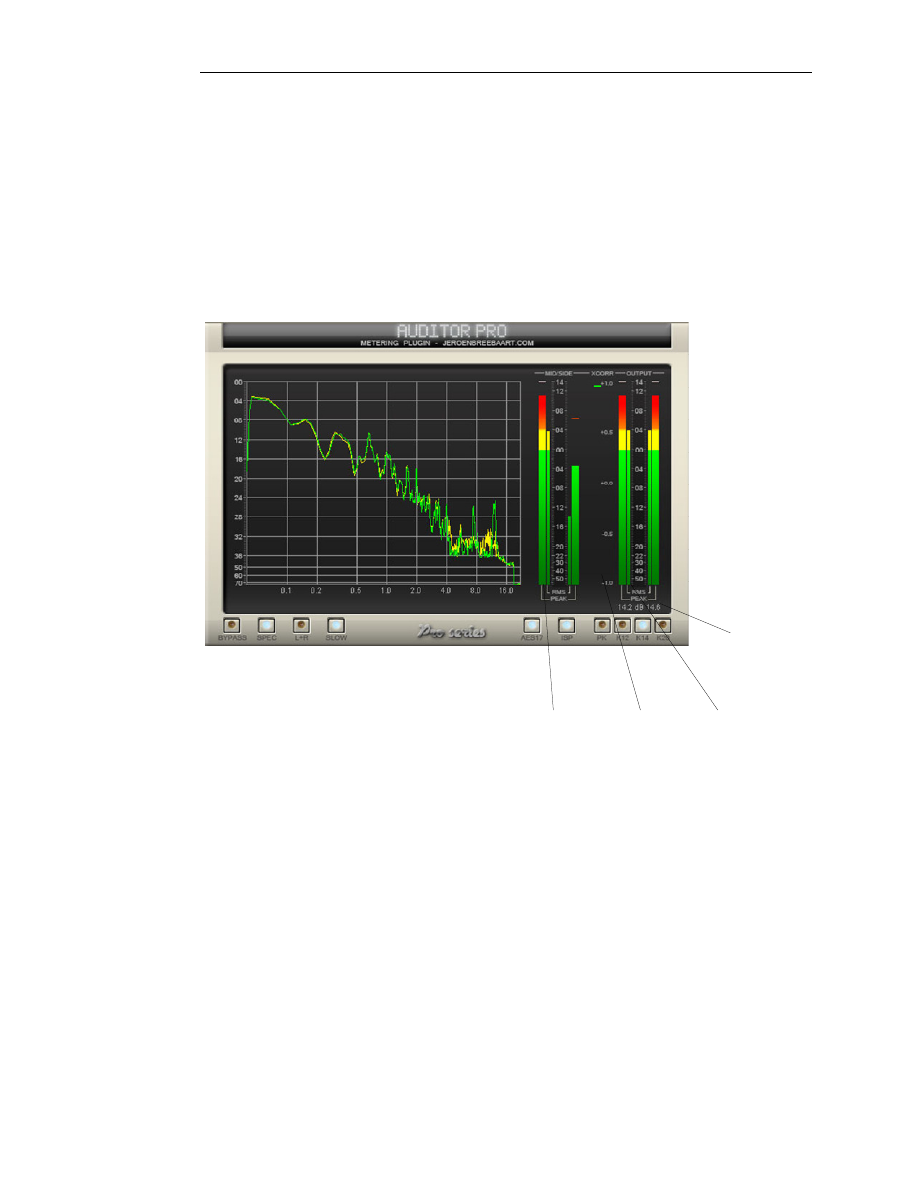
The Graphical User Interface (GUI) of Auditor Pro is shown in Figure 1. The GUI is split in
several parts:
•
A power spectrum meter
•
Mid/side VU meters
•
Left/right VU meters and correlation meter.
Output Peak /
RMS meters
Correlation
meter
Mid/side Peak /
RMS meters
Peak amplitude
indicator
Figure 1 - Graphical User Interface of Auditor Pro.
5.2
Power spectrum meter
The power spectrum meter displays the power spectra of the input signals. There are three
controls that modify its behavior:
SPEC: This switch is used to enable or disable the power spectrum display.
L+R: This switch enables the single spectrum mode: if enabled, only a single power
spectrum will be shown (using acoustical summation of the power spectra of both
channels).
SLOW: By default the spectrum is computed using a time constant of 300 ms. This switch
will enable a longer accumulation window of 5 seconds to estimate the power spectrum.
AES17: If this switch is enabled, signal power is computed according to the AES17
standard specification. This means that a sine wave with maximum amplitude of x dB will
have a reported power of x dB. If disabled, a ‘true’ RMS will be measured and there will be
a 3.01 dB difference between reported peak and RMS levels.
PK/K12/K14/K20: These switches allow definition of the level corresponding to digital full
scale (0, 12, 14 or 20 dB).
BYPASS: Freeze the current spectrum values.

Auditor Pro VST plug in – User manual
© 2008 www.jeroenbreebaart.com
The numerical data can be examined by moving the mouse over the spectrum while
pressing the left mouse button. The current frequency and the spectrum levels will be
indicated as text in the display. To remove the numerical data, right-click the mouse on the
display.
5.3
Mid/side VU meters
The Mid/side VU meters provide RMS and peak values of the mid (m) and side (s) signals
according to:
2
)
(
)
(
)
(
t
r
t
l
t
m
+
=
,
2
)
(
)
(
)
(
t
r
t
l
t
s
−
=
,
with l and r the left and right signals, respectively. The following controls influence the
values reported by the Mid/Side VU meters:
AES17: If this switch is enabled, signal power is computed according to the AES17
standard specification. This means that a sine wave with maximum amplitude of x dB will
have a reported power of x dB. If disabled, a ‘true’ RMS will be measured and there will be
a 3.01 dB difference between reported peak and RMS levels.
PK/K12/K14/K20: These switches allow definition of the level corresponding to digital full
scale (0, 12, 14 or 20 dB).
5.4
Left/Right VU meters and correlation meter
This section displays the amplitude, RMS and peak amplitude during the last 10 seconds.
The exact dB value of the latter is given by the peak amplitude indicator just below the VU
meters. By clicking on the peak amplitude indicator, all peak amplitude values are being
reset.
The following controls modify the behavior of the left/right VU meters:
AES17: If this switch is enabled, signal power is computed according to the AES17
standard specification. This means that a sine wave with maximum amplitude of x dB will
have a reported power of x dB. If disabled, a ‘true’ RMS will be measured and there will be
a 3.01 dB difference between reported peak and RMS levels.
PK/K12/K14/K20: These switches allow definition of the level corresponding to digital full
scale (0, 12, 14 or 20 dB).
ISP: This function enables the Inter-Sample Peak (ISP) function that takes the output
waveform in-between the sampled values into account.
The correlation meter displays the unweighted, time-averaged normalized cross-correlation
between the left and right channels.

Auditor Pro VST plug in – User manual
© 2008 www.jeroenbreebaart.com
6.
Disclaimers
VST is a trademark of Steinberg Media Technologies GmbH.
7.
Change log
Version 1.0.5
-
Added numerical spectrum data readout by moving mouse over the
spectrum display while keeping the left-mouse button pressed.
-
Fixed a bug that caused erroneous data processing on some hosts using
64-bits audio data.
Version 1.0.4
-
New feature: possibility to reset peak hold values by clicking on peak
amplitude value indicator.
-
Fixed wrong range issue with parameters from scale selector.
Wyszukiwarka
Podobne podstrony:
manual isone pro surround v1 0 1
73 Varia B231 POL manual v1
4CH 8CH ENGLISH MANUAL(v1
16 CH ENGLISH MANUAL(v1 0)
73 Varia B231 POL manual v1
Tauris Club Manual v1 4US
Dongle User Manual V1 3
MoTomagx user manual v1 1
HD Tune Pro Manual
MillipaK 4QPM Manual V1 01 (633T43801)
ProtoPlasmTSM Pro Manual
mb ir key pro manual
mikropascal avr pro manual v100(1)
Xlstat Pro Manual
MJoy16 C1 Users Manual v1
CCT DATE manual v1 0d
Auditor Pro
P2P Operation Manual V1 0 0 201406
więcej podobnych podstron