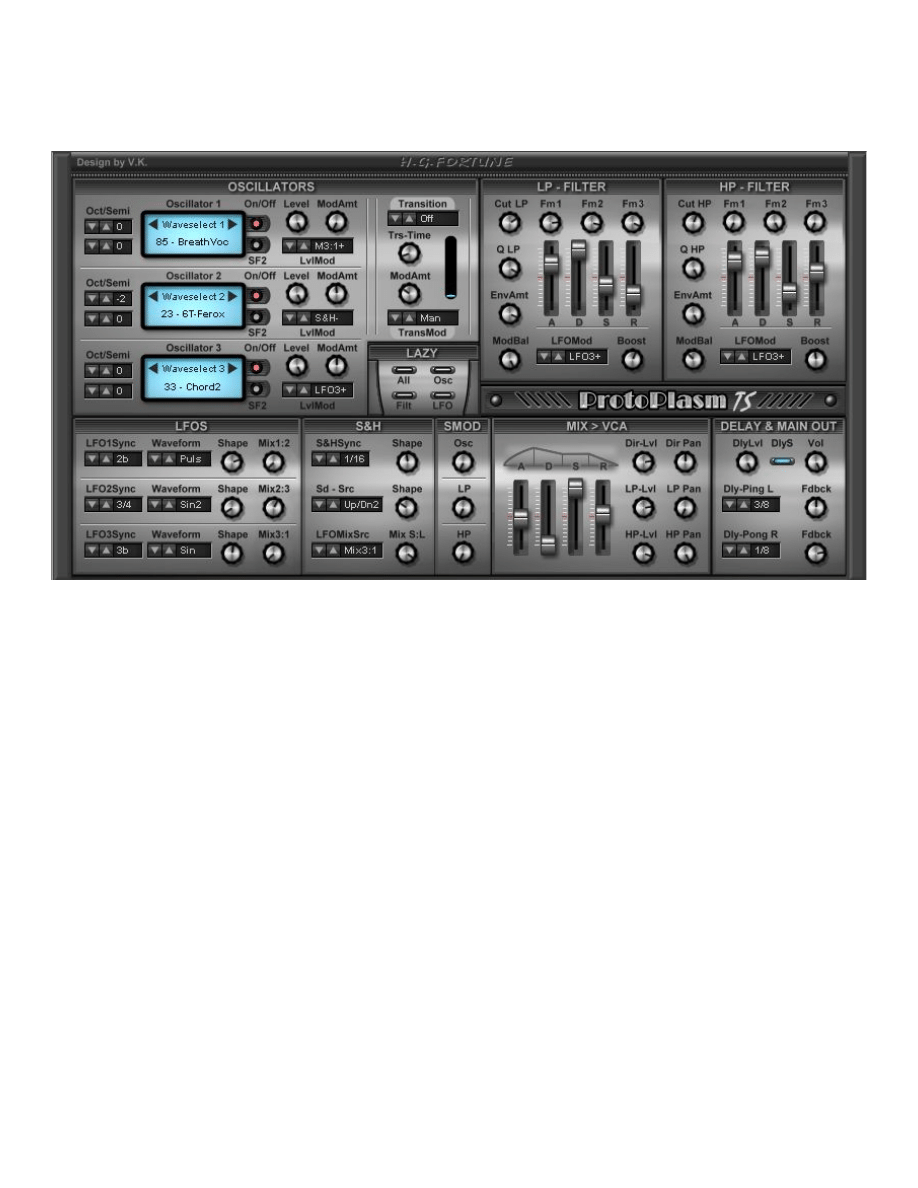
ProtoPlasm TSM Pro Synthesizer
The Next Generation Pad & Texture Synthesizer by H.G. Fortune
One of the special features of this synthesizer is a very easy to handle modulation-system
with 8 LFO/S&H-outputs plus Transition system and Super-Modulation. There are even
patternlike LFO-waveforms as modsources so You can do quite amazing and complex
modulations with only very few settings. Basically this synthesizer is best suited for highly
vivid pads and textures but you can also do standard synth sounds like bass, leads etc. More
than 1100 patches (still patchcompatible to prior versions) included: see Appendix.
The basic features are:
three digital PCM-wave oscillators powered by 150 (96 in free version) different waveforms of enhanced quality
each oscillator's level can be modulated by different sources
new: Super Modulation for osc. and both filters
new: Filter-FM for both filters with adjustable sources
new: Shape function for S&H seed source
adopted Transition System with three modes
one LP filter (24db Lowpass) with adjustable Boost and ADSR EG
one HP filter (12db Hipass) with adjustable Boost and ADSR EG
two shapeable LFO with patternlike waveforms (bpm-synced)
one shapeable standard LFO (bpm-synced)
one shapeable Sample & Hold with pattern (bpm-synced)
each LFO and S&H provide an additional Mix-out for mixed LFO-shapes
the LFO-modulation stepper switches selectable sources for modulation in sequence or at random
'magic eyes' as visual control for LFO & S&H in motion
one ADSR EG for VCA
adjustable level for direct, LP and HP output with separate pan each
stereo-delay for PingPong effects (bpm-synced)
User-Waves for oscillators now via Soundfontfiles (SF2) and wav-files loadable (see Apendix for details and
howto)
The features in detail
The sound-sources
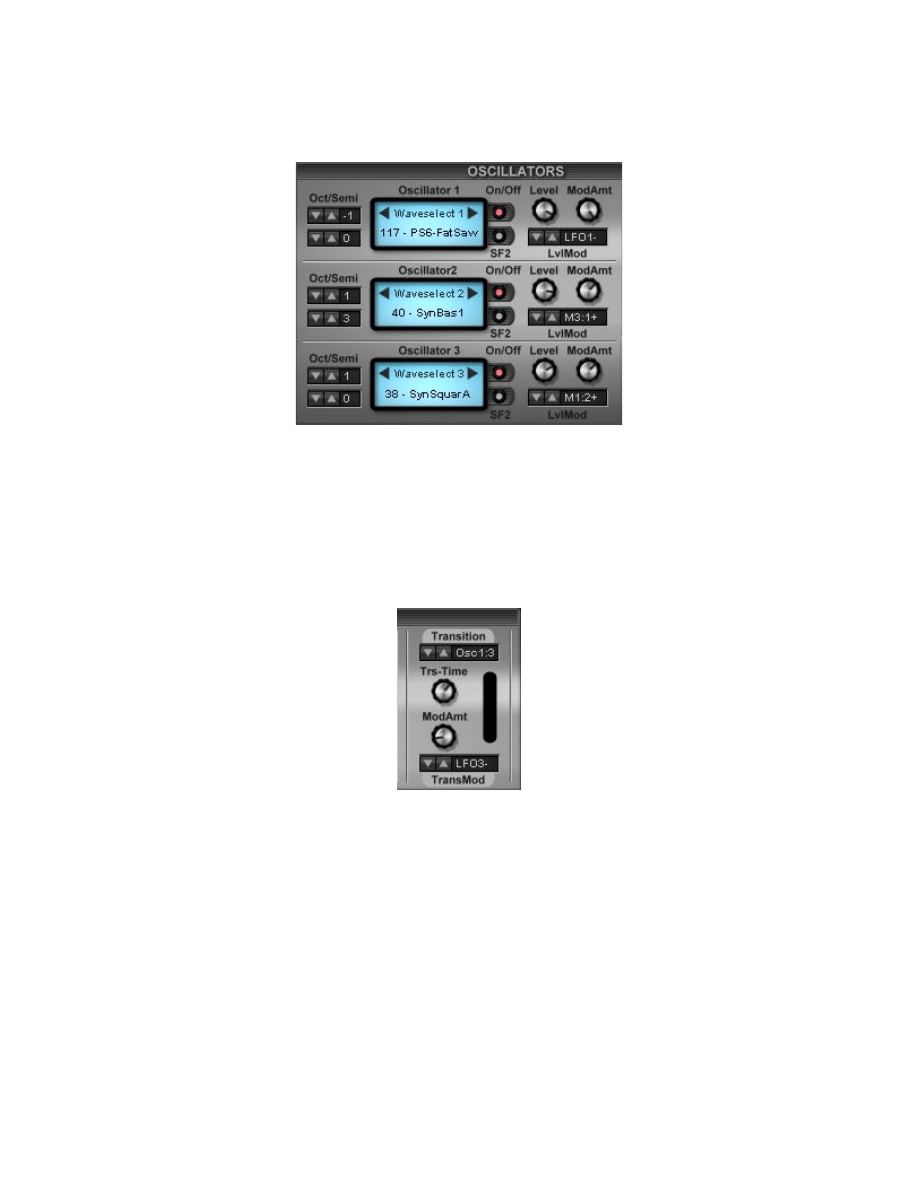
There are three oscillators with octave range adjustable -2 to +2 [Oct]aves & [semi]tones.
There is also an [On/Off] button for each oscillator to mute. The SF2 button is used to load
USER-SF2 (preloaded with 30 waves within the registered version only!) and to switch
between internal and ext. soundsource. The [Level] knobs determine the basic output level
of each oscillator. By [LvlMod] you can select a source to modulate the output level of each
oscillator followed by a knob to adjust amount of modulation [ModAmt].
Transition System
ProtoPlasm TS features a variant of the Transition sytem of the STS-21. As there are only
three osc. a few changes had to be done thus three transition modes have been installed:
Osc. 1:2 - Osc 1 transits to Osc 2 while Osc 3 is sounding anyway (unless switched off)
Osc. 2:3 - Osc 2 transits to Osc 3 while Osc 1 is sounding anyway (unless switched off)
Osc1:2/3 - Osc 1 transits to Osc 2 AND 3!
Input for Transition is the level modulated signal. Transition can be modulated by a selectable
source. Note this modulation is affecting when transition is at endpoint: just watch the blue
bar moving showing how it works.
All in all it turns out that the ProtoPlasm is now the most versatile synth now in my collection
and even less CPU-hungry than the STS-21.
The Filter section
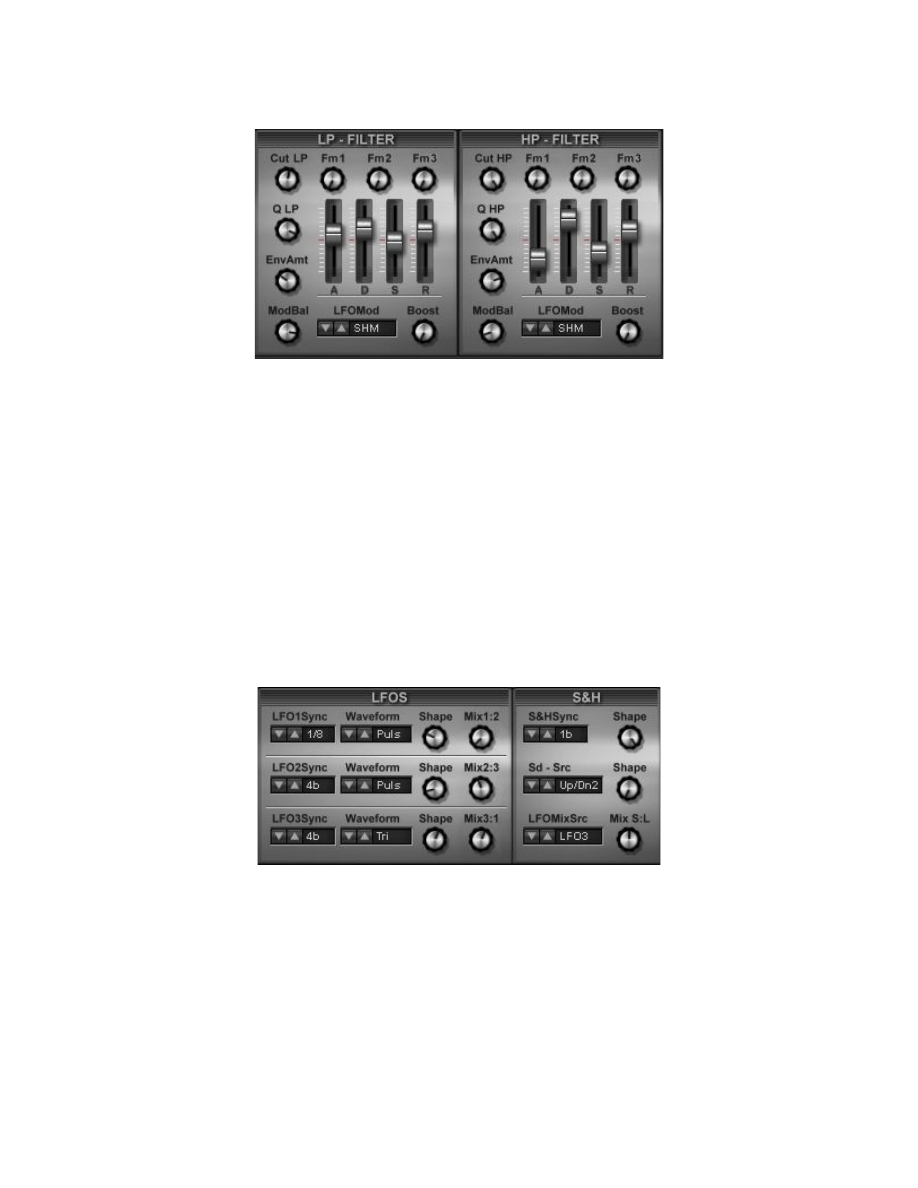
There are two independant filters one 24dB lowpass filter with resonance [Q] and a 12dB
hipass filter with resonance. Each filter can be modulated by an ADSR-EG and/or a
selectable modsource from the LFO-section. The [ModBal] determines the amount of
modulation between ADSR EG and LFO-source. The [Boost] knob provides an adjustable
enhancement of the current filter frequency. Three further knobs (FM 1, FM 2 & FM 3) which
adjust the level of each respective oscillator for Filter FM (frequency modulation). In order to
use Filter FM Q must be up to a certain amount. Note: Due to the variety of oscillator
waveforms the results will differ.
The LFO section
The LFO section offers three shapeable LFO's and one shapeable Sample and Hold, all
bpm-synced (by divisors 1/16note to 8 bars) plus outputs for mixed waveshapes. In addition
osc. 1 and 2 also provide patternlike (Mod1-3) waveforms for far more flexible modulations.
All in all this provides a very comfortable way in getting really complex and vivid modulations
and due to the concept this is easier to be handled than e.g. an 8stage envelope.
The Sample & Hold output can mixed with a selectable output of one LFO too. The upper
Shape knob at S&H smoothes the output while the lower Shape knob changes the structure
of S&H events even to more or less.
Super Modulation
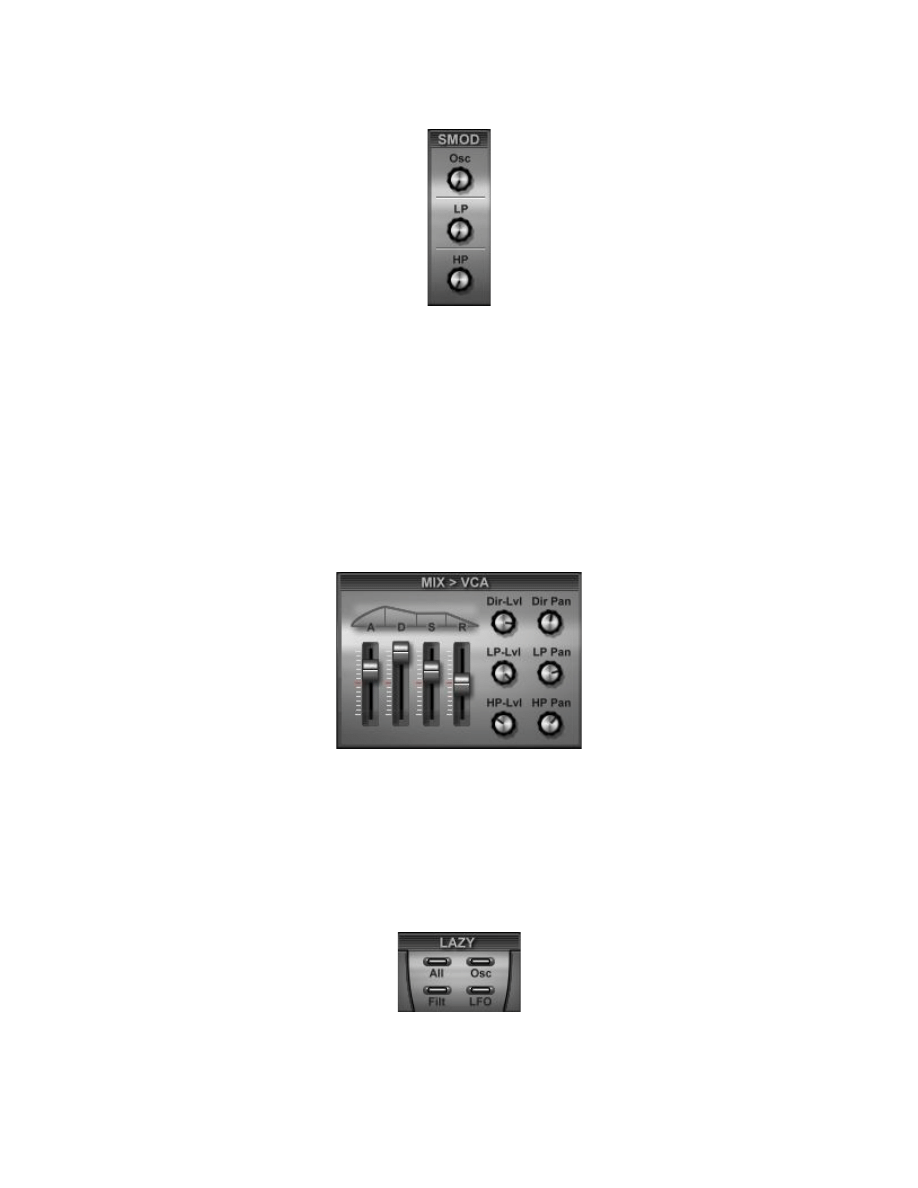
With only three knobs there are very efficient means to get complex modulations on the
oscillator's level mod plus transition mod as well as each filtersection comprising filter FM
mod. One knob controls all mod targets at each section. The mod signals used are variations
of summed signals of all LFO and S&H. Thus you can also control this mod by adjusting the
setting at LFOs and S&H. Esp. Mix S:L is suited to subtract too much S&H in Super
Modulation in adjusting the knob more to the (right) selected LFO source.
The Mix and VCA section
The output section provides an [ A ] [ D ] [ S ] [ R ] envelope generator for shaping the
overall signal with Attack, Decay, Sustain and Release. Also You can mix the amount of level
from outputs of direct(unfiltered signal), Lowpass and HiPass filter. In addition to this there is
an independant pan-setting for each output.
There are four [Lazy?!] buttons to randomize certain sets of parameters for All, Osccillator,
Filter and LFO sections. This is a really easy way to generate new ideas for new patches ;-)
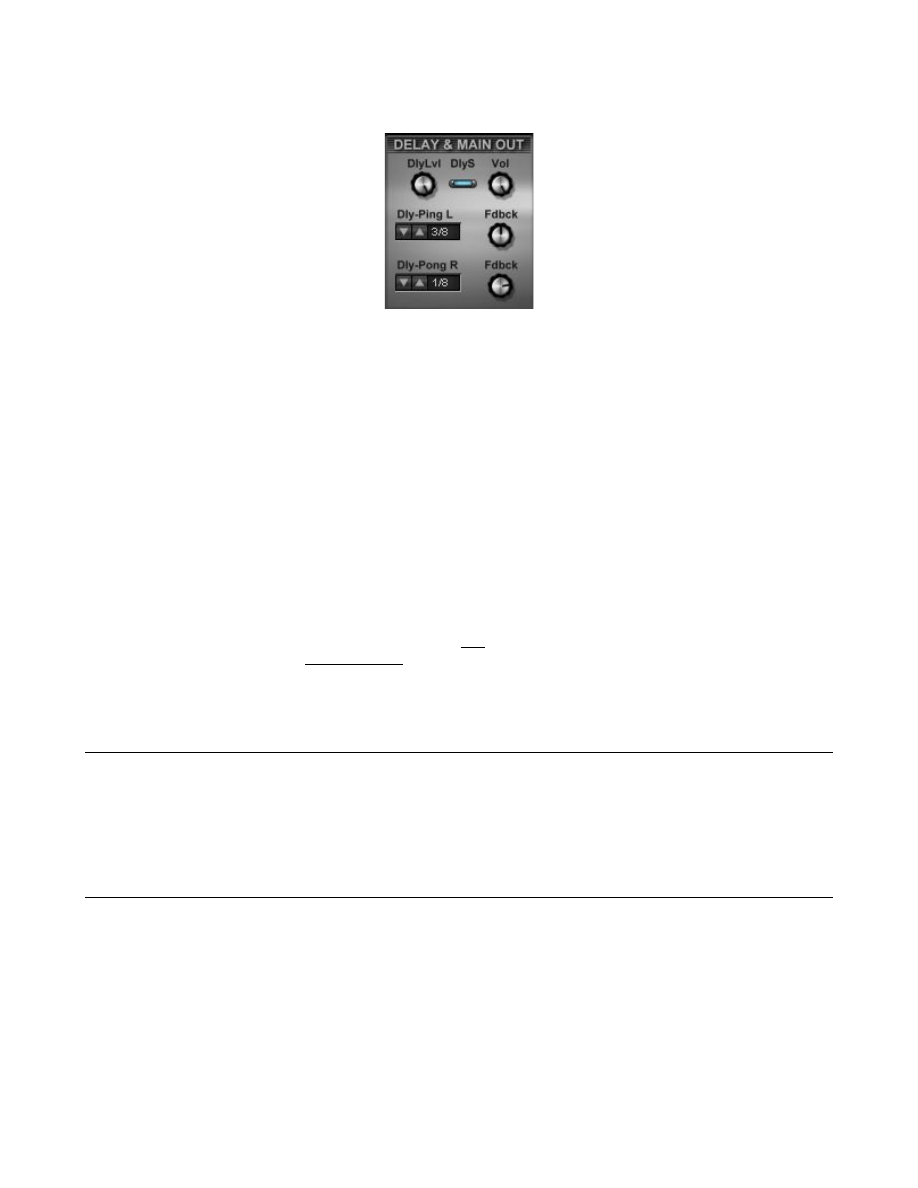
Delay and Main Out section
This stereo delay is synced to host clock at selectable division-settings by [Dly-Ping-L] and
[DlyPong-R]. Use the [Dly-Lvl] knob to adjust the amount of delayed signal to the normal
signal while the two [Fdbck] knobs determine the amount of repetitions of each delay. This is
useful to get more delay repetitions at shorter delay times while the other delay has a longer
delay time setting. So you can compensate the repetitions on the shorter delay vanishing too
early. [DlyS] switches Delay On/Off. If you want to have a continuous delay when switching
from one patch to the next it is advisable to have the divisional settings at the same divisor
then no clicks should occur. [Vol] controls the overall output of the synthesizer.
Hint according volume: 1st raise levels at Osc. and Vca as much as needed for each. Do not forget to raise VCA
Sustain if sound is not of a decaying type. Finally adjust Main Vol for appropriate Out-level. Caution: please note
this level might get higher the 0dB under certain conditions - so be careful with this one!
General hints: 1. When moving a knob or slider you can also press <Crtl> on the PC-keyboard for fine
adjustments. 2. Long release settings at the ADSR EGs use more CPU.
Known bugs: loading a single patch program (*.fxp) to first program number (and only there) may change the
waveform of the oscillators. This does not apply when loading a patchbank file (*.fxb)! This has to be fixed in the
development-environment.
Typical CPU-usage on a PIV at 2.53GHz is 17% at four voices with RAM at 333Mhz
In order to free RAM-space you can unload the preloaded User SF2
The eight voice version of ProtoPlasm Pro TSM is available via Paypal or ShareIt for 35 Euro
(introductionary price) - please visit www.hgf-synthesizer.de for further details.
There is a also Free Version of ProtoPlasm - limited to 2 voices instead of 8, one User-SF2
at osc. 1 and less internal waveforms (only 96 instead of 150).
Other VSTI by H. G. Fortune are:
LaserBlade Synthesizer
STS-21 Space Transition Synthesizer
X-Wheel of Fortune II Pro
X-Wheel of Fortune II (Freeware)
X-Wheel of Fortune Pro
Homepage: www.hgf-synthesizer.de
email: fortune@flomo-art.de

Credits, thanks and further info
The ProtoPlasm Synthesizer has been created with Synthedit by Jeff McClintock with only
two further modules by David Haupt, one by Dan Worrall and modules by Kelly D. Lynch.
The stunning GUI has been done by Vera Kinter (Brno, Czech Republic) - very big thanks!
Preset patches were kindly done by:
Vera Kinter (VK); Annabelle (ANN); Dimitri Schkoda (DS); Timothy Conrardy (TC); Derek Kay
(DK); Stephan Müsch/rsmus7 (SM); Rene Ebenhan (R); Steve Blenkinsopp (Waveform);
Miguel Matas (MTZ) and vurt (v)
A big thanks also goes to all who have helped, betatested and taken part elsewise within this
project also those at KvR esp.: Jack Dark, Ugo, vurt and some others. Not to forget
www.plugindex.de for providing a direct download for Prototypx which has become
ProtoPlasm now.
H. G. Fortune
near Bonn (Germany) August, 29th 2005
updated to TS: January, 8th 2006
updated to TSM: February, 25th 2006
Appendices
List of internal waves
now 120 internal waves PLUS 30 preloaded bonus waves in User SF2.
Free version with 96 internal waves (from 1 to 96)
001.Interstellar
002.Overdrive
003.Fat-CS-080
004.SyncedOsc
005.MajesticBrass
006.Orkestra
007.FogString
008.MysticVox
009.FaintVox
010.ChoirString
011.FogChoir
012.Bassical
013.HauntedPia
014.DropDown
015.ShiverBell
016.MetalBell
017.Bella_Donna
018.SpaceBells
019.InsideTube
020.AlienSpectr
021.Nocturnal
022.6T-FilterFM
023.6T-Ferox
024.6T-Basics
025.KS-EthnoBlo
026.KS-HumOhh
027.KS-Nebulous
028.KS-FatBras
029.KS-Spectral
030.KS-Syncer
031.KS-Pudding
032.ModChord
033.Chord2
034.ArcaneRealms
035.PPG-OrgVox
036.PPGVox
037.SawPad
038.SynSquarA
039.BellMagic
040.SynBas1
041.SynBas2
042.SynBas3
043.BullSynBas
044.FullPoly
045.FM2Slow
046.LongSync
047.DistSync
048.Fulldrive
049.NoiseChoir
050.VA-Vox
051.JustAFlute
052.S-BigGongL
053.DXEP-Base
054.Octavian
055.AtkSyn
056.MSawBras
057.SynAthmoL
058.AsianMetal
059.Mythosfer
060.BenVoxMet
061.SwellStrs
062.ArcaNostra
063.MinorAtm2
064.XtraOrchst
065.LowVox
066.HuanFlute
067.Trumping
068.DrawbarOrg
069.OmziFSteps
070.OmziFMyth
071.OutLand-2
072.MovinBell
073.InTheWoods
074.LightningL
075.Mars-Siren
076.FlowLoop
077.TalkLoop
078.CharmLoop
079.ArcaneBells
080.MoltenBell
081.TubeBell
082.PitchGong
083.GongyFlute
084.JapFlute1
085.BreathVoc
086.HallVox
087.TubeVox
088.BottleVox
089.FakeVox
090.VoxyNse
091.NoiseChord
092.TubeNse
093.MetalNse
094.JetNse
095.NoiseOne
096.MinAtmo
097.OrcStrings
098.Symphonic
099.4Score
100.OrganaVox
101.FarFeesa
102.Tundra
103.FarHorizon
104.FroAndTo
105.SpaceRide
106.BellWave
107.AuraWave
108.QQH-Waving
109.FuzzDigi_Z
110.Digital_X
111.AnFatSync
112.MetalSync
113.AnLead
114.Fat-5th
115.3FatOsc
116.MovinJaws
117.PS6-FatSaw
118.ShiverBras
119.RealBrass
120.Rain&Crackle
Bonus waves in User SF2
Bonus waves in User SF2
Bonus waves in User SF2
001._Al_Saria
002._di_Motou
003._SwirlyHole
004._Spaceballs
005._Bubbles
006._Sparkling
007._Mystery
008._Mystery-nl
009._Cymbalic
010._Cymbalic-nl
011._RhytmoLp
012._KotoicLp
013.#MetalHit
014.#MetalHit-nl
015.#ALoop
016.#ALooph
017.#ALoop-nl
018.#BLoop
019.#BLoop-nl
020.#Flowater
021.#Watery
022.#Seaside
023.#Thunder-nl
024.#Falcon
025.#Jungle
026.#Tropica
027.#BigRoar
028.#Baby_Kong
029.#Juno'sBird
030.#Werewolf
nl = non looped wave
More than 1200 patches with the registered Pro version - (128 patches in free):
(supplied banks have been adopted to the new engine)
Recent Patchbanks are:
TSM-Internal .fxb
TS-Bank1.fxb
TS-Bank2.fxb
TS-Bank3-Ann.fxb
There are also 768 early patches in 6 patchbanks (from 1st release on) in a zip-file with the Pro version:
TSBank00early.fxb to TSBank05early.fxb
List of MIDI-Controllers (CC) used within the ProtoPlasm
>CC Destination
>CC Destination
> 07
Main Volume
>13 Sample & Hold Shape
>14 LFO Mix S:L
>15 LFO Mix Source
>16 LFO 1 Sync
>17 LFO 1 Waveform
>18 LFO 1 Shape
>19 LFO 1 Mix 1:2
>20 LFO 2 Sync
>21 LFO 2 Waveform
>22 LFO 2 Shape
>23 LFO 2 Mix 2:3
>24 LFO 3 Sync
>25 LFO 3 Waveform
>26 LFO 3 Shape
>27 LFO3 Mix 3:1
>29 Left Delay Feedback
>30 Right Delay Feedback
>31 Delay Level
>74 Dir Pan
>75 LoPass Pan
>76 Hipass Pan
>77 Lopass Filter Cutoff
>78 Lopass Filter Q
>79 Lopass Filter Attack
>80 Lopass Filter Decay
>81 Lopass Filter Sustain
>82 Lopass Filter Release
>83 Lopass Filter Envelope Amount
>84 Lopass Filter ModBal
>85 Lopass Filter LFO Modulation Source
>87 Hipass Filter Cutoff
>88 Hipass Filter Q
>89 Hipass Filter Attack
>90 Hipass Filter Decay
>91 Hipass Filter Sustain
>92 Hipass Filter Release
>93 Hipass Filter Envelope Amount
>94 Hipass Filter ModBal
>95 Hipass Filter LFO Modulation Source
>102 SuperMod Osc *
>103 SuperMod LP *
>104 SuperMod HP *
>105 LP Fm 1 *
>106 LP Fm 2 *
>107 LP Fm 3 *
>108 HP Fm 1 *
>109 HP Fm 2 *
> 73 HP Fm 3 *
>110 Osc 1 Wave Select
>111 Osc 2 Wave Select
>112 Osc 3 Wave Select
>113 Osc 1 Level Modulation
>114 Osc 2 Level Modulation
>115 Osc 3 Level Modulation
>116 Osc 1 Mod Amount
>117 Osc 2 Mod Amount
>118 Osc 3 Mod Amount
added in TS:
>70 Transit Time
>71 Transition Mod Amount
>72 Transition Modulation Source
>12 Delay switch on/off (mute Delay) *
* changed in ProtoPlasm TSM
Appendix on Soundfonts (SF2)
General note: place all SF2 you want to use into the subdir which has been created by the ProtoPlasm
(e.g. C:\somewhere\VSTplugins\HGF\ProtoPlasmTS???\ ) you can also have subdirs there. The VSTi will
automatically point to this subdir so it is more convenient to load files from there.
If You load a Soundfont file e.g. into slot for osc. 1 this is valid for the whole patchbank i.e. this soundfont will be
used in all patches osc.1 settings switched to SF2 - while set to internal the internal waves remain valid. For each
osc. you can use a different soundfont being valid for all patches of course. Saving the bankfile will keep the
resp. settings. Thus using different bankfiles you can manage more than three soundfonts in usage at all.
Note on SF2-files:
Although you can use basically any SF2 around there are two limitations: the internal SF-Player does support
only one layer from an SF2-preset or instrument (the bottom one as seen in Vienna) and the synthfunctions of
the SB-hardware are not supported as a specific SB soundcard is not needed.
In order to make SF2-files from Your wavefiles You can use the freeware tool Viena by Kenneth Rundt -
http://www.saunalahti.fi/kru99/index.htm
Viena does not require a Creative Soundblaster Live or Audigy Card to assemble SF2-files and please note
there is only one 'n' in Viena (unlike Vienna from Creative Labs)
As a freeware Wave-Editor with capability to set looppoints you can use Yamaha's TWE Ver. 2.3.1 which is
running on Windows XP systems.
Loading wav-files
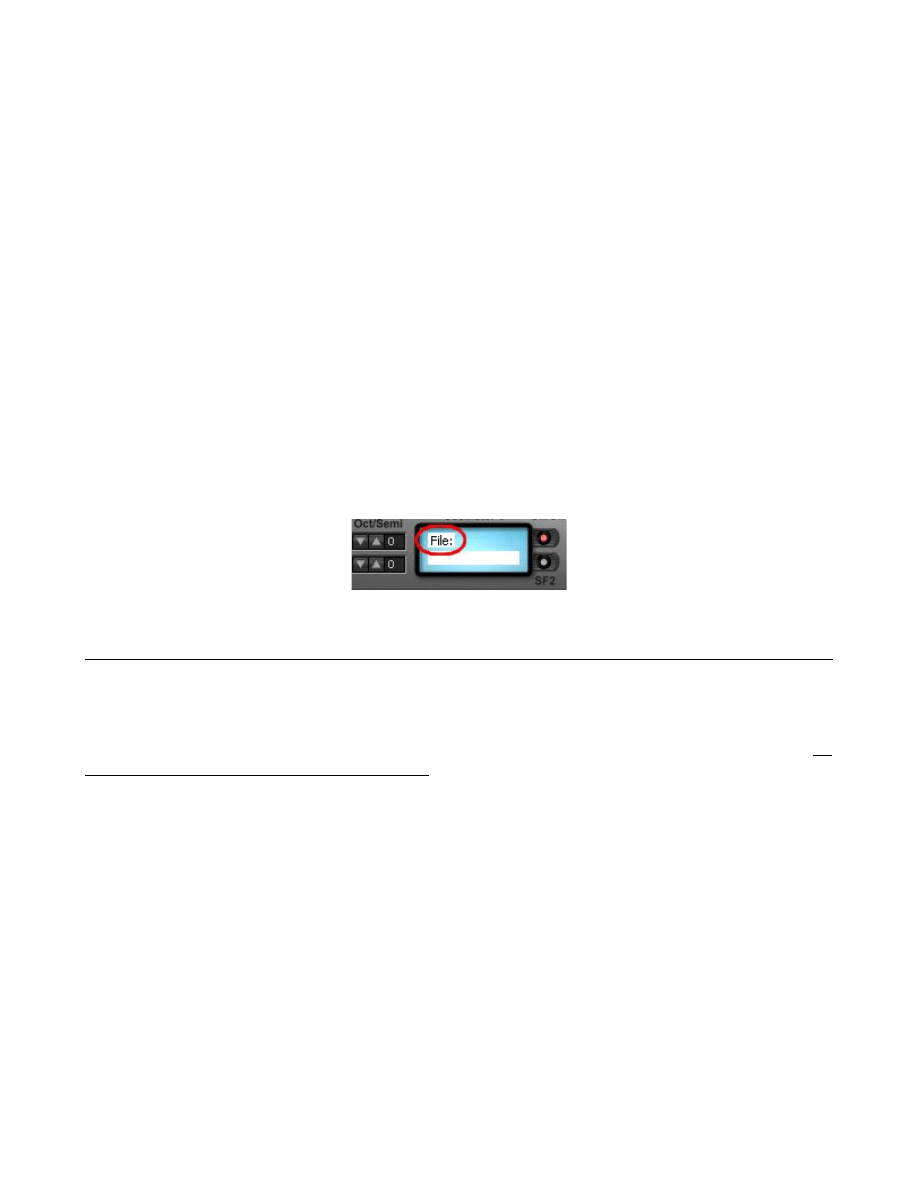
Using the SF2 button the filebox will appear. Click on [File:] to get the file / directory selectorbox to choose a
wave file. Up to 24Bit and loops are supported. Note: This is not made to play drumloops etc. at a synchronized
tempo or so - this is a synth not a drumthing!
Terms of License Agreement:
You are NOT ALLOWED to sell the program or charge for the access to it.
You are allowed to distribute the free version of this program (online or on magazine CD's) as
long as You do not charge for this program! Anyway You are requested to send an info about
such a distribution.
You may use the program in personal and/or commercial music (credits are welcome).
You are allowed to run the registered version of the program on different computers as long
as You are the only person having access to and using the program.
You are not allowed to modify, decompile or reverse-engineer the program.
This program is not copy-protected but protected by national & international (copyright-) laws.
Changes & enhancements may be made without prior notice and a grant that further editions
will read patches from former version cannot be given.
The software is supplied as is. Use this program on Your own risk and Your own
responsibility.
Wyszukiwarka
Podobne podstrony:
HD Tune Pro Manual
Auditor Pro Manual v1 0 5
mb ir key pro manual
mikropascal avr pro manual v100(1)
Xlstat Pro Manual
Ermo482X PRO Manual
Epson Stylus Pro 9000 Auto Take Up Reel Unit Manual
Epson Stylus Pro XL Service Manual
Operation Manual for Ladder Pro Nieznany
manual isone pro surround v1 0 1
Long Tail Pro User Manual
Radio Shack Pro 2045 VHF Scanner Recieverr Manual
więcej podobnych podstron