
1
A GUIDE TO NAVTEX DXING:
By Alan Gale, G4TMV.
Version 1.6
August 2009
With the growing interest in NAVTEX monitoring by many NDB List members, creating a guide to this mode,
and giving a bit of an explanation of how it works seemed like a good idea. This guide is constantly under
development, and I will be more than happy to try and include any additional material, should any readers
request it. A Database of NAVTEX stations under the title of “NAVTEX STATIONS OF THE WORLD”, and
also one covering scheduled NAVTEX broadcasts, which is called, believe it or not, “The NAVTEX
Scheduled Broadcast Database” are available from the Beaconworld Website in both the NAVTEX and
“Download” sections at:
http://www.beaconworld.org.uk
INTRODUCTION:
With the continued decline in the number of coastal radio stations still maintaining a radio watch on many
MF frequencies, a newer and more automated system has been developed to provide shipping with
Navigational, Meteorological and Urgent information by means of an automatic print out from a dedicated
receiver on board the vessel. NAVTEX is a major component of the IMO/IHO’s World-Wide Navigational
Warning System (WWNWS), and since the 1
st
of August 1993 has been a mandatory piece of equipment
carried in certain vessels under the provisions of the International Convention for the Safety of Life at Sea
(SOLAS). The transmissions are made using SITOR Mode B (broadcast mode), with a baud rate of 100
baud. This mode is also frequently referred to as “Narrow Band Direct Printing Telegraphy”.
FREQUENCIES USED:
As far as most Dxers are concerned, there are four main frequencies in use for the NAVTEX service, and
three of these fall within the areas normally favoured by NDB chasers:
518 kHz:
This is the main “International” frequency, and generally most transmissions heard here
will be in the English language (though for the time being some stations will also broadcast
in ‘national’ languages at certain times of the day).
490 kHz:
This is the newer “national” channel, and a number of stations now transmit forecasts and
warnings here in their own languages. Countries were encouraged to try and move any non-
English services here by January 2005, though stations have still been appearing
throughout 2006 and 2007and it seems likely that many more will move here in the future,
so do keep a look out on this channel for anything unusual appearing.
424 kHz:
This frequency is used by a number of Japanese stations for their Japanese language
services.
4209.5 kHz:
This is a ‘national’ frequency, though there aren’t too many stations operating there at
the moment. The number should rise in the future, as some nations migrate a few
of their services here, and the US Coast Guard are said to be planning to operate a
new service here at some future date.
EQUIPMENT NEEDED TO DECODE NAVTEX SIGNALS:
You could buy yourself a dedicated ‘hardware’ NAVTEX receiver, but unless you are either very well off, or
have your own vessel this will not be a very attractive option for you due to the cost. Thankfully, there are
many simpler solutions for Dxers, and your existing beacon receiving set up should work very well for
NAVTEX Dxing provided that you have access to a personal computer and the appropriate software. In this
section we will take a look at some of the software that is currently available (some free and some as
shareware), and how it is used. We’ll also look at some of the other items such as interfaces and connecting
cables later which you might need a little later on in this file.

2
NAVTEX DECODING SOFTWARE:
A number of useful freeware and shareware programs can be downloaded from the Internet, and you will
find links to all of the ones mentioned here in the NAVTEX section at the Beaconworld Website:
DSCDECODER:
This program comes from the COAA stable, and will also decode DSC
signals and also DGPS. It is excellent for decoding DGPS signals –
probably the best of the DGPS decoders available at the moment, and it
will also decode NAVTEX signals as well, though the interface isn’t quite
as user friendly in this mode as some of the other decoders that are
currently available. This is a shareware program, but can be downloaded
on 21 day free trial basis, and is fully working during this period.
MSCAN METEO PRO:
This is not the cheapest of software to purchase, but it is a very effective
and usually gives a very clean decode. It offers a useful feature in that it will
‘automatically’ lock onto any signals that may be slightly off channel – which
can be very useful if you are leaving your radio and PC to monitor the
frequency when you are not in the room. You can also configure this
program to just monitor a particular Navarea or time slot as well, which can
be very useful for avoiding local pests. Probably aimed more at the
professional user than the radio enthusiast, it will also decode WeatherFax
signals as well.
NAVTEX DECODER:
This new program was written and developed by Mark Longstaff-Tyrrell, and
is currently available as freeware from Mark’s website (see page 10 for
Details). This is such a simple program to use that it is ideal for the
newcomer to this mode, and after installation all you really need to do is
feed some audio into it and let it do its thing. You can find out a lot more
about this from Mark’s, site and also learn more about the Navtex mode,
and how it works.
SEATTY:
This is a very useful program for unattended monitoring, since it will ‘time
stamp’ each signal after it has been received. This is a great feature if you
wish to leave your system monitoring all night, or when you are out of the
shack, or busy with other things. Any unusual receptions will
show the times when they appeared, and this can be a great help when
trying to identify where a signal might have come from. Another benefit is
that it only costs about half as much as MSCAN, which again makes it very
attractive to the DXer. One really useful feature is the ability to check the
‘Raw Logs’ from your decodes, since these will often show up incomplete
messages from DX stations, many of which don’t always show up in the
main window, and the decoder can be set to time stamp them, which is
doubly useful when trying to make an identification of them at a later date.
SKYSWEEPER:
There are several versions of this excellent decoding program, covering
(note# this product will be
not only NAVTEX, but a whole range of other modes too, these range from
ceasing production in
‘Lite’ and ‘Standard’ to the very expensive ‘Pro’ versions. This will decode
2009!)
NAVTEX signals with no problem, and if you are also interested in DGPS
decoding will allow you to do both with the one package. Personally, I find
It good, but not as good as MSCAN and SeaTTY for the NAVTEX mode.
This is a good program to buy if you are a datamodes enthusiast and want
to decode a very large range of signal types, but if you are only interested
in NAVTEX then one of the dedicated programs will be a cheaper
and more effective option.
RADIORAFT:
This is a more basic ‘DOS’ program, which unlike the other programs
listed here will require the use of a hardware ‘Hamcomm’ type interface to
connect it to your PC’s serial port. It works very well, and will also decode
DGPS signals, but you may find that it doesn’t work with newer PCs,
or operating systems later than Windows ME. Very useful though if
you don’t want to tie up your main computer, or you have an older
Pentium or 486 lying around the shack, it will still do the job very well.

3
TRUETTY:
Yet another program by DXSoft, the makers of SeaTTY, works well, but
unless you are also interested in decoding packet radio signals or FSK,
but since it lacks the time stamp facility you will probably find the
similarly priced SeaTTY is far more effective, and better value.
MixW:
This is a very comprehensive piece of software that is not only updated
regularly, but is very popular with many Radio Amateurs. If you already
have a copy of this program you should be able to decode NAVTEX
signals using the AMTOR-FEC mode Note# one unique feature about this
program is its use of coloured text and adding ‘national’ flags to text, which
will show the countries being received. This is a shareware program, but
again you can download a trial version and get a feel for it before laying out
any money on it.
MULTIPSK:
This is another shareware program, but for users just wanting to receive
Signals, it’s certainly well worth trying, since the ‘AMTOR’ mode in this
program will continue to work, even without registering it. Some users find
the on screen interface a little ‘busy’ and hard on the eyes, but it’s a very
good performer, and well worth downloading anyway for the sheer number
of modes that it will allow you to decode.
HOKA CODE300:
This is another multi-mode decoder program, but unlike most of the others
is extremely expensive, and probably not the one to buy unless you are
very wealthy. It does decode a great many other modes though, and its
‘SITOR’ function will handle the NAVTEX signals no problem. This is one
strictly for the datamode fanatics I think, and if you are interested in this
type of thing and would like to find out a little more about if I would suggest
a visit to the HOKA website, where more information about their software
and hardware decoders can be found.
BLACK CAT SYSTEMS:
Decoders designed purely for Mackintosh users are very rare, but this
one produced by Black Cat Systems, and going under the name of
“Multimode” should show that Mac users haven’t been completely
forgotten. This program will not only decode NAVTEX signals, but DGPS
as well, and other modes covered by this also include: Morse Code (CW),
RTTY, FAX, SSTV, SITOR-B, NAVTEX, PACKET, ACARS, PSK31 and
ALE. Not being a Mac owner I have not had a chance to try this out
Personally as yet, but from comments I’ve heard it does work very well
with both NAVTEX and DGPS, so is worth considering if you run a Mac.
These are just a few of the programs which will decode NAVTEX, and I’m sure that there are many others
out there which I haven’t yet heard about, or have yet had the chance to play with. I’m always very keen to
hear about any new ones. There are also a number of hardware decoders available too, many of which are
produced for nautical users, and these also seem to perform well from the reports that I’ve seen of them, but
since I have no personal experience of using them I can’t really comment on their effectiveness or sensitivity.
Many of the programs listed above can be downloaded from the Internet as ‘shareware’, or as time limited
but fully working ‘trial’ versions, so it’s always worth seeing which one you personally favour before lashing
out any of your hard earned money on one of them.
NAVTEXVW:
One program not included in the list above is “NAVTEXVW”, and that is because
this isn’t a decoder as such, but it is a great little ‘helper’ program, and one that I
would very much recommend to any NAVTEX Dxers using any of the decoders
listed above. When you are running your decoder program you can activate
NAVTEXVW, and leave it on your desktop covering a small area of your screen, and
when a station is due to come on air it will display all of its details in the window.
This program was created by Tobias (T2) from Germany, and uses the Beaconworld
NAVTEX Schedules list. The program can only be downloaded from the
Beaconworld website, but you’ll find copies in both the NAVTEX and Download
sections. This is one program that I would strongly recommend installing, no matter
which of the decoders you should choose. This is a lovely piece of Freeware for
NAVTEX Dxers, and very generous of Tobias to share it with us!

4
HARDWARE INTERFACES:
One thing you are definitely going to need if you are using a decoder is some form of interface, and in the
case of many of the programs listed above, this may be as simple as just taking an audio lead from the
recorder or line output socket on your receiver or audio filter (the latter is my preferred choice) to the sound
card’s ‘line input’ on your PC. This may consist of nothing more than a simple lead with a jack plug on each
end, though if interference from your PC is a problem, some sort of isolation transformer may need to be
inserted into the lead. My own personal preference is for a line isolation transformer (I normally use one of
the 600 ohm types found on old modem boards, and saw the pcb around the transformer, this avoids any
damage to the fragile pins, and allows you to solder your leads onto it), placed about midpoint on the cable.
This will remove any DC paths, which might allow unwanted RF to travel along the braid of the feeder if that
is a problem. This isn’t always required, but it’s always well worth experimenting with it to see if everything
works okay without one before you go to the trouble of making one. There isn’t a lot of point in using a PC
for decoding if it then drowns out the wanted signal with its own QRM, so I personally favour filtering all of
my leads before attaching any of my radios to a computer.
If you plan to use RadioRaft or Hamcomm you will need a “Hamcomm” type interface to connect the radio to
the serial port of your PC, and details of how to build one are given in the Hamcomm software, and at the
RadioRaft website. You can also buy them ready made from Pervisell (contact details at the end of this
document!) if you aren’t sure how to make one, but if you are planning to build your own I would strongly
recommend reading the article on Interfacing radios to computers, which is available from the Beaconworld
website’s ‘NAVTEX’ and ‘Download’ sections.
MODES AND BANDWIDTH:
Now that you’ve got your software and you’ve connected your radio to your PC, you now need to set up the
radio so that it will deliver an adequate signal to the decoder program that you’ve chosen. This can vary, and
many of the programs will explain how you should do this in their help files, but below I have included a few
simple tips, many of which were taken from some of the software that I use, and these seem to work quite
well:
1.
Set your mode to USB (Upper Sideband).
2.
Set your bandwidth to around 2 kHz (or whatever your SSB filter’s default is).
3.
Check at the scheduled times to see if a signal is audible.
4.
Set the audio level to an amount that is sufficient to ‘drive’ the decoder, but not so high that it causes
distortion to the wanted signal. You can do this with the ‘Mixer’ in Windows by adjusting the sliders
(often found in the Accessories/Entertainment section as “Volume Control”, or via the small speaker
icon in your ‘System Tray’), or by adding an external potentiometer in the feeder lead (my preferred
choice, as it’s easier to adjust, and doesn’t require lots of extra ‘boxes’ to be stuck all over your
compute screen making it even more cluttered!).
5.
Set your frequency to –1.7 kHz e.g. for a 518 kHz signal the radio should be set to 516.3 kHz.
You might wonder why the radio isn’t just set to 518 exactly, and a narrower bandwidth used, but the reason
is the signals in this mode use a ‘Mark/Space’ and are more like FSK than standard A1A and need a slightly
wider bandwidth, and in the case of programs like MSCAN METEO, they need to be able to scan a slightly
wider bandwidth so that any stations which are slightly off frequency can be locked onto. In Europe a centre
frequency of 1360 Hz is generally favoured, whilst in North America 2210 Hz is the norm, you can see which
you are receiving if you are using a program like SeaTTY, just look for the details down at the bottom left
hand corner of the screen.
Many users do set their receivers to the CW mode and choose a narrower filter, and even set their receivers
to exactly 518.0 kHz, and adjust the software’s controls to this frequency, and this will work quite well, but if
you happen to be using one of the many audio filters, such as those made by Timewave or MFJ, then the
filter’s defaults for the SITOR mode will be offset by 1360 or 2210 Hz, and you’ll find that you need to use
the first ‘offset’ method to get a signal through your filter.
In a later section of this document you will find more technical details about the workings of this mode.

5
NAVTEX MESSAGES:
You’ve now got your NAVTEX decoder installed and working, and you can now hear signals on your radio,
and see your computer screen showing all kinds of strange data, so you’ll want to know what this all means,
and how to interpret it. Below is a ‘rough guide’ to reading NAVTEX transmissions:
Below is a transcript of a message received from the Malin Head Coastguard station in Ireland on 518 kHz:
ZCZC QA09
ROUTINE
132240 UTC NOV 04
EJM
NAV 000268
RNW 109/04
IRELAND NORTHWEST COAST LOUGHROS MOR BAY APPROACHES TO ROSBEG .
ROSBEG LEADING LIGHTS UNLIT
DTG 310535 UTC MARCH 2004
NNNN
On first look some of the above might seem like gibberish, but once you get a basic understanding of the
header you can quickly make sense of it.
ZCZC
Whilst this in itself doesn’t actually mean anything, what it does is denote the end of the 10 second phasing
period, which the transmitter will send to help the receiver lock onto the signal.
QA09
This breaks down to the following:
Q
=
The letter ident/slot allocated to Malin Head Coastguard Radio in NAVAREA I.
A
=
Message type, in this case a Navigational Warning.
09
=
The message number.
The ‘
Q
’ is allocated the Malin Head, but other stations in the NAVAREA shared with this station will be
allocated other letters somewhere between A and Z. I this area, which covers much of Western Europe you
will also find:
COUNTRY:
STATION:
CALL:
LATITUDE:
LONGITUDE:
LETTER:
NORWAY
Bodo Radio
LGP
67° 16' N
14° 23' E
B
FAROES
Torshavn Radio
OXJ
62° 00' N
06° 47' W
D
UNITED KINGDOM
Niton
GNI
50° 35' N
01° 18' W
E
UNITED KINGDOM
Cullercoats
GCC
55° 04' N
01° 28' W
G
SWEDEN
Bjuroklubb
SAH
64° 28' N
21° 36' E
H
SWEDEN
Grimeton
SAG
57° 06' N
12° 23' E
I
SWEDEN
Gislovshammar
SAA
55° 29' N
14° 19' E
J
UNITED KINGDOM
Niton (N. France)
GNI
50° 35' N
01° 18' W
K
NORWAY
Rogaland Radio
LGQ
58° 39' N
05° 36' E
L
GERMANY
Pinneberg
DDH47 53° 43' N
09° 55' E
L
BELGIUM
Oostende (Thames)
OST
51° 11' N
02° 48' E
M
NORWAY
Orlandet
LGD
63° 40' N
09° 33' E
N
UNITED KINGDOM
Portpatrick
GPK
54° 51' N
05° 07' W
O
NETHERLANDS
Netherlands Coast Guard
PBK
52° 06' N
04° 15' E
P
IRELAND
Malin Head Coastguard
EJM
55° 22' N
07° 21' W
Q
ICELAND
Reykjavik Radio
TFA
64° 05' N
21° 51' W
R
UNITED KINGDOM
Niton
GNI
50° 35' N
01° 18' W
S
BELGIUM
Oostende
OST
51° 11' N
02° 48' E
T
ESTONIA
Tallinn
ESA
59° 30' N
24° 30' E
U
NORWAY
Vardoe Radio
LGV
70° 22' N
31° 06' E
V
IRELAND
Valentia Coastguard
EJK
51° 27' N
09° 49' W
W
ICELAND
Reykjavik Radio
TFA
64° 05' N
21° 51' W
X
The letters allocated to each station also have some bearing on the broadcast times, more on this later.

6
The ‘
A
’ in the sequence denotes the Subject Indicator Character, this breaks down as follows:
A
=
Navigational Warnings.
B
=
Meteorological Warnings.
C
=
Ice Reports.
D
=
Search & Rescue Information, and pirate attack warnings.
E
=
Meteorological Forecasts.
F
=
Pilot service Messages.
G
=
DECCA Messages.
H
=
LORAN Messages.
J
=
SATNAV Messages.
K
=
Other Electronic Navaid Messages.
L
=
Navigational warnings additional to letter A.
V
=
Special Services Allocated by NAVTEX Panel.
W
=
Special Services Allocated by NAVTEX Panel.
X
=
Special Services Allocated by NAVTEX Panel.
Y
=
Special Services Allocated by NAVTEX Panel.
Z
=
No messages on hand.
There are some variations to this, for example, the United Kingdom stations use the following:
L
=
Subfacts/Gunfacts Warnings.
V
=
Amplifying Navigational warnings initially announced in letter A.
In the USA the following are also used:
V
=
Notice to Fishermen.
W
=
Environmental.
The ‘
09
’ in the number is related to the message sequence, and numbers start at 01 and are allocated in
sequence up to number 99, at which time the sequence will start over again. Some numbers are repeated
frequently, and you will often see several different messages appear in one broadcast, each with a different
message number. The number ‘00’ is sometimes used, but this is strictly controlled as it will force a
dedicated NAVTEX receiver on a vessel to always print out the message being sent.
This 4 digit code will often be described in official documents as B
1
, B
2
, B
3
, B
4
, and these are described by
the following:
B
1
=
The transmitter identification character.
B
2
=
Subject indicator characters.
B
3
=
Message number.
B
4
=
Message number.
Note#
Many new Navtex stations will operate with a B
1
code of [B] when testing, usually they will then
change to their allocated slot when full service begins.
ROUTINE
Messages are handled according to priority, and in this example we can see that the message was a routine
one, below is a list of the other categories which will be seen from time to time:
VITAL
=
For immediate broadcast.
IMPORTANT
=
For broadcast at the next available period when the frequency is unused.
ROUTINE:
=
For broadcast at the next scheduled transmission.
132240 UTC NOV 04
This is the date of the message, and often causes confusion to listeners. The data breaks down as follows:
132240
ddHHmm

7
We can see from the above that the message was issued on the 13
th
, at 2240 UTC. Not all messages show
the years as seen from this example, so only the date, time and month may appear. Times are always
shown in UTC.
EJM
Callsign of the station, in this case EJM is the call of Malin Head Coast Guard Radio, Ireland. Some stations
will show their full name, Netherlands Coastguard for example, always do, but some will not show any name
at all, and you will be left to try and identify the station from the Transmitter Identification Character, Time of
the broadcast, and the text included in the message. This might seem strange, but do bear in mind that the
transmissions are only designed to be received by vessels in the local ‘NAVAREA’ (see more on this later)
that they are operating in, and in many cases there will only be the one station operating with this letter (this
is not the case in every NAVAREA area though, but distance does play a part when two stations are allotted
the same time slot).
NAV 000268
RNW 109/04
Series identity and consecutive numbers.
NNNN
End of message signal (usually followed by 2 carriage returns, and an “end of emission” idle signal.
OTHER EXAMPLES:
Below are several more examples of the types of messages received:
ZCZC MA04
152308 UTC NOV =
WZ 1423
DOVER STRAIT TSS, NORTHEAST-BOUND LANE. SANDETTIE BANK TO OUT
RUYTINGEN. SURVEY OPERATIONS IN PROGRESS BY FS LAPEROUSE WITHIN 4
MILES OF 51-12.5N 002-04.5E. VESSEL MAY BE WORKING CONTRARY TO NORMA
DIRECTION OF TRAFFIC FLOW. WIDE BERTH REQUESTED.
CANCEL THIS MESSAGE 260100Z NOV 04.+
NNNN
Note that there no callsign or station name on this message, but the identifier ‘M’ shows that it’s a
Navigational Warning from Oostende radio in Belgium!
ZCZC PA94
NETHERLANDS COASTGUARD
NAVIGATIONAL WARNING NR94 201949UTC OCT
NEAR COAST OF TEXEL
LIGHT STRUCTURE 53-07N 004-45E
UNLIT
NNNN
The identity of this one is self-explanatory!
ZCZC RL16
MONSANTORADIO
151511 UTC NOV04
PORTUGAL-MADEIRA ARCHIPELAGO
-OCEANOGRAPHIC WORKS
1. FROM 151200Z TO 181200Z
NOV04, OCEANOGRAPHIC WORKS
BY R/V CHARLES DARWIN IN
AREA DEFINED BY PARALLELS
32-00N, 32-00N MERIDIANS
013-00W, 015-00W.
2. WIDE BERTH REQUESTED.
3. NAVTEX RL11 CANCELLED.
NNNN

8
The above is a message from Monsanto Radio in Portugal, which operates in NAVAREA II, this is a standard
“L” message,
which covers Navigational Warnings additional to letter A.
ZCZC EL16
110107 UTC NOV 04
INFORMATION NUMERO 1
INQUIETUDE CONCERNANT LE VOILIER FRANCAIS ''EROS''
LONGUEUR 9.3 METRES, 1 PERSONNE A BORD.
PARTI DE LAS PALMAS (ILES CANARIES) LE 11 OCTOBRE A
DESTINATION DE PORNICHET (FRANCE)
CONTACT : CROSS GRIS NEZ (FRANCE)
NNNN
This one is one of the “National” language broadcasts from CROSS Corsen, France, which broadcasts to
users in NAVAREA II at certain times of the day.
OTHER MESSAGE TYPES:
Not all messages broadcast are of the ‘A’ Navigational Warning types, and below are a few examples of
some of the other secondary letters received:
A good example of an ‘extra’ broadcast is this Storm Warning, which was heard recently:
ZCZC QB25
IMPORTANT
132023 UTC NOV 04
EJM
NAV 000068
HIGH SEAS STORM WARNING ISSUED MET.OFFICE DTG 132000 UTC
STORM WARNING
AT 131200 UTC, LOW 67 NORTH 30 WEST 1001 EXPECTED 70 NORTH 09 WEST
975 BY 141200 UTC. WINDS WILL REACH STORM FORCE 10, OCCASIONALLY
VIOLENT STORM FOREC 11, IN THE WESTERN SEMI CIRCLE BETWEEN 80 AND 200
MILES FROM CENTRE AFTER 140300 UTC.
NNNN
Note that this storm warning, which was issued by the Irish Met Office, and broadcast by EJM one has the
secondary identifier ‘
B
’, and is classed as ‘
IMPORTANT
’.
Similar messages from the UK Coastguard also use the ‘B’ identifier:
ZCZC EB70
EB70
NITONRADIO
GALE WARNING THURSDAY 18 NOVEMBER 1608 UTC
DOVER WIGHT PORTLAND PLYMOUTH
GALE FORCE 8 VEERING NORTHWESTERLY SOON.
NNNN
As I mentioned earlier, the UK also has a special designator for Subfacts and Gunfacts, below is a good
example of what one of these special broadcasts covers. Note the Identifier used is letter ‘
L
’:
ZCZC EL56
SUBFACTS AND GUNFACTS WARNING.
1. DIVED SUBMARINE OPERATIONS IN PROGRESS: NIL.
2. LIVE GUNNERY FIRINGS IN PROGRESS:
PLYMOUTH APPROACHES - LIZARD POINT TO START POINT.
BETWEEN 190845Z AND 191200Z NOV.
FULL DETAILS IN HM COASTGUARD RESCUE CENTRES VHF AND MF BROADCASTS OR
9
CONTACT NAVAL OPERATIONS PHONE (44) (0)1752 557550.
CANCEL EL55
NNNN
SATNAV Messages use the letter identifier “
J
”, these include information on the GPS status, and below is a
recent example:
ZCZC GJ43
NAVAREA ONE 409
GPS. PRN 01 UNUSABLE 181630Z TO 191630Z NOV
CANCEL THIS MESSAGE 191730Z NOV 04.
NNNN
There are many other types which will appear from time to time, I hope by now you have a good
understanding of how to read a NAVTEX header and identify the station you are hearing!
NAVTEX NAVAREAS:
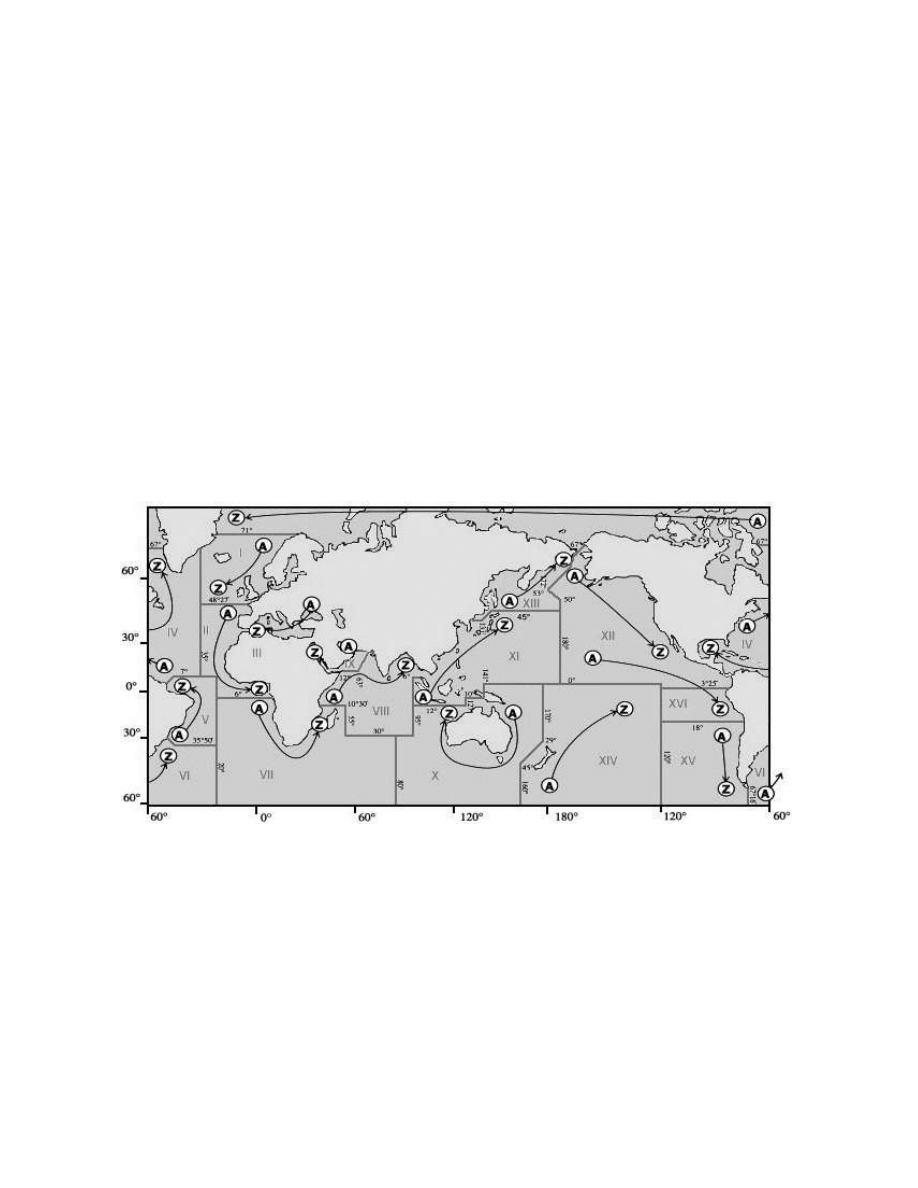
The world is divided into 16 different NAVAREAS (Navigational Areas), and a map of these can be seen
below:
Stations within a particular NAVAREA will ‘Time Share’ the frequency, and each call letter will be allocated a
slot for their transmissions, which generally occurs at four-hourly intervals. Since broadcasts can be of
varying lengths there will often be periods when no signals are heard, and during periods of severe weather,
or when an urgent message such as one related to a Search & Rescue operation needs to be sent, extra
broadcasts can be slotted in at unscheduled times. (note# from January 2010 six new polar navareas will
come into use, these will be numbered XVII to XXII)
TRANSMISSION TIMES:
A full list of transmission times can be obtained from the NAVTEX section, at the Beaconworld website, and
this will show a station’s schedule in a similar manner to the example given on the next page. There is also a
newer publication now available listing Scheduled broadcasts in time sequence, and starting at 0000 utc
then running to 2359 utc. This can be used alongside your receiver as a guide, or you can install the
NAVTEXVW program and have the data appear on your screen at the appropriate time.

10
Country:
Station:
Call:
B
1
Range: Scheduled Broadcast Time UTC:
USA
Miami, FL
NMA
A
240
0000, 0400, 0800, 1200, 1600, 2000 UTC:
BERMUDA
Bermuda Harbour
ZBM
B
280
0010, 0410, 0810, 1210, 1610, 2010 UTC:
CANADA
Riviere-au-Renard, QC
VCK
C
300
0020, 0420, 0820, 1220, 1620, 2020 UTC:
USA
Savannah, GA
NMB
E
200
0040, 0440, 0840, 1240, 1640, 2040 UTC:
USA
Boston, MA
NMF
F
200
0045, 0445, 0845, 1245, 1645, 2045 UTC:
USA
New Orleans, LA
NMG
G
200
0300, 0700, 1100, 1500, 1900, 2300 UTC:
CANADA
Prescott, ON
XMJ
H
300
0110, 0510, 0910, 1310, 1710, 2110 UTC:
ANTILLES
Curacao
JPC
H
250
0110, 0510, 0910, 1310, 1710, 2110 UTC:
USA
Portsmouth, VA
NMN
N
280
0130, 0530, 0930, 1330, 1730, 2130 UTC:
CANADA
St. Johns, NL
VON
O
300
0220, 0620, 1020, 1410, 1810, 2210 UTC:
CANADA
Thunder Bay, ON
XLJ 895 P
300
0230, 0630, 1030, 1430, 1830, 2230 UTC:
CANADA
Sydney, NS (English)
VCO
Q
300
0240, 0640, 1040, 1440, 1840, 2240 UTC:
USA
Isabella - San Juan, PR
NMR
R
200
0200, 0600, 1000, 1400, 1800, 2200 UTC:
CANADA
Iqaluit, NT
VFF
T
150
0310, 0710, 1110, 1510, 1910, 2310 UTC:
CANADA
Montreal, QC
VFN-3 T
0310, 0710, 1110, 1510, 1910, 2310 UTC:
CANADA
Fundy, NB (English)
VAR-3 U
300
0320, 0720, 1120, 1520, 1920, 2320 UTC:
GREENLAND
Nuuk (Kook Island)
OXI
W
400
0340, 0740, 1140, 1540, 1940, 2340 UTC:
CANADA
Labrador, NL
VOK
X
300
0350, 0750, 1150, 1550, 1950, 2350 UTC:
Tuning in on 518 kHz at the above times should produce some of the stations listed above (propagation
permitting, and you can see from the table that each station will broadcast at 4 hour intervals. Other
unscheduled broadcasts may appear, and even more distant ones in other NAVAREAS may be heard too,
but you should at least have a reasonably clear idea of how the system works by now. Downloading one of
the complete databases will help you to work out when broadcasts should appear, and also plan when a
particular station might possibly be heard at your location.
POWER LEVELS AND RANGE:
Listeners often ask what the power levels used by NAVTEX stations are, and this is often difficult to answer
because most listings only show the range in Nautical Miles rather than the power radiated. Some listeners
have received QSL cards from NAVTEX stations, and these often show the power levels to be around 1kW,
but perhaps a better guide can be obtained from the IMO’s official “NAVTEX Manual”, which gives the
following information in Annex 5:
“The range of a NAVTEX transmitter depends on the transmitter power and local propagation conditions.
The actual range achieved should be adjusted to the minimum required for adequate reception in the
NAVTEX area served, taking into account the needs of ships approaching from other areas. Experience has
indicated that the required range of 250 to 400 nautical miles can generally be attained by transmitter power
in the range between 100 and 1000 watts during daylight, with a 60% reduction at night”.
Annex 7 also gives a little more information about this subject:
“Interference between stations with the same B1 character/time slot, but located in different regions is also
increasing, particularly at night, as the number of operational NAVTEX stations increases. This is
occasionally caused by atmospheric conditions, but is generally caused by excessive power from one of the
stations. It is recommended that Administrations restrict the power output from their transmitters to that
required to cover the designated area, particularly at night, in order to avoid interference. As a general rule,
transmitter power should never exceed 1 kW by day and 300 watts by night; use of as much as 7kW has
been noted in extreme cases of reported interference”.
From the above we can see that what may be good news for the Dxer may not be so good for the station,
and this may be a point to bear in mind when sending reception reports to the stations. Telling them that they
were bladdering all over a station in your local NAVAREA might not be welcome news to them, and taking
the line that your reception was down to “Good Atmospheric Conditions” might be a more discrete line of
approach to take – the last thing we want as Dxers is for distant stations to reduce their power levels!

11
TECHNICAL SPECIFICATIONS & CHARACTERISTICS:
IMO Resolution A.801 (19) annex 4 lists the following specification for establishing a coverage area:
Coverage Area:
An area defined by an arc of a circle having a radius from the transmitter calculated
according to the method and criteria given in this annex.
Service Area:
A unique and precisely defined sea area, wholly contained within the coverage area
for which MSI is provided from a particular NAVTEX transmitter. It is normally
defined by a line, which takes full account of local propagation conditions and the
character and volume of information and maritime traffic patterns in the region.
Coverage:
The ground-wave coverage may be determined for each coast station by reference
to CCIR Recommendation 368 and CCIR Report 322 for the performance of a
system under the following conditions:
Frequency:
518 kHz
Bandwidth:
500 Hz
Propagation:
RF S/N in 500 Hz bandwidth:
8db
Percentage of time:
90
According to the US Coast Guard NAVTEX page, broadcasts are made using narrow-band direct printing 7-
unit forward error correcting (FEC or Mode B) transmission. Transmissions use 100 baud FSK modulation,
with a frequency shift of 170 Hz. The centre frequency of the audio spectrum applied to a Single Sideband
(SSB) transmitter is 1700 Hz. The receiver 6 dB bandwidth should be between 270-340 Hz wide.
Each character is transmitted twice. The first transmission (DX) of a specific character is followed by the
transmission of four other characters, after which the retransmission (RX) of the first character takes place,
allowing for time-diversity reception of 280 ms.
REPORTING YOUR RECEPTION TO NAVTEX STATIONS:
A number of Dxers have managed to successfully receive QSL cards and letters in response to their
reception reports, and if collecting QSLs is your thing you might like to try your hand at sending them a few
reports. I’m sure that just as with most other coastal stations, some of the more technical members of staff
will be only to happy to know where their signal is getting out to, and will happily verify your report for you,
but as is often the case with reports to utility stations, it is a good idea to send return postage of some kind,
and also to send reports in an appropriate language that will be understood by the recipients. Details of
stations addresses where known have been included in the “World NAVTEX Database for Dxers”, but I am
always interested in hearing from any listeners who have received QSLs, and details of addresses that
worked, or languages used/postage sent etc. will be useful for future editions.

12
USEFUL RESOURCES:
WEBSITES:
Beaconworld Navtex Section:
http://www.beaconworld.org.uk/navtex.htm
Black Cat Systems Multimode:
http://www.blackcatsystems.com/software/multimode.html
DSCdecoder:
http://www.coaa.co.uk/dscdecoder.htm
DXSoft:
http://www.dxsoft.com/
EUNL QSL Address List:
http://members.aol.com/aibold/utility/qaa.htm
Hamcomm Interface (Connecting it up):
http://www.g7ltt.com/hamcom/connect.htm
HOKA:
http://www.hoka.nl
MixW: (latest version 2.18)
http://www.mixw.net/
MSCAN:
http://mscan.com/
MultiPSK:
http://f6cte.free.fr/index_anglais.htm
Navtex Decoder 2.1.2:
http://www.frisnit.com/navtex/decoder.html
Pervisell: (suppliers of radio software)
http://www.pervisell.com/ham/
RadioRaft 3.21:
http://perso.wanadoo.fr/radioraft/
REU/RNA/RWW Online Database:
http://www.classaxe.com/dx/
US Coast Guard Navcen:
http://www.navcen.uscg.gov/marcomms/gmdss/NAVTEX.htm
William Hepburn’s Navtex Page:
http://home.cogeco.ca/~dxinfo/navtex.htm
UDXF:
http://www.udxf.nl
UDXF Mailing List:
http://groups.yahoo.com/group/udxf/
PUBLICATIONS:
Admiralty List of Radio Signals Volumes 3 and 5:
NAVTEX Manual 2001 edition (IMO):
Klingenfuss Radioteletype Code Manual
ABBREVIATIONS:
AMTOR
Amateur Telex Over Radio
CCIR
International Radio Consultative Committee
EUNL
European Utility News Letter
FEC
Forward Error Correction
GMDSS
Global Maritime Distress & Safety System
IHO
International Hydrographic Organisation
IMO
International Maritime Organisation
ITU
International Telecommunications Union
MSI
Maritime Safety Information
NAVAREA
Navigational Area
NBDPT
Narrow Band Direct Printing via Telegraphy
NNNN
End of emission signal
SITOR
Simplex Teleprinting Over Radio
SOLAS
Safety of Life at Sea
WWNWS
World-Wide Navigational Warning System
ZCZC
End of Phasing signal
NNNN
© A. Gale/Beaconworld 2009
Wyszukiwarka
Podobne podstrony:
opis systemu blueVendo Tour
Kerberos opis systemu i instalacja w OS Linux
opis systemu topto v2 5 pl HSBSIRSSZ37UY4A4OA7HVYOHRVRREU7GXBRV6GQ
opis systemu vendoHotel id 3370 Nieznany
Opis systemu S12
Opis systemów operacyjnych-Linux, Informatyka -all, INFORMATYKA-all
mags1 ogolny opis systemu
opis systemu
opis systemu
pfeifer opis systemu transportowego
opis systemu gps3, UWM Geodezja GiSzN, Geodezja satelitarna
opis systemu windows Mx8
Opis systemu
SYS8 Opis Systemu(1), Politechnika Wrocławska - Materiały, teoria systemow
Opis systemu topTO v3 01 PL
OPIS SYSTEMU MONITOROWANIE ZDROWIA STRUKTURY BURJ KHALIFA
2 OPIS SYSTEMOW LINIOWYCH W DZI Nieznany (2)
więcej podobnych podstron