1 - 19
CCNP: Building Multilayer Switched Networks v5.0 - Lab 8-1
Copyright
© 2006, Cisco Systems, Inc
Lab 8-1 Securing the Layer 2 Switching Devices
Learning Objectives
• Secure the Layer 2 network against MAC flood attacks
• Prevent DHCP spoofing attacks
• Prevent unauthorized access to the network using AAA and dot1x
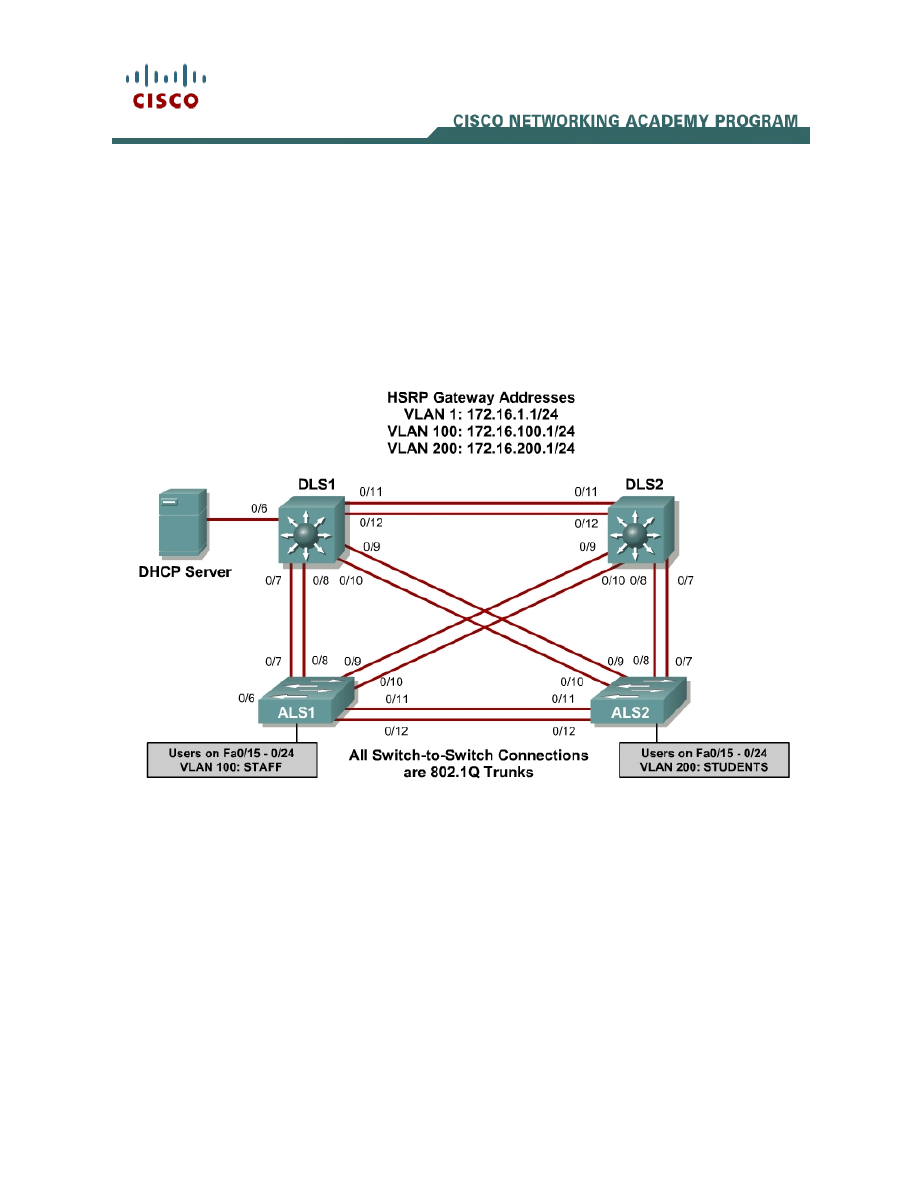
Topology
Scenario
A fellow network engineer that you have known and trusted for many years has
invited you to lunch this week. At lunch, he brings up the subject of network
security and how two of his former co-workers had been arrested for using
different Layer 2 attack techniques to gather data from other users in the office
for their own personal gain in their careers and finances. The story shocks you
because you have always known your friend to be very cautious with security
on his network. His story makes you realize that your business network has
been cautious with external threats, Layer 3–7 security, firewalls at the borders,
and so on, but insufficient at Layer 2 security and protection inside the local
network.

2 - 19
CCNP: Building Multilayer Switched Networks v5.0 - Lab 8-1
Copyright
© 2006, Cisco Systems, Inc
When you get back to the office, you meet with your boss to discuss your
concerns. After reviewing the company’s security policies, you begin to work on
a Layer 2 security policy.
First, you establish which network threats you are concerned about and then
put together an action plan to mitigate these threats. While researching these
threats, you learn about other potential threats to Layer 2 switches that might
not be malicious but could greatly threaten network stability. You decide to
include these threats in the policies as well.
Other security measures need to be put in place to further secure the network,
but you begin with configuring the switches against a few specific types of
attacks, including MAC flood attacks, DHCP spoofing attacks, and unauthorized
access to the local network. You plan to test the configurations in a lab
environment before placing them into production.
Step 1
Power up the switches and use the standard process for establishing a
HyperTerminal console connection from a workstation to each switch in your
pod.
Remove all VLAN information and configurations that were previously entered
into your switches. (Refer to Lab 2.0a or 2.0b if needed.)
Step 2
Cable the lab according to the diagram. Configure the management IP
addresses in VLAN 1, and configure the hostname, password, and Telnet
access on all four switches. HSRP will be used later in the lab, so set up the IP
addressing for VLAN 1 on DLS1 and DLS2. Because 172.16.1.1 will be the
virtual default gateway for this VLAN, use the .3 and .4 for the IP addresses on
DLS1 and DLS2, respectively.
You also need to configure a default gateway on the access layer switches. The
distribution layer switches act as Layer 3 devices and do not need default
gateways.
Set up 802.1q trunking between the switches according to the diagram. The
default trunking for the 2960 switch is dot1q, so you do not need to configure it.
Switch#configure terminal
Enter configuration commands, one per line. End with CNTL/Z.
Switch(config)#hostname ALS1
ALS1(config)#enable secret cisco
ALS1(config)#line vty 0 15
ALS1(config-line)#password cisco
ALS1(config-line)#login
ALS1(config-line)#exit
ALS1(config)#interface vlan 1

3 - 19
CCNP: Building Multilayer Switched Networks v5.0 - Lab 8-1
Copyright
© 2006, Cisco Systems, Inc
ALS1(config-if)#ip address 172.16.1.101 255.255.255.0
ALS1(config-if)#no shutdown
ALS1(config-if)#exit
ALS1(config)#ip default-gateway 172.16.1.1
ALS1(config)#interface range fastethernet 0/7 - 12
ALS1(config-if-range)#switchport mode trunk
ALS1(config-if-range)#end
ALS1#
Switch#configure terminal
Enter configuration commands, one per line. End with CNTL/Z.
Switch(config)#hostname ALS2
ALS2(config)#enable secret cisco
ALS2(config)#line vty 0 15
ALS2(config-line)#password cisco
ALS2(config-line)#login
ALS2(config-line)#exit
ALS2(config)#interface vlan 1
ALS2(config-if)#ip address 172.16.1.102 255.255.255.0
ALS2(config-if)#no shutdown
ALS2(config-if)#exit
ALS2(config)#ip default-gateway 172.16.1.1
ALS2(config)#interface range fastethernet 0/7 - 12
ALS2(config-if-range)#switchport mode trunk
ALS2(config-if-range)#end
ALS2#
Switch#configure terminal
Enter configuration commands, one per line. End with CNTL/Z.
Switch(config)#hostname DLS1
DLS1(config)#enable secret cisco
DLS1(config)#line vty 0 15
DLS1(config-line)#password cisco
DLS1(config-line)#login
DLS1(config-line)#exit
DLS1(config)#interface vlan 1
DLS1(config-if)#ip address 172.16.1.3 255.255.255.0
DLS1(config-if)#no shutdown
DLS1(config-if)#exit
DLS1(config)#interface range fastethernet 0/7 - 12
DLS1(config-if-range)#switchport trunk encapsulation dot1q
DLS1(config-if-range)#switchport mode trunk
DLS1(config-if-range)#end
Switch#configure terminal
Enter configuration commands, one per line. End with CNTL/Z.
Switch(config)#hostname DLS2
DLS2(config)#enable secret cisco
DLS2(config)#line vty 0 15
DLS2(config-line)#password cisco
DLS2(config-line)#login
DLS2(config-line)#exit
DLS2(config)#interface vlan 1
DLS2(config-if)#ip address 172.16.1.4 255.255.255.0
DLS2(config-if)#no shutdown
DLS1(config-if)#exit
DLS1(config)#interface range fastethernet 0/7 - 12
DLS1(config-if-range)#switchport trunk encapsulation dot1q
DLS1(config-if-range)#switchport mode trunk
DLS1(config-if-range)#end

4 - 19
CCNP: Building Multilayer Switched Networks v5.0 - Lab 8-1
Copyright
© 2006, Cisco Systems, Inc
Verify trunking and spanning tree operations using the show interfaces trunk
and show spanning tree commands.
1. Which trunks are marked as designated for ALS1?
2. Is trunk negotiation being used here? Which mode are the trunks in?
Step 3
Set up the VLANs according to the diagram. Two VLANs are in use at this time:
one for students, and one for faculty and staff. These VLANs will be created on
DLS1, which is set up as a VTP server. DLS2 also remains in its default VTP
mode and acts as a server as well. ALS1 and ALS2 are configured as VTP
clients.
The user access ports for these VLANs also needs to be configured on ALS1
and ALS2. Set up these ports as static access ports and turn spanning tree
portfast on. Configure these ports according to the diagram.
HSRP is a requirement for the network, and VLANs 100 and 200 are configured
to use HSRP to provide redundancy at Layer 3. Use the priority command to
make DLS1 the active router for VLANs 1 and 100, and DLS2 the active router
for VLAN 200.
The following is an example for ALS1 and ALS2 for the VTP client changes:
ALS1#configure terminal
Enter configuration commands, one per line. End with CNTL/Z.
ALS1(config)#vtp mode client
Setting device to VTP CLIENT mode.
ALS1(config)#interface range fa0/15 - 24
ALS1(config-if-range)#switchport mode access
ALS1(config-if-range)#switchport access vlan 100
ALS1(config-if-range)#spanning-tree portfast
%Warning: portfast should only be enabled on ports connected to a single
host. Connecting hubs, concentrators, switches, bridges, etc... to this
interface when portfast is enabled, can cause temporary bridging loops.
Use with CAUTION
%Portfast will be configured in 10 interfaces due to the range command
but will only have effect when the interfaces are in a non-trunking mode.
ALS1(config-if-range)#end
ALS1#

5 - 19
CCNP: Building Multilayer Switched Networks v5.0 - Lab 8-1
Copyright
© 2006, Cisco Systems, Inc
ALS2#configure terminal
Enter configuration commands, one per line. End with CNTL/Z.
ALS2(config)#vtp mode client
Setting device to VTP CLIENT mode.
ALS2(config)#interface range fa0/15 - 24
ALS2(config-if-range)#switchport mode access
ALS2(config-if-range)#switchport access vlan 200
ALS2(config-if-range)#spanning-tree portfast
%Warning: portfast should only be enabled on ports connected to a single
host. Connecting hubs, concentrators, switches, bridges, etc... to this
interface when portfast is enabled, can cause temporary bridging loops.
Use with CAUTION
%Portfast will be configured in 10 interfaces due to the range command
but will only have effect when the interfaces are in a non-trunking mode.
ALS2(config-if-range)#end
ALS2#
The following are sample configurations for the VLAN setup and HSRP:
DLS1#configure terminal
Enter configuration commands, one per line. End with CNTL/Z.
DLS1(config)#vtp domain SWPOD
DLS1(config)#vlan 100
DLS1(config-vlan)#name Staff
DLS1(config-vlan)#exit
DLS1(config)#vlan 200
DLS1(config-vlan)#name Student
DLS1(config-vlan)#exit
DLS1(config)#ip routing
DLS1(config)#interface vlan 1
DLS1(config-if)#standby 1 ip 172.16.1.1
DLS1(config-if)#standby 1 preempt
DLS1(config-if)#standby 1 priority 150
DLS1(config-if)#exit
DLS1(config)#int vlan 100
DLS1(config-if)#ip add 172.16.100.3 255.255.255.0
DLS1(config-if)#standby 1 ip 172.16.100.1
DLS1(config-if)#standby 1 preempt
DLS1(config-if)#standby 1 priority 150
DLS1(config-if)#no shutdown
DLS1(config-if)#exit
DLS1(config)#int vlan 200
DLS1(config-if)#ip add 172.16.200.3 255.255.255.0
DLS1(config-if)#standby 1 ip 172.16.200.1
DLS1(config-if)#standby 1 preempt
DLS1(config-if)#standby 1 priority 100
DLS1(config-if)#end
DLS2#config t
Enter configuration commands, one per line. End with CNTL/Z.
DLS2(config)#ip routing
DLS2(config)#interface vlan 1
DLS2(config-if)#standby 1 ip 172.16.1.1
DLS2(config-if)#standby 1 preempt
DLS2(config-if)#standby 1 priority 100
DLS2(config-if)#exit
DLS2(config)#int vlan 100

6 - 19
CCNP: Building Multilayer Switched Networks v5.0 - Lab 8-1
Copyright
© 2006, Cisco Systems, Inc
DLS2(config-if)#ip add 172.16.100.4 255.255.255.0
DLS2(config-if)#standby 1 ip 172.16.100.1
DLS2(config-if)#standby 1 preempt
DLS2(config-if)#standby 1 priority 100
DLS2(config-if)#no shutdown
DLS2(config-if)#exit
DLS2(config)#int vlan 200
DLS2(config-if)#ip add 172.16.200.4 255.255.255.0
DLS2(config-if)#standby 1 ip 172.16.200.1
DLS2(config-if)#standby 1 preempt
DLS2(config-if)#standby 1 priority 150
DLS2(config-if)#end
Verify your configurations using the show vlan, show vtp, show standby, and
show ip route commands.:
3. What is the active router for VLANs 1 and 100? What is the active router for
VLAN 200?
4. How many VLANs are active in the VTP domain?
Step 4
The following table shows the appropriate verification methods and mitigation
approaches for the attack types specified in the left column:
Attack Type
Verification
Mitigation
MAC address
spoofing or flooding
Show CAM dynamic
MAC port security
DHCP spoofing
View DHCP leases for
discrepancies
Configure DHCP
snooping
Unauthorized LAN
access
Verification is very
difficult for this type of
attack
Configure authentication
using AAA

7 - 19
CCNP: Building Multilayer Switched Networks v5.0 - Lab 8-1
Copyright
© 2006, Cisco Systems, Inc
Step 5
To protect against MAC flooding or spoofing attacks, configure port security on
the VLAN 100 and 200 access ports. Because the two VLANs serve different
purposes—one for staff and one for students—configure the ports to meet the
different needs.
The student VLAN must allow for MAC addresses assigned to a port to change,
because most of the student use laptops and move around within the network.
Set up port security so that only one MAC address is allowed on a port at a
given time. (This type of configuration does not work on ports that need to
service IP phones with PCs attached. In this case, there would be two allowed
MAC addresses.) This can be accomplished using the switchport port-
security maximum <# of MAC addresses> command.
The staff MAC addresses do not change often, because the staff uses desktop
workstations provided by the IT department. In this case, you can configure the
staff VLAN so that the MAC address learned on a port is added to the
configuration on the switch as if the MAC address were configured using the
switchport port-security mac-address command. This feature, which is
called sticky learning, is available on some switch platforms. It combines the
features of dynamically learned and statically configured addresses. The staff
ports also allow for a maximum of two MAC addresses to be dynamically
learned per port.
The following is a sample configuration for the student access ports on ALS2:
ALS2#config t
Enter configuration commands, one per line. End with CNTL/Z.
ALS2(config)#interface range fastethernet 0/15 - 24
ALS2(config-if-range)#switchport port-security maximum 1
ALS2(config-if-range)#end
Note that the maximum number of MAC addresses allowed on FastEthernet
0/15 – 24 is one.
Verify your configuration for ALS2 using the show port-security interface
command.
ALS2#show port-security interface fa0/15
Port Security : Disabled
Port Status : Secure-down
Violation Mode : Shutdown
Aging Time : 0 mins
Aging Type : Absolute
SecureStatic Address Aging : Disabled
Maximum MAC Addresses : 1
Total MAC Addresses : 0

8 - 19
CCNP: Building Multilayer Switched Networks v5.0 - Lab 8-1
Copyright
© 2006, Cisco Systems, Inc
Configured MAC Addresses : 0
Sticky MAC Addresses : 0
Last Source Address:Vlan : 0000.0000.0000:0
Security Violation Count : 0
The following is a sample configuration of the staff ports on ALS1:
ALS1#config t
Enter configuration commands, one per line. End with CNTL/Z.
ALS1(config)#interface range fastethernet 0/15 - 24
ALS1(config-if-range)#switchport port-security maximum 2
ALS1(config-if-range)#switchport port-security mac-address sticky
ALS1(config-if-range)#end
This time two MAC addresses are allowed. Both will be dynamically learned
and then added to the running configuration.
Verify your configuration using the show port-security interface command.
ALS1# show port-security int fa0/15
Port Security : Disabled
Port Status : Secure-down
Violation Mode : Shutdown
Aging Time : 0 mins
Aging Type : Absolute
SecureStatic Address Aging : Disabled
Maximum MAC Addresses : 2
Total MAC Addresses : 0
Configured MAC Addresses : 0
Sticky MAC Addresses : 0
Last Source Address:Vlan : 0000.0000.0000:0
Security Violation Count : 0
Step 6
DHCP spoofing is a “man-in-the-middle” type of attack in that an attacker gains
access to information meant for another destination. The attacker replies to a
DHCP request, claiming to have valid gateway and DNS information. A valid
DHCP server may also reply to the request, but if the attacker’s reply reaches
the requestor first, the invalid information from the attacker is used. The
attacking device then receives the data before it is sent to the proper
destination.
To help protect the network from such an attack, you can use DHCP snooping.
DHCP snooping is a Cisco Catalyst feature that determines which switch ports
are allowed to respond to DHCP requests. Ports are identified as trusted or
untrusted. Trusted ports can source all DHCP messages, while untrusted ports
can source requests only. Trusted ports host a DHCP server or can be an
uplink toward a DHCP server. If a rogue device on an untrusted port attempts to
send a DHCP response packet into the network, the port is shut down. From a
DHCP snooping perspective, untrusted access ports should not send any
DHCP server responses, such as a DHCPOFFER, DHCPACK, or DHCPNAK.

9 - 19
CCNP: Building Multilayer Switched Networks v5.0 - Lab 8-1
Copyright
© 2006, Cisco Systems, Inc
The first step to configure DHCP snooping is to turn snooping on globally on all
switches using the ip dhcp snooping command.
Second, you configure the trusted interfaces with the ip dhcp snooping trust
command. By default, all ports are considered untrusted unless statically
configured to be trusted. For this network, configure all trunk ports as trusted,
as well as port FastEthernet 0/6 on DLS1, which connects to the DCHP server
for the network.
Next we will configure a DHCP request rate limit on the user access ports to
limit the amount of DHCP requests that are allowed per second. This is
configured using the ip dhcp snooping limit rate <rate in pps>. This is used
to prevent DHCP starvation attacks by limiting the rate of the DHCP requests
on untrusted ports.
Finally, configure the VLANs that will use DHCP snooping. DHCP snooping will
be used on both the student and staff VLANs.
DLS1#config t
Enter configuration commands, one per line. End with CNTL/Z.
DLS1(config)#ip dhcp snooping
DLS1(config)#interface fastethernet 0/6
DLS1(config-if)#ip dhcp snooping trust
DLS1(config-if)#exit
DLS1(config)#interface range fastethernet 0/7 - 12
DLS1(config-if-range)#ip dhcp snooping trust
DLS1(config-if-range)#exit
DLS1(config)#ip dhcp snooping vlan 100,200
DLS1(config)#end
Verify your configuration using the show ip dhcp snooping command.
DLS1# show ip dhcp snooping
Switch DHCP snooping is enabled
DHCP snooping is configured on following VLANs:
100,200
Insertion of option 82 is enabled
Option 82 on untrusted port is not allowed
Verification of hwaddr field is enabled
Interface Trusted Rate limit (pps)
------------------------ ------- ----------------
FastEthernet0/6 yes unlimited
FastEthernet0/7 yes unlimited
FastEthernet0/8 yes unlimited
FastEthernet0/9 yes unlimited
FastEthernet0/10 yes unlimited
FastEthernet0/11 yes unlimited
FastEthernet0/12 yes unlimited
DLS1#
Configure DLS2 to trust DHCP information on the trunk links, enable DHCP
snooping globally, and define the VLANs that will use DHCP snooping for this
switch.
DLS2#config t
Enter configuration commands, one per line. End with CNTL/Z.

10 - 19
CCNP: Building Multilayer Switched Networks v5.0 - Lab 8-1
Copyright
© 2006, Cisco Systems, Inc
DLS2(config)#ip dhcp snooping
DLS2(config)#interface range fastEthernet 0/7 - 12
DLS2(config-if-range)#ip dhcp snooping trust
DLS2(config-if-range)#exit
DLS2(config)#ip dhcp snooping vlan 100,200
DLS2(config)#end
Configure ALS1 and ALS2 to trust DHCP information on the trunk ports only,
and limit the rate that requests are received with the ip DHCP snooping limit
rate command.
ALS1#config t
Enter configuration commands, one per line. End with CNTL/Z.
ALS1(config)#ip dhcp snooping
ALS1(config)#interface range fastethernet 0/7 - 12
ALS1(config-if-range)#ip dhcp snooping trust
ALS1(config-if-range)#exit
ALS1(config)#interface range fastethernet 0/15 - 24
ALS1(config-if-range)#ip dhcp snooping limit rate 20
ALS1(config-if-range)#exit
ALS1(config)#ip dhcp snooping vlan 100,200
ALS1(config)#end
ALS2#config t
Enter configuration commands, one per line. End with CNTL/Z.
ALS2(config)#ip dhcp snooping
ALS2(config)#interface range fastethernet 0/7 - 12
ALS2(config-if-range)#ip dhcp snooping trust
ALS2(config-if-range)#exit
ALS2(config)#interface range fastethernet 0/15 - 24
ALS2(config-if-range)#ip dhcp snooping limit rate 20
ALS2(config-if-range)#exit
ALS2(config)#ip dhcp snooping vlan 100,200
ALS2(config)#end
Verify the configurations on ALS1 and ALS2 using the show ip dhcp snooping
command.
ALS2# show ip dhcp snooping
Switch DHCP snooping is enabled
DHCP snooping is configured on following VLANs:
100,200
Insertion of option 82 is enabled
Option 82 on untrusted port is not allowed
Verification of hwaddr field is enabled
Interface Trusted Rate limit (pps)
------------------------ ------- ----------------
FastEthernet0/7 yes unlimited
FastEthernet0/8 yes unlimited
FastEthernet0/9 yes unlimited
FastEthernet0/10 yes unlimited
FastEthernet0/11 yes unlimited
FastEthernet0/12 yes unlimited
FastEthernet0/15 no 20
FastEthernet0/16 no 20
FastEthernet0/17 no 20
FastEthernet0/18 no 20
FastEthernet0/19 no 20
FastEthernet0/20 no 20
FastEthernet0/21 no 20

11 - 19
CCNP: Building Multilayer Switched Networks v5.0 - Lab 8-1
Copyright
© 2006, Cisco Systems, Inc
FastEthernet0/22 no 20
FastEthernet0/23 no 20
FastEthernet0/24 no 20
ALS2#
5. Will DHCP replies be allowed on access ports assigned to VLAN 200?
6. How many DHCP packets will be allowed on FastEthernet 0/16 per second?
Step 7
The authentication portion of AAA requires a user to be identified before being
allowed access to the network. Authentication is configured by defining a list of
methods for authentication and applying that list to specific interfaces. If lists are
not defined, a default list is used.
For this network, it has been decided that AAA using 802.1x will be used to
control user access for the staff VLAN using a local list of usernames and
passwords. Once a radius server is added to the network, all user ports,
including the student VLAN, will also be added to the configuration.
The IEEE 802.1x standard defines a port-based access control and
authentication protocol that restricts unauthorized workstations from connecting
to a LAN through publicly accessible switchports. The authentication server
authenticates each workstation that is connected to a switchport before making
any services that are offered by the switch or the LAN available.
Until the workstation is authenticated, 802.1x access control allows only
Extensible Authentication Protocol over LAN (EAPOL) traffic through the port to
which the workstation is connected. After authentication succeeds, normal
traffic can pass through the port.
Use the aaa new-model command to turn on AAA authentication on ALS1. The
aaa authentication dot1x default local command tells the switch to use a
local database of usernames and passwords to authenticate the users. Users
are assigned to the database using the username username password
password command.
The Fast Ethernet interfaces used for VLAN 100 staff access are configured
using the dot1x port-control auto command. The auto keyword allows the
switchport to begin in the unauthorized state, and allows the negotiation

12 - 19
CCNP: Building Multilayer Switched Networks v5.0 - Lab 8-1
Copyright
© 2006, Cisco Systems, Inc
between the client and server to authenticate the user. Once authenticated, the
user is allowed access to the network resources.
The following is a sample configuration for ALS1:
ALS1#config t
Enter configuration commands, one per line. End with CNTL/Z.
ALS1(config)#username janedoe password 0 cisco
ALS1(config)#username johndoe password 0 cisco
ALS1(config)#username joesmith password 0 cisco
ALS1(config)#aaa new-model
ALS1(config)#aaa authentication dot1x default local
ALS1(config)#int range fa 0/15 - 24
ALS1(config-if-range)#dot1x port-control auto
ALS1(config-if-range)#end
Verify your AAA configuration using the show dot1x interface command.
ALS1# show dot1x interface fa0/15
Supplicant MAC <Not Applicable>
AuthSM State = N/A
BendSM State = N/A
PortStatus = N/A
MaxReq = 2
MaxAuthReq = 2
HostMode = Single
PortControl = Auto
QuietPeriod = 60 Seconds
Re-authentication = Disabled
ReAuthPeriod = 3600 Seconds
ServerTimeout = 30 Seconds
SuppTimeout = 30 Seconds
TxPeriod = 30 Seconds
Guest-Vlan = 0
7. If a user with a username frankadams attempts to connect to the staff VLAN
access ports, will he be allowed access? Will the user be allowed access to
the student VLAN ports?
8. How will the configuration need to be changed when a radius server is
added to the network?

13 - 19
CCNP: Building Multilayer Switched Networks v5.0 - Lab 8-1
Copyright
© 2006, Cisco Systems, Inc
Final Configurations
DLS1# show run
Building configuration...
!
hostname DLS1
!
enable secret cisco
!
ip routing
!
ip dhcp snooping vlan 100,200
ip dhcp snooping
!
!
interface FastEthernet0/6
ip dhcp snooping trust
!
interface FastEthernet0/7
switchport trunk encapsulation dot1q
switchport mode trunk
ip dhcp snooping trust
!
interface FastEthernet0/8
switchport trunk encapsulation dot1q
switchport mode trunk
ip dhcp snooping trust
!
interface FastEthernet0/9
switchport trunk encapsulation dot1q
switchport mode trunk
ip dhcp snooping trust
!
interface FastEthernet0/10
switchport trunk encapsulation dot1q
switchport mode trunk
ip dhcp snooping trust
!
interface FastEthernet0/11
switchport trunk encapsulation dot1q
switchport mode trunk
ip dhcp snooping trust
!
interface FastEthernet0/12
switchport trunk encapsulation dot1q
switchport mode trunk
ip dhcp snooping trust
!
interface Vlan1
ip address 172.16.1.3 255.255.255.0
standby 1 ip 172.16.1.1
standby 1 priority 150
standby 1 preempt
no shutdown
!
interface Vlan100
ip address 172.16.100.3 255.255.255.0
standby 1 ip 172.16.100.1

14 - 19
CCNP: Building Multilayer Switched Networks v5.0 - Lab 8-1
Copyright
© 2006, Cisco Systems, Inc
standby 1 priority 150
standby 1 preempt
no shutdown
!
interface Vlan200
ip address 172.16.200.3 255.255.255.0
standby 1 ip 172.16.200.1
standby 1 preempt
no shutdown
!
line con 0
password cisco
login
line vty 0 4
password cisco
login
line vty 5 15
password cisco
login
end
DLS2# show run
Building configuration...
!
hostname DLS2
!
enable secret cisco
!
!
ip routing
!
ip dhcp snooping vlan 100,200
ip dhcp snooping
!
interface FastEthernet0/7
switchport trunk encapsulation dot1q
switchport mode trunk
ip dhcp snooping trust
!
interface FastEthernet0/8
switchport trunk encapsulation dot1q
switchport mode trunk
ip dhcp snooping trust
!
interface FastEthernet0/9
switchport trunk encapsulation dot1q
switchport mode trunk
ip dhcp snooping trust
!
interface FastEthernet0/10
switchport trunk encapsulation dot1q
switchport mode trunk
ip dhcp snooping trust
!
interface FastEthernet0/11
switchport trunk encapsulation dot1q
switchport mode trunk
ip dhcp snooping trust
!
interface FastEthernet0/12
switchport trunk encapsulation dot1q
switchport mode trunk

15 - 19
CCNP: Building Multilayer Switched Networks v5.0 - Lab 8-1
Copyright
© 2006, Cisco Systems, Inc
ip dhcp snooping trust
!
interface Vlan1
ip address 172.16.1.4 255.255.255.0
standby 1 ip 172.16.1.1
standby 1 preempt
no shutdown
!
interface Vlan100
ip address 172.16.100.4 255.255.255.0
standby 1 ip 172.16.100.1
standby 1 preempt
no shutdown
!
interface Vlan200
ip address 172.16.200.4 255.255.255.0
standby 1 ip 172.16.200.1
standby 1 priority 150
standby 1 preempt
no shutdown
!
line con 0
password cisco
login
line vty 0 4
password cisco
login
line vty 5 15
password cisco
login
!
end
ALS1#show run
Building configuration...
!
hostname ALS1
!
enable secret cisco
!
username janedoe password 0 cisco
username johndoe password 0 cisco
username joesmith password 0 cisco
aaa new-model
aaa authentication dot1x default local
!
!
ip dhcp snooping vlan 100,200
ip dhcp snooping
!
!
interface FastEthernet0/7
switchport mode trunk
ip dhcp snooping trust
!
interface FastEthernet0/8
switchport mode trunk
ip dhcp snooping trust
!
interface FastEthernet0/9
switchport mode trunk
ip dhcp snooping trust

16 - 19
CCNP: Building Multilayer Switched Networks v5.0 - Lab 8-1
Copyright
© 2006, Cisco Systems, Inc
!
interface FastEthernet0/10
switchport mode trunk
ip dhcp snooping trust
!
interface FastEthernet0/11
switchport mode trunk
ip dhcp snooping trust
!
interface FastEthernet0/12
switchport mode trunk
ip dhcp snooping trust
!
!
interface FastEthernet0/15
switchport access vlan 100
switchport mode access
switchport port-security maximum 2
switchport port-security mac-address sticky
dot1x port-control auto
spanning-tree portfast
ip dhcp snooping limit rate 20
!
interface FastEthernet0/16
switchport access vlan 100
switchport mode access
switchport port-security maximum 2
switchport port-security mac-address sticky
dot1x port-control auto
spanning-tree portfast
ip dhcp snooping limit rate 20
!
interface FastEthernet0/17
switchport access vlan 100
switchport mode access
switchport port-security maximum 2
switchport port-security mac-address sticky
dot1x port-control auto
spanning-tree portfast
ip dhcp snooping limit rate 20
!
interface FastEthernet0/18
switchport access vlan 100
switchport mode access
switchport port-security maximum 2
switchport port-security mac-address sticky
dot1x port-control auto
spanning-tree portfast
ip dhcp snooping limit rate 20
!
interface FastEthernet0/19
switchport access vlan 100
switchport mode access
switchport port-security maximum 2
switchport port-security mac-address sticky
dot1x port-control auto
spanning-tree portfast
ip dhcp snooping limit rate 20
!
interface FastEthernet0/20
switchport access vlan 100
switchport mode access
switchport port-security maximum 2

17 - 19
CCNP: Building Multilayer Switched Networks v5.0 - Lab 8-1
Copyright
© 2006, Cisco Systems, Inc
switchport port-security mac-address sticky
dot1x port-control auto
spanning-tree portfast
ip dhcp snooping limit rate 20
!
interface FastEthernet0/21
switchport access vlan 100
switchport mode access
switchport port-security maximum 2
switchport port-security mac-address sticky
dot1x port-control auto
spanning-tree portfast
ip dhcp snooping limit rate 20
!
interface FastEthernet0/22
switchport access vlan 100
switchport mode access
switchport port-security maximum 2
switchport port-security mac-address sticky
dot1x port-control auto
spanning-tree portfast
ip dhcp snooping limit rate 20
!
interface FastEthernet0/23
switchport access vlan 100
switchport mode access
switchport port-security maximum 2
switchport port-security mac-address sticky
dot1x port-control auto
spanning-tree portfast
ip dhcp snooping limit rate 20
!
interface FastEthernet0/24
switchport access vlan 100
switchport mode access
switchport port-security maximum 2
switchport port-security mac-address sticky
dot1x port-control auto
spanning-tree portfast
ip dhcp snooping limit rate 20
!
!
interface Vlan1
ip address 172.16.1.101 255.255.255.0
no shutdown
!
ip default-gateway 172.16.1.1
!
!
line con 0
password cisco
login
line vty 0 4
password cisco
line vty 5 15
password cisco
!
end
ALS1# show run
Building configuration...
!

18 - 19
CCNP: Building Multilayer Switched Networks v5.0 - Lab 8-1
Copyright
© 2006, Cisco Systems, Inc
!
hostname ALS2
!
enable secret cisco
!
!
ip dhcp snooping vlan 100,200
ip dhcp snooping
!
!
interface FastEthernet0/7
switchport mode trunk
ip dhcp snooping trust
!
interface FastEthernet0/8
switchport mode trunk
ip dhcp snooping trust
!
interface FastEthernet0/9
switchport mode trunk
ip dhcp snooping trust
!
interface FastEthernet0/10
switchport mode trunk
ip dhcp snooping trust
!
interface FastEthernet0/11
switchport mode trunk
ip dhcp snooping trust
!
interface FastEthernet0/12
switchport mode trunk
ip dhcp snooping trust
!
!
interface FastEthernet0/15
switchport access vlan 200
switchport mode access
spanning-tree portfast
ip dhcp snooping limit rate 20
!
interface FastEthernet0/16
switchport access vlan 200
switchport mode access
spanning-tree portfast
ip dhcp snooping limit rate 20
!
interface FastEthernet0/17
switchport access vlan 200
switchport mode access
spanning-tree portfast
ip dhcp snooping limit rate 20
!
interface FastEthernet0/18
switchport access vlan 200
switchport mode access
spanning-tree portfast
ip dhcp snooping limit rate 20
!
interface FastEthernet0/19
switchport access vlan 200
switchport mode access
spanning-tree portfast

19 - 19
CCNP: Building Multilayer Switched Networks v5.0 - Lab 8-1
Copyright
© 2006, Cisco Systems, Inc
ip dhcp snooping limit rate 20
!
interface FastEthernet0/20
switchport access vlan 200
switchport mode access
spanning-tree portfast
ip dhcp snooping limit rate 20
!
interface FastEthernet0/21
switchport access vlan 200
switchport mode access
spanning-tree portfast
ip dhcp snooping limit rate 20
!
interface FastEthernet0/22
switchport access vlan 200
switchport mode access
spanning-tree portfast
ip dhcp snooping limit rate 20
!
interface FastEthernet0/23
switchport access vlan 200
switchport mode access
spanning-tree portfast
ip dhcp snooping limit rate 20
!
interface FastEthernet0/24
switchport access vlan 200
switchport mode access
spanning-tree portfast
ip dhcp snooping limit rate 20
!
!
interface Vlan1
ip address 172.16.1.102 255.255.255.0
no shutdown
!
ip default-gateway 172.16.1.1
!
line con 0
password cisco
login
line vty 0 4
password cisco
login
line vty 5 15
password cisco
login
!
end
Wyszukiwarka
Podobne podstrony:
CCNP3 lab 3 2 en
CCNP3 lab 2 0 b en
CCNP3 lab 4 1 en
CCNP3 lab 6 2 en
CCNP3 lab 2 1 en
CCNP3 lab 5 1 en
CCNP3 lab 7 1 en
CCNP3 lab 6 3 en
CCNP3 lab 4 2 en
CCNP3 lab 3 5 en
CCNP3 lab 3 1 en
CCNP3 lab 2 0 a en
CCNP3 lab 3 3 en
CCNP3 lab 3 4 en
CCNP3 lab 8 3 en
CCNP3 lab 8 2 en
CCNP3 lab 6 2 opt en
CCNP3 lab 6 1 opt en
NS2 lab 4 4 7 en Configure Cisco IOS IPSec using Pre Shared Keys
więcej podobnych podstron