STRATEGIC COMMAND
EUROPEAN THEATER
USER MANUAL
© Fury Software 2001- 2002

1
CONTENTS
I. OVERVIEW
Introduction…………………………………………………………………………..3
Game Basics………………………………………………………………………….3
II. REFERENCE
General Unit Characteristics…………….……………………………………….…...6
Land Units……………………………………………………………………………6
Air Units……………………………………………………………………………...8
Naval Units…………………………………………………………………………...9
Military Production……………………………………………………………….…11
Research And Development………………………………………………………...12
Politics………………………………………………………………………………16
Unit Formulas……………………………………………………………………….17
III. GETTING STARTED
Playing A New Game……………………………………………………………….21
Loading A Saved Game……………………………………………………………..21
Options……………………………………………………………………………....22
Choosing Your Side………………………………………………………………....23
Hotkeys……………………………………………………………………………...23
IV. GAME PLAY
Turn Breakdown…………………………………………………………………….25
Moving Units………………………………………………………………………..25
Combat……………………………………………………………………………....28
Purchasing Units…………………………………………………………………….31
Reinforcing A Unit………………………………………………………………….32
Renaming A Unit……………………………………………………………………32
Disbanding A Unit…………………………………………………………………..33
Conducting Research………………………………………………………………..33
Declaring War……………………………………………………………………….34
Intelligence Reports…………………………………………………………………35
Ending A Turn………………………………………………………………………36
Saving……………………………………………………………………………….36
Quitting The Game………………………………………………………………….36
V. SPECIAL RULES
Vichy France………………………………………………………………………..37
Moving Capitals………………………………………………………………….…37
Surrendering Nations……………………………………………………………….37
Surface Raiders……………………………………………………………………..37
Production In Occupied Territory…………………………………………………..38
Gibraltar…………………………………………………………………………….38

2
Victory Conditions……………..………………...………………………………….38
VI. STRATEGY & TIPS
Axis Strategy………………….….…………………...…………………………….39
Allied Strategy………………………………………………………………………39
General Tips……………………………………………….…………………….…..40
VII. CAMPAIGN EDITOR
Creating A New Campaign……….…………………………………………………41
Opening An Existing Campaign….…………………………………………………41
Saving Campaigns……………….………………………………………………….41
Activating Countries…………….…………………………………………………..41
Changing Hex Control………….…………………………………………………...42
Adding Units………………………………………………………………………...42
Setting Up Research Levels…………………………………………………………42
Editing Campaign Data……………………………………………………………...43
Editing Units………………………………………………………………………...43
Limitations…………………………………………………………………………..43
VIII. TROUBLESHOOTING
Installation Issues……………………………………………………………………44
Video Issues………………………………………………………………………….44
Sound Issues…………………………………………………………………………45
IX. TABLES
Abbreviations………………………………………………………………………...46
Combat Target Values……………………………………………..…………………46
Terrain Values………………………………………………………………………..47
Supply Values………………………………………………………………………..48
X. TECHNICAL
Hardware Requirements……………………………………………………………..49
XI. CREDITS
………………………………………………………………………………..50
3
I.
OVERVIEW
INTRODUCTION
Total War is not a succession of mere episodes in a day or a week. It is a long drawn out and intricately
planned business, and the longer it continues the heavier are the demands on the character of the men
engaged in it.
– General George C. Marshall June 1941
Strategic Command – European Theater is WWII Grand Strategy at its best. As the
supreme commander of the Axis or Allied forces, the player shapes the fates of the
nations at war during the Second World War in Europe. Political options, research and
upgrade of equipment, management of supply and resources and the strategic
employment of one's armed forces are some of the keys to success. With limited phase
restrictions and wide-open turns you are in complete control to try many different
approaches and entertain just as many possible outcomes. The future of Europe and
perhaps ultimate glory is in your hands.
GAME BASICS
SCALE
Each hex represents about 80 kilometres or 50 miles. Turns vary in length and are
dependant on the time of year.
SEASON TURN
LENGTH
Summer 1
week
Fall, Spring
2 weeks
Winter
1
month
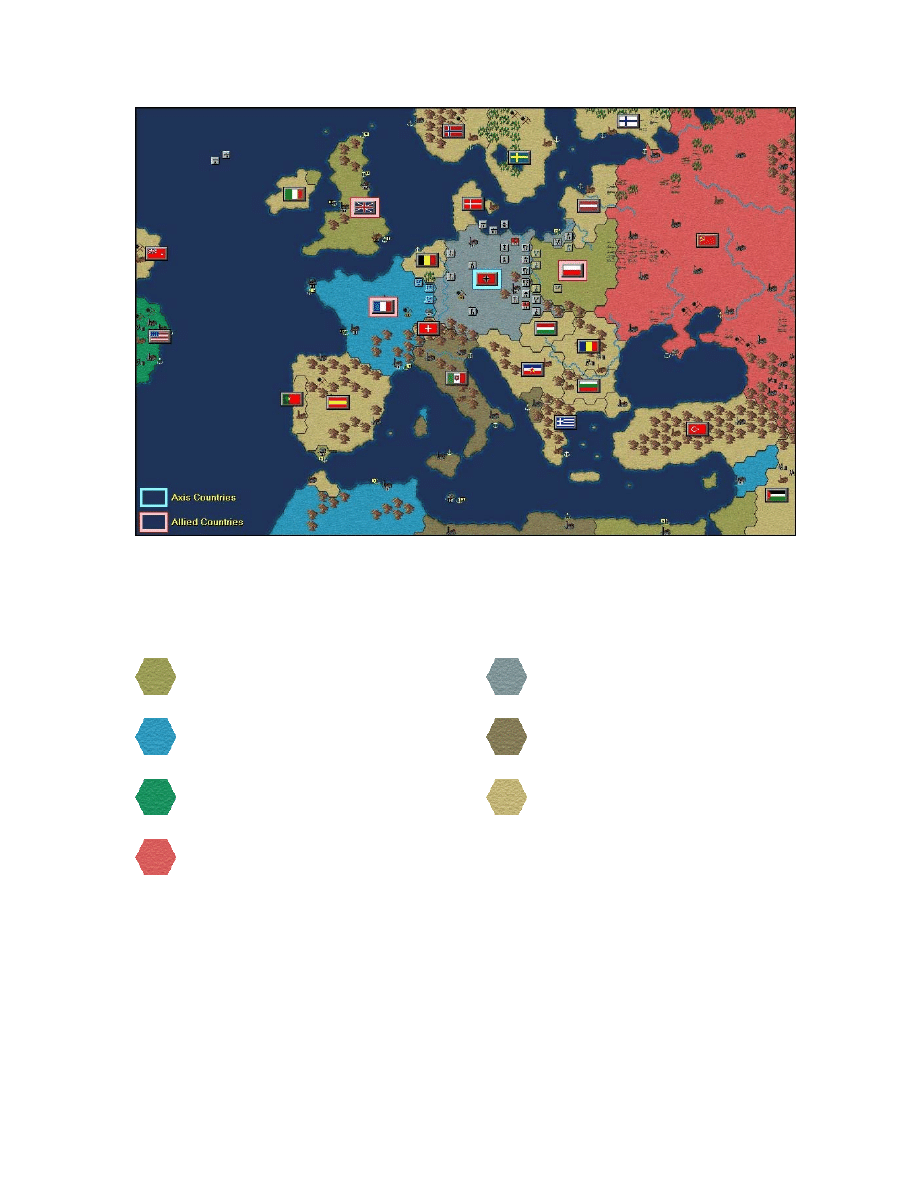
MAP LAYOUT
The map covers an area that stretches horizontally from the east coast of North America
to the Ural Mountains in Russia, and vertically from just below the Arctic Circle to the
North Coast of Africa.
4
Each of the major combatants is represented by a different colour on the map, essentially
representing the territory controlled by that particular country. The colour scheme is as
follows:
United Kingdom & Allied Minor
France
USA
USSR
Germany & Axis Minor
Italy
Neutral Countries
SYMBOLS ON THE MAP
Each type of terrain or resource can have several different properties depending upon
whether or not a unit is attacking or defending on that particular hex. Please refer to the
Terrain Values Table for further detail on terrain values with respect to combat.
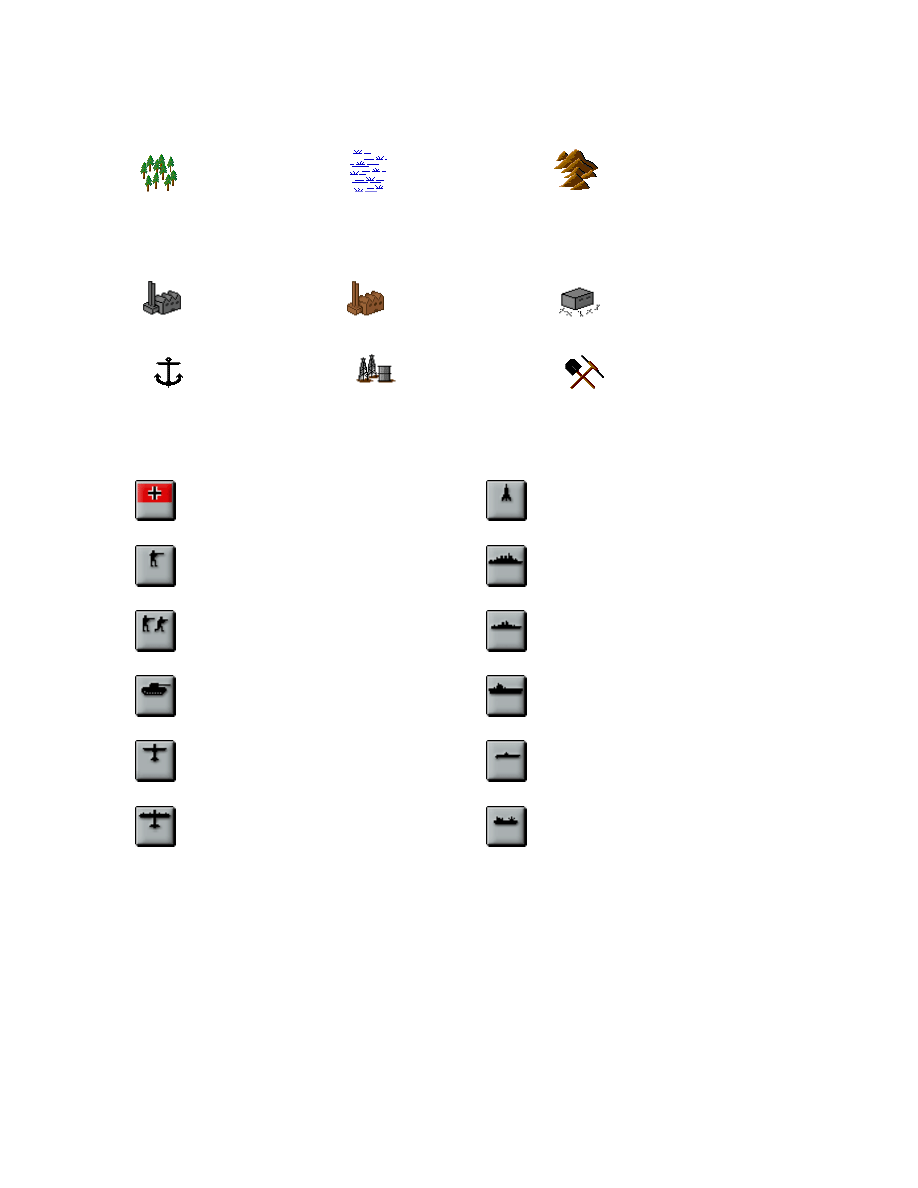
5
TERRAIN SYMBOLS
Forest
Marsh
Mountain
STRATEGIC RESOURCE SYMBOLS
City
Capital City
Fortification
Port
Oil
Mine
UNIT SYMBOLS
Head Quarters (HQ)
Corps
Army
Tank Group
Air Fleet
Strategic Bombers
Rocket Detachment
Battleship
Cruiser
Carrier
Sub
Transport
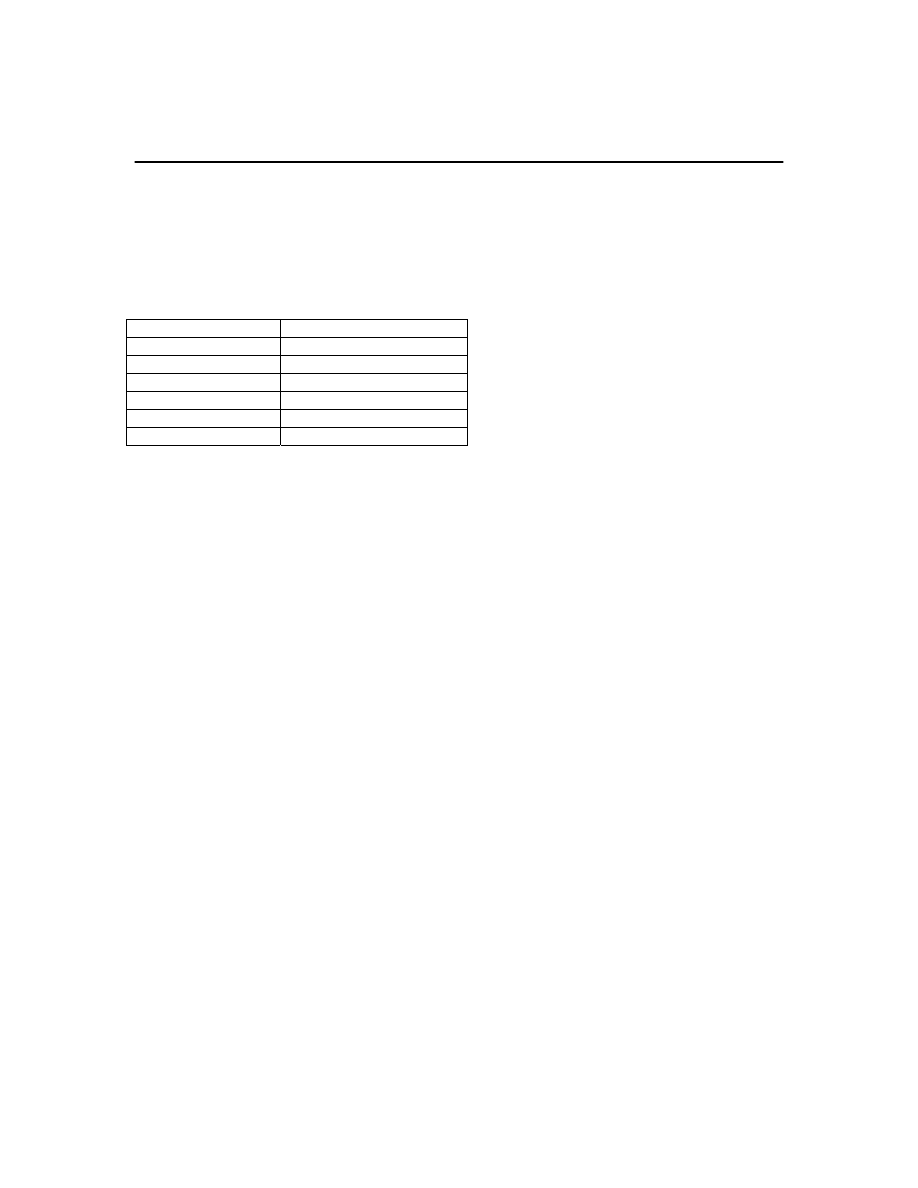
6
II. REFERENCE
GENERAL UNIT CHARACTERISTICS
The following table outlines the six basic characteristics for all units:
CHARACTERISTIC MAX
VALUE
Strength
10 (max 15)
Supply 10
Experience 4
Readiness*
Determined by Formula
Action Points**
Unit’s AP Value
Entrenchment***
Terrain’s Maximum Value
*Refer to the Unit Formulas section for further detail
**Refer to the Combat Target Values Table for further detail on Action Points
***This characteristic does not apply to naval units, since they cannot be entrenched
Each unit type also has combat values for:
•
Spotting
•
Strike Range
•
Soft Attack
•
Tank Attack
•
Air Attack
•
Naval Attack
•
Strategic Attack
•
Soft Defence
•
Tank Defence
•
Air Defence
•
Naval Defence
These values can be improved through research and development. Please refer to the
Research and Development section for further details.
LAND UNITS
Land units are vital in defeating enemy land forces as well as in capturing enemy territory
and resources. The effective use of land forces can be the difference between total
7
victory and bitter defeat. The following is a breakdown of the different land units found
in the game.
HEADQUARTERS
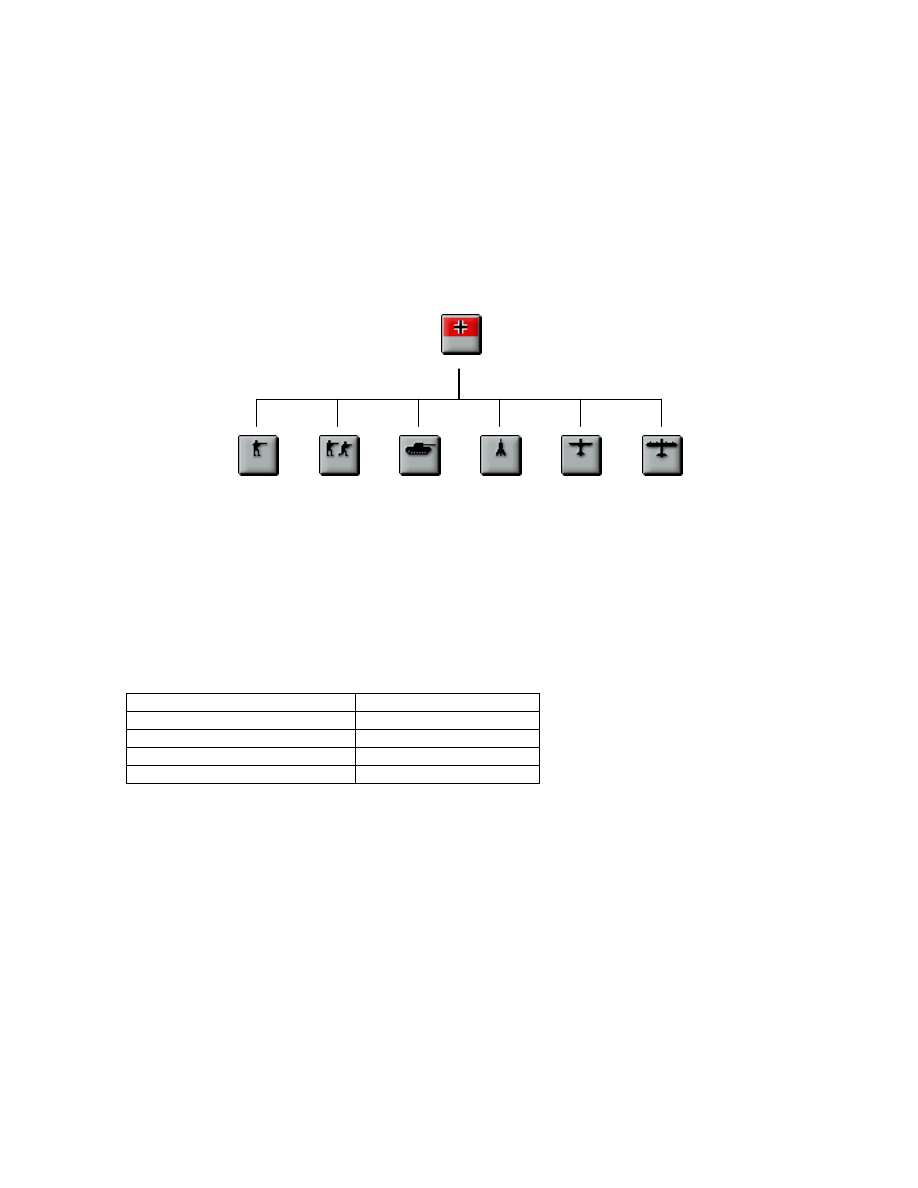
Both land and air units are attached to an Army Group Commander specified by a Head
Quarters (HQ) unit. This can be seen in the command breakdown diagram given below:
HQ
Note: Unit attachment to an HQ is limited to the five closest ‘home’ units that are within at least five hexes
to an HQ. If there is more than one HQ in the area then the game will attempt to allocate attachment as
best fits the above requirement.
Army Group Commanders are available in a pool at production time with a
predetermined commander rating.
Examples:
ARMY GROUP COMMANDER COMMANDER RATING
Rommel 8
Zhukov 8
Patton
7
Wavell 7
The higher the commander rating of an Army Group Commander, the higher the
readiness value for all units attached to his HQ. Please refer to the Unit Formulas
section for further detail on calculating combat readiness.
In addition to influencing the readiness of units under its command, HQ’s can also pass
on a combat morale bonus depending upon how well units perform in the field. Any
unit that performs well when attached to an HQ will increase that HQ’s command
experience and subsequently increase their combat morale bonus at the same time.
While if units under an HQ face some sort of disaster, then this HQ’s command
experience is reduced, in turn reducing the combat morale bonuses for all units under
its command.

8
Although HQ’s are administrative in nature and cannot attack, they can also increase a
unit’s supply value when extended from other supply resources. Please refer to the Unit
Supply Values Table for further detail.
CORPS
Generally an operational unit, the standard Corps in the Second World War comprised of
approximately 40,000 to 60,000 men.
ARMY
More of a strategic unit, armies were made up of one or more Corps plus any special
attached formations and usually comprised of approximately 60,000 to 100,000 men.
TANK GROUPS
As a tactical unit, Tank Groups started the war comprising of one or more motorized
Corps that also consisted of one or more Tank Divisions. Future developments of Tank
Groups, notably in Germany led to larger more strategic formations such as the Tank or
Panzer Armies.
ROCKET DETACHMENTS
Rocket units can be used to attack strategic resources as well as regular land, air or naval
units. The key benefit of rocket detachments is that its attacks cannot be defended
against, so rocket detachments can only lose strength points from direct attack by other
units. This specialized unit’s effectiveness is greatly increased through rocket research
and development. Please refer to the Research and Development section for further
detail.
Used as a strategic unit, rockets were developed primarily by Germany in the hopes of
bringing decisive victory at a minimal cost. In the end though, rockets failed to play this
decisive role due to their late introduction and the limited numbers available.
AIR UNITS
Air units can play an important role in pre-emptive strikes as well as in destroying an
enemy’s strategic assets.

9
AIR FLEETS
Air Fleets can be used to attack any valid land, air, or naval targets, while their strategic
attacks are limited. Air Fleets are very useful when placed in the immediate vicinity of
either tactical or strategic targets and will be automatically activated in a defensive role
for all friendly units adjacent to them within their flight radius.
In general, Air Fleets were normally made up of fighter, tactical bomber, and transport
wings all of which together comprised of the normal day to day air operations throughout
the war.
STRATEGIC BOMBERS
Bombers can be used to attack any valid land, air, or naval units, but are very useful in
attacking strategic resources. The bombing of enemy cities and other resource areas can
reduce their operational strengths, which in turn reduces the overall number of MPP’s
collected at the end of an enemy’s turn. Please refer to the Military Production section
for further detail on the collection of military production points (MPP’s).
As a strategic unit, bombers played an integral role in the Second World War. Most
notably, the Allies’ use of heavy bombers in the closing stages of the war severely
hampered Germany’s war machine and was instrumental to their eventual surrender.
NAVAL UNITS
Naval units can help control sea-lanes as well as perform shore bombardments preceding
amphibious assaults.
BATTLESHIPS
Battleships can be used in regular naval combat as well as in shore bombardments. Shore
bombardments can be commenced upon regular land or air units as well as strategic
resources.
Prior to the Second World War, Battleships were considered by many nations as the
pinnacle symbol of naval power, yet as the war progressed, these capital ships lost much
of their lustre. In general, the advances in sub design and the effective use of aircraft
carriers, particularly in the Pacific Theater, commanded a lot of rethinking with respect to
the Battleships’ role in modern warfare.

10
CRUISERS
Cruisers can be used in regular naval combat as well as in shore bombardments. Shore
bombardments can be commenced upon regular land or air units as well as strategic
resources.
The Battle Cruiser solved the dilemma of trying to balance speed and firepower in a
capital ship. Battle Cruisers were often able to outgun most opponents, while being fast
enough to escape any ship that out classed them.
CARRIERS
With an effective strike range, Carrier units can be extremely useful in advanced strikes
upon land, air and other naval units.
The advent of Carriers marked the beginning of a new form of naval warfare. While
effectively demonstrated in the Pacific Theater, aircraft Carriers did not have as great an
impact in the European Theater due to the close proximity of most combatants.
SUBS
Subs can be used in regular naval combat as well as for disrupting Allied convoys in the
North Atlantic and Mediterranean. Surface raiding by subs is covered in more detail
under the Special Rules section.
Although Subs were instrumental in bringing about a premature end to the First World
War, the Washington Treaties did not state any limitations on their design or numbers.
This lack of restriction resulted in countries like Germany experimenting with new
submarine designs and tactics. One notable development, the idea of a submarine wolf
pack, was extremely successful in wreaking havoc on many allied convoys throughout
the Second World War.
TRANSPORTS
Transports can be used to transport land units across fixed bodies of water. In terms of
combat, transports are very weak since they cannot attack and their defence is very
limited, yet their existence was essential to any campaign in the European Theater.
Please refer to the Game Play section for further detail.
11
MILITARY PRODUCTION
Military Production Points (MPP’s) are collected at the beginning of each round and are
based on the number of cities, ports, mining sites and oil production areas currently
owned or occupied by either the Axis or Allied sides. Only the following major countries
will control their own production while all other countries will fall under either Axis or
Allied Minor control.
•
United Kingdom
•
France
•
USA
•
USSR
•
Germany
•
Italy
In general, a country’s production can only occur in those cities or ports that can trace a
direct line of land hexes back to their capital city. For example, since the sea effectively
cuts off London from the mainland, the United Kingdom could never build units in
mainland Europe. Rather, they would have to build them in England first, and then
transport them there if it was so required.
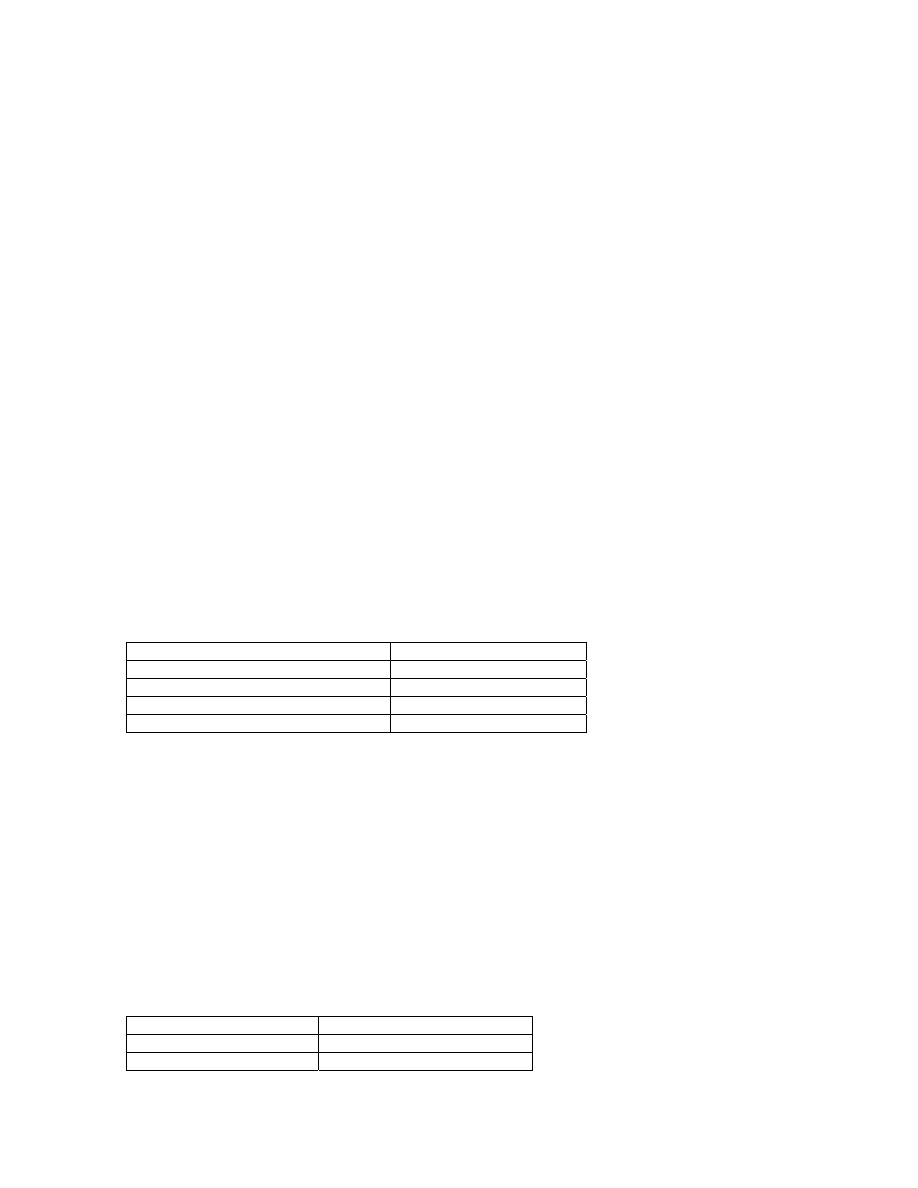
The following table outlines the conditions that determine the maximum operational
strength value of a city or strategic resource:
CONDITION
MAX STRENGTH VALUE
In Direct Connection With Capital city
10
Cut Off From Capital City
5
Occupied City/Resource*
8
Cut Off And Occupied**
5
*Occupied cities or resources in the USSR will have a max strength = 5
**Cut off and occupied cities or resources in the USSR will have a max strength = 3
Strategic bombing, air attack, naval bombardment, or rocket attack can reduce the
operational strength value of any valid strategic resource. This results in strength losses
and directly affects the number of MPP’s collected at the beginning of each round.
Subsequently, for each turn that a strategic resource is not attacked, the operational
strength for that strategic resource is increased by +1 point automatically up to their
maximum attainable value. This simulates rebuilding and repair.
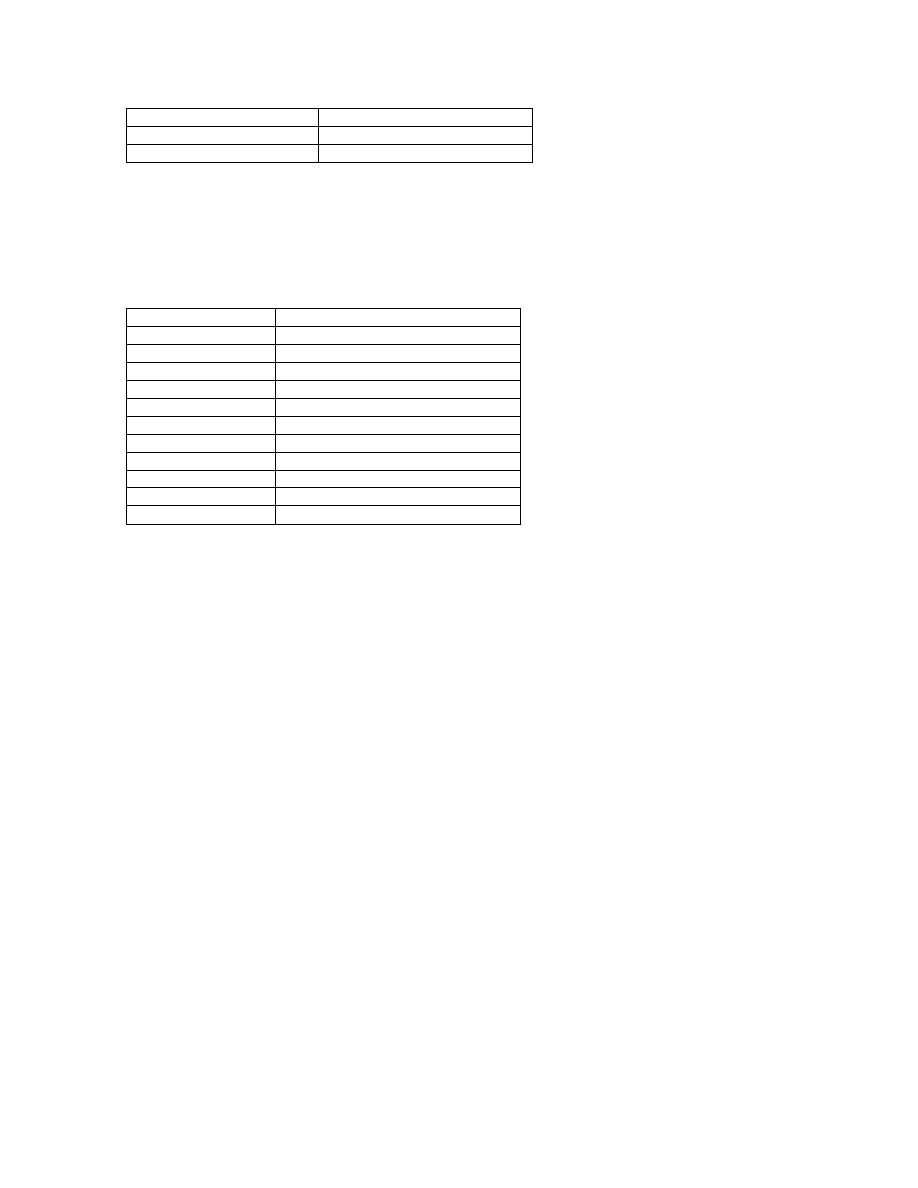
The following table outlines the MPP values assigned to strategic resources:
STRATEGIC RESOURCE
MPP VALUE
City
1 MPP * Operational Strength
Capital City
2 MPP * Operational Strength
12
Port
1 MPP * Operational Strength
Mining Site
2 MPP * Operational Strength
Oil Site
3 MPP * Operational Strength
The sum of these values for each type of strategic resource controlled will determine the
total MPP’s collected at the beginning of each round for each major country.
The following table outlines the production costs for each unit type:
UNIT
MILITARY PRODUCTION COST
HQ
350 + 15 * Rating
Corps 125
Army 250
Rocket Detachment
350
Tank Group
325
Air Fleet
400
Strategic Bombers
500
Battleship 600
Cruiser 500
Carrier 700
Sub 325
Research and development can improve the combat effectiveness of various units, but it
will also result in an increase of the unit’s overall production cost. The following
formula reflects the cost of units for which applicable research levels have been achieved:
Cost of Unit = Production Cost + (10% of Production Cost * # of applicable research levels)
Please see the Research and Development section for further detail on the various types
of research available.
RESEARCH AND DEVELOPMENT
Only the Axis and Allied Major countries can conduct research and development. The
following list of technologies is available for further research and development:
•
Anti-Tank Weapons
•
Heavy Tanks
•
Anti-Aircraft Radar
•
Long Range Aircraft
•
Jet Aircraft
•
Heavy Bombers
•
Sonar
•
Advanced Subs

13
•
Gun Laying Radar
•
Rockets
•
Industrial Technology
Each research type has a maximum level of 5 and a maximum number of 5 research
points that can be put against it. At the beginning of each turn, each research point has a
5% chance of returning the next level of research (so 5 research points in anti-tank
research will give you a 25% chance per turn of getting the next level), so the more
research points put against a particular type of research, the better the chances of
achieving the next level. Each research point costs 250 MPP’s and the total maximum
research funding cannot exceed 2500 MPP’s. Also, depending upon the type of research,
a variety of results can be achieved with each new level. The following is a breakdown
of the benefits for each type:
ANTI-TANK RESEARCH
Anti-tank research encompasses anti-tank guns as well as the later panzerfausts or
bazookas developed by Germany and the USA respectively.
Each new level of anti-tank research increases the tank defence and maximum strength
values for both Corps and Army units.
HEAVY TANK RESEARCH
Both the Axis and Allies put extensive research into developing the next generation of
medium to heavy tanks. Some of the more notable heavy tanks of the war included
Germany’s Tiger I & II, and the USSR’s KV series of tanks.
Each new level of heavy tank research increases the tank attack, tank defence and
maximum strength values for Tank Groups.
ANTI-AIRCRAFT RADAR RESEARCH
This research provided both sides with a more effective defence from air attacks with
improved detection and accuracy.
Every new level of anti-aircraft radar research improves the air defence values for all
Strategic Resources. As an added bonus defending units located on these resources will
also receive the anti-aircraft radar bonus when defending against air attacks.

14
LONG-RANGE AIRCRAFT RESEARCH
An essential development throughout the war years, long-range aircraft provided an
effective means of attack and defence on almost every front. Notably, long-range aircraft
enabled the Allies to finally close the air gap in the mid Atlantic as well as allow for the
deep penetration into Axis held territory.
Every new level of long-range aircraft research increases the spotting, action points, and
strike range values for both Air Fleets, and Strategic Bombers. Also, every new level of
long-range aircraft research increases the spotting, strike range, and maximum strength
values of Carriers.
JET AIRCRAFT RESEARCH
Jet aircraft, such as the ME 262 fighter and the Arado 234 bomber, both produced by
Germany, shocked the Allied Air Commands in the closing stages of the war. Yet,
production problems and limited numbers never truly allowed these aircraft to impact the
course of the war. Nevertheless, many historians agree that had such aircraft been
developed earlier, the outcome of the war could have ended much differently for the
combined Allied forces.
Every new level of jet aircraft research improves the air defence, and air attack for both
Air Fleets and Carriers, while the air defence value for Strategic Bombers is increased.
In addition, the maximum strength value for Air Fleets is increased.
HEAVY BOMBER RESEARCH
As the Second World War came to an end, heavy bombers emerged as pivotal players in
the role of disrupting supply lines and destroying vital factories and resources.
Every new level of heavy bomber research improves the strategic attack and maximum
strength values for Strategic Bomber units.
SONAR RESEARCH
Sonar development was essential in defending from submarine attack, as well as
submarine detection and destruction.
Every new level of sonar research improves the naval defence values of Battleships,
Cruisers and Carriers when attacked by submarines.

15
ADVANCED SUB RESEARCH
Advances in sub design and technology allowed the German Navy to re-enter the Battle
of the Atlantic in the later stages of the war. Most notably, the snorkel allowed German
subs to remain submerged while recharging their batteries with their diesel engines.
Again, these and other developments failed to have any serious impact on the course of
the war due to production problems and dwindling resources as the war drew to a close.
Every new level of advanced sub research improves the naval attack and maximum
strength values for submarines. Also, submarines in general have a 25% chance of
successfully diving from either naval or air attack, but with each new level of advanced
sub research, this percentage improves by +5%.
GUN LAYING RADAR RESEARCH
Both the Axis and Allied navies experimented with various types of radar to improve the
accuracy of their big guns for naval combat.
Every new level of gun laying radar research improves the naval attack, naval defence
and maximum strength values for both Battleships and Cruisers.
ROCKET RESEARCH
Both sides worked on developing various types of surface-to-air, surface-to-surface, air-
to-surface, and air-to-air rocket technology. Some of the most notable rocket
developments of the war were the V-1 and V-2 rockets developed by Germany. While
the V-1 became more of a nuisance to the Allies, the V-2 presented a potentially serious
threat. Luckily for the Allies the V-2 program suffered from many of the common
problems Germany faced in the later stages of the war, material and fuel shortages, as
well as disrupted production.
Every level of rocket research improves the attack values and strike range for all Rocket
Detachments.
INDUSTRIAL TECHNOLOGY RESEARCH
In general, the penalty for attaining new levels for any of the above research results in a
production cost increase of 10% for the unit(s) it applies to. Thus, to offset this penalty,
developing industrial technology improves the capacity and development time of war
production and materials.
Every new level of industrial technology decreases the cost of production for each unit by
10%.

16
POLITICS
THE MAJOR COMBATANTS
The following political options will be available:
•
Random – Randomly enter the war within a historical context
•
Neutral – Remain neutral throughout the war
•
Historical – Enter the war at the historical time
Note: For Russia, the Historical option is not available since they did not enter the war
until Germany invaded in June of 1941.
An important note on the random option with respect to the major countries is that it is
greatly affected by the game play of either the Axis or Allied side. Aggressive game play
by the Axis for example, may be rewarded with an early entry to the war by Italy, yet,
overly rampant aggression may backfire since the USSR and/or the US could enter the
war earlier than expected on the Allied side. While on the other hand, if playing as the
Allies, aggressive declarations of war may also backfire with the US delaying its entry
into the war.
The neutral and historical options will play as expected regardless of how the Axis or
Allied sides choose to conduct the war.
MINOR COMBATANTS
All other countries in the European Theater are treated as neutral until attacked by either
the Axis or Allied side, but for the historical Axis and Allied minor countries like
Canada, Hungary, Romania, Yugoslavia etc., they also include the same three political
options for randomness, neutrality or historical entry. Once again it will be the random
option that can create many new ‘what if?’ situations within a historical context for the
game. Expect to see countries such as Spain or Turkey, both with close ties to Germany,
to join the Axis side if the UK is sufficiently knocked out of the war, or perhaps Hungary
and Romania may not join the Axis Alliance if Germany attacks its fascist ally Spain.
These and many other ‘what if’ outcomes are all possible when playing in the Axis/Allied
Minor random mode.
17
UNIT FORMULAS
The following formulas cover the calculation of the six general unit characteristics.
READINESS, SUPPLY AND ACTION POINTS
Supply is determined by a unit’s distance from its nearest supply source and can have a
maximum value of 10 and a minimum value of 0. Detailed supply values can be
determined by referencing the unit Supply Values Table.
In general, factors that affect any unit’s supply are:
•
Movement – which reduces efficiency and/or causes minor troop attrition
•
Distance – from a valid supply source. These are supply ports for naval units,
while Army Group HQ’s or friendly cities supply land or air units.
The following Tables covers the action point penalties whenever any unit is extended
away from its nearest supply source:
UNIT’S SUPPLY VALUE
ACTION POINT VALUE
<= 10 and > 5
unit’s maximum value
<= 5 and > 0
unit’s maximum value - 1
0
ceiling (unit’s maximum value / 2)
As given above, whenever a unit is moved, supply can either be increased or decreased
depending on the new distance from its nearest supply source. When we factor this
supply value in with the unit’s strength and command rating (given by the nearest HQ)
we can determine a unit’s readiness for combat. Thus, readiness can be described by the
following formula for land and/or air units:
Readiness = (supply + strength + command rating + combat morale bonus) / 3
A unit’s command rating is the value retrieved from the nearest Army Group
Operational Commander or HQ. Since a land or air unit can be attached to an HQ, the
selection of a well-qualified commander for an HQ unit at production time can increase a
unit’s readiness as given by the above formula. Also, an HQ’s experience from combat
leadership can be passed down to all units under its command as a combat morale
bonus. Further detail on an HQ’s command rating, and applicable combat morale
bonuses is discussed in the Land Units section.
Since naval units and strategic resources are not attached to an HQ, their readiness is
determined by the following modified formula:
Readiness = (supply + 2 * strength) / 3
18
STRENGTH
Combat essentially determines a unit’s strength losses and the following formulas
determine these losses for units involved in either attack or defence sequences. First we
need to establish a combat multiplier based on a unit’s readiness that will give us the
percentage of a unit’s attack or defence capabilities. The combat multiplier is therefore:
Multiplier = readiness / 10
The combat formulas that determine a unit’s strength losses is as follows:
Attacker Losses = defender_multiplier * (defend_type_value + defender_experience / 2) -
attacker_multiplier * attacker_experience / 2
Defender Losses = attacker_multiplier * (attack_type_value + attacker_experience / 2) -
(defender_multiplier * (defender_experience / 2 + defender_entrenchment +
defence_bonuses))
Note: Attack or defend types are listed in the Combat Target Values Table, and can be of various
types depending upon the units involved in combat. Defence bonuses are determined by terrain
and are outlined in the Terrain Values Table. In the case of negative values returned by these
formulas,the results are then returned as 0.
When calculating some combat losses there are a couple of considerations that must be
made and thus the above formulas have been adjusted internally to take into account the
following:
•
HQ’s and Transports cannot attack
•
Land and Air units cannot defend against Naval bombardments
•
Submarines cannot defend from Air attacks
•
Land, Air units, and Strategic Resources cannot defend from Rocket attacks
•
Only Cities, Ports and Fortifications can defend from Naval bombardments while
all other Strategic Resources cannot.
A unit’s strength can also be replenished at any time thru reinforcement, although some
restrictions will apply if a unit has overreached its supply source. The following Table
covers the reinforcement penalties for these conditions:
UNIT’S SUPPLY VALUE
ATTAINABLE STRENGTH
<= 10 and > 5
10
5 9
4 8
3 7
2 6
1 5
0
Cannot be reinforced
19
Note: When attempting to replenish a naval unit’s strength, that particular naval unit must be in
a friendly or occupied port in order to be eligible for refitting or repair.
The following formula describes the relative costs of reinforcement of a unit due to
combat losses:
MPP Reinforcement Cost = # of strength points * floor (Cost of Unit / 10)
Also, due to combat losses and fresh troop replacements, experience is reduced each
time a unit is reinforced. Please refer to the sub-section on Experience for further detail.
ENTRENCHMENT
In general, entrenchment increases by +1 point for each turn that a unit has been
unmoved on any hex up to the maximum value assigned to that type of terrain. Please
refer to the Terrain Values table for further details on maximum entrenchment values.
Entrenchment can only be decreased by moving the entrenched unit or from direct attack.
The following table outlines entrenchment losses based upon all possible attack types:
ATTACK TYPE
ENTRENCHMENT LOSSES
Land Unit
-1 point
Air Fleet
-1 points
Strategic Bombers
-2 point
Naval Bombardment
- 1 point
Note: Only Land Units can be entrenched.
EXPERIENCE
A unit’s experience is based upon the number of battles it has been involved in.
Experience has a maximum value of 10, but it may go down whenever a unit is
reinforced with fresh troops and supplies. As outlined in previous sections, strength
losses require fresh troop replacements often with very little combat experience thus
causing a net loss of experience for any reinforced unit. The following table outlines
experience point allotments based on the various types of combat:
COMBAT TYPE EXPERIENCE POINT ALLOTMENT
Attack +0.2
Attack Victory
+0.5
Defence +0.1
For HQ’s, combat experience is dependant upon how well units under it’s command
perform in the field.
20
COMBAT TYPE FOR UNITS UNDER AN HQ’S
COMMAND
HQ EXPERIENCE POINT
ALLOTMENT
Attacker Losses < Defender Losses
+0.1 (Attacker’s HQ)
-0.1 (Defender’s HQ)
Attacker Losses >= Defender Losses
+0.1 (Defender’s HQ)
-0.1 (Attacker’s HQ)
In terms of experience point losses due to the reinforcement of a unit, the following
formula applies:
Experience Point Losses = (reinforcement amount * Experience) / 10

21
III. GETTING STARTED
STARTING A NEW GAME
Once the title screen has appeared, you will notice that there are three choices available
for starting a new game from the Main Menu:
•
NEW GAME (Play Against The Computer)
•
NEW HOTSEAT (2-Player Game)
•
NEW PBEM (Play-By-Email)
Each game type will allow you to choose from a variety of scenarios and set-up options
as well as the choice to play as either the Axis or Allied side. Please see the Options
section for further detail.
When choosing to play either a NEW HOTSEAT or NEW PBEM game you will also
be prompted to provide a password for added game security. Leaving the password field
blank and selecting ‘Okay’ will skip this option, but this may be undesirable, as it will
allow your opponent to view the details of your next turn. Also, any hotseat or play-by-
email game will have its set-up options locked from changes during game play to
maintain integrity.
LOADING A SAVED GAME
You can load a saved game that has been played against the computer, hotseat, or PBEM
by selecting one of the following from the Main Menu:
•
LOAD SAVED GAME
•
LOAD PBEM GAME
There are two default storage directories included with the installation, SAVE and
PBEM. If you have saved either a game played against the computer, or a hotseat game,
then select the LOAD SAVED GAME option to resume play. If on the other hand you
are playing a PBEM game, then after you have downloaded the play-by-email file and
saved it to the PBEM directory, select the LOAD PBEM GAME to resume this game.

22
OPTIONS
PREFERENCES
•
Show Hex Grid – Turn on or off the hex grid
•
Show Resource Strengths – Hide or show resource strengths on the map. These
include all cities, ports, fortifications, mines and oil production areas.
•
Sound Effects – Turn on or off the in game sound effects
•
Disable Undo – Handy to limit game play cheating. Option can be adjusted
during regular play against the computer but will be locked in for Hotseat/PBEM
games.
•
Display Last Turn Summary – Displays a summary of major events that
occurred on that last players turn. The summary is broken down into three main
categories: Combat, Military, and Research and Development
RULES/VARIATIONS
•
Fog of War – Play each turn with limited visibility of enemy units on the map.
Full visibility is given to enemy units that are adjacent a friendly unit, partial
visibility is given to any unit that is located within the spotting range of a friendly
unit or resource, while all remaining enemy units are hidden from view until
eventual encounter.
•
Free French Units – Upon a French surrender, all French units located within
territories controlled by the United Kingdom, or any Allied Minor country will
automatically become a Free French Unit under United Kingdom’s control.
French naval units also have a 20% chance of becoming Free French regardless of
current map position.
•
Soviet Partisans – There will be a 15% chance of partisan activity during Axis
occupation of the USSR. Partisan activity consists of the creation of partisan
units somewhere behind Axis lines within the USSR. This percentage increases
to 75% during winter occupation months.
•
Yugoslavian Partisans – There will be a 15% chance of partisan activity during
Axis occupation of Yugoslavia. Partisan activity consists of a partisan unit
created somewhere behind Axis lines within Yugoslavia. This percentage
increases to 75% during winter occupation months

23
•
War In Siberia – This option assumes that the USSR is currently fighting a war
in Siberia with Japan and will eliminate the historical transfer of Siberian
divisions to the defence of Moscow.
•
Scorched Earth – Any city or resource captured by the Axis within the USSR
will be destroyed by fleeing Soviet forces and results in an immediate value and
operational strength of 0
POLITICS
•
USA – Set this country to play random, neutral or historical. Historical entry
would be on December 7, 1941.
•
USSR – Set this country to play as random or neutral
•
Italy – Set this country to play as either random, neutral, or historical. Historical
entry would be on June 10, 1940
•
Axis/Allied Minor – All other historical Axis or Allied minor countries can play
as either random, neutral, or historical.
CHOOSING YOUR SIDE
When playing against the computer, you will have the option to choose to play as either
the Axis or Allied side. There are also options to select playing difficulty as well as a
computer experience bonus that will be awarded to all opponent units.
•
Difficulty –This setting is used to affect internal percentages such as US and
USSR interest into the war, number of Soviet troops that are transferred from
Siberia, Free French creation percentages, Allied tracking of Axis surface raiders
in the North Atlantic and Mediterranean during FoW, plundering amounts and
initial Soviet income upon it’s entry into the war. Note: This setting does not
influence combat formulas.
•
Experience Bonus – This setting adjusts the experience bonus given to all
opponent units. This includes existing units on the map at the beginning of a
campaign as well as all subsequently purchased units by the AI.
HOTKEYS
•
N – Select the next active unit that has not yet moved

24
•
G – Toggle the hex grid on or off
•
H – Temporarily hide all units on the map
•
!, ,
↑
,
↓
– Scroll map left, right, up or down
•
Cntrl-D – Done
•
Cntrl-P – Purchase Units
•
Cntrl-R – Research
•
Cntrl-W – War Map
•
Cntrl-O – Options
•
Cntrl-S – Save
•
Cntrl-Q - Quit

25
IV. GAME PLAY
TURN BREAKDOWN
Calculation Phase I
•
Determine resource operational efficiency
•
Calculate unit supply
•
Determine unit entrenchment
•
Calculate unit action points
•
Determine fog of war
Turn Phase (No Specific Order)
•
Orders – Move, Attack, Reinforcement etc
•
Politics – Declare War
•
Production – Purchase Units
•
Investment – Research and Development
Calculation Phase II
•
Test for liberated countries
•
Test for country surrender
•
Test for historical dates and random joins
•
Test for partisan activity
•
Test for research and development (current side only)
•
Calculate military production points (MPP)
MOVING UNITS
Any unit that has not been moved is considered active and will be displayed on the map
with its lower section flashing. This applies to all land, air, and naval units and indicates
that they can be moved within the limit of their action point radius. Special movement
rules such as operational movements also apply and will be further explained in the
sections below.
LAND MOVEMENT
Land unit movement is divided into three main areas: regular movement, operational
movement, and naval transport.
26
REGULAR MOVEMENT
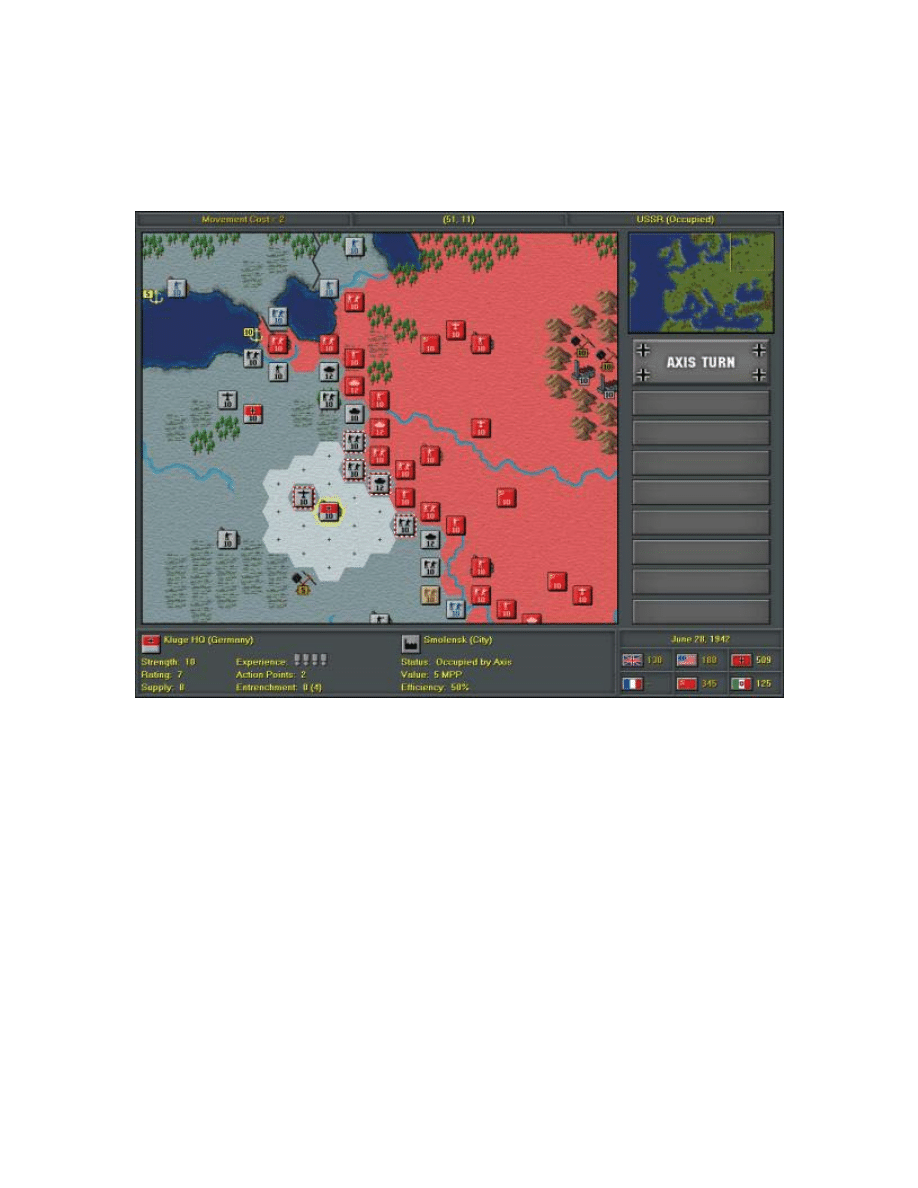
Whenever an active land unit has been selected with a left mouse click, its full movement
range is highlighted on the map as shown below.
Then depending upon the current mouse position, the upper left hand corner of the screen
will display the total movement cost including all associated terrain penalties as well as
an additional action point penalty if attempting to move through two or more adjacent
enemy units. Left clicking on a destination hex will complete the movement.
OPERATIONAL MOVEMENT
An operational movement for land units consists of rapid transfers via rail or other land
transport from a unit’s current position to any valid city or fortification. Valid
destinations include only those from which an unbroken path of friendly land hexes can
be followed from the selected unit to final destination. Thus, land units cannot be
operationally moved over water and not while trapped somewhere behind enemy lines.
Other restrictions include sufficient MPP to pay for the operational movement (10% of
unit’s current production cost), the unit’s supply value must be >= 5, and the destination
city or fortification must have an operational efficiency of >= 50% as well.

27
In order to operationally move a land unit you must right click on the unit and select
Operate from the drop down menu. Left clicking on any one of the highlighted
destination hexes will complete the movement.
NAVAL TRANSPORT
Naval transport consists of loading a land unit onto a transport in order to move across a
body of water. In general, all land units can be transported except rocket detachments
and the cost of transport is 10% of a unit’s current production cost.
In order to transport a land unit, the unit must be still be active and located adjacent a
friendly port with an operational efficiency >= 50%. Then by right clicking on the unit
and selecting Transport from the drop down menu, the land unit will be replaced by a
transport icon either directly on top of the port hex or right next to it. This step can then
be repeated until all water hexes adjacent the friendly port have been filled up. The
transported unit can then be immediately moved to within the limit of its action point
radius. On your next turn, the unit can then be unloaded either into a friendly port or onto
friendly or enemy territory. See the Amphibious Landings section under Naval
Movement for further detail.
AIR MOVEMENT
Air unit movement is divided into two main areas: re-basing and operational
movement.
RE-BASING
Since air units must be able to re-locate themselves as frontlines continuously change,
they can be re-based up to the full range specified by their action points value. Unlike
land units however, air unit movement is not penalized by terrain costs or enemy unit
positions and can thus be re-based to any friendly hex, including those behind enemy
lines or even across bodies of water.
In order to re-base an air unit, select any active air unit and then left click on one of the
highlighted destination hexes to complete the movement.
OPERATIONAL MOVEMENT
An operational movement for an air unit consists of the rapid transfer of an air fleet or
group of strategic bombers from one battlefront to another. Since air units are not
penalized by terrain or enemy unit positions when moving, valid destinations can include
any friendly city or fortification with an operational efficiency of >= 50%, regardless of

28
its map location. Other restrictions include sufficient MPP to pay for the movement
(10% of the current production cost), as well as a supply value of >= 3 for the selected air
unit.
In order to operationally move an air unit, right click on the unit and select Operate from
the drop down menu. Left clicking on any one of the highlighted hexes will complete the
movement.
NAVAL MOVEMENT
Naval unit movement is divided into two main areas: regular movement and
amphibious landings.
REGULAR MOVEMENT
All naval units can be moved by first selecting the unit and then left clicking on any one
of the highlighted destination hexes.
AMPHIBIOUS LANDINGS
A transported land unit can be unloaded in one of two ways: either in a friendly port or
onto friendly or enemy territory. When choosing to unload in a friendly port you must
first move the unit to the desired port hex and finish its movement. The unit will remain
active however, but you will only be allowed to unload it by either left clicking on it
again, or by right clicking and selecting Unload from the drop down menu. Left clicking
on any one of the highlighted hexes will complete the movement.
The obvious advantage of unloading a transported land unit through a friendly port is that
the entire sequence can be completed in a single turn. The only other option which takes
two turns would be to move the transported unit next to the territory you wish to unload
to and wait until the next turn to actually unload the unit. Also when unloading onto
enemy territory there is a 40% chance that a landing casualty penalty may be incurred.
The landing casualty penalty can be a loss of anywhere between 1 and 5 strength points.
COMBAT
There are three basic types of combat: land, air and naval. While most units can
participate in both attack and defence sequences, some restrictions do apply and will be
further explained in the sections below:
29
LAND COMBAT
A land unit can participate in two different modes of combat: regular or blitz.
REGULAR COMBAT
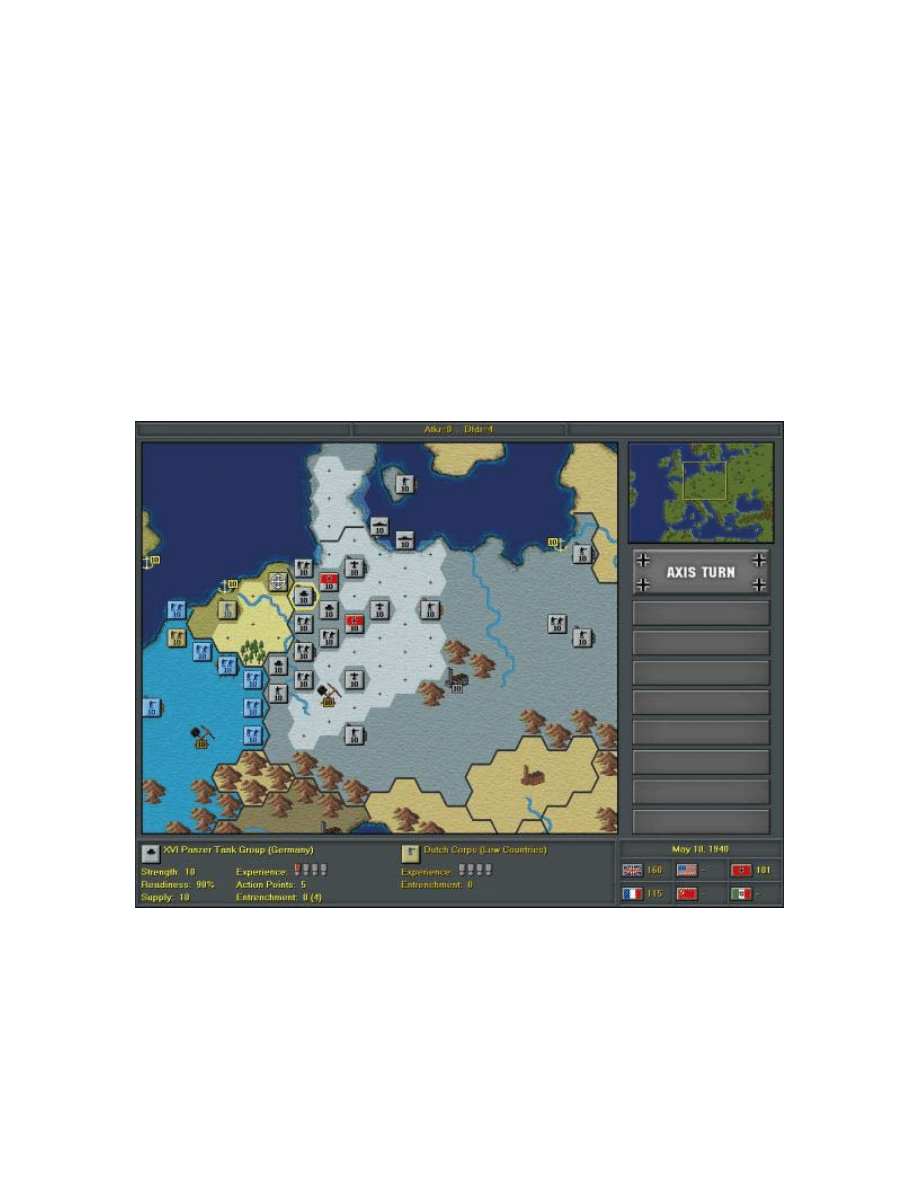
Regular combat is whenever a land unit has been selected to attack another unit without
moving first. This can be achieved by left clicking on a unit and then moving the mouse
cursor over an enemy unit until a valid target is found. Valid targets are those that are
within strike range of the attacking unit. Once a valid target has been found, both the
attacker and defender information is shown at the bottom of the screen as well as the
expected combat losses at the top middle portion of the information bar. This can be seen
below:
In general, the distance from which any unit can attack is limited to its strike range.
While most land units have a strike range of 1 hex, rocket detachments can achieve
greater range through research and development. See the Research and Development
section for further detail on developing rocket technology. The only other consideration
for land units is that HQ units cannot attack since they are administrative in nature. See
the Land Units section for further detail on HQ units.

30
BLITZ ATTACK
A blitz attack is when a land unit first moves and then attacks an enemy unit. The same
limits on strike range apply but they are calculated from the final attacking position of the
land unit and not from its original position. Also whenever a unit is used to attack, in
either regular or blitz attack, this finishes its movement until the next turn.
AIR COMBAT
Air combat is divided into three main areas: interdiction, strategic bombing, escort
duty and defensive activation.
INTERDICTION
Both air fleets and strategic bombers can attack ground units as part of their regular
combat capabilities. However, air units can only attack if they have not yet moved and
the enemy target is located within their strike range. An attack by any air unit completes
its movement for that turn.
STRATEGIC BOMBING
Both air fleets and strategic bombers can attack strategic resources including all cities,
fortifications, ports, mines, and oil production areas. In general, the effects of strategic
bombing can greatly reduce an opponent’s ability to wage war and can thus be extremely
valuable when properly executed.
Primarily, strategic bombing will reduce the operational efficiency of a strategic resource
and can have the effect of rendering it almost useless for those units that depend on it for
supply. Also, if a city or fortification is sufficiently damaged (operational efficiency <
50%) then it will be excluded as a valid destination for operational movement. The final
benefit from strategic bombing is that it will not only immediately reduce an opponent’s
MPP based on the amount of damage incurred, but will also reduce the number of MPP
an enemy can collect at the end of their turn. This of course can affect the production
power of any country that has been effectively targeted through strategic bombing.
ESCORT DUTY
Air fleets may be automatically activated in an escort role when a strategic bomber run is
likely to encounter enemy interceptors. This will happen whenever an escorting air fleet
is within action point range of an attacked unit/resource and if the escorting air fleet has
not yet moved with a strength value >= 5. Generally, this duality makes air fleets
extremely useful when properly located on the map.

31
DEFENSIVE ACTIVATION
Air fleets may be automatically activated in a defensive role whenever an enemy’s air
unit is attacking a friendly target. This will happen whenever a defending air fleet is
within action point range of an attacked unit and if the defending air fleet has a strength
value >= 5. Generally, this duality makes air fleets extremely useful when properly
located on the map.
NAVAL COMBAT
Naval combat is divided into three main areas: regular, advanced strike, and shore
bombardment.
REGULAR COMBAT
A naval unit that attacks another naval unit within its strike range prior to moving is
considered part of regular naval combat. The strike range for naval units can vary and
depends on the type of unit involved. See the Combat Target Values Table for further
detail.
ADVANCED STRIKE
An advanced strike is whenever a naval unit has moved and then attacked. This type of
attack can be extremely effective since it greatly increases a naval unit’s strike range with
respect to its original position. Carriers for example, can often strike deep into an
enemy’s territory when participating in an advanced strike.
SHORE BOMBARDMENT
Shore bombardment can be commenced at any time and at any land or air unit as well as
strategic resources. The shore bombardment of defensive units can be helpful in the
preparation of an amphibious assault, while bombardment of strategic resources is treated
the same as strategic bombing of resources by air units.
PURCHASING UNITS
Units can be purchased at any time during your turn by selecting the PURCHASE
UNITS button from the Game Menu. While there are no restrictions on the number of
units that can be purchased, purchases themselves are limited to only the major
combatants including the United Kingdom, France, USA, USSR, Germany and Italy.
32
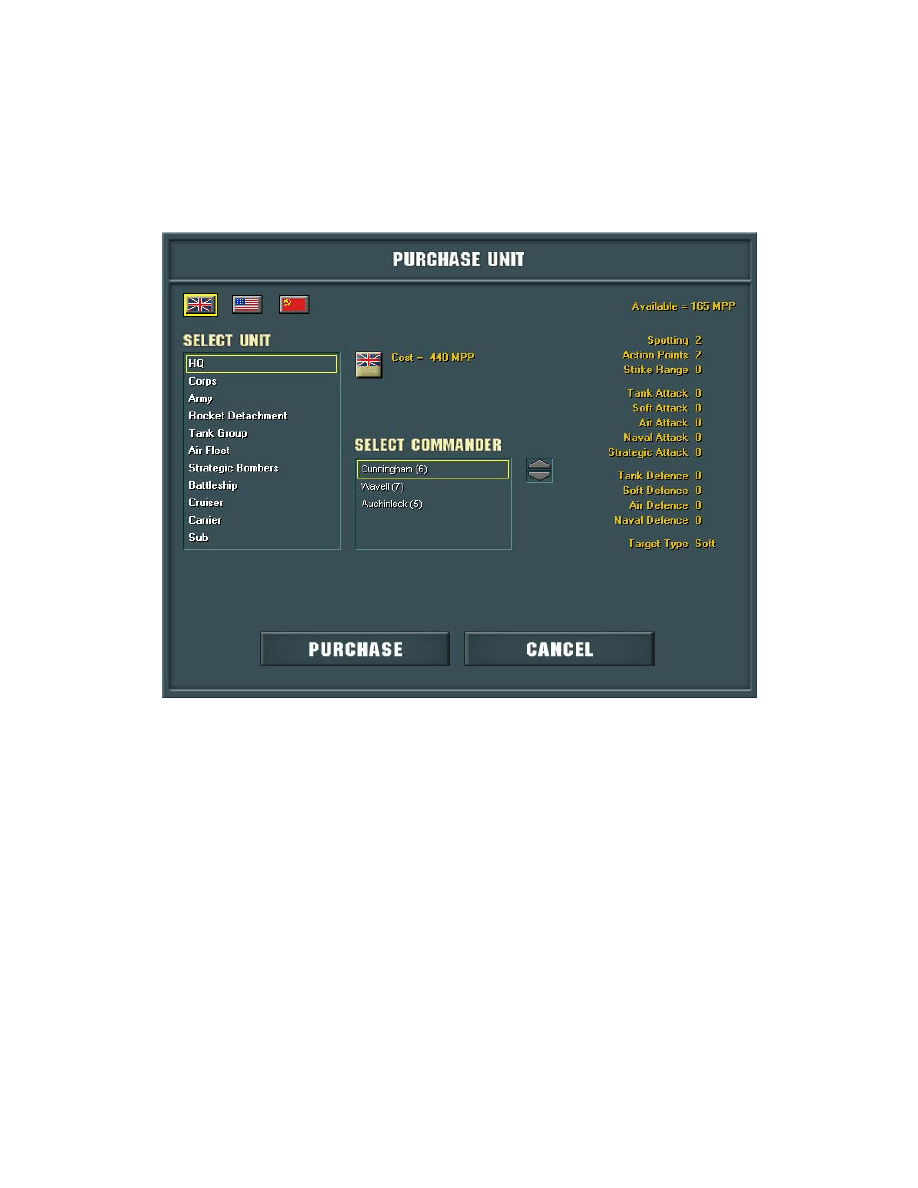
Once the Purchase Unit Dialog appears, a list of available units will be shown on the left
hand side, and a breakdown of their combat benefits located in a single column on the
right. Other information included is an image of the unit, its target type, as well as the
cost of the currently selected unit. This is all shown in the figure below:
REINFORCING A UNIT
A unit can only be reinforced if there is sufficient MPP available, if it has not yet moved,
and it’s current supply value allows for an increase in strength.
In order to reinforce a unit, right click on the unit and select Reinforce from the drop
down menu.
RENAMING A UNIT
In order to rename a unit, right click on the unit and select Rename from the drop down
menu.
33
DISBANDING A UNIT
Units were often disbanded when they were no longer deemed necessary and military
funds would be better allocated to other areas. Any unit that is disbanded results in the
immediate recovery of MPP, and is based upon a unit’s supply
Recovered MPP = 5% unit’s cost * greatest value of unit’s supply or strength
To avoid abuse of the disband feature, only land and air units can be disbanded and they
must have a supply value > 0 and no enemy units next to them.
In order to disband a unit, right click on the unit and select Disband from the drop down
menu.
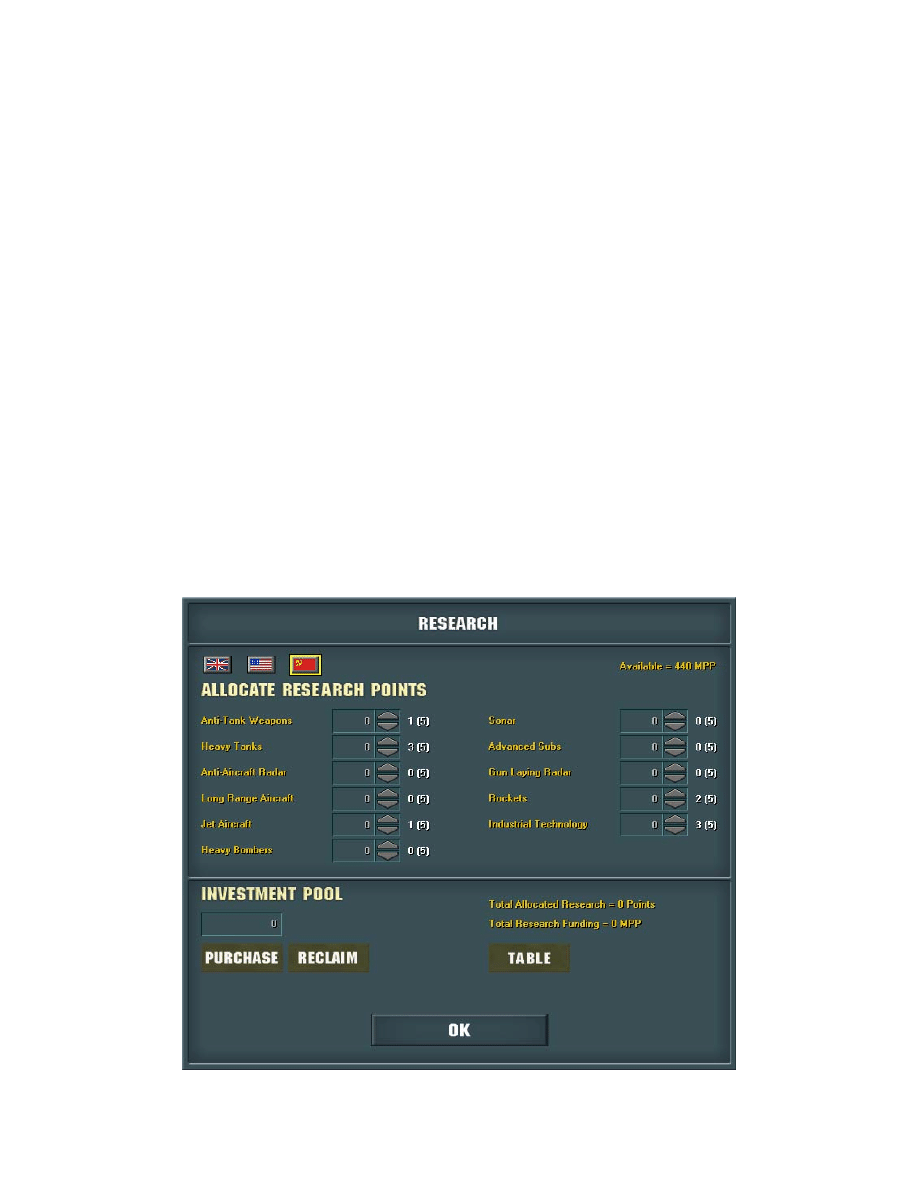
CONDUCTING RESEARCH
Research can be conducted at any time during game play by selecting the RESEARCH
button from the Game Menu. Only the major combatants can conduct their own research
and development, and any benefits achieved will immediately update all relative units on
the map.
34
For more information on the benefits and costs of research and development, please see
the Research and Development section.
DECLARING WAR
Whenever you declare war on another country, that country will automatically join your
opponent’s side. While you may benefit from the combat experience and plundered
resources, there may be a political price to pay with respect to major neutral countries
such as Italy, the US or even the USSR. For more detail on political costs, please refer to
the Politics section.
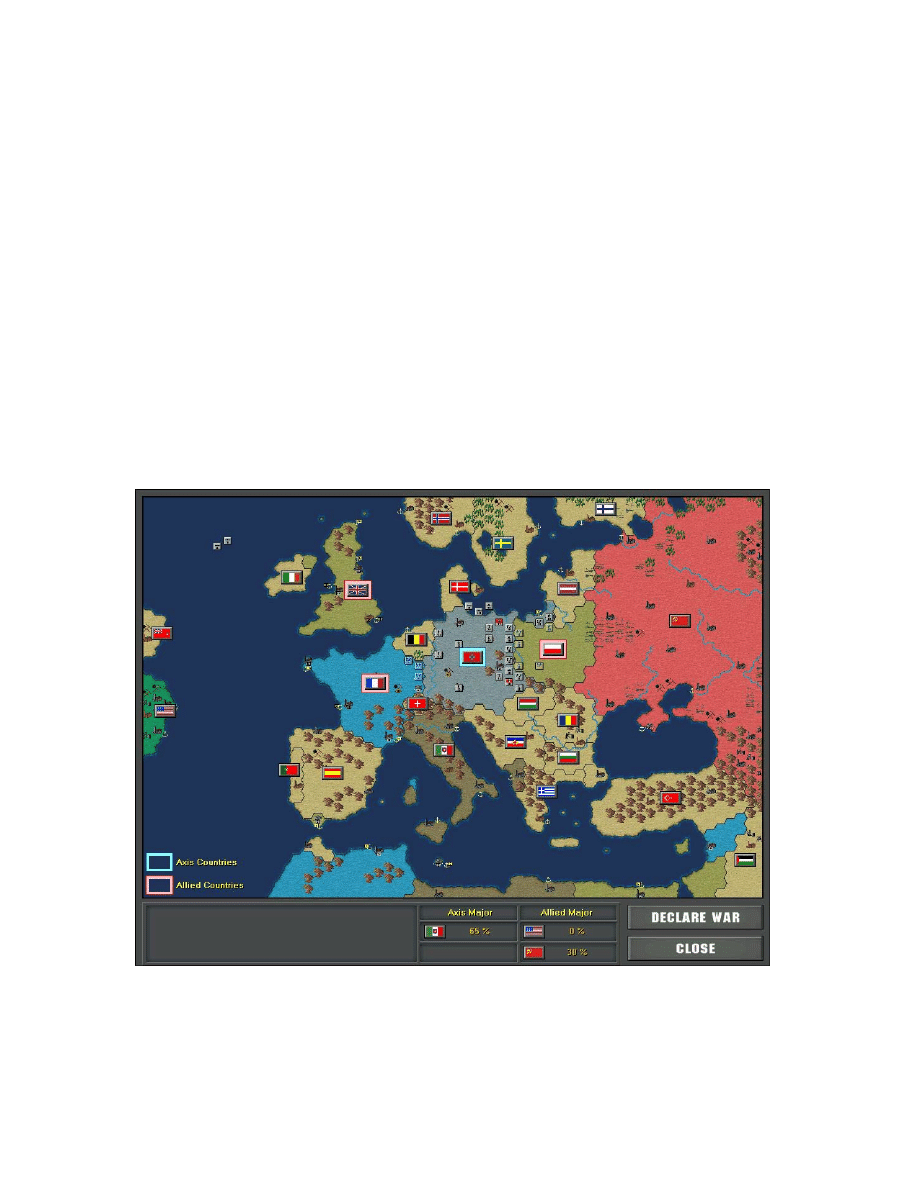
In order to declare war on another country you must first select the WAR MAP button
from the Game Menu. This will display a map of the entire European Theater outlining
the current Axis and Allied alliances as well as the remaining neutral countries.
You can then declare war by left clicking on a neutral country’s flag and selecting the
DECLARE WAR button. You will now be at war with this country and be able to cross
their border and attack their defences. Note: Declarations of war may have an impact on
35
other Major countries as the lower table in the War Map indicates. For further detail
please refer to the Politics section.
INTELLIGENCE REPORTS
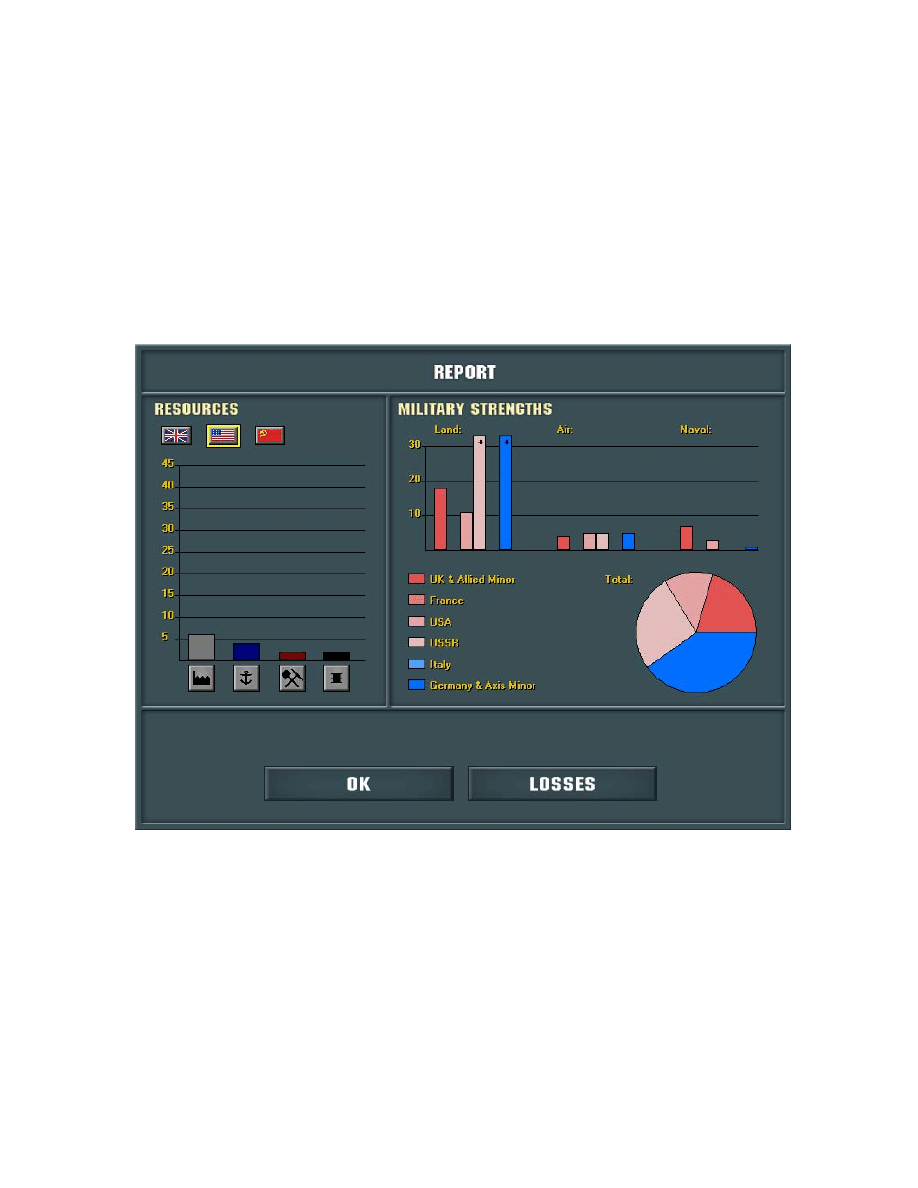
Intelligence reports can be retrieved at any time by selecting the REPORT button from
the Game Menu. The following is an example of how the Report Window may appear in
the game:
The bar graphs on the left hand side indicate the number of resources currently controlled
by all major countries on your side, and on the right half of the window the bar and pie
graphs reveal current strengths with respect to all land, air and naval units on the map.
36
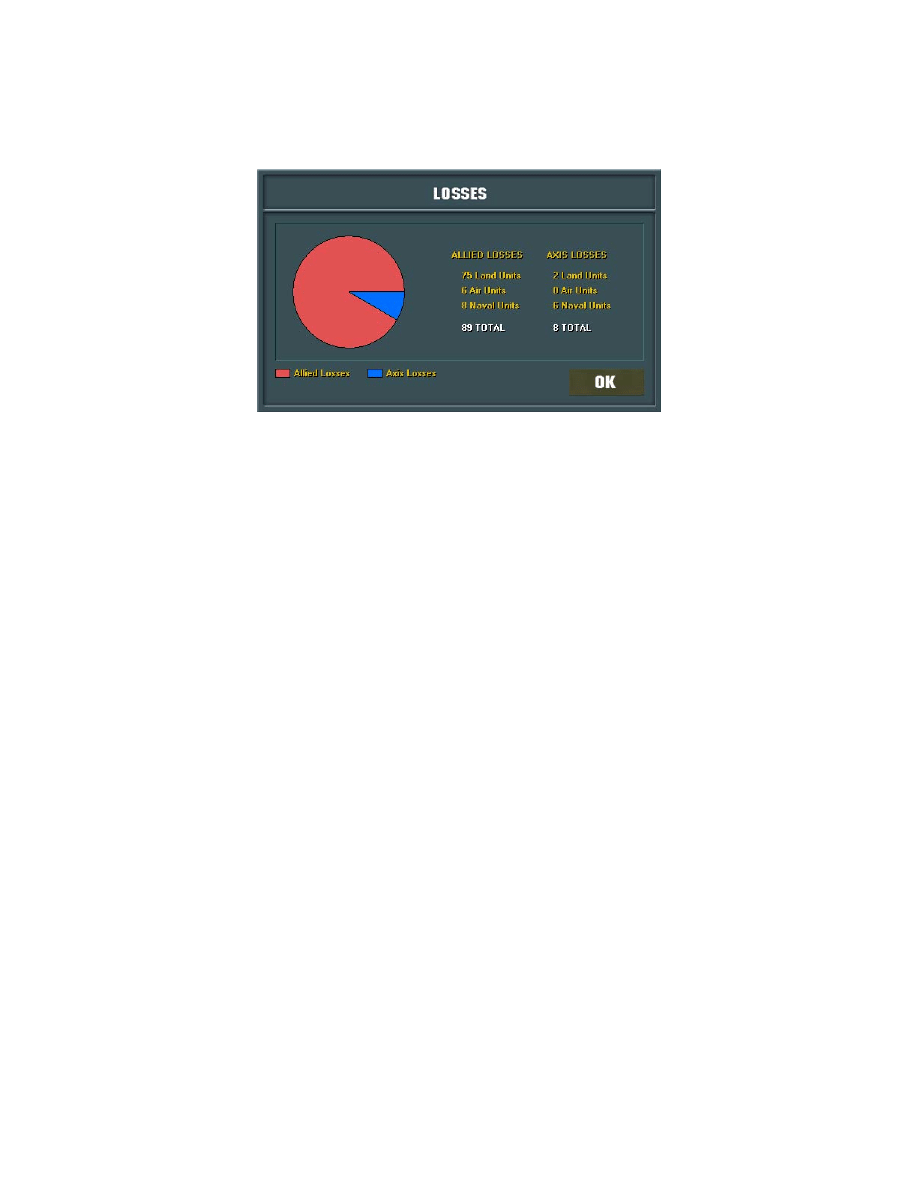
Overall losses can also be shown by selecting the Losses button and will appear as
follows:
ENDING A TURN
A turn can be ended at any time by selecting DONE from the Game Menu. If playing a
PBEM game you will be asked to provide or select a name to save the game as and then
you will be returned to the Main Menu. All other games will proceed to your opponents
turn.
SAVING
A game can be saved at any time by selecting SAVE from the Game Menu. Once
selected you will be asked to provide or select a name to save the game as. As a backup
precaution, all games are also auto saved at the beginning of each turn in a file called
‘autosave.sav’.
QUITTING THE GAME
In order to quit the game select QUIT from the Game Menu.

37
V. SPECIAL RULES
VICHY FRANCE
If France surrenders then a Vichy France state is automatically created encompassing
southern France as well as its former North African and Middle Eastern territories. The
state of Vichy France is then considered neutral and will remain as such unless attacked
by either the Axis or Allied sides.
MOVING CAPITALS
This rule applies to the United Kingdom, the USSR as well as Vichy France. In the first
case if London is captured by the Axis then the UK government will attempt a move to
Manchester if it is still available. In the second case, if Moscow is captured then the
USSR government will attempt to move to either Sverdlovsk in the Urals or Stalingrad.
For Vichy France, if the capital in Marseilles is captured then the Vichy France
government will attempt a move to Algiers if this city is still under Vichy control.
SURRENDERING NATIONS
A country will only surrender if their capital has been captured and if enough of their
current land forces have been destroyed. This can be beneficial for some countries to
keep the fight going even if they have lost their capital and could in turn serve as a
nuisance to those who were looking for a quick victory over their opponents.
Each victory over an enemy country will result in a plundering bonus. Plundering
amounts vary between minors and majors and may also depend on the difficulty setting
chosen when playing against the computer.
SURFACE RAIDERS
On top of their regular naval capabilities, axis subs can be used as surface raiders in
either the North Atlantic or Mediterranean in order to disrupt allied shipping income. In
the North Atlantic axis subs must be in range of either St. John’s or Liverpool, and in the
Mediterranean within range of Gibraltar, Malta and/or Alexandria. Resulting Allied MPP
losses will be determined by a random value based on sub strength in the area as well as
potential MPP income from these resources. The only restriction to surface raiders is that
they must not be presently engaged with other allied naval units.
38
PRODUCTION IN OCCUPIED TERRITORY
Production in occupied territory can only be built in the occupied city and not placed in
friendly hexes that surround the city as is the case in your home country.
GIBRALTAR
Normally only units friendly to the current control of Gibraltar can pass through this
straight, but if an enemy force reduces the port strength of Gibraltar to zero, then
subsequent enemy ships may also pass through this straight as well.
VICTORY CONDITIONS
Total victory is achieved whenever you have successfully defeated all currently activated
major countries in the game. So, if for example you are playing as Axis and the only
major Allied countries that are at war with you are the UK and France, and they have
both subsequently surrendered to you then the game will end in your victory.
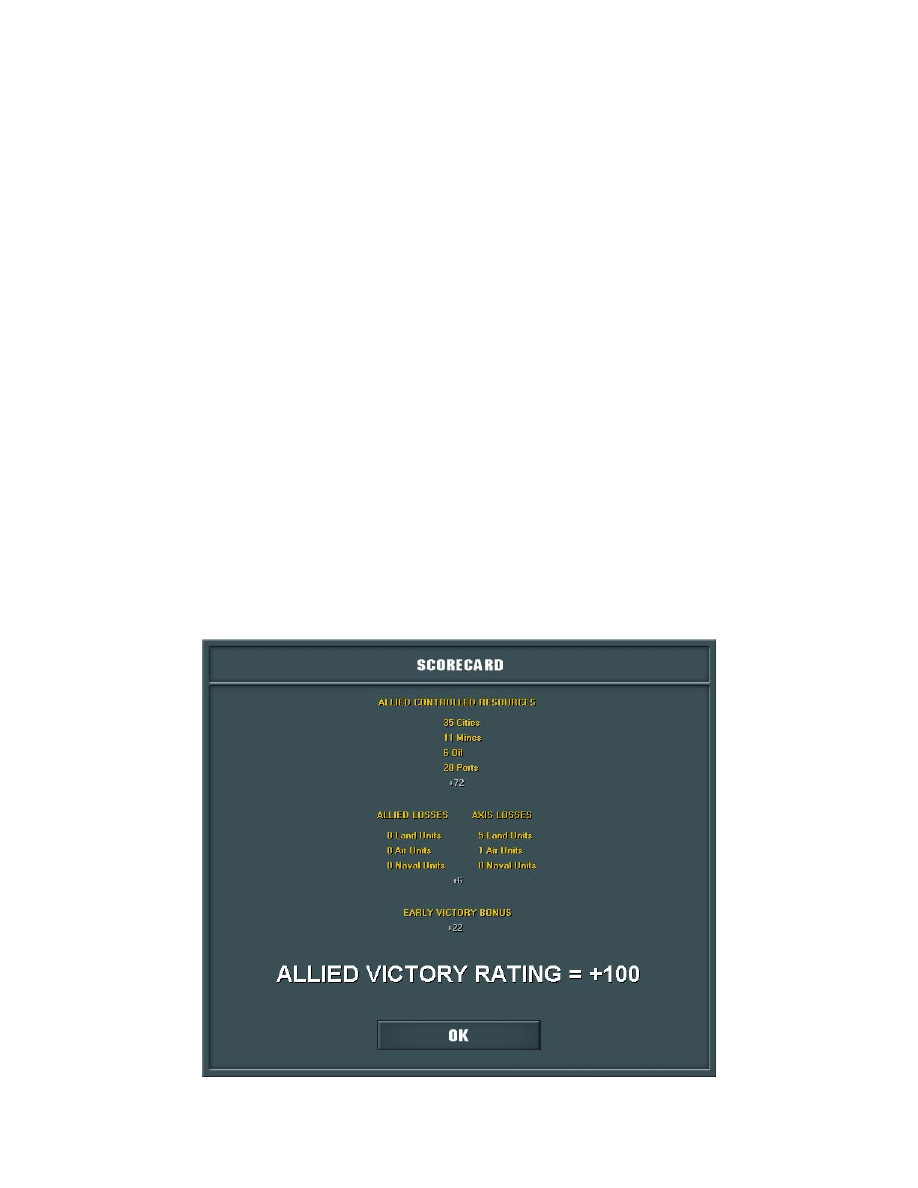
Once total victory is achieved a victory Scorecard will be displayed that will include
points for total resources controlled, losses inflicted upon your opponent as well as an
early victory bonus or late victory penalty. The Scorecard may look something like this:

39
VI. STRATEGY & TIPS
AXIS STRATEGY
Since the Axis side will pretty much be at an economic disadvantage for most of the war,
aggressive game play, use of surface raiders, active research and development and the
plundering of resources may be the only path to victory.
In Germany’s first two front situation of the war Fall Weiss, the UK and France are
positioned in the west while Poland occupies the eastern interest of Germany’s war
machine. Quick victory over the Poles is essential and will ensure that the Western Allies
do not have enough time to mount an offensive on your western border. Sufficient build-
up towards France will then be required and/or perhaps a quick series of battles over
Denmark, Norway and the Low Countries to add to the MPP coffers. At this point
operation Fall Gelb should be performed to at least eliminate the French army on the
European mainland and open up the rest of Europe to potential Axis domination. An
invasion of England could be attempted, or perhaps more attacks on smaller countries
could be mounted as you prepare for the Russian bear. Keep an eye on the US and USSR
join percentages in the War Map, and when playing safe try and avoid declaring war on
countries that were traditionally neutral or at least within the Soviet sphere of influence in
order to keep their interest low. By May of 1941 initial preparations should be in place
for Barbarossa and the conquest of the USSR. Encirclements, successive victories and
rapid drives to Moscow, Leningrad and Stalingrad will be vital before the Soviets are
able to regroup and reorganize their defence forces. Scorched earth, supply problems,
partisans, the transfer of Soviet troops from Siberia, and the eventual entry of the US
armed forces will make a quick victory all the more difficult but not impossible.
ALLIED STRATEGY
The Allied side is generally in a much better situation economically than their Axis
counterparts, but do suffer from smaller sized and less experienced armed forces in the
early stages of the war. As a result, Allied strategy can be of a much more wait and see
style doctrine where holding the line and constantly building up your forces is often all
that can be done to hopefully turn the tide.
Hanging on for dear life is critical in the early years of the war. By Fall Gelb, France
will be in a precarious fight for survival while the UK has the choice of shoring up the
French defences or leaving it’s units on the English island to prepare for a probable Axis
invasion. Delaying the capture of Paris as well as protecting the UK navy for future
defence may be more than enough to guarantee long-term survival. Prior to US and
USSR involvement, the UK should actively protect resource rich areas such as the

40
Middle Eastern oilfields in Iraq from Axis expansionism. Even defending a neutral area
that does not add to your own MPP income can be beneficial as it denies these resources
to your enemy as well. Once the USSR gets involved, using the scorched earth defensive
strategy is a very effective way to prolong the battle for Mother Russia. Keeping a
minimal defence on the front lines and pulling back the bulk of your forces to defensive
positions deep in Russia and behind river hexes may cause your Axis opponent to
overrun their supply and grind their offensive to a minimal pace. This may at first seem
to be a risky strategy, but does allow for a masterful counterstroke as opposed to
constantly taking losses in a perpetually defensive posture. US involvement allows for
more of an active role in the west as your combined UK and US forces can occupy Axis
attention in either North Africa, Italy, or perhaps a quick drive through France. Bombing
campaigns from England and persistent threatening postures in the aforementioned
theatres can often be more than enough to distract Axis forces from Russia and take some
of the pressure off the USSR. A combination of these tactics can often snatch victory
from the jaws of defeat.
GENERAL TIPS
Probably the most important tip is effective use of HQ’s. HQ’s can make or break an
offensive or defensive situation. HQ’s not only add readiness and combat morale bonus
to units under their command but can also influence supply and ultimately combat
outcomes as seen in the Unit Formulas section. Other tips include keeping an eye on the
War Map join percentages when playing in random mode as well as experimenting with
Research and Development. Different strategies warrant different forms of R&D so
some might be better suited than others depending on the needs of your war machine.

41
VII. CAMPAIGN
EDITOR
CREATING A NEW CAMPAIGN
Once the Campaign Editor has fully loaded you will be able to create a new campaign by
selecting File -> New Campaign from the main menu bar at the top left of the screen.
This will initialize a blank campaign template from where you will be able to edit
parameters including currently active countries, research, controlled territory, number of
units, unit characteristics such as entrenchment levels and so on.
OPENING AN EXISTING CAMPAIGN
In order to open an existing campaign, select File -> Open Campaign from the main
menu bar at the top left of the screen. This will open a dialog window that references
your current campaign selections from the Campaign folder. You may also open the
original campaigns that come with the Strategic Command package, but any standard in-
game campaigns will be overwritten and flagged as custom unless otherwise renamed
when saving.
Caution: In order to preserve the standard in-game campaigns, please back these files up
in a safe location on your system, or use custom campaign names to protect these original
files.
SAVING CAMPAIGNS
There are two options to save a campaign using the editor, File -> Save or File -> Save
As. Using the first one will save the campaign with the current file name, while the
second option allows you to rename the file prior to saving.
ACTIVATING COUNTRIES
To activate a country in the campaign editor, select the country you wish to activate in
the Activate Countries drop down list and then select any one of the available options for
it’s activation status. Clicking on the Update button will complete this action.
Activated countries will then be shown on the map as either having ‘Joined’ or
‘Surrendered’ with the exception of the Baltic States since it also has the option of being
activated by ‘Annexation’. If the ‘Joined’ option has been selected then the country will
42
appear on the map with a military force comparable to what it would have had around
September 1, 1939. To edit the number of units or specific unit characteristics such as
strength, or name etc., please refer to the Adding Units and Editing Units sections
explained further below.
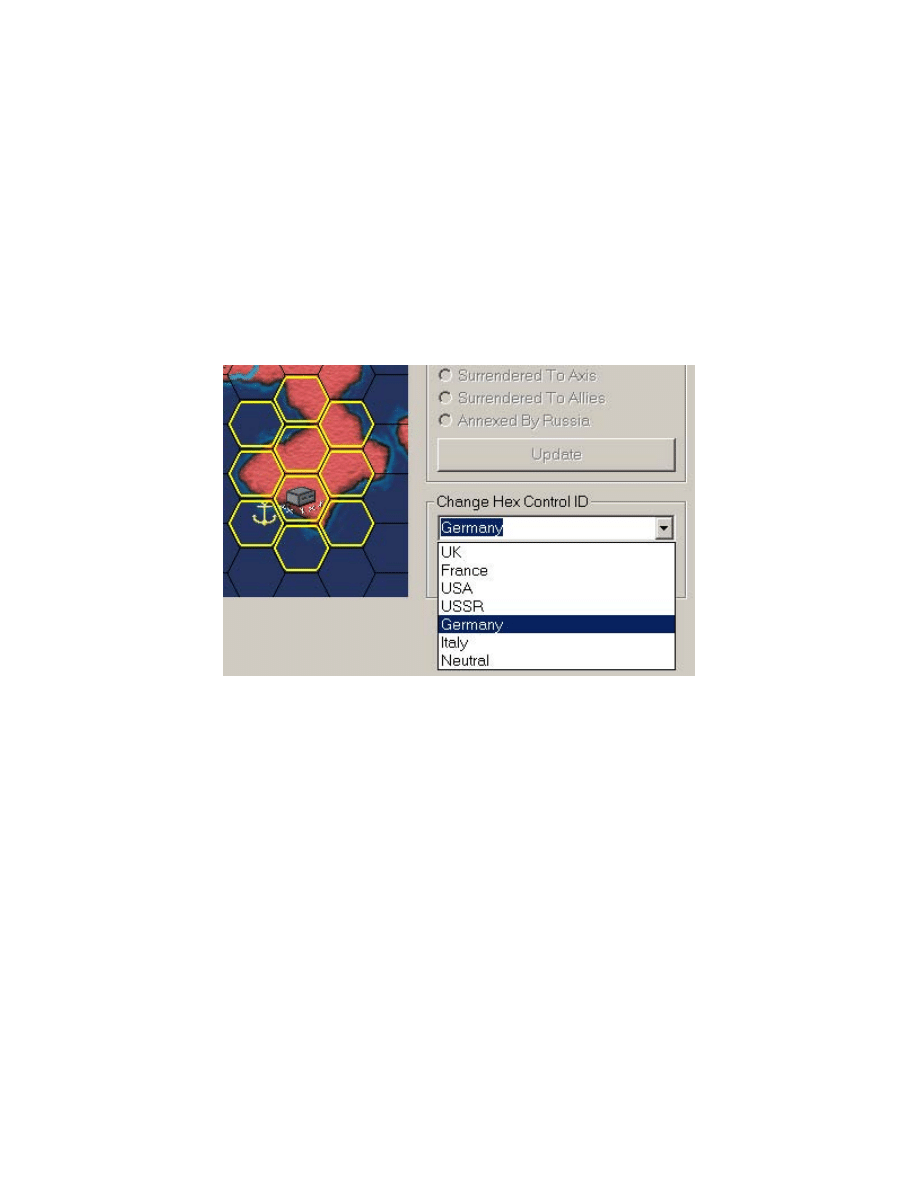
CHANGING HEX CONTROL
In order to change hex control on the map, left click any hex(es) that you wish to change
and then select the new control ID by choosing a major country in the Change Hex
Control ID drop down list. Clicking on the Update button will complete this action.
ADDING UNITS
In order to add units to the map you must fist click on the Add Unit button. A small
dialog window will appear that will allow you to select new units from one of the six
major Axis or Allied countries. Once you’ve clicked OK, the dialog window will be
hidden from view and you must then left click on the map for the desired placement
position to complete the addition. Right clicking will cancel the action. Note: The
selection of units must be made from a country that is currently activated.
SETTING UP RESEARCH LEVELS
Changing the research levels for the current campaign can be done by clicking on the Set
Up Research Levels button.

43
EDITING CAMPAIGN DATA
By clicking on the Edit Campaign Data button you will be able to edit the campaign
description text, start date, side that starts, initial join percentages for Italy, the US and
USSR, toggle the flag for the transfer of the Siberian Army as well as edit the initial
MPP’s for the six major Axis and Allied combatants.
EDITING UNITS
In order to move, delete, rename or set the strength/entrenchement/experience of a unit,
simply right click on the unit and then select the appropriate option.
LIMITATIONS
All campaigns must have a start date that is greater than September 1, 1939 and less than
May 7, 1946. In addition, due to internal game mechanics each of Poland, England,
France and Germany must be activated as either ‘Joined’ or ‘Surrendered’.

44
VIII. TROUBLESHOOTING
INSTALLATION ISSUES
Problem: Setup halts part way through the install process. May indicate a problem
reading a specific file or resource.
Cause/Solution: Could be a dirty or scratched CD. Advise to do the following: Use
some rubbing alcohol and dilute it with water (about a capful total) Dip a cotton swab
into the solution and then gently rub the soaked swab across the shiny surface of the CD.
Be sure to work any area that show smudges or scratches. Let the CD air-dry. Reinsert
the CD and try to reinstall. You can also use any aftermarket CD Cleaning kit or cleaning
system to do the above.
VIDEO ISSUES
Problem: The game seems to run at a very low refresh rate causing my monitor to whine
or flicker more than I am used to.
Cause/Solution: Initially SC was designed to run at the highest refresh rate possible at a
resolution of 1024x768 on your system, but it was found that some computers were
inaccurately reporting what refresh rates were properly supported at this resolution. This
most often occurred with systems that did not have a proper monitor driver installed and
were using the Windows default monitor driver. In this case, higher than supported
refresh rates were reported supported by the video card that the monitor could not handle
resulting in blacked out screens and most often in undesirable rebooting.
If you know that your are sure that your system has the proper drivers installed and can
handle the highest refresh rates reported at 1024x768 then you will be able to run at this
refresh rate by editing the ‘SC.ini’ file and changing the line high refresh = 0, to read
high refresh = 1. In order to edit this file simply navigate to your SC installation folder
and right click and select Open on the file named ‘SC.ini’.
Problem: When I quit the game, my desktop icons are no longer in their original
locations.
Cause/Solution: SC is designed to run at a 1024x768 resolution and if your system is
currently set at a higher or lower resolution it may cause your desktop icons to become
partially rearranged. This is a problem with the Windows system not properly saving the
current desktop setup when switching from one resolution to another and there are a

45
number of third party utilities that work around this problem. One such utility is called
12Ghosts SaveLayout and is available at:
http://www.12ghosts.com/ghosts/sl.htm
.
Problem: When I click on the War Map, the game either freezes or the War Map
graphics appear corrupted.
Cause/Solution: This has been identified as a video driver bug that does not properly
support the standard Windows Stretch_Blt() function. Try downloading the latest video
driver or contacting your video card manufacturer.
SOUND ISSUES
Problem: The game loads properly and even plays the introduction music, but appears
to freeze as soon as I click on any button in the Main Menu.
Cause/Solution: SC uses a standard Windows multimedia capability known as MCI. It
was hoped that this would ensure seamless compatibility between all systems and
guarantee no sound issues, unfortunately this has not been the case. What is happening
here is that your sound card is not supporting asynchronous wav playback under MCI and
is actually waiting for the introduction music to finish playing before it can play the
button click wave file. To work around this issue please try either of the following:
#1 Try downloading the latest sound drivers for your card to see if this resolves the issue
of asynchronous wav playback for MCI devices
#2 Edit the ‘SC.ini’ file located in your installation directory and change the line that
reads sound interrupt = 0 to sound interrupt = 1. This will enforce sound interruption for
the game and will resolve the issue. In order to edit this file simply navigate to your SC
installation folder and then right click and select Open on the file named ‘SC.ini’.
46
IX. TABLES
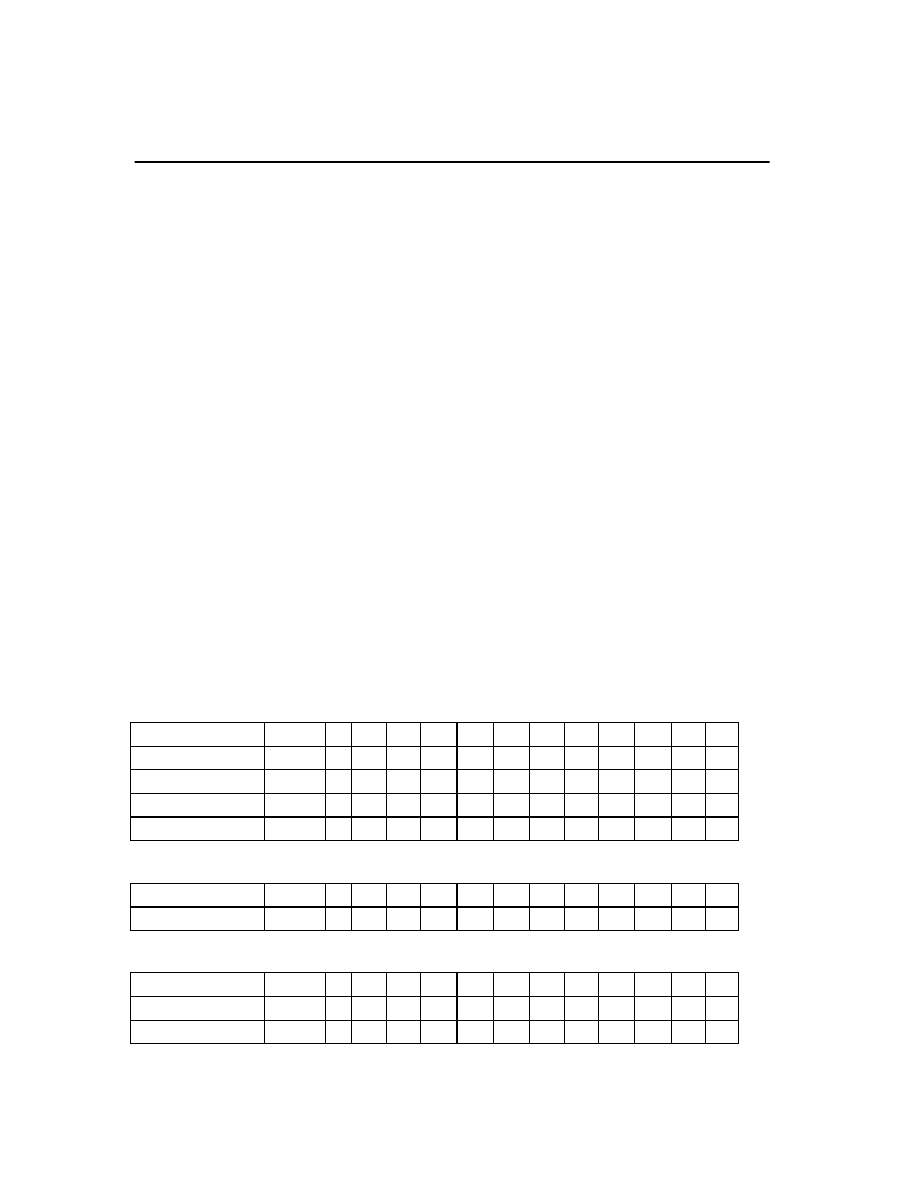
ABREVIATIONS
TT
S
TA
AA
NA
RA
TD
SD
AD
ND
AP
SR
Target Type
Spotting
Tank Attack
Air Attack
Naval Attack
Strategic Attack
Tank Defence
Soft Defence
Air Defence
Naval Defence
Action Points
Strike Range
MC
TDB
SDB
ADB
NDB
ME
Movement Cost
Tank Defence Bonus
Soft Defence Bonus
Air Defence Bonus
Naval Defence Bonus
Maximum Entrenchment
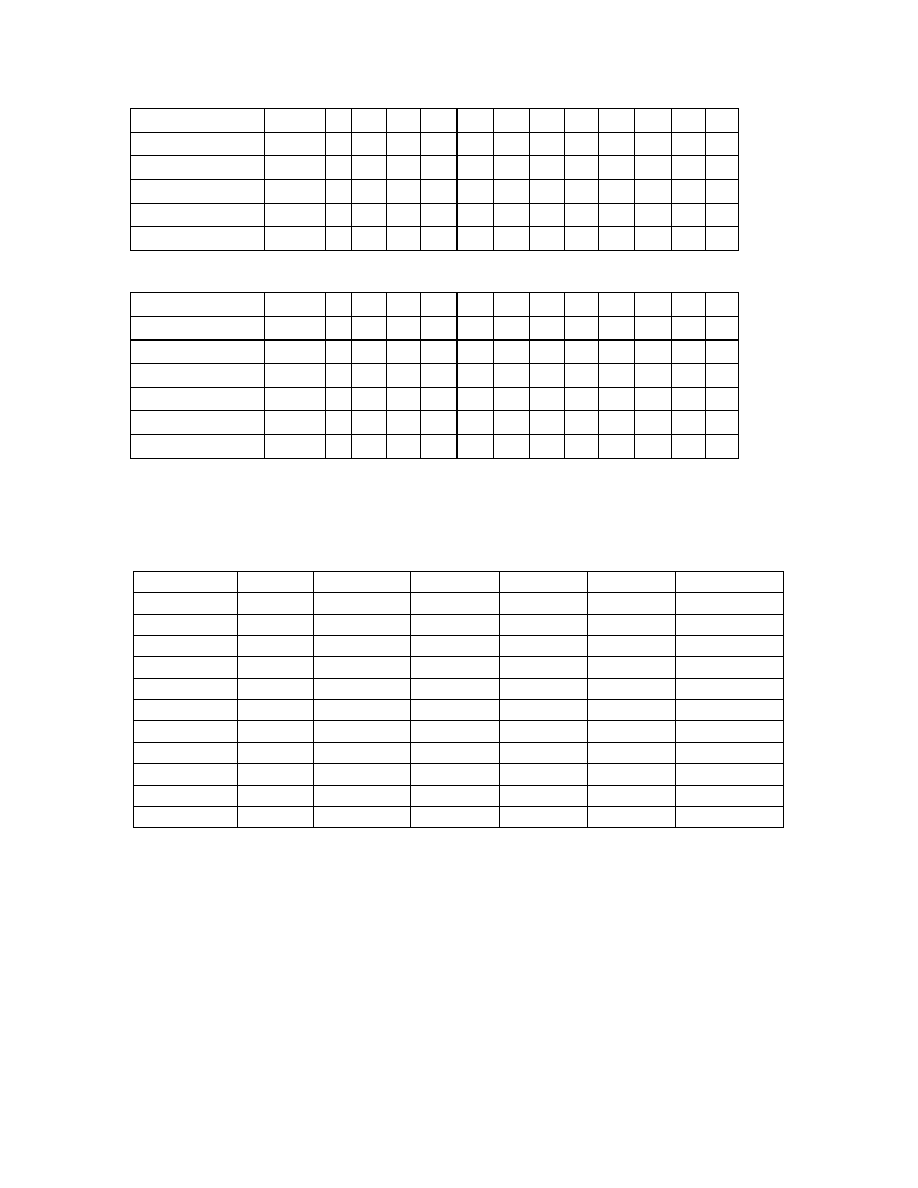
COMBAT TARGET VALUES
TT S TA SA AA NA RA TD SD AD ND AP SR
HQ
Soft 2 0 0 0 0 0 0 0 0 0 2 0
Corps
Soft 2 2 2 4 3 0 1 1 1 0 4 1
Army
Soft 2 4 4 8 6 0 2 2 2 0 3 1
Rocket
Detachment Soft 1 1 1 1 1 1 0 0 0 0 2 1
TT S TA SA AA NA RA TD SD AD ND AP SR
Tank
Group
Tank 2 5 4 8 2 0 5 4 3 0 5 1
TT S TA SA AA NA RA TD SD AD ND AP SR
Air
Fleet
Air 5 2 2 3 4 2 0 0 3 2 5 6
Strategic
Bombers Air 6 1 1 1 5 3 0 0 1 0 6 8
47
TT S TA SA AA NA RA TD SD AD ND AP SR
Battleship
Naval 2 1 1 1 4 2 0 0 2 3 8 1
Cruiser
Naval 2 1 1 1 3 1 0 0 2 2 9 1
Carrier
Naval 3 1 1 1 5 2 0 0 3 5 7 3
Sub
Naval 2 0 0 0 5 0 0 0 0 0 6 1
Transport
Naval 1 0 0 0 0 0 0 0 0 0 10 0
TT S TA SA AA NA RA TD SD AD ND AP SR
Mine
Strategic
1 0 0 0 0 0 0 0 0 0 0 0
Oil
Strategic
1 0 0 0 0 0 0 0 0 0 0 0
Port
Strategic
1 0 0 0 0 0 0 0 1 2 0 0
City
Strategic
1 0 0 0 0 0 0 0 2 2 0 0
Fortification
Strategic
1 0 0 0 0 0 0 0 2 2 0 0
Capital
Strategic
1 0 0 0 0 0 0 0 2 2 0 0
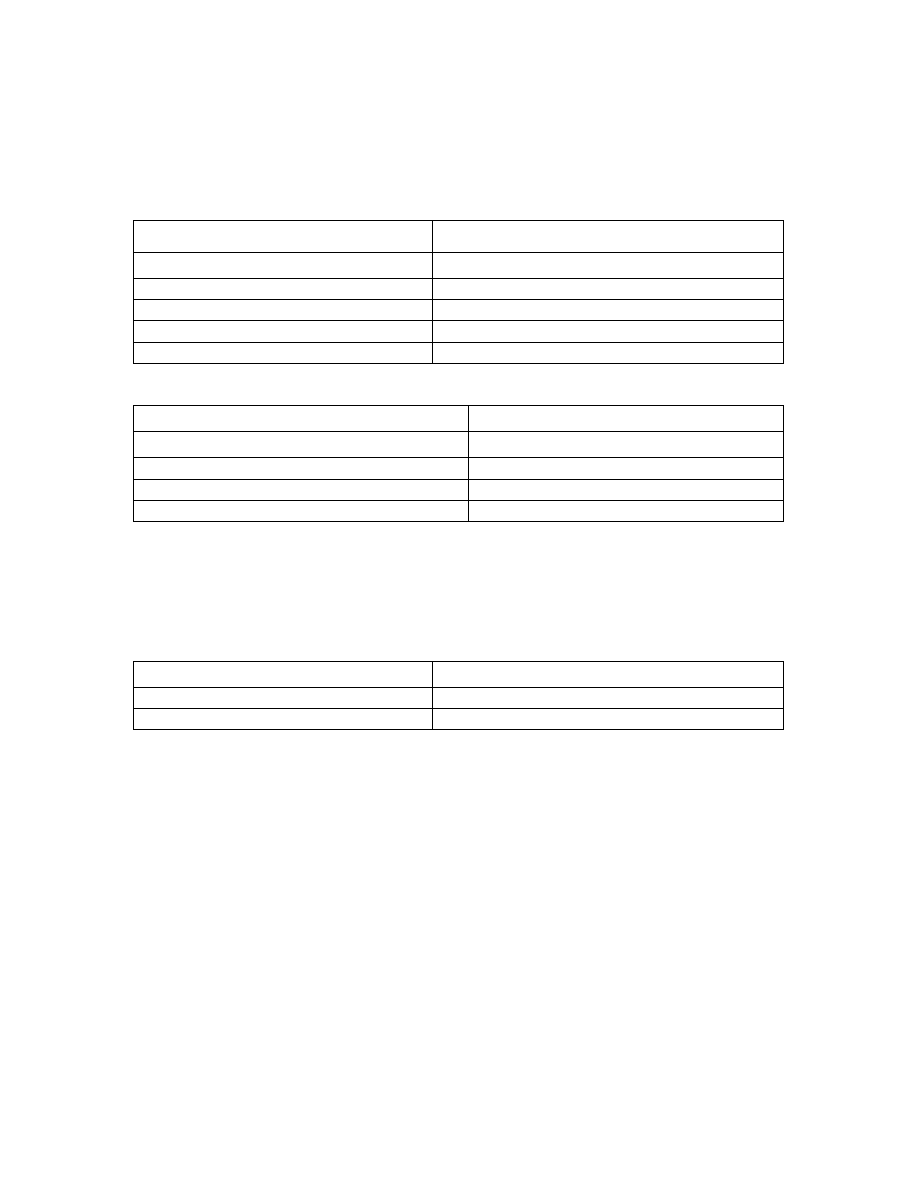
TERRAIN VALUES
MC TDB SDB ADB NDB ME
Clear
1 0 0 0 0 2
Forest
1 1 1 1 1 2
Marsh
2 2 2 0 0 0
Mountain 2 4 2 2 2 4
River
1 0 0 0 0 0
Mine
1 0 1 0 0 2
Oil
1 0 1 1 0 2
Port
1 0 0 2 2 0
City
1 2 1 1 1 4
Fortification
1 4 2 4 6 8
Capital
1 2 1 1 1 6
48
SUPPLY VALUES
LAND UNITS
IN LINE OF CONTROLLED TERRITORY
Unit Location
Unit's Supply Value
<= 10 Action Points to HQ
HQ Supply - Shortest Distance
<= 10 Action Points to Friendly/Occupied City
City Strength - Shortest Distance
> 10 Action Points of HQ
0
> 10 Action Points of Friendly/Occupied City
0
CUT OFF FROM CONTROLLED TERRITORY
Unit Location
Unit's Supply Value
Cut off from HQ but not Friendly/Occupied City
City Strength - Shortest Distance
Cut off from any valid City but not friendly HQ
HQ Supply - Shortest Distance
Cut off from any HQ and any valid City
0
Note: If a unit can be either supplied by an HQ or a friendly/occupied city then the greatest of the above
values will be taken for a unit’s supply
NAVAL UNITS
Unit Location
Unit's Supply Value
<= 10 Action Points to Friendly/Occupied Port
Port Strength - Shortest Distance
> 10 Action Points of Friendly/Occupied Port
0
Note: At the beginning of each new turn, naval units at sea maintain their last supply value – 1. The
greatest value then between this and the above calculated value will be the new supply value for each naval
unit.

49
X. TECHNICAL
HARDWARE REQUIREMENTS
MINIMUM
Pentium 166MHz, 32MB Ram
SVGA Video Card supporting 1024x768 high color (16-Bit) resolution
Windows compatible sound card
50MB Hard Disk Space
CD-ROM Drive
PREFERRED
Pentium 400Mhz, 64MB Ram
SVGA Video Card supporting 1024x768 high color (16-Bit) resolution
Windows compatible sound card
50MB Hard Disk Space
CD-ROM Drive
PLATFORM
Windows 95/98/ME/XP/2000
50
XI. CREDITS
GAME DESIGN AND PROGRAMMING
Hubert Cater
BETA TESTING
Steve Grammont, Jim Douglas, S. Otto Torriero, Paul Herman,
Pal Woje, Rolland Hellstrom, Ted Quincey, Dan Olding,
Bil Hardenberger, Martin Turewicz, Matt Faller, Charles Moylan
USER MANUAL
Hubert Cater
SOUNDS
Matt Faller
ARTWORK AND GRAPHIC DESIGN
Dan Olding, Bil Hardenberger, Hubert Cater
SPECIAL THANKS
Chico, Claudia Petracca, Tony Cater,
Paul Chagas, Claudio Sera, Fred Decarolis
BUILT WITH
© Copyright 2001-2002 Fury Software
Published under exclusive worldwide license by Battlefront.com, Inc. All rights reserved.
Wyszukiwarka
Podobne podstrony:
Strategic Command Senate Testimony 14 0227
Strategic Command manual
Strategie eksportowe europejskich MSP doc
Strategie konstruowania europejskiej jedności
Israeli Commander Crypto Is Strategic Element
Europejska Strategia?zpieczeństwa
Europejska strategia budowania społeczeństwa informacyjnego, Informacja Naukowa i Bibliotekoznawstwo
Strategia lizbońska, Integracja europejska
Integracja europejska, Strategie banków w dostosowaniu do wymogów UE, Strategie banków w dostosowani
Europejska Strategia Zatrudnienia
EUROPEJSKA STRATEGIA BEZPIECZEŃSTWA cześć I
Europejskie społeczeństwo informacyjne w Strategii lizbońskiej, Informacja Naukowa i Bibliotekoznaws
europejska strategia bezpieczenstwa, Warmiński
Europejska strategia zatrudnienia
STRATEGIA WYKORZYSTANIA FUNDUSZU ISPA (GRUDZIEN 1999), Księgozbiór, Europeistyka
Potrzeba nowelizacji strategii bezpieczenstwa Unii Europejskiej
Polska Strategia Bezpieczestwa Narodowego jako implementacja Europejskiej Strategii10
więcej podobnych podstron