
MiraScripts v03.60
User manual
A set of scripts for Magneti Marelli navigation system model
RT4 and RT5, to let you perform directly in your car some
useful action
Mira308sw
19/01/2012

Summary
Introduction ....................................................................................................................................................... 3
Useful Trick .................................................................................................................................................... 4
AGENDA.CMD .................................................................................................................................................... 5
CONFIGFLAG.CMD ............................................................................................................................................. 6
GPH_COPY.CMD ................................................................................................................................................ 8
HD_COPY.CMD ................................................................................................................................................ 10
HRDISPLAY.CMD .............................................................................................................................................. 11
JBX_COPY.CMD ................................................................................................................................................ 12
JBX_EXTRACT.CMD .......................................................................................................................................... 13
LRDISPLAY.CMD ............................................................................................................................................... 14
READ_CFG.CMD ............................................................................................................................................... 15
RRDISPLAY.CMD .............................................................................................................................................. 18
RT_COPY.CMD ................................................................................................................................................. 19
RTBI.CMD ......................................................................................................................................................... 21
RTXSERVICE.CMD ............................................................................................................................................. 22
RTxSET.CMD .................................................................................................................................................... 23
RTXud.CMD ...................................................................................................................................................... 26
SMS.CMD ......................................................................................................................................................... 27
SPY.CMD .......................................................................................................................................................... 28
Notes ............................................................................................................................................................... 29

Introduction
MiraScripts are a set of scripts for Magneti Marelli navigation system model RT4 and RT5, to let you
perform directly in your car some useful action just like well done by third-party PC utilities.
The primary step is to burn these scripts on a CD to be kept in the car, without the need to do the three
step operations (read in a car, modify on PC, write back in the car), as generally required by the PC utilities.
Just unpack all the files you found in the distribution archive, and burn a normal ISO9660 finalized CD. If
you wish, you can copy them into the root of a USB device.
MiraScript is now distributed in two version:
MiraScript 8.1x
this is for system with software version lower than 8.20
MiraScript 8.20
this is mandatory for system with software version from 8.20 to up, but work good
also in system with software version from 8.00 to up
In MiraScript for sw:8.1x, after coping to CD/USB, you must have four files in root and one folder:
BUILTINS.OUT
BUILTINS.OUT.inf
CD_VER.NAV
NAV_UPGRADE.CMD
/CMD (containing all the scripts as listed below)
In MiraScript for sw:8.20, after coping to CD/USB, you must have three files in root and two folder:
BUILTINS.OUT
BUILTINS.OUT.inf
POI_VER.POI
/CMD (containing all the scripts as listed below)
/UPG (containing the upgrade script only)
Just insert the CD in your RTx (or plug the USB device in), and it will be recognized like an update disk. The
user interface is very limited due to the RTx operating system limits, so expect a question dialog to appear
with simple YES or NO options. MiraScripts starts with the CMD launcher: it asks you what script to run. The
scripts are listed sequentially and when you select the one you wish, the launcher stops and runs the script.
Some scripts reboot the system at the end. Please, remember to disconnect any USB device and/or
eject CD before confirming the reboot. System reboot with a media inserted is not a serious problem, but
the boot time is longer than normal because the system checks if the connected media is an upgrade disk
and the MiraScripts will start immediately.

Scripts included are:
• AGENDA.CMD
• CONFIGFLAG.CMD
• FORMAT.CMD
• GPH_COPY.CMD
• HD_COPY.CMD
• HRDISPLAY.CMD
• JBX_COPY.CMD
• JBX_EXTRACT.CMD
• LRDISPLAY.CMD
• READ_CFG.CMD
• RRDISPLAY.CMD
• RT_COPY.CMD
• RTBI.CMD
• RTXSERVICE.CMD
• RTxSET.CMD
• RTXud.CMD
• SMS.CMD
• SPY.CMD
Start from this version of MiraScript, there is no more the script USB_DIRPLAY.CMD, because it is no more
useful, since upgrading the system software to version 8.11, will give you a full functional usb mp3 player.
Upgrade CD for system software version 8.11 is available on PSA service, at very low price.
Useful Trick
To run a single script immediately, that means without need to select it from the list of the available scripts,
delete all files in the /CMD folder and leave just the script you wish.
In this case (only one script in the /CMD folder) the script launcher don’t ask to you for confirmation and
run the unique script present immediately.

AGENDA.CMD
This script is a simply way to retrieve the phone book file “Agenda.dat” to be used subsequently on PC
with programs like my RTXAGENDA.exe.
If an Agenda.dat file exists in the USB root, you are prompted to "WRITE Agenda.dat ?". Just answer NO to
retrieve the actual file from RTx system with the request "READ Agenda.dat ?".
Note: if no Agenda.dat file is in the root of your USB device, the only question is "READ Agenda.dat ?".
After you accept the write question, script ends with message "Copy completed", reboot is no more
needed.
When you attempt to write back to RT4 your modified Agenda.dat file, don’t forget to put in usb root also
the correct control file Agenda.dat.inf.

CONFIGFLAG.CMD
This script is written for sw:8.xx.
It can change the configuration flag like the other program of mine, 811_configflag do, but it work directly
on RT4, and without need to execute again the update process.
Changeable flags are:
USB
enable mp3 direct play from internal usb port (it isn’t the usb-box accessory)
DVD
maybe in the future it enable DVD video reproduction
BT
enable Bluetooth for RT5 with correct hardware inside
BT_AGENDA
enable use of internal RT5 agenda with external BT device (I’m not sure)
Script prompt to you, in sequence, for the all the flags, the actual value and ask to change to new value.
In example: USB=0. Set to 1 ?
You must answer YES if you wish to change.
Answering NO for all flags, don’t produce any write operation to the system files, so it can be useful to
check the current status of the flags.
At the end confirm reboot of RT4 to let new setting become active.

FORMAT
This script can initialize (format) the map disk and the jukebox disk.
You are prompted to confirm the format operation for each disk.
Don’t power off while format is in progress.
Format mean ALL data on the disk will be erased, with no way to came back, please be careful with this
script. Use this script only as a last resource to restore from a blocked map view or jukebox play.

GPH_COPY.CMD
This script can copy the graphics database files to RTx /C partition.
IT SUPPORT ONLY RTX SOFTWARE VERSION 8.xx.
On USB drive (or also on the CD) you must put your gph file to copy (and don’t forget the associated .inf
file), in one, or more, of the following folder, as they should be in the /Data_base/Graphic folder on the /C
partition:
/Common
/Day
/DE
/DU
/EN
/ES
/FR
/HARM00
/HARM01
/HARM02
/HARM03
/HARM04
/HARM05
/HARM06
/IT
/Night
/PO
/SC
/TU
/800x446/Common
/800x446/Day
/800x446/DE
/800x446/DU
/800x446/EN
/800x446/ES
/800x446/FR
/800x446/HARM00
/800x446/HARM01
/800x446/HARM02
/800x446/HARM03
/800x446/HARM04
/800x446/HARM05
/800x446/HARM06
/800x446/IT
/800x446/Night
/800x446/PO
/800x446/SC

/800x446/TU
For all known files found in the listed folder you receive a question to confirm the copy to the RTx drive.
Reboot at the end is not mandatory, for example you can load a new color theme without reboot.
WARNING:
Do not replace the theme you are currently use, because if something goes wrong during copy,
your RTx system will can’t boot up. If you wish to update your current theme,
change
it to
something else
today
, and execute the
update
tomorrow
.

HD_COPY.CMD
This script does a complete or partial backup of RTx partitions. It asks you what to copy by following a
sequence of questions:
"Copy Main Disk?" is the /C partition
"Copy Flash Disk?" is the /F flash disk
"Copy User Disk?" is the /I partition
"Copy Navy Disk?" is the /H partition
"Copy Jukebox Disk?" is the /J partition
All the answers (both YES and NO) you selected, will be processed at the end of the question list as above
mentioned. The total number of files and the total size in Mb, will be displayed, then, asking you to
continue. Coping is done with the technique to stop after every 50 MB data copied (but it can be changed
editing the /CMD/HD_COPY.cmd at line
#define MAX_SIZE (50*_1MBYTE)
), then asking for user input to
continue. This is very useful to permit segmented copy, given that the complete copy process may take
several hours (the USB protocol of the RTx device is 1.1). Some additional files are saved on USB device, so
if you decide to stop and restart the HD_COPY script, copy operations will be resumed from where it was
stopped.

HRDISPLAY.CMD
This script set the display mode to High Resolution (800x480).
It can be use only on system with software version upper than or equal to 8.00.
When start it ask confirmation to “set to HR mode”, then it reboot.
To revert to low resolution video, use the script LRDISPLAY.CMD
Be careful:
Enable HR mode on a low resolution video don’t produce any damage to your system, but you can’t see the
whole image, so it will be a bit difficult to came back.
So use this script only if your display type is a High Resolution display.

JBX_COPY.CMD
This script updates the Jukebox from any USB device. If you have MiraScripts on CD you can insert a USB
device with mp3 song and copy them from USB.
The first question JBX_COPY asks you is: "Only Rebuild Catalogue.dat?".
If you answer YES the script doesn’t start the mp3 copy function, but it rebuilds the catalogue information,
scanning the actual content of jukebox disk.
Answering NO will take you to the following step.
"Copy all Albums?" is the first question. If answering YES you won’t receive other questions.
If you select “NO” you may desire a partial copy so you have to confirm the copy process for each album.
Select "Album /album_name?", then what copy "All songs of /album_name?" or confirm each song. As
soon as the songs selection is terminated, a report with total number of songs to copy and their total size,
will appear to let you confirm the copy process start.
Copy is done with segmented technique (like HD_COPY) to permit the copy of large quantity of songs that
may take several hours.
Regard the previous version no more reboot of the system is needed to use the updated catalogue.
JBX_COPY adjusts the folder name of copied mp3, to one level folder deep, as RTx system requires, by
simply changing the folder separator symbol ‘/’ with a minus ‘-‘. If you have a
/author/year/album/song.mp3 it then becomes /author-year-album/song.mp3.
Songs stored in root folder of USB device will be copied on a fixed name album on jukebox, called /JBXCMD.

JBX_EXTRACT.CMD
This script is essentially the opposite of the previous JBX_COPY. It transfers mp3 song from jukebox HD to
USB device. You will be prompted to choice what to copy: "Copy all Albums?" is the first question. If you
answer YES you won’t receive any other questions. If you answer NO you are going to select a partial copy,
so for each album you have to confirm the operation. "Album/album_name?", then what to copy: "All
songs of /album_name?" or check each song. As soon as terminating the songs selection, a report will
appear showing the total number of songs to copy and their total size. It must be acknowledged to start the
copy operation. Copy is done with segmented technique (like HD_COPY) to permit the copy of a large
quantity of songs that may take several hours.
Catalogue.dat format for sw:710 and sw:7.11 is supported by JBX_EXTRACT.

LRDISPLAY.CMD
This script set the display mode to Low Resolution (480x234).
It can be use only on system with software version upper than or equal to 8.00.
When start it ask confirmation to “set to LR mode”, then it reboot.
To revert to high resolution video, use the script HRDISPLAY.CMD
READ_CFG.CMD
This simple script interrogate the system to retrieve information about Hardware and Software
configuration.
Value read from system are displayed on RT4 screen, and also written to usb device in file
“configuration.txt”. User prompt is not used, don’t matter if you answer yes or no, just press the button to
skip to next value.
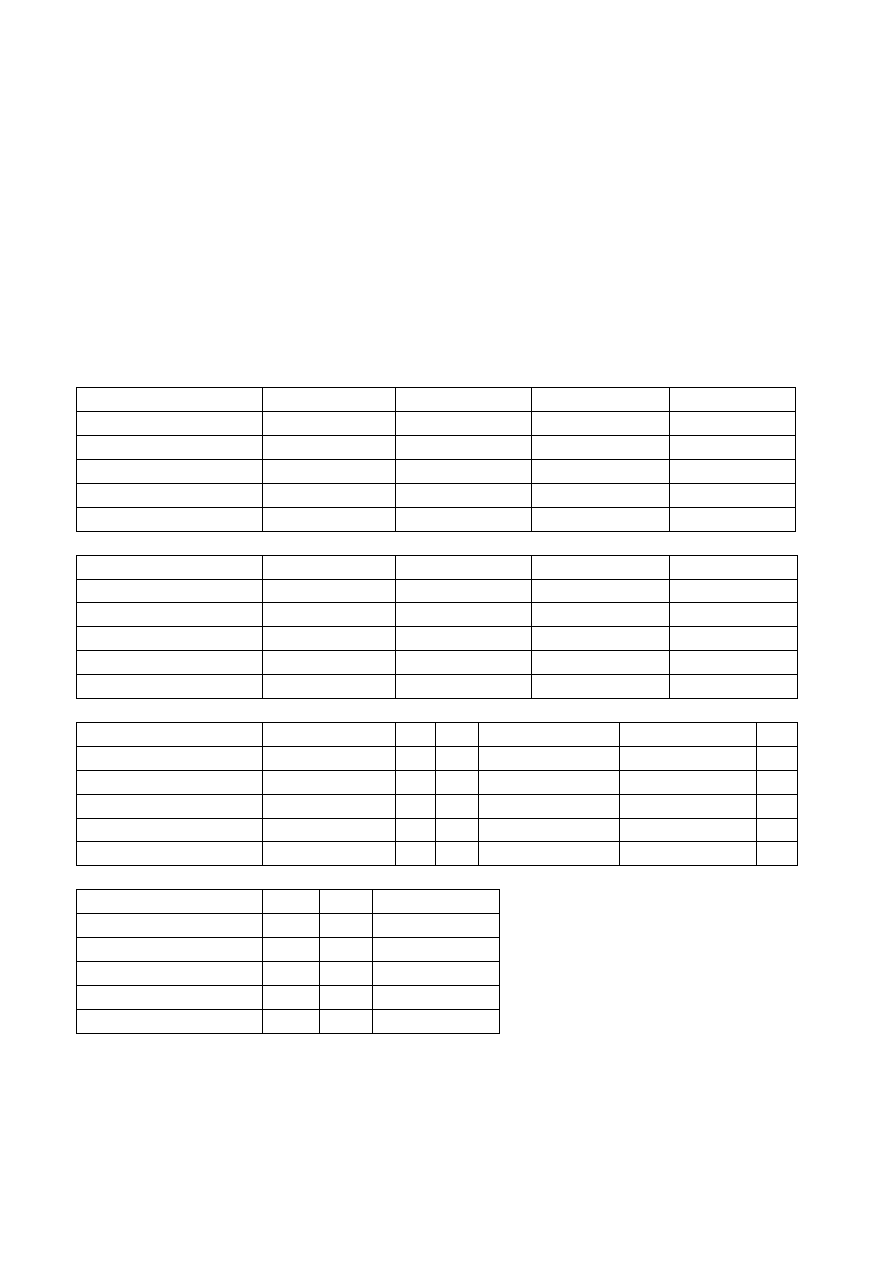
Possible Hardware configuration are:
0
1
2
3
CFG_HW_BT
PBA_31308
NO_BT_HW
PBA_31308
PBA_31308
CFG_HW_GSM
WISMO_Q24AU
WISMO_Q24AU
WISMO_Q24AU
NO_HW_GSM
CFG_HW_RADIO
RB410
RB400
RB410
RB410
CFG_HW_FOR_SIRIUS
NO
NO
NO
NO
CFG_HW_GPS
ATMEL
ATMEL
ATMEL
ATMEL
4
5
6
7
CFG_HW_BT
NO_BT_HW
NO_BT_HW
NO_BT_HW
NO_BT_HW
CFG_HW_GSM
WISMO_Q24AU
NO_HW_GSM
WISMO_Q24AU
NO_HW_GSM
CFG_HW_RADIO
RB410
RB400
CLARION
RB400
CFG_HW_FOR_SIRIUS
NO
NO
NO
NO
CFG_HW_GPS
ATMEL
ATMEL
ATMEL
ATMEL
8
9
10
11
12
13
CFG_HW_BT
NO_BT_HW
NA
NA
PBA_31308
PBA_31308
NA
CFG_HW_GSM
WISMO_Q24AU
NA
NA
NO_HW_GSM
WISMO_Q24AU
NA
CFG_HW_RADIO
CLARION
NA
NA
RB410
RB410
NA
CFG_HW_FOR_SIRIUS
NO
NA
NA
YES
NO
NA
CFG_HW_GPS
ATMEL
NA
NA
ATMEL
ATMEL
NA
14
15
16
CFG_HW_BT
NA
NA
PBA_31308
CFG_HW_GSM
NA
NA
NO_HW_GSM
CFG_HW_RADIO
NA
NA
MB500
CFG_HW_FOR_SIRIUS
NA
NA
NO
CFG_HW_GPS
NA
NA
SIRF
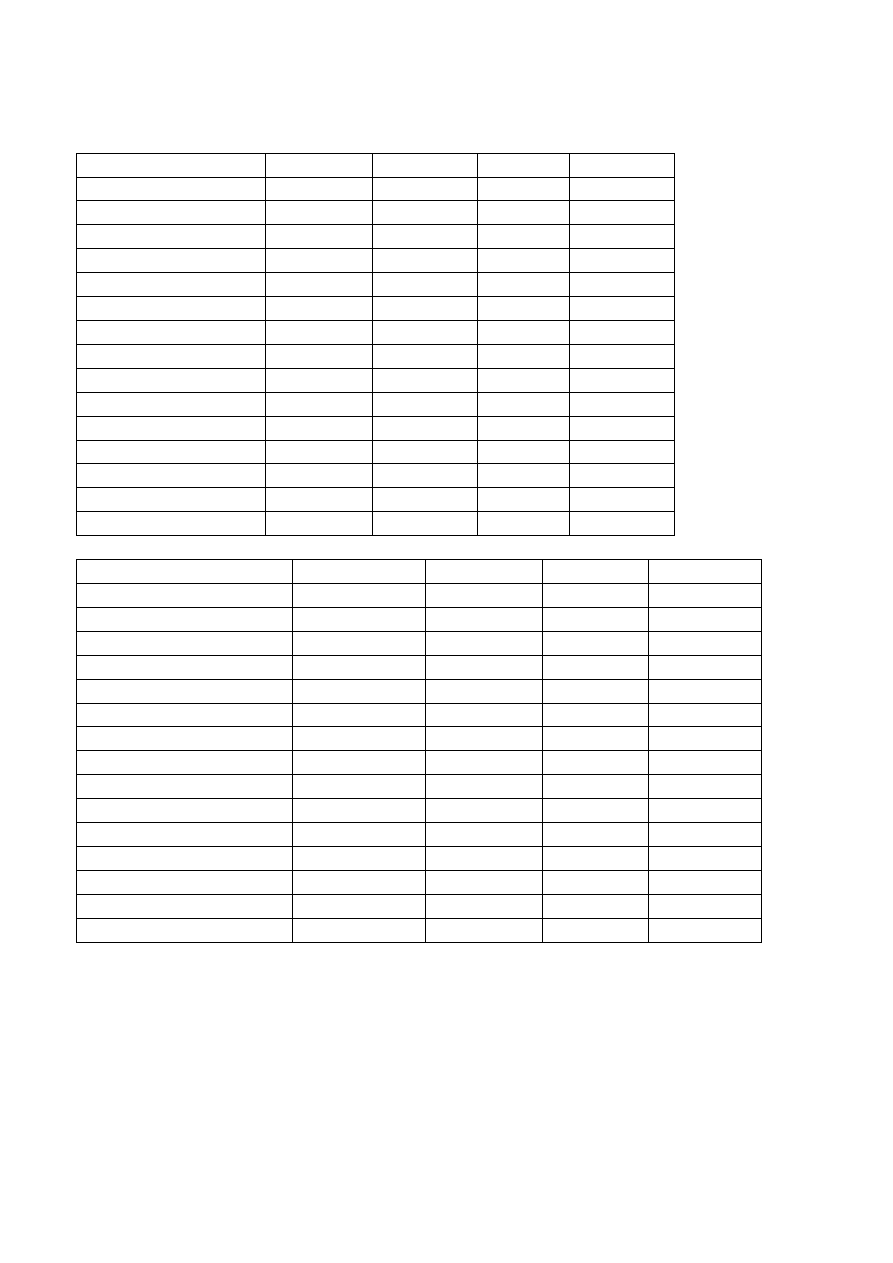
Possible Software configuration are:
APPLICONFIG 7.10
7.05
8.00
CFG_SW_BRAND
PSA
PSA
PSA
PSA
CFG_SW_G2P
OFF
OFF
OFF
OFF
CFG_SW_GPH_DEM
OFF
OFF
OFF
OFF
CFG_SW_PASS_NEAR
OFF
OFF
OFF
OFF
CFG_SW_RDS
ON
ON
OFF
ON
CFG_SW_TMC
OFF
ON
ON
ON
CFG_SW_ZONE_APPLI
EUROPE
EUROPE
CHINE
EUROPE
CFG_SW_LOOP_MENU
TRUE
TRUE
TRUE
TRUE
CFG_SW_GPH_BASE
PSA_EUROPE PSA_EUROPE PSA_CHINE PSA_EUROPE
CFG_SW_ROAD_BOOK
OFF
OFF
OFF
OFF
CFG_SW_FAST_DR
OFF
OFF
OFF
OFF
CFG_SW_AAC
OFF
OFF
OFF
OFF
CFG_SW_OGG
OFF
OFF
OFF
OFF
CFG_SW_DVB
OFF
OFF
OFF
OFF
CFG_SW_CAN_NETWORK PSA_2004
PSA_2004
PSA_2004
PSA_2004
8.10
8.50
M2008
DEMO
CFG_SW_BRAND
PSA
PSA
MASERATI
PSA
CFG_SW_G2P
OFF
OFF
OFF
ON
CFG_SW_GPH_DEM
OFF
OFF
OFF
OFF
CFG_SW_PASS_NEAR
ON
OFF
OFF
ON
CFG_SW_RDS
ON
ON
ON
ON
CFG_SW_TMC
ON
ON
ON
ON
CFG_SW_ZONE_APPLI
EUROPE
WORLD
WORLD
EUROPE
CFG_SW_LOOP_MENU
TRUE
TRUE
FALSE
TRUE
CFG_SW_GPH_BASE
PSA_EUROPE
PSA_CHINE
MASERATI
PSA_EUROPE
CFG_SW_ROAD_BOOK
OFF
OFF
OFF
ON
CFG_SW_FAST_DR
OFF
OFF
OFF
ON
CFG_SW_AAC
OFF
OFF
OFF
ON
CFG_SW_OGG
OFF
OFF
OFF
ON
CFG_SW_DVB
OFF
OFF
OFF
ON
CFG_SW_CAN_NETWORK
PSA_2004
PSA_2004
MASERAT
PSA_2004

RNEG2010-EUROPE
M2009
RNEG2009-CHINE RNEG2010-CHINE
CFG_SW_BRAND
PSA
MASERATI
PSA
PSA
CFG_SW_G2P
OFF
OFF
OFF
OFF
CFG_SW_GPH_DEM
OFF
OFF
OFF
OFF
CFG_SW_PASS_NEAR
OFF
OFF
OFF
OFF
CFG_SW_RDS
ON
ON
ON
ON
CFG_SW_TMC
ON
ON
ON
ON
CFG_SW_ZONE_APPLI
EUROPE
WORLD
CHINE
CHINE
CFG_SW_LOOP_MENU
TRUE
FALSE
TRUE
TRUE
CFG_SW_GPH_BASE
RNEG_PSA_EUROPE
MASERATI
RNEG_PSA_CHIN
E
RNEG_PSA_CHINE
CFG_SW_ROAD_BOOK
OFF
OFF
OFF
OFF
CFG_SW_FAST_DR
ON
OFF
ON
ON
CFG_SW_AAC
ON
OFF
ON
ON
CFG_SW_OGG
ON
OFF
ON
ON
CFG_SW_DVB
OFF
OFF
OFF
OFF
CFG_SW_CAN_NETWORK
PSA_2010
MASERAT
PSA_2004
PSA_2010

RRDISPLAY.CMD
This script invert the rotation screen flag,
When rotation flag is active, image will be displayed rotate by 180 degrees.
It can be use only on system with software version upper than or equal to 8.00.
When start it ask confirmation to “Rotate display”, then it reboot.
Two execution of the script restore the original value of the rotation screen flag.

RT_COPY.CMD
This script is a configurable copier. You can use it to copy data to or from your RTx unit, but a copy method
must be configured before using the script in your car. Simply create some folders READn and/or WRITEn
and/or DELETEn in a USB device. ‘n’ is a number ranging from 1 to 9 and must be sequential (eg.
READ1,READ2,READ3), thus providing a total of 27 different jobs (9 read + 9 write + 9 delete).
Such tasks can be programmed simultaneously on the USB device and you may decide to run every single
task.
READn, WRITEn, DELETEn folders (any or all of them – it depends on the tasks you’re planning to run) shall
contain the exact folders structure of the files (and the files themselves) you want to read/write/delete
from/on RTx unit. Here you have some more information:
if you want to Write files on the RTx unit, the files to be copied must be in the WRITEn folder structure of
the USB device as the example shows
If you want to Read/Delete files from RTx unit you should create as many dummy files as necessary in the
/COPYn /DELETEn folder structure of the USB device as the example shows
Examples of folders structure
/WRITE1/I/ USER_DATA/USER_PROFILE/User_com.dat (this is the real one)
/READ1/I/USER_DATA/USER_PROFILE/User_4.dat (dummy file)
/DELETE1/I/USER_DATA/USER_PROFILE/Phone/SMS_book.dat (dummy file)
User_4.dat and SMS_book.dat in READ and DELETE sections of the above examples are the dummy files
and follow the RTx data structure. The dummy file is essentially a placemark and its lenght or content are
not essential: even a 0 byte file will be fine. It simply reminds the script which file to search and when found
it overwrites/deletes it on/from RTx unit.
Another essential file is DESCRIPTION.TXT . It must exist in the root of every task folder you created. If
absent, the folder content will not be processed by the script. It contains pure ASCII text (any notepad will
do its job greatly) and its purpose is to describe the actual task being carried out by showing it on the user
display (i.e.: "Copy P.O.I. to RT4").
RT_COPY usage is very simple: just follow the on-screen instruction to perform the tasks previously created.
Simple questions will lead you through the whole process and the “Reboot?” question represents the end
of all.
RT_COPY is able to execute heavy tasks, copying 250 MB of data a time (this limit can be modified by
editing the /CMD/RT_COPY.cmd script at line
#define MAX_SIZE (250*_1MBYTE)
), and lets the user decide
whether to continue or suspend the operations. Just remember that the USB protocol used by RTx is 1.1, so

the copying process is very slow. The script writes the following additional files on USB device in order to
remember the interruption copy point:
/LASTJOB.TXT: stores the last READn or WRITEn used folder
/READn|WRITEn|DELETEn/RTCPY_FILELIST.TXT : stores a complete list of files found in the folder
/READn|WRITEn|DELETEn/RTCPY_LASTCOPIED.TXT : stores line numbers of last copied file in the
list.
/READn|WRITEn|DELETEn/RTCPY_NOTCOPIED.TXT : stores files not copied due to read or write
error.
The copying process will be resumed as soon as the user runs the script again.
ATTENTION: Existing files in the destination folder will be overwritten without any user input.

RTBI.CMD
This simple script IS ONLY FOR SOFTWARE VERSION 8.xx.
Starting on software version 8.00 Marelli has introduce a boot speed technique called “Turbo Boot”, it save
a dump of memory on disk, and reload it on the next boot.
When you modify a system file, you need to boot reading the real files on disk, and not the “Turbo Boot”
memory image. To do that, this script simply call the internal function RemoveTurboBootInfo.
You are asked to confirm execution before start.

RTXSERVICE.CMD
This script is the same script generated by the PC program RTXservice.exe.
It can read and write the file SERVICE.DAT to and from RTx drive.
If the service.dat file is present on the USB source device, you will prompted to write it to the RTx drive,
only if you answer NO, the script ask you to read from RTx.
Otherwise if no service.dat file is present on USB, the only question you have is for read from RTx.
After write to RTx, the script let you choice if reboot the system.

RTxSET.CMD
This script lets you modify the “User_com.dat” file directly on RTx device. When starting it asks you to do
a backup copy of current User_com.dat file, or, if a backup is already present, to restore it.
Backup copy is written on the internal hard disk, each time you execute a backup, the previous will be
overwritten. I suggest you to do a backup only the first time you use RTxSET, so you have the original
configuration for safely came back.
RTxSET recognizes and modifies configuration file for sw:7.02 sw:7.10 sw:7.11 sw:8.00 sw:8.10 sw:8.11
sw:8.20. The editable values are divided in sections, and have the same name used by PC program
RTXud.exe.
Here is the list:
"View/modify GENERAL section?"
"Video speed"
5 or 225. It’s the Km/h upper speed limit for video-in disabling.
"View/modify AUDIO section?"
"Ampli present"
0 or 1 if enabled and the amplifier doesn’t exist, the output power will be reduced.
"Front beep"
1 or 4 or 7 level for park assist beep
"Rear beep"
1 or 4 or 7 level for park assist beep
"View/modify KEYBOARD section?"
"E call enable"
0 or 1 enable emergency call button .
"B call enable"
0 or 1 enable service call button .
"View/modify MENU section ?"
"Audio aux in"
0 or 1 enables the AUX in voice in the system menu.
"View/modify TRIP section ?"
"active trip page"
0,1,2,3 select the active page for Trip mode (inst,trip1,trip2,obd)
"D295"
0 or 1 unknown
"D296"
0 or 1 unknown
"OBD page"
0 or 1 enables the cooler, temperature and tire pressure page in the TRIP display
"TRIP page"
0 or 1 enables On Board Computer pages
"Diagnostic menu"
0 or 1 enables the Diagnostic page in the System menu
"Service list menu"
0 or 1 enables Service list page in the Diagnostic menu
"View/modify VAN section ?"
"CD Changer" 0 or 1 enables CD changer support
"CDT"
0 or 1 unknown
"B323"
0 or 1 unknown
"B324"
0 or 1 unknown
"B325"
0 or 1 unknown
"B326"
0 or 1 unknown
"B327"
0 or 1 unknown

"B328"
0 or 1 unknown
"D329"
0 or 1 unknown
"D330"
0 or 1 unknown
"VTH"
0 or 1 unknown
"D332"
0 or 1 unknown
"Reset Tire U.P."
0 or 1 enables reset tire under pressure in Diagnostic menu
"D334"
0 or 1 unknown
"D335"
0 or 1 unknown
"Visual park assist"
0 or 1 enables popup graphics
"Rear park assist"
0 or 1 enables rear park assist, graph and sound
"Front park assist"
0 or 1 enables front park assist, graph and sound
"D339"
0 or 1 unknown
" Hydr.susp.frame " 0 or 1 unknown
" EMF config "
0 or 1 unknown
"VMF/VCCF"
0 or 1 or 2 related to button on steering wheel commands
"View/modify VIDEO section ?"
"D353"
0 or 1 unknown
"D354"
0 or 1 unknown
"D355"
0 or 1 unknown
"Video 1 in"
0 or 1 enables Video in system menu
"D357"
0 or 1 unknown
"D358"
0 or 1 unknown
"View/modify AIRC section ?"
"Turn off L/R reg"
0 or 1 enables turn off L/R regulation in A/C menu
"A/C menu"
0 or 1 enables A/C menu in system menu, and A/C status windows
"D387"
0 or 1 unknown
"D388"
0 or 1 unknown
"View/modify VEICLE CONF section ?"
"Overtake help"
0 or 1 or 2 or 3 unknown
"Near obstacle det"
0 or 1 or 2 or 3 unknown
"Driver wellcome"
0 or 1 unknown
"Boot perm locking"
0 or 1 disable boot open button, let only remote key working to open boot
"Remote doors lock" 0 or 1 unknown
"Adaptable light"
0 or 1 unknown
"Auto headlight"
0 or 1 unknown
"Automatic brake"
0 or 1 enables Automatic brake in vehicle configuration menu
"Conf.Light menu"
0 or 1 enables Light configuration in vehicle configuration menu
"Ambient light"
0 or 1 enables Ambient light in light configuration menu
"Rear wiper"
0 or 1 enables Rear wiper in wiper menu
"Securoscope"
0 or 1 unknown
"Doors selectivity"
0 or 1 enables Vehicle access in vehicle configuration menu
"Diurnal headlight"
0 or 1 enables Diurnal Headlight in light configuration menu
"COE locking mode”
0 or 1 unknown

"Window partial open" 0 or 1 unknown
"D417"
0 or 1 unknown
"D418"
0 or 1 unknown
"Driving assistance"
0 or 1enables Driving assistance in vehicle configuration menu
"D420"
0 or 1 unknown
"D421"
0 or 1 unknown
"D422"
0 or 1 unknown
"D423"
0 or 1 unknown
"D424"
0 or 1 unknown
"View/modify DISPLAY section ?"
"External temp"
0 or 1 unknown
"conf"
0 or 1 change configuration menu layout
"View/modify DIAG section ?"
"Speed limit"
0 or 1 unknown
"Speed trap"
0 or 1 enable “dangerous zone” in Navigation/options menu
"View/modify again ?"
Select YES if you wish to view again the previous configuration value.
After modifying all options the script will end asking you "RTxSET Terminated! Reboot?".
YES is necessary for changes to be effective.
NOTE: Items feature and number listed above may depend on software version running on your RTx unit.
Not all of them are really known at the moment and if you discover the meaning of any of them, please
contact me and I will add your useful information to the script. Be aware that this script is very fast to use
but many more hidden features of the User_com.dat file can be managed more deeply through any specific
editor. The one I suggest is RTXud.exe.

RTXud.CMD
This script was written by RTXud.exe PC program with Init USB function. It is a simply way to retrieve the
configuration file “User_com.dat” to be used subsequently on PC with programs like RTXud.exe.
If a User_com.dat file exists in the USB root, you are prompted to "WRITE user_com.dat ?". Just answer
NO to retrieve the actual file from RTx system with the request "READ user_com.dat ?".
Note: if no User_com.dat file is in the root of your USB device, the only question is "READ user_com.dat?".
After you accept the write question, RTXud asks you to reboot with the question "Files copied. Reboot ?".
Reboot is always needed to permit the system to load changed configuration file.
Warning:
When you attempt to write back to RT4 your modified user_com.dat file, don’t forget to put in usb root
also the correct control file user_com.dat.inf.

SMS.CMD
With this script all your SMS saved in the SMS_book.dat file is converted and written on the target USB
device.
It create as many text files as the message present inside the sms_book.dat file.
Created files have name composed like:
DATE-TIME-NUMBER.TXT
Where:
DATE:
6 characters YYMMDD
TIME:
6 characters HHMMSS
NUMBER:
up to 22 characters

SPY.CMD
For an exhaustive explanation of SPY data read the wiki page from dmatos at
http://rt4.wikidot.com
With this script you can copy to USB device the content of the SPY folders, and clear them to free disk space
on the /I drive.
All founded folder is copied completely, you are not able to copy a single file from a folder.
The script ask to you what to copy and then if you wish to delete the folder.
SPY.CMD can run in single folder copy mode. To do this you must rename the script in SPYfoldername.CMD,
such as SPY21403.CMD.
Note:
The initial question “Delete ALL spy data after copy ?”, activate the erase of all spy data present on RTx,
also if you don’t have copy them, also in single folder copy mode.
Useful SPY data are:
/UPG
there are some log text file generated during update
/21403
the .bin file stored here, are standard bitmap (just rename it) of screenshot
Useful trick:
To generate a complete set of spy data (with screenshot), hold for more than 5 seconds (until you hear a
beep) the audio setting button (on the upper right side of RTx). You must hear three beep to be sure
collection of spy data was terminate (it take about 40 sec).

Notes
I remind everyone that my work was possible because others peoples before me have discovered and
made public, the basic knowledge about the RTx Magneti Marelli world, it is my duty to mention and thank:
dmatos
for the info given to me in private, and those present in his wiki page
http://rt4.wikidot.com
Janfi67
for the info given to me in private and for all programs and documents he made public on
http://www.planete-citroen.com
all users of the forums that I attend, that shared with the others information in their possession
http://www.passionepeugeot.it
http://www.citroen-club.it
http://www.c4atreros.es
http://www.eurovan2.com
By Mira -
mira308sw@libero.it
Revised by Peppe68 –
pep.lau@tiscali.it
Wyszukiwarka
Podobne podstrony:
MIRASCRIPT EN v03 50
MIRASCRIPT v03 12
Partida 60, INMERSO EN EL ZUGZWANG Irving Chernev
Budzik Versa wielkość karty kredytowej instrukcja EN
60 Rolle der Landeskunde im FSU
PN 60 B 01029
G2 4 PW EN wn Rys 01
60
Manual Acer TravelMate 2430 US EN
Ćwiczenie 01 EN DI
eci en
BVSOI 3 001 E en
A Biegus projektowanie konctrukcji stalowych wg PN EN 1993 1 1 cz 1
Flavon Active dopping EN
5817 PN EN ISO IV 2007
highwaycode pol c5 rowery motocykle (s 22 26, r 60 83)
Pisownia ę ą en em om
Conan 60 Conan wyzwoliciel
więcej podobnych podstron