
FSynth Pro VST plug in – User manual
© 2008 www.jeroenbreebaart.com
FSynth Pro
Audio Resynthesizer
User manual v1.0.2
March 2009

FSynth Pro VST plug in – User manual
© 2008 www.jeroenbreebaart.com
1.
Contents
1.
Contents .......................................................................................................................... 2
2.
Description ...................................................................................................................... 3
3.
Demo limitations .............................................................................................................. 3
4.
Installation ....................................................................................................................... 3
5.
Concept of FSynth pro .................................................................................................... 4
6.
Usage .............................................................................................................................. 4
6.1
Graphical User Interface (GUI)............................................................................... 4
6.2
Controlling GUI elements ....................................................................................... 5
(a)
Bypass .................................................................................................................... 5
(b)
Mono ....................................................................................................................... 5
(c)
Analog .................................................................................................................... 5
(d)
Reverb .................................................................................................................... 5
(e)
Threshold................................................................................................................ 6
(f)
Filter freq ................................................................................................................ 6
(g)
Stereo ..................................................................................................................... 6
(h)
Dry/wet ................................................................................................................... 6
(i)
Randomize ............................................................................................................. 6
(j)
Resonance ............................................................................................................. 6
(k)
Filt env .................................................................................................................... 6
(l)
Envelope ADSR ..................................................................................................... 6
(m)
Filter ADSR ......................................................................................................... 6
(n)
Output slider and VU meters .................................................................................. 6
Disclaimers ............................................................................................................................. 7
7.
Specifications .................................................................................................................. 7
8.
Known issues .................................................................................................................. 7
9.
Change log ...................................................................................................................... 7

FSynth Pro VST plug in – User manual
© 2008 www.jeroenbreebaart.com
2.
Description
FSynth Pro is a stereo Virtual Studio Technology (VST) plug in that allows real-time
capturing and re-synthesis of audio events.
3.
Demo limitations
The DEMO version of this plug in has the following limitations:
•
Stereo setting is disabled
•
The parameter display is disabled.
The full version does not have these limitations.
4.
Installation
This plug in comes without installation program. The installation can be performed manually
by the following two steps:
•
Extract the file ‘jb_fsynth_pro.dll’ from the corresponding zip file, using an (un)zip
program or using the build-in functionality from Microsoft Windows XP or Vista;
•
Store the dll file in the directory where your host program stores all VST plugins.
This directory depends on the host program. Please refer to the manual of your
host program to determine the correct directory.
If you have used the demo version of this plug in (with the word ‘demo’ in the file name)
and would like to install the full version, or if you have earlier beta versions, you are
strongly advised to delete all earlier versions of this plug in before installing newer versions.
FSynth Pro VST plug in – User manual
© 2008 www.jeroenbreebaart.com
5.
Concept of FSynth pro
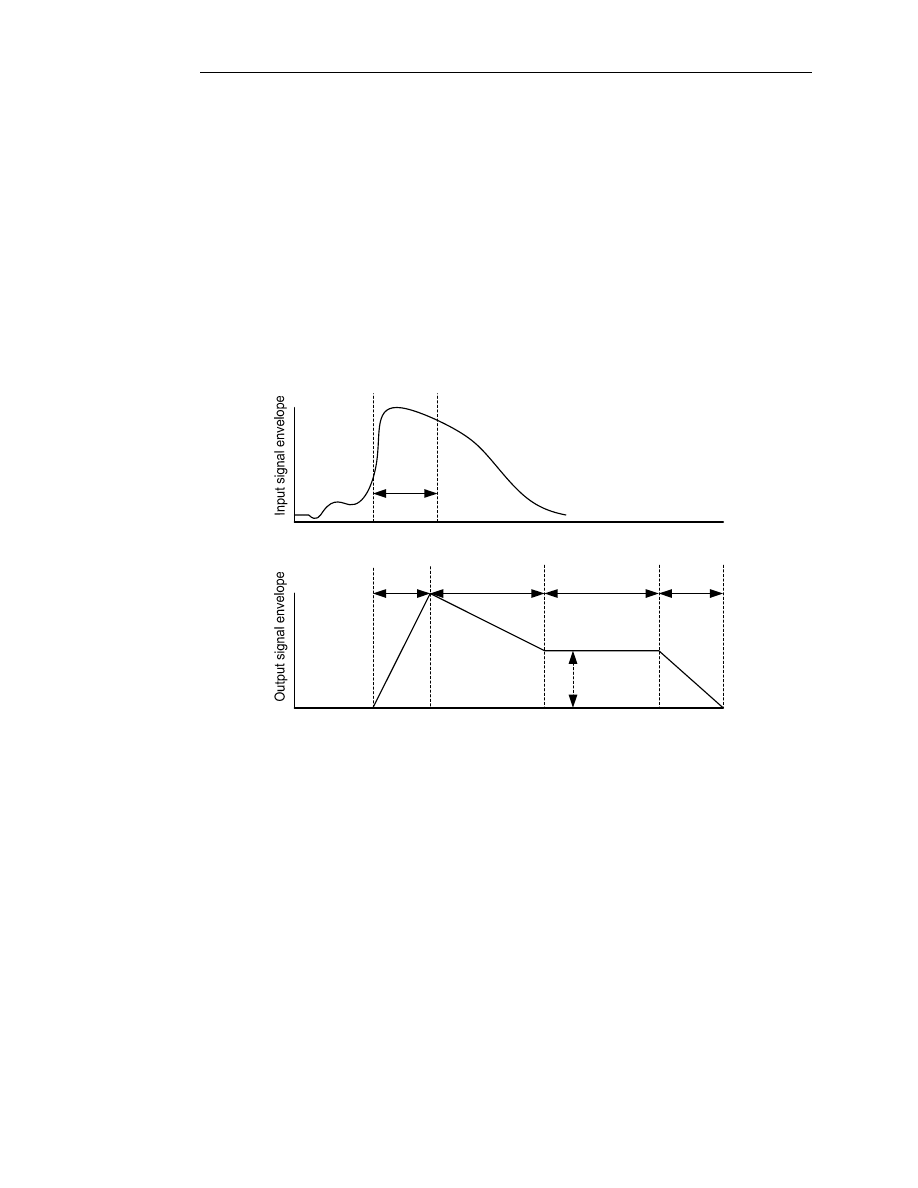
FSynth Pro is an ‘audio resynthesizer’. This means that new audio events are detected
from an input signal, and used to re-synthesize a new signal with a similar timbre as the
newly detected event. This concept is visualized in Figure 1. In an analysis stage, the onset
of a new event is detected by increases in the input signal envelope (top panel). The timbre
of the detected event is captured in a certain sampling interval.
In the subsequent synthesis step, a new sound is generated according to the timbre
captured in the sampling interval. This new sound can be fully adjusted in terms of attack
time, decay time, sustain time and level, and release time. Furthermore, additional
parameters such as the stereo width and a filter envelope can be adjusted to shape the
new sound event.
Time (seconds)
Detected onset
Time (seconds)
Sampling
interval
Attack
time
Decay
time
Sustain
time
Release
time
Sustain
level
Figure 1 - Concept of FSynth Pro.
6.
Usage
6.1
Graphical User Interface (GUI)
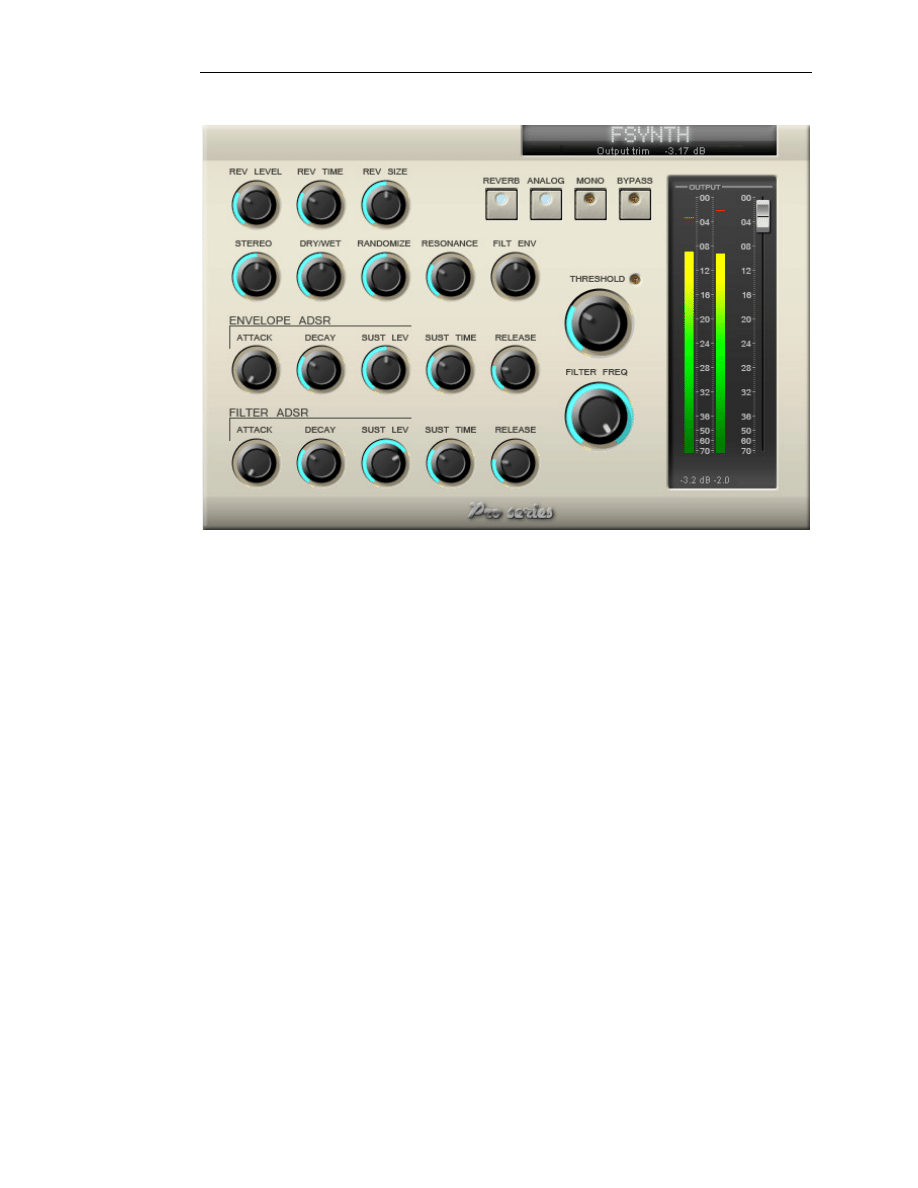
The Graphical User Interface (GUI) of FSynth Pro is shown in Figure 2. The GUI is split in
several parts:
•
A parameter display indicating current parameter values;
•
Output trim slider;
•
A metering section with meters for output level monitoring (with peak indication);
•
A reverb section to add / modify reverb to the output;
•
An envelope ADSR part for controlling the envelope attack, decay, sustain and
release curves
•
A filter ADSR part for controlling the filter attack, decay, sustain and release curves
•
Generic settings to control the character and operation of the plug in.
FSynth Pro VST plug in – User manual
© 2008 www.jeroenbreebaart.com
Figure 2 - Graphical User Interface (GUI) of FSynth Pro.
6.2
Controlling GUI elements
GUI elements are controlled by simple mouse clicking and dragging. The following modes
of operation can additionally be employed on sliders and rotary knobs:
-
Control + left mouse click: reset GUI element to default value
-
Shift + left mouse: enable micro control
Controller values will be displayed in the parameter display just below the plug in name on
top of the GUI.
(a)
Bypass
The ‘Bypass’ know allows to bypass the audio processing. When bypass is enabled, the
plug in will not modify the audio signals while the various meters will continue to operate.
(b)
Mono
The ‘Mono’ switch toggles between full polyphony and a single (monophonic) voice. The
latter will cause ‘voice stealing’ effects if new sound events are detected which may have
pleasant effects for e.g. drum loops.
(c)
Analog
The ‘Analog’ switch toggles between an analog sounding filter and a digital sounding filter.
(d)
Reverb
The ‘Reverb’ switch is used to switch on/off the internal reverberation. The parameters of
the reverb (level, reverb time and room size) can be modified with the knobs ‘rev level’,
‘rev time’ and ‘rev size’.

FSynth Pro VST plug in – User manual
© 2008 www.jeroenbreebaart.com
(e)
Threshold
This knob determines the sensitivity for finding new events. If set to large values, FSynth
will not easily find new events. Low values will easily trigger new events. Detection of a new
event will be visualized by the corresponding LED.
(f)
Filter freq
This knob determines the low-pass filter frequency of the internal filter.
(g)
Stereo
This knob determines the stereo ‘width’ of the output.
(h)
Dry/wet
The ‘Dry/wet’ knob allows to mix the input and output sounds in various amounts.
(i)
Randomize
This knob determines the amount of randomness in the internal synthesizer. A value of
zero indicates that the output will be fully deterministic, often resulting in a somewhat
metallic sound. A larger value will increase the randomness in the synthesizer output.
(j)
Resonance
This knob determines the amount of resonance of the low-pass filter.
(k)
Filt env
This knob determines the effect of the filter envelope onto the filter cut-off frequency. For a
value of 0 (knob is centered), the filter envelope will not adjust the filter cut-off frequency. A
positive value will result in increases in the cut-off frequency with increasing filter envelope
value. A negative value will decrease the cut-off frequency with increasing filter envelope.
(l)
Envelope ADSR
This section modifies the attack, decay, sustain and release times of the output envelope,
as well as the sustain time.
(m)
Filter ADSR
This section modifies the attack, decay, sustain and release times of the filter envelope, as
well as the sustain time. The filter ADSR allows to modify the filter cut-off frequency
automatically.
(n)
Output slider and VU meters
The output VU meters indicate the current output level (in dB) with a peak-hold function.
The peak values are displayed just below the VU meters. Reset of the peak-hold values is
performed by a mouse click on the peak value display.

FSynth Pro VST plug in – User manual
© 2008 www.jeroenbreebaart.com
Disclaimers
VST is a trademark of Steinberg Media Technologies GmbH.
7.
Specifications
Property
Supported values
Supported input/output formats
Stereo
Mono (as double-mono input via host)
Plug in delay
2048 samples
Supported bit depths
32 bit float
64 bit float
Number of parameters
25
Supported sample rates
11025 - 96000 Hz
Algorithm optimized for 44100 - 48000 Hz
VST version
2.4
Maximum polyphony
12
8.
Known issues
-
Changing the sample rate on the fly may cause a loss of current parameter values.
9.
Change log
Version 1.0.2
-
Fixed denormal problem related to reverb
Version 1.0.1
-
Initial version.
Wyszukiwarka
Podobne podstrony:
manual smash pro v1 0 1
manual barricade pro v1 0 3
manual red phatt pro v1 0 3
manual isone pro surround v1 0 1
Manual Metastock Pro Version 10
APP Filterloop Pro v1 1 0 [Unlocked]stalleck
Manual Elottronix XL v1 40
Auditor Pro Manual v1 0 5
73 Varia B231 POL manual v1
Epson Stylus Pro 9000 Auto Take Up Reel Unit Manual
4CH 8CH ENGLISH MANUAL(v1
Epson Stylus Pro XL Service Manual
Operation Manual for Ladder Pro Nieznany
16 CH ENGLISH MANUAL(v1 0)
468 key pro third generation operation manual
73 Varia B231 POL manual v1
manual metody 2 v1 1 (chyba bez bledów)
super ak500 pro user manual
Tauris Club Manual v1 4US
więcej podobnych podstron