DOT MATRIX
LIQUID CRYSTAL DISPLAY
MODULE
LMC-SSC2A16-03 Serial
USER‘ MANUAL
LMC-SSC2A16DRG-03
LMC-SSC2A16DRY-03
LMC-SSC2A16DLGY-03 LMC-SSC2A16DLYB-03
LMC-SSC2A16DLGY-E03 LMC-SSC2A16DLYY-03
LMC-SSC2A16DLYY-E03
PROPOSED BY
APPROVED
Design
Approved
SDEC TECHNOLOGY CORP.

CONTENTS
PAGE
1.
Mechanical
Specification
2
2 Mechanical
Diagram
2
3.
Interface Pin Connections
2
4.
Block Diagram
2
5.
Absolute Maximum Rating
3
6.
Electrical Characteristics
3
7.
Optical Characteristics
3
8.
Optical Definitions
3
9.
Display Address
3
10.
Interface
to
MPU
4
10.1
Interface
to
Z-80
CPU
4
10.2
Interface
to
MC6800
CPU
4
10.3
Interface
to
4-bit
CPU
(
HMCS43C
)
4
10.4
Interface
to
HD6805
MP
4
11.
Timing
Control
4
11.1
Write
and
Read
Operation
4
11.2
Busy
flag
check
timing
4
12.
Initialization
of
LCM
5
13.
Instruction
Set
6
14.
User
Font
Patterns
6
15.
Software
Example
7
15.1
8-bit
operation
(
8
bits
2
lines
)
7
15.2
4-bit
operation
(
4
bits
2
lines
)
7
16.
Reliability
Condition
8
17.
Function
Test
&
Inspection
Criteria
8
18 Character Generator ROM Map
10
PAGE 1 (LMC-SSC2A16-03 Serial)
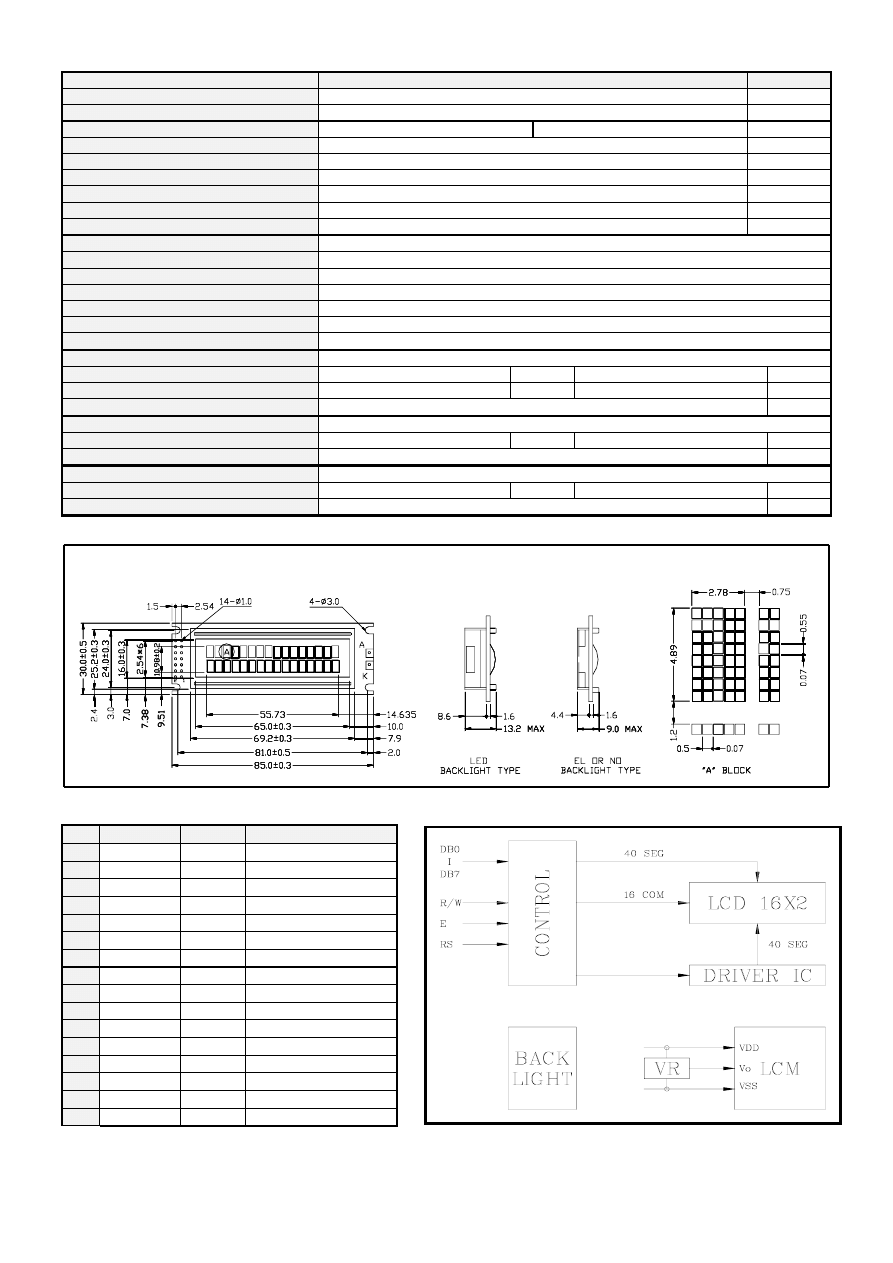
1. Mechanical
Specification
ITEM
STANDARD VALUE
UNIT
NUMBER OF CHARACTERS
16 CHARACTERS X 2 LINES
--
CHARACTER FORMAT
5 X 8 DOTS
--
MODULE DIMENSION
85.0 (W) X 30.0 (H) X 9.0 (T)
85.0 (W) X 30.0 (H) X 13.2 (T)
mm
VIEWING DISPLAY AREA
65.0 (W) X 16.0 (H)
mm
ACTIVE DISPLAY AREA
56.21 (W) X 10.98 (H)
mm
CHARACTER SIZE
2.78 (W) X 4.89 (H)
mm
CHARACTER PITCH
3.53 (W) X 6.09 (H)
mm
DOT SIZE
0.50 (W) X 0.55 (H)
mm
DOT PITCH
0.57 (W) X 0.62 (H)
mm
LMC-SSC2A16DRG-03
STN , Gray , 1/16 Duty , 6 O‘clock
LMC-SSC2A16DRY-03
STN , Yellow Green , 1/16 Duty , 6 O‘clock
LMC-SSC2A16DLGY-03
STN , Gray , 1/16 Duty , 6 O‘clock , LED Backlight
LMC-SSC2A16DLYY-03
STN , Yellow Green , 1/16 Duty , 6 O‘clock , LED Backlight
LMC-SSC2A16DLYB-03
STN , Yellow Green , 1/16 Duty , 6 O‘clock , LED Backlight ( color is Blue )
LMC-SSC2A16DLGY-E02
STN , Gray , 1/16 Duty , 6 O‘clock , E Mode LED Backlight
LMC-SSC2A16DLYY-E02
STN , Yellow Green , 1/16 Duty , 6 O‘clock , E Mode LED Backlight
EL Use Inverter Type
SDEC-I001A
Inverter Input
DC +5V
V
25
mA
Inverter Output
AC 90 ~ 110
V
400 ~ 700
Hz
Backlight Half-Lift Time
3,000 HR.
LED Backlight Color
Yellow Green
Backlight Input
DC +4.2V
V
100
mA
Backlight Half-Lift Time
50,000 HR.
E Mode LED Backlight Color
Yellow Green
Backlight Input
DC +4.2V
V
40
mA
Backlight Half-Lift Time
30,000 HR.
2. Mechanical
Diagram
3. Interface Pin Connections
4. Black Diagram
NO SYMBOL LEVEL
FUNCTION
1
VDD --
DC
+5V
2
VSS --
GND
(0V)
3
VO H/L Contrast
Adjust
4
RS H/L Register
select
5
R/W H/L
Read/Write
6
E H,H
→L Enable
signal
7
DB0
H/L
Data Bit 0
8
DB1
H/L
Data Bit 1
9
DB2
H/L
Data Bit 2
10
DB3
H/L
Data Bit 3
11
DB4
H/L
Data Bit 4
12
DB5
H/L
Data Bit 5
13
DB6
H/L
Data Bit 6
14
DB7
H/L
Data Bit 7
A+ (EL1)
--
A (EL Backlight 1)
K- (EL2)
--
K (EL Backlight 2)
PAGE 2 (LMC-SSC2A16-03 Serial)
5. Absolute Maximum Ratings
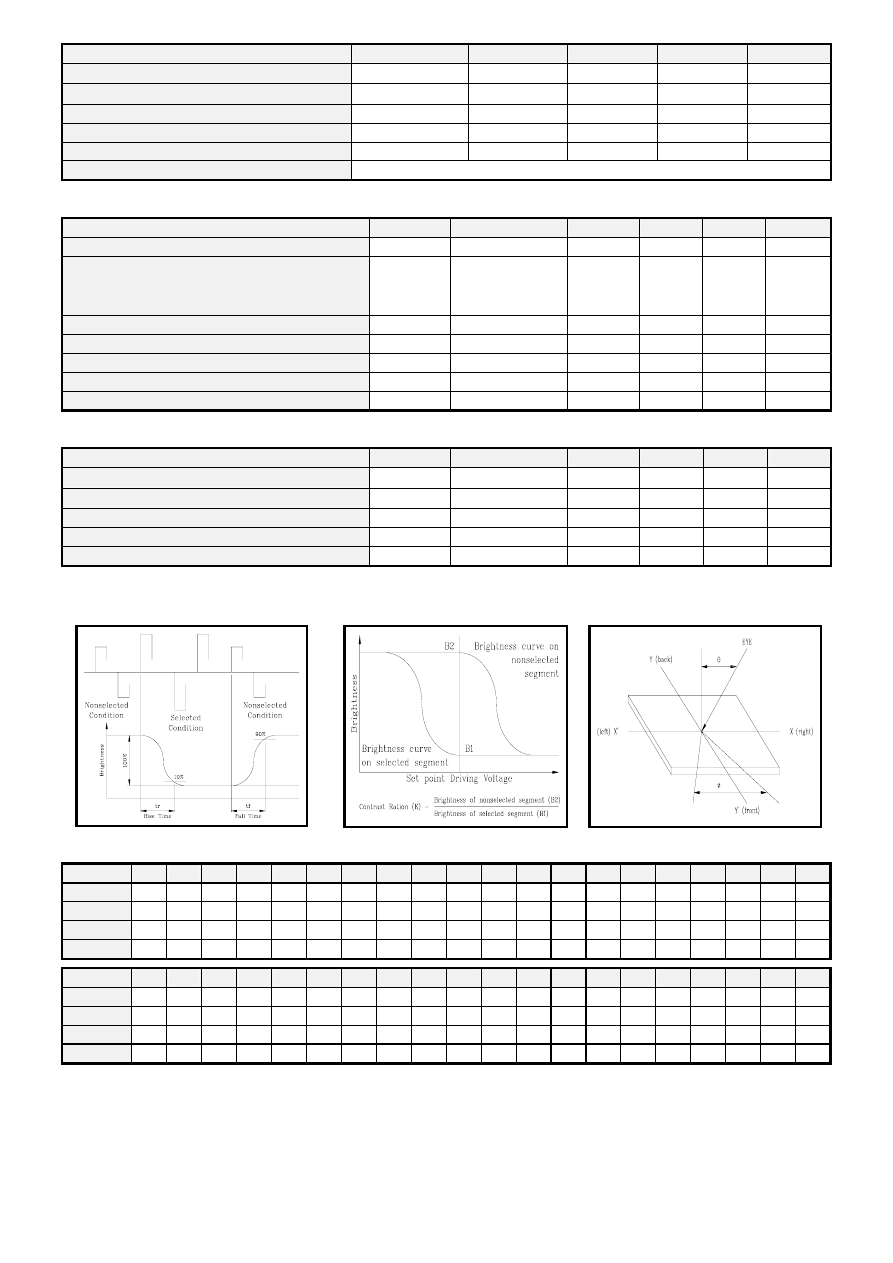
ITEM
SYMBOL
MIN.
TYPE
MAX.
UNIT
OPERATING TEMPERATURE
TOP 0/-20 --
+50/+70
℃
STORAGE TEMPERATURE
TST -10/-30 --
+60/+80
℃
INPUT VOLAGE
VI VSS
--
VDD
V
SUPPLY VOLTAGE FOR LOGIC
VDD-VSS -- 5.0 6.5 V
SUPPLY VOLTAGE FOR LCD
VDD-VO -- -- 6.5 V
STATIC ELECTRICITY
Be sure that you are grounded when handing LCM.
6. Electrical Characteristics
ITEM
SYN
CONDITION
MIN.
TYPE
MAX.
UNIT
SUPPLY VOLTAGE FOR LOGIC
VDD-VSS
-- 4.5
5.0
5.5
V
SUPPLY VOLTAGE FOR LCD
VDD-VO
Ta= 0/-20 ℃
Ta= 25℃
Ta= +50/+70 ℃
--
--
--
4.8/5.0
4.4
4.1/3.9
--
--
--
V
V
V
INPUT HIGH VOLTAGE
VIH -- 2.2
--
VDD
V
INPUT LOW VOLTAGE
VIL -- 0
--
0.6
V
OUTPUT HIGH VOLTAGE
VOH -- 2.4
--
--
V
OUTPUT LOW VOLTAGE
VOL -- --
--
0.4
V
SUPPLY CURRENT
IDD VDD=+5V -- 3.0
4.5
mA
7. Optical Characteristics
ITEM
SYM
CONDITION
MIN.
TYPE
MAX.
UNIT
VIEW ANGLE (V)
θ CR≧2
-10 -- 40
deg.
VIEW ANGLE (H)
φ CR≧2
-30 -- 30
deg.
CONTRAST RATIO
CR -- --
5
--
--
RESPONSE TIME
TON -- --
180
230
mS
RESPONSE TIME
TOFF -- --
100
150
mS
8. Optical Definitions
Response
Time
Contrast
Ration
View
Angle
9. Display Address
1
2
3
4
5
6
7
8
9
10
11
12
13
14
15
16
17
18
19
20
Line 1
80 81 82 83 84 85 86 87
88
89
8A
8B
8C
8D
8E 8F
Line 2
C0 C1 C2 C3
C4 C5 C6 C7
C8
C9
CA
CB
CC
CD
CE CF
Line 3
Line 4
21
22
23
24
25
26
27
28
29
30
31
32
33
34
35
36
37
38
39
40
Line 1
Line 2
Line 3
Line 4
PAGE 3 (LMC-SSC2A16-03 Serial)
10. Interface to MPU
10.1 Interface to Z-80 CPU
10.2 Interface to MC6800 CPU
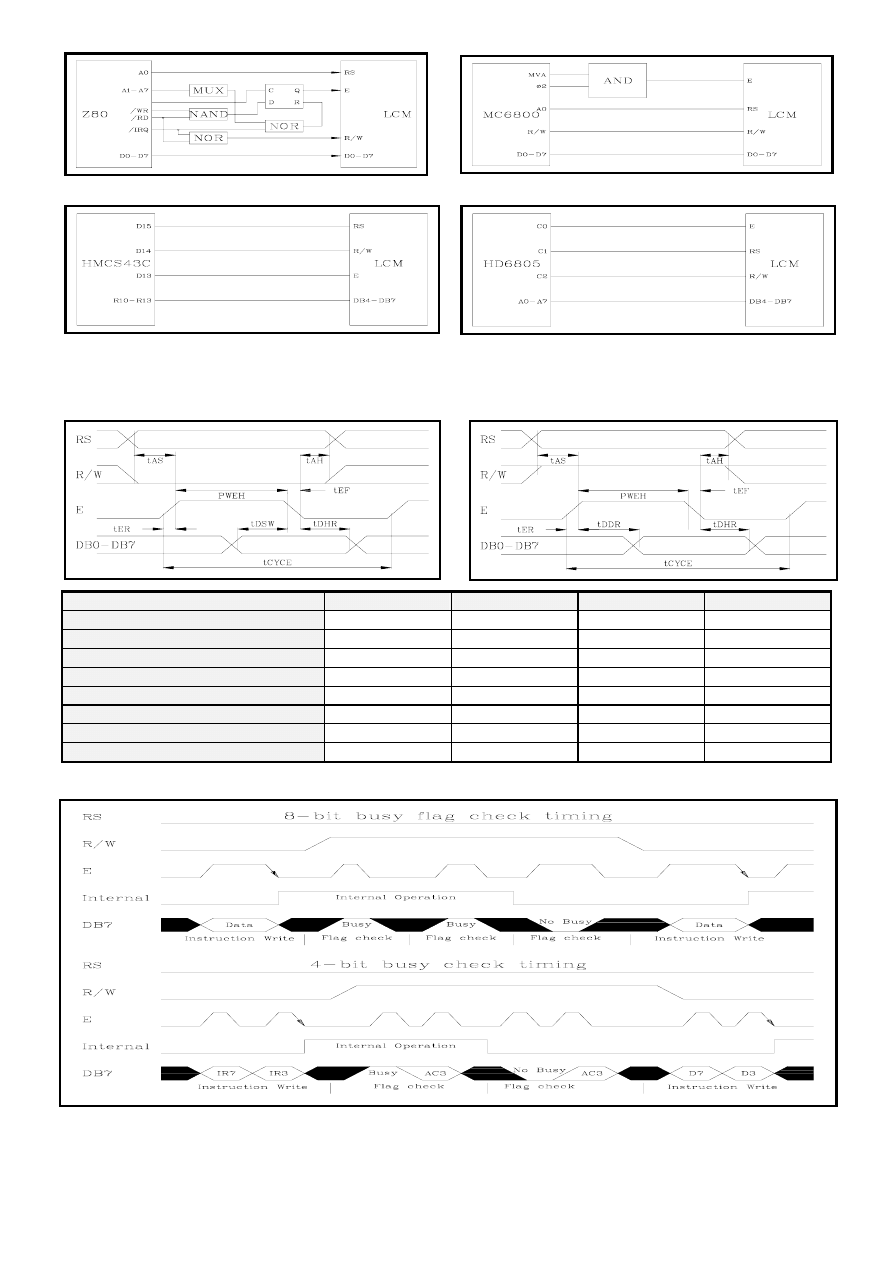
10.3 Interface to 4-bit CPU ( HMCS43C )
10.4 Interface to HD6805 MP
11. Timing
Control
11.1 Write and Read Operation
Write Operation
Read Operation
Item
Symbol
Limit (Min.)
Limit (Max.)
Unit
Enable Cycle Time
tCYCE 1000
--
ns
Enable Pules Width ( High level )
PWEH 450
--
ns
Enable Rise/Fall Time
tER,tEF --
25
ns
Address Set-Up Time ( RS,R/W,E )
tAS 100 -- ns
Address Hole Time
tAH 10 -- ns
Data Set-Up Time
tDSW 100
--
ns
Data Delay Time
tDDR -- 190 ns
Data Hold Time
tDHR 20 --
ns
11.2 Busy flag check timing
Note : IR7, IR3 : Instruction 7th bit , 3rd bit ; AC3 : Address Counter 3rd bit.
PAGE 4 (LMC-SSC2A16-03 Serial)
12. Initialization of LCM
The LCM automatically initializes ( reset ) when power is turned on using the internal reset circuit. If the power supply
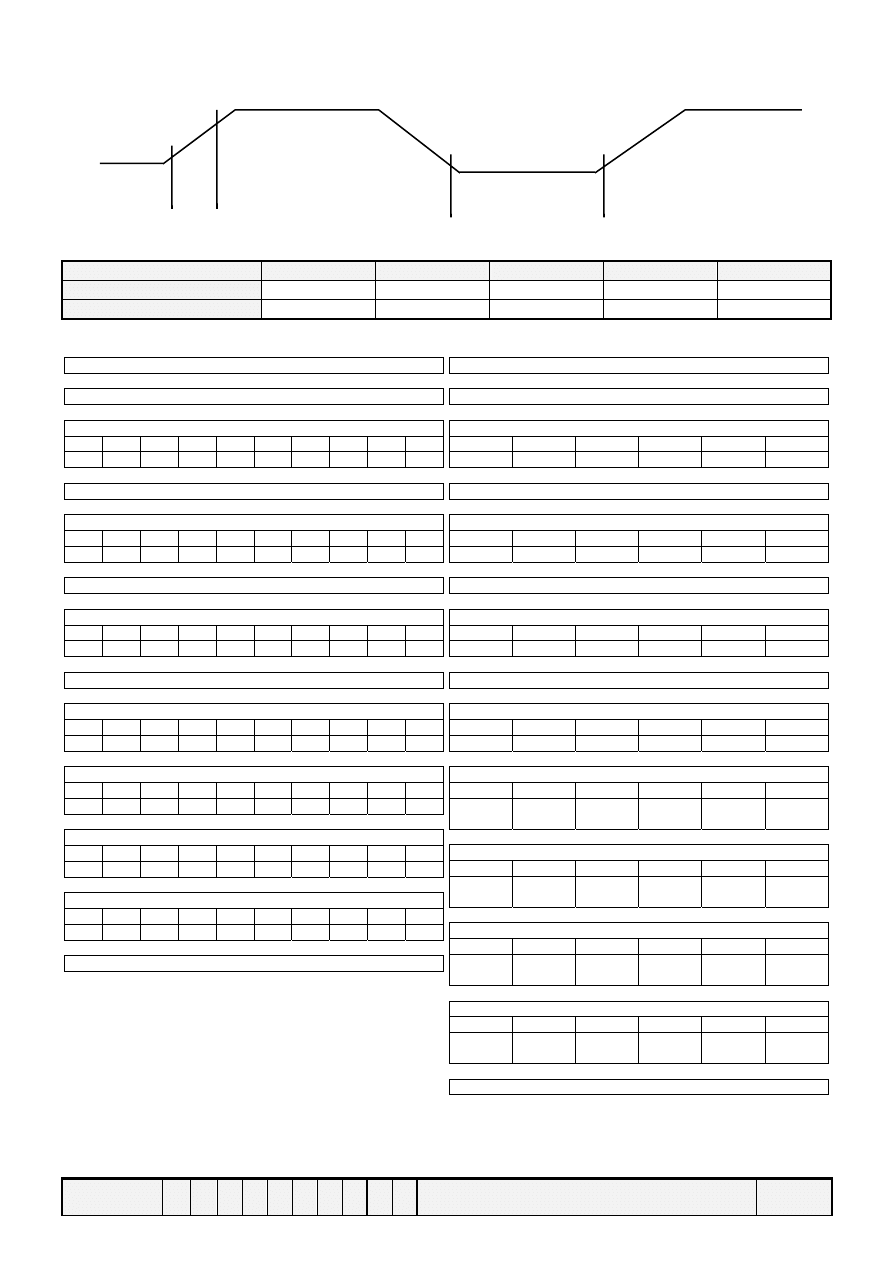
conditions for correctly operating of the internal reset circuit are not met, initialization by instruction is required. Use the
procedure is next page for initialization.
Internal Power Supply reset
4.5V
Vcc
0.2V
toff
→
←
trcc
←------→
(
Note 1) 10 ms ≧ trcc ≧ 0.1 ms , toff ≧ 1 ms.
(Note 2) toff stipulates the time of power OFF for momentary power supply dip or when power supply cycles ON and OFF.
Item
Symbol
Test condition
Limit (Min.)
Limit (Max.)
Unit
Power supply rise time
trcc -- 0.1 10 ms
Power supply off time
toff
-- 1 -- ms
(a) 8-bit
interface
Power ON
↓
Wait more than 15ms after V
DD
rises to 0.9V
DD
↓
Function Set
RS R/W DB7 DB6 DB5 DB4 DB3 DB2 DB1
DB0
0 0 0 0 1 1 * * * *
↓
Wait more than 4.1 ms
↓
Function Set
RS R/W DB7 DB6 DB5 DB4 DB3 DB2 DB1
DB0
0 0 0 0 1 1 * * * *
↓
Wait more than 100μs
↓
Function Set
RS R/W DB7 DB6 DB5 DB4 DB3 DB2 DB1
DB0
0 0 0 0 1 1 * * * *
↓
Wait more than 100μs or Busy Flag Check
↓
Function Set
RS R/W DB7 DB6 DB5 DB4 DB3 DB2 DB1
DB0
0 0 0 0 1 1 N F * *
↓
Display Off
RS R/W DB7 DB6 DB5 DB4 DB3 DB2 DB1
DB0
0 0 0 0 0 0 1 0 0 0
↓
Display Clear
RS R/W DB7 DB6 DB5 DB4 DB3 DB2 DB1
DB0
0 0 0 0 0 0 0 0 0 1
↓
Entry Mode Set
RS R/W DB7 DB6 DB5 DB4 DB3 DB2 DB1
DB0
0 0 0 0 0 0 0 1 I/D
S
↓
Write data to the DD/CG RAM and set the Instruction
(b) 4-bit
interface
Power ON
↓
Wait more than 15ms after V
DD
rises to 0.9V
DD
↓
Function Set
RS R/W DB7 DB6 DB5 DB4
0 0 0 0 1 1
↓
Wait more than 4.1 ms
↓
Function Set
RS R/W DB7 DB6 DB5 DB4
0 0 0 0 1 1
↓
Wait more than 100μs
↓
Function Set
RS R/W DB7 DB6 DB5 DB4
0 0 0 0 1 1
↓
Wait more than 100μs or Busy Flag Check
↓
Function Set
RS R/W DB7 DB6 DB5 DB4
0 0 0 0 1 1
↓
Function Set
RS R/W DB7 DB6 DB5 DB4
0
0
0
0
0
N
0
F
1
*
0
*
↓
Display Off
RS R/W DB7 DB6 DB5 DB4
0
0
0
0
0
1
0
0
0
0
0
0
↓
Display Clear
RS R/W DB7 DB6 DB5 DB4
0
0
0
0
0
0
0
0
0
0
0
1
↓
Entry Mode Set
RS R/W DB7 DB6 DB5 DB4
0
0
0
0
0
0
0
1
0
I/D
0
S
↓
Write data to the DD/CG RAM and set the Instruction
PAGE 5 (LMC-SSC2A16-03 Serial)
13. Instruction
Set
FUNCTION
R
S
R
/W
D
B
D
B
D
B
D
B
D
B
D
B
D
B
D
B
DESCRIPTION
EXECU.
TIME*
7
6
5
4
3
2
1
0
(MAX.)
Clear Display 0
0
0
0
0
0
0
0
0
1 Clears entire display and returns the cursor to home
position ( address 0 ).
1.64ms
Return Home 0
0
0
0
0
0
0
0
1
x Return the cursor to the home position. Also returns the
display being shifted to the original position. DD RAM
contents remain unchanged.
1.64ms
Entry mode
set
0
0
0
0
0
0
0
1
I
/
D
S
Set cursor move direct and specifies display shift.These
operations are performed during data rite/read. For
normal operation, set S to zero. I/D=1 : increment ;
0 :decrement ;S=1 : accompanies display shift when
data is written, for normal operation, set to zero.
40μs
Display
ON/OFF
control
0
0
0
0
0
0
1
D C
B
Set ON/OFF all display(D),cursor ON/OFF(C), and
blink of cursor position character(B). D=1: ON display;
0:OFF display. C=1: ON cursor;0: OFF cursor. B=1:
ON blink cursor; 0: OFF blink cursor.
40μs
Cursor or
Display
shift
0
0
0
0
0
1
S
/
C
R
/
L
x
x
Move the cursor and shift the display without changing
DD RAM contents. S/C=1: Display shift; 0:Cursor
move. R/L=1: shift to right; 0: shift to left.
40μs
Function
Set
0
0
0
0
1
D
L
N
F x
x
Set the interface data length (DL). Number of display
lines (N) and character font (F). DL=1: 8 bits; 0:4 bits.
N=1: 2 lines; 0: 1 lines. F=1: 5x10 dots; 0: 5x7 dots.
40μs
Set CG RAM
address
0
0
0
1
ACG
Set CG RAM address. CG RAM data is sent and
received after this setting.
40μs
Set DD RAM
address
0
0
1
ADD
Set DD RAM address. DD RAM data is sent and
received after this setting
40μs
Read busy
flag &
address
0
1
B
F
AC
Reads Busy Flag (BF) indicating internal operation is
being performed and reads address counter contents.
BF=1: internally operating. 0: can accept instruction
1 μs
Write Data to
CG/DDRAM
1
0
WRITE DATA
Write data into DD RAM or CG RAM.
40μs
Read Data for
CG/DDRAM
1
1
READ DATA
Read data from DD RAM or CG RAM
40μs
14. User Font Patterns ( CG RAM Character )
Character Code (DD RAM data)
CG RAM Address
Character Pattern (CG RAM data)
Hi 7 6 5 4 3 2 1 0 Lo
5 4 3 2 1 0
Hi 7 6 5 4 3 2 1 0 Lo
0 0 0 0 x 0 0 0
0 0 0
0 0 1
0 1 0
0 0 0 0 1 1
1 0 0
1 0 1
1 1 0
1 1 1
x x x 1 1 1 1 0
x x x 1 0 0 0 1
x x x 1 0 0 0 1
x x x 1 1 1 1 0
x x x 1 0 1 0 0
x x x 1 0 0 1 0
x x x 1 0 0 0 1
x x x 0 0 0 0 0
0 0 0 0 x 0 0 1
0 0 0
0 0 1
0 1 0
0 0 1 0 1 1
1 0 0
1 0 1
1 1 0
1 1 1
x x x 1 0 0 0 1
x x x 0 1 0 1 0
x x x 1 1 1 1 1
x x x 0 0 1 0 0
x x x 1 1 1 1 1
x x x 0 0 1 1 0
x x x 0 0 1 0 0
x x x 0 0 0 0 0
----------------
----------------
--------------------------------
0 0 0 0 x 1 1 1
0 0 0
0 0 1
0 1 0
1 1 1 0 1 1
1 0 0
1 0 1
1 1 0
1 1 1
PAGE 6 (LMC-SSC2A16-03 Serial)
15. Software
Example
15.1 8-bit operation ( 8 bits 2 lines )
Function
R
S
R
w
D
7
D
6
D
5
D
4
D
3
D
2
D
1
D
0
Display
Description
Power on delay
Initialization. No display appears.
Function set
0
0
0
0
1
1
0
0
x
x
Sets to 8-bit operation and selects 2-line display and 5x7
dots character font. ( Note: number of display lines and
character fonts cannot be chang after this. )
Display OFF
0
0 0 0 0 0 1 0 0 0
Turn off display.
Display ON
0 0 0 0 0 0 1 1 1 0
Turn on display and cursor
Entry Mode
Set
0
0
0
0
0
0
0
1
1
0
Set mode to increment the address by one and to shift the
cursor to the right, at the time of write, to the DD/CG
RAM Display is not shifted.
Write data to
CG/DD RAM
1 0 0 1 0 1 0 0
1 1 S
Write “S”. Cursor incremented by one and shift to right.
Write data to
CG/DD RAM
1
1
1
0
0
0
0
0
0
1
1
1
0
0
0
0
0
0
0
0
0
1
1
0
0
0
1
0
1
1
SDEC
Write “D” , “E” , and “C”.
Set DD RAM
0 0 1 1 0 0 0 0 0 0 SDEC
Set RAM address so that the cursor is propositioned
at the head of the second line.
Write data to
CG/DD RAM
*
*
SDEC
CR
Write “C” , and “R”.
Cursor or
display shift
0 0 0 0 0 1 0 0 x x SDEC
CR
Shift only the cursor position to the left.
Write data to
CG/DD RAM
*
*
SDEC
CO., LTD.
Write “O., LTD.” .
Entry Mode
Set
0 0 0 0 0 0 0 1 1 1 SDEC
CO., LTD.
Set display mode shift at the time during writing operation.
Write data to
CG/DD RAM
1
0
0
1
1
1
1
0
0
0
DEC
O., LTD. x
Write “ x”. Cursor incremented by one and shift to
right. ( The display move to left. )
Write data to
CG/DD RAM
*
*
Write other characters.
Return Home
0 0 0 0 0 0 0 0 1 0 SDEC
CO., LTD.
Return both display and cursor to the original position
( Set address to zero).
15.2 4-bit operation ( 4-bit, 1 line )
Function
RS R/
W
D7 D6 D5 D4
Display
Description
power on delay
initialization.
No
display
appears.
Function set
0 0
0
0
1
0
Sets to 4-bit operation. In this case, operation is
handled as 8-bits by initialization, and only this
instruction completes with one write.
Function set
0
0
0
0
0
0
0
0
1
x
0
x
Sets 4-bit operation and selects 1-line display and 5x7
dot character font on and resetting is needed.
( number of display lines and character fonts cannot
be changed hence after ).
Display ON/OFF
Control
0
0
0
0
0
1
0
1
0
1
0
0
Turn on display and cursor.
Entry Mode Set
0
0
0
0
0
0
0
1
0
1
0
0
Set mode to incremented the address by one and to
shift the cursor to the right, at the time of write. to the
DD/CG RAM display is not shifted.
Write data to CG/DD
RAM
1
1
0
0
0
0
1
0
0
1
1
1
S
Write “S”. Cursor incremented by one and shift to
right.
same as 8-bit operation
PAGE 7 (LMC-SSC2A16-03 Serial)
16. Reliability
Condition
TN Type
STN Type
Normal Temp.
Wide Temp.
Normal Temp.
Wide Temp.
Viewing
Horizontal Φ
±30°
±30°
±30°
±30°
Angle
Vertical Θ(㎜) -10°to 30° -10°to 30° -10°to 40° -10°to 40°
Operating Temperature
-10 to 70℃
-25 to 80℃
0 to 50℃
*
-20 to 70℃
Storage Temperature
-20 to 80℃
-35 to 90℃
-20 to 70℃
*
-30 to 80℃
High Temperature (Power Off)
240 Hours
@70℃
240 Hours
@90℃
240 Hours
@65℃
240 Hours
@75℃
Low Temperature (Power Off)
240 Hours
@-20℃
240 Hours
@-35℃
240 Hours
@-15℃
240 Hours
@-25℃
High Temperature (Power On)
240 Hours
@70℃
240 Hours
@80℃
240 Hours
@60℃
240 Hours
@70℃
Low Temperature (Power On)
240 Hours
@-10℃
240 Hours
@-25℃
240 Hours
@-10℃
240 Hours
@-20℃
High Temperature & High
Humidity
55℃/90%RH
240 Hours
75℃/90%RH
240 Hours
45℃/90%RH
240 Hours
65℃/90%RH
240 Hours
A 60min@-20℃
60min@-35℃
60min@-20℃ 60min@-30℃
B
5min@25℃ 5min@25℃ 5min@25℃ 5min@25℃
Thermal Shock C
5 Cycle B
A
C 60min@70℃ 60min@90℃ 60min@70℃ 60min@80℃
Expected Lift
50,000 Hours
50,000 Hours
50,000 Hours
50,000 Hours
*
Wide temp. version may not available for some products, Please consult our sales engineer or respresentative.
17. Functional Test & Inspection Criteria
17.1 Sample plan
Sample plan according to MIL-STD-105D level 2, and acceptance/rejection criteria is.
Base on :
Major defect : AQL 0.65
Minor defect : AQL 2.5
17.2 Inspection condition
Viewing distance for cosmetic inspection is 30cm with bare eyes, and under an environment of
800 lus (20W) light intensity. All direction for inspecting the sample should be within 45°
against perpendicular line.
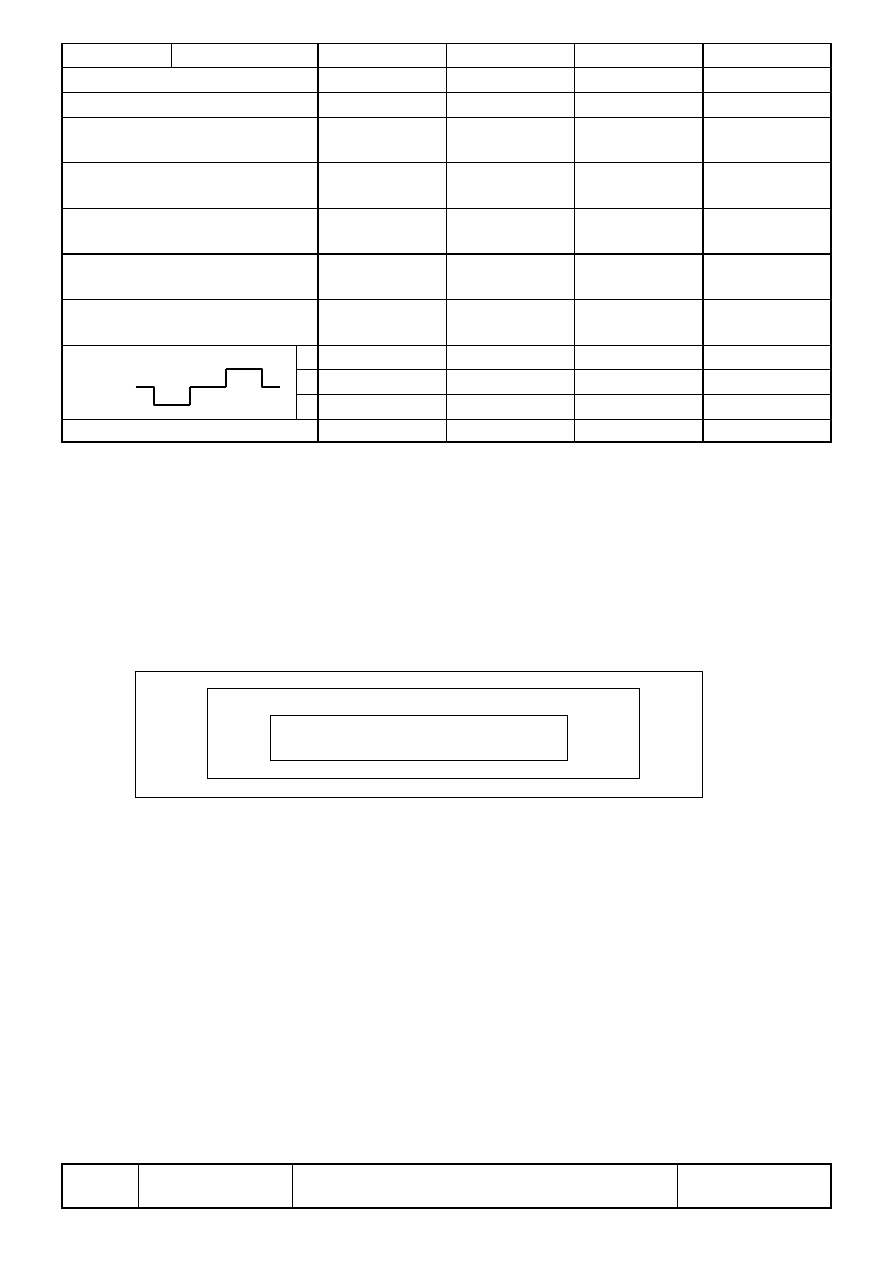
17.3 Definition of Inspection Zone in LCD
Zone A : Character / Digit area
Zone B : Viewing area except Zone A ( Zone A + Zone B = minimum Viewing area )
Zone C : Outside viewing area ( invisible area after assembly in customer’s product )
Note :
As a general rule, visual defects in Zone C are permissible, when it is no trouble for
quality and assembly of customer’s product.
17.4 Major Defect
All functional defects such as open ( or missing segment ), short, contrast differential, excess
power consumption, smearing, leakage, etc. and overall outline dimension beyond the drawing.
Are classified as major defects.
PAGE 8 (LMC-SSC2A16-03 Serial)
17.5 Minor Defect
Except the Major defects above, all cosmetic defects are classified as minor defects.
Item No. Item to be Inspected
Inspection Standard
Classification of
defects
C
B
A
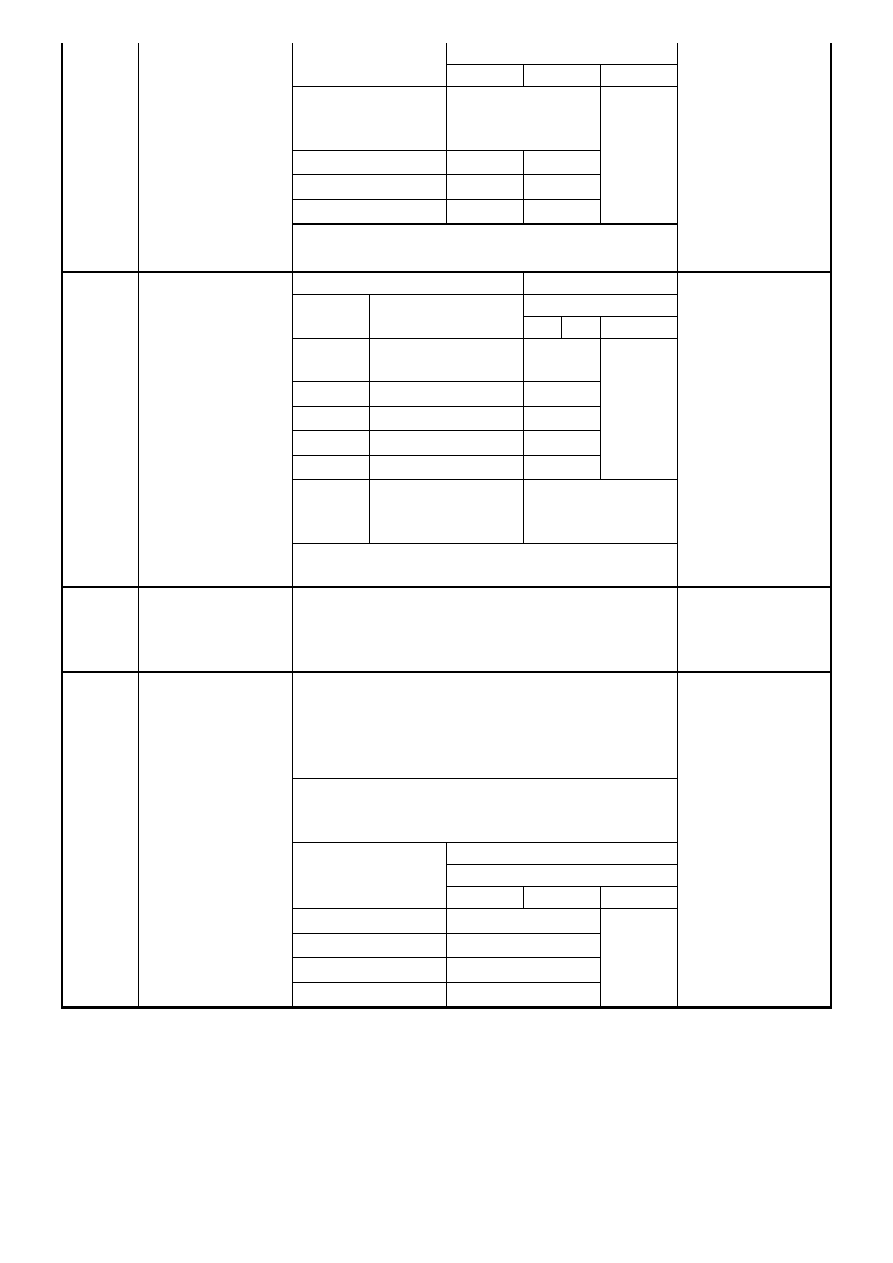
Acceptable Qty
Zone size (mm)
A B C
Φ≦0.15
Acceptable
( clutering of spot
not allowed )
0.15≦Φ≦0.20
1 2
0.20≦Φ≦0.25
0 1
Φ>0.25
0 0
Accepta-
ble
1. Spot
defect
( Defects in spot
from )
Remarks : for dark/white spot, size Φ is defined as
Φ=1/2(X+Y)
Minor
Size (mm)
Acceptable Qty
Zone
L
Length
W
Width
A
B
C
Accep-
table
W≦0.02
Accep-
table
L≦3.0 W≦0.03
2
L>2.5 W≦0.03
0
L≦3.0 0.03<W≦0.05
2
L>2.5 0.03<W≦0.05
0
Accep-
table
W>0.05
Counted as spot
defect ( Follows
item 17.5.1 )
2. Line
defect
( Defects in line
form )
Remarks: The total of spot defect and line defect
shall not exceed four.
Minor
3. Orientation
defect
( such as
misalignment of
L/C)
Not allowed inside viewing area ( Zone A or Zone
B )
Minor
17.5.4.1 Polarizer Position
1. Shifting in Position Should not exceed the
glass outline dimension.
2. Incomplete covering of the viewing area due to
Shifting is not allowed.
17.5.4.2 Seratches, bubble or dent on Glass/
Polarizer/Reflector, Bubble between
Polarizer & Reflector/Glass:
Acceptable Qty
Zone
Size (mm)
A B C
Φ≦0.20
Acceptable
0.20<Φ≦0.50
3
0.50<Φ≦1.00
2
4. Polarizing
Φ>1.00
0
Accep-
table
Minor
PAGE 9 (LMC-SSC2A16-03 Serial)
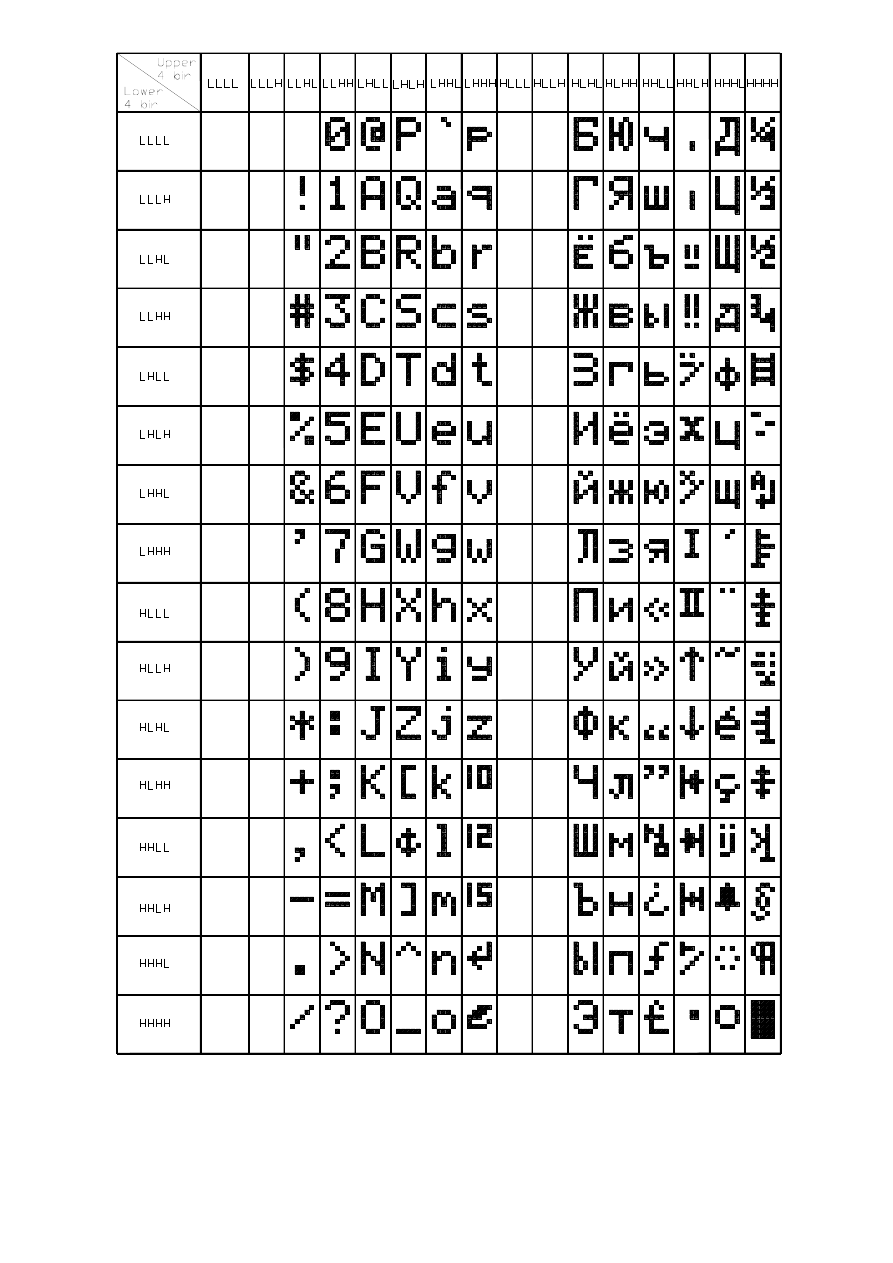
18. Character Generator ROM Map
PAGE 10 (LMC-SSC2A16-03 Serial)

SDEC TECHNOLOGY CORP.
10F, No. 100, Shing De Rd., San Chung City 241,
Taipei Hsien, Taiwan R.O.C.
TEL: 886-2-2999-2512
886-2-8512-1288
FAX:886-2-2999-2510
886-2-8512-2828
EMAIL:sdec8405@ms6.hinet.net
sdec@sdec.com.tw
http://www.sdec.com.tw
Wyszukiwarka
Podobne podstrony:
03 Sejsmika04 plytkieid 4624 ppt
03 Odświeżanie pamięci DRAMid 4244 ppt
podrecznik 2 18 03 05
od Elwiry, prawo gospodarcze 03
Probl inter i kard 06'03
TT Sem III 14 03
03 skąd Państwo ma pieniądze podatki zus nfzid 4477 ppt
03 PODSTAWY GENETYKI
Wyklad 2 TM 07 03 09
03 RYTMY BIOLOGICZNE CZŁOWIEKAid 4197 ppt
Rada Ministrow oficjalna 97 03 (2)
Sys Inf 03 Manning w 06
KOMPLEKSY POLAKOW wykl 29 03 2012
więcej podobnych podstron