Air-Conditioners
PCA-RP
•
KAQ
English
Deutsch
Français
Nederlands
Español
Italiano
Português
Dansk
Svenska
INSTALLATION MANUAL
For safe and correct use, read this manual and the outdoor unit installation manual thoroughly before installing
the air-conditioner unit.
INSTALLATIONSHANDBUCH
Aus Sicherheitsgründen und zur richtigen Anwendung vor Installation der Klimaanlage die vorliegende Bedie-
nungsanleitung und das Installationshandbuch gründlich durchlesen.
MANUEL D’INSTALLATION
Avant d’installer le climatiseur, lire attentivement ce manuel, ainsi que le manuel d’installation de l’appareil exté-
rieur pour une utilisation sûre et correct.
INSTALLATIONSMANUAL
Läs bruksanvisningen och utomhusenhetens installationshandbok noga innan luftkonditioneringen installeras så
att den används på ett säkert och korrekt sätt.
INSTALLATIEHANDLEIDING
Lees deze handleiding en de installatiehandleiding van het buitenapparaat zorgvuldig door voordat u met het
installeren van de airconditioner begint.
MANUALE DI INSTALLAZIONE
Per un uso sicuro e corretto, prima di installare il condizionatore d’aria leggere attentamente il presente manuale
ed il manuale d’installazione dell’unità esterna.
MANUAL DE INSTALACIÓN
Para un uso seguro y correcto, lea detalladamente este manual de instalación antes de montar la unidad de
aire acondicionado.
MANUAL DE INSTALAÇÃO
Para uma utilização segura e correcta, leia atentamente este manual e o manual de instalação da unidade exte-
rior antes de instalar o aparelho de ar condicionado.
INSTALLATIONSMANUAL
Læs af sikkerhedshensyn denne manual samt manualen til installation af udendørsenheden grundigt, før du
installerer klimaanlægget.
FOR INSTALLER
FÜR INSTALLATEURE
TIL INSTALLATØREN
PARA O INSTALADOR
PARA EL INSTALADOR
PER L’INSTALLATORE
VOOR DE INSTALLATEUR
FÖR INSTALLATÖREN
POUR L’INSTALLATEUR
ǼȜȜȘȞȚțȐ
ǼīȋǼǿȇǿǻǿȅȅǻǾīǿȍȃǼīȀǹȉǹȈȉǹȈǾȈ
īȚĮıȦıIJȒțĮȚĮıijĮȜȒȤȡȒıȘįȚĮȕȐıIJİʌȡȠıİțIJȚțȐĮȣIJȩIJȠİȖȤİȚȡȓįȚȠțĮșȫȢțĮȚIJȠİȖȤİȚȡȓįȚȠİȖțĮIJȐıIJĮıȘȢ
IJȘȢİȟȦIJİȡȚțȒȢȝȠȞȐįĮȢʌȡȚȞĮʌȩIJȘȞİȖțĮIJȐıIJĮıȘIJȘȢȝȠȞȐįĮȢțȜȚȝĮIJȚıIJȚțȠȪ
īǿǹǹȊȉȅȃȆȅȊȀǹȃǼǿȉǾȃǼīȀǹȉǹȈȉǹȈǾ
Türkçe
0217$-(/.ø7$%,
(PQL\HWOLYHGR÷UXNXOODQÕPLoLQNOLPDFLKD]ÕQÕPRQWHHWPHGHQ|QFHEXNÕODYX]XYHGÕúQLWHPRQWDMNÕODYX]XQX
WDPDPÕ\ODRNX\XQ
0217g5ødø1
Ɋɭɫɫɤɢɣ
ɊɍɄɈȼɈȾɋɌȼɈɉɈɍɋɌȺɇɈȼɄȿ
Ⱦɥɹɨɛɟɫɩɟɱɟɧɢɹɛɟɡɨɩɚɫɧɨɣɢɧɚɞɥɟɠɚɳɟɣɷɤɫɩɥɭɚɬɚɰɢɢɜɧɢɦɚɬɟɥɶɧɨɩɪɨɱɬɢɬɟɞɚɧɧɨɟɪɭɤɨɜɨɞɫɬɜɨɢ
ɪɭɤɨɜɨɞɫɬɜɨɩɨɭɫɬɚɧɨɜɤɟɧɚɪɭɠɧɨɝɨɩɪɢɛɨɪɚɩɟɪɟɞɭɫɬɚɧɨɜɤɨɣɤɨɧɞɢɰɢɨɧɟɪɚ
ȾɅəɍɋɌȺɇɈȼɂɌȿɅə
2
Contents
1. Safety precautions..................................................................................... 2
2. Installation location.................................................................................... 3
3. Installing the indoor unit ............................................................................ 3
4. Installing the refrigerant piping .................................................................. 5
5. Drainage piping work................................................................................. 6
6. Electrical work ...........................................................................................6
7. Test run.................................................................................................... 11
8. Easy maintenance function ..................................................................... 14
1. Safety precautions
Ź
Before installing the unit, make sure you read all the “Safety precau-
tions”.
Ź
Please report to your supply authority or obtain their consent before
connecting this equipment to the power supply system.
Warning:
Describes precautions that must be observed to prevent danger of injury or
death to the user.
Caution:
Describes precautions that must be observed to prevent damage to the unit.
After installation work has been completed, explain the “Safety Precautions,” use,
and maintenance of the unit to the customer according to the information in the
Operation Manual and perform the test run to ensure normal operation. Both the
Installation Manual and Operation Manual must be given to the user for keeping.
These manuals must be passed on to subsequent users.
:Indicates a part which must be grounded.
Warning:
&DUHIXOO\UHDGWKHODEHOVDI¿[HGWRWKHPDLQXQLW
Warning:
• Ask a dealer or an authorized technician to install the unit.
• For installation work, follow the instructions in the Installation Manual and
XVHWRROVDQGSLSHFRPSRQHQWVVSHFL¿FDOO\PDGHIRUXVHZLWKUHIULJHUDQW
VSHFL¿HGLQWKHRXWGRRUXQLWLQVWDOODWLRQPDQXDO
• The unit must be installed according to the instructions in order to mini-
mize the risk of damage from earthquakes, typhoons, or strong winds. An
incorrectly installed unit may fall down and cause damage or injuries.
• The unit must be securely installed on a structure that can sustain its weight.
• If the air conditioner is installed in a small room, measures must be taken
WR SUHYHQW WKH UHIULJHUDQW FRQFHQWUDWLRQ LQ WKH URRP IURP H[FHHGLQJ WKH
safety limit in the event of refrigerant leakage. Should the refrigerant leak
DQGFDXVHWKHFRQFHQWUDWLRQOLPLWWREHH[FHHGHGKD]DUGVGXHWRODFNRI
R[\JHQLQWKHURRPPD\UHVXOW
• Ventilate the room if refrigerant leaks during operation. If refrigerant comes
LQWRFRQWDFWZLWKDÀDPHSRLVRQRXVJDVHVZLOOEHUHOHDVHG
$OOHOHFWULFZRUNPXVWEHSHUIRUPHGE\DTXDOL¿HGWHFKQLFLDQDFFRUGLQJWR
local regulations and the instructions given in this manual.
8VHRQO\VSHFL¿HGFDEOHVIRUZLULQJ
7KHWHUPLQDOEORFNFRYHUSDQHORIWKHXQLWPXVWEH¿UPO\DWWDFKHG
• Use only accessories authorized by Mitsubishi Electric and ask a dealer or
an authorized technician to install them.
• The user should never attempt to repair the unit or transfer it to another
location.
• After installation has been completed, check for refrigerant leaks. If refrig-
HUDQWOHDNVLQWRWKHURRPDQGFRPHVLQWRFRQWDFWZLWKWKHÀDPHRIDKHDWHU
or portable cooking range, poisonous gases will be released.
1.1. Before installation (Environment)
Caution:
• Do not use the unit in an unusual environment. If the air conditioner is in-
VWDOOHGLQDUHDVH[SRVHGWRVWHDPYRODWLOHRLOLQFOXGLQJPDFKLQHRLORUVXOIX-
ULFJDVDUHDVH[SRVHGWRKLJKVDOWFRQWHQWVXFKDVWKHVHDVLGHWKHSHUIRUP-
DQFHFDQEHVLJQL¿FDQWO\UHGXFHGDQGWKHLQWHUQDOSDUWVFDQEHGDPDJHG
• Do not install the unit where combustible gases may leak, be produced,
ÀRZRUDFFXPXODWH,IFRPEXVWLEOHJDVDFFXPXODWHVDURXQGWKHXQLW¿UHRU
H[SORVLRQPD\UHVXOW
• Do not keep food, plants, caged pets, artwork, or precision instruments in
WKHGLUHFWDLUÀRZRIWKHLQGRRUXQLWRUWRRFORVHWRWKHXQLWDVWKHVHLWHPV
can be damaged by temperature changes or dripping water.
:KHQWKH URRP KXPLGLW\ H[FHHGV RU ZKHQ WKH GUDLQSLSH LV FORJJHG
water may drip from the indoor unit. Do not install the indoor unit where
such dripping can cause damage.
• When installing the unit in a hospital or communications office, be pre-
pared for noise and electronic interference. Inverters, home appliances,
high-frequency medical equipment, and radio communications equipment
can cause the air conditioner to malfunction or breakdown. The air con-
ditioner may also affect medical equipment, disturbing medical care, and
communications equipment, harming the screen display quality.
1.2. Before installation or relocation
Caution:
%H H[WUHPHO\ FDUHIXO ZKHQ WUDQVSRUWLQJ WKH XQLWV7ZR RU PRUH SHUVRQV
DUHQHHGHGWRKDQGOHWKHXQLWDVLWZHLJKVNJRUPRUH'RQRWJUDVSWKH
packaging bands. Wear protective gloves as you can injure your hands on
WKH¿QVRURWKHUSDUWV
• Be sure to safely dispose of the packaging materials. Packaging materials,
such as nails and other metal or wooden parts may cause stabs or other
injuries.
• Thermal insulation of the refrigerant pipe is necessary to prevent condensa-
tion. If the refrigerant pipe is not properly insulated, condensation will be
formed.
• Place thermal insulation on the pipes to prevent condensation. If the drain-
SLSHLVLQVWDOOHGLQFRUUHFWO\ZDWHUOHDNDJHDQGGDPDJHWRWKHFHLOLQJÀRRU
furniture, or other possessions may result.
• Do not clean the air conditioner unit with water. Electric shock may result.
7LJKWHQ DOO ÀDUH QXWV WR VSHFL¿FDWLRQ XVLQJ D WRUTXH ZUHQFK ,I WLJKWHQHG
WRRPXFKWKHÀDUHQXWFDQEUHDNDIWHUDQH[WHQGHGSHULRG
1.3. Before electric work
Caution:
• Be sure to install circuit breakers. If not installed, electric shock may result.
)RUWKHSRZHUOLQHVXVHVWDQGDUGFDEOHVRIVXI¿FLHQWFDSDFLW\2WKHUZLVH
DVKRUWFLUFXLWRYHUKHDWLQJRU¿UHPD\UHVXOW
• When installing the power lines, do not apply tension to the cables.
• Be sure to ground the unit. If the unit is not properly grounded, electric
shock may result.
• Use circuit breakers (ground fault interrupter, isolating switch (+B fuse),
DQGPROGHGFDVHFLUFXLWEUHDNHUZLWKWKHVSHFL¿HGFDSDFLW\,IWKHFLUFXLW
EUHDNHU FDSDFLW\ LV ODUJHU WKDQ WKH VSHFL¿HG FDSDFLW\ EUHDNGRZQ RU ¿UH
may result.
1.4. Before starting the test run
Caution:
• Turn on the main power switch more than 12 hours before starting opera-
tion. Starting operation just after turning on the power switch can severely
damage the internal parts.
• Before starting operation, check that all panels, guards and other protec-
tive parts are correctly installed. Rotating, hot, or high voltage parts can
cause injuries.
'RQRWRSHUDWHWKHDLUFRQGLWLRQHUZLWKRXWWKHDLU¿OWHUVHWLQSODFH,IWKHDLU
¿OWHULVQRWLQVWDOOHGGXVWPD\DFFXPXODWHDQGEUHDNGRZQPD\UHVXOW
• Do not touch any switch with wet hands. Electric shock may result.
• Do not touch the refrigerant pipes with bare hands during operation.
$IWHUVWRSSLQJRSHUDWLRQEHVXUHWRZDLWDWOHDVW¿YHPLQXWHVEHIRUHWXUQ-
ing off the main power switch. Otherwise, water leakage or breakdown may
result.
Note:
The phrase “Wired remote controller“ in this installation manual refers only to the PAR-21MAA.
,I\RXQHHGDQ\LQIRUPDWLRQIRUWKH3$50$$SOHDVHUHIHUWRHLWKHUWKHLQVWDOODWLRQPDQXDORULQLWLDOVHWWLQJPDQXDOZKLFKDUHLQFOXGHGLQ
3$50$$ER[
3
3. Installing the indoor unit
2. Installation location
(mm)
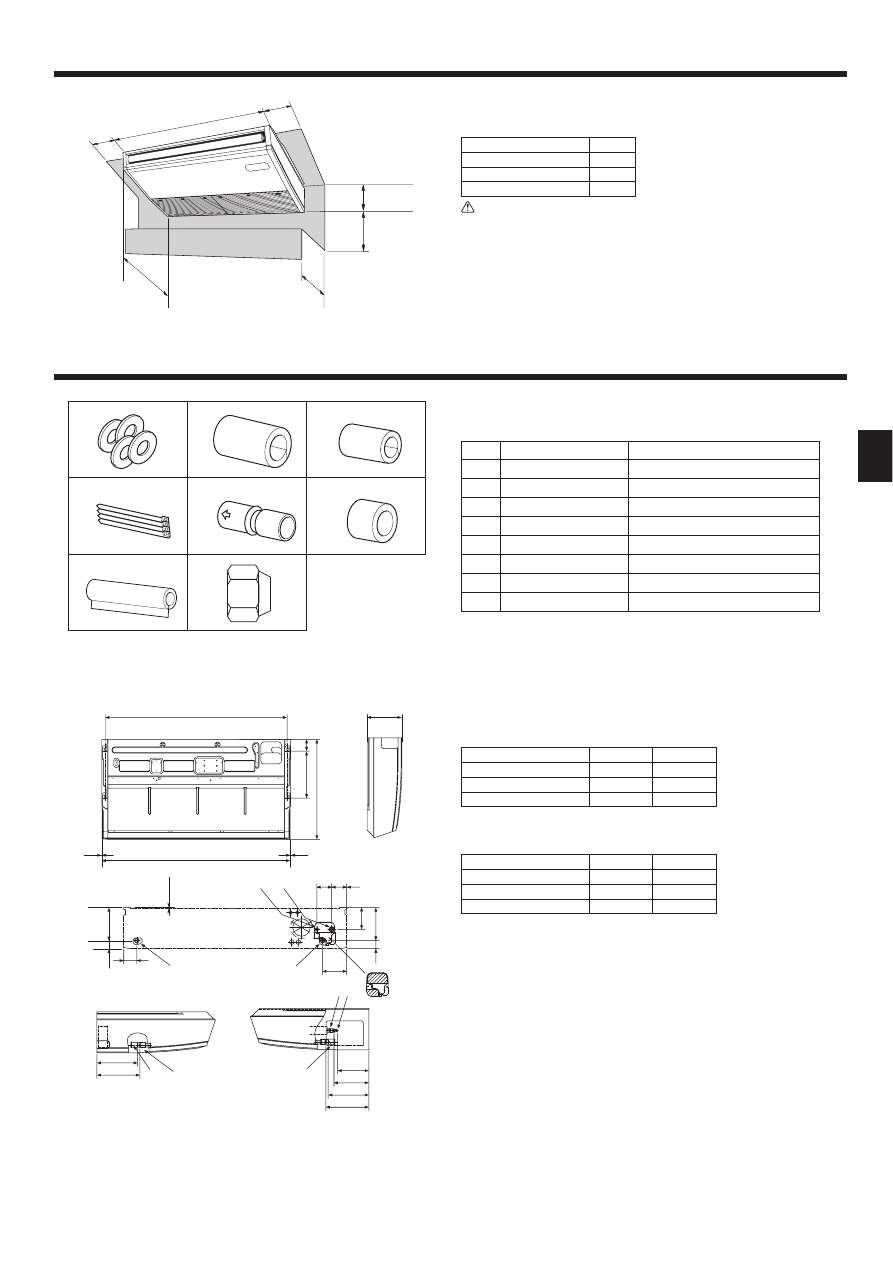
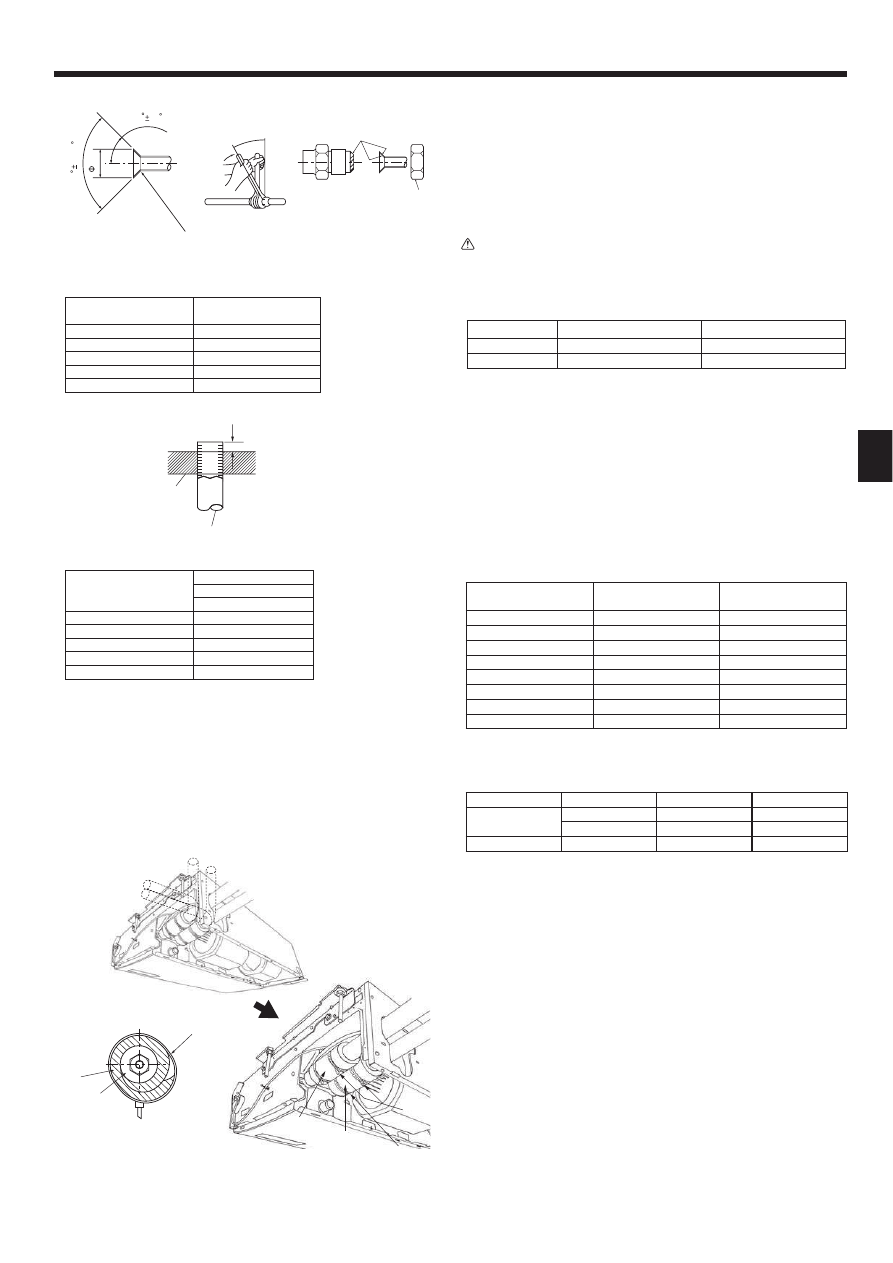
3.1. Check the indoor unit accessories (Fig. 3-1)
The indoor unit should be supplied with the following accessories
(contained in the inside of the intake grille).
Accessory name
Q’ty
Washer
4 pcs
Pipe cover
1 pc Large size (For gas tubing)
Pipe cover
1 pc Small size (For liquid tubing)
Band
4 pcs
Joint socket
1 pc Marked with “UNIT”
Socket cover
1 pc
Drain tubing cover
1 pc
Flare nut
1 pc ø6.35 (RP60 only)
3.2. Preparation for installation (Fig. 3-2)
3.2.1. Suspension bolt installing spacing
(mm)
Models
A
B
RP50
917
960
RP60,71
1237
1280
RP100,125 ,140
1557
1600
3.2.2. Refrigerant and drain tubing location
(mm)
Models
C
D
RP50
184
203
RP60
179
203
RP71-140
180
200
Front side outlet
Left drain tubing
Left side outlet
Gas tubing
Right side outlet
Liquid tubing
Independent piece (Removable)
Rubber plug
Right drain tubing
with Joint socket
In case of the rear pipe arrangement, make sure to remove the shaded portions
from the independent piece. Then put the independent piece back in initial
position.
(The heat exchanger might be clogged because of dust)
236
Min.500
680
Max.250
W
Min.270
Min.300
A
236
B
2
75
80
320
680
2
190
46
6
233
246
C
D
233
246
86 2
85
138
126
190
46
Fig. 2-1
2.1. Outline dimensions (Indoor unit) (Fig. 2-1)
Select a proper position allowing the following clearances for installation and main-
tenance.
Models
W
RP50
960
RP60,71
1280
RP100 ,125,140
1600
Warning:
Mount the indoor unit on a ceiling strong enough to withstand the weight of
the unit.
2.2. Outline dimensions (Outdoor unit)
Refer to the outdoor unit installation manual.
Fig. 3-1
70+6
Fig. 3-2
(mm)
4
3. Installing the indoor unit
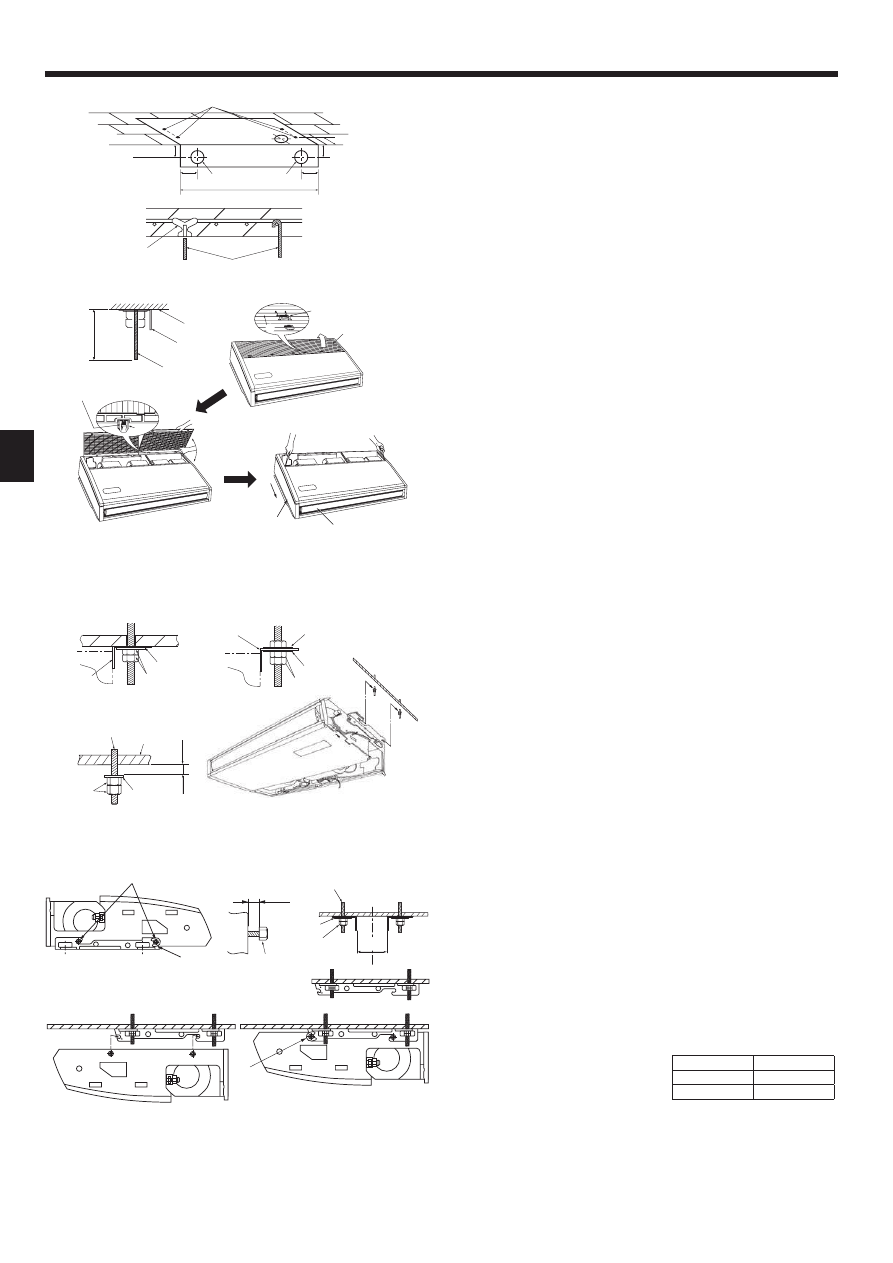
3.3. Installing the indoor unit (Fig. 3-5)
Use a proper suspending method depending on the presence or absence of ceiling
materials as follows.
In the presence of ceiling materials
Ceiling
In the absence of ceiling materials
Suspending bolt
Suspending bracket
Washer
Unit
Washer (Local procurement)
Double nuts
1) Directly suspending the unit
Installing procedures
1. Install the washer (supplied with the unit) and the nuts (to be locally procured).
2. Set (hook) the unit through the suspending bolts.
3. Tighten the nuts.
Check the unit installing condition.
• Check that the unit is horizontal between the right and left sides.
• Check that the front and the rear of suspending brackets are horizontal.
(To keep drainage,the unit is inclined to the suspending brackets. The unit slopes
continuously downward from the front to the rear is the right installation position.)
,QVWDOOLQJWKHVXVSHQGLQJEUDFNHW¿UVWRQWRWKHFHLOLQJ)LJ
Installing procedures
1. Remove the suspending brackets and U-shaped washers from the unit.
$GMXVWWKHVXVSHQGLQJEUDFNHWKROGLQJEROWVRQWKHXQLW
3. Attach the suspending brackets to the suspending bolts.
4. Check that the suspending brackets are horizontal (front and rear / right and left).
5. Set (hook) the unit to the suspending brackets.
7LJKWHQ¿[HGEROWVRIWKHVXVSHQGLQJEUDFNHWV
+ Be sure to install the U-shaped washers.
Suspending bracket holding bolt
Unit
U-shaped washer
Suspending bolt
Washer
Double nuts
(mm)
10
–20
125
175
190
70
80
ø65
ø100
7~12
3.2.3. Selection of suspension bolts and tubing positions (Fig. 3-3)
Using the pattern paper provided for installation, select proper positions for suspen-
sion bolts and tubing and prepare relative holes.
Pattern paper
Suspension bolt hole
Indoor unit width
Secure the suspension bolts or use angle stock braces or square timbers for bolt
installation.
Use inserts of 100 kg to 150 kg each.
Use suspension bolts of W3/8 or M10 in size.
3.2.4. Indoor unit preparation (Fig. 3-4)
1. Install the suspending bolts. (Procure the W3/8 or M10 bolts locally.)
Predetermine the length from the ceiling ( within 100 mm).
Ceiling surface Suspending bolt Suspending bracket
2. Remove the intake grille.
Slide the intake grille holding knobs (at 2 or 3 locations) backward to open the
intake grille.
3. Remove the side panel.
Remove the side panel holding screws (one in each side, right and left) then slide
the side panel forward for removal.
Intake grille
Slide the side panel forward.
Intake grille holding knob
Side panel
Slide
Remove the side panel holding screws.
Hinge
Remove the protective vinyl of vane.
Pushing the hinge, pull out the intake grille.
Forcing open the intake grille or opening it to an angle of more than 120° may
damage the hinges.
Fig. 3-4
Fig. 3-5
Fig. 3-3
)LJ
(mm)
RP50
882-887
RP60,71
1202-1207
RP100 -140
1522-1527
5
4. Installing the refrigerant piping
4.3. Indoor unit (Fig. 4-3)
Installing procedures
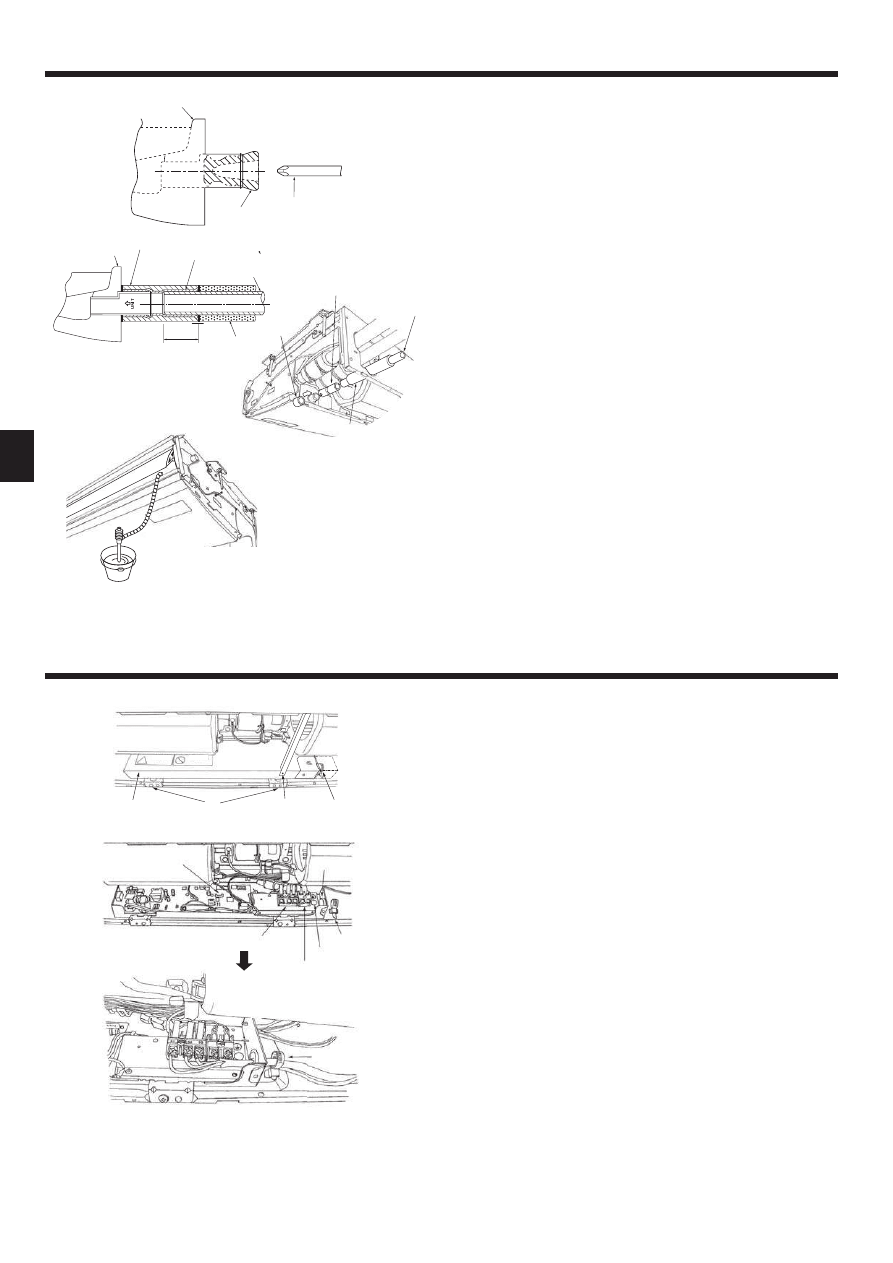
1. Slide the supplied pipe cover over the gas tubing until it is pressed against the
sheet metal inside the unit.
2. Slide the provided pipe cover over the liquid tubing until it is pressed against
the sheet metal inside the unit.
3. Tighten the pipe covers and at the both ends (20 mm) with the supplied
bands
.
Gas tubing
Pipe cover
Liquid tubing
Press the pipe cover against the sheet metal.
Band
Refrigerant tubing heat insulating material
Pipe cover
4.4. For twin/triple combination
Refer to the outdoor unit installation manual.
4.1. Precautions
)RUGHYLFHVWKDWXVH5$UHIULJHUDQW
• Use ester oil, ether oil or alkylbenzene oil (small amount) as the refrigera-
WLRQRLODSSOLHGWRWKHÀDUHGVHFWLRQV
8VH & FRSSHU SKRVSKRUXV IRU FRSSHU DQG FRSSHU DOOR\ VHDPOHVV
pipes, to connect the refrigerant pipes. Use refrigerant pipes with the thick-
QHVVHVVSHFL¿HGLQWKHWDEOHEHORZ0DNHVXUHWKHLQVLGHVRIWKHSLSHVDUH
clean and do not contain any harmful contaminants such as sulfuric com-
SRXQGVR[LGDQWVGHEULVRUGXVW
Warning:
:KHQLQVWDOOLQJRUPRYLQJWKHDLUFRQGLWLRQHUXVHRQO\WKHVSHFL¿HGUHIULJHU-
DQW5$WRFKDUJHWKHUHIULJHUDQWOLQHV'RQRWPL[LWZLWKDQ\RWKHUUHIULJ-
erant and do not allow air to remain in the lines. Air enclosed in the lines can
cause pressure peaks resulting in a rupture and other hazards.
RP35, 50
RP60-140
Liquid pipe
6.35 thickness 0.8 mm
9.52 thickness 0.8 mm
Gas pipe
12.7 thickness 0.8 mm
15.88 thickness 1.0 mm
'RQRWXVHSLSHVWKLQQHUWKDQWKRVHVSHFL¿HGDERYH
4.2. Connecting pipes (Fig. 4-1)
• When commercially available copper pipes are used, wrap liquid and gas pipes
with commercially available insulation materials (heat-resistant to 100 °C or
more, thickness of 12 mm or more).
• The indoor parts of the drain pipe should be wrapped with polyethylene foam in-
VXODWLRQPDWHULDOVVSHFL¿FJUDYLW\RIWKLFNQHVVRIPPRUPRUH
$SSO\WKLQOD\HURIUHIULJHUDQWRLOWRSLSHDQGMRLQWVHDWLQJVXUIDFHEHIRUHWLJKWHQ-
LQJÀDUHQXW
• Use 2 wrenches to tighten piping connections.
• Use refrigerant piping insulation provided to insulate indoor unit connections. In-
sulate carefully.
Flare nut tightening torque
Copper pipe O.D.
(mm)
Flare nut O.D.
(mm)
Tightening torque
(N·m)
6.35
17
14-18
6.35
22
34-42
9.52
22
34-42
12.7
26
49-61
12.7
29
68-82
15.88
29
68-82
15.88
36
100-120
19.05
36
100-120
$SSO\UHIULJHUDWLQJPDFKLQHRLORYHUWKHHQWLUHÀDUHVHDWVXUIDFH
8VHFRUUHFWÀDUHQXWVPHHWLQJWKHSLSHVL]HRIWKHRXWGRRUXQLW
Available pipe size
RP35, 50
RP60
RP71-140
Liquid side
ȅ
6.35
—
—
ȅ
ȅ
Gas side
ȅ
ȅ
ȅ
ȅ)DFWRU\ÀDUHQXWDWWDFKPHQWWRWKHKHDWH[FKDQJHU
Flare cutting dimensions
Copper pipe O.D.
Flare dimensions
(mm)
A dimensions (mm)
6.35
8.7 - 9.1
9.52
12.8 - 13.2
12.7
16.2 - 16.6
15.88
19.3 - 19.7
19.05
23.6 - 24.0
90
0.5
A
R0.4~R0.8
45 2
Fig. 4-1
Die
Copper pipe
B
Fig. 4-2
Copper pipe O.D.
B (mm)
(mm)
Flare tool for R410A
Clutch type
6.35 (1/4")
0 - 0.5
9.52 (3/8")
0 - 0.5
12.7 (1/2")
0 - 0.5
15.88 (5/8")
0 - 0.5
19.05 (3/4")
0 - 0.5
Fig. 4-3
5. Drainage piping work
(OHFWULFDOZRUN
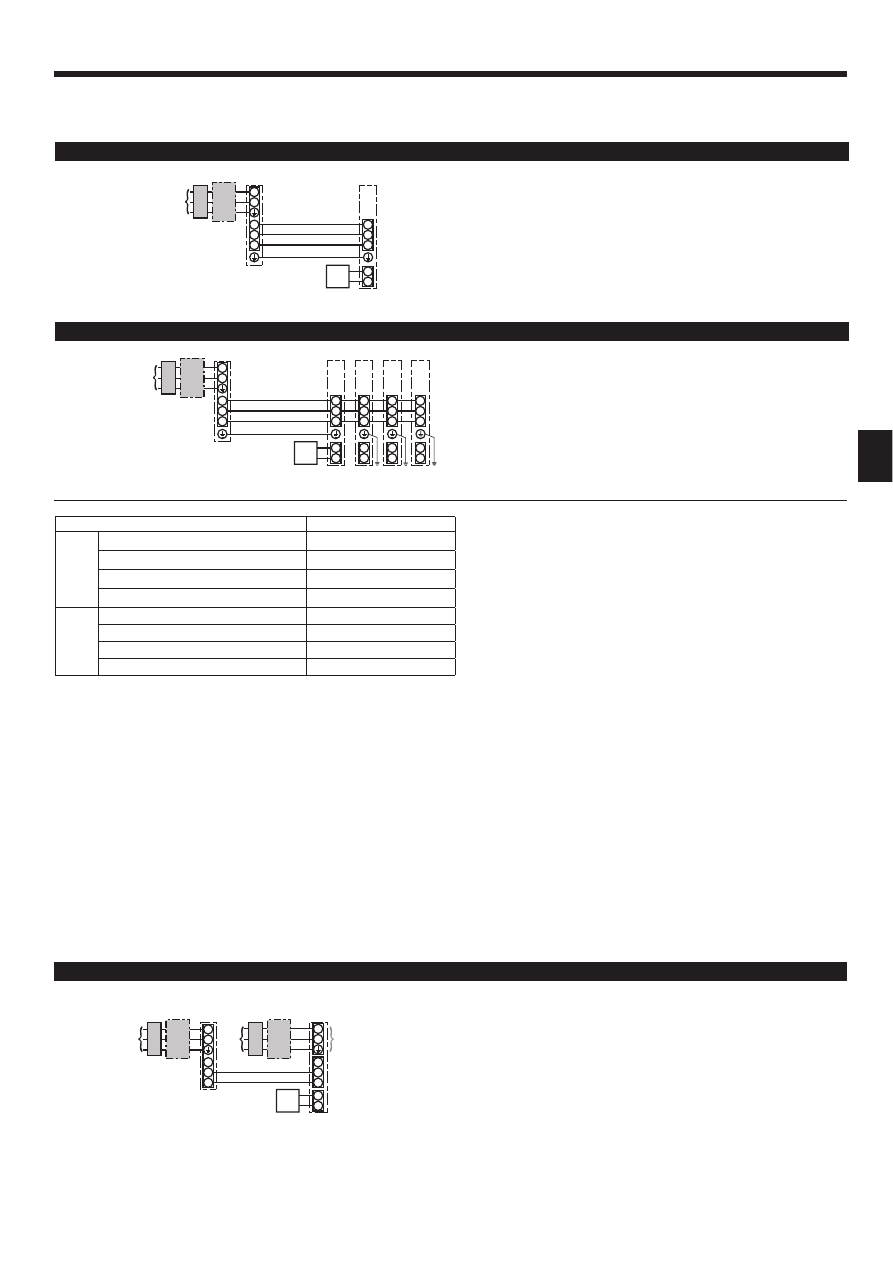
• For left side tubing, be sure to insert the rubber plug into the right drain port. (Fig.
5-1)
• Use VP-20 (O.D. ø26 (1”) PVC TUBE) for drain piping and provide 1/100 or more
downward slope.
$IWHUFRPSOHWLRQRIZRUNFKHFNWKDWFRUUHFWGUDLQLVDYDLODEOHIURPWKHRXWÀRZ
port of the drain tubing.
Drain pan
Plug
Insert the driver etc.in the plug deeply.
Installing procedures (Fig. 5-2)
$WWDFKWKHMRLQWVRFNHW supplied with the unit to the drain port on the unit with a
vinyl chloride adhesive.
2. Fasten the socket cover
VXSSOLHGZLWKWKHXQLWWRWKHMRLQWVRFNHW .
$WWDFKWKH¿HOGGUDLQWXELQJ93WRWKHMRLQWVRFNHW with a vinyl chloride
adhesive.
4. Wrap the drain tubing cover supplied with the unit. (Seam taping)
Drain pan
Drain tubing
Socket cover
Joint socket
Drain tubing cover
Insertion length 37mm
5. Check for correct drainage. (Fig. 5-3)
* Fill the drain pan with water of about 1 L from the air outlet.
(OHFWULFZLULQJ)LJ
Wiring procedures
1. Remove the tapping screw then remove the beam.
2. Remove the (2) tapping screws then remove the electric part cover .
3. Connect the electric wires securely to the corresponding terminals.
4. Replace the removed parts.
5. Tie the electric wires with the local wiring clamp located in the right side of the
MXQFWLRQER[
Cover
Grounding cable connector
Set screws (2 pcs)
Terminal block for Remote controller
Set screws (Beam)
Secure with the wiring clamp.
Wiring clamp
Control board
Wire service entrance
Terminal block for indoor and outdoor units connection
Fig. 5-1
Fig. 5-2
Fig. 5-3
)LJ
7
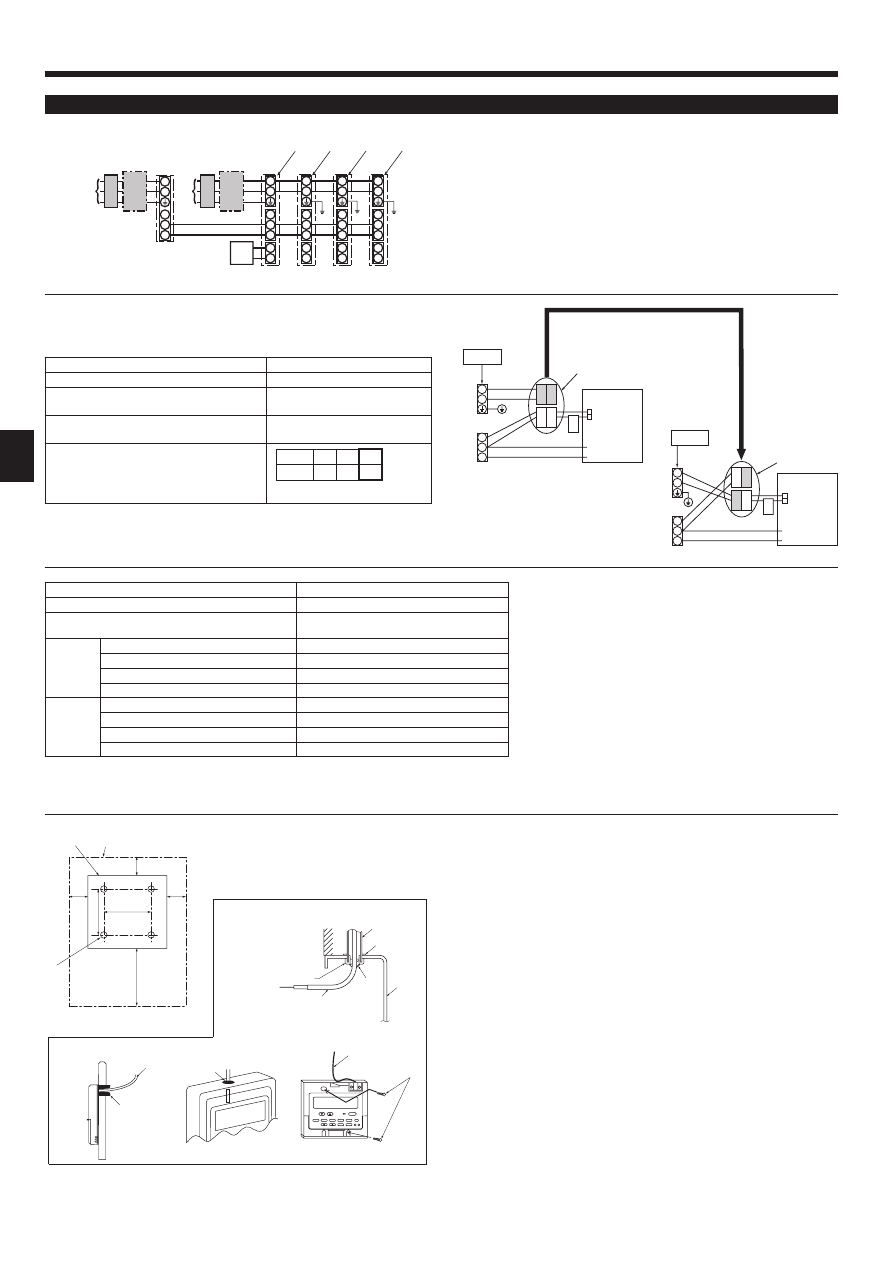
,QGRRUXQLWSRZHUVXSSOLHGIURPRXWGRRUXQLW
The following connection patterns are available.
The outdoor unit power supply patterns vary on models.
1 System
S1
S2
L
N
1
2
S1
S2
S3
S3
A
B
C
D
E
F
G
S1
S2
L
N
1
2
S1
S2
S3
1
2
S1
S2
S3
S3
1
2
S1
S2
S3
1
2
S1
S2
S3
A
B
C
D
E
F
G
G
G
G
H
H
H
$I¿[ODEHO$WKDWLVLQFOXGHGZLWKWKHPDQXDOVQHDUHDFKZLULQJGLDJUDPIRUWKHLQGRRUDQGRXWGRRUXQLWV
A Outdoor unit power supply
B Earth leakage breaker
C Wiring circuit breaker or isolating switch
D Outdoor unit
E Indoor unit/outdoor unit connecting cables
F Remote controller
G Indoor unit
$I¿[ODEHO$WKDWLVLQFOXGHGZLWKWKHPDQXDOVQHDUHDFKZLULQJGLDJUDPIRUWKHLQGRRUDQGRXWGRRUXQLWV
Indoor unit model
PCA
Wiring
Wire No. × size
(mm²)
Indoor unit-Outdoor unit
*1
3× 1.5 (polar)
Indoor unit-Outdoor unit earth
*1
1 × Min.1.5
Indoor unit earth
1 × Min.1.5
Remote controller-Indoor unit
*2
2 × 0.3 (Non-polar)
Circuit rating
Indoor unit (Heater) L-N
*3
-
Indoor unit-Outdoor unit S1-S2
*3
AC 230 V
Indoor unit-Outdoor unit S2-S3
*3
DC24 V
Remote controller-Indoor unit
*3
DC12 V
*1. <For 50-140 outdoor unit application>
Max. 45 m
If 2.5 mm
2
used, Max. 50 m
If 2.5 mm
2
used and S3 separated, Max. 80 m
<For 200/250 outdoor unit application>
Max. 18 m
If 2.5 mm
2
used, Max. 30 m
If 4 mm
2
used and S3 separated, Max. 50 m
If 6 mm
2
used and S3 separated, Max. 80 m
*2. The 10 m wire is attached in the remote controller accessory. Max. 500 m
7KH¿JXUHVDUH127DOZD\VDJDLQVWWKHJURXQG
S3 terminal has DC 24 V against S2 terminal. However between S3 and S1, these terminals are not electrically insulated by the transformer or other device.
Notes: 1. Wiring size must comply with the applicable local and national code.
2.
3RZHUVXSSO\FRUGVDQGLQGRRUXQLWRXWGRRUXQLWFRQQHFWLQJFRUGVVKDOOQRWEHOLJKWHUWKDQSRO\FKORURSUHQHVKHDWKHGÀH[LEOHFRUG
'HVLJQ,(&
3. Install an earth longer than other cables.
Simultaneous twin/triple/quadruple system
1:1 System
6HSDUDWHLQGRRUXQLWRXWGRRUXQLWSRZHUVXSSOLHV)RU38+=DSSOLFDWLRQRQO\
The following connection patterns are available.
The outdoor unit power supply patterns vary on models.
1:1 System
(OHFWULFDOZRUN
A Outdoor unit power supply
B Earth leakage breaker
C Wiring circuit breaker or isolating switch
D Outdoor unit
E Indoor unit/outdoor unit connecting cables
F Remote controller
G Indoor unit
H Indoor unit earth
* The indoor power supply terminal kit is required.
A Outdoor unit power supply
B Earth leakage breaker
C Wiring circuit breaker or isolating switch
D Outdoor unit
E Indoor unit/outdoor unit connecting cables
F Remote controller
G Indoor unit
H Option
J Indoor unit power supply
$I¿[ODEHO%WKDWLVLQFOXGHGZLWKWKHPDQXDOVQHDUHDFKZLULQJGLDJUDPIRUWKHLQGRRUDQGRXWGRRUXQLWV
S1
S2
L
N
1
2
L
N
S1
S2
S3
S3
A
C
B
D
J
E
B
C
F
G
H
(OHFWULFDOZRUN
Simultaneous twin/triple/quadruple system
5HPRWHFRQWUROOHU
)RUZLUHGUHPRWHFRQWUROOHU
1) Installing procedures
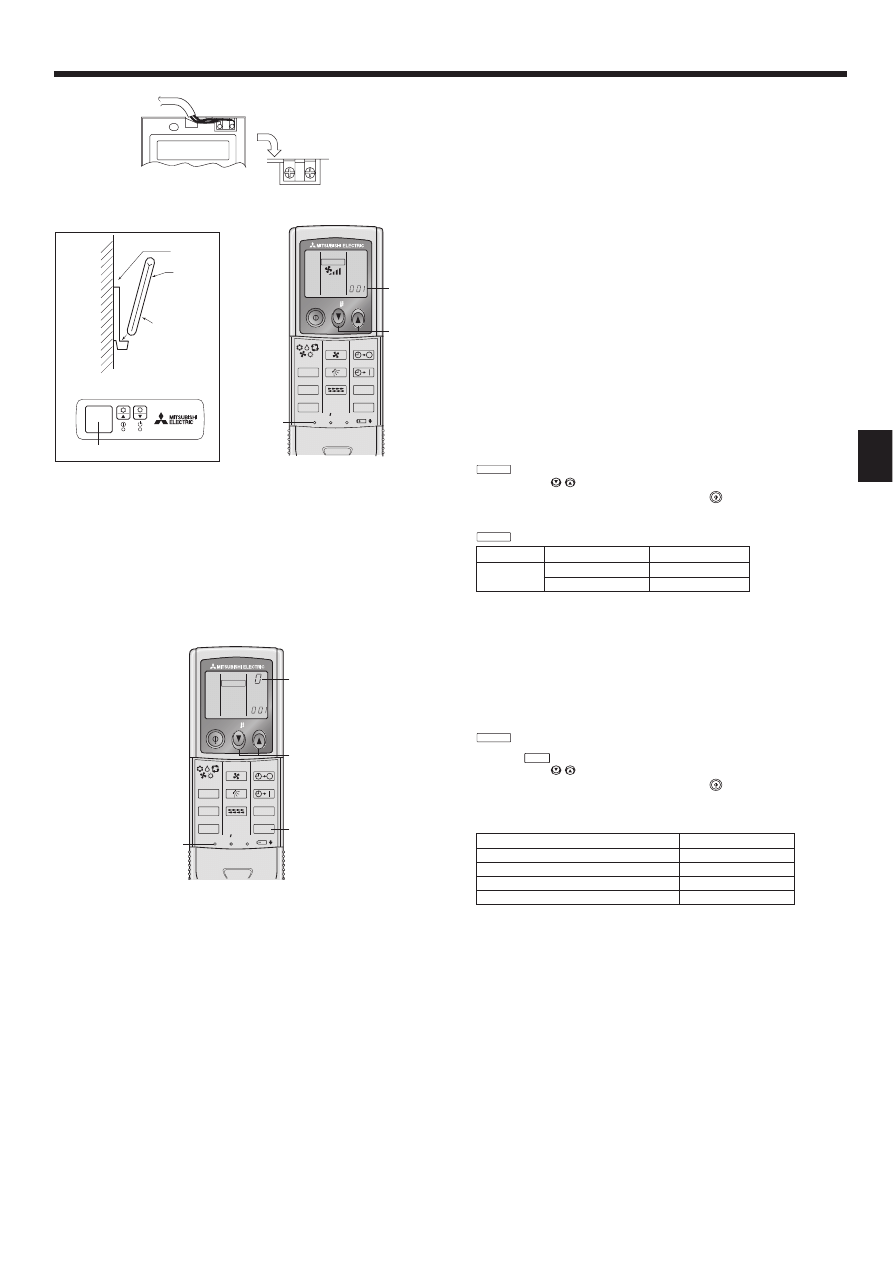
(1) Select an installing position for the remote controller. (Fig. 6-2)
The temperature sensors are located on both remote controller and indoor unit.
Ź 3URFXUHWKHIROORZLQJSDUWVORFDOO\
2 piece switch box
Thin copper conduit tube
Lock nuts and bushings
>)LJ@
5HPRWHFRQWUROOHUSUR¿OH
Required clearances surrounding the remote controller
Installation pitch
(2) Seal the service entrance for the remote controller cord with putty to prevent
possible invasion of dew drops, water, cockroaches or worms. (Fig. 6-3)
For installation in the switch box
For direct installation on the wall, select one of the following:
• Prepare a hole through the wall to pass the remote controller cord (in order to run
the remote controller cord from the back), then seal the hole with putty.
• Run the remote controller cord through the cut-out upper case, then seal the cut-
out notch with putty.
B-1. To lead the remote controller cord from the back of the controller
B-2. To run the remote controller cord through the upper portion
>)LJ@
Wall
Lock nut
Switch box
Seal with putty
Conduit
Bushing
Remote controller cord
Wood screw
$I¿[ODEHO%WKDWLVLQFOXGHGZLWKWKHPDQXDOVQHDUHDFKZLULQJGLDJUDPIRUWKHLQGRRUDQGRXWGRRUXQLWV
If the indoor and outdoor units have separate power supplies, refer to the table
below. If the indoor power supply terminal kit is used, change the indoor unit elec-
WULFDOER[ZLULQJUHIHULQJWRWKH¿JXUHLQWKHULJKWDQGWKH',3VZLWFKVHWWLQJVRIWKH
outdoor unit control board.
,QGRRUXQLWVSHFL¿FDWLRQV
Indoor power supply terminal kit (option)
Required
Indoor unit electrical box connector connec-
tion change
Required
Label affixed near each wiring diagram for
the indoor and outdoor units
Required
Outdoor unit DIP switch settings (when us-
ing separate indoor unit/outdoor unit power
supplies only)
7KHUHDUHW\SHVRIODEHOVODEHOV$%DQG&$I¿[WKHDSSURSULDWHODEHOVWRWKH
units according to the wiring method.
Indoor unit model
PCA
*1. A breaker with at least 3.0 mm contact separation in each pole shall be pro-
vided. Use earth leakage breaker (NV).
The breaker shall be provided to ensure disconnection of all active phase
conductors of the supply.
*2. Max. 120 m
*3. The 10 m wire is attached in the remote controller accessory. Max. 500 m
7KH¿JXUHVDUH127DOZD\VDJDLQVWWKHJURXQG
Indoor unit power supply
~/N (single), 50 Hz, 230 V
Indoor unit input capacity
Main switch (Breaker)
*1
16 A
Wiring
Wire No. ×
size (mm²)
Indoor unit power supply & earth
3 × Min. 1.5
Indoor unit-Outdoor unit
*2
2 × Min. 0.3
Indoor unit-Outdoor unit earth
–
Remote controller-Indoor unit
*3
2 × 0.3 (Non-polar)
Circuit
rating
Indoor unit L-N
*4
AC 230 V
Indoor unit-Outdoor unit S1-S2
*4
–
Indoor unit-Outdoor unit S2-S3
*4
DC24 V
Remote controller-Indoor unit
*4
DC12 V
Notes: 1. Wiring size must comply with the applicable local and national code.
2.
3RZHUVXSSO\FRUGVDQGLQGRRUXQLWRXWGRRUXQLWFRQQHFWLQJFRUGVVKDOOQRWEHOLJKWHUWKDQSRO\FKORURSUHQHVKHDWKHGÀH[LEOHFRUG'HVLJQ,(&
3. Install an earth longer than other cables.
A Outdoor unit power supply
B Earth leakage breaker
C Wiring circuit breaker or isolating switch
D Outdoor unit
E Indoor unit/outdoor unit connecting cables
F Remote controller
G Indoor unit
H Option
J Indoor unit power supply
K Indoor unit earth
30
30
30
120
83.5
B-1.
B-2.
Fig. 6-3
Fig. 6-2
46
S1
S2
L
N
1
2
L
N
S1
S2
S3
1
2
L
N
S1
S2
S3
1
2
L
N
S1
S2
S3
1
2
L
N
S1
S2
S3
S3
A
B
C
D
E
J
B
C
F
H
G
G
G
G
K
K
K
H
H
H
ON
OFF
1
2
(SW8)
3
S1
S2
S3
L
N
BLUE
BLUE
YELLOW
YELLOW
CN01
CN01
BLACK
CN01
BLACK
S1
S2
S3
L
N
YELLOW
BLUE
BLUE
YELLOW
CN01
* The indoor power supply terminal kits are required.
Set the SW8-3 to ON.
Option
Option
Indoor unit power supplied from outdoor unit
(initial setting)
Separate indoor unit/outdoor unit power supplies
Connectors (connections of initial setting
are for indoor unit power supplied from
outdoor unit)
If the indoor and
outdoor units have
separate power
supplies, change the
connections of the
connectors as shown
in the following
¿JXUH
Connectors
Indoor unit
control board
Indoor unit
control board
9
(OHFWULFDOZRUN
&RQQHFWLQJSURFHGXUHV)LJ
Connect the remote controller cord to the terminal block.
To TB5 on the indoor unit
TB6 (No polarity)
3) 2 remote controllers setting
If 2 remote controllers are connected, set one to “Main” and the other to “Sub”. For
setting procedures, refer to “Function selection of remote controller” in the opera-
tion manual for the indoor unit.
)RUZLUHOHVVUHPRWHFRQWUROOHU
1) Installation area
• Area in which the remote controller is not exposed to direct sunshine.
• Area in which there is no nearby heating source.
• Area in which the remote controller is not exposed to cold (or hot) winds.
• Area in which the remote controller can be operated easily.
• Area in which the remote controller is beyond the reach of children.
,QVWDOODWLRQPHWKRG)LJ
Attach the remote controller holder to the desired location using 2 tapping screws.
Place the lower end of the controller into the holder.
Remote controller
Wall
Display panel
Receiver
• The signal can travel up to approximately 7 meters (in a straight line) within 45
degrees to both right and left of the center line of the receiver.
6HWWLQJ)LJ
Insert batteries.
Press the SET button with something sharp at the end.
MODEL SELECT
blinks and Model No. is lighted.
Press the temp
buttons to set the Model No.
If you mistook the operation, press the ON/OFF
button and operate again
from procedure .
Press the SET button with something sharp at the end.
MODEL SELECT
and Model No. are lighted for 3 seconds, then turned off.
Indoor
Outdoor
Model No.
PCA
PUH, PUHZ, SUZ
001
PU
033
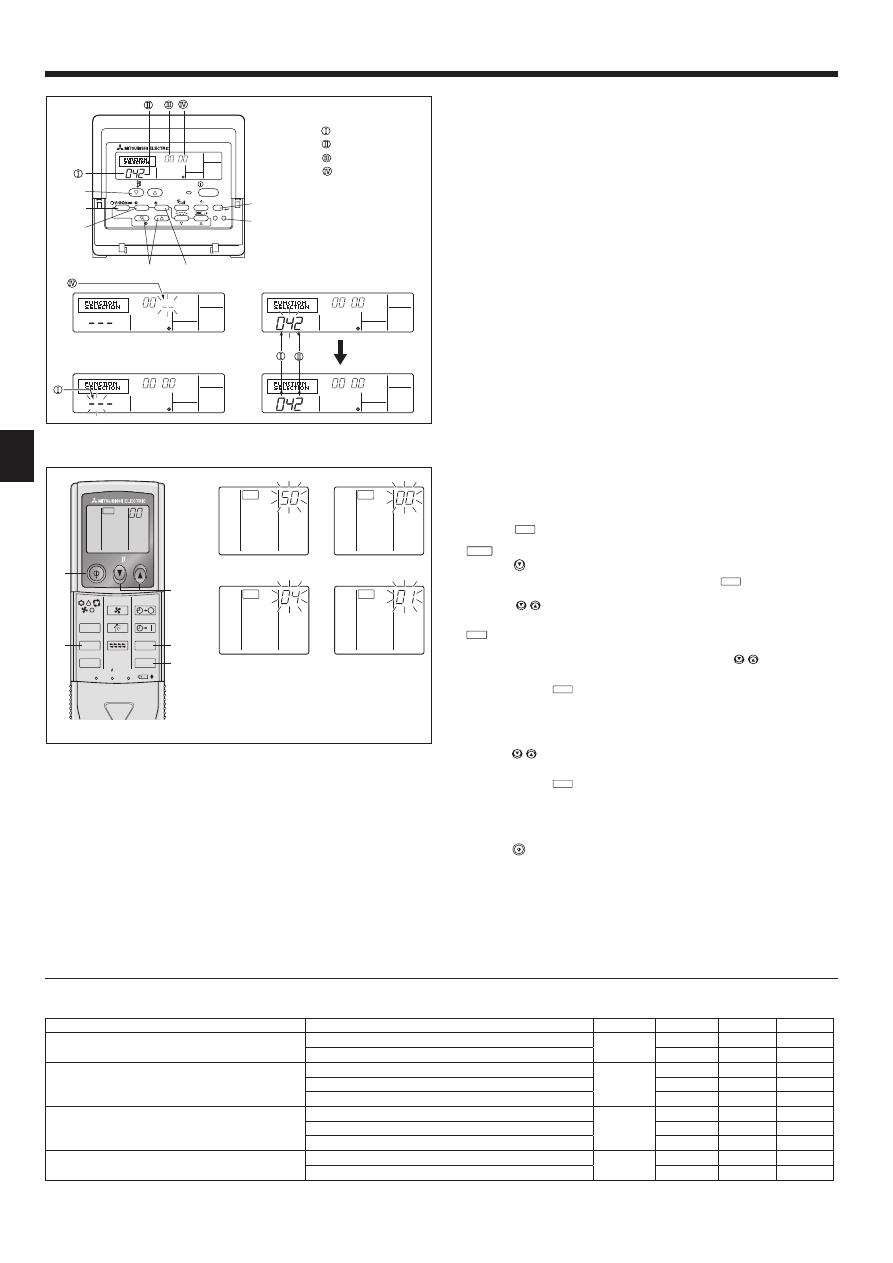
$VVLJQLQJDUHPRWHFRQWUROOHUWRHDFKXQLW)LJ
Each unit can be operated only by the assigned remote controller.
Make sure each pair of an indoor unit PC board and a remote controller is assigned
to the same pair No.
5) Wireless remote controller pair number setting operation
Press the SET button with something sharp at the end.
Start this operation from the status of remote controller display turned off.
MODEL SELECT
blinks and Model No. is lighted.
Press the
min
button twice continuously. Pair No. “0” blinks.
Press the temp
buttons to set the pair number you want to set.
If you mistook the operation, press the ON/OFF
button and operate again
from procedure .
Press the SET button with something sharp at the end.
Set pair number is lighted for 3 seconds then turned off.
Pair No. of wireless remote controller
Indoor PC board
0
Initial setting
1
Cut J41
2
Cut J42
3-9
Cut J41, J42
ON/OFF
TEMP
RESET
SET
CLOCK
MODEL SELECT
FAN
VANE
TEST RUN
AUTO STOP
AUTO START
h
min
LOUVER
MODE
CHECK
Fig. 6-6
B
TB
Fig. 6-4
Fig. 6-5
A
6
Fig. 6-7
ON/OFF
TEMP
FAN
VANE
TEST RUN
AUTO STOP
AUTO START
h
min
LOUVER
MODE
CHECK
RESET
SET
CLOCK
MODEL SELECT
)XQFWLRQVHWWLQJV
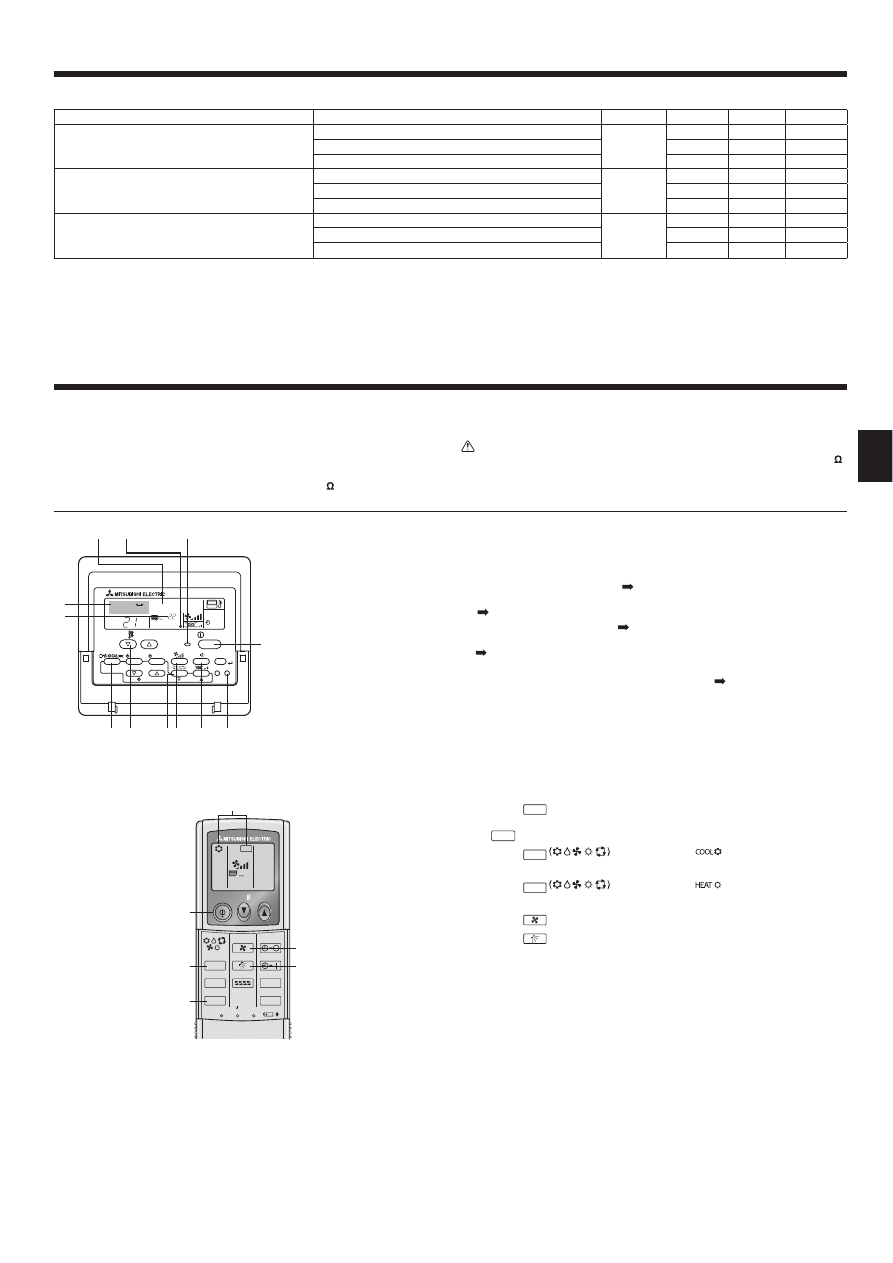
)XQFWLRQVHWWLQJRQWKHXQLW6HOHFWLQJWKHXQLWIXQFWLRQV
)RUZLUHGUHPRWHFRQWUROOHU)LJ
Changing the power voltage setting
• Be sure to change the power voltage setting depending on the voltage used.
Go to the function setting mode.
Switch OFF the remote controller.
Press the FILTER and TEST RUN buttons simultaneously and hold
them for at least 2 seconds. FUNCTION will start to blink.
Use the buttons to set the refrigerant address () to 00.
Press
button and [--] will start to blink in the unit number () display.
Use the buttons to set the unit number () to 00.
Press the MODE button to designate the refrigerant address/unit number. [--]
will blink in the mode number () display momentarily.
Press the buttons to set the mode number () to 04.
Press the button and the current set setting number () will blink.
Use the
button to switch the setting number in response to the power supply
voltage to be used.
Power supply voltage
240 V
: setting number = 1
220 V, 230 V : setting number = 2
Press the MODE button and mode and the setting number () and () will
FKDQJHWREHLQJRQFRQVWDQWO\DQGWKHFRQWHQWVRIWKHVHWWLQJFDQEHFRQ¿UPHG
Press the FILTER
and TEST RUN
buttons simultaneously for at least 2
seconds. The function selection screen will disappear momentarily and the air
conditioner OFF display will appear.
)RUZLUHOHVVUHPRWHFRQWUROOHU)LJ
Changing the power voltage setting
• Be sure to change the power voltage setting depending on the voltage used.
Going to the function select mode
Press the
CHECK
button twice continuously.
(Start this operation from the status of remote controller display turned off.)
CHECK
is lighted and “00” blinks.
Press the
temp button once to set “50”. Direct the wireless remote control-
ler toward the receiver of the indoor unit and press the
h
button .
Setting the unit number
Press the
temp buttons and to set the unit number “00”. Direct the
wireless remote controller toward the receiver of the indoor unit and press the
min
button .
Selecting a mode
Enter 04 to change the power voltage setting using the
temp buttons
and
. Direct the wireless remote controller toward the receiver of the indoor
unit and press the
h
button .
Current setting number:
1 = 1 beep (1 second)
2 = 2 beeps (1 second each)
3 = 3 beeps (1 second each)
Selecting the setting number
Use the
temp buttons and to change the power voltage setting to
01 (240 V). Direct the wireless remote controller toward the sensor of the indoor
unit and press the
h
button .
To select multiple functions continuously
Repeat steps and to change multiple function settings continuously.
Complete function selection
Direct the wireless remote controller toward the sensor of the indoor unit and
press the
button .
Note: Whenever changes are made to the function settings after installation
or maintenance, be sure to record the changes with a mark in the “Setting”
column of the Function table.
)XQFWLRQVHWWLQJRQWKHUHPRWHFRQWUROOHU
Refer to the indoor unit operation manual.
(OHFWULFDOZRUN
Function table
Select unit number 00
Mode
Settings
Mode no.
Setting no. Initial setting
setting
Power failure automatic recovery
Not available
01
1
Available
+
2
ȅ
Indoor temperature detecting
Indoor unit operating average
02
1
ȅ
Set by indoor unit’s remote controller
2
Remote controller’s internal sensor
3
LOSSNAY connectivity
Not Supported
03
1
ȅ
Supported (indoor unit is not equipped with outdoor-air intake)
2
Supported (indoor unit is equipped with outdoor-air intake)
3
Power voltage
240 V
04
1
220 V, 230 V
2
ȅ
Fig. 6-8
CHECK
CHECK
ON/OFF
TEMP
FAN
VANE
TEST RUN
AUTO STOP
AUTO START
h
min
LOUVER
MODE
CHECK
RESET
SET
CLOCK
CHECK
Fig. 6-9
CHECK
CHECK
Mode number
Setting number
Refrigerant address
Unit number
PAR-21MAA
ON/OFF
FILTER
CHECK
OPERATION
CLEAR
TEST
TEMP.
MENU
BACK
DAY
MONITOR/SET
CLOCK
ON/OFF
11
(OHFWULFDOZRUN
7. Test run
7.1. Before test run
Ź$IWHUFRPSOHWLQJLQVWDOODWLRQDQGWKHZLULQJDQGSLSLQJRIWKHLQGRRUDQG
outdoor units, check for refrigerant leakage, looseness in the power sup-
ply or control wiring, wrong polarity, and no disconnection of one phase
in the supply.
Ź8VH D YROW PHJRKPPHWHU WR FKHFN WKDW WKH UHVLVWDQFH EHWZHHQ WKH
SRZHUVXSSO\WHUPLQDOVDQGJURXQGLVDWOHDVW0 .
Ź'RQRWFDUU\RXWWKLVWHVWRQWKHFRQWUROZLULQJORZYROWDJHFLUFXLWWHUPL-
nals.
Warning:
'RQRWXVHWKHDLUFRQGLWLRQHULIWKHLQVXODWLRQUHVLVWDQFHLVOHVVWKDQ0 .
7.2. Test run
The following 3 methods are available.
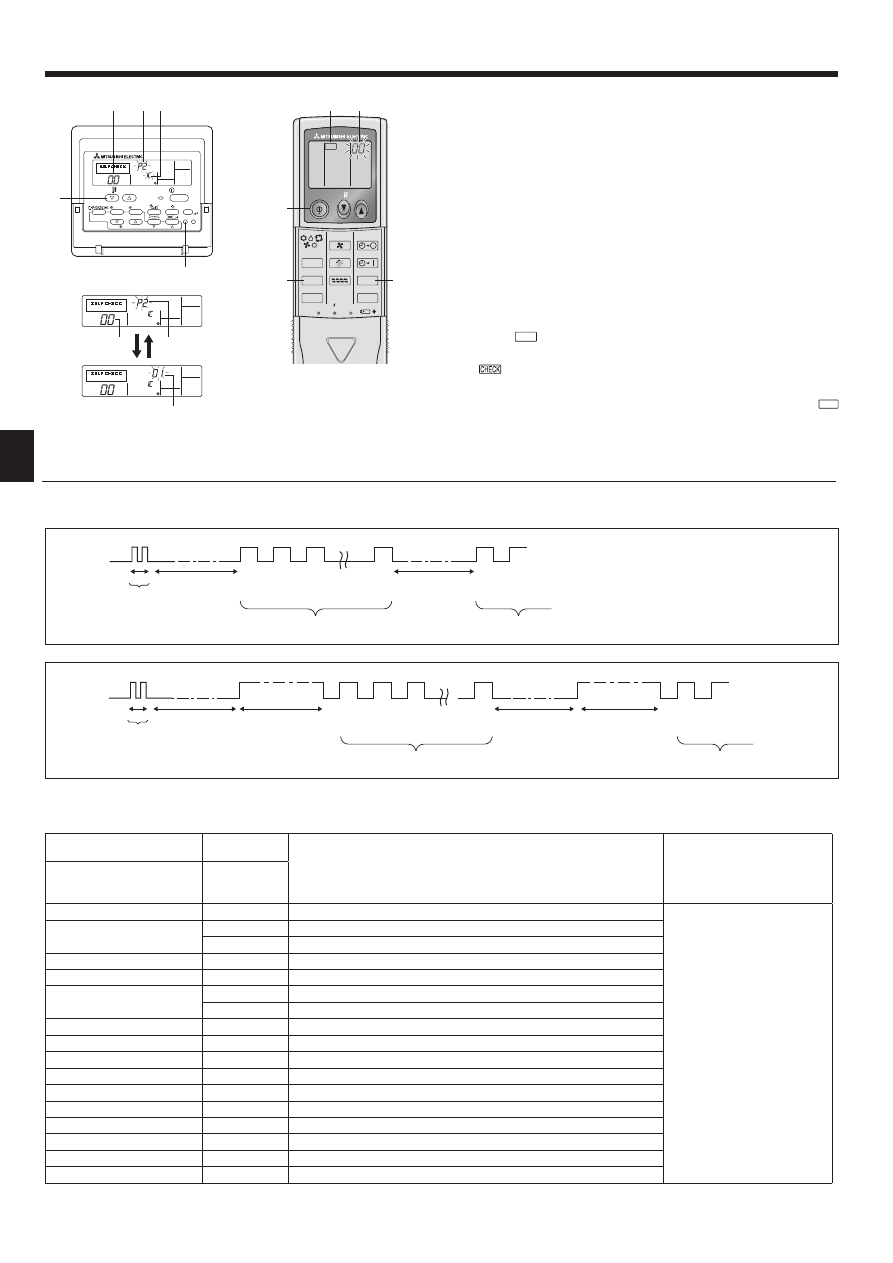
7.2.1. Using wired remote controller (Fig. 7-1)
Turn on the power at least 12 hours before the test run.
Press the [TEST] button twice.
“TEST RUN” liquid crystal display
Press the [Mode selection] button and switch to the cooling (or heating) mode.
Make sure that cold (or warm) wind is blown out.
Press the [Fan speed] button.
Make sure that the wind speed is switched.
Press the [Air direction button] or [Louver button].
Check operation of the vane or louver.
Check operation of the outdoor unit fan.
Release test run by pressing the [ON/OFF] button.
Stop
Register a telephone number.
7KHWHOHSKRQHQXPEHURIWKHUHSDLUVKRSVDOHVRI¿FHHWFWRFRQWDFWLIDQHUURU
occurs can be registered in the remote controller. The telephone number will be
displayed when an error occurs. For registration procedures, refer to the opera-
tion manual for the indoor unit.
7.2.2. Using wireless remote controller (Fig. 7-2)
Turn on the power to the unit at least 12 hours before the test run.
Press the
TEST RUN
button twice continuously.
(Start this operation from the status of remote controller display turned off.)
TEST RUN
and current operation mode are displayed.
Press the
MODE
button to activate
mode, then check whether
cool air is blown out from the unit.
Press the
MODE
button to activate
mode, then check whether
warm air is blown out from the unit.
Press the
FAN
button and check whether fan speed changes.
Press the
VANE
button and check whether the auto vane operates properly.
Press the ON/OFF button to stop the test run.
Note:
• Point the remote controller towards the indoor unit receiver while following
steps
to .
• It is not possible to run the TEST RUN in FAN, DRY or AUTO mode.
7.2.3. Using SW4 in outdoor unit
Refer to the outdoor unit installation manual.
ON/OFF
TEMP
FAN
VANE
TEST RUN
AUTO STOP
AUTO START
h
min
LOUVER
MODE
CHECK
RESET
SET
CLOCK
TEST RUN
Fig. 7-2
Fig. 7-1
°C
°C
SIMPLE
PAR-21MAA
ON/OFF
FILTER
CHECK
OPERATION
CLEAR
TEST
TEMP.
MENU
BACK
DAY
MONITOR/SET
CLOCK
ON/OFF
TEST RUN
COOL, HEAT
ON/OFF button
Test run display
Liquid pipe (Indoor unit)
temperature display
ON/OFF lamp
Power display
Error code display
Test run remaining time display
Set temperature button
Mode selection button
Air direction button
TEST button
Fan Speed button
Louver button
Select unit numbers 01 to 03 or all units (AL [wired remote controller]/07 [wireless remote controller])
Mode
Settings
Mode no.
Setting no. Initial setting
setting
Filter sign
100Hr
07
1
2500Hr
2
ȅ
1R¿OWHUVLJQLQGLFDWRU
3
Fan speed
Silent
08
1
Standard
2
ȅ
High ceiling
3
Up/down vane setting
No vanes
11
1
Equipped with vanes (vanes angle setup )
2
ȅ
Equipped with vanes (vanes angle setup )
3
+
When the power supply returns, the air conditioner will start 3 minutes later.
12
7. Test run
ON/OFF
TEMP
FAN
VANE
TEST RUN
AUTO STOP
AUTO START
h
min
LOUVER
MODE
CHECK
RESET
SET
CLOCK
CHECK
Fig. 7- 4
Fig. 7-3
PAR-21MAA
ON/OFF
FILTER
CHECK
OPERATION
CLEAR
TEST
TEMP.
MENU
BACK
DAY
MONITOR/SET
CLOCK
ON/OFF
ERROR CODE
ERROR CODE
ERROR CODE
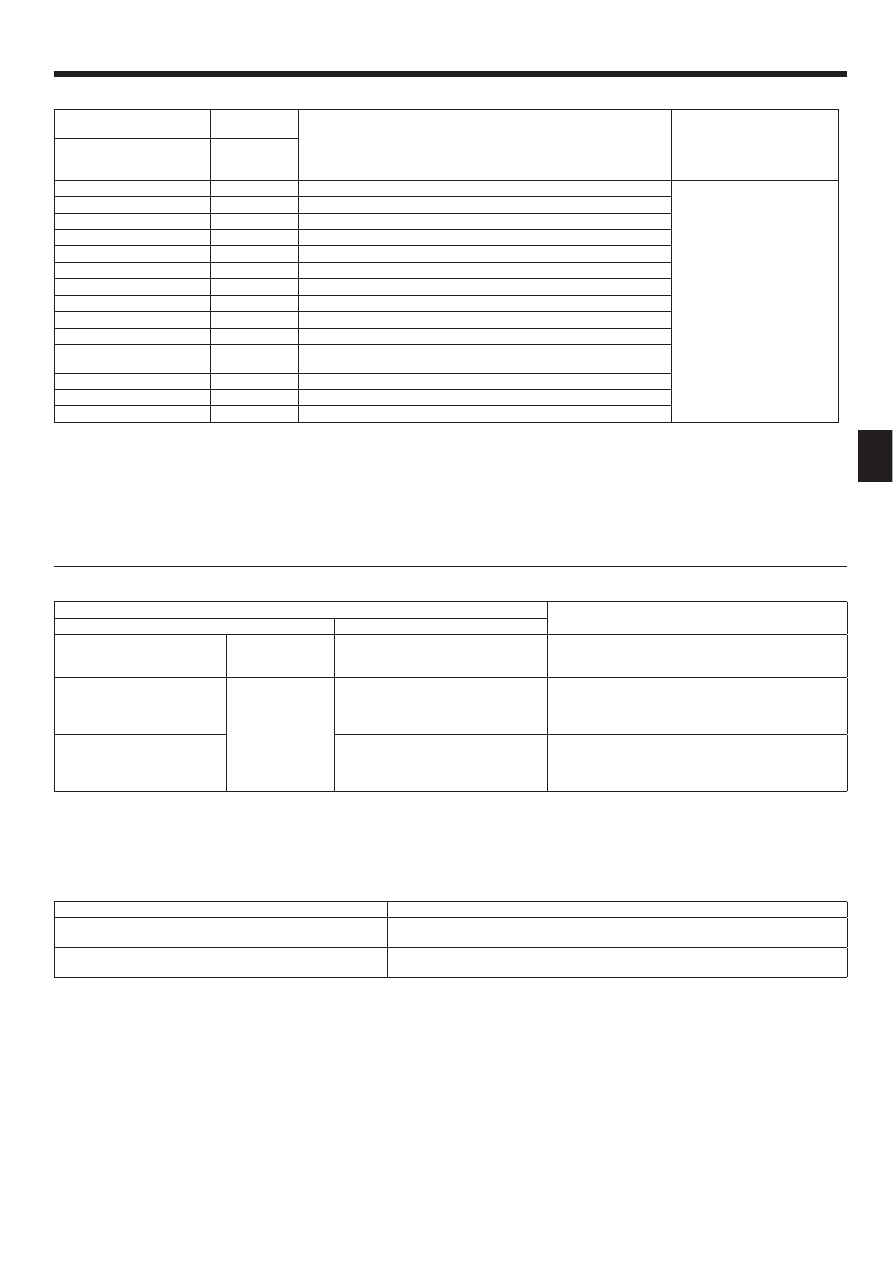
• Refer to the following tables for details on the check codes. (Wireless remote controller)
[Output pattern A]
[Output pattern A]
Errors detected by indoor unit
Wireless remote controller
Wired remote
controller
Symptom
Remark
Beeper sounds/OPERATION
INDICATOR lamp blinks
(Number of times)
Check code
1
P1
Intake sensor error
2
P2
Pipe (TH2) sensor error
P9
Pipe (TH5) sensor error
3
E6, E7
Indoor/outdoor unit communication error
4
P4
Float switch connector open
5
P5
Drain pump error
PA
Forced compressor stop (due to water leakage abnormality)
6
P6
Freezing/Overheating protection operation
7
EE
Communication error between indoor and outdoor units
8
P8
Pipe temperature error
9
E4
Remote controller signal receiving error
10
—
—
11
—
—
12
Fb
Indoor unit control system error (memory error, etc.)
No sound
E0, E3
Remote controller transmission error
No sound
E1, E2
Remote controller control board error
No sound
– – – –
No corresponding
7.3. Self-check
7.3.1. Wired remote controller (Fig. 7-3)
Turn on the power.
Press the [CHECK] button twice.
Set refrigerant address with [TEMP] button if system control is used.
Press the [ON/OFF] button to stop the self-check.
CHECK button
Refrigerant address
TEMP. button
IC:
Indoor unit
OC: Outdoor unit
Check code
Unit address
7.3.2. Wireless remote controller (Fig. 7-4)
Turn on the power.
Press the
CHECK
button twice.
(Start this operation from the status of remote controller display turned off.)
begins to light.
“00” begins to blink.
While pointing the remote controller toward the unit’s receiver, press the
h
button. The check code will be indicated by the number of times that the buzzer
sounds from the receiver section and the number of blinks of the operation
lamp.
Press the ON/OFF button to stop the self-check.
OPERATION
INDICATOR
lamp blinking
pattern
Beep
Beep
Beep
Beep
Beep
Beep
Beep
Off
Approx. 2.5 sec.
On
Approx. 3 sec.
On
0.5 sec.
On
0.5 sec.
On
0.5 sec.
On
0.5 sec.
Off
Approx. 2.5 sec.
On
Approx. 3 sec.
On
0.5 sec.
On
0.5 sec.
· · · Repeated
Number of blinks/beeps in pattern indicates the check
code in the following table (i.e., n=5 for “U2”)
Number of blinks/beeps in pattern indicates
the check code in the following table
n
th
1
st
2
nd
3
rd
1
st
2
nd
Self-check
starts
(Start signal
received)
Beeper sounds
[Output pattern B]
OPERATION
INDICATOR
lamp blinking
pattern
Beep
Beep
Beep
Beep
Beep
Beep
Beep
Off
Approx. 2.5 sec.
On
0.5 sec.
On
0.5 sec.
On
0.5 sec.
On
0.5 sec.
Off
Approx. 2.5 sec.
On
0.5 sec.
On
0.5 sec.
· · · Repeated
Number of blinks/beeps in pattern indicates the check
code in the following table (i.e., n=5 for “P5”)
Number of blinks/beeps in pattern indicates
the check code in the following table
n
th
1
st
2
nd
3
rd
1
st
2
nd
Self-check
starts
(Start signal
received)
Beeper sounds
13
7. Test run
[Output pattern B]
Errors detected by unit other than indoor unit (outdoor unit, etc.)
Wireless remote controller
Wired remote
controller
Symptom
Remark
Beeper sounds/OPERATION
INDICATOR lamp blinks
(Number of times)
Check code
1
E9
Indoor/outdoor unit communication error (Transmitting error) (Outdoor unit)
For details, check the LED
display of the outdoor controller
board.
2
UP
Compressor overcurrent interruption
3
U3, U4
Open/short of outdoor unit thermistors
4
UF
Compressor overcurrent interruption (When compressor locked)
5
U2
$EQRUPDOKLJKGLVFKDUJLQJWHPSHUDWXUH&ZRUNHGLQVXI¿FLHQWUHIULJHUDQW
6
U1, Ud
Abnormal high pressure (63H worked)/Overheating protection operation
7
U5
Abnormal temperature of heat sink
8
U8
Outdoor unit fan protection stop
9
U6
Compressor overcurrent interruption/Abnormal of power module
10
U7
Abnormality of super heat due to low discharge temperature
11
U9, UH
Abnormality such as overvoltage or voltage shortage and abnormal
synchronous signal to main circuit/Current sensor error
12
—
—
13
—
—
14
Others
Other errors (Refer to the technical manual for the outdoor unit.)
,IWKHEHHSHUGRHVQRWVRXQGDJDLQDIWHUWKHLQLWLDOEHHSVWRFRQ¿UPWKHVHOIFKHFNVWDUWVLJQDOZDVUHFHLYHGDQGWKH23(5$7,21,1',&$725ODPSGRHV
not come on, there are no error records.
,IWKHEHHSHUVRXQGVWLPHVFRQWLQXRXVO\³EHHSEHHSEHHSVHF´DIWHUWKHLQLWLDOEHHSVWRFRQ¿UPWKHVHOIFKHFNVWDUWVLJQDOZDVUH-
FHLYHGWKHVSHFL¿HGUHIULJHUDQWDGGUHVVLVLQFRUUHFW
• On wireless remote controller
The continuous buzzer sounds from receiving section of indoor unit.
Blink of operation lamp
• On wired remote controller
Check code displayed in the LCD.
,IWKHXQLWFDQQRWEHRSHUDWHGSURSHUO\DIWHUWHVWUXQUHIHUWRWKHIROORZLQJWDEOHWR¿QGWKHFDXVH
Symptom
Cause
Wired remote controller
LED 1, 2 (PCB in outdoor unit
PLEASE WAIT
For about 2 minutes
after power-on
After LED 1, 2 are lighted, LED 2 is turned
off, then only LED 1 is lighted. (Correct
operation)
• For about 2 minutes after power-on, operation of the remote
controller is not possible due to system start-up. (Correct
operation)
3/($6(:$,7ĺ(UURUFRGH
Subsequent to about
2 minutes after
power-on
Only LED 1 is lighted.
ĺLED 1, 2 blink.
• Connector for the outdoor unit’s protection device is not con-
nected.
Reverse or open phase wiring for the outdoor unit’s power
terminal block (L1, L2, L3)
Display messages do not appear
even when operation switch is
turned ON
(operation lamp does not light up).
Only LED 1 is lighted.
ĺ LED 1 blinks
twice, LED 2 blinks once.
• Incorrect wiring between indoor and outdoor units (incorrect
polarity of S1, S2, S3)
• Remote controller wire short
On the wireless remote controller with condition above, following phenomena take place.
• No signals from the remote controller are accepted.
• Operation lamp is blinking.
• The buzzer makes a short ping sound.
Note:
2SHUDWLRQLVQRWSRVVLEOHIRUDERXWVHFRQGVDIWHUFDQFHOODWLRQRIIXQFWLRQVHOHFWLRQ&RUUHFWRSHUDWLRQ
For description of each LED (LED1, 2, 3) provided on the indoor controller, refer to the following table.
LED 1 (power for microcomputer)
Indicates whether control power is supplied. Make sure that this LED is always lit.
LED 2 (power for remote controller)
Indicates whether power is supplied to the remote controller. This LED lights only in the case of
the indoor unit which is connected to the outdoor unit refrigerant address “0”.
LED 3 (communication between indoor and outdoor units)
Indicates state of communication between the indoor and outdoor units. Make sure that this LED
is always blinking.
14
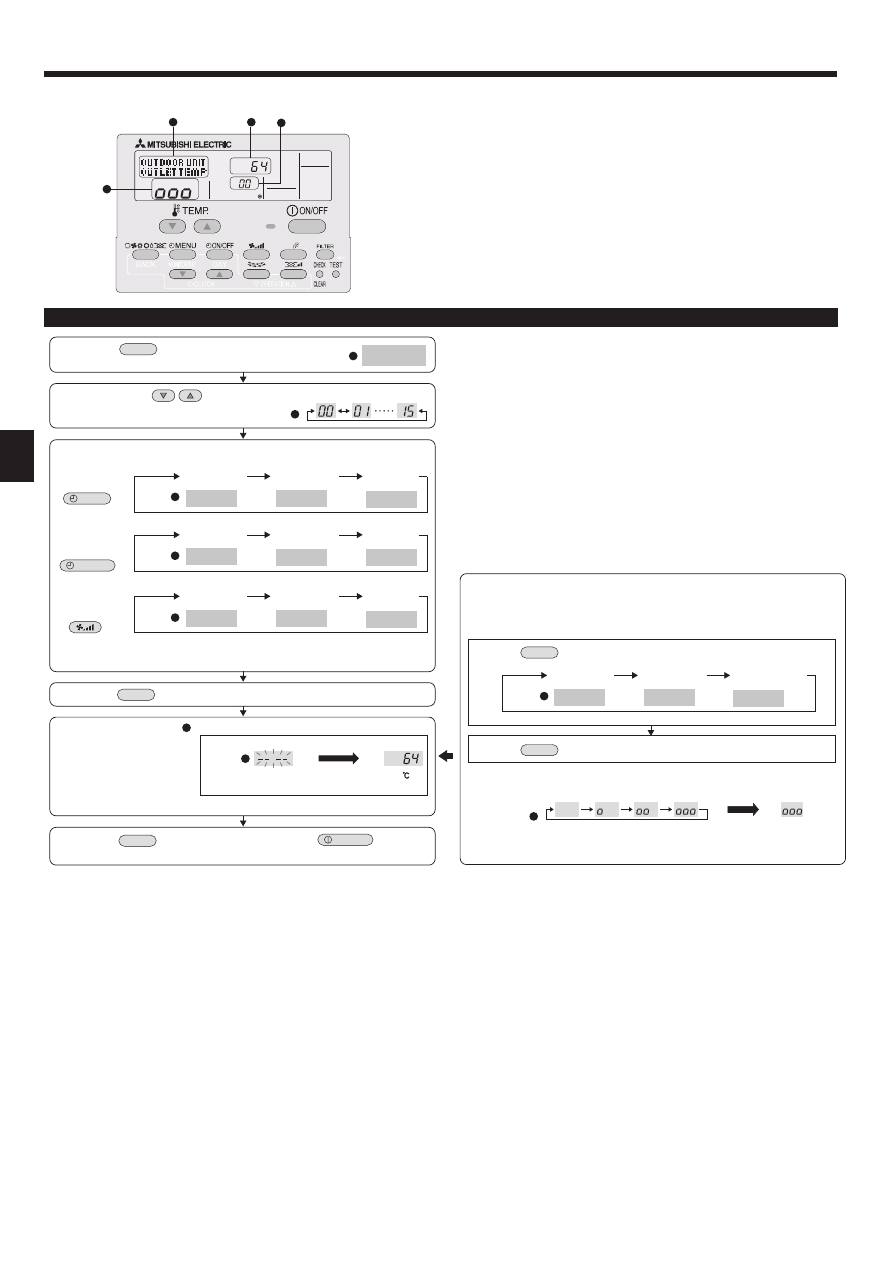
(1) Press the
TEST
button for 3 seconds to
activate the maintenance mode.
(2) Press the TEMP.
buttons to set the refrigerant address.
MAINTENANCE
(3) Select the data you want to display.
MENU
ON/OFF
Compressor
information
COMP ON
x10 HOURS
COMP ON
x100 TIMES
COMP ON
CURRENT (A)
Cumulative
operation time
ON/OFF
number
Operation
current
Display
Display
Display
OUTDOOR UNIT
H•EXC. TEMP
OUTDOOR UNIT
OUTLET TEMP
OUTDOOR UNIT
OUTDOOR TEMP
Heat exchanger
temperature
Comp discharge
temperature
Outdoor ambient
temperature
Display
Outdoor unit
information
INDOOR UNIT
INLET TEMP
INDOOR UNIT
H•EXC. TEMP
INDOOR UNIT
FILTER USE H
Indoor room
temperature
Heat exchanger
temperature
Filter operation
time
Display
Indoor unit
information
* The filter operation time displayed is the number of hours the filter has been
used since the filter reset was performed.
(4) Press the
FILTER
button.
(5) The data is displayed in
.
(Airflow temperature display example)
Blinking
Waiting for
response
Approx.
10 sec.
64
* Repeat steps (2) to (5) to check another data.
(6) Press the
TEST
button for 3 seconds or press the
ON/OFF
button to
deactivate the maintenance mode.
Stable operation
Using the maintenance mode, the operation frequency can be fixed and the op-
eration can be stabilized. If the air conditioner is stopped, use the following pro-
cedure to start this operation.
COOL
STABLE MODE
HEAT
STABLE MODE
STABLE MODE
CANCEL
Stable cooling
operation
Stable heating
operation
Stable operation
cancellation
Display
Press the
MODE
button to select the operation mode.
Press the
FILTER
button.
Waiting for
stable operation
Display
Stable
operation
10-20 min.
* You can check the data using steps (3) to (5) of the maintenance mode opera-
tion procedures while waiting for the stable operation.
'LVSOD\H[DPSOH&RPSGLVFKDUJHWHPSHUDWXUHÛ&
Display
PAR-21MAA
B
B
C
C
C
D
D
A
A
A
A
A
A
Maintenance mode operation procedures
(DV\PDLQWHQDQFHIXQFWLRQ)RU38+=+53DSSOLFDWLRQRQO\
By using the maintenance mode, you can display many types of maintenance data
on the remote controller such as the heat exchanger temperature and compressor
current consumption for the indoor and outdoor units.
This function can be used whether the air conditioner is operating or not.
During air conditioner operation, data can be checked during either normal opera-
tion or maintenance mode stable operation.
* This function cannot be used during the test run.
* The availability of this function depends on the connecting outdoor unit. Refer to
the brochures.
Wyszukiwarka
Podobne podstrony:
IM PCA RP50 140GA PCH P GAH BG79U614H02 2006
IM PCA RP50 140KA RG79D451H01 Jul 2009
IM PAC SH83 84 85 86DM E RG79V973H02 Nov 2010
IM PCA RP HA BG79U617H01 2005
IM PCA RP2 6GA BG79U334H01 Aug 2004
IM PAC AK31 51BC BG79U439K08 Sep 2010
IM PCA RP GA BG79U614H01 2005
2010 6 NOV Current Topics in Canine and Feline Infectious Diseases
IM MSZ MUZ GE22 50VA JG79A103H07 GB 01 2010
Im[reza STI, od 2010
IM MSZ GA22 35 MUZ 25 35VA SG79Y421H01 GB Nov 2006
IM PEAD RP35 140JAQ JALQ KB79U749H01 Nov 2000
IM MSZ MUZ HC25 35VA SG79Y763H07 GB 01 2010
Mikroskopia IM 2010 terminy zajec od 10 maja
IM MSZ SF15 20VA E1 JG79A290H02 Nov 2009
więcej podobnych podstron