
MQL4 COURSE
By Coders’ guru
-15-
Your First Expert Advisor
Part 3
--------------------
I
n the previous two parts of this lesson, we have introduced our expert advisor and knew
the idea behind it.
And in the Appendix 2 we have studied the Trading Functions which we will use some of
them today in our expert advisor.
Today we will continue cracking the remaining code of the expert advisor.
I hope you have cleared your mind for our discovering mission.
The code we have:
//+------------------------------------------------------------------+
//| My_First_EA.mq4 |
//| Coders Guru |
//| http://www.forex-tsd.com |
//+------------------------------------------------------------------+
#property
copyright
"Coders Guru"
#property
link
//---- input parameters
extern
double
TakeProfit
=
250.0
;
extern
double
Lots
=
0.1
;
extern
double
TrailingStop
=
35.0
;
//+------------------------------------------------------------------+
//| expert initialization function |
//+------------------------------------------------------------------+
int
init
()
{
//----
//----
return
(
0
);
}
//+------------------------------------------------------------------+
//| expert deinitialization function |
//+------------------------------------------------------------------+
int
deinit
()
{
//----
//----
return
(
0
);
}
int
Crossed
(
double
line1
,
double
line2
)

{
static
int
last_direction
=
0
;
static
int
current_direction
=
0
;
if
(
line1
>
line2
)
current_direction
=
1
;
//up
if
(
line1
<
line2
)
current_direction
=
2
;
//down
if
(
current_direction
!=
last_direction
)
//changed
{
last_direction
=
current_direction
;
return
(
last_direction
);
}
else
{
return
(
0
);
}
}
//+------------------------------------------------------------------+
//| expert start function |
//+------------------------------------------------------------------+
int
start
()
{
//----
int
cnt
,
ticket
,
total
;
double
shortEma
,
longEma
;
if
(
Bars
<
100
)
{
(
"bars less than 100"
);
return
(
0
);
}
if
(
TakeProfit
<
10
)
{
(
"TakeProfit less than 10"
);
return
(
0
);
// check TakeProfit
}
shortEma
=
iMA
(
NULL
,
0
,
8
,
0
,
MODE_EMA
,
PRICE_CLOSE
,
0
);
longEma
=
iMA
(
NULL
,
0
,
13
,
0
,
MODE_EMA
,
PRICE_CLOSE
,
0
);
int
isCrossed
=
Crossed
(
shortEma
,
longEma
);
total
=
OrdersTotal
();
if
(
total
<
1
)
{
if
(
isCrossed
==
1
)
{
ticket
=
OrderSend
(
Symbol
(),
OP_BUY
,
Lots
,
Ask
,
3
,
0
,
Ask
+
TakeProfit
*
Point
,
"My EA"
,
12345
,
0
,
Green
);
if
(
ticket
>
0
)
{
if
(
OrderSelect
(
ticket
,
SELECT_BY_TICKET
,
MODE_TRADES
))
(
"BUY order opened : "
,
OrderOpenPrice
());
}

else
(
"Error opening BUY order : "
,
GetLastError
());
return
(
0
);
}
if
(
isCrossed
==
2
)
{
ticket
=
OrderSend
(
Symbol
(),
OP_SELL
,
Lots
,
Bid
,
3
,
0
,
Bid
-
TakeProfit
*
Point
,
"My EA"
,
12345
,
0
,
Red
);
if
(
ticket
>
0
)
{
if
(
OrderSelect
(
ticket
,
SELECT_BY_TICKET
,
MODE_TRADES
))
(
"SELL order opened : "
,
OrderOpenPrice
());
}
else
(
"Error opening SELL order : "
,
GetLastError
());
return
(
0
);
}
return
(
0
);
}
for
(
cnt
=
0
;
cnt
<
total
;
cnt
++)
{
OrderSelect
(
cnt
,
SELECT_BY_POS
,
MODE_TRADES
);
if
(
OrderType
()<=
OP_SELL
&&
OrderSymbol
()==
Symbol
())
{
if
(
OrderType
()==
OP_BUY
)
// long position is opened
{
// should it be closed?
if
(
isCrossed
==
2
)
{
OrderClose
(
OrderTicket
(),
OrderLots
(),
Bid
,
3
,
Violet
);
// close position
return
(
0
);
// exit
}
// check for trailing stop
if
(
TrailingStop
>
0
)
{
if
(
Bid
-
OrderOpenPrice
()>
Point
*
TrailingStop
)
{
if
(
OrderStopLoss
()<
Bid
-
Point
*
TrailingStop
)
{
OrderModify
(
OrderTicket
(),
OrderOpenPrice
(),
Bid
-
Point
*
TrailingStop
,
OrderTakeProfit
(),
0
,
Green
);
return
(
0
);
}
}
}
}
else
// go to short position
{
// should it be closed?
if
(
isCrossed
==
1
)
{
OrderClose
(
OrderTicket
(),
OrderLots
(),
Ask
,
3
,
Violet
);
// close position
return
(
0
);
// exit
}
// check for trailing stop
if
(
TrailingStop
>
0
)
{
if
((
OrderOpenPrice
()-
Ask
)>(
Point
*
TrailingStop
))
{
if
((
OrderStopLoss
()>(
Ask
+
Point
*
TrailingStop
))
||
(
OrderStopLoss
()==
0
))
{
OrderModify
(
OrderTicket
(),
OrderOpenPrice
(),
Ask
+
Point
*
TrailingStop
,
OrderTakeProfit
(),
0
,
Red
);
return
(
0
);
}
}
}
}
}
}
return
(
0
);
}
//+------------------------------------------------------------------+
int
cnt
,
ticket
,
total
;
In this line we declared three integer type variables.
We used one line to declare the three of them because they are the same type (You can’t
use a single line declaration with dissimilar data types).
Note: To declare multi variables in a single line you start the line with the declaration
keyword which indicates the type of the variables then separate the variables identifiers
(names) with comma.
You can divide the above line into three lines like that
int cnt;
int ticket;
int total;
We will use the cnt variable as a counter in our “opened orders checking loop”.
We will use the ticket variable to hold the ticket number returned by OrderSend function.
And we will use the total variable to hold the number of already opened orders.
double
shortEma
,
longEma
;
Again, we used a single line to declare two double variables.
We will use these variables to hold the value of short EMA and long EMA.
As you remember (I hope) from the previous part we uses the Crossing of short and long
EMAs as buying and selling conditions and as closing conditions too.
if
(
Bars
<
100
)
{
(
"bars less than 100"
);
return
(
0
);
}
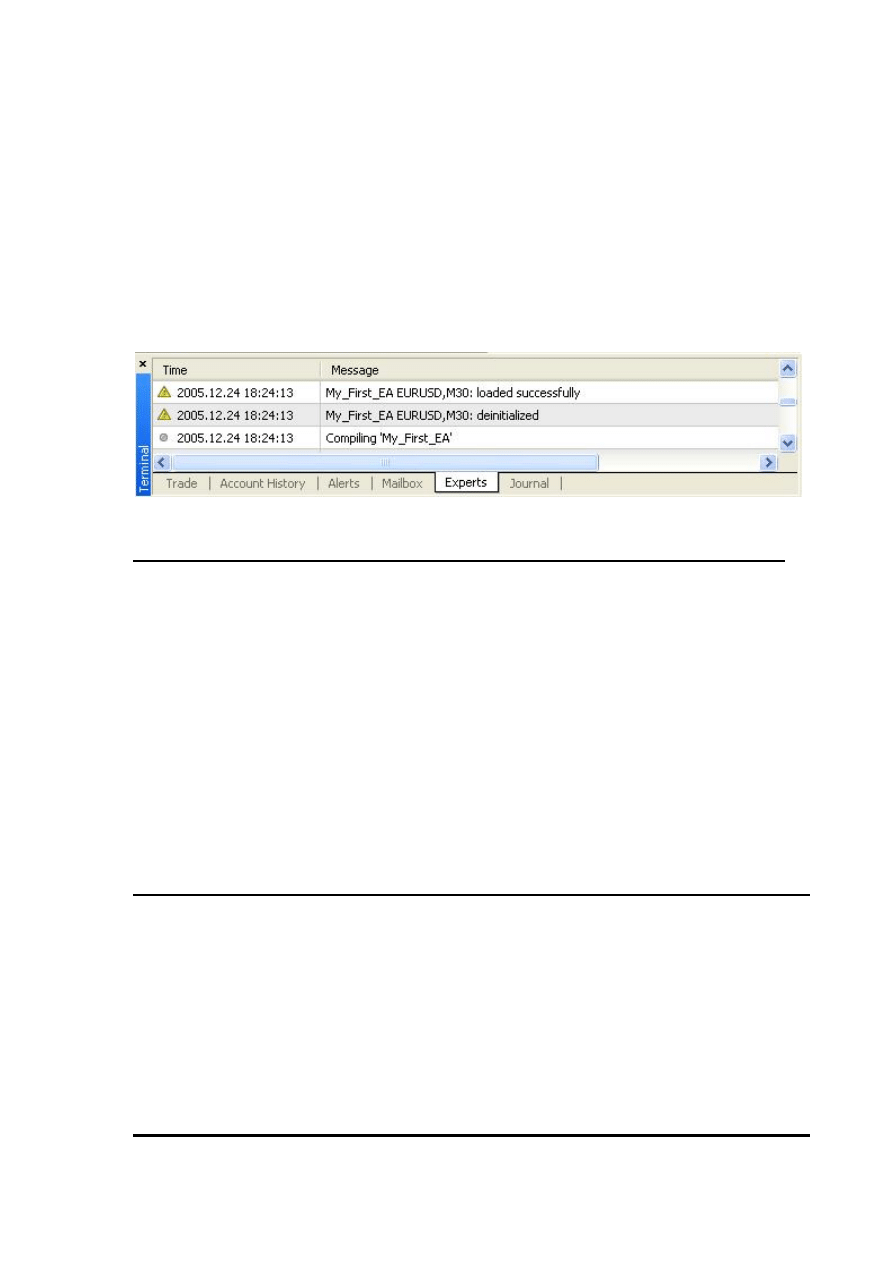
We want to work with a normal chart and we assume that the normal chart must have
more than 100 bars. That’s because the insufficient numbers of bars will not enable or
EMA indicators to work right.
We have got the number of bars on the chart using the Bars function and checked this
number to find is it less than 100 or not. If it’s less than 100 we will do two things:
We will tell the user what’s the wrong by writing this message to the Experts log "bars
less than 100" (Figure 1).
Then we will terminate the start function by the line retrun(0);
That’s the way we refuse to work with less than 100 bars on the chart.
Figure 1 – Experts log
if
(
TakeProfit
<
10
)
{
(
"TakeProfit less than 10"
);
return
(
0
);
// check TakeProfit
}
We don’t want too to work with insufficient value of TakeProfit.
The TakeProfit variable is an external variable and that’s mean the user can change its
default value from the expert advisor properties windows.
We want to protect the user of our expert advisor from his bad choices.
We assume that any value less than 10 for the TakeProfi variable will be bad choice and
for that we have checked the TakeProfit value the user set to find is it less than 10 or not.
If it’s less than 10 we will inform the user what’s the wrong by printing him the message
"TakeProfit less than 10", and we will terminate the start function by return(0) statement.
shortEma
=
iMA
(
NULL
,
0
,
8
,
0
,
MODE_EMA
,
PRICE_CLOSE
,
0
);
longEma
=
iMA
(
NULL
,
0
,
13
,
0
,
MODE_EMA
,
PRICE_CLOSE
,
0
);
Well, everything is OK, the bars on the chart were more than 100 bars and the value of
TakeProfit the user supplied was more than 10.
We want now to calculate the short and long EMAs of the current bar.
We use the MQL4 built-in technical indicator function iMA which calculates the moving
average indicator.
I have to pause here for a couple of minutes to tell you more details about iMA function.
iMA:
Syntax:
double iMA( string symbol, int timeframe, int period, int ma_shift, int ma_method, int
applied_price, int shift)
Description:
The iMA function calculates the moving average indicator and returns its value (double
data type).
Note: A moving average is an average price of a certain currency over a certain time interval
(in days, hours, minutes etc) during an observation period divided by these time intervals.
Parameters:
This function takes 7 parameters:
string symbol:
The symbol name of the currency pair you trading (Ex: EURUSD and USDJPY).
If you want to use the current symbol use NULL as a parameter.
int timeframe:
The time frame you want to use for the moving average calculation.
You can use one of these time frame values:
Constant
Value
Description
PERIOD_M1
1
1 minute.
PERIOD_M5
5
5 minutes.
PERIOD_M15
15
15 minutes.
PERIOD_M30
30
30 minutes.
PERIOD_H1
60
1 hour.
PERIOD_H4
240
4 hour.
PERIOD_D1
1440
Daily.
PERIOD_W1
10080
Weekly.
PERIOD_MN1
43200
Monthly.
0 (zero)
0
Time frame used on the chart.
If you want to use the current timeframe, use 0 as a parameter.
Note: You can use the integer representation of the period or its constant name.
For example, the line:
iMA(NULL,
PERIOD_H4,8,0,MODE_EMA,PRICE_CLOSE,0);
is equal to
iMA(NULL,240,8,0,MODE_EMA,PRICE_CLOSE,0);
But it's recommended to use the constant name to make your code clearer.
int period:
The number of days you want to use for the moving average calculation.
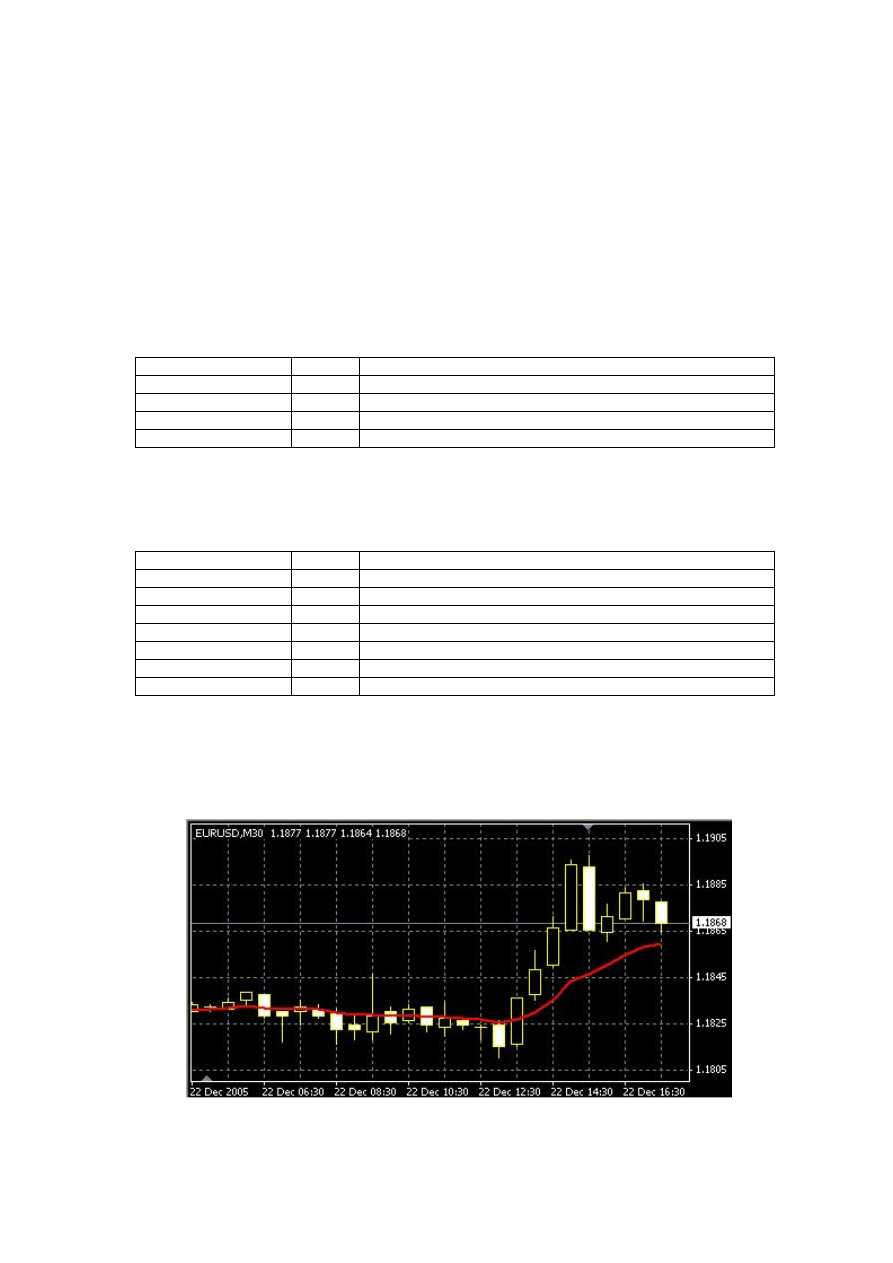
int ma_shift:
The number of the bars you want to shift the moving average line relative to beginning of
the chart:
0 means no shift (Figure 2)
A positive value shifts the line to right (Figure 3)
A negative value shifts the line to left (Figure 4)
int ma_method:
The moving average method you want to use for the moving average calculation,
It can be one of these values:
Constant
Value
Description
MODE_SMA
0
Simple moving average.
MODE_EMA
1
Exponential moving average.
MODE_SMMA
2
Smoothed moving average.
MODE_LWMA
3
Linear weighted moving average.
int applied_price:
The price you want to use for the moving average calculation,
It can be one of these values:
Constant
Value
Description
PRICE_CLOSE
0
Close price.
PRICE_OPEN
1
Open price.
PRICE_HIGH
2
High price.
PRICE_LOW
3
Low price.
PRICE_MEDIAN
4
Median price, (high+low)/2.
PRICE_TYPICAL
5
Typical price, (high+low+close)/3.
PRICE_WEIGHTED
6
Weighted close price, (high+low+close+close)/4.
int shift:
The number of bars (relative to the current bar) you want to use for the moving average
calculation. Use 0 for the current bar.
Figure 2 : ma_ shift = 0
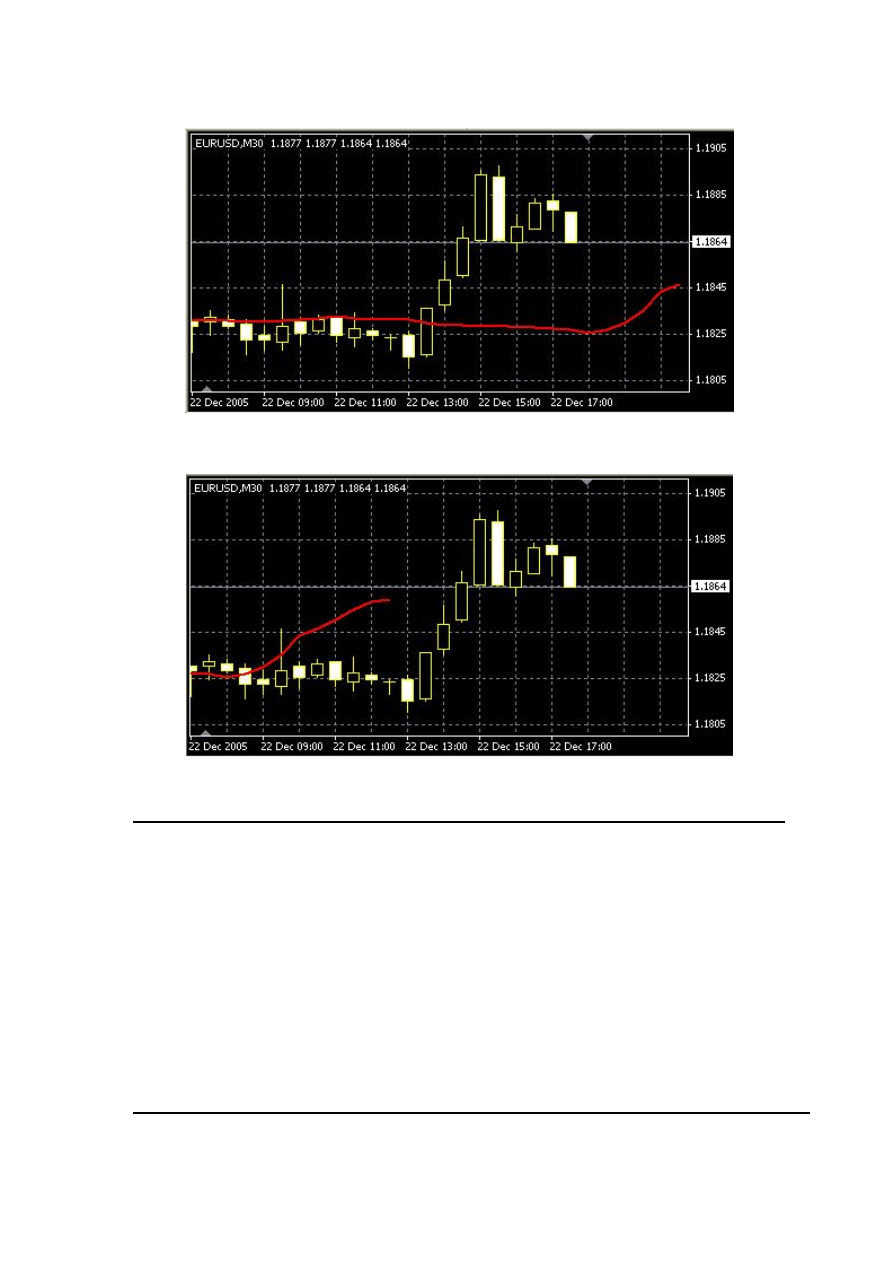
Figure 3: ma_shift = 10
Figure 4: ma_shift = -10
shortEma
=
iMA
(
NULL
,
0
,
8
,
0
,
MODE_EMA
,
PRICE_CLOSE
,
0
);
longEma
=
iMA
(
NULL
,
0
,
13
,
0
,
MODE_EMA
,
PRICE_CLOSE
,
0
);
Now you know what the above lines means.
We assigned to the variable shortEma the value of:
8 days closing price based exponential moving average of the current bar.
Which we can briefly call it 8EMA
And assigned to the variable longEma the value of:
13 days closing price based exponential moving average of the current bar.
Which we can briefly call it 13EMA
int
isCrossed
=
Crossed
(
shortEma
,
longEma
);
Note: The Crossed function takes two double values as parameters and returns an integer.
The first parameter is the value of the first line we want to monitor (the short EMA in our
case) and the second parameter is the value of the second we want to (the long EMA).
The function will monitor the two lines every time we call it by saving the direction of
the two lines in static variables to remember their state between the repeated calls.
It will return 0 if there’s no change happened in the last directions saved.
It will return 1 if the direction has changed (the lines crossed each others) and the
first line is above the second line.
It will return 2 if the direction has changed (the lines crossed each others) and the
first line is below the second line.
Here we declared an integer variable isCrossed to hold the return value of the function
Corssed. We will use this value to open and close orders.
total
=
OrdersTotal
();
if
(
total
<
1
)
{
…….
}
We assigned the OrdersTotal return value to the variable total.
Note: The OrdersTotal function returns the number of opened and pending orders. If this
number is 0 that means there are no orders (market or pending ones) has been opened.
Please review appendix 2
Then we checked this number (total) to find if there was already opened orders or not. The if
block of code will work only if the total value is lesser than 1 which means there's no already
opened order.
if
(
isCrossed
==
1
)
{
ticket
=
OrderSend
(
Symbol
(),
OP_BUY
,
Lots
,
Ask
,
3
,
0
,
Ask
+
TakeProfit
*
Point
,
"My EA"
,
12345
,
0
,
Green
);
if
(
ticket
>
0
)
{
if
(
OrderSelect
(
ticket
,
SELECT_BY_TICKET
,
MODE_TRADES
))
(
"BUY order opened : "
,
OrderOpenPrice
());
}
else
(
"Error opening BUY order : "
,
GetLastError
());
return
(
0
);
}
In the case the shortEma crossed the longEma and the shortEma is above the longEma
we will buy now.
We are using the OrderSend function to open a buy order.
Note: The OrderSend function used to open a sell/buy order or to set a pending order.
It returns the ticket number of the order if succeeded and -1 in failure.
Syntax:
int OrderSend( string symbol, int cmd, double volume, double price, int slippage,
double stoploss, double takeprofit, string comment=NULL, int magic=0, datetime
expiration=0, color arrow_color=CLR_NONE)
Please review appendix 2
These are the parameters we used with our OrderSend function:
symbol:
We used the Sybmol function to get the symbol name of the current currency and passed
it to the OrderSend function.
cmd:
We used OP_BUY because we want to open a Buy position.
volume:
We used the Lots value that the use has been supplied.
price:
We used the Ask function to get the current ask price and passed it to the OrderSend
function.
slippage:
We used 3 for the slippage value.
stoploss:
We used 0 for stoploss which mean there's no stoploss for that order.
takeprofit:
We multiplied the TakeProfit value the user has been supplied by the return value of the
Point function and added the result to the Ask price.
Note: Point function returns the point size of the current currency symbol.
For example: if you trade EURUSD the point value = .0001 and if you trade EURJPY the
point value should be .01
So, you have to convert your stoploss and takeprofit values to points before using them
with OrderSend or OrderModify functions.
comment:
We used "My EA" string for the comment

magic:
We used the number 12345 for the order magic number.
expiration:
We didn't set an expiration date to our order, so we used 0.
arrow_color:
We set the color of opening arrow to Green (Because we like the money and the money
is green)
The OrderSend function will return the ticket number of the order if succeeded, so we
check it with this line:
if
(
ticket
>
0
)
We used the OrderSelect function to select the order by its ticket number that's before we
used the OrderOpenPrice function which returns the open price of the selected order.
Everything is OK, the OrderSend returned a proper ticket number (greater than 0) and the
OrderSelect successfully selected the order. It's the good time to tell the user this good
new by printing to him the message "BUY order opened : " plus the opened price of the
order.
Note: For more details about OrderSelect and OrderOpenPrice, please review appendix 2
Else, if the OrderSend function returned -1 which means there was an error opening the
order, we have to tell the user this bad news by printing him the message: "Error opening
BUY order : ", plus the error number returned by the function GetLastError.
And in this case we have to terminate the start function by using return(0).
if
(
isCrossed
==
2
)
{
ticket
=
OrderSend
(
Symbol
(),
OP_SELL
,
Lots
,
Bid
,
3
,
0
,
Bid
-
TakeProfit
*
Point
,
"My EA"
,
12345
,
0
,
Red
);
if
(
ticket
>
0
)
{
if
(
OrderSelect
(
ticket
,
SELECT_BY_TICKET
,
MODE_TRADES
))
(
"SELL order opened : "
,
OrderOpenPrice
());
}
else
(
"Error opening SELL order : "
,
GetLastError
());
return
(
0
);
}
Here, the opposite scenario, the shortEma crossed the longEma and the shortEma is
below the longEma we will sell now.
We use the OrderSend function to open a Sell order. Can you guess what the differences
between the Buy parameters and Sell parameters in OrderSend are? Right! You deserve 100
pips as a gift.
These parameters haven't been changed:

symbol is the same.
volume is the same.
slippage is the same.
stoploss is the same.
comment is the same.
magic is the same.
expiration is the same.
These parameters have been changed (that's why you've got the gift):
cmd:
We used OP_SELL because we want to open a Sell position.
price:
We used the Bid function to get the current bid price and passed it to the OrderSend
function.
takeprofit:
We multiplied the TakeProfit value the user has been supplied by the return value of the
Point function and subtracted the result from the Bid price.
arrow_color:
We set the color of opening arrow to Red (Because we like the money and the money is
green but we want a different color for selling position).
We can briefly repeat what will happen after calling the OrderSend with the above
parameters:
The OrderSend returns the ticket number if succeeded.
We check this number to find is it greater than 0 which means no errors.
We used the OrderSelect to select the order before using OrderOpenPrice.
Everything is OK, we tell the user this good news by printing to him the message "Sell
order opened : " plus the opened price of the order.
Else, if the OrderSend function returned -1 we tell the user this bad news by printing him the
message: "Error opening SELL order : ", plus the error number and terminate the start
function by using return(0).
- Wait a minute! (You said).
- I've noticed that there's a line after the last if block of code you have just explained above.
- Where? (I'm saying).
- Here it's:
return
(
0
);
Yes! Great but I have no pips to gift you this time.
Look carefully to these blocks (braces):

if
(
total
<
1
)
{
if
(
isCrossed
==
1
)
{
.....
}
if
(
isCrossed
==
2
)
{
.....
}
return
(
0
);
Right!
}
If the shorEma crossed the longEma upward we open Buy order.
If the shorEma crossed the longEma downward we open Sell order.
What if they haven't been crossed yet? That's the job of this line.
We terminate the start function if there was no crossing.
(In the case that isCrossed not equal 1 or 2).
Now we are ready to open Buy and Sell positions.
In the coming part we will crack the remaining of the code and will discuss in details the
MetaTrader Strategy Tester.
I hope you enjoyed the lesson.
I welcome very much your questions and suggestions.
Coders’ Guru
24-12-2005
Wyszukiwarka
Podobne podstrony:
13 Lesson13 Your First Expert Advisor (Part 1)
14 Lesson14 Your First Expert Advisor (Part 2)
16 Lesson16 Your First Expert Advisor (Part 4)
11 Lesson11 Your First Indicator (Part2)
17 Lesson17 Your First Script
12 Lesson12 Your First Indicator (Part3)
RT6?tivation map 15 1 READ THIS FIRST!!!
RT6 15 2 maps?tivation RT6?tivation map 15 2 READ THIS FIRST!!!
Chapter 3 Your room or mine part 4
Chapter 3 Your rooom or mine part 3
Build Your Double Bass Chops Part 1
Expert Advisors
You are on your first military mission
Build Your Double Bass Chops Part 2
Build Your Double Bass Chops Part 1 (continued)
więcej podobnych podstron