1
© 2011 IBM Corporation
Troubleshooting
IBM Information Management Cloud Computing Center of Competence
IBM Canada Labs
2
© 2011 IBM Corporation
Agenda
■
Overview
■
The help (?) command
■
The DB2 Information Center
■
The Administration notification log
■
The db2diag.log
■
The DB2 Express-C Forum
■
Review OS commands
■
Search for APARs, technotes
3
© 2011 IBM Corporation
• Reading materials
•
Getting started with DB2 Express-C eBook
•
Appendix A: Troubleshooting
• Videos
•
db2university.com course AA001EN
•
Lesson 13: Troubleshooting
Supporting reading material & videos
4
© 2011 IBM Corporation
Agenda
■
Overview
■
The help (?) command
■
The DB2 Information Center
■
The Administration notification log
■
The db2diag.log
■
The DB2 Express-C Forum
■
Review OS commands
■
Search for APARs, technotes
5
© 2011 IBM Corporation
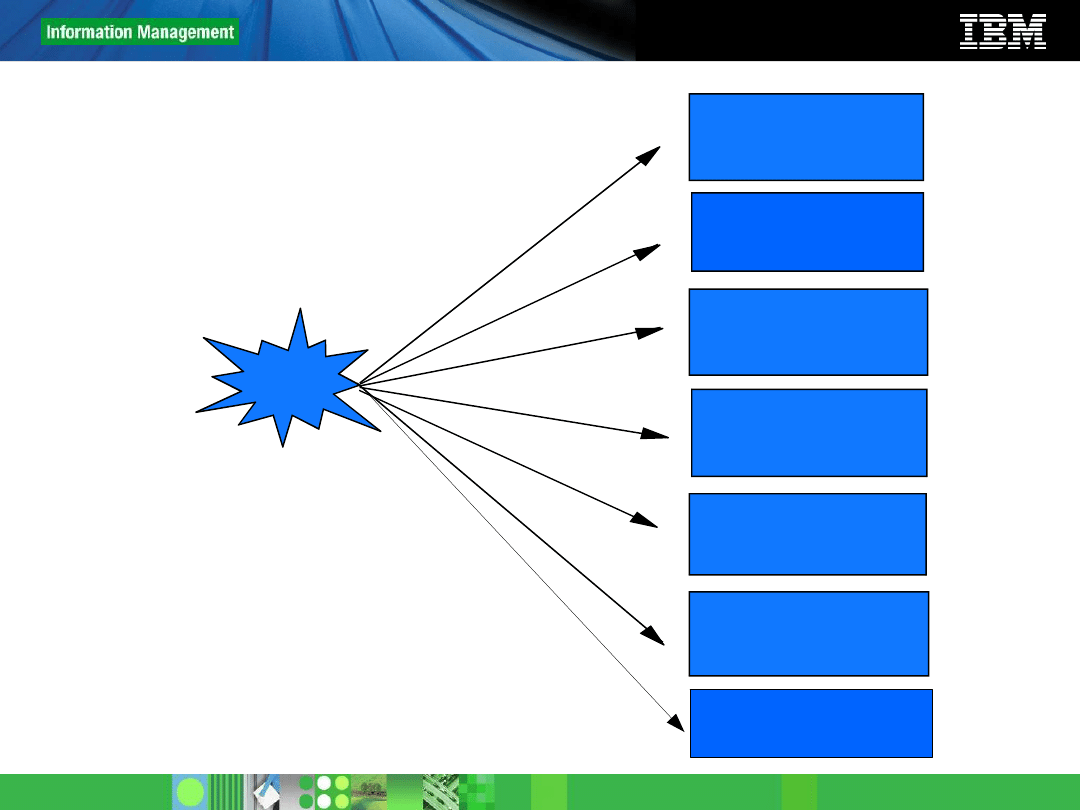
Problem diagnosis overview
Review the DB2
online manuals
(Information Center)
Problem!
db2 ? <code>
Check the
DB2 Express-C forum
Review
Admin notification log
or
the db2diag.log
Search for APARs, or
known problems
Review system with
Operating System
commands
Google it!
6
© 2011 IBM Corporation
Agenda
■
Overview
■
The help (?) command
■
The DB2 Information Center
■
The Administration notification log
■
The db2diag.log
■
The DB2 Express-C Forum
■
Review OS commands
■
Search for APARs, technotes
7
© 2011 IBM Corporation
The help (?) command
db2 ? SQL0104N
db2 ? SQL104N
db2 ? SQL-0104
db2 ? SQL-104
db2 ? SQL-104N
8
© 2011 IBM Corporation
Agenda
■
Overview
■
The help (?) command
■
The DB2 Information Center
■
The Administration notification log
■
The db2diag.log
■
The DB2 Express-C Forum
■
Review OS commands
■
Search for APARs, technotes
9
© 2011 IBM Corporation
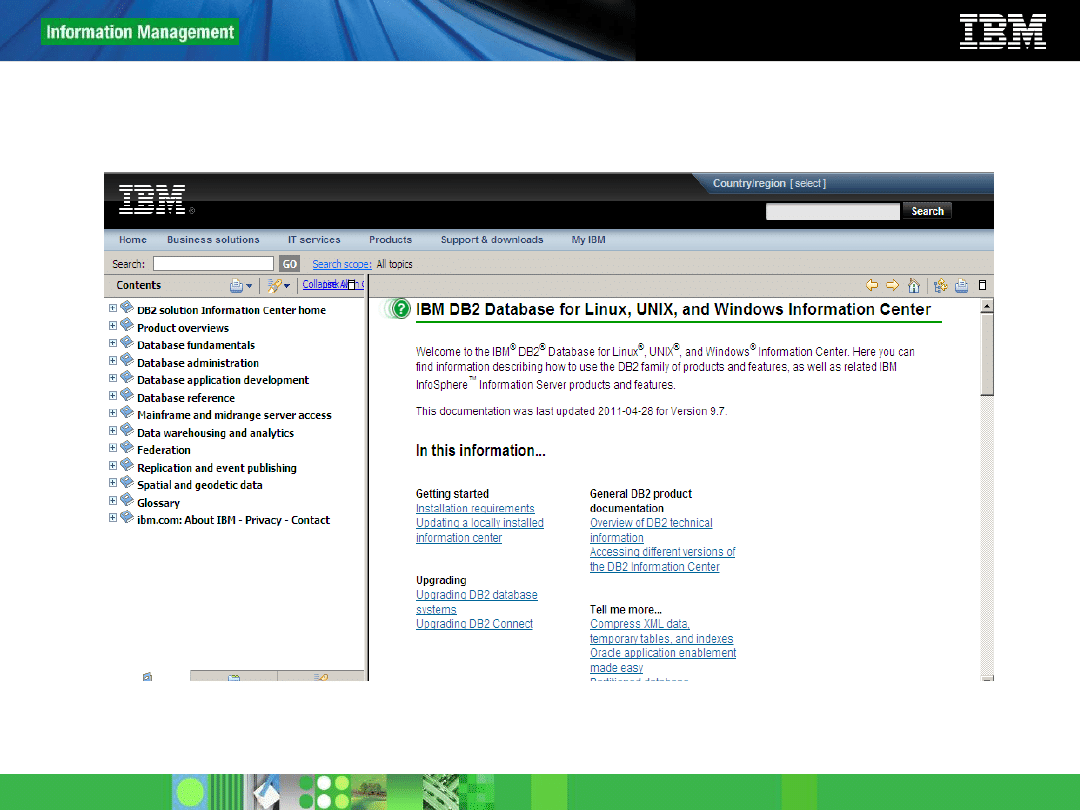
DB2 Information Center
• Contains the DB2 online manuals.
• It has a search field
• It can be installed locally, or accessed through the
internet
• The internet version is the most up-to-date one:
•
http://publib.boulder.ibm.com/infocenter/db2luw/v9r7/index.jsp
• Most of the answers to your questions can be found from
the DB2 Information Center!
10
© 2011 IBM Corporation
DB2 Information Center
11
© 2011 IBM Corporation
Agenda
■
Overview
■
The help (?) command
■
The DB2 Information Center
■
The Administration notification log
■
The db2diag.log
■
The DB2 Express-C Forum
■
Review OS commands
■
Search for APARs, technotes
12
© 2011 IBM Corporation
The administration notification log
• Log with diagnosis information at the point of failure
• On Linux/UNIX platforms, the administration notification log is
a text file called instance.nfy
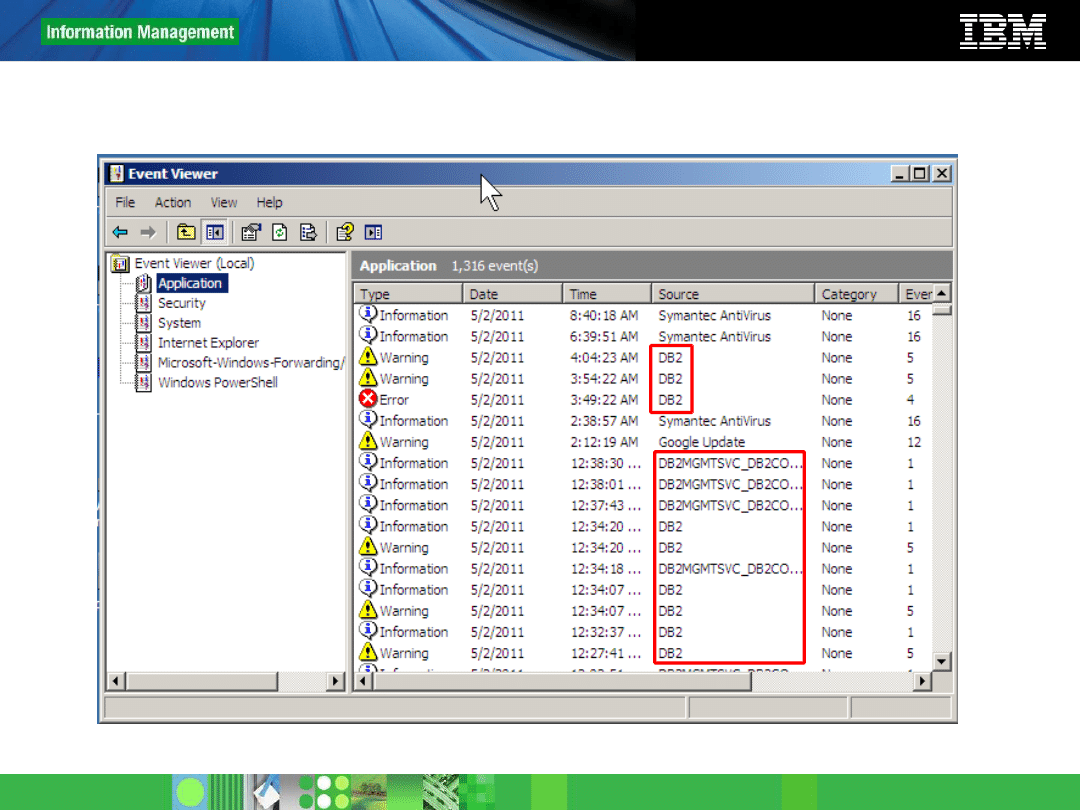
• On Windows, all administration notification messages are
written to the Event Log. Use the Event Viewer to review.
• The DBM configuration parameter
notifylevel
specifies the
level of information to be recorded:
•
0 -- No administration notification messages captured (not recommended)
•
1 -- Fatal or unrecoverable errors
•
2 -- Immediate action required
•
3 -- Important information, no immediate action required (default)
•
4 -- Informational messages
13
© 2011 IBM Corporation
Administration notification log
Windows event viewer with entries for the DB2 administration notification log
14
© 2011 IBM Corporation
Agenda
■
Overview
■
The help (?) command
■
The DB2 Information Center
■
The Administration notification log
■
The db2diag.log
■
The DB2 Express-C Forum
■
Review OS commands
■
Search for APARs, technotes
15
© 2011 IBM Corporation
The db2diag.log
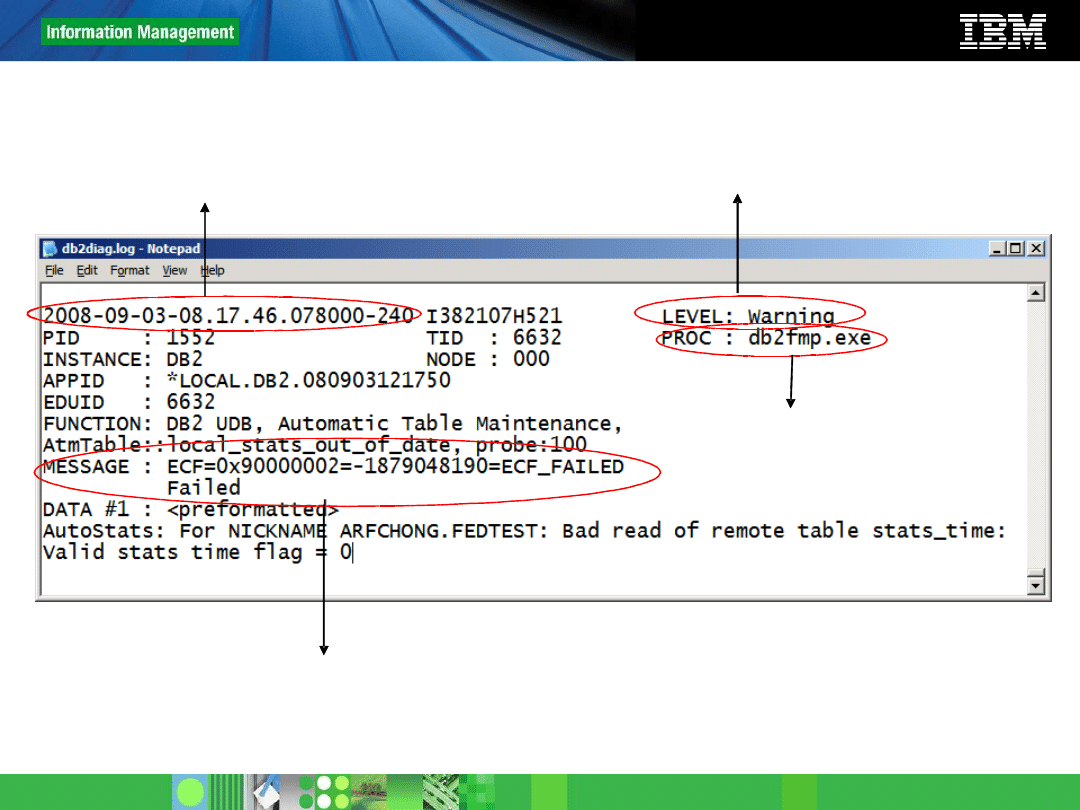
• Information included in the db2diag.log
•
The timestamp when the error occurred. Use it to find the error
quickly
•
The application name and DB2 function involved in the problem.
•
A diagnostic message explaining the reason for the error.
•
Any available supporting data, such as SQLCA data structures and
pointers to the location of any extra dump or trap files.
• If you can recreate the problem:
•
Remove/rename the db2diag.log
•
Recreate the problem. A new db2diag.log file will be generated
16
© 2011 IBM Corporation
Example of a db2diag.log entry
Timestamp when the problem occurred
Level: Be concerned when you see
“Severe” or “Error” here.
Application name
Error message information. Use any of these for searching in “Google”
17
© 2011 IBM Corporation
Locating the db2diag.log
• Windows Vista and later
•
ProgramData\IBM\DB2\
• Windows XP/2003 (default)
•
C:\Documents and Settings\All Users\Application Data\IBM\DB2\DB2COPY1\<instance name>
• Linux/UNIX (default)
•
INSTHOME/sqllib/db2dump (INSTHOME is the home directory of the instance owner)
• You can change the location of the db2diag.log using diagpath in the
dbm cfg
Eg: db2 update dbm cfg using diagpath <path>
• The verbosity of diagnostic text is determined by diaglevel in the dbm
cfg
•
range is 0 to 4 (default is 3)
•
most verbose is 4
18
© 2011 IBM Corporation
Agenda
■
Overview
■
The help (?) command
■
The DB2 Information Center
■
The Administration notification log
■
The db2diag.log
■
The DB2 Express-C Forum
■
Review OS commands
■
Search for APARs, technotes
19
© 2011 IBM Corporation
DB2 Express-C forum
• Free community assistance
www.ibm.com/developerworks/forums/dw_forum.jsp?forum=805&cat=19
• Mainly in English
• The IBM DB2 Express-C team monitors the forum, though
it is the community who assists the most
• You can also access it from the DB2 Express-C web site:
www.ibm.com/db2/express
(and click the button to go to the forum)
20
© 2011 IBM Corporation
Agenda
■
Overview
■
The help (?) command
■
The DB2 Information Center
■
The Administration notification log
■
The db2diag.log
■
The DB2 Express-C Forum
■
Review OS commands
■
Search for APARs, technotes
21
© 2011 IBM Corporation
Review operating system (OS) commands
• For connectivity issues:
•
ipconfig /all (Windows): Returns the IP address and configuration info).
Use ifconfig in Linux
•
ping <IP address/hostname>: To verify if the network is OK and you can
read the other server
•
hostname: Returns the host name
•
netstat –a: Checks which ports are listening
• For performance issues:
•
Check the Windows task manager, or use db2top (Linux)
•
Check the db2sysc process CPU/memory usage
22
© 2011 IBM Corporation
Agenda
■
Overview
■
The help (?) command
■
The DB2 Information Center
■
The Administration notification log
■
The db2diag.log
■
The DB2 Express-C Forum
■
Review OS commands
■
Search for APARs, technotes
23
© 2011 IBM Corporation
Search for APARs and Technotes
• APARs is IBM’s recognition of a bug in the product.
• APARs are fixed through fixpacks, however the APAR description
may provide a workaround
• If you are using DB2 Express-C (Unwarranted free license) you
cannot apply fixpacks. You have to wait until the DB2 Express-C
image is refreshed incorporating the fixes
• If you know the APAR number, go to
www.ibm.com
and input it in
the search field to read more about it.
• Google can also help!
24
© 2011 IBM Corporation
Thank you!
Wyszukiwarka
Podobne podstrony:
Diagnostic Trouble Code (DTC) D Nieznany
2 4 Troubleshooting Labid 20091
e984 38x sysplan & installman appb & troubleshooting
HP CJJ 5 troubleshooting
Kody Mitsubishi Trouble, Kody błędów DTC PL
Kody Kia Trouble, Kody błędów DTC PL
pat troubleshooting
Ignition TroubleShooting
Popular Mechanics Saturday Mechanic Troubleshooting Distributorless Ignitions
Mahjongg trouble es
Disposal Trouble
Display, Imager Troubleshooting
Jvc Power Supply Description And Trouble Shooting Procedure
4c 5 3 2 4 Lab Troubleshooting Inter VLAN Routing PL
12 5 3 Lab Troubleshooting Operating System Problems in Windows 7
Kody Acura Trouble, Kody błędów DTC PL
6 4 3 4 Packet Tracer Troubleshooting?fault Gateway Issues Instructions
11 6 3 Lab Troubleshooting Hardware Problems in Windows 7
13 5 3 Lab Troubleshooting Laptop Problems in Windows 7
więcej podobnych podstron