
KMSnano Documentation
KMSnano V25 documentation by DCZ
Page 1 / 9
KMSnano V25 by Heldigard
Important: If you like Microsoft Windows and Microsoft Office I recommend that you buy
legal and original versions. This program is only provided to help you test these products.
Ja mata ne, Farewell, Hejdå, Ciao, Aloha, Zegnaj, Doei
KMSnano is a portable Key Management Service (KMS) Host for Windows (client) 6.0, 6.1, and 6.2,
and for Office 14 and 15. It uses a virtual machine that runs within Windows and activates Volume
License versions of Windows (client) and Office for 180 days.
It can be used to Activate Windows Vista/7/8 Pro/Enterprise/N/VL and Office 2010/2013 Retail/VL.
Note that the program also activate Visio and Project 2013.
Program is based off of Ratiborus's KMSmicro v3.10.
Thanks to NotFake.me and their members.
Thanks to MyDigitalLife.info and their members.
Thanks to Ru-Board.com and their members.
Thanks to PC-Beta.com and their members.
KMSnano Setup Version .......................................................................................................................... 2
Installing KMSnano .............................................................................................................................. 2
Standard Usage ................................................................................................................................... 2
Custom Usage ...................................................................................................................................... 3
Permanent Activation.......................................................................................................................... 3
KMSnano Portable Version ..................................................................................................................... 3
KMSnano Repack Version ........................................................................................................................ 4
KMSnano FAQ .......................................................................................................................................... 5
KMSnano Recent Change log .................................................................................................................. 6
TriggerKMS Usage & FAQ ........................................................................................................................ 8
This document applies to the following KMSnano releases:
KMSnano Setup,
KMSnano Portable,
KMSnano Repack
KMSnano Documentation
KMSnano V25 documentation by DCZ
Page 2 / 9
KMSnano Setup Version
Installing KMSnano
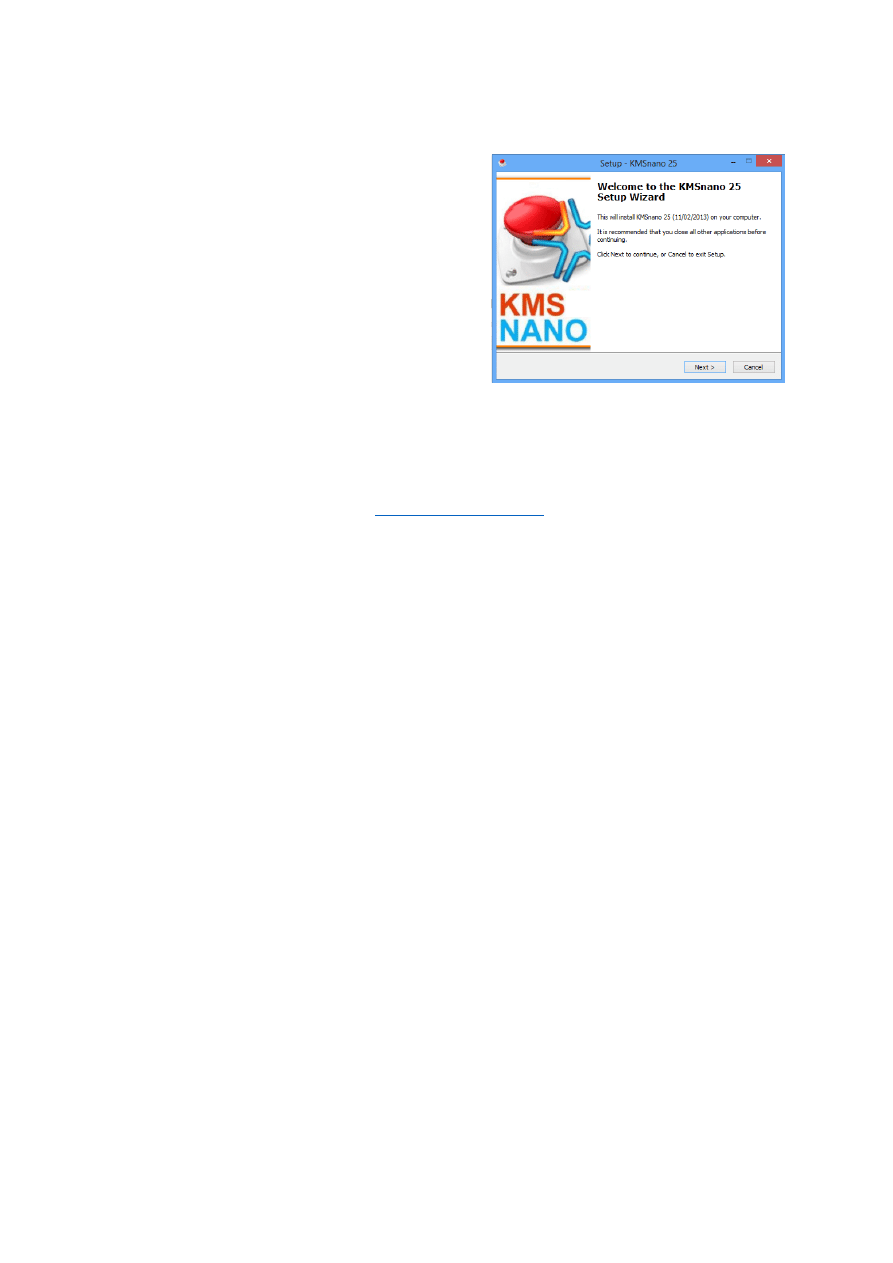
Starting with Version 21 and above the KMSnano is
distributed with an installer / uninstaller. To install the
KMSnano program run KMSnano_install_vxx.exe.
The setup creates a directory called KMSnano in the
system file with all the required file. Beware that the
KMSELDI.exe and TriggerKMS.exe file in this directory
has the Hidden and System attributes set and
therefore is normally not visible. The setup programs
also adds several links, describe after, in the KMSnano
start menu.
At the end of the setup you are offered the option to
“Create a Task Schedule”. If you check this option the TriggerKMS program is automatically called
with the following parameters:
TriggerKMS 31 Kmsnano.exe /install /battery
This will start the activation process if necessary (if the grace period is less than 31 days) as well as
add an entry to the Task Scheduler (see
Standard Usage
Use the following links created in the KMSnano start menu:
Check: Displays the activation status in a window.
KMSnano: Starts KMSELDI with the right parameters in order to activate products.
Log: Displays the KMSnano log file in a command prompt window.
Unistall KMSnano: Uninstall KMSnano from system.
Therefore, after installing the program, a typical usage scenario is the following:
Start the KMSnano program using the KMSnano link in the start menu and wait for
activation process to finish. This activates or re-activate Windows and/or all Office products
for 180 days.
Check that products have been correctly activated using the Check link.
Notes:
A log file, named KmsNano.log, is written in the installation directory during activation. It is
possible to look at its content by using the Log link in the KMSnano start menu.
A directory, called TokensBackup_<date>, is created in the installation directory and a
backup of the activation tokens before is placed inside. This allow you to restore the state
of the activation in case KMSnano breaks something.
Beware that the activation process can sometimes take a lot of times, especially when
Retail to Volume conversions are involved. By default the program plays sounds to indicate
completion of the different phases of the activation process.
My advices:
Although the program can be used to activate Windows Vista and 7, I do not see any good
reason to do so. The Loader from DAZ does a much better job using SLIC and activate any
Windows 7 / Vista version permanently.
The program can be used to activate Retail version of Windows and/or Office. In that case
the Retail version is first converted to a Volume version. But beware that this process is
slow and sometimes prone to problems with specific foreign languages. It is therefore
recommended to use Volume versions of Windows and/or Office whenever possible.

KMSnano Documentation
KMSnano V25 documentation by DCZ
Page 3 / 9
Custom Usage
Should you run into trouble or if you want to have more control over the activation process you can
directly use the scripts provided in the installation directory.
From the installation directory you can run any of the following scripts in administrator mode:
The “silent.cmd” script is similar to the KMSnano link and result in the same execution.
The “manual.cmd” script displays the KMS GUI ELDI windows. You have to specify the IP
address (in the range 127.0.0.1 to 127.0.03), select what you want to activate from the GUI
(non-installed product are greyed) and click the big red button to start activation. For more
information refer to the
Check.cmd is used to check activation
You can edit any of the script file to change or add parameters to the execution of the
KMSELDI program. KMSELDI parameters are detailed in the
section. For example you can add the /noWin parameter to bypass Windows activation.
You can also run manually the different components. For example you can execute the “00-
Start_Qemu_Manual.cmd” script to start the KMS server and allow QEMU to communicate
over the network. Then you can start the KMSELDI.exe program to activate Windows
and/or Office against the KMS server. In the ELDI GUI enter the IP address 127.0.0.1 and
port 1688, select the components you want to activate and click the big red button. At the
end of the activation the ELDI GUI will close and you will have to close the QEMU emulator
window.
For more information about the usage and parameters of KMSELDI.exe program see the
Permanent Activation
If you want to automatically re-activate Windows and/or Office you can run the “Run Trigger.cmd”
or use the TriggerKMS.exe program detailed in the
you can type the following line in an administrative command prompt:
TriggerKMS 31 VerySilent.cmd /install
This adds an entry in the Task Scheduler so that each time the user login the TriggerKMS program
checks if the grace period falls below 30 days and if that the case the VerySilent.cmd script is started
to re-activate Windows and/or Office for 180 days.
KMSnano Portable Version
This version is distributed as one file: KMSnano.exe. Running this program decompress the archive in
the %temp% directory and performs all required actions to activate the Windows/Office products. As
the KMSELDI program is stated in silent mode without any parameters, the process is very silent: No
log file, no backup, no sound …
This version is very easy to use but it offers no control over the process and it does not provide any
checking capability.
KMSnano Documentation
KMSnano V25 documentation by DCZ
Page 4 / 9
KMSnano Repack Version
As the name indicates this version is just a repackaging of the KMSnano setup version and therefore
all credits goes to Heldigard. I have created this version to get the exact customization that I wanted
from the KMSnano.
This version is portable so you do not need to setup anything. To use it just decompress the archive
any place you want and start the KMSnano.cmd script in the KMSnanoRepackXX directory.
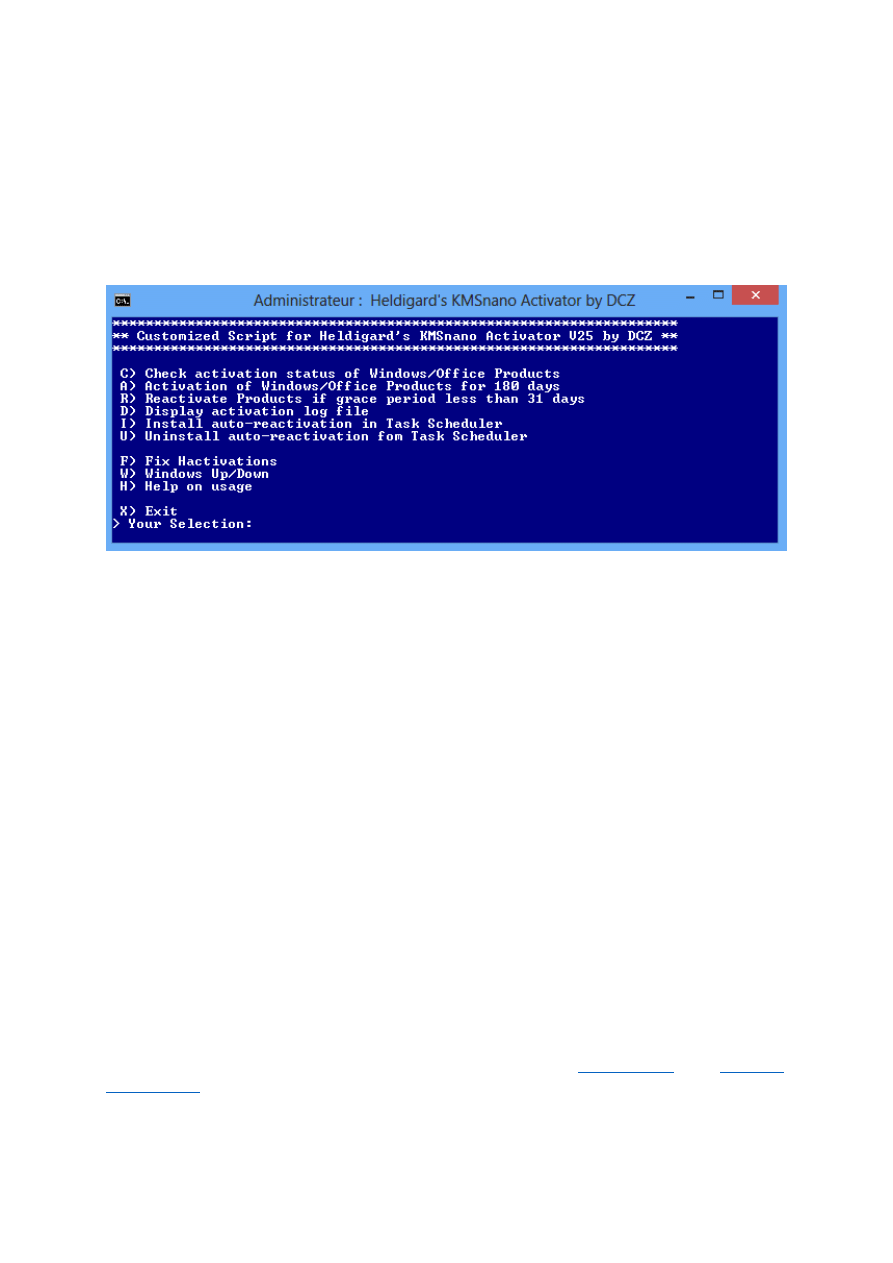
The KMSnano script look like this:
The check activation command displays the activation status in a separate window.
The activation command is similar to calling the silent.cmd script. It will silently activate or
reactivate the Windows/Office products for 180 days. A log file, and a backup of the tokens
are created. The process play customized sounds to indicate completion of the different
phases of the activation process.
The reactivate command activates or reactivates the Windows/Office products if the grace
period falls below 31 days.
The Display command displays the log file created during the activation process.
The install auto-reactivation command creates an entry in the Task Scheduler that will
check if reactivation of the products is needed each time the user logon. Note that contrary
to the TriggerKMS program this command just install an entry in the Task Scheduler but
never starts the activation process.
Uninstall auto-reactivation command removes the auto-activation entry from the Task
Scheduler.
Fix Hacktivation command is just a script to check validity of Windows system files.
Windows UP/Down calls the UpDown program. This program allow you to change the
Windows version. For example change a Windows 8 Core version to a Professional version.
Help command displays a short help on script usage.
For your information this version has been created using an untouched version of the KMSnano
installation directory (from the KMSnano setup version) with just an added KMSnano.cmd script and
modified sounds.
For more information about the other scripts provided please refer to
in the

KMSnano Documentation
KMSnano V25 documentation by DCZ
Page 5 / 9
Q: Does it needs Internet Connection?
A: No, It works with the local time and date.
Q: Will it broke my Retail activation of Windows or Office?
A: No, as soon the application detect the RETAIL flag in Windows 7/8 and/or Office
2010/2013 it will skip the process.
Q: Will it work on a Windows or Office with the Grace Time expired?
A: Yes.
Q: How much RAM memory I need?
A: It has a method of RAM detections of the machine and divide that amount by 2 and use
that amount, if you have problem with allocation of memory, the unzip the KMSnano.exe
modified the 00-Start_Qemu.cmd, change the amount of memory and when run
successful the Qemu, use the Manual.cmd script.
Q: What KMSnano program really does?
A: Good question:
0. Run Qemu.
1. Detect Windows 7/8 Enterprise/Pro/N version’s type. Automatically convert non
activated Windows Retail version to Volume.
2. Detect Office 2013/2010 version’s type. Automatically convert non activated
supported Office Retail versions to Volume.
3. Set KMS server address to the registry.
4. Try to activate using slmgr.vbs and/or ospp.vbs (simultaneous requests with new
KMS Client). Automatically skip permanently activated Windows Retail versions and
automatically skip permanently activated Retail Office versions.
5. Check errors, take necessary corrective actions, and retry activation several times.
6. Clear KMS server address.
7. Close Qemu.
Q: How to schedule auto-re-activation?
A: You can trigger auto-activation by using /install option of TriggerKMS (see
Q: What are the requirements to run programs
A: You either need to be running on Windows 8 or you need to have the .Net Framework
4.0 installed
Q: Determining Which Version of the .NET Framework Is Installed
A: To see which versions are installed, view the %WINDIR%\Microsoft.NET\Framework
directory. You should also view the Framework64 directory on a 64-bit computer.
Q: Why every day a new version come out?
A: Because people report bugs of special cases, mostly no fresh installs of Windows. Other
times people make good suggestions. Other times just improvements.
Q: Any Recommendations?
- Disable smart screen.
- Make exceptions to KMSnano.exe in Antivirus.

KMSnano Documentation
KMSnano V25 documentation by DCZ
Page 6 / 9
KMSnano Recent Change log
V25
- Fixed reported bugs on v24 with Retail Editions and Skipped Windows.
V24
- Setup Encrypted (because there is fakes KMSnano in the net)
- Runs unzipped.
- Possible work with Vista and XP (beta)
V23
-
Fake version released on Internet do not use
V22.1
- Fixed autocharged.
- Fixed minor bugs with O2010.
- Faster.
V22
- Fixed known bugs.
V21
- Install and Uninstall version.
V20.1
- Fixed bug with permanent activated windows.
- Improved detection of Retail version.
- Add UpDown8 v1.3.exe for Evaluation Trial Windows 8 Enterprise.
V20
- Fixed bug with Retail Visio 2013.
- Add /music and /backup arguments to KMSELDI v12
- Improved Retail conversion.
V19.1
- Complete support for Office2013 in W7.
V19
- Faster conversion from Retail to VL.
- Avoid OEM Windows’s editions.
V18
- Code Remaked looking fix logical bugs.
V17
- Faster Activation.
- Detect Windows 8 - 90 Day Trial Evaluation Edition.
- In Windows 8 Evaluation automatic delete the key for unlimited evaluation period.
- Minor code improved.
V16.1
- Fixed activation of Office 2013 in Non Entr/Pro Windows.
- Smart detection of Qemu running for allocation memory error.
- Add TriggerKMS v9.1
V16
- Detect Office 2013 in W7.
- Fixed Conversion from Retail Office 2013 to Volume License.
- Add TriggerKMS v9.
V15.1
- Detect Office 2013 Grace Edition.
- Fixed bug when Firewall service is off.
- Add TriggerKMS v8.
V15
- Optimized for W7 and Office 2010 with KMSELDI v8.

KMSnano Documentation
KMSnano V25 documentation by DCZ
Page 7 / 9
- Automatic convert non activated support Windows versions to VL.
- Automatic skip permanent activated Windows versions.
- Automatic convert non activated support Office versions to VL.
- Automatic skip permanent activated Office versions.
- New KMS Client with simultaneous request.
- Add TriggerKMS v7: Support W7 and Office 2010.
- Clear KMS server name after installation.
V14
- Faster for Windows 8 and Office 2013 in Windows 8 with KMSELDI v7
- New KMS Client
- Faster Auto Charging in Qemu.
- Add TriggerKMS v5.1
V13
- Lot of Code remake in KMSELDI v6
- Add TriggerKMS v2
V12.1
- Fixed known bugs at this moment
- Add /noWin, /no2010 and /no2013 arguments to KMSELDI.exe (run KMSELDI.exe /? for
help)

KMSnano Documentation
KMSnano V25 documentation by DCZ
Page 8 / 9
TriggerKMS Usage & FAQ
TriggerKMS.exe checks the remaining grace days in Windows 7/8 and/or Office 2010/2013 and run
KMSnano (or any other activator specified) if this value drop below a specified threshold.
The TriggerKMS syntax:
TriggerKMS.exe [minDays Activator [/install [/battery]]] [/log] [/pause]
Where [arg] notation denote an optional argument that should be typed as arg
Arguments description:
The minDays and Activator arguments must be specified together. If remaining days of
Windows and/or Office grace period falls below minDays the Activator program is run.
Typically Activator argument is set to verysilent.cmd.
/install adds an entry to the Task Scheduler. This option must always be specified along with
the minDays and Activator arguments as these values are recorded in the Task Scheduler
entry. Each time a new user’s session is started (logon) the TriggerKMS.exe is run with the
specified minDays and Activator arguments. To uninstall you must delete the TriggerKMS
entry in the Task Scheduler this can be done using the Uninstall Trigger.cmd script. Once this
entry has been added to the Task Scheduler the directory that contains TriggerKMS.exe and
KMSnano.exe should not be moved because the path is recorded in the entry. Using this
option allows to auto-re-activate Windows and Office products when the grace period drop
below the minDays value.
/battery is used to remove (although should probably be the opposite) the power supply
condition that tells the task to run only if the computer is AC powered when the user’s
session is started.
/pause will open a Window that displays activation information about Windows and all
Office products installed. This option can be used alone.
/log store execution information in %temp%/TriggerKMS.log file. This option can be used
alone to store the product activation information.
Note: The /battery option is counterintuitive. If you do not specify this option the TriggerKMS
program is executed only if the computer is not running on battery. If you specify the option the
TriggerKMS program is always executed! I recommend not to use this option
Typical usage:
TriggerKMS 20 verysilent.cmd /log
Run verysilent.cmd if grace period is less than 20 days write results in log file.
TriggerKMS 30 verysilent.cmd /install
Run verysilent.cmd if grace period is less than 30 days. This will also add an entry in the Task
Scheduler so that each time the user login the TriggerKMS program will check if the grace period falls
below 30 days. In which case the verysilent.cmd script will be started to re-activate Windows and/or
Office for 180 days.
TriggerKMS /pause
Display activation information about Windows and all Office products.
Permanent re-activation
As explained above the /install option of the TriggerKMS program adds an entry in the Task
Scheduler which is executed each time the user logon to the system. Using the command:
TriggerKMS 30 verysilent.cmd /install
Will start the TriggerKMS program at each logon that checks that at least 30 days of grace period
remains for KMS activated Windows & Office products. When the grace period falls below the
specified 30 days the TriggerKMS program will execute verysilent.cmd to reactivate Windows and
Office products for 180 days. To uninstall use the Uninstall Trigger.cmd script.
KMSnano Documentation
KMSnano V25 documentation by DCZ
Page 9 / 9
KMS GUI ELDI Usage & FAQ
This is a tool that automates activation against any KMS host.
The KMSELDI syntax:
KMSELDI [/qemu] [/silent] [/wretail] [/log] [noWin] [/no2013] [/no2010] [/backup]
[/music] [/?]
Where [arg] notation denote an optional argument that should be typed as arg
Line arguments description:
/qemu: Run qemu-system-i386.exe
/silent: Run in Silent mode
/wretail: Convert Retail Windows 8 to VL
/log: Create a log in the current directory
/noWin: Skip Windows activation
/no2013: Skip Office 2013 activation
/no2010: Skip Office 2010 activation
/backup: Takes a backup of activation tokens and save them in TokenBackup_<date>
/music: play sounds at completion of KMSELDI different phases of the process.
/?: Display help information in a window.
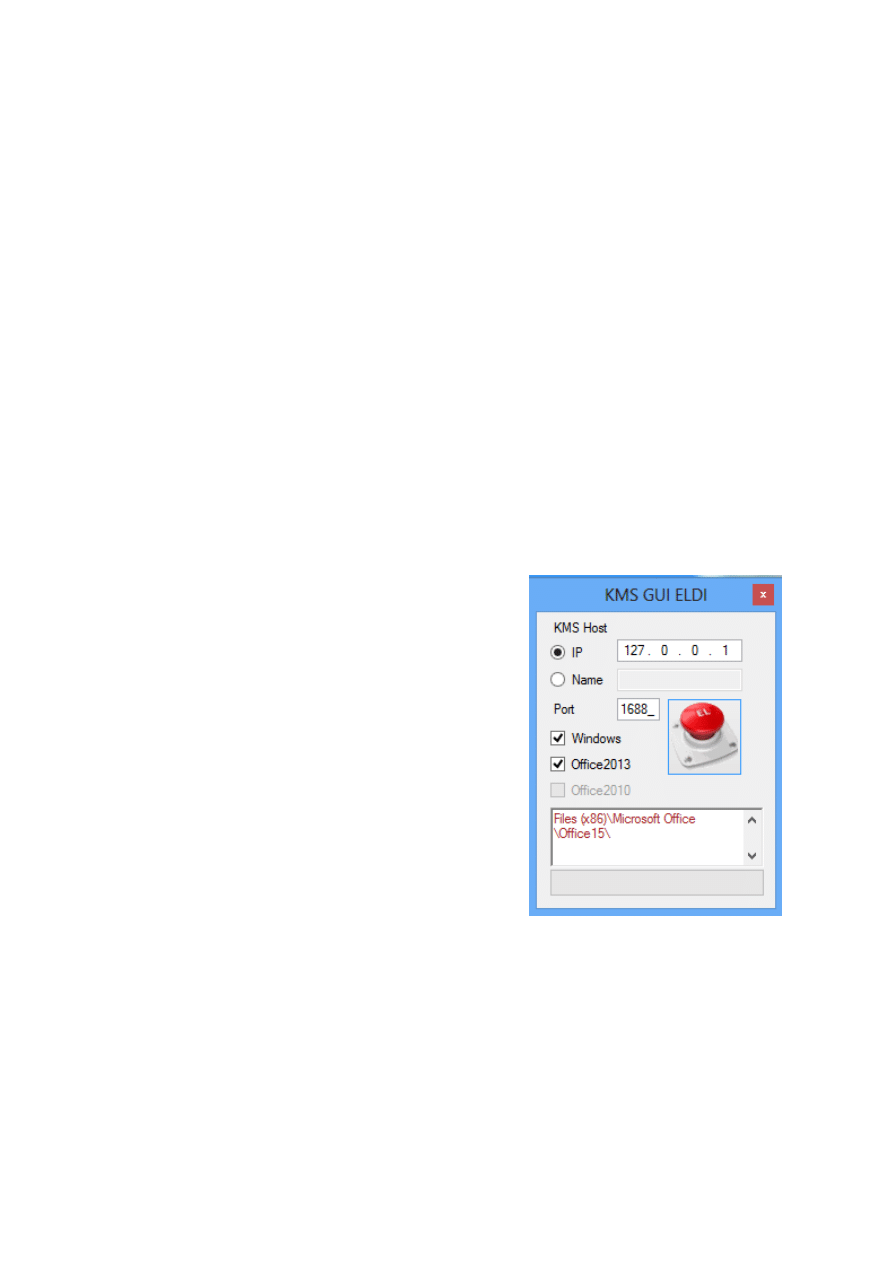
The KMSELDI GUI
You first need to fill:
IP: enter here the IP of the KMS server, or
Name: the name of the server
Port: Port to use on the KMS server
Windows: check if you want to activate
Office 2013: check if you want to activate
Office 2010: check if you want to activate
The status window at the bottom display information from
the programs spawned by KMSELDI.
At startup the program detects the products that can be
activated and non-present feature are greyed. For example
this picture shows that Office 2010 is not installed and
therefore it is not possible to check this option for activation.
Once you have specified the parameters you must push the
red EL button to start the activation process. This will start
the QEMU emulator and activates the products against the
KMS server specified in the IP/Port entries.
Wyszukiwarka
Podobne podstrony:
KMSnano Documentation v1 3 1
KMSnano Documentation v1 3 1
AF104114261 en us quick start guide store and share documents
Us ugi internetu dla LTK i SRK
Transfer sk adki US
Document 4
Document
Manual Acer TravelMate 2430 US EN
Autograss documentation
Document (10)
document (2)
Document (51)
C DOCUME~1 GERICOM USTAWI~1 Temp plugtmp 1 plugin lokalizacja przejsc problemy i dobre praktyki rkur
2012 11 22 Document 001
alcatel support document for cable system in cuba
Document 0
Eisenhower Briefing Document, 18 November 1952
więcej podobnych podstron