
Google Secrets
How to Get a Top 10 Ranking
On the Most Important Search Engine in the World
THE COMPLETE GUIDE
Dan Sisson

Google Secrets – How to Get a Top 10 Ranking…
page 2 of 112
Published by Blue Moose Webworks, Inc., 16625 Redmond Way, Ste. M-215,
Redmond, WA 98052
ISBN 0-9728588-0-6 (PDF ed.)
Copyright © 2003, 2004 by Dan Sisson, Blue Moose Webworks, Inc. All rights
reserved.
No part of this publication may be reproduced or transmitted in any form or by any
means, electronic or mechanical, including photocopying, recording or by any
information storage and retrieval system, without written permission from the author,
except for the inclusion of brief quotations in a review. Published in the United States
of America.
All products and/or services mentioned in this publication bearing the name,
likeness, or image of any other company or product line are trademarks, registered
trademarks, or service marks of the respective companies identified. No
endorsement or approval by such companies is or should be inferred by their
inclusion herein. The author and Blue Moose Webworks, Inc is not affiliated with, or
endorsed by, Google Inc. in any manner.
The author has put forth a best effort in ensuring the content of this publication is
accurate and current as of the time of publication. The author is not responsible for
any inadvertent errors, omissions, or contrary interpretations of the subject matter
herein. The author makes no warranty of any kind, expressed or implied, with regard
to the information supplied. No guarantees of ranking, traffic, or income is made. The
author shall not be liable in the event of incidental or consequential damages in
connection with, or arising out of, the providing of information offered herein. The
author is not responsible for external changes that may affect the applicability of the
processes, methods, techniques, or tools discussed in this publication. The author
reserves the right to make changes to the information herein. The purchaser or
reader of this publication assumes full responsibility for the use of this information.
On the World Wide Web at
http://www.google-secrets.com
. Receive free quarterly
book updates by email with your authorized order or transaction number.
www.google-secrets.com Copyright 2003-2004 Dan Sisson.
All rights reserved.

Google Secrets – How to Get a Top 10 Ranking…
page 3 of 112
Contents
Preface .............................................................................................................................6
PART I – Getting Started
................................................................................................8
Chapter 1 - The Importance of Google.........................................................................9
Chapter 2 - How Google Works ..................................................................................12
So What Is a Ranking?.......................................................................................... 12
When Google Comes Visiting................................................................................ 14
How Google Ranks Websites................................................................................ 16
Chapter 3 - Determining Your Best Keywords
............................................................19
So What Exactly Are Keywords?........................................................................... 19
Using WordTracker................................................................................................ 20
What is your Primary Keyword Phrase?................................................................ 24
What are your Secondary Keyword Phrases?....................................................... 25
Putting it All Together ............................................................................................ 26
PART II - Optimizing Your Website
.............................................................................27
Chapter 4 - Structuring your Site Correctly
.................................................................28
Structure by Theme and Topic .............................................................................. 28
Create Lots of Short Pages ................................................................................... 29
Don’t Nest Your Pages .......................................................................................... 30
Don’t Bloat Your Pages With Code ....................................................................... 31
Keywords in Your Domain Name .......................................................................... 31
Chapter 5 - Optimizing Your Web Pages
.....................................................................33
Keyword Factors Used in the Algorithm ................................................................ 33
The Importance of the <TITLE> ............................................................................ 34
How and Where to Use Keywords......................................................................... 36
Chapter 6 – Linking Your Pages Correctly
..................................................................41
Structuring Your Internal Links .............................................................................. 42
Best Practices for Internal Linking ......................................................................... 44
Chapter 7 – More Advanced Techniques
.....................................................................46
Multiple Sites – Is it Worth It? ................................................................................ 46
Domain Pointing and Subdomains ........................................................................ 47
www.google-secrets.com Copyright 2003-2004 Dan Sisson.
All rights reserved.

Google Secrets – How to Get a Top 10 Ranking…
page 4 of 112
PART III - Exchanging Links Effectively
...................................................................48
Chapter 8 – The Importance of Links
...........................................................................49
Link Factors Used in the Algorithm........................................................................ 49
Introducing PageRank ........................................................................................... 50
So What is Link Quality? ....................................................................................... 50
Chapter 9 - All About PageRank
.................................................................................52
PageRank vs. Search Result Ranking .................................................................. 52
Toolbar PageRank vs. Actual PageRank .............................................................. 53
Increasing PageRank ............................................................................................ 54
The PageRank Equation ....................................................................................... 55
Chapter 10 - Submitting Your Site to Directories
........................................................57
About the Google Directory ................................................................................... 57
Submitting Your Site to the OPD ........................................................................... 58
Submitting Your Site to Yahoo .............................................................................. 59
Submitting Your Site to Business.com .................................................................. 60
Other Search Submissions.................................................................................... 60
Chapter 11 – Getting Ready for Linking
......................................................................62
Creating “Link to Us” Code .................................................................................... 62
Maintaining a “Related Links” Page....................................................................... 63
Dealing with Non-Reciprocal Links........................................................................ 63
Chapter 12 – Which Links to Focus On
.......................................................................65
Best Practices and Tips......................................................................................... 65
Link Farms and FFA Sites – Just Say No.............................................................. 66
Chapter 13 - Managing a Reciprocal Link Campaign
.................................................67
About OptiLink ....................................................................................................... 67
About Arelis ........................................................................................................... 68
Checklist for Setting Up a Link Campaign ............................................................. 69
A Link Exchange Email Template.......................................................................... 72
PART IV - Putting It All Together
................................................................................73
Chapter 14 - Monitoring and Measuring
......................................................................74
Monitoring Your Site Traffic ................................................................................... 74
Monitoring Your Ranking ....................................................................................... 78
Monitoring Your PageRank ................................................................................... 78
Checking Pages Indexed....................................................................................... 79
Checking Link Count ............................................................................................. 79
Measuring Sales Conversion and ROI .................................................................. 80
www.google-secrets.com Copyright 2003-2004 Dan Sisson.
All rights reserved.

Google Secrets – How to Get a Top 10 Ranking…
page 5 of 112
Appendix A - Web Site Design Do’s and Don’ts
.........................................................83
Appendix B - Linking Do’s and Don’ts
........................................................................85
Appendix C - Additional Resources
.............................................................................87
Appendix D - About the Florida Update
........................................................................90
Appendix E - About Froogle
..........................................................................................97
Appendix F – About Google AdWords™
......................................................................99
Glossary.......................................................................................................................106
www.google-secrets.com Copyright 2003-2004 Dan Sisson.
All rights reserved.

Google Secrets – How to Get a Top 10 Ranking…
page 6 of 112
Preface
You know how important it is to have a website that is ranked high in the search
engines today. The fact is - if you are not in the top 30 for your category, it is unlikely
you will get much traffic from any search engine. While top 30 is OK, a number of
people never go past the first page in a search result. As such, a top 10 ranking is
needed to really bring visitors to your site.
Google is undisputedly the most important search engine in the world today. In fact,
a top 10 listing on Google
can bring more traffic to your site than all the other search
engines combined!
But do you know the rules that Google plays by? Do you know where best to focus
your efforts? Do you know what the most important factors are for a top ranking on
the Google search engine? The fact is – there currently is no book in the
marketplace currently that is focused solely on Google and how to achieve top
rankings with them!
Google Secrets is a comprehensive how-to guide for getting your website ranked in
the top 10 on Google. Whether you are a beginner or have more advanced
knowledge, this guide has something for you. It pulls timely information from a variety
of sources into one end-to-end process for you to follow. More importantly, this step-
by-step process has been proven to work in getting top 10 rankings on Google. Just
ask some of my clients (references are available upon request).
This guide assumes that you do have a working knowledge of HTML and how web
sites are put together in general – that’s all that is required. As such, Google Secrets
can benefit Web-savvy business decision makers, webmasters, and general Internet
marketers. Beginning Search Engine Optimization (SEO) specialists may also find
this guide to be of use in that the information is all in one place, rather than scattered
around the Web.
Because each chapter more or less builds on what came before it, it is
recommended that you read this book from beginning to end. To put it all together,
there is a step-by-step checklist at the end as well as several appendices that you
may find useful.
www.google-secrets.com Copyright 2003-2004 Dan Sisson.
All rights reserved.

Google Secrets – How to Get a Top 10 Ranking…
page 7 of 112
The focus of this book is to give you the maximum results using the minimum
amount of your money. There are numerous success stories of business people
getting top rankings on Google using no pay-per-click (PPC) advertising. As such,
this guide covers the paid forms of advertising you can do on Google – specifically
Google AdWords™ - somewhat sparsely. Before embarking down the potentially
PPC road, you should take advantage to the fullest the free exposure that Google
can provide for you. Only after you have applied the techniques in this guide should
you really consider whether Google AdWords and other PPC campaigns are the right
choice for you. There are numerous stories of small business owners spending large
amounts of money every month, getting into bidding wars with their competitors, and
for whom can’t get to a break-even point with their web sites. However, since PPC
campaigns do have their place in marketing web sites, and since no discussion
about Google would be complete without discussing AdWords, Appendix D contains
tips and best practices on using AdWords effectively.
While you are going through this book, there is one important thing to remember:
Getting a top ranking is only part of it. Yes, you will receive lots of traffic to your
site, but you then need to convert these visitors to satisfied, paying, repeat
customers. If you do not have a web site with compelling, fresh and useful content,
intuitive navigation, a simple ordering system, and a reason to return, all of your
efforts will be wasted. Put another way, having lots of traffic is only half the equation
to success on the Web – you still need to make sales. This means making sure you
have a professional and easy-to-use web site with products, services, or information
that visitors need in place beforehand. This seems obvious, but is often overlooked!
Are you ready for massive amounts of free traffic to your site? Are you ready to blow
past the competition? Then let’s get started…
Best regards,
Dan Sisson
www.google-secrets.com
January 2004
www.google-secrets.com Copyright 2003-2004 Dan Sisson.
All rights reserved.

Google Secrets – How to Get a Top 10 Ranking…
page 8 of 112
PART I – Getting Started
This section of the book lays the foundation for your work. It is highly recommended
that you understand the concepts and perform the tasks discussed here, even if you
feel they are basic or you already know them.
The first chapter deals with how Google works, while the second chapter discusses
the important concept of keywords and how they form the basis of your future efforts
and success with Google.
Before we continue, there are a few basic terms that you should understand right off
the bat. These terms are the most often misunderstood by beginners. There are
other terms you’ll need to know, but let’s get through these first.
Rank, ranking: a website’s actual placement or position on the free (unpaid) listings
section of a search engine results page for a certain search term or phrase. It is
meaningless to speak of website rank without specifying what search word or phrase
you are ranked on. When someone says to you “My website is #1 on Google”, you
need to ask “OK, but for which search term?” Your ranking on Google is dependent
on a number of different factors, which is the subject of a significant portion of this
guide.
PageRank: Google’s patented system for specifying a web page’s importance,
which is but a single, albeit important, factor that determines rank. Many people
confuse a page’s rank (what position they are on a search results page) with a
page’s PageRank (PR) value. They are totally separate. Because of the confusion
around PageRank, it will be discussed in detail later on.
Keywords: Keywords for those words and phrases that best define what a web
page is all about, and are found in a variety of places on web pages. When someone
enters a search term or phrase into Google, Google tries to find those web pages
whose keywords match the search phrase the best. This is an oversimplification
here, but you should get the idea. Some people confuse keywords with the META
“Keywords” tag. They are not the same thing. The days of filling up the META
Keywords tag with as many terms as possible are over. Google, along with most
other search engines today, ignore META tags as they have been so abused.
Page title: The title of a web page is the text contained between the
<TITLE></TITLE> tags at the top of an HTML file and is displayed in the top bar of a
browser window. It is not the first heading of a web page or any other large text that
may be displayed at the top of a web page. This is an important distinction to know.
For a complete list of terms and their definitions, see the
Glossary
.
www.google-secrets.com Copyright 2003-2004 Dan Sisson.
All rights reserved.
Google Secrets – How to Get a Top 10 Ranking…
page 9 of 112
Chapter 1
- The Importance of Google
So why a special guide just on Google? Aren’t there hundreds, if not thousands, of
search engines out there that need to be worried about? There are many other
search engines and search directories that exist, but Google is the most prominent,
most used, and most important of them all. At the very least, it is the search engine
you should focus your website promotion efforts on first. So let’s discuss why this is
so…
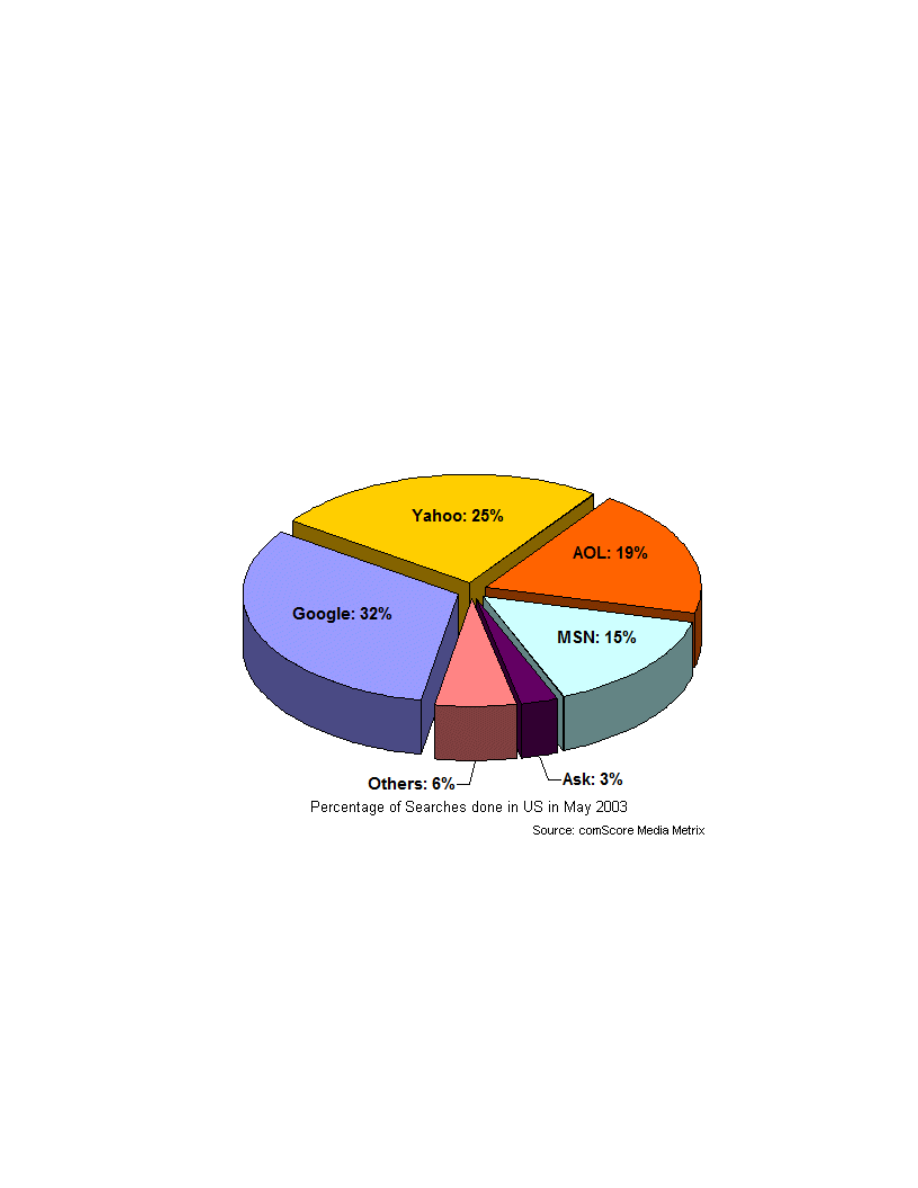
Without a doubt, Google is the largest and most used search engine in the world
today. Google currently indexes over 3.3 billion Web pages (as well as PDF, Word,
Excel and other files), over 425 million images, over 800 million Usenet (newsgroup)
messages, and performs more than 200 million searches per day (as of September
2003).
Google also currently provides search results to other search engines and
directories, notably Yahoo!, AOL, Netscape, Lycos, CompuServe, Earthlink, and
AT&T Worldnet.
This means a # 1 ranking on Google also mostly likely will land you a # 1 position on
these partner sites as well! I say “likely” because the partner sites tend to blend their
results a little bit so the rankings across the partners may not be exact. To repeat:
www.google-secrets.com Copyright 2003-2004 Dan Sisson.
All rights reserved.
Google Secrets – How to Get a Top 10 Ranking…
page 10 of 112
a #1 ranking on Google also generally means a #1 ranking on:
Yahoo!
AOL
Netscape
Earthlink
CompuServe
Lycos (Sympatico)
iWon.com
GO.com
AT&T Worldnet
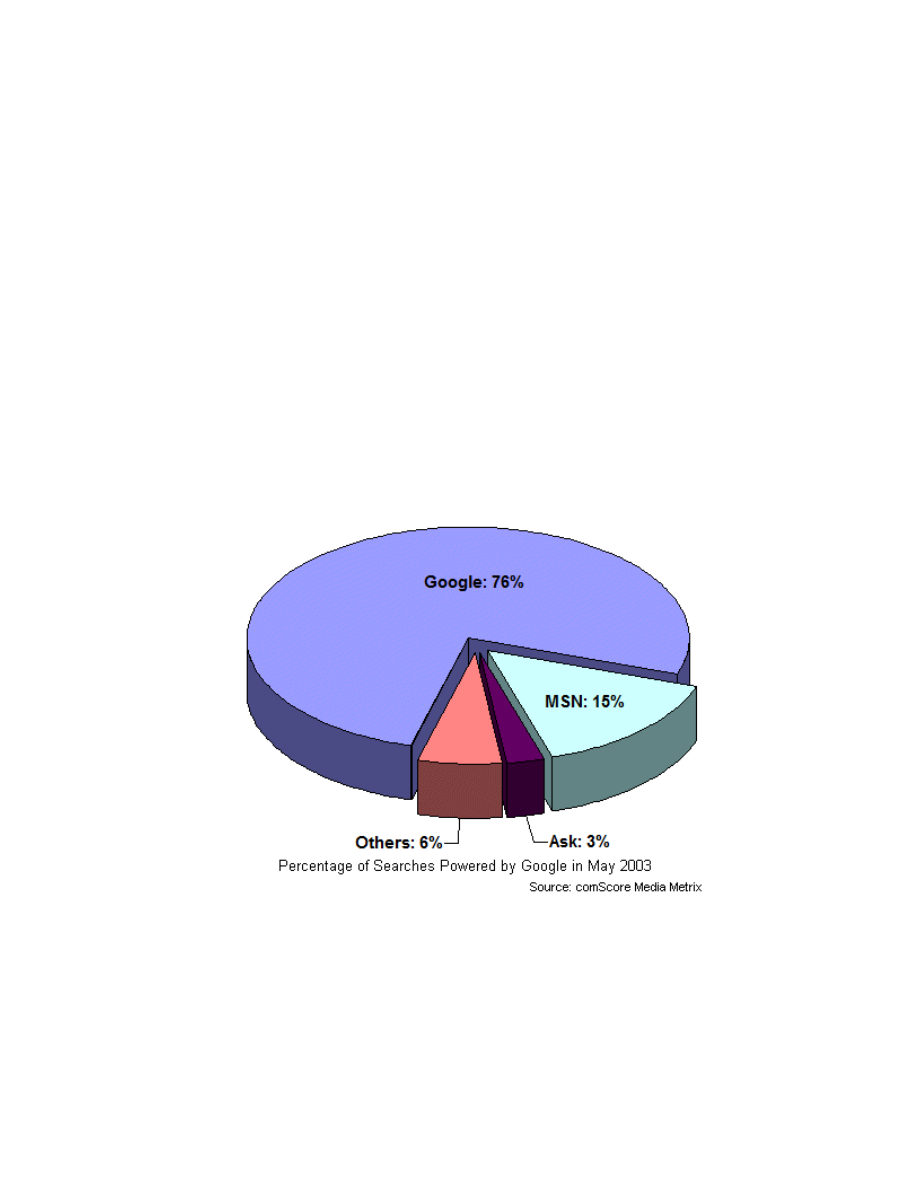
With its partners included, Google is now responsible for powering over 76% of all
search engine traffic to websites.
www.google-secrets.com Copyright 2003-2004 Dan Sisson.
All rights reserved.
Google Secrets – How to Get a Top 10 Ranking…
page 11 of 112
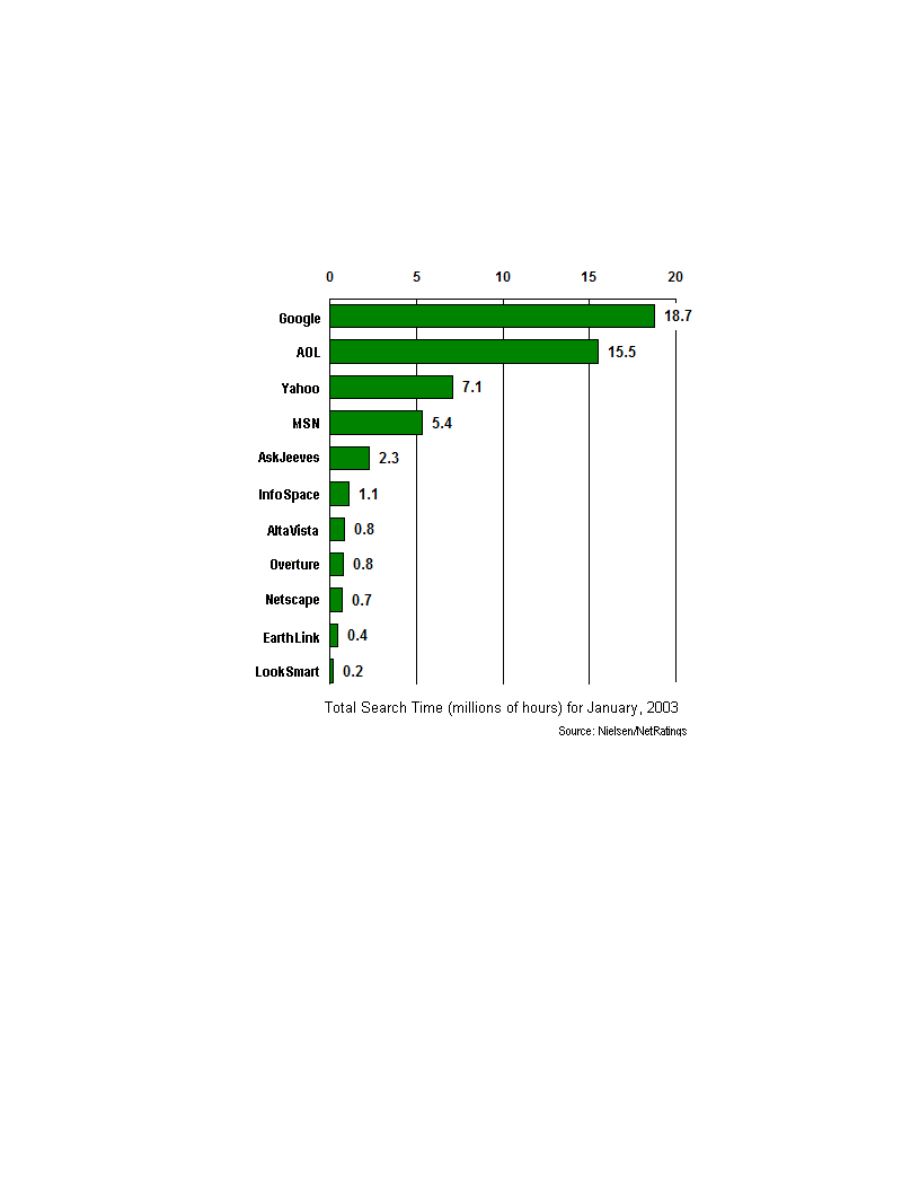
In addition, the chart below illustrates that more people are spending time on Google
searching for what they need than on any other search firm. If you also include
Google’s two major search partners AOL and Yahoo!, this is a lot of time web surfers
spend in just a few places.
Clearly then, Google is where you need to focus your website promotion efforts. After
you have applied the techniques discussed in this guide, have monitored your
results, and then refined your efforts over several months time, you should start
seeing dramatic results. As an aside, the other major search engines are starting to
look for the same elements as Google. So if you get it right for Google, you have also
gotten it right in general for all the other search engines!
www.google-secrets.com Copyright 2003-2004 Dan Sisson.
All rights reserved.

Google Secrets – How to Get a Top 10 Ranking…
page 12 of 112
Chapter 2
- How Google Works
This chapter explains those elements of the Google ranking process that will matter
most to you. It is not meant however to be an exhaustive inside look of how Google
works – only a handful of persons at Google know this.
Google, like other search engines, uses automated software to read, analyze,
compare, and rank your web pages. So you need to know what elements and factors
Google cares about, and how important these factors are in relation to each other.
Because this is an important concept, it will be repeated: Google uses automated
software to analyze your website – not human beings. Which means that visual
elements of your website that may matter to you – like layout, color, animation,
Flash, and other graphics are ignored by Google. The Google search engine is like a
blind person reading a book in Braille – anything that is graphical, spatial, or visual in
nature is simply not seen.
As such, you need to start thinking like the Google search engine.
So What Is a Ranking?
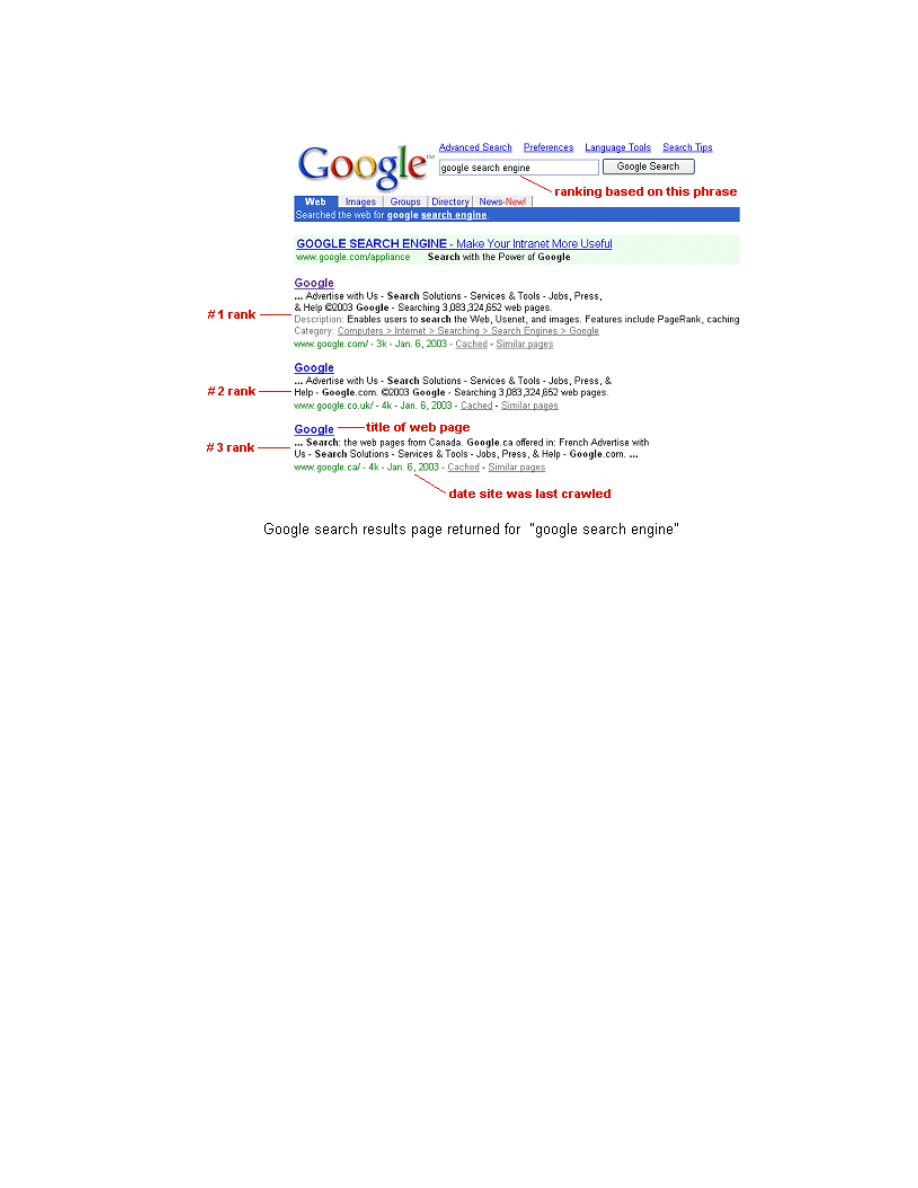
As stated previously, a ranking on a search engine is a web page’s listing and
relative placement on a results page (also known as a SERP) for a certain search
query. As an example, if you type “house plans” into the search box at Google, you
will get those listings displayed (10 listings per page by default) that Google deems
most relevant to the search phrase house plans, sorted in order of relative
importance.
www.google-secrets.com Copyright 2003-2004 Dan Sisson.
All rights reserved.
Google Secrets – How to Get a Top 10 Ranking…
page 13 of 112
The most relevant and most important web pages are listed in descending order.
For Google, page relevancy is dependent on how well a web page “matches” a
specific word search. Page importance on the other hand is dependent on the
quality and quantity of links that point to your web page from other web pages
(particularly from web pages on websites other than your own). The concept of link
quality is important and will be discussed in a later chapter.
If your site does not appear in the top 30 for your most important category or subject,
you might as well forget getting much traffic from Google or from any other search
engine. Because many people never go past the first page for a search result, you
really need to be in the top 10.
It can be debated how much more traffic a #1 gets compared to say, a #3 or a #10
ranking. Studies indicate that those listings “above the fold” on a results page (which
means anything higher than a #4 or #3 depending on your monitor size, resolution,
and other factors) do better than those below the fold as a certain percentage of
people do not scroll. Above the fold is anything displayed on the page before you
have to start scrolling.
www.google-secrets.com Copyright 2003-2004 Dan Sisson.
All rights reserved.

Google Secrets – How to Get a Top 10 Ranking…
page 14 of 112
When Google Comes Visiting
To be listed in Google’s database (or index), Google visits your site using automated
programs called robots or spiders. Such programs “read” each and every page of
your website, starting typically with your home page and then following each link to
all other web pages on your site. When a search engine robot or spider visits your
site, it is said to crawl or spider your site.
Important
: Google will not add a web page to its index unless there is at least one
other web page in its index that links to one of your web pages. So don’t fret over
submitting your site to Google directly. Rather, you need to get another website to
link to your website first.
Google in the past has done two types of crawl - the deep crawl (or main crawl) and
the fresh crawl. The deep crawl is traditionally done near the end of each month and
each page is crawled. The fresh crawl is traditionally done several times a week
(daily for some sites), but only certain pages are crawled. The more “popular” your
site, the more often it typically is crawled by Google. Highly ranked sites and sites
that update content frequently (like news sites) can get crawled daily.
You can determine when your site was last crawled by looking at the date displayed
on the last line of your website’s listing on a Google search results page.
Deep Crawl and the Google Dance
The deep crawl is traditionally performed by the main Google spider, called
Googlebot. Google updates its main index once a month after the deep crawl is
completed for all websites. (Google now tends to go with a more continuous update
although monthly updates still happen from time to time).
This process usually starts the last week of every month and continues for up to a
week. The index update is generally based on content they have cached or stored in
their database earlier in the month for your site. Because of the nature of the update
process, ranking calculations are performed multiple times for each page of every
site. Because of the sheer number of web pages in the Google index, these
calculations can take up to a week to complete.
During this period, search rankings can fluctuate - sometimes minute-by-minute.
These monthly fluctuations are termed the Google Dance, as your site’s ranking can
jump around on a search results page (or even appear to drop completely). You can
view other versions of the index on different servers at the ten major Google
datacenters by using the Google Dance Tool at
http://www.google-dance.com
.
www.google-secrets.com Copyright 2003-2004 Dan Sisson.
All rights reserved.

Google Secrets – How to Get a Top 10 Ranking…
page 15 of 112
Important:
It is critical that your website is up and running when Google visits you.
If your site is down, your listing on Google may disappear until the next update! The
reason is that Google thinks your site no longer exists and may remove it from the
index.
Fresh Crawl
The fresh crawl is performed by a different Google spider, called Freshbot. Fresh
crawls are done several times a week (daily for some sites), but only some pages
are crawled.
Freshbot looks for new pages and for pages whose content has been recently
updated. New pages are included in search results right away, which means they
can be found by visitors almost immediately, even though they are not yet in
Google's main index. Rather they are stored in a temporary index and then ranked.
Daily fluctuations in the search results caused by new pages being crawled by
Freshbot and then ranked are termed the everflux.
New pages aren’t added to the main index, and hence don’t have an accurate
ranking, until after the main crawl. It is not uncommon for new pages to drop in rank
once they are compared against all other web pages in the main index. This is
because the pages are then compared against other pages in the main index.
Note:
Over the spring and summer of 2003, Google has been slowly merging their
deep crawl and fresh crawl results together in addition to rolling out some other
changes. This led to a period of unpredictable or pre-April 2003 rankings for some
sites. Although not officially announced by Google, the consensus is that Google is
moving toward a continuous update, with the traditional Google Dance and monthly
visits going away.
If interested, you can check your server log files for the user-agent “Googlebot”. This
will tell when Google crawls your site. You can also check by IP address although
this method is not as accurate as Google uses different IP addresses for their robots,
which can change over time.
www.google-secrets.com Copyright 2003-2004 Dan Sisson.
All rights reserved.

Google Secrets – How to Get a Top 10 Ranking…
page 16 of 112
How Google Ranks Websites
Google uses a sophisticated and proprietary algorithm for ranking Web sites that
uses over 100 different criteria in the calculation, each of which is given a specific
weighting which can change over time. Because the algorithm can change, specific
techniques that used to work well may no longer work as well over time. This is
important to remember when your site’s ranking seems to change for no apparent
reason. For this reason, optimizing your site should not be considered as a one-time
task. You should always try, test, and refine your efforts.
Note:
In mid-November 2003, Google introduced a major algorithm change during
the so-called “Florida Update” that changes the way Google ranks certain websites.
At this writing, this new algorithm is still changing, with some of the effects not well
understood. It is believed that the methods and practices discussed in this guide are
still accurate, so this is more of a heads-up that changes may be coming. For more
information, see Appendix D – About the Florida Update”.
With that said, the Google algorithm can be broken down into two major groups of
factors:
Keyword (textual) factors. Keyword factors involve how, where and when keywords
are used. Meaning how well your website is optimized for your chosen keywords,
and if those same keywords appear in links that point to pages on your site. Keyword
factors determine page relevance.
Link (PageRank) factors. These include the quantity and quality of links that point
to your site. Link factors determine page importance and are strongly related to
Google PageRank (PR).
Very simply put, Google finds pages in its index that are both relevant and important
to a search for a particular term or phrase, and then lists them in descending order
on a search results page.
Keyword Factors and Page Relevance
Keywords are intrinsically related to search terms – those words and phrases that
people enter into a search engine to find specific information. Most people enter 2 to
5-word phrases in Google to find what they are looking for. Google in turn analyzes
all pages in its index and lists the pages which contain those search terms. Each
www.google-secrets.com Copyright 2003-2004 Dan Sisson.
All rights reserved.

Google Secrets – How to Get a Top 10 Ranking…
page 17 of 112
website usually contains one or two keywords that are repeated more often than
others throughout the site. These keywords dictate the “theme” of a website, and will
be discussed later on.
How well you can define the theme of your site, and how well you can optimize the
use of keywords that comprise the theme of your site, will greatly influence your
ranking with Google.
Google determines the most relevant web pages based on a hypertext search and
analysis of your site AND of other sites that contain links to your site. Specifically,
Google looks to see if the text of a link (the clickable portion) that points to your site,
the title of the linking page, and other content on the linking page, also contain your
keywords.
Note:
When Internet marketers speak of optimizing a site for a search engine, they
are usually talking about improving those aspects and elements of your website that
will improve page relevance.
Link Factors (PageRank) and Page Importance
Page importance is all about links - their quantity, quality, and strength, which we will
discuss later on. This part of the algorithm is also called the Google PageRank (PR).
Google looks for links that point to your site from other websites. Google believes a
link from website A to website B is a “vote” for the importance of website B. In this
way, other websites add votes for your website, which in turn helps increase a pages
PageRank value on your site. Each page on your site has a PR value. Usually the
PR value is the highest for the home page as most people will link to your home
page rather than another page on your site.
The more web pages that link to your site, the more important Google thinks your
site is and hence the higher your PageRank value can be. Moreover, it is the quality,
as well as the quantity, of links that matter – not all links are valued the same.
However, keep in mind that PageRank is but a single (albeit important) factor used in
ranking. Sites that are highly optimized for particular keywords can outrank sites that
are less optimized but have higher PageRank values.
PageRank value is assigned after comparing every page on every site in the Google
index against one another. This is over 3.3 billion web pages! Note that PageRank
does NOT factor in keywords or phrases used on your site.
www.google-secrets.com Copyright 2003-2004 Dan Sisson.
All rights reserved.

Google Secrets – How to Get a Top 10 Ranking…
page 18 of 112
Note:
When Internet marketers speak of increasing your link popularity, they are
generally talking about increasing the quantity and quality of links to your site,
generally through a reciprocal link exchange effort.
Top 5 Things Google Looks For
Although Google looks at over 100 different criteria (which can change in importance
over time) for ranking sites, here are the five aspects or elements that are currently
deemed a “must-do” if you are serious about a top ranking. There are others
elements that will be discussed later on that are also important. The following are
listed in approximate order of importance, with the first item being much more
important than the others:
1. Keywords used in the title of your pages (between the <TITLE> tags).
2. Keywords used in headings (H1) and in the first paragraph of your pages.
3. Keywords used in link text, both on your site AND on other websites.
4. The PageRank (PR) value of your pages, which in turn is dependent on the
number of links that point to your site from other sites.
5. Pages that contain at least 200 words of relevant text content (and the more
pages the better).
Put even more simply, to rank high on Google, you need to optimize your website for
your best keywords, get as many important and relevant sites to link to your site as
you can, and make sure the text of those links contain your best keywords.
So let’s continue by looking at the foundation for a successful web site in the next
chapter – keyword research, analysis, and selection.
www.google-secrets.com Copyright 2003-2004 Dan Sisson.
All rights reserved.

Google Secrets – How to Get a Top 10 Ranking…
page 19 of 112
Chapter 3
-
Determining Your Best Keywords
This is where your first and most important efforts begin. Do not skip the tasks in
this chapter as they form the foundation of your entire effort. It is absolutely
critical that you research and determine the most important and relevant keywords
for your website.
Time spent upfront in this endeavor will reap great rewards later. If you fail to
complete this important step, your chance for a top 10 ranking is greatly diminished.
The importance of this cannot be stressed enough!
So What Exactly Are Keywords?
In the context of the Web, a keyword is a term that a person enters into a search
engine to find specific information. Most people enter search phrases that consists of
between two and five words. Such phrases may be called search phrases, keyword
phrases, query phrases, or just keywords, but they all generally mean the same
thing.
Your most important keywords are those best and most relevant search phrases
you want your website listing to be found for on a search results page. Good
keyword phrases are specific and descriptive. It is better to have 100 highly-qualified
visitors who find your site listed in Google under a specific and particular search
phrase than to have 1,000 visitors who find your site listed under a generic search
phrase and then aren’t that interested in what you offer once they get to your site.
Important:
Your ultimate objective shouldn’t be just to get lots of traffic to your site
(although this is important), but instead should be to get a high sales conversion.
Having a #1 listing in Google means nothing unless you can convert visitors to your
website into satisfied, repeat, paying customers.
The more targeted, the more specific, the more unique your chosen keywords are,
the greater the chance that visitors to your site will find what they are looking for. You
want a high “click-to-sales” or high “visitors-to-customers” ratio. As such, you need to
start thinking like your customers. Determine what it is that they need, what problems
they have, and what solutions you can offer to help them.
www.google-secrets.com Copyright 2003-2004 Dan Sisson.
All rights reserved.

Google Secrets – How to Get a Top 10 Ranking…
page 20 of 112
So how do you determine which keywords are most important and relevant for your
website? There are two main methods, as follows:
1. By using an online tool called WordTracker at
http://www.wordtracker.com
.
Do this first and spend time doing it right.
2. By analyzing your website traffic statistics. Do this later over time to validate
the results of method 1.
WordTracker is an online tool that finds all possible variations and permutations of
search phrases, including synonyms and common misspellings that people have
actually entered into search engines to find sites similar to yours. In addition, it will
also tell you how many people have actually used that particular search term over
the last 60 days and over the last 24 hours. There is no other program currently
available that offers this much information. Yes, there are other tools out there, like
Overture’s or AdWord’s Keyword Suggestion tools, but they simply aren’t as
accurate or as good. For this reason, it is the tool of choice for many search engine
optimizers (SEOs) and Internet marketers. Indeed, WordTracker has been one of the
better-kept secrets around for increasing traffic to websites by finding out the search
habits of people on the Internet.
In addition, you should also make a habit of viewing your site traffic statistics to find
out which keywords people are using to find your site. This is usually done after your
site has been in operation for a while, and is useful for verifying and validating your
WordTracker results. For more information, see
Monitoring Your Traffic
.
Using WordTracker
Before you use WordTracker, you should first brainstorm and make a list of all
possible words and phrases that you think a customer may use to find those
products, services, or information that you are offering on your site. Don’t include
industry jargon, acronyms, or buzzwords that only experts in your industry or
marketers would know. Think like your customer. This is an important distinction to
keep in mind.
WordTracker offers both a free trial version and a paid (full) version. You will need to
sign up for the full version of WordTracker to be able to find search terms that people
have searched for using Google. The free trial of WordTracker only allows you to find
keywords people have searched for using the AltaVista search engine.
WordTracker is quite inexpensive to use, and there simply is no better way to
research the best keywords to use for your website. In fact, you can use it to
estimate beforehand how much traffic you can potentially expect to receive so it is an
invaluable tool for general business research as well.
www.google-secrets.com Copyright 2003-2004 Dan Sisson.
All rights reserved.
Google Secrets – How to Get a Top 10 Ranking…
page 21 of 112
You should first use the trial version to learn how to use WordTracker effectively. Go
through the Online Tour and read through the online manual. This is time well spent!
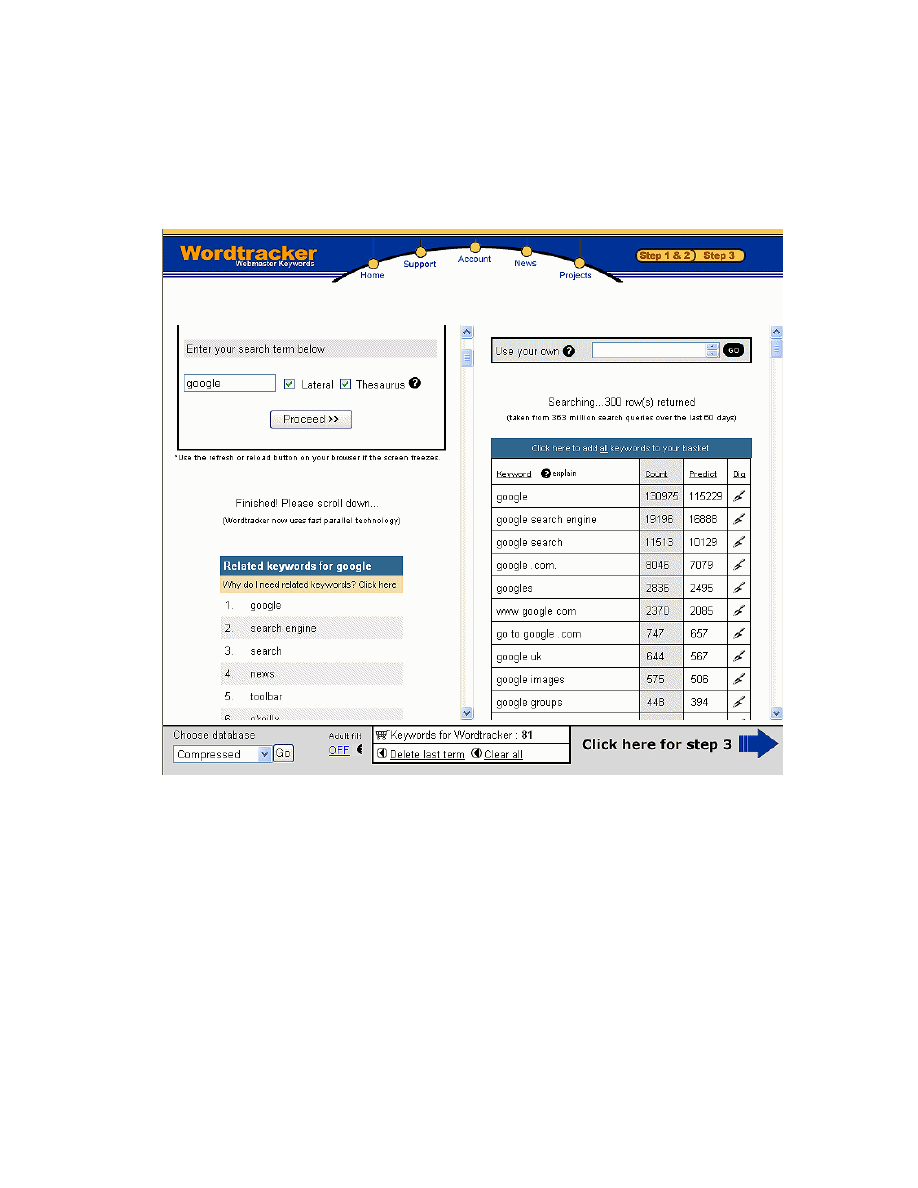
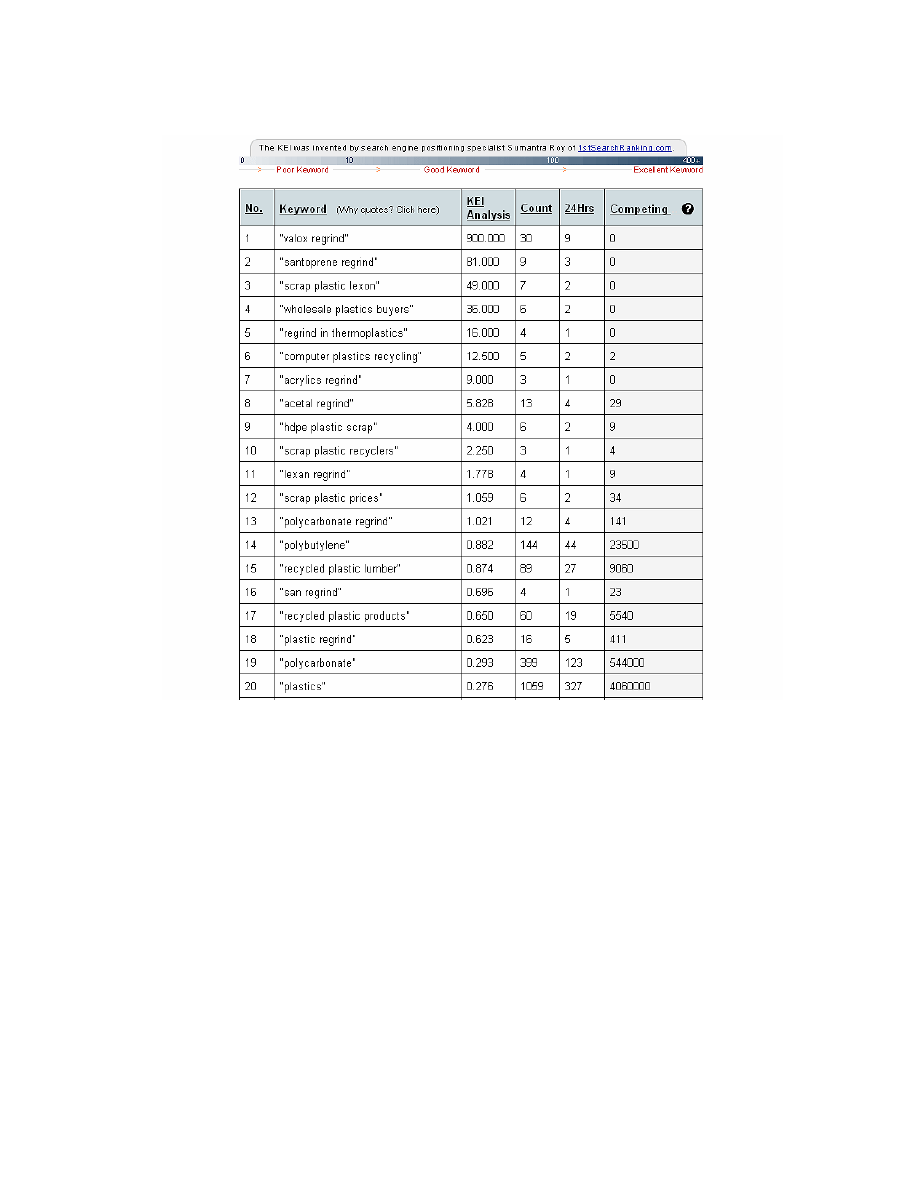
Here are a couple of screenshots in WordTracker to aid in following the procedure:
www.google-secrets.com Copyright 2003-2004 Dan Sisson.
All rights reserved.
Google Secrets – How to Get a Top 10 Ranking…
page 22 of 112
Because some people may find WordTracker a little tricky to use at first, here is the
actual step-by-step procedure for using this tool:
Using WordTracker step-by-step
1. After signing up for the full version, click Login from the home page.
2. Under Keyword Universe, click Here.
3. Under Step 2, type in what you think is your best phrase overall, and then
click Proceed. Leave all other settings as is.
www.google-secrets.com Copyright 2003-2004 Dan Sisson.
All rights reserved.

Google Secrets – How to Get a Top 10 Ranking…
page 23 of 112
4. On the left pane, scroll down to see the list of related synonyms that
WordTracker has returned. You will likely find terms and phrases that you
may not have thought of. Jot down the most interesting ones - you will want
to add these later on.
5. Click the first phrase in the list (the one you entered in Step 3).
6. In the right-hand pane, you will see a list of related phrases. Click on those
that you believe are the best. They are then added to your “cart”.
These are the actual search phrases that people have been entered into
search engines over the last 60 days, along with how many times each was
used.
7. Go back to the left pane and repeat steps 4 through 6, adding as many
phrases as you feel are needed. These phrases will be analyzed later on by
WordTracker.
Tip:
You can also import keywords into WordTracker that you have in a .txt file.
Copy and paste your keywords into the Use your own box in the right pane and
then click Go. Each keyword must be on a separate line.
Alternatively, you can also import keywords into an unused project from the Projects
link on their home page.
8. When finished, click Click here for step 3.
9. Under Step 3, look at those terms at the bottom of the list that have very low
numbers in the Count column, as compared to the terms at the top. Click
Delete for each low-count term you want to remove, and then click
Competition Search.
10. Under Step 4, select the Google check box, and then click Proceed.
WordTracker will now analyze these terms to see how many times they were
entered during search requests using Google.
11. When WordTracker is finished, scroll down the page and study the list,
paying particular attention to the KEI Analysis column. KEI is very important
– a high value represents those keywords that are most popular in Google
AND that are used on the least number of other websites. Put another way,
you want to look at those keywords that have the highest number in the
Count column and the lowest numbers in the Competing column.
www.google-secrets.com Copyright 2003-2004 Dan Sisson.
All rights reserved.

Google Secrets – How to Get a Top 10 Ranking…
page 24 of 112
You can have the best keyword phrase on the Internet, but if 10 million other
websites also use the phrase, your chances of getting a top ranking are
greatly diminished. You want to find those niches where people are searching
for a phrase, but where there aren’t a lot of websites that you would have to
compete with for traffic.
12. Write down those phrases with the highest KEI value. These are terms that
are the most popular and are found on the least number of competing Web
pages.
13. Write down those phrases that also have high Count values, regardless of
KEI value. Using KEI alone can be misleading. While you do want to pick
out phrases with high KEI values, you specifically want those that have a KEI
value AND have high traffic. Using terms with very high KEI values but with
low Count values, which results when there are virtually no competing pages,
will not be that productive.
14. From these two lists, select those phrases you feel are most relevant and
important to your website.
15. When done, pick 2 or 3 of the more broad-based phrases – these will be
used on your home page. Next, pick several more specific phrases that can
be used on your product or service pages.
WordTracker allows you to export your keyword list and your Competition Search
results (in tab-delimited format) to Excel or Access, where you can then easily sort
(and resort) the data any number of different ways. This is a useful feature and I
highly encourage you to do this. This is also great if you have more than 7 projects,
the maximum you can store with Wordtracker. This way you can export and store
your projects offline. If you want to rerun WordTracker against a set of keywords that
you exported, simply pick a “reserved” project on WordTracker, import your
keywords into the Use your own box (mentioned in Step 7), and rerun.
Tip:
Pay special attention to whether the plural form or the singular form of a
keyword phrase has a higher KEI rating or higher traffic. This is important as one
form of your word will be more important than another.
What is your Primary Keyword Phrase?
After using WordTracker, you should have a great list of keyword phrases. Ideally,
you have a single keyword phrase that sticks out from the rest in terms of KEI value
and that best represents the category of service, product, or information your website
provides. This is your Primary Keyword Phrase and is the one phrase that will be
included on all your web pages, particularly on your home page.
www.google-secrets.com Copyright 2003-2004 Dan Sisson.
All rights reserved.

Google Secrets – How to Get a Top 10 Ranking…
page 25 of 112
You should also have several other phrases that represent more specific or refined
variations to your Primary Keyword Phrase. These phrases will be used on your
specific product, service, or content pages.
For example, let’s use a website that sells house plans online:
Primary Keyword Phrase: “house plans”
Specific variations:
“country house plans”
“luxury house plans”
“Cape
Cod
house
plans”
Notice how the Primary Keyword Phrase is contained within the more specific
phrases? This is the ideal situation to achieve.
Do not try to go after generic keywords or single words. How difficult do you
think it would be to get a top ranking for, say “computers”? You’d be competing with
over 52 million other web pages!
If your site is comprised of totally separate categories of products or services (such
as baby diapers and garage door openers for example), or if you sell to completely
different bases of customers, you should consider splitting your website into multiple
sites, with each site containing one category. For more information on this, see
Creating Multiple Sites
.
What are your Secondary Keyword Phrases?
After using WordTracker, you should also have a list of phrases that do not have as
high of a KEI rating as your Primary Keyword Phrase but are nonetheless also
relevant. These are your Secondary Keyword Phrases that, while also highly relevant
to your website or business, are not searched on as frequently as your Primary
Keyword Phrase.
Using the example above, here are some Secondary Keyword Phrases for house
plans using WordTracker:
Secondary Keyword Phrases: “home
plans”
“home
designs”
“houseplans”
Secondary Keyword Phrases should also be used on your site, just not as frequently
as your Primary Keyword Phrase.
www.google-secrets.com Copyright 2003-2004 Dan Sisson.
All rights reserved.

Google Secrets – How to Get a Top 10 Ranking…
page 26 of 112
Putting it All Together
Now that you have your list of best and most important keyword phrases, here is the
general strategy of how to use them on your web pages. Exactly how to optimize
your use of keywords on your web pages is the subject of the entire next section.
The general rule of thumb is that you optimize each page for ideally no more
than two different keyword phrases.
Each page should include your Primary Keyword Phrase. Your home page should
also contain your best Secondary Keyword Phrase. Each product, service, or content
page should also contain the best specific variation to your Primary Keyword Phrase.
Because your home page is generally the one that gets the highest ranking, and is
linked to most from other sites, you need to place special emphasis on the use of
your Primary Keyword Phrase there. Your home page will then link to other pages on
your site that contain (and are optimized for) your other, more specific, keyword
phrases.
Using the example again for “house plans”, here would be the general strategy:
• Home page: optimize for “house plans” (primary phrase) and “home plans”
(best secondary phrase).
• Country House Plans page: optimize for “country house plans” phrase and
any other variations, such as “French country house plans”. Note how these
phrases already contain the Primary Keyword phrase within them. This is the
ideal situation to achieve.
• French Country House Plans page: optimize for “French country house
plans” phrase.
• Contact Us page: include the phrase “house plans” several times on the
page. This is because this page, along with the other “fluff” pages that are
sites, are not really relevant against any specific keyword phrase. So use
your Primary Keyword Phrase here.
• About Us page: again, include “house plans” phrase several times on the
page for the same reason as the Contact Us page.
This example, while being quite general, nonetheless should give you an idea of how
to proceed.
Now let’s look at how and where to use these on your web site correctly.
www.google-secrets.com Copyright 2003-2004 Dan Sisson.
All rights reserved.

Google Secrets – How to Get a Top 10 Ranking…
page 27 of 112
PART II - Optimizing Your Website
This section deals with those aspects and elements of your website that should be
optimized for Google in order to increase relevancy. You want to maximize how
relevant your site and pages are to a given search query for a given search phrase
(keywords).
In addition to optimizing your site for Google, you should also strive to incorporate
some best practices into your website design and structure. For additional
information on general website design principles, see
Appendix A - Web Site
Design Do’s and Don’ts
.
Before we begin, make sure you don’t overlook the obvious:
Your website must contain high-quality, useful, timely content that people will
actually want to read.
It is amazing how often this statement is ignored. You should spend more time
creating useful and relevant content, and less time on fancy graphics, gratuitous
animations, or Flash – especially on your home page. Remember that Google uses
automated software to analyze the text on your site. This means it will ignore
graphics and other multimedia elements on your site - and often your customer will
too.
Think of site optimization as a long-term investment in your site “infrastructure. Once
your site is optimized, it stays optimized and keeps its ranking over time (but not
forever – you still need to update your site on a regular basis). This means free traffic
over time. Compare that with paid advertising (such as an Overture pay-per-click
campaign) where the minute you stop paying for your ads, your traffic goes away – it
is a recurring expense.
As this section builds on the previous chapter, it is highly recommended that you
complete the tasks described in
Chapter 3 - Determining Your Best Keywords
first, if
you haven’t already.
www.google-secrets.com Copyright 2003-2004 Dan Sisson.
All rights reserved.

Google Secrets – How to Get a Top 10 Ranking…
page 28 of 112
Chapter 4
-
Structuring your Site Correctly
This chapter discusses the general structure of a website – folder structure, file
names, domain names, page count, and how content should be placed on pages.
Structure by Theme and Topic
The general subject or category of your website dictates it’s theme. Loosely stated,
the theme of your website is generally your Primary Keyword Phrase, as determined
by your earlier efforts using WordTracker, discussed in
Chapter 3 - Determining Your
Best Keywords
.
For example, if your site sells baby diapers and other infant products and services
online, the theme of your site would probably be infant care, so every page of your
site needs to include infant care (if that is the best phrase as determined by
WordTracker of course). You would also have pages that discuss specific or more
refined variations, like baby diapers, on your theme.
Tip:
Ideally, your site is only about one major subject or category. If you have more
than one major subject for your site, say, for example, you sell baby diapers AND
garage door openers, you should strongly consider creating multiple sites, one per
subject.
The main idea is to separate content onto different pages by topic (keyword phrase)
within your site. As another example, suppose that a site sells house plans online
and that is the theme of the site (it’s Primary Keyword Phrase). This site also sells
country house plans, garage plans, and duplex plans, and let’s say for this example
that each page of the site mentions all three plan types.
However, what is each page's specific topic? The different plan types have been
mentioned on multiple pages, so each page contains the keywords country house
plans, garage plans, and duplex plans. None of the three plan types would be
strongly relevant on any of these pages for Google.
The correct way to structure this site is to have one page that discusses only country
house plans, another page that discusses only garage plans, and a third page that
discusses only duplex plans. Each page is now strongly relevant for one keyword
phrase. No “dilution” occurs in any of the pages, and each page should subsequently
fair better in the rankings for its particular keyword phrase. This is important.
www.google-secrets.com Copyright 2003-2004 Dan Sisson.
All rights reserved.

Google Secrets – How to Get a Top 10 Ranking…
page 29 of 112
Next, you would add links on each page so that garage plan pages link only to other
garage plan pages, duplex plan pages link only to duplex plan pages, and so forth.
By using the applicable keyword phrase in the link text (the clickable part of the link),
you can also help strengthen the importance of each page. We’ll discuss in greater
detail how to link pages correctly between pages in “Chapter 6 – Linking Your Pages
Correctly”.
So, to properly structure a site that offers different products, services, or content
categories, you should split the content onto different pages. In the end, you ideally
want a single topic, or keyword phrase, applied per page.
Create Lots of Short Pages
Websites with lots of pages in general rank better than sites with just a few pages, all
other things being equal. It is better to have a 50-page site with short pages than a 5-
page site with long, flowing pages. Each page should however contain a
minimum of about 200 visible words of text to maximize relevance with
Google.
Short pages also are indexed faster and download faster. Studies show you lose
10% of your visitors for every second it takes your page to download and display in
their browser. Much beyond 5 seconds and you might as well forget it – people will
click elsewhere. This is important to keep in mind.
Also, you need pages with real content – don’t create just a lot of “fluff” pages that
are standard fair anyway – About Us page, Contact Us page, etc.
Keep your web pages simple from a coding standpoint. Try to avoid gratuitous
animations, junk graphics, large imagemaps, JavaScript, or anything else that may
get in the way of Google or, more importantly, of your customers getting the
message you are trying to get across on your site.
Also be sure and break up your pages using <H1>, <H2>, and <H3> heads, and
include your keywords in these heads. Not only will it help visitors read your pages
more quickly by providing visual separators on the page, it will give your pages more
relevance with Google.
Strive to have only one topic per page, and then to optimize that page for that
particular topic (keyword phrase). Write content by hand, don’t be lured into using
software programs that use “templates” for generating web pages. In general, your
pages will look cookie-cutter and Google may consider them as duplicate pages.
www.google-secrets.com Copyright 2003-2004 Dan Sisson.
All rights reserved.

Google Secrets – How to Get a Top 10 Ranking…
page 30 of 112
Caution
:
Don’t create pages that are all identical or nearly so. Google may
consider them to be spam or duplicates and your page (or site) may be penalized.
Pages full of high quality, unique, keyword-rich content are a must. Be careful if you
both HTML and PDF versions of the same content. Google will index both.
To prevent this, create a robots.txt file and place it in the main (root) directory on
your server. A robots.txt file specifies which directories and file types to exclude from
crawling. If your PDF files are duplicates of your HTML files, put all the PDF files in a
different directory and specify that this directory by excluded from crawling. For more
information on creating a robots.txt file, see
http://www.searchengineworld.com/robots/robots_tutorial.htm
.
Here is a sample website with pages you should consider for your site:
• Home
page
• Your main product, service, or content pages (this is the meat of your site)
• FAQ page(s) (Frequently Asked Questions)
• Sitemap page (links to each page on your site)
• About Us page
• Contact Us page
• Related Links page(s) (discussed later)
• Link to Us page (discussed later)
• Testimonials
page
• Copyright, Disclaimers, Privacy Policy page
• Ordering
page
Lastly, adding more pages to your site is one of two ways of increasing your site’s
total PageRank (PR) value. PR is assigned on a per page basis, but can be
channeled or distributed amongst pages of your site. This important concept will be
discussed later on.
Don’t Nest Your Pages
When Google crawls your site, it typically starts at the home page and then follows
each link on the page to all your other pages. Google finds your home page in turn
from following a link on another website that points to your site.
Generally speaking, Google seems to attach more importance to files that are closer
to the root folder on your server - the folder on your Web server where the home
page file is located. Bear in mind however that some web designers may create
multiple folders on the server for ease in maintaining lots of files.
www.google-secrets.com Copyright 2003-2004 Dan Sisson.
All rights reserved.

Google Secrets – How to Get a Top 10 Ranking…
page 31 of 112
It is believed that Google assigns pages located in other folders a lower score than
pages located in the root folder. In general, Google doesn’t like to index sites that are
more than about two folder levels deep. Ideally, all pages should live in the same
folder as your home page or at most be one level deep.
Don’t Bloat Your Pages With Code
Google generally has a time limit that it sets to crawl sites. If you have a large site,
Google may not have time to crawl all pages during the first or second passes. This
problem can be minimized if you keep the code of your web pages lean and clean.
This also makes your pages download faster, which improves the visitor experience.
Studies show that you lose 10% of your visitors for every second it takes your page
to load. After about 5 seconds, you might as well forget it – most people will have left
your site. Remember there is a still a large percentage of people who still use dial-up
modems – particularly outside of the US. This will not change anytime soon, despite
the hype over broadband.
This means try not to have more code than visible content (text) on your page.
Frequently web pages are comprised of 80% or even 90% JavaScript code and style
code (hard-coded font information or inline style blocks). Right-click a web page and
then click View Source – you will be amazed at the amount of code present.
Although Google ignores such code, it still takes time for it to wade through to find
your content.
Put your JavaScript code in a separate (.JS) file and link to it from the <HEAD>
section of each applicable web page, as follows:
<script language = "JavaScript" type = "text/javascript" src =
"YourFile.js"></script>
In addition, create a stylesheet file (.CSS) file and link to it also.
<link rel = "stylesheet" href = "YourFile.css">
Keywords in Your Domain Name
Although by itself not a real important factor, Google currently does look to see if
your keywords are used in the actual domain name of your site.
www.google-secrets.com Copyright 2003-2004 Dan Sisson.
All rights reserved.

Google Secrets – How to Get a Top 10 Ranking…
page 32 of 112
Given that you can register domain names for as cheap as $6.95 per year (see
Hostway.com for details), it might make sense to register your Primary Keyword
Phrase for use as the domain name of your website. If the .com version of a domain
name is taken, try the .net version or the .cc version. It doesn’t matter to Google.
When registering a domain name, separate each word in the domain name with a
hyphen, otherwise Google will not be able to recognize the phrase and will think it is
a single (usually nonexistent) word. Here is the correct format to use for domain
names:
http://www.primary-keyword-phrase.com
As a general rule of thumb, don’t use more than two hyphens, it looks spammy and
Google may take a closer look at your site for other possible issues.
Note:
Don’t go overboard with this – by itself, it is not an important factor. There IS
something to be said about having a branded, easily recognizable name that
coincides with your business name however. This is more of a suggestion to include
a keyword or two in your branded domain name. For example, if your business name
is Blue Moose Web, register and use www.bluemoose-web-design.com instead of
www.best-web-design.com.
www.google-secrets.com Copyright 2003-2004 Dan Sisson.
All rights reserved.

Google Secrets – How to Get a Top 10 Ranking…
page 33 of 112
Chapter 5
-
Optimizing Your Web Pages
Now that you know how to structure your site and pages, you next need to optimize
those pages for Google. As such, this chapter is quite important – in fact, this is the
meat of the matter where many search engine optimizers (SEOs) tend spend the
majority of their time on.
Put another way, this chapter discusses those aspects and elements of web pages
that determine relevancy in Google.
Specifically, Google checks if and how keywords that match a search query are used
on pages on your website AND on pages on other websites that link to your site.
Tip
:
Not just HTML pages need to be optimized. If your Web site contains PDF or
Word files, these too must be optimized. Google will index all files on your Web
server that it can find, and these will be included in the overall site ranking algorithm.
Keyword Factors Used in the Algorithm
The following factors play a part in the portion of the Google algorithm that
determines page relevancy. Google looks at the following keyword factors and
assigns a relevancy score for each page of your site. The factors are listed in
approximate order of importance, however, like all factors in the Google algorithm,
this is subject to change.
Keyword Proximity
Google looks at individual words that make up phrases. Keyword proximity is a
measure of word order and closeness. The closer all words in a keyword phrase are
together, and in the correct order, the better.
Obviously, exact matches score the best. As an example, say someone does a
search on “country house plans”. Google will assign a higher score if your page
contains “country house plans” than if it contains “country and farm house plans”. For
the latter, all three words are contained on the page, so the page would receive
some score, but since this is an inexact match (there are words in between “country
and “house”), the page score would be lower than for the exact match of country
house plans.
www.google-secrets.com Copyright 2003-2004 Dan Sisson.
All rights reserved.

Google Secrets – How to Get a Top 10 Ranking…
page 34 of 112
Keyword Placement
This measures where on the page keywords are located. Google looks for keywords
in the page title, in headings, in body text, in links, in image ALT text, in drop-down
boxes, in file names, and in domain names.
Keyword Prominence
A measure of how early or high up on a page the keywords are found. Having
keywords in the first heading and in the first paragraph (first 20 words or so) on a
page are best.
Keyword Density
Also known as keyword weight, the number of times a keyword is used on a page
divided by the total number of words on the page. There is some confusion over
keyword density. Part of this stems from the fact that different software programs
look at different parts of the page and calculate this differently.
There doesn’t seem to be an ideal density value for Google – from 6 - 20% is good.
Just don’t spam. In other words, don’t fill your pages up needlessly with your
keywords - not only will customers think your site is amateurish, but Google may
penalize you. It is not clear however whether Google measures keyword density per
page, across the entire site - or both, in their ranking algorithm.
Keyword density used to be more important in the past for search engines, and you
may still find books and other literature that stress the importance of this factor. For
Google (at least currently), it is not that important. This can change however.
A good online tool for calculating keyword density for a web page is located at
http://www.keyworddensity.com
.
Keyword Format
A measure of whether keywords are bolded or italicized on the page. The best
place to do this is in the first paragraph of the page. This isn’t a real important factor,
but every little bit helps.
The Importance of the <TITLE>
There is one place on a web page where your keywords MUST be present, and that
is in the page title, which is everything between the <TITLE> tags in the <HEAD>
section of a page. The page title (not to be confused with the heading for a page) is
what is displayed in the title bar of your browser window, and is also what is
displayed when you bookmark a page or add it to your browser Favorites.
www.google-secrets.com Copyright 2003-2004 Dan Sisson.
All rights reserved.
Google Secrets – How to Get a Top 10 Ranking…
page 35 of 112
Correct use of keywords in the title of every page of your website is extremely
important to Google – particularly for the home page. If you do nothing else to
optimize your site, remember to do this! Also note that the "Keywords" META
tag is ignored by Google. Concentrate your efforts on the title for each page,
making sure they contain the best keywords for the content of each page.
The title shouldn’t consist of much more than about 9 words or 60 characters, with
your keywords used at the very beginning of the title. Since Google is looking for
relevant keywords in the title, this means you should NOT include your company
name in the title unless your company name is so well known as to be a keyword in
it’s own right with instant name recognition – like Disney, Nike, or Yahoo. If you must
include your company name in the title, put it at the end. In addition, each page title
should be unique – don’t duplicate titles on pages.
If you remember only one sentence in this entire book – commit this one to memory:
Improper or nonexistent use of titles in web pages will keep more websites out
of top rankings on Google than any other factor except perhaps for a lack of
relevant content on a page or a lack of quality links from other websites that
point to your site.
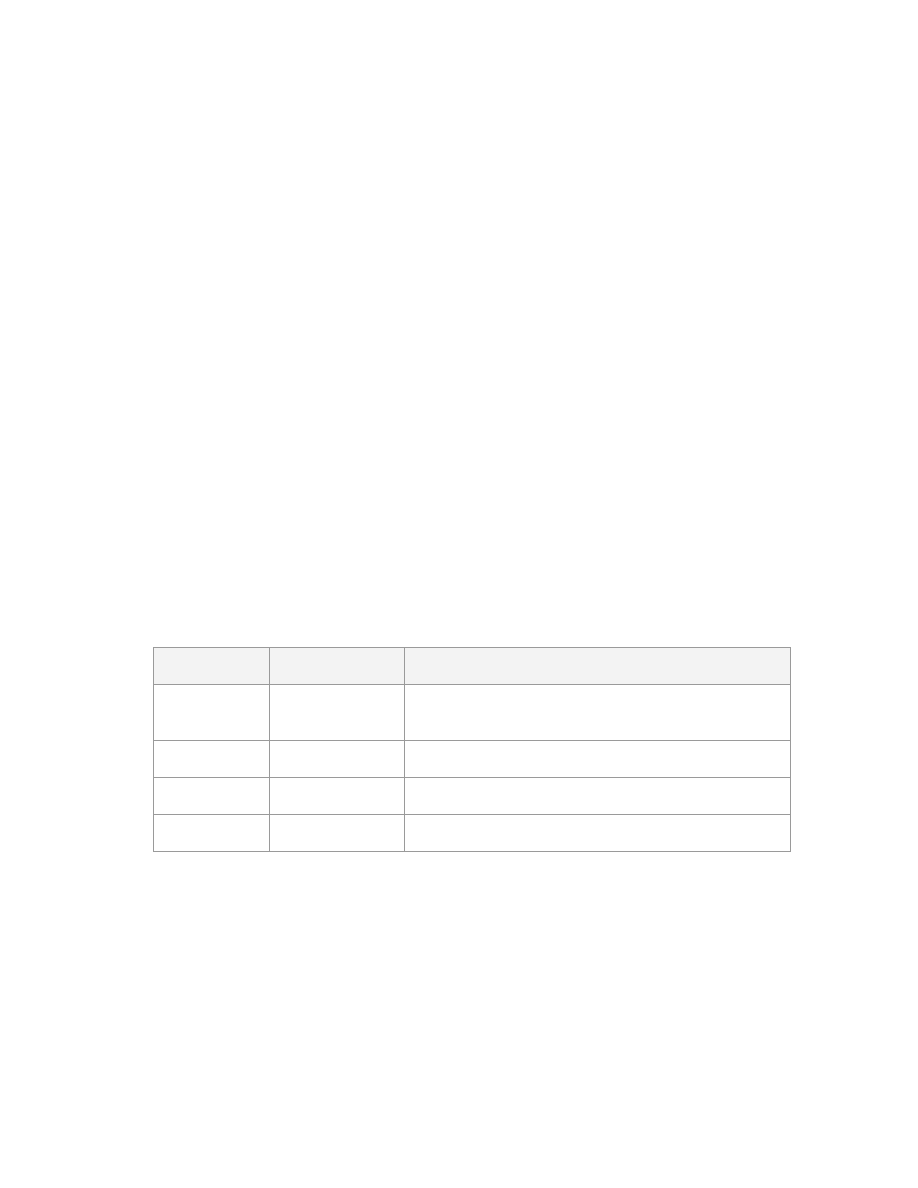
The following table shows both the improper and proper use of titles on an example
website that sells house plans. You undoubtedly have seen numerous websites that
use “Home” as the title of their home page. Google may think these sites are about
homes!
Web page
Improper Title
Proper Title
Home page
“Home”
“Unique house plans, home plans & home
designs”
Contact page “Contact us”
“Contact us for questions about our house plans”
About page
“About us”
“We are all about house plans”
Links page
“Links”
“Links to more information about house plans”
As you can see, you should use relevant keywords in every title of every page of
your site.
www.google-secrets.com Copyright 2003-2004 Dan Sisson.
All rights reserved.

Google Secrets – How to Get a Top 10 Ranking…
page 36 of 112
Best Practices for Creating Titles
Here are some best practices you should follow for creating titles on pages:
• Each page should have a unique title.
• If practical, try to include your Primary Keyword Phrase in every title of every
page
• Begin the title of your home page with your Primary Keyword Phrase,
followed by your best Secondary Keyword Phrases
• Use more specific variations to your Primary Keyword Phrase on your
specific product, service, or content pages
• If you must include your company name, put it at the end of the title
• Use the best form, plural or singular, for your keywords based on what
WordTracker says is searched on more often
• Don’t overdo it – don’t repeat your keywords more than 2 – 3 times in the title
• Make sure the <TITLE> tag is the first element in the <HEAD> section of your
page – this makes it easier to find by Google.
How and Where to Use Keywords
Don't try to use all of your keywords on the home page - rather focus only on your
Primary Keyword Phrase and your best Secondary Keyword. Use your product or
service pages to focus on the more specific keyword phrases as determined using
WordTracker.
In general, you will likely want to use the plural form of your keywords. However, you
need to verify this using WordTracker as sometimes the singular form of a word is
searched on more often.
Google as of the November 2003 “Florida” update now incorporates word stemming
into their search results. See the following section for a discussion on word
stemming.
www.google-secrets.com Copyright 2003-2004 Dan Sisson.
All rights reserved.

Google Secrets – How to Get a Top 10 Ranking…
page 37 of 112
Google treats hyphenated words as two words: house-plans is the same as house
plans on Google. However, words connected by an underscore, such as
house_plans are treated as a single word currently.
In addition, Google is not case-sensitive, so HOUSE PLANS, House Plans, house
plans, and HoUsE pLaNs are all treated the same.
Use Keywords in the Following Places
The following shows where keywords should be used on your web pages. The list is
in approximate order of importance (subject to change). The first four items are
particularly important, with Google giving weight to keywords found in the title much
more than any of the other locations.
Title: <TITLE>keywords</TITLE>. Use starting with first or second word in
the title.
1.
2.
3.
4.
5.
6.
7.
8.
9.
10.
Headings: <H1>keywords</H1>, <H2>keywords</H2>. Use a stylesheet
(CSS file) to control the size of heading text to make it blend in better.
First paragraph of page (first 20 words): <BODY><P>keywords</P> Bold
and/or italicize keywords also.
Link (anchor) text: <A HREF>keywords</A>. The clickable portion of links.
Last paragraph of page: <P>keywords </P></BODY>
Drop-down boxes: <FORM><OPTION>keywords</OPTION></FORM>
URLs: <A HREF=”http://www.keywords.com/”></A>
Folder & file names: keywords/keywords.html, keywords.gif
Image ALT text: <IMG SRC=” ” ALT=”keywords” >
Link TITLE attribute text: <A HREF=” “ TITLE=”keywords”></A> (Displays
in Internet Explorer only)
www.google-secrets.com Copyright 2003-2004 Dan Sisson.
All rights reserved.

Google Secrets – How to Get a Top 10 Ranking…
page 38 of 112
Note:
There has been a trend where more people are abusing H1 tags by wrapping
them around entire pages of content or by using multiple H1 tags on a page.
This is a bad idea and borders on spam – the H1 tag should be used a page
headline, nothing else. It is perfectly legitimate to reduce the size of H1 text on a
page using a linked style sheet but that’s about it. There is some evidence to
suggest that Google may be discounting H1 text as a result so it may carry less
weight for ranking moving forward.
The same can be said about image ALT text – some people are putting entire
paragraphs of content in them for each image on a page. It is perfectly legitimate to
put keywords relating to the image or to the section of the page that the image
appears but that’s it. There is evidence to suggest that image ALT text does now
carry less weight than before. Images that are clickable (wrapped in a A HREF tag)
do not appear to have a discounting of ALT text however.
About Word Stemming
As of November 2003, Google now uses word stemming. Word stemming allows all
forms of the word – singular, plural, verb form as well as similar words to be returned
for a given search query. This can work both for and against a site depending on
which form of a word a page is primarily optimized for. So if someone types in
"house plans", not only will pages that are optimized for that phrase be returned, but
so will pages that contain all variations of that phrase, for example:
house plan
house planning
house planner
Conversely, a page that may be optimized for “house plans” will also be returned
whenever a searcher types in any variation of that phrase. Using the same example,
typing in any of the phrases below would also return the page optimized for “house
plans”:
house plan
house planning
house planner
Word stemming is in general a helpful feature for searchers to have, since it saves
one from having to think of many variations of a word. Word stemming can help as
well as hurt your ranking for a given page as not only does it increases the number of
words that you can rank well for (even if you do not include a given form of the word
anywhere on a page) but it can also increase the amount of sites (competition)
returned for a given search query.
Stemming can be overridden. When you enter a search query in google, place a plus
“+” sign in front of the word for which you want to disable stemming for. For example:
www.google-secrets.com Copyright 2003-2004 Dan Sisson.
All rights reserved.

Google Secrets – How to Get a Top 10 Ranking…
page 39 of 112
house +plans
Would disable stemming on “plans” and thus not return pages that contain variations
on that word.
Pay attention to stemming for your keywords – particularly to what the root word is
and what Google considers to be a match for that word when optimizing pages over
time.
Proper Link Structure
Besides the title of a page, Google places special importance on the use of keywords
in the text of links. This means you need to structure your links correctly.
Ideally, you should only use text links on your site as opposed to graphics (like
buttons) links. Google looks for, and counts, keywords contained in link anchor text –
the clickable portion of the link. Remember that Google cannot see graphics-based
links – all it has to go on is the ALT attribute for image tags, which doesn’t carry near
as much weight. In fact, recent evidence indicates that Google may not continue to
read ALT text in image tags due to their misuse.
If there is a second sentence to remember in this book, it is as follows:
Keywords found in link text should match keywords found on the page that the
link points to – especially in the title of the page.
Here is an example of the ideal link structure for Google. Of primary importance is
the use of keywords in link anchor text (text between the <A HREF> </A> tags). Note
also the use of keywords in the actual name of the graphics file. Every little bit helps!
Text-Based (Ideal) Link Structure:
<A HREF=”your-keywords.html” TITLE=”your keywords”>your keywords</A>
If you must use graphics-based links on your web pages, be sure and fill in the ALT
text attribute of the image tag as follows:
Graphics Link Structure:
<A HREF=”your-keywords.html”>
<IMG SRC=”your-keywords.gif” ALT=”your keywords” BORDER=”0”></A>
www.google-secrets.com Copyright 2003-2004 Dan Sisson.
All rights reserved.

Google Secrets – How to Get a Top 10 Ranking…
page 40 of 112
What Google Ignores
Google ignores the following elements on your web pages. Due to their abuse and
misuse, META tags are a thing of the past with Google!
• Information in the <META name= “Keywords”> tag
• Information in the <META name = “Description”> tag
Note:
Google has been known to display information from the META
“Description” tag in their search listings if it cannot find a description for your
page in the OPD (DMOZ) directory. Because of this, and because other
search engines do read it, you should use this tag and have a decent-
sounding description that includes your keywords. Make sure each
description is unique per page.
• Information within the <!—Comments --> tag
• Information within the <STYLE>
• Information within <SCRIPT> tags (JavaScript and other client-side code)
• Duplicate links to the same page (only counts once)
• Links that point to the same page they are on
• Any graphics or multimedia (menu buttons, photos, animations, Flash)
www.google-secrets.com Copyright 2003-2004 Dan Sisson.
All rights reserved.

Google Secrets – How to Get a Top 10 Ranking…
page 41 of 112
Chapter 6
–
Linking Your Pages Correctly
Before we continue with this chapter, it is time to introduce the concept of Google
PageRank (PR). PageRank will be discussed in more detail in “Chapter 9 - All About
PageRank”, but is discussed here in order to understand why it matters how you link
pages on your website together.
PageRank is a numeric value that Google places on how important a page is on the
Web. PageRank is determined by how many incoming links there are that point to a
page. Incoming links are links that point to a page from another page. Such links
may be located on pages on the same website (internal links) or on pages on
different websites (external links). External links are valued more than internal links
although the exact amount is not publicly known.
Google figures that when one page links to another page, it is in effect “casting a
vote” for the other page. The more incoming links (votes) there are for a page, the
more important the page is to Google, generally speaking.
Note
: Google PageRank is but a single factor used in the ranking algorithm. Many
obsess over the importance of PageRank to the near exclusion of everything else.
As such, PageRank and its importance is truly over-hyped.
Proper linking between pages of your website, if done right, will help retain the total
PageRank of your site and will also distribute or channel your site’s overall
PageRank value to your most important pages. Your site’s total “PR” value is simply
the sum of the PR values of all the individual web pages. But remember that PR is
usually referred to on a per-page basis.
Internal links serve to share or distribute PageRank among all pages of your site.
Links on your site that point to other websites can decrease PR from those pages
that contain outbound links (and hence your site’s total PR), while links from other
sites can increase your site’s total PageRank.
In general, the more internal links there are between pages of your site, the more
evenly distributed the PageRank becomes in your site. Let’s see why this is
important.
www.google-secrets.com Copyright 2003-2004 Dan Sisson.
All rights reserved.
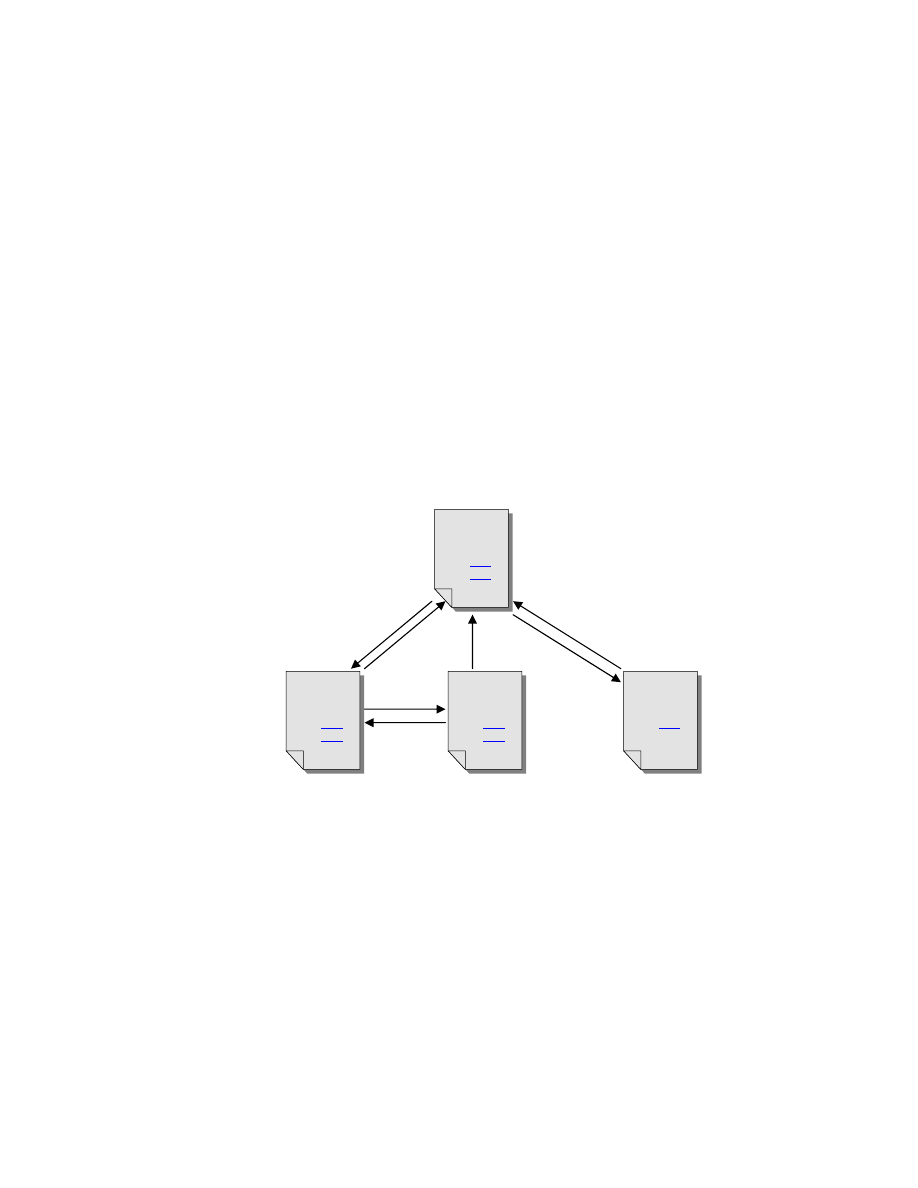
Google Secrets – How to Get a Top 10 Ranking…
page 42 of 112
Structuring Your Internal Links
There are two main types of internal linking methods – hierarchical and mesh.
Hierarchical linking
Hierarchical linking is used where one or more pages on your site (such as the home
page) are considered more important than other pages. Important pages are linked
to from all other pages in the site, but not all pages cross-link between each other.
This concentrates PageRank on your most important pages.
Most sites should use a hierarchical linking structure, whereby the home page and
the most important product, service, or content pages are linked to more often than
other pages are. In this way, you can increase the chance that your most important
page is ranked the highest on Google for your most important keyword phrase. The
following figure illustrates this concept.
Home
PR=6
page
link
link
Product
Product 1
About Us
PR=5
PR=5
PR=4
main page
page
page
The home page typically has the highest PR value as this is the page most often
linked to, both externally and internally. This may not be ideal if your home page is
nothing but a splash page or contains little content. In this case, you should redesign
your home page to include more content and make it more relevant to Google (and
to your visitors). If this is not possible, you should re-link internally to your most
important keyword-relevant content page(s).
Hierarchical linking – only important page(s) get links from every other page
link
link
link
link
link
www.google-secrets.com Copyright 2003-2004 Dan Sisson.
All rights reserved.
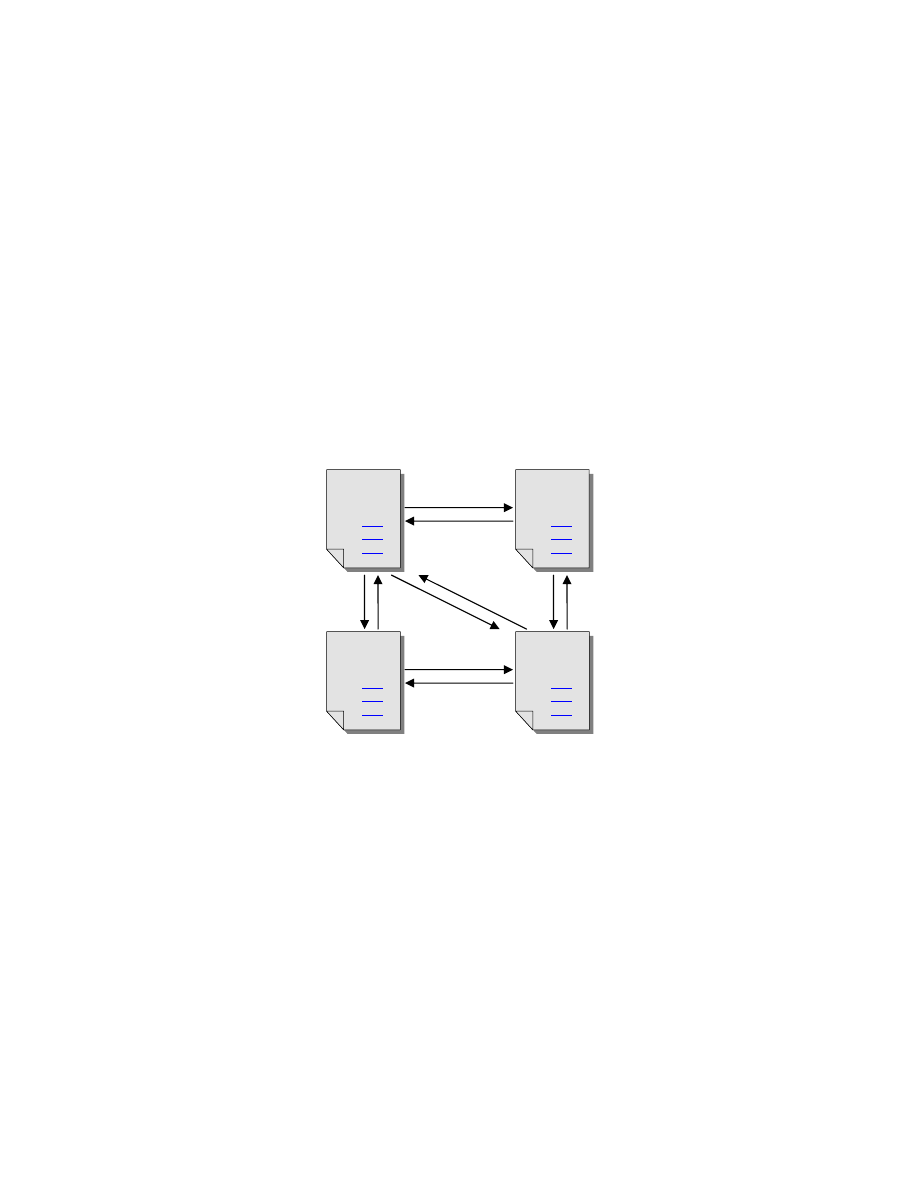
Google Secrets – How to Get a Top 10 Ranking…
page 43 of 112
Note that in the preceding figure that the About Us page is only linked to from a
single page. This is because the About Us page is not nearly as important (as far as
relevant content related to theme, topic and keywords) as the other pages. So why
funnel precious PR value to it – instead flow PR value out of the page back to the
home page.
Mesh linking
Mesh linking is used when all pages are considered equally important (to theme,
topic, and keywords). This is the simplest linking method in that each page on the
site links to every other page on the site. Most sites use mesh linking by default
without thinking about it by virtue of having the same menu or navigation bar on each
page that contains the same links. This evenly distributes PageRank among all
pages in the site, which is generally not ideal. The following figure illustrates this
concept.
Home
Products
PR=5
PR=5
page
main page
In this example, note that each page links to the lesser important About Us page. So
why funnel precious PR value to it? Use hierarchical linking whenever possible!
Product 1
page
About Us
page
link
link
link
link
link
link
link
link
link
PR=5
PR=5
link
link
link
Mesh linking – each page links to every other page
www.google-secrets.com Copyright 2003-2004 Dan Sisson.
All rights reserved.

Google Secrets – How to Get a Top 10 Ranking…
page 44 of 112
Best Practices for Internal Linking
The following are best practices that should be used to properly link pages of your
site together:
1. Use text-based links if possible and use the proper link structure.
This was covered previously in the
Proper Link Formatting
topic.
2. Use keywords in your link text for every link.
An important part of Google’s ranking algorithm includes checking the text of a link
against text on the linked-to page. Which means use your keywords in link text!
Try not to use “Click here” or “Home” as the text of a link, otherwise Google may
decide that page is about “clicks” or “homes”!
3. Link from your home (or sitemap) page to every other page on your site.
If your Web site is relatively small (less than 10 pages or so), your home page can
effectively function as your sitemap page. If you have a larger site, this becomes
unwieldy and you then really need a separate sitemap page. Make sure you add
some content to your sitemap page. It should not consist of just links.
A sitemap page functions as an “index” to your site and is invaluable for the following
reasons:
• Helps Google find and crawl other pages on your site quickly
• Helps your customers find what they need quickly
• Helps distribute your site’s PageRank to other important pages
Tip:
Because your home page likely has the highest PageRank in your site, you
should try NOT to put any outgoing links on this page. Ideally, the only page you
should have outgoing links on is your Related Links page. This will minimize the
small amount of PageRank “leakage” from that page. This concept will be discussed
later on.
4. Link from every “non-relevant” page back to your home page ONLY.
Non-relevant pages are defined here as those pages that are not keyword-rich and
do not likely contain the information that a visitor to your site is looking for while
searching on Google. You do not want these pages to receive as much PageRank
as your more important pages. Examples of non-relevant pages that should ONLY
link back to the Home page include the following:
www.google-secrets.com Copyright 2003-2004 Dan Sisson.
All rights reserved.

Google Secrets – How to Get a Top 10 Ranking…
page 45 of 112
• “Copyright”
page
• “Privacy Policy” Page
• “Disclaimers”
Page
• “About Us” page
• “Contact Us” page
• Order form, shopping cart pages
• “Link to Us” page
• “Testimonials”
page
This helps return and concentrate PageRank back to your Home page, which should
be one of the most important pages on your site. Remember, you want to maximize
PageRank for your most important pages.
5. Link from your “Related Links” page to every other page on your site.
Because this page contains outgoing links that point to other websites, this page will
“leak” PageRank from itself (but not from any other pages). Since PageRank “voting
power” is shared evenly among all links on a page, by having as many links point
back to your own pages as possible, you minimize this effect. This is a somewhat
confusing concept that will be discussed later.
As a rule of thumb, try to keep all links going to other sites on a single page – your
“Related Links” page. (If you have more than 100 links on a page, you should split
them up into multiple pages. Google may frown on pages that contain hundreds of
links and may consider this a link farm.) For more information, see “Maintaining a
“Related Links” Page.”
6. Link ONLY between pages that are related by keyword.
This helps distribute PageRank among pages that are related by keyword phrase.
The reason you should do this is that these pages are likely as important (or even
more) to your customers, which means you should concentrate PageRank on these.
Generally, visitors find your site from the home page and then navigate to your other
pages. Internal pages can rank higher than the home page for a keyword phrase,
particularly if the home page contains little relevant content.
These pages should also contain a link back to the Home page.
7. Ensure every page links to at least one other page.
This will help Google crawl your site faster and help your customers navigate through
your site better. Pages with a link to them but without a link on them are called
orphan pages.
www.google-secrets.com Copyright 2003-2004 Dan Sisson.
All rights reserved.

Google Secrets – How to Get a Top 10 Ranking…
page 46 of 112
Chapter 7
–
More Advanced Techniques
The following are techniques that some consider to be more advanced. These are
not required to get a top ranking but rather are ideas that may be explored further.
Instead, these are listed for sake of completeness and because you may need to use
them. It is advised however that you first implement all the other techniques
discussed up to now before implementing the following.
Multiple Sites – Is it Worth It?
If your site contains more than one major subject – like baby diapers and garage
door openers, you should strongly consider splitting your site into multiple sites, one
site per subject. This case is largely a no-brainer.
However, if you have a site that has several related, but distinct groups of products
or services, the case is not so clear-cut. The jury is still out, but you are perhaps
better off spending your time and effort expanding the size of your main site and
perhaps organizing it better.
Should you decide to create more than one site for your business, keep the following
points in mind:
• Don’t copy your main site onto a separate domain and duplicate pages in
order to increase number of links or traffic. Google can detect this and your
site may get penalized (or even dropped from their index).
• Use different hosting companies for each site. The reason being is that
Google may consider multiple similar sites on the same server that are cross-
linked together as potential duplicate sites. The important consideration here
is to have each site hosted on a different Class C block.
A Class C block is that number shown in the third position of an IP address.
For example, for 255.137.xxx.255, xxx represents the Class C block. This
number needs to be different for all your websites and the easiest way to
guarantee this is to use separate Web hosting companies for each site you
own.
www.google-secrets.com Copyright 2003-2004 Dan Sisson.
All rights reserved.

Google Secrets – How to Get a Top 10 Ranking…
page 47 of 112
Note:
It is not advised that you create multiple “mini” sites to help increase your
traffic or number of incoming links. This was a popular technique a couple of years
ago but has largely fallen out of favor due to abuse. There are people reportedly that
do well at these but I am skeptical of the ethics involved. Many mini-sites are junk
one-page sites with little content (or with duplicate content) in the hopes of creating
lots of links to boost PageRank. Google will catch on and you will be sorry you did
this.
In summary, create multiple sites only if there is a strong, compelling reason to do
so.
Domain Pointing and Subdomains
Given that you can register domain names for as cheap as $6.95 per year (see
Hostway.com for more information), it makes sense to register your top keyword
phrases, and then use domain pointers (also known as aliases) or domain forwarding
to redirect visitors from your “pointer” domains to your main domain.
For example, if your main website is at www.houseplans.com, you may want to
register the following domains: www.houseplan.com, www.house-plans.com,
www.unique-house-plans.com, and www.homeplans.com, and set it up to have
each one of these forward visitors to your main website. This can make sense to
capture visitors who may type in variations of your main domain and singular vs.
plural forms.
Another technique is the use of subdomains, also known as prefix domains or third-
level domains. For example - http://keyword.domain.com.
Google currently treats a subdomain as an entirely different domain name. Each
subdomain is redirected to a different folder on your website - for example,
www.keyword.mydomain.com could point to www.my-main-domain.com/keyword/.
This is an excellent strategy is your site is comprised of related but distinct groups of
topics.
Contact your webmaster or web hosting provider for specific details on how to set
this up as it varies from one server platform to the next. There is usually a small fee
associated with setting up pointer domains and subdomains.
www.google-secrets.com Copyright 2003-2004 Dan Sisson.
All rights reserved.

Google Secrets – How to Get a Top 10 Ranking…
page 48 of 112
PART III - Exchanging Links Effectively
This section deals with those aspects and elements of your website promotion efforts
that increase page importance. You want to maximize how important your website
is with Google.
You should also strive to incorporate some best practices for linking with other sites.
For additional information, see
Appendix B - Linking Do’s and Don’ts
.
Before we begin, make sure you don’t overlook the obvious:
Your website must contain high-quality, useful, timely content that people will
actually want to link to.
It is amazing how often this statement is ignored. Spend more time creating useful
and relevant content, and less time on fancy graphics, gratuitous animations, or
Flash – especially on your home page. Remember that Google uses automated
software to analyze your site. This means it will ignore all graphics and other
multimedia elements on your site - and often your customer will too.
As this section builds on the previous section, it is recommended that you first
complete the tasks described in
PART II - Optimizing Your Website
.
www.google-secrets.com Copyright 2003-2004 Dan Sisson.
All rights reserved.

Google Secrets – How to Get a Top 10 Ranking…
page 49 of 112
Chapter 8
–
The Importance of Links
Simply put, if your site has NO incoming links from other websites, your site will not
be included in the Google index. You MUST have at least one incoming link from
another website if you are going to show up in Google at all! Let’s repeat this:
You need at least one incoming link before you show up in Google at all!
Exchanging links with other websites is a tedious, time-consuming, and ongoing
process. However, without other sites that link to your site, you will likely not rank
well on Google for your keywords.
Incoming links from other sites also increase your site traffic as follows:
• You get higher rankings with Google, which means more people will find your
website due to you being near the top of the search results for a given
keyword phrase.
• You get greater exposure by being listed on different websites. The power of
this shouldn’t be underestimated. Not only should links from more sites over
time steadily increase your traffic, but it also offers you some diversification
from relying solely on Google for all your traffic. Traffic to your site will
increase over the long-term as long as you actively manage your reciprocal
link campaign.
Link Factors Used in the Algorithm
Link factors include that portion of the Google algorithm that determines page
importance, which in turn is primarily dependent on PageRank (PR) – the quantity
and strength of links that point to your site . However, the concept of link quality is
also an important factor, which is not part of the PageRank calculation.
Strictly speaking, link quality is determined by keyword factors, which was the topic
of the previous section of the book, but is listed here because of it’s close tie-in with
your link exchange efforts.
www.google-secrets.com Copyright 2003-2004 Dan Sisson.
All rights reserved.

Google Secrets – How to Get a Top 10 Ranking…
page 50 of 112
Introducing PageRank
In a nutshell, PageRank (PR) measures the quantity of incoming links to a given
web page and their relative strength. When one page links to another, it “casts a
vote” for that page in the form of a PageRank value.
In general, the more links you have that point to your site the better, as this increases
the PageRank of the page being linked to. The number of links that point to a site is
also sometimes called link popularity.
However, the amount of PageRank value these links “forward” on to your site, and
hence the amount that is used in the Google PageRank calculation, is diluted by the
presence of other links on the same page. This is where link strength comes into
play.
The greater the number of other links on a page, the weaker the strength of each
individual link. Each link is essentially a “vote” for the page being linked to, and the
strength of that “vote” is divided equally among all other links on the page. Which
means, all other things being equal, if someone has a link to your site on their page
with 100 other links, you won’t get any appreciable value from that link in the overall
calculation, UNLESS the page has a very high PageRank score. Confused? All will
be explained in the next chapter!
Tip:
There is some confusion around whether you should spend more time getting a
few links from pages with high PageRank or whether to get lots of links from pages
with low PageRank. Rather than fret over this, my advice is simple - just acquire
links! Today’s site with a low PageRank can be tomorrow’s site with a high
PageRank, and even vice versa.
Note:
In mid-November 2003, Google introduced a major algorithm change during
the so-called “Florida Update” that changes the way Google ranks certain websites.
It is believe these changes mainly involve how PageRank is computed – more
accurately that PageRank is being phased out by a new “LocalRank” system of
computing PageRank dynamically on the fly. At this writing, this new algorithm is still
changing, with some of the effects not well understood. For more information, see
the applicable section Appendix D – About the Florida Update”.
So What is Link Quality?
Google tries to return the most relevant results for a given search query. One way
Google does so is by searching for and analyzing keywords on pages of other
websites that link to your site. What other sites “say” about your site through their
www.google-secrets.com Copyright 2003-2004 Dan Sisson.
All rights reserved.

Google Secrets – How to Get a Top 10 Ranking…
page 51 of 112
link text, the title of their Links page, and the content of their Links page can be
almost as important as what your own web pages say! This means that the quality of
links may be as important as the quantity of links to your site.
You could have hundreds of pages linking to your site, but if the text of those links
doesn’t match your keywords, or if the linking page content is not related to your site,
those links by themselves probably won’t add any appreciable boost to your ranking.
If only the quantity of links to a site were important, every site on the Web would link
indiscriminately with every other site and the site with the largest number of incoming
links would be #1 for a given keyword. This clearly is not the case.
Specifically, the quality of a link on another site that points to your site is determined
by the following factors:
1. Text of the link – does it contain your keywords? (This very important)
2. Text of other links on the same page – do they also contain, or are similar
to, your keywords?
3. Is the link contained in a paragraph on the page, surrounded by related
text. Such “inline” links are weighted higher than links that are simply
listed on a page without any other non-link text.
4. Title of the linking page – does it contain, or is it related to, your
keywords?
www.google-secrets.com Copyright 2003-2004 Dan Sisson.
All rights reserved.
Google Secrets – How to Get a Top 10 Ranking…
page 52 of 112
Chapter 9 -
All About PageRank
This is the only chapter of the book that deals pretty much with theory only. However,
because of the general confusion and hype over Google PageRank, it is important
that you understand how PageRank works and what role it plays in achieving
rankings.
Note:
In mid-November 2003, Google introduced a major algorithm change during
the so-called “Florida Update” that changes the way Google ranks certain websites.
It is believe these changes mainly involve how PageRank is computed – more
accurately that PageRank is being phased out by a new “LocalRank” system of
computing PageRank dynamically on the fly. At this writing, this new algorithm is still
changing, with some of the effects not well understood. For more information, see
the applicable section Appendix D – About the Florida Update”.
PageRank, or PR, is a numeric value that Google places on how important a page
is on the Web. PageRank is determined by how many incoming links there are to a
page. Google figures that when one page links to another page, it is in effect
“casting a vote” for the importance of the other page. The more incoming links
(votes) there are for a page, the more important the page is to Google, generally
speaking.
Many people obsess and over-hype the importance PageRank and therefore
introduce worry and confusion that is not warranted. It is but a single factor in
the overall ranking algorithm. This may be because it is the only part of the Google
ranking algorithm that is made public – well sort of.
You can see what the “public” PR value of a page is in the Google Toolbar:
PageRank vs. Search Result Ranking
Some people confuse Google PageRank (PR) with their page’s ranking for a certain
search result for a certain keyword. Google PR is just one factor that is used to
determine your page’s actual rank (position or placement) on a search results page
for a given search query.
www.google-secrets.com Copyright 2003-2004 Dan Sisson.
All rights reserved.
Google Secrets – How to Get a Top 10 Ranking…
page 53 of 112
It is not uncommon to see a page with a lower PageRank value that is positioned
higher on a search results page than a page with a higher PageRank. This shows
that PageRank is not the most important factor in Google’s ranking algorithm. A
properly keyword-optimized site with a lower PageRank can outrank a non-optimized
site with a higher PageRank.
This is a common scenario for large corporate sites. The corporate site may have a
high PageRank as a result of the large number of other sites that link to it, but they
end up being outranked due to their lack of keyword optimization for their pages.
Toolbar PageRank vs. Actual PageRank
So how does one find out what the PageRank (PR) value is for a given page? Well,
Google has a tool, called the Google Toolbar, which allows you to see a crude
approximation of PageRank value. Download and install the free Google Toolbar at
http://toolbar.google.com/
. Once installed, it should look like this in your browser:
What most people fail to realize is that the PageRank values shown in the Google
Toolbar are not the actual PageRank values that Google uses to rank web pages.
The Google Toolbar is divided up into 10 equal linear ranges from 0 - 10. These
linear divisions correspond to a logarithmic scale that Google uses. The actual
scale is estimated to be anywhere from log base 5 to log base 10. This public
Toolbar PageRank is however what people talk and agonize about.
The Toolbar PageRank value only indicates that a page is in a certain range of the
overall scale. One PR=5 page could be just above the PR=5 division and another
PR=5 page could be just below the PR=6 division, which is a really vast gulf between
them.
Although the exact logarithmic base used for PageRank is a secret, the following
table should give you an idea of how different the Toolbar PR is from the actual PR.
Toolbar PR (linear) Actual PR (log base 5)
Actual PR (log base 10)
0
0.15
0.15
0 - 1
0.15 - 1
0.15 - 1
1 - 2
1 – 5
1 - 10
2 - 3
5 – 25
10 - 100
3- 4
25 - 125
100 - 1,000
4 - 5
125 – 625
1,000 – 10,000
www.google-secrets.com Copyright 2003-2004 Dan Sisson.
All rights reserved.

Google Secrets – How to Get a Top 10 Ranking…
page 54 of 112
5 - 6
625 – 3,125
10,000 – 100,000
6 - 7
3,125 – 15,625
100,000 – 1,000,000
7 - 8
15,625 – 78,125
1,000,000 – 10,000,000
8 - 9
78,125 – 390,625
10,000,000 – 100,000,000
9 - 10
390,625 +
100,000,000 +
What this means is that moving a page from a PageRank of 6 to a PageRank of 7 is
much harder than moving from a PageRank of 4 to a PageRank of 5.
New pages that the Toolbar displays a PR value for may not have been indexed yet,
and as such don't have any “real” PageRank of their own. What is happening is that
one page on such a site may have already been indexed and as such PageRank has
been estimated for the new page as a result. The new page generally has a PR
value 1 point below an indexed page on the site, but this is just an “estimate”
PageRank that exists only in the Toolbar. Before exchanging links, search for the
actual page on Google to make sure that it is indexed.
Note:
PR as viewed using the Toolbar can be pretty inaccurate. Please keep this in
mind. During the spring and summer months of 2003, some home pages for sites
suddenly showed a PR = 0 (no green bar) when indeed the page did have a PR
value. Simply appending /index.html to the URL (or whatever the filename is for the
home page) into your browser restored the proper value in the Toolbar. So make
sure that the site that you reject exchanging links with truly does not have a PR
value.
Whichever scale Google uses, keep in mind that a link from another site increases
your site's total PageRank, as explained next. Although PageRank is assigned per
page, your site is a collection of web pages under a single domain that you control
and hence can be thought as having a total “PR” value too.
Increasing PageRank
Each page of your website has a PR value, and as such you can simply add up the
individual PR values of each page to arrive at the total PR that your site has (Bear in
mind however that someone speaks of PR, it applies to a page). How you structure
your internal links can influence to some extent what the PR value of a page will be,
as will external links pointing to a page on your site. Although page PR value is
important, you should really be trying to increase your total site PR value.
www.google-secrets.com Copyright 2003-2004 Dan Sisson.
All rights reserved.

Google Secrets – How to Get a Top 10 Ranking…
page 55 of 112
There are only two ways to increase your “site PR” value:
1. Get more incoming links that point to pages on your site.
2. Add new pages to your site (which was discussed in a previous chapter).
The actual PR value of each page indexed by Google on the Web is in constant flux.
All over the Web, new pages are added, old pages are removed, more links are
created – all of which over time decrease the “value” of your incoming links.
As the number of websites (and web pages) in Google’s index increases, so does
the total PageRank value of the entire Web, and so also does the high end of the
overall scale used. This is kind of like the top student setting the “curve” for an exam
at college. The top student gets 100% and everyone else gets correspondingly less.
Therefore, the top-ranking site (or handful of sites in actuality) gets the maximum,
perfect PageRank score (which is a 10 in the Google Toolbar) and everyone else is
scaled down accordingly. As a result, some web pages may drop in PageRank value
for no apparent reason. If a page's actual PR value was just above a division on the
scale, the addition of new pages to the Web may cause the dividing line to move up
the scale slightly and the page would end up just below the new division.
What this means is that you should always strive to get more links that point to your
site, otherwise your site can naturally start slipping in rankings due to this decay of
PageRank value for incoming links – both from other pages on your site as well as
from other websites. This is also why you should add new pages to your site on a
regular basis, as additional pages will increase your site’s total PR score too.
The PageRank Equation
OK, I know you’ve waiting for it, so here is the official PageRank equation. It is
calculated by solving an equation of 500 million variables and more than 3.3 billion
terms (web pages):
PR
(your page)
= 0.15 + 0.85 [(PR
(page A)
/ total links
(page A)
) + (PR
(page B)
/ total links
(page B)
) + …]
There are a couple of observations to note about the PR equation:
• PR values for based on individual web pages.
• The PR value of each page that links to your site in turn is dependent on the
PR of the pages that link to it, and so on backwards.
www.google-secrets.com Copyright 2003-2004 Dan Sisson.
All rights reserved.

Google Secrets – How to Get a Top 10 Ranking…
page 56 of 112
• A
link’s
value (amount of PageRank or “voting power” forwarded to the linked-
to page) is at most only 85% of the linking page’s PageRank value, and this
value is diluted (decreased) by the number of other links on that page.
• PR has nothing to do with keywords or text in links - it is purely dependent on
link quantity and link strength, as discussed previously.
Some may incorrectly conclude that a link from a page with a PR=4 with only a few
outgoing links is worth a more than a link from a page with a PR=7 with 100 outgoing
links because for the latter, the “voting power” or value is divided up among 99 other
links.
However, you must remember the logarithmic nature of the true PageRank. This
means that a link from a PR=6 page that has lots of outbound links may be worth
more than a link from a PR=4 page that has only a few outbound links. Whether this
is true is dependent on the actual log base used for the PR equation, which is a
secret.
Do not get caught up in the minutiae of determining whether a site is worth
exchanging links with. Barring link farms, Free-For-All (FFA) sites, sites with a true
PR of 0 (which either aren’t indexed or have been “blacklisted” by Google), and sites
that have nothing to do with your theme, you should strive to get more links that point
to your site - period.
Note:
Google performs multiple iterations of the PageRank equation for each page
in it’s entire index to determine the new PageRank value each month. This process
takes up to a week to accomplish and is the primary manifestation of the “Google
Dance” each month. For more information, see
Deep Crawl and the Google Dance
.
www.google-secrets.com Copyright 2003-2004 Dan Sisson.
All rights reserved.
Google Secrets – How to Get a Top 10 Ranking…
page 57 of 112
Chapter 10
-
Submitting Your Site to Directories
Submitting your site to prominent search directories should be your first order of
business. Getting listed on the Open Directory Project (OPD), also known as DMOZ,
and on Yahoo! are especially important. This is because the OPD and Yahoo are
very prominent directories that receive large amounts of traffic and themselves have
large amounts of links – both incoming and outgoing. Perhaps the most important
link you can have is from the OPD as it feeds so many other directories.
As a refresher, search directories contain website listings that are ordered
alphabetically under categories and sub-categories. It is important to remember that
site listings are placed into directories by people – unlike search engines, which
place and rank sites using automated programs (spiders and robots). Also unlike
search engines, search directories can alter the title and description of your site to
better “fit” into their categories.
Tip:
For every search directory you submit your site to and get listed on, you should
add a link pointing to it on your Related Links page. Make sure that you point to the
specific category or sub-category page that you are listed in.
About the Google Directory
Google has a search directory that is based on the OPD called the Google
Directory. Google has a partnership with the OPD where it takes all listings in the
OPD and displays them in it’s own directory and ranks them based on PageRank
alone.
If you are interested in seeing where your website is ranked solely on PageRank
alone, go to
http://directory.google.com
. This is more of an interesting side note, as
most people use the standard Google Search pages to find information, not the
Google Directory.
Note
: To make matters more complex, the Google Directory PageRank bar goes
from 0 – 7, unlike the Google Toolbar, which goes from 0 -10.
www.google-secrets.com Copyright 2003-2004 Dan Sisson.
All rights reserved.

Google Secrets – How to Get a Top 10 Ranking…
page 58 of 112
Submitting Your Site to the OPD
Due to it’s importance, a listing on the OPD (also known as DMOZ) is generally
considered golden. The OPD provides directory listings not only to Google, but also
for the directories at AOL, Lycos, Teoma, AskJeeves, Netscape, AltaVista, HotBot
and a score of smaller, specialized directories. As such, you should focus on getting
listed in the OPD as soon as possible after your site is complete. It can take several
months to show up in the OPD database, as the OPD is staffed by volunteers who
get overwhelmed with work.
To submit your site to the OPD:
1. Go to
http://dmoz.org/add.html
.
2. Read the submission guidelines carefully – don’t skip this step.
3. Determine the single best category for your site to be listed under. Take
your time and determine this carefully.
4. On your chosen category page, click add URL and go to the submission
page for that category.
5. In Site URL, enter the URL to your site.
6. In Title of Site, be sure and include your best keywords.
7. In Site Description, be sure and include your best keywords.
Google normally uses what you have submitted to the OPD in the Site Description
field and displays it in their search results. This means you should have a decent-
sounding description that reads well. In addition, Google has been known in the past
to sometimes display this information from the <META name= “Description”> tag
instead. Because of this, and because other search engines read it, you should use
this tag and duplicate the description of your site their too.
An ODP editor will review your submission. If applicable, submit your website to the
OPD twice. Submit your site for the appropriate topic-related page in the OPD as
well the appropriate regional or geographical page if your business is location-
specific. Multiple submissions of the same or related sites to the same topical page
may result in OPD deleting all your sites from it’s directory, so be careful. Also make
sure your site is clean and complete before submitting it to the OPD.
www.google-secrets.com Copyright 2003-2004 Dan Sisson.
All rights reserved.
Google Secrets – How to Get a Top 10 Ranking…
page 59 of 112
Caution
: If your site is comprised of separate product or service lines, or different
topical content categories, you may consider submitting those specific pages to the
OPD under separate categories. However, don’t overdo it, and make sure you follow
the submission guidelines carefully.
Submitting Your Site to Yahoo
Yahoo charges $299 a year for all business sites ($600 for adult sites), but is
considered by many to be worth it. Non-business and non-profit sites can still get
listed for free. As with the OPD, people at Yahoo will review your site first. Since the
process takes some time, focus on getting listed on Yahoo early on too.
Getting listed on Yahoo can be a bit of a challenge as they have exacting editorial
standards. You want your site to be absolutely complete and ready before a Yahoo
editor looks at it. Do not have any broken links and make sure your site displays
correctly in Netscape 4.7 - this is the browser that Yahoo editors will use to review
your site.
Also bear in mind your $299 is no guarantee that your site will be listed, it is merely
the fee for having your site reviewed and considered for a listing.
Submitting your site properly to Yahoo could be the subject of another book and as
such is beyond the scope of this guide.
Important
:
Because of the precise and exacting nature of how to submit your site
correctly for review on Yahoo, you must follow the review submission guidelines on
the Yahoo site precisely and to the letter. For more information on this, see
Yahoo Express at
http://docs.yahoo.com/info/suggest/busexpress.html
.
Heads Up
:
Sometime early in 2004, Google will no longer provide search results to
Yahoo! Instead, Inktomi (which Yahoo bought) will provide search results instead.
This means that you could potentially lose up to about 25% of your current Google
traffic. As such, make sure you are in the Inktomi index. Although Inktomi's crawler
may pick up your site naturally, there is no guarantee. Currently, the best way to get
in the Inktomi index is through a paid inclusion service such as offered by
www.positiontech.com
. Current cost for inclusion is $39 per URL per year. Your
page(s) will be indexed within 48 hours. Pricing and details sure to change once
Yahoo finally makes the switch.
www.google-secrets.com Copyright 2003-2004 Dan Sisson.
All rights reserved.

Google Secrets – How to Get a Top 10 Ranking…
page 60 of 112
Submitting Your Site to Business.com
If you operate a business-to-business (B2B) web site, a listing in Business.com can
bring pretty qualified traffic as their listings are high quality. It costs $100/year for a
listing and is well worth it. Sign up for a Standard Listing at
https://secure.business.com/registration/newlisting.jsp
Other Search Submissions
In addition to the OPD and Yahoo, you should work on getting listed in any specialty
directory or portal pertaining to your area, industry, or market. Most keyword phrases
have one or more “authority” sites associated with them. You will undoubtedly run
across such directories in your ongoing link exchange efforts.
You should ALWAYS submit your site manually. Do NOT use software or an online
service that submits your site to multiple search engines or directories automatically.
This is particularly important for the larger directories, which ignore submissions from
automated programs. You always want to control how and where your site is
submitted.
The following list represents some of the other relevant search engines that can drive
some percentage of traffic to your site. It is by no means all-inclusive. You should
submit to each one of these individually and manually. Do NOT be tempted to use a
service that offers to “Submit your Site to 18,000 search engines now!”.
Average time to show up in these is 4 – 6 weeks. Check back after then to make
sure your site appears in their databases.
Note:
Search engines generally find your site by crawling and following links to your
site but this isn’t always a given. So it can’t hurt to submit your site manually here.
Teoma (AskJeeves)
Teoma, owned by AskJeeves, is a search engine modeled after Google. Although it
doesn’t represent a significant portion of overall search engine traffic (yet), it is
considered a must to be listed in. Cost is $30/yr. Sign up at:
http://ask.ineedhits.com/sitesubmit.asp
AltaVista
You can submit up to 5 pages to the AltaVista search engine for free using Basic
Submit. Submit your home page and 4 of your most important topic pages at:
http://addurl.altavista.com/addurl/new
www.google-secrets.com Copyright 2003-2004 Dan Sisson.
All rights reserved.

Google Secrets – How to Get a Top 10 Ranking…
page 61 of 112
AlltheWeb
Submit your home page to AlltheWeb search engine for free at below. This also gets
you listed on Lycos (US version).
http://www.alltheweb.com/add_url.php
MSN (Inktomi Index)
Yes, there still appears to be a free way to get listed on MSN. However this method
isn’t guaranteed as MSN so heavily uses Overture and Inktomi to display paid
results.
http://free.submit-it.com/msnsubmit.htm
HotRate
Submit your home page to the HotRate directory for free at:
http://www.hotrate.com/suggestURL.asp
www.google-secrets.com Copyright 2003-2004 Dan Sisson.
All rights reserved.

Google Secrets – How to Get a Top 10 Ranking…
page 62 of 112
Chapter 11
–
Getting Ready for Linking
When you ask for a link to your site placed on another site, the other site owner most
likely will want to see that you have a link to their site put on your site as well. This is
called "reciprocal linking". It is for this reason that you should need a "Related Links"
page on your site.
In addition, you should also have “Link to Us” code on your site where other site
owners can simply copy your HTML link code to their Links page. In this way, you
control the use of keywords in the text of such links that point to your site.
Creating “Link to Us” Code
Google places importance on what the text of links that it finds on other sites. Google
analyzes the text of a link and compares it to text found on the linked-to page. You
want other websites to have your best keywords in the text of links that point to your
site, and then you want to make sure those same keywords appear prominently on
your linked-to page.
One way to help ensure this to create a “Link to Us” code section on your Links page
that contains link code that other website owners can copy and paste on their
websites. This helps you control what the text of the link says that is placed on other
sites.
Using a site about house plans as an example, here is representative link code on a
Link to Us page (or section on a Related Links page):
Link to the Best House Plans Site!
Link to one of the fastest-growing sites for house plans on the Web today!
Adding our link to your site is very easy. Simply copy the code between the dotted
lines and add it to your web page:
----------------------------------------------------------------------------------------------
<A HREF=”http://www.acme-house-plans.com/”>Unique house plans at
ACME House Plans></A> - Search from thousands of great house plans online!
----------------------------------------------------------------------------------------------
If you would like a link back to your site, please contact us at…
www.google-secrets.com Copyright 2003-2004 Dan Sisson.
All rights reserved.

Google Secrets – How to Get a Top 10 Ranking…
page 63 of 112
Note how the keyword phrase house plans is used both in the link text AND in the
description that follows.
Maintaining a “Related Links” Page
Since you must have external links that point to your site to increase your ranking
with Google, other website owners will likely want you to reciprocate by having you
place a link on your site that point to their site. For this reason, you need a “Related
Links” page.
In general, you should only link to other sites that offer similar or complementary
products and services to your own. Don’t clutter your Related Links page with links to
your aunt’s personal page for example (unless your aunt is in a similar line of work!).
Remember that Google is analyzing what the theme of your site is, so you need to
use keywords on your Related Links page that are related to your site’s keywords.
This includes using keywords in the text of links that point to other sites if possible.
You should also include some actual content on your Related Links page. Simply
don’t create a long list of links with no text. Add a short description of the site to
accompany each link.
Ideally, all outgoing links to other sites should be located on a single Related Links
page on your site. This is because outgoing links can “leak” PageRank on a page
that contains outgoing links. Make sure that each outgoing link is reciprocated with a
link back to your site, otherwise think about it if you really need that link (as a
customer service).
Caution
: Google has been known to flag web pages whose titles are created by
link-generation software. Specifically, if you use the Zeus program to generate a
Related Links page for your site, you should change the title of the page from the
default “themeindex”. In general, such programs, while useful, need to be
configured according to your specific needs and to avoid looking like a “cookie-
cutter” page.
Dealing with Non-Reciprocal Links
It is common to have outgoing links that are for the benefit of your customers and
that you don’t expect reciprocal links back to your site for.
www.google-secrets.com Copyright 2003-2004 Dan Sisson.
All rights reserved.

Google Secrets – How to Get a Top 10 Ranking…
page 64 of 112
A good example are links that go to lots of specific book pages on Amazon.com.
Clearly such links can benefit your visitors, but clearly also Amazon.com is not going
to reciprocate by placing links on their site back to your site!
There is a way you can prevent “leakage” of PageRank from non-reciprocating links
on your site, but use with caution. This method is discussed for the sake of
completeness and because you may find it mentioned elsewhere. Bear in mind that
this method is considered a little controversial, more advanced, and may not work in
the future! You are forewarned.
Note:
Don’t go overboard fretting over this. This is only an issue if you have LOTS
of outbound, non-reciprocating links. Remember that you are leaking PR only from
that page or pages that contain the outbound links. So the damage is generally quite
minimal.
Most links use a standard <A HREF=”“> </A> format, which Google has no problem
following. However, if you use JavaScript code to create your links, Google may not
be able to recognize this is a link, and hence PageRank won’t be leaked away for
those links.
Bear in mind that Google can recognize some JavaScript-coded links, depending on
how the link is coded. Another point to consider is if a human editor at Google would
consider you using such a tactic globally as a form of deception – not a good thing.
Lastly, and most importantly, do not consider such a tactic for reciprocal links, as it
really is deceitful for the other site owners as they do not get the value of your link
counted by Google for their site.
If you are paranoid, you may want to look for JavaScript-coded links (by viewing the
page source) on the Links pages of your linking partners if you want to be absolutely
sure they are on the up and up.
For information on how to construct a JavaScript-coded link, look anywhere on the
Web for samples. The best way is to use an external JavaScript (.js) file to store the
URLs.
www.google-secrets.com Copyright 2003-2004 Dan Sisson.
All rights reserved.

Google Secrets – How to Get a Top 10 Ranking…
page 65 of 112
Chapter 12
– Which Links to Focus On
After submitting your site to the OPD, Yahoo, and any other specialized search
directory and portal in your industry, the next order of business is to start asking for
links on other websites. The majority of links that point to your site should be from
other business websites similar to yours. If you provide interesting, useful, and timely
content on your site, others will be compelled to link to your site.
Your ongoing objective is to obtain the highest number of “high-quality” links as
possible from other sites. Just remember to exchange links with sites that offer
related or complementary products and services to your own.
Best Practices and Tips
Although the blanket statement of “get as many links as possible” applies in general,
here are some tips and best practices for prioritizing your link exchange efforts:
• Only exchange links with sites that are relevant to, similar to, or are in the
same or a complementary customer market as your own business.
• Start by looking at other sites that are listed in the OPD and in Yahoo under
the same category as your site. These make great sites to start focusing on.
• Do a search in Google and see what the top 30 sites are for your top keyword
phrases. These are either your competition or prominent complementary sites
to your own. Brainstorm other products or services that your customers may
also find useful.
• Focus
first on getting links from sites with a PageRank (PR) of 4 or higher.
Links from sites with a PR = 3 or less won’t influence your ranking negatively,
but you probably won’t be getting an appreciable boost from Google unless
you have a large number (more than 100 or so) of these.
• However, don’t discount the power of even low PR sites directing traffic to
your site over time. Today's PR = 3 site could be tomorrow's PR = 6 site, and
vice versa. Don’t fret over the PR of the site, remember this is a long-term
continual effort on your part to get more links!
• Your best links will be from sites that have a large number of incoming links
themselves and that also have a relatively small number of outgoing links
(such sites are called authorities). Just make sure these sites are relevant to
your theme or keywords.
www.google-secrets.com Copyright 2003-2004 Dan Sisson.
All rights reserved.

Google Secrets – How to Get a Top 10 Ranking…
page 66 of 112
• Always try to get your keywords included in the text of your links. Have “Link
to Us” code to make it easy for others to simply copy the exact link code you
want used.
• Try to get your link on a page that is as close to their home page as possible.
A link is less important (has less PR) if it is buried several levels deep. For
example a link on, http://www.acme-house-plans.com/links.htm is better than
a link on http://www.acme-house-plans.com/Links/SectionA/links.htm.
• Always include a link to your site in your email “signature” line when posting
on forums, blogs, newsgroups or discussion groups, when submitting articles
to online publications, or when sending out newsletters. Content that you
write and send out has a way of being posted on a web server somewhere.
Link Farms and FFA Sites – Just Say No
There are two types of sites to stay far away from. Try to keep your site off of these
sites and under no circumstances ever link to one of them!
The first type are the dreaded link farms. Link farms are sites that contain hundreds
or thousands of links to every type of site imaginable. Link farms generally have very
little (if any) content and often have links to porn, gambling, warez, get-rich-quick,
and body-part enlargement sites - to name a few.
If your site is ranked high in the search engines for a popular keyword phrase, you
may find a link has been added to a link farm without your consent or knowledge.
Google’s current stance on link farms is that, while you may not be able control it if
your site is placed on a link farm, you should definitely never link to such a site,
otherwise your site may get penalized.
The second type are Free-For-All (FFA) link pages, where you are encouraged to
add your link to their site yourself using an automated form. Too often the purpose of
these sites is to collect (and resell) your email address when you fill out the form so
they can send you spam email in the future.
Whenever you see an ad for you to "submit your site to 18,000 search engines", you
can be sure that around 17,950 of those so-called search engines are actually FFA
sites in disguise.
Google has been known to penalize link farms and FFA sites by downgrading their
PageRank value to zero. This is a good indication that you should NOT exchange
links with such sites!
www.google-secrets.com Copyright 2003-2004 Dan Sisson.
All rights reserved.

Google Secrets – How to Get a Top 10 Ranking…
page 67 of 112
Chapter 13
- Managing a Reciprocal Link Campaign
Managing a reciprocal link exchange campaign is a tedious, time-consuming, and
ongoing process. However, it is critical for getting a top ranking on Google, as well as
for increasing traffic to your website over the long term. Over time, traffic you receive
from different sites may be more than you obtain from Google itself. Having lots of
links is also important for “diversifying” where your traffic comes from – it is not wise
to place all your traffic “eggs” in one “Google basket”. Google may not be as
important in the future as it is now, but by growing and maintaining an active link
exchange effort, your business risk can be decreased.
Although you can certainly manage a link exchange campaign by hand, there are
two software programs that can make your job easier – OptiLink and Arelis. OptiLink
allows you to see the actual linking structure of any website, including seeing what
the link text is for links on sites, which sites are authorities, and PageRank, all in
one interface. Arelis, on the other hand, helps you track and manage who you linked
to, if they linked back to you, and so forth. Both products complement one another
nicely.
About OptiLink
OptiLink is a powerful tool that allows you to reverse-engineer the linking structure of
any website – including your competition. Some of the more important features that
OptiLink has that make it strongly recommended include:
• Shows you the incoming and outgoing links for each page on a site, as well
as how many incoming links a link page has.
• Tells you what the link text is for each incoming link, as well as the page title
of the linking page.
• Tells you the Google PageRank for each page (with an optional module).
• Allows you to look up the domain record for a site (for the email address).
All results can be sorted, so that you can tell at a glance which sites are authorities –
that is, which have the most links that point to them, and with the least outgoing links.
As discussed previously, this important. You can also tell at a glance what your link
text is for all sites that link to you!
www.google-secrets.com Copyright 2003-2004 Dan Sisson.
All rights reserved.
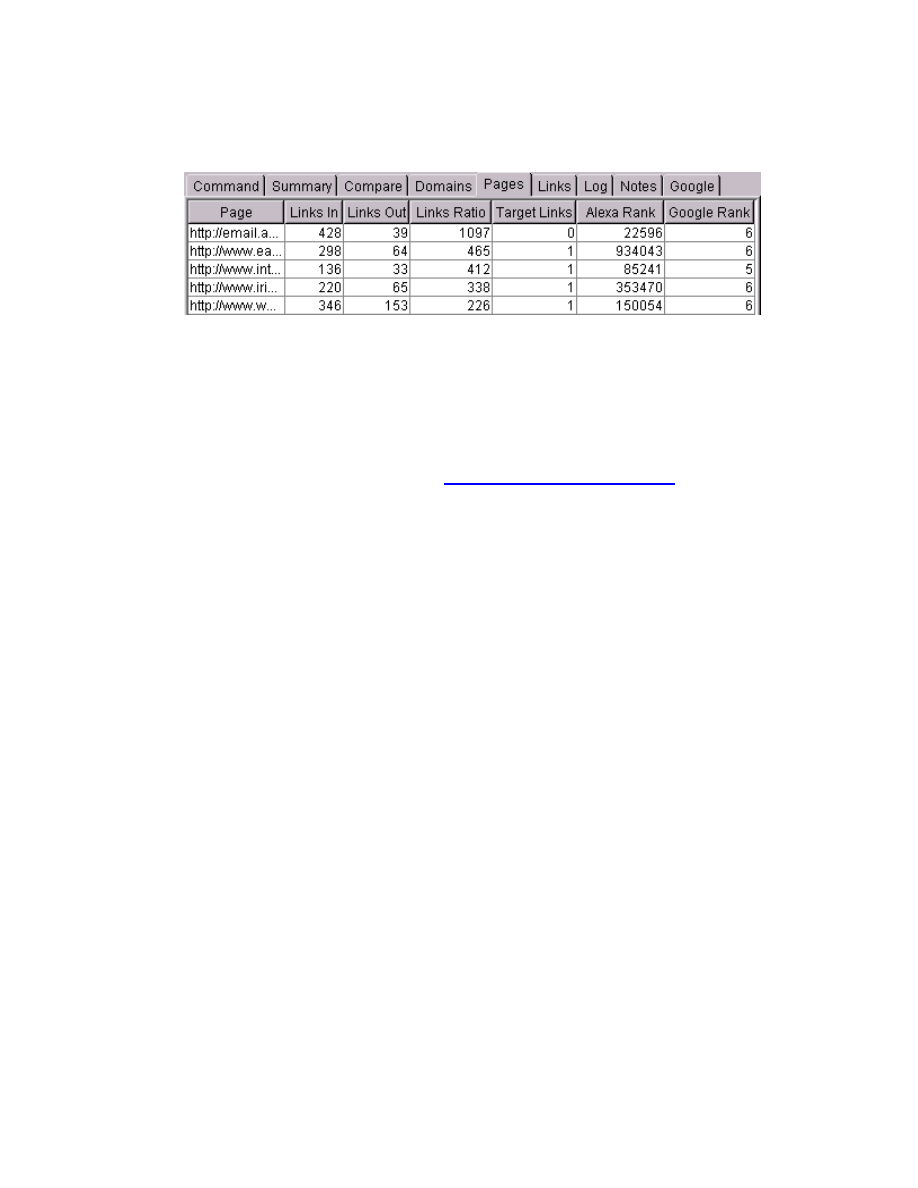
Google Secrets – How to Get a Top 10 Ranking…
page 68 of 112
Here is a sample screenshot of the OptiLink program interface:
In a nutshell, OptiLink quickly allows you to “spy” on your competition and determine
which sites you should target to exchange links with. If they link to your competitor’s
site, they will likely link to your site as well. In addition, it also shows you the internal
linking structure of a site. Best of all, you can save and export your OptiLink results
to a spreadsheet or database.
For more information on OptiLink, see
http://www.optitext.com/optilink/
. Download
the trial version, read the online manual, and try it out.
About Arelis
Arelis is a program that helps you find quality linking partners, and then tracks and
manages who you have linked to. In a nutshell, it searches for sites based on
keywords and returns a list of sites. What’s nice about Arelis is that you can click and
preview each site in the interface. It also allows you to look up the domain record
(similar to OptiLink) in order to get the email address of the site owner. Arelis also
shows you the link text for all links, and has columns for you to check whether you
link to the site, whether the site links back to you, and so on.
Arelis has a number of sample email templates that you can modify and then send
out to prospective site owners. Although not recommended, Arelis also builds Link
pages for you automatically.
Here is a sample screenshot of the Arelis program interface:
www.google-secrets.com Copyright 2003-2004 Dan Sisson.
All rights reserved.
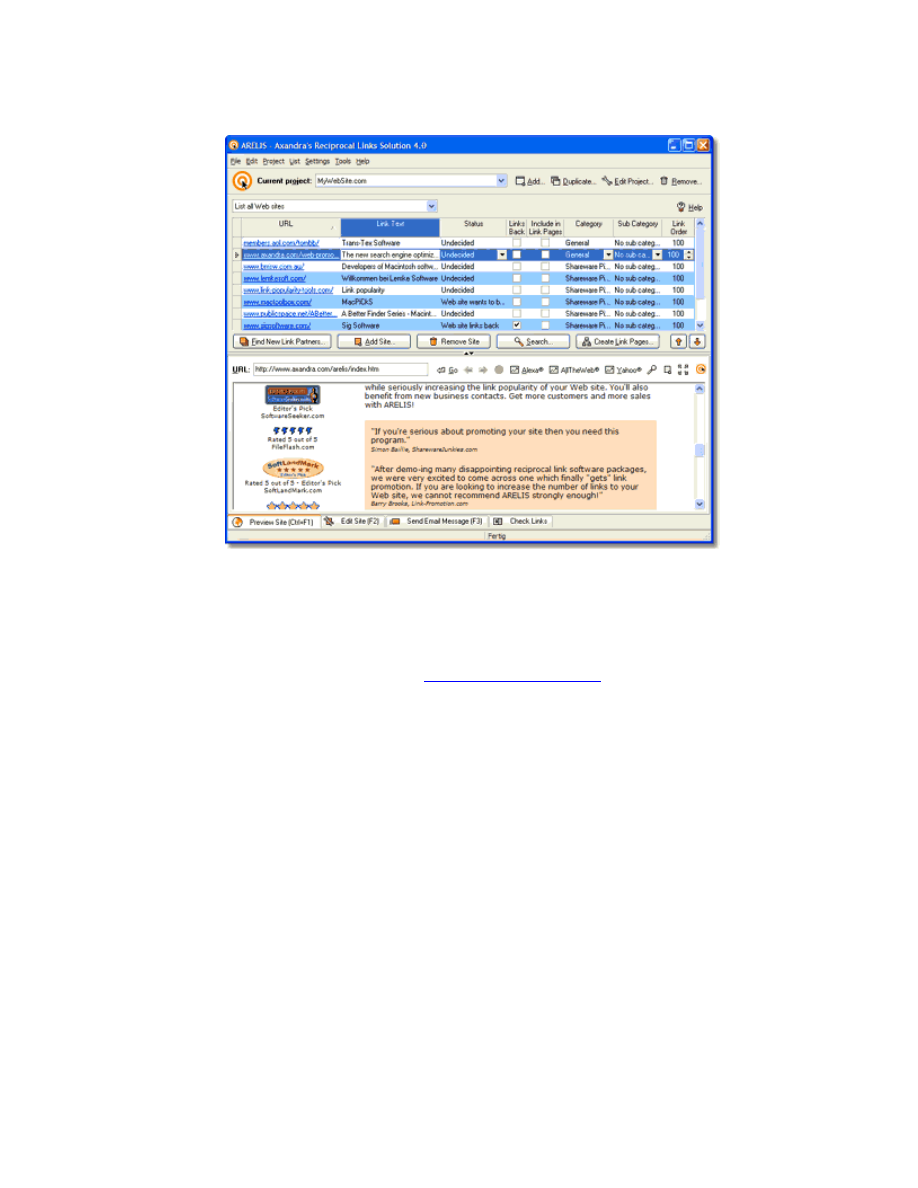
Google Secrets – How to Get a Top 10 Ranking…
page 69 of 112
When using Arelis to generate your Links page, make sure you modify the page to
make it look like a page on your site and not one of the cookie-cutter template
layouts. Although Google isn’t penalizing template pages made with Arelis yet, it has
done so with pages generated using Zeus, a similar program.
For more information on Arelis, see
http://www.axandra.com
. Again, I encourage you
to download the trial version, read the online manual, and try it out.
Checklist for Setting Up a Link Campaign
The general process for setting up and managing a reciprocal link campaign is as
follows. Although you can use OptiLink and Arelis software to help you out, this is not
strictly needed – the checklist shows you how to do everything manually too.
1. Do a search of your most important keywords on Google. Look at the top 50
results. These sites are either your competition or are similar sites to yours.
Also look at other sites that are listed in the OPD and in Yahoo under the
same category as your site.
www.google-secrets.com Copyright 2003-2004 Dan Sisson.
All rights reserved.

Google Secrets – How to Get a Top 10 Ranking…
page 70 of 112
2. Determine who links to you presently. You can either use OptiLink, or you
can use a free online service at
http://www.LinkPopularity.com
to check this.
Both internal and external links are shown.
3. Determine who links to your competitors, based on your list. Since these
sites are linking to your competitors, they should be willing to link to you as
well.
4. Visit each site on your list to see if they would make a good linking partner.
Pare down your list as needed.
5. Obtain the email address of each website owner. This can be done several
different ways:
a. Determine the email address directly from the website, such as
from their Contact Us page.
b. Use the “Whois Lookup” utility from a domain registrar to look up
the email address from the domain name record. Most registrars,
such as
Register.com
, display the email address on record for a
domain name.
c. Use OptiLink or Arelis, which have built-in Whois utilities to obtain
the email address for a site owner.
6. Create a dedicated email account on your web server, such as link-
partners@YourDomain.com, to help manage your efforts.
7. Create one or more email "templates" to use for contacting your prospective
link partners. This is simply a form letter with “placeholders” that allow the
email address to be automatically merged in. Most email clients, such as
Microsoft Outlook and Eudora, allow you to generate templates for this
purpose. One simple way of sending the same email to multiple people is to
use the “bcc” option (blind carbon) in your email program. This way, each
email recipient won’t see all the other email recipients.
Be sure and include sample link code in your email template that can be
copied by your prospective linking partners. For a sample you can use, see
Sample Link Exchange Email Template
.
8. Once you start getting responses from your link partners, you will need to
make sure you have links to their sites on your Related Links page. You will
get a higher response rate if others can see you have made the effort to
put their link on your site first. Make sure they place your link on their site
as well!
www.google-secrets.com Copyright 2003-2004 Dan Sisson.
All rights reserved.

Google Secrets – How to Get a Top 10 Ranking…
page 71 of 112
9. Create a system for managing your ongoing efforts. You can use a
spreadsheet that lists each site, who you have already contacted, whether
they have added a link to your site, whether you have added a link to them on
your site, etc. You can use Arelis for this purpose, or you can create a
spreadsheet in Microsoft Excel with the following columns:
Date
Contact name
Contact email
URL
Status of Link
PR of page
Follow-up?
You should systematically track and expand your efforts. Always seek to obtain
more links over time. This may be the most important part of your reciprocal link
campaign. It will save you time and effort and you will reap the rewards over
time. Strive for one new link a day. If someone won’t link to you, don’t fret about it
and just move on.
www.google-secrets.com Copyright 2003-2004 Dan Sisson.
All rights reserved.

Google Secrets – How to Get a Top 10 Ranking…
page 72 of 112
A Link Exchange Email Template
You can use the following template for your emails to prospective linking partners for
exchanging links. Simply copy and modify as needed.
[SUBJECT: Exchanging links with your site]
Hello,
After visiting your site, I believe it would be mutually beneficial to
exchange links. Our site, [name of your site], provides [your main product
or service].
Not only could we drive more traffic to our sites and get a boost in
search engine rankings, but we would be adding value to our respective
customer bases as well.
A link to your site has already been placed on our site at [URL to your Links
page]. It would be appreciated with you would reciprocate with a link back to our
site as well.
Simply copy the code between the dotted lines to your web page:
---------------------------------------------------------------------------
<a href=”http://[your domain name]/” target=”new”>
[your link text using keywords]</a>
[brief description of your site using keywords].
---------------------------------------------------------------------------
If you are interested, send email to [your email address] and specify:
1. The URL to your site.
2. The link text you want displayed.
3. A short description of your site (optional).
Please let me know if you have any questions.
Best regards,
[your name]
[your URL or email]
www.google-secrets.com Copyright 2003-2004 Dan Sisson.
All rights reserved.

Google Secrets – How to Get a Top 10 Ranking…
page 73 of 112
PART IV - Putting It All Together
After all your hard work, you need to monitor your progress and results over time.
This section discusses what you should monitor regularly and how often. To wrap it
all up, there is a handy checklist that summarizes the processes and tasks used in
the book.
Note
: If you simply don’t have the time or patience to do it on your own,
contact me at
dan@bluemoosedesign.com
and I’ll be happy to help you get a
top ranking on Google! Blue Moose Webworks is the company I run that does
optimization work (as well as build web sites for businesses). Just a small
plug here☺
www.google-secrets.com Copyright 2003-2004 Dan Sisson.
All rights reserved.

Google Secrets – How to Get a Top 10 Ranking…
page 74 of 112
Chapter 14
- Monitoring and Measuring
The long-term key to success on Google is to be able to measure and monitor the
“performance” and “success” your web site over time, modify your efforts, test, and
repeat. This means you need to regularly monitor different metrics of your website.
Monitoring Your Site Traffic
This is a must-do activity. If you are not viewing and analyzing your site traffic and
visitor statistics over time, you are essentially flying blind. This would be akin to a
retail store not tracking how many customers come into their store, what they look at,
what they buy, and on which days.
Here is a representative screenshot of a typical site traffic statistics program
interface:
www.google-secrets.com Copyright 2003-2004 Dan Sisson.
All rights reserved.
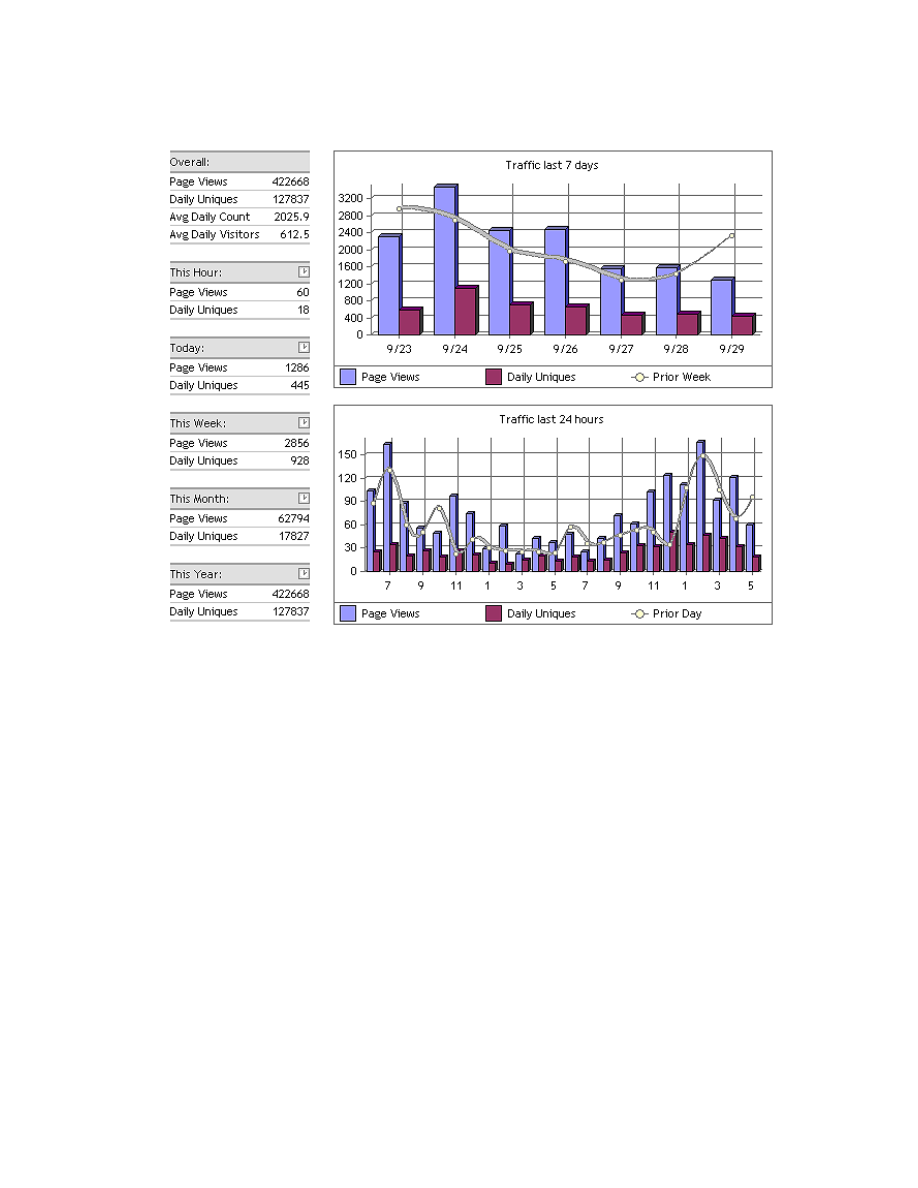
Google Secrets – How to Get a Top 10 Ranking…
page 75 of 112
You should first take advantage of the free statistics or “stats” program that most
Web hosting companies offer in their packages. These work by reading and then
displaying the contents of the server log file for your site. Such programs are also
called log file analyzers. However, more often than not, such programs don’t really
provide the information that you need or they present it in poorly-organized, hard-to
decipher reports. As such, I highly recommend you use a third-party program or
service to obtain the information you need to track for your site. You can often
customize what kind of reports you want to view and download them into Excel.
You have two main choices – use a different log analyzer program, which runs either
on the server or on your desktop computer, or sign up for a monthly service that
monitors real-time traffic for you (browser-based tracking). There are pros and cons
to each as follows.
Using a Log-file Analyzer
Most good log-file analyzer programs can be installed either on the server or on your
desktop computer. Unless your log files are really large, I recommend the latter.
www.google-secrets.com Copyright 2003-2004 Dan Sisson.
All rights reserved.

Google Secrets – How to Get a Top 10 Ranking…
page 76 of 112
Getting your Web host to install and configure a different log-file analyzer than the
default one they offer can be a frustrating and difficult experience. Regardless of
where the program is run from, make sure you ask that the referrer option is turned
on for your site (it is usually turned off by default), otherwise you’ll be reading IP
addresses in order to figure out where your traffic is coming from.
One issue with log-file analyzers is that the information isn’t shown in real time – the
server log file they read data from is typically generated daily. This usually isn’t a
problem however. One of the more popular analyzers is Urchin - however it will set
you back $500 or more. There is only one free log-file analyzer that I consider
worthwhile and easy to read and that is Funnel Web Analyzer, available from Quest
Software at
http://www.quest.com/funnel_web/analyzer/.
Using a Real-time Tracking Service
Real-time tracking, also called browser-based tracking, is sold as a monthly service.
Instead of reading a log file, this method involves you inserting JavaScript tracking
code on each page of your site you wish to monitor. Each time a visitor comes to
your site, the JavaScript code sends information to the service provider where it is
stored and accessed from. Information can be accessed in near real-time and
usually the quality of information is better (more accurate visitor and page view
counts) than with a log-file analyzer. However you are paying a monthly recurring
expense if you go this route and you are charged by how much traffic you receive on
your site – this can be very expensive for high-traffic sites.
The most popular providers of this service are WebTrends Live and HitBox, which
charge around $25/mo for low-traffic sites. There are also a couple of lower-cost
vendors that I recommend – Web-Stat (
http://www.web-stat.com
) for $5 per month
and HitsLink (
http://www.hitslink.com
) for $10 per month.
What to Monitor?
I cannot stress how important it is to get into the habit of regularly viewing the traffic
statistics for your website. At a minimum you should check them weekly as they are
a veritable goldmine of information. Of particular importance is tracking the following
parameters for your web site:
Keywords: This lists the actual keywords people typed into search engines to find
your site. This list will probably look similar to results you obtain using WordTracker.
Also listed is the percentage of the total traffic each keyword brought in. There will
probably be an entry called “other”, “no keyword” or something similar. This
represents people that either directly typed your site into their browser or that have
bookmarked your site in their browser Favorites list.
www.google-secrets.com Copyright 2003-2004 Dan Sisson.
All rights reserved.

Google Secrets – How to Get a Top 10 Ranking…
page 77 of 112
Spend time determining which search terms visitors used to find your site. You may
uncover some new keyword combinations that you didn’t think of using on your
pages. If this is the case, tweak your site or create a new page around this
phrase accordingly.
Search Engines: This lists the search engines that visitors used to find your site.
Also listed is the percentage of the total traffic each search engine brought to your
site. Usually Google is at the top of the list – both the US version as well as the
Canadian version.
Referrals: This lists the actual websites that brought traffic to your site and what
percentage of the total traffic each “referral” site brought in. Over time, you should
start seeing referral traffic from websites you've exchanged links with. There will
probably be an entry called “direct”, “no referral” or something similar. This
represents people that either directly typed your site into their browser or that have
bookmarked your site in their browser Favorites list.
Tip
:
Consider creating a favicon.ico file. A favicon is a small 16 x 16 pixel icon that
is displayed when you bookmark a page and add it your Favorites using Internet
Explorer. If you create a favicon and place it in the root directory of your server, you
can monitor how many referrals are coming from people that have bookmarked your
site. Favicons are created with special software that creates the correct file format.
They are also great for branding purposes. For more information, see
http://www.favicon.com/.
Page Views: This represents the most viewed (or popular) pages on your site. This
is useful for determining where your visitors are spending their time on your site.
Click Path or Visitor Path: This shows the actual path that a visitor took while
browsing through your site. This is great for determining what visitors are looking for
on your site.
Exit Pages: These represent the last pages that a visitor views before leaving your
site. Hopefully it is your sales page and not your home page!
Length of Session or Page View: This shows how long visitors spend on each
page and on your site in general. Are people leaving your site too fast? Try to find
out why.
www.google-secrets.com Copyright 2003-2004 Dan Sisson.
All rights reserved.

Google Secrets – How to Get a Top 10 Ranking…
page 78 of 112
Monitoring Your Ranking
Although the focus of this book is on how to get top rankings on Google, what you
are really after is lots of traffic to your site that you can then turn into sales. Google is
one way (albeit an important way) of getting traffic. Don’t get too hung up on your
rankings - if you are in the top 10, you will do fine. Some people obsess over getting
a #1 ranking to the exclusion of all else, when what is really important in the end are
sales. Keep this in mind.
There are two ways to check your ranking on Google for a particular keyword phrase
– check it manually by simply counting your position in a search results pages (this
works OK if you are in the top 30 or so), or by using software to do it. For the latter,
you can use WebRank or WebPosition.
WebRank, at
www.webrank.com
, is a free online tool for checking your site rankings.
Once you sign up, they send you reports regularly via email. While Google is not
currently specifically listed as one of the search engines you can monitor, AOL is, so
by checking AOL, you should get a pretty close idea of where you rank on Google.
The premiere software program for checking ranking is WebPosition Gold. This is a
powerful, full-featured tool designed for the professional. It contains several modules,
but only one is really recommended for use – the Reporter module.
Some of WebPosition’s features have gotten people in trouble with search engines in
the past. Before you use this tool, make sure your read the online manual and
understand how it works. To download a trial version, go to
http://www.webposition.com
.
WebPosition Gold (and other programs like it) should only be used during off-peak
hours and only when really needed. Google, along with other search engines, have a
dislike for the use of such tools as they impact the performance of their servers.
Google has been known to block access to their site from computers that carelessly
and frequently run such tools.
Monitoring Your PageRank
You can see an approximation of the actual PageRank that Google uses by
downloading and installing the free Google Toolbar at
http://toolbar.google.com
.
Once installed, it should look like this in your browser:
www.google-secrets.com Copyright 2003-2004 Dan Sisson.
All rights reserved.

Google Secrets – How to Get a Top 10 Ranking…
page 79 of 112
Some people have turned the monitoring of PageRank (PR) into an obsession. Don’t
waste your time being one of them. PR is but a single factor used to rank web pages.
PR as viewed using the Toolbar can also be pretty inaccurate. In fact, during the
spring and summer months of 2003, some home pages all of a sudden showed a PR
= 0 (no green bar) when indeed the page did have a PR value. Simply appending
/index.html to the URL (or whatever the filename is for the home page) into your
browser restored the proper value in the Toolbar.
The Toolbar PageRank (PR) scale goes from 0 to 10. Bear in mind that there are
vast gulfs between ranges at the upper end, due to the logarithmic nature of actual
PageRank. Also bear in mind that sometimes the PR value shown for a new page
may not be real and is only a guess. For a refresher on this, see “Chapter 9 - All
About PageRank.”
It’s good to know what the PR of your pages are, and that of other pages, but don’t
use it as a basis for not exchanging links. In the past, one wouldn’t want to exchange
links with site that were a PR = 0, which usually indicated that a site has been
banned from the Google index, or that a page hasn’t been indexed. Due to
continuing issues of Toolbar PR accuracy however, don’t discount such links (unless
you suspect they are link farms).
Checking Pages Indexed
If you have a new site or if you have new pages added to your site, you should check
to see if and when those pages have been added to the Google index. More often
than not, new sites rank poorly simply because Google hasn’t yet indexed all the
pages of the site.
The easiest way to check is to go to
www.google.com
and in the search box, type:
site:YourDomain YourDomain
replacing YourDomain with your actual domain (such as
www.xyz.com
).
Checking Link Count
Part of managing an active reciprocal link exchange campaign involves monitoring
who actually links to you and to your competitors. The most accurate way to
determine the total number of incoming links to your site is by using the AlltheWeb
search engine. The way to use them is to type the following in your browser,
http://www.alltheweb.com/urlinfo?q=YourDomain&c=web
www.google-secrets.com Copyright 2003-2004 Dan Sisson.
All rights reserved.

Google Secrets – How to Get a Top 10 Ranking…
page 80 of 112
replacing YourDomain with your actual domain (such as www.xyz.com).
Because it does not give an accurate number, it is not recommended that you use
the Google Toolbar to count incoming links for a page. The Toolbar currently only
counts pages with a PR = 4 value and higher. If interested, this feature can be found
on the Toolbar by clicking the Page Info button, then by clicking Backward Links.
For an interesting comparison of how many links each major search engine has on
record to your site, use MarketLeap’s Link Popularity Check tool at
http://www.marketleap.com/publinkpop/default.htm
.
Measuring Sales Conversion and ROI
At the end of the day, what matters most is your sales and your bottom line. After all
your hard work, are you converting your visitors to customers? Do you know what
percentage of visitors turn into customers? Do you know what your return on
investment (ROI) is when you have added up your web site development costs, web
hosting costs, consultants, books (such as this one) and all other expenses related to
driving traffic to your web site? Do you know what that cost per customer is?
Surprisingly few people do.
The subject of sales conversion and ROI (and how to measure and increase them) is
complex and is really beyond the scope of this book. Nevertheless, this is an
important topic that should be introduced for you to think about.
Quite a number of business owners don’t make their money back on their web sites.
Frequently this is because they got carried away with the look for their site (We just
have to have Flash and all those gorgeous graphics!), bells and whistles on their site
(We have to have that interactive, self-updating, daily survey!), or what the site
should say (We just have to use those paradigm-speak, marketing buzzwords – that
is what our company is all about!). As a result, you have a case of “Corporate Egos
Gone Wild”. Well guess what? The customer does not care about any of this. The
customer wants to find a solution to their problem, they want to find it fast, at a value,
and they don’t want to be patronized.
You need a method to track visitors from beginning to end and “close the loop”. This
means tracking a single visitor from which keyword they typed into Google to find
your listing, to which page they landed on your site, to the “sales” page where they
took an action. The “sales” page can be an actual product purchase page, the form
or request for information page, or any other page that represents the action you
want visitors to take on your site before they leave.
www.google-secrets.com Copyright 2003-2004 Dan Sisson.
All rights reserved.

Google Secrets – How to Get a Top 10 Ranking…
page 81 of 112
The easiest way to track visitors in this way is to use a third-party service like
Conversion Ruler at
www.conversionruler.com
. For a monthly fee, they will set this
up for you.
Alternatively, you can also place custom JavaScript code on each page of your site
that obtains the referral URL of the page that a visitor came from before landing on
your site, and then storing a cookie that tracks the visitor through the site. The code
then sends this information along with the other information that is emailed to you
when a “sale” takes place (product confirmation email, form submission, etc).
This can be somewhat tricky to set up and may not work with all shopping carts or
code bases. If you are interested in evaluating whether this method can be used on
your site, contact me at
dan@google-secrets.com
for more information.
www.google-secrets.com Copyright 2003-2004 Dan Sisson.
All rights reserved.

Google Secrets – How to Get a Top 10 Ranking…
page 82 of 112
Chapter 15
– End-to-End Checklist
Here is the process in a nutshell that you need to undertake to achieve a top ranking
on Google. Print this page out where you can refer to it often.
ڤ
1. Determine the best keyword phrases for your site
. Use WordTracker to
help you come up with a list of 2 to 4-word phrases. Target 100 keywords initially.
ٱ
2. Create lots of pages.
It’s better to have 20 short pages than 5 long pages on
your site. Each page should be 200 words minimum and discuss one topic (one
keyword phrase) only.
ڤ
3. Optimize each page for your keyword phrases:
• Include keywords in the <TITLE> of each page. This is a MUST!
• Include keywords in the <H1> and <H2> headings for each page.
• Include keywords in the first paragraph of each page.
• Include keywords in the text of links. Never use “Click here”.
• Read “Appendix A - Web Site Design Do’s and Don’ts.”
ڤ
4. Link to each page from your sitemap page, and from each page back to
your home page.
Also cross-link between pages that discuss the same topic.
ڤ
5. Submit your site to the Open Directory Project (OPD)
. This is very
important and should be done early as it takes time to get listed!
ڤ
6. Submit your site to Yahoo!
If you can afford it, this is money well spent. Be
sure and follow Yahoo’s submission guidelines precisely and to the letter.
ڤ
7. Setup and maintain a link exchange campaign:
• Create a “Related Links” page on your site for exchanging links.
• Create “Link to Us” code can be copied by your link partners.
• Determine the best sites to exchange links with. This is important.
• Read “Appendix B - Linking Do’s and Don’ts.”
• Use a standard email template to send out. Include code for your link.
• Actively manage your link campaign. Always strive to get more links!
ڤ
8. Regularly monitor your progress and modify your efforts:
• Monitor your site traffic often – it contains a wealth of information.
• Check to see that all new pages are indexed in Google.
• Check your site’s ranking on your chosen keywords once a month.
• Regularly check your incoming links as part of your link campaign.
www.google-secrets.com Copyright 2003-2004 Dan Sisson.
All rights reserved.

Google Secrets – How to Get a Top 10 Ranking…
page 83 of 112
Appendix A -
Web Site Design Do’s and Don’ts
This is a general list of website design do’s and don’ts. Some of these apply not only
to Google but to all search engines in general. Some may be obvious, while others
are not. Adhering to this list will not only improve optimization of your site, but will
likely make it easier on visitors to your site in the form of reduced download times
and better navigation between pages.
DO
• Do use a reliable Web hosting provider. If your site is down while Google
visits your site, you may be dropped from their index for a while.
• Do create relevant, timely, and useful content on your site – particularly for
your home page. This may be obvious, but often is overlooked in search of
the magic bullet or quick fix.
• Do update your content frequently – particularly your home page. Sites that
frequently update their content get visited by Google more often. This also
gives your visitors a reason to return to your site regularly.
• Do create lots of relevant content and pages on your site. It is better to have
50 short pages than to have 10 long, flowing pages. Make sure each page
contains a minimum of 200-250 words.
• Do use your keywords in the page title, headings, the first paragraph, and in
link text. These are the main places that Google looks – the title is extra
important. It also helps to bold or italicize your keyword once per page.
• Do keep your page size small. Both your customers and Google like smaller
pages. They download (and are crawled) faster and are easier to read. For
every second it takes your page to load, you lose 10% of your visitors. You
have 5 seconds to “hook” your visitor, otherwise they will go elsewhere.
• Do create unique titles and descriptions for each page. Unique titles are a
must. Don’t skimp on this.
• Do optimize any PDF and Word files on your site. Google will index these will
any other page on your site. If these files contain duplicate content, put them
in a separate folder and use the robots.txt file to disallow crawling.
• Do use a shallow site structure. If you can manage it, keep all your web
pages in the same folder on your server as your home page.
www.google-secrets.com Copyright 2003-2004 Dan Sisson.
All rights reserved.

Google Secrets – How to Get a Top 10 Ranking…
page 84 of 112
• Do create a “Related Links” page for adding links to other sites as part of your
reciprocal link exchange campaign. Make sure you have some content on
this page – don’t just have a list of links.
• Do create a “Link to Us” page that contains link code that can be simply
copied (or email this information to link partners). You want your link text to
contain your best keywords.
• Do put JavaScript code in a separate file and link to it. This makes pages
load (and get crawled) faster.
• Do create a stylesheet file and link to it from your pages. This makes pages
load (and get crawled) faster.
DON’T
• Don’t use page redirects on your site. Google has been known to penalize
sites that use fast redirects.
• Don’t use "doorway pages" hosted on free servers, or create one-page “mini-
sites” as such pages usually have very low PageRank. Spend time adding
new content to your main site instead.
• Don’t repeat your keyword endlessly on a page. Keep your keyword density
below 20% or so, otherwise Google may consider this as spam - as might
other search engines.
• Don’t use hidden text on your site, such as using white text on a white
background. Search engines consider this as spam.
• Don’t use tiny text with extremely small font sizes. Search engines may
consider this as spam.
• Don’t use hidden image links on your site. Hidden image links are 1-by-1
pixel sized images inside a <A HREF> link tag.
• Don’t use frames. Although Google can crawl framed sites, they are
problematic in other areas. Most sites don’t use frames.
• Don’t use elaborate image maps, gratuitous animations, or Flash on your site
if possible - especially on your home page. Google needs to see actual
textual content on your pages!
www.google-secrets.com Copyright 2003-2004 Dan Sisson.
All rights reserved.

Google Secrets – How to Get a Top 10 Ranking…
page 85 of 112
Appendix B -
Linking Do’s and Don’ts
DO
• Do submit your site to the Open Directory Project (OPD or DMOZ). A listing in
the OPD is considered golden as the ODP feeds so many other directories,
which will result in multiple listings for your site.
• Do submit your site to Yahoo. It costs $300 a year to be reviewed and listed
on Yahoo but this is a pretty small price to pay once a year compared with
the number of people that use Yahoo.
• Do submit your site to Business.com if you have are a B2B (business-to-
business) site. It costs $100 a year to be listed here but is well worth it for the
quality of traffic you get.
• Do exchange links with all sites that offer similar or complementary services
to yours, with specialized portals (vortals) and directories, and with industry
associations.
• Do create your own Related Links page rather than have it automatically
generated by a program. Google has been known to penalize sites that
generate Links pages using “cookie-cutter” template pages.
• Do include a link to your site in your “signature” line when you post in forums,
blogs, or newsgroups. This also applies when submitting articles or sending
out newsletters.
• Do link to each page on your site from your home page (or your sitemap
page) and back again. This will help funnel PageRank to your most important
pages.
• Do include inline links on your site. Inline links appear in the body of a
paragraph rather than in a navigation menu. Google likes the neighboring text
that surrounds inline links.
• Do use simple A HREF format links rather than JavaScript to generate the
link. Google may have a harder time deciphering your link otherwise.
• Do actively monitor who links to you. You need to track this on a regular basis
to make sure your link is added on sites you have agreed to trade links with.
www.google-secrets.com Copyright 2003-2004 Dan Sisson.
All rights reserved.

Google Secrets – How to Get a Top 10 Ranking…
page 86 of 112
DON’T
• Don’t use “click here” as the text link for any link, ever. Otherwise, Google
may decide your site is about “click here.”
• Don’t exchange links with link farms, link free-for-alls (FFAs), or other sites
that are obvious spam.
• Don’t exchange links with unrelated sites simply to boost the number of links.
Your customers won’t be on these sites and it won’t help with Google.
• Don’t have broken links on your site. While not as critical with Google, Yahoo
routinely checks your site for broken links. Plus, it is unprofessional.
• Don’t “hide” your links using JavaScript, forms or other methods, unless you
have a legitimate reason for doing so.
• Don’t have your Links page automatically generated by a program. Google
has been known to penalize sites that generate Links pages using “cookie-
cutter” template pages.
www.google-secrets.com Copyright 2003-2004 Dan Sisson.
All rights reserved.

Google Secrets – How to Get a Top 10 Ranking…
page 87 of 112
Appendix C -
Additional Resources
Rather than list a mind-numbing number of different resources simply to impress you
or to add page count, this list represents the best of the best:
Online Subscription Newsletters
• Search Engine News – Provides a superb monthly newsletter that
discusses search engines in general. Also produces a great e-book, The
Unfair Advantage…, which is included in the cost of the subscription.
www.searchengine-news.com
• Search Engine Watch – Provides a monthly newsletter that discusses
search engines in general. The author, Danny Sullivan, also organizes the
acclaimed Search Engine Strategies (SES) Conference & Expo which hosted
several times a year.
www.searchenginewatch.com
Web Forums & Bulletin Boards
• Search Engine World – Comprehensive Web forum that discusses search
engine optimization strategies in general.
www.searchengineworld.com
• Webmaster World (Google News) - Web “forum 3” discusses every move
that Google makes. If you want to examine Google under the microscope,
this is the place to be.
http://www.webmasterworld.com/forum3/
• Search Engine Guide - A mini-directory with links to news, strategies, and
other tips on search engines.
www.searchengineguide.com
• JimWorld – The Search Engine Optimization and the Internet Marketing
forums are quite good, as are some of the tools listed.
http://www.jimworld.com
www.google-secrets.com Copyright 2003-2004 Dan Sisson.
All rights reserved.

Google Secrets – How to Get a Top 10 Ranking…
page 88 of 112
Web Content Sites
• Google Information for Webmasters – Important information straight from
the horse’s mouth. The information here is MUST reading.
www.google.com/webmasters/index.html
• WebWorkshop – Excellent site on PageRank, including an interactive
PageRank calculator. This site explains PageRank better than most.
www.webworkshop.net/pagerank.html
• IPR Computing Whitepaper on PageRank - Everything you wanted to
know about PageRank in minute detail.
http://www.iprcom.com/papers/pagerank/index.html
Online Tool Sites
• WordTracker – Indispensable online tool for researching keywords.
http://www.wordtracker.com
• Keyword Density Analyzer – Online tool for measuring keyword density.
http://www.keyworddensity.com
• Link Popularity Check – Online tool for counting incoming links
http://www.linkpopularity.com
• WebRank – Online tool for checking site rankings.
http://www.webrank.com
• MarketLeap – Great tools for determining link popularity, how many of your
pages are actually indexed, and if your site is in the top 30.
http://www.marketleap.com/services/freetools/default.htm
• SimSpider - Shows you how your page actually looks to a search engine
spider. You may be surprised.
http://www.searchengineworld.com/cgi-bin/sim_spider.cgi
• Google Dance Tool – Online tool for viewing multiple Google servers.
http://www.google-dance.com
• Digital Point – Great site ranking tool as an alternative to WebPosition Gold.
Requires you to obtain a Google Web API Service key first.
http://www.digitalpoint.com/tools/keywords
www.google-secrets.com Copyright 2003-2004 Dan Sisson.
All rights reserved.

Google Secrets – How to Get a Top 10 Ranking…
page 89 of 112
Software Sites
• Google Toolbar – Free software for measuring PageRank (PR).
http://toolbar.google.com
• OptiLink – Indispensable software for analyzing linking structure.
http://www.optitext.com/optilink/
• Arelis – Software for finding and managing reciprocal link partners.
http://www.axandra.com
• WebPosition Gold – Full-featured software for checking site ranking.
http://www.webposition.com
Professional Organizations:
• SEMPO – Search Engine Marketing Professional Organization. New formed
organization spans both the SEO and PPC worlds.
http://www.sempo.org
Books
• Search Engine Positioning – Fredrick W. Marckini
• Maximize Your Web Site Traffic: Build Web Site Traffic Fast and Free by
Optimizing Search Engine Placement – Robin Nobles, Susan O’Neil
• Search Engine Visibility – Shari Thurow
Professional Services:
• Blue Moose Webworks – Provides Web design, search engine
optimization, PPC management and consulting services for small businesses.
www.bluemoosedesign.com
.
Note
: This is the company owned and run by yours truly, the author. If you
simply don’t have the time or patience to optimize your own site, contact me
and I’ll be happy to help you get a top ranking on Google!
www.google-secrets.com Copyright 2003-2004 Dan Sisson.
All rights reserved.

Google Secrets – How to Get a Top 10 Ranking…
page 90 of 112
Appendix D
–
About the Google “Florida” Update
By now many of you have undoubtedly heard of the Google update that happened in
mid-November 2003, dubbed the “Florida” update, with a number of you being
adversely effected. Given the ongoing changes with this new algorithm, lots of
people in the industry have been pulling their hair out trying to figure out what it all
means - why some sites suddenly lost all ranking, what it means, and more
importantly what to do about it.
Rather than repeat lengthy and detailed discussions from the forums and
newsgroups that discuss the Florida update ad infinitum, I’m going to give you links
at the end of this section to the best online resources and instead summarize what I
consider the status of Google are on this front.
Keep in mind that this is a moving target and is the reason I refrained from putting
out a bulletin sooner – what worked or was believed to be true one day wasn't the
next and didn't want to whipsaw everyone. I was truly hoping to have some definitive
answers for you by this date but it appears that there are no real workarounds or
solutions at this point.
What the Florida Update is
The Florida update introduced a major new algorithm – perhaps the most sweeping
change ever in how Google ranks sites. The Florida update is still being refined and
still has many problems. Despite this however, it appears here to stay. Think of it as
new measurement yardstick that unfortunately returns some really bad, irrelevant
and weird search results.
Here is a quote from a software engineer at Google that frequents the
WebmasterWorld.com forums:
"It's definitely not penalties or [spam] filtering but new scoring that takes advantage
of these new signals…It's not that they are in some penalty sandbox, and even if
they change things, they'll never be better. Instead, we've got a better view of those
sites, and some sites don't measure up as well as they did before."
Google has done a major reweighing of the ranking factors it uses, in particular how
it analyzes. Perhaps the biggest reason for a lot of the changes seen is that links are
being scored in a new way and some links just may not count for as much or not at
all.
Why It Happened
There have been an increasing number of complaints about people manipulating, or
“gaming” Google search results, particularly when it comes to PageRank (PR). This
www.google-secrets.com Copyright 2003-2004 Dan Sisson.
All rights reserved.

Google Secrets – How to Get a Top 10 Ranking…
page 91 of 112
isn’t surprising since Google controls over 77% of all search engine traffic. So to
Google there seemed to be an increasing amount of sites in their index that were in
their eye unfairly manipulating the system to get top rankings.
In addition, blog, guestbook and forum sites today have a profusion of links. And link
exchanges and link selling is much more sophisticated and often implemented solely
for PageRank purposes without much regard as to whether those links benefit
searchers. These are just a couple of reasons why Google felt the method for
analyzing and weighting of links had to change.
Lastly, Google appears to want to increase the exposure of non-commercial
(informational) content within search results and thus more evenly balance the
commercial and non-commercial mix.
Who Was Effected?
At the recent Search Engine Strategies conference in Chicago in December, a show
of hands in the audience gave an almost even split: 33% of the attendee's sites were
negatively effected in ranking, 33% were positively affected, and 33% incurred no
change in ranking.
It appears that primarily commercial English-language sites in certain industries and
with a PageRank of below 7 were negatively effected. Such sites that had a top 10
ranking now are not listed in the first 1,000 results – they are for all intents and
purposes gone. All sites affected adversely run the spectrum in terms of size, style
and how (and how much) they were optimized.
There is an excellent site, Scroogle, that has a "Hit List" page that shows the various
keywords that were negatively effected by the Florida update at
http://www.google-
watch.org/scroogle.html
. As you can see, the decimation is pretty widespread and
hard-hitting.
If your site has dropped off the face of Google, you probably haven't done anything
wrong. It's simply that the scoring criteria has changed. Just because your site no
longer ranks so highly on doesn't mean that you've spammed Google. Instead, it
most likely means that some of the factors Google uses to rank pages have been
adjusted -- and you no longer do so well with these.
From personal experience on my own sites and those of my clients that I actively
manage, only one client was effected adversely - and their site was not optimized
any differently (or more) than the other.
Keep in mind that those who dropped in ranking are more likely to complain about it
in forums than those who've benefited from the update. That's one reason why you
may hear that "everyone" has lost ranking. In reality, for every page that has dropped
in ranking, another two pages have either gained in ranking or stayed the same.
www.google-secrets.com Copyright 2003-2004 Dan Sisson.
All rights reserved.

Google Secrets – How to Get a Top 10 Ranking…
page 92 of 112
The Florida Filter Test
There is a simple test you can do that shows your page ranking before the Florida
“filter” was applied after the update. Start by entering your keywords in a Google
search but add an exclude minus “-“ character in front of a nonsense word like this:
keywordA keywordB -sflgkj
The text used behind the “-“ doesn’t matter, it's just a string of nonsense characters.
If you see your site ranked well when doing this, but is nowhere to be seen
otherwise, the Florida algorithm is in effect for that phrase on your page. Note that
Google will likely change how this type of search works to prevent you from seeing
the results without the algorithm applied.
Why does this happen? One theory (that I happen to believe) by Danny Sullivan
supposes that Google is running two different algorithms side-by-side. The new
Florida algorithm is used for many search queries now, but some queries (including
those that use exclusion characters) are still handled by the pre-Florida algorithm.
More and more queries now appear to be processed by the new Florida algorithm
with the old algorithm slowly being phased out.
See the section "PageRank is Being Replaced by LocalRank" below for a possible
explanation as to why Google is running the old and new algorithms together.
Theories and Rumors: Current Status
There has certainly been no shortage of rumors, conspiracy theories or numbers of
experts who were giving a day-by-day update on how, where, and to whom the
Florida update was effecting. Although some of the items listed below were true
during the last part of November to early December, the following no longer seem to
be true at this writing:
• The “over-optimization penalty” or OOP theory no longer seems to be true.
You aren’t being penalized for having a site that is “too optimized”. However,
the jury is not 100% sure on this issue yet.
• The use of incoming link text that exactly matches the text used in the title of
the linked-to page does not appear to trigger the Florida filter any longer.
However, given the changing nature of the now Ginger (December) update,
this appears bears further scrutiny moving forward.
• Less weighting of links from different sites that share the same Class-C IP
address, which happens if you have multiple sites that are on the same
server. This does not appear to be the case.
So What Has Changed?
So exactly what is Google doing differently that is causing such drastic changes in
the ranking of some sites? Here are several new components which singly could
www.google-secrets.com Copyright 2003-2004 Dan Sisson.
All rights reserved.

Google Secrets – How to Get a Top 10 Ranking…
page 93 of 112
cause quite a bit of change but taken together can account for the massive change in
some search rankings:
1. Word Stemming is Now Being Used
This is actually quite a big deal that has been quietly introduced with the Florida
update. Google now incorporates a form of word stemming in their search results
.
Word stemming allows all forms of the word – singular, plural, verb form as well as
similar words to be returned for a given search query. This can work both for and
against a site depending on which form of a word a page is primarily optimized for.
So if someone types in "house plans", not only will pages that are optimized for that
phrase be returned, but so will pages that contain all variations of that phrase, for
example:
house plan
house planning
house planner
Conversely, a page that may be optimized for “house plans” will also be returned
whenever a searcher types in any variation of that phrase. Using the same example,
typing in any of the phrases below would also return the page optimized for “house
plans”:
house plan
house planning
house planner
Word stemming is in general a helpful feature for searchers to have, since it saves
one from having to think of many variations of a word. However, it can have big
implications for webmasters who have carefully optimized their pages for the most
popular (most searched on) version of a keyword phrase. Word stemming can help
as well as hurt your ranking for a given page as not only does it increases the
number of words that you can rank well for (even if you do not include a given form
of the word anywhere on a page) but it can also increase the amount of sites
(competition) returned for a given search query.
Given the “house plans” example above, one of my clients currently ranks #1 on
Google for “house plan”, even though that phrase is not used anywhere on the page!
Stemming can be overridden. When you enter a search query in google, place a plus
“+” sign in front of the word for which you want to disable stemming for. For example:
house +plans
Would disable stemming on “plans” and thus not return pages that contain variations
on that word.
If your site has suffered as a result of the Florida update, try disabling stemming on
your most important keyword phrases to see if stemming is mainly to blame. What
stemming does is increase the amount of potential sites (competitors) returned for a
given search query. If your page comes back up, then you know it's mainly
stemming that was to blame.
www.google-secrets.com Copyright 2003-2004 Dan Sisson.
All rights reserved.

Google Secrets – How to Get a Top 10 Ranking…
page 94 of 112
Pay attention to stemming for your keywords – particularly to what the root word is
and what Google considers to be a match for that word. For two good articles on
Google stemming, see
http://www.searchguild.com/tpage4713-0.html
and
http://www.cre8asiteforums.com/viewtopic.php?t=4829
.
2. Sites Are Being Classified Into Commercial and Non-commercial
Google appears to be trying to classify all sites in their index as being primarily either
non-commercial (informational) or commercial (ecommerce).
The new algorithm seems to primarily affect commercial sites in those industries
whose associated keyword phrases cost the most to bid on in the Google AdWords
program. Some believe that they are being deliberately forced to start an AdWords
campaign so as to enhance Google's profit margins in the months before their IPO.
Sadly there seems to be credible evidence to support this idea however it seems
somewhat unreasonable that Google would risk public opinion and favor using such
a tactic. Google would forever be tainted, not to mention the legal fallout if this were
proved true. Whether it was deliberate or not, those keyword phrases that were
affected the most on the Hit List on Scroogle (
www.scroogle.org
) overlap
substantially with the those keywords that cost the most in the AdWords system.
To wit, sites that end in .edu, .org and .gov seem to have been untouched during the
Florida update. Now Google may just be trying to balance out their overall listings by
showing more content from information, educational or government sites than before.
Also, Google may be giving more weight to links from .edu and .gov sites although
this is just a theory at this point.
Now whether a site is commercial or non-commercial is not a cut-and-dried issue.
Many commercial sites have lots of purely informational content on them. Rather,
Google may apply a "commercialness" weighting to a site based on the keyword mix
found for a site. This weighting value would be different dependent on what industry
the site was associated in.
3. PageRank is Being Replaced By LocalRank
Traditionally, PageRank (PR) was calculated once a month for every page in the
Google index. The PR score for a page was pretty static until the next time around
that PR was calculated, and was computed based on ALL links that point to a page.
Contrast this with LocalRank, which computes a link score based only on incoming
links from pages that are returned from a given search result set that matches the
search query (whether the result set is 100, 1000 or 10,000 pages is not yet known).
Which means that a flower site only gets links counted from other sites that are
related to flowers - not from sites that are about mortgage loans for example. This is
similar to how the Teoma search engine does it.
Think of LocalRank has a dynamic PageRank score that is computed on the fly each
time for a given search query
www.google-secrets.com Copyright 2003-2004 Dan Sisson.
All rights reserved.

Google Secrets – How to Get a Top 10 Ranking…
page 95 of 112
There is evidence to suggest that as part of the Florida algorithm, Google is using
their newly-patented LocalRank system to replace or supplement PageRank in
calculating incoming link scores to a site. PageRank has been abused as more
people try to get as many links as possible to their site – regardless of whether the
other site has anything to do with the topic of the linked-to page. By using
LocalRank, Google hopes to filter out irrelevant links that has thrown the value of
PageRank off in the past.
LocalRank can have a big impact for sites that currently have lots of incoming
links from sites that aren’t related to the linked-to page and whose favorable
rankings have been skewed as a result of PR rather than on-page optimization
(content, titles, headlines, etc).
LocalRank takes a lot more processor power as a PageRank-like score is computed
on the fly for every search query. This may also explain why running the Florida filter
test (using excluded words in the search query) brings back pre-Florida results – it
invokes the older algorithm that uses the static PageRank score which takes up a lot
less server processing power. For those search queries that do not use exclusion
words (and perhaps also for "simpler" queries), the new algorithm using LocalRank is
used instead.
4. More Importance Given to Hub Pages and Outgoing Links
Although the evidence is not as compelling, the Florida update also seems to have
increased the importance of outgoing link text. Google appears to be increasing the
importance of "hub" pages, which have links out to lots of other related sites. This is
just the opposite of “link reputation” which stresses the importance of incoming link
text to your site. The point to keep in mind here is you need to link out to sites that
are related in theme or topic to your site. Google is looking at your Related Links
pages and really analyzing the link text on those pages and whether it is on-topic to
the rest of the page (and site).
Reality Check
Despite all that has been said by various experts in the field, there still isn't a clear,
consistent answer as to why certain sites have dropped so horribly in ranking and
what can be done to improve rankings for them or to prevent this from happening in
the future for other sites since the Florida algorithm seems here to stay.
However, you should stay the course and don't throw away everything you learned
about optimization - here or elsewhere. The majority of SEO methods and practices
will likely remained unchanged. Once the Florida update is better understood, we will
likely see additions to SEO methods and practices but not major modifications to
them.
If Google dropped you, Froogle is one new way to get free traffic to your site (see
next section). The new reality is that there ways to get visibility in the search engines
but they'll likely cost money - think AdWords. Smart businesses have always realized
www.google-secrets.com Copyright 2003-2004 Dan Sisson.
All rights reserved.

Google Secrets – How to Get a Top 10 Ranking…
page 96 of 112
they need to budget for online marketing, just as they budget for advertising and to
obtain leads elsewhere.
Google Secrets is no exception - I have an active AdWords campaign and will soon
have an affiliate system in place. Indeed, I have been busy writing a new book titled
"AdWords Secrets" for the new reality of both traditional SEO and pay-per-click
(PPC) efforts to promote websites. The Appendix in Google Secrets is just a small
sampling for the book that should be done by end of next quarter.
Google and other search engines will continue altering their ranking systems just as
they always have done, and listings will change, sometimes dramatically, as a result.
Free listings such as we have now aren't always guaranteed. It's foolhardy to build a
business model solely around getting what are free ads on Google.
If you want to explore the Florida update in more detail
More information about the Google “Florida” update is available at:
http://searchenginewatch.com/searchday/article.php/3285661
- A summary of
articles from Search Engine Watch dubbed the “Florida Google Dance Resources”.
http://www.google-watch.org/scroogle.html
- Scroogle site that features a “Hit List” of
keywords that were hit hardest during the Florida update.
www.google-secrets.com Copyright 2003-2004 Dan Sisson.
All rights reserved.

Google Secrets – How to Get a Top 10 Ranking…
page 97 of 112
Appendix E
–
About Froogle
Froogle is a new extension of Google that has been in Beta for some time now but
that now appears poised to me mainstream. Froogle is a separate index that focuses
only on commercial merchant sites that provide products for sale. It is all about
comparative product shopping for the user. Listing your products on the Froogle site
is a free way to extend the reach of your marketing efforts to new customers. Froogle
only lists products with set prices - it excludes services and affiliate products,
although there is some evidence that affiliate products are listed via the normal
Google index.
Each one of your products should have a separate listing in Froogle.
Although it’s too early in their launch to accurately determine Froogle ranking criteria,
clues nonetheless lie in how search results are presented and what information is
provided. Similar to Google, relevancy to the search query will be very important to
good Froogle ranking.
General information about Froogle is available at
http://froogle.google.com/froogle/about.html
.
A Froogle product listing has the following minimum components:
Product Title. Write a title using the techniques you would use for a Web page on
Google. Keep it concise and include the most important keywords earliest in the title.
Since the foundation of Froogle is specific product search, include a specific product
make and model number in the title if applicable. Consumers that are price
comparison-shopping are likely to include this information in their search query
Product Description. Create a compelling keyword-rich description of about 25
words. This improves the chances of Froogle using your supplied description rather
than “scraping” one from a different location.
Product Photo. Froogle has a place to the left of a listing for a product photo. A user
is less likely to click on a listing that does not include a photo as it looks
unprofessional and sloppy compared to other listings that do. You may need to
create specific product images on your server just for Froogle as they need to be a
specific size.
Product Price. A product price must be included. If you have multiple prices for a
product (regular, special, after rebate) place the current price you want displayed.
www.google-secrets.com Copyright 2003-2004 Dan Sisson.
All rights reserved.

Google Secrets – How to Get a Top 10 Ranking…
page 98 of 112
Froogle will not display multiple prices. You can update your product information
daily, weekly or monthly – more on this later.
Product URL. Like Google, product Web pages that are closest to the root folder of
the server are believed to score better with Froogle.
Using a Data Feed
When your product Web pages are indexed by Google, your products should
automatically be included in the Froogle index if they meet Froogle guidelines.
However this is not the ideal way for your products to be listed on Froogle.
Instead, you should create submit a Froogle data feed, which is simply a tab-
delimited text file. A data feed file can be submitted to Froogle either daily, weekly or
monthly as best fits your product updates and price changes. The data feed file is
uploaded via FTP to hedwig.google.com.
Submitting a data feed is by far the most efficient method of listing your
products in Froogle. For specific information on creating a Froogle data feed, see
http://froogle.google.com/froogle/merchants.html
.
Here is the actual data feed I use for the Google Secrets book on Froogle. Note that
an actual data feed can have more fields than this (product ID, color, size, etc):
product_url name
description price image_url
http://www.google-secrets.com/
Google Secrets - How to Get a Top Ranking
The complete guide to search engine optimization and linking strategies for
the Google search engine. A must-have ebook for Webmasters and Internet
marketers alike. Order now. 49.00
http://www.google-secrets.com/froogle1.jpg
Although hard to tell, my feed is comprised of 5 tabbed columns - URL, title,
description, price, and URL to product photo.
Froogle only supports online merchants that sell products with fixed prices.
Submission of data feeds gives you time-sensitive control over product changes and
accuracy rather than waiting for regular Google updates. Data feeds must be
submitted at least once a month to avoid automatic expiration in the Froogle
index. I have had this happen to me so make sure you submit a feed file at least
once a month.
Submitting data feeds can be a time-consuming. There is a great tool available,
Froogle Feeder, that helps automate product additions, deletions, and product
conversions to data feed format and will submit your feed to your Froogle account.
For more information on Froogle Feeder, see
http://www.siteall.com/
. This site also
contains a wealth of information about Froogle.
www.google-secrets.com Copyright 2003-2004 Dan Sisson.
All rights reserved.
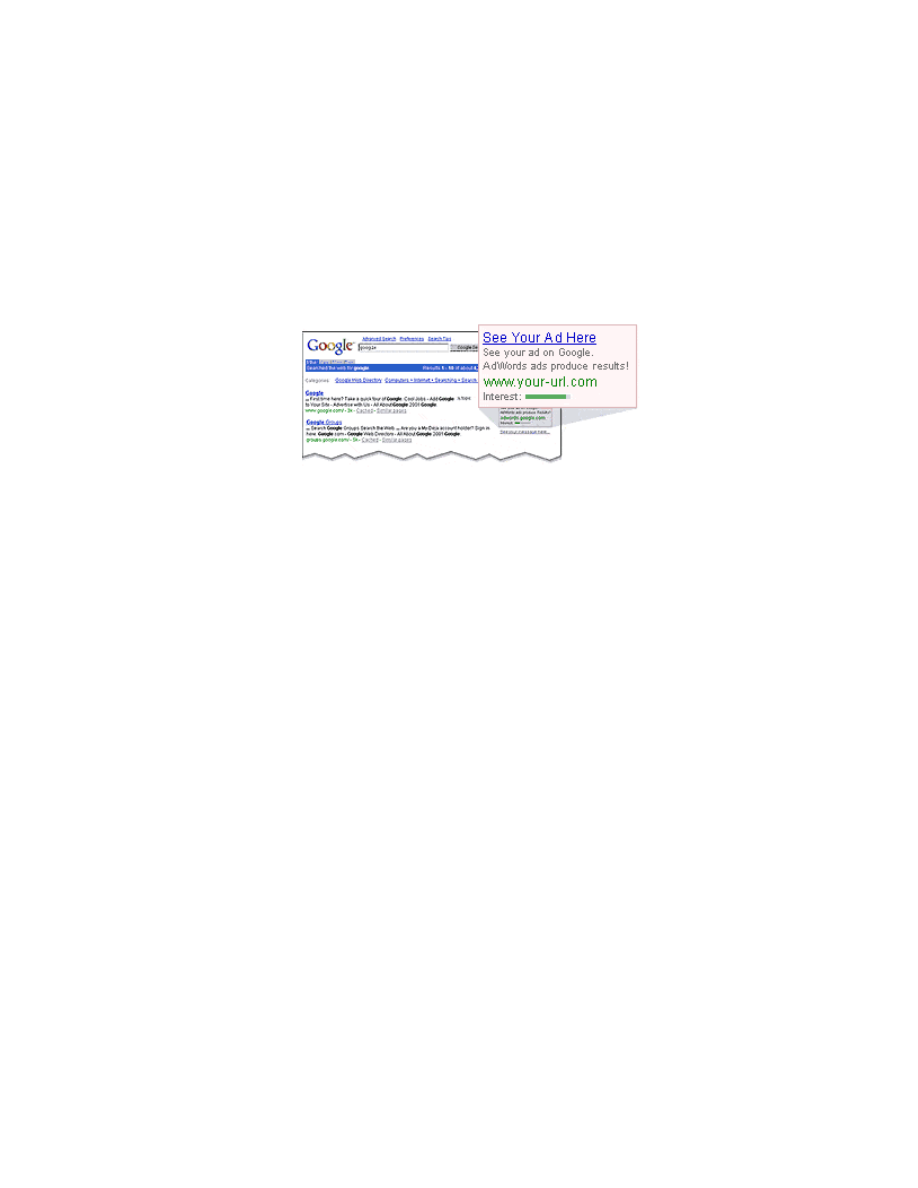
Google Secrets – How to Get a Top 10 Ranking…
page 99 of 112
Appendix F –
About Google AdWords™
The focus of this book was to learn those methods for getting “free” traffic to your site
using Google. However, no discussion of Google would be complete if the popular
Google AdWords™ program was not mentioned. Google AdWords are those small
boxed ads that appear on the right-hand side of a Google search results page.
Google AdWords is a pay-per-click (PPC) program.
So why a whole Appendix on a paid-advertising PPC tool if this guide is all about
getting free rankings using SEO methods? The answer is two-fold:
1. Setting up a low-cost AdWords campaign is a great way to test your business
idea and your keyword selections. It is a fast and cheap predictor of how
successful your site can be before you spend a lot of time creating content,
building a web site, optimizing your pages, and acquiring links.
2. Studies have shown that the best sales results are obtained by those that do
a combination of both SEO and AdWords. If you are listed in more places on
a search results page, you stand a greater chance of being clicked on.
Another reason is that if you are listed on the both the free (organic) side of
the page AND on the paid side of the page with an AdWord ad, you may be
seen as a more important player in your industry.
What makes Google AdWords great is that it can also be used as a relatively low-
cost way to quickly validate the results of your keyword research. Unlike other PPC
programs, AdWords can be setup for $5 with no monthly minimums and your ads run
almost immediately.
One problem with site optimization however is that it can take awhile to see the
results of your efforts. With Google AdWords, you can place a number of different
ads simultaneously and start seeing your results within a matter of minutes. As such,
it is a great keyword research tool (as well being the best PPC program for you to
start should you be so inclined).
www.google-secrets.com Copyright 2003-2004 Dan Sisson.
All rights reserved.

Google Secrets – How to Get a Top 10 Ranking…
page 100 of 112
The name of the game with Google AdWords is to avoid a costly bidding war with
your competitors, get your clicks as cheaply as possible (5 cents minimum), and to
run you ads against keywords that have the least competition. This is best
accomplished by finding as many unique keyword phrase variations as you can - and
that your competitors have not discovered for themselves. It is surprising how many
advertisers using AdWords simply copy each other and hence drive up the cost of
everyone’s clicks on keywords they feel they must compete on.
But before you dive in, I strongly encourage you to go to
https://adwords.google.com/select/index.html
and read through the online
documentation to familiarize yourself with the terminology and the basic premise of
how the AdWords program works. You should also take the Quick Tour as well to
learn the interface.
Ongoing Keyword Research and Testing
Although it is a good start, don’t assume that you can simply use the results of your
WordTracker keyword research for your AdWords campaign. Unlike site
optimization, which involves focusing on, and optimizing for, a relatively small
number of keyword phrases that have both the highest traffic count and highest KEI
value in WordTracker, this is just the beginning for a successful AdWords campaign.
Keyword phrase research for a successful AdWords campaign should be ongoing
and you should strive to come up with at least a couple hundred different keyword
phrases at the beginning. This means having a list of possible permutations of
different phrases that use different action verbs, singular and plural, single and
double words, hyphenation, etc.
Consider this book. Here are just of a few of the various keyword phrases I used to
initially start my Adwords campaign:
“search engine optimization”
“search engines optimization”
“search engine optimized”
“search engines optimized”
“search engine optimize”
“search engines optimized”
“SEO optimization”
“learn SEO best practices”
“learning SEO best practices”
“learn Google”
“google search engine”
“google search engine optimization”
“google secrets”
“google exposed”
www.google-secrets.com Copyright 2003-2004 Dan Sisson.
All rights reserved.

Google Secrets – How to Get a Top 10 Ranking…
page 101 of 112
“google revealed”
“google guide”
“google SEO tips”
“google tips”
“google optimization guide”
“google best practices”
“google SEO best practices”
“google higher ranking”
“google higher rankings”
“google page rank”
“google pagerank”
“google keyword best practices”
“google keyword tips”
“google linking secrets”
“web site promotion”
“website promotion”
“promoting web sites”
“promoting websites”
As you can see, the list could go on. It doesn’t take much brainstorming to come up
with a list of several hundred keyword phrase variations. Many of these won’t pan out
(nobody will click on them), but some will – and they won’t necessarily be the best
ones that came out of your WordTracker results used for site optimization.
Here’s a list of ideas you can use to brainstorm your AdWords keywords:
• Use all possible synonyms (example: report, guide, report, manual, ebook)
• Use different verb forms (example: learn, learning)
• Use singular and plural word forms (example: site, sites)
• Use single and double words (example: website, “web site”)
• Use word hyphenation (example: “how to”, “how-to”)
• Use misspellings (example: jewelry, jewelery)
• Use abbreviations (example: jan, january)
• Use acronyms (example: SEO, KWD)
• Use industry buzzwords (example: “organic listings”, “kw inventory”)
• Use dates, years (example: “2003 google report”)
• Use numbers (example: “top 10 ranking”)
• Use “action words” (example: learn, get, buy, order, )
• Use “sales” words (example: new, leading, top, quick, advanced, unique,
discount)
• Use book titles (example: “google hacks”)
• Use famous people (example: “bill gates software”)
• Use region, geography (example: “seattle SEO services”)
• Use related product names (example Ex: wordtracker, “webposition pro”)
• Use in form of partial question (example: “need more traffic”)
www.google-secrets.com Copyright 2003-2004 Dan Sisson.
All rights reserved.

Google Secrets – How to Get a Top 10 Ranking…
page 102 of 112
Find those keyphrase nuggets that nobody else is bidding on and therefore that you
can get for the minimum possible cost at $0.05 per click. You may not get a lot of
clicks on each one, but if you have enough of these, collectively they can account for
a substantial portion of your click traffic from your AdWords campaign. The best
situation is where you are the ONLY ad listed for a particular search results page.
Don’t stop afterwards, it may take a month or more to think of all the possible
variations. Make it a habit to think of at least 3 new keyphrases every day for a
month. If you follow no other recommendations here, make sure you do this –
because chances are your competition won’t.
Use Keyword Matching Options
Google allows three different forms of keyphrase matching. I recommend that you
use all of them simultaneously:
1. Broad matching. Phrase words can be in any order, and can be part of
larger phrase. For example, consider the phrase google search engine
optimization. With broad matching, these words can appear in any order such
as “search engine optimization for google” and as part of a larger phrase.
Broad matching works best on 3-word (and larger) phrases.
2. Phrase matching. Enclose those words you want to appear in exact order in
parentheses. For example, use google “search engine optimization” if you
want to allow only phrases with the words “search engine optimization” in that
order. With phrase matching, there can be other words included in the
phrase, such as google search engine optimization best practices.
3. Exact matching. Enclose the entire phrase in square brackets. For example,
[google search engine optimization]. With exact matching, the phrase must
be in the exact order shown and cannot include any other words in the
phrase.
Set up Multiple Ad Groups
You should have a number of different keyword phrase variations that are centered
around common, similar keywords. Each “cluster” of related phrases should be
placed in their own Ad Group. This is important for two reasons: 1) it is easier to
manage; and 2) it allows more freedom in setting your maximum price per click. All
keywords in an Ad Group have the same maximum price per click applied to the
group so this can be a real money-saving feature. If you have one or more keyword
phrases that are bid on much higher than the rest of your keywords, put those in their
own Ad Group.
www.google-secrets.com Copyright 2003-2004 Dan Sisson.
All rights reserved.

Google Secrets – How to Get a Top 10 Ranking…
page 103 of 112
Tip
If you have more than a dozen or so Ad Groups, or want to apply different daily
budgets to different groups of keyword phrases, consider setting up multiple
AdWords Campaigns.
Create Multiple Ads per Ad Group
Because you don’t know in advance which ads will have the highest click-through
rate (CTR), you should create several ads per Ad Group. This is very important.
Because Google’s AdWord program interface is in real-time and so easy to use, you
can tell in no time which ads are pulling in more clicks than the others. These ads
then be constantly tweaked and refined to determine which ads are the absolute best
for pulling in clicks. I cannot stress how much difference it can make by simply
changing one word in the title or in the description, or changing the order, or making
the title into a question, etc. I recommend you have at least 3 - 4 four different ads
per Ad Group at any one time that you are testing.
Writing Great Google Ads
Writing compelling ads in a Google AdWords campaign is both an art and an
science. It is all about writing good sales copy, in a very limited space, for the Web.
Google has the following limitations:
Ad title: 25 characters maximum
Ad description: 70 characters maximum (2 lines at 35 characters per line maximum)
This isn’t a lot of space, so make every word count. Some tips for writing good ads:
1. Use keywords from your particular Ad Group in the ad title or description.
Studies have shown that your click-through rate can almost double if you
include the keywords in the ad – these will also be shown bolded in the ad.
2. Consider using a question in the title. Some titles that have worked for pulling
in clicks for my ebook include: “Need a Top 10 Site?”, “Got Rank?”, and
“Search Engine Optimized?”
3. Consider stating the problem or the solution in the ad. For example: “No
traffic to your site?” or “Learn SEO tips for your site”.
4. Use the ideas listed previously in the “Ongoing Keyword Research Phase”
section. Use of the following can have particularly good results:
www.google-secrets.com Copyright 2003-2004 Dan Sisson.
All rights reserved.

Google Secrets – How to Get a Top 10 Ranking…
page 104 of 112
• Use of “action words” (learn, get, buy, order)
• Use of “sales” words (new, leading, top, quick, advanced, unique,
discount)
• Use of region, geography (Seattle SEO services)
If you are totally clueless about writing good ad copy, I suggest you read up on how
to great good sales ads. One good resource is Net Words: Creating High-Impact
Online Copy by Nick Usborne.
Setting Up Tracking URLs
Although you can see at a glance in the AdWords program which ads are pulling the
most clicks, you should nevertheless set up tracking URLs for each ad or each Ad
Group for ease of analyzing all of your site traffic using your stats program. With
tracking URLs, you can look at your site traffic reports and see exactly how much
traffic your pay-per-click (PPC) campaign(s) did in relation to your “free” clicks
obtained through traditional SEO methods and from your incoming reciprocal links.
Tracking URLs for Google ads are extremely simple to set up. Here is a
representative tracking URL:
www.your-web-site.com/?gg&grp1&ad1
where,
gg = google
grp = Ad Group 1
ad = ad 1
Use whatever format works best for you to track your Google AdWords traffic. At a
minimum, you should at least be tracking at the Ad Group level to determine which
“keyphrase clusters” are doing the best and ideally down to the ad level so you know
which specific ads are doing the best in each Ad Group.
I can’t stress how important it is to analyze your server logs and site traffic, and
tracking your Google AdWords campaign in this manner lets you see at a glance
how effective and expensive it may be in relation to traffic you get as a result of the
“free” natural rankings in Google and from other sources such as incoming links and
other PPC campaigns.
If your current stats program won’t allow you to track referrals because of the ? in the
URL, consider switching stats programs. I recommend
http://www.web-stat.com
or
www.hitslink.com
– they are cheap and provide a wealth of data that usually is only
found with the more expensive stats packages.
www.google-secrets.com Copyright 2003-2004 Dan Sisson.
All rights reserved.

Google Secrets – How to Get a Top 10 Ranking…
page 105 of 112
Setting Your Daily Budget Limit
Whatever daily budget you decide to place on your Google AdWords campaign is
totally up to you and your unique situation. The only recommendations I can give in
this regard are as follows:
• Set your daily budget higher than is comfortable for you in the early
experimentation and testing phase of your campaign – say for the first two
week to a month. Much good testing data can come out of the first 2 weeks,
but only if you don’t stifle your efforts by setting your daily budget too low.
Google states that your daily budget can be exceeded, but not your daily limit
x 30 (for a monthly budget). Don’t be one of those that fails slowly. Pump up
the budget initially to see quickly which ads and ad groups to dump, revise, or
start over with.
• Don’t fret about setting your daily limit high in order to try to appear in the #1
AdWords spot for a given keyword. Studies have shown that there is no real
difference in click-through rate between being in positions 1 through 3. In fact,
some studies have shown that a #2 AdWords position pulls more clicks than
a #1 AdWords position. Ah, the nuances of customer psychology!
This just covers some of the basic tips and best practices for using Google AdWords
effectively. Rather than reinvent the wheel here, there is a great report, "21 Ways to
Maximize ROI on Google AdWords Select", that covers Google AdWords in great
detail. For more information, see
http://www.page-zerocom/products_asroi.asp
. If
you are serious about mastering Google AdWords, read this report!
www.google-secrets.com Copyright 2003-2004 Dan Sisson.
All rights reserved.

Google Secrets – How to Get a Top 10 Ranking…
page 106 of 112
Glossary
Here is a list of terms that were either used in this book, or represent terms in the
Internet marketing industry that you may encounter.
Algo, Algorithm. A specific mathematical process for achieving a desired result.
Google uses a proprietary algorithm that contains over 100 different criteria to rank
Web sites in a specific order based on a specific search request.
Algorithmic listing. Any search engine listing that is on the “free” or unpaid section
of a search results page. These listings are obtained using SEO techniques without
the use of paid advertising. Also called organic, natural or editorial listing.
Anchor text. The clickable portion of text displayed (usually as blue, underlined
text) for a link. Also known as link text.
Authority. Site with a high number of incoming links and a relatively low number of
outgoing links. Opposite of hub.
Backlinks, backward links. Links from other sites that point to your site. Also
known as inbound or incoming links.
Cascading Style Sheet (CSS). Code that defines the visual appearance, style
(size, color, font), or positioning of text on a Web page. This code can be located
either on the page it is used on or can be stored in a separate (.css) file.
Conversion rate. The percentage of visitors to a website that end up performing a
specific action that leads to a sale. Such actions can include the purchase of a
product, the submission of a form, or an email requesting more information.
Cost-Per-Click (CPC). See Pay-per-click (PPC).
Crawl. The operation of reading or analyzing pages of a website by an automated
program called a spider or robot. Spiders crawl your site by following links on each
page of your site. After crawling, the spider will return the results back to the search
engine for later inclusion into it’s database for indexing. See also Index.
CSS. See Cascading Style Sheet.
Deep crawl. Deep crawls are performed once a month by the main Google spider
Googlebot; all pages of a site are visited during a deep crawl. Also known as the
main crawl.
www.google-secrets.com Copyright 2003-2004 Dan Sisson.
All rights reserved.

Google Secrets – How to Get a Top 10 Ranking…
page 107 of 112
Directory. As opposed to search engines, search directories use humans to review
and place websites in alphabetical order under defined categories and sub-
categories. The best-known directories are Yahoo! and the Open Directory Project
(OPD).
DMOZ. Another term for the Open Directory Project.
Editorial listing. Any search engine listing that is on the “free” or unpaid section of a
search results page. These listings are obtained using SEO techniques without the
use of paid advertising. Also called organic, algorithmic or natural listing.
Everflux. Term used for the constantly changing search results that occur
throughout the month between Google’s monthly update. Everflux is caused by the
Google search engine spider FreshBot that crawls sites..
External links. Links located on websites other than your own.
FreshBot. A version of the Google spider that visits high-ranking sites, or sites that
change content frequently. Freshbot may visit sites daily, while Googlebot visits sites
once a month.
Fresh crawl. Fresh crawls are performed as often as daily by the Google spider
Freshbot. Freshbot only crawls portions of your site and looks for new pages and
updated content on existing pages only.
Googlebot. The name given to the main Google spider that deep crawls sites once a
month. See also Freshbot.
Google AdWords™. Google’s Pay-Per-Click (PPC) advertising program, whereby
your site is listed in the right-hand side of Google search result pages in a small box.
For every visitor that clicks on your AdWords link, you pay Google a fee, up a
maximum daily limit. This type of advertising involves an auction where you bid,
along with your competitors, for the cost per click for a specific keyword.
Google bombing. Term used to describe the process of artificially altering the
ranking of a page by the use of links. It requires a concerted group effort from many
different site owners who all agree to use the exact same link text in links that point
to the same site. The linked-to site however may not even contain the text used
anywhere on the page.
Google dance. The period of time at the end of every month where Google updates
their index, which results in site rankings that jump around, sometimes minute by
minute. This is specifically caused by Google running PageRank calculations for all
pages repeatedly until the values reach a steady-state.
www.google-secrets.com Copyright 2003-2004 Dan Sisson.
All rights reserved.

Google Secrets – How to Get a Top 10 Ranking…
page 108 of 112
Google Directory™. The Google Directory lists those websites that are in the Open
Project Directory (OPD), then ranks them according to PageRank alone. The Google
Directory PageRank bar goes from 1 to 7 (unlike the Google Toolbar PageRank,
which goes from 1 to 10).
Google Toolbar™. A downloadable program that attaches to your browser,
allowing you to see an approximation for the PageRank (PR) value of a page, along
with the external sites that link to that page.
Hub. Site with a high number of outgoing links and a relatively low number of
incoming links. Opposite of authority.
Inbound, incoming links. Links that reside on another website that point to your
website. Also known as backlinks or backward links. The opposite of inbound links
are outbound links.
Index. Term used to denote the database that stores information about every web
page for every website that a search engine has crawled (visited). If your website is
included in the Google database (index), it is said to be indexed.
Index page. Another name for a home page. Many home pages are named
index.html so that Web servers will display this page by default.
Internal links. Links that are located on pages within the same website. As opposed
to external links, which are links that are located on a different website.
Inline links. Links that are part of a sentence in a paragraph on a page, rather than
simply listed in a menu bar or a links page without any surrounded text.
KD. See Keyword density.
KDA. Keyword Density Analyzer. A software program that determines the keyword
density, either together or separately, of various parts of a web page – body, head,
title, etc. Also see Keyword density.
Keyword phrase. General term used to define a specific word phrase that best
describes the main topic of a web page. Synonymous with a search phrase that a
visitor enters into a search engine to find specific information.
Keyword. General term used to define the main topic of a page. Synonymous with
search term. A group of keywords used together in a phrase is called a keyword
phrase. Google looks for keywords on a page that match searched-for terms.
Keyword density. The number of times a keyword is used on a web page divided by
the total number of words on the page. Expressed as a percentage.
www.google-secrets.com Copyright 2003-2004 Dan Sisson.
All rights reserved.

Google Secrets – How to Get a Top 10 Ranking…
page 109 of 112
www.google-secrets.com Copyright 2003-2004 Dan Sisson.
All rights reserved.
Keyword prominence. How close to the beginning or top of a web page that a
keyword is found.
Keyword proximity. How close together the individual words that make up a
keyword phrase are to one another, and in what order.
Keyword weight. Also known as keyword density.
Landing page. Generally speaking, the web page that a person reaches when
clicking on a search engine listing or ad. This is commonly the home page of the site
but it can be any. For paid advertising, it is common to have multiple ads, each one
linking to a specific web page on the site that is targeted specifically for that ad.
Link quality. A general term referring to link reputation and link strength. Links with
high quality are those where the PageRank of the linking page is high, and where
your keywords are used in the link text and in the page title that the link is.
Link popularity. A general term referring to the number of incoming links to your
site.
Link reputation. A general term referring to how closely link text matches the title of
the page the link is on and, more importantly, the text on the page that the link points
to.
Link text. The clickable portion of text displayed (usually as blue, underlined text) for
a link. Also known as anchor text.
Link strength. Dependent on the PageRank of the linking page as well as the
number of other links on the page. Also referred to as link voting power.
Main crawl. Main crawls are performed once a month by the main Google spider
Googlebot; all pages of a site are crawled during a main crawl. Also known as the
deep crawl.
META tags. HTML tags located in the <HEAD> section of a web page that specify
information that is viewable only to a search engine. The two most commonly-used
META tags are the “Keywords” META tag and the “Description” META tag. Most
search engines ignore META tags today due to their abuse in the past – however
Google and others still use the contents of the Description META tag when listing
web pages. In addition, the Robots META tag can be used to prevent search engines
from indexing a web page.
Natural listing. Any search engine listing that is on the “free” or unpaid section of a
search results page. These listings are obtained using SEO techniques without the
use of paid advertising. Also called organic, algorithmic or editorial listing.

Google Secrets – How to Get a Top 10 Ranking…
page 110 of 112
www.google-secrets.com Copyright 2003-2004 Dan Sisson.
All rights reserved.
Off-page factors. Those aspects or elements of a website that are not located on
your website (such as incoming links). Off-page factors are largely out of your
control.
On-page factors. Those aspects or elements of a website that are located on your
website (such as keywords). You are largely in control of on-page factors.
OPD. See Open Directory Project. Also known as DMOZ.
Organic listing. Any search engine listing that is on the “free” or unpaid section of a
search results page. These listings are obtained using SEO techniques without the
use of paid advertising. Also called algorithmic, editorial or natural listing.
Orphan pages. Pages with a link to them but without a link on them to any other
page.
Outbound, Outgoing links. Links on your website that point to other websites.
Opposite of inbound or incoming links.
Paid placement. Similar to pay-per-click. See below.
Pay-Per-Click (PPC). A paid advertising mechanism whereby you bid to have your
site listed in a specific position on a search engine. You bid, along with your
competitors, for the cost per click of a specific keyword. Every time a visitor clicks on
your listing (ad), you pay the PPC company the bid price. Google AdWords is the
name of the PPC program that Google offers.
PPC. See Pay-Per-Click.
PR. See PageRank.
Page. Synonymous with web page. The actual HTML file and associated graphics
that are displayed in a browser.
PageRank™. Google’s patented system for measuring page importance. PageRank
analyzes the quantity and quality of links that point to a web page. The more high-
quality links that point to your web page from other sites, the higher your PageRank.
Page importance. Synonymous with PageRank.
Page relevance. How closely keywords on your page match a search request.
Page reputation: what other sites “say” about your site. Google looks to see if your
keywords are used in the link text, page title, and in the link text of other links on the
page that links to your site.

Google Secrets – How to Get a Top 10 Ranking…
page 111 of 112
www.google-secrets.com Copyright 2003-2004 Dan Sisson.
All rights reserved.
Page topic. What your page is about. Google looks at keywords on your page to
determine the page topic.
Popularity. A general term referring to how “important” your web site is in terms of
how many external links point to it.
Rank, ranking: a website’s actual placement or position on a search engine results
page for a certain search term or phrase. It is meaningless to speak of website rank
without specifying what search words or phrase you are ranked for. Sometimes
confused with PageRank – the two are totally separate concepts.
Robot. The software program which a search engine runs to read and analyze your
site. See also spider. Google’s robots are called Googlebot and Freshbot.
ROI. Return On Investment. The amount of revenue generated from a specific
marketing expense, expressed as a percentage.
Search Engine Marketing (SEM). A general term that encompasses both paid and
free forms of advertising a website using search engines. Often used
interchangeably with Search Engine Optimization (SEO). SEO is actually one type of
SEM. The other major type of SEM is Pay-Per-Click advertising (PPC).
Search Engine Optimization (SEO). A general term used to describe specific
techniques that can be used on websites in order to rank favorably with search
engine. A good example of SEO is the proper use of keywords in specific locations
on a web page.
Search Engine Positioning (SEP). A general term used interchangeably with SEO.
However, since search engine optimizers do not actually "position" pages within the
search engines, this can be misleading. SEP more closely describes Pay-Per-Click
(PPC) advertising, since that is the only way a site can be exactly positioned in a
search engine.
Search Term. The word or words a person enters into a search engine's search box.
Also synonymous with keyword or query term.
SE. Acronym for search engine.
SEM. See Search Engine Marketing.
SEMPO. Search Engine Marketing Professional Organization. A non-profit group
whose focus is increase the awareness of and educate people on the value of
search engine marketing.
SEO. See Search Engine Optimization.

Google Secrets – How to Get a Top 10 Ranking…
page 112 of 112
www.google-secrets.com Copyright 2003-2004 Dan Sisson.
All rights reserved.
SEP. See Search Engine Positioning.
SERP. Search Engine Results Page. The page or pages that a search engine
displays after a search query for a certain search term or phrase.
Server log. The data file that a Web server produces (usually daily) that lists website
traffic activity by domain. Web statistics programs use the server log file to produce
graphic reports. See statistics.
Spider. The software program, also known as a robot, which a search engine runs
to read through and analyze your site. Google’s spiders are called Googlebot and
Freshbot.
Statistics, stats. The data associated with visitor traffic to your site over time. Most
Web hosting companies offer a free program that lets you view traffic statistics for
your website.
Theme. General term related to the overall subject area, topic, or category of a web
site.
Tracking URL. Typically used in paid ads, such as Google AdWords, where unique
code is added to the end of a link in order to track visitors who click on that ad.
Tracking URLs allow you to measure the popularity of an ad. An example of a
tracking URL is as follows:
http://www.google-secrets.com?source=google&keyword=metatag&ad=1.
Vote, voting. When one website links to another website, it “casts a vote” for the
other website. The strength or weight of this “vote” depends on the PageRank of the
page and the number of other links on the page.
Yahoo. A popular search directory (as opposed to a search engine). All Web sites
listed on Yahoo are first reviewed by a human editor.
Document Outline
- Google Secrets
- PART I – Getting Started
- Chapter 3 - Determining Your Best Keywords
- PART II - Optimizing Your Website
- Chapter 4 - Structuring your Site Correctly
- Chapter 5 - Optimizing Your Web Pages
- Chapter 6 – Linking Your Pages Correctly
- Chapter 7 – More Advanced Techniques
- PART III - Exchanging Links Effectively
- Chapter 8 – The Importance of Links
- Chapter 9 - All About PageRank
- Chapter 10 - Submitting Your Site to Directories
- Chapter 11 – Getting Ready for Linking
- Chapter 12 – Which Links to Focus On
- Chapter 13 - Managing a Reciprocal Link Campaign
- PART IV - Putting It All Together
- Chapter 14 - Monitoring and Measuring
- Appendix A - Web Site Design Do’s and Don’ts
- Appendix B - Linking Do’s and Don’ts
- Appendix C - Additional Resources
- Appendix F – About Google AdWords™
Wyszukiwarka
Podobne podstrony:
How To Get An Old Picture?fect
How to Get Married and Stay Married
How to get the new iPod Touch(8GB) for nothing (easy to complete)
How to Get the Most Out of Conversation Escalation
Ross Jeffries How to Get the Women you?sire into?d
How to Get Over $100,000 Worth of Free Publicity and?vertising Using PR
010601 [English Dating Seduction] Ross Jeffries How to get the women you desire into bed
How to get the best from your green vehicles
Brown Derren How to Get the Truth out of Anyone
więcej podobnych podstron