`
MOTOROLA INTERNAL USE ONLY
Page 1
Beijing Competency Centre
Beijing MCIC
No.39A Zi Zhu Yuan Road
Beijing
P.R.China
Website: gs.mot.com/cc
FIELD SERVICE BULLETIN
FSB Number:
BJCCFSB2005-123
Author: Jianfeng
Ma
Date:
Apr 22, 2005
Total No. Of Pages: 2
Subject:
GSM Razr V3 Main Display Missing Line
Model Affected:
GSM Razr V3
Level of Repair:
1 & 2
Problem
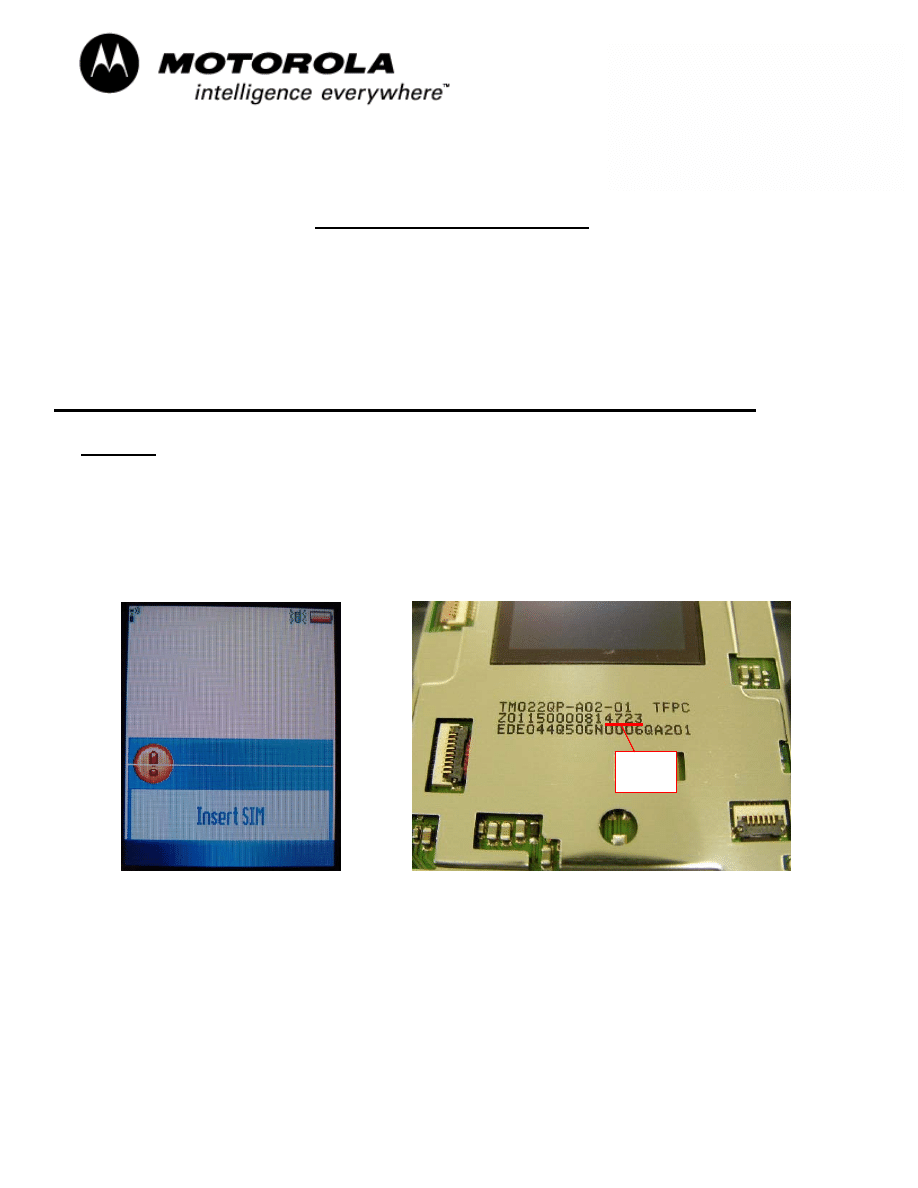
Service is aware of an issue identified during the 1st 200 NPI Analysis on V3. Some units,
returned with a customer complaint of “Display Main, Missing Pixels / Icons”, were found to
show one horizontal/vertical line on main display. Analysis revealed the failure was caused
by excessive pressure in COG bonding process. Figure 1.0 below shows example of display
with the missing line failure.
Figure 1.0 – Missing Line Figure 2.0 – Date Code Identification
Date
Code
`
MOTOROLA INTERNAL USE ONLY
Page 2
Beijing Competency Centre
Beijing MCIC
No.39A Zi Zhu Yuan Road
Beijing
P.R.China
Website: gs.mot.com/cc
Field Service Action
Customer Returns:
For V3 phones
returned to Service Centre with the Customer Complaint of “Display Main,
Missing Pixels / Icons”, please verify the phone display the failure modes shown as above,
then:
a. Disassemble the Flip Assembly and verify that the failure is caused by the display
module itself by replacing the suspect module with a known good module
.
Then
replace the failed display module with a new one with date code 5xxx, reassemble the
unit, and retest to confirm the repair.
b. If the unit displays the original failure symptoms with the known good display module,
then proceed with normal troubleshooting techniques as per the customer complaint.
Service Inventory:
N/A
Customer Call Center:
If the customer calls with the above mentioned symptoms, please refer to the above service
action
.
Service Entry Codes
Please ensure that repairs of this type are logged on to the applicable database as follows:
Global M-Claims Codes:
Customer Complaint Codes:
DIM02 (Display Main - Missing Pixels / Icons)
Problem Found Code
: DIM02 (Display Main - Missing Pixels / Lines / Icons)
REF Designator Code:
A(Display)
Repair Code:
REP06 (Replace Electrical Part - CSB/ FSB)
PRC E-service Entry Codes:
Complaint Code:
3002 (Display Main - Missing Pixels / Icons)
Root Cause Code:
1206 (Replace Electrical Part - CSB/ FSB)
Wyszukiwarka
Podobne podstrony:
LVCCFSB2006 44 V3 Main LCD Dust Ingress
CSB 1168 2 Main Display Crack Driver IC
CSB 1067 2 LCD missing line
LVCCFSB2005 7s Ramless TMR Display (7287946Y01)White Main Display
Board Layout V3 06 Razr MAIN 8488648Z01 A3 C L3 O
BJCCFSB2005 338 V3 Keypad Corrosion
BJCCFSB2006 60 V3i froze and white display when receiving a call
LVCCFSB2006 4 V3 Display Audio Buzz in STBY
LVCCFSB2006 47 V3 Display SW Compatibility
Schematics V3 06 MAIN 8488648Z01 A2 C L3 rO
Board Layout V3 06 Razr FLIP 8488650Z01 A3 C L3 O
LVCCFSB2006 1 V3 Wet Spot Display
CSB 1011 2 RAZR Missing Endcap
Referat 3 v3
br9000 mic v3
Pirates of the Spanish Main Smuggler's Song
C20090551288 B9780323067942000420 main
KB04 SMD DISPLAY
C20090551288 B9780323067942000055 main
więcej podobnych podstron