How to configure fuel injectors on the pre-CAN Duratorq HPCR
Topic locked
2 posts • Page 1 of 1
How to configure fuel injectors on the pre-CAN Duratorq HPCR
by
FORScan
» Sun Jun 15, 2014 1:27 pm
In this article we discuss the following service task: configuration of fuel injectors installed on the Duratorq HPCR
engines (Ford Focus Mk1 1.8 TDCi, Mondeo Mk3 2.0/2.2 TDCi, Ford Transit 2.0/2.4 TDCi before 2006, Transit
Connect 1.8 TDCi ), equipped with Delphi components. The operation is necessary in case of injectors repair or
replacement. The issue is that every injector of this type has so-called C2I - an individual code that reflects the
injector's parameters. This code must be saved to ECU in order to keep an optimal system operation. The specific
of this type of control unit is that it is very important to save the right code. More than, as illustrated in the example
below, in some cases the system works in a malfunction mode ("safe" mode with limitations) unless the C2I code is
saved after the repair or replacement.
The article is based on a real example resolving the injector problem using FORScan (version 2.1.17). We were
approached by an owner of Ford Mondeo Mk3 2.0 TDCi 2005 (115 hp). He had the following problem: the engine
has troubles with cold start (requires at least 5 attempts or more), runs unstable and produces a lot of dove-colored
smoke after the start. Running the engine is stabilized after warming up to 60-80 degrees of Celsius, but the vehicle
acceleration is very poor. Check Engine light is on and the glow plug indicator is blinking, it means serious
malfunction registered by the control unit and most likely limited mode of work. Previous owner has repaired one
of injectors, but was unable to find an appropriate scanner to reset the error, this is why the MIL is on. New owner
has tried to address this issue to two different Ford engine specialists, and they both said the engine has lost a
compression and has to be replaced (as realized later - without measuring the compression).
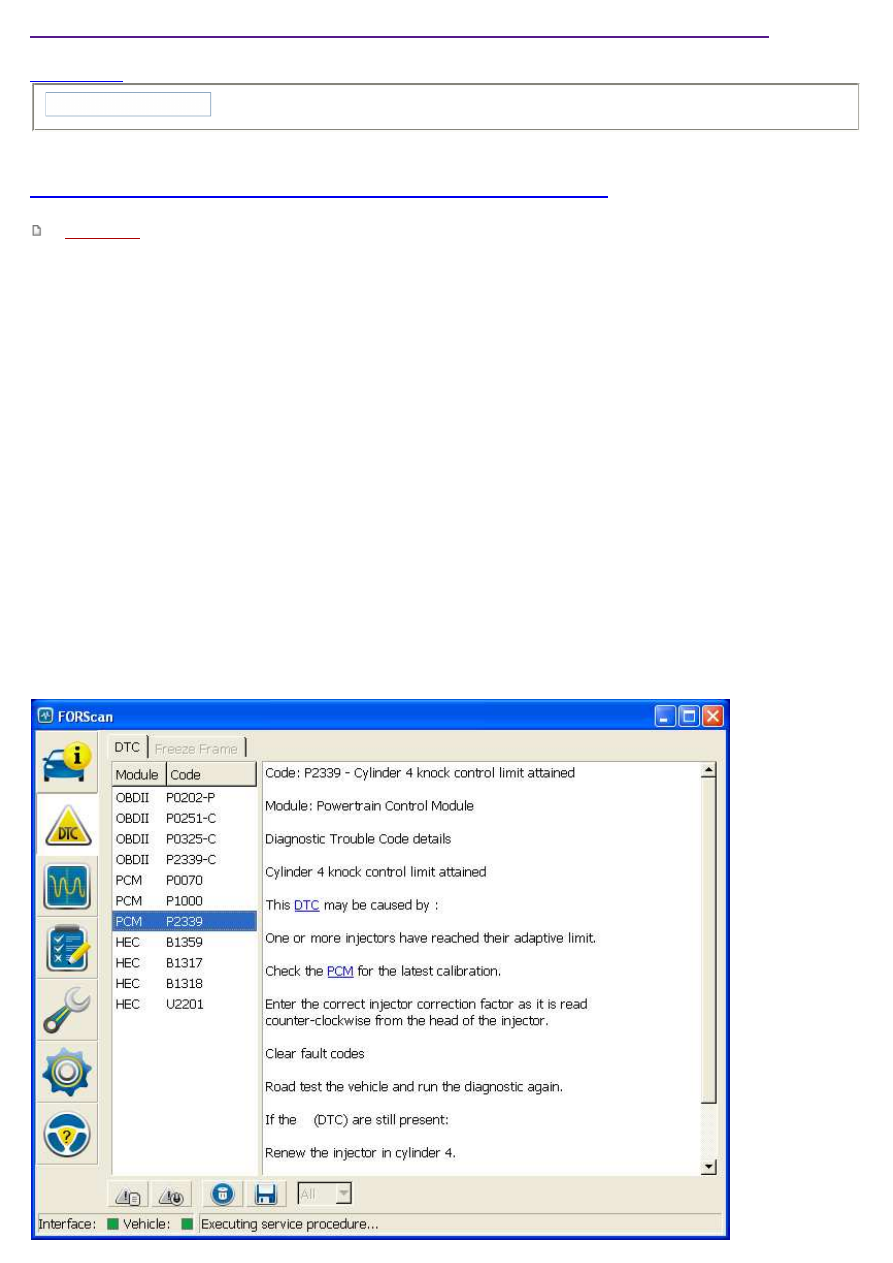
Let's connect FORScan and read the errors:
Together with other codes we see here DTC P2339 - knock control limit reached for the cylinder #4. Other codes
either not directly related to the problem or caused by unsuccessful attempts to run the engine and dead battery.
But P2339 is exactly the code that caused the Check Engine light and blinking glow plug indicator. It looks like it
appeared with the injector malfunction and remained after the injector was repaired. This error can not be simply
reset as other DTC codes - we have to (re)configure the injector in order to restore normal system operations.
As a side note: a normal repair of Delphi injector requires a special stand (Hartridge). The stand does calc a new
C2I code after the repair. But such stands are not widespread at all. If the injector was repaired in a home-made
way, it is not possible to obtain new C2I code. In this case we have no other choice than re-write the same old
injector code to the ECU memory. First, this code is the closest one. Second, this is the only way to let ECU know
that we have set new injector up so it can switch from emergency to normal mode of work and reset the error.
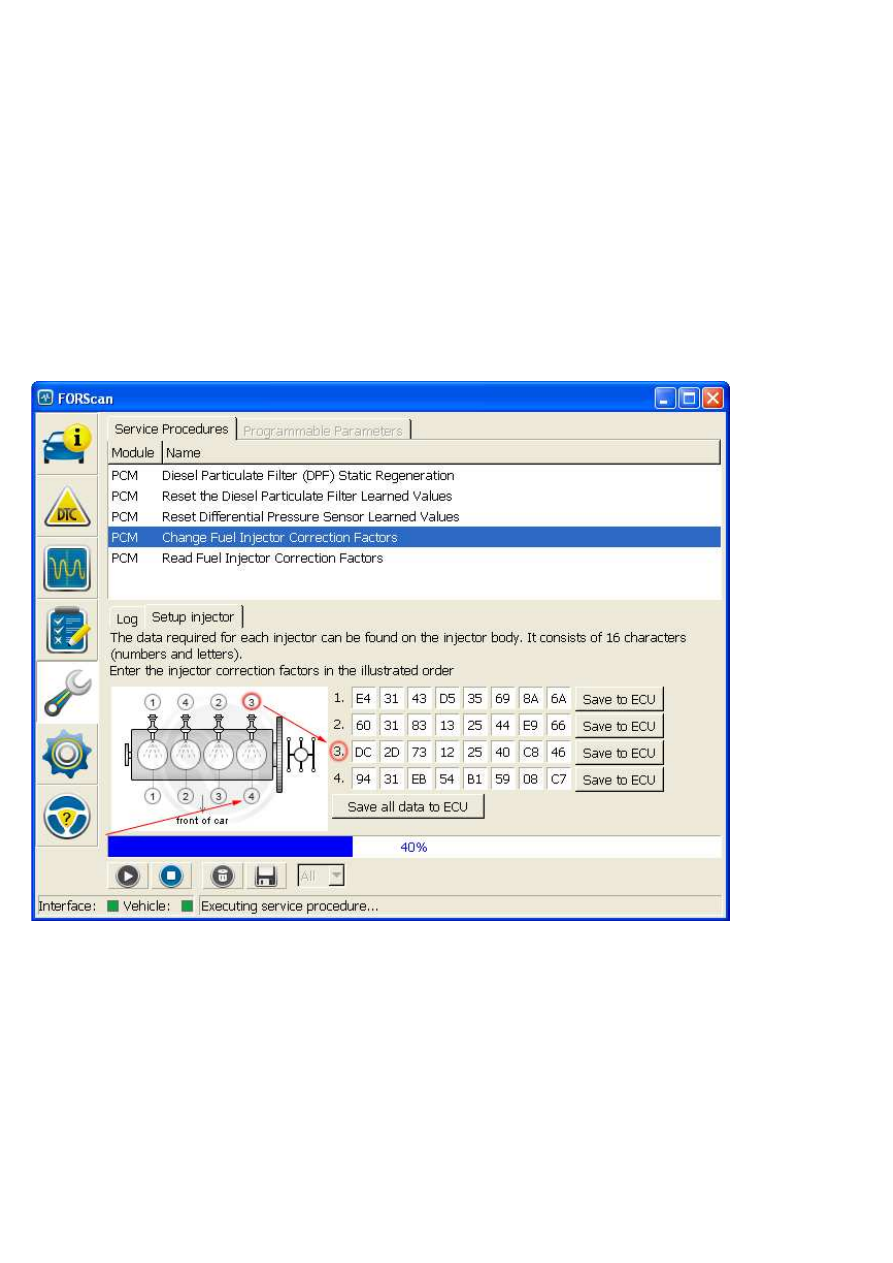
Let's run the service function "Change Fuel Injector Correction Factors" and follow instruction provided by
application (switch ignition to ON and OFF positions as requested and so on). As a result we get the configuration
screen:
The DTC P2339 tells us about malfunction in the cylinder #4 (DTCs P2336, P2337 and P2338 are responsible for
other cylinders). Now we need to determine what injector has to be addressed. The problem is that on Duratorq
engines injectors and cylinders are numbered in different orders. Cylinders are numbered from the belt to the
gearbox (symbolically represented on the picture), but injectors are numbered in firing order. Cylinders' order is
represented below the picture, injectors' numbering is above the picture. So we have to find number of cylinder at
the bottom and find the injector that matches to it using numbers above the picture. In this case Cylinder #4 has
injector #3 and 3rd line of records.
Now we have to write the C2I code. In case of we save a new code, everything is clear - we just enter new code
and click "Save to ECU" (or "Save all data to ECU" if we want to save several codes at once). But in this case we
already have the code in memory, so how to proceed and make sure the code has been re-written? There are two
options here: either check the main criterion (reset of DTC P233x), or perform this operation in two stages. On first
stage we save some other code (correct one!), for example, from a neighbouring injector. And on the second stage
re-enter the old code (of course, you have to preliminary save it somewhere preliminary or make a screenshot).
After every save operation FORScan finalizes the service procedure, so it has to be run 2 times.
After every save operation FORScan finalizes the service procedure, so it has to be run 2 times.
After performing this operation on this Mondeo the glow plug indicator and Check Engine light disappeared, all
troubles with cold start gone, and the new owner was pleasantly surprized with perfect vehicle acceleration.
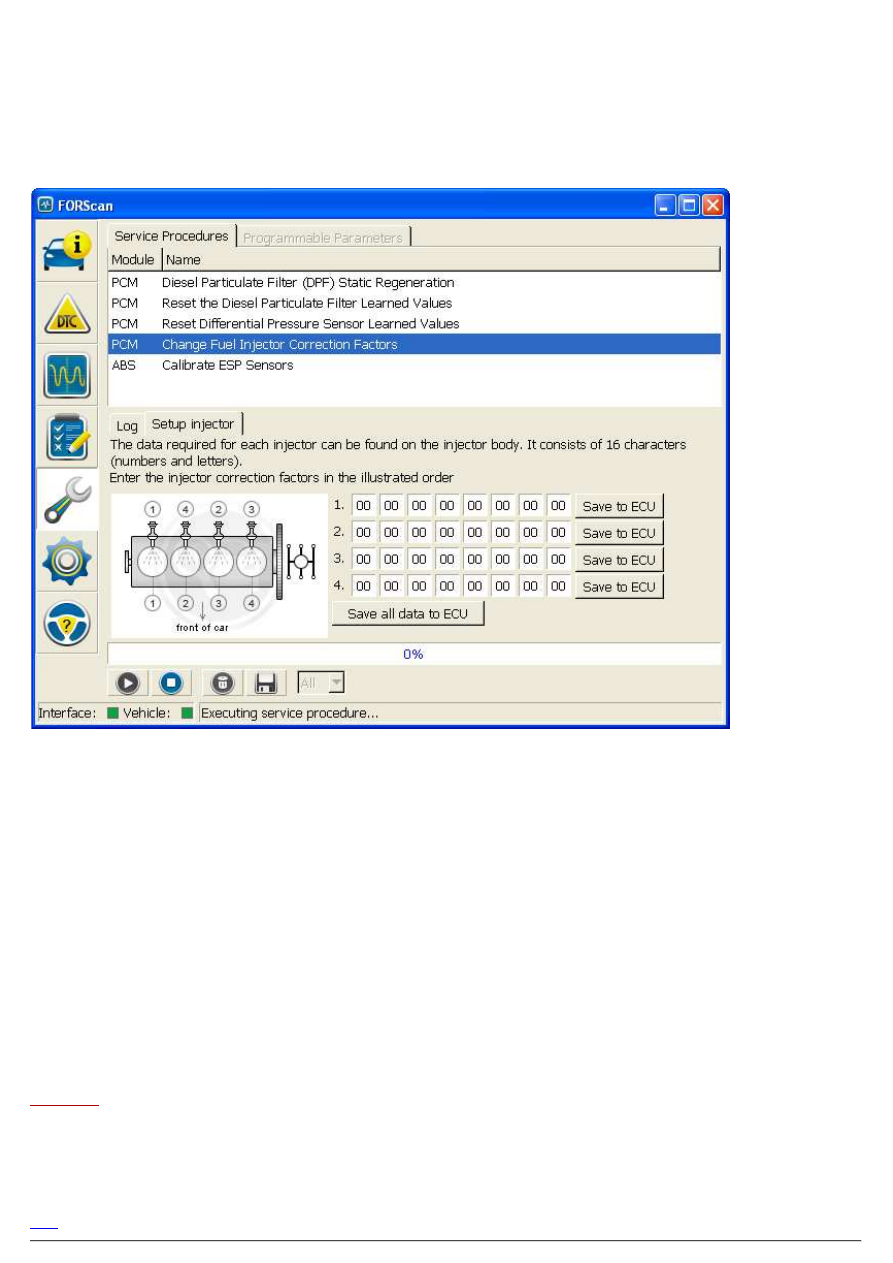
This Mondeo provides an ability to read C2I codes from ECU memory. But TDCi vehicles manufactured before
2003 have no such possibility. In case of such vehicles the injector setup screen will look like the following:
So FORScan displays zeroes instead of injector codes. Some users think that it means FORScan cannot program
this ECU. This is not correct. These ECUs have two different methods to save and read the C2I codes. Relatively
speaking, the ECUs have 2 cells, A and B, where A is used to save C2I codes and B is used to read them. So,
pre-2003 vehicles have no the cell B. But the cell A is present and can be addressed in the same wayas on later
models. In other words, injector codes can be saved in the same way as described above, just with no ability to
control saved codes visually. So result of operation has to be tracked by the main criterion - reset of errors and
restoring normal work of engine.
By the way, this is why we do not recommend to use the popular F-Super and his application Formidable to save
injector data. The problem is that this application does not save the C2I codes to the cell A, instead of it saves it
right to the cell B. We don't know how this works as the connection between cells A and B is hidden inside of ECU.
In any case we consider this implementation is not very correct and confusing. Besides, it doesn't work on pre-2003
models.
Finally, we would like to note that this service function for pre-CAN TDCi works reliably only since FORScan
v2.1.17.
FORScan
Site Admin
Posts: 2153
Joined: Fri Jun 13, 2014 2:21 am
Top
Clarification on cylinder/injector numbering
by
FORScan
» Wed Mar 25, 2015 8:50 am
In the past we started to receive complaints like: your article is wrong, your procedure is wrong as it uses incorrect
cylinder order. You show 1-4-2-3 but it must be 1-3-4-2 etc.
These people make a mistake: they mix injector's numbering with cylinder firing order. Look at the picture in
FORScan:
engTDDI_TDCI.gif (9.31 KiB) Viewed 20672 times
and try to imagine you are PCM and firing the injectors in the injectors' order (upper line of number on the picture),
and look what cylinders will work.
Inj1 - Cyl
1
Inj2 - Cyl
3
Inj3 - Cyl
4
Inj4 - Cyl
2
So as you may see, you get the right firing order known from ETIS, workshop manuals and other reliable sources.:
1-3-4-2.
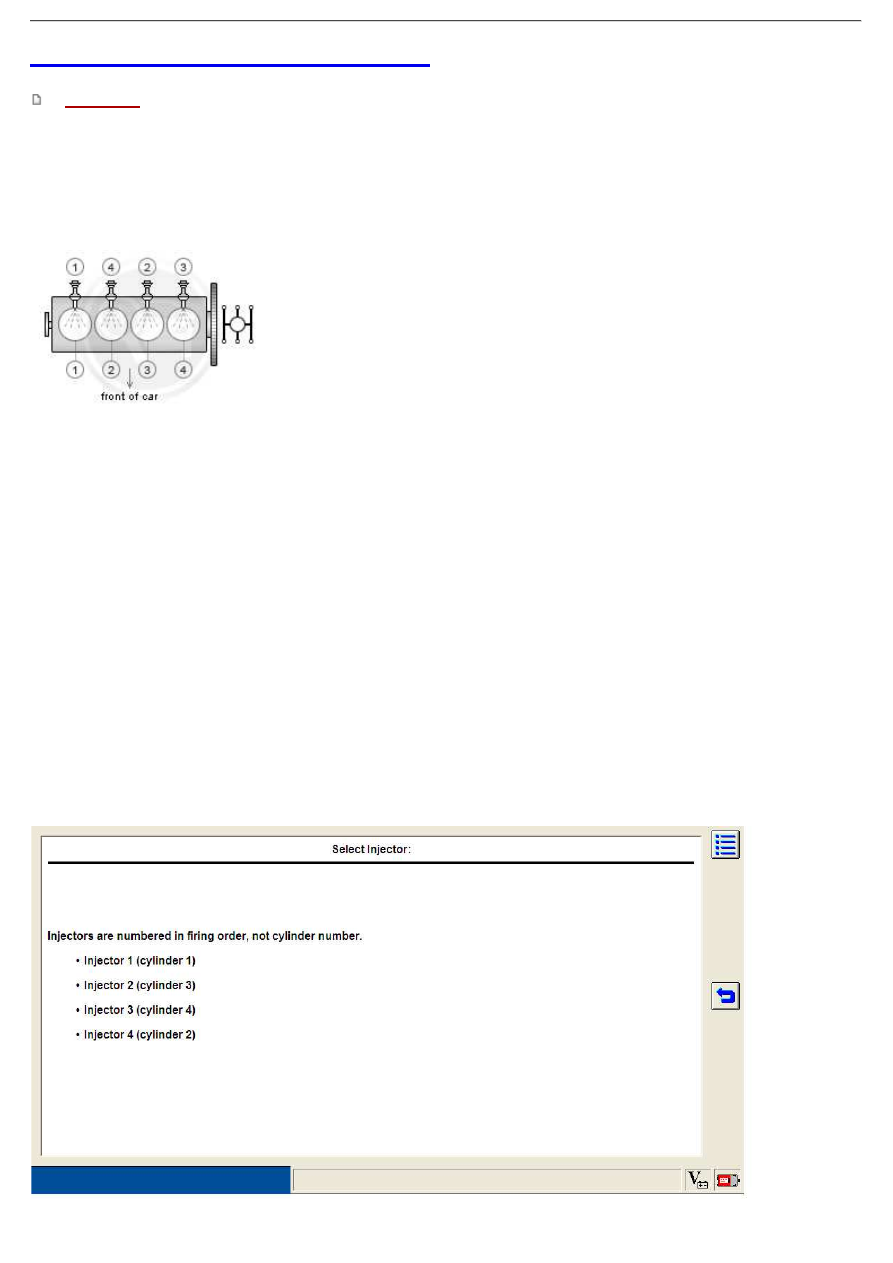
In summary it looks like our attempt to visualize the thing and simplify it for user just made the situation even
worse. It seems it would be more clear if we just provided injector-cylinder order like Ford IDS does (without any
picture):
IDS_inj_TDCI_PWM.jpg (59.35 KiB) Viewed 20672 times
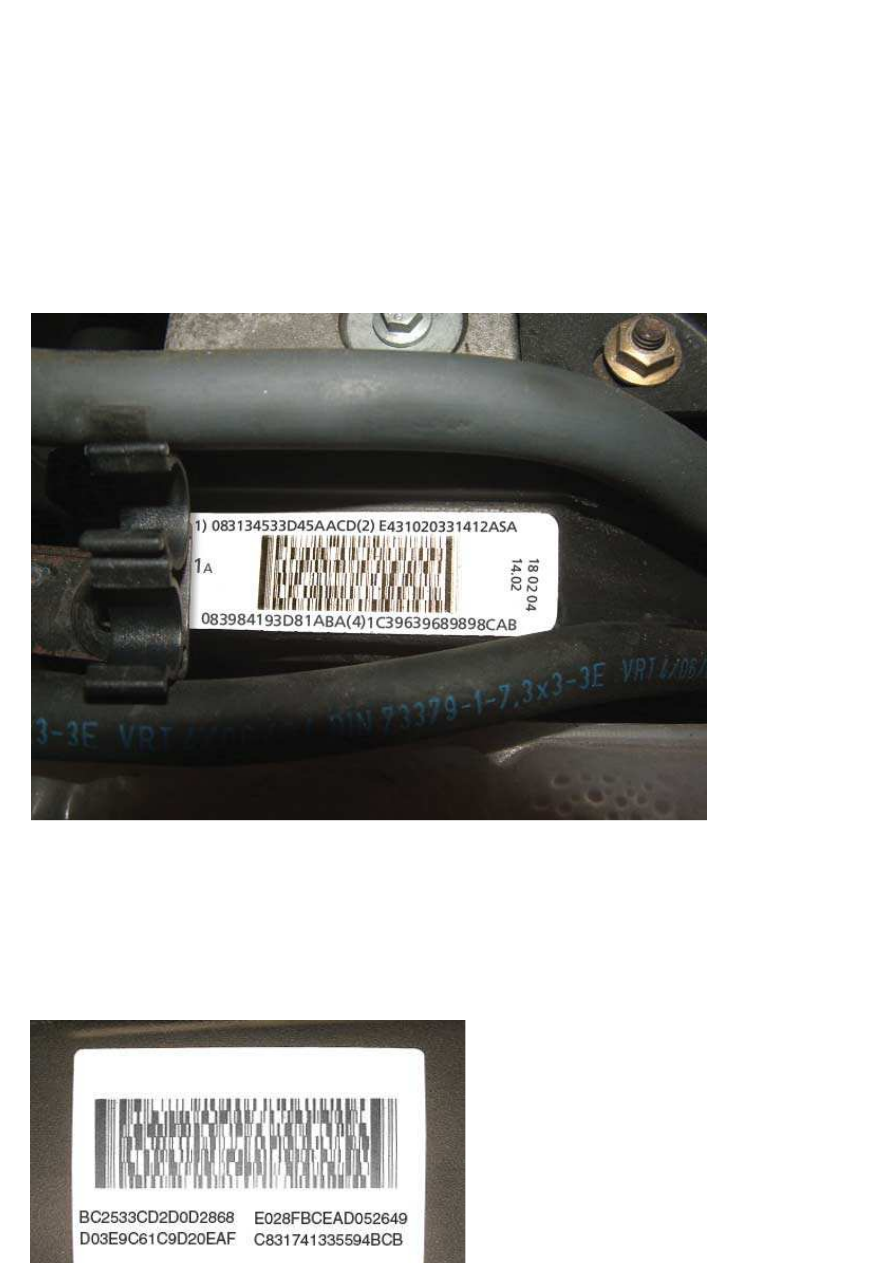
Another question is: what is the sense for so complex numbering? Why can't we just make it so user enters it in the
cylinder order and forget about this problem? Answer: because engine label that shows injector codes may have
different numbering on different models. For example:
On 1.8 TDCi engines the label shows codes in physical cylinder order, not injector order (so (1) means cylinder 1,
(2) means cylinder 2 etc)
Label_order_1.8_TDCI.PNG (366.06 KiB) Viewed 20672 times
On 2.0 TDCi engines the label shows injector codes in injectors order (the top left code is Injector 1, cylinder 1 and
the bottom right is injector 4, cylinder 2):

Label_order_2.0_TDCI.PNG (129.72 KiB) Viewed 20672 times
The idea of 2 orders was exactly to avoid the confusion in case of programming different types of engines.
Wyszukiwarka
Podobne podstrony:
How To Pick Up Women On The Dance Floor
Anderson Here Come The Regulars How To Run A Record Label On A Shoestring Budget
How to configure VLANS on DFL Series Firewall and Layer 2 Managed Switch
CISCO how to configure VLAN
How to optimize Windows XP for the best performance
CISCO how to configure VLAN
Mullins Eustace, How to be a United States Senator; The Hiding Place (Different Version) (1990)
LUNGA Approaches to paganism and uses of the pre Christian past
AMACOM, How to Negotiate Like a Child Unleash the Little Monster Within to Get Everything You Want
How to Use System Restore on Windows 7
więcej podobnych podstron