
MOTOROLA INTERNAL USE ONLY
Page 1
Consumer Solutions & Support
US Competency Center
600 North US Highway 45
Libertyville, Illinois 60048
Website: gs.mot.com
FIELD SERVICE BULLETIN
FSB Number:
LVCCFSB2005-321
Authors: Darwin
Garcia
Date:
November 7, 2005
Total No. of Pages:
2
Subject:
No keypad backlight –Customer Perception
Model Affected:
V3
Level of Repair:
1
Problem
This is an information bulletin detailing the customer perception for “Keypad- No/ dim
backlight” issue that has been identified during NPI/MOL analysis of GSM V3 phones.
V3 is equipped with a photo sensor which is used to measure the amount of light in the
area around the phone. The phone uses the information from the sensor to determine if it
should turn on the keypad backlight. If the amount of light is above a certain threshold
then the keypad backlight will not turn on. If it is below the threshold then it will turn it
on. It makes this decision each time a key is pressed.
Sometimes the user can be in an area where the lighting is near the threshold point. If the
user moves the phone while pressing the keys, if can appear as if the keypad backlight is
intermittent, erratic, or broken. The user pushes a button and the keypad backlight goes
off, the user moves the phone slightly and presses a button and the keypad backlight
comes on. This is normal phone performance and not an indication of a keypad backlight
problem.
Solution
Customer Education.
Field Service Action
Customer Returns:
When servicing affected GSM V3 customer returns with a customer complaint of
“Keypad- No/ dim backlight”, then:
1.
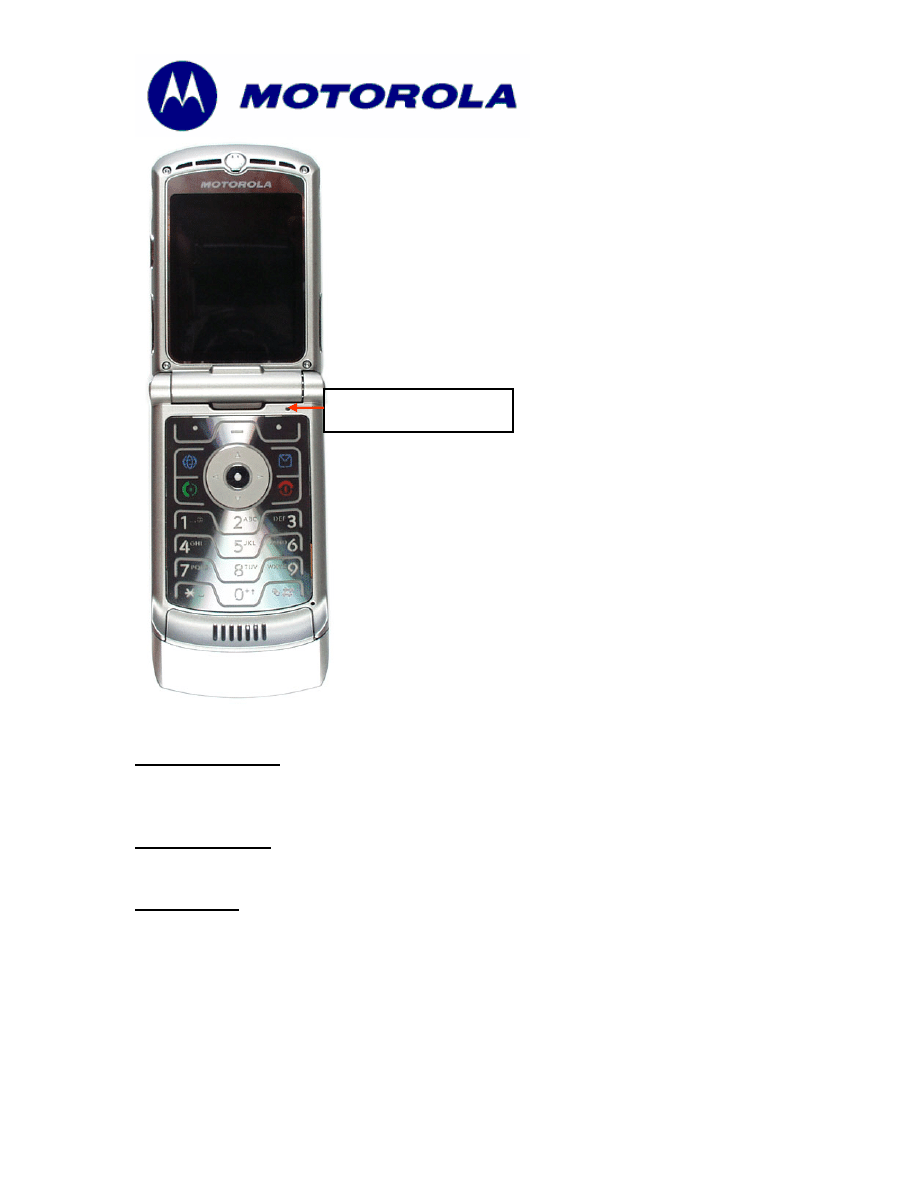
Power up the phone. Cover the light sensor, located in the upper right corner of
the keypad per figure 1.0, with your finger. Press any key and check if the
keypad backlight is on or not.
1a.
If the keypad backlight does not turn on, then proceed with normal
troubleshooting techniques per customer complaint.
2.
Otherwise, return the phone to customer and explain how keypad backlight
works.
MOTOROLA INTERNAL USE ONLY
Page 2
Consumer Solutions & Support
US Competency Center
600 North US Highway 45
Libertyville, Illinois 60048
Website: gs.mot.com
Figure 1.0
Photo Sensor
Call Center Action:
Call center should advise callers with complaint of “Keypad- No/ dim backlight” to
check if the keypad backlight is functional or not per method described above.
Service Inventory
N/A
Global Codes
M Claims:
Customer Complaint Codes: MKP05 (Main Keypad - No/dim Backlight)
Problem Found Code: CND00 (Could not Duplicate - No Detail Provided)
Repair Code: TAP00 (Handset - Tested And Passed)
Document Outline
Wyszukiwarka
Podobne podstrony:
LVCCFSB2006 14 V3 V3i Keypad Backlight Low Brightness
LVCCFSB2006 36 V3i Keypad Intermittent FM Contamination
LVCCFSB2004 206 V3 Keypad FSB
LVCCFSB2004 256 3G E1000 V980 Main Keypad No backlights
LVCCFSB2004 249s 3G V980 No Intermittent CLI Display
CSB 1083 2 Keypad no function
15 customer service no 2
No Home, No Homeland raport
NO 04 A004 4 2010
Ciało człowieka Błędy percepcji
Chopin Bourrée No 2, Op D2 No 2
dietetyk 321[11] z
No Longer White
ROZWÓJ PERCEPCJI, studia - praca socjalna, Biomed
percepcja ksztaltu, Psychologia, poznawcza (percepcja, myślenie, pamięć), ćwiczenia
więcej podobnych podstron