
Making Leaders Successful Every Day
January 5, 2009
Should Your Email Live
In The Cloud? An Infrastructure
And Operations Analysis
by Christopher Voce
for IT Infrastructure & Operations Professionals

© 2009, Forrester Research, Inc. All rights reserved. Unauthorized reproduction is strictly prohibited. Information is based on best available
resources. Opinions reflect judgment at the time and are subject to change. Forrester®, Technographics®, Forrester Wave, RoleView, TechRadar,
and Total Economic Impact are trademarks of Forrester Research, Inc. All other trademarks are the property of their respective companies. To
purchase reprints of this document, please email clientsupport@forrester.com. For additional information, go to www.forrester.com.
For IT Infrastructure & Operations Professionals
ExECuTIVE SummArY
There isn’t much that hasn’t already been said about the criticality of email in business today — but the
cost of hosting and managing your own email infrastructure is probably reaching the breaking point.
Google’s $50-per-user annual fee has set a new floor in email pricing and is driving organizations
to look inward at their situation and then outside at the hosted and cloud offerings. Companies are
looking at upcoming email migrations, consolidations, and upgrades as times to potentially make a
change. Before making a service architecture change, you should examine the needs of your different
user constituencies, profile the applications that either integrate or work in concert with email, and
understand the real costs of keeping email in your data center and running it yourself.
TAbLE OF COnTEnTS
On-Premise Email Is Giving IT Ops A Migraine
The Service Architectures To Support Email
Are Evolving
Organizations Should Look To The Sky For Help
Roll Up Your Sleeves — Your Users, Apps, And
Costs Dictate The Best Approach
rECOmmEndATIOnS
Ready Your Organization To Take Advantage
Of The Cloud
WHAT IT mEAnS
Email Could Open The Door To Broader Cloud
Adoption
ALTErnATIVE VIEW
Storage Trends Shift The Cost Equation For
Microsoft Exchange Users
Supplemental Material
nOTES & rESOurCES
Forrester surveyed 53 user companies,
interviewed 12 of those companies, and
interviewed the following 14 vendors: Azaleos,
Capgemini, dell, EdS (HP), Google, HP, Ibm,
Intermedia.net, LiveOffice, mailtrust (a division
of rackspace), microland, microsoft, novell, and
Symantec messageLabs.
Related Research Documents
“Should Your Email Live In The Cloud? A
January 5, 2009
“Trimming The Fat From Exchange”
April 28, 2008
“SaaS Clients Face Growing Complexity”
April 17, 2008
January 5, 2009
Should Your Email Live In The Cloud?
An Infrastructure And Operations Analysis
rethinking Where Your Email Lives And Who’s managing It
This is the second document in the “Email In The Cloud” series.
by Christopher Voce
with Ted Schadler, ben Echols, and Sara burnes
2
6
7
14
17
17
18
18

© 2009, Forrester research, Inc. reproduction Prohibited
January 5, 2009
Should Your Email Live In The Cloud? An Infrastructure And Operations Analysis
For IT Infrastructure & Operations Professionals
2
On-PREMISE EMAIL IS GIVInG IT OPS A MIGRAInE
Email is not new technology, but the way email is accessed, managed, and delivered is constantly
evolving. Google’s cloud-hosted enterprise push along with Microsoft’s introduction of its hosted
Exchange Online service have caused many infrastructure and operations (I&O) professionals to
wonder whether they should continue to manage and run their entire email infrastructure in their
own data centers.
1
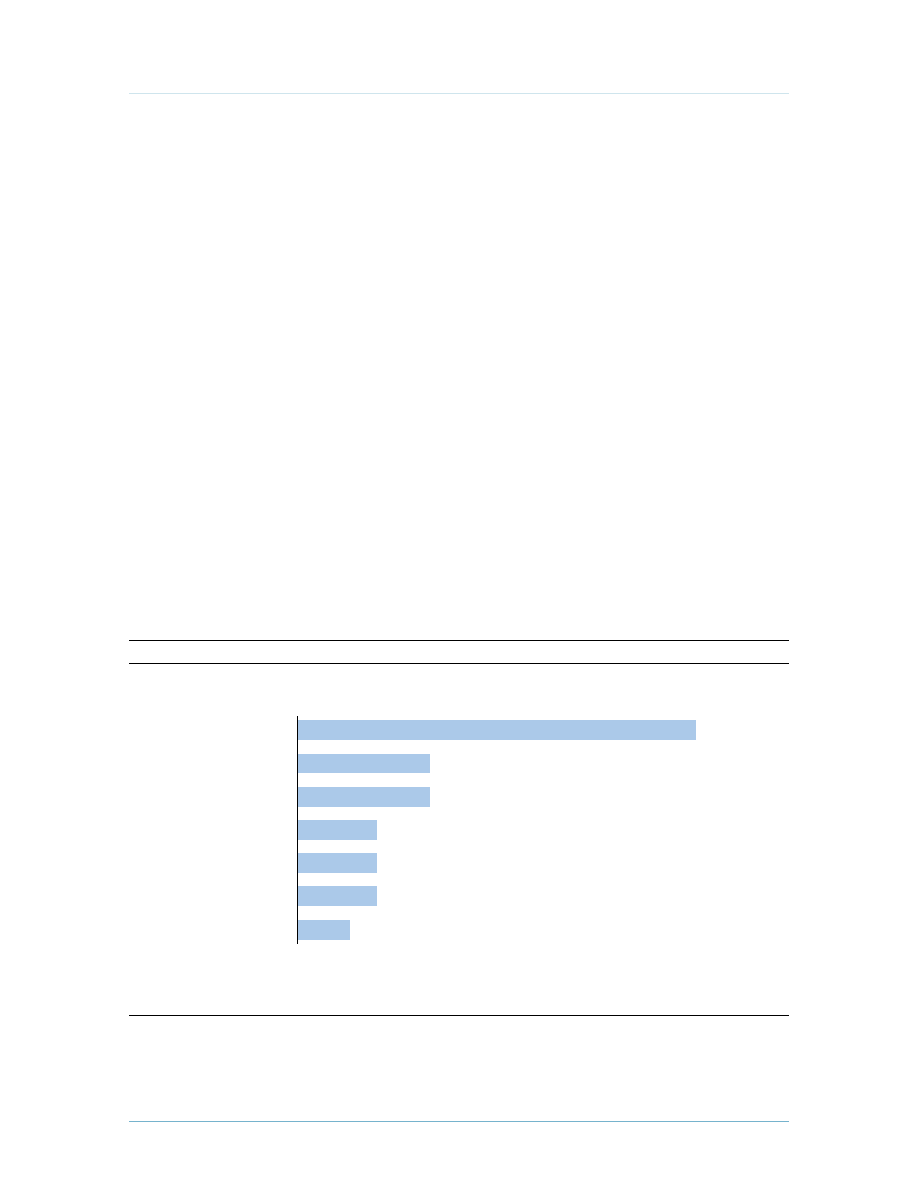
Forrester recently spoke with 53 large enterprises to find out how they plan to provide email for their
organizations and what barriers they see in shifting their email architecture. More than two-thirds of
respondents said they have already evaluated or are in the process of evaluating their email systems,
and many are considering different approaches (see Figure 1). In this report we’re examining the
barriers and opportunities to move some or all parts of email to a hosted or cloud provider, and in a
companion report titled “Should Your Email Live In The Cloud? A Comparative Cost Analysis,” we
further explore the fully loaded costs of running email on-premise or in the cloud.
Figure 1 many Enterprises Are rethinking Their Email Architecture
Source: Forrester Research, Inc.
42980
“What delivery model do you think you will
use?”
1-2
“Are you evaluating alternative options for
managing and providing email?”
1-1
Source: Q3 2008 North America And Europe Email Architecture Online Survey
Base: 53 IT professionals responsible for providing
email at North American and European businesses
Base: 36 IT professionals responsible for providing
email at North American and European businesses
that have previously evaluated or are currently
evaluating alternative options for managing
and providing email
(multiple responses accepted)
Currently
evaluating
49%
Not evaluating
30%
Have previously
evaluated
19%
Don’t know 2%
Keep
in-house
Move our servers to a
colocated data center
A hybrid of on-premise
and external
email services
Migrate to a hosted or
managed email provider
Outsource internal
email operations
28%
14%
56%
19%
22%
31% are considering multiple models

© 2009, Forrester research, Inc. reproduction Prohibited
January 5, 2009
Should Your Email Live In The Cloud? An Infrastructure And Operations Analysis
For IT Infrastructure & Operations Professionals
3
Several Factors Trigger Organizations To Re-evaluate Email Architecture
You don’t approach a decision to move something as critical and complex as email lightly. Typically,
your organization has a sunk cost in email infrastructure, and its criticality makes you shy away
from rocking the boat. It’s hard to ignore the “if it ain’t broke, don’t fix it” mentality when a
disruption to email can carry heavy consequences. One interviewee from an oil and gas company
stated, “If a message doesn’t go through, you may stop production,” and another from a financial
services company said, “And what happens when the link goes down — even if it’s for half an hour,
because the [trading] bell doesn’t wait.” However, there are certain trigger events that organizations
have come across that cause them to rethink their email architectures. Our conversations with
interviewees focused on:
·
Spiraling costs caused by email requirements. Email doesn’t exist in a vacuum — a variety of
external business and technical pressures cause a ripple effect in costs associated with backup,
archiving, eDiscovery, security, and high availability and disaster recovery that tie back to
email.
2
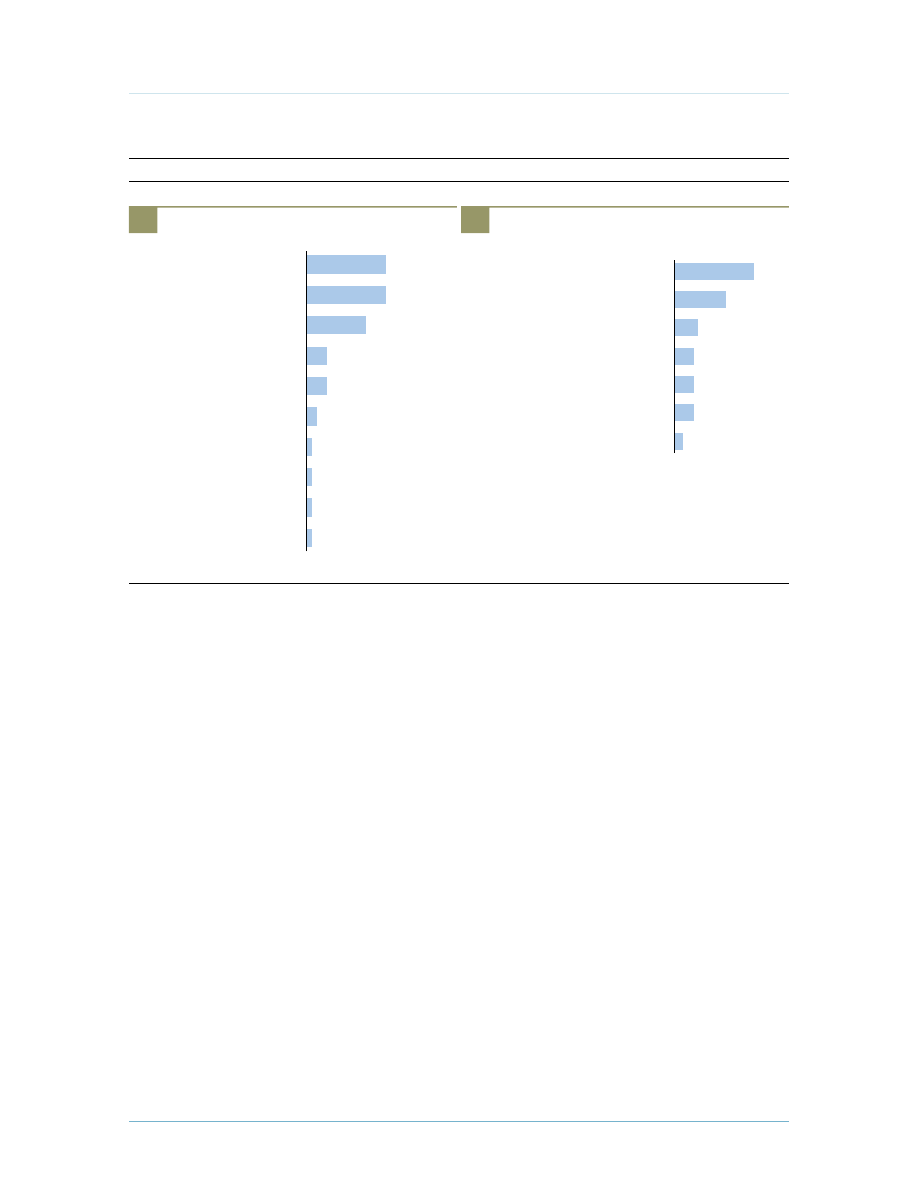
A whopping 42% of firms cited costs associated with running email as the primary
trigger to re-evaluate their approach (see Figure 2).
3
Firms must adhere to external regulatory or
legal requirements dictating how long they keep messages, which forces them to invest in pricey
archiving and eDiscovery systems. For many organizations, email holds a business- or mission-
critical role, so I&O professionals invest heavily in facilities like expensive SANs or alternate
failover sites to insulate them from downtime and disasters.
4
“The biggest driving force is reducing cost. A huge problem for us is storage because we have
expensive SAN hardware dedicated to Exchange.” (Healthcare organization)
“We’re always examining how we deliver a technology from a cost and capabilities
standpoint. Complexity is increasing, and cost along with it. Email antivirus and antispam
changes so rapidly that insourcing email is a major distraction. It’s not core to our
business, and we’d rather focus on core activity rather than worrying about running email.”
(Telecommunications company)
·
Email consolidation projects. Several factors have driven firms to put overweight email
infrastructure on a diet. Whether it’s legacy email systems that didn’t scale well, causing more
servers to be dedicated to email, or mergers and acquisitions that left organizations with
multiple disparate email systems from different vendors and different versions that must be knit
together, many organizations look to drive more efficiency into how they deliver email.
“Managing multiple platforms is an ordeal but it does ‘work’ and I put work in quotes.”
(Financial services firm)
·
Upgrades and migrations. Another combined 16% of surveyed users cited major upgrades and
platform migrations as triggers to re-evaluating their architecture. For some organizations, these
© 2009, Forrester research, Inc. reproduction Prohibited
January 5, 2009
Should Your Email Live In The Cloud? An Infrastructure And Operations Analysis
For IT Infrastructure & Operations Professionals
4
activities might also be tied to a consolidation, where different parts of the company are running
different email systems or versions. Often, the goal is to create a shared service to serve email to
the broader organization. Interviewees cited this as an ideal time to question whether or not this
should still reside in their own facilities.
“We are looking at upgrading to Exchange 2007 across our organization, which is spread out
around the world. Rather than keeping email in-house, we’re evaluating hosted providers to
offload it altogether.” (Manufacturing company)
Email’s Reach And Legacy Complicate Architectural Changes
For I&O pros, supporting legacy infrastructure is always a primary barrier inhibiting innovation
and flexibility. Forrester defines MOOSE as spending to maintain and operate the existing
organization, systems, and equipment — and email can be the 800-pound MOOSE in the room.
5
The cost of maintaining email internally extends beyond the email servers themselves, and
organizations are often confronted with maintaining the sprawling legacy.
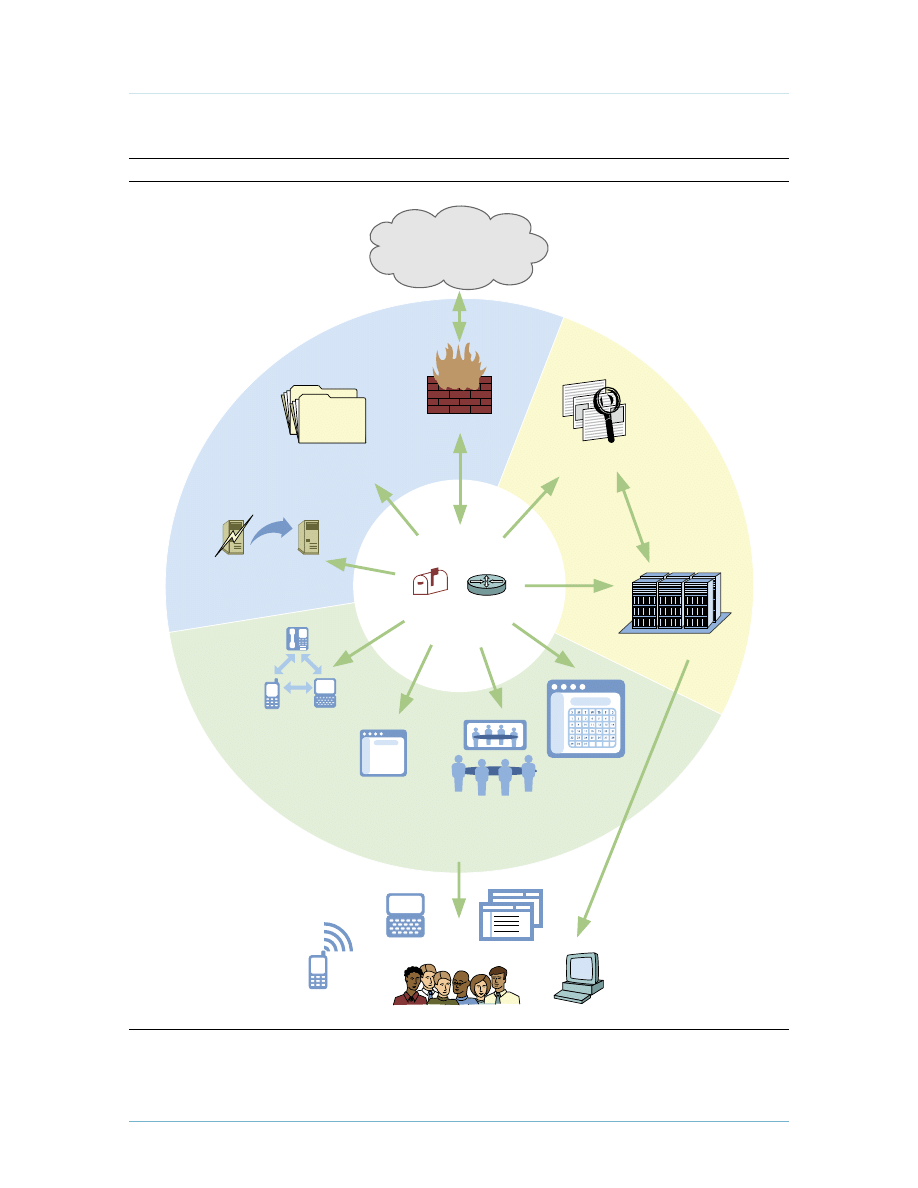
But trying to pry email infrastructure out of the data center raises many challenges. Interviewees
listed several critical points of integration where hosted email would have to tie back into their
company, with directories and applications topping the list (see Figure 3-1). Interviewees also
questioned the security of entrusting email to a third party and are dubious that an external provider
can ensure the availability of email (see Figure 3-2).
Figure 2 rising Email Costs drive Firms To Search For Answers
Source: Forrester Research, Inc.
42980
Source: Q3 2008 North America And Europe Email Architecture Online Survey
Base: 36 IT professionals responsible for providing email at North American and European businesses that
have previously evaluated or are currently evaluating alternative options for managing and providing email
“What is triggering your evaluation or change?”
Merger or
acquisition
Upgrading
existing software
Moving to
different vendor
New leadership
desires change
Other
Server
consolidation
Email is getting
too expensive
14%
14%
8%
8%
6%
8%
42%
© 2009, Forrester research, Inc. reproduction Prohibited
January 5, 2009
Should Your Email Live In The Cloud? An Infrastructure And Operations Analysis
For IT Infrastructure & Operations Professionals
5
Figure 3 businesses Face many Hurdles When making Changes To Email Architecture
Source: Forrester Research, Inc.
42980
Source: Q3 2008 North America And Europe Email Architecture Online Survey
Base: 26 IT professionals responsible for providing
email at North American and European businesses
that have previously evaluated or are currently
evaluating using a hosted or hybrid
approach to provide email
(multiple responses accepted)
“What other barriers or concerns do you have
about moving email out of the data centers?”
3-2
“What are the critical points of integration?”
3-1
Integration issues
Potentially higher cost
Organizational impact
Functionality loss
Regulatory/legal implications
Email availability
Security concerns
2
5
5
5
6
13
20
Don’t know
Records management
Partner access
Availability
Security
Mobility options
Applications
Collaboration suites
Directories
16
16
12
4
4
2
1
1
1
1
Unified communications
Email Is Embedded Deeply In The Organization
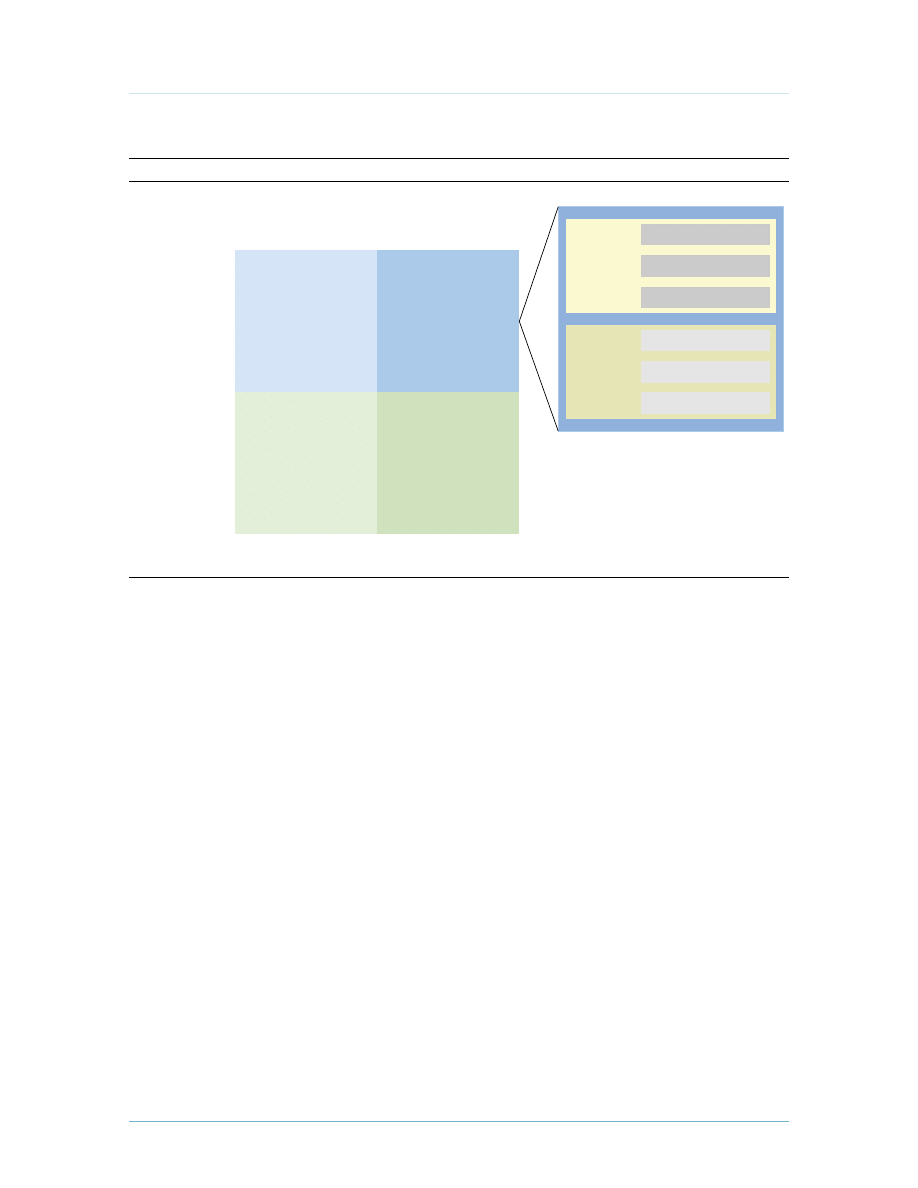
Email does not sit near the surface in most organizations’ infrastructure. It’s tightly wrapped in
business processes, services that support and extend email, and applications (see Figure 4). All
of this makes it difficult to take advantage of architectural shifts that can drive down the cost and
increase flexibility. The ties that bind email infrastructure into organizations include:
·
Supporting infrastructure required to support and extend email. There is a piece of
infrastructure supporting email that can complicate making an architectural change. A shift
would affect systems like message archiving or disaster recovery — both the infrastructure
itself and the process and people that support it. For instance, organizations are increasingly
accountable for an accurate record of their documents and communications, whether it comes
from regulatory, internal, or legal requirements. Broader corporate data archiving or eDiscovery
strategies can complicate changes to email architecture. Mobility infrastructure like BlackBerry
Enterprise Servers are very latency sensitive, so where the mail servers go, so must they.
· A broader set of messaging and collaboration services. Companies are deploying new tools
to foster more effective collaboration among their employees, including instant messaging, Web
conferencing, and team workspaces. These services are becoming more and more intertwined

© 2009, Forrester research, Inc. reproduction Prohibited
January 5, 2009
Should Your Email Live In The Cloud? An Infrastructure And Operations Analysis
For IT Infrastructure & Operations Professionals
6
as functionality like presence is integrated across collaboration tools. For example, you
can integrate Microsoft Exchange mail information into SharePoint sites or relay reporting
information. One interviewee remarked, “If it was just email, we’d make the jump right now —
but there are strong links to our other collaboration tools. We’ll strongly consider this in the
next few years, but it won’t be just for email.”
·
Affiliated applications and processes. Many applications may require integration with email
systems for their functionality, and they can vary in how deeply they’re tied into email. Your
financial system may simply require SMTP to send email updates to employees, while your
CRM package might use a platform-specific protocol like Microsoft Exchange’s MAPI to send
customized newsletters to customers. It’s not just the applications, either — some disparate
email environments that span an enterprise might integrate with different directories as well,
further complicating integration. Email integration can be more subtle, too. For example, firms
frequently use template-based emails to drive business processes like a new employee hire or
facilities request.
THE SERVICE ARCHITECTURES TO SUPPORT EMAIL ARE EVOLVInG
The options you have at your disposal for where to run email are evolving, but they address basically
two questions: “Where does the email live?” and “Who’s managing it?” Answering these two
questions paints a simple picture of different approaches to the email service architecture (see Figure
5). In addition to running everything on-premise, you can:
·
Outsource email operations. Basic outsourcing implies you would typically be working with
an external outsourcing provider to supplement or replace your staff running the infrastructure.
This can address a very real pain you feel, as knowledgeable talent can be expensive and hard
to find and retain. Traditional outsourcers have evolved as well and can bring your email
infrastructure into their own data centers. Firms like Microland have a sophisticated remote
management approach, lessening the costs associated with managing and maintaining an
Exchange environment. Azaleos takes a different approach, remotely managing its customers’
Exchange environments from a central operations center.
·
Move infrastructure to a colocated facility. The costs associated with building your own data
center and worrying about reliable power, cooling, and adequate bandwidth are more than some
firms should bear. Colocation helps save users the trouble of building their own data centers
while benefiting from the efficiencies of a larger provider.
6
Some firms use colocated facilities as
secondary sites for disaster recovery purposes — and where possible, utilize the otherwise idle
cycles for lower priority workloads.
7
·
Use a hosted mailbox service. A hosted mailbox service offloads both the hosting and
management of email and encompasses three basic variations: multi-tenant hosted, single-

© 2009, Forrester research, Inc. reproduction Prohibited
January 5, 2009
Should Your Email Live In The Cloud? An Infrastructure And Operations Analysis
For IT Infrastructure & Operations Professionals
7
tenant hosted, and outsourcer hosted. The major architectural differentiator of these options
is the level of integration possible — just how deeply can you integrate or modify the systems?
What are the service windows and do you have inspection rights? Multi-tenant providers don’t
have to dedicate as much infrastructure to providing discrete email environments for customers,
and you benefit in reduced costs from the economies of scale. Problems like server support,
facilities costs, and capacity planning and sizing now belong to your provider.
·
Employ a hybrid approach. The different alternatives to email architecture are not necessarily
black and white, mutually exclusive options — there can be a mix of on-premise and externally
hosted services that fall into two categories that we’ll explore in depth later. First, you can
peel off support services like message filtering, archiving, and continuity and use a hosted
service provider while keeping the rest of the mail infrastructure on-premise. Second, you
can use an inexpensive single- or multi-tenant hosted mailbox service for a large number of
users while retaining others on an on-premise email system. This can shift the economics back
in favor of providing email to those users that you don’t currently serve. Some colleges and
universities have already begun to adopt this model — keeping their staff’s email on-premise
while leveraging a service for the tens or hundreds of thousands of students. Firms with large
numbers of affiliates and agencies, like insurance or mortgage companies, might be likely
candidates for this model as well. There is the potential to have more control over — and drive
down costs in —communications with them.
ORGAnIzATIOnS SHOULD LOOk TO THE SkY FOR HELP
There aren’t many scenarios where an organization could not benefit from hosting some of its email
services in the cloud. The cloud lets you shed burdens like email-driven capacity planning and free
up IT resources so you can focus on your business. Certainly there are opportunities to contain
costs, but the cloud can also enable new scenarios not possible with on-premise solutions, such as
quickly integrating newly acquired businesses or spinning up new businesses.
© 2009, Forrester research, Inc. reproduction Prohibited
January 5, 2009
Should Your Email Live In The Cloud? An Infrastructure And Operations Analysis
For IT Infrastructure & Operations Professionals
8
Figure 4 Email Sits At The Center Of A Complex Ecosystem
Source: Forrester Research, Inc.
42980
Messaging/
collaboration
Mobility
IM
Web conferencing
Workspace
Filtering
Users
Disaster recovery
Unified
communications
CRM, HR, etc.
Supporting
services
External email traffic
Mailboxes Routing
Laptops
Desktops
Web Access
Affiliated
applications
Archiving
Directory/directories
© 2009, Forrester research, Inc. reproduction Prohibited
January 5, 2009
Should Your Email Live In The Cloud? An Infrastructure And Operations Analysis
For IT Infrastructure & Operations Professionals
9
Figure 5 A Framework For Email deployment Architectures
Source: Forrester Research, Inc.
42980
Your data center
Who
runs it?
Their data center
Where does it live?
They do
You do
Colocated
On-premise
Outsourced
Hosted email services
Mailboxes
Multi-tenant hosted
Single-tenant hosted
Outsourcer hosted
Supporting
services
Email continuity
Message filtering
Message archiving
Cloud-Based Services Can Offload Costs And Responsibility While Increasing Flexibility
There are three opportunities to use providers outside the four walls of your data center either to
replace or extend your on-premise email infrastructure (see Figure 6). Not all are true multi-tenant
providers, as some of these, like hosted email solutions, have infrastructure dedicated to you. True
multi-tenant SaaS offerings are cheaper for providers to operate, but the trade-off is in your ability to
integrate with them. For services like a multi-tenant email filtering, this is a non-issue — but if you’re
looking to integrate your Siebel CRM system with Google Gmail, then this could be a problem. Based
on your organization’s environment and needs, there are three architectures to consider:
1. Hosted email. There is a range of options at your disposal here. On one hand, for simple
environments, a multi-tenant or cloud solution can be an extremely cost-effective option.
On the other hand, firms have the least amount of control over a cloud service. You’re at the
mercy of the provider’s service windows as well as its upgrade cycle. Some Google Apps users
were locked out after an upgrade to the system in October. Single-tenant email solutions don’t
match the price of cloud solutions, but they offer more control to organizations. Providers also
offer more mobility options to include BlackBerry Enterprise Servers. Finally, outsourcing
organizations like EDS bring infrastructure into their own data centers to leverage economies of
scale to manage and maintain those environments.

© 2009, Forrester research, Inc. reproduction Prohibited
January 5, 2009
Should Your Email Live In The Cloud? An Infrastructure And Operations Analysis
For IT Infrastructure & Operations Professionals
10
2. Hosted support services (hybrid). If maintaining an on-premise email system is a necessity,
there is still an opportunity to benefit from cloud services to streamline your environment. You
don’t have to tie up your own people and resources worrying about message filtering, archiving,
and continuity — there are people who can do it better and cheaper than you can.
3. Split-domain email (hybrid). Split-domain routing enables you to segment users and leverage
different architectures to serve those with more modest needs. This does introduce more
complexity into the environment, as you now have to either replicate directory information to
a provider or allow access to your internal directories.
8
Perhaps tens of thousands of rotating
users may come and go, not carrying the same requirements as the full-time staff at a staffing
organization. Organizations may also look to extend email to employees in emerging markets
where they might not have the resources or infrastructure to support on-premise email.
Manufacturing firms may have many users who don’t have email but who could benefit from
electronic communication in place of bulletin boards or paper-based benefits enrollment.
“We have over 10,000 users on email, but can have over a hundred thousand contractors
at any given time. We pulled back email a while ago from the contractors and have them
use their own personal email. But a cloud service could be much more attractive to serve
them from a branding and business perspective to manage communications with them.”
(Professional services firm)
Hosted Supporting Services Are Making More And More Sense
Supporting services can take up more space, power, and resources than they need to. Traditional on-
premise software vendors like Trend Micro are taking their solutions and offering them as a service.
While circumstances such as a broader corporate strategy involving an archiving service might limit
options, there is a clear opportunity for many to offload the cost and responsibility associated with
(see Figure 7):
·
Message filtering. Because filtering is mostly well partitioned from your infrastructure, it’s
the easiest place to start. This includes in- and out-bound antivirus, antispam, encryption, and
possibly data-loss prevention. In addition to merely offloading responsibility for maintaining
and managing the service, moving your email filtering to a provider means email is consuming
less bandwidth and your mail servers are processing fewer messages. External providers will
also be able to back their services with more redundancy than you can, at a better price.
·
Message archiving. As mentioned, archiving and eDiscovery for email can be trickier for some
organizations. Broader archiving, corporate eDiscovery needs, or plans for data may limit
options for you to make changes to those associated with email. Services range from basic
journaling — where all incoming messages are sent and stored at an external provider with little
granularity — to more detailed archiving. It’s important to fully explore your organization’s
requirements for archiving and fully vet issues like, “Does the online service provide
performance requirements for discovery?”
9

© 2009, Forrester research, Inc. reproduction Prohibited
January 5, 2009
Should Your Email Live In The Cloud? An Infrastructure And Operations Analysis
For IT Infrastructure & Operations Professionals
11
·
Email continuity. Email continuity, or disaster recovery, covers scenarios associated with the
loss of your primary site and allows email to keep flowing. The costs associated with planning
and building out your own data center or leveraging a colocation provider and purchasing the
necessary hardware and software can be stifling. These hosted services range from providing
basic send/receive functionality if the primary server fails to more sophisticated and expensive
offerings that include access to an archive of the past week’s or month’s messages. When
selecting a service, you want to think about how all of your users access their email. Some email
continuity services include failover for mobile devices as well.
Figure 6 Architecture Options
Source: Forrester Research, Inc.
42980
• Expensive to
maintain
• Consumes IT staff time
and resources
On-premise email
All email services
(mailboxes, filtering,
etc.) run on company-
owned servers.
• Integration with
directory and other
business applications
• Exposure to business
failure by service provider
Hosted email
All email services
are delivered by a
hosted mailbox service
provider.
• Loss of direct access
• Potential for conflict in
implementing archiving
and eDiscovery processes
Hosted supporting
services (hybrid)
Some supporting
services, like filtering or
archiving, are delivered
by a cloud- based
provider.
• Integration with
directory and other
business applications
• Different experiences for
workers using on-premise
versus hosted email
Split-domain
email (hybrid)
Some employees use
the on-premise email,
and some use a hosted
mailbox service.
Challenges
Architecture
Description
Benefits
• Traditional, hence
comfortable
• Easier integration with
other applications and
resources
• Pay-as-you-go financing
model
• Always-current software
and protection
• Operated by someone
else
• Offload maintenance
of specialty services
• Often less expensive
• Keeps core email on-
premise
• Move occasional users
or new users to a hosted
service
• Easier to provision new
users or acquired
companies

© 2009, Forrester research, Inc. reproduction Prohibited
January 5, 2009
Should Your Email Live In The Cloud? An Infrastructure And Operations Analysis
For IT Infrastructure & Operations Professionals
12
Figure 7 Hosted Supporting Services Can Save On-Premise Email Infrastructure
Source: Forrester Research, Inc.
42980
Potential barriers
Service
Message
filtering
Message
archiving
continuity
Ease of adoption
Easy
Medium to hard
Easy to medium
Best suited for
Most organizations
Organizations that do not
want the cost and complexity
of an on-premise archiving
strategy
Organizations looking to add
site-resiliency to their email
environments but find the costs
associated with a remote site
and infrastructure prohibitive
• Some might need a highly configurable
on-premise solution
• Already have a sunk cost in filtering
• Some filtering might require directory
access
• Broader data archiving strategy may
dictate an on-premise offering
• Larger corporations may do it in-house
for less
• May need a feature-rich, on-premise
solution
• Possible conflict with broader corporate
disaster recovery strategy
• Failover is easier than failback
• Interdependencies with applications
can complicate failover and failback
Hosted Mailbox Services Can Provision Some — Or All — Of Your Users
The three categories of hosted mailbox services (all of which could be considered cloud providers,
based on their pricing models) differ on cost, visibility, and your ability to integrate with them (see
Figure 8). There is a difference in contract commitment as well with each of these. For example,
relationships with outsourcing firms often involve agreements of at least three years, while a multi-
tenant hosted solution requires little, if any time commitment, for basic email. Hosted mailbox
services fall into three categories, which include:
·
Multi-tenant hosted solutions. Hosted multi-tenant email vendors use a shared infrastructure
to host customers’ email. Because of the economies of scale in providing this, it’s the lowest
cost option — but it lags behind the other options in your ability to integrate with your other
applications and services. This is an appealing option for companies with simpler environments
who need basic integration for a fully hosted architecture or those looking to provide cheaper
email for large subsets of users in a split-domain hybrid architecture. As time progresses, multi-
tenant offerings will become more accessible to a broader audience as application vendors work
with the providers to integrate with them. In time, this will be the de facto standard.
·
Single-tenant hosted solutions. Hosted email vendors use single-tenant, or dedicated, servers
for individual companies. This is best suited for organizations that need a higher level of
integration than is possible with multi-tenant solutions but that still want to move email off-
premise for all of their employees or for large subsets of the organization (e.g., a large contractor

© 2009, Forrester research, Inc. reproduction Prohibited
January 5, 2009
Should Your Email Live In The Cloud? An Infrastructure And Operations Analysis
For IT Infrastructure & Operations Professionals
13
population or newly acquired business). Single-tenant solutions allow you more access to the
systems, easier integration with applications and mobility services, and more control over
service windows and updates.
·
Outsourcer hosted solutions. In this option, a traditional IT outsourcing provider uses its
data centers to host your infrastructure. This is best suited for large organizations with complex
environments and deep integration into their email infrastructure that want to reduce their
facilities and labor costs with an outsourcer. Because of the high cost associated with this
option, you would most likely only use this for hosting all of your users. Outsourcer hosted
solutions also require a longer commitment than the other two options, more like a traditional
outsourcing arrangement.
Figure 8 Hosted mailbox Services balance Cost And Capabilities
Source: Forrester Research, Inc.
42980
Option
Cost
Barriers
Sample vendors
Multi-tenant
hosted
Google, Microsoft, PostPath
(Cisco), Zimbra (Yahoo!)
Dedicated
hosted
Outsourcer
hosted
Lower
Medium
Higher
• Lags in features compared to single-tenant
and on-premise solutions
• Limited integration possible with affiliated
applications and mobility solutions
• Lack of visibility into service windows and
upgrades
• Add-on services like mobility options add up fast
• Larger corporations can do it in-house for less
• More integration possible than cloud, but not on
par with on-premise
• Lacks the massive scalability of the cloud
• Highest costs
• Corporate resistance to outsourcing
AT&T Hosting & Application
Services, BT, Intermedia.net,
LiveOffice, Mailtrust (Rackspace),
Mi8, Microsoft, USA.NET, Verio,
Verizon Business
Capgemini, EDS (HP), IBM,
Microland

© 2009, Forrester research, Inc. reproduction Prohibited
January 5, 2009
Should Your Email Live In The Cloud? An Infrastructure And Operations Analysis
For IT Infrastructure & Operations Professionals
14
ROLL UP YOUR SLEEVES — YOUR USERS, APPS, AnD COSTS DICTATE THE BEST APPROACH
The process of choosing the right architecture for your organization starts with a discovery project
to better understand the opportunities, risks, and implications of making a change. There is a large
ecosystem of partners that can help (see Figure 9). But before you start, you have to roll up your
sleeves to do a detailed risk and impact analysis lest you come across a surprise that blows up your
migration effort. To proceed, you must understand:
·
How your workers use email. It’s important to profile how your employees or contractors use
email. Do all of your users require full-blown email and collaboration? We’ve seen workers
fall into three buckets: mobile executives, information workers, and occasional users.
10
Cloud
services could be an opportunity to serve employees who did not traditionally have email at all.
Can email be a more effective and secure way of communicating with them? For example, if you
could reduce paper communications with employees like direct-deposit statements and other
corporate communications, could the savings more than justify the cost?
·
The applications affected by the change. This task uncovers the depth of the integration with
your email platform. When examining applications, ask yourself questions like: “What is their
criticality? Are there alternatives? How deeply are they integrated?” Some applications may be
targeted for sunsetting, therefore minimizing their impact on the direction you take. There are
some applications that might not be tightly integrated but that have proximity issues. Chatty
applications like BlackBerry Enterprise Server require close proximity to the mail server.
·
Your real costs in running email — and the cost of change. When we asked respondents about
the costs associated with supporting email in their environments, their answers varied widely —
and most didn’t know. To see if it’s more cost-effective to take a different approach, you have to
know exactly what it costs you to keep on supporting your email infrastructure.
11
Don’t be shy
either: Look for the full burden email places on your budget, from the servers to the security,
availability, and mobility services that surround it. One of the largest components to think about
is the labor cost, which can far outweigh the others. Finally, if making a move, what’s the cost of
change? Will this require new licenses, development, implementation, or end user training?
© 2009, Forrester research, Inc. reproduction Prohibited
January 5, 2009
Should Your Email Live In The Cloud? An Infrastructure And Operations Analysis
For IT Infrastructure & Operations Professionals
15
Figure 9 Vendor List
Source: Forrester Research, Inc.
42980
AppAssure Software
Accenture*
Azaleos
Apptix
Barracuda Networks
BT (formerly British Telecom)
CA (formerly Computer Associates)
Provider
Capgemini*
Cemaphore Systems
Double-Take Software
EDS (HP)*
EMC
Global Relay Communications
HP Services*
IBM Global Services*
Intermedia.net
Iron Mountain
LiveOffice
Mailtrust (Rackspace)
IBM Lotus
MessageOne (Dell)
*Outsourcer that can also host email infrastructure in its data center
†
Provides hosted monitoring and management of Exchange
AT&T Hosting & Application Services
Mailboxes
Both
Both
Both
Both
Both
Both
Both
Both
Both
Both
Both
Both
Both
Both
Both
Both
Both
Both
Both
Both
Both
Both
Hosted
Hosted
Hosted
Hosted
Hosted
Hosted
Hosted
Hosted
Hosted
†
Message
archiving
On-premise
On-premise
Both
Hosted
Hosted
Hosted
Hosted
Hosted
Hosted
Hosted
Hosted
Hosted
continuity
Both
On-premise
On-premise
On-premise
Both
Hosted
Hosted
Hosted
Hosted
Hosted
Hosted
Hosted
Hosted
Message
filtering
On-premise
On-premise
Hosted
Hosted
Hosted
Hosted
Hosted
Hosted
Autonomy ZANTAZ
Both
Hosted
Hosted
Hosted
On-premise
Both
Both

© 2009, Forrester research, Inc. reproduction Prohibited
January 5, 2009
Should Your Email Live In The Cloud? An Infrastructure And Operations Analysis
For IT Infrastructure & Operations Professionals
16
Figure 9 Vendor List (Cont.)
Source: Forrester Research, Inc.
42980
Provider
Mimosa Systems
NetApp
Neverfail
Novell
Open Text
PostPath (Cisco)
Proofpoint
Quest Software
Sophos
Symantec MessageLabs
Teneros
Trend Micro
USA.NET
Verio
Verizon Business
Zimbra (Yahoo!)
Microsoft
Microland*
Mailboxes
Both
On-premise
Both
Both
Hosted
Hosted
Hosted
Message
archiving
Both
On-premise
On-premise
On-premise
On-premise
Both
Hosted
Hosted
Hosted
Hosted
Both
continuity
On-premise
On-premise
On-premise
Both
Both
Hosted
Hosted
Hosted
Both
Both
Both
Both
Both
Message
filtering
On-premise
Both
On-premise
Both
Both
Both
Hosted
Hosted
Hosted
*Outsourcer that can also host email infrastructure in its data center
†
Provides hosted monitoring and management of Exchange

© 2009, Forrester research, Inc. reproduction Prohibited
January 5, 2009
Should Your Email Live In The Cloud? An Infrastructure And Operations Analysis
For IT Infrastructure & Operations Professionals
17
r E C O m m E n d A T I O n S
READY YOUR ORGAnIzATIOn TO TAkE ADVAnTAGE OF THE CLOUD
Outsourcing email might seem familiar. You may have been here several years ago, and the
questionable-at-best cost savings didn’t make up for frustrated end users suffering from a
reduced experience and hanging email clients. It would have left a bad taste in your mouth. but
it’s worth taking another look. Changes to email platforms have made them more service-provider
friendly and have driven down the costs. Client applications like microsoft Outlook are much
more latency-friendly and abstract where their email actually sits from the users. And the services
themselves have improved.
After performing an impact analysis, you may run into organizational resistance to moving off-
premise. Google, Ibm, microsoft, and other vendors are rapidly improving their services to make
them more digestible, but maybe your organization faces too many hurdles to make a shift within
the next two years. Even if you’re not ready to make an architectural shift now, you should:
·
Run a pilot program with a hosted service. The beauty of these services is it can take very
little effort to stand them up and test them. You can feel out a hosted or cloud email service
much easier than an on-premise solution. by piloting a group of users, you can see how it
affects their email experience and how applications behave.
·
Avoid deepening your dependence on an on-premise email platform. Pause before
diving into application deployments that have ties into your email. Explore alternative
methods of integration and focus on standards-based methods like SmTP rather than tying
into a proprietary protocol like mAPI — you’ll ensure that you have more options available to
you and have a much easier time making a transition down the road.
·
Think about more than just email. Email sits in an ecosystem of broader collaboration
tools and mobility options. Focusing your approach on just email threatens the shared
functionality found in collaboration tools like presence. If you’re beginning to adopt these
tools or have already deployed them, you should certainly factor them in to your plans.
W H A T I T m E A n S
EMAIL COULD OPEn THE DOOR TO BROADER CLOUD ADOPTIOn
Craig mundie, microsoft’s chief research and strategy officer, recently said at a conference
that people make decisions based on applications, not platforms, and that the cloud needs
killer apps. Organizations face significant costs in simply providing resilient email in the face of
external regulation and business changes involving m&A. All of this might be enough to push an
organization to decide that it can no longer be in the business of running email. It’s hard to make
pivots in your business if your infrastructure can only change directions like a tanker. Success with
email will start organizations thinking about where else they can benefit from the economies of
scale that the cloud can buy them.

© 2009, Forrester research, Inc. reproduction Prohibited
January 5, 2009
Should Your Email Live In The Cloud? An Infrastructure And Operations Analysis
For IT Infrastructure & Operations Professionals
18
A L T E r n A T I V E V I E W
STORAGE TREnDS SHIFT THE COST EqUATIOn FOR MICROSOFT EXCHAnGE USERS
In a microsoft Exchange Server environment, the costs associated with storage can more than
quadruple the investment in server hardware. SAns were once must-haves in order to provide
Exchange with high availability in clustering scenarios. With Exchange 2007, microsoft targeted
performance issues impacting storage and has pulled the resiliency intelligence out of the storage
and pushed it into Exchange itself — using multiple copy clusters, which means the use of direct-
attached storage (dAS) is now a more realistic option. In fact, microsoft published a white paper
detailing its internal use of dAS for its entire Exchange environment. many firms not only use
expensive dedicated SAn hardware but have also deployed pricey archiving solutions to give
their users larger mailboxes. The use of dAS in Exchange could mean large amounts of storage at
a cheaper price point — eliminating the separate archiving and backup systems necessitated by
tight mailbox size requirements — and that could be enough for some firms to put off the pain of
ripping email out of their data centers and sending it to the cloud.
SUPPLEMEnTAL MATERIAL
Companies Interviewed For This Document
Azaleos
Capgemini
Dell
EDS (HP)
HP
IBM
Intermedia.net
LiveOffice
Mailtrust (a division of Rackspace)
Microland
Microsoft
Novell
Symantec MessageLabs
EnDnOTES
1
A similar re-evaluation is happening in collaboration software: Software based in the cloud is potentially
much less expensive, makes it easier to manage a single source of the truth, and is available anywhere, at any
time. See the March 18, 2008, “Get Ready For Collaboration In The Cloud” report.
2
High costs aren’t tied to just sending, receiving, and storing email — business requirements and external
pressures demand firms surround Exchange with expensive services. See the April 28, 2008, “Trimming The
Fat From Exchange” report.
3
When you factor in the costs of hardware, software, people, maintenance, storage, archiving, mobile email,
and financing, the fully loaded cost of maintaining on-premise email can soar. So while the cost to an

© 2009, Forrester research, Inc. reproduction Prohibited
January 5, 2009
Should Your Email Live In The Cloud? An Infrastructure And Operations Analysis
For IT Infrastructure & Operations Professionals
19
individual budget holder might look low, the fully loaded cost of email is surprisingly high. See the January
5, 2009, “Should Your Email Live In The Cloud? A Comparative Cost Analysis” report.
4
Exchange has become so inextricably linked to company productivity that any downtime can result in
business screeching to a grinding halt. As a result, IT professionals are rushing to improve Exchange
availability with dedicated, highly redundant storage, next-generation backup technologies, and clustering.
See the October 9, 2007, “Messaging Continuity: Ensuring High Availability For Microsoft Exchange” report.
5
Forrester has developed a checklist of 20 best practices to enable CIOs to score themselves on their ability
to control their IT MOOSE costs (spending to maintain and operate the organization, systems, and
equipment). See the September 20, 2007, “IT MOOSE Management — 20 Best Practices” report.
6
Building a modern data center isn’t easy, and a colocated data center will have state-of-the-art security,
power, cooling, fire suppression, and network bandwidth. Colocation facilities can also act as disaster
recovery sites, provide overflow capacity, and host applications that need more bandwidth or closer
proximity to users. See the October 21, 2008, “Don’t Build Your Next Data Center, Colocate It” report.
7
The pursuit of IT consolidation and greater financial and operational benefits is driving US enterprises
toward more active-active data centers — data centers that run production workloads but also serve
as recovery sites. See the December 7, 2007, “IT Consolidation Drives Active-Active Data Center
Configurations” report.
8
Cloud vendors have secure ways of synchronizing directories, but it may take convincing your security
team. If users on the hosted service still need their email integrated with other on-premise applications,
then split-domain email might not be feasible.
9
Smart companies use four key strategies to succeed with email archiving: They rightsize the infrastructure;
walk through eDiscovery scenarios ahead of time; consider archiving other data types besides just email;
and staff and manage the archive for the long term. See the October 17, 2008, “Best Practices: Email
Archiving” report.
10
These categories capture the needs of the user, answering questions like: Does this user need a BlackBerry?
Is a Web client sufficient for their work? To analyze the costs of providing email in a way that reveals where
costs can be controlled, it’s important to segment your employees based on what they actually need. See the
January 5, 2009, “Should Your Email Live In The Cloud? A Comparative Cost Analysis” report.
11
Zeroing in on the real costs of hosting and managing your own email environment can be difficult, but in
the companion report, Forrester provides guidance on exactly how to go about it. See the January 5, 2009
“Should Your Email Live In The Cloud? A Comparative Cost Analysis” report.
Forrester Research, Inc. (Nasdaq: FORR)
is an independent research company
that provides pragmatic and forward-
thinking advice to global leaders in
business and technology. Forrester
works with professionals in 19 key roles
at major companies providing
proprietary research, consumer insight,
consulting, events, and peer-to-peer
executive programs. For more than 25
years, Forrester has been making IT,
marketing, and technology industry
leaders successful every day. For more
information, visit www.forrester.com.
Australia
Brazil
Canada
Denmark
France
Germany
Hong Kong
India
Israel
Japan
Korea
The Netherlands
Switzerland
United Kingdom
United States
Headquarters
Forrester Research, Inc.
400 Technology Square
Cambridge, MA 02139 USA
Tel: +1 617.613.6000
Fax: +1 617.613.5000
Email: forrester@forrester.com
Nasdaq symbol: FORR
www.forrester.com
m a k i n g L e a d e r s S u c c e s s f u l E v e r y d a y
For a complete list of worldwide locations,
visit www.forrester.com/about.
Research and Sales Offices
42980
For information on hard-copy or electronic reprints, please contact Client Support
at +1 866.367.7378, +1 617.613.5730, or clientsupport@forrester.com.
We offer quantity discounts and special pricing for academic and nonprofit institutions.
Wyszukiwarka
Podobne podstrony:
NIST Cloud Computing Synopsis and Recommendations sp800 146
Fit sphere unwrapping and performance analysis of 3D fingerprints
Babi Yar Message and Writing Analysis of the Poem
Crime and Punishment Analysis of the Character Raskol
A systematic review and meta analysis of the effect of an ankle foot orthosis on gait biomechanics a
After the Bomb Book Summary and Setting Analysis
Heathkit AA 151 Stereo Amplifier Assembly and Operation manual
Crime and Punishment Analysis of the Character Raskolnikov
Pride and Prejudice Analysis of the Theme of the Novel
Romeo and Juliet Analysis and Summary of the Play doc
ORC and Kalina Analysis and experience
Baker A Introduction To p adic Numbers and p adic Analysis
Emissions and Economic Analysis of Ground Source Heat Pumps in Wisconsin
TEM and STEM analysis
Contact profilometry and correspondence analysis to correlat
Windows 7 2008 Event Log forensic and reversing analysis
Email networks and the spread of computer viruses
3 carbomethoxy fentanyl synthesis pharmacology and conformational analysis heterocyclic commun 4 (2)
COMBAT AND OPERATIONAL STRESS CONTROL MANUAL FOR LEADERS AND SOLDIERS
więcej podobnych podstron