
The Google Hacker’s Guide
johnny@ihackstuff.com
http://johnny.ihackstuff.com
- Page 1 -
The Google Hacker’s Guide
Understanding and Defending Against
the Google Hacker
by Johnny Long
johnny@ihackstuff.com
http://johnny.ihackstuff.com

The Google Hacker’s Guide
johnny@ihackstuff.com
http://johnny.ihackstuff.com
- Page 2 -
GOOGLE SEARCH TECHNIQUES................................................................................................................ 3
G
OOGLE WEB INTERFACE
................................................................................................................................... 3
B
ASIC SEARCH TECHNIQUES
.............................................................................................................................. 7
GOOGLE ADVANCED OPERATORS ........................................................................................................... 9
A
BOUT
G
OOGLE
’
S
URL
SYNTAX
.................................................................................................................... 12
GOOGLE HACKING TECHNIQUES........................................................................................................... 13
D
OMAIN SEARCHES USING THE
‘
SITE
’
OPERATOR
........................................................................................... 13
F
INDING
‘
GOOGLETURDS
’
USING THE
‘
SITE
’
OPERATOR
................................................................................. 14
S
ITE MAPPING
: M
ORE ABOUT THE
‘
SITE
’
OPERATOR
...................................................................................... 15
F
INDING
D
IRECTORY LISTINGS
........................................................................................................................ 16
V
ERSIONING
: O
BTAINING THE
W
EB
S
ERVER
S
OFTWARE
/ V
ERSION
............................................................. 17
via directory listings ................................................................................................................................... 17
via default pages ......................................................................................................................................... 19
via manuals, help pages and sample programs......................................................................................... 21
U
SING
G
OOGLE AS A
CGI
SCANNER
................................................................................................................ 23
U
SING
G
OOGLE TO FIND INTERESTING FILES AND DIRECTORIES
.................................................................... 25
ABOUT GOOGLE AUTOMATED SCANNING.......................................................................................... 26
OTHER GOOGLE STUFF .............................................................................................................................. 27
G
OOGLE
A
PPLIANCES
...................................................................................................................................... 27
G
OOGLEDORKS
................................................................................................................................................. 27
G
OOSCAN
......................................................................................................................................................... 28
G
OO
P
OT
........................................................................................................................................................... 28
A WORD ABOUT HOW GOOGLE FINDS PAGES (OPERA)................................................................. 30
PROTECTING YOURSELF FROM GOOGLE HACKERS...................................................................... 30
THANKS AND SHOUTS.................................................................................................................................. 31
The Google Hacker’s Guide
johnny@ihackstuff.com
http://johnny.ihackstuff.com
- Page 3 -
The Google search engine found at
www.google.com
offers many different features
including language and document translation, web, image, newsgroups, catalog and
news searches and more. These features offer obvious benefits to even the most
uninitiated web surfer, but these same features allow for far more nefarious possibilities
to the most malicious Internet users including hackers, computer criminals, identity
thieves and even terrorists. This paper outlines the more nefarious applications of the
Google search engine, techniques that have collectively been termed “Google hacking.”
The intent of this paper is to educate web administrators and the security community in
the hopes of eventually securing this form of information leakage.
Google search techniques
Google web interface
The Google search engine is fantastically easy to use. Despite the simplicity, it is very
important to have a firm grasp of these basic techniques in order to fully comprehend the
more advanced uses. The most basic Google search can involve a single word entered
into the search page found at
www.google.com
.
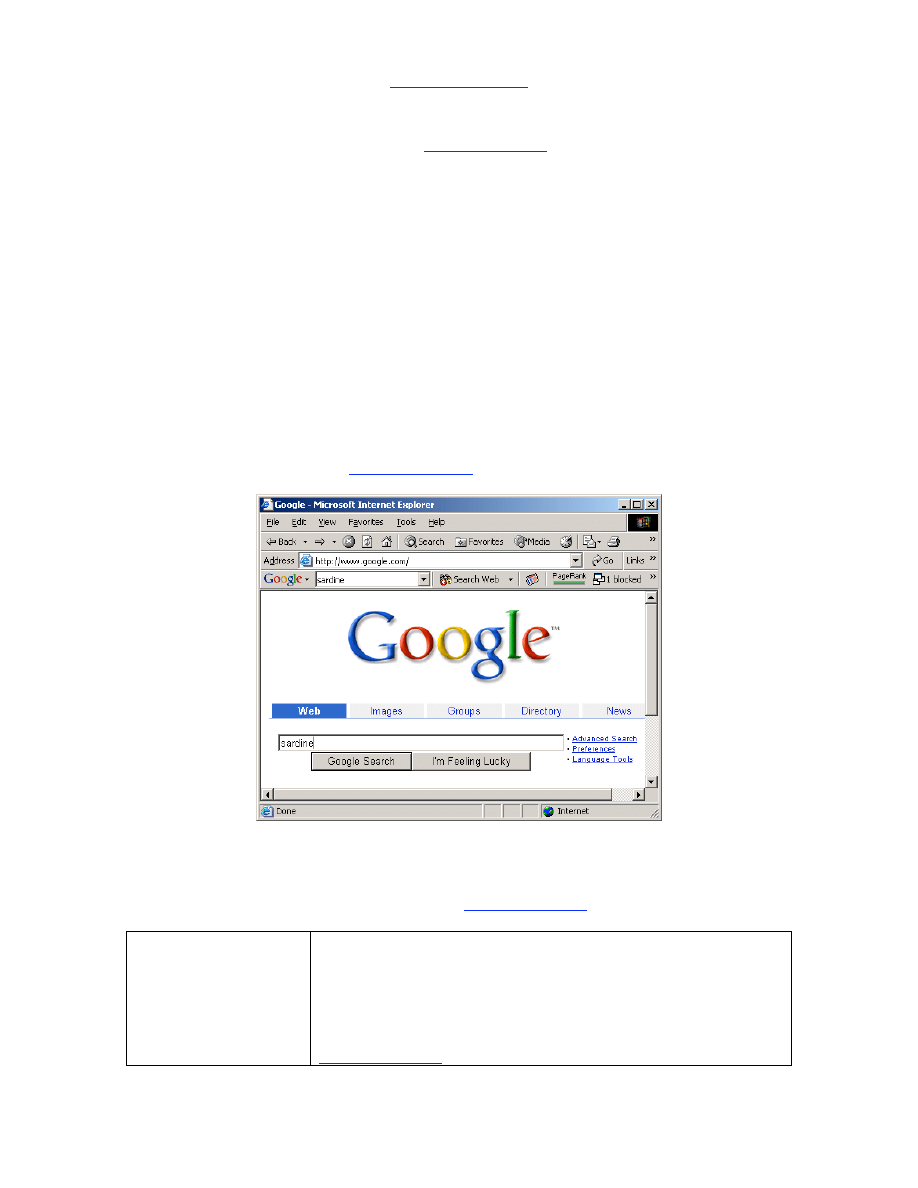
Figure 1: The main Google search page
As shown in Figure 1, I have entered the word “sardine” into the search screen. Figure 1
shows many of the options available from the
www.google.com
front page.
The Google toolbar
The Internet Explorer browser I am using has a Google
“toolbar” (a free download from toolbar.google.com) installed
and presented under the address bar. Although the toolbar
offers many different features, it is not a required element for
performing advanced searches. Even the most advanced
search functionality is available to any user able to access the
www.google.com
web page with any type of browser, including
text-based and mobile browsers.

The Google Hacker’s Guide
johnny@ihackstuff.com
http://johnny.ihackstuff.com
- Page 4 -
text-based and mobile browsers.
“Web, Images,
Groups, Directory and
News” tabs
These tabs allow you to search web pages, photographs,
message group postings, Google directory listings, and news
stories respectively. First-time Google users should consider
that these tabs are not always a replacement for the “Submit
Search” button.
Search term input field
Located directly below the alternate search tabs, this text field
allows the user to enter a Google search term. Search term
rules will be described later.
“Submit Search”
This button submits the search term supplied by the user. In
many browsers, simply pressing the “Enter/Return” key after
typing a search term will activate this button.
“I’m Feeling Lucky”
Instead of presenting a list of search results, this button will
forward the user to the highest-ranked page for the entered
search term. Often times, this page is the most relevant page
for the entered search term.
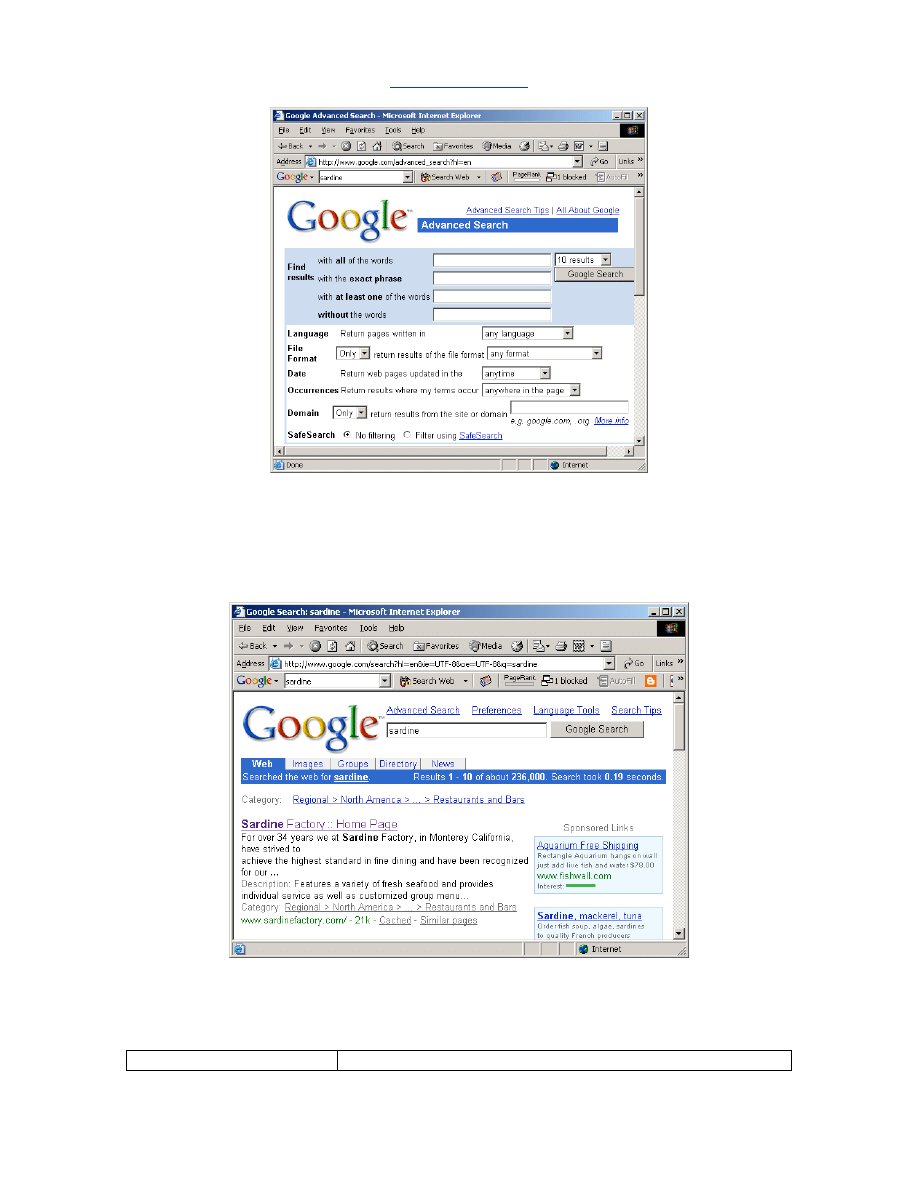
“Advanced Search”
This link takes the user to the “Advanced Search” page as
shown in Figure 2. Much of the advanced search functionality is
accessible from this page. Some advanced features are not
listed on this page.
“Preferences”
This link allows the user to select several options (which are
stored in cookies on the user’s machine for later retrieval)
including languages, filters, number of results per page, and
window options.
“Language tools”
This link allows the user to set many different language options
and translate text to and from various languages.
The Google Hacker’s Guide
johnny@ihackstuff.com
http://johnny.ihackstuff.com
- Page 5 -
Figure 2: Advanced Search page
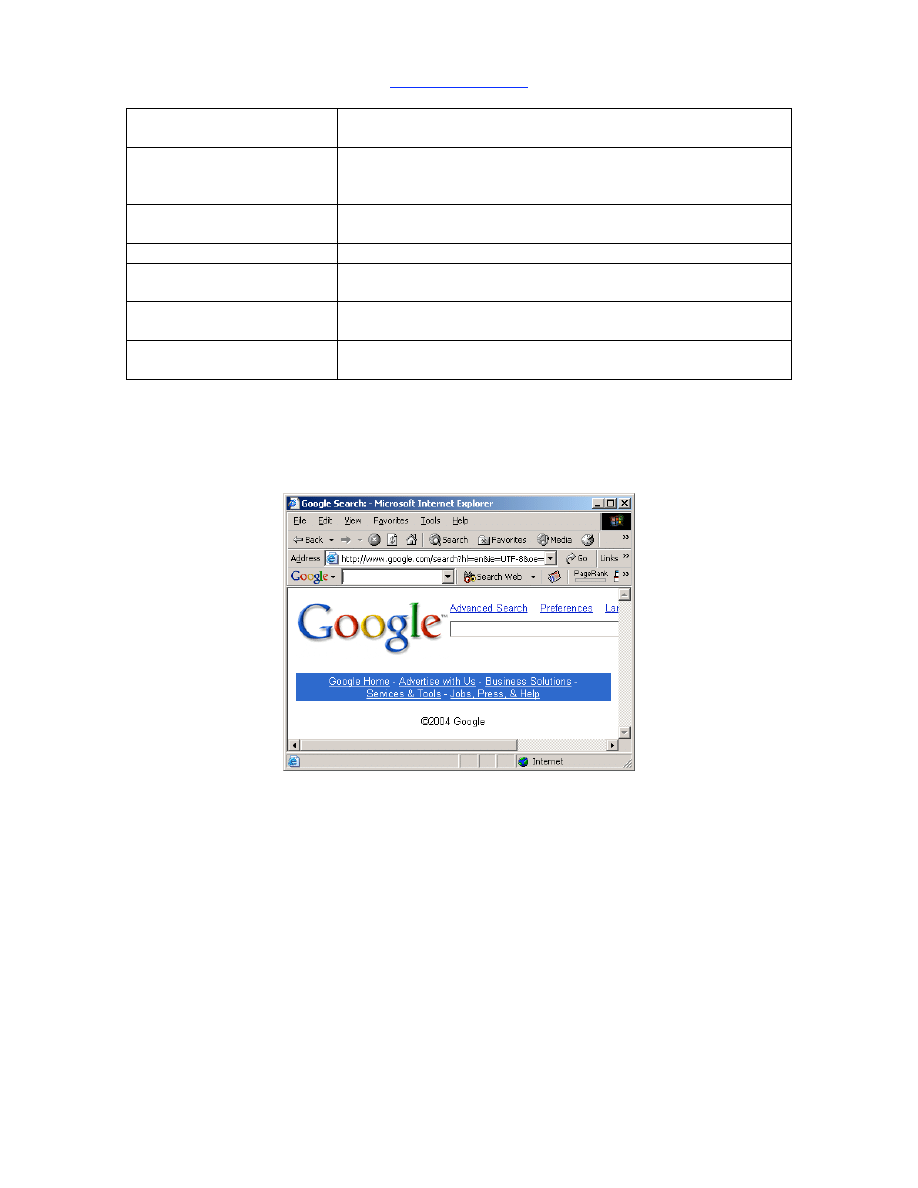
Once a user submits a search by clicking the “Submit Search” button or by pressing
enter in the search term input box, a results page may be displayed as shown in Figure
3.
Figure 3: A basic Google search results page.
The search results page allows the user to explore the search results in various ways.
Top line
The top line (found under the alternate search tabs) lists the
search query, the number of hits displayed and found, and
how long the search took.
The Google Hacker’s Guide
johnny@ihackstuff.com
http://johnny.ihackstuff.com
- Page 6 -
search query, the number of hits displayed and found, and
how long the search took.
“Category” link
This link takes you to the Google directory category for the
search you entered. The Google directory is a highly
organized directory of the web pages that Google monitors.
Main page link
This link takes you directly to a web page. Figure 3 shows
this as “Sardine Factory :: Home page”
Description
The short description of a site
Cached link
This link takes you to Google’s copy of this web page. This
is very handy if a web page changes or goes down.
“Similar Pages”
This link takes to you similar pages based on the Google
category.
“Sponsored Links”
coluimn
This column lists pay targeted advertising links based on
your search query.
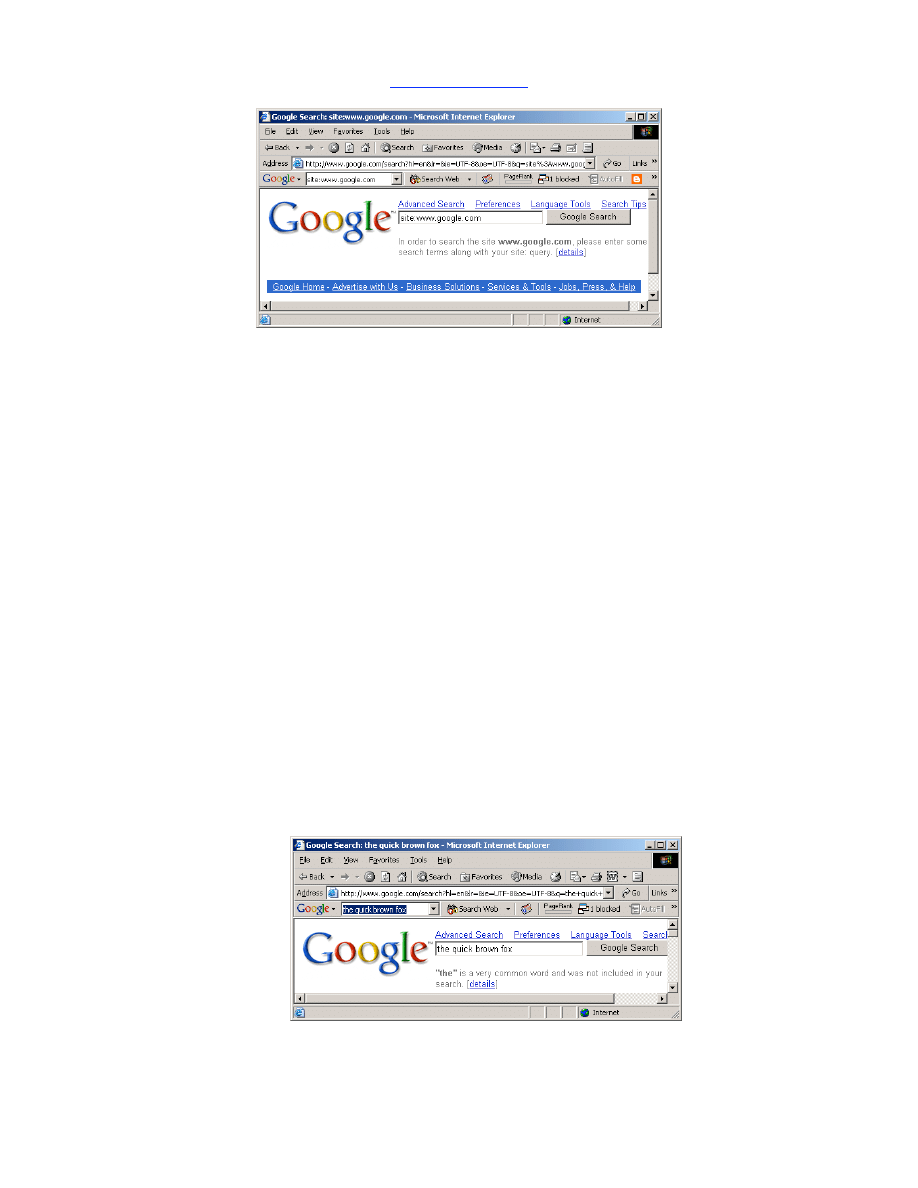
Under certain circumstances, a blank error page (See Figure 4) may be presented
instead of the search results page. This page is the catchall error page, which generally
means Google encountered a problem with the submitted search term. Many times this
means that a search query option was not entered properly.
Figure 4: The "blank" error page
In addition to the “blank” error page, another error page may be presented as shown in
Figure 5. This page is much more descriptive, informing the user that a search term was
missing. This message indicates that the user needs to add to the search query.
The Google Hacker’s Guide
johnny@ihackstuff.com
http://johnny.ihackstuff.com
- Page 7 -
Figure 5: Another Google error page
There is a great deal more to Google’s web-based search functionality which is not
covered in this paper.
Basic search techniques
Simple word searches
Basic Google searches, as I have already presented, consist of one or more
words entered without any quotations or the use of special keywords. Examples:
peanut butter
butter peanut
olive oil popeye
‘+’ searches
When supplying a list of search terms, Google automatically tries to find every
word in the list of terms, making the Boolean operator “AND” redundant. Some
search engines may use the plus sign as a way of signifying a Boolean “AND”.
Google uses the plus sign in a different fashion. When Google receives a basic
search request that contains a very common word like “the”, “how” or “where”,
the word will often times be removed from the query as shown in Figure 6.
Figure 6: Google removing overly common words

The Google Hacker’s Guide
johnny@ihackstuff.com
http://johnny.ihackstuff.com
- Page 8 -
In order to force Google to include a common word, precede the search term with
a plus (+) sign. Do not use a space between the plus sign and the search term.
For example, the following searches produce slightly different results:
where quick brown fox
+where quick brown fox
The ‘+’ operator can also be applied to Google advanced operators, discussed
below.
‘-‘ searches
Excluding a term from a search query is as simple as placing a minus sign (-)
before the term. Do not use a space between the minus sign and the search
term. For example, the following searches produce slightly different results:
quick brown fox
quick –brown fox
The ‘-’ operator can also be applied to Google advanced operators, discussed
below.

The Google Hacker’s Guide
johnny@ihackstuff.com
http://johnny.ihackstuff.com
- Page 9 -
Phrase Searches
In order to search for a phrase, supply the phrase surrounded by double-quotes.
Examples:
“the quick brown fox”
“liberty and justice for all”
“harry met sally”
Arguments to Google advanced operators can be phrases enclosed in quotes, as
described below.
Mixed searches
Mixed searches can involve both phrases and individual terms. Example:
macintosh "microsoft office"
This search will only return results that include the phrase “Microsoft office” and
the term macintosh.
Google advanced operators
Google allows the use of certain operators to help refine searches. The use of advanced
operators is very simple as long as attention is given to the syntax. The basic format is:
operator:search_term
Notice that there is no space between the operator, the colon and the search term. If a
space is used after a colon, Google will display an error message. If a space is used
before the colon, Google will use your intended operator as a search term.
Some advanced operators can be used as a standalone query. For example
‘cache:www.google.com’ can be submitted to Google as a valid search query. The
‘site’ operator, by contrast, must be used along with a search term, such as
‘site:www.google.com help’.
Table 1: Advanced Operator Summary
Operator
Description
Additional search
argument required?
site:
find search term only on site specified by search_term.
YES
filetype:
search documents of type search_term
YES
link:
find sites containing search_term as a link
NO
cache:
display the cached version of page specified by
search_term
NO
intitle:
find sites containing search_term in the title of a page
NO
inurl:
find sites containing search_term in the URL of the page
NO

The Google Hacker’s Guide
johnny@ihackstuff.com
http://johnny.ihackstuff.com
- Page 10 -
site: find web pages on a specific web site
This advanced operator instructs Google to restrict a search to a specific web site or
domain. When using this operator, an addition search argument is required.
Example:
site:harvard.edu tuition
This query will return results from harvard.edu that include the term tuition anywhere on
the page.
filetype: search only within files of a specific type.
This operator instructs Google to search only within the text of a particular type of file.
This operator requires an additional search argument.
Example:
filetype:txt endometriosis
This query searches for the word ‘endometriosis’ within standard text documents. There
should be no period (.) before the filetype and no space around the colon following the
word “filetype”. It is important to note thatGoogle only claims to be able to search within
certain types of files. Based on my experience, Google can search within most files that
present as plain text. For example, Google can easily find a word within a file of type
“.txt,” “.html” or “.php” since the output of these files in a typical web browser window is
textual. By contrast, while a WordPerfect document may look like text when opened with
the WordPerfect application, that type of file is not recognizable to the standard web
browser without special plugins and by extension, Google can not interpret the
document properly, making a search within that document impossible. Thankfully,
Google can search within specific type of special files, making a search like
“filetype:doc endometriosis“ a valid one.
The current list of files that Google can search is listed in the filetype FAQ located at
http://www.google.com/help/faq_filetypes.html. As of this writing, Google can search
within the following file types:
• Adobe Portable Document Format (pdf)
• Adobe PostScript (ps)
• Lotus 1-2-3 (wk1, wk2, wk3, wk4, wk5, wki, wks, wku)
• Lotus WordPro (lwp)
• MacWrite (mw)
• Microsoft Excel (xls)
• Microsoft PowerPoint (ppt)
• Microsoft Word (doc)
• Microsoft Works (wks, wps, wdb)
• Microsoft Write (wri)
• Rich Text Format (rtf)
• Text (ans, txt)

The Google Hacker’s Guide
johnny@ihackstuff.com
http://johnny.ihackstuff.com
- Page 11 -
link: search within links
The hyperlink is one of the cornerstones of the Internet. A hyperlink is a selectable
connection from one web page to another. Most often, these links appear as underlined
text but they can appear as images, video or any other type of multimedia content. This
advanced operator instructs Google to search within hyperlinks for a search term. This
operator requires no other search arguments.
Example:
link:www.apple.com
This query query would display web pages that link to Apple.com’s main page. This
special operator is somewhat limited in that the link must appear exactly as entered in
the search query. The above query would not find pages that link to
www.apple.com/ipod, for example.
cache: display Google’s cached version of a page
This operator displays the version of a web page as it appeared when Google crawled
the site. This operator requires no other search arguments.
Example:
cache:johnny.ihackstuff.com
cache:http://johnny.ihackstuff.com
These queries would display the cached version of Johnny’s web page. Note that both of
these queries return the same result. I have discovered, however, that sometimes
queries formed like these may return different results, with one result being the dreaded
“cache page not found” error. This operator also accepts whole URL lines as arguments.
intitle: search within the title of a document
This operator instructs Google to search for a term within the title of a document. Most
web browsers display the title of a document on the top title bar of the browser window.
This operator requires no other search arguments.
Example:
intitle:gandalf
This query would only display pages that contained the word ‘gandalf’ in the title. A
derivative of this operator, ‘allintitle’ works in a similar fashion.
Example:
allintitle:gandalf silmarillion

The Google Hacker’s Guide
johnny@ihackstuff.com
http://johnny.ihackstuff.com
- Page 12 -
This query finds both the words ‘gandalf’ and ‘silmarillion’ in the title of a page. The
‘allintitle’ operator instructs Google to find every subsequent word in the query only in the
title of the page. This is equivalent to a string of individual ‘intitle’ searches.
inurl: search within the URL of a page
This operator instructs Google to search only within the URL, or web address of a
document. This operator requires no other search arguments.
Example:
inurl:amidala
This query would display pages with the word ‘amidala’ inside the web address. One
returned result, ‘http://www.yarwood.org/kell/amidala/’ contains the word
‘amidala’ as the name of a directory. The word can appear anywhere within the web
address, including the name of the site or the name of a file. A derivative of this operator,
‘allinurl’ works in a similar fashion.
Example:
allinurl:amidala gallery
This query finds both the words ‘amidala’ and ‘gallery’ in the URL of a page. The ‘allinurl’
operator instructs Google to find every subsequent word in the query only in the URL of
the page. This is equivalent to a string of individual ‘inurl’ searches.
For a complete list of advanced operators and their usage, see
http://www.google.com/help/operators.html
.
About Google’s URL syntax
The advanced Google user often times streamlines the search process by use of the
Google toolbar (not discussed here) or through direct use of Google URL’s. For
example, consider the URL generated by the web search for sardine:
http://www.google.com/search?hl=en&ie=UTF-8&oe=UTF-8&q=sardine
First,
notice
that
the
base
URL
for
a
search
is
“http://www.google.com/search”. The question mark denotes the end of the URL
and the beginning of the arguments to the “search” program. The “&” symbol separates
arguments. The URL presented to the user may vary depending on many factors
including whether or not the search was submitted via the toolbar, the native language of
the user, etc. Arguments to the Google search program are well documented at
http://www.google.com/apis. The arguments found in the above URL are as follows:
hl:
Native language results, in this case “en” or English.
ie:
Input encoding, the format of incoming data. In this case “UTF-8”.
oe:
Output encoding, the format of outgoing data. In this case “UTF-8”.
q:
Query. The search query submitted by the user. In this case “sardine”.

The Google Hacker’s Guide
johnny@ihackstuff.com
http://johnny.ihackstuff.com
- Page 13 -
Most of the arguments in this URL can be omitted, making the URL much more concise.
For example, the above URL can be shortened to
http://www.google.com/search?q=sardine
making the URL much more concise. Additional search terms can be appended to the
URL with the plus sign. For example, to search for “sardine” along with “peanut” and
“butter,” consider using this URL:
http://www.google.com/search?q=sardine+peanut+butter
Since simplified Google URLs are simple to read and portable, they are often used as a
way to represent a Google search.
Google (and many other web-based programs) must represent special characters like
quotation marks in a URL with a hexadecimal number preceded by a percent (%) sign in
order to follow the http URL standard. For example, a search for “the quick brown fox”
(paying special attention to the quotation marks) is represented as
http://www.google.com/search?&q=%22the+quick+brown+fox%22
In this example, a double quote is displayed as “%22” and spaces are replaced by plus
(+) signs. Google does not exclude overly common words from phrase searches. Overly
common words are automatically included when enclosed in double-quotes.
Google hacking techniques
Domain searches using the ‘site’ operator
The site operator can be expanded to search out entire domains. For example:
site:gov secret
This query searches every web site in the .gov domain for the word ‘secret’. Notice that
the site operator works on addresses in reverse. For example, Google expects the site
operator to be used like this:
site:www.cia.gov
site:cia.gov
site:gov
Google would not necessarily expect the site operator to be used like this:
site:www.cia
site:www
site:cia
The reason for this is simple. ‘Cia’ and ‘www’ are not valid top-level domain names. This
means that as of this writing, Internet names may not end in ‘cia’ or ‘www’. However,
The Google Hacker’s Guide
johnny@ihackstuff.com
http://johnny.ihackstuff.com
- Page 14 -
sending unexpected queries like these are part of a competent Google hacker’s arsenal
as we explore in the “googleturds” section.
How this technique can be used
1. Journalists, snoops and busybodies in general can use this technique to find
interesting ‘dirt’ about a group of websites owned by organizations such as a
government or non-profit organization. Remember that top-level domain names
are often very descriptive and can include interesting groups such as: the U.S.
Government (.gov or .us)
2. Hackers searching for targets. If a hacker harbors a grudge against a specific
country or organization, he can use this type of search to find sensitive targets.
Finding ‘googleturds’ using the ‘site’ operator
Googleturds, as I have named them, are little dirty pieces of Google ‘waste’. These
search results seem to have stemmed from typos Google found while crawling a web
page. Example:
site:csc
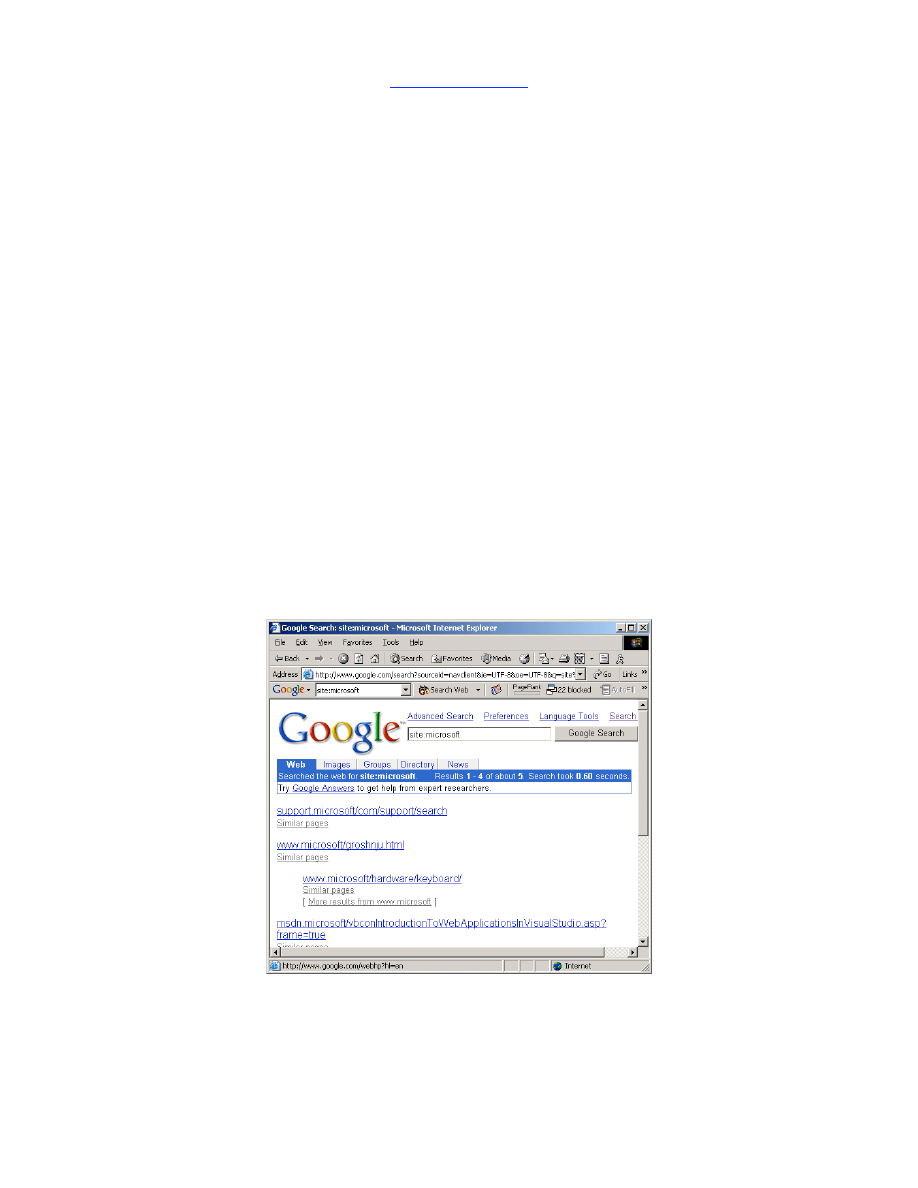
site:microsoft
Neither of these queries are valid according to the loose rules of the ‘site’ operator, since
they do not end in valid top-level domain names. However, these queries produce
interesting results as shown in Figure 7.
Figure 7: Googleturd example
These little bits of information are most likely the results of typographical errors in links
place on web pages.

The Google Hacker’s Guide
johnny@ihackstuff.com
http://johnny.ihackstuff.com
- Page 15 -
How this technique can be used
Hackers investigating a target can use munged site values based on the target’s name
to dig up Google pages (and subsequently potential sensitive data) that may not be
available to Google searches using the valid ‘site’ operator. Example: A hacker is
interested in sensitive information about ABCD Corporation, located on the web at
www.ABCD.com. Using a query like ‘s i t e : A B C D ’ may find mistyped links
(http://www.abcd instead of http://www.abcd.com) containing interesting information.
Site mapping: More about the ‘site’ operator
Mapping the contents of a web server via Google is simple. Consider the following
query:
site:www.microsoft.com microsoft
This query searches for the word ‘microsoft’, restricting the search to the
www.microsoft.com web site. How many pages on the Microsoft web server contain the
word ‘microsoft?’ According to Google, all of them! Remember that Google searches not
only the content of a page, but the title and URL as well. The word ‘microsoft’ appears in
the URL of every page on
www.microsoft.com
. With one single query, an attacker gains
a rundown of every web page on a site cached by Google.
There are some exceptions to this rule. If a link on the Microsoft web page points back to
the IP address of the Microsoft web server, Google will cache that page as belonging to
the IP address, not the
www.micorosft.com
web server. In this special case, an attacker
would simply alter the query, replacing the word ‘microsoft’ with the IP address(es) of the
Microsoft web server.
Google has recently added an additional method of accomplishing this task. This
technique allows Google users to simply enter a ‘site’ query alone. Example:
site:microsoft.com
This technique is simpler, but I’m not sure if this search technique is a permanent
Google feature.
Since Google only follows links that it finds on the Web, don’t expect this technique to
return every single web page hosted on a web server.
How this technique can be used
This technique makes it very simple for any interested party to get a complete rundown
of a website’s structure without ever visiting the website directly. Since Google searches
occur on Google’s servers, it stands to reason that only Google has a record of that
search. The process of viewing cached pages from Google can also be safe as long as
the Google hacker takes special care not to allow his browser to load linked content
such as images from that cached page. For a competent attacker, this is a trivial
exercise. Simply put, Google allows for a great deal of target reconnaissance that results
in little or no exposure for the attacker.
The Google Hacker’s Guide
johnny@ihackstuff.com
http://johnny.ihackstuff.com
- Page 16 -
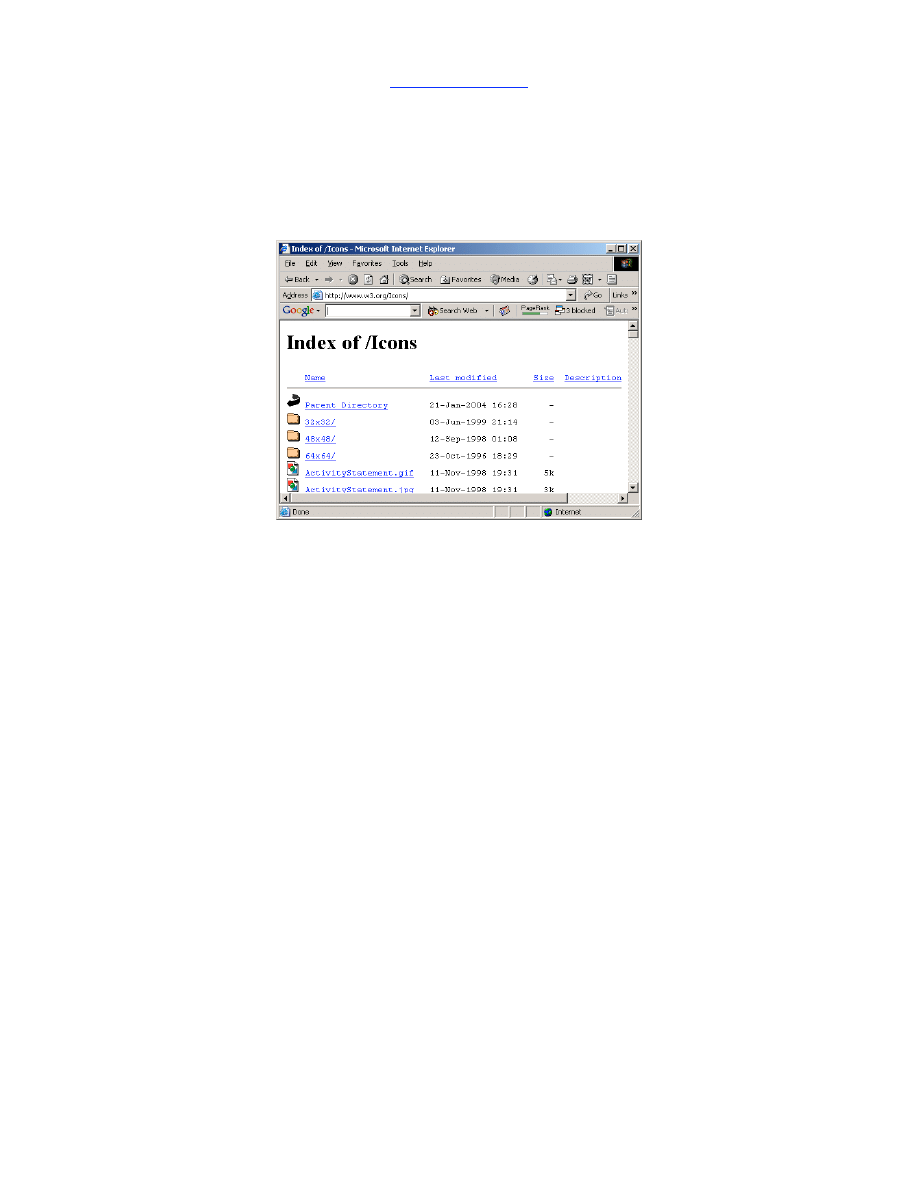
Finding Directory listings
Directory listings provide a list of files and directories in a browser window instead of the
typical text-and graphics mix generally associated with web pages. Figure 8 shows a
typical directory listing.
Figure 8: A typical directory listing
Directory listings are often placed on web servers purposely to allow visitors to browse
and download files from a directory tree. Many times, however, directory listings are not
intentional. A misconfigured web server may produce a directory listing if an index, or
main web page file is missing. In some cases, directory listings are setup as a
temporarily storage location for files. Either way, there’s a good chance that an attacker
may find something interesting inside a directory listing.
Locating directory listings with Google is fairly straightforward. Figure 8 shows that most
directory listings begin with the phrase “Index of”, which also shows in the title. An
obvious query to find this type of page might be “intitle:index.of”, which may find
pages with the term ‘index of’ in the title of the document. Remember that the period (.)
serves as a single-character wildcard in Google. Unfortunately, this query will return a
large number of false-positives such as pages with the following titles:
Index of Native American Resources on the Internet
LibDex - Worldwide index of library catalogues
Iowa State Entomology Index of Internet Resources
Judging from the titles of these documents, it is obvious that not only are these web
pages intentional, they are also not the directory listings we are looking for. (*jedi wave*
“This is not the directory listing you’re looking for.”) Several alternate queries provide
more accurate results:
intitle:index.of "parent directory"
intitle:index.of name size
The Google Hacker’s Guide
johnny@ihackstuff.com
http://johnny.ihackstuff.com
- Page 17 -
These queries indeed provide directory listings by not only focusing on “index.of” in the
title, but on key words often found inside directory listings such as “parent directory”
“name” and “size.”
How this technique can be used
Bear in mind that many directory listings are intentional. However, directory listings
provide the Google hacker a very handy way to quickly navigate through a site. For the
purposes of finding sensitive or interesting information, browsing through lists of file and
directory names can be much more productive than surfing through the guided content
of web pages. Directory listings provide a means of exploiting other techniques such as
versioning and file searching, explained below.
Versioning: Obtaining the Web Server Software / Version
via directory listings
The exact version of the web server software running on a server is one piece of
required information an attacker requires before launching a successful attack against
that web server. If an attacker connects directly to that web server, the HTTP (web)
headers from that server can provide this information. It is possible, however, to retrieve
similar information from Google without ever connecting to the target server under
investigation. One method involves the using the information provided in a directory
listing.
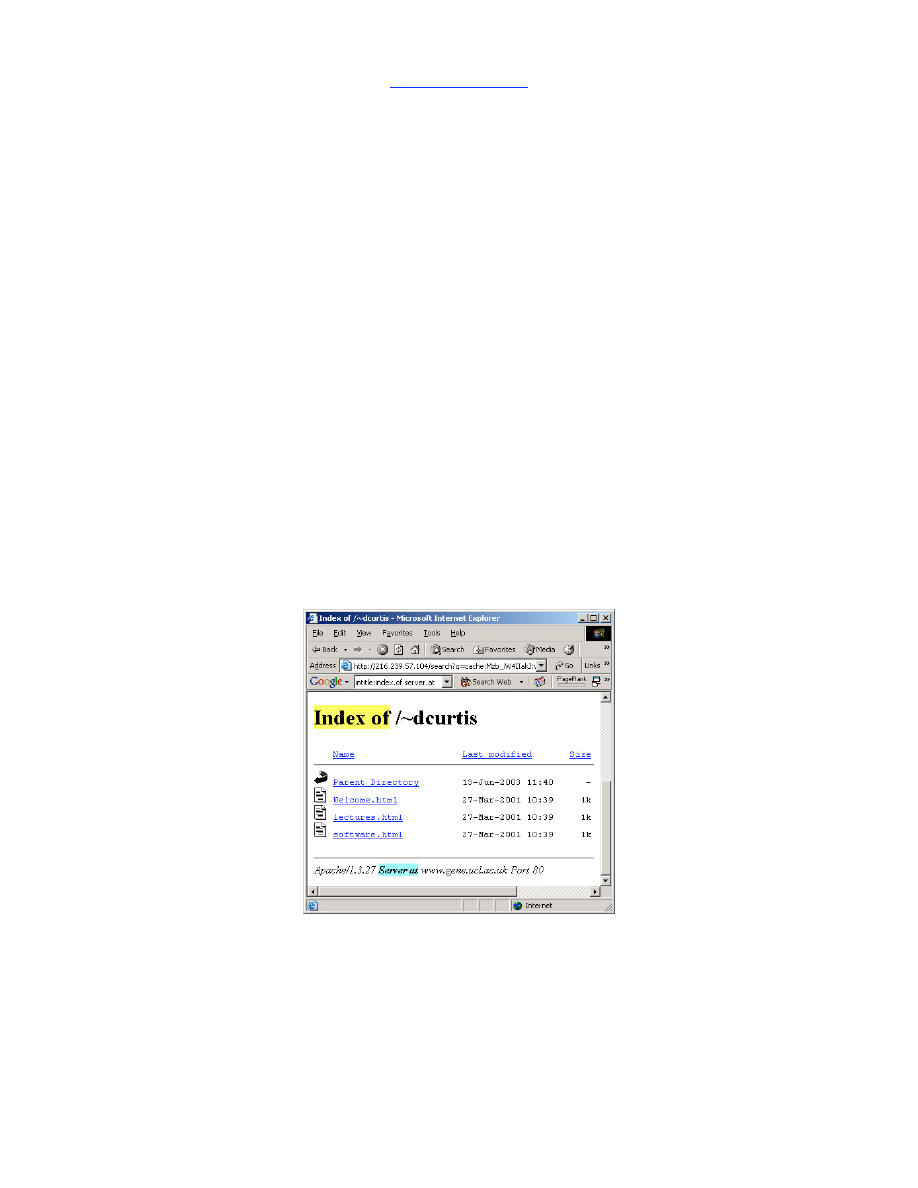
Figure 9: Directory listing "server.at" example
Figure 9 shows the bottom line of a typical directory listing. Notice that the directory
listing includes the name of the server software as well as the version. An adept web
administrator can fake this information, but this information is often legitimate, allowing
an attacker to determine what attacks may work against the server. This example was
gathered using the following query:

The Google Hacker’s Guide
johnny@ihackstuff.com
http://johnny.ihackstuff.com
- Page 18 -
intitle:index.of server.at
This query focuses on the term “index of” in the title and “server at” appearing at the
bottom of the directory listing. This type of query can additionally be pointed at a
particular web server:
intitle:index.of server.at site:aol.com
The result of this query indicates that gprojects.web.aol.com and vidup-r1.blue.aol.com,
both run Apache web servers.
intitle:index.of server.at site:apple.com
The result of this query indicates that mirror.apple.com runs an Apache web server. This
technique can also be used to find servers running a particular version of a web server.
For example:
intitle:index.of "Apache/1.3.0 Server at"
This query will find servers with directory listings enabled that are running Apache
version 1.3.0.
How this technique can be used
This technique is somewhat limited by the fact that the target must have at least one
page that produces a directory listing, and that listing must have the server version
stamped at the bottom of the page. There are more advanced techniques that can be
employed if the server ‘stamp’ at the bottom of the page is missing. This technique
involves a ‘profiling’ technique which involves focusing on the headers, title, and overall
format of the directory listing to observe clues as to what web server software is running.
By comparing known directory listing formats to the target’s directory listing format, a
competent Google hacker can generally nail the server version fairly quickly. This
technique is also flawed in that most servers allow directory listings to be completely
customized, making a match difficult. Some directory listings are not under the control of
the web server at all but instead rely on third-party software. In this particular case, it
may be possible to identify the third party software running by focusing on the source
(‘view source’ in most browsers) of the directory listing’s web page or by using the
profiling technique listed above.
Regardless of how likely it is to determine the web server version of a specific server
using this technique, hackers (especially web defacers) can use this technique to troll
Google for potential victims. If a hacker has an exploit that works against, say Apache
1.3.0, he can quickly scan Google for victims with a simple search like
‘intitle:index.of "Apache/1.3.0 Server at"’. This would return a list of
servers that have at least one directory listing with the Apache 1.3.0 server tag at the
bottom of the listing. This technique can be used for any web server that tags directory
listings with the server version, as long as the attacker knows in advance what that tag
might look like.
The Google Hacker’s Guide
johnny@ihackstuff.com
http://johnny.ihackstuff.com
- Page 19 -
via default pages
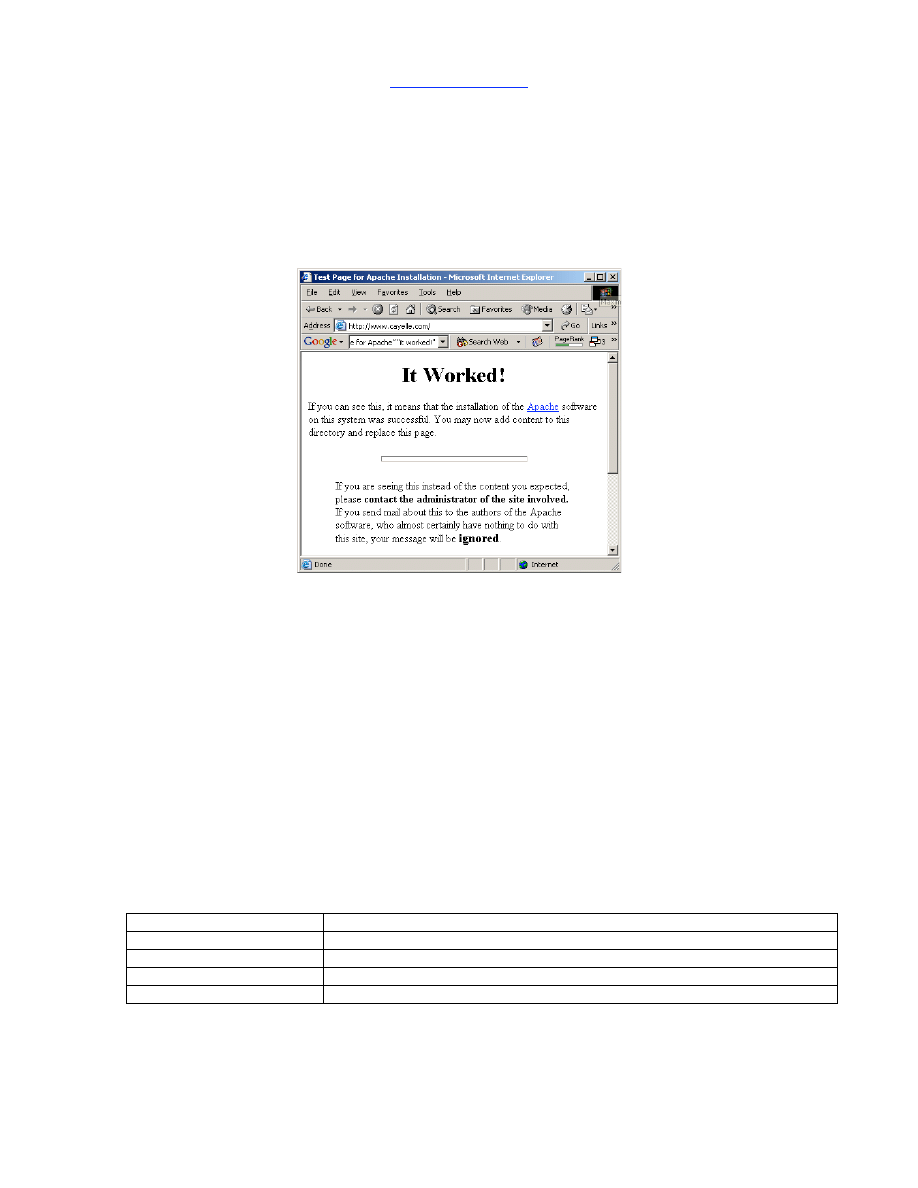
It is also possible to determine the version of a web server based on default pages.
When a web server is installed, it generally will ship with a set of default web pages, like
the Apache 1.2.6 page shown in Figure 10.
Figure 10: Apache test page
These pages can make it easy for a site administrator to get a web server running. By
providing a simple page to test, the administrator can simply connect to his own web
server with a browser to validate that the web server was installed correctly. Some
operating systems even come with web server software already installed. In this case,
an Internet user may not even realize that a web server is running on his machine. This
type of casual behavior on the part of an Internet user will lead an attacker to rightly
assume that the web server is not well maintained and is, by extension insecure. By
further extension, the attacker can also assume that the entire operating system of the
server may be vulnerable by virtue of poor maintenance.
How this technique can be used
A simple query of “intitle:Test.Page.for.Apache it.worked!" will return a list
of sites running Apache 1.2.6 with a default home page. Other queries will return similar
Apache results:
Apache server version
Query
Apache 1.3.0 – 1.3.9
Intitle:Test.Page.for.Apache It.worked! this.web.site!
Apache 1.3.11 – 1.3.26
Intitle:Test.Page.for.Apache seeing.this.instead
Apache 2.0
Intitle:Simple.page.for.Apache Apache.Hook.Functions
Apache SSL/TLS
Intitle:test.page "Hey, it worked !" "SSL/TLS-aware"
The Google Hacker’s Guide
johnny@ihackstuff.com
http://johnny.ihackstuff.com
- Page 20 -
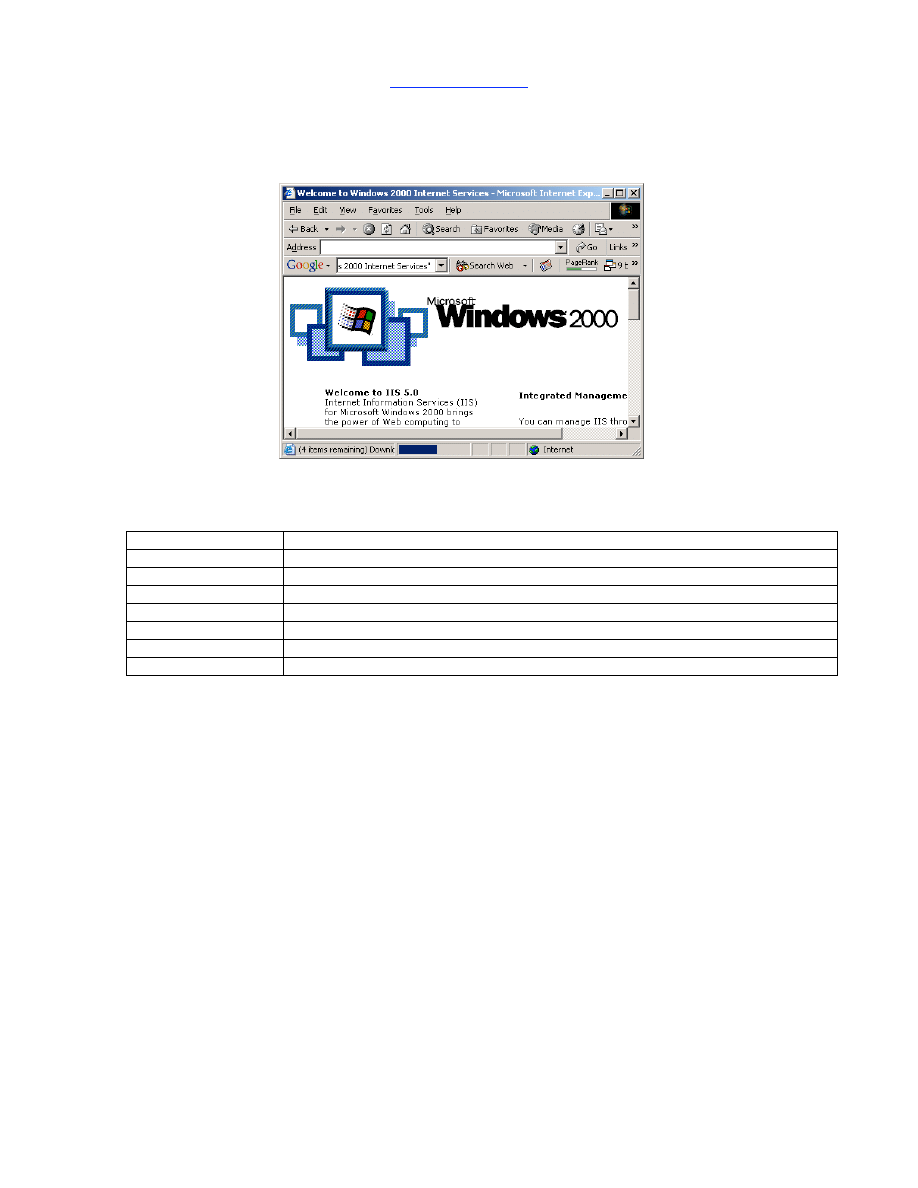
Microsoft’s Internet Information Services (IIS) also ships with default web pages as
shown in Figure 11.
Figure 11: IIS 5.0 default web page
Queries that will locate default IIS web pages include:
IIS Server Version
Query
Many
intitle:welcome.to intitle:internet IIS
Unknown
intitle:"Under construction" "does not currently have"
IIS 4.0
intitle:welcome.to.IIS.4.0
IIS 4.0
allintitle:Welcome to Windows NT 4.0 Option Pack
IIS 4.0
allintitle:Welcome to Internet Information Server
IIS 5.0
allintitle:Welcome to Windows 2000 Internet Services
IIS 6.0
allintitle:Welcome to Windows XP Server Internet Services
In the case of Microsoft-based web servers, it is not only possible to determine web
server version, but operating system and server pack version as well. This information is
invaluable to an attacker bent on hacking not only the web server, but hacking beyond
the web server and into the operating system itself. In most cases, an attacker with
control of the operating system can wreak more havoc on a machine than a hacker that
only controls the web server.
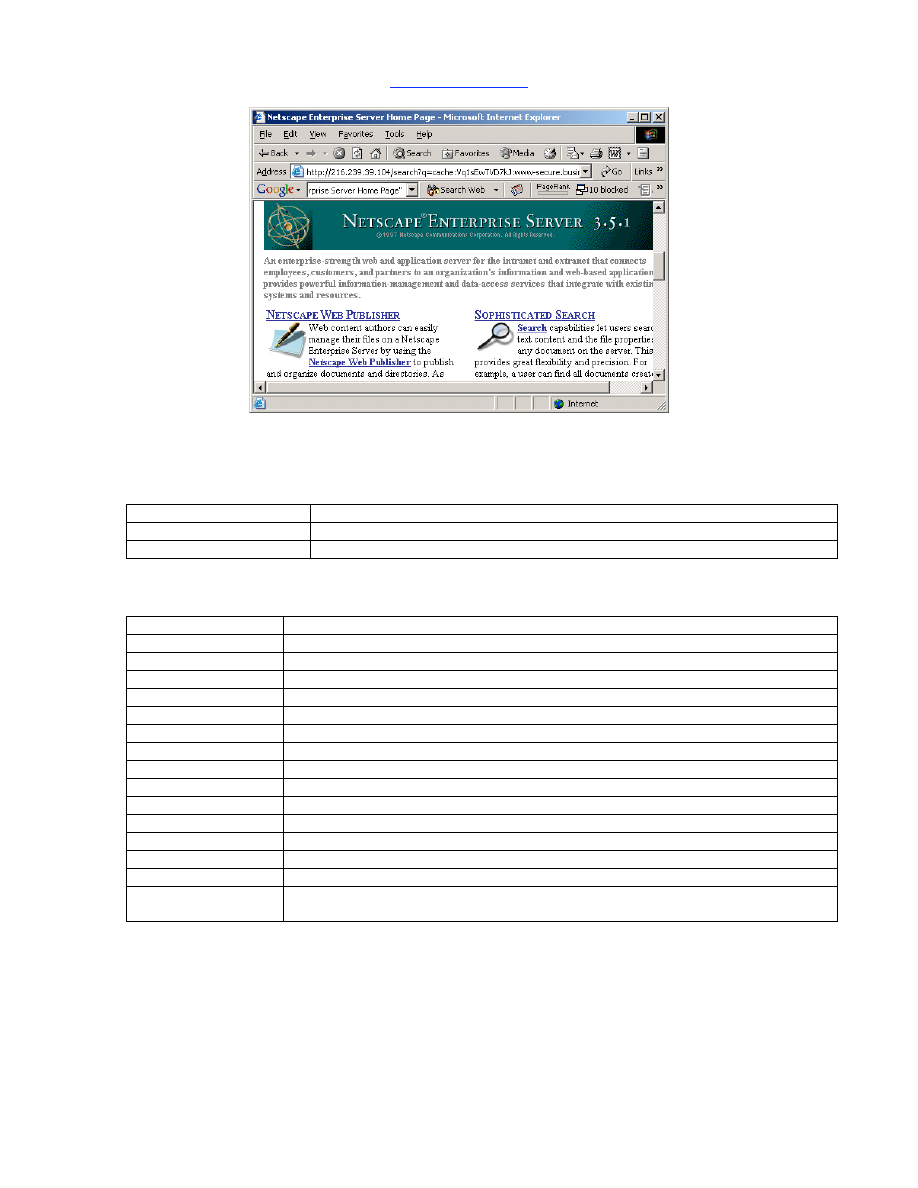
Netscape Servers also ship with default pages as shown in Figure 12.
The Google Hacker’s Guide
johnny@ihackstuff.com
http://johnny.ihackstuff.com
- Page 21 -
Figure 12: Netscape Enterprise Server default page
Some queries that will locate default Netscape web pages include:
Netscape Server Version
Query
Many
allintitle:Netscape Enterprise Server Home Page
Unknown
allintitle:Netscape FastTrack Server Home Page
Some queries to find more esoteric web servers/applications include:
Server / Version
Query
Jigsaw / 2.2.3
intitle:"jigsaw overview" "this is your"
Jigsaw / Many
intitle:”jigsaw overview”
iPlanet / Many
intitle:"web server, enterprise edition"
Resin / Many
allintitle:Resin Default Home Page
Resin / Enterprise
allintitle:Resin-Enterprise Default Home Page
JWS / 1.0.3 – 2.0
allintitle:default home page java web server
J2EE / Many
intitle:"default j2ee home page"
KFSensor honeypot
"KF Web Server Home Page"
Kwiki
"Congratulations! You've created a new Kwiki website."
Matrix Appliance
"Welcome to your domain web page" matrix
HP appliance sa1*
intitle:"default domain page" "congratulations" "hp web"
Intel Netstructure
"congratulations on choosing" intel netstructure
Generic Appliance
"default web page" congratulations "hosting appliance"
Debian Apache
intitle:"Welcome to Your New Home Page!" debian
Cisco Micro
Webserver 200
"micro webserver home page"
via manuals, help pages and sample programs
Another method of determining server version involves searching for manuals, help
pages or sample programs which may be installed on the website by default. Many web
The Google Hacker’s Guide
johnny@ihackstuff.com
http://johnny.ihackstuff.com
- Page 22 -
server distributions install manual pages and sample programs in default locations. Over
the years, hackers have found many ways to exploit these default web applications to
gain privileged access to the web server. Because of this, most web server vendors
insist that administrators remove this sample code before placing a server on the
Internet. Regardless of the potential vulnerability of such programs, the mere existence
of these programs can help determine the web server type and version. Google can
stumble on these directories via a default-installed webpage or other means.
How this technique can be used
In addition to determining the web server version of a specific target, hackers can use
this technique to find vulnerable targets.
Example:
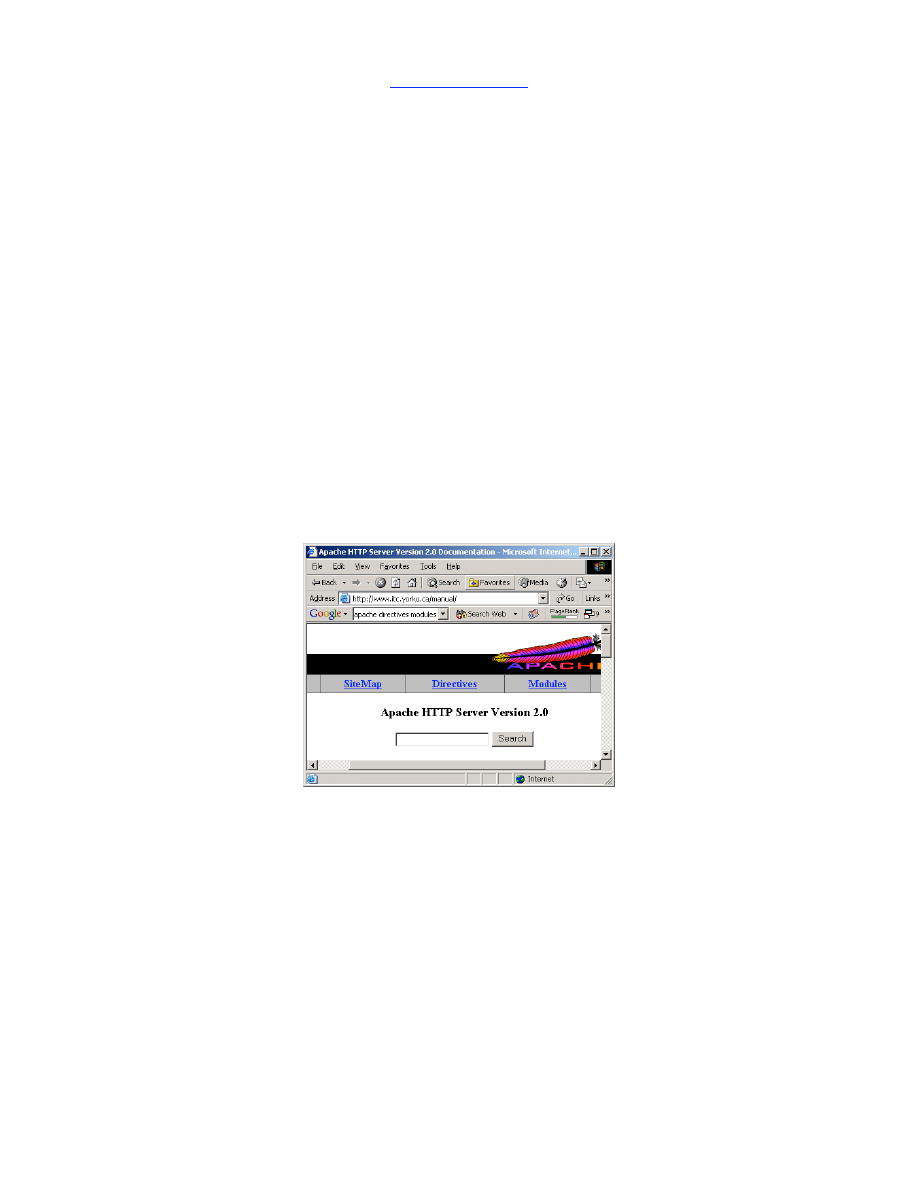
inurl:manual apache directives modules
This query returns pages that host the Apache web server manuals. The Apache
manuals are included in the default installation package of many different versions of
Apache. Different versions of Apache may have different styles of manual, and the
location of manuals may differ, if they are installed at all. As evidenced in Figure 13, the
server version is reported at the top of the manual page. This may not reflect the current
version of the web server if the server has been upgraded since the original installation.
Figure 13: Determining server version via server manuals
Microsoft’s IIS often deploy manuals (termed ‘help pages’) with various versions of their
web server. One way to search for these default help pages is with a query like
‘allinurl:iishelp core’.
Many versions of IIS optionally install sample applications. Many times, these sample
applications are included in a directory called ‘iissamples,’ which may be discovered
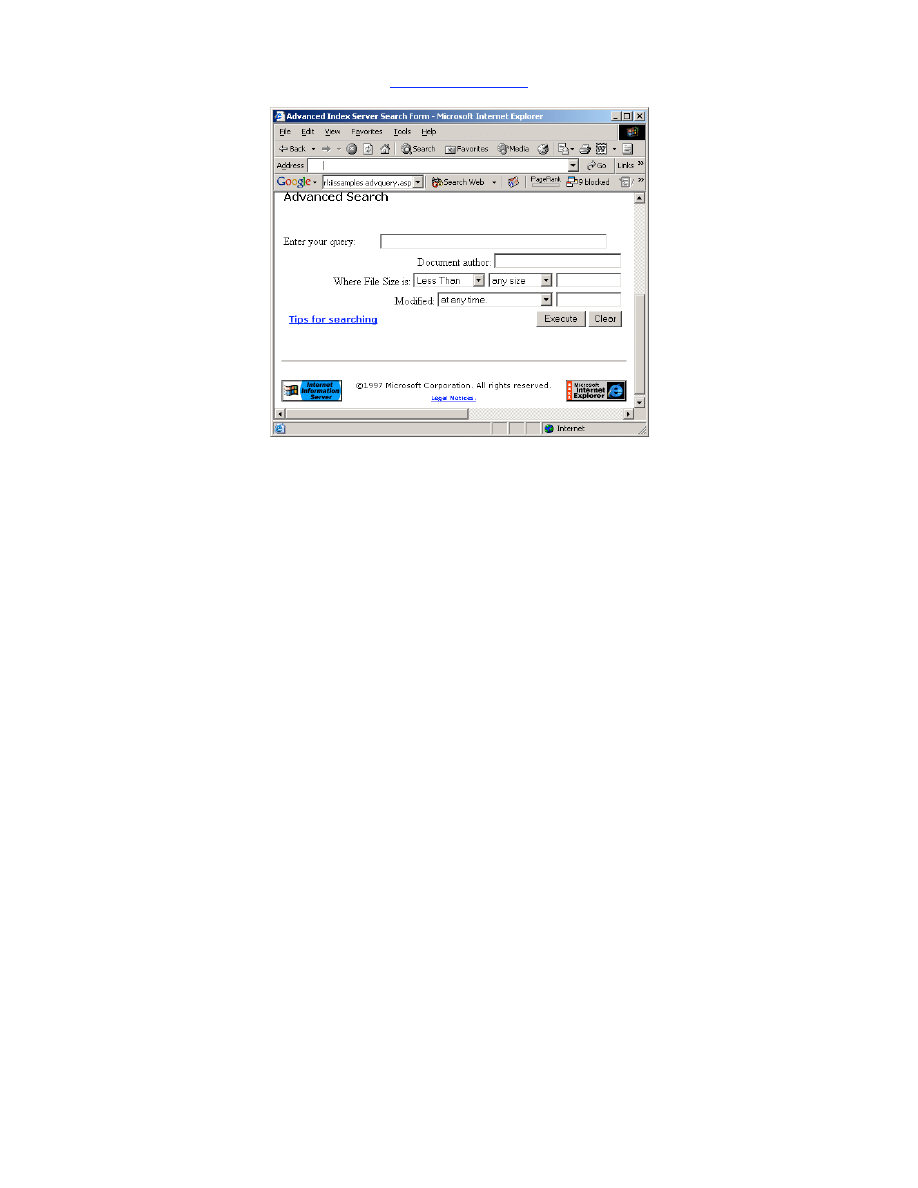
using a query like ‘inurl:iissamples’. In addition, the names of a sample program
can be included in the query such as ‘inurl:iissamples advquery.asp’ as shown
in Figure 14.
The Google Hacker’s Guide
johnny@ihackstuff.com
http://johnny.ihackstuff.com
- Page 23 -
Figure 14: An IIS server with default sample code installed
Many times, subdirectories may exist inside the samples directory. A page with both the
‘iissamples’ directory and the ‘sdk’ directory can be found with a query like
‘inurl:iissamples sdk’.
There are many more combinations of default manual, help pages and sample programs
that can be searched for. As mentioned above, these programs often contain
vulnerabilities. Searching for vulnerable programs is yet another trick of the Google
hacker.
Using Google as a CGI scanner
The ‘CGI scanner’ or ‘web scanner’ has become one of the most indispensable tools in
the world of web server hacking. Mercilessly searching out vulnerable programs on a
server, these programs help pinpoint potential avenues for attack. These programs are
brutally obvious, incredibly noisy and fairly accurate tools. However, the accomplished
Google hacker knows there are more subtle and interesting ways to attempt the same
task.
In order to accomplish its task, these scanners must know what exactly to search for on
a web server. In most cases these tools are scanning web servers looking for
vulnerable files or directories that may contain sample code or vulnerable files. Either
way, the tools generally store these vulnerabilities in a file that is formatted like the
following except:
The Google Hacker’s Guide
johnny@ihackstuff.com
http://johnny.ihackstuff.com
- Page 24 -
/cgi-bin/cgiemail/uargg.txt
/random_banner/index.cgi
/random_banner/index.cgi
/cgi-bin/mailview.cgi
/cgi-bin/maillist.cgi
/cgi-bin/userreg.cgi
/iissamples/ISSamples/SQLQHit.asp
/iissamples/ISSamples/SQLQHit.asp
/SiteServer/admin/findvserver.asp
/scripts/cphost.dll
/cgi-bin/finger.cgi
How this technique can be used
The lines in a vulnerability file like the one shown above can serve as a roadmap for a
Google hacker. Each line can be broken down and used in either an ‘index.of’ or an
‘inurl’ search to find vulnerable targets. For example, a Google search for
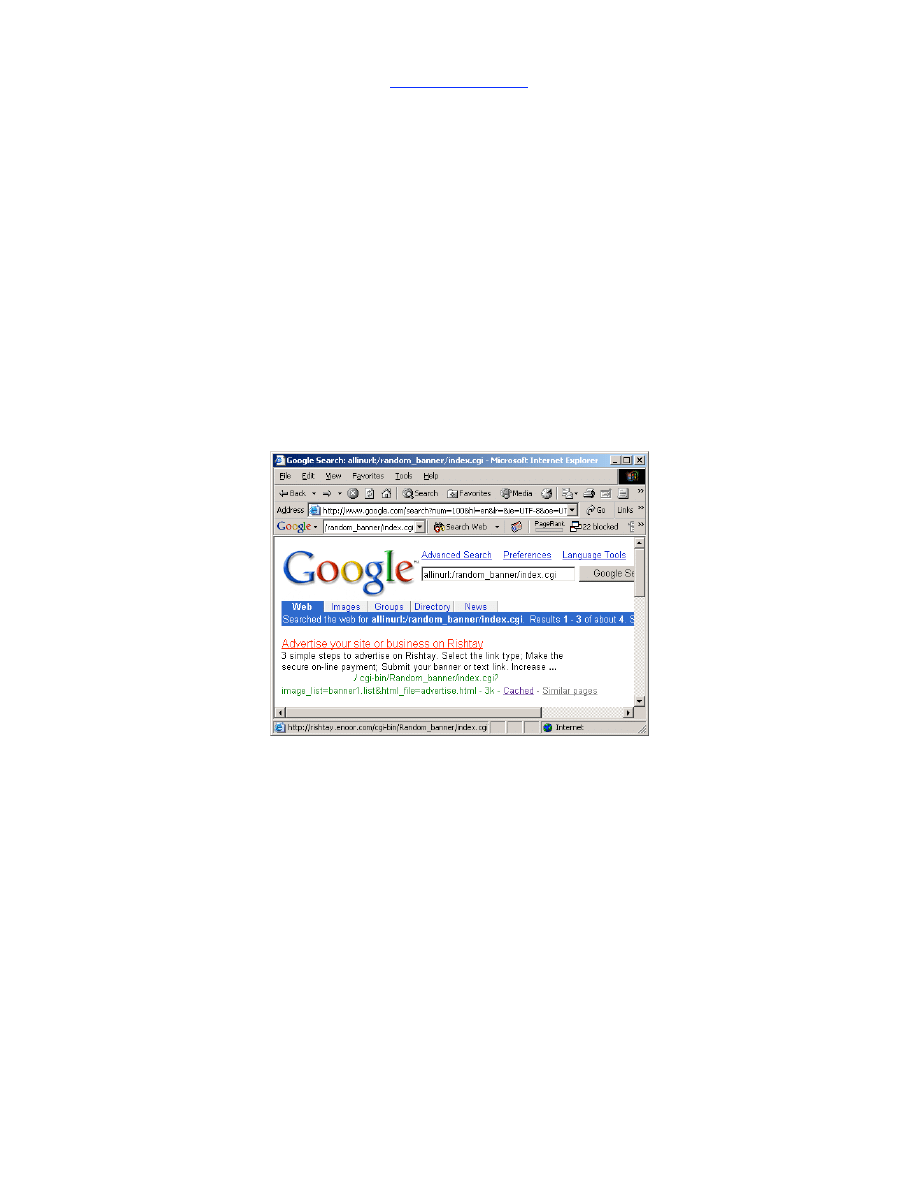
‘allinurl:/random_banner/index.cgi’ returns the results shown in Figure 15.
Figure 15: Example search using a line from a CGI scanner
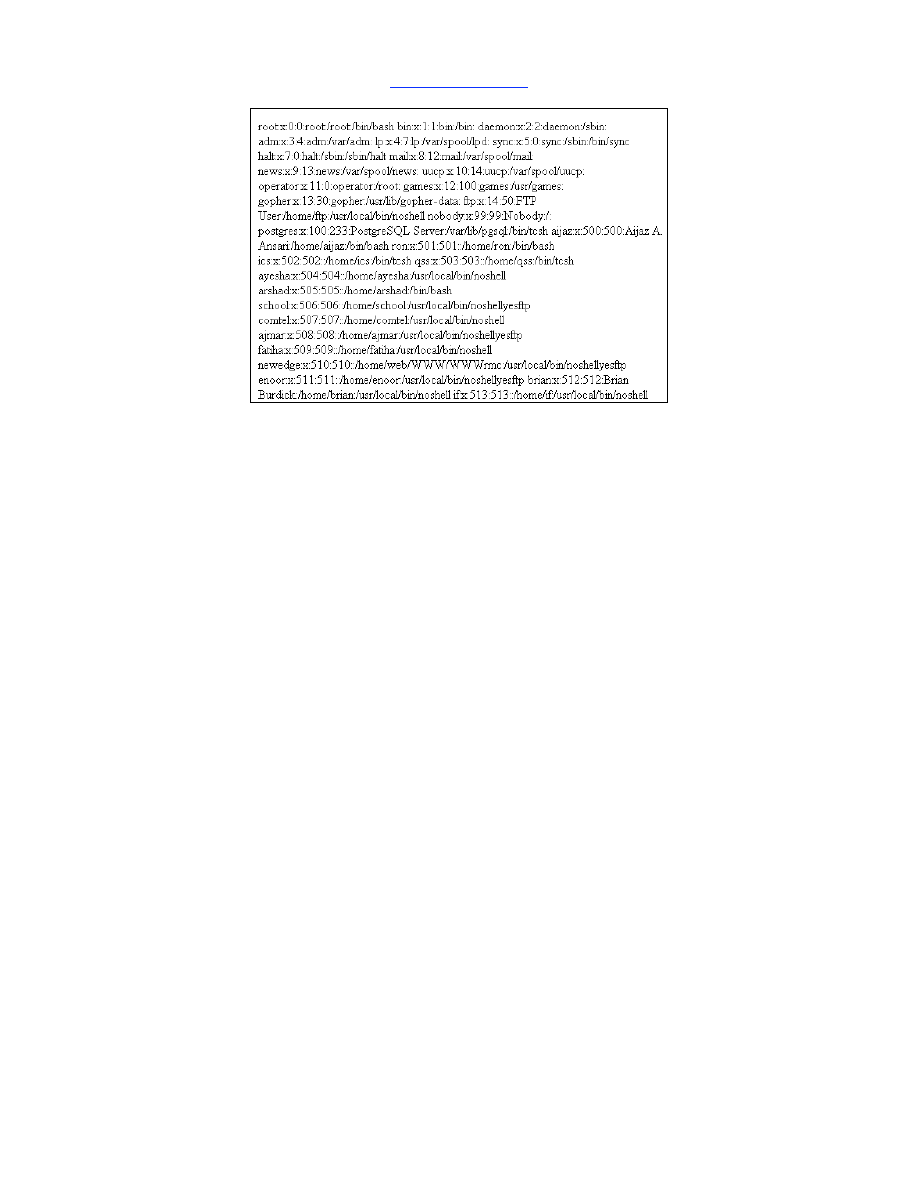
A hacker can take sites returned from this Google search, apply a bit of hacker ‘magic’
and eventually get the broken ‘random_banner’ program to cough up any file on that
web server, including the password file as shown in Figure 16.
The Google Hacker’s Guide
johnny@ihackstuff.com
http://johnny.ihackstuff.com
- Page 25 -
Figure 16: password file captured from a vulnerable site found using a Google search
Of the many Google hacking techniques we’ve looked at, this technique is one of the
best candidates for automation since the CGI scanner vulnerability files can be very
large. The gooscan tool, written by j0hnny performs this and many other functions.
Gooscan and automation is discussed later.
Using Google to find interesting files and directories
Using Google to find vulnerable targets can be very rewarding. However, it is often more
rewarding to find not only vulnerabilities but to find sensitive data that is not meant for
public viewing. People and organizations leave this type of data on web servers all the
time (trust me, I’ve found quite a bit of it). Now remember, Google is only crawling a
small percentage of the pages that contain this type of data, but the tradeoff is that
Google’s data can be retrieved from Google quickly, quietly and without much fuss.
It is not uncommon to find sensitive data such as financial information, social security
numbers, medical information, and the like.
How this technique can be used
Of all the techniques examined this far, this technique is the hardest to describe because
it takes a bit of imagination and sometimes just a bit of luck. Often the best way to find
sensitive files and directories is to find them in the context of other “important” words and
phrases.
Example:
Consider the fact that many people store an entire hodgepodge of data inside backup
directories. Often times, the entire content of a web server or personal computer can be
found in a directory called backup. Using a simple query like “inurl:backup” can
yield potential backup directories, yet refining the search to something like
“inurl:backup intitle:index.of inurl:admin” can reveal even more
relevant results.

The Google Hacker’s Guide
johnny@ihackstuff.com
http://johnny.ihackstuff.com
- Page 26 -
A query like “inurl:admin” can often reveal administrative directories. Several
combinations of this query are often fruitful. For example:
“inurl:admin intitle:login” can reveal admin login pages
“inurl:admin filetype:xls” can reveal interesting Excel spreadsheets either
named “admin” or stored in a directory named “admin”. Educational institutions are
notorious for falling victim to this search.
“inurl:admin inurl:userlist” is a generic catch-all query which finds many
different types of administrative userlist pages. These results may take some sorting
through, but the benefits are certainly worth it, as results range from usernames,
passwords, phone numbers, addresses, etc.
“inurl:admin filetype:asp inurl:userlist” will find more specific examples
of an administrator’s user list function, this time written in an ASP page. In most cases,
these types of pages do not require authentication.
About Google automated scanning
With so many potential search combinations available, it’s obvious that an automated
tool scanning for a known list of potentially dangerous pages would be extremely useful.
However, Google frowns on such automation as quoted at
http://www.google.com/terms_of_service.html
:
“You may not send automated queries of any sort to Google's system without
express permission in advance from Google. Note that "sending automated
queries" includes, among other things:
• using any software which sends queries to Google to determine how a
website or webpage "ranks" on Google for various queries;
• "meta-searching" Google; and
• performing "offline" searches on Google.”
Google does offer alternatives to this policy in the form of the Google Web API’s found at
http://www.google.com/apis/
. There are several major drawbacks to the Google API
program at the time of this writing. First, users and developers of Google API programs
must both have Google license keys. This puts a damper on the potential user base of
Google API programs. Secondly, API-created programs are limited to 1,000 queries per
day since “The Google Web APIs service is an experimental free program, so the
resources available to support the program are limited.” (according to the API FAQ found
at
http://www.google.com/apis/api_faq.html#gen12
.) With so many potential searches,
1000 queries is simply not enough.
The bottom line is that any user running an automated Google querying tool (with the
exception of API created tools) must obtain express permission in advance to do so. It is
unknown what the consequences of ignoring these terms of service are, but it seems
best to stay on Google’s good side.
The only exception to this rule appears to be the Google search appliance (described
below). The Google search appliance does not have the same automated query

The Google Hacker’s Guide
johnny@ihackstuff.com
http://johnny.ihackstuff.com
- Page 27 -
restrictions since the end user, not Google, owns the appliance. One should, however,
obtain advance express permission from the owner or maintainer of the Google
appliance before searching it with any automated tool for various legal and moral
reasons.
Other Google stuff
Google Appliances
The Google search appliance is described at
http://www.google.com/appliance/
:
“Now the same reliable results you expect from Google web search can be yours
on your corporate website with the Google Search Appliance. This combined
hardware and software solution is easy to use, simple to deploy, and can be up
and running on your intranet and public website in just a few short hours.”
The Google appliance can best be described as a locally controlled and operated mini-
Google search engines for individuals and corporations. When querying a Google
appliance, often times the queries listed above in the “URL Syntax” section will not work.
Extra parameters are often required to perform a manual appliance query. Consider
running a search for "Steve Hansen" at the Google appliance found at Stanford. After
entering this search into the Stanford search page, the user is whisked away to a page
with this URL (chopped for readability):
http://find.stanford.edu/search?q=steve+hansen
&site=stanford&client=stanford&proxystylesheet=stanford
&output=xml_no_dtd&as_dt=i&as_sitesearch=
Breaking this up into chunks reveals three distinct pieces. First, the target appliance is
find.stanford.edu. Next, the query is "steve hansen" or "steve+hansen" and
last but not least are all the extra parameters:
&site=stanford&client=stanford&proxystylesheet=stanford
&output=xml_no_dtd&as_dt=i&as_sitesearch=
These parameters may differ from appliance to appliance, but it has become clear that
there are several default parameters that are required from a default installation of the
Google appliance like the one found at find.stanford.edu.
Googledorks
The term “googledork” was coined by Johnny Long (
http://johnny.ihackstuff.com
) and
originally meant “An inept or foolish person as revealed by Google.” After a great deal of
media attention, the term came to describe those “who troll the Internet for confidential
goods.” Either term is fine, really. What matters is that the term googledork conveys the
concept that sensitive stuff is on the web, and Google can help you find it. The official
googledorks page (found at
http://johnny.ihackstuff.com/googledorks
) lists many different
examples of unbelievable things that have been dug up through Google by the
maintainer of the page, Johnny Long. Each listing shows the Google search required to
find the information along with a description of why the data found on each page is so
interesting.

The Google Hacker’s Guide
johnny@ihackstuff.com
http://johnny.ihackstuff.com
- Page 28 -
Gooscan
Gooscan (
http://johnny.ihackstuff.com
) is a UNIX (Linux/BSD/Mac OS X) tool that
automates queries against Google search appliances, but with a twist. These particular
queries are designed to find potential vulnerabilities on web pages. Think "cgi scanner"
that never communicates directly with the target web server, since all queries are sent to
Google, not to the target. For the security professional, gooscan serves as a front-end
for an external server assessment and aids in the "information gathering" phase of a
vulnerability assessment. For the web server administrator, gooscan helps discover what
the web community may already know about a site thanks to Google.
Gooscan was not written using the Google API. This raises questions about the “legality”
of using gooscan as a Google scanner. Is gooscan “legal” to use? You should not use
this tool to query Google without advance express permission. Google appliances,
however, do not have these limitations. You should, however, obtain advance express
permission from the owner or maintainer of the Google appliance before searching it
with any automated tool for various legal and moral reasons. Only use this tool to
query appliances unless you are prepared to face the (as yet unquantified) wrath
of Google.
Although there are many features, the gooscan tool’s primary purpose is to scan Google
(as long as you obtain advance express permission from Google) or Google appliances
(as long as you have advance express permission from the owner/maintainer) for the
items listed on the googledorks page. In addition, the tool allows for a very thorough CGI
scan of a site through Google (as long as you obtain advance express permission from
Google) or a Google appliance (as long as you have advance express permission from
the owner/maintainer of the appliance). Have I made myself clear about how this tool is
intended to be used? Get permission! =) Once you have received the proper advance
express permission, gooscan makes it easy to measure the Google exposure of yourself
or your clients.
GooPot
The concept of a honeypot is very straightforward. According to techtarget.com:
“A honey pot is a computer system on the Internet that is expressly set up to
attract and ‘trap’ people who attempt to penetrate other people's computer
systems.”
In order to learn about how new attacks might be conducted, the maintainers of a
honeypot system monitor, dissect and catalog each attack, focusing on those attacks
which seem unique.
An extension of the classic honeypot system, a web-based honeypot or “pagepot” is
designed to attract those employing the techniques outlined in this paper. The concept is
fairly straightforward. A simple googledork entry like “inurl:admin
inurl:userlist” could easily be replicated with a web-based honeypot by creating
an index.html page which referenced another index.html file in an /admin/userlist
directory. If a web search engine like Google was instructed to crawl the top-level
index.html page, if would eventually find the link pointing to /admin/userlist/index.html.
The Google Hacker’s Guide
johnny@ihackstuff.com
http://johnny.ihackstuff.com
- Page 29 -
This link would satisfy the Google query of “inurl:admin inurl:userlist”
eventually attracting a curious Google searcher.
Once the Google searcher clicks on the Google, he is whisked away to the target web
page. In the background, the user’s web browser also sends many variables to that web
server, including one variable of interest, the “referrer” variable. This field contains the
complete name of the web page that was visited previously, or more clearly, the web site
that referred the user to the web page. The bottom line is that this variable can be
inspected to figure out how a web surfer found a web page assuming they clicked on
that link from a search engine page. This bit of information is critical to the maintainer of
a pagepot system, since it outlines the exact method the Google searcher used to locate
the pagepot system. The information aids in protecting other web sites from similar
queries.
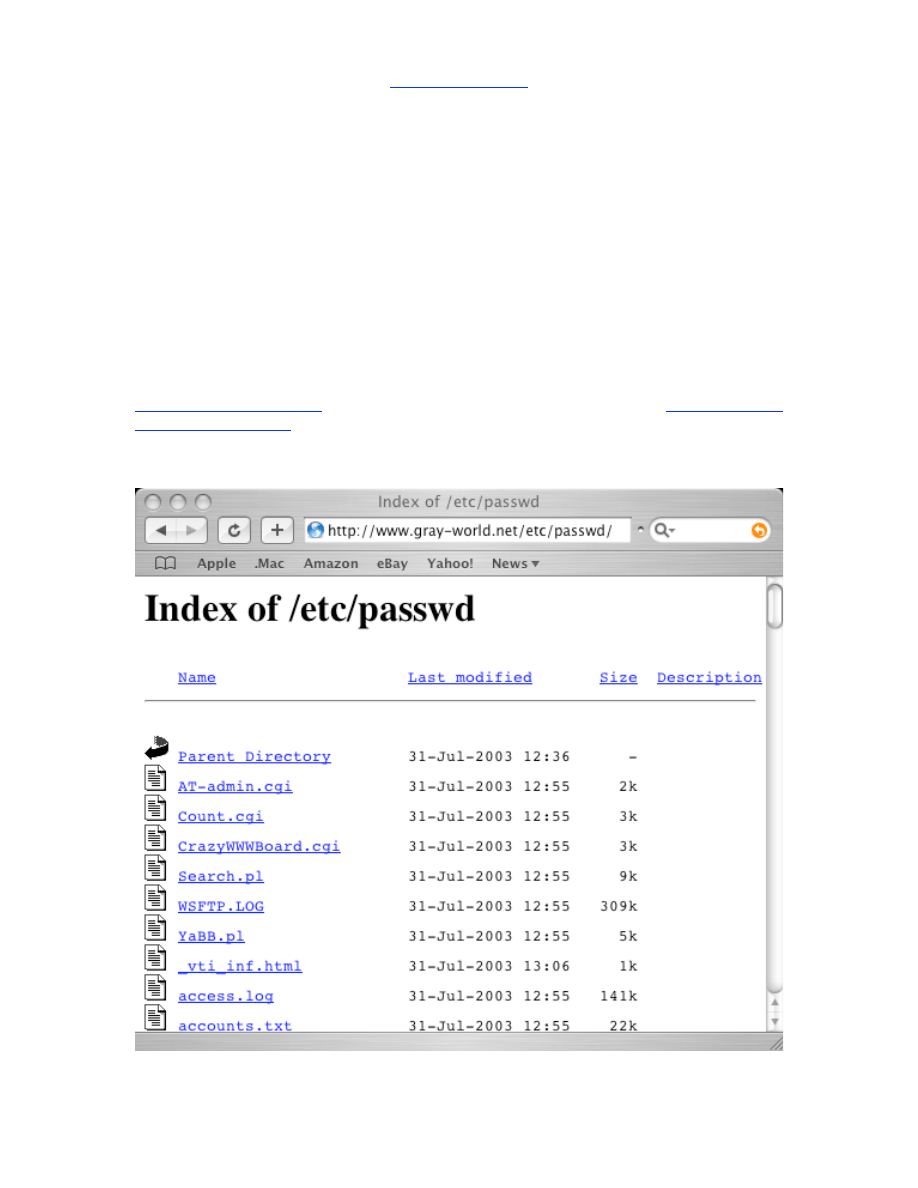
The concept of a pagepot is not a new one thanks to many folks including the group at
http://www.gray-world.net/
. Their web-based honeypot, hosted at
http://www.gray-
world.net/etc/passwd/
is designed to entice those using Google like a CGI scanner. This
is not a bad concept, but as we’ve seen in this paper, there are so many other ways to
use Google to find vulnerable or sensitive pages.

The Google Hacker’s Guide
johnny@ihackstuff.com
http://johnny.ihackstuff.com
- Page 30 -
Enter GooPot, the Google honeypot system designed by
johnny@ihackstuff.com
. By
populating a web server with sensitive-looking documents and monitoring the referrer
variables passed to the server, a GooPot administrator can learn about new web search
techniques being employed in the wild and subsequently protect his site from similar
queries. Beyond a simple pagepot, GooPot uses enticements based on the many
techniques outlined in the googledorks collection and this document. In addition, the
GooPot more closely resembles the juicy targets that Google hackers typically go after.
Johnny Long, the administrator of the googledorks list, utilizes the GooPot to discover
new search types and publicize them in the form of googledorks listings, creating a self-
sustaining cycle for learning about, and protecting from search engine attacks.
Although the GooPot system is currently not publicly available, expect it to be made
available early 2Q 2004.
A word about how Google finds pages (Opera)
Although the concept of web crawling is fairly straightforward, Google has created other
methods for learning about new web pages. Most notably, Google has incorporated a
feature into the latest release of the Opera web browser. When an Opera user types a
URL into the address bar, the URL is sent to Google, and is subsequently crawled by
Google’s bots. According to the FAQ posted at
http://www.opera.com/adsupport
:
“The Google system serves advertisements and related searches to the Opera
browser through the Opera browser banner 468x60 format. Google determines
what ads and related searches are relevant based on the URL and content of the
page you are viewing and your IP address, which are sent to Google via the
Opera browser.”
As of the time of this writing it is unclear as to whether or not Google includes the link
into it’s search engine. However, testing shows that when an unindexed URL
(
http://johnny.ihackstuff.com/temp/suck.html
) was entered into Opera 7.2.3, a Googlebot
crawled the URL moments later as shown by the following access.log excerpts:
64.68.87.41 - "GET /robots.txt HTTP/1.0" 200 220 "-" "Mediapartners-
Google/2.1 (+http://www.googlebot.com/bot.html)"
64.68.87.41 - "GET /temp/suck.html HTTP/1.0" 200 5 "-" "Mediapartners-
Google/2.1 (+http://www.googlebot.com/bot.html)"
The privacy implications of this could be staggering, especially if you Opera users expect
visited URLs to remain private.
This feature can be turned off within Opera by selecting “Show generic selection of
graphical ads” from the “File -> Preferences -> Advertising” screen.
Protecting yourself from Google hackers
1. Keep your sensitive data off the web!
Even if you think you’re only putting your data on a web site temporarily, there’s a
good chance that you’ll either forget about it, or that a web crawler might find it.
Consider more secure ways of sharing sensitive data such as SSH/SCP or
encrypted email.

The Google Hacker’s Guide
johnny@ihackstuff.com
http://johnny.ihackstuff.com
- Page 31 -
2. Googledork!
• Use the techniques outlined in this paper to check your own site for
sensitive information or vulnerable files.
• Use gooscan from
http://johnny.ihackstuff.com
) to scan your site for bad
stuff, but first get advance express permission from Google! Without
advance express permission, Google could come after you for violating
their terms of service. The author is currently not aware of the exact
implications of such a violation. But why anger the “Goo-Gods”?!?
• Check the official googledorks website (
http://johnny.ihackstuff.com
) on a
regular basis to keep up on the latest tricks and techniques.
3. Consider removing your site from Google’s index.
The Google webmaster FAQ located at
http://www.google.com/webmasters/
provides invaluable information about ways to properly protect and/or expose
your site to Google. From that page:
“Please have the webmaster for the page in question contact us with proof that
he/she is indeed the webmaster. This proof must be in the form of a root level
page on the site in question, requesting removal from Google. Once we receive
the URL that corresponds with this root level page, we will remove the offending
page from our index.”
In some cases, you may want to rome individual pages or snippets from Google’s
index. This is also a straightforward process which can be accomplished by
following the steps outlined at http://www.google.com/remove.html.
4. Use a robots.txt file.
Web crawlers are supposed to follow the robots exclusion standard found at
http://www.robotstxt.org/wc/norobots.html
. This standard outlines the procedure
for “politely requesting” that web crawlers ignore all or part of your website. I
must note that hackers may not have any such scruples, as this file is certainly a
suggestion. The major search engine’s crawlers honor this file and it’s contents.
For examples and suggestions for using a robots.txt file, see the above URL on
robotstxt.org.
Thanks and shouts
First, I would like to thank God for the taking the time to pierce my way-logical mind with
the unfathomable gifts of sight by faith and eternal life through the sacrifice of Jesus
Christ.
Thanks to my family for putting up with the analog version of j0hnny.
Shouts to the STRIKEFORCE, “Gotta_Getta_Hotdog” Murray, “Re-Ron” Shaffer, “2 cute
to B single” K4yDub, “Nice BOOOOOSH” Arnold, “Skull Thicker than a Train Track”

The Google Hacker’s Guide
johnny@ihackstuff.com
http://johnny.ihackstuff.com
- Page 32 -
Chapple, “Bitter Bagginz” Carter, Fosta’ (student=teacher;), Tiger “Lost my badge”
Woods, LARA “Shake n Bake” Croft, “BananaJack3t” Meyett, Patr1ckhacks, Czup, Mike
“Scan Master, Scan Faster” Walker, “Mr. I Love JAVA” Webster, “Soul Sistah” G Collins,
Chris, Carey, Matt, KLOWE, haywood, micah, Shouts to those who have passed on:
Chris, Ross, Sanguis, Chuck, Troy, Brad.
Shouts to Joe “BinPoPo”, Steve Williams (by far the most worthy defender I’ve had the
privilege of knowing) and to “Bigger is Better” Fr|tz.
Thanks to my website members for the (admittedly thin) stream of feedback and
Googledork additions. Maybe this document will spur more submissions.
Thanks to JeiAr at GulfTech Security <www.gulftech.org>, Cesar <sqlsec@yahoo.com>
of Appdetective fame, and Mike “Supervillain” Carter for the outstanding contributions to
the googledorks database.
Thanks to Chris O'Ferrell (
www.netsec.net
), Yuki over at the Washington Post, Slashdot,
and TheRegister.co.uk for all the media coverage. While I’m thanking my referrers, I
should mention Scott Granneman for the front-page SecurityFocus article that was all
about Googledorking. He was nice enough to link me and call Googledorks his “favorite
site” for Google hacking even though he didn’t mention me by name or return any of my
emails. I’m not bitter though… it sure generated a lot of traffic! After all the good press,
it’s wonderful to be able to send out a big =PpPPpP to NewScientist Magazine for their
particularly crappy coverage of this topic. Just imagine, all this traffic could have been
yours if you had handled the story properly.
Shouts out to Seth Fogie, Anton Rager, Dan Kaminsky, rfp, Mike Schiffman, Dominique
Brezinski, Tan, Todd, Christopher (and the whole packetstorm crew), Bruce Potter,
Dragorn, and Muts (mutsonline, whitehat.co.il) and my long lost friend Topher.
Hello’s out to my good friends SNShields and Nathan.
When in Vegas, be sure to visit any of the world-class properties of the MGM/Mirage or
visit them online at
http://mgmmirage.com
. =)
Wyszukiwarka
Podobne podstrony:
google a hacker tool 3UZZOCAHGK Nieznany
HS07 (long)
M 5190 Long dress with a contrast finishing work
M 5588 Long Sleeveless Dress With Shaped Trim
Effect of long chain branching Nieznany
MiUT long ver
Google Analytics Cheatsheet
phoneme a long
Czy wyszukiwarka Google indeksuje dokumenty PDF
Ekonomia ostatni wykład Google Docs
ABC ochrony komputerami przed atakami hackera
TK W URAZACH CZASZKOWO radiologia, ANATOMIA I INNE, Radiologia (www.google.pl)
Radiologia - Ostre schorzenia jamy brzusznej, ANATOMIA I INNE, Radiologia (www.google.pl)
L 5198 Lacy dress with a long sleeve
kamery google
long fact key
L 5588 Long Sleeveless Dre
więcej podobnych podstron