
Editor's Note: This article's code has been updated to work with the final release of the .Net framework.
Ideally, every software application will access the data from all possible data sources in the same manner. Every
application will be able to manipulate data in every possible way. But we do not live in a perfect world. There are
limitations on how we can or cannot access certain types of data. In the past few years Microsoft's ActiveX Data
Object (ADO) has revolutionized data access mechanism. With the arrival of .NET, comes ADO.NET, which truly is
the next generation of the ADO data species. In this article, readers will learn how to build a thin universal data
access layer at the top of ADO.NET using Design Patterns and .NET Framework. This component layer, which will
be based on ADO.NET, will provide access to OLE DB Managed Providers as well as SQL Server Managed Providers
through a single interface. It will be extensible so that in the future we can add access to other Managed providers
when they become available.
This article does not require a prior knowledge of Design Patterns. However, familiarity with Object Oriented
Design and Analysis techniques is recommended. A brief overview of Design Patterns is covered later in the
article. The discussion on n-tier (Presentation Tier, Business Tier, Data Tier) design and architecture is beyond the
scope of this article. It assumes that readers have some familiarity with n-tier design.
An Overview of Data Access Strategies
Before we dive into ADO.NET, let's go through a brief overview of history of data access on Microsoft platforms
including Windows and DOS. It all started with the arrival of ODBC (Open Database Connectivity). ODBC provided
a single API-style interface to access heterogeneous data sources. Components called ODBC drivers provided the
abstraction layer between databases and ODBC interface. Theoretically an application could switch to any
database without modifying a single line of data access code for which an ODBC driver was available. Because of
the API-style interface the use of ODBC was much more rampant in C/C++ applications than in Visual Basic
applications. Then came a slew of data access frameworks such as DAO (Data Access Objects) and RDO (Remote
Data Objects). DAO basically came with Visual Basic to supply developers with a data access class library for
Microsoft's own desktop database named "Access". On the other hand RDO just provided an object-wrapper for
ODBC. Although each of these solutions was effective for accessing certain types of data source, none provided a
Programme
Search
C#Today
Living Book
Index
n
m
l
k
j
i
Full Text
n
m
l
k
j
Advanced
CATEGORIES
HOME
SITE MAP
SEARCH
REFERENCE
FORUM
FEEDBACK
ADVERTISE
SU
The C#Today Article
August 13, 2001
Previous article -
August 10, 2001
Next art
August 1
Developing a Universal Data Access Layer leveraging
ADO.NET, C# and Factory Design Pattern
by
Naveed Zaheer
CATEGORIES: Site Design,
Data Access/ADO.NET
ARTICLE TYPE:
Tutorial
Reader Comments
ABSTRACT
Article
Usefu
Innov
Inform
14 resp
In this article Naveed Zaheer shows us how to build a thin universal data access layer at the top of
ADO.NET using Design Patterns and .NET Framework. This component layer, which will be based on
ADO.NET, will provide access to OLE DB Managed Providers as well as SQL Server Managed Providers
through a single interface. It will be extensible so that in the future we can add access to other
Managed providers when they become available.
Article Discussion
Rate this article
Related Links
Index Entries
ARTICLE
Page 1 of 9
C#Today - Your Just-In-Time Resource for C# Code and Techniques
2002-08-02
http://www.csharptoday.com/content/articles/20010813.asp?WROXE...

comprehensive solution. The arrival of ADO (Active Data Objects) a few years ago provided a far from elegant, but
better solution to common data access problems. ADO is a user-friendly object wrapper around Microsoft's data
access technology OLE DB. This object model provides uniform access relational as well as non-relational data.
With the many great features it provides, the best one is a single interface to access all type of data sources. Just
like ODBC drivers for ODBC, you have to develop OLE DB providers as an abstraction layer between database and
OLE DB. From ODBC to ADO one theme was consistent i.e. a single interface to access different types of data
sources. Although it was useful to switch between data sources without making many changes to the data access
layer, in many cases it took away a chunk from performance. The availability of OLE DB provider for SQL Server
alleviated the problem a little bit, but still performance was the issue. Because now it was possible to access SQL
Server data by using this native OLE DB provider instead of OLE Db Provider for ODBC.
Next Generation of Data Access - ADO.NET
With the arrival of .NET came ADO.NET. ADO.NET is not here to replace classic ADO, but to offer a different
approach to data access. Classic ADO offered disconnected recordsets but still most of the data access was in
connected mode. What ADO.NET offers is a disconnected approach. Also, to boost performance it offers a
separate, Managed Provider for different types of data sources. The idea is to take advantage of native database
capabilities, instead of building a single interface across all backends based upon least common denominator. At
the time of writing only three managed providers i.e. MS SQL Server, OLE DB and ODBC are available. Manager
Provider for SQL Server goes directly through TDS (Tabular Data Stream), which is SQL Server's native data
interface. It is only supported for SQL Server 7.0 or above. This way if you are accessing data from MS SQL
Server, you get a big performance boost compared to OLE DB provider. Now we have separate classes to deal
with when accessing data for OLE DB and MS SQL Server data sources. Suppose that you are using OLE DB data
provider to access data from an Oracle database for your .NET application. In the meantime, an ADO.NET
Managed Provider for Oracle native data interface becomes available from Microsoft or a 3rd party. Now to use the
new Manager Provider, you may have to alter all your data access code.
Many businesses are running a mixture of different databases. Imagine a company's e-Commerce site for
example. It may have a variety of databases that it uses for different purposes. For example, DB2 database,
where its entire inventory has stored; Oracle database, where it's entire customer data is stored; and MS SQL
Server database where it is planning to migrate in the future. What if we can have a single interface to access all
these Managed Providers without sacrificing performance? This interface should be neither too general nor too
specific. Whenever possible, this interface should try to expose the native Provider functionality instead of
providing a wrapper for it. It should cover the entire common functionality supported by all the Manager
Providers. The abstraction layer it provides should not be so thick that it degrades performance.
There are different ways to solve this problem. One way is to have a single class where each method has a switch-
case statement to handle different data providers. Sample code for this solution is shown below:
public override void Execute(ProviderType ctProviderType,CommandType ctStatement, string
{
switch(ctProviderType)
{
case ProviderType.MSSqlClient:
.
//Do Stuff Here for SqlClient
.
objSqlCommand.ExecuteNonQuery()
break;
case ProviderType.MSOleDb:
.
//Do Stuff Here for OleDb
.
objOleDbCommand.ExecuteNonQuery()
break;
default:
//Do Nothing
break;
}
}
However, this is not an elegant solution, because it will make code unnecessarily complex. Each time a new
Managed Provider becomes available you will have to modify that class. After you make a change for one Managed
Provider, you will have to regression test the component against all Managed Providers just to make sure you did
not break anything.
Overview of Design Patterns
Page 2 of 9
C#Today - Your Just-In-Time Resource for C# Code and Techniques
2002-08-02
http://www.csharptoday.com/content/articles/20010813.asp?WROXE...

Let's see how Design Patterns can help us solving this problem. However, before we do that let's get a brief look
at what
Design
Patterns
are.
Design
Patterns
are the robust solutions of frequently occurring problems,
which evolve, because of object-oriented development, over a period of decades. These are not new techniques,
which were never used before. You may have been using Design Patterns before without any knowledge of doing
so. For example if you have programmed with Visual C++ MFC you must have used Document/View Architecture,
which itself is based on a Design Pattern. If you have programmed with ATL (Active Template Library) or STL
(Standard Template Library) then you must have used templates. A template is a type of Behavioral Design
Pattern. In COM, design of interface
IClassFactory
is based on Factory Design Pattern. Singleton is a common
Design Patten, which is used very often. For a detailed discussion about Design Patterns, please refer to the book
mentioned in the Helpful Links section later in this article. Design Patterns are divided into three categories:
z
1) Creational: Design Patterns in this category deal with object instantiation. Factory and Singleton belong to
this category.
z
2) Structural: Design Patterns in this category deal with object and class composition. Adapter and Facade
belong to this category.
z
3) Behavioral: Design Patterns in this category deal with algorithms and assigning object responsibilities.
Mediator and Command belong to this category.
Factory Design Pattern
Sometimes an application or a framework does not know at runtime what kind of objects it has to create at
runtime. It may only know about the abstract class for those objects. However, these abstract classes or
interfaces cannot be instantiated. In other words, application only knows when to create the object but it does not
know the type of the object to create. Factory Design Pattern does solve this problem. Factory Design Pattern
Method is a Creational Design Pattern. The purpose of Factory method is to create objects. It helps us design an
interface that creates objects of appropriate subclasses at runtime. It provides loose coupling eliminating the need
to tie application specific classes together.
Factory Design Pattern is defined as "Define an interface for creating an object, but let the subclasses decide
which class to instantiate." The Factory method lets a class defer instantiation to subclasses. The Factory Method
lets a class defer instantiation to subclasses in the book Design Patterns.
In simple words, Factory Method lets you decide at runtime which subclasses of an abstract base class will be
instantiated.
There are different implementations of Factory Method. One particular implementation that we are interested in is
"Parameterized Factory method". In this implementation Factory Method is used to create multiple kinds of
objects. It accepts a parameter that identifies which type of object to create. All the objects created implement
the same interface or subclasses from the same abstract base class. Consider the following example:
public class Creator
{
public static int gintComicBook = 0;
public static int gintProgrammingBook = 1;
public static int gintFictionBook = 2;
public Creator()
{
}
public Book CreateBook(int iBookType)
{
switch(iBookType)
{
case gintComicBook:
return new ComicBook();
case gintProgrammingBook:
return new ProgrammingBook();
case gintFictionBook:
return new FictionBook();
};
}
}
In the code above function,
CreateBook
of class
Creator
takes an integer as a parameter. Based on that
parameter it decides what type of object it is going to create. All the three classes i.e.
ComicBook
,
ProgrammingBook
,
FictionBook
, derive from the same base class Book.
Page 3 of 9
C#Today - Your Just-In-Time Resource for C# Code and Techniques
2002-08-02
http://www.csharptoday.com/content/articles/20010813.asp?WROXE...

Data Access Layer Implementation
Let's see that how we can use the Parameterized Factory Method implementation to create a single interface for
all of the Managed Providers using Factory Method. First, we will have to have a Creator class with a function like
CreateBook
. This function will take a parameter identifying what type of Managed Provider object it has to
create. For our implementation, class DataManager is our Creator class. Its function
GetDBAccess
, which has two
overloads, behaves the same way as
CreateBook
behaves in the above example. Following is the partial code for
DataManager class:
public static DBAccess GetDBAccessor(ProviderType ctProviderType,string strConnectionInf
{
DBAccess objDBAccess;
switch(ctProviderType)
{
case ProviderType.MSSqlClient:
objDBAccess = new DBAccessSQL(strConnectionInfo);
break;
case ProviderType.MSOleDb:
objDBAccess = new DBAccessOleDb(strConnectionInfo);
break;
default:
objDBAccess = null;
break;
}
return objDBAccess;
}
public static DBAccess GetDBAccessor(ProviderType ctProviderType)
{
return GetDBAccessor(ctProviderType,"");
}
As you can see from the code shown above, both overloads of function
GetDBAccess
take a parameter of type
enumeration
ProviderType
. Based on the value of that parameter, it is decided from that object which class will
be instantiated. Both classes i.e.
DBAccessOleDb
,
DBAccessSQL
, derive from the same base class
DBAccess
.
DBAccess
is the abstract base class that defines an interface common to all Managed Providers. Following is the
partial code shown for the base class
DBAccess
:
public abstract class DBAccess : IDisposable
{
protected string mstrConnectionInfo;
//public properties
public abstract string ConnectionInfo
{
set;
get;
}
public abstract bool InTransaction
{
get;
}
//public functions
public abstract void BeginTransaction();
public abstract void CommitTransaction();
public abstract void AbortTransaction();
public abstract void Execute(CommandType ctStatement,string strSQL);
public abstract void Execute(CommandType ctStatement,string
strSQL,string strTable,out DataSet objDataSet);
public abstract void Execute(CommandType ctStatement,string
strSQL,out IDataReader objDataReader);
public abstract void SetParameter(string strName, ParameterDirection
pdDirection, ParameterType ptType, int intSize, object objValue);
public abstract void SetParameter(string strName, ParameterDirection
pdDirection, ParameterType ptType, int intSize);
public abstract void SetParameter(string strName, ParameterDirection
pdDirection, ParameterType ptType);
public abstract void ClearParameters();
public abstract void GetParameterValue(string strName, out object
Page 4 of 9
C#Today - Your Just-In-Time Resource for C# Code and Techniques
2002-08-02
http://www.csharptoday.com/content/articles/20010813.asp?WROXE...

objValue);
public abstract void GetParameterValue(string strName, out string
strValue);
public abstract void GetParameterValue(string strName, out short
shtValue);
public abstract void GetParameterValue(string strName, out int
intValue);
public abstract void GetParameterValue(string strName, out Double
dblValue);
public abstract void GetParameterValue(string strName, out Decimal
decValue);
public abstract void GetParameterValue(string strName, out long
lngValue);
public abstract void GetParameterValue(string strName, out DateTime
dateValue);
public virtual void Dispose()
{
}
}
One interesting thing about this class is that it implements
IDisposable
interface. This interface only has one
method Dispose, for which implementation has to be provided by the class, which implements that interface. As
we know, in .NET Framework, Garbage Collection handles the object cleanup. However, it is recommended that if
you are dealing with precious system resources, such as database connections, in your class then you should
expose a Dispose method. In that method you should properly cleanup those resources. Applications using the
objects of your class should call this method to properly and timely free the system resources.
As we know that classes derived from DBAccess encapsulates important system resources such as database
connection. It is possible in some cases that an object of type DBAccess is de-referenced but Garbage Collector
may take some time to collect. In that case, the database connection that is encapsulated by the subclass of
DBAccess will not be freed until the Garbage collection takes place. This is not a desirable behavior and may
consume resources on the database sever. That's where use of Dispose method comes into the picture. We can
put all the database connection cleanup code in the Dispose method. An application that is using an object of class
DBAccess will call Dispose to free up any database resources. Note that classes such as DBAccessSQL, which is
derived from DBAccess implements IDisposable inherently because it is implemented in its base class.
As you can see none of the functionality in the abstract base class DBAccess is provider specific. All the properties
and functions of base class DBAccess, which are declared abstract, will require implementation in the derived
classes. All the provider specific functionality is implemented in the derived classes. It will be a lot clearer when
we start looking at the different subclasses of DBAccess class. Let's look at the code shown below for
DBAccessSQL:
internal class DBAccessSQL : DBAccess
{
private SqlConnection mobjConnection = null;
private SqlCommand mobjCommand = null;
private SqlDataAdapter mobjDataAdapter = null;
private SqlTransaction mobjTransaction = null;
internal DBAccessSQL(string strConnectionInfo)
{
mstrConnectionInfo = strConnectionInfo;
mobjCommand = new SqlCommand();
mobjDataAdapter = new SqlDataAdapter();
}
internal DBAccessSQL()
{
mstrConnectionInfo = "";
mobjCommand = new SqlCommand();
mobjDataAdapter = new SqlDataAdapter();
}
Class
DBAccessSQL
is derived from
DBAccess
. Access modified for class
DBAccess
is "public" while access
modifier for
DBAccessSQL
is "internal". Access modifier "internal" makes sure that this class is not visible outside
its own namespace. Therefore, when we build
DataManager
component as a DLL, consumers will not be able to
create the instances of class
DBAccessSQL
directly. They will only be able to create them through the creator
class
DataManager
. That is exactly what we want. In addition,
DBAccessSQL
declares objects of type
SqlConnection
,
SqlCommand
and
SqlDataAdapter
as data member. Data members of the class
mobjCommand and mobjDataAdapters are initialized in the object's constructor. You can set value of data
member mstConnectionInfo in different ways. One way is that when you call
GetDBAccess
method of class
Page 5 of 9
C#Today - Your Just-In-Time Resource for C# Code and Techniques
2002-08-02
http://www.csharptoday.com/content/articles/20010813.asp?WROXE...

DataManager
, you can pass connection string as one of the parameters. Another way to set this information is by
calling property ConnectioInfo of class DBAccessSQL. Whatever way you set this property, you have to do it
before calling functions Execute or BeginTransaction. Otherwise, an SQLException will be thrown by the Managed
Provider.
One benefit that we get from building a wrapper around the ADO.NET data access functionality is that we are able
to hide complex implementation details from the consumer of the component. For example, you know that to get
a DataSet build based on the results returned from a query, we have to use the Command object of DataAdapter
class. For a query that returns no results, we can use Command object directly. As you can see from the code
listed above, function Execute has four overloads. Each of them returns a different type of object as out
parameters. These overloads of function
Execute
hide the complex details on how different data access objects
such as
DataReader
or
DataSet
was created.
public override void SetParameter(string strName, ParameterDirection pdDirection,
ParameterType ptType)
{
try
{
SqlParameter objParameter = mobjCommand.Parameters.Add(strName,
GetSqlParameterType(ptType));
objParameter.Direction = pdDirection;
}
//Exception Handling Code Here
}
Code for one of the overloads of function
SetParameter
is shown above. Overloads of the function
SetParameter
are used to add parameter to the Parameters collection of Command object for the query or the
stored procedure to be executed. As you can see, function
SetParameter
does not take any of the Provider
dependent parameter types as parameter. It takes enumeration
ParameterType
declared in file
DataManager
.cs as a parameter for this function. This enumeration abstracts out the differences between the
parameters types used by different Managed Providers. It is the responsibility of the derived class of
DBAccess
to
convert it to Provider-Specific parameter type. On thing to note here is that we always add a parameter to the
Parameters collection of
mobjCommand
data member. So, what happens when the overload of function
Execute
is called that uses data member
mobjDataAdapter
? In that case function
BindParameters
is called by the
Execute
function, which copies parameters from data member
mobjCommand's
Parameters collection to the
Parameters collection of
mobjDataAdapter's
SelectCommand
property. Listing for function BindParameter is
shown below:
private void BindParameters (SqlCommand objCommand)
{
if (mobjCommand.Parameters.Count > 0)
{
foreach(SqlParameter objParameter in mobjCommand.Parameters)
{
SqlParameter objNewParameter =
objCommand.Parameters.Add(objParameter.ParameterName,objParameter.SqlDbType,objParameter
objNewParameter.Value = objParameter.Value;
objNewParameter.Direction = objParameter.Direction;
}
}
}
Now let's look at the code for some of the more interesting functions of class
DBAccessSQL
. Following is the code
for one of the overloads of function
Execute
:
public override void Execute(CommandType ctStatement, string strSQL)
{
try
{
CreateConnection();
SetCommandData(mobjCommand,ctStatement,strSQL);
mobjCommand.ExecuteNonQuery();
}
//Exception Handling Code Here
}
Page 6 of 9
C#Today - Your Just-In-Time Resource for C# Code and Techniques
2002-08-02
http://www.csharptoday.com/content/articles/20010813.asp?WROXE...
This function is pretty simple. Parameters to this function are enumeration
CommandType
, which may be a stored
procedure, name of a table or an SQL query and the statement text itself. This function first calls
CreateConnection
. Function
CreateConnection
is responsible for creating and opening the database
connection if one does not exists. It does so by checking data member
mobjConnection
. If data member
mobjConnection
is not null and its state is Open, this function does not do anything. Otherwise, it creates and
opens a new
SQLConnection
object and assigns it to data member
mobjConnection
. As said before, it is
recommended that as soon as you are done with an instance of class DBAccessSQL, you should call its
Dispose
method.
Dispose
method takes care of closing the database connection. The reason why it is done this way is to
follow the principle of getting a system resource as late as possible and releasing it as early as possible once it is
no longer required. This way no one holds precious system resources for too long and their availability is
maximized. A complete example on the sequence of how different methods of this class should be called will be
explained in a later section.
Finally, function
GetParameterValue
that has eight overloads is used to extract the value of parameters
returned after executing a stored procedure. Each overload returns a parameter of a specific type as out
parameter. Function
ClearParameters
just clears out all the parameters that are set by calling function
SetParameter
. If there is no parameter set by calling function
SetParameter
, this function does not do
anything. As mentioned earlier, overloads for function
GetParameterValue
are used to extract the value of the
parameters returned by the stored procedure. As you can see from the code shown below for one of the overloads
of this function, it simply gets the parameter value from
mobjCommand's
Parameters collection.
public override void GetParameterValue(string strName, out object objValue)
{
try
{
objValue = mobjCommand.Parameters[strName].Value;
}
//Exception Handling Code Here
}
Testing
In the code download there is an application called
DataManagerTest
that we will use to test this component.
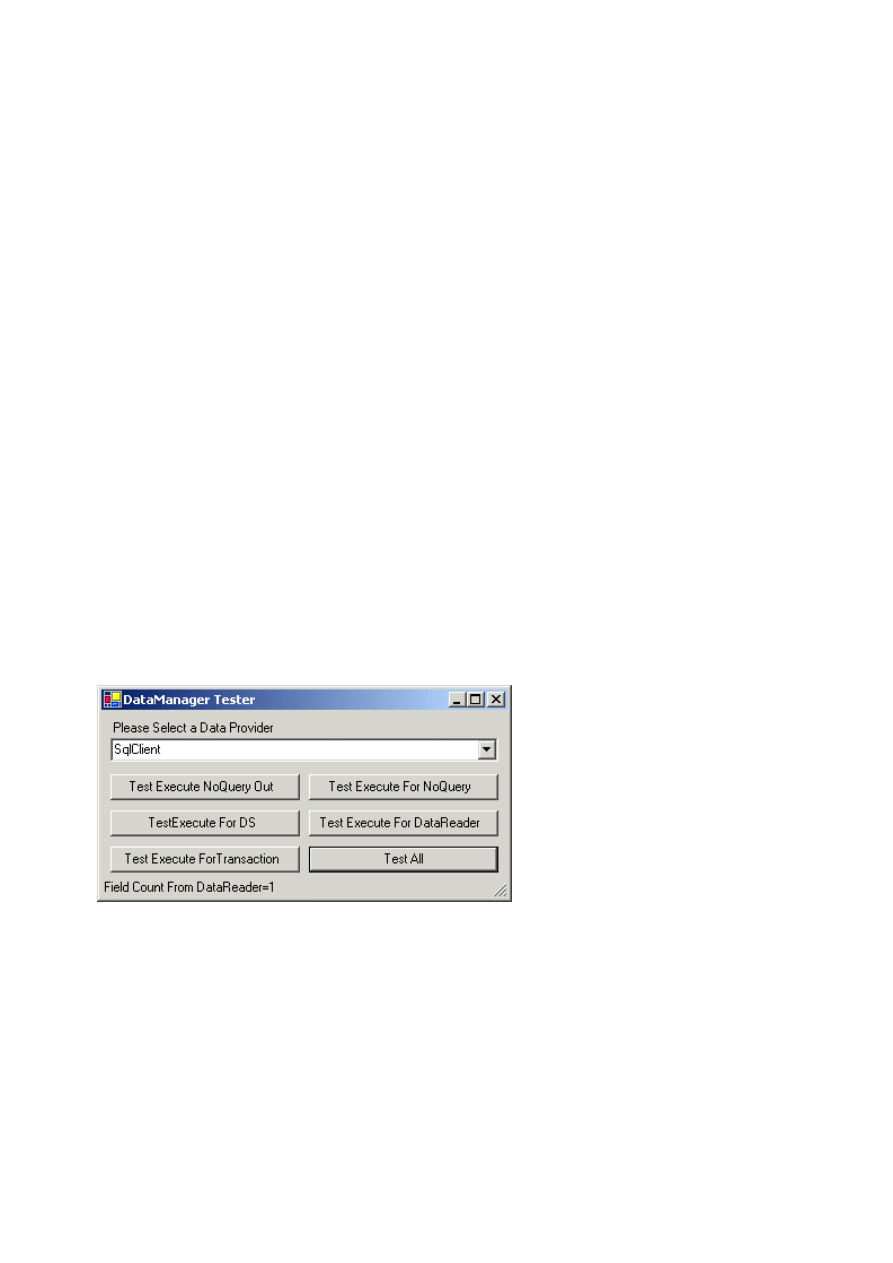
We will use the pubs database that comes with MS SQL Server as our test database. As you can see from the
screenshot below, that each buttons is to test a specific functionality.
First let me show you how we will use this component. The partial code for one of the button onclick event is
shown below:
DBAccess objABAccess = DataManager.GetDBAccessor(ptType,mstrConnectionInfo);
objABAccess.SetParameter("@JobId",ParameterDirection.Input,ParameterType.dmPtSmallInt,2,
objABAccess.SetParameter("@JobDesc",ParameterDirection.Output,ParameterType.dmPtVarChar,
objABAccess.Execute(CommandType.StoredProcedure,strSQL);
objABAccess.GetParameterValue("@JobDesc",out strJobDesc);
objABAccess.Dispose();
As you can see, we first get a reference of a new
objDBAccess
component by calling
GetDBAccessor
method
of DataManager with proper
ProviderType
enumeration value. Then parameters are assigned to that component
by calling function
SetParameter
. The next step is to call Execute method with proper
CommandType
and SQL
text. If the command type is stored procedure and the stored procedure has any output parameters, you can use
overloads of function
GetParameterValue
to extract their values. Finally, once you are done with the
DBAccess
Page 7 of 9
C#Today - Your Just-In-Time Resource for C# Code and Techniques
2002-08-02
http://www.csharptoday.com/content/articles/20010813.asp?WROXE...

object then it is highly recommended that you call its Dispose method to cleanup system resources in a timely
manner. If you want to reuse the same DBAccess object then do not call its
Dispose
method. However, make
sure to call its function
ClearParameters
to safely remove all the parameters that were assigned to this object
before. You should call
ClearParameters
before you do anything else with the
DBAccess
object. Partial code
for this
DBAccess
reuse is shown below:
DBAccess objABAccess = DataManager.GetDBAccessor(ptType,mstrConnectionInfo);
//Code for SetParameters
//Code to Call Execute
//Code to Get Parametrs or Deal with Data Set
//Make Sure you call Clear Paramaetrs before you do anything
objABAccess.ClearParameters()
//Code to Reuse the same object
//Code to SetParameters
//Code to Call Execute
//Code to Get Parametrs or Deal with Data Set
//Once you are done then call Dispose
objABAccess.Dispose();
Tools and Technologies Used
We will be using the following tools and technologies to build this component.
z
. NET Framework Beta 2
z
Visual Studio .NET Beta 2
z
Windows 2000 Server or Professional
z
Internet Information Server 5.0
z
C#
z
SQL Sever 7.0 or 2000
Conclusion
This completes our discussion regarding this article.
DBAccessOleDb
is the other class that is derived from
DBAccess. It works pretty much the same was as
DBAccessSQL
. There is some functionality, which is only
available in Managed Provider for SQL Server. To support that kind of functionality you have two options: One,
that you can somehow implement that functionality yourself, the other being to throw a proper exception. Some
other features that we may want to implement later are bulk updates using DataSet and DataAdapter.
One other thing to note here is how straightforward Object Oriented development is with .NET Framework. With
classic COM, only interface inheritance was possible. So to develop an application based on complex Object
Oriented designs you had to improvise and use roundabout techniques. However, with .NET Framework both
interface inheritance and implementation inheritance are available. This way any type of Object Oriented
implementation is possible using the .NET Framework. You are not forced to convert your OO classes to interfaces
to make things work, as you had to do in the case of classic COM. In addition, you can take advantage of different
OO techniques without any problem.
RATE THIS ARTICLE
Please rate this article (1-5). Was this article...
Useful?
No
n
m
l
k
j
n
m
l
k
j
n
m
l
k
j
n
m
l
k
j
n
m
l
k
j
Yes, Very
Innovative?
No
n
m
l
k
j
n
m
l
k
j
n
m
l
k
j
n
m
l
k
j
n
m
l
k
j
Yes, Very
Informative?
No
n
m
l
k
j
n
m
l
k
j
n
m
l
k
j
n
m
l
k
j
n
m
l
k
j
Yes, Very
Brief Reader Comments?
Your Name:
(Optional)
USEFUL LINKS
Related Tasks:
z
Download the support material
for this
z
Enter Technical Discussion
on this Artic
z
Technical Support on this article -
support@
z
See other articles in the Site Design catego
z
See other articles in the
Data Access/ADO.
z
See other
Tutorial
articles
z
Reader Comments
on this article
z
Go to
Previous Article
z
Go to Next Article
Page 8 of 9
C#Today - Your Just-In-Time Resource for C# Code and Techniques
2002-08-02
http://www.csharptoday.com/content/articles/20010813.asp?WROXE...

Related Sources
z
The Factory Method (Creational) Design Pattern:
http://gsraj.tripod.com/design/creational/factory/factory.html
z
ADO+ Guides the Evolution of the Data Species:
http://msdn.microsoft.com/library/default.asp?url=/library/en-
us/dndotnet/html/adoplus.asp
z
Design Patterns in C#:
http://www.clipcode.com/components/snippets.htm
Search the
C#Today Living Book
Index
n
m
l
k
j
i
Full Text
n
m
l
k
j
Advanced
Index Entries in this Article
z
ADO
z
ADO.NET
z
behavioral design patterns
z
Command object
z
creational design patterns
z
DAO
z
data access
z
data source tier
z
DataAdapter object
z
description
z
design patterns
z
Dispose method
z
factory des
method
z
IDisposable
z
introductio
z
managed p
z
ODBC
z
OLE DB pro
z
parameteri
method
z
Parameters
z
RDO
z
SelectCom
z
structural d
z
testing
HOME
|
SITE MAP
|
INDEX
|
SEARCH
|
REFERENCE
|
FEEDBACK
|
ADVERTIS
Ecommerce
Performance
Security
Site Design
XML
SO
Data Access/ADO.NET
Application
Development
Web Services
Graphics/Games
Mobile
Other Technologies
C#Today is brought to you by Wrox Press (www.wrox.com). Please see our
terms and conditions
and
privacy
C#Today is optimised for Microsoft
Internet Explorer 5
browsers.
Please report any website problems to
webmaster@csharptoday.com
. Copyright © 2002 Wrox Press. All Rights
Page 9 of 9
C#Today - Your Just-In-Time Resource for C# Code and Techniques
2002-08-02
http://www.csharptoday.com/content/articles/20010813.asp?WROXE...
Wyszukiwarka
Podobne podstrony:
Technologie ASP NET i ADO NET w Visual Web Developer techas
ADO NET 2005
3 ADO NET
Obiekty ADO NET
Slide Lập Trình Trên Môi Trường Windows Với ADO NET Phạm Minh Tuấn, 23 Trang
ADO NET 2005
System bezpieczeństwa dla komputerów osobistych ( DACS for Windows 95 Data Access Control System)
recent developments in the med chem of cannabimimetic indoles pyrroles and indenes curr med chem 12
Hiding data inside the padding area in files and packets
Building An Online Shopping Cart Using C Sharp And Asp Net Part 1
ASP NET Module 3 Using Microsoft ADO NE
Jezyk C Programowanie Wydanie III Microsoft NET Development Series
13 Interoperability, data discovery and access The e infrastructures for earth sciences resources
więcej podobnych podstron