
ABB i-bus
®
EIB / KNX
Software Information
Product:
Switch Actuator
Type:
SA/S x.y.zS
Current application program:
Switch xf y/2
(x = 2, 4, 8, 12-fold, y = 6A, 10A, 16A, 16CS)
=======================================================================================
Software-Information
to:
Switch xf y/2
at: 10/2006
General
The application Switch xf y/2
(
Product manual „Switch Actuators SA/S“ – Pub. No 2CDC 505 056 D0202)
no changes
SA/S 12.16.1 is new in the SA/S portfolio.
The name of the Application is switch 12f 16/2
---------------------------------------------------------------------------------------------------------------------------------------------------------
Software-Information
to:
Switch xf y/2
at: 10/2006
General
The application Switch xf y/2
(
Product manual „Switch Actuators SA/S“ – Pub. No 2CDC 505 056 D0202)
updates the actual application Switch, xfy/1
(
Product manual „Switch Actuators SA/S“ – Pub. No. 2CDC 505 056 D0201)
There is no possibility to convert old ETS-Project automatically with the new
application.
The update includes the following changes.
1. Name of Application:
Sample
old
new
SA/S 4.6.1
Switch, 4f6/1
Switch 4f 6A/2
SA/S 8.6.1
Switch, 8f6/1
Switch 8f 6A/2
SA/S 12.6.1
Switch, 12f6/1
Switch 12f 6A/2
SA/S 2.10.1
Switch, 2f10/1
Switch 2f 10A/2
SA/S 4.10.1
Switch, 4f10/1
Switch 4f 10A/2
SA/S 8.10.1
Switch, 8f10/1
Switch 8f 10A/2
SA/S 12.10.1
Switch, 12f10/1
Switch 12f 10A/2
SA/S 2.16.1
Switch, 2f16/1
Switch 2f 16A/2
SA/S 4.16.1
Switch, 4f16/1
Switch 4f 16A/2
SA/S 8.16.1
Switch, 8f16/1
Switch 8f 16A/2
SA/S 2.16.5S
Switch, 2f16S/1
Switch 2f 16CS/2
SA/S 4.16.5S
Switch, 4f16S/1
Switch 4f 16CS/2
SA/S 8.16.5S
Switch, 8f16S/1
Switch 8f 16CS/2
SA/S 12.16.5
Switch, 12f16/1
Switch 12f 16C/2
1. Current Value on EIB/KNX:

ABB i-bus
®
EIB / KNX
Software Information
Devices with current detection (Type „S“) can send the current value as an
mA value on the EIB/KNX Bus. This object is a 2-Byte counter value (EIS
10, DTP 7.012).
With the application …/2 it is not longer possible to send the current value in
Ampere over an 1-Byte Object on the Bus.
2. Device Delivery Status:
The default operation mode of the switch actuator is now defined as Switch
actuator. Therefore the Object “switch” and “Telegr. status switch“ is visible
without setting any parameter over the ETS.
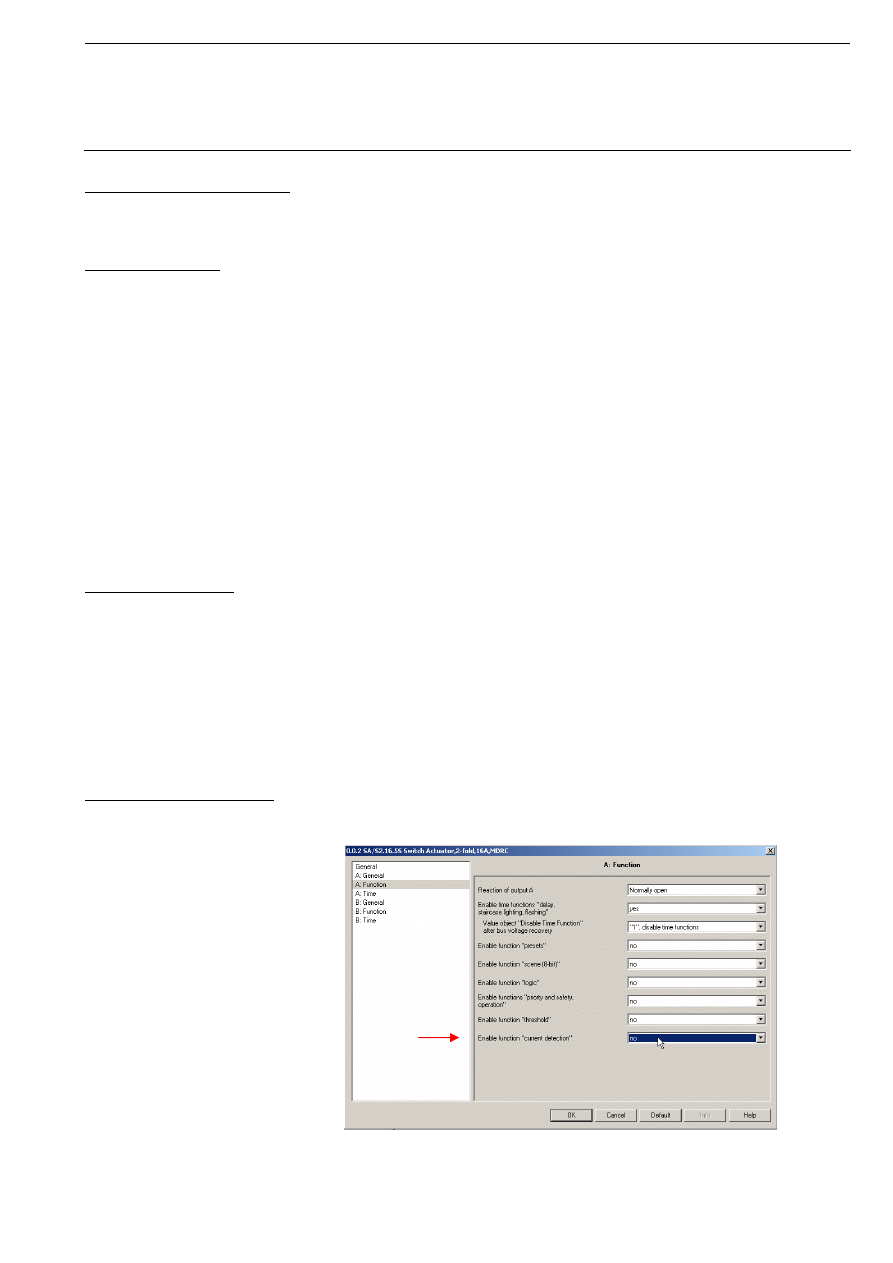
ABB i-bus
®
EIB / KNX
Software Information
3. Limitation of Telegram Rate:
With the new application (…/2) it is possible to limit the sending of telegrams
of the switch actuator. The corresponding parameter is in the parameter
window „General“.
4. Status Response:
The response of the switching status is parameterise in the „X: General“
(x= channel).
Options:
nein
after a change
always
If “no” is set the object value will always be updated, but not sent.
The “always” setting has the effect that the status of contact position is
updated and always sent, if a “switch option” is received, even if no
switching or change in the object value has occurred. With the “after a
change” setting the status telegram is only sent if the object value “Telegr.
Status Switch” changes. The bus load can be greatly influenced here
particularly with multi-channel switch actuators. The object value (“0” or “1”)
which is used at a contact position is possible with the “Object value contact
position (Object “Telegr. Status Switch”) parameter. This parameter appears
if “after a change” or “always” have been selected.
5. Staircase Retrigger:
The wording of the parameter has changed. The function has not changed.
Parameter „Extending staircase lighting by multiple operation (pumping up)“:
new
old
Options: no (not retriggerable)
nein
yes (retriggerable)
up to max. 1x …
up to max. 2x …
up to max. 2x …
up to max. 3x …
up to max. 3x …
up to max. 4x …
up to max. 4x …
up to max. 5x …
up to max. 5x …
6. Enable Current Detection:
The current detection is enable in the parameter windows „X: Function“
together with the other functions of the switch actuator:

ABB i-bus
®
EIB / KNX
Software Information
7. Contact Monitoring:
The devices with current detection (Type “S”) has get a additional function.
Now it is possible to monitor the switching contact of the relay with an
integrated logic in the switch actuator.
For this new function the object “contact monitoring” is available. The value
“1” (contact fault) is assumed if the contact is opened via a switching action
and a current is still detected (contact welded) or if the contact is closed
manually and a current will detect. The evaluation if a current flows or does
not flow is undertaken in the steady-state approximation of 2 seconds after
the switching action. The current is safely detected if it is greater than 100
mA.
8. Evaluation of Current Detection:
With the new application (…/2) it is possible to evaluate the current for the
threshold-function of the current detection.
It is possible to evaluate the current only during the contact is open, it is
closed or during both contact positions. The parameter is in the parameter
window “x: Current Detection”.
Further on it is possible to set a delay of the current evaluation, after contact
switching, via parameter. Delay times of 0 up to 255 seconds are possible.
9. Staircase lighting time:
If the old application (…/1) is load in an unloaded SA/S device and the
object „staircase time“ was not enabled. The staircase time was limited up to
4 minutes, even if a larger time was set via parameter.
The new application (…/2) eliminate this bug.
---------------------------------------------------------------------------------------------------------------------------------------------------------
Wyszukiwarka
Podobne podstrony:
29 08 11
08 11
2010 08 11 16 29 37
2015 08 20 08 11 47 01
Mikroekonomia - wyklad 07 [08.11.2001], Ekonomia, ekonomia, Mikroekonomia
15 Pochodne kwasów karboksylowych (08 11 2011)
2015 08 20 08 11 05 01
30 08 11
2015 08 20 08 11 58 01
08.11.2010, prawo pracy(8)
czapelski SzNP 08 11
RiE 08.11.2012r, Dziennikarstwo i komunikacja społeczna (KUL) I stopień, Rok 2, semestr 1, Retoryka
kospekt - prawo humanitarne 08.11.10 - podoficerowie, Konspekty, KO-Ksztalcenie Obywatelskie
08 11
Załącznik 4 ratownik medyczny 08.11.2007
wykład 5 prawo finansowe 08.11
31 08 11
Mikroekonomia 08 11 24, Ekonomia, Mikroekonomia
08 11 86
więcej podobnych podstron