

Mastering Ninject for
Dependency Injection
Learn how Ninject facilitates the implementation
of Dependency Injection to solve common design
problems of real-life applications
Daniel Baharestani
BIRMINGHAM - MUMBAI

Mastering Ninject for Dependency Injection
Copyright © 2013 Packt Publishing
All rights reserved. No part of this book may be reproduced, stored in a retrieval
system, or transmitted in any form or by any means, without the prior written
permission of the publisher, except in the case of brief quotations embedded in
critical articles or reviews.
Every effort has been made in the preparation of this book to ensure the accuracy
of the information presented. However, the information contained in this book is
sold without warranty, either express or implied. Neither the author, nor Packt
Publishing, and its dealers and distributors will be held liable for any damages
caused or alleged to be caused directly or indirectly by this book.
Packt Publishing has endeavored to provide trademark information about all of the
companies and products mentioned in this book by the appropriate use of capitals.
However, Packt Publishing cannot guarantee the accuracy of this information.
First published: September 2013
Production Reference: 1190913
Published by Packt Publishing Ltd.
Livery Place
35 Livery Street
Birmingham B3 2PB, UK..
ISBN 978-1-78216-620-7
www.packtpub.com
Cover Image by Daniel Baharestani (
baharestani@gmail.com
) and
Sheetal Aute (
sheetala@packtpub.com
)

Credits
Author
Daniel Baharestani
Reviewers
Remo Gloor
Daniel Allen
Matt Duffield
Ted Winslow
Acquisition Editor
Pramila Balan
Commissioning Editor
Nikhil Chinnari
Technical Editors
Iram Malik
Krishnaveni Haridas
Veena Pagare
Project Coordinator
Romal Karani
Proofreader
Clyde Jenkins
Indexer
Monica Ajmera
Graphics
Ronak Dhruv
Production Coordinator
Conidon Miranda
Cover Work
Conidon Miranda

About the Author
Daniel Baharestani
is an experienced IT professional living in Australia. He has
a BSc in software engineering and has over 10 years of professional experience in
design and development of enterprise applications, mostly focused on Microsoft
technologies. Daniel is currently working at 3P Learning, which is a global leader in
online learning for school-aged students with its flagship platform, Mathletics—used
by more than 3.5 million students in over 10,000 schools worldwide.
A book is like a song, which may usually be referred to by its singer's
name, whereas many people are involved in the background to make
it happen.
First, I am deeply indebted to my wife, Mona, who has taken all my
responsibilities during this period. I understand how hard it was for
her to do everything alone that we used to do together.
My special thanks goes to Remo Gloor, the main developers of
Ninject, who kindly accepted the final technical review of this book,
and other technical reviewers, including Daniel Allen, Matt Duffield,
and Ted Winslow for providing valuable feedback.
I would also like to thank my manager, Houman, for being helpful
and encouraging, and for understanding how important this book
was to me. It would be much difficult to have it done without his
support.
Finally, I should acknowledge the whole Packt team, who gave me
this opportunity and guided me through this process, including
but definitely not limited to, Nikhil Chinnari and Yogesh Dalvi, my
commissioning editors, Sneha Modi and Romal Karani, my project
coordinators, and Shrutika Kalbag, the author relationship executive
for opening a door.

About the Reviewers
Remo Gloor
has worked as a Software Architect at bbv Software Services AG
in Switzerland for many years. During this time, he was using Ninject in several
projects. At the beginning, he was a user of Ninject. Later, he contributed with
several extensions. In 2010, he became manager and the main contributor to Ninject,
which was developed originally by Nate Kohari and Ian Davis.
Besides his interest in dependency injection and IoC containers, he has also a strong
interest in service-oriented and message-driven architectures, as well as event
sourcing. Because of this, he contributed to the ActiveMq support to NServiceBus.
He blogs on
http://www.planetgeek.ch/author/remo-gloor/
mainly about
Ninject. He also answers many Ninject-related questions on stackoverflow:
http://stackoverflow.com/users/448580/remo-gloor
.

Daniel Allen
is a Chicago-based developer who specializes in ASP.NET MVC
4 development and enterprise architecture design. He develops primarily in C#,
JavaScript, and Objective-C. Because of his heavy focus on enterprise architecture
design, Dan has experience in an array of patterns and tools that he has effectively
and logically combined together to meet a project's unique needs. Dan holds a B.S.
in Management Information Systems and an MBA with a concentration in
Information Systems.
Dan spends much of his free time working on development-related side contracts
and searching for the next great startup idea. He aspires to start a consulting firm
that will provide capital for the various startup ideas one day. For recreation, he
enjoys training and competing in various marathons, and aspires to complete a
full iron man competition one day.
He has formerly worked with Millennium Information Services, Inc. as an ASP.
NET MVC Web Developer. His primary tasks in this role were MVC 4 Razor
development, HTML 5 frontend GUI design, enterprise architecture design,
and WCF, Oracle database, and agile development. He has also worked for Arc
Worldwide / Leo Burnett as an Associate Software Engineer. His primary tasks
in this role were ASP.NET Web Forms development, frontend GUI design, and he
also worked on SQL Server database. Dan has also worked with American Concrete
Pavement Association as a Software Engineer. His primary tasks in this role were
ASP.NET Web Forms and MVC 4 development, iOS mobile development, and SQL
Server database, graphics and media development.
For Dan's complete professional history and his online interactive portfolio,
please visit
http://www.apexwebz.com
.
I would like to thank my family for their ongoing support. My father
inspired me to start working in this field, and now I can't picture
myself doing anything else. I would also like to thank my close
friend, past boss, and ongoing mentor, Robert Rodden, for helping
me at every step of the way in my professional career.

Matt Duffield
is a software architect, and has over 17 years of experience working
in IT. He enjoys building a rich line of business applications that focus on great user
experiences while providing excellent business intelligence, such as dashboards and
expert systems. His current focus is on client-side MVC architecture and building
cross-platform solutions. Matt is very active in the community, speaking at user
groups and code camps. He is an INETA speaker and a Microsoft MVP in client
development. He is the co-author of Microsoft Silverlight 5: Building Rich Enterprise
Dashboards, Packt Publishing. His blog can be found at
http://mattduffield.
wordpress.com
. You can follow him on Twitter at
@mattduffield
. Matt is also
the leader of the Charlotte ALT.NET user group (
http://www.meetup.com/
charlottealtnet/
) and Charlotte Game Dev user group (
http://www.meetup.
com/Charlotte-Game-Dev/
). He is also the Vice President of the Charlotte
Enterprise Developers Guild (
http://www.developersguild.org/
) and also
board member of the Carolina Code Camp.
Ted Winslow
has been one of those programmers who impressed the likes of
NASA and Boeing with his skills behind a keyboard ever since his sixth grade. Even
when he isn't working for one of the big names, he's freelancing for multimillion-
dollar shops, and considers writing code a way to relax in his downtime. He started
writing code while young and did it with little more than a basic starter book and a
half-broken computer. Against all odds, he has now a lengthy and respected work
history with code chops for which large and small companies hunger. Nowadays,
he's spotted helping people in his free time to make sure the young programmers
understand and have a chance to live their dream, even when the odds are stacked
against them.
I'd like to thank my friends for both the encouragement they've
provided during my career and for putting up with me every day.
You all mean a lot to me.

www.PacktPub.com
Support files, eBooks, discount offers
and more
You might want to visit www.PacktPub.com for support files and downloads related to your book.
Did you know that Packt offers eBook versions of every book published, with PDF and ePub files
available? You can upgrade to the eBook version at www.PacktPub.com and as a print book
customer, you are entitled to a discount on the eBook copy. Get in touch with us at service@
packtpub.com
for more details.
At www.PacktPub.com, you can also read a collection of free technical articles, sign up for a range
of free newsletters and receive exclusive discounts and offers on Packt books and eBooks.
TM
http://PacktLib.PacktPub.com
Do you need instant solutions to your IT questions? PacktLib is Packt's online digital book library.
Here, you can access, read and search across Packt's entire library of books.
Why Subscribe?
• Fully searchable across every book published by Packt
• Copy and paste, print and bookmark content
• On demand and accessible via web browser
Free Access for Packt account holders
If you have an account with Packt at www.PacktPub.com, you can use this to access PacktLib
today and view nine entirely free books. Simply use your login credentials for immediate access.

Table of Contents
Preface 1
Chapter 1: Understanding Dependency Injection
DI or Inversion of Control (IoC)
Chapter 2: Getting Started with Ninject
Filtering the selected components

Table of Contents
[
ii
]
Chapter 3: Meeting Real-world Requirements
Initializer methods and properties
Multi binding and contextual binding
WPF and Silverlight applications



Preface
Mastering Ninject for Dependency Injection demonstrates how Ninject facilitates
the implementation of Dependency Injection to solve common design problems
of real-life applications in a simple and easy-to-understand format. This book will
teach you everything you need in order to implement Dependency Injection using
Ninject in a real-life project. Not only does it teach the Ninject core framework
features which are essential for implementing DI, but it also explores the power
of Ninject's most useful extensions, and demonstrates how to apply them in a
real-life application.
What this book covers
Chapter 1, Understanding Dependency Injection, introduces Dependency Injection
concepts and describes the advantages of using this technique. We will also go
through a simple example and implement the principles and patterns related to
DI techniques. After understanding what a DI container is, we will discuss why
Ninject is a suitable choice.
Chapter 2, Getting Started with Ninject, teaches the user how to add Ninject to a
practical project and how to use the basic features of this framework. The chapter
starts with an example demonstrating how to set up and use Ninject in a Hello
World project. Then, we will talk about how Ninject resolves dependencies and how
it manages object lifetime. We will also cover the code-based configuration using
Ninject modules and XML-based configuration. The final section of this chapter
describes how to configure a large application which includes hundreds of services
using Ninject conventions. By the end of this chapter, the user will be able to set
up and use the basic features of Ninject.

Preface
[
2
]
Chapter 3, Meeting Real-world Requirements, introduces more advanced features of
Ninject which are necessary in order to implement DI in real-world situations. The
chapter starts with an introduction to some patterns and antipatterns related to
Ninject. We will then go through real examples and see how Ninject can solve such
kind of problems. By the end of this chapter, the user is expected to know almost
all of the significant features of Ninject.
Chapter 4, Ninject in Action, shows how to set up different types of applications using
Ninject. We will implement a concrete scenario using a variety of application types,
including but not limited to, WPF, ASP .NET MVC, and WCF, to see how to set up
and use Ninject for injecting the dependencies. By the end of this chapter, the user
should be able to set up and use Ninject for all kinds of described applications.
Chapter 5, Doing More with Extensions, will show how Interception is a solution for
cross-cutting concerns, and how to use Mocking Kernel as a test asset. While the core
library of Ninject is kept clean and simple, Ninject is a highly extensible DI container,
and it is possible to extend its power by using extension plugins. We will also see
how Ninject can be extended.
What you need for this book
The examples of the book are written in Microsoft Visual Studio 2012; however,
the target framework is set to .NET 4.0 so that they can be easily built using
MSBuild and .NET Framework 4.0, even if you do not have Visual Studio 2012.
In the ASP.NET MVC application, we used MVC 3, and Microsoft SQL Server
Compact 4.0 is used for SQL Data Layer.
You need an Internet connection to download required references and online
packages, such as Ninject and its extensions. Having NuGet package manager
on your system facilitates installing of referenced packages, but it is not required,
as wherever we need to install such packages, the instruction for manually
downloading and referencing the binaries is also provided.
We have also used NUnit for our Unit Tests, which is freely available for download
via NuGet or NUnit website.

Preface
[
3
]
Who this book is for
This book is for all software developers and architects who are willing to create
maintainable, loosely coupled, extensible, and testable applications. Because Ninject
targets the .NET platform, this book is not suitable for software developers of other
platforms. You should be comfortable with object oriented principals, and have
a fair understanding of inheritance and abstraction. Being familiar with design
patterns and general concept of unit testing is also a great help, but no knowledge
of Dependency Injection is assumed. Although Ninject can be used in any .NET
programming languages, the examples of this book are all in C#, so the reader is
assumed to be familiar with this language.
Conventions
In this book, you will find a number of styles of text that distinguish between
different kinds of information. Here are some examples of these styles, and an
explanation of their meaning.
Code words in text are shown as follows: "The following example shows how
to use the
ILogger
interface."
A block of code is set as follows:
[Inject]
public ILogger Logger {get; set;}
public void DoSomething()
{
Logger.Debug("Doing something...");
}
When we wish to draw your attention to a particular part of a code block,
the relevant lines or items are set in bold:
kernel.Bind(x => x
.FromThisAssembly()
.SelectAllClasses()
.InNamespaces("Northwind.Controllers")
.BindBase());
Any command-line input or output is written as follows:
2013-05-23 05:04:40 INFO LogSamples.
Consumer - Doing something...
Preface
[
4
]
New terms and important words are shown in bold. Words that you see on the
screen, in menus or dialog boxes for example, appear in the text like this: "The first
one is called when the hyperlink Create New is clicked using HTTP GET method ".
Warnings or important notes appear in a box like this.
Tips and tricks appear like this.
Reader feedback
Feedback from our readers is always welcome. Let us know what you think about
this book—what you liked or may have disliked. Reader feedback is important for
us to develop titles that you really get the most out of.
To send us general feedback, simply send an e-mail to
feedback@packtpub.com
,
and mention the book title through the subject of your message.
If there is a topic that you have expertise in and you are interested in either writing
or contributing to a book, see our author guide on
www.packtpub.com/authors
.
Customer support
Now that you are the proud owner of a Packt book, we have a number of things
to help you to get the most from your purchase.
Downloading the example code
You can download the example code files for all Packt books you have purchased
from your account at
http://www.packtpub.com
. If you purchased this book
elsewhere, you can visit
http://www.packtpub.com/support
and register to
have the files e-mailed directly to you.

Preface
[
5
]
Errata
Although we have taken every care to ensure the accuracy of our content, mistakes
do happen. If you find a mistake in one of our books—maybe a mistake in the text or
the code—we would be grateful if you would report this to us. By doing so, you can
save other readers from frustration and help us improve subsequent versions of this
book. If you find any errata, please report them by visiting
http://www.packtpub.
com/support
, selecting your book, clicking on the errata submission form link, and
entering the details of your errata. Once your errata are verified, your submission
will be accepted and the errata will be uploaded to our website, or added to any list
of existing errata, under the Errata section of that title.
Piracy
Piracy of copyright material on the Internet is an ongoing problem across all media.
At Packt, we take the protection of our copyright and licenses very seriously. If you
come across any illegal copies of our works, in any form, on the Internet, please
provide us with the location address or website name immediately so that we
can pursue a remedy.
Please contact us at
copyright@packtpub.com
with a link to the suspected
pirated material.
We appreciate your help in protecting our authors, and our ability to bring
you valuable content.
Questions
You can contact us at
questions@packtpub.com
if you are having a problem
with any aspect of the book, and we will do our best to address it.


Understanding
Dependency Injection
"It's more about a way of thinking and designing code than it is about tools
and techniques"
– Mark Seemann
This chapter introduces the Dependency Injection (DI) concepts and describes
the advantages of using this pattern. We will also go through a simple example
and implement the principles and patterns related to the DI technique to it. After
understanding what a DI container is, we will discuss why Ninject is a suitable one.
By the end of this chapter, the reader is expected to have a good understanding of
DI and how Ninject can help them as a DI container.
The topics covered in this chapter are:
• What is Dependency Injection?
• How can DI help?
• My first DI application
• DI Containers
• Why use Ninject?

Understanding Dependency Injection
[
8
]
What is Dependency Injection?
Dependency Injection is one of the techniques in software engineering which
improves the maintainability of a software application by managing the dependent
components. In order to have a better understanding of this pattern, let's start this
section with an example to clarify what is meant by a dependency, and what other
elements are involved in this process.
Cameron is a skilled carpenter who spends most of his time creating wooden stuffs.
Today, he is going to make a chair. He needs a saw, a hammer, and other tools.
During the process of creating the chair, he needs to figure out what tool he needs
and find it in his toolbox. Although what he needs to focus on is how to make
a chair, without thinking of what tools he needs and how to find them, it is not
possible to finish the construction of the chair.
The following code is the C# representation of Cameron, as a carpenter:
class Carpenter
{
Saw saw = new Saw();
void MakeChair()
{
saw.Cut();
// ...
}
}
Sarah is a heart surgeon. She works for a hospital and spends her days in the
operation room, and today she is going to perform an open-heart surgery. It is a
sophisticated procedure, and she needs to focus on the operation itself, rather than
finding the tools during the operation. That is why she has an assistant to provide
her with the tools she requires. This way, she ensures that the exact tool that she
needs will be in her hand by her assistant. She doesn't need to know where the
tool is and how to find it. These are her assistant's responsibilities.
Downloading the example code
You can download the example code files for all Packt books you
have purchased from your account at http://www.packtpub.
com
. If you purchased this book elsewhere, you can visit http://
www.packtpub.com/support
and register to have the files
e-mailed directly to you.

Chapter 1
[
9
]
This is the C# implementation of Sarah, the surgeon:
class Surgeon
{
private Forceps forceps;
// The forceps object will be injected into the constructor
// method by a third party while the class is being created.
public Surgeon(Forceps forceps)
{
this.forceps = forceps;
}
public void Operate()
{
forceps.Grab();
//...
}
}
As we can see, she doesn't need to worry about how to get the forceps; they are
provided to her by someone else.
In the previous examples, Cameron and Sarah are samples of dependent components
that have a responsibility, and tools that they need are their dependencies.
Dependency Injection is all about how they get to the tools they need. In the first
example, the dependent component (Cameron) itself had to locate the dependency,
while in the second one, a third party (the assistant) locates and provides it. This
third party is called an Injector, which injects the dependencies.
DI or Inversion of Control (IoC)
Martin Fowler defines Inversion of Control (IoC) as a style of programming in
which the framework takes the control of the flow instead of your code. Comparing
handling an event to calling a function is a good example to understand IoC. When
you call the functions of a framework, you are controlling the flow, because you
decide in what sequence to call the functions. But in case of handling events, you
are defining the functions and the framework is calling them, so the control is
inverted to the framework instead of you. This example showed you how control
can be inverted. DI is a specific type of IoC, because instead of your components
concern about their dependencies, they are provided with the dependencies by the
framework. Indeed, as Mark Seemann states in his book, Dependency Injection in
.NET, IoC is a broader term which includes, but is not limited to, DI, even though
they are often being used interchangeably. IoC is also known as the Hollywood
Principle: "Don't call us, we'll call you".

Understanding Dependency Injection
[
10
]
How can DI help?
Every software application is inevitable of change. As your code grows and
new requirements arrive, the importance of maintaining your codes becomes
more tangible, and it is not possible for a software application to go on if it is not
maintainable. One of the design principles that lead to producing a maintainable
code is known as Separation of Concerns (SoC). The SoC is a broad concept and is
not limited to software design; but in the case of composing software components,
we can think of SoC as implementing distinct classes, each of which deals with
a single responsibility. In the first example, finding a tool is a different concern
from doing the operation itself and separating these two concerns is one of the
prerequisites for creating a maintainable code.
Separation of concerns, however, doesn't lead to a maintainable code if the sections
that deal with concerns are tightly coupled to each other.
Although there are different types of forceps that Sarah may need during the
operation, she doesn't need to mention the exact type of forceps which she requires.
She just states that she needs forceps, and it is on her assistant to determine which
forceps satisfies her need the best. If the exact type that Sarah needs is temporarily
not available, the assistant has the freedom to provide her with another suitable
type. If the hospital has bought a new type of forceps that the assistant thinks is more
suitable, he or she can easily switch to the new one because he or she knows that
Sarah doesn't care about the type of forceps as long as it is suitable. In other words,
Sarah is not tightly coupled to a specific type of forceps.
The key principle leading to loose coupling is the following, from the Gang of Four
(Erich Gamma, Richard Helm, Ralph Johnson, and John Vlissides, Design Patterns:
Elements of Reusable Object-Oriented Software):
"Program to an "interface", not an "implementation"."
When we address our dependencies as abstract elements (an interface or abstract
class), rather than concrete classes, we will be able to easily replace the concrete
classes without affecting the consumer component:
class Surgeon
{
private IForceps forceps;
public Surgeon(IForceps forceps)
{
this.forceps = forceps;
}

Chapter 1
[
11
]
public void Operate()
{
forceps.Grab();
//...
}
}
The
Surgeon
class is addressing the interface
IForceps
and does not care about the
exact type of the object injected into its constructer. The C# compiler ensures that
the argument passed to the forceps parameter always implements the
IForceps
interface and therefore, existence of the
Grab()
method is guaranteed. The following
code shows how an instance of
Surgeon
can be created providing with a suitable
forceps:
var forceps = assistant.Get<IForceps>();
var surgeon = new Surgeon (forceps);
Because the
Surgeon
class is programmed to the
IForceps
interface rather than a
certain type of forceps implementation, we can freely instantiate it with any type of
forceps that the assistant object decides to provide.
As the previous example shows, loose coupling (surgeon is not dependent on a
certain type of forceps) is a result of programming to interface (surgeon depends on
IForceps
) and separation of concerns, (choosing forceps is the assistant's concern,
while the surgeon has other concerns) which increases the code maintainability.
Now that we know loose coupling increases the flexibility and gives freedom of
replacing the dependencies easily; let's see what else we get out of this freedom
other than maintainability. One of the advantages of being able to replace the
concrete classes is testability. As long as the components are loosely coupled to their
dependencies, we can replace the actual dependencies with Test Doubles such as
mock objects. Test Doubles are simplified version of the real objects that look and
behave like them and facilitate testing. The following example shows how to unit test
the
Surgeon
class using a mock forceps as a Test Double:
[Test]
public void CallingOperateCallsGrabOnForceps()
{
var forcepsMock = new Mock<IForceps>();
var surgeon = new Surgeon(forcepsMock.Object);
surgeon.Operate();
forcepsMock.Verify(f => f.Grab());
}

Understanding Dependency Injection
[
12
]
In this unit test, an instance of the
Surgeon
class is being created as a System Under
Test (SUT), and the mock object is injected into its constructor. After calling the
Operate
method on the
surgeon
object, we ask our mock framework to verify
whether the
Grab
operation is called on the mock forceps object as expected.
Maintainability and testability are two advantages of loose coupling, which is in turn
a product of Dependency Injection. On the other hand, the way an Injector creates
the instances of concrete types, can introduce the third benefit of DI, which is the late
binding. An Injector is given a type and is expected to return an object instance of
that type. It often uses reflection in order to activate objects. So, the decision of which
type to activate can be delayed to the runtime. Late binding gives us the flexibility of
replacing the dependencies without recompiling the application. Another benefit of
DI is extensibility. Because classes depend on abstractions, we can easily extend their
functionality by substituting the concrete dependencies.
My First DI Application
We start our example with a service class in which the concerns are not separated.
Then we will improve maintainability step-by-step, by first separating concerns and
then programming to interface in order to make our modules loosely coupled. At the
final point, we will have our first DI application. The source code
for all the examples of this book is available for download on the publisher's website.
The main responsibility of this service is to send an e-mail using the information
provided. In order to make the example simple and clear, client initialization
is omitted.
class MailService
{
public void SendEmail(string address, string subject, string
body)
{
var mail = new MailMessage();
mail.To.Add(address);
mail.Subject = subject;
mail.Body = body;
var client = new SmtpClient();
// Setup client with smtp server address and port here
client.Send(mail);
}
}
Then, we add some logging to it, so that we know what is going on in our service:

Chapter 1
[
13
]
class MailService
{
public void SendMail(string address, string subject, string
body)
{
Console.WriteLine("Creating mail message...");
var mail = new MailMessage();
mail.To.Add(address);
mail.Subject = subject;
mail.Body = body;
var client = new SmtpClient();
// Setup client with smtp server address and port here
Console.WriteLine("Sending message...");
client.Send(mail);
Console.WriteLine("Message sent successfully.");
}
}
After a little while, we find it useful to add time to our logs. In this example, sending
the mail message and logging functionality are two different concerns which are
addressed in a single class, and it is not possible to change the logging mechanism
without touching the
MailService
class. Therefore, in order to add time to our logs,
we have to change the
MailService
class. So, let's re-factor this class and separate
the concern of logging from sending a mail prior to adding the time functionality:
class MailService
{
private ConsoleLogger logger;
public MailService()
{
logger = new ConsoleLogger();
}
public void SendMail(string address, string subject, string
body)
{
logger.Log("Creating mail message...");
var mail = new MailMessage();
mail.To.Add(address);
mail.Subject = subject;
mail.Body = body;
var client = new SmtpClient();
// Setup client with smtp server address and port here
logger.Log("Sending message...");
client.Send(mail);
logger.Log("Message sent successfully.");
}
}

Understanding Dependency Injection
[
14
]
The
ConsoleLogger
class is only responsible for the logging mechanism, and this
concern is removed from
MailService
. Now, it is possible to modify the logging
mechanism without affecting
MailService
:
class ConsoleLogger
{
public void Log(string message)
{
Console.WriteLine("{0}: {1}", DateTime.Now, message);
}
}
Now, we need to write our logs in Windows Event Log rather than showing them
in console. Looks like we need an
EventLogger
class as well:
class EventLogger
{
public void Log(string message)
{
EventLog.WriteEntry("MailService", message);
}
}
Although the concern of sending mail and logging are now separated in two different
classes,
MailService
is still tightly coupled to the
ConsoleLogger
class, and it is not
possible to replace its logger without modifying it. We are just one step away from
breaking the tight coupling between the
MailService
and
Logger
classes. We should
now introduce the dependencies as interfaces rather than concrete classes:
interface ILogger
{
void Log(string message);
}
Both the
ConsoleLogger
and
EventLogger
classes should implement this interface:
class ConsoleLogger:ILogger
{
public void Log(string message)
{
Console.WriteLine("{0}: {1}", DateTime.Now, message);
}
}
class EventLogger:ILogger
{

Chapter 1
[
15
]
public void Log(string message)
{
EventLog.WriteEntry("MailService", message);
}
}
Now, it is time to remove the references to the concrete
ConsoleLogger
class and
address
ILogger
instead:
private ILogger logger;
public MailService()
{
logger = new ILogger();
}
But the previous code won't compile because it doesn't make sense to instantiate an
interface. We should introduce this dependency as a constructor parameter and have
the concrete object injected into it by a third party:
public MailService(ILogger logger)
{
this.logger = logger;
}
At this point, our classes are loosely coupled and we can change the loggers freely
without affecting the
MailService
class. Using DI, we have also separated the
concern of creating a new instance of the logger class, which includes the concern of
deciding what concrete logger to use from the main responsibility of
MailService
,
which is sending an e-mail:
internal class Program
{
private static void Main(string[] args)
{
var mailService = new MailService(new EventLogger());
mailService.SendMail("someone@somewhere.com", "My first DI
App", "Hello World!");
}
}
The main method of this application is where we decide what concrete objects to
inject in our dependent classes. This (preferably) unique location in the application
where modules are composed together is named
Composition Root
by Mark
Seemann. For more information on DI, Dependency Injection in .NET, by Mark Seemann
is recommended.

Understanding Dependency Injection
[
16
]
DI Containers
A DI container is an injector object that injects the dependencies into a dependent
object. As we have seen in the previous example, we don't necessarily need a DI
container in order to implement Dependency Injection. However, in more complex
scenarios, a DI container can save a lot of time and effort by automating most of the
tasks that we had to do manually. In real world applications, a single dependant
class can have many dependencies, each of which have their own dependencies
that forms a large graph of dependencies. A DI container should resolve the
dependencies, and this is where the decision of selecting a concrete class for the
given abstraction should be made. This decision is made by a mapping table,
which is either based on a configuration file or is programmatically defined by the
developer. We can see an example for both here:
<bind service="ILogger" to="ConsoleLogger" />
This one is an example of code-based configuration:
Bind<ILogger>().To<ConsoleLogger>();
We can also define conditional rules instead of just mapping a service to a concrete
type. We will discuss this feature in detail in Chapter 2, Getting Started with Ninject.
A container has the responsibility of dealing with the lifetime of the created objects.
It should know how long an object should be kept alive, when to dispose of it,
in what condition to return the existing instance, and in what condition to create
a new one.
DI Containers are also known as IoC Containers.
There are other DI Container besides Ninject. You can find a list of
them in Scott Hanselman's blog (
http://www.hanselman.com/blog/
ListOfNETDependencyInjectionContainersIOC.aspx
). Unity, Castle Windsor,
StructureMap, Spring.NET, and Autofac are a few of them:

Chapter 1
[
17
]
Unity
Castle
Windsor
StructureMap Spring.NET Autofac
License
MS-PL
Apache 2
Apache 2
Apache 2
MIT
Description Build on the
"kernel" of
ObjectBuilder.
Well
documented
and used by
many.
Written by
Jeremy D.
Miller.
Written
by Mark
Pollack.
Written by
Nicholas
Blumhardt
and Rinat
Abdullin.
Why use Ninject?
Ninject is a lightweight Dependency Injection framework for .NET applications.
It helps you split your application into a collection of loosely-coupled, highly-
cohesive pieces, and then glues them back together in a flexible manner. By using
Ninject to support your software's architecture, your code will become easier to
write, reuse, test, and modify. Instead of relying on reflection for invocation, Ninject
takes advantage of lightweight code generation in the CLR (Common Language
Runtime). This can result in a dramatic (8-50x) improvement in performance in
many situations. Ninject includes many advanced features. For example, Ninject
was the first dependency injector to support contextual binding, in which a different
concrete implementation of a service may be injected, depending on the context in
which it is requested. Ninject supports most major facilities offered by the competing
frameworks (although, many such elements live in extensions: plugin modules that
layer on facilities on top of the core). You can have a look at the Ninject official wiki
at
https://github.com/ninject/ninject/wiki
for a more detailed list of Ninject
features which makes it one of the top DI containers.
Summary
Dependency Injection is a technique to help us produce loosely coupled code by
moving the concern of creating the dependencies to another object known as a DI
container. In other words, instead of a dependent object to decide what concrete class
it needs, it just states the needs as an abstraction, and the injector provides it with the
most suitable concrete class that satisfies the needs. Loose coupling is one of the main
advantages of DI that leads to extensibility, maintainability, and testability. Late
binding is another benefit of DI and dynamic loading of plugins is an example of
this feature. There are DI containers other than Ninject, each of which has their own
advantages and disadvantages.


Getting Started with Ninject
This chapter teaches the user how to add Ninject to a practical project and use the
basic features of this framework. The chapter starts with an example demonstrating
how to setup and use Ninject in a Hello World project. Then, we will talk about how
Ninject resolves dependencies and how it manages object lifetime. Final sections
of this chapter will cover code-based configuration using Ninject modules and
XML-based configuration using an XML file. By the end of this chapter, the user
will be able to setup and use basic features of Ninject.
The topics covered in this chapter are:
• Hello Ninject!
• It's all about Binding
• Object Lifetime
• Ninject modules
• XML configuration
• Convention over configuration
Hello Ninject!
Although DI is for complex projects, and applying it to a simple project looks like
over-engineering, a Hello World project should usually be as simple as possible to
show only how a framework works. This project helps us understand how to setup
Ninject and run it in the simplest way. So, if you have already used Ninject and are
familiar with this process, you can skip this section and continue reading the next one.

Getting Started with Ninject
[
20
]
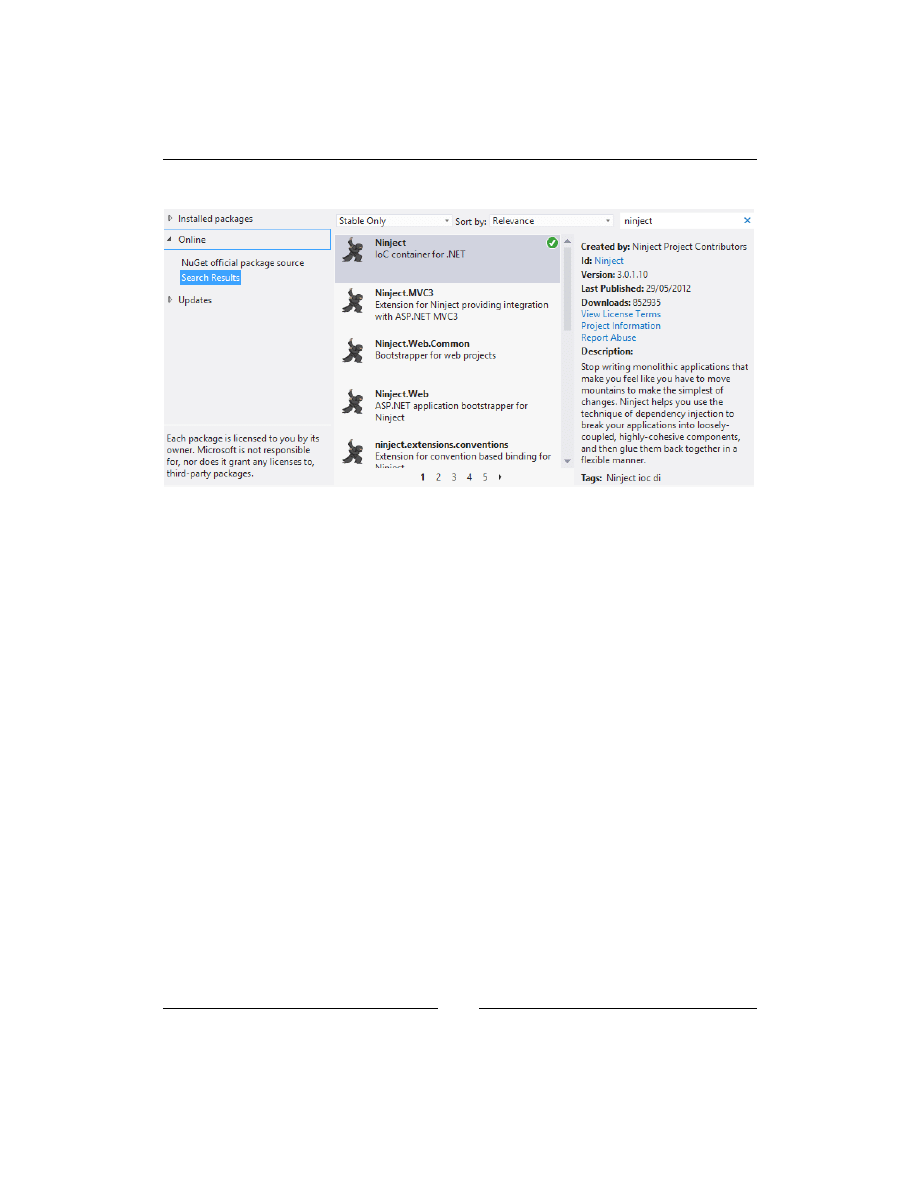
1. The first step to setup Ninject is to download Ninject library. You can do it
either using NuGet or by downloading the binary file. If you have NuGet
package manager, create a new Console Application project in Visual Studio,
and then simply search for Ninject in NuGet UI to install the package, as the
following figure illustrates. Alternatively, you can type
install-package
Ninject,
and then press enter in the Packet Manager Console located at
View | Other Windows menu. Once the installation of Ninject package is
finished, jump to step 5. If you don't have NuGet package manager, go to
the download page of Ninject official website (
http://www.ninject.org/
download.html
) and download the most recent version for your desired
framework. Considering Ninject is an open source project, you can even
download the source codes from GitHub via the link provided on the
download page.
2. In Windows Vista and other newer versions of Windows, you need to
unblock the downloaded archive prior to uncompressing it, in order
to prevent further security issues at runtime. Simply right-click on the
downloaded file, open Properties, and from the General tab, click on the
Unblock button. Then, unzip the archive to your libraries directory (for
example,
D:\Libraries\Ninject
).
3. Open Visual Studio and create a new Console Application project.
4. Add a reference to
Ninject.dll
in your library directory.
5. Add a new class to your project and call it
SalutationService
:
class SalutationService
{
public void SayHello()
{
Console.WriteLine("Hello Ninject!");
}
}
6. Add using Ninject to the using section of
Program.cs
.
7. Add the following lines to your
Main
method:
using (var kernel = new Ninject.StandardKernel())
{
var service = kernel.Get<SalutationService>();
service.SayHello();
}
Chapter 2
[
21
]
8. Run the application.
That is how Ninject works in the simplest way. We didn't even need to add
any configuration or annotation. Although we didn't have anything to inject
in the previous example, Ninject did its main job, which was resolving a type
(
SalutationService
).
Let's have a look at the
Main
method to see what was happening there. In the first
line, we created a kernel object by instantiating
StandardKernel
. Kernel is always
the start point of creating our dependency graph. In this simple example, the graph
only consists of one type, which is
SalutationService
. As we see, we didn't call
the constructor of
SalutationService
in neither of the
Main
method lines. Instead,
we asked our container (kernel) to do it for us. We gave our required type to the
Get
method, and it returned an instance of the given type. In other words, the
Get
method was provided with the root type (
SalutationService
) of our dependency
graph and returned the graph object.
Now that we know how to setup Ninject, let's move ahead to a more complex
example to see how Ninject helps us to implement DI better.

Getting Started with Ninject
[
22
]
It's all about Binding
In Chapter 1, Understanding Dependency Injection, we implemented DI manually in the
MailService
class. You remember that we ignored the configuration of
SmtpClient
to simplify the project. Now, we are going to add the configuration of
SmtpClient
and implement DI using Ninject.
Let's start by creating the
MailConfig
class:
class MailServerConfig
{
public string SmtpServer
{
get
{
return ConfigurationManager.AppSettings["SmtpServer"];
}
}
public int SmtpPort
{
get
{
var port = ConfigurationManager
.AppSettings["SmtpPort"];
return Convert.ToInt32(port);
}
}
public string SenderEmail
{
get
{
return ConfigurationManager
.AppSettings["SenderEmail"];
}
}
public string SenderPassword
{
get
{
return ConfigurationManager
.AppSettings["SenderPassword"];
}
}
}

Chapter 2
[
23
]
Now, we can update the
MailService
class and incorporate
MailServiceConfig
:
class MailService
{
private ILogger logger;
private SmtpClient client;
private string sender;
public MailService(MailServerConfig config, ILogger logger)
{
this.logger = logger;
InitializeClient(config);
sender = config.SenderEmail;
}
public void SendMail(string address, string subject, string
body)
{
logger.Log("Initializing...");
var mail = new MailMessage(sender, address);
mail.Subject = subject;
mail.Body = body;
logger.Log("Sending message...");
client.Send(mail);
logger.Log("Message sent successfully.");
}
private void InitializeClient(MailServerConfig config)
{
client = new SmtpClient();
client.Host = config.SmtpServer;
client.Port = config.SmtpPort;
client.EnableSsl = true;
var credentials = new NetworkCredential();
credentials.UserName = config.SenderEmail;
credentials.Password = config.SenderPassword;
client.Credentials = credentials;
}
}
The class consists of two methods and one constructor. The
SendMail
method is not
changed so much, except that it is no more instantiating
SmtpClient
and is using the
new introduced client field.
Getting Started with Ninject
[
24
]
We have added a new method called
InitializeClient
, which instantiates and
initializes the client field using the given
MailServerConfig
object.
The constructor has been added another parameter, which accepts an object of
MailServerConfig
, which contains some settings obtained from the application
configuration file.
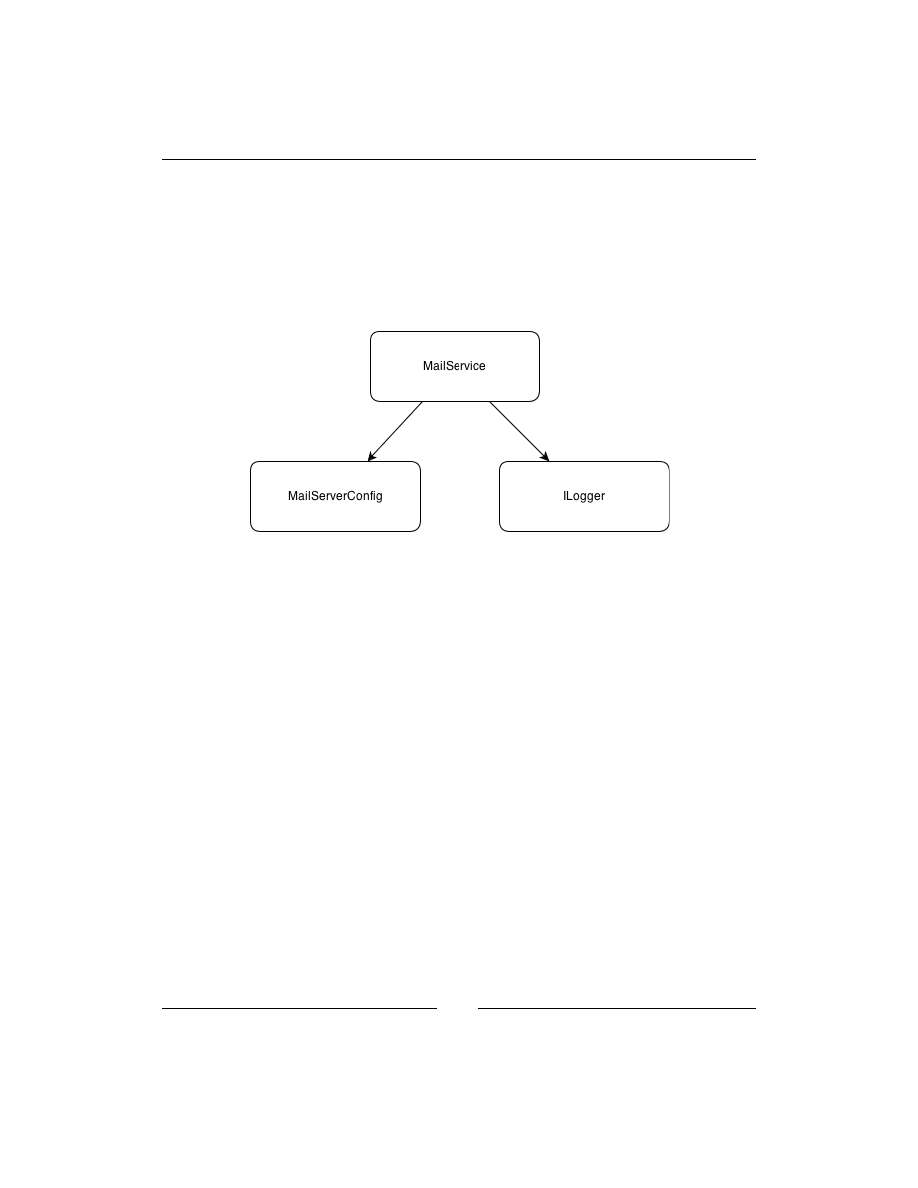
The following figure shows the dependency graph of this application:
Now, let's see how Ninject is going to resolve the dependencies and create the graph
object. Considering the last example, we need a kernel object and give it the starting
node of our graph, so that it returns the entire graph as the following code shows:
var kernel = new StandardKernel();
var mailService = kernel.Get<MailService>();
Ninject starts by resolving the
MailService
type. It finds the type and realizes that
in order to instantiate it, first it should create an instance of
MailServerConfig
and
ILogger
. That is because Ninject automatically creates arguments that should be
passed to the constructor of the type being instantiated. It injects these arguments
to the constructor parameters without us having to instruct it to do so. Creating an
instance of
MailServerConfig
is as easy as calling its only constructor, but what
about
ILogger
?
ILogger
is an interface, and it is not possible to create an instance
of an interface itself. Also, it may have multiple implementations. So, how is Ninject
supposed to know which implementation of
ILogger
to use?
Ninject uses its Binding system to decide what implementation to use for a given
type. A binding is an instruction which maps one type (usually an abstract type or
an interface) to a concrete type that matches such a given type. This process is also
called Service Registration.

Chapter 2
[
25
]
The following code instructs Ninject how to resolve
ILogger
:
kernel.Bind<ILogger>().To<ConsoleLogger>();
It means that Ninject should always use the
ConsoleLogger
type as an
implementation type for the
ILogger
type.
The final
Main
method's body looks like this:
using (var kernel = new StandardKernel())
{
kernel.Bind<ILogger>().To<ConsoleLogger>();
var mailService = kernel.Get<MailService>();
mailService.SendMail("someone@domain.com", "Hi", null);
}
If multiple services should be bound to a single component, use this
syntax:
kernel.Bind<IService1,IService2>().To<MyService>();
Object Lifetime
One of the responsibilities of a DI container is to manage the lifetime of objects that
it creates. It should decide when to create a new instance of the given type and when
to use an existing instance. It should also take care of disposing of objects when they
are not used anymore. Ninject has a strong support for managing Object Lifetime in
different situations. Whenever we define a binding, we can declare the scope of the
object instance being created. Within that scope, the object instance will be reused
and exist exactly once for each binding. Note that an object is not allowed to have a
dependency on an object with shorter lifetime.
Transient scope
In Transient scope, the object lifetime is not managed by Ninject. Whenever we
request an instance of a type, a new one will be created. Ninject doesn't take care of
keeping the created instance or disposing of it in this scope. This is the default object
scope in Ninject. If no scope is explicitly specified, they are transient-scoped. In the
previous code, both
ConsoleLogger
and
MailService
were treated in the Transient
scope because the object scope was not specified.

Getting Started with Ninject
[
26
]
Singleton scope
In the previous example, the
ILogger
interface is bound to the
ConsoleLogger
class,
which means whenever Ninject encounters
ILogger
, it should create a new instance
of
ConsoleLogger
. But we don't really need multiple instances of
ConsoleLogger
in all of the classes that need to log to console. Looks like it is a good idea to make
ConsoleLogger
singleton. There are two approaches to achieve this. The first one
is using one of the Singleton patterns:
class ConsoleLogger:ILogger
{
public static readonly ConsoleLogger Instance = new ConsoleLogger();
private static ConsoleLogger()
{
// Hiding constructor
}
public void Log(string message)
{
Console.WriteLine("{0}: {1}", DateTime.Now, message);
}
}
And instructing the binding to always use the provided instance rather than every
time creating a new instance of
ConsoleLogger
. We can achieve this by using the
ToConstant
method:
kernel.Bind<ILogger>().ToConstant(ConsoleLogger.Instance);
However, if we make a singleton type like this, we will draw some limitations to our
class. For example, we won't be able to unit test, it because it doesn't have a default
constructor.
Using lifetime management of Ninject, we will be able to have singleton objects
without having to make their type singleton. All we need to do is to instruct Ninject
to treat the given type as singleton:
kernel.Bind<ILogger>().To<ConsoleLogger>().InSingletonScope();
Now, what if we decide to change the scope of
MailServerConfig
to singleton as
well? There is no binding definition for this type because Ninject already knows how
to resolve it. Such classes are actually bound to themselves. Although Ninject doesn't
require us to register such types, if we need to change their scope, we can explicitly
define their binding in order to set their lifetime scope:
kernel.Bind<MailServerConfig>().ToSelf().InSingletonScope();

Chapter 2
[
27
]
Thread scope
If we define a binding in Thread scope, only one instance of the given type will
be created per thread. The object lifetime is as long as the lifetime of the underlying
Thread object.
The following test asserts equality of instances created by Ninject in the same thread:
[Test]
public void ReturnsTheSameInstancesInOneThread()
{
using (var kernel = new StandardKernel())
{
kernel.Bind<object>().ToSelf().InThreadScope();
var instance1 = kernel.Get<object>();
var instance2 = kernel.Get<object>();
Assert.AreEqual(instance1, instance2);
}
}
In the previous example, we instructed Ninject to bind the type
object
to itself
and create new instances of object per thread. Then, we asked Ninject to return
two instances of type
object
in the same thread and tested their equality.
The test succeeded.
The following test demonstrates inequality of the instances created from the
same type but in different threads:
[Test]
public void ReturnsDifferentInstancesInDifferentThreads()
{
var kernel = new StandardKernel();
kernel.Bind<object>().ToSelf().InThreadScope();
var instance1 = kernel.Get<object>();
new Thread(() =>
{
var instance2 = kernel.Get<object>();
Assert.AreNotEqual(instance1, instance2);
kernel.Dispose();
}).Start();
}
This time we got the second instance in another thread. Ninject detects that the
calling thread is changed, and this is the first time that an instance of object is being
requested in this new thread. So, it creates a new instance rather than returning
the existing one. Finally, we asserted inequality of the created instances.

Getting Started with Ninject
[
28
]
Request scope
Request scope is useful in web applications when we need to get a single instance
of a type from Ninject as long as we are handling the same request. Once the request
is processed and a new request arrives, Ninject creates a new instance of the type
and keeps it until the end of the request processing. Note that Request scope behaves
like Transient scope outside of a web request (for example, during startup) or in
non-web applications.
The following code shows how to change the scope of the
MailService
type, so that
we get a new instance only for new web requests, and keep the existing instance
during the current request:
kernel.Bind<MailServerConfig>().ToSelf().InRequestScope();
The
InRequestScope
method is not available unless we add a reference to the
Ninject.Web.Common
library, which makes sense only in web applications.
Chapter 4, Ninject in Action, will discuss web applications in detail.
Custom scope
Custom scope lets us define our own scopes in which to keep an instance of a type
unique. As long as reference of the object returned by the provided call-back is the
same, Ninject returns the same instance of the type which is created in this scope.
Once reference of the returned object is changed, a new instance of the given type
will be created. The created instance is kept in the cache until the returned scope
object is garbage collected. As soon as the scope object is garbage collected, all the
object instances created by Ninject will be released from the cache and disposed.
The following test shows how to define a custom scope which monitors the
current user:
[Test]
public void ReturnsTheSameInstancesForAUser()
{
using (var kernel = new StandardKernel())
{
kernel.Bind<object>().ToSelf().InScope(ctx =>User.Current);
User.Current = new User();
var instance1 = kernel.Get<object>();
User.Current.Name = "Foo";
var instance2 = kernel.Get<object>();
Assert.AreEqual(instance1, instance2);
}
}

Chapter 2
[
29
]
The
User
class has the following structure, and the
Current
static property is
supposed to be populated with the current
User
:
class User
{
public string Name { get; set; }
public static User Current { get; set; }
}
Although
User.Current
is modified in the previous example, the reference is still
the same (
User.Current
is still referring to the same object), so the scope is not
changed. As the test shows, we are getting the same instance of object every time
we call
kernel.Get<object>()
.
[Test]
public void ReturnsDifferentInstancesForDifferentUsers()
{
using (var kernel = new StandardKernel())
{
kernel.Bind<object>().ToSelf().InScope(ctx =>User.Current);
User.Current = new User();
var instance1 = kernel.Get<object>();
User.Current = new User();
var instance2 = kernel.Get<object>();
Assert.AreNotEqual(instance1, instance2);
}
}
Since we have changed the user, the scope is changed, and kernel is returning a
different instance in the new scope.
You may have noticed that the call-back function provides an argument of type
IContext
which is named
ctx
. This object provides information about the binding
context which can be used in order to create the scope object. The
Context
object
will be discussed in Chapter 3, Meeting Real-world Requirements, and we are not going
to use it at the moment. Just keep in mind that returning anything from the provided
context as scope should be handled with extra care. For example, returning the
context itself as scope would result in a memory leak. Although a new instance is
returned, it will be kept in the cache forever.
Custom scope is the most flexible and powerful scope, and it is also possible
to implement other scopes using Custom scope.

Getting Started with Ninject
[
30
]
The following example shows how to implement Thread scope using Custom scope:
kernel.Bind<object>().ToSelf().InScope(ctx=>Thread.CurrentThread);
The following snippet implements Request scope using Custom scope:
kernel.Bind<object>().ToSelf().InScope(ctx=>HttpContext.Current);
We can always ask kernel to dispose of an object whose lifetime is being managed
by Ninject:
var myObject = kernel.Get<MyService>();
..
kernel.Release(myObject);
Ninject also has an extension called Named Scope, which adds some
additional scopes other than the common ones we addressed here.
For more information, see Named Scope on Ninject official wiki:
github.com/ninject/ninject.extensions.namedscope/wiki
Ninject modules
As our application grows, the list of service registrations gets longer, and it would
be difficult to manage this list. Ninject modules are a good way to segregate our
type bindings into distinct groups of bindings, which can be easily organized into
separate files. Minimum requirement for a class to be accepted as a Ninject module
is to implement the
INinjectModule
interface. Implementing this interface requires
us to implement three methods and two properties each time we need to create a
module. It is a good idea to implement this interface as an abstract class once,
and extend it whenever we need to create a Ninject module. The good news is that
Ninject has already implemented this abstract class, which is named
NinjectModule
.
Here is how to register our
MailService
classes in a module:
class MailServiceModule: NinjectModule
{
public override void Load()
{
Bind<ILogger>().To<ConsoleLogger>().InSingletonScope();
Bind<MailServerConfig>().ToSelf().InRequestScope();
}
}

Chapter 2
[
31
]
After declaring our modules, we need to load them into kernel so that Ninject
can use them to resolve the registered types. Put this code into the
Main
method:
using (var kernel = new StandardKernel(new MailServiceModule()))
{
var mailService = kernel.Get<MailService>();
mailService.SendMail("someone@somewhere.com", "Hello", null);
}
The following code shows how to load multiple modules in a single Ninject kernel:
var kernel = newStandardKernel(newModule1(), newModule2(), … );
We can also load all of the Ninject modules defined in an application at the same
time using the following code:
kernel.Load(AppDomain.CurrentDomain.GetAssemblies());
In this case, Ninject looks in all assemblies for the public classes which have
implemented the
INinjectModule
interface to load type registrations. The
next example will show how to load modules dynamically.
XML configuration
Ninject supports both code-based and XML configuration. An XML module is
like a code module that consists of a list of type registrations via Ninject binding.
All bindings can be defined in a single XML document or segregated into multiple
documents. The only advantage of using XML modules over code modules is that
once we have composed such a document, we can still change our type registrations
without having to recompile any part of the application. However, XML modules are
not as powerful as code modules; so it is recommended to use code modules unless
we need this feature. Even in this case, we can only include those bindings for which
we need to change the configuration at runtime in our XML module and keep other
bindings in code modules.
How to use XML configuration
In order to use XML configuration, we need to add a reference to the Ninject XML
extension. It can be added either by installing
Ninject.Extensions.Xml
via
NuGet
package manager or by downloading the binary files from GitHub.
The next step is to add one or more XML documents to our project to contain our
type registrations. Keep in mind that these files should be published along with your
application. So don't forget to set their
Copy to Output Directory
property to
Copy if newer
.

Getting Started with Ninject
[
32
]
An XML document should look like the following configuration:
<module name="moduleName">
<bind service="Namespace.IService1, AssemblyName"
to="Namespace.ConcreteService1, AssemblyName" />
<bind service="Namespace.IService2, AssemblyName"
to="Namespace.ConcreteService2, AssemblyName"
Scope="singleton"/>
</module>
Each binding element contains at least two attributes:
•
Service
: It represents the service type, which is usually an interface or
an abstract type
•
To
: It represents the concrete type, which is an implementation of the
service type
The types should be defined as assembly qualified names which should contain
namespace, type name, and assembly name. For more information about assembly
qualified names, check the following MSDN page:
http://msdn.microsoft.com/en-us/library/system.type.
assemblyqualifiedname.aspx
The next example will show how to use the XML configuration in a DI project.
In this example we are going to create a project which contains two encryptor
classes, each of which implements a particular encryption algorithm. Both classes
implement a common interface named
IEncryptor
which is referenced in
the consumer. We will configure the application to use one of the encryptors
dynamically. This configuration can be changed later and we will see how to
instruct the application to swap the encryptors without being recompiled.
Open Visual Studio and add references to Ninject and the
Ninject.Extensions.Xml
libraries. Then, add the
IEncryptor
interface as follows:
public interface IEncryptor
{
string Encrypt(string str);
}
The next step is to implement this interface and create our concrete services. Let's start
with
ReverseEncryptor
. The encryption algorithm is to reverse the given string:

Chapter 2
[
33
]
public class ReverseEncryptor : IEncryptor
{
public string Encrypt(string str)
{
var charArray = str.Reverse().ToArray();
return new string(charArray);
}
}
Now we are going to implement the
ShiftEncryptor
class, which implements
another algorithm. This class shifts up each character code to encrypt the
given string:
public class ShiftEncryptor : IEncryptor
{
public string Encrypt(string str)
{
var charArray = str.Select(c => (char)(c + 1)).ToArray();
return new string(charArray);
}
}
Now, let's add a new XML document to our project and register one of our concrete
encryptors like this:
<module name="encryptorModule">
<bind service="Samples.Encryption.IEncryptor, Encryptors"
to="Samples.Encryption.ShiftEncryptor, Encryptors" />
</module>
Note that the name of our assembly is
Encryptors
, and our classes are declared
in
Samples.Encryption
namespace. Don't forget to set the
Copy to Output
Directory
property of this file to
Copy if newer
, so that it can be copied to the
output directory automatically.
The next step is to load the XML module in the kernel. We can put this code in the
Main
method of our application:
var kernel = new StandardKernel();
kernel.Load("typeRegistrations.xml");
The final step is to consume the service using the following code:
var encryptor = kernel.Get<IEncryptor>();
Console.WriteLine(encryptor.Encrypt("Hello"));
Console.ReadKey();

Getting Started with Ninject
[
34
]
Running the application leads to the following output:
Ifmmp
At this step, we don't need Visual Studio anymore; we can navigate to the output
directory of our application and just change the service type in the configuration file
to
"Samples.Encryption.IEncryptor, Encryptors"
. Note that we don't need to
recompile the application.
Running the application should result in the following output:
olleH
We have dynamically replaced the Encryptor service in our application using XML
configuration.
The following code snippet shows how to load multiple XML modules into kernel.
The first overload accepts individual paths to the XML configuration files. The paths
can either be relative to the output directory or start from the file system root:
kernel.Load("module1.xml","module2.xml","module3.xml");
We can also use
"*"
as a wildcard character to address any path that matches the
declared pattern. In the following example, the kernel loads all of the XML files from
the same directory of the executing assembly:
kernel.Load("*.xml");
In the next example, the kernel loads the XML files which are located in a directory
named
Modules
, located in the application directory:
kernel.Load("Modules/*.xml");
Convention over configuration
It is not difficult to register a few service types, one by one in a small application.
But what about a production application with hundreds of services which should
be wired to their implementations?
Convention-based configuration allows us to bind a group of services using a
convention rather than defining individual bindings for each of them. For example,
you can simply ask Ninject to bind all components to their base interfaces like this:
kernel.Bind(r => r
.FromThisAssembly()
.SelectAllClasses()
.BindAllInterfaces());

Chapter 2
[
35
]
In order to take advantage of the Convention based configuration, we should
add refererence to the Ninject's Conventions extension. We can either use NuGet
to install
Ninject.Extensions.Conventions
or download the binary file from
GitHub. We also need to add
Ninject.Extensions.Conventions
to the using
section of our code to make the previous syntax available.
As the syntax indicates, registering a convention-based binding at least consists
of the following steps:
1. Selecting the assembly or assemblies which contain the concrete components.
2. Selecting the concrete components within the selected assemblies.
3. Selecting the service types relative to the selected components.
One thing that may look weird in this syntax is that we are selecting the concrete
components prior to the service types, which is in reverse order compared to the
ordinary binding registration.
The first reason is that each implementation can be bound to many service types,
whereas each service type cannot be bound to more than one implementation. The
syntax is actually telling Ninject to bind each selected implementation to its relevant
service types, which can address many services. But if we asked Ninject to bind each
selected service type to its relevant implementation, no more than one binding per
service type would be valid and hence, created.
The second reason is that this syntax forces to select the components first and then
only select those services which can be bound to the selected components. This way,
it is not possible to select the service types for which there is no implementation.
Note that the service selection clause doesn't allow us to select every desired service
types. We can only select services relative to the selected components (for example,
their base classes).
The third reason is that it is possible to locate the service types based on a given
implementation, because each component has a reference to its base service types.
That is why we select assemblies only for components and not for the service types.
But a given service type doesn't have any idea about its implementations.
Selecting the assemblies
The first step to register a convention is to project the assemblies which contain
the component types. It can either be the current assembly or an external one.

Getting Started with Ninject
[
36
]
Here are some of the methods which can be used to identify an assembly:
•
FromThisAssembly()
: It selects the assembly that contains the current line
of code.
•
From(params Assembly[] assemblies)
: It selects the specified assemblies.
•
FromAssemblyContaining<SomeType>()
: It selects the assembly that
contains the specified type.
In case not all of the components are in a single assembly, the
Join
syntax can be
used to select multiple assemblies:
kernel.Bind(x => x
.FromAssemblyContaining<CustomersService>()
.SelectAllClasses()
.Join
.FromAssemblyContaining<MessageProvider>()
.SelectAllClasses()
.BindAllInterfaces());
Generally, only public types are exposed in the projected assemblies. In order to
also include the non-public types, we should explicitly declare this by using the
IncludingNonePublicTypes()
method after the assembly selection clause:
.FromAssemblyContaining<CustomersService>()
.IncludingNonePublicTypes()
.SelectAllClasses()
.BindAllInterfaces());
Selecting the components
The second step is to select the components to which the bindings are going to
be registered. We can use either the
SelectAllClasses()
method to select all
non-abstract classes or the
Select(Func<Type, bool> filter)
method to select
any desired types. The following example shows how to select all classes whose
names start with word "customer":
kernel.Bind(r => r
.FromThisAssembly()
.Select(t =>t.Name.StartsWith("Customer"))
.BindBase());

Chapter 2
[
37
]
Filtering the selected components
We don't have to select all types within the selected assembly. It is possible to apply
conditions to filter the results. The following code binds only those classes which
are in the
"Northwind.Controllers"
namespace to their base type:
kernel.Bind(x => x
.FromThisAssembly()
.SelectAllClasses()
.InNamespaces("Northwind.Controllers")
.BindBase());
Explicit inclusion and exclusion
We can also exclude or include some types explicitly to make the final component list
exactly match our requirements using the Exclude or Include methods.
Selecting service types
Now that we have projected the concrete components, we should select their
corresponding service types to participate in the binding. We can use one of the
following methods to indicate the service types relative to each projected component:
•
BindAllInterfaces()
: It binds all the interfaces of the selected component
to the selected component.
•
BindBase()
: It binds the base type of the selected components to the current
component.
•
BindDefaultInterface()
: Binds the default interface of the given types
to the type. The default interface is the interface with the same name
as the type. For example,
ICustomerSerive
is the default interface for
CustomerService
.
•
BindDefaultInterfaces()
: It binds the default interfaces of the
given types to the type. Default interfaces for a type are all of the
interfaces that the type's name ends with their names. For example,
IRepository
and
ICustomerRepository
are both default interfaces for
SqlCustomerRepository
.
•
BindSingleInterface()
: It requires that the given type has exactly one
interface. In this case, this interface is bound to the type. If the type has no or
several interfaces then no binding is added.

Getting Started with Ninject
[
38
]
•
BindToSelf()
: It binds the type to itself.
•
BindSelection(ServiceSelector selector)
: It binds the selected
interfaces to the type.
•
BindUsingRegex(string pattern):
It binds the interfaces of the
current type matching the given regular expression to the type.
Configuring the Bindings
Once a binding is created, we can configure it in the same way we configure
ordinary bindings:
kernel.Bind(x => x
.FromThisAssembly()
.SelectAllClasses()
.BindAllInterfaces()
.Configure(b=>b.InSingletonScope()));
Additionally, we have access to each component type in the corresponding binding
configuration. The following method shows how to define Named bindings using
the component's type name:
kernel.Bind(x => x
.FromAssemblyContaining<MessageProvider>()
.SelectAllClasses()
.BindAllInterfaces()
.Configure((b, c) =>b.Named(c.Name)));
We can also configure certain types individually using the
ConfigureFor<T>
method. In the following example, all the repository classes are given a connection
string and configured to live in a Singleton scope.
SqlCustomerRepository
is also
getting the same connection string, but its scope configuration is overridden to be
InThreadScope
:
kernel.Bind(x => x
.FromThisAssembly()
.SelectAllClasses()
.InheritedFrom<IRepository>()
.BindAllInterfaces()
.Configure(b =>b.InSingletonScope ()
.WithConstructorArgument("connectionString", ApplicationSettings.
ConnectionString))
.ConfigureFor<SqlCustomerRepository>(b =>b.InThreadScope()));

Chapter 2
[
39
]
Summary
Ninject uses its binding system to map abstract services to concrete types. The core
object of Ninject to which we give a service type and get the concrete service is
Ninject kernel. Ninject uses the object scopes to deal with Lifetime of the created
objects. We can use the predefined scopes or create our custom scopes to define
the lifetime of objects created by Ninject. Ninject supports both code-based and
XML-based configurations for registering service types. Although XML modules
can be modified without having to compile the application, code modules are more
powerful and recommended. Instead of registering each service individually,
we usually use conventions to register a group of services at a time.


Meeting Real-world
Requirements
This chapter starts with some patterns and antipatterns which should be considered
while using Ninject. We will go through the advanced features of Ninject, and also
some examples to see how Ninject can meet real-world requirements. By the end
of this chapter, the user is expected to know almost all the significant features
of Ninject.
The topics covered in this chapter are as follows:
• DI patterns and antipatterns
• Multi binding and contextual binding
• Custom providers
• Dynamic factories
DI patterns and antipatterns
Dependencies can be injected in a consumer class using different patterns and
injecting them into a constructor is just one of them. While there are some patterns
that can be followed for injecting dependencies, there are also some patterns that
are recommended to be avoided, as they usually lead to undesirable results. In this
section, we will examine only those patterns and antipatterns that are somehow
relevant to Ninject features. However, a comprehensive study of them can be found
in Mark Seemann's book, Dependency Injection in .NET.

Meeting Real-world Requirements
[
42
]
Constructor Injection
Constructor Injection is the most common and recommended pattern for injecting
dependencies in a class. Generally this pattern should always be used as the primary
injection pattern unless we have to use other ones. In this pattern, a list of all class
dependencies should be introduced in the constructor.
The question is what if the class has more than one constructor. Although Ninject's
strategy for selecting constructor is customizable, its default behavior is selecting the
constructor with more parameters, provided all of them are resolvable by Ninject. So,
although in the following code the second constructor introduces more parameters,
Ninject will select the first one if it cannot resolve
IService2
and it will even use the
default constructor if
IService1
is not registered either. But if both dependencies are
registered and resolvable, Ninject will select the second constructor because it has
more parameters:
public class Consumer
{
private readonly IService1 dependency1;
private readonly IService2 dependency2;
public Consumer(IService1 dependency1)
{
this.dependency1 = dependency1;
}
public Consumer(IService1 dependency1, IService2 dependency2)
{
this.dependency1 = dependency1;
this.dependency2 = dependency2;
}
}
If the preceding class had another constructor with two resolvable parameters,
Ninject would throw an
ActivationException
exception notifying that several
constructors had the same priority.
There are two approaches to override this default behavior and explicitly select a
constructor. The first approach is to indicate the desired constructor in a binding
as follows:
Bind<Consumer>().ToConstructor(arg =>
new Consumer(arg.Inject<IService1>()));
In the preceding example, we explicitly selected the first constructor. Using the
Inject<T>
method that the
arg
argument provides, we requested Ninject to
resolve
IService1
in order to be injected into the specified constructor.

Chapter 3
[
43
]
The second method is to indicate the desired constructor using the
[Inject]
attribute:
[Inject]
public Consumer(IService1 dependency1)
{
this.dependency1 = dependency1;
}
In the preceding example, we applied the Ninject's
[Inject]
attribute on the first
constructor to explicitly specify that we need to initialize the class by injecting
dependencies into this constructor; even though the second constructor has more
parameters and the default strategy of Ninject would be to select the second one.
Note that applying this attribute on more than one constructor will result in the
ActivationException
.
Ninject is highly customizable and it is even possible to substitute the default
[Inject]
attribute with another one, so that we don't need to add reference to the
Ninject library from our consumer classes just because of an attribute:
kernel.Settings.Set("InjectAttribute",typeof(MyAttribute));
Initializer methods and properties
Apart from constructor injection, Ninject supports the injection of dependencies
using initializer methods and property setters. We can specify as many methods
and properties as required using the
[Inject]
attribute to inject dependencies.
Although the dependencies will be injected to them as soon as the class is
constructed, it is not possible to predict in which order they will receive their
dependencies. The following code shows how to specify a property for injection:
[Inject]
public IService Service
{
get { return dependency; }
set { dependency = value; }
}
Here is an example of injecting dependencies using an injector method:
[Inject]
public void Setup(IService dependency)
{
this.dependency = dependency;
}

Meeting Real-world Requirements
[
44
]
Note that only
public
members and constructors will be injected and even the
internals will be ignored unless Ninject is configured to inject nonpublic members.
In Constructor Injection, the constructor is a single point where we can consume
all of the dependencies as soon as the class is activated. But when we use initializer
methods the dependencies will be injected via multiple points in an unpredictable
order, so we cannot decide in which method all of the dependencies will be ready
to consume. In order to solve this problem, Ninject offers the
IInitializable
interface. This interface has an
Initialize
method which will be called once all of
the dependencies have been injected:
public class Consumer:IInitializable
{
private IService1 dependency1;
private IService2 dependency2;
[Inject]
public IService Service1
{
get { return dependency1; }
set { dependency1 = value; }
}
[Inject]
public IService Service2
{
get { return dependency2; }
set { dependency2 = value; }
}
public void Initialize()
{
// Consume all dependencies here
}
}
Although Ninject supports injection using properties and methods, Constructor
Injection should be the superior approach. First of all, Constructor Injection makes the
class more reusable, because a list of all class dependencies are visible, while in the
initializer property or method the user of the class should investigate all of the class
members or go through the class documentations (if any), to discover its dependencies.

Chapter 3
[
45
]
Initialization of the class is easier while using Constructor Injection because all the
dependencies get injected at the same time and we can easily consume them at
the same place where the constructor initializes the class. As we have seen in the
preceding examples the only case where the backing fields could be readonly was in
the Constructor Injection scenario. As the readonly fields are initializable only in the
constructor, we need to make them writable to be able to use initializer methods and
properties. This can lead to potential mutation of backing fields.
Service Locator
Service Locator is a design pattern introduced by Martin Fowler regarding which
there have been some controversies. Although it can be useful in particular
circumstances, it is generally considered as an antipattern and preferably should be
avoided. Ninject can easily be misused as a Service Locator if we are not familiar to
this pattern. The following example demonstrates misusing the Ninject kernel as a
Service Locator rather than a DI container:
public class Consumer
{
public void Consume()
{
var kernel = new StandardKernel();
var depenency1 = kernel.Get<IService1>();
var depenency2 = kernel.Get<IService2>();
...
}
}
There are two significant downsides with the preceding code. The first one is that
although we are using a DI container, we are not at all implementing DI. The class is
tied to the Ninject kernel while it is not really a dependency of this class. This class
and all of its prospective consumers will always have to drag their unnecessary
dependency on the kernel object and Ninject library. On the other hand, the real
dependencies of class (
IService1
and
IService2
) are invisible from the consumers,
and this reduces its reusability. Even if we change the design of this class to the
following one, the problems still exist:
public class Consumer
{
private readonly IKernel kernel;
public Consumer(IKernel kernel)
{

Meeting Real-world Requirements
[
46
]
this.kernel = kernel;
}
public void Consume()
{
var depenency1 = kernel.Get<IService1>();
var depenency2 = kernel.Get<IService2>();
...
}
}
The preceding class still depends on the Ninject library while it doesn't have to and
its actual dependencies are still invisible to its consumers. It can easily be refactored
using the Constructor Injection pattern:
public Consumer(IService1 dependency1, IService2 dependency2)
{
this.dependency1 = dependency1;
this.dependency2 = dependency2;
}
Multi binding and contextual binding
In the previous chapter, we saw how Ninject can resolve dependency types in single
binding situations, that is, each service type is bound only to a single implementation
type. However, there are situations where we need to bind an abstract service type
to multiple implementations, which is called as multi binding. Multi binding has
two scenarios. The first one is the plugin model implementation and the other one
is contextual binding, which we will discuss in this section.
Implementing the plugin model
The plugin model allows an application to be extremely extensible without
modifying its source code. In the following example, we will implement a Music
Player application, which uses codec plugins in order to support different music
formats. The application comes out with two built-in codecs, and it is possible to
add more plugin codecs and extend the formats that our player application supports.
Please note that as we try to keep the application as simple as possible, many
complexities and details will not be implemented.

Chapter 3
[
47
]
Let's start by defining the interface of our codec plugin as follows:
public interface ICodec
{
string Name { get; }
bool CanDecode(string extension);
Stream Decode(Stream inStream);
}
The next step is to implement our pluggable player. What makes the player
extensible is that it depends on a sequence of the
ICodec
objects, rather than
a certain number of concrete codecs:
public class Player
{
private readonly ICodec[] codecs;
// Note that the constructor parameter is not a single ICodec.
public Player(IEnumerable<ICodec> codecs)
{
this.codecs = codecs.ToArray();
}
}
Then we will add a
Play
method to our
Player
class as follows:
public void Play(FileInfo fileInfo)
{
ICodec supportingCodec = FindCodec(fileInfo.Extension);
using (var rawStream = fileInfo.OpenRead())
{
var decodedStream = supportingCodec.Decode(rawStream);
PlayStream(decodedStream);
}
}
This method accepts a
FileInfo
object and after finding a suitable codec, it decodes
and plays the given file. We can assume that our player has a
PlayStream
method
which can play decoded streams.

Meeting Real-world Requirements
[
48
]
Now, let's implement the
FindCodec
method as follows:
private ICodec FindCodec(string extension)
{
foreach (ICodec codec in codecs)
if (codec.CanDecode(extension))
return codec;
throw new Exception("File type not supported.");
}
FindCodec
calls the
CanDecode
method of each codec object to find a codec which
supports the given file extension. If it cannot find any codecs suitable for the given
file type, it throws an error. One of the things that we need to keep in mind is that
none of our concrete codecs have been resolved before this
foreach
loop.
Ninject doesn't resolve the types within a sequence unless the
sequence is enumerated.
The final step is to add a convention to the entry point of our UI layer, which is a
console application in this case. Open the
Main
method and add the following lines:
using (var kernel = new StandardKernel())
{
kernel.Bind(b => b.FromAssembliesMatching("*")
.SelectAllClasses()
.InheritedFrom<ICodec>()
.BindAllInterfaces());
}
The preceding convention instructs Ninject to register all implementations of the
ICodec
interface automatically without having to declare individual bindings
for them.
Since the
ICodec
type is bound to multiple implementations, it can only be resolved
to a sequence of objects rather than a single object. So, resolving
ICodec
with the
following constructor will result in a runtime exception:
public Consumer(ICodec codec){}
The result is the same if we execute the following code:
ICodec codec = Kernel.Get<ICodec>();

Chapter 3
[
49
]
In both cases, Ninject will try to resolve
ICodec
, but it will find more than one
concrete type for it. Instead of
Get<T>
, we can call the
GetAll<T>
method to get
all the implementations of
ICodec
. The following code shows the names of all
supported codecs:
IEnumerable<ICodec> codecs = kernel.GetAll<ICodec>();
foreach (ICodec codec in codecs)
System.Console.WriteLine(codec.Name);
Now, any assemblies that have an implementation of
ICodec
and are located in
the root directory of our application will be recognized as a codec plugin by our
Player application. Our application does not even need to have a reference to the
codec project.
The code sample and built-in codec plugins can be downloaded
from the publisher's website.
Contextual binding
Since in the plugin model each service type can be mapped to multiple
implementations, the binding engine doesn't need to make any decision about
which implementation to return; because the kernel is supposed to return all of
them. Contextual binding, however, is a multi-binding scenario in which the
kernel has to choose one implementation among multiple provided types based
on a given condition.
In the following example, we will implement a data migration application which
can migrate data from a SQL database to an XML datafile. It is going to have a
presentation layer, a business layer, and a data access layer.
Our SQL database is Northwind which exists as a sample database with the SQL
server installation package. In order to keep this sample clean and simple, we use
the
Shippers
table, which contains only two fields:
Shipper ID
and
Company Name
.
We add a class library project to our solution to implement the business layer. The
only business model will be the
Shipper
class. It has only the following members:
public int ShipperID { get; set; }
public string CompanyName { get; set; }

Meeting Real-world Requirements
[
50
]
The next step is to implement our
ShippersService
class. It should contain a
method for migrating data from our source repository, which is a SQL database
to the target repository, which is an XML datafile:
public void MigrateShippers()
{
foreach (Shipper shipper in sourceRepository.GetShippers())
targetRepository.AddShipper(shipper);
}
What should the type of these repositories be and where should they come from?
The answer to these questions can turn this application into a loosely coupled
maintainable application or a tightly coupled hard to maintain one. The easiest way
may be to create an
XmlRepository
and
SQLRepository
and then instantiate them
in the
ShippersService
class as follows:
// The following code leads to a tightly coupled code
var sourceRepository = new ShippersSqlRepository();
var targetRepository = new ShippersXmlRepository();
This way, we will make our service dependent of these two concrete repositories and
tighten our business layer to our data access layer. It would not be possible to modify
or replace the data access without modifying the business layer and recompiling the
application. Although our application layers may look like being separated, they are
actually so tightly coupled that it is not easily maintainable.
The solution is to create our
ShippersService
class based on an abstraction of the
repositories which can be defined in the business layer, rather than the concrete
repositories which will be implemented in the data access layer. Let's define this
abstraction using the following interface in our business layer:
public interface IShippersRepository
{
IEnumerable<Shipper> GetShippers();
void AddShipper(Shipper shipper);
}
Now we can use this interface rather than the concrete repositories the
ShippersService
class as follows:
public class ShippersService
{
...

Chapter 3
[
51
]
public ShippersService(IShippersRepository sourceRepository,
IShippersRepository targetRepository)
{
this.sourceRepository = sourceRepository;
this.targetRepository = targetRepository;
}
public void MigrateShippers()
{
foreach (var shipper in sourceRepository.GetShippers())
targetRepository.AddShipper(shipper);
}
}
The
ShippersService
class is now highly reusable. It can migrate
Shipper
instances
not only from SQL to XML, but also between any types of data sources as long as
they implement
IShippersRepository
. The interesting thing is that we can easily
migrate data in reverse direction without modifying our
ShippersService
class or
data access layer.
We know that Ninject will inject concrete repositories into the constructor of the
ShippersService
class. But wait for a second. The type of both parameters is
IShippersRepository
. How will Ninject understand which concrete type should
be injected into which parameter? Contextual binding is the answer to this question.
Let's go through different resolution approaches one by one.
Named binding
This is the simplest approach in which we can assign names to both our binding
and our target parameters so that Ninject can decide which binding should be used
for which target. We need to insert names on targets as well as their corresponding
bindings:
public ShippersService(
[Named("Source")]IShippersRepository sourceRepository,
[Named("Target")]IShippersRepository targetRepository)
The following code shows the type registration section in our presentation layer,
which is a console application:
Bind<IShippersRepository>()
.To<ShippersSqlRepository>().Named("Source");
Bind<IShippersRepository>()
.To<ShippersXmlRepository>().Named("Target");

Meeting Real-world Requirements
[
52
]
Now that we have distinguished the different implementations of
IShippersRepository
with names, it is also possible to get them from the
kernel
object using the following syntax:
kernel.Get<IShippersRepository>("Source");
However, resolving instances in this way is not recommended because in this way,
Ninject will be misused as a means for implementing the Service Locator antipattern.
Once a binding is named, this name can also be used to address
any subsequent dependencies of the registered types.
Resolving metadata
In this approach, each bindings is provided with some metadata which can
be evaluated while resolving the types. The following code shows how to
set metadata:
Bind<IShippersRepository>().To<ShippersSqlRepository>()
.WithMetadata("IsSource", true);
Bind<IShippersRepository>().To<ShippersXmlRepository>()
.WithMetadata("IsSource", false);
One way of associating targets with their corresponding bindings is by defining
a custom
ConstraintAttribute
class. This is an abstract class which provides a
method for matching the attributed target with its desired binding. The following
code shows how to define such an attribute:
public class IsSourceAttribute : ConstraintAttribute
{
private readonly bool isSource;
public IsSourceAttribute(bool isSource)
{
this.isSource = isSource;
}
public override bool Matches (Ninject.Planning.Bindings.
IBindingMetadata metadata)
{
return metadata.Has("IsSource")
&& metadata.Get<bool>("IsSource") == isSource
}
}

Chapter 3
[
53
]
Now, we can apply this attribute to the targets to associate them with their
corresponding bindings:
public ShippersService([IsSource(true)]IShippersRepository
sourceRepository, [IsSource(false)]IShippersRepository
targetRepository)
{
this.sourceRepository = sourceRepository;
this.targetRepository = targetRepository;
}
We can provide as many metadata as required to our binding for being used
while resolving the associated services:
Bind<IService>().To<Component>()
.WithMetadata("Key1", value1)
.WithMetadata("Key2", value2)
.WithMetadata("Key3", value3);
We can also provide as many
Constraint
attributes as needed on a binding target,
as shown in the following code:
public Consumer(
[Constraint1(value1, value2), Constraint2(value), Constraint3]
IService dependency)
{
}
Please keep in mind that named binding scenario is also implemented using
metadata. The following code shows how to implement a custom constraint
attribute which can resolve named bindings based on a matching pattern rather
than the exact name:
public class NamedLikeAttribute : ConstraintAttribute
{
private readonly string pattern;
public NamedLike(string namePattern)
{
this.pattern = namePattern;
}
public override bool Matches(IBindingMetadata metadata)
{
return Regex.IsMatch(metadata.Name, pattern);
}
}
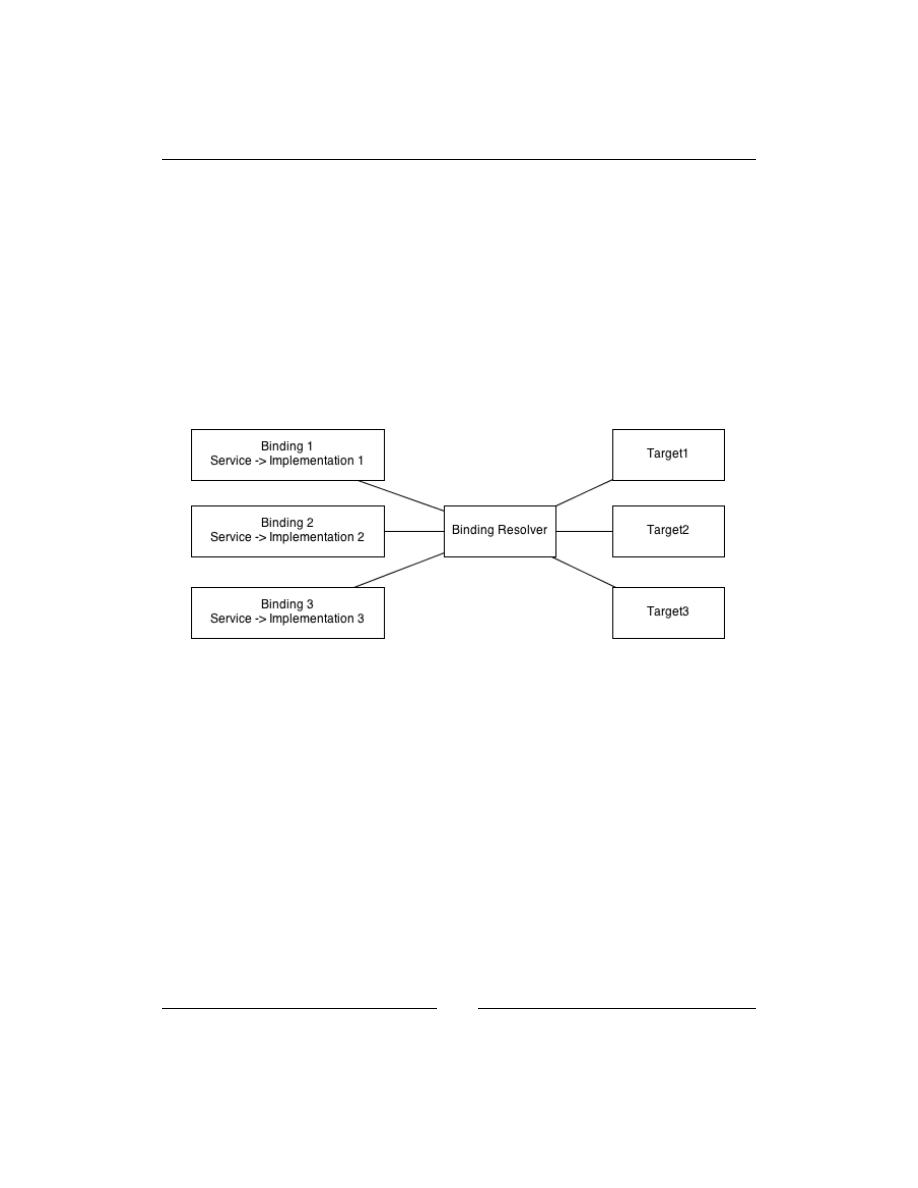
Meeting Real-world Requirements
[
54
]
Given a pattern, the preceding attribute can be applied to the target. The binding
name then will be evaluated using a Regular Expression to determine whether or
not the name matches the given pattern. The following code shows how to use
this attribute:
public Consumer([NamedLike(@"source\w+") dependency)
{
...
}
In order to understand how metadata can help Ninject resolve types, we need to
know how binding targets are associated with bindings. The following diagram
shows a simplified demonstration of this relationship:
Ninject Kernel uses different components to resolve types, and one of them
is Binding Resolver. Although Binding Resolver refers to a group of Ninject
components rather than a single one, we can think of it as a single component for
now to keep things simple. When Ninject is asked for resolving a service type,
Binding Resolver will be provided with all of the registered bindings as well as a
Request object which contains information about the target for which a resolution is
requested. Binding information includes binding metadata and target information
contains attributes set on the target. Binding Resolver examines all of the targets
using this information in order to find their matching bindings. Whenever it detects
a constraint attribute on a target, it executes the
Matches
method of that attribute
across all of the bindings to find the matching binding. Once the matching binding
is found, it is easy to get the concrete type from that binding.

Chapter 3
[
55
]
Attribute-based binding
Although Named binding is simple to use and metadata is flexible and powerful,
both the approaches require library of the dependent classes to have a reference to
the Ninject library. Another downside of these two solutions is that they both rely on
strings, which are error prone. One can easily mistype the names or metadata keys
without being warned by the compiler.
The following code shows how to use this technique without referencing the
Ninject library:
public class SourceAttribute : Attribute{}
public class TargetAttribute : Attribute{}
These attributes then can be applied to the target parameters as follows:
public ShippersService([Source]IShippersRepository sourceRepository,
[Target]IShippersRepository targetRepository)
Now, we need to register our bindings using the following code:
Bind<IShippersRepository>().To<ShippersSqlRepository>()
.WhenTargetHas<SourceAttribute>()
Bind<IShippersRepository>().To<ShippersXmlRepository>()
.WhenTargetHas<TargetAttribute>()
Not only can we apply these attributes to parameters, but we can also apply them to
the class itself or to the other injected members, for example, the constructor itself.
The following binding shows how to make a binding conditional based on an
attribute on the consuming class:
Bind<IService>().To<MyService>().WhenClassHas<MyAttribute>();
Here is the consuming class:
[MyAttribute]
Public class Consumer {...}
The following code shows how to make a binding conditional based on an attribute
on an injected class member:
Bind<IService>().To<MyService>().WhenClassHas<MyAttribute>();

Meeting Real-world Requirements
[
56
]
This is how we can apply such an attribute to the constructor:
[MyAttribute]
public Consumer(IServive service) { ... }
A class member can be the constructor itself, or it can even be another method, or an
injected property. We will talk about these kinds of binding later in this chapter.
Target-based conditions
Another way of deciding which binding to use is target-based conditions. Ninject
offers several helpers which can restrict the number of matching bindings for a target
based on the type of its container. The following example shows a scenario to which
this approach applies.
In this example, we have two service classes named
SourceShipperService
and
TargetShipperService
, both of which depend on
IShippersRepository
.
Here is the structure of our service classes:
public class SourceShipperService
{
public SourceShipperService(IShippersRepository repository)
{ ... }
}
public class TargetShipperService
{
public TargetShipperService(IShippersRepository repository)
{ ... }
}
In order to tell Ninject which concrete repository should be injected into which
service, we can base our condition on the service type itself rather than any attribute
or metadata.
The following code shows how to register our types in such a way that instances of
ShippersXmlRepository
and
ShippersSqlRepository
respectively get injected
into
SourceShipperService
and
TargetShipperService
:
Bind<IShippersRepository>().To<ShippersXmlRepository>()
.WhenInjectedInto<SourceShipperService>();
Bind<IShippersRepository>().To<ShippersSqlRepository>()
.WhenInjectedInto<TargetShipperService>();

Chapter 3
[
57
]
Note that the
WhenInjectedInto<T>
method will match even if the target class
is a subtype of
T
. If we mean exactly the given type, we should use the following
alternative method:
Bind<IShippersRepository>().To<ShippersSqlRepository>()
.WhenInjectedExactlyInto<TargetShipperService>();
Generic helper
As we have seen, most of the preceding approaches take advantage of the helper
methods whose names follow the
Whenxxx
pattern. All of these methods are specific
versions of a more generalized
When
. This versatile helper offers an argument to its
call back that contains all information about current binding request including the
target information. Here is how to register types for a
Data Migration
application
using this helper method:
Bind<IShippersRepository>().To<ShippersSqlRepository>()
.When(r => r.Target.Name.StartsWith("source"));
Bind<IShippersRepository>().To<ShippersXmlRepository>()
.When(r => r.Target.Name.StartsWith("target"));
The preceding code binds
IShippersRepository
to
ShippersSqlRepository
provided that the target parameter name starts with
source
. Similar rule is applied
to the second binding as well.
Custom providers
Providers are specialized factory classes that Ninject uses in order to instantiate
resolved types. Whenever we bind a service type to a component, we are implicitly
associating that service type to a provider that can generate instances of that
component. This hidden provider is a generic factory, which can create instances of
every given type, and is called
StandardProvider
. Although we can often rely on
StandardProvider
without having to bother about what it does behind the scenes,
Ninject also allows us to create and register our custom providers just in case we
need to customize the activation process as follows:
Bind<IService>().ToProvider<MyService>();
public class MyServiceProvider : Provider<MyService>
{
protected override MyService CreateInstance(IContext context)
{
return new MyService();
}
}

Meeting Real-world Requirements
[
58
]
Although extending the
Provider<T>
class is the recommended way to create a
custom provider, implementing the
IProvider
interface is enough for a class to be
accepted by Ninject as a provider:
public interface IProvider
{
Type Type { get; }
object Create(IContext context);
}
Implementing the data access layer of the data migration application demonstrates
how to implement and use a custom provider. We need to add a new class library
projects to our solution for each of our data access libraries (SQL data access and
XML data access).
Let's start with implementing the
ShippersSqlRepository
class:
public class ShippersSqlRepository : IShippersRepository
{
private readonly NorthwindContext objectContext;
public ShippersSqlRepository(string northwindConnectionString)
{
objectContext =
new NorthwindContext(northwindConnectionString);
}
public IEnumerable<Business.Model.Shipper> GetShippers()
{ ... }
public void AddShipper(Business.Model.Shipper shipper)
{ ... }
}
Our
ShippersSqlRepository
class needs to be passed a connection string
which we will deal with later in this section. We have a similar scenario in the
ShippersXmlRepository
class:
public class ShippersXmlRepository : IShippersRepository
{
private readonly string documentPath;
public ShippersXmlRepository(string xmlRepositoryPath)
{
this.documentPath = xmlRepositoryPath;
}

Chapter 3
[
59
]
public IEnumerable<Shipper> GetShippers()
{ ... }
public void AddShipper(Shipper shipper)
{ ... }
}
In this case, we need to pass a file path for the XML data file. These parameters
prevent Ninject from instantiating our repositories, because the kernel doesn't have
any idea how to resolve the string parameters. So, the following lines are not enough
for registering our repositories:
Bind<IShippersRepository>().To<ShippersSqlRepository>()
.When(r => r.Target.Name.StartsWith("source"));
Bind<IShippersRepository>().To<ShippersXmlRepository>()
.When(r => r.Target.Name.StartsWith("target"));
One way of providing the required arguments is using the
WithConstructorArgument
method:
connection = ConfigurationManager.AppSettings["northwindConnectionStr
ing"];
Bind<IShippersRepository>()
.To<ShippersSqlRepository>()
.When(r => r.Target.Name.StartsWith("source"))
.WithConstructorArgument("NorthwindConnectionString", connection);
path = ConfigurationManager.ConnectionStrings["xmlRepositoryPath"];
Bind<IShippersRepository>()
.To<ShippersXmlRepository>()
.When(r => r.Target.Name.StartsWith("target"))
.WithConstructorArgument("XmlRepositoryPath",path);
It looks good when we don't have to register many repositories which need such
configuration. However, in more complicated cases, we need to automate injection
of these arguments somehow. This is where a
Provider
class can offer a better
solution. All of the settings here are instances of
string
. So, we can create a provider
for the
string
type to generate our configuration strings based on the name of the
parameter. The provider will look up the parameter name as a configuration key in
the application configuration file (either
web.config
or
app.config
), and if such a
configuration is defined (as in the following code), it returns its value:

Meeting Real-world Requirements
[
60
]
public class ConfigurationProvider : Provider<string>
{
protected override string CreateInstance(IContext context)
{
if (context.Request.Target == null)
throw new Exception("Target required.");
var paramName = context.Request.Target.Name;
string value = ConfigurationManager.AppSettings[paramName];
if (string.IsNullOrEmpty(value))
value = ConfigurationManager
.ConnectionStrings[paramName].ConnectionString;
return value;
}
}
ConfigurationProvider
is given a context object which contains all of the
information about the current activation process, including the
request
object that
we mentioned earlier in this chapter. The
Request
object has information about the
target, which in this case is the constructor parameter into which a
string
instance
should be injected. The
Target
object will be
null
if this
string
type is being
requested directly from the kernel by using the
Get<string>()
method. Because we
need name of the parameter as the configuration key, we check the target first. Using
the target's name, we can look up
AppSettings,
and in case of we do not find such
a setting, we will search in the
ConnectionStrings
section. Finally, the retrieved
value will be returned.
The only problem is that this provider will be registered for the
string
type and it
will affect any string which is going to be resolved by Ninject. In order to specify the
strings which are going to be considered as application configurations, we will define
a custom attribute and apply it to those parameters as follows:
[AttributeUsage(AttributeTargets.Property | AttributeTargets.
Parameter)]
public class ConfigurationAttribute : Attribute { }
We have declared that the attribute should only be applied to properties and
parameters. Here is how this attribute is applied to the constructor parameter of our
repository classes:
public ShippersXmlRepository([Configuration]string xmlRepositoryPath)
{
this.documentPath = xmlRepositoryPath;
}
public ShippersSqlRepository([Configuration]string
northwindConnectionString)
{

Chapter 3
[
61
]
objectContext = new NorthwindContext(northwindConnectionString);
}
And finally, the binding code is as follows:
Bind<string>().ToProvider<ConfigurationProvider>()
.WhenTargetHas<ConfigurationAttribute>();
Activation context
While overriding the
CreateInstance
method in our provider, we used the context
object, which was passed through method parameter. This object, which is represented
by the
IContext
interface, contains pretty much of all the information related to the
current activation process. Using this object, we can have access to the current binding
object, the type being resolved, the type being injected, where in the dependency graph
we are, who has requested this resolution, and so on. While resolving a dependency
graph, a context object is created for each type being resolved, and this leads to an
activation context graph. Starting from each context object, we can also navigate
through its parent context nodes until reaching the root of the graph where the initial
request is made. When using Ninject, this context object is available wherever we need
to make a decision about how to resolve dependencies.
Factory Methods
Factory Methods are another way of informing Ninject how to resolve a dependency.
Like creating a provider, we have access to the activation context object to help
us make decisions on how to resolve the requested type. However, we don't need
to create a new class, and we can just write our resolution logic inline. A Factory
Method is a good substitute for a Provider class, where the resolution logic is simple
and short. A good example of using a Factory Method is to initialize a logger object
in a class. The following is the code to initialize a logger without DI:
class ConsumerClass
{
private ILog log = LogManager.GetLogger(typeof(ConsumerClass));
}
We can implement DI in the preceding class using the following code:
class ConsumerClass
{
private ILog log;
public ConsumerClass(ILog log)
{

Meeting Real-world Requirements
[
62
]
this.log = log;
}
}
It is not possible to register a type binding for
ILogger
using the
To<T>
method,
because the concrete logger has to be created by calling the
LogManager.GetLogger
method rather than the constructor of a concrete logger. In this case, we can use a
Factory Method in order to inform Ninject about creating a new instance of the logger:
Bind<ILog>().ToMethod(ctx => LogManager.GetLogger(ctx.Request.
ParentRequest.Service));));
The type of
ctx
is
IContext
and we are getting type of the
Consumer
class from the
Service
property of the parent request of Ninject Activation Context.
This example was just to demonstrate how to employ a Factory Method, and is not a
best practice for logging, because it is requiring the application to have a reference to
the logger library. One of the best practices for logging will be discussed in Chapter 5,
Doing More with Extensions.
Dynamic factories
As long as we know all the dependencies of a class and in scenarios where we
only need one instance of them, it is easy to introduce a list of the dependencies in
the constructor of the class. But there are cases where we may need to create more
instances of a dependency in a class as a single instance that Ninject injects is not
enough. There are also cases where we don't know which services a consumer
may require, because it may require different services in different circumstances,
and it doesn't make sense to instantiate all of them while creating the class. In such
scenarios, factories can help. We can design our class so that it depends on a factory,
rather than the objects that the factory can create. Then, we can command that
factory to create the required services on demand and in any required number.
We will see two examples each of which addresses one of the preceding cases and
demonstrates the solution that Ninject offers.
The Shape Factory example
In the first example we will create a Graphic library. It contains a
ShapeService
class, which offers an
AddShapes
method to add a given number of specific
IShape
objects to a given
ICanvas
object:
public void AddShapes(int circles, int squares, ICanvas canvas)
{
for (int i = 0; i < circles; i++)
{

Chapter 3
[
63
]
// The following line should change
ICircle circle = new Circle();
canvas.AddShape(circle);
}
for (int i = 0; i < squares; i++)
{
// The following line should change
ISquare square = new Square();
canvas.AddShape(square);
}
}
The traditional way was to create new instances of the
Circle
and
Square
classes
directly in the
AddShapes
method. However, this way we will tightly couple the
ShapeService
class to the concrete
Circle
and
Square
types that is in contrast with
DI principles. On the other hand, introducing these dependencies as parameters
doesn't meet our requirement, because only one instance per shape will be injected,
which will not be enough. In order to solve this problem, we should first create a
simple factory interface as follows:
public interface IShapeFactory
{
ICircle CreateCircle();
ISquare CreateSquare();
}
Then, we can introduce this factory interface as the dependency of our
ShapeService
class:
public ShapeService(IShapeFactory factory)
{
this.factory = factory;
}
public void AddShapes(int circles, int squares, ICanvas canvas)
{
for (int i = 0; i < circles; i++)
{
ICircle circle = factory.CreateCircle();
canvas.AddShape(circle);
}
for (int i = 0; i < squares; i++)
{
ISquare square = factory.CreateSquare();
canvas.AddShape(square);
}
}

Meeting Real-world Requirements
[
64
]
The good news is that we don't need to worry about how to implement
IShapeFactory
. Ninject can implement it dynamically and inject the implemented
factory into the
ShapeService
class. We just need to add the following code to our
type registration segment:
Bind<IShapeFactory>().ToFactory();
Bind<ISquare>().To<>(Square);
Bind<ICircle>().To<>(Circle);
In order to make use of Ninject factory, we need to add a reference to the
Ninject.
Extensions.Factory
library. This either can be added via NuGet or download it
from the Ninject official website.
Keep in mind that a factory can have as many methods as required and each method
can return any desired type. The methods can have any arbitrary name and have any
number of parameters. The only constraint is that the name and type of parameters
must conform to the name and type of the constructor parameters of the concrete
class, but their order does not matter. Even the number of parameters doesn't need
to match and Ninject will try to resolve those parameters which are not provided via
the factory interface.
So, if the concrete
Square
class is as follows:
public class Square
{
public Square(Point startPoint, Point endPoint)
{ ... }
}
The
IShapeFactory
factory interface should look as follows:
public interface IShapeFactory
{
ICircle CreateCircle();
ISquare CreateSquare(Point startPoint, Point endPoint);
}
Alternatively, the
CreateSquare
method could look as follows:
ISquare CreateSquare(Point endPoint, Point startPoint);
This is the default behaviour of Ninject dynamic factories. However, this default
behavior can be overridden by creating customized Instance Providers, which we
will learn later in this chapter.

Chapter 3
[
65
]
Using convention
Registering convention-based binding for dynamic factories or other on-the-fly
implementation generators is slightly different from the regular convention. The
difference is that once we have selected assemblies, we should select service types
instead of components and then bind them to factory or a custom generator. The
following sections describe how to implement these two steps.
Selecting service types
Select an abstraction using any of the following methods:
•
SelectAllIncludingAbstractClasses()
: This method selects all classes
including the abstract ones.
•
SelectAllAbstractClasses()
: This method selects just abstract classes.
•
SelectAllInterfaces()
: This method selects all interfaces.
•
SelectAllTypes()
: This method selects all types (
classes
,
interfaces
,
structs
,
enums
, and primitive types).
The following code binds all interfaces within the selected assembly to dynamic
factories:
kernel.Bind(x => x
.FromAssembliesMatching("factories")
.SelectAllInterfaces()
.BindToFactory());
Defining Binding Generator
Use one of the following methods to define appropriate binding generator:
•
BindToFactory
: This method registers the projected types as dynamic
factories.
•
BindWith
: This method creates a binding using a binding generator
argument. Creating a binding generator is just a matter of implementing
the
IBindingGenerator
interface.

Meeting Real-world Requirements
[
66
]
The following example binds all of those interfaces of the current assembly whose
names end with
Factory
to dynamic factories.
kernel.Bind(x => x
.FromThisAssembly()
.SelectAllInterfaces()
.EndingWith("Factory")
.BindToFactory());
Telecom Switch example
In the following example, we will write a service for a Telecom center that
returns the current status of a given telecom switch. Telecom switches which are
manufactured by different vendors may offer different ways to be queried. Some
of them support communication via TCP/IP protocol and some of them simply
write their status in a file.
Let's start by creating the
Switch
class as follows:
public class Switch
{
public string Name { get; set; }
public string Vendor { get; set; }
public bool SupportsTcpIp { get; set; }
}
To collect the status of a switch we create an interface as follows:
public interface IStatusCollector
{
string GetStatus(Switch @switch);
}
In C#, the @ symbol allows us to use a reserved word as a
variable name.
We need two different implementations of this interface for two different switch
types; the switches which support TCP/IP communication and those that don't.
Let's name them as
TcpStatusCollector
and
FileStatusCollector
respectively.
We also need to declare a factory interface which can create instances of these two
concrete
StatusCollectors
:

Chapter 3
[
67
]
public interface IStatusCollectorFactory
{
IStatusCollector GetTcpStatusCollector();
IStatusCollector GetFileStatusCollector();
}
And finally it comes to the
SwitchService
class:
public class SwitchService
{
private readonly IStatusCollectorFactory factory;
public SwitchService(IStatusCollectorFactory factory)
{
this.factory = factory;
}
public string GetStatus(Switch @switch)
{
IStatusCollector collector;
if (@switch.SupportsTcpIp)
collector = factory.GetTcpStatusCollector();
else
collector = factory.GetFileStatusCollector();
return collector.GetStatus(@switch);
}
}
The
SwitchService
class will never create an instance of
FileStatusCollector
if
all of the given switches support TCP/IP. This way, the
SwitchService
class is only
injected with the dependencies that it really needs rather than all of the types for
which there is a possibility of need.
IStatusCollectorFactory
has two factory methods both of which are of the same
type. Now, how does Ninject's implementation of this factory understand how to
resolve
IStatusCollector
? The magic lies in the name of the factory methods.
Whenever the name of a factory method starts with
Get
, it indicates that the type will
be resolved using named binding, where the name is the rest of the method name.
For example if the name of the factory's method is
GetXXX
, the factory will
try to find a binding named
XXX
. So, the type registration section for this example
should be as follows:
Kernel.Bind(x => x.FromThisAssembly()
.SelectAllInterfaces()
.EndingWith("Factory")
.BindToFactory());

Meeting Real-world Requirements
[
68
]
Kernel.Bind(x => x.FromThisAssembly()
.SelectAllClasses()
.InheritedFrom<IStatusCollector>()
.BindAllInterfaces()
.Configure((b, comp) => b.Named(comp.Name)));
The first convention binds all of the interfaces whose names end with
Factory
to
Factory
and the second one registers named binding for all implementations of
IStatusCollector
in such a way that each binding is named after its component's
name. It is equivalent to the following single bindings:
Bind<IStatusCollector>().To<TcpStatusCollector>()
.Named("TcpStatusCollector");
Bind<IStatusCollector>().To<FileStatusCollector>()
.Named("FileStatusCollector");
However, using single binding in this relies on
string
names, which is error
prone and the relation can easily break by a typo. There is another way of
naming for single bindings which is only available while referencing
Ninject.
Extensions.Factory
and is especially designed for such scenarios. We can use the
NamedLikeFactoryMethod
helper method instead of the
Named
helper to name a
binding for a factory:
Bind<IStatusCollector>().To<FileStatusCollector>()
.NamedLikeFactoryMethod(
(IStatusCollectorFactory f) => f.GetFileStatusCollector());
It means that we are defining a named binding with the name that the indicated
factory method suggests.
Please note that using conventions is always the preferred approach.
Custom Instance Providers
A dynamic factory doesn't instantiate requested types directly. Instead, it uses
another object named Instance Provider (don't get confused with Provider) to
create an instance of a type. The Instance Provider is given some information about
the factory's method including the name of the method, its return type, and its
parameters based on which the Instance Provider should resolve the requested
object. As long as a factory is not assigned a custom Instance Provider, it uses its
default Instance Provider, which is named
StandardInstanceProvider
. We can
assign a custom Instance Provider to a factory while registering it as follows:

Chapter 3
[
69
]
Kernel.Bind(x => x.FromThisAssembly()
.SelectAllInterfaces()
.EndingWith("Factory")
.BindToFactory(() => new MyInstanceProvider()));
In order for Ninject to accept a class as an Instance Provider, it is enough for the
class to implement the
IInstanceProvider
interface. However, the easier way is
to inherit from
StandardInstanceProvider
and override the desired members.
The following code shows how to define an Instance Provider which gets the name
of the binding from
NamedAttribute
rather than the method name:
class NameAttributeInstanceProvider : StandardInstanceProvider
{
protected override string GetName(System.Reflection.MethodInfo
methodInfo, object[] arguments)
{
var nameAttribute = methodInfo
.GetCustomAttributes(typeof(NamedAttribute), true)
.FirstOrDefault() as NamedAttribute;
if (nameAttribute != null)
return nameAttribute.Name;
return base.GetName(methodInfo, arguments);
}
}
Using this custom Instance Provider, we can choose any desired name for our factory
methods and then use an attribute to specify the required binding name. Since the
Ninject
NamedAttribute
attribute doesn't apply to methods, we will create our own
attribute as follows:
public class BindingNameAttribute:Attribute
{
public BindingNameAttribute(string name)
{
this.Name = name;
}
public string Name { get; set; }
}

Meeting Real-world Requirements
[
70
]
The factory interface can now be defined as follows:
public interface IStatusCollectorFactory
{
[BindingName("TcpStatusCollector"")]"
IStatusCollector GreateTcpStatusCollector();
[BindingName("FileStatusCollector"")]"
IStatusCollector GreateFileStatusCollector();
}
And the factory type registration should be as follows:
Bind<IStatusCollectorFactory>()
.ToFactory(() = > new NameAttributeInstanceProvider());
Func
Another way of creating multiple instances of a dependency in a consumer class is
by using the
Func
delegate. Whenever Ninject detects
Func<IService>
rather than
IService
itself, it injects a factory method which can create an implementation
of
IService
. It is not as powerful as the
factory
interface, but it is easier to use
because there is no need to define an interface:
public class Consumer
{
private readonly Func<IService> factory;
public Consumer(Func<IService> factory)
{
this.factory = factory;
}
public void Consume()
{
// A new instance of service will be created each time
// the following factory method is called
var service = this.factory();
...
}
}
Func
also supports passing parameters, but since it doesn't provide any information
about the arguments, using
Func
in such scenarios is not recommended.

Chapter 3
[
71
]
Lazy
As soon as a consumer class is being created, all of its dependencies are instantiated
and injected, even though they are not being used at that very moment. This can
slow down the instantiation of the consumer class especially when the dependencies
are expensive. For instance, a dependency which needs network communication
while being created can also slow down the activation of its consumer class. Using
Lazy<IService>
instead of
IService
, defers the instantiation of the dependency to
the time when it is requested:
public class Consumer
{
private readonly Lazy<IService> lazyService;
public Cunsumer(Lazy<IService> service)
{
this.lazyService = service;
}
public void Consume()
{
// service will be created once the Value requested.
var service = lazyService.Value;
...
}
}
Ninject automatically creates and injects a
Lazy
object, and there is no need to
register a separate binding for it.
Summary
We studied the most common DI patterns and antipatterns related to Ninject.
Multibinding means binding a single service type to multiple concrete types and
has two scenarios of the Plugin model and contextual binding. Providers are a kind
of factories that are specialized for Ninject to be used for creating new instances of
resolved types. We can create our own providers by deriving from the
Provider<T>
class. A
Factory
method is a substitute for
Provider
, where the activation logic is
short and simple and instantiation of the service type is not as simple as calling the
constructor of the implementation. Introducing a dependency as
Lazy<dependency>
informs Ninject to defer instantiation of that dependency whenever that dependency
is requested.

Ninject in Action
This chapter shows how to set up different types of applications using Ninject. We
will implement a concrete scenario using a variety of application types to see how to
set up and use Ninject for injecting the dependencies. By the end of this chapter, the
user will be able to set up and use Ninject for all kinds of described applications.
Topics covered:
• Windows Forms applications
• WPF and Silverlight applications
• ASP.NET MVC applications
• WCF applications
• ASP.NET Web Forms applications
Although how Ninject helps us inject dependencies into our application components
is the same across different types of applications, setting these applications up varies
according to their architectures. Some new frameworks such as ASP .NET MVC are
intentionally designed to support DI, while some older frameworks such as ASP
.NET are not even capable of supporting all DI patterns.
We have already learned most of the features that Ninject offers and this chapter
helps us to put them together in a project. We will implement several applications,
each of which includes a data access layer, a domain layer, and a presentation
layer. The first two layers will be shared among all of them and also will be used in
combination with a service layer to implement a WCF service application.

Ninject in Action
[
74
]
Our objective is to perform Create and Read operations out of CRUD (Create,
Read, Update, and Delete) operations across the
Customers
table of the
Northwind
database, which is the sample database for all editions of Microsoft SQL Server, and
should already exist on your machine if you have any version of SQL Server installed.
Although we will implement a SQL data access as our data access layer, the entire
application is independent from a concrete data access, and uses an abstraction as its
repository; but our Model conforms to the
Customers
table with selective fields.
The source code of this sample is available for
download on the publisher's website.
Let's start with the domain layer, which will be shared among all of the applications
that we will create. Create a new class library in Visual Studio and name it
Northwind.Core
. It will contain our domain models and logic. Add a new class
and name it
Customer
. To keep things simple, we select only a few fields of the
Northwind Customer
entity. So, create a class that has string properties for
ID
,
CompanyName
,
City
,
PostalCode
, and
Phone
.
Then, we will define the abstraction of our
Customer
repository. For this sample
project, we only define those operations that we need (create and read), but we can
add other operations to it later. Create the following interface in
Northwind.Core
:
public interface ICustomerRepository
{
IEnumerable<Customer> GetAll();
Customer Get(string customerID);
void Add(Customer customer);
}
The rest of the application will use this interface as the repository abstraction for the
Customer
entity.
Now, add another class library project and name it
Northwind.SqlDataAccess
.
As far as we implement
ICustomerRepository
, it doesn't matter to the rest of
the application how the data access is implemented. We use Entity Framework as
our data access solution. So, let's add a new ADO.NET Entity Data Model to the
project, and name it
NorthwindModel
. For this sample, we only need the
Customers
table. We can also remove the fields of this table that we don't need.
Customer_ID
,
Company_Name
,
City
,
Postal_Code
, and
Phone
are all of the fields that we need.

Chapter 4
[
75
]
Then add a class named
SqlCustomerRepository
which should implement
ICustomerRepository
:
public class SqlCustomerRepository : ICustomerRepository
{
// The Mapper will be discussed in a moment
private readonly Mapper mapper;
private readonly NorthwindEntities context;
public void Add(Core.Customer domainCustomer)
{ }
IEnumerable<Core.Customer> ICustomerRepository.GetAll()
{ }
public Core.Customer Get(string customerID)
{ }
}
The following is the implementation of the
Add
method:
public void Add(Core.Customer domainCustomer)
{
// Converts domainCustomer to customer
var customer = mapper.Map(domainCustomer);
context.Customers.AddObject(customer);
context.SaveChanges();
}
Please note that the type of the
Customer
entity generated by Entity Framework is
different from our domain model
Customer
. Thus, we need a mapper to convert
these two types to each other. We have had two dependencies for this class so far:
a mapper and the entity container context. Let's see how we should declare the
constructor of the
SqlCustomerRepository
class:
public SqlCustomerRepository(Mapper mapper, NorthwindEntities context)
{
this.mapper = mapper;
this.context = context;
}

Ninject in Action
[
76
]
The next step is to add the Read methods:
IEnumerable<Core.Customer> ICustomerRepository.GetAll()
{
return mapper.Map(context.Customers);
}
public Core.Customer Get(string customerID)
{
var customer = context.Customers
.SingleOrDefault(c => c.Customer_ID == customerID);
return mapper.Map(customer);
}
Again, we use the mapper to convert the auto generated
Customer
entity to our
domain
Customer
mode.
There are third-party libraries that automate the mapping logic.
AutoMapper
and ValueInjecter are two examples.
The following is our implementation of the
Mapper
class:
public class Mapper
{
public Core.Customer Map(Customer customer)
{
if (customer == null)
{
return null;
}
return new Core.Customer
{
ID = customer.Customer_ID,
City = customer.City,
CompanyName = customer.Company_Name,
Phone = customer.Phone,
PostalCode = customer.Postal_Code
};
}
public Customer Map(Core.Customer customer)
{
if (customer==null)

Chapter 4
[
77
]
{
return null;
}
return new Customer
{
Customer_ID = customer.ID,
City = customer.City,
Company_Name = customer.CompanyName,
Phone = customer.Phone,
Postal_Code = customer.PostalCode
};
}
public IEnumerable<Core.Customer> Map(IEnumerable<Customer>
customers)
{
return customers.Select(Map);
}
}
The logic of the
Mapper
class is pretty simple. It maps null objects to
null
and non-
null objects to their corresponding entity. Note that in the last
Map
method, the LINQ
Select
method is using the first
Map
method as a method group, and we don't need to
use a lambda expression to call it. It is equivalent to the following expression:
return customers.Select(c => Map(c));
Having prepared our domain and data access layers, we are now ready to move ahead
to implement our first presentation scenario, which is a Windows Forms application.
Windows Forms applications
Windows Forms is one of the most straightforward application types to implement
DI. Just like Console application, it does not need special Ninject configuration. The
Main
method in the
Program
class is where we can use as a Composition Root (refer
to Dependency Injection In .NET by Mark Seemann, published by Manning Publication
Co.), and the framework components such as Form classes do not require to have
a parameterless constructor, which makes implementation of constructor injection
easily possible.
Add a new Windows Forms application to the
Northwind
solution, and name it
Northwind.Winforms
.

Ninject in Action
[
78
]
Add references to the
Northwind.Core
project,
Ninject.Extensions.Conventions
and
Ninject.Extensions.Factory
. Note that the extensions implicitly add a
reference to
Ninject
if you are using NuGet. Otherwise, you need to add it manually.
We continue with the
MainForm
, which is going to have a
DataGrid
to show the list
of customers.
Add a
DataGrid
and bind it to a
BindingSource
control. You can also add the
Customer
class as a data source to the project. In the source code of the
MainForm
,
either override the
OnLoad
method or add a handler for
Load
event:
protected override void OnLoad(EventArgs e)
{
base.OnLoad(e);
LoadCustomers();
}
private void LoadCustomers()
{
customerBindingSource.DataSource = repository.GetAll();
}
We introduced the
LoadCustomers
method to populate customers, because we will
need to call it again later in this form. In this method, we need an instance of our
Customer
repository. This introduces the first dependency of the
MainForm
:
private readonly ICustomerRepository repository;
public MainForm(ICustomerRepository repository)
{
this.repository = repository;
InitializeComponent();
}
Then, we need to add another Form for creating a new customer. Let's call it
CustomerForm
.
We need to have a
BindingSource
bound to the
Customer
project data source. The
Text
property of all
TextBox
controls should be bound to their corresponding fields
of the
Customer
model. The easiest way is to drag the data source and drop it into
the form in details mode.

Chapter 4
[
79
]
The following code shows the code behind of
CustomerForm
:
public partial class CustomerForm : Form
{
private readonly ICustomerRepository repository;
public CustomerForm(ICustomerRepository repository)
{
this.repository = repository;
InitializeComponent();
customerBindingSource.Add(new Customer());
}
private void saveButton_Click(object sender, EventArgs e)
{
customerBindingSource.EndEdit();
var customer = customerBindingSource.Current as Customer;
repository.Add(customer);
}
}
ICustomerRepository
is the only dependency of this class, which is introduced in
the constructor and will be injected later. Note that the
Customer
object is created
using its constructor rather than injected. The reason is that
Customer
is an entity,
and entities should not be created by an
IoC
container. It is also the same for a Data
Transfer Object (DTO).
Now that we are done with
CustomerForm
, we need to show it from
MainForm
in
the
Click
event handler of
saveButton
. An instance of
CustomerForm
should not be
achieved in any of the following ways:
• Calling
new
CustomerForm()
because this way we will have to resolve its
dependencies ourselves rather than Ninject
• Calling
kernel.Get<CustomerForm>()
because we will need to make our
class dependent on
Kernel
• Introducing a new dependency to
CustomerForm
in constructor, because
this way we will receive only one instance of
CustomerForm
, while after
closing that instance, we will need another one for subsequent clicks on the
Save button

Ninject in Action
[
80
]
So what are we going to do? Here is where the factories come into play. Thanks to a
Ninject built-in
Factory
feature, we simply need to declare the following interface:
public interface IFormFactory
{
T Create<T>() where T : Form;
}
If we need to provide more arguments than those Ninject can resolve to the
requested form, we can add more overloads for the previous generic
Create
method to our factory providing those parameters:
private void saveButton_Click(object sender, EventArgs e)
{
var customerForm = formFactory.Create<CustomerForm>();
if (customerForm.ShowDialog(this) == DialogResult.OK)
{
LoadCustomers();
}
}
This introduces the second dependency of
MainForm
:
private readonly ICustomerRepository repository;
private readonly IFormFactory formFactory;
public MainForm(ICustomerRepository repository, IFormFactory
formFactory)
{
this.repository = repository;
this.formFactory = formFactory;
InitializeComponent();
}
The next step is to define our service registrations. The Composition Root for a
Windows Forms application is the
Main
method in the
Program
class. So, add the
following lines to the
Main
method:
using (var kernel = new StandardKernel())
{
kernel.Bind(x => x.FromAssembliesMatching("Northwind.*")
.SelectAllClasses()
.BindAllInterfaces());
kernel.Bind(x => x.FromThisAssembly()
.SelectAllInterfaces()

Chapter 4
[
81
]
.EndingWith("Factory")
.BindToFactory()
.Configure(c => c.InSingletonScope()));
var mainForm = kernel.Get<MainForm>();
Application.Run(mainForm);
}
The first convention rule selects all of the assemblies starting with
"Northwind"
and
binds their types to their base interfaces. This way, we are avoiding unwanted or
possibly duplicated bindings for other assemblies, for example, Ninject assemblies.
The second rule registers the interfaces whose names end with
"Factory"
as
Singleton factories.
WPF and Silverlight applications
Although Silverlight is a lighter version of Windows Presentation Foundation
(WPF), these two frameworks are so similar that they can be treated the same way
in terms of DI. Both frameworks offer a single startup location for the application in
their
App.xaml
file, which can be used as the Composition Root. The view engine for
both frameworks is based on Extensible Application Markup Language (XAML)
and they both support Model-View-ViewModel (MVVM) architecture.
In this section we will implement the Northwind scenario using MVVM pattern
which can be applied to either WPF or a Silverlight application. In MVVM, the
application consists of the following key parts:
• Model: The domain Models that represent business entities, and we have
already created them in our domain layer.
• View: A XAML UI file which is usually a Window or a User Control with
minimal or no code behind.
• ViewModel: As the name suggests, it is a Model for the View. It contains the
presentation logic and exposes the application outputs from Models to the
View or gets inputs from the View via property binding.
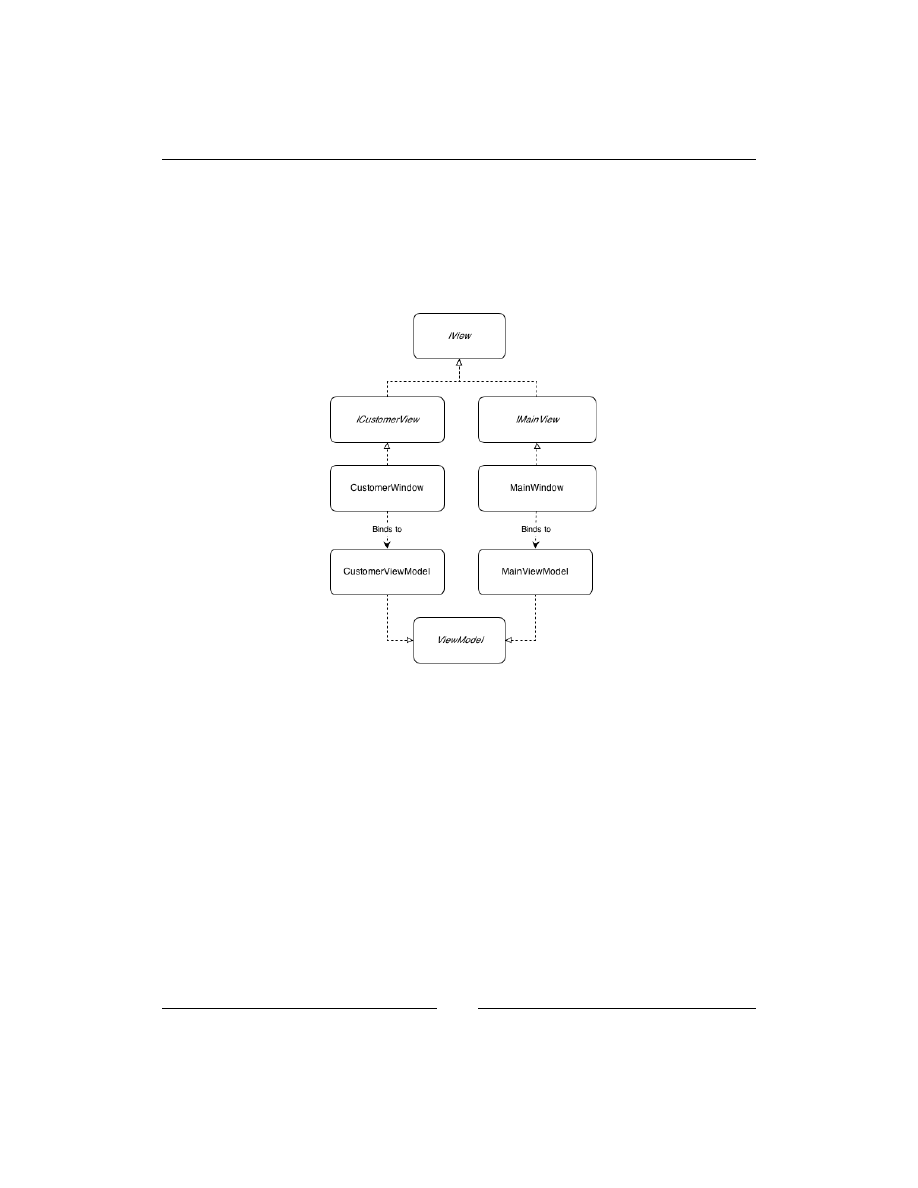
Ninject in Action
[
82
]
In this application, we are going to have a
MainView
to populate the list of customers
and a
CustomerView
which will be shown when the Save button on
MainView
is
clicked. The Views look like those we created for our Windows Forms application
in the previous section. Each View is going to have a View Model, which will be
assigned to its
DataContext
property. Figure 4.1 shows the relation between our
Views and their corresponding ViewModels:
Figure 4.1: The relation between our Views and their corresponding ViewModels
Let's start by implementing
MainViewModel
. In MVVM, the ViewModels are
totally independent from their Views. Any data which is going to be presented in
the View should be exposed as a property. The following property exposes the list
of customers:
public IEnumerable<Customer> Customers
{
get { return repository.GetAll(); }
}
This property suggests that the first dependency of the
MainViewModel
class should
be our repository. As soon as we get to know our dependencies, we should declare
them, as shown in the following code:
private readonly ICustomerRepository repository;

Chapter 4
[
83
]
public MainViewModel(ICustomerRepository repository)
{
this.repository = repository;
}
The
MainWindow
will then have a
DataGrid
control or any other proper control to
present the data exposed by this property:
<DataGrid IsReadOnly="True" ItemsSource="{Binding Customers}" />
Now we create the
CustomerViewModel
class which is responsible for adding new
customers to the repository, as shown in the following snippet. It exposes a single
Customer
Model via a property which can later be modified using a View.
public Customer Customer
{
get
{
return customer;
}
}
The
customer
field is instantiated with a
Customer
object in constructor.
The following XAML code shows how the
CustomerWindow
controls are bound to
the properties of the
Customer
object, which is exposed by the
Customer
property:
<StackPanel DataContext="{Binding Customer}">
<Label >Customer ID</Label>
<TextBox Text="{Binding ID}"/>
<Label>Company Name</Label>
<TextBox Text="{Binding CompanyName}"/>
<Label >City</Label>
<TextBox Text="{Binding City}"/>
<Label>Postal Code</Label>
<TextBox Text="{Binding PostalCode}"/>
<Label>Phone</Label>
<TextBox Text="{Binding Phone}"/>
</StackPanel>
The next step is to add the modified customer to the repository and close the
CustomerWindow
as soon as the user clicks on the Save button. A ViewModel is
not supposed to see its View and instead, the View observes its ViewModel to
change any UI state. Hence, in order to close the
CustomerWindow
, we cannot call
its
Close
method, because we have no reference to the View.

Ninject in Action
[
84
]
Instead, we can have a
DialogResult
property in the ViewModel which can be set to
notify the View to be closed:
public void Save(object paramer)
{
repository.Add(Customer);
DialogResult = true;
}
public bool? DialogResult
{
get
{
return dialogResult;
}
set
{
dialogResult = value;
OnPropertyChanged("DialogResult");
}
}
The
OnPropertyChanged
method is implemented in the abstract
ViewModel
class
which is inherited by
CustomerViewModel
. It is used to notify the View about the
changes of a property, so that View reacts to those changes.
The
DialogResult
property of a Window is not a Dependency Property and
hence, cannot accept a binding. To work around this problem, we can create a
WindowHelper
class which offers a
DialogResult
Attached Property, and can be
attached to a Window like the following:
<Window x:Class="Northwind.Wpf.Views.CustomerWindow"
xmlns="http://schemas.microsoft.com/winfx/2006/xaml/presentation"
xmlns:x="http://schemas.microsoft.com/winfx/2006/xaml"
xmlns:Infrastructure="clr-namespace:Northwind.Wpf.Infrastructure"
Infrastructure:WindowHelper.DialogResult=»{Binding DialogResult}»>
Note that a Window's
DialogResult
property is assignable only when the Window
is shown as a dialog using its
ShowDialog
method. In normal circumstances, you
can set the
IsClosed
attached property of
WindowHelper
which calls the
Close
method of Window rather than setting its
DialogResult
property, as shown in the
following code.

Chapter 4
[
85
]
Dependency properties, Attached properties, and how to implement a
WindowHelper
is beyond the scope of this book; however, you can view the details in
the downloaded samples of this book.
public static readonly DependencyProperty DialogResultProperty =
DependencyProperty.RegisterAttached(
"DialogResult", typeof(bool?), typeof(WindowHelper),
new UIPropertyMetadata(null, OnPropertyChanged));
private static void OnPropertyChanged(DependencyObject d,
DependencyPropertyChangedEventArgs e)
{
var view = d as IView;
if (view == null)
{
throw new NotSupportedException("Only IView type is
supported.");
}
view.DialogResult = (bool?)e.NewValue;
}
Now we need to call the
Save
method when the user clicks the Save button.
In MVVM, we use commands to let a View call ViewModel's methods.
The following is the
SaveCommand
property in
CustomerViewModel
to be
exposed to the
CustomerWindow
:
public ICommand SaveCommand
{
get
{
return saveCommand;
}
}
The following XAML code shows the Save button, which is bound to the
SaveCommand
:
<Button Command="{Binding SaveCommand}" >Save</Button>

Ninject in Action
[
86
]
We have used
ICommand
which is an interface of the .NET Framework, and is
recognized by WPF components. Now we should implement
ICommand
. In order
to make our concrete command independent from our domain logic, we use an
ActionCommand
, which is a simple version of the
RelayCommand
pattern:
public class ActionCommand : ICommand
{
private readonly Action<object> action;
private readonly Func<object, bool> canExecute = p => true;
public ActionCommand(Action<object> action,
Func<object, bool> canExecute = null)
{
if (action == null)
{
throw new ArgumentNullException("action");
}
this.action = action;
if (canExecute != null)
{
this.canExecute = canExecute;
}
}
public void Execute(object parameter)
{
action(parameter);
}
public bool CanExecute(object parameter)
{
return canExecute(parameter);
}
public event EventHandler CanExecuteChanged;
}
In order to create an instance of
ActionCommand
and assign it to the
SaveCommand
,
we need an abstract factory. Ninject can create this factory on the fly if we define
its interface:
public interface ICommandFactory
{
ICommand CreateCommand(Action<object> action,

Chapter 4
[
87
]
Func<object, bool> canExecute = null);
}
Using this factory in a ViewModel class, we can create as many
Command
objects as
we need. Now that we have identified the dependencies of
CustomerViewModel
, let's
have a look at its constructor:
public CustomerViewModel(ICustomerRepository repository,
ICommandFactory commandFactory)
{
this.repository = repository;
this.saveCommand = commandFactory.CreateCommand(Save);
this.customer = new Customer();
}
Now that we have created
CustomerViewModel
, we can go back to the
MainViewModel
class and implement the logic of showing the
CustomerWindow
method:
private void CreateCustomer(object param)
{
var customerView = viewFactory.CreateView<ICustomerView>();
if (customerView.ShowDialog() == true)
{
// Refresh the list
OnPropertyChanged("Customers");
}
}
The
MainViewModel
doesn't have any idea about
CustomerWindow
and it doesn't
need to. It just interacts with
ICustomerView
which provides an interface containing
only those methods that a ViewModel may need to call. This interface can then be
implemented with any View class. The View does not even have to be an XAML
window. The following code shows the
IView
interface which is inherited by
ICustomerView
:
public interface IView
{
bool? ShowDialog();
void Show();
void Close();
bool? DialogResult { get; set; }
}

Ninject in Action
[
88
]
The
MainViewModel
doesn't even care how the concrete
Customer
View will
implement
Show
or
Close
. It may be a
TabPage
in a
TabControl
, a simulated popup,
or a Mock object.
In order to create an instance of the concrete View, we need a view factory:
public interface IViewFactory
{
T CreateView<T>() where T : IView;
T CreateView<T>(ViewModel viewModel) where T : IView;
}
The constructor of
MainViewModel
introduces all of its three dependencies as the
following code shows:
public MainViewModel(ICustomerRepository repository,
IViewFactory viewFactory,
ICommandFactory commandFactory)
{
this.repository = repository;
this.viewFactory = viewFactory;
createCustomerCommand = commandFactory.
CreateCommand(CreateCustomer);
}
Now that we have introduced all of our dependencies, we need to compose the
application. The starting point of a WPF and Silverlight application is the
App
class
which is defined within the
App.xaml
file. We need to remove the
MainWindow
from
StartupUri
of
App.xaml
and either handle the
Startup
event or override the
OnStartup
method of the
App
class to define the application's composition. It should
include the following code block:
using (var kernel = new StandardKernel())
{
kernel.Bind(x => x.FromAssembliesMatching("Northwind.*")
.SelectAllClasses()
.BindAllInterfaces());
kernel.Bind(x => x.FromThisAssembly()
.SelectAllInterfaces()
.EndingWith("Factory")
.BindToFactory()
.Configure(c=>c.InSingletonScope()));
var mainWindow = kernel.Get<IMainView>();
mainWindow.Show();
}

Chapter 4
[
89
]
The convention rules are the same as our WinForms application and finally the
pre-existing code, which shows that the
MainWindow
is replaced with our code which
calls the
Show
method of the concrete implementation of
IMainView
.
ASP.NET MVC applications
Using Ninject in Windows client applications (WPF and Windows Forms) was not
much different from using it in a Console application. We didn't need any certain
configuration to set up Ninject in such applications, because in Windows client
applications the developer has the control of instantiating UI components (Forms
or Windows), and can easily delegate this control to Ninject. In Web applications,
however, it is not the same, because the framework is responsible of instantiating
the UI. So, we need to somehow tell the framework to delegate that responsibility
to Ninject. Fortunately, asking the ASP.NET .MVC framework to do so is easily
possible, but it is not the same for Web Forms applications.
Thanks to Ninject's MVC extension, we don't even need to bother setting up MVC
framework to support DI. Instead, Ninject's MVC extension will do it for us. In this
section, we will implement the Northwind customers scenario using Ninject in an
ASP.NET MVC 3 application. Ninject MVC extension also supports other versions
of the MVC framework.
Add a new ASP .NET MVC3 Web application to the Northwind solution with
references to the
Northwind.Core
project and Ninject
Conventions
extension.
We should also reference Ninject MVC extension. The easiest way is to install the
Ninject.Mvc3
package using NuGet. Keep in mind that although the name of the
package is
Ninject.Mvc3
, it is upward compatible with newer versions of the MVC
framework. Alternatively, we could download the
Ninject.Web.Mvc
binary from
GitHub and reference it from our project. In this case, we also needed to reference
the
Ninject
and
Ninject.Web.Common
libraries. These libraries are referenced
automatically if we install the
Ninject.Mvc3
package using NuGet. NuGet also adds
the
App_Start
folder containing a file named
NinjectWebCommon.cs
to the project.
The
NinjectWebCommon
class contains a
Start()
method that will be the starting
point of the application. It sets up everything to hook Ninject to MVC framework.
So, once we have installed Ninject MVC extension using NuGet, we do not need
to do anything else to set up our application, and everything will be already there
for us. This is because NuGet allows packages to add files to the project as a part
of their installation process. The
NinjectWebCommon
class has a method named
CreateKernel
which can be used as the Composition Root to register our services.
We will talk more about this class in the next section.

Ninject in Action
[
90
]
If we reference Ninject libraries manually using separately downloaded binary files,
we should make the following changes to the
MvcApplication
class located under
the
Global.asax
file:
1. The
MvcApplication
class should derive from the
NinjectHttpApplication
class, rather than
System.Web.HttpApplication
.
2. Instead of having the
Application_Start
method as the starting point, we
should override the
OnApplicationStarted
method, and anything within
Application_Start
should go to
OnApplicationStarted
.
3. We should override
CreateKernel
and use it for service registration.
The following code shows the
CreateKernel
method:
protected override IKernel CreateKernel()
{
var kernel = new StandardKernel();
kernel.Load(new ServiceRegistration());
return kernel;
}
Even if we use NuGet to set up our project, we can delete the
App_Start
folder,
and use
Global.asax
as described previously. In this case, we can remove references
to the
WebActivator
and
Microsoft.Web.Infrastructure
libraries that NuGet
has created. It is up to you which approach to use, as they do exactly the same thing
in two different ways. The first one is easier to use and does not need any extra
efforts to set up the application; while the second one uses the existing
Global.asax
file as the application startup point and doesn't require additional files or libraries
to be referenced. In this example, we use the
Global.asax
file as starting point.
In the next section, we will use the
App_Start
and
NinjectWebCommon
classes
which NuGet creates.
Let's start implementing the presentation of customers list in our application.
Open the
HomeController
class and add a constructor which introduces our
ICustomerRepository
interface as its parameter:
private readonly ICustomerRepository repository;
public HomeController(ICustomerRepository repository)
{
this.repository = repository;
}

Chapter 4
[
91
]
The next step is to modify the
Index
action method as follows:
public ActionResult Index()
{
var customers = repository.GetAll();
return View(customers);
}
It uses the
ICustomerRepository
interface to populate customers. Please note that
we don't need to create a new Model for customer, and the one that we have already
created in our domain layer is being used here. Then, delete the existing
Index.
cshtml
View and add a new one with List scaffold template and our
Customer
domain model as the Model class.
Now, add the
Create
action methods as follows:
public ActionResult Create()
{
return View();
}
[HttpPost]
public ActionResult Create(Customer customer)
{
if (ModelState.IsValid)
{
repository.Add(customer);
return RedirectToAction("Index");
}
return View();
}
The first one is called when the hyperlink Create New is clicked using HTTP
GET
method, and the second one is called when the
Create
View is submitted using
HTTP
POST
method. The created customer Model is passed to the
Create
method
and can be added to the repository. Checking the
ModelState.IsValid
property is
for server-side validation. We can now add a
Create
View for this action with
Core.
Customer
as Model class and the Create scaffold template.

Ninject in Action
[
92
]
Validator injection
Now, we need to add some validation rules to our
Customer
Model class. MVC
framework supports different kinds of validation including annotation-based
validation in which we use validation attributes on the properties of the Model to
define the validation rules:
public class Customer
{
[Required]
public string ID { get; set; }
[Required]
public string CompanyName { get; set; }
public string City { get; set; }
public string PostalCode { get; set; }
[StringLength(10)]
public string Phone { get; set; }
}
The validation attributes are not part of MVC library, and this makes it possible to
apply them to our
Customer
Model within our domain layer. This way, we can share
these validation rules among other UI frameworks as well. We just need to reference
the
System.ComponentModel.DataAnnotations
library in our domain project. MVC
framework automatically validates the Model based on the provided attributes.
But these attributes are limited to basic validation rules. What if we need to check
whether the provided ID for our customer is not duplicated? In such scenarios, we
need to create our custom validation attributes:
public class UniqueCustomerIdAttribute : ValidationAttribute
{
[Inject]
public ICustomerValidator Validator { get; set; }
public override bool IsValid(object value)
{
if (Validator == null)
{
throw new Exception("Validator is not specified.");
}
if (string.IsNullOrEmpty(value as string))
{
return false;
}
return Validator.ValidateUniqueness(value as string);
}
}

Chapter 4
[
93
]
By deriving from
ValidationAttribute
and overriding its
IsValid
method, we
can define a custom validation attribute. This validator uses an object of the type
ICustomerValidator
to validate the given value, which is a customer ID across
the repository to check whether it is unique or duplicated. The following is the
implementation of
ICustomerValidator
:
public class CustomerValidator : ICustomerValidator
{
private readonly ICustomerRepository repository;
public CustomerValidator(ICustomerRepository repository)
{
this.repository = repository;
}
public bool ValidateUniqueness(string customerID)
{
return repository.Get(customerID) == null;
}
}
Validation is successful, provided the repository cannot find any existing customer
with the given customer ID.
You may have noticed that in the
UniqueCustomerIdAttribute
class, we didn't
introduce the
ICustomerValidator
interface as a dependency in the constructor.
The reason is that it is not possible to apply an attribute which requires constructor
parameters without providing its arguments. That's why we used the Property
Injection pattern, rather than Constructor Injection. Although this attribute should
be instantiated by MVC framework, Ninject can inject the dependency before the
IsValid
method is called. Now, you may be wondering that applying the
[Inject]
attribute in our domain layer will make it dependent on Ninject. Well, it didn't,
because we didn't use the Ninject version of the
[Inject]
attribute. Instead, we
created another
InjectAttribute
class in our
Core
library. We discussed about how
to set up Ninject to use another attribute instead of its internal
[Inject]
attribute
in Chapter 3, Meeting real-world Requirements. This way, we don't have to have a
reference to the Ninject library, and can even replace Ninject with other DI containers
without needing to touch the domain layer.
We can now add the
UniqueCustomerIdAttribute
attribute to the validation rules
of our
Customer
Model:
[Required, UniqueCustomerId]
public string ID { get; set; }

Ninject in Action
[
94
]
Filter injection
Filters are implementations of the
IActionFilter
,
IResultFilter
,
IExceptionFilter
, or
IAuthorizationFilter
interfaces that make it possible to
perform special operations while invoking an action method. ASP.NET MVC allows
us to apply filters in two ways, both of which are supported by Ninject:
• Applying a filter attribute to the Controller or an
Action
method.
This approach has been supported by MVC framework since its first
version and doesn't fully support DI.
• Applying filters without attributes using filter providers which is introduced
in MVC 3 and supports all DI patterns.
In the first method, the filter class derives from
ActionFilterAttribute
and the
created filter attribute will be applied to a Controller or one of its action methods.
Like other attributes, a filter attribute cannot be applied if it does not have a default
constructor, so we cannot use Constructor Injection in filter attributes. However,
if we use Property Injection using the
[Inject]
attribute, the dependencies get
injected by Ninject without any special configuration. The following example shows
how to define an
action
filter attribute which can pass action information to a
performance monitoring service:
public class PerformanceFilterAttribute : ActionFilterAttribute
{
[Inject]
public IPerformanceMonitoringService PerformanceMonitor
{ get; set; }
public void OnActionExecuting(ActionExecutingContext
filterContext)
{
PerformanceMonitor.BeginMonitor(filterContext);
}
public void OnActionExecuted(ActionExecutedContext filterContext)
{
PerformanceMonitor.EndMonitor(filterContext);
}
}
The implementation of
IPerformanceMonitoringService
will be injected by
Ninject into the property
PerformanceMonitor
.

Chapter 4
[
95
]
MVC3 or later versions of MVC, however, support a new way of applying filters
which is DI compatible and allows all DI patterns including Construction Injection.
Thus, the previous approach is not recommended in MVC3+.
The following example demonstrates how to define and apply
LogFilter
to
our actions, which can log some tracking information about the called or being
called action methods. The filter uses the
ILog
interface of the
Log4Net
library
as a dependency:
public class LogFilter : IActionFilter
{
private readonly ILog log;
private readonly Level logLevel;
public LogFilter(ILog log, string logLevel)
{
this.log = log;
this.logLevel = log.Logger.Repository.LevelMap[logLevel];
}
public void OnActionExecuting(ActionExecutingContext
filterContext)
{
var message = string.Format(
CultureInfo.InvariantCulture,"Executing action {0}.{1}",
filterContext.ActionDescriptor.ControllerDescriptor.ControllerName,
filterContext.ActionDescriptor.ActionName);
this.log.Logger.Log(typeof(LogFilter), this.logLevel, message,
null); }
public void OnActionExecuted(ActionExecutedContext filterContext)
{
var message = string.Format(
CultureInfo.InvariantCulture, "Executed action {0}.{1}",
filterContext.ActionDescriptor.ControllerDescriptor.ControllerName,
filterContext.ActionDescriptor.ActionName);
this.log.Logger.Log(typeof(LogFilter),
this.logLevel, message, null);
}
}

Ninject in Action
[
96
]
The
LogFilter
class uses the provided
filterContext
argument to determine the
name of the
Action
method and its enclosing Controller. It then uses the injected
implementation of
ILog
to log the tracking information. This class introduces two
dependencies, one of which is the
ILog
interface and the other one is the log level
under which the messages should be logged.
In order to tell MVC to use Ninject to resolve a filter, we need to register the filter
using the
BindFilter<TFilter>
method of
Kernel
:
Kernel.BindFilter<LogFilter>(FilterScope.Action, 0)
.WithConstructorArgument("logLevel", ("Info");
The first parameter defines the filter scope whose type is
System.Web.Mvc.
FilterScope
and the second one is a number defining the order of the filter. This
information is required by MVC to instantiate and apply filters. Ninject collects this
information and asks MVC on our behalf to create an instance of the given filter type
and apply it to the given scope. In the previous example,
LogFilter
will be resolved
using Ninject with
"Info"
as an argument for the
logLevel
parameter, and will be
applied to all of the
Action
methods.
The
ILog
log parameter will be resolved based on how we register
ILog
. If you have
used Log4Net before, you will remember that it can associate each logger to the type
of class for which the logger is used:
public class MyClass
{
private static readonly ILog log =
LogManager.GetLogger(typeof(MyApp));
}
This way, the logs can later be filtered based on their associated types.
In order to provide the required type for our logger, we bind it to a method rather
than a concrete service. This way, we can use the
context
object to determine the
type of object requiring the log:
Bind<ILog>().ToMethod(GetLogger);
The following is the code for the
GetLogger
method:
private static ILog GetLogger(IContext ctx)
{
var filterContext = ctx.Request.ParentRequest.Parameters
.OfType<FilterContextParameter>()
.SingleOrDefault();
return LogManager.GetLogger(filterContext == null ?
ctx.Request.Target.Member.DeclaringType :

Chapter 4
[
97
]
filterContext.ActionDescriptor.ControllerDescriptor.
ControllerType);
}
In the previous code, the
context.Request
is the request for resolving
ILog
and
ParentRequest
is the request for resolving
LogFilter
. When a filter class is
registered using
BindFilter
, Ninject provides the request with a parameter of type
FilterContextParameter
, which contains information about the context of the
object to which the filter is being applied, and we can then obtain the type of the
Controller class from it. Otherwise, this parameter is not provided, which means the
logger is not requested by a filter class, in which case we just use the type of the class
requiring the logger.
Conditional filtering (When)
Now what if we are not going to apply the filter to all of the Controllers or the action
methods? Ninject provides three groups of the
WhenXXX
methods to determine in
which conditions to apply the filter:
• WhenControllerType: This method applies the filter to the specified
Controller types only.
• WhenControllerHas: This method applies the filter to those Controllers with
the specified attribute type
• WhenActionMethodHas: This method applies the filter to those
Action
methods with the specified attribute type
Apart from the mentioned three groups, Ninject offers a generic
When
method, which
can be used to define any custom conditions which cannot be applied using the
previous methods.
The following code shows how to apply
LogFilter
to those
action
methods which
have
LogAttribute
, given that the
LogAttribute
class is a simple class deriving
from the
Attribute
class:
Kernel.BindFilter<LogFilter>(FilterScope.Action, 0)
.WhenActionMethodHas<LogAttribute>()
.WithConstructorArgument("logLevel", ("Info");
This is another example that shows how to apply this filter to all of the actions of the
HomeController
class:
Kernel.BindFilter<LogFilter>(FilterScope.Controller, 0)
.WhenControllerType <HomeController>()
.WithConstructorArgument("logLevel", ("Info");

Ninject in Action
[
98
]
Contextual arguments (With)
In the previous examples, we have always used a constant
"Info"
argument to be
passed to the
logLevel
parameter. Apart from the standard
WithXXX
helpers, which
can be used on normal bindings, Ninject provides the following
WithXXX
methods
especially for filter binding:
•
WithConstructorArgumentFromActionAttribute
: It allows to get
the constructor argument from the attribute which is applied to the
action
method
•
WithConstructorArgumentFromControllerAttribute
: It allows to get
the constructor argument from the attribute which is applied to the
Controller class
•
WithPropertyValueFromActionAttribute
: In case of Property Injection, it
allows to set the property using a value from the attribute which is applied to
the action method
•
WithPropertyValueFromControllerAttribute
: In case of Property
Injection, it allows to set the property using a value from the attribute which
is applied to the Controller class
In the following code, we get the log level from the
LogAttribute
class rather than
always passing a constant string to the
logLevel
parameter:
Kernel.BindFilter<LogFilter>(FilterScope.Action, 0)
.WhenActionMethodHas<LogAttribute>()
.WithConstructorArgumentFromActionAttribute<LogAttribute>(
"logLevel",
attribute => attribute.LogLevel);
The previous code requires the
LogAttribute
class to have the
LogLevel
property:
public class LogAttribute : Attribute
{
public string LogLevel { get; set; }
}
WCF applications
In this section, we will implement the Northwind customers scenario using
Windows Communication Foundation (WCF). WCF is a highly customizable and
extensible framework, and it is possible to configure it to use Ninject service host
factories to enable hosting of injectable services. Ninject WCF extensions include all
the necessary components.

Chapter 4
[
99
]
Now, add a new WCF service application to the Northwind solution, and
reference
Northwind.Core
project. We also need to add reference to the
Ninject.
Extensions.WCF
,
Ninject.Web.Common
, and
Ninject
libraries. We can do it
either via NuGet, or we can download the binaries from the Ninject page on
GitHub
. Adding binary references manually requires some manipulations of the
Global.asax
file in our application. We talked about this approach in the last
section. However, adding a reference to
Ninject.Extensions.WCF
via NuGet
will also add other references to the required Ninject packages, and will create the
NinjectWebCommon
class in the
App_Start
directory of the project. Although we can
use either approach, since we have used the first method in previous section, we are
going to demonstrate the latter in this section. The following is the content of the
NinjectWebCommon
class:
public static class NinjectWebCommon
{
private static readonly Bootstrapper bootstrapper = new
Bootstrapper();
public static void Start()
{
DynamicModuleUtility
.RegisterModule(typeof(OnePerRequestHttpModule));
DynamicModuleUtility.RegisterModule(typeof(NinjectHttpModu
le));
bootstrapper.Initialize(CreateKernel);
}
public static void Stop()
{
bootstrapper.ShutDown();
}
private static IKernel CreateKernel()
{
var kernel = new StandardKernel();
kernel.Bind<Func<IKernel>>().ToMethod(ctx =>
() => new Bootstrapper().Kernel);
kernel.Bind<IHttpModule>()
.To<HttpApplicationInitializationHttpModule>();
RegisterServices(kernel);
return kernel;
}
private static void RegisterServices(IKernel kernel)
{
// Here is our Composition Root
}
}

Ninject in Action
[
100
]
Having the
NinjectWebCommon
class in the
App_Start
directory of our application
causes the application to be started from the
Start
method of this class. The
Start
method registers the
OnePerRequestHttpModule
and
NinjectHttpModule
modules
which are needed for Ninject to take care of web applications, and it initializes the
Ninject bootstrapper using the kernel created in the
CreateKernel
method, which
in turn calls the
RegisterServices
method. This is where we can either register our
service types or load our service registration module.
Let's start by creating our
CustomerService
contract. Add a new WCF
Service
class and name it
CustomerService
. Then open the
ICustomerService
interface
and add the following operations:
[ServiceContract]
public interface ICustomerService
{
[OperationContract]
IEnumerable<CustomerContract> GetAllCustomers();
[OperationContract]
void AddCustomer(CustomerContract customer);
}
We need a method for getting the list of customers, and another one to add a new
customer to the repository. Since the return type of
GetAllCustomers
is not primitive,
we need to define a data contract as well:
[DataContract]
public class CustomerContract
{
[DataMember]
public string ID { get; set; }
[DataMember]
public string CompanyName { get; set; }
[DataMember]
public string City { get; set; }
[DataMember]
public string PostalCode { get; set; }
[DataMember]
public string Phone { get; set; }
}
Now, we implement the
CustomerService
class:
public class CustomerService : ICustomerService
{
private readonly ICustomerRepository repository;

Chapter 4
[
101
]
private readonly IMapper mapper;
public CustomerService(ICustomerRepository repository, IMapper
mapper)
{
this.repository = repository;
this.mapper = mapper;
}
public IEnumerable<CustomerContract> GetAllCustomers()
{
var customers = repository.GetAll();
return mapper.Map(customers);
}
public void AddCustomer(CustomerContract customer)
{
repository.Add(mapper.Map(customer));
}
}
Apart from
ICustomerRepository
, which is the first dependency, it needs a mapper
class to map the domain
Customer
to the contract
Customer
:
public interface IMapper
{
Core.Customer Map(CustomerContract customer);
CustomerContract Map(Core.Customer customer);
IEnumerable<CustomerContract> Map(IEnumerable<Core.Customer>
customers);
}
The
CustomerService
class has two dependencies, which are introduced in its
constructor. But in order for WCF to instantiate such services which lack the default
constructor, we should tell it to use Ninject's service host factories rather than
the standard ones. To do so, right-click the
CustomerService.svc
file, and from
the pop-up menu, select View Markup. In the markup editor of the service, add
Ninject.Extensions.Wcf.NinjectServiceHostFactory
as the factory of the
corresponding
ServiceHost
:
<%@ ServiceHost Language="C#" Debug="true"
CodeBehind="CustomerService.svc.cs"
Service="Northwind.Wcf.CustomerService"
Factory="Ninject.Extensions.Wcf.NinjectServiceHostFactory"%>

Ninject in Action
[
102
]
The
Factory
attribute can have the following values:
•
Ninject.Extensions.Wcf.NinjectServiceHostFactory
for
ordinary services
•
Ninject.Extensions.Wcf.NinjectDataServiceHostFactory
for
data services
Now reference the Ninject
Conventions
extension, and enter the following binding
convention in the
RegisterServices
method of the
NinjectWebCommon
class:
kernel.Bind(x => x.FromAssembliesMatching("Northwind.*")
.SelectAllClasses()
.BindAllInterfaces());
ASP.NET Web Forms applications
ASP.NET Web Forms is not as extensible as MVC or WCF, and it is not possible to
tweak its UI engine to support activation of pages without a default constructor.
This limitation of Web Forms applications prevents making use of the Constructor
Injection pattern. However, it is still possible to use other DI patterns such as an
initializer method.
In order to set up Ninject for a Web Forms application, we need to add a reference
to the
Ninject.Web
extension. This extension requires to have referenced
Ninject.
Web.Common
and
Ninject
as well. If we use NuGet package manager, these libraries
will be referenced automatically as soon as we make a reference to
Ninject.Web
.
It will also create two classes in the
App_Start
directory of the application. The
NinjectWebCommon
class, which we have already discussed, and
NinjectWeb
. These
classes are required by the
Ninject.Web
extension to work properly. We can add our
service registrations to the
RegisterServices
method of the
NinjectWebCommon
class.
In this example, we will create a Web Form which presents a list of Northwind
customers using an initializer method. Add a new ASP.NET Web Forms application
to the Northwind solution, and after referencing the
Northwind.Core
project, set up
Ninject as described previously.
Add a
GridView
control to the
Default.aspx
page and modify the source code of
the page, as shown in the following code:
public partial class Default : System.Web.UI.Page
{
private ICustomerRepository repository;
[Inject]

Chapter 4
[
103
]
public void Setup(ICustomerRepository customerRepository)
{
this.repository = customerRepository;
}
protected void Page_Load(object sender, EventArgs e)
{
customersGridView.DataSource = repository.GetAll();
customersGridView.DataBind();
}
}
The
ICustomerRepository
interface is introduced as a parameter in the
Setup
method rather than a constructor parameter. That is because ASP.NET Web Forms
UI engine is not configurable in such a way to instantiate UI components which don't
have a default constructor. The
Setup
method will be called as soon as the
Page
object is created, having its parameter resolved and injected.
Now, reference Ninject conventions extension and put the following binding
convention in the
RegisterServices
method of the
NinjectWebCommon
class:
kernel.Bind(x => x.FromAssembliesMatching("Northwind.*")
.SelectAllClasses()
.BindAllInterfaces());
Summary
Windows Forms application supports all DI patterns, because it offers a single
startup location in the
Main
method and gives us the freedom of instantiating all
classes ourselves. WPF and Silverlight applications are friendly to MVVM pattern,
and they support all DI patterns as well. ASP.NET MVC is a DI-friendly framework,
and although the creation of framework components (for example, Controllers) are
up to the framework factories, it allows to replace them with Ninject factories which
support injectable components.
Ninject.Web.MVC
extension contains ASP.NET
MVC injection facilities of Ninject. WCF is the other web platform which supports all
DI patterns because of its high extensibility and configurability. It can be configured
to use Ninject service host factories which are implemented in the
Ninject.
Extensions.WCF
library.
ASP.NET Web Forms does not fully support DI; however, it is possible to configure
it in such a way to use some DI patterns. The
Ninject.Web
extension contains the
necessary components to make use of the partial DI support to ASP.NET.

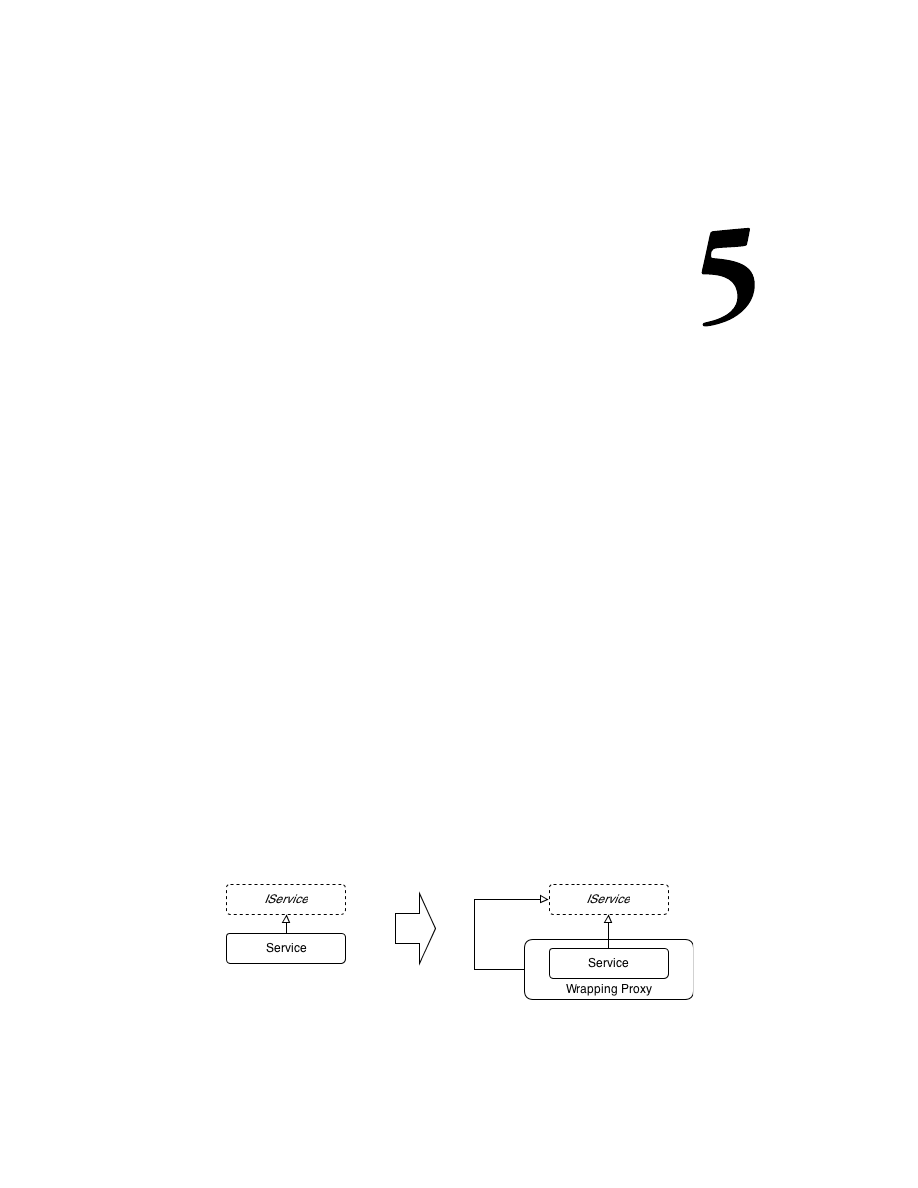
Doing More with Extensions
While the core library of Ninject is kept clean and simple, Ninject is a highly
extensible DI container and it is possible to extend its power using extension plugins.
We have already used some of them in the previous chapter. In this chapter, we will
see how interception is a solution for cross-cutting concerns and how to use Mocking
Kernel as a test asset. We will also look at how Ninject can be extended:
• Interception
• Mocking Kernel
• Extending Ninject
By the end of this chapter, the user will be able to make use of Interception and
Mocking Kernel extensions.
Interception
There are cases where we need to do some operations before or after calling a single
method or a number of methods. For example, we may need to log something before
and after invoking all the methods in a component. Interception allows us to wrap
the injecting dependency in a proxy object which can perform such operations
before, after, around or instead of each method invocation. This proxy object can
then be injected instead of the wrapped service. Ninject Interception extension
creates such proxy wrappers on the fly, and allows us to intercept invocations of
the wrapped service members. The following diagram shows how a service will be
replaced with an intercepted one during the interception process.

Doing More with Extensions
[
106
]
Interception is one of the best practices for implementing Cross Cutting Concerns
such as logging, caching, exception handling, or transaction processing.
Setup Interception
Ninject Interception extension generates proxy instances based on the DynamicProxy
implemented by LinFu or Castle. We can choose which implementation to use when
referencing interception extension. Using NuGet either install
Ninject.Extensions.
Interception.DynamicProxy
or
Ninject.Extensions.Interception.Linfu
.
NuGet will also automatically install
Ninject
,
Ninject.Extensions.Interception
and
Castle.Core
or
LinFu.DynamicProxy
depending on the selected DynamicProxy
implementation. In this section, we will use Castle DynamicProxy. We can also
download and reference the binary files of these libraries manually. Finally,
we need to add the following
using
statements to the code:
using Ninject.Extensions.Interception;
using Ninject.Extensions.Interception.Infrastructure.Language;
Member Interception
Once we have setup our project for Interception extension, some extension methods
will be available via the kernel which can be used for interception. We can use these
methods to intercept a method or property. Here are a few of them:
InterceptReplace<T> (Expression<Action<T>>, Action<IInvocation>)
InterceptAround<T> (Expression<Action<T>>,
Action<IInvocation>, Action<IInvocation>)
InterceptBefore<T> (Expression<Action<T>>, Action<IInvocation>)
InterceptAfter<T> (Expression<Action<T>>, Action<IInvocation>)
The following example shows us how to use a method interception to log around
the
GetAllCustomers()
method of the
CustomerService
class:
Kernel.InterceptAround<CustomerService>(
s=>s.GetAllCustomers(),
invocation =>logger.Info("Retrieving all customers..."),
invocation =>logger.Debug("Customers retrieved"));
In the preceding example, the type parameter indicates the service we are going to
intercept (that is,
CustomerService
). The first parameter is a delegate which indicates
the method to intercept (for example,
GetAllCustomers
). For the
InterceptAround
method, the second and third parameters are two delegates which will be executed
before and after invoking the intercepted method respectively.

Chapter 5
[
107
]
The
invocation
parameter whose type is
IInvocation
, provides useful information
about the method invocation context. For example, we can get or change the
returned value. In the following example, we will log the number of retrieved
customers using the
InterceptAfter
method:
Kernel.InterceptAfter<CustomerService>(s=>s.GetAllCustomers(),
invocation =>logger.DebugFormat("{0} customers retrieved",
(IEnumerable<Customer>) invocation.ReturnValue).Count()));
Since the type of
ReturnedValue
is
object
, we need to cast it to reach the
Count()
method. In the following example, we will implement caching for the
GetAll
()
method of the
customers
repository:
Kernel.InterceptReplace<SqlCustomerRepository>(
r => r.GetAll(),
invocation =>
{
const string cacheKey = "customers";
if (HttpRuntime.Cache[cacheKey] == null)
{
invocation.Proceed();
if (invocation.ReturnValue != null)
HttpRuntime.Cache[cacheKey] = invocation.ReturnValue;
}
else
invocation.ReturnValue = HttpRuntime.Cache[cacheKey];
});
In this example, we used the
InterceptReplace
method, which can totally replace
the functionality of the intercepted method. We used
HttpRuntime.Cache
for
caching the list of
Customer
objects, which the
GetAll()
method returns. If the
Cache
object is empty, we need to call
GetAll()
, which is the intercepted method
and then put the returned value in the cache. In order to call the intercepted method
via the interception method (
InterceptReplace
), we should call the
Proceed()
method of the invocation object. Then, we can get its returned value, which is the list
of
Customer
objects from the
ReturnValue
property of the invocation. If the
Cache
object is not empty, we just need to set the
ReturnValue
property to the cached
Customer
list. In this way, the
GetAll()
method will not be called.
The important thing to keep in mind is that the type argument provided
for interception methods cannot be the type of the abstracted service. It
should be the concrete implementation type. That is why we have provided
SqlCustomerRepository
rather than
ICustomerRepository
as the type argument
for the
InterceptReplace
method, so the following code wouldn't work:

Doing More with Extensions
[
108
]
Kernel.InterceptReplace<ICustomerRepository>(
r => r.GetAll(), invocation =>{ ... });
That is because interception creates a proxy wrapper around the resolved object
rather than creating a new implementation of the abstracted service.
You may have noticed that all of the
InterceptXxx<T>
methods require a type
argument. This obliges the application to have a reference to the dependency library,
which is usually not desirable. We should be able to refer to types using their names
so that we can dynamically load dependency assemblies at runtime. In order to do
so, we can use the
AddMethodInterceptor
method. Here is the implementation of
the preceding example using the
AddMethodInterceptor
method:
var repositoryType = Type.GetType(
"Northwind.SqlDataAccess.SqlCustomerRepository, Northwind.
SqlDataAccess");
Kernel.AddMethodInterceptor(repositoryType.GetMethod("GetAll"),
invocation => { ... });
Type Interception
Although method Interception targets a particular method or property of a given
type, type Interception is more generalized and applies to a type or a group of types,
and intercepts all of the methods and properties in a single point. In order to create
an interceptor, we need to implement the
IInterceptor
interface. This interface has
only one method, which is as follows:
void Intercept( IInvocation invocation );
In the following example, we will implement an exception handling interceptor
which can catch the exceptions and hand them over to an exception handler service.
It is the same as putting
try-catch
in all of the methods of the intercepted type:
public class ExceptionInterceptor : IInterceptor
{
private IExceptionHandlerService exceptionHandlerService;
public ExceptionInterceptor(IExceptionHandlerService
handlerService)
{
this.exceptionHandlerService = handlerService;
}
public void Intercept(IInvocation invocation)
{
try
{

Chapter 5
[
109
]
invocation.Proceed();
}
catch (Exception exception)
{
exceptionHandlerService.HandleException(exception);
}
}
}
The following code shows how to add the
ExceptionInterceptor
to our convention
so that it applies to all the classes of our application:
Kernel.Bind(x => x.FromAssembliesMatching("Northwind.*")
.SelectAllClasses()
.BindAllInterfaces()
.Configure(b =>
b.Intercept()
.With<ExceptionInterceptor>()
));
The
Intercept()
method is added to the configuration section of our convention
and accepts the type of the desired interceptor as its type parameter. It can then
activate the provided type to create and apply the interceptor object.
If we need to intercept only a certain type in a convention rule, we can use the
ConfigureFor<T>
method:
Kernel.Bind(x => x.FromAssembliesMatching("Northwind.*")
.SelectAllClasses()
.BindAllInterfaces()
.ConfigureFor<CustomerRepository>
(b => b.Intercept()
.With<ExceptionInterceptor>()
));
If we already have an instance of our interceptor, we can use the following syntax:
var exceptionInterceptor = Kernel.Get<ExceptionInterceptor>();
Kernel.Bind(x => x.FromAssembliesMatching("Northwind.*")
.SelectAllClasses()
.BindAllInterfaces()
.Configure(b =>
b.Intercept()
.With(exceptionInterceptor)
));

Doing More with Extensions
[
110
]
The preceding example showed how to intercept types projected by a convention.
It is also possible to intercept the kernel itself. The following example applies
ExceptionInterceptor
to all of the services resolved by the kernel, no matter
how they are registered:
kernel.Intercept(context => true)
.With<ExceptionInterceptor>();
The
Intercept
method accepts a predicate, which is given an instance of the current
activation context (
IContext
). This predicate indicates what services to choose for
interception. In this example, we always return
true
, which means we intend to
intercept all services. We can define any contextual condition by this predicate based
on the activation context. Refer to the Contextual binding section in Chapter3, Meeting
Real-world Requirements for refreshing how to define contextual conditions.
There is also a built-in interceptor class named
ActionInterceptor
, which can
be used as a generic interceptor in case our interception logic is as simple as a
single method:
Kernel
.Intercept()
.With(new ActionInterceptor(invocation =>
log.Debug(invocation.Request.Method.Name)));
The
Interception
extension also contains an abstract
SimpleInterceptor
class,
which can be extended to create interceptors with a pre/post interception
logic, and an
AutoNotifyPropertyChangedInterceptor
class, which is
designed specifically for WPF ViewModels and automates notification
of property changes.
Multiple Interceptors
We already studied how to implement exception handling concern using
interception. But what if we need to add more interceptors to a type? In reallife
scenarios we usually have to implement a variety of cross-cutting concerns on
each type. Multiple interception allows us to meet this requirement. The following
example shows how to address both logging and exception-handling concerns using
two interceptors:
kernel.Intercept(context => true).With<ExceptionInterceptor>();
kernel.Intercept(context => true).With<LoggerInterceptor>();
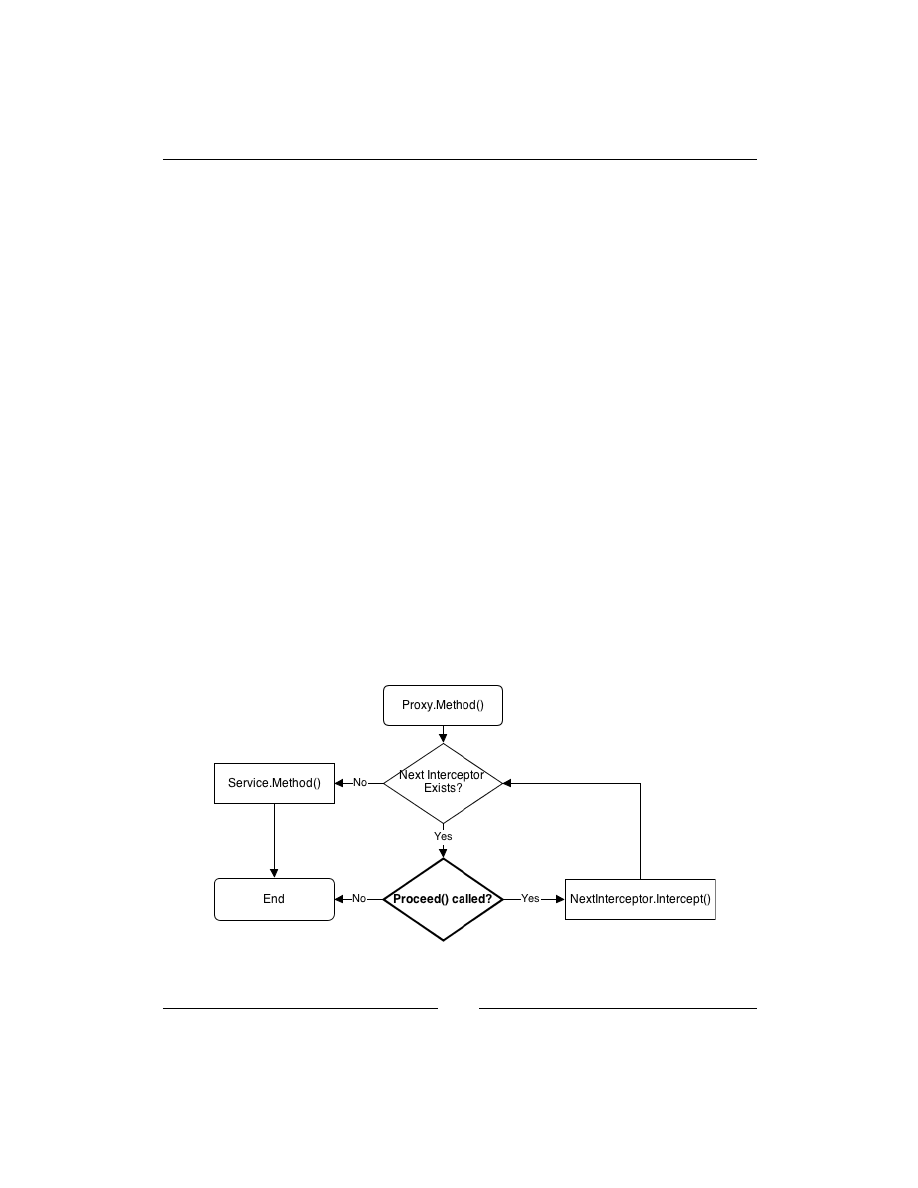
Chapter 5
[
111
]
Alternatively, we can apply them to a convention similar to this:
Kernel.Bind(x => x.FromAssembliesMatching("Northwind.*")
.SelectAllClasses()
.BindAllInterfaces()
.Configure(b =>
{
b.Intercept()
.With<ExceptionInterceptor>();
b.Intercept()
.With<LoggerInterceptor>();
}
));
We can also register multiple interceptors on a single Binding in the same way
as follows:
var binding = Bind<IService>().To<MyService>();
binding.Intercept().With<ExceptionInterceptor>();
binding.Intercept().With<LoggerInterceptor>();
When we register an interceptor for a service type, Ninject no longer resolves the
service by activating the service itself. Instead, Ninject returns a proxy object which
wraps an instance of the service. When we call a method on the resolved object, we
are actually calling the proxy implementation of that method, rather than the actual
service method. The following diagram demonstrates that the proxy method invokes
the
Intercept
method on the first registered interceptor:
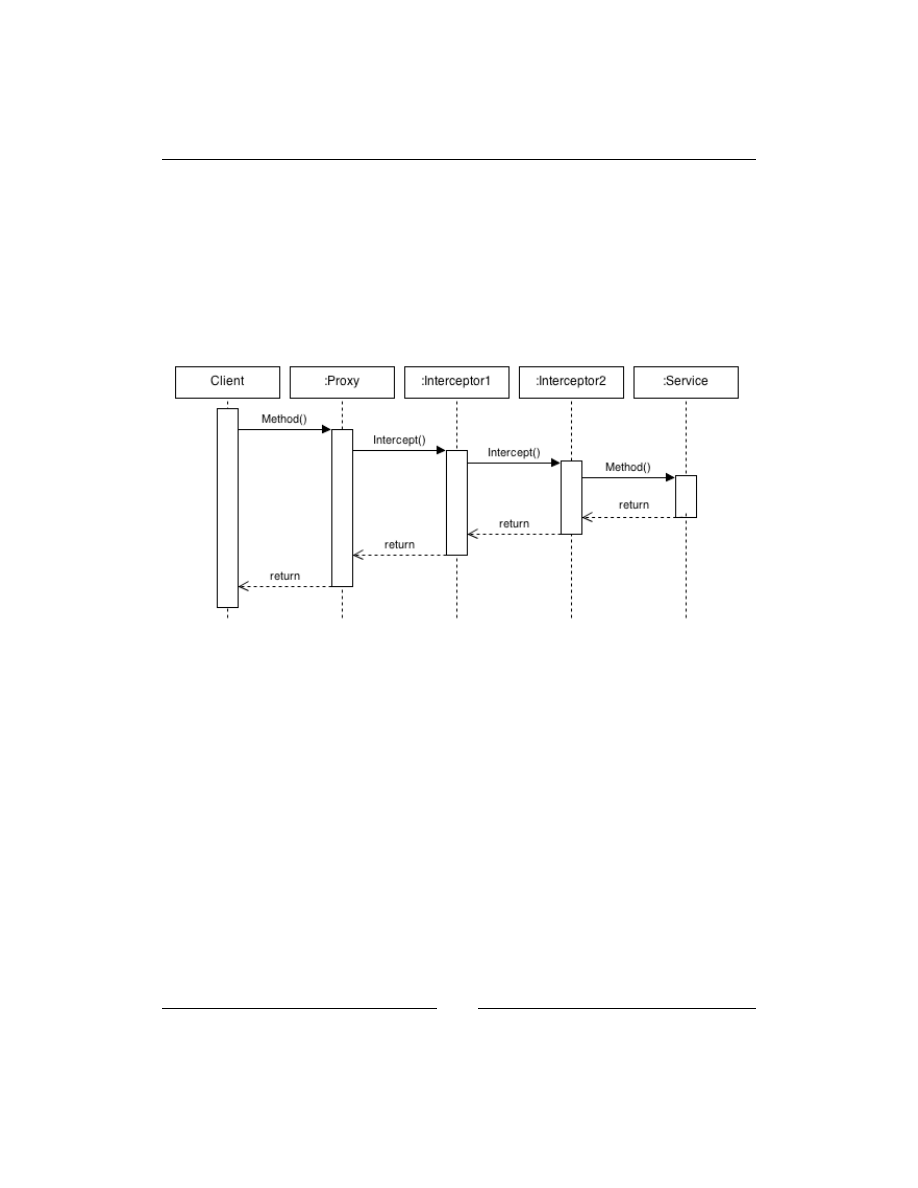
Doing More with Extensions
[
112
]
If the
Proceed
method is called within the
Intercept
method, the proxy class
advances to the next interceptor and executes its
Intercept
method. Calling the
Proceed
method in the last interceptor leads to calling the actual service method.
Once the actual service method is called, the control returns to the last
Intercept
method along with the value returned by the service method. Here is where the
interceptor can perform post-invocation operations (for example, modifying the
returned value). The control then returns to the previous interceptors one by one,
until it reaches the proxy method which was initially called. The following diagram
shows this sequence:
When we register multiple interceptors, the order in which they intercept can
be indicated using the
InOrder
method as follows:
Kernel.Bind(x => x.FromAssembliesMatching("Northwind.*")
.SelectAllClasses()
.BindAllInterfaces()
.Configure(b =>
{
b.Intercept()
.With<ExceptionInterceptor>()
.InOrder(1);
b.Intercept()
.With<LoggerInterceptor>()
.InOrder(2);
}
));

Chapter 5
[
113
]
The lower the value of the order, the earlier the interceptor executes. So, in the
preceding example,
ExceptionInterceptor
executes before
LoggerInterceptor
.
Intercept Attribute
Another way of registering an interceptor for a type or method is by using
attributes. In order to create an attribute interceptor, we just need to derive from the
InterceptAttribute
class and override its
CreateInterceptor
method. In the
following example, we create an attribute named
InterceptExceptionsAttribute
for intercepting exceptions:
public class InterceptExceptionsAttribute : InterceptAttribute
{
public override IInterceptor CreateInterceptor(IProxyRequest
request)
{
return request.Kernel.Get<ExceptionInterceptor>();
}
}
We can then apply this attribute to a method or a type as follows:
[InterceptExceptions]
public class Sample
{ ... }
We can also apply both attributes to the same type as shown in the following code:
[InterceptExceptions, Log]
public class Sample
{ ... }
We can apply the interceptor attributes also to methods (remember that in either
way, the method should be
virtual
or it will not be intercepted) as follows:
[InterceptExceptions]
public class Sample
{
[Log]
public virtual void DoSomething()
{ ... }
...
}

Doing More with Extensions
[
114
]
In the preceding example, all of the
virtual
methods within the
Sample
class
will be intercepted by
ExceptionInterceptor
. The
DoSomething
method is also
intercepted by
LoggerInterceptor
.
We can also specify the order of interceptors, by setting the
Order
property of the
applied attribute as follows:
[InterceptExceptions(Order = 2)]
public class Sample
{
[Log(Order = 1)]
public virtual void DoSomething()
{ ... }
}
In the preceding example, the
DoSomething
method will be intercepted first by
LoggerInterceptor
and then by
ExceptionInterceptor
.
In case if we have methods which we don't want to be intercepted, we can exclude
them using the
[DoNotIntercept]
attribute as follows:
[InterceptExceptions]
public class Sample
{
[Log]
public virtual void DoSomething()
{ ... }
[DoNotIntercept]
public virtual void DoSomethingElse()
{ ... }
}
In the preceding example, although the
[InterceptExceptions]
attribute is applied
to the type, it doesn't intercept the
DoSomethingElse
method.
Mocking Kernel
One of the advantages of Dependency Injection is that it improves the testability of
code units and makes it even easier. Ninject has introduced Mocking Kernel, which
facilitates the injection of mock objects. In this section, we will add a Test project to
the
Northwind
solution and see how to use Mocking Kernel in order to write our
unit tests. It is possible to extend Mocking Kernels for different isolation frameworks,
and for some of them including RhinoMocks, Moq and NSubstitute, mocking kernel
extensions already exist. In this example, we will use the Moq Mocking Kernel in
combination with the NUnit framework to write some unit tests for the
Northwind.
Wpf
project.

Chapter 5
[
115
]
Add a new class library project named
Northwind.Wpf.Test
to the
Northwind
solution and reference the
Northwind.Wpf
and
Northwind.Model
projects. Since
we are going to use some WPF components in our tests, we also need a reference
to
PresentationCore
. Now using NuGet install
Ninject.MockingKernel.Moq
.
It will automatically reference
Ninject
,
Ninject.MockingKernel
, and
Moq
as
its prerequisites. It is also possible to download and reference binaries manually.
You can use other test frameworks or Mocking Kernels according to your needs.
Although there might be some slight changes, the overall process would be the same.
Now we add a new class for testing
MainViewModel
and create it as follows:
[TestFixture]
class MainViewModelTests
{
private readonly MoqMockingKernel kernel;
public MainViewModelTests()
{
this.kernel = new MoqMockingKernel();
}
[TearDown]
public void TearDown()
{
kernel.Reset();
}
}
The
Reset()
method clears Ninject cache of all created instances. By calling this
method as part of NUnit teardown process which happens after each test, we
don't need to dispose and reinitialize kernel for each test. Note that instead of
StandardKernel
we are using
MoqMockingKernel
. If there are no matching bindings
for a service type, and if the type is not self-bindable,
MockingKernel
will create
mock for the type and inject the associated mocked object wherever the type is
requested. Thus, calling the
Get<T>()
method on
MockingKernel
will return the
associated mocked object. In order to get the mock itself, the
MockingKernel
has
another method named
GetMock<T>()
. We can also use the following syntax in
order to explicitly define a mock binding:
Bind<IService>().ToMock();
It is useful when further setup on a binding is required:
Bind<IService>().ToMock()
.WithConstructorArgument("paramName",argument)
.InSingletonScope().Named("BindingName");

Doing More with Extensions
[
116
]
Let's write our first test which verifies whether getting the
Customers
property calls
the
GetAll()
method of
ICustomerRepository
(you can review Chapter 4, Ninject in
Action to refresh your memory if you don't remember
CustomerViewModel
clearly)
as follows:
[Test]
public void GettingCustomersCallsRepositoryGetAll()
{
var repositoryMock = kernel.GetMock<ICustomerRepository>();
repositoryMock.Setup(r => r.GetAll());
var sut = kernel.Get<MainViewModel>();
var customers = sut.Customers;
repositoryMock.VerifyAll();
}
In this test, calling
GetMock<ICustomerRepository>
returns the mock which Moq
created for
ICustomerRepository
. We expect the
GetAll()
method to be called
on the mocked object associated with this mock.
MainViewModel
is our System
under Test (SUT) which is acquired from the kernel using the
Get
method. Because
MainViewModel
is self bindable, the kernel doesn't return a mocked object for this
type and returns an instance of our own implementation of
MainViewModel
. Then
we call the get accessor of the
Customers
property and verify the mock to see if the
GetAll
method is called on the mocked implementation of
ICustomerRepository
.
The preceding test was a simple one and implementing it without
MockingKernel
wouldn't be much harder. We just needed to create mocks for other dependencies of
MainViewModel
and pass the associated objects to
MainViewModel
. In the following
test we will study a more complicated case. We are going to verify whether
executing
CreateCustomerCommand
will call the
ShowDialog
method of the
CustomerView
class:
[Test]
public void ExecutingCreateCustomerCommandShowsCustomerView()
{
var customerViewMock = kernel.GetMock<ICustomerView>();
customerViewMock.Setup(v => v.ShowDialog());
var sut = kernel.Get<MainViewModel>();
sut.CreateCustomerCommand.Execute(null);
customerViewMock.VerifyAll();
}
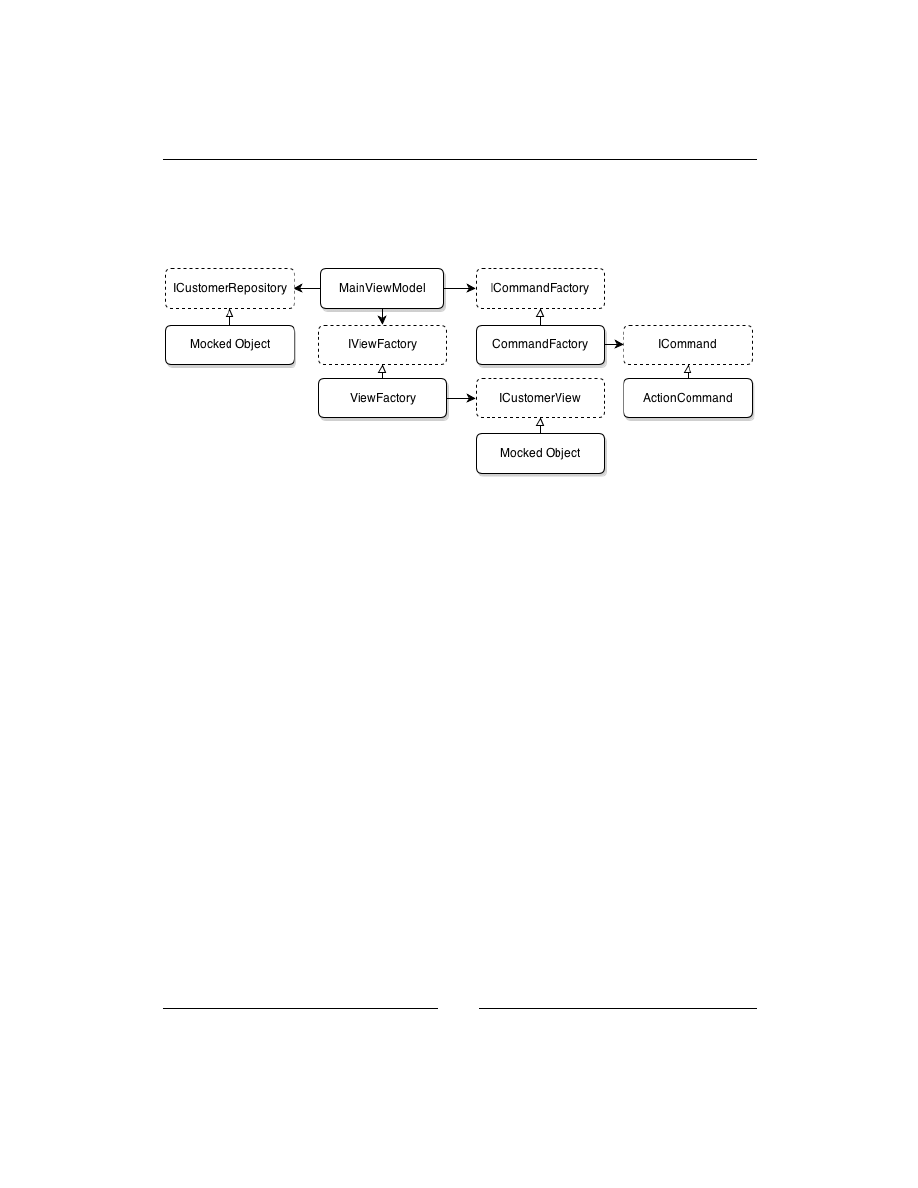
Chapter 5
[
117
]
Again our SUT is
MainViewModel
, but the type of mocked object is
ICustomerView
.
The dependency graph of
MainViewModel
which is shown in the following diagram,
shows that we need to involve other objects in this scenario in order to make the test
work properly:
We need actual implementations of
IViewFactory
,
ICommandFactory
, and
ICommand
rather than their mocked objects. Therefore, we need the following
binding rules:
kernel.Bind(x => x.FromAssembliesMatching("Northwind.*")
.SelectAllClasses()
.BindDefaultInterfaces());
kernel.Bind(x => x.FromAssembliesMatching("Northwind.*")
.SelectAllInterfaces()
.EndingWith("Factory")
.BindToFactory());
We need to have a reference to the Ninject Factory extension (
Ninject.Extensions.
Factory
) in order to create the required dynamic factories. Dynamic factory was
discussed in Chapter 3, Meeting Real-World Requirements.

Doing More with Extensions
[
118
]
Extending Ninject
Ninject is actually a collection of single responsible components that are wired
together using DI. This makes it extremely extensible, and thus new functionalities
are created by adding new components and the existing behaviors can easily be
customized by swapping standard components with our customized ones. All of
the Ninject components are available via the
kernel.Components
property. We can
also create a customized
Kernel
object by extending the
KernelBase
class or even
implementing the
IKernel
interface. In order to extend
Ninject
behaviors, we need
to know Ninject components and their roles. Going through all of those components
is out of the scope of this book. However, we will have an example to see how to
extend Ninject by adding a new component.
In the following example we will create a new
IMissingBindingResolver
component and add it to Ninject components.
IMissingBindingResolver
, as the
name suggests, is responsible for resolving types for which there are no registered
bindings.
SelfBindingResolver
is a preexisting example of this component
which returns the type itself if it is not registered. That is why we don't need
to registers types to themselves explicitly. In this example, we will create an
IMissingBindingResolver
object which can resolve any interface named
IXXX
to a type named
XXX
as follows:
public class DefaultImplementationBindingResolver :
NinjectComponent, IMissingBindingResolver
{
public IEnumerable<IBinding> Resolve (
Multimap<Type, IBinding> bindings, IRequest request)
{
var service = request.Service;
if (!service.IsInterface || !service.Name.StartsWith("I"))
return Enumerable.Empty<IBinding>();
return new[] {
new Binding(service) { ProviderCallback = StandardProvider
.GetCreationCallback(GetDefaultImplementationType(service)) }};
}
private Type GetDefaultImplementationType(Type service)
{
var typeName = string.Format("{0}.{1}",
service.Namespace, service.Name.TrimStart('I'));
return Type.GetType(typeName);
}
}

Chapter 5
[
119
]
The
Resolve
method gets a list of bindings and the
request
object. It tries to restrict
the list of bindings as much as it can and then returns the restricted list. Ideally this
list should contain only one binding. We expect the service type to be an interface
whose name starts with
I
. Otherwise, we return an empty list which means we
cannot resolve it here. In the
GetDefaultImplementationType
method we remove
I
from the service name to achieve the name of its implementation and return its type.
The type will be passed to
StandardProvider
to create a
CreationCallback
object.
This callback will later be used for creating the instance. We create a new
Binding
object for this service type, having set the
CreationCallback
, and return it as a
single member sequence.
The following code shows how to add this component to the kernel:
var kernel = new StandardKernel();
kernel.Components
.Add<IMissingBindingResolver, DefaultImplementationBindingResolver>();
Summary
Interception extension creates on the fly proxy wrappers around injected objects
and allows us to intercept invocation of the wrapped service members and is one
of the best practices to address cross-cutting concerns.
Mocking is another Ninject's handy extension which automates injection of
mock objects. It has a built-in support for popular mocking frameworks such
as RhinoMocks, Moq, and NSubstitute.
Ninject is a collection of independent components that are wired together and
we can extend Ninject's functionality by adding new components or substituting
the existing ones.


Index
A
ActivationException exception 42, 43
ASP.NET MVC applications
ASP.NET Web Forms applications 102, 103
assemblies, convention over configuration
AutoNotifyPropertyChangedInterceptor
B
binding, convention over configuration
Binding Generator
BindSelection(ServiceSelector selector) 38
BindUsingRegex(string pattern) 38
C
Common Service Locator.
See
CLR
components, convention over configuration
inclusion and exclusion, explicit 37
selected components, filtering 37
conditional filtering (When)
contextual arguments (With)
WithConstructorArgumentFromAction
WithConstructorArgumentFrom
WithPropertyValueFromActionAttribute
WithPropertyValueFromController

[
122
]
contextual binding
attribute-based binding 55, 56
target-based conditions 56, 57
convention over configuration
service types, selecting 37, 38
Copy to Output Directory property 31
CreateCustomerCommand command 116
Create method
CustomerForm
CustomerService class
custom scope, object lifetime 28, 29
D
Dependency Injection.
See
DI
DI
or Inversion of Control (IoC) 9
dynamic factories
custom instance providers 68-70
E
ExceptionInterceptor interface 109
Extensible Application Markup Language
F
filtering
conditional filtering (When) 97
contextual arguments (With) 98
filters
FromAssemblyContaining
From(params Assembly[] assemblies) 36
G
GetDefaultImplementationType

[
123
]
H
I
ICustomerRepository interface 91
ICustomerService interface 100
IMissingBindingResolver component 118
IncludingNonePublicTypes() method 36
injecting dependencies
interception
IPerformanceMonitoringService 94
K
kernel.Components property 118
L
M
Main method
Mapper class
multi binding
plugin model, implementing 46-49
MVVM architecture
N
NamedLikeFactoryMethod helper
Ninject

[
124
]
Ninject.Extensions.Factory library 64
Ninject.Extensions.WCF library 99
Ninject modules
MailService classes, registering 30
NinjectWebCommon class 89, 99, 102
O
object lifetime
P
PerformanceMonitor property 94
plugin model
providers
R
RegisterServices method 100, 102
request scope, object lifetime 28
S
SelectAllAbstractClasses() method 65
SelectAllIncludingAbstractClasses()
SelectAllInterfaces() method 65
Separation of Concerns.
See
SoC
service types
service types, convention over configuration
ShippersSqlRepository class 58
Silverlight applications
singleton scope, object lifetime 26
System Under Test (SUT) 12, 116
T

[
125
]
U
UniqueCustomerIdAttribute class 93
V
W
Windows Presentation Foundation.
See
WPF applications
WPF applications
X
XML configuration


Thank you for buying
Mastering Ninject for Dependency
Injection
About Packt Publishing
Packt, pronounced 'packed', published its first book "Mastering phpMyAdmin for Effective
MySQL Management" in April 2004 and subsequently continued to specialize in publishing
highly focused books on specific technologies and solutions.
Our books and publications share the experiences of your fellow IT professionals in adapting
and customizing today's systems, applications, and frameworks. Our solution based books
give you the knowledge and power to customize the software and technologies you're using
to get the job done. Packt books are more specific and less general than the IT books you have
seen in the past. Our unique business model allows us to bring you more focused information,
giving you more of what you need to know, and less of what you don't.
Packt is a modern, yet unique publishing company, which focuses on producing quality,
cutting-edge books for communities of developers, administrators, and newbies alike.
For more information, please visit our website:
www.packtpub.com
.
About Packt Open Source
In 2010, Packt launched two new brands, Packt Open Source and Packt Enterprise, in order
to continue its focus on specialization. This book is part of the Packt Open Source brand, home
to books published on software built around Open Source licences, and offering information
to anybody from advanced developers to budding web designers. The Open Source brand
also runs Packt's Open Source Royalty Scheme, by which Packt gives a royalty to each Open
Source project about whose software a book is sold.
Writing for Packt
We welcome all inquiries from people who are interested in authoring. Book proposals
should be sent to author@packtpub.com. If your book idea is still at an early stage and you
would like to discuss it first before writing a formal book proposal, contact us; one of our
commissioning editors will get in touch with you.
We're not just looking for published authors; if you have strong technical skills but no writing
experience, our experienced editors can help you develop a writing career, or simply get some
additional reward for your expertise.

Refactoring with Microsoft Visual
Studio 2010
ISBN: 978-1-849680-10-3 Paperback: 372 pages
Evolve your software system to support new and
ever-changing requirements by uploading your C#
code base with patterns and principles
1. Make your code base maintainable with
refactoring
2. Support new features more easily by making
your system adaptable
3. Enhance your system with an improved
object-oriented design and increased
encapsulation and componentization
JBoss Weld CDI for Java Platform
ISBN: 978-1782160-18-2 Paperback: 122 pages
Learn CDI concepts and develop modern web
applications using JBoss Weld
1. Learn about dependency injection with CDI
2. Install JBoss Weld in your favorite container
3. Develop your own extension to CDI
4. Decouple code with CDI events
5. Communicate between CDI beans and
AngularJS
Please check
www.PacktPub.com for information on our titles
Java EE 6 with GlassFish 3
Application ServerInstant
ISBN: 978-1-849510-36-3 Paperback: 488 pages
A practical guide to install and configure the
GlassFish 3 Application Server and develop Java EE 6
applications to be deployed to this server
1. Install and configure the GlassFish 3
Application Server and develop Java EE 6
applications to be deployed to this server
2. Specialize in all major Java EE 6 APIs, including
new additions to the specification such as CDI
and JAX-RS
3. Use GlassFish v3 application server and gain
enterprise reliability and performance with
less complexity
Instant Dependency Management
with RequireJS How-to
ISBN: 978-1-782169-06-2 Paperback: 42 pages
Optimize the performance and maintainability of
your web applications with RequireJS
1. Learn something new in an Instant! A short,
fast, focused guide delivering immediate
results
2. Filled with useful tips to improve the
performance and maintainability of web
applications
4. Contains valuable guidance to integrate
popular third-party libraries, such as jQuery,
the jQueryUI Widget Factory, and Backbone.js,
with RequireJS
Please check
www.PacktPub.com for information on our titles
Document Outline
- Cover
- Copyright
- Credits
- About the Author
- About the Reviewers
- www.PacktPub.com
- Table of Contents
- Preface
- Chapter 1: Understanding Dependency Injection
- Chapter 2: Getting Started with Ninject
- Chapter 3: Meeting Real-world Requirements
- Chapter 4: Ninject in Action
- Chapter 5: Doing More with Extensions
- Index
Wyszukiwarka
Podobne podstrony:
Din 16903 Threaded Inserts For Plastic Injection Molding
Masterspy RFI for 215 Bulk Collection Metadata
Countermeasure for Fault Injection Crypto Attack
steel?rgoes guidelines for master and co
Bill Hurter Master Lighting Guide for Wedding Photographers (2)
Student Roles and Responsibilities for the Masters of Counsel
Ebook Nlp Very Practical Suggestions For Building Wealth
(Ebook) English Advanced Language Patterns Mastery VSYLLIH3KCXTZSV6DGDTP52DD4GAXUEMURFHLIY
Masterspy Releases $45 6B Budget for FY2015
[Trading eBook] Pristine Micro Trading for a Living Micro Trading for a Living
Programming (ebook PDF) Efficient Algorithms For Sorting and Synchronization
Multiple Patterns for Mastering Fear, Part II
ebook Wine for the Dogs Well, Not Exactly
(ebook electronics) Schematics Power Regulated Power Supply for CB & Ham Radio
Injectable liquid copolymers for soft ti
8 Last Minute Valentine Gifts Crochet Patterns for that Special Someone eBook
więcej podobnych podstron