
IJCSNS International Journal of Computer Science and Network Security, VOL.9 No.1, January 2009
248
Manuscript received January 5, 2009
Manuscript revised January 20, 2009
Do-It-Yourself Guide to Cell Phone Malware
William R. Mahoney and Craig A. Pokorny,
University of Nebraska at Omaha, Omaha Nebraska USA
Summary
The authors present recent research they have conducted to
determine the simplicity of constructing malicious code for cell
phones. The results are quite surprising, due to the straight-
forwardness of the programming interface and the availability of
tools. Our paper recounts the results of a simplistic search for
off-the-shelf code which can be utilized for the creation of
malicious software for cell phones. Our search yielded a self-
replicating phone virus which we simulated in a contained
environment.
Key words:
Cell phone, malware, outlook, contact propagation.
1. Introduction
With the advent of web-enabled cell telephones, handling
email, web pages, and rich content, there is a definite
potential for misuse. This has been an emerging problem
for some time; in fact the first cell phone hacker references
appeared over 20 years ago[1]. As cell phones subsume
additional capabilities and are used by an increasing
number of people, the possibilities for a cell phone virus
or other malware impacting the global economy is getting
larger. It is estimated that fully one quarter of the
inhabitants of the planet currently use mobile phones[2];
in Europe there are currently more cell phones than
people[3]. And cell phone viruses such as Phage and
Liberty Crack were already appearing back in 2000[4,5].
The use of smart phones, which are the aim of our study
and which incorporate email and web browsing, was
increasing at a rate of 156% in 2007 [6].
Over the course of the development of the internet,
meanwhile, simple tools for hackers have become
available and so-called “script kiddies” use these easy
tools to attack web servers. The knowledge required is not
extensive. Without a tremendous amount of information
concerning the actual technical aspects of the attack, a
“script kiddy” can download the available software and
start right in as a nefarious user. Is the same now true for
cell phone usage? Our research encompassed a simple
goal: determine what tools are openly available for some
type of cell phone attack, download the necessary items,
verify that they can be used in a bad manner, and report on
the results. This paper represents the last of these aims.
Our research was thus to create a cell phone virus such as
Cabir[7] – a virus that does no harm other than self-
replicate, and in the process determine whether the tools
and skills are readily available and simple.
In section two of the paper we present a few of the
techniques used for data delivery to cell phones, including
brief overviews of SMS, MMS, and email applications
typical for currently existing cell phones. Section three
describes the tools we located and used for the project, and
the following section describes the effort required to create
a “cruel” application. Our conclusions are in section five.
2. Background
Although it is normal to think of cell phones simply as
phones, they generally have other communications
methods available which are more easily utilized for
delivering malware. These include the SMS system, MMS,
e-Mail, and others. These methods may or may not be
capable of transmitting a payload containing the
troublesome software.
Cell phone manufacturers and providers are gradually
becoming aware that these techniques can be used for
malicious intent. A 2004 document by Microsoft[8] sated
that “Although Microsoft Windows Mobile-based devices
have yet to become a significant target for malicious code,
one may argue that it is only a matter of time before such
threats occur. Also, even if the devices themselves are not
affected by such code, when they connect to a network
they can serve as transport mechanisms for passing
destructive software on to other computing systems.”
Presumably the normal “transport mechanisms” such as
SMS, MMS, email, etc. are used for this “destructive
software”
2.1 Available Transport Mechanisms
The Short Message Service, popularly referred to as
“texting”, allows one to send a message of up to 160 (7-
bit) bytes of message content to mobile devices, including
cell phones, Personal Digital Assistants (PDAs), and smart
phones. The SMS system is similar to paging systems used
prior to the popularization of cell technology. A key
difference is that the SMS messages are queued at the
server until the cell phone is within range and powered on.
IJCSNS International Journal of Computer Science and Network Security, VOL.9 No.1, January 2009
249
It is not necessary to be ready to receive the message from
the cellular provider at the moment that it is sent. SMS
payloads can also be sent to the destination phone from
web applications, instant messaging clients, Voice over IP
services, and other services including email[9]. Because of
the short nature of the message it is probably difficult to
use SMS for the delivery of malware.
Contrasting with SMS is the Multimedia Messaging
Service, or MMS. MMS is a variation of SMS which is
used specifically to get past the length restriction of SMS
and thus deliver rich content. This content can include
photos, videos, and web content in general. The encoding
scheme is similar to Multipurpose Internet Mail
Extensions (MIME) and the contents are saved as a web
page on a server. An SMS “control message” is then sent
to the recipient; this message contains the URL of the
content, and this triggers the receiver's web browser to
open and receive the content from the embedded URL. In
this way, the contents of the message can be of arbitrary
length.
Obviously the restrictions imposed by size within
SMS are not present in MMS. Also the contents of the
payload coming from the web server can just as easily
hold software as well as photos. Thus, MMS is a candidate
for malware.
2.2 The Rise of e-Mail
Ever since the internet became a household norm, e-mail
has been everywhere. E-mail was originally the best way
to propagate a virus, and is still, unfortunately, used in this
manner. With the rise of cell phones along with the
availability of internet on cell phones, the ability to check
e-mail via cell phone became another norm.
On the popular Microsoft Windows platform the
default email client of Outlook Express is immensely
popular, despite it being the default target for malware.
The Outlook client also runs on a variety of embedded
applications on top of what once was called Windows CE
but is now referred to as Windows Mobile. Since the
particular cell phone we were working with supported
Microsoft Windows Mobile[10] and the particular phone
also contained Outlook, we specifically focused on email
malware delivery. Note that this is not currently the most
popular cell phone platform; “in the third quarter of 2008,
Nokia had 47 percent worldwide smart phone market
share; Apple, 17 percent; RIM 15 percent and Microsoft
Windows Mobile phones, 14 percent”[11]. However it
was favored simply because one of the authors owns a
Microsoft Mobile phone, and the previously mentioned
propensity for Outlook security issues.
3. Locating and Utilizing Software Tools
Since the cell phone we planned to attack was Windows
Mobile based, we initially made a determination as to how
to go about creating software for this platform. Obviously
the place to start is the Microsoft Windows Mobile web
site, which indicated that application development for
these phones is generally accomplished using Visual
Studio. We simply downloaded a copy of Visual Studio
via the Microsoft Developer Network (MSDN) Academic
Alliance[12]. One can easily find a trial version of Visual
Studio from the MSDN without any login. Also necessary
is the Windows Mobile 6 Cell Phone Emulator package
and the pertinent software development kit (SDK) for this
emulator. This SDK can be found on the Microsoft
download center [13].
We used the HTC Mogul[14] as the sample phone for
development purposes, as one of us happened to own this
particular unit. A quick search of the internet also
indicated the availability of a considerable amount of open
source knowledge and software for this platform, which
also influenced our decision.
After installing Visual Studio, we brought up our
source code (described next), which is based on C#. We
chose this language as it is near enough to C and C++, and
that most programmers can do basic manipulations of the
source code. After writing sample software and
manipulating the code, one can subsequently test it on the
cell phone emulator. This is done by running the cellular
emulator located in the Windows Mobile 6 SDK package,
resetting the connection, and then starting the phone
emulator in the Visual Studio environment. The only
configuration issued we encountered were setting the
Peripherals to the correct communications ports; in our
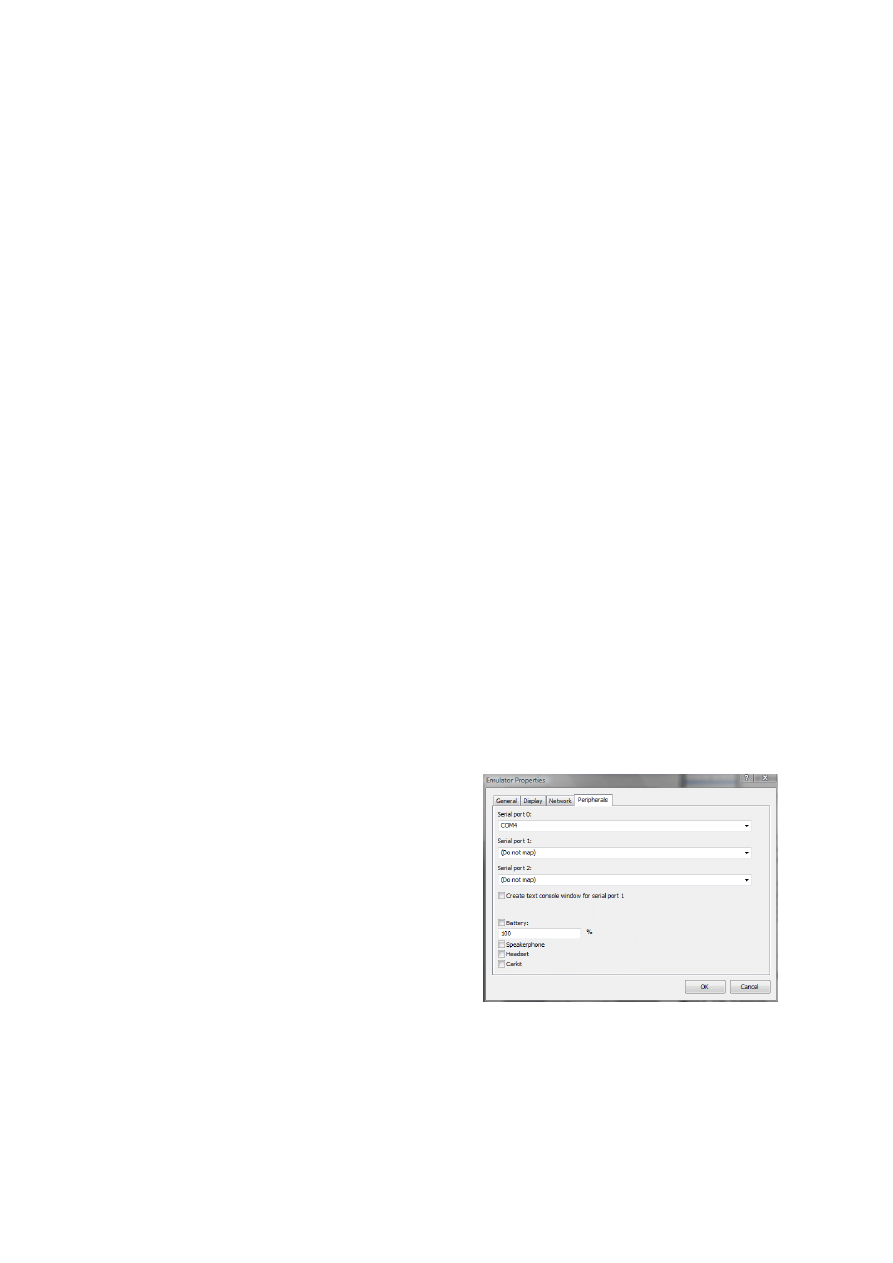
case Serial port 0 needs to be set to COM4, as in Figure 1:
Fig. 1 Windows Mobile 6 SDK Configuration for Phone Emulator.
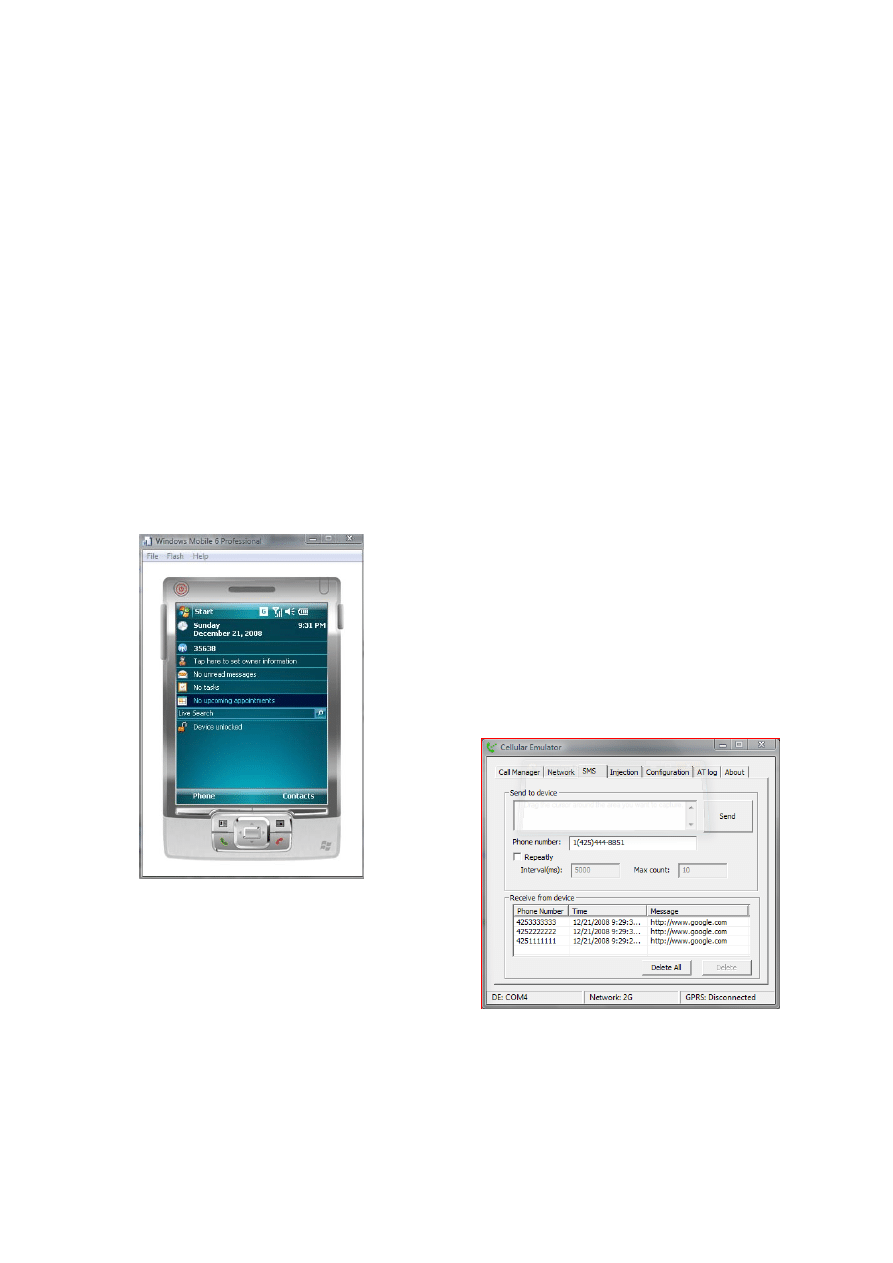
In Visual Studio, we debug and deploy the program
into the Windows Mobile 6 Professional Emulator. The
IJCSNS International Journal of Computer Science and Network Security, VOL.9 No.1, January 2009
250
end result is a cell phone within a window (Figure 2),
which accurately mimics the real hand held unit.
Even the simplest malware needs one aspect in order to
be malicious: the ability to propagate. Based on this
requirement we searched for open source code which
would allow us to view the contents of the address book
on the phone. Once we understand the methods for
accessing this data, we can replicate our malware via SMS
messages, email messages, or some other means.
Obtaining this source and adding it to our application is as
simple as cut and paste once you locate the necessary
code; we discovered what we needed at a site managed by
Craft[15]. The original use for this code was simply to
broadcast an SMS message to different contact groups. Of
course in order to do this it must have access to all of the
contacts listed in the phone, which was exactly the
software we wanted. We obtained this source, integrated it
into our application by having it automatically pull up all
contacts and send an SMS message. Using the phone
emulator we verified that it did obtain the correct list and
could send the message.
Fig. 2 Phone Emulator Running in Development Kit.
4. Our Malicious Application
We next created our malicious program and included the
open source contact list software. The actual application
creates an internal SMS message instead of the original
version, which sent a user generated message to groups of
contacts. In our version, when the software is launched on
the phone, it sends the generated message to everyone in
the contact list and then immediately exits. Because of this
behavior the program window never actually becomes
visible on the phone at all, possibly causing the phone user
to run the application again.
There are different approaches to propagating the
malware via the SMS message. Presumably one can create
a control message which causes the recipient cell phone to
automatically launch the browser application, for example.
We instead selected a method with is low-tech and simple,
but likely would be almost as effective: the content of the
message is designed to deceive the recipient in some way
so that they will install the program. Thus, a simple text
message: “Hi! Hey, I located a nice phone add-on at
www.malicious.com/...”. The receiver of the message
knows the sender, presumably, and as a result often times
will also simply trust the content. They click the link,
select “download”, and run the application. This then
propagates the malware to their contact list.
Our idea is that a malicious virus would then exploit
the security loop holes in Windows. There are a wide
range of possibilities. A simple attack could delete
necessary files to run the operating system, and thus crash
the phone. This would cause many phones to need service
at the local phone store.
Of course we did not actually launch the application in
the “real world”. Rather we tested it on the emulation
package, using various contact lists and web links,
including the web link necessary to cause the propagation
as outlined above. In all cases the message came back to
the emulator when the phone itself was in the contact list,
and did not come back when the phone itself was not in
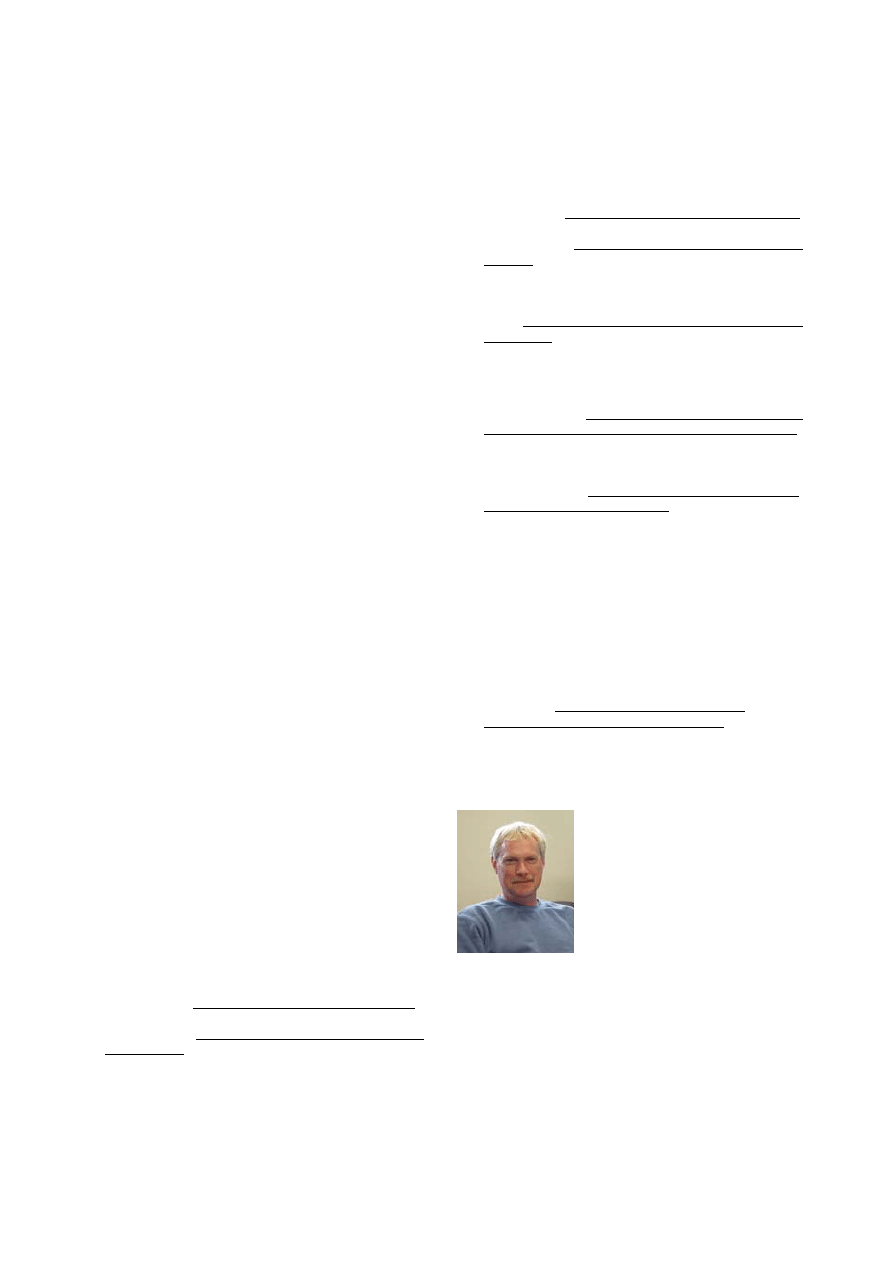
the contact list. Shown in figure 3 below are several
messages of this type as received by the phone emulator.
We have, of course, replaced the message with a simple
link to a well known URL instead of our message:
Fig. 3 Incoming Messages on Phone Emulator.
In this manner we determined that the software was
successfully propagating the message, and that following
IJCSNS International Journal of Computer Science and Network Security, VOL.9 No.1, January 2009
251
the link resulted in another download of the malicious
software.
5. Conclusions
We were quite surprised with the ease that nefarious
software can be created using off-the-shelf tools.
First and foremost, the necessary software tools for
creating phone applications are easily available and often
free for a trial period. As stated above, Visual Studio can
be downloaded as a trial version, and the Windows Mobile
6 SDK is currently free as well.
Secondly, the propagation problem is easily solved by
the available facility within the SMS messages to fool the
recipient into following the embedded link. Obviously if
one were to include a SMS control message instead of a
simple (manually clickable) link, this would be a better
route for reproduction of the malware; however our simple
approach works as well and supports our suspicions about
the simplicity and availability of the software creation.
Thirdly, locating the off-the-shelf software was very
simple via searching the internet with obvious terms.
Although the software was not targeted per-se with
hackers in mind, a very small amount of “reading between
the lines” is necessary in order to understand how the
available software can be utilized for other exploits.
Finally, an experienced software engineering team,
working into the wee hours of the night, is exactly the
opposite of what is necessary. A reasonable background in
computer programming, the ability to read the “help”
system within the software tools, and a knowledge of how
to fix the odd syntax error are sufficient skills for malware
creation on cell phones.
Obviously we performed these experiments on a
certain platform because of its availability and because we
knew that the email client would have plenty of associated
free software. However, our future work includes looking
into some of the newer technologies, in particular
applications which run on more popular phones such as
the iPhone. Also future work includes what we call a
“medium scale test” where a small group of actual phones,
instead of the emulator, are used to test the malware in a
larger, but still controlled, environment.
We predict that the “script kiddies” of the cell phone
world are right around the corner.
References
[1] Bruce Alston, “Cellular Telephones – How They Work”,
2600 Magazine, December 1986.
[2] Steven Furnell, “Handheld hazards: The rise of malware on
mobile devices”, Computer Fraud & Security, Volume 2005,
Issue 5, May 2005, Pages 4-8.
[3] “Cell phone popularity growing in Europe”
http://www.usatoday.com/tech/products/2008-09-25-
518457659_x.htm
[4] Neal Leavitt, “Malicious Code Moves to Mobile Devices”,
Computer, vol. 33, no. 12, pp. 16-19, Dec., 2000.
[5] Neal Leavitt, “Mobile Phones: The Next Frontier for
Hackers?” Computer, April 2005,
http://ieeexplore.ieee.org/stamp/stamp.jsp?arnumber=14326
39&isnumber=30759
[6] Jerry Cheng1, Starsky H.Y. Wong1, Hao Yang and Songwu
Lu, “SmartSiren: Virus Detection and Alert for
Smartphones”
http://www.usenix.org/events/mobisys07/full_papers/p258.p
df
[7] 29A lab: http://vx.netlux.org/29a/ however this web site is
currently “retiring”.
[8] Douglas Dedo, “Windows Mobile-Based Devices and
Security: Protecting Sensitive Business Information”
http://download.microsoft.com/download/4/7/c/47c9d8ec-
94d4-472b-887d-
4a9ccf194160/6.%20WM_Security_Final_print.pdf
[9] Dylan F. Tweney, “Everything you need to know about text
messaging with your mobile phone”,
http://www.sms411.net/
[10] http://www.microsoft.com/windowsmobile/en-
us/default.mspx
[11] Mary-Jo Foley, “Microsoft starts rolling out IE 6 for
Windows Mobile”, ZDNet, November 12th, 2008
http://blogs.zdnet.com/microsoft/?p=1711
[12] http://msdn.microsoft.com/en-us/academic/default.aspx
[13] http://www.microsoft.com/downloads/details.aspx?familyid
=06111A3A-A651-4745-88EF-
3D48091A390B&displaylang=en
[14] Mogul™ by HTC (Sprint) at
http://www.htc.com/us/faq_detail.aspx?p_id=75&act=um
[15] Chris Craft, “30 Days of .NET [Windows Mobile
Applications] - Day 14: Mobile SMS Contact” at
http://www.cjcraft.com/blog/2008/06/15/30DaysOfNETWin
dowsMobileApplicationsDay14MobileSMSContact.aspx
William R. Mahoney received his B.A.
and B.S. degrees from Southern Illinois
University, and his M.A. and Ph.D.
degrees from the University of Nebraska.
He is an Assistant Professor and
Graduate Faculty at the University of
Nebraska at Omaha Peter Kiewit
Institute. His primary research interests
include language compilers, hardware
and instruction set design, and code
generation and optimization. Prior to the Kiewit Institute Dr.
Mahoney worked for 20+ years in the computer design industry,
specifically in the areas of embedded computing and real-time
operating systems. During this time he was also on the part time
faculty of the University of Nebraska at Omaha. His outside
interests include bicycling, photography, and more bicycling.

IJCSNS International Journal of Computer Science and Network Security, VOL.9 No.1, January 2009
252
Craig A. Pokorny is currently a
student at the University of Nebraska at
Omaha. He will be graduating with a
Bachelor’s Degree in Computer Science.
Craig has financed and enhanced his
education via his employer; he is a
Computer Diagnostic Specialist for a
local technology reselling firm. He plans
to pursue a career in computers and
business management. He is an active
wrestling coach, and his other outside interests include
photography, and European car modification.
Wyszukiwarka
Podobne podstrony:
Do It Yourself How To Make Hash Oil
Do it Yourself Workbench id 137 Nieznany
Do it Yourself Workbench
The Unoffiicial Teach Yourself Guide To LockPicking
General do it yourself safety comments
Do It Yourself Make And Toke Your Own Bongs!
Do It Yourself THC Resin Extraction
Do it Yourself Pick Case Making
Tips Funky Wine Racks or Do It Yourself Wine Racks The Choice is Yours
The Four Agreements A Practical Guide to Personal Freedom A Toltec Wisdom Book by Don Miguel Ruiz T
lesson plan how to do it
Alex Schiffer Experimenters Guide to the Joe Cell
Free How to do TIG Welding Guide
Herbs for Sports Performance, Energy and Recovery Guide to Optimal Sports Nutrition
Meezan Banks Guide to Islamic Banking
NLP for Beginners An Idiot Proof Guide to Neuro Linguistic Programming
więcej podobnych podstron