
bb
c
APPLESCRIPT SCRIPTING REFERENCE
ADOBE PHOTOSHOP CS5

© 2010 Adobe Systems Incorporated. All rights reserved.
Adobe® Creative Suite® 5 Photoshop
®
AppleScript Scripting Reference for Macintosh
®
.
NOTICE: All information contained herein is the property of Adobe Systems Incorporated. No part of this publication (whether in hardcopy or
electronic form) may be reproduced or transmitted, in any form or by any means, electronic, mechanical, photocopying, recording, or
otherwise, without the prior written consent of Adobe Systems Incorporated. The software described in this document is furnished under
license and may only be used or copied in accordance with the terms of such license.
This publication and the information herein is furnished AS IS, is subject to change without notice, and should not be construed as a
commitment by Adobe Systems Incorporated. Adobe Systems Incorporated assumes no responsibility or liability for any errors or
inaccuracies, makes no warranty of any kind (express, implied, or statutory) with respect to this publication, and expressly disclaims any and
all warranties of merchantability, fitness for particular purposes, and noninfringement of third party rights.
Any references to company names in sample templates are for demonstration purposes only and are not intended to refer to any actual
organization.
Adobe
®
, the Adobe logo, Acrobat
®
, Illustrator
®
, and Photoshop
®
are either registered trademarks or trademarks of Adobe Systems
Incorporated in the United States and/or other countries.
Apple
®
, Mac OS
®
, and Macintosh
®
are trademarks of Apple Computer, Inc., registered in the United States and other countries. Microsoft
®
, and
Windows
®
are either registered trademarks or trademarks of Microsoft Corporation in the United States and other countries. JavaScript
TM
and
all Java-related marks are trademarks or registered trademarks of Sun Microsystems, Inc. in the United States and other countries. UNIX
®
is a
registered trademark of The Open Group.
All other trademarks are the property of their respective owners.
If this guide is distributed with software that includes an end user agreement, this guide, as well as the software described in it, is furnished
under license and may be used or copied only in accordance with the terms of such license. Except as permitted by any such license, no part
of this guide may be reproduced, stored in a retrieval system, or transmitted, in any form or by any means, electronic, mechanical, recording,
or otherwise, without the prior written permission of Adobe Systems Incorporated. Please note that the content in this guide is protected
under copyright law even if it is not distributed with software that includes an end user license agreement.
The content of this guide is furnished for informational use only, is subject to change without notice, and should not be construed as a
commitment by Adobe Systems Incorporated. Adobe Systems Incorporated assumes no responsibility or liability for any errors or
inaccuracies that may appear in the informational content contained in this guide.
Adobe Systems Incorporated, 345 Park Avenue, San Jose, California 95110, USA.

3
add noise .........................................................................................................................................................................................10
adjustment options .....................................................................................................................................................................11
application ......................................................................................................................................................................................12
art layer, art layers ........................................................................................................................................................................15
automatic contrast.......................................................................................................................................................................18
automatic levels............................................................................................................................................................................19
average.............................................................................................................................................................................................20
batch options.................................................................................................................................................................................21
Bitmap mode options .................................................................................................................................................................23
blur.....................................................................................................................................................................................................24
blur more.........................................................................................................................................................................................25
BMP save options .........................................................................................................................................................................26
brightness and contrast .............................................................................................................................................................28
Camera RAW open options.......................................................................................................................................................29
change mode options ................................................................................................................................................................31
channel, channels.........................................................................................................................................................................32
clouds ...............................................................................................................................................................................................34
CMYK color......................................................................................................................................................................................35
color balance..................................................................................................................................................................................36
color sampler, color samplers ..................................................................................................................................................37
color value.......................................................................................................................................................................................38
contact sheet options .................................................................................................................................................................39
count item, count items.............................................................................................................................................................41
curves................................................................................................................................................................................................42
custom filter ...................................................................................................................................................................................43
deinterlace ......................................................................................................................................................................................44
desaturate .......................................................................................................................................................................................45
despeckle ........................................................................................................................................................................................46
DICOM open options ..................................................................................................................................................................47
difference clouds ..........................................................................................................................................................................48
diffuse glow....................................................................................................................................................................................49
displace filter..................................................................................................................................................................................50
document, documents...............................................................................................................................................................51
dust and scratches .......................................................................................................................................................................55
EPS open options .........................................................................................................................................................................56
EPS save options...........................................................................................................................................................................57
equalize............................................................................................................................................................................................59
export options ...............................................................................................................................................................................60
filter options ...................................................................................................................................................................................61
font, fonts ........................................................................................................................................................................................62
gallery banner options ...............................................................................................................................................................63

Adobe Photoshop CS5
AppleScript Scripting Reference
4
gallery color options ...................................................................................................................................................................64
gallery images options ...............................................................................................................................................................65
gallery options...............................................................................................................................................................................67
gallery security options..............................................................................................................................................................68
gallery thumbnail options.........................................................................................................................................................69
gaussian blur..................................................................................................................................................................................70
GIF save options............................................................................................................................................................................71
glass filter ........................................................................................................................................................................................73
gray color.........................................................................................................................................................................................74
high pass..........................................................................................................................................................................................75
history state, history states .......................................................................................................................................................76
HSB color .........................................................................................................................................................................................77
Illustrator paths export options ..............................................................................................................................................78
indexed mode options ...............................................................................................................................................................79
info-object.......................................................................................................................................................................................81
inversion ..........................................................................................................................................................................................83
JPEG save options ........................................................................................................................................................................84
Lab color ..........................................................................................................................................................................................85
layer, layers .....................................................................................................................................................................................86
layer comp, layer comps ............................................................................................................................................................88
layer set, layer sets .......................................................................................................................................................................89
lens blur ...........................................................................................................................................................................................92
lens flare...........................................................................................................................................................................................94
levels adjustment .........................................................................................................................................................................95
maximum filter..............................................................................................................................................................................96
measurement scale......................................................................................................................................................................97
median noise..................................................................................................................................................................................98
minimum filter...............................................................................................................................................................................99
mix channels ............................................................................................................................................................................... 100
motion blur.................................................................................................................................................................................. 101
no color ......................................................................................................................................................................................... 102
notifier, notifiers......................................................................................................................................................................... 103
NTSC colors.................................................................................................................................................................................. 104
ocean ripple................................................................................................................................................................................. 105
offset filter .................................................................................................................................................................................... 106
open options............................................................................................................................................................................... 107
path item, path items............................................................................................................................................................... 108
path point, path points ........................................................................................................................................................... 110
path point info............................................................................................................................................................................ 111
PDF open options...................................................................................................................................................................... 112
PDF save options ....................................................................................................................................................................... 114
Photo CD open options........................................................................................................................................................... 117
photo filter ................................................................................................................................................................................... 118
Photoshop DCS 1.0 save options......................................................................................................................................... 119
Photoshop DCS 2.0 save options......................................................................................................................................... 121
Photoshop save options ......................................................................................................................................................... 123
PICT file save options ............................................................................................................................................................... 124
PICT resource save options.................................................................................................................................................... 125
picture package options ......................................................................................................................................................... 126
pinch .............................................................................................................................................................................................. 128
Pixar save options ..................................................................................................................................................................... 129

Adobe Photoshop CS5
AppleScript Scripting Reference
5
PNG save options ...................................................................................................................................................................... 130
polar coordinates ...................................................................................................................................................................... 131
posterize ....................................................................................................................................................................................... 132
presentation options................................................................................................................................................................ 133
radial blur ..................................................................................................................................................................................... 135
raw format open options........................................................................................................................................................ 136
raw save options........................................................................................................................................................................ 137
RGB color ...................................................................................................................................................................................... 138
RGB hex color.............................................................................................................................................................................. 139
ripple.............................................................................................................................................................................................. 140
save for web export options.................................................................................................................................................. 141
save options ................................................................................................................................................................................ 143
selection-object ......................................................................................................................................................................... 144
selective color ............................................................................................................................................................................. 145
settings-object ........................................................................................................................................................................... 146
SGI RGB save options ............................................................................................................................................................... 150
sharpen ......................................................................................................................................................................................... 151
sharpen edges ............................................................................................................................................................................ 152
sharpen more.............................................................................................................................................................................. 153
shear............................................................................................................................................................................................... 154
smart blur ..................................................................................................................................................................................... 155
spherize......................................................................................................................................................................................... 156
sub path info ............................................................................................................................................................................... 157
sub path item, sub path items.............................................................................................................................................. 158
Targa save options.................................................................................................................................................................... 159
text-object.................................................................................................................................................................................... 160
texture fill ..................................................................................................................................................................................... 168
threshold adjustment .............................................................................................................................................................. 169
TIFF save options ....................................................................................................................................................................... 170
twirl................................................................................................................................................................................................. 172
unsharp mask.............................................................................................................................................................................. 173
wave filter..................................................................................................................................................................................... 174
XMP metadata ............................................................................................................................................................................ 175
zigzag............................................................................................................................................................................................. 176
Overview....................................................................................................................................................................................... 177
activate.......................................................................................................................................................................................... 178
adjust ............................................................................................................................................................................................. 179
apply .............................................................................................................................................................................................. 180
apply layer style ......................................................................................................................................................................... 181
auto count.................................................................................................................................................................................... 182
batch .............................................................................................................................................................................................. 183
change mode.............................................................................................................................................................................. 184
close ............................................................................................................................................................................................... 185
clear ................................................................................................................................................................................................ 186
contract......................................................................................................................................................................................... 187
convert .......................................................................................................................................................................................... 188
convert color ............................................................................................................................................................................... 188
convert to shape........................................................................................................................................................................ 188
copy................................................................................................................................................................................................ 189

Adobe Photoshop CS5
AppleScript Scripting Reference
6
copy merged............................................................................................................................................................................... 189
count.............................................................................................................................................................................................. 190
create contact sheet................................................................................................................................................................. 191
create PDF presentation ......................................................................................................................................................... 191
create photo gallery ................................................................................................................................................................. 191
create photo merge.................................................................................................................................................................. 191
create picture package............................................................................................................................................................ 192
create selection .......................................................................................................................................................................... 193
create work path........................................................................................................................................................................ 193
crop................................................................................................................................................................................................. 194
cut ................................................................................................................................................................................................... 195
delete ............................................................................................................................................................................................. 196
delete measurements.............................................................................................................................................................. 197
deselect......................................................................................................................................................................................... 198
deselect......................................................................................................................................................................................... 198
do action....................................................................................................................................................................................... 199
do javascript ................................................................................................................................................................................ 200
doc duplicate .............................................................................................................................................................................. 201
duplicate....................................................................................................................................................................................... 201
duplicate....................................................................................................................................................................................... 202
equal colors ................................................................................................................................................................................. 203
exists .............................................................................................................................................................................................. 204
expand........................................................................................................................................................................................... 205
export ............................................................................................................................................................................................ 206
export measurements ............................................................................................................................................................. 207
feather ........................................................................................................................................................................................... 208
feature enabled.......................................................................................................................................................................... 209
fill..................................................................................................................................................................................................... 210
fill path .......................................................................................................................................................................................... 210
filter ................................................................................................................................................................................................ 212
flatten ............................................................................................................................................................................................ 213
flip canvas .................................................................................................................................................................................... 214
grow ............................................................................................................................................................................................... 215
import annotations................................................................................................................................................................... 216
index .............................................................................................................................................................................................. 217
invert.............................................................................................................................................................................................. 218
link .................................................................................................................................................................................................. 219
load................................................................................................................................................................................................. 220
load................................................................................................................................................................................................. 220
make............................................................................................................................................................................................... 221
make clipping path................................................................................................................................................................... 222
make work path ......................................................................................................................................................................... 222
merge............................................................................................................................................................................................. 223
merge visible layers .................................................................................................................................................................. 223
move .............................................................................................................................................................................................. 224
open ............................................................................................................................................................................................... 225
paste............................................................................................................................................................................................... 226
Photoshop open dialog .......................................................................................................................................................... 227
print................................................................................................................................................................................................ 228
purge.............................................................................................................................................................................................. 229
quit.................................................................................................................................................................................................. 230

Adobe Photoshop CS5
AppleScript Scripting Reference
7
rasterize......................................................................................................................................................................................... 231
recapture ...................................................................................................................................................................................... 232
record measurements.............................................................................................................................................................. 233
refresh............................................................................................................................................................................................ 234
reset from comp ........................................................................................................................................................................ 235
resize canvas ............................................................................................................................................................................... 236
resize image................................................................................................................................................................................. 236
reveal all........................................................................................................................................................................................ 237
rotate ............................................................................................................................................................................................. 238
rotate boundary......................................................................................................................................................................... 238
rotate canvas............................................................................................................................................................................... 239
save................................................................................................................................................................................................. 240
scale................................................................................................................................................................................................ 243
scale boundary ........................................................................................................................................................................... 243
select .............................................................................................................................................................................................. 244
select .............................................................................................................................................................................................. 244
select all ........................................................................................................................................................................................ 245
select border ............................................................................................................................................................................... 245
similar ............................................................................................................................................................................................ 246
smooth .......................................................................................................................................................................................... 247
split channels .............................................................................................................................................................................. 248
store................................................................................................................................................................................................ 249
stroke ............................................................................................................................................................................................. 250
stroke path................................................................................................................................................................................... 250
translate ........................................................................................................................................................................................ 252
translate boundary ................................................................................................................................................................... 253
trap ................................................................................................................................................................................................. 254
trim ................................................................................................................................................................................................. 255
unlink ............................................................................................................................................................................................. 256
web safe color............................................................................................................................................................................. 257

8
1
Introduction
This reference describes the objects and commands in the Adobe® Photoshop® CS5 AppleScript
dictionary. A companion document, Adobe Photoshop CS5, describes basic scripting concepts and the
Photoshop object model. This document provides reference details of the Photoshop object model, and
additional information on AppleScript-specific features.
This book contains the following sections:
●
This introduction, which describes scripting support in Adobe Photoshop CS5, and lists changes to the
AppleScript interface since the previous release.
●
, which provides a complete reference for all AppleScript Photoshop DOM objects.
●
, which provides a complete refernce for all AppleScript Photoshop DOM
commands.
Changes Since Earlier Versions—CS5 Changes
The following changes have been made to the AppleScript object model and language support in Adobe
Photoshop CS5.
We have made major changes around printing a document. After making such sweeping changes, your
printing scripts may not work in CS5. The new printing interface makes maintaining backwards
compatibility an issue and scripts will need to be updated for the new printing interface. See the
command.
Two new blend modes:
subtract
and
divide
Two new color blend modes:
subtract
and
divide
9
2
AppleScript Objects
The objects of the AppleScript dictionary for Adobe Photoshop CS5 are presented alphabetically and in
tabular format in this chapter. Where appropriate, the object class has two tables:
●
Element — Lists the classes that inherit from the current class, as well as the methods by which the
classes can be referred.
●
Property — The properties you can use with the object, as well as each property’s value type, input
status, and description.
The commands that can be used with an object are listed below the object’s Properties table.
Sample code for several object classes is given to help illustrate the syntax as well as usage of the object
class.
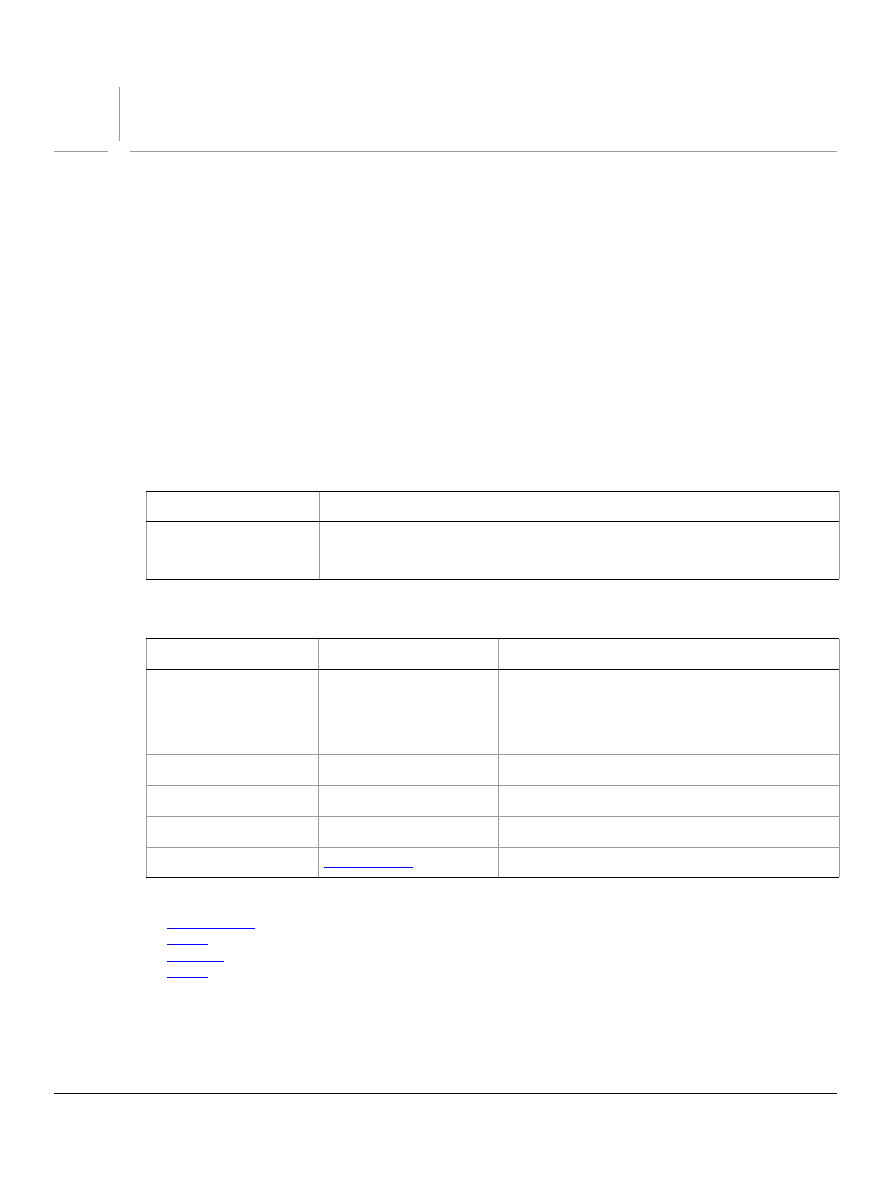
The following sample tables and command list illustrate the format for this chapter.
Elements
Properties
Valid Commands
Element
Refer to by
channel
name, numeric index, as a range of elements, before
after another element, satisfying a test
Property
Value Type
What it is
bits per channel
Valid values:
eight
one
sixteen
The number of bits per channel.
component channels
list of channels
Read-only. A list of the component color channels.
current channels
list of channel
The selected channels.
current layer
layer
The selected layer.
info
Read-only. The document metadata.

Adobe Photoshop CS5
AppleScript Scripting Reference
AppleScript Objects 10
add noise
Options that may be supplied when applying an Add Noise filter.
The
add noise
class supplies properties for the
class. The
add noise
class is used only
to define a record whose properties specify options when applying an Add Noise filter.
add noise
options can be supplied only in conjunction with the
filter
command. It is not possible to get or create
an
add noise
object.
See the
command for additional details.
Properties
The following code sample demonstrates how to apply the add noise filter using the filter command of the
add noise
class (inherited from the
filter options
super class).
tell application "Adobe Photoshop CS5"
filter current layer of the current document using add noise ¬
with options {class:add noise, amount:2.5, distribution:uniform, ¬
monochromatic:false}
end tell
Property
Value Type
What it is
amount
real
(
amount
: 0.1% - 400%)
distribution
Valid values:
Gaussian
uniform
monochromatic
boolean

Adobe Photoshop CS5
AppleScript Scripting Reference
AppleScript Objects 11
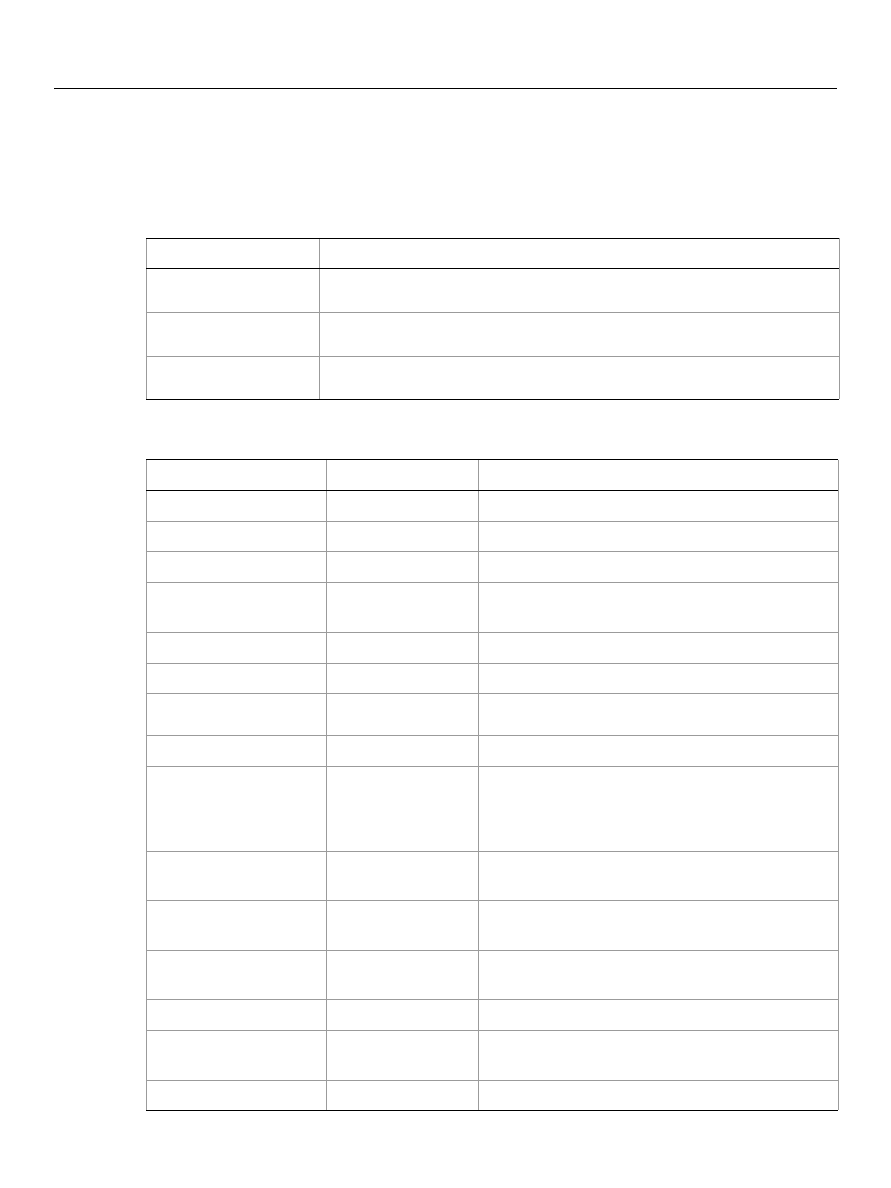
adjustment options
Options used with the
adjust
method. The following classes inherit properties from the
adjustment
options
,
,
,
,
,
Valid Commands
Adobe Photoshop CS5
AppleScript Scripting Reference
AppleScript Objects 12
application
The Adobe Photoshop CS5 application object, which contains all other Adobe Photoshop CS5 objects.
Elements
Properties
Elements
Refer to by
document
name, numeric index, as a range of elements, before/
after another element, satisfying a test
font
name, numeric index, as a range of elements, before/
after another element, satisfying a test
notifier
name, numeric index, as a range of elements, before/
after another element, satisfying a test
Property
Value type
What it is
best type
type class
Read-only. The best type for the object's value.
class
type class
Read-only. The object's class.
default type
type class
Read-only. The default type for the object's value.
properties
record
All of this object's properties returned in a single
record.
background color
color value
The color for the document’s background color.
build
string
Read-only. Information about the application build.
color settings
string or color
object
The name of selected color setting’s set.
current document
document
The frontmost document.
display dialogs
Valid Values:
always
error dialogs
never
Controls whether and dialogs are displayed while the
script is running.
foreground color
color value
The default foreground color (used to fill and stroke
selections).
free memory
real
Read-only. The amount of unused memory available
to Adobe Adobe Photoshop CS5.
frontmost
boolean
Read-only. Indicates whether Adobe Photoshop CS5
is the frontmost application.
locale
string
Read-only. The language location of the application.
macintosh file types
list of Unicode
text
Read-only. A list of file image types Adobe
Photoshop CS5 can open.
measurement log
measurement log
The log of measurements taken.

Adobe Photoshop CS5
AppleScript Scripting Reference
AppleScript Objects 13
The the first line of the following code sample directs Adobe Photoshop CS5 to carry out the script’s
commands. The second line uses the
activate
command to make Adobe Photoshop CS5 the frontmost
application.
tell application "Adobe Photoshop CS5"
activate
set fgColor to foreground color
set bgColor to background color
set foreground color to {class:RGB color, red:255, green:128, blue:128}
set background color to {class:RGB color, red:0, green:50, blue:255}
delay 1
set foreground color to fgColor
set background color to bgColor
tell me to activate
my dd("name:" & name)
my dd("locale:" & locale)
my dd("scripting version:" & scripting version)
my dd("scripting build date:" & scripting build date)
my dd("macintosh file types:" & macintosh file types)
my dd("windows file types:" & windows file types)
end tell
on dd(msg)
display dialog msg giving up after 1
end dd
Valid Commands
name
Unicode text
Read-only. The application's name.
notifiers enabled
boolean
TIndicates whether all notifiers are enabled or
disabled..
preferences folder
alias
Read-only. The full path to the Preferences folder.
recent files
list of file
specification
Read-only. Files in the Recent Files list.
scripting build date
Unicode text
Read-only. The build date of the scripting interface .
scripting version
Unicode text
Read-only. The scripting interface version.
settings
settings-object
Read-only. The application preference settings
(equivalent to selecting Edit > Preferences in the
Adobe Photoshop CS5 application in Windows
®
or
Photoshop > Preferences in Mac OS
®
).
system information
string
Read-only. Runtime details of the application and
system.
windows file types
list of Unicode
text
Read-only. A list of file image types Adobe
Photoshop CS5 can open.
version
Unicode text
Read-only. The Adobe Photoshop version.
Property
Value type
What it is (Continued)


Adobe Photoshop CS5
AppleScript Scripting Reference
AppleScript Objects 15
art layer, art layers
Any layer that can contain data. The
art layer
class inherits properties from the
class.
Properties
Property
Value Type
What it is
best type
type class
Read-only. (Inherited from the
layer
class)
The best type for the object's value.
class
class
Read-only. (Inherited from the
layer
class)
The object’s class.
default type
type class
Read-only. (Inherited from the
layer
class)
The default type for the object’s value.
index
integer
Read-only. (Inherited from the
layer
class)
The index of this instance of the object.
properties
record
(Inherited from the
layer
class) All of this
object’s properties returned in a single record.
all locked
boolean
(Inherited from the
layer
class) Indicates
whether all of the layer’s contents are locked
or editable.
blend mode
Valid Values:
color blend
color burn
color dodge
darken
darker color
difference
dissolve
divide
exclusion
hard light
hard mix
hue blend
lighten
lighter color
linear burn
linear dodge
linear light
luminosity
multiply
normal
overlay
pass through
pin light
saturation blend
screen
soft light
subtract
vivid light
(Inherited from the
layer
class) The mode
used when compositing an object.

Adobe Photoshop CS5
AppleScript Scripting Reference
AppleScript Objects 16
bounds
list of real
Read-only. (Inherited from the
layer
class) A
list of coordinates that describes the bounding
rectangle of the layer.
container
reference
Read-only. (Inherited from the
layer
class)
The object’s container.
linked layers
list of layers
Read-only. (Inherited from the
layer
class)
The layers linked to this layer.
name
Unicode text
(Inherited from the
layer
class) The layer’s
name.
opacity
real
(Inherited from the
layer
class) The layer’s
master opacity (0.0 - 100.0).
visible
boolean
(Inherited from the
layer
class) Indicates
whether the layer is visible.
background
layer
boolean
Indicates whether the layer is a background
layer.
fill opacity
real
The layer’s interior opacity (0.0 - 100.0).
grouped
boolean
Indicates whether the layer is grouped with
the layer below.
kind
Valid Values:
blank and white layer
brightness contrast layer
channel mixer layer
color balance layer
curves layer
exposure layer
gradient fill layer
gradient map layer
hue saturation layer
inversion layer
levels layer
normal
pattern fill layer
photo filter layer
posterize layer
smart object layer
selective color layer
solid fill layer
text layer
threeD layer
threshold layer
vibrance layer
video layer
Sets the layer’s kind (such as 'text layer').
Note:
You can use the
kind
property to make
a background layer a normal layer;
however, to make a layer a background
layer, you must use
Note:
Valid only when the layer is empty and
when
background layer
is
false
. See
.
pixels locked
boolean
Indicates whether the pixels in the layer’s
image can be edited using the paintbrush
tool.
position locked
boolean
Indicates whether the pixels in the layer’s
image can be moved within the layer.
Property
Value Type
What it is (Continued)

Adobe Photoshop CS5
AppleScript Scripting Reference
AppleScript Objects 17
Valid Commands
adjust
apply layer style
clear
copy
copy merged
count
cut
delete
duplicate
exists
filter
index
link
make
merge
move
rasterize
rotate
scale
translate
unlink
The following code creates a text layer by creating an art layer and setting its
kind
property to
text
layer
.
tell application "Adobe Photoshop CS5"
activate
--create a variable named theDocRef
--assign the current (active) document to it
set theDocRef to the current document
--create a variable for the text layer, create the layer as an art layer object
--and use the kind property of the art layer object to make it a text layer
set theTextLayer to make new art layer in theDocRef with properties ¬
{kind:text layer}
end tell
text object
Read-only. The text item that is associated
with the art layer.
Note:
Valid only when
kind: text layer
.
transparent
pixels locked
boolean
Indicates whether editing is confined to the
opaque portions of the layer.
Property
Value Type
What it is (Continued)

Adobe Photoshop CS5
AppleScript Scripting Reference
AppleScript Objects 18
automatic contrast
The
automatic contrast
class supplies options properties for the
class to
automatically adjust the overall contrast and mixture of colors in an RGB image.
The
automatic contrast
class, which is analogous to the Auto Contrast command in the Adobe
Photoshop CS5 application, is used only to define a record containing properties that specify options
when using the
adjust
command to apply an Auto Contrast adjustment to an image. The
automatic
contrast
class can be used only in conjunction with the
adjust
command. It is not possible to get or
create an
automatic contrast
object.
See the
command for additional details.
The following code sample demonstrates how to apply an Automatic Contrast adjustment using the
adjust
command of the
automatic contrast
class (inherited from the
adjustment options
super
class).
tell application "Adobe Photoshop CS5"
adjust current layer of the current document using automatic contrast
end tell

Adobe Photoshop CS5
AppleScript Scripting Reference
AppleScript Objects 19
automatic levels
The
automatic levels
class supplies options properties for the
class to
automatically adjust the black point and white point in an image.
The
automatic levels
class, which is analogous to the Auto Levels command in the Adobe Photoshop
CS5 application, is used only to define a record containing properties that specify options when using the
adjust
command to apply an Auto Levels adjustment to an image. The
automatic levels
class can be
used only in conjunction with the
adjust
command. It is not possible to get or create an
automatic
levels
object.
See the
command for additional details.
The following code sample demonstrates how to apply an Automatic Levels adjustment using the
adjust
command of the
automatic levels
class (inherited from the
adjustment options
super class).
tell application "Adobe Photoshop CS5"
adjust current layer of the current document using automatic levels
end tell

Adobe Photoshop CS5
AppleScript Scripting Reference
AppleScript Objects 20
average
Options that may be supplied when applying an Average filter.
The
average
class supplies properties for the
class. The
average
class is used only to
define a record when using the
filter
command to apply an Average filter.
average
options can be
supplied only in conjunction with the
filter
command. It is not possible to get or create an
average
object.
See the
command for additional details.
The following code sample demonstrates how to apply the average filter using the filter command of the
average
class (inherited from the
filter options
super class).
tell application "Adobe Photoshop CS5"
filter current layer of the current document using average
end tell

Adobe Photoshop CS5
AppleScript Scripting Reference
AppleScript Objects 21
batch options
Options to specify when running a Batch command. See
.
Properties
Property
Value type
What it is
destination
Valid values:
folder
no destination
save and close
The type of destination for the processed files
(default:
no destination
).
destination folder
alias
The folder location for the processed files.
Note:
Valid only when
destination: folder
.
.
error file
alias
The file in which to log errors encountered.
Note:
To display errors on the screen (and stop
batch processing when errors occur) leave
blank.
file naming
Valid values:
ddmm
ddmmyy
document name lower
document name mixed
document name upper
extension lower
extension upper
mmdd
mmddyy
serial letter lower
serial letter upper
serial number one
serial number two
serial number three
serial number four
yyddmm
yymmdd
yyyymmdd
A list of file naming options (maximum: 6).
Note:
Valid only when
destination:folder
.
.
macintosh compatible
boolean
Indicates whether to make the final file nameS
Macintosh compatible (default:
true
).
Note:
Valid only when
destination:folder
.
.
override open
boolean
Indicates whether to override action open
commands (default:
false
).

Adobe Photoshop CS5
AppleScript Scripting Reference
AppleScript Objects 22
override save
boolean
Indicates whether to override save as action steps
with the specified destination (default:
false
).
Note:
Valid only when
destination:folder
or
destination:save and close
.
.
starting serial
number (long)
The starting serial number to use in naming files
(default:
1
).
Note:
Valid only when
destination:folder
.
.
suppress open
boolean
Indicates whether to suppress the file open options
dialogs (default:
false
).
suppress profile
boolean
Indicates whether to suppress the color profile
warnings (default:
false
).
unix compatible
boolean
Indicates whether to make the final file name Unix
compatible (default:
true
).
Note:
Valid only when
destination:folder
.
.
windows compatible
boolean
Indicates whether to make the final file names
Windows compatible (default:
true
).
Note:
Valid only when
destination:folder
.
.
Property
Value type
What it is (Continued)

Adobe Photoshop CS5
AppleScript Scripting Reference
AppleScript Objects 23
Bitmap mode options
Options that can be specified when changing the document mode to Bitmap using the
change mode
command. The
bitmap mode
class inherits properties from the
class.
This class is used to define a record containing properties that specify options when changing a
document’s mode.
Bitmap mode options
can only be supplied in conjunction with the
change mode
command. It is not possible to get or create a
Bitmap mode options
object. See the
command for more details.
Properties
Properties
Value Type
What it is
angle
real
The angle (in degrees) at which to orient
individual dots (-180 - 180). See
.
Note:
Valid only when
conversion
method: halftone screen
.
conversion method
Valid Values:
custom pattern
diffusion dither
halftone screen conversion
middle threshold
pattern dither
The conversion method to use (default:
diffusion dither
).
frequency
real
The number of printer dots (per inch) to
use (1.0 - 999.99).
Note:
Valid only when
conversion
method: halftone screen
.
pattern name
Unicode text
The name of the pattern to use.
Note:
Valid only when
conversion
method: custom pattern
.
For information about pre-installed valid
patterns, see Adobe Photoshop CS5 Help
on the bitmap conversion command, or
view the options availabe in the Custom
Color drop down box after choosing the
bitmap conversion command.
resolution
real
The output resolution (in pixels per inch)
(default:
72.0
).
screen shape
Valid values:
halftone cross
halftone diamond
halftone ellipse
halftone line
halftone round
halftone square
The dot shape to use.
Note:
Valid only when
conversion
method: halftone screen
.

Adobe Photoshop CS5
AppleScript Scripting Reference
AppleScript Objects 24
blur
Options that may be supplied when applying a Blur filter.
The
blur
class supplies properties for the
class. The
blur
class is used only to define a
record when using the
filter
command to apply a Blur filter.
blur
options can be supplied only in
conjunction with the
filter
command. It is not possible to get or create a
blur
object.
See the
command for additional details.
The following code sample demonstrates how to apply the blur filter using the filter command of the
blur
class (inherited from the
filter options
super class).
tell application "Adobe Photoshop CS5"
filter current layer of the current document using blur
end tell

Adobe Photoshop CS5
AppleScript Scripting Reference
AppleScript Objects 25
blur more
The
blur more
class supplies properties for the
class when using the
filter
command
apply a Blur More filter. The
blur more
class is used only to define a record when using the
filter
command to apply a Blur More filter. The
blur more
option can be supplied only in conjunction with the
filter
command. It is not possible to get or create a
blur more
object.
See the
command for additional details.
The following code sample demonstrates how to apply the blur more filter using the filter command of the
blur more
class (inherited from the
filter options
super class).
tell application "Adobe Photoshop CS5"
filter current layer of the current document using blur more
end tell

Adobe Photoshop CS5
AppleScript Scripting Reference
AppleScript Objects 26
BMP save options
Options that can be specified when saving a document in BMP format. See the
command for
additional details.The
BMP save options
class inherits properties from the
class.
This class is used to define a record containing properties used to specify options when saving a document
as a BMP file.
BMP save options
can only be supplied in conjunction with the
save
command. It is not
possible to get or create a
BMP save options
object.
Properties
Property
Value Type
What it is
bits per sample
Valid values:
A1R5G5B5
A4R4G4B4
A8R8G8B8
eight
four
one
R5G6B5
R8G8B8
sixteen
thirty two
twenty four
X1R5G5B5
X4R4G4B4
X8R8G8B8
The number of bits per channel (default:
twenty
four
).
flipped row order
boolean
Indicates whether to write the image from top to
bottom (default:
false
).
Note:
Available only when
target operating
system: windows
. See
.
RLE compression
boolean
Indicates whether to use RLE compression.
Note:
Available only when
target operating
system: windows
. See
.
save alpha channels
boolean
Indicates whether to save the alpha channels.
target operating
system
OS2
Windows
The target OS (default:
Windows
).

Adobe Photoshop CS5
AppleScript Scripting Reference
AppleScript Objects 27
The following code creates the
myOptions
variable to hold the
BMP save options
command to save the document with the specified options.
tell application "Adobe Photoshop CS5"
make new document
set myFile to "Data:docsamples:testfiles:BmpTest.bmp"
set myOptions to {class:BMP save options, bits per sample:sixteen, ¬
flipped row order:false, RLE compression:true, save alpha channels:true,¬
target operating system:Windows}
save current document in file myFile as BMP with options ¬
myOptions appending no extension without copying
end tell

Adobe Photoshop CS5
AppleScript Scripting Reference
AppleScript Objects 28
brightness and contrast
The
brightness and contrast
class supplies options properties for the
class to
adjust the tonal range of an image.
The
brightness and contrast
class, which is analogous to the Brightness/Contrast command in the
Adobe Photoshop CS5 application, is used only to define a record containing properties that specify
options when applying a Brightness/Contrast adjustment to an image. The
brightness and contrast
class can be used only in conjunction with the
adjust
command. It is not possible to get or create a
brightness and contrast
object.
See the
command for additional details.
Properties
The following code sample demonstrates how to apply a Brightness/Contrast adjustment using the
adjust
command of the
brightness and contrast
class (inherited from the
adjustment options
super class).
tell application "Adobe Photoshop CS5"
adjust current layer of the current document using brightness and contrast ¬
with options {class:brightness and contrast, brightness level:10, ¬
contrast level:10}
end tell
Property
Value Type
What it is
brightness level
integer
(-100 - 100)
contrast level
integer
(-100 - 100)

Adobe Photoshop CS5
AppleScript Scripting Reference
AppleScript Objects 29
Camera RAW open options
Options that can be specified when opening a document in Camera RAW format. The
Camera RAW open
options
class inherits properties from the
class.
This class is used to define a record containing properties that specify options when opening a document
in raw format.
Camera
RAW open options
can be supplied only in conjunction with the
open
command. It
is not possible to get or create a
Camera
RAW open options
object.
Properties
Property
Value type
What it is
bits per channel
Valid values:
eight
one
sixteen
thirty two
The number of bits per channel.
blue hue
integer
The blue hue of the shot (-100 - 100).
blue saturation
integer
The blue saturation of the shot (-100 - 100).
brightness
integer
The brightness of the shot (0 - 150).
chromatic aberration by
integer
The chromatic aberration B/Y of the shot (-100 -
100).
chromatic aberration rc
integer
The chromatic aberration R/C of the shot (-100 -
100).
color noise reduction
integer
The color noise reduction of the shot (0 - 100).
color space
Valid values:
Adobe RGB
color match RGB
ProPhoto Rgb
sRGB
The colorspace for the image.
contrast
integer
The contrast of the shot (-50 - 100).
exposure
real
The exposure of the shot (4.0 - 4.0).
green hue
integer
The green hue of the shot (-100 - 100).
green saturation
integer
The green saturation of the shot (-100 - 100).
luminance smoothing
integer
The luminance smoothing of the shot (0 - 100).
red hue
integer
The red hue of the shot (-100 - 100).
red saturation
integer
The red saturation of the shot (-100 - 100).
resolution
real
The resolution of the document in pixels per
inch (1 - 999).
saturation
integer
The saturation of the shot (-100 - 100).

Adobe Photoshop CS5
AppleScript Scripting Reference
AppleScript Objects 30
The following code opens a camera raw document.
tell application "Adobe Photoshop CS5"
set myFilePath to alias "Data:docsamples:testfiles:CanonG1.CRW"
open myFilePath as Camera RAW with options ¬
{class:Camera RAW open options, bits per channel:eight, ¬
color noise reduction:20, temperature:4200, white balance:cloudy}
end tell
settings
Valid values:
camera default
custom settings
selected image
The global settings for all Camera RAW options.
Default value:
camera default.
shadows
integer
The shadows of the shot (0 - 100).
shadow tint
integer
The shadow tint of the shot (-100 - 100).
sharpness
integer
The sharpness of the shot (0 - 100).
size
Valid values:
extra large
large
maximum
medium
minimum
small
The size of the new document.
extra large
=5120 x 3413
large
=4096 x 2731
maximum
=6144 x 4096
medium
=3072 x 2048
minimum
=1536 x 1024
small
=2048 x 1365
temperature
integer
The temperature of the shot (2000 - 50000).
tint
integer
The tint of the shot (-150 - 150).
vignetting amount
integer
The vignetting amount of the shot (-100 - 100).
vignetting midpoint
integer
The vignetting mid point of the shot (-100 -
100).
white balance
Valid values:
as shot
auto
cloudy
custom camera settings
daylight
flash
fluorescent
shade
tungston
The white balance options for the image.
Property
Value type
What it is (Continued)

Adobe Photoshop CS5
AppleScript Scripting Reference
AppleScript Objects 31
change mode options
Options that can be supplied when changing a document’s mode using the
change mode
command. See
The following classes inherit properties from the
change mode options
class:
Valid Commands

Adobe Photoshop CS5
AppleScript Scripting Reference
AppleScript Objects 32
channel, channels
A channel in a document. A channel can be either a component channel representing a color of the
document color model or an alpha channel. You can use alpha channels to store masked areas, selected
areas or spot colors.
Properties
Valid Commands
Property
Value Type
What it is
best type
type class
Read-only. The best type for the object's value.
class
type class
Read-only. The object’s class.
default type
type class
Read-only. The default type for the object's value.
index
integer
Read-only. The index of this instance of the object.
properties
record
All of this objects properties returned in a single
record.
channel color
color value
The channel’s color.
Note:
Not valid when
kind: component channel
.
See
.
container
reference
The object’s container.
histogram
list of integers
Read-only. A histogram of color values for the
channel.
Note:
Not valid when
kind: component channel
. For component
component channel histogram values, use the
histogram
property of the
document
object
instead. See
kind
Valid values:
component channel
masked area channel
selected area channel
spot color channel
The type of channel.
name
Unicode text
The channel’s name.
opacity
real
The opacity (as percent) to use for alpha channels or
the solidity to use for spot channels (0 - 100).
Note:
Valid only when
kind: masked area
or
kind: selected area
.
visible
boolean
Indicates whether the channel is visible.


Adobe Photoshop CS5
AppleScript Scripting Reference
AppleScript Objects 34
clouds
Options that may be supplied when applying a Clouds filter.
The
clouds
class supplies properties for the
class. The
clouds
class is used only to
define a record when using the
filter
command to apply a Clouds filter.
clouds
options can be supplied
only in conjunction with the
filter
command. It is not possible to get or create a
clouds
object.
See the
command for additional details.
The following code sample demonstrates how to apply the clouds filter using the filter command of the
clouds
class (inherited from the
filter options
super class).
tell application "Adobe Photoshop CS5"
filter current layer of the current document using clouds
end tell

Adobe Photoshop CS5
AppleScript Scripting Reference
AppleScript Objects 35
CMYK color
Options that can be specified for a CMYK color: numeric values for the component colors. The
CMYK color
class inherits properties from the
class.
This class a property of the
object and is used to define a record that specifies options when
creating a color value.
Note:
If the
mode
of a document is RGB and you specify the color value for a stroke, foreground, or
background color property using a
CMYK color
object, Adobe Photoshop CS5 translates the CMYK
color specification into an RGB color specification. The same thing happens if the document’s color
mode is CMYK and you specify colors using a
RGB color
object. Since this translation can cause
information loss you should specify colors using the color class that matches the document’s color
mode.
Properties
For an example of how to create and use color values, see
Property
Value Type
What it is
cyan
real
The cyan color value (as percent) (0.0 - 100.0).
magenta
real
The magenta color value (as percent) (0.0 100.0).
yellow
real
The yellow color value (as percent) (0.0 - 100.0).
black
real
The black color value (as percent) (0.0 - 100.0).

Adobe Photoshop CS5
AppleScript Scripting Reference
AppleScript Objects 36
color balance
The
color balance
class specifies options for the
class to change the overall
mixture of colors in an image for generalized color correction.
The
color balance
class, which is analogous to the Color Balance command in the Adobe Photoshop
CS5 application, is used only to define a record containing properties that specify options when applying a
Color Balance adjustment to an image. The
color balance
class can be used only in conjunction with the
adjust
command. It is not possible to get or create a
color balance
object.
See the
command for additional details.
Properties
The following code sample demonstrates how to apply a color balance adjustment using the
adjust
command of the
color balance
class (inherited from the
adjustment options
super class). This code
adjusts only the shadows in the image.
tell application "Adobe Photoshop CS5"
adjust current layer of the current document using color balance ¬
with options {class:color balance, shadows:{45, 4, 5}, ¬
preserve luminosity:false}
end tell
Property
Value Type
What it is
shadows
list of integers
The list of adjustments for shadows (three values
(-100 - 100 required). The specified values indicate
the color levels for component colors of the
document mode, either RGB or CMYK. For CMYK
mode, the values represent C, M, and Y.
midtones
list of integers
The list of adjustments for midtones (three values
(-100 - 100 required). The specified values indicate
the color levels for component colors of the
document mode, either RGB or CMYK. For CMYK
mode, the values represent C, M, and Y.
highlights
list of integers
The list of adjustments for highlights (three values
(-100 - 100 required). The specified values indicate
the color levels for component colors of the
document mode, either RGB or CMYK. For CMYK
mode, the values represent C, M, and Y.
preserve luminosity
boolean
Indicates whether to preserve the image luminosity.

Adobe Photoshop CS5
AppleScript Scripting Reference
AppleScript Objects 37
color sampler, color samplers
A color sampler for the document.
Note:
For additional information about color samplers, see Adobe Photoshop CS5 help on the Color
SamplerTool.
Properties
Valid commands:
count
delete
exists
index
make
open
Property
Value type
What it is
best type
type class
Read-only. The best type for the object's value.
class
type class
Read-only. The object’s class.
default type
type class
Read-only. The default type for the object’s value.
index
integer
Read-only. The index of this instance of the object.
properties
record
All of this object’s properties returned in a single record.
position
list of real
Read-only. The position of the color sampler in the
document. This property can be set using the
command.
color sampler
color
Read-only. The color of the color sampler.

Adobe Photoshop CS5
AppleScript Scripting Reference
AppleScript Objects 38
color value
A color value. The following classes inherit properties from the
color value
,
,
,
The following script creates an RGB color value to use as the fill color for the selection.
tell application "Adobe Photoshop CS5"
make new art layer at beginning of current document with properties ¬
{name:"MyBlendLayer", blend mode:normal}
select all current document
fill selection of current document with contents ¬
{class:RGB color, red:255, green:0, blue:0}
end tell
Valid Commands

Adobe Photoshop CS5
AppleScript Scripting Reference
AppleScript Objects 39
contact sheet options
Options that can be specified for a contact sheet. See
.
Properties
Property
Value Type
What it is
across first
boolean
Indicates whether to place the images horizontally
(left to right, then top to bottom) first (default:
true
).
auto spacing
boolean
Indicates whether to auto space the images (default:
true
).
best fit
boolean
Indicates whether to rotate images for the best fit
(default:
false
).
caption
boolean
Indicates whether to use the filename as a caption
for the image (default:
true
).
column count
integer
The number of columns to include
(1 - 100; default:
5
).
flatten final
boolean
Indicates whether to flatten all layers in the final
document (default:
true
).
font
Valid values:
Arial
Courier New
Helvetica
Times New Roman
The font used for the caption (default:
arial
).
font size
integer
The font size to use for the caption (default:
12
).
height
integer
The height (in pixels) of the resulting document (100
- 2900; default:
720
).
horizontal offset
integer
The horizontal spacing (in pixels) between images (0
- 29000; default:
1
).
mode
Valid values:
bitmap
CMYK
grayscale
Lab
RGB
The document color mode (default:
RGB
).
resolution
real
The resolution of the document in pixels per inch (35
- 1200; default:
72.0
).
row count
integer
The number of rows to use (1 - 100; default:
6
).

Adobe Photoshop CS5
AppleScript Scripting Reference
AppleScript Objects 40
vertical offset
integer
The vertical spacing (in pixels) between images (0 -
29000; default:
1
).
Note:
Valid only when
use auto spacing: false
.
width
integer
The width (in pixels) of the resulting document (100
- 2900; default:
576
).
Property
Value Type
What it is (Continued)

Adobe Photoshop CS5
AppleScript Scripting Reference
AppleScript Objects 41
count item, count items
A counted item in the document. See
Note:
The count item feature is available in the Extended Version only.
For additional information about count items, see Adobe Photoshop CS5 help on the Count Tool.
Properties
Valid commands:
Property
Value type
What it is
best type
type class
Read-only. The best type for the object's value.
class
type class
Read-only. The object’s class.
default type
type class
Read-only. The default type for the object’s value.
index
integer
Read-only. The index of this instance of the object.
properties
record
All of this object’s properties returned in a single record.
position
list of real
Read-only. The position of the count item in the document.
This property can be set when using the
command.

Adobe Photoshop CS5
AppleScript Scripting Reference
AppleScript Objects 42
curves
The
curves
class supplies options for the
class to adjust the tonal range of an
image. You can also use the curves object to make precise adjustments to individual color channels within
an image.
The
curves
class, which is analogous to the Curves command in the Adobe Photoshop CS5 application, is
used only to define a record containing properties that specify options when applying a Curves
adjustment to an image. The
curves
class can be used only in conjunction with the
adjust
command. It
is not possible to get or create a
curves
object.
See the
command for additional details.
Properties
The following code sample demonstrates how to apply a Curves adjustment using the
adjust
command
of the
curves
class (inherited from the
adjustment options
super class).
--curve points are in {input, output} pairs
--{0,0} & {255,255} are the initial points when you open curves dialog.
tell application "Adobe Photoshop CS5"
adjust current layer of the current document using curves ¬
with options {class:curves, ¬
curve points:{{0, 0}, {25, 10}, {96, 166}, {189, 179}, {255, 255}}}
end tell
Property
Value Type
What it is
curve points
list of lists
The list of lists of coordinates (x and y) that indicate
the points that describe the curve. (You must include
2 - 14 points).
Tip:
For more information, please refer to Adobe
Photoshop CS5 Help.

Adobe Photoshop CS5
AppleScript Scripting Reference
AppleScript Objects 43
custom filter
Options that may be supplied when applying a Custom filter.
The
custom
filter
class supplies properties for the
class. The
custom
filter
class is
used only to define a record whose properties specify options when applying a Custom filter.
custom
filter
options can be supplied only in conjunction with the
filter
command. It is not possible to get or
create a
custom
filter
object.
See the
command for additional details.
Properties
The following code sample demonstrates how to apply a custom filter using the
filter
command of the
custom
filter
class (inherited from the
filter options
super class).
tell application "Adobe Photoshop CS5"
filter current layer of the current document using custom filter with options
{characteristics:{0, 0, 0, 0, 0, 1, 1, 1, 1, 1, 2, 2, 2, 2, 2, 1, 1, 1, 1, 1, 0, 0, 0,
0, 0}, scaling:2, offset:0}
end tell
Property
Value Type
What it is
characteristic
list of integers
The filter characteristics (array of 25 values;
corresponds to a left to right, top to bottom traversal
of the array presented in the user interface).
Note:
Required parameter values define the filter.
Refer to Adobe Photoshop CS5 Help for
specific instructions.
scaling
integer
offset
integer

Adobe Photoshop CS5
AppleScript Scripting Reference
AppleScript Objects 44
deinterlace
Options that may be supplied when applying a De-Interlace filter.
The
deinterlace
class supplies properties for the
class. The
deinterlace
class is used
only to define a record whose properties specify options when applying a De-Interlace filter.
deinterlace
options can be supplied only in conjunction with the
filter
command. It is not possible to get or create a
deinterlace
object.
See the
command for additional details.
Properties
The following code sample demonstrates how to apply the De-Interlace filter using the
filter
command
of the
deinterlace
class (inherited from the
filter options
super class).
tell application "Adobe Photoshop CS5"
filter current layer of the current document using deinterlace ¬
with options {class:deinterlace, eliminate:odd fields, ¬
create new fields by:duplication}
end tell
Property
Value Type
What it is
eliminate
Valid values:
even fields
odd fields
The type of fields to eliminate.
create new fields by
Valid values:
duplication
interpolation
The method to use to create new fields.

Adobe Photoshop CS5
AppleScript Scripting Reference
AppleScript Objects 45
desaturate
The
desaturate
class supplies options for the
class to convert a color image to a
grayscale image in the current color mode by assigning equal values of each component color to each
pixel.
The
desaturate
class, which is analogous to the Desaturate command in the Adobe Photoshop CS5
application, is used only to define a record containing properties that specify options when using the
adjust
command to apply a desaturation adjustment to a selected layer. The
desaturate
class can be
used only in conjunction with the
adjust
command. It is not possible to get or create a
desaturate
object.
See the
command for additional details.
The following code sample demonstrates how to apply a Desaturate adjustment using the
adjust
command of the
desaturate
class (inherited from the
adjustment options
super class).
tell application "Adobe Photoshop CS5"
adjust current layer of the current document using desaturate ¬
with options {class:desaturate}
end tell

Adobe Photoshop CS5
AppleScript Scripting Reference
AppleScript Objects 46
despeckle
Options that may be supplied when applying a Despeckle filter.
The
despeckle
class supplies properties for the
class. The
despeckle
class is used only
to define a record whose properties specify options when using the
filter
command to apply a
Despeckle filter.
despeckle
options can be supplied only in conjunction with the
filter
command. It is
not possible to get or create a
despeckle
object.
See the
command for additional details.
The following code sample demonstrates how to apply the despeckle filter using the
filter
command of
the
despeckle
filter class (inherited from the
filter options
super class).
tell application "Adobe Photoshop CS5"
filter current layer of the current document using despeckle ¬
with options {class:despeckle}
end tell

Adobe Photoshop CS5
AppleScript Scripting Reference
AppleScript Objects 47
DICOM open options
Settings related to opening a DICOM format document. The
DICOM open options
class inherits properties
from the
class.
This class is used to define a record containing properties that specify options when opening a document
in raw format.
DICOM open options
can be supplied only in conjunction with the
open
command. It is not
possible to get or create a
DICOM open options
object.
Note:
DICOM open options
is available in the Extended Version only.
Properties
Property
Value Type
What it is
anonymize
boolean
Indicates whether to make the patient information
anonymous.
columns
integer
Number of columns in n-up configuration.
reverse
boolean
Indicates whether to reverse (invert) the image.
rows
integer
Number of rows in n-up configuration.
show_overlays
boolean
Indicates whether to show overlays.
windowlevel
integer
The contrast of the image in Houndsfield units.
windowwidth
integer
The brightness of the image in Houndsfield units.

Adobe Photoshop CS5
AppleScript Scripting Reference
AppleScript Objects 48
difference clouds
Options that may be supplied when applying a Difference Clouds filter.
The
difference clouds
class supplies properties for the
class. The
difference
clouds
class is used only to define a record whose properties specify options when using the
filter
command to apply a Difference Clouds filter.
difference clouds
options can be supplied only in
conjunction with the
filter
command. It is not possible to get or create a
difference clouds
object.
See the command for additional details.
The following code sample demonstrates how to apply the difference clouds filter using the
filter
command of the
difference clouds
class (inherited from the
filter options
super class).
tell application "Adobe Photoshop CS5"
filter current layer of the current document using difference clouds ¬
with options {class:difference clouds}
end tell

Adobe Photoshop CS5
AppleScript Scripting Reference
AppleScript Objects 49
diffuse glow
Options that may be supplied when applying a Diffuse Glow filter.
The
diffuse glow
class supplies properties for the
class. The
diffuse glow
class is
used only to define a record whose properties specify options when applying a Diffuse Glow filter.
diffuse glow
options can be supplied only in conjunction with the
filter
command. It is not possible
to get or create a
diffuse glow
object.
See the
command for additional details.
Properties
The following code sample demonstrates how to apply the diffuse glow filter using the
filter
command
of the
diffuse glow
class (inherited from the
filter options
super class).
tell application "Adobe Photoshop CS5"
filter current layer of the current document using diffuse glow ¬
with options {class:diffuse glow, graininess:5, glow amount:10, ¬
clear amount:10}
end tell
Property
Value Type
What it is
graininess
integer
(0 - 10)
glow amount
integer
(0 - 20)
clear amount
integer
(0 - 20)

Adobe Photoshop CS5
AppleScript Scripting Reference
AppleScript Objects 50
displace filter
Options that may be supplied when applying a Displace filter.
The
displace filter
class supplies properties for the
class. The
displace filter
class is used only to define a record whose properties specify options when applying a Displace filter.
displace filter
options can be supplied only in conjunction with the
filter
command. It is not
possible to get or create a
displace filter
object.
See the
command for additional details.
Properties
The following code sample demonstrates how to apply the Displace filter using the
filter
command of
the
displace
class (inherited from the
filter options
super class).
tell application "Adobe Photoshop CS5"
filter current layer of the current document using displace filter ¬
with options {class:displace filter, horizontal scale:250, ¬
vertical scale:350, kind:tile, undefined areas:repeat edge pixels,¬
displacement map definition:"Data:docsamples:testfiles:displace.psd"}
end tell
Property
Value Type
What it is
horizontal scale
integer
(-999 - 999)
vertical scale
integer
(-999 - 999)
kind
Valid values:
stretch to fit
tile
The displacement map type.
undefined areas
Valid values:
repeat edge pixels
wrap around
The method to use to treat undistorted areas.
displacement map
definition
alias
The location of the desired displacement map.

Adobe Photoshop CS5
AppleScript Scripting Reference
AppleScript Objects 51
document, documents
The active containment object for layers and all other objects in the script; the basic canvas for the file.
Note:
In Adobe Photoshop CS5, a document can also be referred to as an image or a canvas.
Elements
Properties
Element
Refer to by
art layer
name, numeric index, as a range of elements, before/after
another element, satisfying a test
channel
name, numeric index, as a range of elements, before/after
another element, satisfying a test
color sampler
name, numeric index, as a range of elements, before/after
another element, satisfying a test
count item
name, numeric index, as a range of elements, before/after
another element, satisfying a test
history state
name, numeric index, as a range of elements, before/after
another element, satisfying a test
layer comp
name, numeric index, as a range of elements, before/after
another element, satisfying a test
layer
name, numeric index, as a range of elements, before/after
another element, satisfying a test
layer set
name, numeric index, as a range of elements, before/after
another element, satisfying a test
path item
name, numeric index, as a range of elements, before/after
another element, satisfying a test
Property
Value Type
What it is
best type
type class
Read-only.
The best type for the object's value.
class
type class
Read-only.
The object's class.
default type
type class
Read-only.
The default type for the object's value.
index
integer
Read-only.
The index of this instance of the
object.
properties
record
The object's properties returned in a single
record.

Adobe Photoshop CS5
AppleScript Scripting Reference
AppleScript Objects 52
background layer
art layer
Read-only. The background layer for the
document.
Note:
Valid only for documents that have a
background layer.
bits per channel
Valid values:
eight
one
sixteen
thirty two
The number of bits per channel.
color profile kind
Valid values:
none
working
The type of color profile management for the
document.
Note:
If you want to set a custom color profile, do
not set a value for
color profile kind
,
but set the appropriate
color profile
name.
Caution:
Assigning
color profile kind
to
working
when the
color profile
kind
is already set to
working
results in
a Photoshop error.
color profile name
Unicode text
The name of color profile for the document.
Note:
Valid no value is specified for
color
profile kind
(to indicate a custom color
profile).
component channels
list of channels
Read-only. A list of the component color channels.
current channels
list of channel
The selected channels.
current history
brush source
history state
The current history state to use with the history
brush.
current history
state
history state
The selected history state.
current layer
layer
The selected layer.
file path
alias
Read-only. The full path name of the document.
height
real
Read-only. The document height (unit value).
Note:
This property can be set when using the
command for
document
.
histogram
list of 256 integers
Read-only. A histogram of values for the
composite document.
Note:
Valid only when
mode: RGB
;
mode: CMYK
; or
mode: indexed color
.
Property
Value Type
What it is (Continued)

Adobe Photoshop CS5
AppleScript Scripting Reference
AppleScript Objects 53
info
Read-only. The document metadata.
initial fill
Valid values:
transparent
use background color
white
Read-only. The initial fill.
Note:
Valid only when used as an option with the
'make new document' command. See
managed
boolean
Read-only. Indicates whether the document is a
workgroup document.
measurement scale
Read-only. The measurement scale for the
document.
mode
Valid values:
bitmap
CMYK
duotone
grayscale
indexed color
Lab
multichannel
RGB
Read-only. The color profile for the document.
Note:
This property can be set when using the
command for
document
.
modified
boolean
Read-only. Indicates whether the document has
been modified since the last save.
name
Unicode text
Read-only. The document’s name.
Note:
This property can be set when using the
command for
document
.
pixel aspect ratio
real
The (custom) pixel aspect ratio to use (0.100 -
10.000).
quick mask mode
boolean
Indicates whether the document is in the quick
mask mode.
resolution
real
Read-only. The document’s resolution (in pixels
per inch).
Note:
This property can be set when using the
command for
document
.
selection
selection-object
Read-only. The selected area of the document.
width
real
Read-only. The document width (unit value).
Note:
This property can be set when using the
command for
document
.
XMP metadata
XMP metadata
Read-only. Camera raw settings for the image.
Note:
Valid only for documents opened in
Camera Raw format.
Property
Value Type
What it is (Continued)

Adobe Photoshop CS5
AppleScript Scripting Reference
AppleScript Objects 54
Valid Commands
auto count
change mode
close
convert
count
crop
deselect
doc duplicate
duplicate
exists
export
flatten
flip canvas
import annotations
index
load
make
merge visible layers
paste
print
resize canvas
resize image
reveal all
rotate canvas
save
select
select all
split channels
trap
trim

Adobe Photoshop CS5
AppleScript Scripting Reference
AppleScript Objects 55
dust and scratches
Options that may be supplied when applying a Dust & Scratches filter.
The
dust and scratches
class supplies properties for the
class. The
dust and
scratches
class is used only to define a record whose properties specify options when applying a Dust &
Scratches filter.
dust and scratches
options can be supplied only in conjunction with the
filter
command. It is not possible to get or create a
dust and scratches
object.
See the
command for additional details.
Properties
The following code sample demonstrates how to apply the Dust & Scratches filter using the
filter
command of the
dust and scratches
class (inherited from the
filter options
super class).
tell application "Adobe Photoshop CS5"
filter current layer of the current document using dust and scratches ¬
with options {class:dust and scratches, radius:15, threshold:212}
end tell
Property
Value Type
What it is
radius
integer
(1 - 100) in pixels.
threshold
integer
(0 - 255)

Adobe Photoshop CS5
AppleScript Scripting Reference
AppleScript Objects 56
EPS open options
Settings related to opening a generic EPS document. The
EPS open options
class inherits properties
from the
class.
This class is used to define a record containing properties that specify options when opening a document
in EPS format.
EPS open options
can be supplied only in conjunction with the
open
command. It is not
possible to get or create a
EPS open options
object.
Properties
The following code opens an EPS document.
tell application "Adobe Photoshop CS5"
set myFilePath to alias "Data:docsamples:testfiles:AI11.eps"
open myFilePath as EPS with options ¬
{class:EPS open options, height:pixels 100,¬
width:pixels 200, mode:RGB, resolution:72, ¬
use antialias:true, constrain proportions:true}
end tell
Property
Value Type
What it is
constrain
proportions
boolean
Indicates whether to constrain the image
proportions.
height
real
The image height (unit value).
mode
Valid values:
CMYK
grayscale
Lab
RGB
The color profile to use as the document mode.
resolution
real
The resolution of the document (in pixels per inch).
use antialias
boolean
Indicates whether to use antialias.
width
real
The image width (unit value).

Adobe Photoshop CS5
AppleScript Scripting Reference
AppleScript Objects 57
EPS save options
Options that can be specified when saving a document in EPS format. See the
command for
additional details.The
EPS save options
class inherits properties from the
class.
This class is used to define a record containing properties used to specify options when saving a document
as an EPS file.
EPS save options
can only be supplied in conjunction with the
save
command. It is not
possible to get or create an
EPS save options
object.
Properties
Property
Value Type
What it is
embed color profile
boolean
Indicates whether to embed the color profile in
the document.
encoding
Valid Values:
ASCII
binary
high quality JPEG
low quality JPEG
maximum quality JPEG
medium quality JPEG
The type of encoding to use (default:
binary
).
halftone screen
boolean
Indicates whether to include the halftone
screen (default:
false
).
image interpolation
boolean
Indicates whether to use image interpolation
(default:
false
).
PostScript color
management
boolean
Indicates whether to use Postscript color
management (default:
false
).
preview type
Valid Values:
eight bit Mac OS
eight bit TIFF
JPEG Mac OS
monochrome Mac OS
monochrome TIFF
none
The preview type (default:
monochrome TIFF
).
transfer function
boolean
Indicates whether to include the Transfer
functions to compensate for dot gain between
the image and film (default:
false
).
transparent whites
boolean
Indicates whether to display white areas as
transparent.
Note:
of document is
bitmap
.
vector data
boolean
Indicates whether to include vector data.
Note:
Valid only if the document includes
vector data (text).

Adobe Photoshop CS5
AppleScript Scripting Reference
AppleScript Objects 58
The following code creates the
myOptions
variable to hold the
EPS save options
command to save the document with the specified options.
tell application "Adobe Photoshop CS5"
make new document
set myFile to "Data:docsamples:testfiles:EPSSave.eps"
set myOptions to {class:EPS save options, embed color profile:true}
save current document in file myFile as Photoshop EPS with options ¬
myOptions appending no extension without copying
end tell

Adobe Photoshop CS5
AppleScript Scripting Reference
AppleScript Objects 59
equalize
The
equalize
class supplies options for the
class to convert a color image to
redistribute the brightness values of the pixels in an image so that they more evenly represent the entire
range of brightness levels.
The
equalize
class, which is analogous to the Equalize command in the Adobe Photoshop CS5
application, is used only to define a record containing properties that specify options when using the
adjust
command to apply an Equalize adjustment to a selected area. The
equalize
class can be used
only in conjunction with the
adjust
command. It is not possible to get or create an
equalize
object.
See the
command for additional details.
The following code sample demonstrates how to apply a Equalize adjustment using the
adjust
command
of the
equalize
class (inherited from the
adjustment options
super class).
tell application "Adobe Photoshop CS5"
adjust current layer of the current document using equalize ¬
with options {class:equalize, ¬
curve points:{{45, 4}, {42, 9}, {40, 17}, {36, 22}}}
end tell

Adobe Photoshop CS5
AppleScript Scripting Reference
AppleScript Objects 60
export options
Options used with the
export
command. The following classes inherit properties from the
export
options
class:
Illustrator paths export options
Valid Commands

Adobe Photoshop CS5
AppleScript Scripting Reference
AppleScript Objects 61
filter options
Options used with the
filter
command.
The following classes inherit properties from the
filter options
,
,
,
,
,
,
,
,
,
,
,
,
,
,
,
,
,
,
Valid Commands
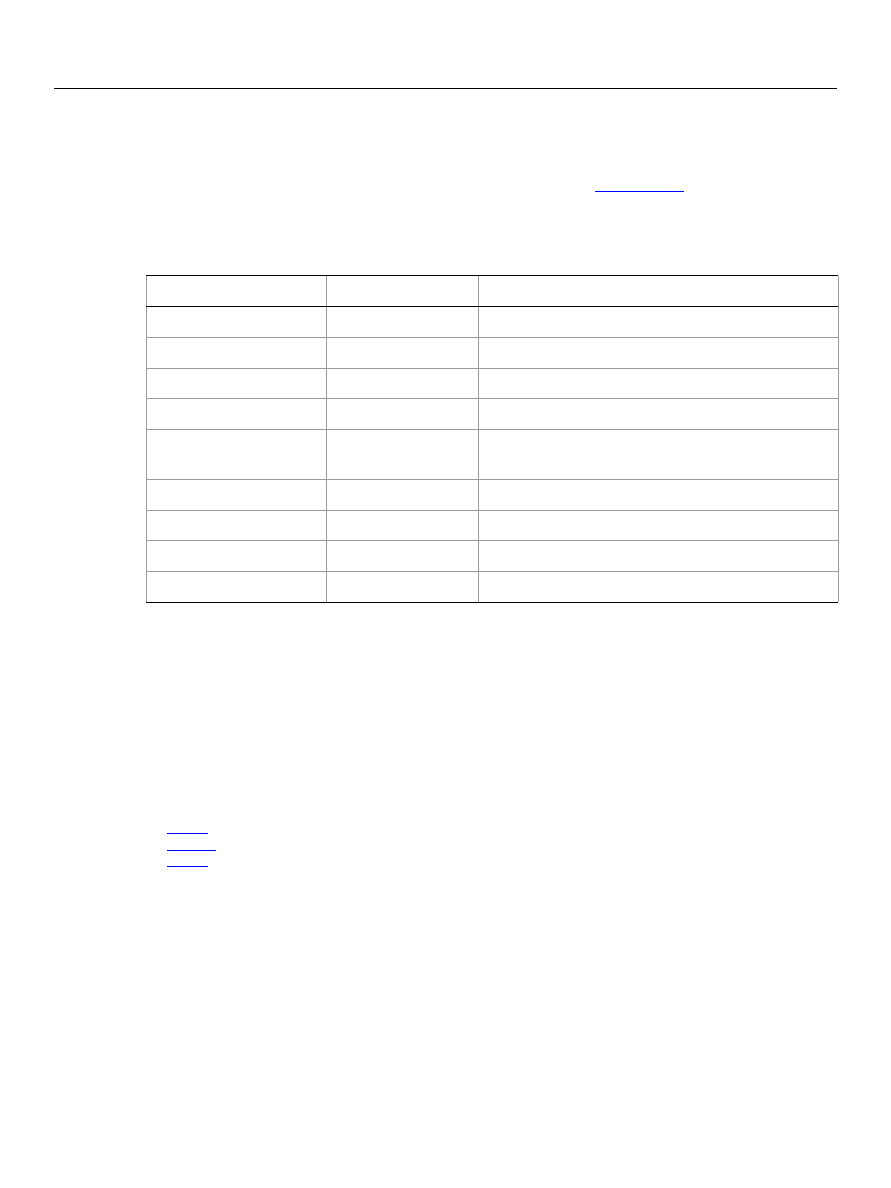
Adobe Photoshop CS5
AppleScript Scripting Reference
AppleScript Objects 62
font, fonts
An installed font. The
font
object is an element of the
application
class. You use the
font
object to
retrieve information about the fonts installed on your computer. See
on page 12 for more
information.
Properties
The following code uses the standard AppleScript commands
get
and
prompt
to display a dialog that lists
the fonts installed on the computer running the script.
tell application "Adobe Photoshop CS5"
set fontsInstalled to name of fonts
log fontsInstalled
end tell
Valid commands:
Property
Value Type
What it is
best type
type class
Read-only. The best type for the object's value.
class
type class
Read-only.The object’s class.
default type
type class
Read-only. The default type for the object's value.
index
integer
Read-only. The index of this instance of the object.
properties
record
All of this objects properties returned in a single
record.
family
Unicode text
Read-only. The font family.
name
Unicode text
Read-only. The text face name.
PostScript name
Unicode text
Read-only. The font's PostScript name.
style
Unicode text
Read-only. The font’s style name.

Adobe Photoshop CS5
AppleScript Scripting Reference
AppleScript Objects 63
gallery banner options
Options that can be specified for a Web photo gallery banner.
This class a property of the
object and is used to define a record that specifies options
when creating a Web photo gallery.
Gallery banner options
can only be supplied in conjunction with
the
create photo gallery
command. It is not possible to get or create a
Gallery banner options
object.
See the
command for additional details.
Properties
Property
Value Type
What it is
contact info
Unicode text
Web photo gallery contact info.
date
Unicode text
Web photo gallery date (default: current date).
font
Valid values:
Arial
Courier New
Helvetica
Times New Roman
The font setting for the banner text (default:
Arial
).
font size
integer
The font size for the banner text (1 - 7; default:
3
).
photographer
Unicode text
Web photo gallery photographer.
site name
Unicode text
Web photo gallery site name (default:
Adobe Web
Photo Gallery
).

Adobe Photoshop CS5
AppleScript Scripting Reference
AppleScript Objects 64
gallery color options
Color options that can be specified for a Web photo gallery.
This class a property of the
object and is used to define a record that specifies options
when creating a Web photo gallery.
Gallery color options
can only be supplied in conjunction with
the
create photo gallery
command. It is not possible to get or create a
Gallery color options
object.
See the
command for additional details.
Properties
Property
Value Type
What it is
active link color
RGB color
The color used to indicate an active link.
background color
RGB color
The background color.
banner color
RGB color
The banner color.
link color
RGB color
The color used to indicate a link.
text color
RGB color
The text color.
visited link color
RGB color
The color used to indicate a visited link.

Adobe Photoshop CS5
AppleScript Scripting Reference
AppleScript Objects 65
gallery images options
Options for the larger images (not thumbnails) in a Web photo gallery.
This class a property of the
object and is used to define a record that specifies options
when creating a Web photo gallery.
Gallery images options
can only be supplied in conjunction with
the
create photo gallery
command. It is not possible to get or create a
Gallery images options
object.
See the
command for additional details.
Note:
for information on specifying thumbnail image options.
Properties
Property
Value Type
What it is
border
integer
The width (in pixels) of the border between images
(0 - 99; default:
0
).
caption
boolean
Indication of whether to generate image captions
(default:
false
).
dimension
integer
The dimensions (in pixels) of a resized image
(default:
350
).
font
Valid values:
Arial
Courier New
Helvetica
Times New Roman
The font to use for captions (default:
Arial
).
font size
integer
The font size to use for captions (1 - 7; default:
3
).
image quality
integer
The quality setting for JPEG images (0 - 12; default:
5
).
include copyright
boolean
Indication of whether to include copyright
information in captions (default:
false
).
include credits
boolean
Indication of whether to include credits information
in captions (default:
false
).
include file name
boolean
Indication of whether to include the file name in
captions (default:
false
).
include title
boolean
Indication of whether to include the title in captions
(default:
false
).
numeric links
boolean
Indication of whether to add numeric links (default:
true
).

Adobe Photoshop CS5
AppleScript Scripting Reference
AppleScript Objects 66
resize constraint
Valid values:
constrain both
constrain height
constrain width
Indication of whether and how the image should be
constrained (default:
constrain both
).
resize images
boolean
Indication of whether to automatically resize images
for placement on the gallery pages (default:
true
).
Property
Value Type
What it is (Continued)
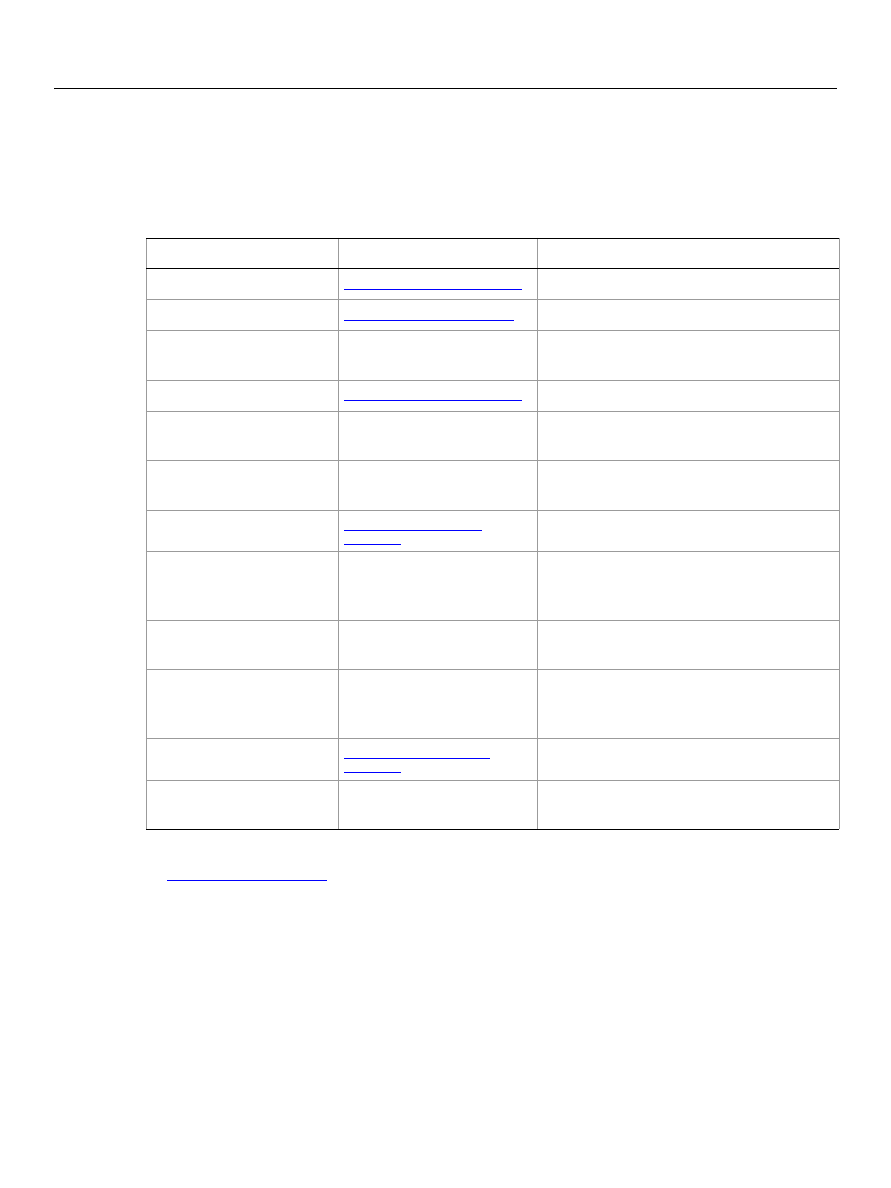
Adobe Photoshop CS5
AppleScript Scripting Reference
AppleScript Objects 67
gallery options
Options for the
create photo gallery
command.
Properties
Valid Commands
Property
Value Type
What it is
banner options
Options related to banner settings.
custom color options
Options related to custom color settings.
email address
Unicode text
The email address to show on the web
page.
images options
Options related to images settings.
layout style
Unicode text
The style to use for laying out the web page
(default:
Centered Frame 1 - Basic
).
preserve all metadata
boolean
Indication of whether to save the metadata
in JPEG files (default:
false
).
security options
Options related to security settings.
short extension
boolean
Indication of whether to use the short
(.htm), as opposed to the long (.html) web
page file name extension (default:
true
).
size attributes
boolean
Indication of whether to add width and
height attributes for images (default:
true
).
sub folders
boolean
Indication of whether to include files found
in the in sub folders of the input folder
(default:
true
).
thumbnail options
Options related to thumbnail settings.
UTF8 encoding
boolean
Indication of whether the web page should
use UTF-8 encoding (default:
false
).

Adobe Photoshop CS5
AppleScript Scripting Reference
AppleScript Objects 68
gallery security options
Options for security text in a Web photo gallery.
This class a property of the
object and is used to define a record that specifies options
when creating a Web photo gallery.
Gallery security options
can only be supplied in conjunction
with the
create photo gallery
command. It is not possible to get or create an
Gallery security
options
object.
See the
command for additional details.
Properties
Property
Value Type
What it is
content
Valid values:
gallery caption
gallery copyright
gallery credit
gallery custom text
gallery filename
gallery none
gallery title
The content to use for Web photo gallery
security text (default:
gallery none
).
custom text
Unicode text
Custom text to use for Web photo gallery
security text.
Note:
Valid only when
content: custom
text
font
Arial
Courier New
Helvetica
Times New Roman
The font to use for Web photo gallery security
text (default:
Arial
).
font size
integer
The font size to use for Web photo gallery
security text (minimum 1; default:
36
).
opacity
integer
The opacity (as percent) to use for web page
security text (default:
100
).
text color
The web page security text color.
text position
Valid values:
gallery centered
gallery lower left
gallery lower right
gallery upper left
gallery upper right
The position of web page security text (default:
gallery centered
).
text rotate
Valid values:
clock wise 45
clock wise 90
counter clock wise 45
counter clock wise 90
zero
The orientation to use for web page security
text (default:
zero
).

Adobe Photoshop CS5
AppleScript Scripting Reference
AppleScript Objects 69
gallery thumbnail options
Options for the thumbnail images in a Web photo gallery.
This class a property of the
object and is used to define a record that specifies options
when creating a Web photo gallery.
Gallery thumbnail options
can only be supplied in conjunction
with the
create photo gallery
command. It is not possible to get or create an
Gallery thumbnail
options
object.
See the
command for additional details.
Properties
Property
Value Type
What it is
border
integer
The width (in pixels) of the border around thumbnail
images (0 - 99; default:
0
).
caption
boolean
Indication of whether to display captions (default:
false
).
column count
integer
The number of columns on the page (default:
5
).
dimension
integer
Thumbnail dimensions in pixels (default:
75
).
font
Valid values:
Arial
Courier New
Helvetica
Times New Roman
The font to use (default:
Arial
).
font size
integer
The font size for thumbnail images text (1 - 7; default:
3
).
include copyright
boolean
Indication of whether to include copyright
information for thumbnails (default:
false
).
include credits
boolean
Indication of whether to include credits for
thumbnails (default:
false
).
include file name
boolean
Indication of whether to include file names for
thumbnails (default:
false
).
include title
boolean
Indication of whether to include titles for thumbnails
(default:
false
).
row count integer
integer
The number of rows on the page (default:
3
).
size
Valid values:
gallery custom
gallery large
gallery medium
gallery small
The thumbnail image size (default:
gallery
medium
).

Adobe Photoshop CS5
AppleScript Scripting Reference
AppleScript Objects 70
gaussian blur
Options that may be supplied when applying a Gaussian Blur filter.
The
gaussian blur
class supplies properties for the
class. The
gaussian blur
class is
used only to define a record whose properties specify options when applying a Gaussian Blur filter.
gaussian blur
options can be supplied only in conjunction with the
filter
command. It is not possible
to get or create a
gaussian blur
object.
See the
command for additional details.
Properties
The following code sample demonstrates how to apply the Gaussian Blur filter using the
filter
command of the
gaussian blur
class (inherited from the
filter options
super class).
tell application "Adobe Photoshop CS5"
filter current layer of the current document using gaussian blur ¬
with options {class:gaussian blur, radius:200}
end tell
Property
Value Type
What it is
radius
real
The radius in pixels in which to apply the filter.

Adobe Photoshop CS5
AppleScript Scripting Reference
AppleScript Objects 71
GIF save options
Options that can be specified when saving a document in GIF format. See the
command for
additional details.The
GIF save options
class inherits properties from the
class.
This class is used to define a record containing properties used to specify options when saving a document
as a GIF file.
GIF save options
can only be supplied in conjunction with the
save
command. It is not
possible to get or create a
GIF save options
object.
Properties
Property
Value Type
What it is
colors in palette
integer
The number of colors in the Color palette.
Note:
Valid only when
palette: local adaptive
;
palette: local perceptual
;
palette: local selective
;
palette: Mac OS system
;
palette: uniform
;
palette: web
; or
palette: Windows system
.
See
.
dither
Valid values:
diffusion
noise
none
pattern
The dither type to use.
dither amount
integer
The amount of dither to use (1 - 100).
(default:
75
)
Note:
Valid only when
dither: diffusion
.
See
.
forced colors
Valid values:
black and white
none
primaries
web
Forces the inclusion of specified colors.
interlaced
boolean
Indicates whether to interlace rows (default:
false
).
matte
Valid values:
background color matte
black matte
foreground color matte
Netscape gray
none
semi gray
white matte
The color to use to fill antialiased edges
adjacent to transparent areas of the image.
Note:
When
transparency: false
, the
matte color is applied to transparent
areas. See

Adobe Photoshop CS5
AppleScript Scripting Reference
AppleScript Objects 72
The following code creates the
myOptions
variable to hold the
GIF save options
command to save the document with the specified options.
tell application "Adobe Photoshop CS5"
make new document
set myFile to "Data:docsamples:testfiles:GifTest.gif"
set myOptions to ¬
{class:GIF save options, dither:diffusion, dither amount:46, ¬
preserve exact colors:true, matte:background color matte}
save current document in file myFile as CompuServe GIF with options ¬
myOptions appending no extension without copying
end tell
palette
Valid values:
exact
local adaptive
local perceptual
local selective
Mac OS system
master adaptive
master perceptual
master selective
previous
uniform
web
Windows system
The type of palette to use (default:
local
selective
).
preserve exact
colors
boolean
Indicates whether to protect colors in the
image that contain entries in the color table
from being dithered.
Note:
Valid only when
dither: diffusion
.
See
.
transparency
boolean
Indicates whether to preserve transparent
areas of the image during conversion to GIF
format.
Property
Value Type
What it is (Continued)

Adobe Photoshop CS5
AppleScript Scripting Reference
AppleScript Objects 73
glass filter
Options that may be supplied when applying a Glass filter.
The
glass filter
class supplies properties for the
class. The
glass filter
class is
used only to define a record whose properties specify options when applying a Glass filter.
glass filter
options can be supplied only in conjunction with the
filter
command. It is not possible to get or create a
glass filter
object.
See the
command for additional details.
Properties
The following code sample demonstrates how to apply the Glass filter using the
filter
command of the
glass
class (inherited from the
filter options
super class).
tell application "Adobe Photoshop CS5"
filter current layer of the current document using glass filter ¬
with options {class:glass filter, distortion:20, ¬
smoothness:100, scaling:155, ¬
texture definition:"Data:docsamples:testfiles:texturefill.psd"}
end tell
Property
Value Type
What it is
distortion
integer
(0 - 20)
smoothness
integer
(1 - 15)
scaling
integer
(50 - 200) as percent.
invert texture
boolean
(default:
false
)
texture kind
Valid values:
blocks
canvas
frosted
texture document
tiny lens
The type of texture to use.
Note:
You cannot specify
texture kind
and
texture defintion
at the same time.
texture definition
alias
The file that contains the texture image.

Adobe Photoshop CS5
AppleScript Scripting Reference
AppleScript Objects 74
gray color
Options that can be specified for a Gray color: the numeric values of component colors. The
Gray color
class inherits properties from the
class.
This class a property of the
object and is used to define a record that specifies options when
creating color value.
Properties
Property
Value Type
What it is
gray value
real
The gray value (0.0 - 100.0; default: 0.0).

Adobe Photoshop CS5
AppleScript Scripting Reference
AppleScript Objects 75
high pass
Options that may be supplied when applying a High Pass filter.
The
high pass
class supplies properties for the
class. The
high pass
class is used only
to define a record whose properties specify options when applying a High Pass filter.
high pass
options
can be supplied only in conjunction with the
filter
command. It is not possible to get or create a
high
pass
object.
See the
command for additional details.
Properties
The following code sample demonstrates how to apply the High Pass filter using the
filter
command of
the
high pass
class (inherited from the
filter options
super class).
tell application "Adobe Photoshop CS5"
filter current layer of the current document using high pass ¬
with options {class:high pass, radius:25.5}
end tell
Property
Value Type
What it is
radius
real
(0.1 - 250.0) in pixels.

Adobe Photoshop CS5
AppleScript Scripting Reference
AppleScript Objects 76
history state, history states
A history state for the document.
Properties
Valid Commands
Property
Value Type
What it is
best type
type class
Read-only. The best type for the object's value.
class
type class
Read-only. The object’s class.
default type
type class
Read-only. The default type for the object's value.
index
integer
Read-only. The index of this instance of the object.
properties
record
All of this objects properties returned in a single
record.
container
reference
Read-only. The object’s container.
name
Unicode text
Read-only. The history state’s name.
snapshot
boolean
Read-only. Indicates whether to the history state is a
snapshot.

Adobe Photoshop CS5
AppleScript Scripting Reference
AppleScript Objects 77
HSB color
Options that can be specified for an HSB color: the numeric values of component colors. The
HSB color
class inherits properties from the
class.
This class a property of the
object and is used to define a record that specifies options when
creating color value.
Properties
Property
Value Type
What it is
hue
real
The hue value (0.0 - 360.0; default:
0.0
).
saturation
real
The saturation value (0.0 - 100.0; default:
0.0
).
brightness
real
The brightness value (0.0 - 100.0; default:
0.0
).

Adobe Photoshop CS5
AppleScript Scripting Reference
AppleScript Objects 78
Illustrator paths export options
Options that can be specified when exporting a path item to an Adobe Illustrator
®
file. See
The
Illustrator paths export options
class supplies properties for the
class.
Illustrator paths export options
options can be supplied only in conjunction with the
export
command. It is not possible to get or create a
Illustrator paths export options
object.
See the
command for further details.
Properties
Property
Value Type
What it is
path name
Unicode text
The name of path to export.
Note:
Valid only when
target path: named path
.
target path
Valid values:
all paths
document bounds
named path
The sort of path(s) to export (default:
document
bounds
).

Adobe Photoshop CS5
AppleScript Scripting Reference
AppleScript Objects 79
indexed mode options
Options that can be specified when changing the document mode to Indexed using the
change mode
command. The
indexed mode
class inherits properties from the
class.
This class is used to define a record containing properties used to specify options when changing a
document’s mode.
Indexed mode options
can only be supplied in conjunction with the
change mode
command. It is not possible to get or create a
Indexed mode options
object. See the
command for more details.
Properties
Property
Value Type
What it is
colors in palette
integer
The number of colors in the Color palette.
Note:
Valid only when
palette: local adaptive
;
palette: local perceptual
;
palette: local selective
;
palette: Mac OS system
;
palette: uniform
;
palette: web
; or
palette: Windows system
.
dither
Valid values:
diffusion
noise
none
pattern
The dither type to use.
dither amount
integer
The amount of dither to use (1 - 100).
Note:
Valid only when
dither: diffusion
.
forced colors
Valid values:
black and white
none
primaries
web
The type of colors to force into the color
palette.
matte background
color
Valid values:
background color matte
black matte
foreground color matte
Netscape gray
none
semi gray
white matte
The color to use to fill antialiased edges
adjacent to transparent areas of the image
(default:
matte white
).
Note:
When
transparency: false
, the
matte color is applied to transparent
areas. See

Adobe Photoshop CS5
AppleScript Scripting Reference
AppleScript Objects 80
palette
Valid values:
exact
local adaptive
local perceptual
local selective
Mac OS system
master adaptive
master perceptual
master selective
previous
uniform
web
Windows system
The type of palette to use (default:
exact
).
preserve exact
colors
boolean
Indicates whether to protect colors in the
image that contain entries in the color table
from being dithered.
Note:
Valid only when
dither: diffusion
. See
transparency
boolean
Indicates whether to preserve transparent
areas of the image during conversion to GIF
format.
Property
Value Type
What it is (Continued)

Adobe Photoshop CS5
AppleScript Scripting Reference
AppleScript Objects 81
info-object
Document metadata.This class is a property of the
document
object and is used to define a record
containing properties that specify application preferences. See
Properties
Property
Value Type
What it is
best type
type class
Read-only. The best type for the object's value.
class type
class
Read-only. The object’s class.
default type
type class
Read-only. The default type for the object's value.
properties
record
All of this objects properties returned in a single
record.
author
Unicode text
author position
Unicode text
caption
Unicode text
caption writer
Unicode text
category
Unicode text
city
Unicode text
container
reference
Read-only. The object’s container.
copyright notice
Unicode text
copyrighted
Valid values:
copyrighted work
public domain
unmarked
The document’s copyrighted status.
country
Unicode text
creation date
Unicode text
credit
Unicode text
EXIF
list of lists:
list (list {tag,
tag data}}, ...
Read-only. Camera data that includes camera
settings used when the image was taken. Sample list
values are: tag = “camera”; tag value = “Cannon”.
headline
Unicode text
instructions
Unicode text
job name
Unicode text
keywords
list of Unicode
text
A list of keywords that can identify the document or
its contents.
owner url
Unicode text

Adobe Photoshop CS5
AppleScript Scripting Reference
AppleScript Objects 82
province or state
Unicode text
source
Unicode text
supplemental
categories
list of Unicode
text
title
Unicode text
transmission
reference
Unicode text
urgency
Valid values:
four
high
low
none
normal
seven
six
three
two
Property
Value Type
What it is (Continued)

Adobe Photoshop CS5
AppleScript Scripting Reference
AppleScript Objects 83
inversion
The
inversion
class supplies options for the
class to invert the colors in an image.
The
inversion
class, which is analogous to the Invert command in the Adobe Photoshop CS5
application, is used only to define a record containing properties that specify options when using the
adjust
command to apply an Invert adjustment to an image. The
inversion
class can be used only in
conjunction with the
adjust
command. It is not possible to get or create an
inversion
object.
See the
command for additional details.
The following code sample demonstrates how to apply a Inversion adjustment using the
adjust
command of the
inversion
class (inherited from the
adjustment options
super class).
tell application "Adobe Photoshop CS5"
adjust current layer of the current document using inversion
end tell

Adobe Photoshop CS5
AppleScript Scripting Reference
AppleScript Objects 84
JPEG save options
Options that can be specified when saving a document in JPEG format. See the
command for
additional details.The
JPEG save options
class inherits properties from the
class.
This class is used to define a record containing properties used to specify options when saving a document
as a JPEG file.
JPEG save options
can only be supplied in conjunction with the
save
command. It is not
possible to get or create a
JPEG save options
object.
Properties
The following code creates the
myOptions
variable to hold the
JPEG save options
command to save the document with the specified options.
tell application "Adobe Photoshop CS5"
make new document
set myFile to "Data:docsamples:testfiles:JpegSave.jpg"
set myOptions to ¬
{class:JPEG save options, embed color profile:true, ¬
format options:progressive, quality:12, scans:3}
save current document in file myFile as JPEG with options ¬
myOptions appending no extension without copying
end tell
Property
Value Type
What it is
embed color
profile
boolean
Indicates whether to embed the color profile in
the document.
format options
Valid values:
optimized
progressive
standard
The download format to use (default:
standard
).
matte
Valid values:
background color matte
black matte
foreground color matte
Netscape gray
none
semi gray
white matte
The color to use to fill antialiased edges adjacent
to transparent areas of the image (default:
white matte
).
Note:
When
transparency: false
, the matte
color is applied to transparent areas. See
quality
integer
The quality of the produced image (0 - 12;
default:
3
).
scans
integer
The number of increasingly detailed scans to
use to display the image on the screen (3 - 5).
Note:
Valid only when
format options:
progressive
. See
.

Adobe Photoshop CS5
AppleScript Scripting Reference
AppleScript Objects 85
Lab color
Options that can be specified for an Lab color: numeric values for the component colors. The
Lab color
class inherits properties from the
class.
This class a property of the
object and is used to define a record that specifies options when
creating color value.
See the
command for additional details.
Properties
Property
Value Type
What it is
value_L
real
The L value (0.0 - 100.0).
value_a
real
The a value (-128.0 - 127.0).
value_b
real
The b value (-128.0 - 127.0).

Adobe Photoshop CS5
AppleScript Scripting Reference
AppleScript Objects 86
layer, layers
A layer object. The following classes inherit properties from the
layer
class:
Properties
Property
Value Type
What it is
best type
type class
Read-only. The best type for the object's value.
class
type class
Read-only. The object’s class.
default type
type class
Read-only. The default type for the object’s value.
index
integer
Read-only. The index of this instance of the object.
properties
record
All of this object’s properties returned in a single
record.
all locked
boolean
Indicates whether all of the layer’s contents are
locked or editable.
blend mode
Valid Values:
color blend
color burn
color dodge
darken
difference
dissolve
exclusion
hard light
hard mix
hue blend
lighten
linear burn
linear dodge
linear light
luminosity
multiply
normal
overlay
pass through
pin light
saturation blend
screen
soft light
vivid light
The mode to use when compositing an object.
bounds
list
Read-only. A list of coordinates that describe the
corners of the bounding rectangle of the layer.
container
reference
Read-only. The object’s container.
linked layers
list of layers
Read-only. The layers linked to this layer.
name
Unicode text
The layer’s name.

Adobe Photoshop CS5
AppleScript Scripting Reference
AppleScript Objects 87
Valid Commands
count
delete
duplicate
exists
index
link
make
move
rotate
scale
translate
unlink
opacity
real
The layer’s master opacity (as percent) (0.0 - 100.0).
visible
boolean
Indicates whether the layer is visible.
Property
Value Type
What it is (Continued)

Adobe Photoshop CS5
AppleScript Scripting Reference
AppleScript Objects 88
layer comp, layer comps
A "snapshot" of a temporary composition of the layers in a document.
Properties
Valid Commands
apply
count
delete
exists
index
make
recapture
reset from comp
Property
Value Type
What it is
best type
type class
Read-only. The best type for the object's value.
class
type class
Read-only. The object’s class.
default type
type class
Read-only. The default type for the object’s value.
index
integer
Read-only. The index of this instance of the object.
properties
record
All of this object’s properties returned in a single
record.
appearance
boolean
Indicates whether to use layer appearance (layer
styles) settings.
comment
anything
A description of the layer comp.
container
reference
Read-only. The object’s container.
name
Unicode text
The layer’s name.
position
boolean
Indicates whether to use layer position.
selected
boolean
Read-only. Indicates whether the layer comp is
selected.
visibility
boolean
Indicates whether to use layer visibility settings.

Adobe Photoshop CS5
AppleScript Scripting Reference
AppleScript Objects 89
layer set, layer sets
A layer set.
Elements
Properties
Element
Refer to by
art layer
name, numeric index, as a range of elements, before/after
another element, satisfying a test.
layer
name, numeric index, as a range of elements, before/after
another element, satisfying a test.
layer set
name, numeric index, as a range of elements, before/after
another element, satisfying a test.
Property
Value Type
What it is
best type
type class
Read-only. (Inherited from the
layer
class) The best
type for the object's value.
class
type class
Read-only. (Inherited from the
layer
class) The
object’s class.
default type
type class
Read-only. (Inherited from the
layer
class) The
default type for the object’s value.
index
integer
Read-only. (Inherited from the
layer
class) The index
of this instance of the object.
properties
record
(Inherited from the
layer
class) All of this object’s
properties returned in a single record.
all locked
boolean
(Inherited from the
layer
class) Indicates whether
the contents in the layers contained in the layer set
are editable.

Adobe Photoshop CS5
AppleScript Scripting Reference
AppleScript Objects 90
Valid Commands
count
delete
duplicate
exists
index
link
make
merge
move
rotate
blend mode
Valid Values:
color blend
color burn
color dodge
darken
difference
dissolve
exclusion
hard light
hard mix
hue blend
lighten
linear burn
linear dodge
linear light
luminosity
multiply
normal
overlay
pass through
pin light
saturation blend
screen
soft light
vivid light
(Inherited from the
layer
class) The mode to use
when compositing an object.
bounds
list
Read-only. (Inherited from the
layer
class) The
bounding rectangle of the layer.
container
reference
Read-only. (Inherited from the
layer
class) The
object’s container.
linked layers
list of layers
Read-only. (Inherited from the
layer
class) The
layers linked to this layer set.
name
Unicode text
(Inherited from the
layer
class) The layer set’s name.
opacity
real
(Inherited from the
layer
class) The layer set’s
master opacity (0.0 - 100.0).
visible
boolean
(Inherited from the
layer
class) Indicates whether
the layer set is visible.
enabled channels
list of channels
Channels that are enabled for the layer set.
Note:
Must be a list of component channels.
Property
Value Type
What it is


Adobe Photoshop CS5
AppleScript Scripting Reference
AppleScript Objects 92
lens blur
Options that can be specified when applying a Lens Blur filter.
The
lens blur
class supplies properties for the
class. The
lens blur
class is used only
to define a record whose properties specify options when applying a Lens Blur filter.
lens blur
options
can be supplied only in conjunction with the
filter
command. It is not possible to get or create a
lens
blur
object.
See the
command for additional details.
Properties
Property
Value type
What it is
amount
integer
The amount of noise (default:
0
).
blade curvature
integer
The blade curvature of the iris (default:
0
).
brightness
integer
The brightness for the specular highlights (default:
0
).
distribution
Valid values:
Gaussian
uniform
The distribution value for the noise (default:
uniform
).
focal distance
integer
The blur focal distance for the depth map (default:
0
).
invert depth map
boolean
Indicates whether the depth map is inverted
(default:
false
).
iris shape
Valid values:
heptagon
hexagon
octagon
pentagon
square
triangle
The shape of the iris (default:
hexagon
).
monochromatic
boolean
Indicates whether the noise is monochromatic
(default:
false
).
radius
integer
The radius of the iris (default:
15
).
rotation
integer
The rotation of the iris (default:
0
).
source
Valid values:
image highlight
layer mask
none
transparency channel
The source for the depth map (default:
none
).
threshold
integer
The threshold for the specular highlights (default:
0
).

Adobe Photoshop CS5
AppleScript Scripting Reference
AppleScript Objects 93
The following code sample demonstrates how to apply the Lens Blur filter using the
filter
command of
the
Lens blur
class (inherited from the
filter options
super class).
tell application "Adobe Photoshop CS5"
filter current layer of the current document using lens blur ¬
with options {class:lens blur, radius:13}
end tell

Adobe Photoshop CS5
AppleScript Scripting Reference
AppleScript Objects 94
lens flare
Options that may be supplied when applying a Lens Flare filter.
The
lens flare
class supplies properties for the
class. The
lens flare
class is used
only to define a record whose properties specify options when applying a Lens Flare filter.
lens flare
options can be supplied only in conjunction with the
filter
command. It is not possible to get or create a
lens flare
object.
See the
command for additional details.
Properties
The following code sample demonstrates how to apply the Lens Flare filter using the
filter
command of
the
lens flare
class (inherited from the
filter options
super class).
tell application "Adobe Photoshop CS5"
filter current layer of the current document using lens flare ¬
with options {class:lens flare, brightness:209, ¬
flare center:{2 as inches, 4 as inches}, lens type:Prime 35}
end tell
Property
Value Type
What it is
brightness
integer
(10 - 300) as percent.
flare center
list
The x and y coordinates of the center of the flare
(unit value).
lens type
Valid values:
Movie Prime
Prime 105
Prime 35
zoom

Adobe Photoshop CS5
AppleScript Scripting Reference
AppleScript Objects 95
levels adjustment
The
levels adjustment
class supplies options for the
class to correct the tonal
range and color balance of an image.
The
levels adjustment
class, which is analogous to the Levels command in the Adobe Photoshop CS5
application, is used only to define a record containing properties that specify options when applying a
Levels adjustment to an image. The
levels adjustment
class can be used only in conjunction with the
adjust
command. It is not possible to get or create a
levels adjustment
object.
See the
command for additional details.
Properties
The following code sample demonstrates how to apply a Levels Adjustment using the
adjust
command
of the
levels adjustment
class (inherited from the
adjustment options
super class).
tell application "Adobe Photoshop CS5"
adjust current layer of the current document using levels adjustment ¬
with options {class:levels adjustment, input range start:4, ¬
input range end:245, input range gamma:4.8, ¬
output range start:5, output range end:7}
end tell
Property
Value Type
What it is
input range start
integer
(
0 - 253)
input range end
integer
((
inputRangeStart
+ 2) - 255)
input range gamma
real
(0.10 - 9.99)
output range start
integer
(0 - 253)
output range end
integer
((
outputRangeStart
+ 2) - 255)

Adobe Photoshop CS5
AppleScript Scripting Reference
AppleScript Objects 96
maximum filter
Options that may be supplied when applying a Maximum filter.
The
maximum filter
class supplies properties for the
class. The
maximum filter
class
is used only to define a record whose properties specify options when applying a Maximum filter.
maximum
filter
options can be supplied only in conjunction with the
filter
command. It is not possible to get or
create a
maximum filter
object.
See the
command for additional details.
Properties
The following code sample demonstrates how to apply the Maximum filter using the
filter
command of
the
maximum filter
class (inherited from the
filter options
super class).
tell application "Adobe Photoshop CS5"
filter current layer of the current document using maximum filter ¬
with options {class:maximum filter, radius:29}
end tell
Property
Value Type
What it is
radius
real
(1 - 100) in pixels.

Adobe Photoshop CS5
AppleScript Scripting Reference
AppleScript Objects 97
measurement scale
The measurement scale of a document. This class is a property of the document object, see
.
Note:
This feature is available in the Extended Version only.
Properties
The following code sample shows how to set the properties of the measurement scale object.
tell application "Adobe Photoshop CS5"
tell current document
set pixel length of measurement scale to 1
set logical length of measurement scale to 100
set logical units of measurement scale to "My Units"
end tell
end tell
Property
Value Type
What it is
pixel length
number (Long)
Read-write. The length in pixels this scale equates to.
logical length
number (Double)
Read-write. The logical length this scale equates to.
logical unit
Unicode text
Read-write. The logical units for this scale.

Adobe Photoshop CS5
AppleScript Scripting Reference
AppleScript Objects 98
median noise
Options that may be supplied when applying a Median Noise filter.
The
median noise
class supplies properties for the
class. The
median noise
class is
used only to define a record whose properties specify options when applying a Median Noise filter.
median
noise
options can be supplied only in conjunction with the
filter
command. It is not possible to get or
create a
median noise
object.
See the
command for additional details.
Properties
The following code sample demonstrates how to apply the Median Noise filter using the
filter
command of the
median noise
class (inherited from the
filter options
super class).
tell application "Adobe Photoshop CS5"
filter current layer of the current document using median noise ¬
with options {class:median noise, radius:22}
end tell
Property
Value Type
What it is
radius
real
(1 - 100) in pixels.

Adobe Photoshop CS5
AppleScript Scripting Reference
AppleScript Objects 99
minimum filter
Options that may be supplied when applying a Minimum filter.
The
minimum filter
class supplies properties for the
class. The
minimum filter
class
is used only to define a record whose properties specify options when applying a Minimum filter.
minimum
filter
options can be supplied only in conjunction with the
filter
command. It is not possible to get or
create a
minimum filter
object.
See the
command for additional details.
Properties
The following code sample demonstrates how to apply the Minimum filter using the
filter
command of
the
minimum filter
class (inherited from the
filter options
super class).
tell application "Adobe Photoshop CS5"
filter current layer of the current document using minimum filter ¬
with options {class:minimum filter, radius:29}
end tell
Property
Value Type
What it is
radius
real
(1 - 100) in pixels.

Adobe Photoshop CS5
AppleScript Scripting Reference
AppleScript Objects 100
mix channels
The
mix channels
class supplies options for the
class to modify a targeted
(output) color channel using a mix of the existing color channels in the image.
The
mix channels
class, which is analogous to the Channel Mixer command in the Adobe Photoshop CS5
application, is used only to define a record containing properties that specify options when applying a
Channel Mixer adjustment to an image. The
mix channels
class can be used only in conjunction with the
adjust
command. It is not possible to get or create a
mix channels
object.
See the
command for additional details.
Note:
Valid only for RGB or CMYK documents.
Properties
The following code sample demonstrates how to apply a Mix Channels adjustment using the
adjust
command of the
mix channels
class (inherited from the
adjustment options
super class). This code
assumes an RGB document mode and uses the default value for the
monochrome mixing
property by not
specifying a value.
tell application "Adobe Photoshop CS5"
adjust current layer of the current document using mix channels ¬
with options {class:mix channels, ¬
output channels:{red:{-42, 62, 5, 116}, ¬
green:{0, 172, 136, 0}, blue:{-66, 0, 100, -112}}}
end tell
Property
Value Type
What it is
output channels
list of anything
A list of channel specifications. For each component
channel, you must specify a list of adjustment values
(-200 - 200) followed by a 'constant' value (-200 -
200).
Note:
When
monochrome mixing: true
, the
maximum number of channel value
specifications is 1.
Note:
Valid only when the document mode is RGB or
CMYK. See
mode
in the Properties table of the
class.
monochrome mixing
boolean
Indicates whether to use monochrome mixing
(default:
false
).

Adobe Photoshop CS5
AppleScript Scripting Reference
AppleScript Objects 101
motion blur
Options that may be supplied when applying a Motion Blur filter.
The
motion blur
class supplies properties for the
class. The
motion blur
class is used
only to define a record whose properties specify options when applying a Motion Blur filter.
motion blur
options can be supplied only in conjunction with the
filter
command. It is not possible to get or create a
motion blur
object.
See the
command for additional details.
Properties
The following code sample demonstrates how to apply the Motion Blur filter using the
filter
command
of the
motion blur
class (inherited from the
filter options
super class).
tell application "Adobe Photoshop CS5"
filter current layer of the current document using motion blur ¬
with options {class:motion blur, angle:-224, radius:29}
end tell
Property
Value Type
What it is
angle
integer
(
angle
: -360 - 360)
radius
real
(
radius
: 1 - 999) in pixels.

Adobe Photoshop CS5
AppleScript Scripting Reference
AppleScript Objects 102
no color
An object that represents a missing color. The
no color
class inherits properties from the
class.

Adobe Photoshop CS5
AppleScript Scripting Reference
AppleScript Objects 103
notifier, notifiers
An event-handler object that tells the script to execute specified code when a specified event occurs.
Note:
You can remove a
notifier
object from the Script Events Manager drop-down list by deleting the
file named
Script Events Manager.xml
from in the Photoshop preferences folder. See Adobe
Photoshop CS5 help for more information.
Properties
Valid commands:
Property
Value type
What it is
best type
type class
Read-only. The best type for the object's value.
class
type class
Read-only. The object’s class.
default type
type class
Read-only. The default type for the object’s value.
index
integer
Read-only. The index of this instance of the object.
properties
record
All of this object’s properties returned in a single record.
event
string
Read-only. The event ID in four characters or a unique string
that the notifier is associated with.
event class
string
Read-only. The class ID of the event: the class of the object
the event is applied to. Four characters or a unique string.
Note:
When an
event
applies to multiple types of objects,
you use this property to distinguish which object this
notifier
applies to. For example, the Make event
(
“Mk “)
applies to documents (
“Dcmn”)
, channels
(
“Chnl”
) and other objects.
event file
file
Read-only. The path to the file to execute when the event
occurs/activates the notifier.

Adobe Photoshop CS5
AppleScript Scripting Reference
AppleScript Objects 104
NTSC colors
Options that may be supplied when applying the NTSC colors filter.
The
NTSC colors
class supplies properties for the
class. The
NTSC colors
class is used
only to define a record whose properties specify options when using the
filter
command to apply an
NTSC colors filter.
NTSC colors
options can be supplied only in conjunction with the
filter
command. It
is not possible to get or create a
NTSC colors
object.
See the
command for additional details.
The following code sample demonstrates how to apply the NTSC colors filter using the
filter
command
of the
motion blur
class (inherited from the
filter options
super class).
tell application "Adobe Photoshop CS5"
filter current layer of the current document using NTSC colors
end tell

Adobe Photoshop CS5
AppleScript Scripting Reference
AppleScript Objects 105
ocean ripple
Options that may be supplied when applying an Ocean Ripple filter.
The
ocean ripple
class supplies properties for the
class. The
ocean ripple
class is
used only to define a record whose properties specify options when applying an Ocean Ripple filter.
ocean
ripple
options can be supplied only in conjunction with the
filter
command. It is not possible to get or
create an
ocean ripple
object.
See the
command for additional details.
Properties
The following code sample demonstrates how to apply the Ocean Ripple filter using the
filter
command
of the
ocean ripple
class (inherited from the
filter options
super class).
tell application "Adobe Photoshop CS5"
filter current layer of the current document using ocean ripple ¬
with options {class:ocean ripple, ripple size:4, ripple magnitude:2}
end tell
Property
Value Type
What it is
ripple size
integer
(1 - 15)
ripple magnitude
integer
(0 - 20)

Adobe Photoshop CS5
AppleScript Scripting Reference
AppleScript Objects 106
offset filter
Options that may be supplied when applying an Offset filter.
The
offset filter
class supplies properties for the
class. The
offset filter
class is
used only to define a record whose properties specify options when applying an Offset filter.
offset
filter
options can be supplied only in conjunction with the
filter
command. It is not possible to get or
create an
offset filter
object.
See the
command for additional details.
Properties
The following code sample demonstrates how to apply the Offset filter using the
filter
command of the
offset filter
class (inherited from the
filter options
super class).
tell application "Adobe Photoshop CS5"
filter current layer of the current document using offset filter ¬
with options {class:offset filter, horizontal offset:3 as centimeters,¬
vertical offset:2 as centimeters, undefined areas:wrap around}
end tell
Property
Value Type
What it is
horizontal offset
real
(unit value) (min/max amounts depend on layer
size).
vertical offset
real
(unit value) (min/max amounts depend on layer
size).
undefined areas
Valid values:
repeat edge pixels
set to layer fill
wrap around
The method to use to fill areas left undefined
when the image is moved.

Adobe Photoshop CS5
AppleScript Scripting Reference
AppleScript Objects 107
open options
Options used with the open command.
The following classes inherit properties from the open options class:
,
,
,
Valid Commands

Adobe Photoshop CS5
AppleScript Scripting Reference
AppleScript Objects 108
path item, path items
An artwork path.
Elements
Properties
The following code creates a path in three segments that end up looking like an ice cream cone: two
connected diagonal lines that form a V (or the "cone"), and a curved line that arcs above the V to create aa
2-d ice cream cone.
tell application "Adobe Photoshop CS5"
set ruler units of settings to pixel units
set type units of settings to pixel units
set docRef to make new document with properties {height:700, width:500,¬
name:"Snow Cone"}
set pathPointInfo1 to {class:path point info, kind:corner point, ¬
anchor:{100, 100}, left direction:{100, 100}, right direction:{100, 100}}
set pathPointInfo2 to {class:path point info, kind:corner point, ¬
anchor:{150, 200}, left direction:{150, 200}, right direction:{150, 200}}
Element
Refer to by
sub path item
numeric index, as a range of elements, before/after another element,
satisfying a test
Property
Value Type
What it is
best type
type class
Read-only. The best type for the object's value.
class
type class
Read-only. The object’s class.
default type
type class
Read-only. The default type for the object’s value.
index
integer
Read-only. The index of this instance of the object.
properties
record
All of this object’s properties returned in a single
record.
container
reference
Read-only. The object’s container.
entire path
objects
Read-only. The item’s sub paths.
kind
Valid values:
clipping
normal
text mask
vector mask
work
The type of path.
name
Unicode text
The path item’s name.

Adobe Photoshop CS5
AppleScript Scripting Reference
AppleScript Objects 109
set subPathInfo1 to {class:sub path info, ¬
entire sub path:{pathPointInfo1, pathPointInfo2}, ¬
operation:shape xor, closed:false}
set pathPointInfo3 to {class:path point info, kind:corner point, ¬
anchor:{150, 200}, left direction:{150, 200}, right direction:{150, 200}}
set pathPointInfo4 to {class:path point info, kind:corner point, ¬
anchor:{200, 100}, left direction:{200, 100}, right direction:{200, 100}}
set subPathInfo2 to {class:sub path info, ¬
entire sub path:{pathPointInfo3, pathPointInfo4}, ¬
operation:shape xor, closed:false}
set pathPointInfo5 to {class:path point info, kind:corner point, ¬
anchor:{200, 100}, left direction:{200, 100}, right direction:{200, 100}}
set pathPointInfo6 to {class:path point info, kind:corner point, ¬
anchor:{150, 50}, left direction:{100, 50}, right direction:{200, 50}}
set pathPointInfo7 to {class:path point info, kind:corner point, ¬
anchor:{100, 100}, left direction:{100, 100}, right direction:{100, 100}}
set subPathInfo3 to {class:sub path info, ¬
entire sub path:{pathPointInfo5, pathPointInfo6, pathPointInfo7},¬
operation:shape xor, closed:false}
set newPathItem to make new path item in docRef with properties ¬
{entire path:{subPathInfo1, subPathInfo2, subPathInfo3}, ¬
name:"Snow Cone", kind:normal}
end tell
Valid Commands
count
create selection
delete
deselect
duplicate
exists
fill path
index
make
make clipping path
select
stroke path

Adobe Photoshop CS5
AppleScript Scripting Reference
AppleScript Objects 110
path point, path points
object.
Tip:
You do not use the path point object to create a path point. Rather, you use the path point object to
retrieve information about a path point. To create points that describe path segments, see
.
Properties
Valid Commands
Property
Value Type
What it is
best type
type class
Read-only. The best type for the object's value.
class
type class
Read-only. The object’s class.
default type
type class
Read-only. The default type for the object’s value.
index
integer
Read-only. The index of this instance of the object.
properties
record
All of this object’s properties returned in a single
record.
anchor
list
Read-only. The position (coordinates) of the anchor
point.
container
reference
Read-only. The object’s container.
entire path
objects
Read-only. The item’s sub paths.
kind
Valid values:
corner point
smooth point
Read-only. The type of point.
left direction
list
Read-only. The location of the left-direction (’in’
position) point.
right direction
list
Read-only. The location of the right-direction (’out’
position) point.

Adobe Photoshop CS5
AppleScript Scripting Reference
AppleScript Objects 111
path point info
A point on a path, expressed in three sets of coordinates:
●
anchor point
●
left direction point
●
right direction point
For paths that are straight segments (not curved), the coordinates of all three points are the same.
For curved segments, the coordinates are different; the difference between the anchor point and the left
or right direction points determines the arc of the curve. You use the left direction point to bend the curve
“outward” or make it convex; you use the right direction point to bend the curve “inward” or make it
concave.
Properties
Valid Commands
Property
Value Type
What it is
anchor
list of
coordinates
The position (in x and y coordinates) of the anchor
point.
kind
Valid values:
corner point
smooth point
The type of point.
left direction
list of
coordinates
The location (in x and y coordinates) of the
left-direction (’in’ position) point.
right direction
list of
coordinates
The location (in x and y coordinates) of the
right-direction (’out’ position) point.

Adobe Photoshop CS5
AppleScript Scripting Reference
AppleScript Objects 112
PDF open options
Settings related to opening a generic PDF document. The
PDF open options
class inherits properties
from the
class.
This class is used to define a record containing properties that specify options when opening a document
as a PDF file.
PDF open options
can be supplied only in conjunction with the
open
command. It is not
possible to get or create a
PDF open options
object.
Properties
The following code opens a PDF document.
Property
Value Type
What it is
bits per channel
Valid values:
eight
one
sixteen
thirtytwo
The number of bits per channel.
constrain
proportions
boolean
Deprecated for Adobe Photoshop CS5.
crop page
Valid values:
art box
bleed box
bounding box
crop box
media box
trim box
The method of cropping to use.
height
real
Deprecated for Adobe Photoshop CS5.
mode
Valid values:
CMYK
grayscale
Lab
RGB
The color model to use.
name
Unicode text
The name of the document.
page
integer
The page to which to open the document.
resolution
real
The resolution of the document (in pixels per inch).
suppress warnings
boolean
Indicates whether to suppress warnings when
opening the document.
use antialias
boolean
Indicates whether to use antialias.
use page number
boolean
Indicates whether the value specified in the
page
property refers to a page number or an image
number. If
usePageNumber = false
, the
page
property refers to an image number. See
width
real
Deprecated for Adobe Photoshop CS5.

Adobe Photoshop CS5
AppleScript Scripting Reference
AppleScript Objects 113
tell application "Adobe Photoshop CS5"
set display dialogs to never
set myFilePath to alias "Data:docsamples:testfiles:PdfTest.pdf"
open myFilePath as PDF with options ¬
{class:PDF open options, height:pixels 100, width:pixels 200, mode:RGB,¬
resolution:72, use antialias:true, page:1, constrain proportions:false}
end tell

Adobe Photoshop CS5
AppleScript Scripting Reference
AppleScript Objects 114
PDF save options
Options that can be specified when saving a document in PDF format. See the
command for
additional details.The
PDF save options
class inherits properties from the
class.
This class is used to define a record containing properties used to specify options when saving a document
as a PDF file.
PDF save options
can only be supplied in conjunction with the
save
command. It is not
possible to get or create a
PDF save options
object.
Properties
Property
Value Type
What it is
color conversion
boolean
Indicates whether to convert the color
profile to a destination profile.
descripton
Unicode text
Description of the save options to use.
destination profile
Unicode text
Description of the final RGB or CMYK output
device, such as a monitor or a press
standard.
downgrade color
profile
boolean
Deprecated for Adobe Photoshop CS5.
down sample
Valid values:
none
PDF average
PDF bicubic
PDF subsample
The down sample method to use.
down sample limit
real
Limits downsampling or subsampling to
images that exceed this value in pixels per
inch.
down sample size
real
The size to downsample images if they
exceed the limit in pixels per inch.
eight convert
boolean
Indicates whether to convert a 16-bit image
to 8-bit for better compatibility with other
applications.
embed color profile
boolean
Indicates whether to embed the color
profile in the document.
embed fonts
boolean
Deprecated for Adobe Photoshop CS5.
embed thumbnail
boolean
Indicates whether to include a small preview
image in Adobe PDF files.

Adobe Photoshop CS5
AppleScript Scripting Reference
AppleScript Objects 115
encoding
Valid values:
JPEG
JPEG 2000 high
JPEG 2000 lossless
JPEG 2000 low
JPEG 2000 med
JPEG 2000 med high
JPEG 2000 med low
JPEG high
JPEG low
JPEG med
JPEG med high
JPEG med low
none
ZIP
ZIP 4
The encoding or compression method to
use (default:
ZIP
).
image interpolation
boolean
Deprecated for Adobe Photoshop CS5.
JPEG quality
integer
The quality of the produced image (0 - 12;
default:
10
).
Note:
Valid only when
encoding: JPEG
.
output condition
Unicode text
An optional comment field for inserting
descriptions of the output condition. The
text is stored in the PDF/X file.
output condition ID
Unicode text
Indentifier for the output condition.
PDF compatibility
Valid values:
PDF 13
PDF 14
PDF 15
PDF 16
The PDF version to make the document
compatible with.
PDF standard
Valid values:
none
PDFX1a2001 standard
PDFX1a2003 standard
PDFX32002 standard
PDFX32003 standard
The PDF standard to make the document
compatible with.
preserve editing
boolean
Indicates whether to reopen the PDF in
Adobe Photoshop CS5 with native
Photoshop data intact.
presetfile
Unicode text
The preset file to use for settings.
Note:
This option overrides other settings.
profile inclusion
policy
boolean
Indicates whether to show which profiles to
include.
registry name
Unicode text
URL where the output condition is
registered.
Property
Value Type
What it is (Continued)

Adobe Photoshop CS5
AppleScript Scripting Reference
AppleScript Objects 116
The following code creates the
myOptions
variable to hold the
PDF save options
command to save the document with the specified options.
tell application "Adobe Photoshop CS5"
set theDocRef to make new document
set myFile to "Data:docsamples:testfiles:PDFSave.pdf"
--create a variable that contains a color object of the RGB color class
--whose color is red
set theTextColor to {class:RGB color, red:255, green:0, blue:0}
-- create a text layer
set theTextLayer to make new art layer in theDocRef with properties ¬
{kind:text layer}
--Set the contents, size, position and color of the text layer
set contents of text object of theTextLayer to "Hello, World!"
set size of text object of theTextLayer to 36
set position of text object of theTextLayer to {0.75 as inches, 1 as inches}
set stroke color of text object of theTextLayer to theTextColor
set myOptions to ¬
{class:PDF save options, embed color profile:true, ¬
save alpha channels:true, vector data:true, use outlines for text:true}
save current document in file myFile as Photoshop PDF with options ¬
myOptions appending no extension without copying
end tell
save alpha channels
boolean
Indicates whether to save the alpha
channels.
save annotations
boolean
Indicates whether to save the annotations.
save layers
boolean
Inidcates whether to save the documents
layers.
save spot colors
boolean
Indicates whether to save the spot colors.
transparency
boolean
Indicates whether to use transparency
(default:
true
).
tile size
integer
Compression option.
Note:
Valid only when
encoding: JPEG
2000
.
transparency
boolean
Deprecated for Adobe Photoshop CS5.
use outlines for
text
boolean
Deprecated for Adobe Photoshop CS5.
vector data
boolean
Deprecated for Adobe Photoshop CS5.
view
boolean
Indicates whether to open the saved PDF in
Adobe Acrobat.
web optimize
boolean
Indicates whether to improve performance
of PDF files on Web servers.
Property
Value Type
What it is (Continued)

Adobe Photoshop CS5
AppleScript Scripting Reference
AppleScript Objects 117
Photo CD open options
DEPRECATED. Options that can be specified when opening a Kodak Photo CD (PCD) files, including
high-resolution files from Pro Photo CD discs. The
Photo CD open options
class inherits properties from
class.
This class is used to define a record containing properties that specify options when opening a Photo CD
document.
Photo CD open options
can be supplied only in conjunction with the
open
command. It is
not possible to get or create a
Photo CD open options
object.
Properties
The following code opens a Photo CD document.
tell application "Adobe Photoshop CS5"
set myFilePath to alias "Data:docsamples:testfiles:IMG0001.PCD"
open myFilePath as Photo CD with options ¬
{class:Photo CD open options, color profile name:"Adobe RGB (1998)", ¬
color space:RGB 8, resolution:72, orientation:landscape, pixel size:medium}
end tell
Property
Value Type
What it is
color profile name
Unicode text
The profile to use when reading the image.
color space
Valid Values:
Lab 16
Lab 8
RGB 16
RGB 8
The colorspace for the image.
orientation
Valid Values:
landscape
portrait
The image orientation.
pixel size
Valid Values:
extra large
large
maximum
medium
minimum
small
The image dimensions.
extra large = 1024x1536
large = 512x768
maximum = 2048x3072
medium = 256x384
minimum = 64x96
small = 128x192
resolution
real
The image resolution (in pixels per inch).

Adobe Photoshop CS5
AppleScript Scripting Reference
AppleScript Objects 118
photo filter
The
photo filter
class supplies options for the
class to adjust the layer’s color
balance and temperature.
The
photo filter
class, which is analogous to the Photo Filter command in the Adobe Photoshop CS5
application, is used only to define a record containing properties that specify options when using the
adjust
command to apply a Photo Filter adjustment to an image. The
photo filter
class can be used
only in conjunction with the
adjust
command. It is not possible to get or create a
photo filter
object.
See the
command for additional details.
Properties
Property
Value Type
What it is
with contents
The color hue adjustment to use for the image.
density
integer
The density of the filter effect as a percent.
(default:25)
preserve luminosity
boolean
Indicates whether to preserve luminosity (i.e. the
image is not darkened by adding the color filter.)

Adobe Photoshop CS5
AppleScript Scripting Reference
AppleScript Objects 119
Photoshop DCS 1.0 save options
Options that can be specified when saving a document in Photoshop DCS 1.0 format. See the
command for additional details.The
Photoshop DCS 1.0 save options
class inherits properties from
class.
This class is used to define a record containing properties used to specify options when saving a document
as a Photoshop DCS 1.0 file.
Photoshop DCS 1.0 save options
can only be supplied in conjunction with
the
save
command. It is not possible to get or create a
Photoshop DCS 1.0 save options
object.
Properties
The following code creates the
myOptions
variable to hold the
Photoshop DCS 1.0 save options
, then
uses the
command to save the document with the specified options.
tell application "Adobe Photoshop CS5"
activate
Property
Value Type
What it is
DCS
Valid Values:
color composite
grayscale composite
no composite PostScript
The DCS color to use (default:
color
composite
).
embed color profile
boolean
Indicates whether to embed the color
profile in the document.
encoding
Valid Values:
ASCII
binary
high quality JPEG
low quality JPEG
maximum quality JPEG
medium quality JPEG
The type of encoding to use (default:
binary
).
halftone screen
boolean
Indicates whether to include the halftone
screen (default:
false
).
image interpolation
boolean
Indicates whether to use image
interpolation (default:
false
).
preview type
Valid Values:
eight bit Mac OS
eight bit TIFF
JPEG Mac OS
monochrome Mac OS
monochrome TIFF
none
The type of preview (default:
eight bit
Mac OS
).
transfer function
boolean
Indicates whether to include the Transfer
functions to compensate for dot gain
between the image and film (default:
false
).
vector data
boolean
Indicates whether to include vector data
(un-rasterized text) (default:
false
).

Adobe Photoshop CS5
AppleScript Scripting Reference
AppleScript Objects 120
set theDocRef to make new document
set myFile to "Data:docsamples:testfiles:DCS1.eps"
-- create a text layer
set theTextLayer to make new art layer in theDocRef with properties ¬
{kind:text layer}
--Set the contents, size, position and color of the text layer
set contents of text object of theTextLayer to "Hello, World!"
set size of text object of theTextLayer to 36
set position of text object of theTextLayer to {0.75 as inches, 1 as inches}
set theTextColor to {class:RGB color, red:255, green:0, blue:0}
set stroke color of text object of theTextLayer to theTextColor
set myOptions to ¬
{class:Photoshop DCS 1.0 save options, embed color profile:true,¬
vector data:true}
save current document in file myFile as Photoshop DCS 1.0 with options ¬
myOptions appending no extension without copying
end tell

Adobe Photoshop CS5
AppleScript Scripting Reference
AppleScript Objects 121
Photoshop DCS 2.0 save options
Options that can be specified when saving a document in Photoshop DCS 2.0 format. See the
command for additional details.The
Photoshop DCS 2.0 save options
class inherits properties from
class.
This class is used to define a record containing properties used to specify options when saving a document
as a Photoshop DCS 2.0 file.
Photoshop DCS 2.0 save options
can only be supplied in conjunction with
the
save
command. It is not possible to get or create a
Photoshop DCS 2.0 save options
object.
Properties
The following code creates the
myOptions
variable to hold the
Photoshop DCS 2.0 save options
, then
uses the
command to save the document with the specified options.
Property
Value Type
What it is
DCS
Valid Values:
color composite
grayscale composite
no composite PostScript
The DCS color to use (default:
no composite
PostScript
).
embed color profile
boolean
Indicates whether to embed the color profile
in the document.
encoding
Valid Values:
ASCII
binary
high quality JPEG
low quality JPEG
maximum quality JPEG
medium quality JPEG
The type of encoding to use (default:
binary
)
halftone screen
boolean
Indicates whether to include the halftone
screen (default:
false
).
image interpolation
boolean
Indicates whether to use image interpolation
(default:
false
).
multifile DCS
boolean
Indicates whether to save color channels as
multiple files or a single file (default:
false
).
preview type
Valid Values:
eight bit Mac OS
eight bit TIFF
JPEG Mac OS
monochrome Mac OS
monochrome TIFF
none
The type of preview (default:
eight bit Mac
OS
).
save spot colors
boolean
Indicates whether to save the spot colors.
transfer function
boolean
Indicates whether to include the Transfer
functions to compensate for dot gain
between the image and film (default:
false
).
vector data
boolean
Indicates whether to include vector data
(un-rasterized text) (default:
false
).

Adobe Photoshop CS5
AppleScript Scripting Reference
AppleScript Objects 122
tell application "Adobe Photoshop CS5"
set display dialogs to never
set theDocRef to make new document
set myFile to "Data:docsamples:testfiles:DCS2.eps"
-- create a text layer
set theTextLayer to make new art layer in theDocRef with properties ¬
{kind:text layer}
--Set the contents, size, position and color of the text layer
set contents of text object of theTextLayer to "Hello, World!"
set size of text object of theTextLayer to 36
set theTextColor to {class:RGB color, red:255, green:0, blue:0}
set position of text object of theTextLayer to {0.75 as inches, 1 as inches}
set stroke color of text object of theTextLayer to theTextColor
set myOptions to ¬
{class:Photoshop DCS 2.0 save options, embed color profile:true, ¬
save spot colors:true, vector data:true}
save current document in file myFile as Photoshop DCS 2.0 with options ¬
myOptions appending no extension without copying
end tell

Adobe Photoshop CS5
AppleScript Scripting Reference
AppleScript Objects 123
Photoshop save options
Options that can be specified when saving a document in PSD format. See the
command for
additional details.The
PSD save options
class inherits properties from the
class.
This class is used to define a record containing properties used to specify options when saving a document
as a Photoshop file.
PSD save options
can only be supplied in conjunction with the
save
command. It is
not possible to get or create a
PSD save options
object.
Properties
The following code creates the
myOptions
variable to hold the
Photoshop save options
, then uses the
command to save the document with the specified options.
tell application "Adobe Photoshop CS5"
set theDocRef to make new document
set myFile to "Data:docsamples:testfiles:PSDSave.psd"
-- create a text layer
set theTextLayer to make new art layer in theDocRef with properties ¬
{kind:text layer}
--Set the contents, size, position and color of the text layer
set contents of text object of theTextLayer to "Hello, World!"
set size of text object of theTextLayer to 36
set position of text object of theTextLayer to {0.75 as inches, 1 as inches}
set theTextColor to {class:RGB color, red:0, green:64, blue:255}
set stroke color of text object of theTextLayer to theTextColor
set myOptions to ¬
{class:Photoshop save options, embed color profile:true, ¬
save spot colors:true, save alpha channels:true, save annotations:true, ¬
save layers:true}
save current document in file myFile as Photoshop format with options ¬
myOptions appending no extension without copying
end tell
Property
Value Type
What it is
embed color profile
boolean
Indicates whether to embed the color profile in the
document.
save alpha channels
boolean
Indicates whether to save the alpha channels.
save annotations
boolean
Indicates whether to save the annotations.
save layers
boolean
Indicates whether to save the layers.
save spot colors
boolean
Indicates whether to save the spot colors.

Adobe Photoshop CS5
AppleScript Scripting Reference
AppleScript Objects 124
PICT file save options
Options that can be specified when saving a document in PICT format. See the
command for
additional details.The
PICT file save options
class inherits properties from the
class.
This class is used to define a record containing properties used to specify options when saving a document
as a PICT file.
PICT file save options
can only be supplied in conjunction with the
save
command. It is
not possible to get or create a
PICT file save options
object.
Properties
The following code creates the
myOptions
variable to hold the
PICT file save options
, then uses the
command to save the document with the specified options.
tell application "Adobe Photoshop CS5"
activate
close documents saving no
make new document
set myFile to "Data:docsamples:testfiles:PictSave.pct"
set myOptions to ¬
{class:PICT file save options, compression:maximum quality JPEG, ¬
embed color profile:true, save alpha channels:false, resolution:thirty two}
save current document in file myFile as PICT file with options ¬
myOptions appending no extension without copying
end tell
Property
Value Type
What it is
compression
Valid Values:
high quality JPEG
low quality JPEG
maximum quality JPEG
medium quality JPEG
none
(default:
none
).
embed color profile
boolean
Indicates whether to embed the color profile in
the document.
resolution
Valid Values:
eight
four
sixteen
thirty two
two
The number of bits per pixel.
save alpha channels
boolean
Indicates whether to save the alpha channels.

Adobe Photoshop CS5
AppleScript Scripting Reference
AppleScript Objects 125
PICT resource save options
Options that can be specified when saving a document as a PICT resource. See the
command for
additional details.The
PICT resource save options
class inherits properties from the
class.
This class is used to define a record containing properties used to specify options when saving a document
as a PICT resource file.
PICT resource save options
can only be supplied in conjunction with the
save
command. It is not possible to get or create a
PICT resource save options
object.
Properties
The following code creates the
myOptions
variable to hold the
PICT resource save options
, then uses
command to save the document with the specified options.
tell application "Adobe Photoshop CS5"
make new document
set myFile to "Data:docsamples:testfiles:PictResorce.pic"
set myOptions to ¬
{class:PICT resource save options, embed color profile:true, ¬
save alpha channels:true, name:"My PICT resource", resolution:sixteen}
save current document in file myFile as PICT resource with options ¬
myOptions appending no extension without copying
end tell
Property
Value Type
What it is
compression
Valid Values:
high quality JPEG
low quality JPEG
maximum quality JPEG
medium quality JPEG
none
(default:
none
).
embed color profile
boolean
Indicates whether to embed the color profile in
the document.
name
Unicode text
The name of the PICT resource.
resolution
Valid Values:
eight
four
sixteen
thirty two
two
The number of bits per pixel.
resource id
integer
The ID of the PICT resource (default:
128
).
save alpha channels
boolean
Indicates whether to save the alpha channels.

Adobe Photoshop CS5
AppleScript Scripting Reference
AppleScript Objects 126
picture package options
Options that can be specified for a picture package. See
Property
Value type
What it is
content
Valid values:
caption text
copyright text
credit text
filename text
no text
origin text
user text
The content information (default:
user
).
content text
string
The picture package custom text.
Note:
Valid only when
content: user
text
. See
flatten final
boolean
Indicates whether all layers in the final
document are flattened (default:
true
).
font
Valid values:
Arial
Courier New
Helvetica
Times New Roman
The font used for security text (default:
arial
).
size
real
The font size used for security text (default:
12
).
layout
Unicode text
The layout to use to generate the picture
package (default:
“(2)5x7”
).
mode
Valid values:
bitmap
CMYK
grayscale
lab
RGB
The color profile to use as the document
mode
(default:
RGB
).
opacity
integer
The web page security opacity as a percent
(default:
100
).
resolution
real
The resolution of the document in pixels per
inch (default:
72.0
).
text color
The color to use for text.

Adobe Photoshop CS5
AppleScript Scripting Reference
AppleScript Objects 127
text position
Valid values:
gallery centered
gallery lower left
gallery lower right
gallery upper left
gallery upper right
The text position
(default:
gallery centered
).
text rotate
Valid values:
clock wise 45
clock wise 90
counter clock wise 45
counter clock wise 90
zero
The orientation to use for text (default:
zero
).
Property
Value type
What it is (Continued)

Adobe Photoshop CS5
AppleScript Scripting Reference
AppleScript Objects 128
pinch
Options that may be supplied when applying a Pinch filter.
The
pinch
class supplies properties for the
class. The
pinch
class is used only to define
a record whose properties specify options when applying a Pinch filter.
pinch
options can be supplied
only in conjunction with the
filter
command. It is not possible to get or create a
pinch
object.
See the
command for additional details.
Properties
The following code sample demonstrates how to apply the Pinch filter using the
filter
command of the
pinch
class (inherited from the
filter options
super class).
tell application "Adobe Photoshop CS5"
filter current layer of the current document using pinch ¬
with options {class:pinch, amount:40}
end tell
Property
Value Type
What it is
amount
integer
(-100 - 100)

Adobe Photoshop CS5
AppleScript Scripting Reference
AppleScript Objects 129
Pixar save options
Options that can be specified when saving a document in Pixar format. See the
command for
additional details.The
Pixar save options
class inherits properties from the
class.
This class is used to define a record containing properties used to specify options when saving a document
as a Pixar file.
Pixar save options
can only be supplied in conjunction with the
save
command. It is not
possible to get or create a
Pixar save options
object.
Properties
The following code creates the
myOptions
variable to hold the
Pixar file save options
, then uses the
command to save the document with the specified options.
tell application "Adobe Photoshop CS5"
make new document
set myFile to "Data:docsamples:testfiles:PixarSave.pxr"
set myOptions to {class:Pixar save options, save alpha channels:true} ¬
save current document in file myFile as Pixar with options ¬
myOptions appending no extension without copying
end tell
Property
Value Type
What it is
save alpha channels
boolean
Indicates whether to save the alpha channels.

Adobe Photoshop CS5
AppleScript Scripting Reference
AppleScript Objects 130
PNG save options
Options that can be specified when saving a document in PNG format. See the
command for
additional details.The
PNG save options
class inherits properties from the
class.
This class is used to define a record containing properties used to specify options when saving a document
as a PNG file.
PNG save options
can only be supplied in conjunction with the
save
command. It is not
possible to get or create a
PNG save options
object.
Properties
The following code creates the
myOptions
variable to hold the
PNG save options
command to save the document with the specified options.
tell application "Adobe Photoshop CS5"
make new document
set myFile to "Data:docsamples:testfiles:PngTest.png"
set myOptions to {class:PNG save options}
save current document in file myFile as PNG with options ¬
myOptions appending no extension without copying
end tell
Property
Value Type
What it is
interlaced
boolean
Indicates whether rows should be interlaced
(default:
false
).

Adobe Photoshop CS5
AppleScript Scripting Reference
AppleScript Objects 131
polar coordinates
Options that may be supplied when applying a Polar Coordinates filter.
The
polar coordinates
class supplies properties for the
class. The
polar
coordinates
class is used only to define a record whose properties specify options when applying a Polar
Coordinates filter.
polar coordinates
options can be supplied only in conjunction with the
filter
command. It is not possible to get or create a
polar coordinates
object.
See the
command for additional details.
Properties
The following code sample demonstrates how to apply the Polar Coordinates filter using the
filter
command of the
polar coordinates
class (inherited from the
filter options
super class).
tell application "Adobe Photoshop CS5"
filter current layer of the current document using polar coordinates ¬
with options {class:polar coordinates, kind:rectangular to polar}
end tell
Property
Value Type
What it is
kind
Valid Values:
polar to rectangular
rectangular to polar
The type of polar conversion to use.

Adobe Photoshop CS5
AppleScript Scripting Reference
AppleScript Objects 132
posterize
The
posterize
class supplies options for the
class to specify the number of tonal
levels for each channel and then map pixels to the closest matching level.
The
posterize
class, which is analogous to the Posterize command in the Adobe Photoshop CS5
application, is used only to define a record containing properties that specify options when using the
adjust
command to apply a Posterize adjustment to an image. The
posterize
class can be used only in
conjunction with the
adjust
command. It is not possible to get or create a
posterize
object.
See the
command for additional details.
Properties
The following code sample demonstrates how to apply a Posterize adjustment using the
adjust
command of the
posterize
class (inherited from the
adjustment options
super class).
tell application "Adobe Photoshop CS5"
adjust current layer of the current document using posterize ¬
with options {class:posterize, level:15}
end tell
Property
Value Type
What it is
levels
integer
(2 - 255)

Adobe Photoshop CS5
AppleScript Scripting Reference
AppleScript Objects 133
presentation options
Options for the
create PDF presentation
command. See
.
Properties
Property
Value Type
What it is
auto advance
boolean
Indicates whether to auto advance images
when viewing the presentation (default:
true
).
Note:
Valid only when
presentation:
true
. See
.
include file name
boolean
Indicates whether to include the file name
for the image (default:
false
).
interval
integer
The number of seconds before the view is
auto advanced (default:
5
).
Note:
Valid only when
auto advance:
true
. See
.
loop
boolean
Indicates whether to loop after the last
page of the presentation.
Note:
Valid only when
auto advance:
true
. See
.
magnification
Valid Values:
actual size
fit page
The magnification type to use when
viewing the image.
PDF options
Options to use when creating the PDF file.

Adobe Photoshop CS5
AppleScript Scripting Reference
AppleScript Objects 134
Valid Commands
presentation
boolean
Indicates whether the file type is
presentation (default:
false
).
Note:
false
indicates a Multi-Page
document.
transition
Valid Values:
blinds horizontal
blinds vertical
box in
box out
dissolve
glitter down
glitter right
glitter right down
none
random
split horizontal in
split horizontal out
split vertical in
split vertical out
wipe down
wipe left
wipe right
wipe up
The transition from one image to the next
(default:
none
).
Note:
Valid only when
auto advance:
true
. See
.
Property
Value Type
What it is (Continued)

Adobe Photoshop CS5
AppleScript Scripting Reference
AppleScript Objects 135
radial blur
Options that may be supplied when applying a Radial Blur filter.
The
radial blur
class supplies properties for the
class. The
radial blur
class is used
only to define a record whose properties specify options when applying a Radial Blur filter.
radial blur
options can be supplied only in conjunction with the
filter
command. It is not possible to get or create a
radial blur
object.
See the
command for additional details.
Properties
The following code sample demonstrates how to apply the Radial Blur filter using the
filter
command of
the
radial blur
class (inherited from the
filter options
super class).
tell application ""Adobe Photoshop CS5"
filter current layer of the current document using radial blur with options ¬
{class:radial blur, amount:35, blur method:spin, quality:draft}
end tell
Property
Value Type
What it is
amount
integer
(0 - 100)
blur method
Valid Values:
spin
zoom
The type of blur effect to use.
quality
Valid Values:
best
draft
good

Adobe Photoshop CS5
AppleScript Scripting Reference
AppleScript Objects 136
raw format open options
Settings related to opening a raw format document. The
raw format open options
class inherits
properties from the
class.
This class is used to define a record containing properties that specify options when opening a document
in raw format.
raw format open options
can be supplied only in conjunction with the
open
command. It
is not possible to get or create a
raw format open options
object.
Properties
The following code opens a raw format document.
tell application "Adobe Photoshop CS5"
set myFilePath to alias "Data:docsamples:testfiles:Fern.raw"
open myFilePath as raw with options ¬
{class:raw format open options, bits per channel:8, ¬
header size:0, height:480, width:400, number of channels:3, ¬
retain header:true, interleave channels:true}
end tell
Property
Value Type
What it is
bits per channel
integer
The number of bits for each channel (8 or 16).
byte order
Valid Values:
IBM PC
Mac OS
The order in which bytes will be read.
Note:
Valid only when
bits per channel: 16
.
header size
integer
The number of bytes of information that appears in
the file before actual image information begins; that
is, the number of zeroes inserted at the beginning of
the file as placeholders (0 - 1919999).
height
integer
The image height (in pixels).
interleave channels
boolean
Indicates whether to store color values sequentially.
number of channels
integer
The number of channels in the image (1 - 56).
Note:
The value of
number of channels
cannot
exceed the number of channels in the image.
When
bitsPerChannel: 16
, only the
following values are valid: 1, 3, or 4. See
retain header
boolean
Indicates whether to retain the header when saving
the document.
Note:
is 1 or greater.
width
integer
The image width (in pixels).

Adobe Photoshop CS5
AppleScript Scripting Reference
AppleScript Objects 137
raw save options
Options that can be specified when saving a document in raw format. See the
command for
additional details.The
raw save options
class inherits properties from the
class.
This class is used to define a record containing properties used to specify options when saving a document
as a raw file.
raw save options
can only be supplied in conjunction with the
save
command. It is not
possible to get or create a
raw save options
object.
Properties
The following code creates the
myOptions
variable to hold the
raw save options
command to save the document with the specified options.
tell application "Adobe Photoshop CS5"
make new document
set myFile to "Data:docsamples:testfiles:RawSave.raw"
set myOptions to ¬
{class:raw save options, save alpha channels:true, save spot colors:false}
save current document in file myFile as raw with options ¬
myOptions appending no extension without copying
end tell
Property
Value Type
What it is
save alpha channels
boolean
Indicates whether alpha channels should be saved.
save spot colors
boolean
Indicates whether the spot colors should be saved.

Adobe Photoshop CS5
AppleScript Scripting Reference
AppleScript Objects 138
RGB color
An RGB color specification: numeric values for the component colors (red, green, and blue). The
RGB
color
class inherits properties from the
class.
This class a property of the
object and is used to define a record that specifies options when
creating a color value.
If the
mode
of a document is RGB and you specify the color value for a stroke, foreground, or background
color property using a
CMYK color
object, Adobe Photoshop CS5 translates the CMYK color specification
into an RGB color specification. The same thing happens if the document’s color mode is CMYK and you
specify colors using a
RGB color
object. Since this translation can cause information loss you should
specify colors using the color class that matches the document’s color mode.
Properties
The following code creates a color value using the
RGB color
class, assigns the color to the variable
theTextColor
, and then uses the variable to set the text color to the
RGB color
.
tell application "Adobe Photoshop CS5"
activate
--create a variable named theDocRef
--assign the current (active) document to it
set theDocRef to the current document
--create a variable that contains a color object of the RGB color class
--whose color is red
set theTextColor to {class:RGB color, red:255, green:0, blue:0}
--create a variable for the text layer, create the layer as an art layer object
--and use the kind property of the art layer object to make it a text layer
set theTextLayer to make new art layer in theDocRef with properties ¬
{kind:text layer}
--Set the contents, size, position and color of the text layer
set contents of text object of theTextLayer to "Hello, World!"
set size of text object of theTextLayer to 36
set position of text object of theTextLayer to {0.75 as inches, 1 as inches}
set stroke color of text object of theTextLayer to theTextColor
end tell
Property
Value Type
What it is
red
real
The red color value (0.0 - 255.0; default:
255.0
).
green
real
The green color value (0.0 - 255.0; default:
255.0
).
blue
real
The blue color value (0.0 - 255.0; default:
255.0
).

Adobe Photoshop CS5
AppleScript Scripting Reference
AppleScript Objects 139
RGB hex color
A hexadecimal specification of an RGB color. The
RGB hex color
class inherits properties from the
class.
Properties
Property
Value Type
What it is
hex value
Unicode text
The hex representation of an RGB color.

Adobe Photoshop CS5
AppleScript Scripting Reference
AppleScript Objects 140
ripple
Used to apply the Ripple filter. The
ripple
class inherits properties from the
class.
Options that may be supplied when applying a filter to a layer or selection. See the
command for
additional details.
This class is used to define a record containing properties used to specify options when applying a filter.
ripple
options can only be supplied in conjunction with the
filter
command. It is not possible to get or
create a
ripple
object.
Properties
The following code sample demonstrates how to apply the Ripple filter using the
filter
command of the
ripple
class (inherited from the
filter options
super class).
tell application "Adobe Photoshop CS5"
filter current layer of the current document using ripple with options ¬
{class:ripple, amount:345, ripple size:small}
end tell
Property
Value Type
What it is
amount
integer
(-999 - 999)
ripple size
Valid Values:
large
medium
small

Adobe Photoshop CS5
AppleScript Scripting Reference
AppleScript Objects 141
save for web export options
Options that can be specified when optimizing a document for the web or devices.
The
save for web export options
class supplies properties for the
class.
save for
web export options
options can be supplied only in conjunction with the
export
command. It is not
possible to get or create a
save for web export options
object.
See the
command for further details.
Properties
Property
Value type
What it is
blur
real
Applies blur to the image to reduce artifacts
(default:
0.0
).
color reduction
Valid values:
adaptive
black white
custom reduction
grayscale
macintosh colors
perceptual reduction
restrictive
selective
windows colors
The color reduction algorithm (default:
selective
).
colors in palette
integer
The number of colors in the palette (default:
256
).
dither
Valid values:
diffusion
noise
none
pattern
The type of dither (default:
diffusion
).
dither amount
integer
The amount of dither (default:
100
).
Note:
Valid only when
dither:diffusion
. See
.
interlaced
boolean
Indicates whether to download in multiple passes;
progressive (default:
false
).
lossy
integer
The amount of lossiness allowed (default:
0
).
matte
The colors to blend transparent pixels against.
optimized size
boolean
Indicates whether to create smaller but less
compatible files (default:
true
).
Note:
Valid only when
format:JPEG
.
See

Adobe Photoshop CS5
AppleScript Scripting Reference
AppleScript Objects 142
png eight
boolean
Indicates the number of bits;
true
= 8,
false
= 24
(default:
true
).
Note:
Valid only when
format:PNG
.
See
quality
integer
The quality of the produced image (0 - 100 as
percentage; default:
60
).
transparency
boolean
Indication of transparent areas of the image
should be included in the saved image (default:
true
).
transparency amount
integer
The amount of transparency dither (default: 100).
Note:
Valid only if
transparency: true
. See
transparency dither
Valid values:
diffusion
noise
none
pattern
The transparency dither algorithm (default:
none
).
web format
Valid values:
CompuServe GIF/
JPEG/
PNG/
Wireless Bitmap
The file format to use (default:
CompuServe GIF
).
web snap
integer
The tolerance amount within which to snap close
colors to web palette colors (default:
0
).
with profile
boolean
Indicates whether to include the document’s
embedded color profile (default:
false
).
Property
Value type
What it is (Continued)

Adobe Photoshop CS5
AppleScript Scripting Reference
AppleScript Objects 143
save options
Options used with the save command. The following classes inherit properties from the
save options
,
Photoshop DCS 1.0 save options
Photoshop DCS 2.0 save options
,
,
,
,
,
.
Valid Commands
Adobe Photoshop CS5
AppleScript Scripting Reference
AppleScript Objects 144
selection-object
The selection of the document.
Properties
Valid Commands
clear
contract
copy
copy merged
cut
deselect
expand
feather
fill
grow
invert
load
make work path
rotate
rotate boundary
scale
scale boundary
select
select all
select border
similar
smooth
store
stroke
translate
translate boundary
Property
Value Type
What it is
best type
type class
Read-only. The best type for the object's value.
class
type class
Read-only. The object’s class.
default type
type class
Read-only. The default type for the object’s value.
properties
record
All of this object’s properties returned in a single
record.
container
reference
Read-only. The object’s container.
bounds
list of real
Read-only. The bounding rectangle of the entire
selection
solid
boolean
Read-only. Indicates whether the bounding
rectangle is solid.

Adobe Photoshop CS5
AppleScript Scripting Reference
AppleScript Objects 145
selective color
The
selective color
class supplies options for the
class to modify the amount of
a process color in a specified primary color without affecting the other primary colors.
The
selective color
class, which is analogous to the Selective Color command in the Adobe Photoshop
CS5 application, is used only to define a record containing properties that specify options when using the
adjust
command to apply a Selective Color adjustment to an image. The
selective color
class can be
used only in conjunction with the
adjust
command. It is not possible to get or create a
selective color
object.
See the
command for additional details.
Properties
Property
Value Type
What it is
selection method
Valid Values:
absolute
relative
The method to use for interpreting selective color
adjustment specifications:
absolute
= % of the
whole;
relative
= % of the existing color amount.
reds
list of reals
Array of 4 values: cyan, magenta, yellow, black.
yellows
list of reals
Array of 4 values: cyan, magenta, yellow, black.
greens
list of reals
Array of 4 values: cyan, magenta, yellow, black.
cyans
list of reals
Array of 4 values: cyan, magenta, yellow, black.
blues
list of reals
Array of 4 values: cyan, magenta, yellow, black.
magentas
list of reals
Array of 4 values: cyan, magenta, yellow, black.
whites
list of reals
Array of 4 values: cyan, magenta, yellow, black.
neutrals
list of reals
Array of 4 values: cyan, magenta, yellow, black.
blacks
list of reals
Array of 4 values: cyan, magenta, yellow, black.

Adobe Photoshop CS5
AppleScript Scripting Reference
AppleScript Objects 146
settings-object
Preferences for the Adobe Photoshop CS5 application.
Properties
Property
Value Type
What it is
best type
type class
Read-only. The best type for the object's
value.
class
type class
Read-only. The object’s class.
default type
type class
Read-only. The default type for the object’s
value.
properties
record
All of this object’s properties returned in a
single record.
additional plugin
folder
alias
The path to an additional plug-in folder.
Valid only when
use additional plugin
folder: true
append extension
Valid Values:
ask
no
yes
Save files with extensions on Windows.
ask before saving
layered TIFF
boolean
Indicates whether to ask the user to verify
layer preservation options when saving a
file in TIFF format.
auto update open
documents
boolean
Indicates whether to automatically update
open documents.
beep when done
boolean
Indicates whether to beep when a process
finishes.
cache levels
integer
The number of images to hold in the cache
(1 - 8).
color picker
Valid Values:
Adobe color picker
Apple color picker
plug in color picker
Windows color picker
column gutter
real
The width of the column gutters (in points).
column width
real
The width of the columns (in points).
create first
snapshot
boolean
Indicates whether to automatically make
first snapshot when a new document is
created.
display color
channels in color
boolean
Indicates whether to display component
channels in the Channels palette in color.

Adobe Photoshop CS5
AppleScript Scripting Reference
AppleScript Objects 147
dynamic color
sliders
boolean
Indicates whether to display dynamic
sliders in the Channels palette.
edit log items
Valid Values:
concise
detailed
sessiononly
The options for editing history log items.
Valid only when
use history log: true
.
See
.
export clipboard
boolean
Indicates whether to retain Adobe
Photoshop CS5 contents on the clipboard
after you exit the application.
font preview size
Valid Values:
none
preview large
preview medium
preview small
Indicates whether to show font previews in
the type tool font menus.
full size preview
boolean
(Mac only.) Indicates whether to display
image previews as full size images or
thumbnails.
gamut warning
opacity
real
(0 - 100 as percent).
grid size
Valid Values:
large
medium
none
small
The size to use for squares in the grid.
grid style
Valid Values:
dashed line
dotted line
solid line
The formatting style for non-printing grid
lines.
grid subdivisions
integer
(1 - 100)
guide style
Valid Values:
dashed line
solid line
The formatting style for non-printing guide
lines.
icon preview
boolean
(Mac only.)
image previews
Valid Values:
ask
no
yes
The behavior mode to use when saving
files.
interpolation method
Valid Values:
bicubic
bicubic sharper
bicubic smoother
bilinear
closest neighbor
none
The method to use to assign color values to
any new pixels created when an image is
resampled or resized.
keyboard zoom
resizes windows
boolean
Indicates whether to automatically resize
the window when zooming in or out using
keyboard shortcuts.
Property
Value Type
What it is (Continued)

Adobe Photoshop CS5
AppleScript Scripting Reference
AppleScript Objects 148
Mac OS thumbnail
boolean
(Mac only.) Indicates whether to create a
thumbnail when saving the image.
maximize
compatibility
Valid Values:
always
ask
never
Indicates whether and when to maximize
compatibility when opening Adobe
Photoshop CS5 (PSD) files.
maximum RAM use
integer
Maximum percentage of available RAM
used by Adobe Photoshop CS5 (5 - 100).
nonlinear history
boolean
Indicates whether to allow non-linear
history.
number of history
states
integer
The number of history states to remember
(1 - 100).
other cursors
Valid Values:
precise
standard
The type of pointer to use.
painting cursors
Valid Values:
brush size
precise
standard
The type of pointer to use.
pixel doubling
boolean
Indicates whether to halve the resolution
or (double the size of pixels) to make
previews display more quickly.
point size
Valid Values:
postscript size
traditional size
The point/pica size.
recent file list
length
integer
The number of items in the recent file list (0
- 30)
ruler units
Valid Values:
cm units
inch units
mm units
percent units
pica units
pixel units
point units
The unit that the scripting system will use
when receiving and returning values.
Note:
For properties that accept ruler unit
values (such as
height
of
document
);
the values cannot be provided as
mm
or as
cm
. These unit types are not
recognized by the AppleScript
terminology.
save log items
Valid Values:
both
log file
metadata
Options for saving the history items.
save log items file
alias
The file in which to save the history log.
save palette
locations
boolean
Indicates whether to make new palette
locations the default location.
Property
Value Type
What it is (Continued)

Adobe Photoshop CS5
AppleScript Scripting Reference
AppleScript Objects 149
show Asian text
options
boolean
Indicates whether to display Asian text
options in the Paragraph palette.
show English font
names
boolean
Indicates whether to list Asian font names
in English.
show slice numbers
boolean
Indicates whether to display slice numbers
in the document window when using the
Slice tool.
show tool tips
boolean
Indicates whether to show pop up
definitions on mouse over.
smart quotes
boolean
Indicates whether to use curly or straight
quote marks.
type units
Valid Values:
mm units
pixel units
point units
The unit type-size that the numeric inputs
are assumed to represent.
use additional
plugin folder
boolean
Indicates whether to use an additional
folder for compatible plug-ins stored with a
different application.
use history log
boolean
Turn on and off the history logging
use lowercase
extension
boolean
Indicates whether to use lowercase for file
extensions.
use Shift key for
tool switch
boolean
Indicates whether to enable cycling
through a set of hidden tools.
use video alpha
boolean
Indicates whether to enable Adobe
Photoshop CS5 to send transparency
information to your computer’s video
board. (Requires hardware support.)
Windows thumbnail
boolean
(Requires hardware support.)
Indicates
whether to create a thumbnail when saving
the image.
Property
Value Type
What it is (Continued)

Adobe Photoshop CS5
AppleScript Scripting Reference
AppleScript Objects 150
SGI RGB save options
Options that can be specified when saving a document in SGI RGB format. See the
command for
additional details.The
SGI RGB save options
class inherits properties from the
class.
This class is used to define a record containing properties used to specify options when saving a document
as a SGI RBG file.
SGI RGB save options
can only be supplied in conjunction with the
save
command. It
is not possible to get or create a
SGI RBG save options
object.
Properties
The following code creates the
myOptions
variable to hold the
SGI RGB save options
, then uses the
command to save the document with the specified options.
tell application "Adobe Photoshop CS5"
make new document
set myFile to "Data:docsamples:testfiles:MySGIRGB.rgb"
set myOptions to {class:SGI RGB save options, save alpha channels:true, ¬
save spot colors:true}
save current document in file myFile as SGI RGB with options ¬
myOptions appending no extension without copying
end tell
Property
Value Type
What it is
save alpha channels
boolean
Indicates whether to save the alpha channels.
save spot colors
boolean
Indicates whether to save the spot colors.

Adobe Photoshop CS5
AppleScript Scripting Reference
AppleScript Objects 151
sharpen
Options that may be supplied when applying a Sharpen filter.
The
sharpen
class supplies properties for the
class. The
sharpen
class is used only to
define a record whose properties specify options when using the
filter
command to apply a Sharpen
filter.
sharpen
options can be supplied only in conjunction with the
filter
command. It is not possible
to get or create a
sharpen
object.
See the
command for additional details.
The following code sample demonstrates how to apply the Sharpen filter using the
filter
command of
the
sharpen
class (inherited from the
filter options
super class).
tell application "Adobe Photoshop CS5"
filter current layer of the current document using sharpen with options end tell

Adobe Photoshop CS5
AppleScript Scripting Reference
AppleScript Objects 152
sharpen edges
Options that may be supplied when applying a Sharpen Edges filter.
The
sharpen edges
class supplies properties for the
class. The
sharpen edges
class is
used only to define a record when using the
filter
command to apply a Sharpen Edges filter.
sharpen
edges
options can be supplied only in conjunction with the
filter
command. It is not possible to get or
create a
sharpen edges
object.
See the
command for additional details.
The following code sample demonstrates how to apply the Sharpen Edges filter using the
filter
command of the
sharpen edges
class (inherited from the
filter options
super class).
tell application "Adobe Photoshop CS5"
filter current layer of the current document using sharpen edges
end tell

Adobe Photoshop CS5
AppleScript Scripting Reference
AppleScript Objects 153
sharpen more
Options that may be supplied when applying a Sharpen More filter.
The
sharpen more
class supplies properties for the
class. The
sharpen more
class is
used only to define a record when using the
filter
command to apply a Sharpen More filter.
sharpen
more
options can be supplied only in conjunction with the
filter
command. It is not possible to get or
create a
sharpen more
object.
See the
command for additional details.
The following code sample demonstrates how to apply the Sharpen More filter using the
filter
command of the
sharpen more
class (inherited from the
filter options
super class).
tell application "Adobe Photoshop CS5"
filter current layer of the current document using sharpen more
end tell

Adobe Photoshop CS5
AppleScript Scripting Reference
AppleScript Objects 154
shear
Options that may be supplied when applying a Shear filter.
The
shear
class supplies properties for the
class. The
shear
class is used only to define
a record whose properties specify options when applying a Shear filter.
shear
options can be supplied
only in conjunction with the
filter
command. It is not possible to get or create a
shear
object.
See the
command for additional details.
Properties
The following code sample demonstrates how to apply the Shear filter using the
filter
command of the
shear
class (inherited from the
filter options
super class).
tell application "Adobe Photoshop CS5"
filter current layer of the current document using shear with options ¬
{class:shear, curve:{{12, 4}, {12, 8}, {8, 13}}, undefined areas:wrap around}
end tell
Property
Value Type
What it is
curve
list of points
A list of curve coordinates (x, y) that define the points
that describe the shear curve. You must provide x and
y coordinates for a minimum of 2 points.
undefined areas
Valid Values:
repeat edge pixels
wrap around
The method to use to treat undistorted areas or areas
left blank in an image to which the a filter in the
Distort category has been applied.

Adobe Photoshop CS5
AppleScript Scripting Reference
AppleScript Objects 155
smart blur
Options that may be supplied when applying a Smart Blur filter.
The
smart blur
class supplies properties for the
class. The
smart blur
class is used
only to define a record whose properties specify options when applying a Smart Blur filter.
smart blur
options can be supplied only in conjunction with the
filter
command. It is not possible to get or create a
smart blur
object.
See the
command for additional details.
Properties
The following code sample demonstrates how to apply the Smart Blur filter using the
filter
command of
the
smart blur
class (inherited from the
filter options
super class).
tell application "Adobe Photoshop CS5"
filter current layer of the current document using smart blur with options ¬
{class:smart blur, radius:765, threshold:88, quality:high, mode:normal}
end tell
Property
Value Type
What it is
radius
real
(0 - 1000)
threshold
real
(0 - 1000)
quality
Valid Values:
high
low
medium
mode
Valid Values:
edge only
normal
overlay edge
The method to use for smart blurring:
edge only
,
overlay edges
: Apply blur only to
edges of color transitions;
normal
: Apply blur to entire image.

Adobe Photoshop CS5
AppleScript Scripting Reference
AppleScript Objects 156
spherize
Options that may be supplied when applying a Spherize filter.
The
spherize
class supplies properties for the
class. The
spherize
class is used only to
define a record whose properties specify options when applying a Spherize filter.
spherize
options can
be supplied only in conjunction with the
filter
command. It is not possible to get or create a
spherize
object.
See the
command for additional details.
Properties
The following code sample demonstrates how to apply the Spherize filter using the
filter
command of
the
spherize
class (inherited from the
filter options
super class).
tell application "Adobe Photoshop CS5"
filter current layer of the current document using spherize with options ¬
{class:spherize, amount:27, mode:normal}
end tell
Property
Value Type
What it is
amount
integer
(-100 - 100)
mode
Valid Values:
horizontal
normal
vertical
The curve (or stretch shape) to use for the distortion.

Adobe Photoshop CS5
AppleScript Scripting Reference
AppleScript Objects 157
sub path info
Sub path information (returned by the
entire path
property of the
class).
You add sub path information to a path by passing a
sub path info
object to the
command
(through the
property) for a
path item
object. This method creates the
sub path item
objects associated with each
sub path info
object, and returns a
path item
object that is the path
represented by all the sub paths.
Note:
For an example of creating sub path info object, see
.
Properties
Valid Commands
Property
Value Type
What it is
closed
boolean
Indicates whether the path describes an
enclosed area.
entire sub path
list of
objects
The sub path item's path points.
operation
Valid Values:
shape add
shape intersect
shape subtract
shape xor
The sub path’s operation on other sub paths.

Adobe Photoshop CS5
AppleScript Scripting Reference
AppleScript Objects 158
sub path item, sub path items
An array of
path point info
objects that describes a straight or curved segment of a path.
Tip:
You do not use the
sub path item
object to create a sub path. Rather, you use the
sub path item
object to retrieve information about a sub path. To create sub paths, see
Elements
Properties
Valid Commands
Element
Refer to by
path point
numeric index, as a range of elements, before
after another element, satisfying a test
Property
Value Type
What it is
best type
type class
Read-only. The best type for the object's value.
class
type class
Read-only. The object’s class.
default type
type class
Read-only. The default type for the object’s value.
index
integer
Read-only. The index of this instance of the object.
properties
record
All of this object’s properties returned in a single
record.
closed
boolean
Read-only. Indicates whether the sub path item
describes an enclosed area.
container
reference
Read-only. The object’s container.
entire sub path
list of
objects
Read-only. The sub path item’s path points.
operation
Valid Values:
shape add
shape intersect
shape subtract
shape xor
Read-only. The sub path’s operation on other sub
paths.

Adobe Photoshop CS5
AppleScript Scripting Reference
AppleScript Objects 159
Targa save options
Options that can be specified when saving a document in Targa format. See the
command for
additional details.The
Targa save options
class inherits properties from the
class.
This class is used to define a record containing properties used to specify options when saving a document
as a Targa file.
Targa save options
can only be supplied in conjunction with the
save
command. It is not
possible to get or create a
Targa save options
object.
Properties
The following code creates the
myOptions
variable to hold the
Targa save options
command to save the document with the specified options.
tell application "Adobe Photoshop CS5"
make new document
set myFile to "Data:docsamples:testfiles:TargaSave.tga"
set myOptions to {class:Targa save options, resolution:sixteen, ¬
RLE compression:true, save alpha channels:true}
save current document in file myFile as Targa with options ¬
myOptions appending no extension without copying
end tell
Property
Value Type
What it is
resolution
Valid Values:
sixteen
thirty two
twenty four
The number of bits per pixel (default:
twenty four
).
RLE compression
boolean
Indicates whether to use RLE compression (default:
true
).
save alpha channels
boolean
Indicates whether to save the alpha channels.

Adobe Photoshop CS5
AppleScript Scripting Reference
AppleScript Objects 160
text-object
The text item contained in an art layer. A
text-object
is a property of an art layer class whose
kind
property value is
text layer
.
text-object
is used only to define a record whose properties specify
options for a text layer.
text-object
options can be supplied only in conjunction with a text layer; it is
not possible to get or create a
text-object
object.
See
for additional details.
Properties
Property
Value Type
What it is
best type
type class
Read-only. The best type for the object's
value.
class
type class
Read-only. The object’s class.
default type
type class
Read-only. The default type for the object’s
value.
properties
record
All of this object’s properties returned in a
single record.
alternate ligatures
boolean
Indicates whether to use alternate ligatures.
antialias method
Valid Values:
crisp
none
sharp
smoothing
strong
The method of antialiasing to use.
auto kerning
Valid Values:
manual
metrics
optical
The auto kerning option to use.
auto leading
boolean
Indicates whether to use a font's built-in
leading information.
auto leading amount
real
The percentage to use for auto (default)
leading (0.01 - 5000.00 in points).
Valid only when
auto leading: true
. See
.
baseline shift
real
The baseline offset of the text (unit value).
capitalization
Valid Values:
all caps
normal
small caps
The text case.
container
reference
Read-only. The object’s container.
contents
Unicode text
The actual text in the layer.

Adobe Photoshop CS5
AppleScript Scripting Reference
AppleScript Objects 161
desired glyph scaling
real
The desired amount (percentage) to scale
the horizontal size of the text letters (50 -
200; at 100, the width of characters is not
scaled).
Note:
Valid only when
justification:
center justified
;
justification:
fully justified
;
justification:
left justified
; or
justification:
right justified
. See
.
The following values are also required:
and
.
desired letter scaling
Note:
‘letter scaling’ is
basically equivalent to
‘Letter Spacing’ in the
Adobe Photoshop CS5
application
Justification dialog
(Select Justification on
the Paragraphs palette
menu).
’
real
The amount of space between letters (100 -
500; at 0, the width of characters is not
scaled).
Note:
Valid only when
justification:
center justified
;
justification:
fully justified
;
justification:
left justified
; or
justification:
right justified
. See
.
The following values are also required:
and
.
desired word scaling
Note:
‘word scaling’ is
basically equivalent to
‘Word Spacing’ in the
Adobe Photoshop CS5
application
Justification dialog
(Select Justification on
the Paragraphs palette
menu).
’
real
The amount (percentage) of space between
words (0 -1000; at 100, no additional space is
added between words).
Note:
Valid only when
justification:
center justified
;
justification:
fully justified
;
justification:
left justified
; or
justification:
right justified
. See
.
The following values are also required:
and
.
faux bold
boolean
Indicates whether to use faux bold.
faux italic
boolean
Indicates whether to use faux italic.
first line indent
real
The amount (unit value) to indent the first
line of paragraphs (-1296 - 1296).
font
Unicode text
The text face of the characters.
Property
Value Type
What it is (Continued)

Adobe Photoshop CS5
AppleScript Scripting Reference
AppleScript Objects 162
height
real
The width of the bounding box (unit value)
for paragraph text.
Note:
Valid only when
kind: paragraph
text
. See
.
horizontal scale
integer
Character scaling (horizontal) in proportion
to vertical scale (0 - 1000 in percent). See
.
horizontal warp
distortion
real
The horizontal distortion of the warp (-100 -
100 as percent).
hyphen limit
integer
The maximum number of consecutive lines
that can end with a hyphenated word.
hyphenate after first
integer
The number of letters after which
hyphenation in word wrap is allowed (1 - 15).
hyphenate before last
integer
The number of letters before which
hyphenation in word wrap is allowed (1 - 15).
hyphenate capitalized
words
boolean
Indicates whether to allow hyphenation of
capitalized words.
hyphenate words longer
than
integer
The minimum number of letters a word must
have in order for hyphenation in word wrap
to be allowed (2 - 25).
hyphenation
boolean
Indicates whether to allow hyphenation in
word wrap.
hyphenation zone
real
The distance at the end of a line that will
cause a word to break in unjustified type (0 -
720 pica).
justification
Valid Values:
center
center justified
fully justified
left
left justified
right
right justified
The paragraph justification.
kind
Valid Values:
paragraph text
point text
The type of the text wrap to use.
Property
Value Type
What it is (Continued)

Adobe Photoshop CS5
AppleScript Scripting Reference
AppleScript Objects 163
language
Valid Values:
Brazilian Portuguese
Canadian French
Danish
Dutch
English UK
English USA
Finnish
French
German
Italian
Norwegian
Nynorsk Norwegian
Old German
Portuguese
Spanish
Swedish
Swiss German
The language to use.
leading
real
The leading amount (unit value).
left indent
real
The amount (unit value) of space to indent
text from the left (-1296 - 1296).
ligatures
boolean
Indicates whether to use ligatures.
maximum glyph scaling
real
The maximum amount (percentage) to scale
the horizontal size of the text letters (50 -
200; at 100, the width of characters is not
scaled).
Note:
Valid only when
justification: center
justified
;
justification: fully
justified
;
justification: left
justified
; or
justification:
right justified
. See
.
The following values are also required:
and
.
maximum letter scaling
Note:
‘letter scaling’ is
basically equivalent to
‘Letter Spacing’ in the
Adobe Photoshop CS5
application
Justification dialog
(Select Justification on
the Paragraphs palette
menu).
’
real
The maximum amount of space to allow
between letters (100 - 500; at 0, the width of
characters is not scaled).
Note:
Valid only when
justification:
center justified
;
justification:
fully justified
;
justification:
left justified
; or
justification:
right justified
. See
.
The following values are also required:
and
.
Property
Value Type
What it is (Continued)

Adobe Photoshop CS5
AppleScript Scripting Reference
AppleScript Objects 164
maximum word scaling
Note:
‘word scaling’ is
basically equivalent to
‘Word Spacing’ in the
Adobe Photoshop CS5
application
Justification dialog
(Select Justification on
the Paragraphs palette
menu).
’
real
The maximum amount (percentage) of
space to allow between words (0 -1000; at
100, no additional space is added between
words).
Note:
Valid only when
justification:
center justified
;
justification:
fully justified
;
justification:
left justified
; or
justification:
right justified
. See
.
The following values are also required:
and
.
minimum glyph scaling
real
The minimum amount (percentage) to scale
the horizontal size of the text letters (50 -
200; at 100, the width of characters is not
scaled).
Note:
Valid only when
justification:
center justified
;
justification:
fully justified
;
justification:
left justified
; or
justification:
right justified
. See
.
The following values are also required:
and
.
minimum letter scaling
Note:
‘letter scaling’ is
basically equivalent to
‘Letter Spacing’ in the
Adobe Photoshop CS5
application
Justification dialog
(Select Justification on
the Paragraphs palette
menu).
’
real
The minimum amount of space to allow
between letters (100 - 500; at 0, the width of
characters is not scaled).
Note:
Valid only when
justification:
center justified
;
justification:
fully justified
;
justification:
left justified
; or
justification:
right justified
. See
.
The following values are also required:
and
.
Property
Value Type
What it is (Continued)

Adobe Photoshop CS5
AppleScript Scripting Reference
AppleScript Objects 165
minimum word scaling
Note:
‘word scaling’ is
basically equivalent to
‘Word Spacing’ in the
Adobe Photoshop CS5
application
Justification dialog
(Select Justification on
the Paragraphs palette
menu).
’
real
The minimum amount (percentage) of space
to allow between words (0 -1000; at 100, no
additional space is added between words).
Note:
Valid only when
justification:
center justified
;
justification:
fully justified
;
justification:
left justified
; or
justification:
right justified
. See
.
The following values are also required:
and
.
no break
boolean
Indicates whether to allow words to break at
the end of a line.
Tip:
When enacted on large amounts of
consecutive characters,
noBreak: true
can prevent word wrap and thus may
prevent some text from appearing on
the screen.
old style
boolean
Indicates whether to use old style type.
position
list
The position of origin for the text. The list
must contain two values (unit value).
Tip:
Setting the
position
property is
basically equivalent to clicking the text
tool at a point in the document to
create the point of origin for text.
right indent
real
The amount of space (unit value) to indent
text from the right (-1296 - 1296).
Roman hanging
punctuation
boolean
Indicates whether to use Roman Hanging
Punctuation.
size
real
The font size(unit value).
space after
real
The amount of space (unit value) to use after
each paragraph (-1296 - 1296).
space before
real
The amount of space (unit value) to use
before each paragraph (-1296 - 1296).
strike thru
Valid Values:
off
strike box
strike height
Options for text strikethrough.
stroke color
color value
The text color.
Property
Value Type
What it is (Continued)

Adobe Photoshop CS5
AppleScript Scripting Reference
AppleScript Objects 166
text composer
Valid Values:
Adobe every line
Adobe single line
The composition method to use to evaluate
line breaks and optimize the specified
hyphenation and justification options.
Note:
Valid only when
kind: paragraph
text
. See
.
text direction
Valid Values:
horizontal
vertical
The text orientation.
tracking
real
The amount of uniform spacing between
multiple characters (-1000 - 10000).
Tip:
Tracking units are 1/1000 of an em
space. The width of an em space is
relative to the current type size. In a
1-point font, 1 em equals 1 point; in a
10-point font, 1 em equals 10 points. So,
for example, 100 units in a 10-point font
are equivalent to 1 point.
underline
Valid Values:
left
off
right
Options for text underlining.
vertical scale
integer
Character scaling (vertical) in proportion to
horizontal scale (0 - 1000 in percent). See
.
vertical warp distortion
real
(-100 - 100 as percent).
warp bend
real
(-100 - 100 as percent).
warp direction
Valid Values:
horizontal
vertical
Property
Value Type
What it is (Continued)

Adobe Photoshop CS5
AppleScript Scripting Reference
AppleScript Objects 167
Valid Commands
convert to shape
create work path
exists
The following code creates a text item in the art layer
textLayer
, and then uses the
contents
,
justification
, and
stroke color
properties of the
text-object
class to define the text item. For the
second document, the text layer is set up using set
properties
.
tell application "Adobe Photoshop CS5"
activate
set doc to make new document
set textLayer to make new art layer of doc with properties {kind:text layer}
set contents of text object of textLayer to "Hello, World!"
set position of text object of textLayer to {4 as inches, 1 as inches}
set justification of text object of textLayer to right
set stroke color of text object of textLayer to ¬
{class:RGB color, red:255, green:0, blue:0}
set doc to make new document
set textLayer to make new art layer of doc with properties {kind:text layer}
set properties of text object of textLayer to {contents:"Hello, World!",¬
position:{4 as inches, 1 as inches}, justification:right, ¬
stroke color:{class:RGB color, red:255, green:0, blue:0}, size:40}
end tell
warp style
Valid Values:
arc
arc lower
arc upper
arch
bulge
fish
fish eye
flag
inflate
none
rise
shell lower
shell upper
squeeze
twist
wave
width
real
The width of the bounding box (unit value)
for paragraph text.
Note:
Valid only when
kind: paragraph
text
. See
.
Property
Value Type
What it is (Continued)

Adobe Photoshop CS5
AppleScript Scripting Reference
AppleScript Objects 168
texture fill
Options that may be supplied when applying a Texture Fill filter.
The
texture fill
class supplies properties for the
class. The
texture fill
class is
used only to define a record whose properties specify options when applying a Texture Fill filter.
texture
fill
options can be supplied only in conjunction with the
filter
command. It is not possible to get or
create a
texture fill
object.
See the
command for additional details.
Properties
The following code sample demonstrates how to apply the Texture Fill filter using the
filter
command of
the
texture fill
class (inherited from the
filter options
super class).
tell application "Adobe Photoshop CS5"
filter current layer of the current document using texture fill with options ¬
{class:texture fill, file path:"Data:docsamples:testfiles:texturefill.psd"}
end tell
Property
Value Type
What it is
file path
alias
The full path to the texture file. Must be a grayscale
Photoshop file.

Adobe Photoshop CS5
AppleScript Scripting Reference
AppleScript Objects 169
threshold adjustment
The
threshold adjustment
class supplies options properties for the
class to
convert grayscale or color images to high-contrast, B/W images by converting pixels lighter than the
specified threshold to white and pixels darker than the threshold to black.
The
threshold adjustment
class, which is analogous to the Threshold command in the Adobe
Photoshop CS5 application, is used only to define a record containing properties that specify options
when using the
adjust
command to apply a Threshold adjustment to an image. The
threshold
adjustment
class can be used only in conjunction with the
adjust
command. It is not possible to get or
create an
threshold adjustment
object.
See the
command for additional details.
Properties
The following code sample demonstrates how to apply a threshold adjustment using the
adjust
command of the
threshold adjustment
class (inherited from the
adjustment options
super class).
tell application "Adobe Photoshop CS5"
adjust current layer of the current document using threshold adjustment ¬
with options {class:threshold adjustment, level:36}
end tell
Property
Value Type
What it is
level
integer
(1 - 255)

Adobe Photoshop CS5
AppleScript Scripting Reference
AppleScript Objects 170
TIFF save options
Options that can be specified when saving a document in TIFF format. See the
command for
additional details.The
TIFF save options
class inherits properties from the
class.
This class is used to define a record containing properties used to specify options when saving a document
as a TIFF file.
TIFF save options
can only be supplied in conjunction with the
save
command. It is not
possible to get or create a
TIFF save options
object.
Properties
Property
Value Type
What it is
byte order
Valid Values:
IBM PC
Mac OS
The order in which the document’s bytes will be
read. (The default is
ByteOrder.MACOS
when
running on Mac OS and
ByteOrder.IBM
when
running on a PC.)
embed color profile
boolean
Indicates whether to embed the color profile in the
document.
image compression
Valid Values:
JPEG
LZW
none
ZIP
The compression type to use (default:
none
).
interleave channels
boolean
Indicates whether the channels in the image will be
interleaved. (default:
true
)
JPEG quality
integer
The quality of the produced image (0 - 12), which is
inversely proportionate to the amount of JPEG
compression.
Note:
Valid only when
image compression: JPEG
.
layer compression
Valid Values:
RLE
ZIP
The method of compression to use when saving
layers (as opposed to saving composite data).
Note:
Valid only when
save layers: true
. See
save alpha channels
boolean
Indicates whether to save the alpha channels.
save annotations
boolean
Indicates whether to save the annotations.
save image pyramid
boolean
Indicates whether to preserve multiresolution
information (default:
false
).
save layers
boolean
Indicates whether to save the layers.
save spot colors
boolean
Indicates whether to save the spot colors.
transparency
boolean
Indicates whether to save the transparency as an
additional alpha channel when the file is opened in
another application.

Adobe Photoshop CS5
AppleScript Scripting Reference
AppleScript Objects 171
The following code creates the
myOptions
variable to hold the
TIFF save options
command to save the document with the specified options.
tell application "Adobe Photoshop CS5"
make new document
set myFile to "Data:docsamples:testfiles:TiffSave.tif"
set myOptions to ¬
{class:TIFF save options, embed color profile:true, ¬
image compression:JPEG, JPEG quality:4, save layers:true, ¬
save spot colors:true}
save current document in file myFile as TIFF with options ¬
myOptions appending no extension without copying
end tell

Adobe Photoshop CS5
AppleScript Scripting Reference
AppleScript Objects 172
twirl
Options that may be supplied when applying a Twirl filter.
The
twirl
class supplies properties for the
class. The
twirl
class is used only to define
a record whose properties specify options when applying a Twirl filter.
twirl
options can be supplied
only in conjunction with the
filter
command. It is not possible to get or create a
twirl
object.
See the
command for additional details.
Properties
The following code sample demonstrates how to apply the Twirl filter using the
filter
command of the
twirl
class (inherited from the
filter options
super class).
tell application "Adobe Photoshop CS5"
filter current layer of the current document using twirl with options ¬
{class:twirl, angle:47}
end tell
Property
Value Type
What it is
angle
integer
(-999 - 999)

Adobe Photoshop CS5
AppleScript Scripting Reference
AppleScript Objects 173
unsharp mask
Options that may be supplied when applying an Unsharp Mask filter.
The
unsharp mask
class supplies properties for the
class. The
unsharp mask
class is
used only to define a record whose properties specify options when applying an Unsharp Mask filter.
unsharp mask
options can be supplied only in conjunction with the
filter
command. It is not possible
to get or create an
unsharp mask
object.
See the
command for additional details.
Properties
The following code sample demonstrates how to apply the Unsharp Mask filter using the filter command
of the
unsharp mask
class (inherited from the
filter options
super class).
tell application "Adobe Photoshop CS5"
filter current layer of the current document using unsharp mask with options ¬
{class:unsharp mask, amount:437, radius:17.8, threshold:255}
end tell
Property
Value Type
What it is
amount
real
(1 - 500 as percent)
radius
real
(0.1 - 250.00 in pixels)
threshold
integer
(0 - 255)

Adobe Photoshop CS5
AppleScript Scripting Reference
AppleScript Objects 174
wave filter
Options that may be supplied when applying a Wave filter.
The
wave filter
class supplies properties for the
class. The
wave
class is used only to
define a record whose properties specify options when applying a Wave filter.
wave filter
options can
be supplied only in conjunction with the
filter
command. It is not possible to get or create a
wave
object.
See the
command for additional details.
Properties
The following code sample demonstrates how to apply the Wave filter using the
filter
command of the
wave
class (inherited from the
filter options
super class).
tell application "Adobe Photoshop CS5"
filter current layer of the current document using wave filter ¬
with options ¬
{class:wave filter, number of generators:1 ¬
, minimum wavelength:1, maximum wavelength:100 ¬
, minimum amplitude:5, maximum amplitude:10 ¬
, horizontal scale:100, vertical scale:100 ¬
, wave type:sine, undefined areas:repeat edge pixels, random seed:0}
end tell
Property
Value Type
What it is
number of generators
integer
(1 - 999)
minimum wavelength
integer
(1 - 998)
maximum wavelength
integer
(2 -
minimum wavelength
+ 1)
minimum amplitude
integer
(1 - 998)
maximum amplitude
integer
(2 -
minimumAmplitude
+ 1)
horizontal scale
integer
(1 - 100 as percent)
vertical scale
integer
(1 - 100 as percent)
wave type
Valid Values:
sine
square
triangular
undefined areas
Valid Values:
repeat edge pixels
wrap around
The method to use to fill areas left blank by the
wave distortion.
random seed
integer
The number to use to control random wave
lengths.

Adobe Photoshop CS5
AppleScript Scripting Reference
AppleScript Objects 175
XMP metadata
Camera raw image file settings stored in an XMP file in the same folder as the raw file with the same base
name and an XMP extension.
Properties
Property
Value Type
What it is
best type
type class
Read-only. The best type for the object's value.
class
type class
Read-only. The object’s class.
default type
type class
Read-only. The default type for the object’s value.
properties
record
All of this object’s properties returned in a single
record.
container
reference
Read-only. The object’s container.
raw data
Unicode text
The raw XML form of file information.

Adobe Photoshop CS5
AppleScript Scripting Reference
AppleScript Objects 176
zigzag
Options that may be supplied when applying a Zigzag filter.
The
zigzag
class supplies properties for the
class. The
zigzag
class is used only to
define a record whose properties specify options when applying a Zigzag filter.
zigzag
options can be
supplied only in conjunction with the
filter
command. It is not possible to get or create a
zigzag
object.
See the
command for additional details.
Properties
The following code sample demonstrates how to apply the Zigzag filter using the
filter
command of the
zigzag
class (inherited from the
filter options
super class).
tell application "Adobe Photoshop CS5"
activate
filter current layer of the current document using zigzag ¬
with options {class:zigzag, amount:-45, ridges:13, style:pond ripples}
end tell
Property
Value Type
What it is
amount
integer
(-100 - 100)
ridges
integer
(0 - 20)
style
Valid Values:
around center
out from center
pond ripples
The type of zigzag to use.

177
3
AppleScript Commands
This chapter provides a complete reference for the commands in the Adobe Photoshop CS5 AppleScript
dictionary. The commands are presented alphabetically.
The commands supported by each object, with links to the detailed descriptions here, are listed in
‘AppleScript Objects’ on page 9
.
Overview
This chapter describes the commands in the Adobe Photoshop CS5 AppleScript dictionary, as well as some
of the important standard AppleScript commands. The AppleScript dictionary itself shows only that the
command returns an object, or that the command takes an object reference as a parameter; it does not
show the specific objects that can respond to a particular command. Not all Adobe Photoshop CS5 objects
can respond to all commands. This reference details which objects respond to which commands, and what
type of object each command returns (if any).
The following information is given for each command.
Column heading
What it means
Parameters
Constants, keywords, and values needed by the command.
●
Variable values to be supplied are shown in bold.
●
Literal terms and constants are shown in plain type.
●
Items surrounded by brackets [ ] are optional.
What it is
An explanation of the parameters.
Objects supported
Which objects support the command and/or which objects the command can
operate upon. The
document
object, for example, supports the command
close
,
but not the command
quit
.
Returns
Many commands return values (text, numbers, lists, and object references). This
column shows you what kind of reference you can expect the command to return
(if any).

Adobe Photoshop CS5
AppleScript Scripting Reference
AppleScript Commands 178
activate
Makes an application active; that is, makes Adobe Photoshop CS5 the frontmost application.
The the first line of the following code sample directs Adobe Photoshop CS5 to carry out the script’s
commands. The second line uses the
activate
command to make Adobe Photoshop CS5 the frontmost
application.
tell application "Adobe Photoshop CS5"
activate
end tell
Note:
Adobe Photoshop CS5 must be the frontmost application when executing any command that deals
with the clipboard. Use
activate
to ensure that Adobe Photoshop CS5 is the active application. See
the clipboard commands for examples:
Parameters
What it is
Objects supported
Returns
none
nothing
Adobe Photoshop CS5
AppleScript Scripting Reference
AppleScript Commands 179
adjust
Applies an adjustment to one or more art layers.
The following code sample demonstrates how to apply an Automatic Contrast adjustment using the
adjust
command of the
automatic contrast
class (inherited from the
adjustment options
super
class).
tell application "Adobe Photoshop CS5"
adjust current layer of the current document using automatic contrast end tell
Parameters
What it is
Objects supported
Returns
adjust art layer
The art layer object or objects to
be operated upon.
using anything
The options class used to invoke
the method.
Note:
The class must be a class
that inherits from
.
automatic contrast
automatic levels
brightness and
contrast
color balance
curves
desaturate
equalize
inversion
levels adjustment
mix channels
posterize
selective color
threshold adjustment
[with options
]
The options that can be specified
for the command.

Adobe Photoshop CS5
AppleScript Scripting Reference
AppleScript Commands 180
apply
Applies the specified layer comp to the document.
The following code creates two art layers and a layer comp, then applies the layer comp to the document.
tell application "Adobe Photoshop CS5"
activate
--create a variable named theDocRef
--assign the current (active) document to it
set theDocRef to the current document
--create two art layers and make a layer comp
set layer1 to make new art layer in theDocRef with properties ¬
{visible:true}
set layer2 to make new art layer in theDocRef with properties ¬
{visible:true}
set layerComp1 to make new layer comp in theDocRef with properties ¬
{visibility:true, name:"First Document State"}
apply layerComp1
end tell
Parameters
What it is
Objects supported
Returns
apply layer
comp
The layer comp object or objects to
be operated upon.
nothing

Adobe Photoshop CS5
AppleScript Scripting Reference
AppleScript Commands 181
apply layer style
Applies a layer style to the specified art layer.
The following code creates a text layer by creating an art layer and setting its
kind
property to
text
layer
, then applies the Sunset Sky layer style to the layer. The layer style is taken from the apply Layer
Style list in the Layers palette in the Adobe Photoshop CS5 application.
tell application "Adobe Photoshop CS5"
activate
--create a variable named theDocRef
--assign the current (active) document to it
set theDocRef to the current document
--create a text layer and apply a style
set layer1 to make new art layer in theDocRef with properties ¬
{kind:text layer}
set properties of text object of layer1 to {contents:"This is myTest.", ¬
size:60, position:{0.5 as inches, 3 as inches}}
try
apply layer style layer1 using "Sunset Sky (Text)"
on error
--load default styles for localized version
try
open file "Data:docsamples:testfiles:Default Styles.asl"
end try
apply layer style layer1 using "Sunset Sky (Text)"
end try
end tell
Parameters
What it is
Objects supported
Returns
apply layer style
art layer
The art layer object or objects to which
you want to apply the style.
art layer, art
layers
layer, layers
using Unicode
text
The name of the layer style to apply.

Adobe Photoshop CS5
AppleScript Scripting Reference
AppleScript Commands 182
auto count
Counts the objects in an image. Creates a
count item
object for each object counted. See
Note:
The auto count feature is available inhe Extended Version only.
For additional information about how to set up objects to count, please see the Count Tool in the
Adobe Photoshop CS5 Help
Parameters
What it is
Objects supported
Returns
auto count document
The document to count
objects in.
from channel
The channel to use for
counting.
threshold integer
Threshold to use for
counting (0-255)

Adobe Photoshop CS5
AppleScript Scripting Reference
AppleScript Commands 183
batch
Runs the batch automation routine. This is analogous to using the Batch command in Adobe Photoshop
CS5.
Parameters
What it is
Objects supported
Returns
batch Unicode text
The name of the action to
play.
Note:
The case of letters in
the Action name
must match the case
of the name in the
Actions palette.
Unicode text
from files
list of alias
The list of files to operate
on.
from
Unicode text
The name of the action set
containing the action being
played.
Note:
The case of letters in
the Action Set name
must match the case
of the name in the
Actions palette.
[with options
Options for batch
automation.

Adobe Photoshop CS5
AppleScript Scripting Reference
AppleScript Commands 184
change mode
Changes the color mode of the document.
Parameters
What it is
Objects supported
Returns
change mode document
The document object or
objects to be operated
upon.
to
bitmap/CMYK/grayscale/
indexed color/Lab/
multichannel/RGB
The mode to change to.
[with options
Options for changing the
mode.

Adobe Photoshop CS5
AppleScript Scripting Reference
AppleScript Commands 185
close
Closes a document.
➤
Closing a document
-- Close the first document and prompt the user with a "Save as" dialog
tell application "Adobe Photoshop CS5"
activate
close document 1 saving ask
end tell
Parameters
What it is
Objects supported
Returns
object reference
The document to close.
nothing
[saving
yes/no/ask]
Specifies whether to save the document
before closing (default:
ask
).

Adobe Photoshop CS5
AppleScript Scripting Reference
AppleScript Commands 186
clear
Clears the currently selected object.
Parameters
What it is
Objects supported
Returns
clear
Deletes the selected object
and does not copy it to the
clipboard.

Adobe Photoshop CS5
AppleScript Scripting Reference
AppleScript Commands 187
contract
Contracts the selection.
Parameters
What it is
Objects supported
Returns
contract
selection-object
The selection-object object or
objects to be operated upon.
by real
The amount to contract the
selection (unit value).

Adobe Photoshop CS5
AppleScript Scripting Reference
AppleScript Commands 188
convert
Converts the document from using one color profile to using another.
convert color
Converts an object from one color model to another.
convert to shape
Converts the text item and its containing layer to a fill layer with the text changed to a clipping path.
Parameters
What it is
Objects supported
Returns
convert document
The document object or
objects to be operated upon.
to profile Unicode
text
The name of the color profile
to convert to. Either a string
that names a specific color
profile or
Working RGB
,
Working CMYK
,
Working Gray
,
Lab Color
(
meaning one of
the working color spaces or
Lab color).
intent
absolute colorimetric/
perceptual/
relative colorimetric/
saturation intent
The conversion intent.
[blackpoint
compensation boolean]
Indicates whether to use black
point compensation.
[dithering boolean]
Indicates whether to use dither
(default:
true
).
Parameters
What it is
Objects
supported
Returns
convert color color
value
The color to convert.
color value
to
CMYK/grayscale/HSB/
Lab/RGB/RGB Hex
The color model to convert to.
Parameters
What it is
Objects
supported
Returns
convert to shape
text-object
The text-object object or
objects to be operated upon.

Adobe Photoshop CS5
AppleScript Scripting Reference
AppleScript Commands 189
copy
Copies the current selection to the clipboard.
copy merged
Copies the current selection, including the data from all visible layers, to the clipboard.
Note:
Commands that manipulate the clipboard (
cut
,
copy
, and
paste
) require that Adobe Photoshop
CS5 be the frontmost application during these operations. Use
to bring Adobe
Photoshop CS5 to the front before executing a
copy
command. No error is returned if there is no
selection to copy. If the application is not frontmost, an error is returned.
Parameters
What it is
Objects supported
Returns
copy
art layer, art layers
selection-object
Parameters
What it is
Objects supported
Returns
copy merged

Adobe Photoshop CS5
AppleScript Scripting Reference
AppleScript Commands 190
count
Counts the elements of a specified type contained in a specified object.
Notes
With the optional
each
term, use the singular form for the object type to be counted; for example,
art
layer
rather than
art layers
. If you don’t use
each
, you can use the singular or plural form.
➤
Counting normal path items in a document
-- This script shows the user how many paths
-- are normal paths out of the total number in document 1
tell application "Adobe Photoshop CS5"
set pathCount to count each path item of document 1
set numberNormal to ¬
count (path items of document 1 whose kind is normal)
display dialog numberNormal & " of " & pathCount ¬
& " paths are normal in this document." as string
end tell
Parameters
What it is
Objects supported
Returns
count object
reference
The object whose elements
are to be counted.
art layer, art layers
channel, channels
color sampler, color
samplers
count item, count items
document, documents
font, fonts
history state, history
states
layer, layers
layer comp, layer comps
layer set, layer sets
notifier, notifiers
path item, path items
path point, path points
sub path item, sub path
items
integer
[each type class]
The class of the objects to
count.
Adobe Photoshop CS5
AppleScript Scripting Reference
AppleScript Commands 191
create contact sheet
Creates a contact sheet from multiple files. This was deprecated in Photoshop CS4.
create PDF presentation
Creates a PDF presentation file. This was deprecated in Photoshop CS4.
create photo gallery
Creates a web photo gallery. This was deprecated in Photoshop CS4.
create photo merge
Merges multiple files into one.
Parameters
What it is
Objects supported
Returns
from files list of
alias
A list of the input files to
include in the contact sheet.
Unicode Text
(an empty
string)
[with options
contact sheet
options
]
Options that can be specified
for creating the contact sheet.
Parameters
What it is
Objects supported
Returns
from files list of
alias
A list of the input files to
include in the presentation.
Unicode text
that can be
cast to the
file path.
to file file
specification
The location of the output file.
[with options
presentation
options
]
Options that can be specified
for the PDF presentation.
Parameters
What it is
Objects supported
Returns
from folder
anything
A folder for or list of input files
to include in the presentation.
file specification
(for a folder), or
list of alias
Unicode text
to folder alias
The location for output files.
[with options
gallery options
]
Options that can be specified
for the photo gallery.
Parameters
What it is
Objects supported
Returns
from files list of
alias
A list of the input files to
merge.
Unicode text
(an empty
string)

Adobe Photoshop CS5
AppleScript Scripting Reference
AppleScript Commands 192
create picture package
Creates a picture package from multiple files. This was deprecated in Photoshop CS4.
Parameters
What it is
Objects supported
Returns
from files list of
alias
A list of the input files to
include in the picture package.
Unicode text
(an empty
string)
[with options
picture package
options
]
Options that can be specified
for creating the picture
package.

Adobe Photoshop CS5
AppleScript Scripting Reference
AppleScript Commands 193
create selection
Makes a selection object from the specified path; the
can be accessed through the
property of the document object.
create work path
Creates a work path based on the text object.
Parameters
What it is
Objects supported
Returns
create selection
path item
The path item object or
objects to be operated upon.
[feather amount
real
]
T
he feather amount in pixels.
[
antialiasing
boolean
]
Indicates whether to
use anti
aliasing for the selection.
[operation
diminished/extende
d/intersected/
replaced]
T
he operation mode for the
selection.
Parameters
What it is
Objects
supported
Returns
create work path
text-object
The text-object object or
objects to be operated upon.

Adobe Photoshop CS5
AppleScript Scripting Reference
AppleScript Commands 194
crop
Crops the document.
Parameters
What it is
Objects supported
Returns
crop document
The document object or
objects to be operated upon.
bounds list
The area to crop (unit value).
A list of four coordinates that
mark the portion remaining
after cropping, in the following
order: left, top, right, bottom.
[angle real]
The angle of the cropping
bounds (default:
0.0
).
[width real]
The width of the resulting
document (unit value).
[height real]
The height of resulting
document (unit value).

Adobe Photoshop CS5
AppleScript Scripting Reference
AppleScript Commands 195
cut
Cuts the current selection to the clipboard.
Note:
Commands that manipulate the clipboard (
cut
,
copy
, and
paste
) require that Adobe Photoshop
CS5 be the frontmost application during these operations. Use
to bring Adobe
Photoshop CS5 to the front before executing a
copy
command. No error is returned if there is no
selection to copy. If the application is not frontmost, an error is returned.
Parameters
What it is
Objects supported
Returns
cut
Deletes the selected object and
copies it to the clipboard.

Adobe Photoshop CS5
AppleScript Scripting Reference
AppleScript Commands 196
delete
Removes an element from an object.
d
➤
Deleting a layer
-- This script deletes the top layer in the document
tell application "Adobe Photoshop CS5"
activate
set doc to make new document
make new art layer of doc
delay 1
if (count layers of doc) > 1 then
delete layer 1 of doc
end if
end tell
Parameters
What it is
Objects supported
Returns
object reference
or
list (of object
references
)
Contained object or
objects to delete.
art layer, art layers
color sampler, color
samplers
count item, count items
channel, channels
layer, layers
layer comp, layer comps
layer set, layer sets
notifier, notifiers
path item, path items
nothing

Adobe Photoshop CS5
AppleScript Scripting Reference
AppleScript Commands 197
delete measurements
Exports the measurement data to a file.
Parameters
What it is
Objects supported
Returns
delete measurement
log
The measurement log object
or objects to be operated
upon.
range
Which measurements to
export. Default to selected.

Adobe Photoshop CS5
AppleScript Scripting Reference
AppleScript Commands 198
deselect
Deselects the selected object.
deselect
Deselects the path item. No path item is selected. (For Path Suite).
Parameters
What it is
Objects supported
Returns
deselect object
The object or objects to be
operated upon.
Parameters
What it is
Objects supported
Returns
deselect object
The object or objects to be
operated upon.

Adobe Photoshop CS5
AppleScript Scripting Reference
AppleScript Commands 199
do action
Plays an action from the Actions Palette.
Parameters
What it is
Objects
supported
Returns
do action Unicode
text
The name of the action to play.
Note:
The Action name is case sensitive. Be sure to
enter the Action name exactly as it appears
in the Actions palette.
from Unicode text
The name of the Action Set containing the Action
to be played.
Note:
The Action Set name is case sensitive. Be
sure to enter the Action Set name exactly as
it appears in the Actions palette.

Adobe Photoshop CS5
AppleScript Scripting Reference
AppleScript Commands 200
do javascript
Executes a JavaScript.
For an example of exectuing JavaScript code from AppleScript, see the Photoshop CS5 Scripting Guide
Parameters
What it is
Objects
Supported
Returns
do javascript
anything
The JavaScript code or file (.js or .jsx)
to execute.
Unicode text
[with arguments
list of anything
]
The arguments to pass to the
JavaScript routine.
[show debugger
before running/
never/
on runtime error]
Indication of when, if at all, to show
the debugger (default:
never
).

Adobe Photoshop CS5
AppleScript Scripting Reference
AppleScript Commands 201
doc duplicate
Duplicates a document with parameters.
duplicate
Duplicates a document without parameters.
Parameters
What it is
Objects supported
Returns
doc duplicate
document
The document to
duplicate
reference to the
duplicated
document
[name Unicode text]
The name for the
duplicated document.
[merge layers only
boolean
]
Indicates whether only
the merged layers are
duplicated.
Parameters
What it is
Objects supported
Returns
duplicate document
The document to
duplicate
reference to the
duplicated
document

Adobe Photoshop CS5
AppleScript Scripting Reference
AppleScript Commands 202
duplicate
Duplicates one or more objects.
Parameters
What it is
Objects supported
Returns
duplicate object
reference
The object to duplicate
art layer, art layers
channel, channels
layer, layers
layer set, layer sets
path item, path items
reference to the
duplicated
object
[to location
reference
]
The new container
(parent object) for the
object.
[with properties
record
]
Not applicable for
Photoshop objects.

Adobe Photoshop CS5
AppleScript Scripting Reference
AppleScript Commands 203
equal colors
Determines whether the specified colors are visually equal.
Parameters
What it is
Objects
supported
Returns
equal colors color
value
The original color with which
to compare.
boolean
with color value
The color to which to compare
the original color.

Adobe Photoshop CS5
AppleScript Scripting Reference
AppleScript Commands 204
exists
Determines whether an object exists.
➤
Check if a document exists
-- Check if a document exists and beep twice if one does
tell application "Adobe Photoshop CS5"
if exists document 1 then
beep 2
end if
end tell
Parameters
What it is
Objects supported
Returns
object
reference
The object to test for existence.
Any object except
application
boolean

Adobe Photoshop CS5
AppleScript Scripting Reference
AppleScript Commands 205
expand
Expands the current selection.
Parameters
What it is
Objects
supported
Returns
expand
selection-object
The selection-object object or
objects to be expanded.
by real
The amount by which to
expand the selection (unit
value).

Adobe Photoshop CS5
AppleScript Scripting Reference
AppleScript Commands 206
export
Exports the document.
Parameters
What it is
Objects supported
Returns
export document
The document object or
objects to be operated upon.
in file
specification
The file to export to.
[as
Illustrator paths/
save for web
]
The type of export (default:
Illustrator paths
).
[with options
]
Options that can be specified
for the export type.

Adobe Photoshop CS5
AppleScript Scripting Reference
AppleScript Commands 207
export measurements
Exports the measurement data to a file.
Parameters
What it is
Objects supported
Returns
export measurement
log
The measurement log object
or objects to be operated
upon.
data points
Array of identifiers of data
points to export. The order of
the data points is respected in
the exported file. Defaults to
data points visible in
Measurement Log palette.
in file
specification
The file to export to.
range
Which measurements to
export. Default to selected.

Adobe Photoshop CS5
AppleScript Scripting Reference
AppleScript Commands 208
feather
Feathers the edges of the current selection.
Parameters
What it is
Objects supported
Returns
feather
selection-object
The object or objects to be
operated upon.
by real
The amount of the edge to
feather (unit value).

Adobe Photoshop CS5
AppleScript Scripting Reference
AppleScript Commands 209
feature enabled
Determines whether the specified feature is enabled.
Parameters
What it is
Objects supported
Returns
feature enabled
“photoshop/extended”
“photoshop/standard”
“photoshop/trial”
boolean

Adobe Photoshop CS5
AppleScript Scripting Reference
AppleScript Commands 210
fill
Fills the current selection.
fill path
Fills the path with the specified information.
Parameters
What it is
Objects supported
Returns
fill
selection-object
The selection-object
object or objects to
be operated upon.
with contents
anything
A color object or
history state object
.
CMYK color
color value
gray color
history state, history states
HSB color
RGB color
RGB hex color
[
blend mode
behind mode/
clear mode/
color blend/
color burn/
color dodge/darken/
difference/dissolve
/divide/
exclusion/hard
light/
hard mix/hue blend/
lighten/
linear burn/
linear dodge/
linear light/
luminosity/
multiply/normal/
overlay/
pin light/
saturation blend/
screen/soft
light/subtract/
vivid light
]
The color blend
mode to use (default:
normal
).
[opacity integer]
The fill opacity
(default:
100
as
percent).
[preserving
transparency
boolean
]
Indicates whether to
preserve the
transparencies.

Adobe Photoshop CS5
AppleScript Scripting Reference
AppleScript Commands 211
Parameters
What it is
Objects supported
Returns
fill path path item
The path item object or objects
to be operated upon.
[with contents
anything
]
The color of the fill for this path.
CMYK color
color value
gray color
history state,
history states
HSB color
RGB color
RGB hex color
[
blend mode
behind mode/clear mode/
color blend/color burn/
color dodge/darken/
difference/dissolve/
exclusion/hard light/
hard mix/hue blend/
lighten/linear burn/
linear dodge/
linear
light/luminosity/
multiply/normal/overlay
/
pin light/
saturation blend/
screen/soft light/
vivid light
]
The blending mode to use for
the path’s fill
.
[opacity real]
The opacity of the path’s fill
.
[
antialiasing boolean]
Indicates whether to use anti
aliasing for the selection.
[
preserving
transparency boolean
]
Indicates whether to preserve
the transparency of the fill for
this path.
[feather amount real]
The feather amount in pixels.
[
whole path boolean]
Indicates whether to use all
subpaths during the fill.

Adobe Photoshop CS5
AppleScript Scripting Reference
AppleScript Commands 212
filter
Applies a filter to one or more art layers.
Parameters
What it is
Objects supported
Returns
filter art layer
The art layer object or objects
to be operated upon.
using anything
The options class used to
invoke the method.
Note:
The class must be a a
class that inherits from
.
[with options
filter options
]
The options that can be
specified for the method.
All classes that
inherit from

Adobe Photoshop CS5
AppleScript Scripting Reference
AppleScript Commands 213
flatten
Flattens all layers in the document.
Parameters
What it is
Objects supported
Returns
flatten document
The document object or
objects to be operated upon.

Adobe Photoshop CS5
AppleScript Scripting Reference
AppleScript Commands 214
flip canvas
Flips the canvas horizontally or vertically.
Parameters
What it is
Objects supported
Returns
flip canvas
document
The document object or
objects to be operated upon.
direction
horizontal/vertical
The direction in which to flip
the canvas.

Adobe Photoshop CS5
AppleScript Scripting Reference
AppleScript Commands 215
grow
Grows the current selection to include all adjacent pixels falling within the specified tolerance range.
Parameters
What it is
Objects supported
Returns
grow
selection-object
The selection-object object or
objects to be operated upon.
tolerance integer
(0 - 255)
antialiasing
boolean

Adobe Photoshop CS5
AppleScript Scripting Reference
AppleScript Commands 216
import annotations
Imports annotations into the document.
Parameters
What it is
Objects supported
Returns
import annotations
document
The document object or
objects to be operated upon.
from alias
The document from which to
import the annotations.

Adobe Photoshop CS5
AppleScript Scripting Reference
AppleScript Commands 217
index
Gets an element from the specified element.
Parameters
What it is
Objects supported
Returns
item key
The object or objects to
be operated upon.
art layer, art layers
color sampler, color
samplers
count item, count items
channel, channels
document, documents
font, fonts
history state, history
states
layer, layers
layer comp, layer comps
layer set, layer sets
notifier, notifiers
path item, path items
path point, path points
sub path item, sub path
items
object reference

Adobe Photoshop CS5
AppleScript Scripting Reference
AppleScript Commands 218
invert
Inverts the selection.
Tip:
To invert an art layer, see the
adjustment option.
Parameters
What it is
Objects supported
Returns
invert
selection-object
The selection-object object or
objects to be operated upon.

Adobe Photoshop CS5
AppleScript Scripting Reference
AppleScript Commands 219
link
Links the layer with another layer.
Parameters
What it is
Objects supported
Returns
link layer
The layer object or objects to
be operated upon.
art layer, art
layers
layer, layers
layer set, layer
sets
with layer
The layer to link to.

Adobe Photoshop CS5
AppleScript Scripting Reference
AppleScript Commands 220
load
Loads a support document.
load
Loads a selection from a channel.
Parameters
What it is
Objects supported
Returns
load document
The
document
to open.
Parameters
What it is
Objects supported
Returns
load
selection-object
The selection-object object or
objects to be operated upon.
from channel
The channel from which to
load the selection.
[combination type
diminished/extended
/
intersected/replace
d
]
The method to use to combine
the channel contents with the
existing selection (default:
replaced
).
[inverting boolean]
Indicates whether to select the
inverse of the channel
contents (default:
false
).
Adobe Photoshop CS5
AppleScript Scripting Reference
AppleScript Commands 221
make
Creates a new object and returns a reference to newly created object.
➤
Creating layer objects
-- Make 2 layers, one at the top and one at the bottom
-- demonstrating the power of location references like beginning and end
tell application "Adobe Photoshop CS5"
set doc to make new document
set background layer of layer 1 of doc to false
set topLayer to make new art layer ¬
at beginning of doc with properties {name:"Top Layer"}
set bottomLayer to make new art layer ¬
at end of doc with properties {name:"Bottom Layer"}
end tell
Parameters
What it is
Objects supported
Returns
new type class
The class of object to create.
Note:
The term
new
is optional.
art layer, art layers
channel, channels
color sampler, color
samplers
document, documents
layer, layers
layer comp, layer
comps
layer set, layer sets
notifier, notifiers
path item, path items
object
referenc
e
at location
reference
Location at which to insert new object.
[with properties
record
]
Any property of the object you wish to
set at creation.
[with data
anything]
Any data needed for creation that is not
a property.

Adobe Photoshop CS5
AppleScript Scripting Reference
AppleScript Commands 222
make clipping path
Makes the current path item the clipping path for this document.
make work path
Makes the current selection item the work path for the document.
Parameters
What it is
Objects supported
Returns
make clipping path
path item
The path item object or
objects to be operated upon.
[flatness real]
Tells the PostScript printer how
to approximate curves in the
path (0.2 - 100).
Parameters
What it is
Objects supported
Returns
make work path
selection-object
The selection-object object or
objects to be operated upon.
[tolerance real]
The tolerance in pixels.
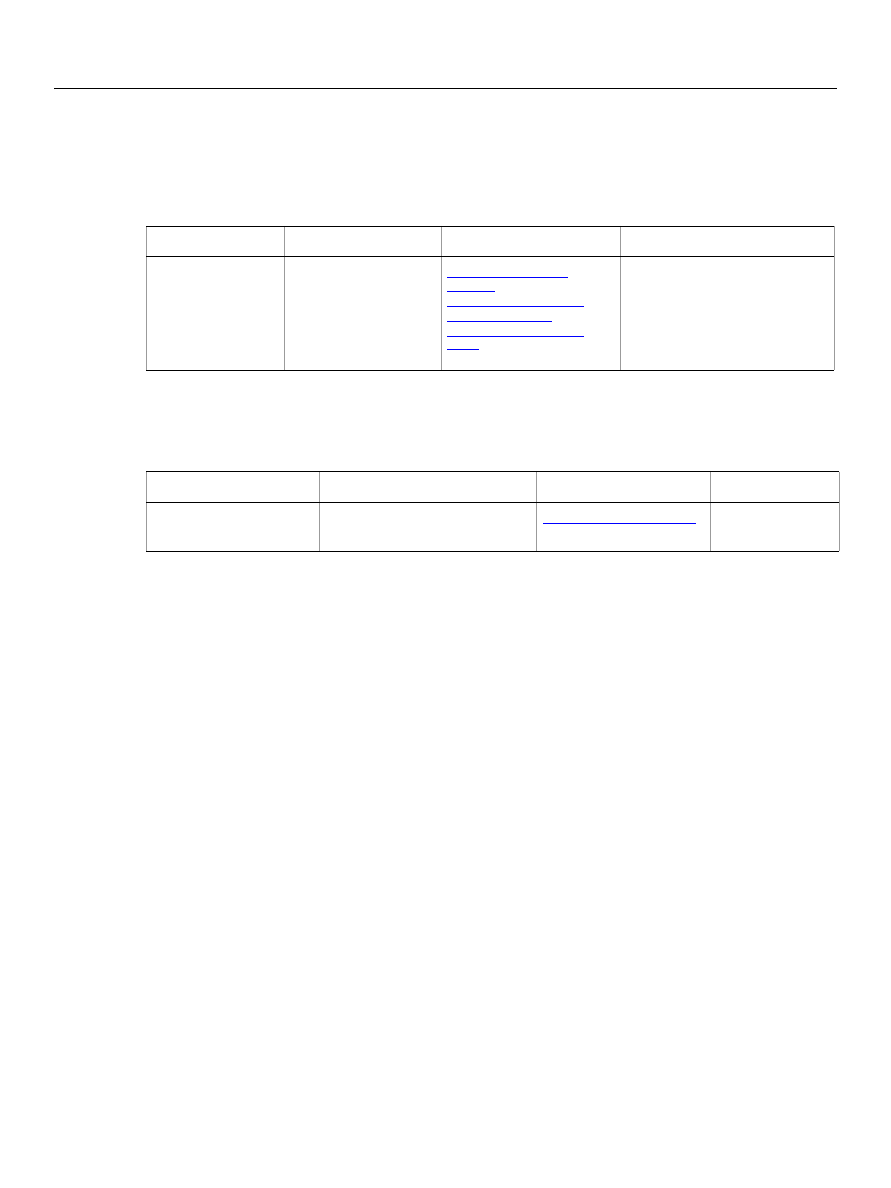
Adobe Photoshop CS5
AppleScript Scripting Reference
AppleScript Commands 223
merge
Merges an art layer or layer set into the layer below, or merges a spot channel into the component
channels. Merging a layer or layer set returns a reference to the resulting layer. Merging a channel does not
return any value.
merge visible layers
Flattens all visible layers in the document.
Parameters
What it is
Objects supported
Returns
merge art
layer/channel/
layer/ layer
set
The object or objects
to be operated upon.
art layer, art
layers
channel, channels
layer, layers
layer set, layer
sets
Merging a layer or layer set
returns a reference to the
resulting layer.
Merging a channel does not
return any value.
Parameters
What it is
Objects supported
Returns
merge visible
layers document
The document object or
objects to be operated upon.

Adobe Photoshop CS5
AppleScript Scripting Reference
AppleScript Commands 224
move
Moves one or more objects to a new location; returns references to the moved object or objects at the new
location.
Notes
Objects cannot be moved between documents.
➤
Moving layers
-- This script moves the bottommost, non-background layer, to after the first layer
tell application "Adobe Photoshop CS5"
activate
set doc to make new document
tell doc
set background layer of layer 1 to false
make new art layer with properties {name:"Top Layer"}
make new art layer with properties {name:"Buttom Layer"}
move first layer to after last layer
end tell
end tell
Parameters
What it is
Objects supported
Returns
move object
reference
or
list (of object
references
)
Object or objects to move.
art layer, art layers
layer, layers
layer set, layer sets
object reference
or
list
(of object
references)
to location
reference
New location of the object or
objects.

Adobe Photoshop CS5
AppleScript Scripting Reference
AppleScript Commands 225
open
Opens one or more specified document file(s).
➤
Opening a PDF file
This script sample opens a PDF document.
tell application "Adobe Photoshop CS5"
set myFilePath to alias "Data:docsamples:testfiles:PdfTest.pdf"
open myFilePath as PDF with options ¬
{class:PDF open options, height:pixels 100, width:pixels 200, ¬
mode:RGB, resolution:72, use antialias:true, page:1, ¬
constrain proportions:false}
end tell
Parameters
What it is
Objects supported
Returns
open file specification
The file to be opened.
N/A
nothing
as
Alias PIX/BMP/Camera
RAW/ CompuServe GIF/
DICOM/
Electric Image/EPS/
EPS PICT preview/
EPS TIFF
preview/Filmstrip/JPEG/
PCX/PDF/Photo CD/
Photoshop DCS 1.0/
Photoshop DCS 2.0/
Photoshop EPS/
Photoshop format/
Photoshop PDF/PICT file/
PICT resource/Pixar/PNG/
Portable Bitmap/raw/
Scitex CT/SGI RGB/
SoftImage/Targa/
TIFF/Wavefront RLA/
Wireless Bitmap
The type of file to open.
Note:
Photo CD
is
deprecated.
Note:
DICOM
is availabe in
the Extended version
only.
[showing dialogs
always/error
dialogs/never
]
The type of dialogs, if any, to
allow when the script is run.
[smart object boolean]
Indicates whether to create a
smart object around the
document opened.
(Default:
false
)
with options
Options for opening a
particular type of file.
Camera RAW open
options
DICOM open options
EPS open options
PDF open options
Photo CD open options
raw format open
options

Adobe Photoshop CS5
AppleScript Scripting Reference
AppleScript Commands 226
paste
Paste the clipboard contents into the current document.
Note:
Commands that manipulate the clipboard (
cut
,
copy
, and
paste
) require that Adobe Photoshop
CS5 be the frontmost application during these operations. Use
to bring Adobe
Photoshop CS5 to the front before executing a
copy
command. No error is returned if there is no
selection to copy. If the application is not frontmost, an error is returned.
Parameters
What it is
Objects supported
Returns
paste [clipping to
selection boolean]
Indicates whether to paste the
clipboard contents into the
current selection (default:
false
).

Adobe Photoshop CS5
AppleScript Scripting Reference
AppleScript Commands 227
Photoshop open dialog
Uses the Photoshop open dialog box to allow you to select files to open.
Parameters
What it is
Objects supported
Returns
Photoshop open
dialog
list of file
specification

Adobe Photoshop CS5
AppleScript Scripting Reference
AppleScript Commands 228
Prints one or more documents or files.
➤
Print a document
-- Print the current document
tell application "Adobe Photoshop CS5"
print document 1
end tell
Parameters
What it is
Objects supported
Returns
print anything
Document or list of documents, or
file or list of files to be printed.
nothing
[source space
document
space/
proof space
]
The color space for source (default:
document space
)
.
[print space Unicode
text
]
The color space for the printer. Can
be nothing (that is, the same as the
source); or
Working RGB
,
Working
CMYK
,
Working Gray
,
Lab Color
(
meaning one of the working color
spaces or Lab color); or a string
specifying a specific colorspace
(default:
nothing
).
[intent
absolute
colorimetric/
perceptual/
relative
colorimetric/
saturation intent
]
The color conversion intent (default:
relative colorimetric
).
Note:
Valid only when the print
space is different than the
source space.
[blackpoint
compensation
boolean
]
Indicates whether the color
conversion should use black point
compensation (default:
true
).
Note:
Valid only when the print
space is different than the
source space.

Adobe Photoshop CS5
AppleScript Scripting Reference
AppleScript Commands 229
purge
Purges one or more caches.
Parameters
What it is
Objects
supported
Returns
purge
all caches/
clipboard cache/
history caches/
undo caches
The caches to purge.

Adobe Photoshop CS5
AppleScript Scripting Reference
AppleScript Commands 230
quit
Forces Adobe Photoshop CS5 to quit.
Notes
If there is Adobe Photoshop CS5 data on the clipboard, Adobe Photoshop CS5 displays a dialog asking if
you want to save the clipboard for other applications. To prevent this dialog from being displayed, send
the following command to the frontmost application
set the clipboard to {}
➤
Quitting Adobe Photoshop CS5
tell application "Adobe Photoshop CS5"
activate
set the clipboard to {}
close every document saving no
quit
end tell
Parameters
What it is
Objects supported
Returns
none
nothing

Adobe Photoshop CS5
AppleScript Scripting Reference
AppleScript Commands 231
rasterize
Rasterizes the contents of an art layer.
Parameters
What it is
Objects supported
Returns
rasterize art layer
The art layer object or objects
to be operated upon.
art layer, art layers
layer, layers
affecting
all linked layers/
entire layer/
fill content/
layer clipping
path/
shape/text contents
The layers or layer contents or
components to rasterize.

Adobe Photoshop CS5
AppleScript Scripting Reference
AppleScript Commands 232
recapture
Recaptures the current layer state(s) for this layer comp.
Parameters
What it is
Objects supported
Returns
recapture layer
comp
The layer comp object or objects
to be operated upon.

Adobe Photoshop CS5
AppleScript Scripting Reference
AppleScript Commands 233
record measurements
Exports the measurement data to a file.
Parameters
What it is
Objects supported
Returns
record measurement
log
The measurement log object
or objects to be operated
upon.
data points
Array of identifiers of data
points to export. The order of
the data points is respected in
the exported file. Defaults to
data points visible in
Measurement Log palette.
source
Source of the measurments to
record.

Adobe Photoshop CS5
AppleScript Scripting Reference
AppleScript Commands 234
refresh
Pauses the script while the application refreshes.
Parameters
What it is
Objects supported
Returns
refresh
Wait for the application to redraw
the current document.

Adobe Photoshop CS5
AppleScript Scripting Reference
AppleScript Commands 235
reset from comp
Resets the layer comp state to the document state.
Parameters
What it is
Objects supported
Returns
reset from comp
layer comp
The layer comp object or objects to
be operated upon.

Adobe Photoshop CS5
AppleScript Scripting Reference
AppleScript Commands 236
resize canvas
Changes the size of the canvas.
resize image
Changes the size of the image.
Parameters
What it is
Objects supported
Returns
resize canvas
document
The document object or objects to
be operated upon.
[width real]
The desired width of the canvas
(unit value).
[height real]
The desired height of the canvas
(unit value).
[anchor position
bottom center/
bottom left/
bottom right/
middle center/
middle left/
middle right/
top center/top
left/
top right
]
The anchor to resize around
(default:
middle center
).
Parameters
What it is
Objects supported
Returns
resize image
document
The document object or
objects to be operated upon.
[width real]
The desired width of the
canvas (unit value).
[height real]
The desired height of the
canvas (unit value).
[resolution real]
The resolution (in pixels per
inch).
[resample method
bicubic/
bicubic sharper/
bicubic smoother/
bilinear/
closest neighbor/
none
]
The method to use for
resampling pixels (default:
bicubic
).

Adobe Photoshop CS5
AppleScript Scripting Reference
AppleScript Commands 237
reveal all
Expands the document to show clipped sections.
Parameters
What it is
Objects supported
Returns
reveal all document
The document object or
objects to be operated upon.

Adobe Photoshop CS5
AppleScript Scripting Reference
AppleScript Commands 238
rotate
Rotates the object.
rotate boundary
Rotates the boundary of the selection-object.
Parameters
What it is
Objects supported
Returns
rotate layer or
selection-object
The object or objects to be operated
upon.
art layer, art layers
layer, layers
layer set, layer sets
selection-object
angle real
The number of degrees to rotate. A
positive angle will rotate the canvas
clockwise; a negative value will
rotate the canvas counter-clockwise.
[anchor position
bottom center/
bottom left/
bottom right/
middle center/
middle left/
middle right/
top center/
top left/top right
]
The anchor point around which to
rotate the layer (default:
middle
center
).
Parameters
What it is
Objects supported
Returns
rotate boundary
selection-object
The selection-object object or
objects to be operated upon.
angle real
The number of degrees to rotate. A
positive angle will rotate the canvas
clockwise; a negative value will
rotate the canvas counter-clockwise.
[anchor position
bottom center/
bottom left/
bottom right/
middle center/
middle left/
middle right/
top center/
top left/top right
]
The anchor point around which to
rotate the layer (default:
middle
center
).

Adobe Photoshop CS5
AppleScript Scripting Reference
AppleScript Commands 239
rotate canvas
Rotates the canvas.
Parameters
What it is
Objects supported
Returns
rotate canvas
document
The document object or objects
to be operated upon.
angle real
The number of degrees to rotate.
A positive angle will rotate the
canvas clockwise; a negative
value will rotate the canvas
counter-clockwise.

Adobe Photoshop CS5
AppleScript Scripting Reference
AppleScript Commands 240
save
Saves an Adobe Photoshop CS5 document. Returns a reference to the saved document.
Parameters
What it is
Objects supported
Returns
save document
The document to save.
object
referenc
e
[in file
specification]
The file to save to,
specified as a string
containing the full file
path or an alias.
If not specified, the
document is saved to its
existing file.
[as
Alias PIX/
BMP/
CompuServe GIF/
Electric Image/
JPEG/
PCX/
Photoshop DCS 1.0/
Photoshop DCS 2.0/
Photoshop EPS/
Photoshop format/
Photoshop PDF/
PICT file/
PICT resource/
Pixar/
PNG/
Portable Bitmap/
raw/
Scitex CT/
SGI RGB/
SoftImage/
Targa/
TIFF/
Wavefront RLA
]
The file type to which to
save.
Note:
To save a file in
Wireless
Bitmap
format,
use the
comand, and
.
[copying boolean]
save as copy leaving
original open. Unsaved
files cannot be saved as
copy.

Adobe Photoshop CS5
AppleScript Scripting Reference
AppleScript Commands 241
This example shows to batch process folders of Adobe Photoshop CS5 documents, saving each as a PDF
file with specific settings.
-- Process all files in folders dropped on this script
-- (when saved as an applet)
-- Save each Adobe Photoshop CS5 file as a PDF file.
on run
tell me to open {choose folder}
end run
on open droppedItems
set destFolder to choose folder with prompt "Destination folder?"
repeat with anItem in droppedItems
tell application "Finder"
-- Make sure each item processed by this script is a folder
if class of item anItem is not folder then
-- Not a folder, notify the user of the error
display dialog "Please drop only folders on this script"
else
-- A folder, get the Adobe Photoshop CS5 files and process them
set fileList to (every file of anItem whose creator type is ¬
"8BIM") as alias list
end if
end tell
SaveFilesAsPDF(fileList, destFolder)
end repeat
end open
-- fileList is a list of aliases to Photoshop files
-- destFolder is an alias to a folder where the PDF files are to be saved
on SaveFilesAsPDF(fileList, destFolder)
set destPath to destFolder as string
repeat with aFile in fileList
tell application "Finder" to set fileName to name of aFile
[appending
lowercase extension/
no extension/
uppercase extension
]
append an extension to
the document name
[with options
The save options for the
specified file type.
BMP save options
EPS save options
GIF save options
JPEG save options
PDF save options
Photoshop DCS 1.0 save
options
Photoshop DCS 2.0 save
options
Photoshop save options
PICT file save options
PICT resource save options
Pixar save options
PNG save options
raw save options
SGI RGB save options
Targa save options
TIFF save options
Parameters
What it is
Objects supported
Returns

Adobe Photoshop CS5
AppleScript Scripting Reference
AppleScript Commands 242
set newFilePath to destPath & fileName & ".pdf"
tell application "Adobe Photoshop CS5"
open aFile
save current document in file newFilePath as Photoshop PDF ¬
with options {class:PDF save options, PDF compatibility:PDF 15,¬
preserve editing:true}
close current document saving no
end tell
end repeat
end SaveFilesAsPDF

Adobe Photoshop CS5
AppleScript Scripting Reference
AppleScript Commands 243
scale
Scales the object to the specified size.
scale boundary
Scales the boundary of selection.
Parameters
What it is
Objects supported
Returns
scale layer or
selection-object
The object or objects to be
operated upon.
art layer, art
layers
layer, layers
layer set, layer
sets
selection-object
[horizontal scale
real
]
The amount to scale the layer
horizontally (default: 100.0 as
percent).
[vertical scale
real
]
The amount to scale the layer
(default: 100.0 as percent).
[anchor position
bottom center/
bottom left/
bottom right/
middle center/
middle left/
middle right/
top center/top
left/
top right
]
The anchor point around
which to rotate the layer
(default:
middle center
).
Parameters
What it is
Objects supported
Returns
scale boundary
selection-object
The selection-object object or
objects to be operated upon.
[horizontal scale
real
]
The amount to scale the layer
horizontally (default:
100.0
as
percent).
[vertical scale
real
]
The amount to scale the layer
(default:
100.0
as percent).
[anchor position
bottom center/
bottom left/
bottom right/
middle center/
middle left/
middle right/
top center/top
left/
top right
]
The anchor point around
which to rotate the layer
(default:
middle center
).

Adobe Photoshop CS5
AppleScript Scripting Reference
AppleScript Commands 244
select
Changes the selection. (For Photoshop Suite.)
select
Makes the path item the active or selected path item. (For Path Suite).
Parameters
What it is
Objects supported
Returns
select object
The object or objects to be
operated upon.
document, documents
selection-object
region list of
anything
A list of corners of the
selection (in pixels).
[combination type
diminished/extended
/
intersected/replace
d
]
The method to use to combine
the new selection with the
existing selection (default:
replaced
).
[feather amount
real
]
The feather amount (default:
0.0
).
[antialiasing
boolean
]
Indicates whether to use
antialiasing (default:
true
).
Parameters
What it is
Objects supported
Returns
select path item
The path item to select.

Adobe Photoshop CS5
AppleScript Scripting Reference
AppleScript Commands 245
select all
Selects the entire image.
select border
Selects the border of the selection.
Parameters
What it is
Objects supported
Returns
select all document
The document object or
objects to be operated upon.
document, documents
selection-object
Parameters
What it is
Objects supported
Returns
select border
selection-object
The selection-object object or
objects to be operated upon.
width real
The width of the selection (unit
value).

Adobe Photoshop CS5
AppleScript Scripting Reference
AppleScript Commands 246
similar
Grows the selection to include pixels throughout the image falling within the tolerance range.
Parameters
What it is
Objects supported
Returns
similar
selection-object
The selection-object object or
objects to be operated upon.
tolerance integer
antialiasing
boolean

Adobe Photoshop CS5
AppleScript Scripting Reference
AppleScript Commands 247
smooth
Cleans up stray pixels left inside or outside a color-based selection within the radius specified in pixels.
Parameters
What it is
Objects supported
Returns
smooth
selection-object
The selection-object object or
objects to be operated upon.
radius integer
The sample radius in pixels (0 -
100).

Adobe Photoshop CS5
AppleScript Scripting Reference
AppleScript Commands 248
split channels
Splits the document’s channels.
Parameters
What it is
Objects supported
Returns
split channels
document
The document object or
objects to be operated upon.
list of
document
objects

Adobe Photoshop CS5
AppleScript Scripting Reference
AppleScript Commands 249
store
Saves the selection as a channel.
Parameters
What it is
Objects
supported
Returns
store
selection-object
The selection-object object or objects to
be operated upon.
into channel
The channel to save the selection to.
[combination type
diminished/extended
/
intersected/replace
d
]
The method to use to add the selection
to the existing contents of the channel
(default:
replaced
).

Adobe Photoshop CS5
AppleScript Scripting Reference
AppleScript Commands 250
stroke
Strokes the selection.
stroke path
Strokes the path with the specified information.
Parameters
What it is
Objects supported
Returns
stroke
selection-object
The selection-object object or
objects to be operated upon.
using color anything
The stroke color.
width integer
The stroke width (in pixels).
[location
center/inside/outside
]
The stroke placement (default:
center
).
[
blend mode
behind mode/clear
mode/
color blend/color
burn/
color dodge/darken/
difference/dissolve/
exclusion/hard light/
hard mix/hue blend/
lighten/linear burn/
linear dodge/
linear
light/luminosity/
multiply/normal/overla
y/pin light/
saturation blend/
screen/soft light/
vivid light
]
The color blending mode to use
(default:
normal
).
[opacity integer]
The opacity of the stroke
(default:
100
as percent).
[preserving
transparency boolean]

Adobe Photoshop CS5
AppleScript Scripting Reference
AppleScript Commands 251
Parameters
What it is
Objects supported
Returns
stroke path path item
The path item object or objects
to be operated upon.
[tool
art history brush tool/
background eraser tool/
blur tool/brush tool/
burn tool/
clone stamp tool/
color replacement tool/
dodge tool/eraser tool/
healing brush tool/
history brush tool/
pattern stamp tool/
pencil tool/sharpen
tool/
smudge tool/sponge
tool
]
The tool to use when stroking the
path.
[simulate pressure
boolean
]
Indicates whether to simulate the
pressure when using the tool.

Adobe Photoshop CS5
AppleScript Scripting Reference
AppleScript Commands 252
translate
Moves a layer or selection the specified amount (in pixels) relative to its current position.
Parameters
What it is
Objects supported
Returns
translate layer or
selection-object
The object or objects to be
operated upon.
art layer, art layers
layer, layers
layer set, layer sets
selection-object
[delta x real]
The horizontal transformation
(unit value).
[delta y real]
The vertical transformation
(unit value).

Adobe Photoshop CS5
AppleScript Scripting Reference
AppleScript Commands 253
translate boundary
Moves the selection relative to its current position.
Parameters
What it is
Objects supported
Returns
translate boundary
selection-object
The selection-object object or
objects to be operated upon.
[delta x real]
The horizontal transformation (unit
value).
[delta y real]
The vertical transformation (unit
value).

Adobe Photoshop CS5
AppleScript Scripting Reference
AppleScript Commands 254
trap
Applies trapping to a CMYK document.
Parameters
What it is
Objects supported
Returns
trap document
The document object or
objects to be operated upon.
width integer
The trap width in pixels.

Adobe Photoshop CS5
AppleScript Scripting Reference
AppleScript Commands 255
trim
Trims the transparent area around the image on the specified sides of the canvas.
Parameters
What it is
Objects supported
Returns
trim document
The document object or objects to be
operated upon.
[basing trim on
bottom right pixel/
top left pixel/
transparent pixels
]
The color of, or type of, pixels to base
trim on (default:
top left pixel
).
[top trim boolean
]
Indicates whether to trim away the
top of document (default:
true
).
[left trim boolean
]
Indicates whether to trim away the
left of document (default:
true
).
[bottom trim
boolean
]
Indicates whether to trim away the
bottom of document (default:
true
).
[right trim
boolean
]
Indicates whether to trim away the
right of document (default:
true
).

Adobe Photoshop CS5
AppleScript Scripting Reference
AppleScript Commands 256
unlink
Unlinks the layer.
Parameters
What it is
Objects supported
Returns
unlink layer
The layer object or objects to
be operated upon.

Adobe Photoshop CS5
AppleScript Scripting Reference
AppleScript Commands 257
web safe color
Finds the closest web safe color for a color.
Parameters
What it is
Objects
supported
Returns
The color to be changed.
CMYK color
gray color
HSB color
Lab color
no color
RGB color
RGB hex color
RGB color

258
Appendix A: Event ID Codes
The following table lists events and their four-character ID codes or string identifiers for use with the
notifier
object.
Note:
Do not include single quotes ( ' ) with four-character IDs in your code. The single quotes are
used in this table to illustrate the placement of required spaces in codes that do not contain four
letters. However, string identifiers, which are longer than four characters, require double quotes in
the code.
Tip:
If you can’t find the event you want to use for notification in this table, you can use ScriptListener to
determine the event ID code. See the ScriptListener documentation in the Action Manager chapter of
the Photoshop CS5 Scripting Guide.
Event
4-char ID or String
3DTransform
'TdT '
Average
'Avrg'
ApplyStyle
'ASty'
Assert
'Asrt'
AccentedEdges
'AccE'
Add
'Add '
AddNoise
'AdNs'
AddTo
'AddT'
Align
'Algn'
All
'All '
AngledStrokes
'AngS'
ApplyImage
'AppI'
BasRelief
'BsRl'
Batch
'Btch'
BatchFromDroplet
'BtcF'
Blur
'Blr '
BlurMore
'BlrM'
Border
'Brdr'
Brightness
'BrgC'
CanvasSize
'CnvS'
ChalkCharcoal
'ChlC'
ChannelMixer
'ChnM'

Adobe Photoshop CS5
AppleScript Scripting Reference
Appendix A: Event ID Codes 259
Charcoal
'Chrc'
Chrome
'Chrm'
Clear
'Cler'
Close
'Cls '
Clouds
'Clds'
ColorBalance
'ClrB'
ColorHalftone
'ClrH'
ColorRange
'ClrR'
ColoredPencil
'ClrP'
ContactSheet
"0B71D221-F8CE-11d2-B21B-0008C75B322
C"
ConteCrayon
'CntC'
Contract
'Cntc'
ConvertMode
'CnvM'
Copy
'copy'
CopyEffects
'CpFX'
CopyMerged
'CpyM'
CopyToLayer
'CpTL'
Craquelure
'Crql'
CreateDroplet
'CrtD'
Crop
'Crop'
Crosshatch
'Crsh'
Crystallize
'Crst'
Curves
'Crvs'
Custom
'Cstm'
Cut
'cut '
CutToLayer
'CtTL'
Cutout
'Ct
'
DarkStrokes
'DrkS'
DeInterlace
'Dntr'
DefinePattern
'DfnP'
Defringe
'Dfrg'
Delete
'Dlt '
Desaturate
'Dstt'
Event
4-char ID or String

Adobe Photoshop CS5
AppleScript Scripting Reference
Appendix A: Event ID Codes 260
Deselect
'Dslc'
Despeckle
'Dspc'
DifferenceClouds
'DrfC'
Diffuse
'Dfs '
DiffuseGlow
'DfsG'
DisableLayerFX
'dlfx'
Displace
'Dspl'
Distribute
'Dstr'
Draw
'Draw'
DryBrush
'DryB'
Duplicate
'Dplc'
DustAndScratches
'DstS'
Emboss
'Embs'
Equalize
'Eqlz'
Exchange
'Exch'
Expand
'Expn'
Export
'Expr'
Jumpto
'Jpto'
ExportTransparentImage "02879e00-cb66-11d1-bc43-0060b0a13dc
4"
Extrude
'Extr'
Facet
'Fct '
Fade
'Fade'
Feather
'Fthr'
Fibers
'Fbrs'
Fill
'Fl '
FilmGrain
'FlmG'
Filter
'Fltr'
FindEdges
'FndE'
FitImage "3caa3434-cb67-11d1-bc43-0060b0a13dc
4"
FlattenImage
'FltI'
Flip
'Flip'
Fragment
'Frgm'
Event
4-char ID or String

Adobe Photoshop CS5
AppleScript Scripting Reference
Appendix A: Event ID Codes 261
Fresco
'Frsc'
GaussianBlur
'GsnB'
Get
'getd'
Glass
'Gls '
GlowingEdges
'GlwE'
Gradient
'Grdn'
GradientMap
'GrMp'
Grain
'Grn '
GraphicPen
'GraP'
Group
'GrpL'
Grow
'Grow'
HalftoneScreen
'HlfS'
Hide
'Hd '
HighPass
'HghP'
HSBHSL
'HsbP'
HueSaturation
'HStr'
ImageSize
'ImgS'
Import
'Impr'
InkOutlines
'InkO'
Intersect
'Intr'
IntersectWith
'IntW'
Inverse
'Invs'
Invert
'Invr'
LensFlare
'LnsF'
Levels
'Lvls'
LightingEffects
'LghE'
Link
'Lnk '
Make
'Mk '
Maximum
'Mxm '
Median
'Mdn '
MergeLayers
'Mrg2'
MergeLayersOld
'MrgL'
MergeSpotChannel
'MSpt'
Event
4-char ID or String

Adobe Photoshop CS5
AppleScript Scripting Reference
Appendix A: Event ID Codes 262
MergeVisible
'MrgV'
Mezzotint
'Mztn'
Minimum
'Mnm '
ModeChange "8cba8cd6-cb66-11d1-bc43-0060b0a13dc
4"
Mosaic
'Msc '
Mosaic_PLUGIN
'MscT'
MotionBlur
'MtnB'
Move
'move'
NTSCColors
'NTSC'
NeonGlow
'NGlw'
Next
'Nxt '
NotePaper
'NtPr'
Notify
'Ntfy'
Null
typeNull
OceanRipple
'OcnR'
Offset
'Ofst'
Open
'Opn '
Paint
'Pnt '
PaintDaubs
'PntD'
PaletteKnife
'PltK'
Paste
'past'
PasteEffects
'PaFX'
PasteInto
'PstI'
PasteOutside
'PstO'
Patchwork
'Ptch'
Photocopy
'Phtc'
PicturePackage
"4C1ABF40-DD82-11d2-B20F-0008C75B322
C"
Pinch
'Pnch'
Place
'Plc '
Plaster
'Plst'
PlasticWrap
'PlsW'
Play
'Ply '
Event
4-char ID or String

Adobe Photoshop CS5
AppleScript Scripting Reference
Appendix A: Event ID Codes 263
Pointillize
'Pntl'
Polar
'Plr '
PosterEdges
'PstE'
Posterize
'Pstr'
Previous
'Prvs'
'Prnt'
ProfileToProfile
'PrfT'
Purge
'Prge'
Quit
'quit'
RadialBlur
'RdlB'
Rasterize
'Rstr'
RasterizeTypeSheet
'RstT'
RemoveBlackMatte
'RmvB'
RemoveLayerMask
'RmvL'
RemoveWhiteMatte
'RmvW'
Rename
'Rnm '
ReplaceColor
'RplC'
Reset
'Rset'
ResizeImage
"1333cf0c-cb67-11d1-bc43-0060b0a13dc
4"
Reticulation
'Rtcl'
Revert
'Rvrt'
Ripple
'Rple'
Rotate
'Rtte'
RoughPastels
'RghP'
Save
'save'
Select
'slct'
SelectiveColor
'SlcC'
Set
'setd'
SharpenEdges
'ShrE'
Sharpen
'Shrp'
SharpenMore
'ShrM'
Shear
'Shr '
Show
'Shw '
Event
4-char ID or String

Adobe Photoshop CS5
AppleScript Scripting Reference
Appendix A: Event ID Codes 264
Similar
'Smlr'
SmartBlur
'SmrB'
Smooth
'Smth'
SmudgeStick
'SmdS'
Solarize
'Slrz'
Spatter
'Spt '
Spherize
'Sphr'
SplitChannels
'SplC'
Sponge
'Spng'
SprayedStrokes
'SprS'
StainedGlass
'StnG'
Stamp
'Stmp'
Stop
'Stop'
Stroke
'Strk'
Subtract
'Sbtr'
SubtractFrom
'SbtF'
Sumie
'Smie'
TakeMergedSnapshot
'TkMr'
TakeSnapshot
'TkSn'
TextureFill
'TxtF'
Texturizer
'Txtz'
Threshold
'Thrs'
Tiles
'Tls '
TornEdges
'TrnE'
TraceContour
'TrcC'
Transform
'Trnf'
Trap
'Trap'
Twirl
'Twrl'
Underpainting
'Undr'
Undo
'undo'
Ungroup
'Ungr'
Unlink
'Unlk'
UnsharpMask
'UnsM'
Event
4-char ID or String

Adobe Photoshop CS5
AppleScript Scripting Reference
Appendix A: Event ID Codes 265
Variations
'Vrtn'
Wait
'Wait'
WaterPaper
'WtrP'
Watercolor
'Wtrc'
Wave
'Wave'
Wind
'Wnd '
ZigZag
'ZgZg'
BackLight
'BacL'
FillFlash
'FilE'
ColorCast
'ColE'
Event
4-char ID or String

Adobe Photoshop CS5
AppleScript Scripting Reference
Index 266
Index
A
actions
Add Noise filter 10
adjust command
adjustment options 11
Adobe Photoshop CS 3 changes 8
Adobe Photoshop CS 4 changes 8
anchor points 110, 111
annotations 170, 216
application
activating 178
bringing to front 12
checking if feature enabled 209
colors 12
preference settings 13
properties 12
quitting 230
version 13
art layers
See layers
auto kerning 160
auto leading 160
average filter 20
B
background color
application 12
as fill 53
galleries 64
RGB documents 35
background layer 16, 52
baseline shift 160
Batch command 21
batch command 183
beep 146
bitmap documents
opening 225
saving 26
specifying options for 23
bitmap images See bitmap documents
black and white images 169
Blur filter 24
blur filters
Blur 24
Blur More 25
Gaussian Blur 70
Glass 73
Lens Blur 92
Motion Blur 101
Radial Blur 135
Smart Blur 155
Blur More filter 25
BMP documents
BMP documents See bitmap documents
brightness
equalizing 59
specifying options 28
C
caches
camera raw documents
canvas
flipping 214
resizing 236
trimming 255
captions
contact sheets 39
document 81
gallery images 65
gallery thumbnails 69
picture packages 126
changes in Photoshop CS5 8
channels
activating 52
colors 32
creating 221
current 52
displaying in color 146
loading from 220
merging 223
mixing 100
specifying type 32
splitting 248
clipboard commands 178
clipping paths
defining 108
from path 222
from text 188
close command 185
Clouds filter 34
CMYK color 35
color picker 146
color samplers 37
colors
adjusting 179
balancing 36
changing mode 184
channels 32
comparing 203
converting 188
correcting 36
inverting 83
modifying 145
none 101

Adobe Photoshop CS5
AppleScript Scripting Reference
Index 267
process colors 145
text 165
web save 257
column gutter 146
commands
clipboard 178
See individual commands
CompuServe GIF documents
Compuserve GIF documents
contact sheets
columns 39
dimensions 40
rows 39
contrast
adjusting 179
automatic 18
specifying options 28
copying 189
copyright
counting 190
credits
documents 81
gallery images 65
gallery thumbnails 69
picture packages 126
cropping 193
cursors 148
curved segments (paths) 111, 157, 158
curves
D
DCS 1.0 documents
opening 119, 225
saving 60, 143
DCS 2.0 documents
opening 225
saving 60, 121, 143
De-Interlace filter 44
delete command 196
delete measurements 197
deleting, objects 196
desaturate command 45
deselect command
for documents 198
for path item 198
for selection-object 198
Despeckle filter 46
dialogs
display modes 12
suppressing 22
DICOM format documents
Difference Clouds filter 48
Diffuse Glow filter 49
Displace filter 50
distort filters
Diffuse Glow 49
Displace 50
Ocean Ripple 105
Pinch 128
Polar Coordinates 131
Ripple 140
Shear 154
Spherize 156
Twirl 172
Wave 174
Zigzag 176
documents
closing 185
color samplers 51
converting 188
creating 221
cropping 193
current 12
duplicating 201
elements of 51
exporting 206
flattening 213
flipping 214
loading 220
location 52
measurement scale 53
metadata 53
opening 225
opening with Photoshop dialog box 227
printing 228
saving 185, 240
size 52–53
updating automatically 146
duplicating 201, 202
Dust & Scratches filter 55
E
elements 9
EPS documents
opening 56, 107, 225
saving 57, 60, 143
equalizing 59
event IDs
using ScriptListener to find 258
event-handler 103
EXIF 81
exporting
documents 206
to Illustrator 78, 197, 206, 207, 233
to Web 141, 197, 206, 207, 233

Adobe Photoshop CS5
AppleScript Scripting Reference
Index 268
F
feature enabled command 209
file extensions 146
filter command 10, 61
Also see individual filters
filters See individual filters
filters, applying 212
filtersSee individual filters
fonts
Asian 149
English names 149
family 62
PostScript name 62
G
galleries
banner options 63
color options 64
layout 67
mage options 65
options 67
security 68
thumbnail options 69
Gaussian Blur filter 70
GIF documents
Glass filter 73
gray color 74
grids 147
guides 147
H
hanging punctuation 165
headline 81
hex color 139
High Pass filter 75
highlights
adjusting 36
brightness of 92
threshold 92
histograms
history states
activating 52
number to keep 148
properties 76
I
image pyramid 170
images
black and white 169
compressing 170
inverting colors 83
resizing 236
J
JavaScript, executing from Applescript 200
JPEG documents
K
kerning 160
keyboard behavior 147
keywords 81
L
Lab color 85
layer comps
applying 180
creating 221
options 88
recapturing 232
resetting 235
layer sets
creating 221
locking contents 89
layers
activating 52
blend mode 15
creating 221
linked 15, 16
linking 86, 219
locking contents 15, 86
making visible 15
merging 223
rasterizing 231
sample code 17
styles 181
type of 16
unlinking 256
leading 160
left direction points 110, 111
Lens Blur filter 92
Lens Flare filter 94
levels
load command
for documents 220
for selection-object 220
M
Maximum filter 96, 99
Median Noise filter 98
memory, available 12
merging

Adobe Photoshop CS5
AppleScript Scripting Reference
Index 269
metadata 53, 81, 175
midtones 36
Minimum filter 99
Motion Blur filter 101
move command 224
N
new features 8
notifier object 103
notifiers
O
objects
moving 224
rotating 238
scaling 243
Ocean Ripple filter 105
Offset filter 106
opacity
channels 32
fill (layers) 16
gamut warning 147
layer sets 90
layers 16, 87
picture packages 126
open command 107
optimizing 141
other filters
Custom 43
High Pass 75
Maximum 96
Minimum 99
P
paragraphs
pasting 226
path items See paths
path points
path segments 111, 157, 158
paths
closing 157
creating 111, 221
deselecting 198
exporting to Illustrator 78
filling 210
path type 108
retrieving information 110
selecting 244
stroking 250
PDF documents
opening 107, 112, 225
saving 60, 114, 143
PDF presentations
creating 191
formatting 133
looping 133
transition type 134
Photo CD documents
Photo CD documents, opening 117
photo filter adjustment 118
Photoshop documents
maximizing compatibility 148
opening 225
saving 60, 123, 143
Photoshop open dialog command 227
PICT files
PICT resource documents
picture packages 126
Pinch filter 128
Pixar documents
plugins 146
PNG documents
point size 148
point text 162
Polar Coordinates filter 131
posterizing 132
PostScript fonts 62
preferences 146
previewing 147
printing 228
properties 9
property
PSD documents
maximizing compatibility 148
saving 123
Q
R
Radial Blur filter 135
rasterizing 231
raw format documents
opening 107, 136, 137
saving 143
refresh command 234
RGB colors

Adobe Photoshop CS5
AppleScript Scripting Reference
Index 270
right direction points 110, 111
Ripple filter 140
ruler units 148
S
Also see individual document formats
Script Events Manager 103
scripting build date 13
scripting version 13
select command
for document 244
for path item 244
for selection-object 244
clearing 185
contracting 187
creating 193
deselecting 198
expanding 205
feathering 208
filling 210
growing 215
inverting 218
loading 220
selecting 244
storing as channel 249
stroking 250
selective colors 145
settings 146
SGI RGB documents
shadows
adjusting 36
camera raw documents 30
Sharpen Edges filter 152
Sharpen filter 151
sharpen filters
Sharpen 151
Sharpen Edges 152
Sharpen More 153
Unsharp Mask 173
Sharpen More filter 153
Shear filter 154
Smart Blur filter 155
smart quotes 149
smoothing 247
snapshot 76
Spherize filter 156
straight segments (paths) 111, 157, 158
strike thru 165
T
Targa documents
text
contents 160
converting to path 188
indenting 163
kerning 160
kind 162
orientation 166
picture package 126
text composer 166
text layers
Texture Fill filter 168
threshold
threshold adjustments 169
thumbnails
gallery images 69
Mac OS 148
Windows 149
TIFF documents
opening 225
saving 143, 170
saving layers in 146
trapping 254
trimming 255
Twirl filter 172
type units 149
U
units 148, 149
Unsharp Mask filter 173
urgency 82
V
video alpha 149
video filters
De-Interlace 44
NTSC colors 104
visibility
channels 32
layer sets 90
layers 16, 87
visible layers
W
warp 166
Wave filter 174
Web photo galleries
See galleries
creating 193
creating from selection 222
X

Document Outline
- Contents
- Introduction
- AppleScript Objects
- Elements
- Properties
- add noise
- adjustment options
- application
- Elements
- Properties
- best type
- class
- default type
- properties
- background color
- build
- color settings
- current document
- display dialogs
- foreground color
- free memory
- frontmost
- locale
- macintosh file types
- measurement log
- name
- notifiers enabled
- preferences folder
- recent files
- scripting build date
- scripting version
- settings
- system information
- windows file types
- version
- art layer, art layers
- automatic contrast
- automatic levels
- average
- batch options
- Bitmap mode options
- blur
- blur more
- BMP save options
- brightness and contrast
- Camera RAW open options
- Properties
- bits per channel
- blue hue
- blue saturation
- brightness
- chromatic aberration by
- chromatic aberration rc
- color noise reduction
- color space
- contrast
- exposure
- green hue
- green saturation
- luminance smoothing
- red hue
- red saturation
- resolution
- saturation
- settings
- shadows
- shadow tint
- sharpness
- size
- temperature
- tint
- vignetting amount
- vignetting midpoint
- white balance
- Properties
- change mode options
- channel, channels
- clouds
- CMYK color
- color balance
- color sampler, color samplers
- color value
- contact sheet options
- count item, count items
- curves
- custom filter
- deinterlace
- desaturate
- despeckle
- DICOM open options
- difference clouds
- diffuse glow
- displace filter
- document, documents
- Elements
- Properties
- best type
- class
- default type
- index
- properties
- background layer
- bits per channel
- color profile kind
- color profile name
- component channels
- current channels
- current history brush source
- current history state
- current layer
- file path
- height
- histogram
- info
- initial fill
- managed
- measurement scale
- mode
- modified
- name
- pixel aspect ratio
- quick mask mode
- resolution
- selection
- width
- XMP metadata
- dust and scratches
- EPS open options
- EPS save options
- equalize
- export options
- filter options
- font, fonts
- gallery banner options
- gallery color options
- gallery images options
- gallery options
- gallery security options
- gallery thumbnail options
- gaussian blur
- GIF save options
- glass filter
- gray color
- high pass
- history state, history states
- HSB color
- Illustrator paths export options
- indexed mode options
- info-object
- Properties
- best type
- class type
- default type
- properties
- author
- author position
- caption
- caption writer
- category
- city
- container
- copyright notice
- copyrighted
- country
- creation date
- credit
- EXIF
- headline
- instructions
- job name
- keywords
- owner url
- province or state
- source
- supplemental categories
- title
- transmission reference
- urgency
- Properties
- inversion
- JPEG save options
- Lab color
- layer, layers
- layer comp, layer comps
- layer set, layer sets
- lens blur
- lens flare
- levels adjustment
- maximum filter
- measurement scale
- median noise
- minimum filter
- mix channels
- motion blur
- no color
- notifier, notifiers
- NTSC colors
- ocean ripple
- offset filter
- open options
- path item, path items
- path point, path points
- path point info
- PDF open options
- PDF save options
- Properties
- color conversion
- descripton
- destination profile
- downgrade color profile
- down sample
- down sample limit
- down sample size
- eight convert
- embed color profile
- embed fonts
- embed thumbnail
- encoding
- image interpolation
- JPEG quality
- output condition
- output condition ID
- PDF compatibility
- PDF standard
- preserve editing
- presetfile
- profile inclusion policy
- registry name
- save alpha channels
- save annotations
- save layers
- save spot colors
- transparency
- tile size
- transparency
- use outlines for text
- vector data
- view
- web optimize
- Properties
- Photo CD open options
- photo filter
- Photoshop DCS 1.0 save options
- Photoshop DCS 2.0 save options
- Photoshop save options
- PICT file save options
- PICT resource save options
- picture package options
- pinch
- Pixar save options
- PNG save options
- polar coordinates
- posterize
- presentation options
- radial blur
- raw format open options
- raw save options
- RGB color
- RGB hex color
- ripple
- save for web export options
- save options
- selection-object
- selective color
- settings-object
- Properties
- best type
- class
- default type
- properties
- additional plugin folder
- append extension
- ask before saving layered TIFF
- auto update open documents
- beep when done
- cache levels
- color picker
- column gutter
- column width
- create first snapshot
- display color channels in color
- dynamic color sliders
- edit log items
- export clipboard
- font preview size
- full size preview
- gamut warning opacity
- grid size
- grid style
- grid subdivisions
- guide style
- icon preview
- image previews
- interpolation method
- keyboard zoom resizes windows
- Mac OS thumbnail
- maximize compatibility
- maximum RAM use
- nonlinear history
- number of history states
- other cursors
- painting cursors
- pixel doubling
- point size
- recent file list length
- ruler units
- save log items
- save log items file
- save palette locations
- show Asian text options
- show English font names
- show slice numbers
- show tool tips
- smart quotes
- type units
- use additional plugin folder
- use history log
- use lowercase extension
- use Shift key for tool switch
- use video alpha
- Windows thumbnail
- Properties
- SGI RGB save options
- sharpen
- sharpen edges
- sharpen more
- shear
- smart blur
- spherize
- sub path info
- sub path item, sub path items
- Targa save options
- text-object
- Properties
- best type
- class
- default type
- properties
- alternate ligatures
- antialias method
- auto kerning
- auto leading
- auto leading amount
- baseline shift
- capitalization
- container
- contents
- desired glyph scaling
- desired letter scaling
- desired word scaling
- faux bold
- faux italic
- first line indent
- font
- height
- horizontal scale
- horizontal warp distortion
- hyphen limit
- hyphenate after first
- hyphenate before last
- hyphenate capitalized words
- hyphenate words longer than
- hyphenation
- hyphenation zone
- justification
- kind
- language
- leading
- left indent
- ligatures
- maximum glyph scaling
- maximum letter scaling
- maximum word scaling
- minimum glyph scaling
- minimum letter scaling
- minimum word scaling
- no break
- old style
- position
- right indent
- Roman hanging punctuation
- size
- space after
- space before
- strike thru
- stroke color
- text composer
- text direction
- tracking
- underline
- vertical scale
- vertical warp distortion
- warp bend
- warp direction
- warp style
- width
- Properties
- texture fill
- threshold adjustment
- TIFF save options
- twirl
- unsharp mask
- wave filter
- XMP metadata
- zigzag
- AppleScript Commands
- Overview
- activate
- adjust
- apply
- apply layer style
- auto count
- batch
- change mode
- close
- clear
- contract
- convert
- convert color
- convert to shape
- copy
- copy merged
- count
- create contact sheet
- create PDF presentation
- create photo gallery
- create photo merge
- create picture package
- create selection
- create work path
- crop
- cut
- delete
- delete measurements
- deselect
- deselect
- do action
- do javascript
- doc duplicate
- duplicate
- duplicate
- equal colors
- exists
- expand
- export
- export measurements
- feather
- feature enabled
- fill
- fill path
- filter
- flatten
- flip canvas
- grow
- import annotations
- index
- invert
- link
- load
- load
- make
- make clipping path
- make work path
- merge
- merge visible layers
- move
- open
- paste
- Photoshop open dialog
- purge
- quit
- rasterize
- recapture
- record measurements
- refresh
- reset from comp
- resize canvas
- resize image
- reveal all
- rotate
- rotate boundary
- rotate canvas
- save
- scale
- scale boundary
- select
- select
- select all
- select border
- similar
- smooth
- split channels
- store
- stroke
- stroke path
- translate
- translate boundary
- trap
- trim
- unlink
- web safe color
- Appendix A: Event ID Codes
- Index
Wyszukiwarka
Podobne podstrony:
więcej podobnych podstron