HUAWEI
U8815 V100R001C00B952
Secret
2012-12-17
Huawei confidential, no
spreading without permission
Page 1, Total7
HUAWEI
U8815 V100R001C00B952
Software Upgrade Guideline
Prepared by
U8815
Date
2012-11-21
Reviewed by
U8815
Date
2012-11-21
Approved by
U8815
Date
2012-11-21
Huawei Technologies Co., Ltd.
All rights reserved

HUAWEI
U8815 V100R001C00B952
Secret
2012-12-17
Huawei confidential, no
spreading without permission
Page 2, Total7
Contents
HE FOLLOWING VERSIONS CAN BE UPGRADED
. ....................................................................... 3
HECK CURRENT UPGRADE ENVIRONMENT
.............................................................................. 3
ET AND CHECK THE SOFTWARE PACKAGE
............................................................................... 3
HUAWEI
U8815 V100R001C00B952
Secret
2012-12-17
Huawei confidential, no
spreading without permission
Page 3, Total7
1 Version introduction
1.1
The following versions can be upgraded.
Versions can be upgraded
U8815 V100R001C00B934
U8815 V100R001C00B937
U8815 V100R001C00B939
U8815 V100R001C00B944
U8815 V100R001C00B946
U8815 V100R001C00B948
U8815 V100R001C00B951
U8815 V100R001C00B952
1.2
Upgrade prerequisite
The handset software should be updated with the MICRO SD card.
1.3
Upgrade files
File Name
Software: main package
Dload\update.app
Update tools
MICRO SD card
2 Upgrade preparation
2.1
Check current upgrade environment
A MICRO SD card of 1GB or more should be available. The MICRO SD card made
by Sandisk、Kingstone or Kingmax is recommended,Make sure that the MICRO SD card
is available and can be read and write.
2.2
Get and check the software package
The content of the compressed files is: dload/UPDATE.APP
HUAWEI
U8815 V100R001C00B952
Secret
2012-12-17
Huawei confidential, no
spreading without permission
Page 4, Total7
3 Upgrade introduction
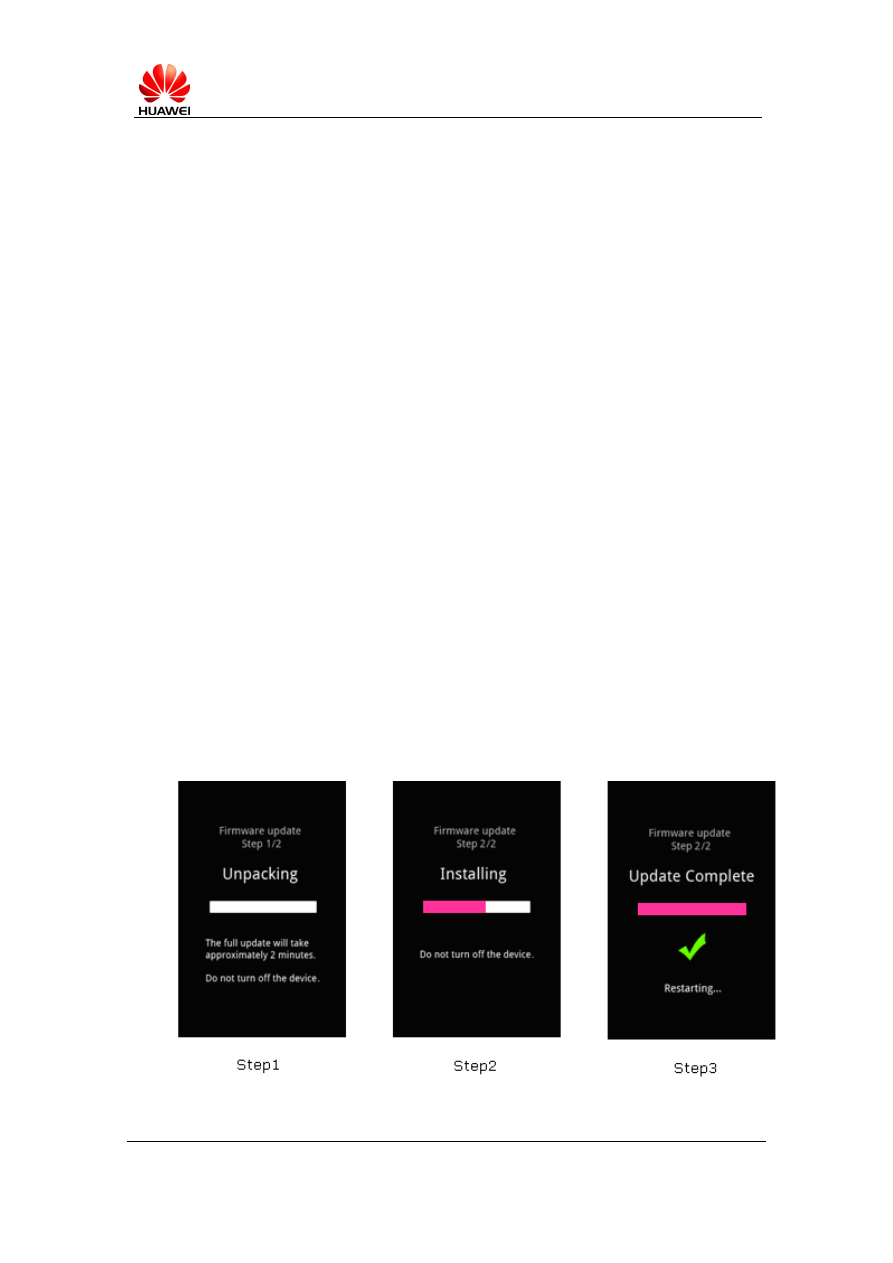
There are two methods to upgrade: force upgrade and normal upgrade.
Force upgrade is often used when the handset can
’t boot up or can’t enter the idle
screen. Normal upgrade needs to start the handset and enter the Setting module.
4 Upgrade operations
4.1 Force upgrade
Step 1. Format the MICRO SD card (This operation is optional).
Step 2. Unzip the package
U8815 V100R001C00B952.rar
(right click your mouse and
select ‘Extract here’).
Step 3. Obtain the unzipped file (subdirectory: \dload\*.*) to be upgraded,Copy the
entire dload folder (with
UPDATE.APP
in it) to the root directory of the MICRO
SD card(dload\
UPDATE.APP
).
Step 4. Make sure your handset is power off. Insert the MICRO SD card into the
handset. Pressing the
VOLUME UP
key and
VOLUME DOWN
key, and then
press the
POWER
key to power on the phone and enter the Software Upgrade
Mode.
Step 5. When the progress bar stop, the phone will restart, if not you need to
HUAWEI
U8815 V100R001C00B952
Secret
2012-12-17
Huawei confidential, no
spreading without permission
Page 5, Total7
remove the battery manually.
4.2 Normal upgrade
Step 1. Format the MICRO SD card (This operation is optional).
Step 2. Unzip the package
U8815 V100R001C00B952.rar
(right click your mouse and
select ‘Extract here’).
Step 3. Obtain the unzipped file (subdirectory: \dload\*.*) to be upgraded,Copy the
entire dload folder (with
UPDATE.APP
in it) to the root directory of the MICRO
SD card(dload\
UPDATE.APP
).
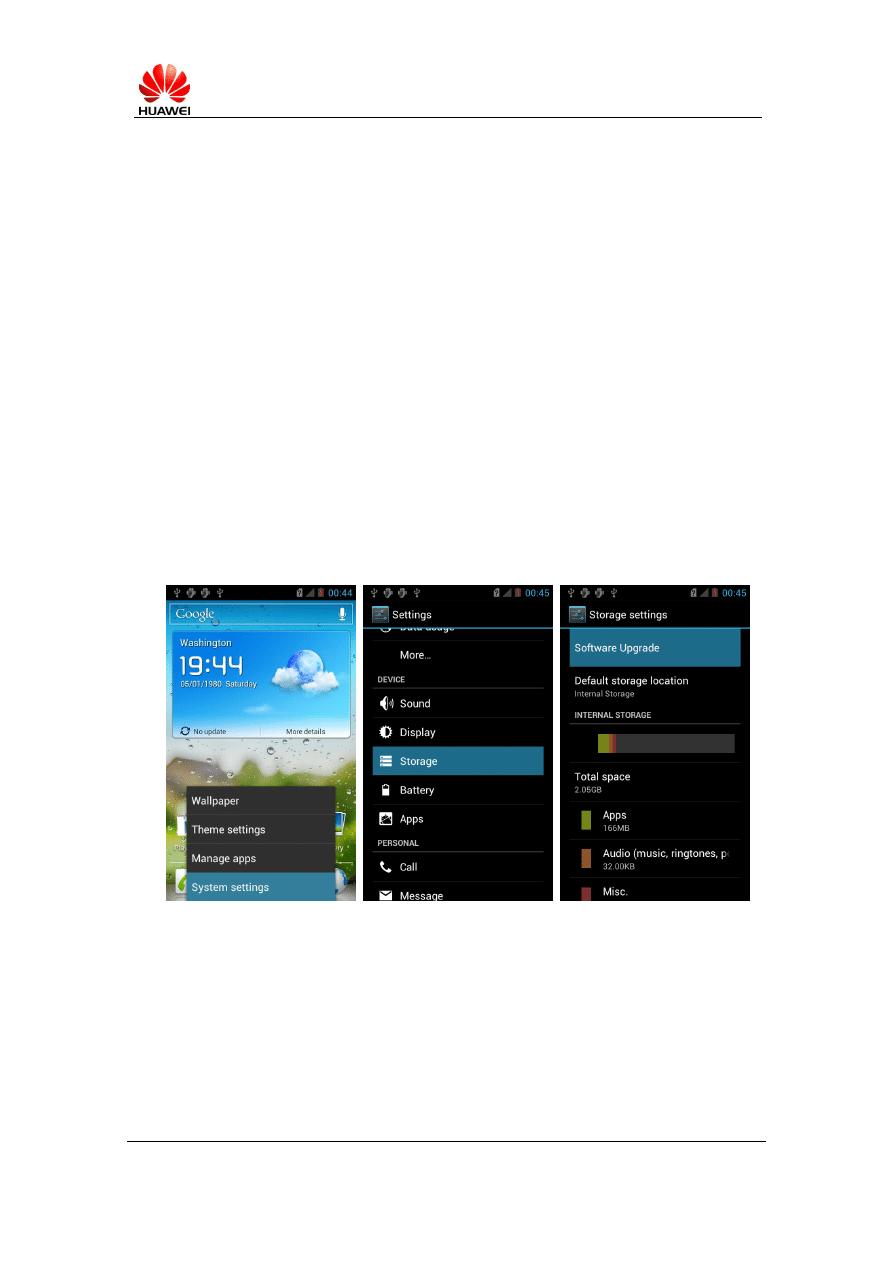
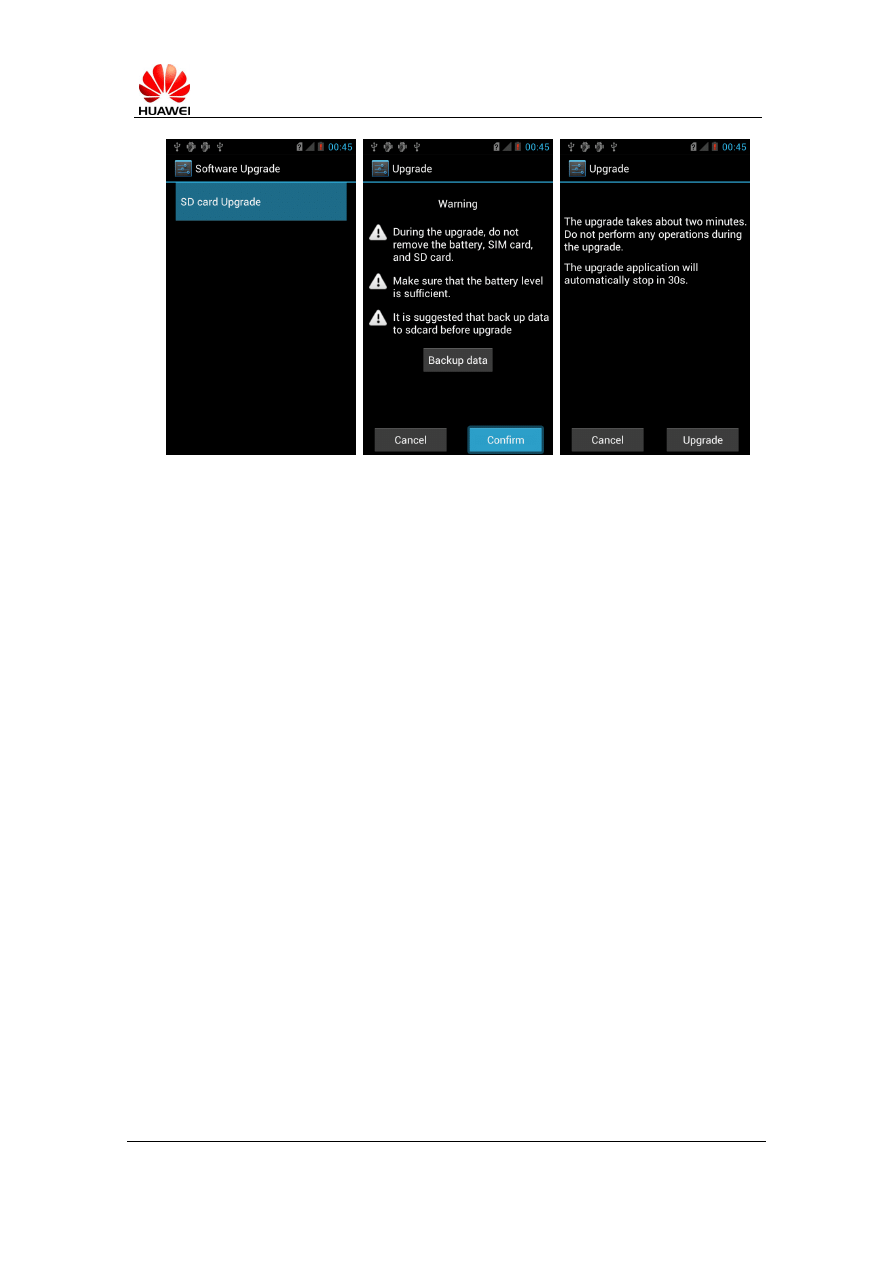
Step 4. Insert the MICRO SD card into the handset and power on. After entering the
home screen, press menu key to choose Settings->Storage->Software
upgrade->SD card Upgrade to start the upgrade. Reference to the following
pictures.
HUAWEI
U8815 V100R001C00B952
Secret
2012-12-17
Huawei confidential, no
spreading without permission
Page 6, Total7
Step 5. When the progress bar stop, the phone will restart, if not you need to
remove the battery manually.
5 Upgrade validate
5.1 Check the version
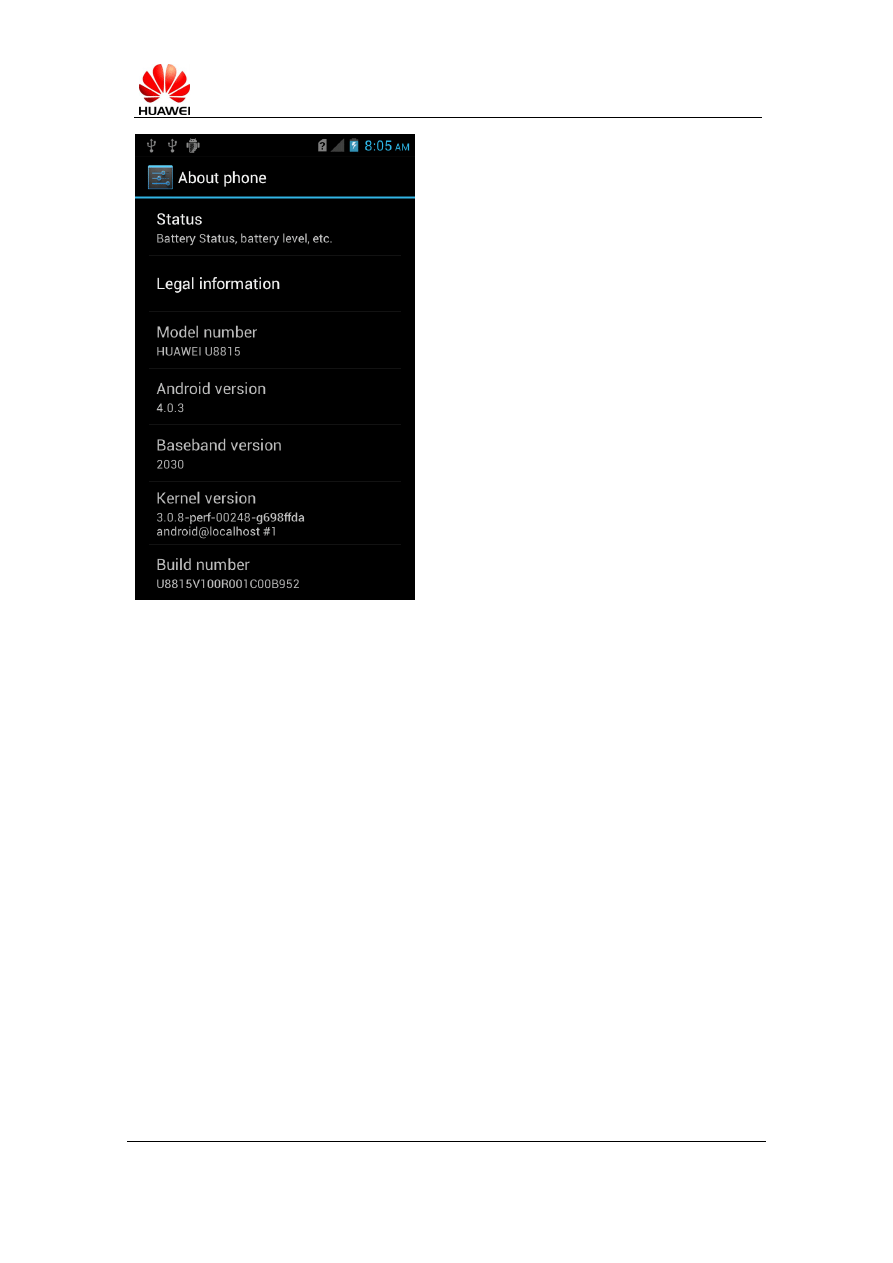
1. By Setting ->About phone->Build version, to check the version. Just like
HUAWEI
U8815 V100R001C00B952
Secret
2012-12-17
Huawei confidential, no
spreading without permission
Page 7, Total7
U8815V100R001C00B952
5.2
Notes 1
To make sure that the power of the battery is enough to run the upgrade process.
Maybe you can connect the handset with the charger or the USB data cable to provide
power.
5.3
Notes 2
Upgrade operations will erase the user data, so if there is something very important,
recommend you to backup them.
Wyszukiwarka
Podobne podstrony:
więcej podobnych podstron