
University of Washington
Section 9: Virtual Memory (VM)
Overview and motivation
Indirection
VM as a tool for caching
Memory management/protection and address translation
Virtual memory example
Virtual Memory as Cache
University of Washington
VM and the Memory Hierarchy
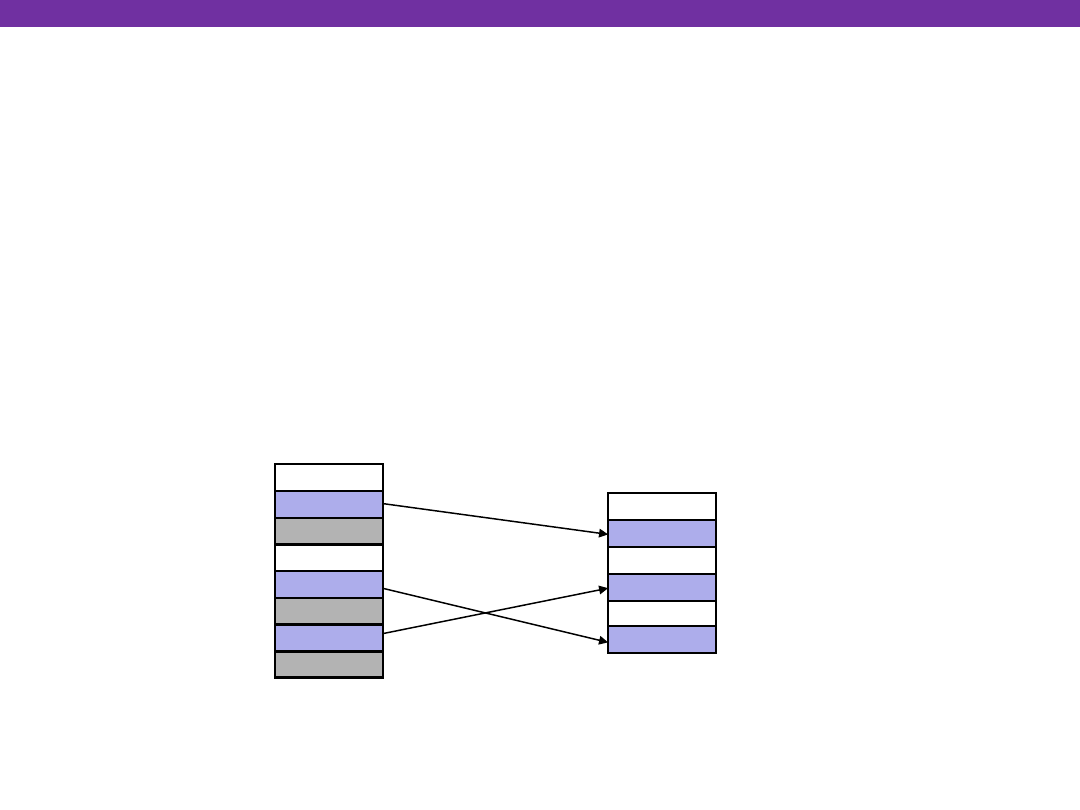
Think of virtual memory as an array of N = 2
n
contiguous
bytes stored
on a disk
Then physical main memory (DRAM) is used as a
cache
for
the virtual memory array
The cache blocks are called
pages
(size is P = 2
p
bytes)
PP 2
m-p
-1
Physical memory
Empty
Empty
Uncached
VP 0
VP 1
VP 2
n-p
-1
Virtual memory
Unallocated
Cached
Uncached
Unallocated
Cached
Uncached
PP 0
PP 1
Empty
Cached
0
N-1
M-1
0
Virtual pages (VPs)
stored on disk
Physical pages (PPs)
cached in DRAM
Virtual Memory as Cache
University of Washington
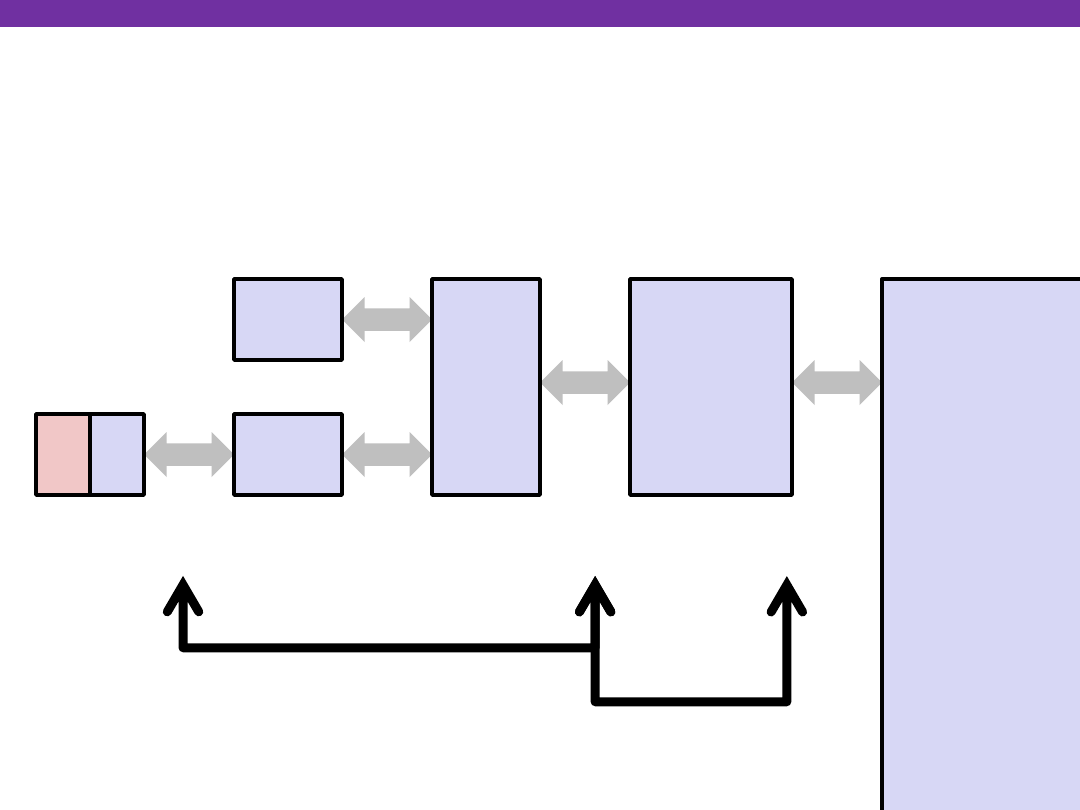
Memory Hierarchy: Core 2 Duo
Virtual Memory as Cache
Disk
Main
Memory
L2
unified
cache
L1
I-cache
L1
D-cache
CPU
Reg
2 B/cycle
8 B/cycle
16 B/cycle
1 B/30 cycles
Throughput:
Latency:
100 cycles
14 cycles
3 cycles
millions
~4 MB
32 KB
~4 GB
~500 GB
Not drawn to scale
L1/L2 cache: 64 B blocks
Miss penalty (latency): 33x
Miss penalty (latency): 10,000x

University of Washington
DRAM Cache Organization
DRAM cache organization driven by the enormous miss
penalty
DRAM is about
10x
slower than SRAM
Disk is about
10,000x
slower than DRAM
(for first byte; faster for next byte)
Consequences?
Block size?
Associativity?
Write-through or write-back?
Virtual Memory as Cache

University of Washington
DRAM Cache Organization
DRAM cache organization driven by the enormous miss
penalty
DRAM is about
10x
slower than SRAM
Disk is about
10,000x
slower than DRAM
(for first byte; faster for next byte)
Consequences
Large page (block) size: typically 4-8 KB, sometimes 4 MB
Fully associative
Any VP can be placed in any PP
Requires a “large” mapping function – different from CPU caches
Highly sophisticated, expensive replacement algorithms
Too complicated and open-ended to be implemented in hardware
Write-back rather than write-through
Virtual Memory as Cache
University of Washington
Indexing into the “DRAM Cache”
Virtual Memory as Cache
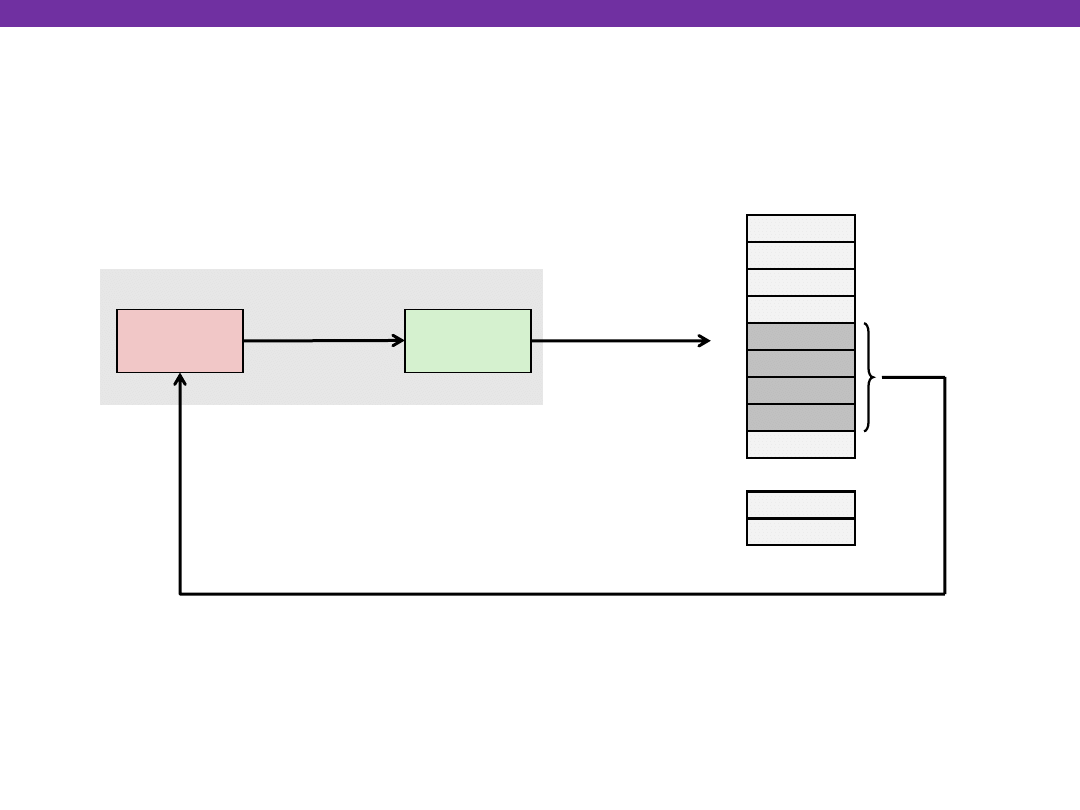
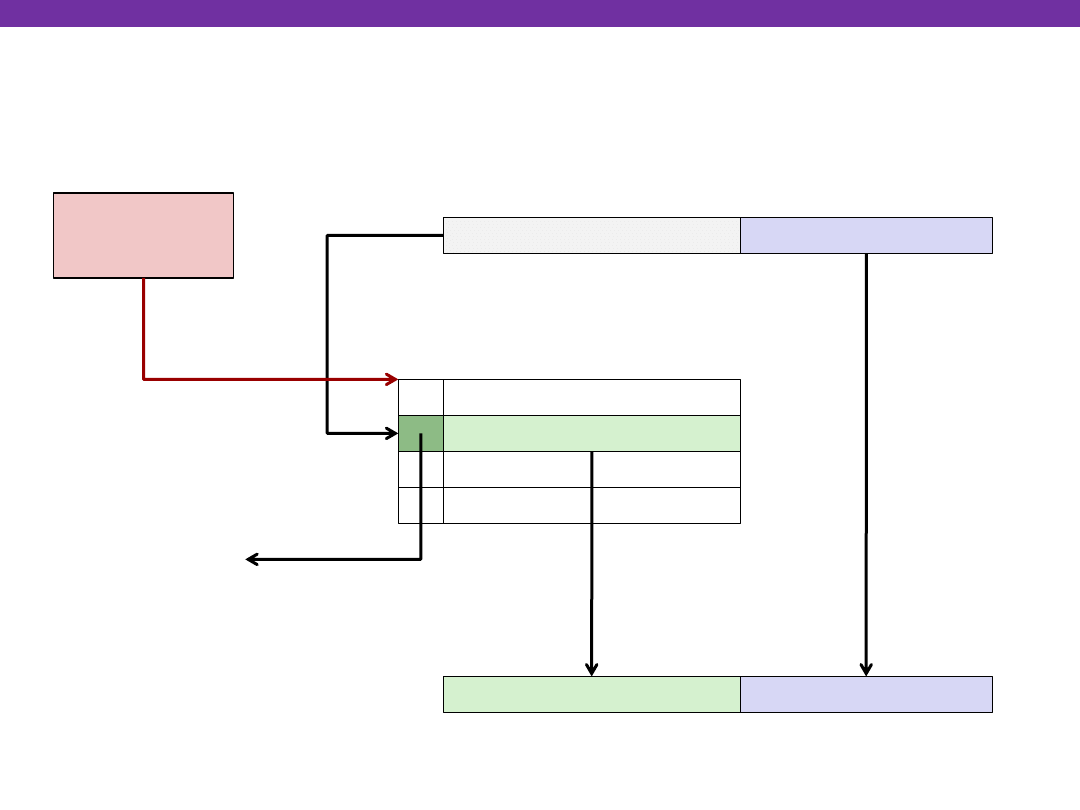
How do we perform the VA -> PA translation?
0:
1:
M-1:
Main memory
MMU
2:
3:
4:
5:
6:
7:
Physical address
(PA)
Data word
8:
...
CPU
Virtual address
(VA)
CPU Chip
University of Washington
Address Translation: Page Tables
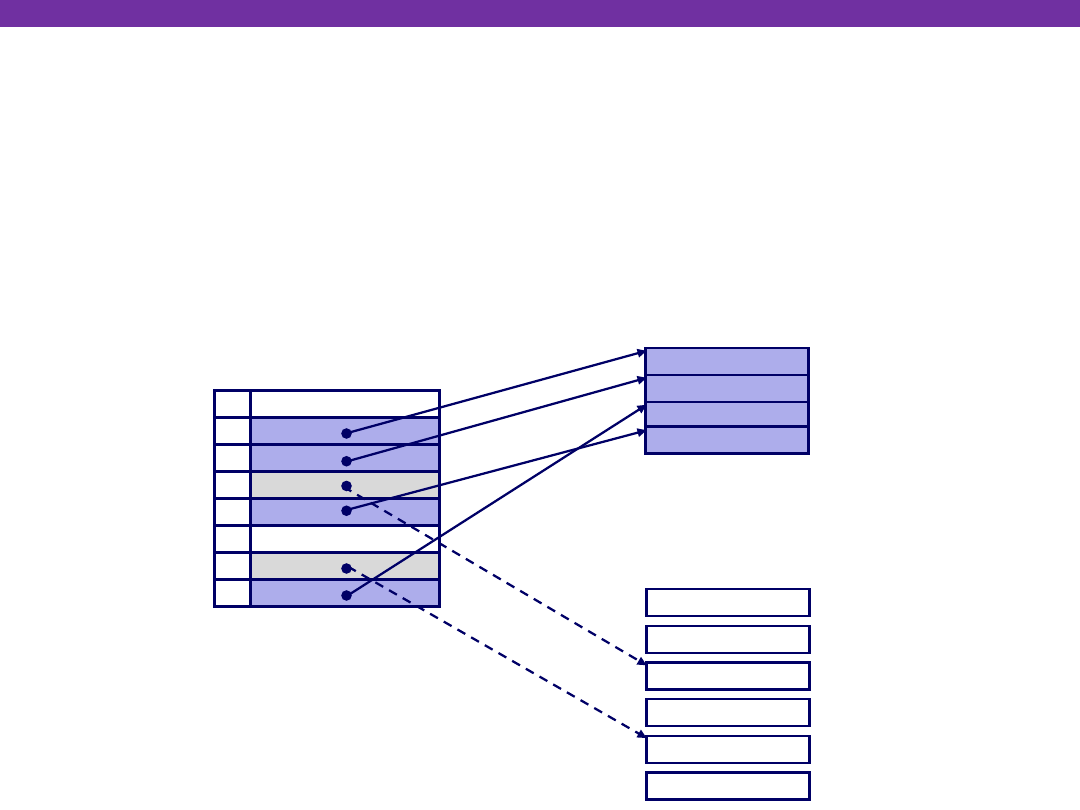
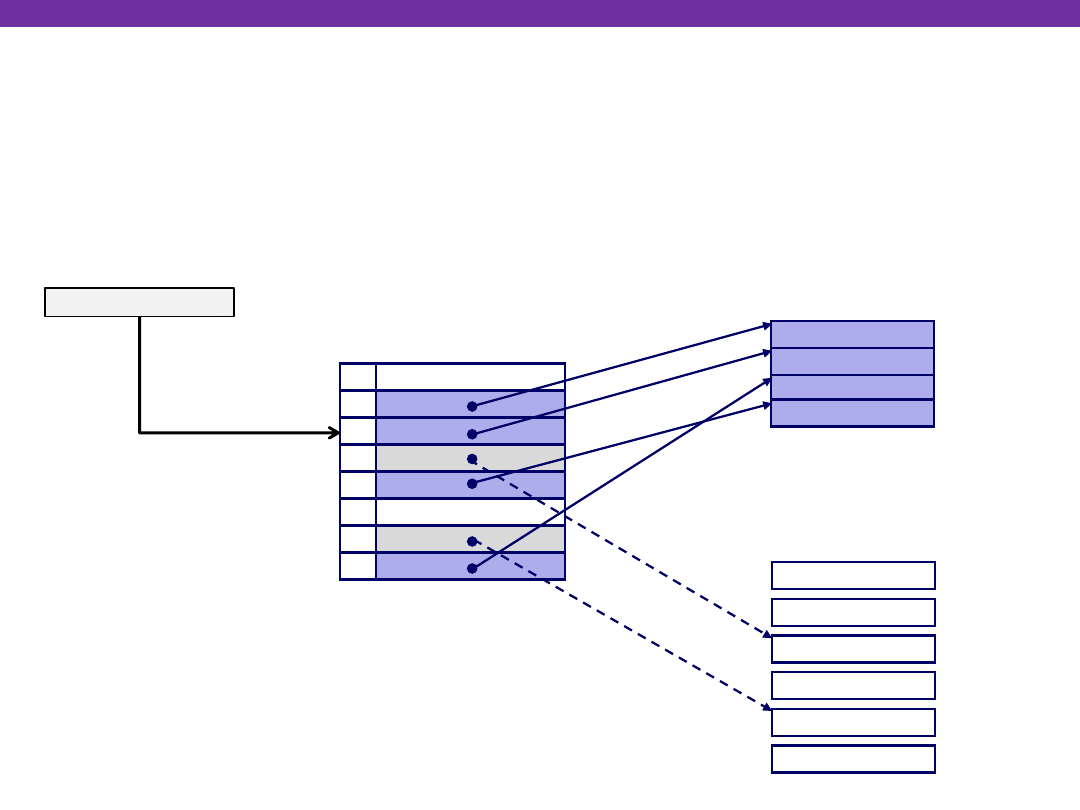
A
page table
(PT) is an array of
page table entries
(PTEs) that
maps virtual pages to physical pages.
Virtual Memory as Cache
null
null
Memory resident
page table
(DRAM)
Physical memory
(DRAM)
VP 7
VP 4
Virtual memory
(disk)
Valid
0
1
0
1
0
1
0
1
Physical page
number or
disk address
PTE 0
PTE 7
PP 0
VP 2
VP 1
PP 3
VP 1
VP 2
VP 4
VP 6
VP 7
VP 3
How many page tables are in the system?
One per process
University of Washington
Address Translation With a Page Table
Virtual Memory as Cache
Virtual page number (VPN)
Virtual page offset (VPO)
Physical page number (PPN)
Physical page offset (PPO)
Virtual address (VA)
Physical address (PA)
Valid
Physical page number (PPN)
Page table
base register
(PTBR)
Page table
Page table address
for process
Valid bit = 0:
page not in memory
(page fault)
In most cases, the hardware
(the MMU) can perform this
translation on its own,
without software assistance
University of Washington
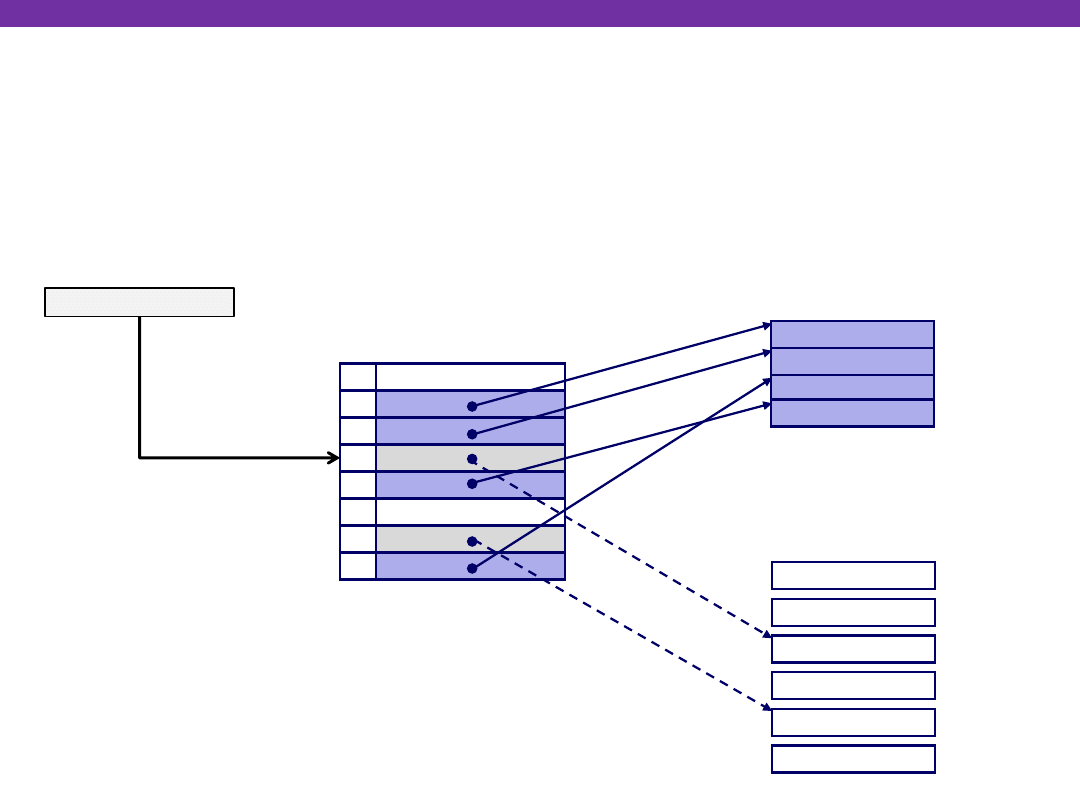
Page Hit
Page hit:
reference to VM byte that is in physical memory
null
null
Memory resident
page table
(DRAM)
Physical memory
(DRAM)
VP 7
VP 4
Virtual memory
(disk)
Valid
0
1
0
1
0
1
0
1
Physical page
number or
disk address
PTE 0
PTE 7
PP 0
VP 2
VP 1
PP 3
VP 1
VP 2
VP 4
VP 6
VP 7
VP 3
Virtual address
Virtual Memory as Cache
University of Washington
Page Fault
Page fault:
reference to VM byte that is
NOT
in physical
memory
Virtual Memory as Cache
null
null
Memory resident
page table
(DRAM)
Physical memory
(DRAM)
VP 7
VP 4
Virtual memory
(disk)
Valid
0
1
0
1
0
1
0
1
Physical page
number or
disk address
PTE 0
PTE 7
PP 0
VP 2
VP 1
PP 3
VP 1
VP 2
VP 4
VP 6
VP 7
VP 3
Virtual address
What happens when a page
fault occurs?
University of Washington
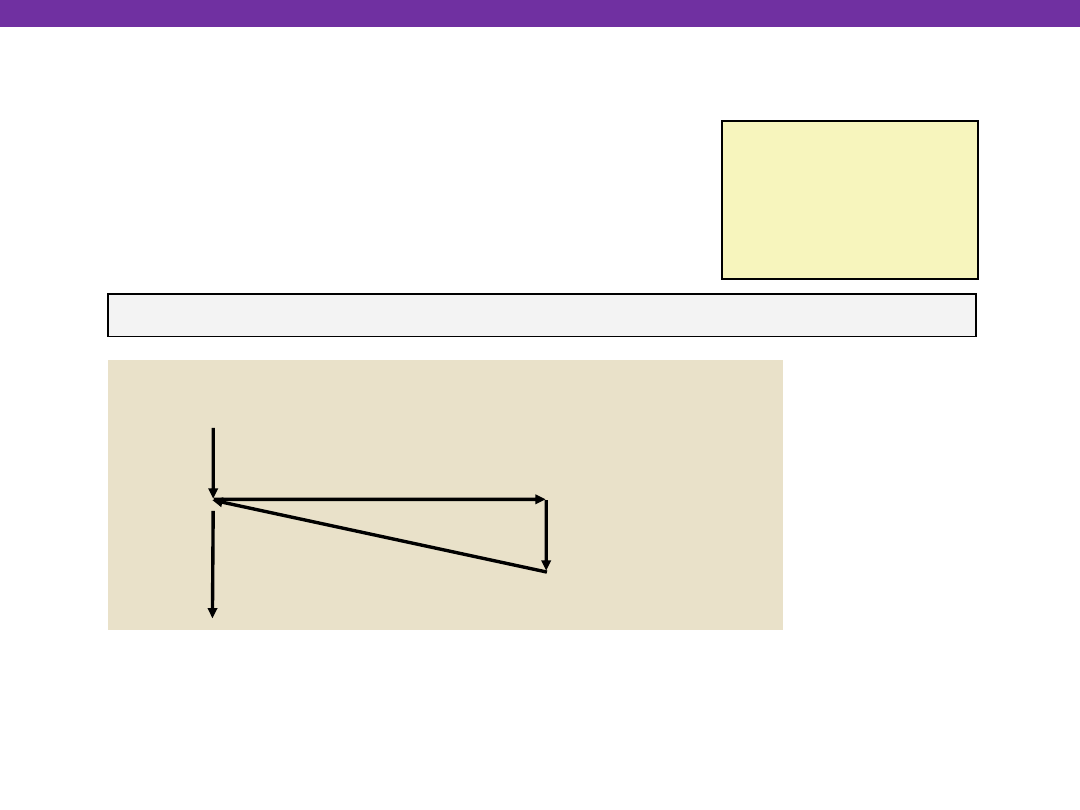
User writes to memory location
That portion (page) of user’s memory
is currently on disk
Page handler must load page into physical memory
Returns to faulting instruction: mov is executed again!
Successful on second try
int a[1000];
main ()
{
a[500] = 13;
}
80483b7:
c7 05 10 9d 04 08 0d movl $0xd,0x8049d10
User Process
OS
exception: page fault
Create page and
load into memory
returns
movl
Virtual Memory as Cache
Fault Example: Page Fault
University of Washington
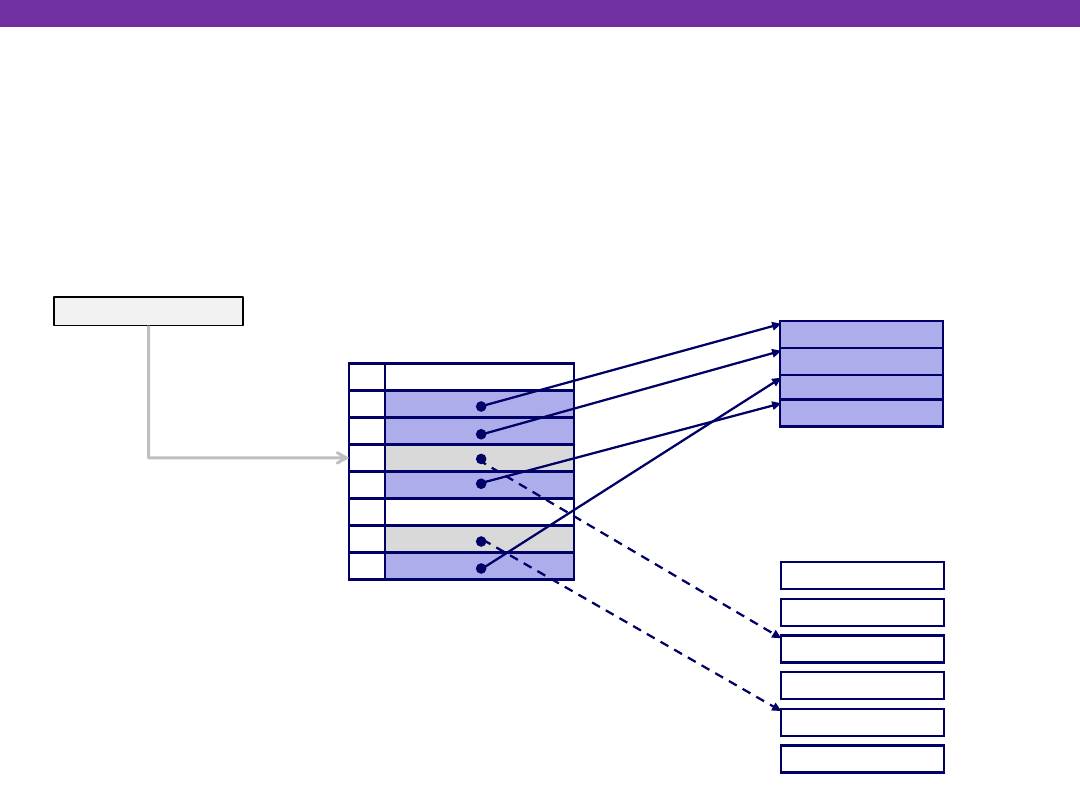
Handling Page Fault
Page miss causes page fault (an exception)
null
null
Memory resident
page table
(DRAM)
Physical memory
(DRAM)
VP 7
VP 4
Virtual memory
(disk)
Valid
0
1
0
1
0
1
0
1
Physical page
number or
disk address
PTE 0
PTE 7
PP 0
VP 2
VP 1
PP 3
VP 1
VP 2
VP 4
VP 6
VP 7
VP 3
Virtual address
Virtual Memory as Cache
University of Washington
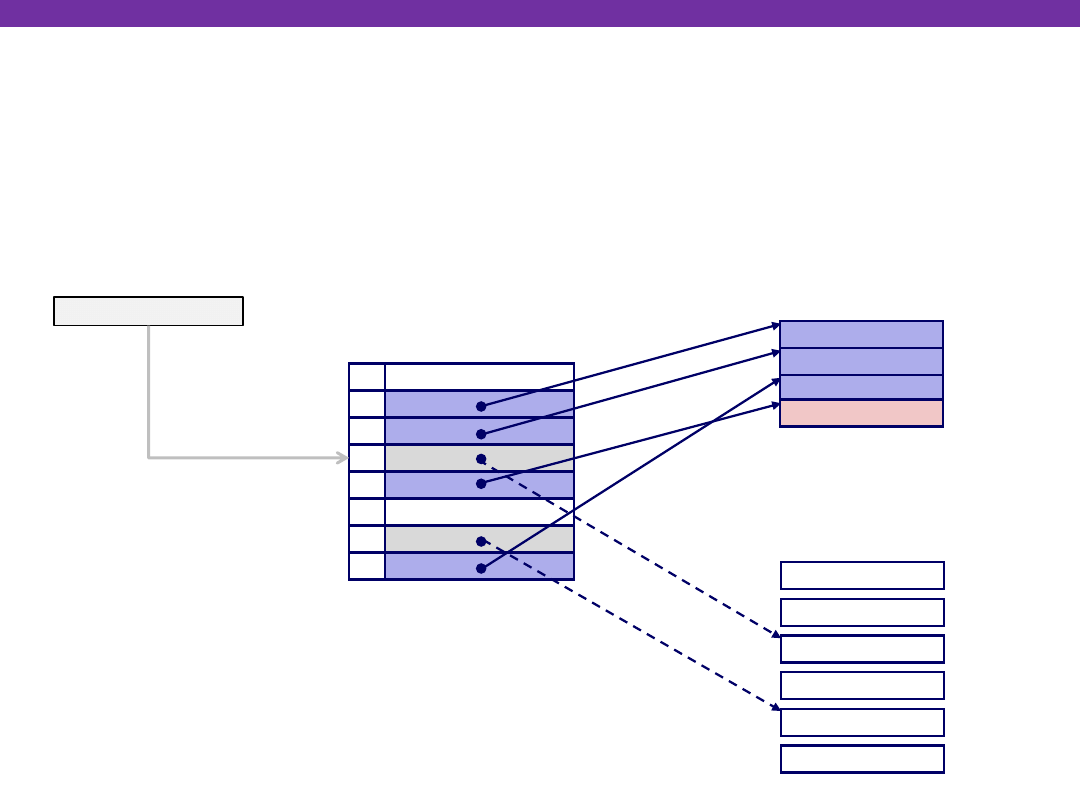
Handling Page Fault
Page miss causes page fault (an exception)
Page fault handler selects a victim to be evicted (here VP 4)
null
null
Memory resident
page table
(DRAM)
Physical memory
(DRAM)
VP 7
VP 4
Virtual memory
(disk)
Valid
0
1
0
1
0
1
0
1
Physical page
number or
disk address
PTE 0
PTE 7
PP 0
VP 2
VP 1
PP 3
VP 1
VP 2
VP 4
VP 6
VP 7
VP 3
Virtual address
Virtual Memory as Cache
University of Washington
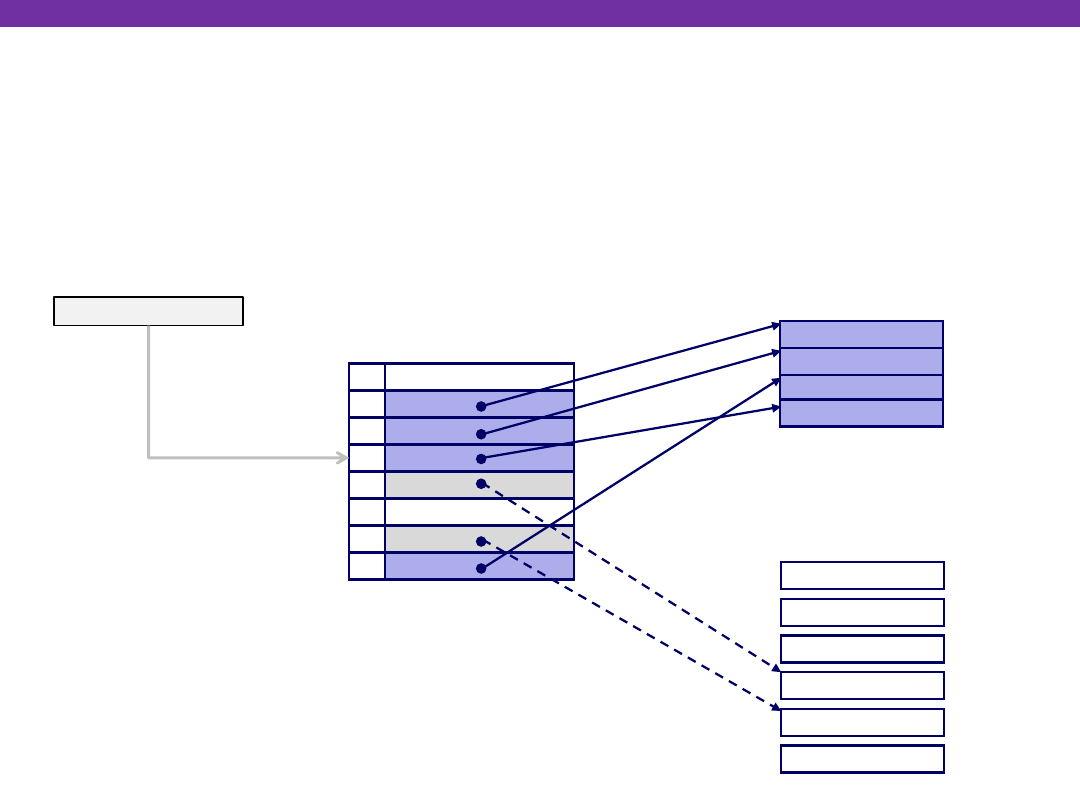
Handling Page Fault
Page miss causes page fault (an exception)
Page fault handler selects a victim to be evicted (here VP 4)
null
null
Memory resident
page table
(DRAM)
Physical memory
(DRAM)
VP 7
VP 3
Virtual memory
(disk)
Valid
0
1
1
0
0
1
0
1
Physical page
number or
disk address
PTE 0
PTE 7
PP 0
VP 2
VP 1
PP 3
VP 1
VP 2
VP 4
VP 6
VP 7
VP 3
Virtual address
Virtual Memory as Cache
University of Washington
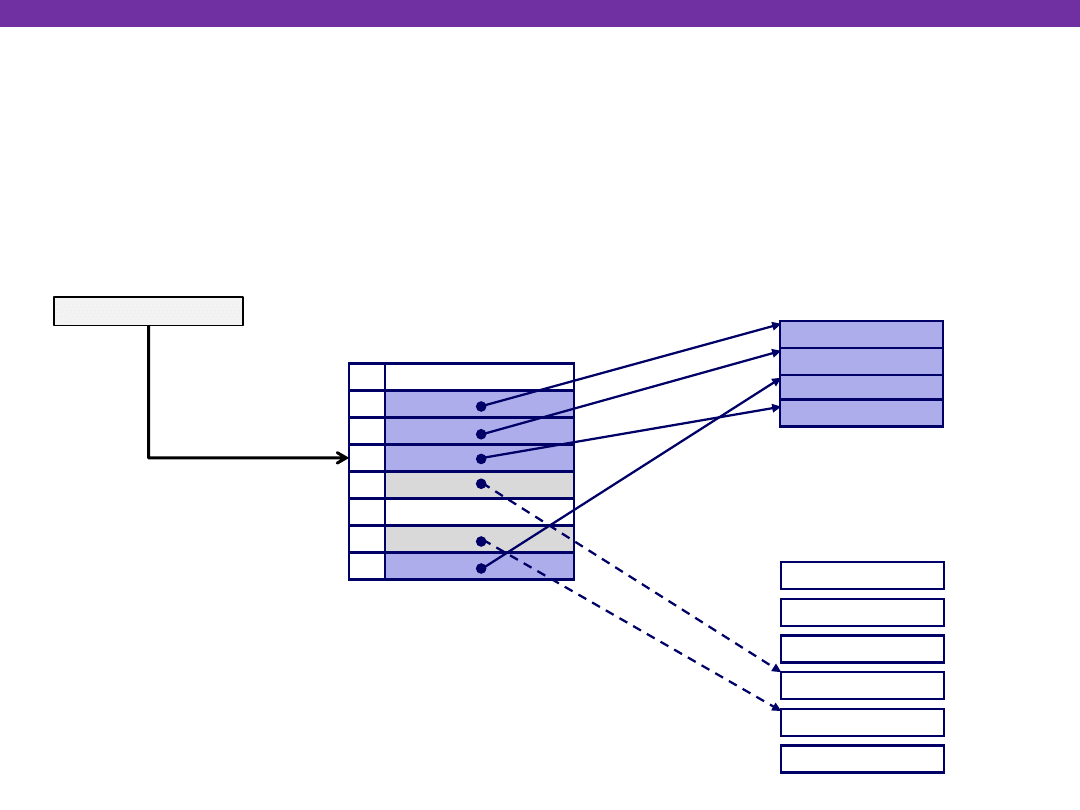
Handling Page Fault
Page miss causes page fault (an exception)
Page fault handler selects a victim to be evicted (here VP 4)
Offending instruction is restarted: page hit!
null
null
Memory resident
page table
(DRAM)
Physical memory
(DRAM)
VP 7
VP 3
Virtual memory
(disk)
Valid
0
1
1
0
0
1
0
1
Physical page
number or
disk address
PTE 0
PTE 7
PP 0
VP 2
VP 1
PP 3
VP 1
VP 2
VP 4
VP 6
VP 7
VP 3
Virtual address
Virtual Memory as Cache

University of Washington
Why does it work? Locality
Virtual memory works well because of locality
Same reason that L1 / L2 / L3 caches work
The set of virtual pages that a program is “actively” accessing
at any point in time is called its
working set
Programs with better temporal locality will have smaller working sets
If (working set size < main memory size):
Good performance for one process after compulsory misses
If (SUM(working set sizes) > main memory size):
Thrashing:
Performance meltdown where pages are swapped (copied)
in and out continuously
Virtual Memory as Cache
Wyszukiwarka
Podobne podstrony:
01 Virtual Memory Overview
03 Virtual Machines
memory game 25 03 11
christmas misc memory cards 03
03 Fuzzy Cognitive Maps Virtual Worlds
03 Memory Hierarchies
03 Memory Addressing Modes
christmas misc memory cards 03
03 Memory Addressing Modes
03 Sejsmika04 plytkieid 4624 ppt
03 Odświeżanie pamięci DRAMid 4244 ppt
podrecznik 2 18 03 05
od Elwiry, prawo gospodarcze 03
Probl inter i kard 06'03
TT Sem III 14 03
więcej podobnych podstron