

Rampant TechPress
Using Oracle SQL Stored
Outlines & Optimizer Plan
Stability
Mike Ault

ROBO B
OOKS
M
ONOGRAPH
S
TABILIZING
E
XECUTION
P
LANS IN
O
RACLE
P
AGE
II
Notice
While the author & Rampant TechPress makes every effort to ensure the
information presented in this white paper is accurate and without error, Rampant
TechPress, its authors and its affiliates takes no responsibility for the use of the
information, tips, techniques or technologies contained in this white paper. The
user of this white paper is solely responsible for the consequences of the
utilization of the information, tips, techniques or technologies reported herein.
C
OPYRIGHT
© 2003 R
AMPANT
T
ECH
P
RESS
. A
LL
R
IGHTS
R
ESERVED
.

ROBO B
OOKS
M
ONOGRAPH
S
TABILIZING
E
XECUTION
P
LANS IN
O
RACLE
P
AGE
III
Using Oracle SQL Stored Outlines &
Optimizer Plan Stability
By Mike Ault
Copyright © 2003 by Rampant TechPress. All rights reserved.
Published by Rampant TechPress, Kittrell, North Carolina, USA
Series Editor: Don Burleson
Production Editor: Teri Wade
Cover Design: Bryan Hoff
Oracle, Oracle7, Oracle8, Oracle8i, and Oracle9i are trademarks of Oracle
Corporation. Oracle In-Focus is a registered Trademark of Rampant TechPress.
Many of the designations used by computer vendors to distinguish their products
are claimed as Trademarks. All names known to Rampant TechPress to be
trademark names appear in this text as initial caps.
The information provided by the authors of this work is believed to be accurate
and reliable, but because of the possibility of human error by our authors and
staff, Rampant TechPress cannot guarantee the accuracy or completeness of
any information included in this work and is not responsible for any errors,
omissions, or inaccurate results obtained from the use of information or scripts in
this work.
Visit www.rampant.cc for information on other Oracle In-Focus books.
ISBN:
0-9740716-8-4
C
OPYRIGHT
© 2003 R
AMPANT
T
ECH
P
RESS
. A
LL
R
IGHTS
R
ESERVED
.

ROBO B
OOKS
M
ONOGRAPH
S
TABILIZING
E
XECUTION
P
LANS IN
O
RACLE
P
AGE
IV
Table Of Contents
Notice...............................................................................................ii
Publication Information ...................................................................iv
Table Of Contents...........................................................................iv
Introduction ..................................................................................... 1
Setting Up for Use of Outlines......................................................... 1
Installing OUTLN Schema “After the Fact” ....................................... 1
Script to Install OUTLN Schema ........................................................ 2
General Facts about OUTLN Schema ................................................. 3
Requirements for OUTLINE Use........................................................ 4
Some General Usage Notes: ................................................................ 5
Views Used With OUTLINES ............................................................ 5
Packages Used with OUTLINEs ......................................................... 6
Plan Stability ................................................................................... 6
Creation of a OUTLINE object ........................................................ 7
Altering a OUTLINE ........................................................................ 8
Dropping an OUTLINE.................................................................... 9
Use of the OUTLN_PKG To Manage SQL Stored Outlines ............ 9
DROP_UNUSED ................................................................................ 9
DROP_BY_CAT ............................................................................... 11
UPDATE_BY_CAT .......................................................................... 12
New Procedures for Oracle9i............................................................. 13
C
OPYRIGHT
© 2003 R
AMPANT
T
ECH
P
RESS
. A
LL
R
IGHTS
R
ESERVED
.

ROBO B
OOKS
M
ONOGRAPH
S
TABILIZING
E
XECUTION
P
LANS IN
O
RACLE
P
AGE
V
Manually Editing Plans.................................................................. 14
Using DML and Packages to Edit Outlines....................................... 15
A Detailed Example........................................................................................... 15
Using DBMS_OUTLN_EDIT. GENERATE_SIGNATURE ........... 20
Replacing a Non-Hinted Outline.................................................... 21
Technique .......................................................................................... 22
Example ............................................................................................. 22
Moving OUTLINES from One DB to Another ................................ 24
Scenario ............................................................................................. 24
Technique .......................................................................................... 25
Example ............................................................................................. 26
Summary....................................................................................... 28
C
OPYRIGHT
© 2003 R
AMPANT
T
ECH
P
RESS
. A
LL
R
IGHTS
R
ESERVED
.

ROBO B
OOKS
M
ONOGRAPH
S
TABILIZING
E
XECUTION
P
LANS IN
O
RACLE
P
AGE
VI
C
OPYRIGHT
© 2003 R
AMPANT
T
ECH
P
RESS
. A
LL
R
IGHTS
R
ESERVED
.

ROBO B
OOKS
M
ONOGRAPH
S
TABILIZING
E
XECUTION
P
LANS IN
O
RACLE
P
AGE
1
Introduction
In versions of Oracle prior to Oracle8i the only way to stabilize an execution plan
was to ensure that tables where analyzed frequently and that the relative ratios of
rows in the tables involved stayed relatively stable. Neither of these options in
pre-Oracle8i for stabilizing execution plans worked 100 percent of the time. In
Oracle8i a new feature known as OUTLINEs has been added.
An outline allows the DBA to tune a SQL statement and then store the optimizer
plan for the statement in what is known as an OUTLINE. From that point
forward whenever an identical SQL statement to the one in the OUTLINE is
used, it will use the optimizer instructions contained in the OUTLINE.
Setting Up for Use of Outlines
If you install using the DBCA (Database Creation Assistant) or through a manual
script and run the catproc.sql script, then the OUTLINE option (in ENTEPRISE
edition) is automatically installed.
The OUTLN schema is created automatically during installation of Oracle8i and
Oracle9i. This schema is granted connect, resource, and execute any procedure
privileges. The OUTLN schema acts as a place to centrally manage metadata
associated with stored outlines.
Installing OUTLN Schema “After the Fact”
It is possible to install the OUTLN schema after the databse has been created. As
was said above, this is not usually suggested. Make sure that the OUTLN schema
has been dropped using the cascade option before running this script. You may
want to review the C0800050.sql script for your release in case there have been
updates since the script below was generated. This process should work for
RDBMS release 8.1.5 or greater.
This script MUST be run as the user INTERNAL or SYS. This script was
extracted from C0800050.sql. After running this script, the user will need to run
C
OPYRIGHT
© 2003 R
AMPANT
T
ECH
P
RESS
. A
LL
R
IGHTS
R
ESERVED
.

ROBO B
OOKS
M
ONOGRAPH
S
TABILIZING
E
XECUTION
P
LANS IN
O
RACLE
P
AGE
2
catalog.sql and catproc.sql. These scripts must be run as the user SYS or
INTERNAL.
Script to Install OUTLN Schema
Here is the extracted script which can be used to rebuild or initially install the
OUTLN schema if for some reason the OUTLN schema becomes unusable or
was never installed.
set serveroutput on
DECLARE
user_exists EXCEPTION;
outln_user number;
outln_tables number;
extra_outln_tables number;
DDL_CURSOR integer;
BEGIN
select count(*) into outln_user from user$ where name='OUTLN';
select count(*) into outln_tables from obj$ where name in
('OL$', 'OL$HINTS') and owner#=
(select user# from user$ where name='OUTLN');
select count(*) into extra_outln_tables from obj$ where name not in
('OL$', 'OL$HINTS') and type#=2 and owner#=
(select user# from user$ where name='OUTLN');
DDL_CURSOR := dbms_sql.open_cursor;
IF outln_user = 0 THEN
dbms_sql.parse(DDL_CURSOR, 'create user outln identified by outln',
dbms_sql.native);
dbms_sql.parse(DDL_CURSOR,
'grant connect, resource, execute any procedure to
outln',
dbms_sql.native);
dbms_sql.parse(DDL_CURSOR, 'create table outln.ol$ ( '||
'ol_name varchar2(30), ' ||
'sql_text long, ' ||
'textlen number, ' ||
'signature raw(16), ' ||
'hash_value number, ' ||
'category varchar2(30), ' ||
'version varchar2(64), ' ||
'creator varchar2(30), ' ||
'timestamp date, ' ||
'flags number, ' ||
'hintcount number)', dbms_sql.native);
dbms_sql.parse(DDL_CURSOR, 'create table outln.ol$hints ( '||
'ol_name varchar2(30), '||
'hint# number, '||
'category varchar2(30), '||
'hint_type number, '||
'hint_text varchar2(512), '||
C
OPYRIGHT
© 2003 R
AMPANT
T
ECH
P
RESS
. A
LL
R
IGHTS
R
ESERVED
.
'stage# number, '||

ROBO B
OOKS
M
ONOGRAPH
S
TABILIZING
E
XECUTION
P
LANS IN
O
RACLE
P
AGE
3
'node# number, '||
'table_name varchar2(30), '||
'table_tin number, '||
'table_pos number)', dbms_sql.native);
dbms_sql.parse(DDL_CURSOR, 'create unique index outln.ol$name '||
'on outln.ol$(ol_name)', dbms_sql.native);
dbms_sql.parse(DDL_CURSOR, 'create unique index outln.ol$signature
'||
' on outln.ol$(signature,category)', dbms_sql.native);
dbms_sql.parse(DDL_CURSOR, 'create unique index outln.ol$hnt_num
'||
' on outln.ol$hints(ol_name, hint#)', dbms_sql.native);
dbms_output.put_line('OUTLN CREATION SUCCESSFUL');
ELSE
IF outln_tables!=2 or extra_outln_tables!=0 THEN
dbms_output.put_line('ERROR - OUTLN USER ALREADY EXISTS');
RAISE
user_exists;
ELSE
dbms_output.put_line('OUTLN CREATION SUCCESSFUL');
END IF;
END IF;
EXCEPTION
WHEN user_exists THEN
RAISE;
END;
/
General Facts about OUTLN Schema
The schema OUTLN owns the package OUTLN_PKG that is used to manage
stored outlines and their outline categories. The database administrator should
change the password for the OUTLN schema just as for the SYS and SYSTEM
schemas. OUTLINEs are not available in the STANDARD release of Oracle only
in the ENTERPRISE release.
The "c0800050.sql" upgrade script from 8.0.5 to 8.1.x also creates the schema
OUTLN.
The package outln_pkg is created by script "dbmsol.sql" in the
$ORACLE_HOME/rdbms/admin directory. The "dbmsol.sql" script is called
from "catproc.sql". The file "prvtol.plb" creates the body of "outln_pkg"; it is
also called from catproc.
There are other tables (base tables), indexes, grants, and synonyms related to this
package created during the install process by the SQL.BSQ script.
After carefully tuning an application, you might want to ensure that the optimizer
generates the same execution plan whenever the same SQL statements are
C
OPYRIGHT
© 2003 R
AMPANT
T
ECH
P
RESS
. A
LL
R
IGHTS
R
ESERVED
.

ROBO B
OOKS
M
ONOGRAPH
S
TABILIZING
E
XECUTION
P
LANS IN
O
RACLE
P
AGE
4
executed. This is accomplished via OUTLINEs. OUTLINEs can be generated in
either the rule or cost based optimizer. Plan stability allows you to maintain the
same execution plans for the same SQL statements, regardless of changes to the
database such as re-analyzing tables, adding or deleting data, modifying a table's
columns, constraints, or indexes, changing the system configuration, or even
upgrading to a new version of the optimizer.
The CREATE OUTLINE statement creates a stored outline, which contains a set
of attributes that the optimizer uses to create an execution plan. Stored outlines
can also be created automatically by setting the system parameter
CREATE_STORED_OUTLINES to TRUE.
The system parameter USE_STORED_OUTLINES can be set to TRUE, FALSE,
or a category name to indicate whether to make use of existing stored outlines for
queries that are being executed. The OUTLN_PKG package provides procedures
used for managing stored outlines.
Requirements for OUTLINE Use
The only privilege needed to create outlines is the CREATE ANY OUTLINE
privilege. However it is also useful to be able to select from DBA_OUTLINES
To force a session to either use or not create out lines you would issue the
command:
ALTER SESSION SET CREATE_STORED_OUTLINES = TRUE | FALSE | <category>
This command causes Oracle to automatically create outlines for all SQL
statements issued during the session. If set to TRUE then the category name for
the outlines is set to DEFAULT.
Note: Category should not be quoted contrary to documentation
To turn on or off the creation of stored outlines at the system level issue the
command:
ALTER SYSTEM SET CREATE_STORED_OUTLINES = TRUE | FALSE | <category>
[NOOVERRIDE]
This determines whether Oracle should automatically create and store an outline
for each query submitted on the system. These outlines are stored in the
DEFAULT category. If a particular query already has an outline defined for it in
C
OPYRIGHT
© 2003 R
AMPANT
T
ECH
P
RESS
. A
LL
R
IGHTS
R
ESERVED
.

ROBO B
OOKS
M
ONOGRAPH
S
TABILIZING
E
XECUTION
P
LANS IN
O
RACLE
P
AGE
5
the DEFAULT category, that outline will remain and a new outline will not be
created.
The NOOVERRIDE option specifies that this system setting will not override the
setting for any session in which this parameter was explicitly set.
It should be noted that outlines overide all other optimizer settings. They are only
used if a session explicitly requests that they be used using the following
command.
ALTER SESSION SET USE_STORED_OUTLINES = TRUE | FALSE | <category>
Note: As with the previous commands, category should not be quoted contrary to
documentation
If USE_STORED_OUTLINES is set to TRUE then the DEFAULT category is
used. If set to a category then TRUE is assumed and that category is used.
When set Oracle checks for a known stored plan based on an address calculated
from the SQL TEXT of the statement. If a plan exists in the selected category
then that plan will be used (provided it is valid).
Some General Usage Notes:
Plan outlines are global: They apply to all identical statements
Outlines, if present, will be used, regardless of which user issues the
statement.
Use of an outline is based on the SQL TEXT being IDENTICAL
Use is NOT based on resolved names of underlying objects so changing a
synonym etc.. still uses the outline (if it is valid)
When creating outlines outside the application ensure:
SQL TEXT is identical character for character
Binds should be of the expected type when creating the outline to ensure
the correct plan is obtained.
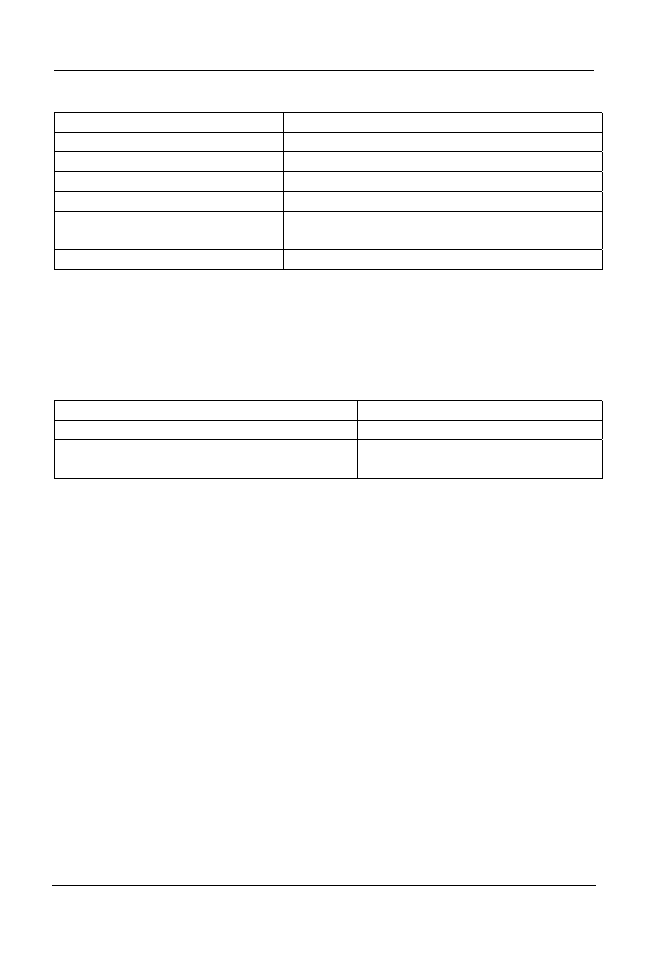
Views Used With OUTLINES
These views are defined by the script catol.sql:
C
OPYRIGHT
© 2003 R
AMPANT
T
ECH
P
RESS
. A
LL
R
IGHTS
R
ESERVED
.
ROBO B
OOKS
M
ONOGRAPH
S
TABILIZING
E
XECUTION
P
LANS IN
O
RACLE
P
AGE
6
View Description
USER_OUTLINES
Shows all OUTLINEs owned by user
ALL_OUTLINES
Shows all OUTLINEs accessible by user
DBA_OUTLINES
Shows all OUTLINEs defined in system
USER_OUTLINE_HINTS
Shows hints for all users OUTLINEs
ALL_OUTLINE_HINTS Shows
hints
for all OUTLINES accessible by
user
DBA_OUTLINE_HINTS
Shows hints for all OUTLINEs in system
All of these views are based on the tables OUTLN.OL$ and OUTLN.OL$HINTS
Packages Used with OUTLINEs
Packages are defined in the script dbmsol.sql.
Package Description
DBMS_OUTLN (actually OUTLN_PKG)
Used To mange outlines
DBMS_OUTLN_EDIT (actually
OUTLN_EDIT_PKG)
Used to edit outlines
Plan Stability
This storing of plan outlines for SQL statements is known as plan stability and
insures that changes in the Oracle environment don't affect the way a SQL
statement is optimized by the cost based optimizer. If you wish, Oracle will
define plans for all issued SQL statements at the time they are executed and this
stored plan will be reused until altered or dropped. Generally I do not suggest
using the automatic outline feature as it can lead to poor plans being reused by
the optimizer. It makes more sense to monitor for high cost statements and tune
them as required, storing an outline for them only once they have been properly
tuned.
As with the storage of SQL in the shared pool, storage of outlines depends on the
statement being reissued in an identical fashion each time it is used. If even one
space is out of place the stored outline is not reused. (Note: In Oracle9i excess
white space is cleaned from SQL before use, so this limit is only for pre-9i
databases.) Therefore your queries should be stored as PL/SQL procedures,
functions or packages (or perhaps Java routines) and bind variables should
C
OPYRIGHT
© 2003 R
AMPANT
T
ECH
P
RESS
. A
LL
R
IGHTS
R
ESERVED
.

ROBO B
OOKS
M
ONOGRAPH
S
TABILIZING
E
XECUTION
P
LANS IN
O
RACLE
P
AGE
7
always be used. This allows reuse of the stored image of the SQL as well as reuse
of stored outlines.
Remember that to be useful over the life of an application the outlines will have
to be periodically verified by checking SQL statement performance. If
performance of SQL statements degrades the stored outline may have to be
dropped and regenerated after the SQL is re-tuned.
Creation of a OUTLINE object
Outlines are created using the CREATE OUTLINE command, the syntax for this
command is:
CREATE [OR REPLACE] OUTLINE outline_name
[FOR CATEGORY category_name]
ON statement;
Where:
Outline_name -- is a unique name for the outline
[FOR CATEGORY category_name] – This optional clause allows more than
one outline to be associated with a single query by specifying multiple
categories each named uniquely.
ON statement – This specifies the statement for which the outline is
prepared.
An example would be:
C
OPYRIGHT
© 2003 R
AMPANT
T
ECH
P
RESS
. A
LL
R
IGHTS
R
ESERVED
.

ROBO B
OOKS
M
ONOGRAPH
S
TABILIZING
E
XECUTION
P
LANS IN
O
RACLE
P
AGE
8
CREATE OR REPLACE OUTLINE get_tables
ON
SELECT
a.owner,
a.table_name,
a.tablespace_name,
SUM(b.bytes),
COUNT(b.table_name) extents
FROM
dba_tables
a,
dba_extents
b
WHERE
a.owner=b.owner
AND
a.table_name=b.table_name
GROUP BY
a.owner, a.table_name, a.tablespace_name;
Assuming the above select is a part of a stored PL/SQL procedure or perhaps part
of a view, the stored outline will now be used each time an exactly matching
SQL statement is issued.
Altering a OUTLINE
Outlines are altered using the ALTER OUTLINE or CREATE OR REPLACE
form of the CREATE command. The format of the command is identical whether
it is used for initial creation or replacement of an existing outline. For example,
what if we want to add SUM(b.blocks) to the previous example?
CREATE OR REPLACE OUTLINE get_tables
ON
SELECT
a.owner,
a.table_name,
a.tablespace_name,
SUM(b.bytes),
COUNT(b.table_name) extents,
SUM(b.blocks)
FROM
dba_tables
a,
dba_extents
b
WHERE
a.owner=b.owner
AND
a.table_name=b.table_name
GROUP BY
a.owner, a.table_name, a.tablespace_name;
The above example has the effect of altering the stored outline get_tables to
include any changes brought about by inclusion of the SUM(b.blocks) in the
C
OPYRIGHT
© 2003 R
AMPANT
T
ECH
P
RESS
. A
LL
R
IGHTS
R
ESERVED
.

ROBO B
OOKS
M
ONOGRAPH
S
TABILIZING
E
XECUTION
P
LANS IN
O
RACLE
P
AGE
9
SELECT list. But what if we want to rename the outline or change a category
name? The ALTER OUTLINE command has the format:
ALTER OUTLINE outline_name
[REBUILD]
[RENAME TO new_outline_name]
[CHANGE CATEGORY TO new_category_name]
The ALTER OUTLINE command allows us to rebuild the outline for an existing
outline_name as well as rename the outline or change its category. The benefit of
using the ALTER OUTLINE command is that we do not have to respecify the
complete SQL statement as we would have to using the CREATE OR REPLACE
command.
Dropping an OUTLINE
Outlines are dropped using the DROP OUTLINE command the syntax for this
command is:
DROP OUTLINE outline_name;
Use of the OUTLN_PKG To
Manage SQL Stored Outlines
The OUTLN_PKG package provides for the management of stored outlines. A
stored outline is an execution plan for a specific SQL statement. A stored outline
permits the optimizer to stabilize a SQL statement’s execution plan giving
repeatable execution plans even when data and statistics change.
The DBA should take care to whom they grant execute on the OUTLN_PKG, by
default it is not granted to the public user group nor is a public synonym created.
The following sections show the packages in the OUTLN_PKG.
DROP_UNUSED
C
OPYRIGHT
© 2003 R
AMPANT
T
ECH
P
RESS
. A
LL
R
IGHTS
R
ESERVED
.
The drop_unused procedure is used to drop outlines that have not been used in
the compilation of SQL statements. The drop_unused procedure has no
arguments.

ROBO B
OOKS
M
ONOGRAPH
S
TABILIZING
E
XECUTION
P
LANS IN
O
RACLE
P
AGE
10
SQL> EXECUTE OUTLN_PKG.DROP_UNUSED;
PL/SQL procedure successfully executed.
To determine if a SQL statement OUTLINE is unused, perform a select against
the DBA_OUTLINES view:
SQL> desc dba_outlines;
Name Null? Type
------------------------------- -------- ----
NAME VARCHAR2(30)
OWNER VARCHAR2(30)
CATEGORY VARCHAR2(30)
USED VARCHAR2(9)
TIMESTAMP DATE
VERSION VARCHAR2(64)
SQL_TEXT LONG
SQL> set long 1000
SQL> select * from dba_outlines where used='UNUSED';
C
OPYRIGHT
© 2003 R
AMPANT
T
ECH
P
RESS
. A
LL
R
IGHTS
R
ESERVED
.

ROBO B
OOKS
M
ONOGRAPH
S
TABILIZING
E
XECUTION
P
LANS IN
O
RACLE
P
AGE
11
NAME OWNER CATEGORY USED TIMESTAMP VERSION SQL_TEXT
------------ ------ -------- ------ --------- --------- ---------------------
TEST_OUTLINE SYSTEM TEST UNUSED 08-MAY-99 8.1.3.0.0 select a.table_name,
b.tablespace_name,
c.file_name from
dba_tables a,
dba_tablespaces b,
dba_data_files c
where
a.tablespace_name =
b.tablespace_name
and b.tablespace_name
= c.tablespace_name
and c.file_id =
(select
min(d.file_id) from
dba_data_files d
where
c.tablespace_name =
d.tablespace_name)
1 row selected.
SQL> execute sys.outln_pkg.drop_unused;
PL/SQL procedure successfully completed.
SQL> select * from dba_outlines where used='UNUSED';
no rows selected
Remember, the procedure drops all unused outlines so use it carefully.
DROP_BY_CAT
The drop_by_cat procedure drops all outlines that belong to a specific category.
The procedure drop_by_cat has one input variable, cat, a VARCHAR 2 that
corresponds to the name of the category you want to drop.
SQL> create outline test_outline for category test on
2 select a.table_name, b.tablespace_name, c.file_name from
3 dba_tables a, dba_tablespaces b, dba_data_files c
4 where
5 a.tablespace_name=b.tablespace_name
6 and b.tablespace_name=c.tablespace_name
7 and c.file_id = (select min(d.file_id) from dba_data_files d
8 where c.tablespace_name=d.tablespace_name)
9 ;
Operation 180 succeeded.
SQL> select * from dba_outlines where category='TEST';
C
OPYRIGHT
© 2003 R
AMPANT
T
ECH
P
RESS
. A
LL
R
IGHTS
R
ESERVED
.

ROBO B
OOKS
M
ONOGRAPH
S
TABILIZING
E
XECUTION
P
LANS IN
O
RACLE
P
AGE
12
NAME OWNER CATEGORY USED TIMESTAMP VERSION SQL_TEXT
------------ ------ -------- ------ --------- ---------- -------------------------
TEST_OUTLINE SYSTEM TEST UNUSED 08-MAY-99 8.1.3.0.0 select a.table_name, b.ta
blespace_name, c.file_nam
e from
dba_tables a, dba_tablesp
aces b, dba_data_files c
where
a.tablespace_name=b.table
space_name
and b.tablespace_name=c.t
ablespace_name
and c.file_id = (select m
in(d.file_id) from dba_da
ta_files d
where c.tablespace_name=d
.tablespace_name)
1 row selected.
SQL> execute sys.outln_pkg.drop_by_cat('TEST');
PL/SQL procedure successfully completed.
SQL> select * from dba_outlines where category='TEST';
no rows selected
UPDATE_BY_CAT
The update_by_cat procedure changes all of the outlines in one category to a new
category. If the SQL text in an outline already has an outline in the target
category, then it is not merged into the new category. The procedure has two
input variables, oldcat VARCHAR2 and newcat VARCHAR2 where oldcat
corresponds to the category to be merged and newcat is the new category that
oldcat is to be merged with.
SQL> create outline test_outline for category test on
2 select a.table_name, b.tablespace_name, c.file_name from
3 dba_tables a, dba_tablespaces b, dba_data_files c
4 where
5 a.tablespace_name=b.tablespace_name
6 and b.tablespace_name=c.tablespace_name
7 and c.file_id = (select min(d.file_id) from dba_data_files d
8 where c.tablespace_name=d.tablespace_name)
9 ;
Operation 180 succeeded.
SQL> create outline test_outline2 for category test on
2 select * from dba_data_files;
Operation 180 succeeded.
SQL> create outline prod_outline1 for category prod on
C
OPYRIGHT
© 2003 R
AMPANT
T
ECH
P
RESS
. A
LL
R
IGHTS
R
ESERVED
.
2 select owner,table_name from dba_tables;

ROBO B
OOKS
M
ONOGRAPH
S
TABILIZING
E
XECUTION
P
LANS IN
O
RACLE
P
AGE
13
Operation 180 succeeded.
SQL> create outline prod_outline2 for category prod on
2 select * from dba_data_files;
Operation 180 succeeded.
SQL> select name,category from dba_outlines order by category
NAME CATEGORY
--------------- --------
PROD_OUTLINE1 PROD
PROD_OUTLINE2 PROD
TEST_OUTLINE2 TEST
TEST_OUTLINE TEST
4 rows selected.
SQL> execute sys.outln_pkg.update_by_cat('TEST','PROD');
PL/SQL procedure successfully completed.
SQL> select name,category from dba_outlines order by category;
NAME CATEGORY
--------------- --------
TEST_OUTLINE PROD
PROD_OUTLINE1 PROD
PROD_OUTLINE2 PROD
TEST_OUTLINE2 TEST
4 rows selected.
As a result of the update_by_cat procedure call we moved the TEST_OUTLINE
outline into the PROD category, but the TEST_OUTLINE2, since it is a
duplicate of PROD_OUTLINE2, was not merged.
New Procedures for Oracle9i
In Oracle9i the OUTLN_PKG has been expanded to include several new
procedures:
Procedure Use
CLEAR_USED Procedure
Marks all outlines UNUSED
EXACT_TEXT_SIGNATURES
Procedure
Used when reverting a 9i database
back to 8i, alters the signatures back to
8i format.
DROP_COLLISION Procedure
Drops an outline with an ol$.hintcount
value that does not match the number
of hints for that outline in
ol$hints.
C
OPYRIGHT
© 2003 R
AMPANT
T
ECH
P
RESS
. A
LL
R
IGHTS
R
ESERVED
.
ROBO B
OOKS
M
ONOGRAPH
S
TABILIZING
E
XECUTION
P
LANS IN
O
RACLE
P
AGE
14
Procedure Use
DROP_EXTRAS Procedure
Cleans up after an import by dropping
extra hint records not accounted for by
hintcount.
DROP_UNREFD_HINTS
Procedure Drops hint records that have no
corresponding outline in the OL$ table.
UPDATE_SIGNATURES Procedure
Used when importing an 8i outline into
a 9i database to update signatures.
Manually Editing Plans
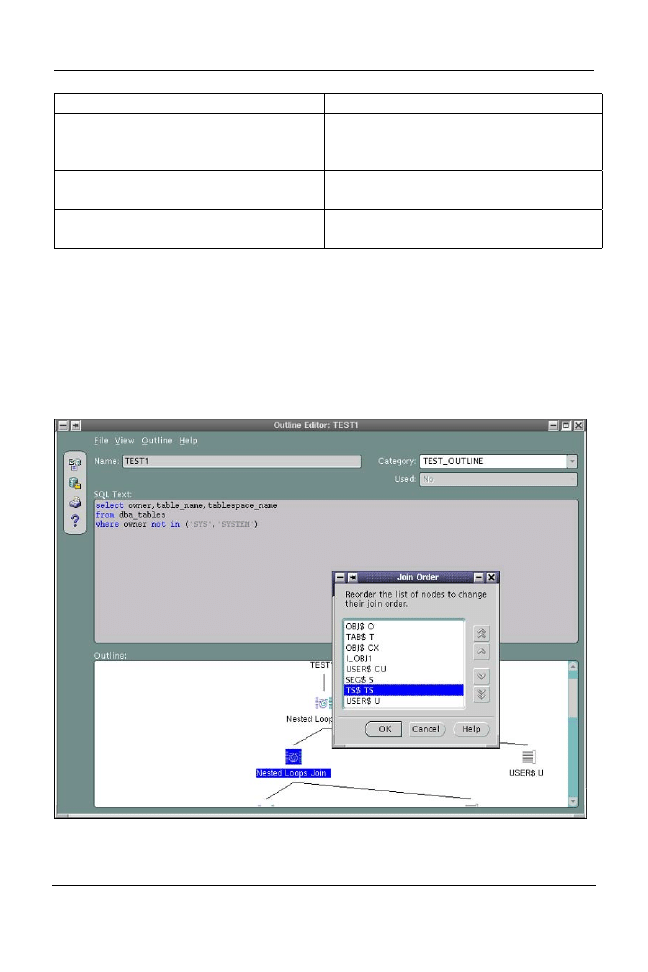
In Oracle9i, you can edit stored outlines either with the Outline Editor in
Enterprise Manager (OEM) or manually by querying the local OL$HINTS tables
and performing DML against the appropriate hint records. A screen shot of the
OEM Outline editor is shown below.
C
OPYRIGHT
© 2003 R
AMPANT
T
ECH
P
RESS
. A
LL
R
IGHTS
R
ESERVED
.

ROBO B
OOKS
M
ONOGRAPH
S
TABILIZING
E
XECUTION
P
LANS IN
O
RACLE
P
AGE
15
Using DML and Packages to Edit Outlines
This is an example of editing the outlines manually. The steps are as follows:
1.
Create a new public stored outline
2.
Create a private outline
3.
Edit the private outline, test the result
4.
Publicize the edits by creating a public stored outline from your private
outline.
A Detailed Example
Let’s look at a more detailed example.
1. Create a new public stored outline
a. First, ensure that the required privileges have been granted.
SQL> connect system as sysdba
Enter password:
Connected.
SQL> grant create any outline to scott;
Grant succeeded.
SQL> grant execute on dbms_outln to scott;
Grant succeeded.
SQL> grant execute on dbms_outln_edit to scott;
Grant succeeded.
b. Connect and set your environment. In this example, you will set
hash_join_enabled=false and you will still be able to enforce a hash
join by editing your stored outline.
SQL> connect scott
Enter password:
Connected.
SQL> set pages 1000
SQL> alter session set optimizer_goal=all_rows;
Session altered.
C
OPYRIGHT
© 2003 R
AMPANT
T
ECH
P
RESS
. A
LL
R
IGHTS
R
ESERVED
.

ROBO B
OOKS
M
ONOGRAPH
S
TABILIZING
E
XECUTION
P
LANS IN
O
RACLE
P
AGE
16
SQL> alter session set hash_join_enabled=false;
Session altered.
c. Create standard demo tables in Scott's schema.
SQL> @$ORACLE_HOME/sqlplus/demo/demobld.sql
Building demonstration tables. Please wait.
Demonstration table build is complete.
d. Analyze the tables for Oracle cost-based optimizer.
SQL> analyze table emp compute statistics;
Table analyzed.
SQL> analyze table dept compute statistics;
Table analyzed.
e. Check the current execution plan for the query involved.
SQL> set autotrace on explain
SQL> select e.ename from emp e, dept d where e.deptno=d.deptno;
ENAME
----------
SMITH
ALLEN
WARD
JONES
MARTIN
BLAKE
CLARK
SCOTT
KING
TURNER
ADAMS
JAMES
FORD
MILLER
14 rows selected.
Execution Plan
----------------------------------------------------------
0 SELECT STATEMENT Optimizer=ALL_ROWS (Cost=126 Card=41
Bytes=
1353)
1 0 NESTED LOOPS (Cost=126 Card=41 Bytes=1353)
2 1 TABLE ACCESS (FULL) OF 'EMP' (Cost=4 Card=41 Bytes=820)
3 1 TABLE ACCESS (FULL) OF 'DEPT' (Cost=3 Card=41 Bytes=533)
SQL> set autotrace off
C
OPYRIGHT
© 2003 R
AMPANT
T
ECH
P
RESS
. A
LL
R
IGHTS
R
ESERVED
.

ROBO B
OOKS
M
ONOGRAPH
S
TABILIZING
E
XECUTION
P
LANS IN
O
RACLE
P
AGE
17
f. Create a public outline
SQL> create or replace outline outln1
2 on select e.ename from emp e, dept d where e.deptno=d.deptno;
outline created.
2. Create a private outline
a. Create the Edit Tables in your schema, to store information about
your private outlines. The tables created in this step must be there for
the next step, otherwise you will get error:
ORA-18009 "one or more outline system tables do not exist".
SQL> execute dbms_outln_edit.create_edit_tables;
PL/SQL procedure successfully completed.
b. Create your private outline by cloning it from the Public outline.
SQL> create private outline priv_outln1 from outln1;
outline created.
3. Edit the private outline, test the result
a. After you create the private outline, new entries appear in the table
ol$hints. This table is created in your schema by running the
procedure create_edit_tables. Let’s examine the contents relevant to
the newly created private outline.
SQL> column hint# format 999999
SQL> column hint_text format a28
SQL> column user_table_name format a16
SQL> select hint#, hint_text, user_table_name from ol$hints
2 where ol_name = 'PRIV_OUTLN1';
HINT# HINT_TEXT USER_TABLE_NAME
------- ---------------------------- ----------------
1 NOREWRITE
2 NOREWRITE
3 NO_EXPAND
4 PQ_DISTRIBUTE(D NONE NONE) SCOTT.DEPT
5 USE_NL(D) SCOTT.DEPT
6 ORDERED
7 NO_FACT(D) SCOTT.DEPT
8 NO_FACT(E) SCOTT.EMP
9 FULL(E) SCOTT.EMP
C
OPYRIGHT
© 2003 R
AMPANT
T
ECH
P
RESS
. A
LL
R
IGHTS
R
ESERVED
.

ROBO B
OOKS
M
ONOGRAPH
S
TABILIZING
E
XECUTION
P
LANS IN
O
RACLE
P
AGE
18
10 FULL(D) SCOTT.DEPT
10 rows selected.
b. Edit the outline by performing DML against the appropriate hint
records in the ol$hints table. In this example, you will change the hint
USE_NL to USE_HASH.
SQL> update ol$hints set hint_text='USE_HASH(D)'
2 where hint# = 5;
1 row updated.
SQL> commit;
Commit complete.
Query the table ol$hints to see the changes.
SQL> select hint#, hint_text, user_table_name from ol$hints
2 where ol_name = 'PRIV_OUTLN1';
HINT# HINT_TEXT USER_TABLE_NAME
------- ---------------------------- ----------------
1 NOREWRITE
2 NOREWRITE
3 NO_EXPAND
4 PQ_DISTRIBUTE(D NONE NONE) SCOTT.DEPT
5 USE_HASH(D) SCOTT.DEPT
6 ORDERED
7 NO_FACT(D) SCOTT.DEPT
8 NO_FACT(E) SCOTT.EMP
9 FULL(E) SCOTT.EMP
10 FULL(D) SCOTT.DEPT
10 rows selected.
c. After manually editing the outline, re-synchronize the stored outline
definition using the following procedure:
SQL> execute
dbms_outln_edit.refresh_private_outline('PRIV_OUTLN1');
PL/SQL procedure successfully completed.
Note that the private outline name must match in case to
ol$hints.ol_name
Alternatively, you can use:
C
OPYRIGHT
© 2003 R
AMPANT
T
ECH
P
RESS
. A
LL
R
IGHTS
R
ESERVED
.
SQL> alter system flush shared_pool or

ROBO B
OOKS
M
ONOGRAPH
S
TABILIZING
E
XECUTION
P
LANS IN
O
RACLE
P
AGE
19
or
SQL> create private outline priv_outln1 from private
priv_outln1;
d. Set the parameter use_private_outlines, otherwise the query will still
use nested loops instead of not hash join.
SQL> alter session set use_private_outlines=true;
Session altered.
e. Test the current execution plan for the query, to confirm that Oracle
optimizer is now using hash join method for this query.
C
OPYRIGHT
© 2003 R
AMPANT
T
ECH
P
RESS
. A
LL
R
IGHTS
R
ESERVED
.

ROBO B
OOKS
M
ONOGRAPH
S
TABILIZING
E
XECUTION
P
LANS IN
O
RACLE
P
AGE
20
SQL> set autotrace on explain
SQL> select e.ename from emp e, dept d where e.deptno=d.deptno;
ENAME
----------
MILLER
KING
CLARK
FORD
ADAMS
SCOTT
JONES
SMITH
JAMES
TURNER
BLAKE
MARTIN
WARD
ALLEN
14 rows selected.
Execution Plan
----------------------------------------------------------
0 SELECT STATEMENT Optimizer=ALL_ROWS (Cost=10 Card=41
Bytes=1353)
1 0 HASH JOIN (Cost=10 Card=41 Bytes=1353)
2 1 TABLE ACCESS (FULL) OF 'EMP' (Cost=4 Card=41 Bytes=820)
3 1 TABLE ACCESS (FULL) OF 'DEPT' (Cost=3 Card=41 Bytes=533)
4. Publicize the edits by creating a public stored outline from your private
outline.
If you want to preserve your edits for public use, then publicize the edits with
the following statement:
SQL> create or replace outline outln2 from private priv_outln1;
Outline created.
Using DBMS_OUTLN_EDIT.
GENERATE_SIGNATURE
The GENERATE_SIGNATURE procedure is mistakenly attributed to the
OUTLN_PKG in the Oracle documentation set, in actuality it is located in the
OUTLN_EDIT_PKG which is synonymed to be DBMS_OUTLN_EDIT. Passing
the GENERATE_SIGNATURE procedure a SQL statement will return a RAW
signature of the SQL which can then be used to probe the outline tables to see if
that SQL has an existing OUTLINE.
C
OPYRIGHT
© 2003 R
AMPANT
T
ECH
P
RESS
. A
LL
R
IGHTS
R
ESERVED
.

ROBO B
OOKS
M
ONOGRAPH
S
TABILIZING
E
XECUTION
P
LANS IN
O
RACLE
P
AGE
21
When using GENERATE_SIGNATURE, it is probably easiest to create an
anonymous PL/SQL script to return the signature or the SQL and OUTLINE
name to you. The signature is a RAW, so in the example, shown below, we
return the outline name.
SQL> set serveroutput on
SQL> declare
2 sql_text varchar2(200);
3 ret_sql_text varchar2(200);
4 ret_outline_name varchar2(32);
5 gen_sig raw(16);
6 begin
7 sql_text := 'select owner, table_name, tablespace_name
8 from
9 dba_tables
10 where owner not in '
11 ('||chr(39)||'SYS'||chr(39)||','||chr(39)||'SYSTEM'||chr(39)||')';
12 dbms_outln_edit.generate_signature(sql_text,gen_sig);
13 select a.sql_text, a.name into ret_sql_text, ret_outline_name
14 from dba_outlines a where signature=gen_sig;
15 dbms_output.put_line('Sql text for '||name||': '||ret_sql_text);
16 end;
17* /
Sql text for TEST1: select owner,table_name,tablespace_name
from dba_tables
where
owner not in ('SYS','SYSTEM')
PL/SQL procedure successfully completed.
Once you have identified the SQL statement for which you want to edit
the hint structure, you use the DBMS_OUTLN_EDIT procedure to perform the
edits as shown above.
Replacing a Non-Hinted
Outline
In many applications you are not allowed to change source code. This means that
you cannot, or are unable to, add hints to force behavior. As we have seen
OUTLINEs place hints into statements at the parse level, by using an OUTLINE
you can force hints into statements. Let’s look at a technique to perform this
operation.
C
OPYRIGHT
© 2003 R
AMPANT
T
ECH
P
RESS
. A
LL
R
IGHTS
R
ESERVED
.

ROBO B
OOKS
M
ONOGRAPH
S
TABILIZING
E
XECUTION
P
LANS IN
O
RACLE
P
AGE
22
Technique
Let's call the SQL statement to optimize 'ORIGINALSQL'
1. Find the hints to optimize the original SQL statement. Let's call the same
SQL statement with hints 'HINTSQL'
2. Create the OUTLINE for ORIGINALSQL
3. Create the OUTLINE for HINTSQL
4. Exchange the OUTLINE plan between the two OUTLINES
5. Drop the OUTLINE for HINTSQL
6. Now the OUTLINE plan for ORIGINALSQL is the same as the execution
plan of HINTSQL which uses HINTs.
Only the point 5 (Exchange the OUTLINE plan between the two OUTLINEs) is
detailed below. The rest of the steps are covered in the bulk of the paper.
Under the sys or outln user, simply exchange outline names used in step 2 and 3:
UPDATE OUTLN.OL$HINTS
SET
OL_NAME=DECODE(OL_NAME,'HINTSQL','ORIGINALSQL','ORIGINALSQL','HINTSQL')
WHERE OL_NAME IN ('HINTSQL','ORIGINALSQL');
Commit;
Example
Let’s look at an example using the SCOTT schema using the example schema
objects. Under the Schema scott with EMP and DEPT tables, create this index on
DEPT.LOC:
create index I_DEPT$LOC ON DEPT (LOC);
Next, analyze the tables emp and dept.
Analyze table emp compute statistics;
Analyze table dept compute statistics;
The Original SQL statement we want to optimize is:
select sum(SAL) total, DEPT.DNAME from EMP,DEPT
where EMP.DEPTNO(+) = DEPT.DEPTNO
and DEPT.LOC= 'DALLAS'
C
OPYRIGHT
© 2003 R
AMPANT
T
ECH
P
RESS
. A
LL
R
IGHTS
R
ESERVED
.

ROBO B
OOKS
M
ONOGRAPH
S
TABILIZING
E
XECUTION
P
LANS IN
O
RACLE
P
AGE
23
group by DEPT.DNAME;
The original explain plan for this SQL statement should be
0 SELECT STATEMENT Optimizer=CHOOSE
1 0 SORT (GROUP BY)
2 1 NESTED LOOPS (OUTER)
3 2 TABLE ACCESS (FULL) OF 'DEPT'
4 2 TABLE ACCESS (FULL) OF 'EMP'
The same SQL statement with the INDEX_ASC hint is:
select /*+ INDEX_ASC (DEPT I_DEPT$LOC) */ sum(SAL) total, DEPT.DNAME
from EMP,DEPT
where EMP.DEPTNO(+) = DEPT.DEPTNO
and DEPT.LOC= 'DALLAS'
group by DEPT.DNAME;
The revised explain plan for this SQL statement should be:
0 SELECT STATEMENT Optimizer=CHOOSE
1 0 SORT (GROUP BY)
2 1 NESTED LOOPS (OUTER)
3 2 TABLE ACCESS (BY INDEX ROWID) OF 'DEPT'
4 3 INDEX (RANGE SCAN) OF 'I_DEPT$LOC' (NON-UNIQUE)
5 2 TABLE ACCESS (FULL) OF 'EMP'
Using the original statement, create an OUTLINE called ORIGINALSQL:
CREATE OR REPLACE OUTLINE ORIGINALSQL ON
select sum(SAL) total, DEPT.DNAME from EMP,DEPT
where EMP.DEPTNO(+) = DEPT.DEPTNO
and DEPT.LOC= 'DALLAS'
group by DEPT.DNAME;
Now create the OUTLINE for the hinted SQL and call it HINTSQL:
CREATE OR REPLACE OUTLINE HINTSQL ON
select /*+ INDEX_ASC (DEPT I_DEPT$LOC) */ sum(SAL) total, DEPT.DNAME
from EMP,DEPT
where EMP.DEPTNO(+) = DEPT.DEPTNO
and DEPT.LOC= 'DALLAS'
group by DEPT.DNAME;
Under SYS or OUTLN user exchange outline plans by exchanging the names in
the table:
UPDATE OUTLN.OL$HINTS
SET
OL_NAME=DECODE(OL_NAME,'HINTSQL','ORIGINALSQL','ORIGINALSQL','HINTSQL')
C
OPYRIGHT
© 2003 R
AMPANT
T
ECH
P
RESS
. A
LL
R
IGHTS
R
ESERVED
.
WHERE OL_NAME IN ('ORIGINALSQL','HINTSQL');

ROBO B
OOKS
M
ONOGRAPH
S
TABILIZING
E
XECUTION
P
LANS IN
O
RACLE
P
AGE
24
commmit;
Please note that the outline names used (ORIGINALSQL and HINTSQL) must
be unique.
Now under the SCOTT user, drop the temporary OUTLINE HINTSQL.
DROP OUTLINE HINTSQL;
Now check that the new access plan for the original SQL uses the new hint:
alter session set query_rewrite_enabled = true;
alter session set use_stored_outlines = true;
select sum(SAL) total, DEPT.DNAME from EMP,DEPT
where EMP.DEPTNO(+) = DEPT.DEPTNO
and DEPT.LOC= 'DALLAS'
group by DEPT.DNAME;
The plan for this SQL is now the same access plan as the SQL with HINTS.
0 SELECT STATEMENT Optimizer=CHOOSE
1 0 SORT (GROUP BY)
2 1 NESTED LOOPS (OUTER)
3 2 TABLE ACCESS (BY INDEX ROWID) OF 'DEPT'
4 3 INDEX (RANGE SCAN) OF 'I_DEPT$LOC' (NON-UNIQUE)
5 2 TABLE ACCESS (FULL) OF 'EMP'
Moving OUTLINES from One
DB to Another
A user may want to copy OUTLINEs from one database to another, for example,
to copy the outlines of an application from a test database to a production
database. This can easily be done utilizing Oracle’s export and import routines.
Scenario
Once the optimization for an application is achieved in a test database, you can
move the outlines created and stored for the application in a production database.
Instead of recreating these outlines in the production database using the
CREATE OUTLINE ... FOR CATEGORY command for each optimized query
of the application, export the outlines for the specified category from the test
database, and then import these in the production database.
C
OPYRIGHT
© 2003 R
AMPANT
T
ECH
P
RESS
. A
LL
R
IGHTS
R
ESERVED
.

ROBO B
OOKS
M
ONOGRAPH
S
TABILIZING
E
XECUTION
P
LANS IN
O
RACLE
P
AGE
25
Technique
1. The outlines for all categories are inserted in the OL$ and OL$HINTS tables
owned by OUTLN schema.
2. The OUTLN schema, OL$ and OL$HINTS tables are created during the
database creation while sql.bsq is executed:
create user outln identified by outln
/
grant connect to outln
/
grant resource to outln
/
grant execute any procedure to outln
/
create table outln.ol$
(
ol_name
varchar2(30), /* named is potentially
generated */
sql_text long,
/* the SQL stmt being outlined */
textlen number,
/* length of SQL stmt */
signature raw(16),
/* signature of sql_text */
hash_value number,
/* KGL's calculated hash value */
category varchar2(30), /* category name */
version varchar2(64),
/* db version @ outline creation
*/
creator varchar2(30),
/* user from whom outline created
*/
timestamp date,
/* time of creation */
flags number,
/* e.g. everUsed, bindVars, dynSql
*/
hintcount number /* number of hints on the outline */
)
/
create table outln.ol$hints
(
ol_name varchar2(30), /* outline name */
hint# number, /* which hint for a given outline */
category varchar2(30), /* collection/grouping name */
hint_type number, /* type of hint */
hint_text varchar2(512), /* hint specific information */
stage# number, /* stage of hint generation/applic'n
*/
node#number, /* QBC node id */
table_name varchar2(30),
/* for ORDERED hint */
table_tin number, /* table instance number */
table_pos number /* for ORDERED hint */
)
/
create unique index outln.ol$name on outln.ol$(ol_name)
/
create unique index outln.ol$signature on outln.ol$(signature,category)
/
create unique index outln.ol$hnt_num on outln.ol$hints(ol_name, hint#)
C
OPYRIGHT
© 2003 R
AMPANT
T
ECH
P
RESS
. A
LL
R
IGHTS
R
ESERVED
.

ROBO B
OOKS
M
ONOGRAPH
S
TABILIZING
E
XECUTION
P
LANS IN
O
RACLE
P
AGE
26
/
3. Export the data from the OUTLN.OL$ and OUTLN.OL$HINTS from the
test database, selecting the appropriate category for the required application
with the new 8i QUERY export parameter.
4. In the production database, it is recommended to store all stored outlines in a
separate tablespace. If this is not set yet, create a new tablespace, and set this
tablespace as the default one for the OUTLN schema user. Drop the OL$
and OL$HINTS tables so that the import recreates them in the appropriate
tablespace.
5. Import the OUTLN.OL$ and OUTLN.OL$HINTS tables and/or rows only
depending on the status of the previous step in the production database.
Example
Using the QUERY option in export you can select distinct categories of outlines
from the test database. To get the appropriate category for the application to be
exported you will need to issue a SELECT similar to:
SQL> select distinct(category), ol_name from outln.ol$hints;
CATEGORY OL_NAME
------------------------------ ------------------------------
COURSE SYS_OUTLINE_0003140951400000
COURSE SYS_OUTLINE_0003140952040001
COURSE SYS_OUTLINE_0003140953500002
COURSE SYS_OUTLINE_0003140955480003
TRAIN CO_CL_JOIN
TRAIN DEPT_LOC
For this example, the category of outlines for the application is TRAIN. So now
we export the outlines for the TRAIN category:
% more exp_parfile (show the contents of the exp_parfile file)
tables=ol$,ol$hints query="WHERE CATEGORY=\'TRAIN\'"
% exp outln/outln parfile=exp_parfile
Export: Release 8.1.6.0.0 - Production on Tue Mar 14 11:05:07 2000
(c) Copyright 1999 Oracle Corporation. All rights reserved.
Connected to: Oracle8i Enterprise Edition Release 8.1.6.0.0 - Production
With the Partitioning option
JServer Release 8.1.6.0.0 - Production
Export done in US7ASCII character set and US7ASCII NCHAR character set
server uses WE8ISO8859P9 character set (possible charset conversion)
C
OPYRIGHT
© 2003 R
AMPANT
T
ECH
P
RESS
. A
LL
R
IGHTS
R
ESERVED
.

ROBO B
OOKS
M
ONOGRAPH
S
TABILIZING
E
XECUTION
P
LANS IN
O
RACLE
P
AGE
27
About to export specified tables via Conventional Path ...
. . exporting table OL$ 2 rows
exported
. . exporting table OL$HINTS 17 rows
exported
Export terminated successfully without warnings.
%
If you had wanted to export all outlines of all categories, you would have
exported using no QUERY clause:
% exp system/manager owner=outln
...
. about to export OUTLN's tables via Conventional Path ...
. . exporting table OL$ 9 rows
exported
. . exporting table OL$HINTS 68 rows
exported
Now we create a new tablespace for outlines of all categories in the production
database (if not already done.)
SQL> create tablespace TBS_OUTLINES
2 datafile '/oracle2/OFA_base/u01/oradata/V816/ts_outln01.dbf' size 2M;
Tablespace created.
Next we set the tablespace dedicated for stored outlines as the default tablespace
for the OUTLN schema, owner of all outlines (if not already done.)
SQL> alter user OUTLN default tablespace TBS_OUTLINES;
User altered.
Now we drop the OUTLN.OL$ and OUTLN.OL$HINTS tables to let import
recreate them in the appropriate tablespace (if not already done.)
SQL> drop table outln.ol$;
Table dropped.
SQL> drop table outln.ol$hints;
Table dropped.
Now we Import the outlines of the TRAIN category into the production database:
% imp outln/outln full=Y
Import: Release 8.1.6.0.0 - Production on Tue Mar 14 11:24:15 2000
(c) Copyright 1999 Oracle Corporation. All rights reserved.
Connected to: Oracle8i Enterprise Edition Release 8.1.6.0.0 - Production
With the Partitioning option
JServer Release 8.1.6.0.0 - Production
C
OPYRIGHT
© 2003 R
AMPANT
T
ECH
P
RESS
. A
LL
R
IGHTS
R
ESERVED
.

ROBO B
OOKS
M
ONOGRAPH
S
TABILIZING
E
XECUTION
P
LANS IN
O
RACLE
P
AGE
28
C
OPYRIGHT
© 2003 R
AMPANT
T
ECH
P
RESS
. A
LL
R
IGHTS
R
ESERVED
.
Export file created by EXPORT:V08.01.06 via conventional path
import done in US7ASCII character set and US7ASCII NCHAR character set
import server uses WE8ISO8859P9 character set (possible charset
conversion)
. importing OUTLN's objects into OUTLN
. . importing table "OL$" 2 rows
imported
. . importing table "OL$HINTS" 17 rows
imported
Import terminated successfully without warnings.
Of course you could have also imported the tables into a different user and then
used an INSERT using a SELECT to add the outlines if you wanted to retain the
outlines already in production.
Summary
The OUTLN_PKG and DBMS_OUTLN_EDIT packages are powerful new
features in Oracle. By their capability to add “stealth” hints to Oracle SQL
statements without altering code they allow the DBA greater flexibility in tuning
“hands off” systems than was ever available before. By using import and export
and specialized editing techniques statement execution plans can be easily
modified “under the hood” without touching production code.
Document Outline
- Using Oracle SQL Stored Outlines & Optimizer Plan Stability
- Notice
- Table Of Contents
- Publication Information
- Table Of Contents
- Introduction
- Setting Up for Use of Outlines
- Plan Stability
- Creation of a OUTLINE object
- Altering a OUTLINE
- Dropping an OUTLINE
- Use of the OUTLN_PKG To Manage SQL Stored Outlines
- Manually Editing Plans
- Replacing a Non-Hinted Outline
- Moving OUTLINES from One DB to Another
- Summary
- Team DDU
Wyszukiwarka
Podobne podstrony:
Rampant Tech Press Using the Oracle oradebug Utility Debugging Oracle Applications eBook DDU
using money methods of paying and purchasing 6Q3S45ES3EDKO6KGT3XJX2BUKBHZSD4TR3PXKTI
helion%2c+o%27reilly+ +optymalizacja+oracle+sql+ +leksykon+kieszonkowy 5VYAOTMKBEMJVIKMQWPLPR26MA5UX
PL 7 2 4 3 Lab Using Wireshark to Examine FTP and TFTP Captures (1)
Optymalizacja Oracle SQL Leksykon kieszonkowy oporsq
7 2 4 3 Lab Using Wireshark to Examine FTP and TFTP?ptures
Using Verification Technology to Specify and Detect Malware
Optymalizacja Oracle SQL Leksykon kieszonkowy oporsq
Optymalizacja Oracle SQL Leksykon kieszonkowy
Using Lots of, a lot of and few,little
SQL Roles Users and Security in InterBase (1998)
John Tietz An Outline and Study Guide to Heidegger Being and time
Optymalizacja Oracle SQL Leksykon kieszonkowy oporsq
Optymalizacja Oracle SQL Leksykon kieszonkowy
Optymalizacja Oracle SQL Leksykon kieszonkowy 2
PORTFOLIO DESIGN AND OPTIMIZATION USING NEURAL NETWORK BASED MULTIAGENT SYSTEM OF INVESTING AGENTS
Using Predators to Combat Worms and Viruses A Simulation Based Study
Optymalizacja Oracle SQL Leksykon kieszonkowy oporsq
więcej podobnych podstron