
Tuning for Web Serving on the Red
Hat Enterprise Linux 6.4 KVM
Hypervisor
Barry Arndt - Linux Technology Center, IBM
Version 1.0
March 2013
1

IBM, the IBM logo, and ibm.com are trademarks or registered trademarks of International
Business Machines Corp., registered in many jurisdictions worldwide. Other product and
service names might be trademarks of IBM or other companies. A current list of IBM
trademarks is available on the Web at "Copyright and trademark information" at
www.ibm.com/legal/copytrade.shtml
Intel, Intel logo, Intel Inside, Intel Inside logo, Intel Centrino, Intel Centrino logo, Celeron, Intel
Xeon, Intel SpeedStep, Itanium, and Pentium are trademarks or registered trademarks of Intel
Corporation or its subsidiaries in the United States and other countries.
Linux is a registered trademark of Linus Torvalds in the United States, other countries, or both.
2

Table of Contents
1.1 Overview.............................................................................................................................4
1.2 The KVM hypervisor...........................................................................................................5
1.3 Red Hat Enterprise Linux 6 virtualization...........................................................................5
2.1 Hardware configuration......................................................................................................6
2.2 Software..............................................................................................................................8
3.1 Host configuration and tuning.............................................................................................9
3.2 Guest definition.................................................................................................................11
3.3 Guest configuration and tuning........................................................................................13
3.4 Performance results.........................................................................................................17
3

Introduction
1.1 Overview
Every time you display an internet website in a web browser, a web server is used. A web
server is the hardware and software combination that delivers web content, typically a website
and associated data, over the internet to the requesting client browser. Websites served by
web servers can be simple static pages, such as images or instruction manuals. They can
also be complex dynamic pages requiring back end processing, such as retail product pages
complete with current pricing, reviews, and social media approvals.
The explosion of internet use and the incredible amount of content available by way of the
internet have caused a corresponding explosion in the number of web servers required to
deliver that content. If the web servers are poorly configured and perform sluggishly, the lag
time for displaying the page in the browser increases. Lag times that are too great can lead
to fewer returns to the website, and for online retailers, revenue loss. Thus, properly
configured, high performing web servers are critical for successful online experiences and
transactions.
Few companies today have the luxury of owning, housing, and maintaining an excess of
equipment. Having many underutilized servers creates unnecessary expense. Server
consolidation through virtualization provides a means for eliminating unneeded servers and
their associated costs. This paper examines best practices for configuring and tuning a web
server on a virtualized system to achieve sufficient performance for successful transactions
while providing the opportunity to cut costs.
4

1.2 The KVM hypervisor
A hypervisor is a specialized program that allows multiple operating systems to concurrently
share a single hardware host system. Each operating system is run by the hypervisor in a
virtual machine (commonly called a VM or guest) that is assigned a portion of the host's
physical resources. Linux's Kernel-based Virtual Machine (KVM) [1] project represents the
next generation in open-source virtualization and has rapidly matured into a stable, high-
performing hypervisor.
KVM's design principles include:
•
Leveraging all hardware-assisted virtualization capabilities provided by Intel
Virtualization Technology (VT) and AMD Secure Virtual Machine (SVM)
•
Exploiting hardware capabilities and virtualization extensions while keeping the KVM
virtualization overhead to the absolute minimum
•
Full integration into the Linux operating system kernel
The Linux kernel, with its 20 years of development, is the industry leader in terms of
performance and availability. The Linux process scheduler, for example, provides completely
fair scheduling (CFS) that is optimized to manage complex workloads and NUMA systems,
while offering low latency, high-performance determinism, and fine-grained Service Level
Agreement (SLA) for applications. By placing the KVM hypervisor directly into the Linux
kernel, all of these services and advantages have a direct impact on hypervisor performance.
1.3 Red Hat Enterprise Linux 6 virtualization
Red Hat’s unique approach to virtualization is easy to adopt because it is delivered as an
integral part of the Red Hat Enterprise Linux platform. Based on KVM technology, Red Hat’s
virtualization capabilities are integrated into Red Hat Enterprise Linux and leverage the latest
in hardware virtualization that Intel and AMD processor platforms can provide. The modular
design of Red Hat Enterprise Linux allows customers to choose when and where to use
virtualization. For additional flexibility, customers can deploy both Red Hat Enterprise Linux
and Microsoft Windows as fully supported guests within a Red Hat Enterprise Linux
virtualized environment. Red Hat Enterprise Linux also supports multiple virtualization use
cases, from hardware abstraction for existing software stacks and data center consolidation to
virtualized clusters and private clouds.
Red Hat Enterprise Linux 6.4 supports up to 160 virtual CPUs (VCPUs) per virtual machine,
allowing even the largest workloads to be virtualized.
5
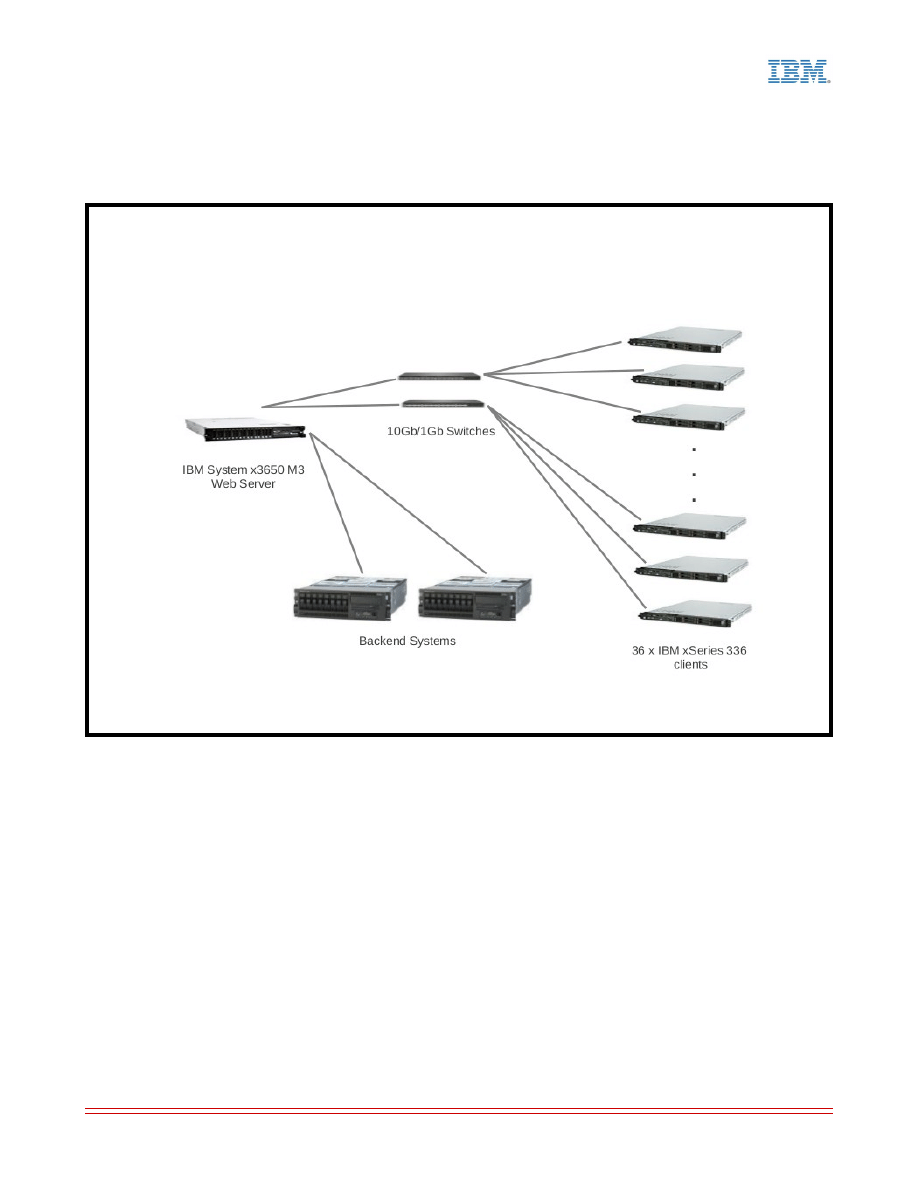
Test environment
2.1 Hardware configuration
6
Illustration 1: Test Configuration

KVM host system under test (SUT) – IBM System x3650 M3
•
2 x Intel Xeon X5680 3.33 GHz CPUs
•
96 GB memory
•
Networking
◦
2 x Intel 10 Gigabit Dual Port Adapters for client connections
◦
Intel 10 Gigabit PCI Express Network Driver (ixgbe) version 3.10.17
◦
1 x Intel PRO/1000 Quad Port Server Adapter for back end systems connections
◦
2 x BNT BLADE RackSwitch G8000 Rackable 1/10G Aggregation Switches for
connections to the clients
•
Storage
◦
8 x 200GB SFF SAS SSDs
◦
1 SSD for the host OS and guest images, 1 SSD for the web server session files,
and 6 SSDs for the web server dataset.
Clients – IBM xSeries 336
•
36 load providing clients and one additional system for benchmark management
•
2 x Intel Xeon 2.80GHz CPUs
•
3GB memory
•
IBM NetXtreme BCM5721 Gigabit Ethernet PCI Express (onboard dual port)
•
2 x NetGear ProSafe 48 Port Gigabit Stackable Smart Switches GS748TS for client
management
Back end (simulator) systems – IBM System p5 550
•
2 systems
•
2 x POWER5+ 1.896GHz CPUs
•
4GB memory
•
Intel Pro/1000 onboard dual port gigabit ethernet
7

2.2 Software
Red Hat Enterprise Linux 6.4 was used on the host system with its implementation of KVM
and the libvirt virtualization API [2].
Red Hat Enterprise Linux 6.4 was used on the guests. Multiple small guests were tested as
well as a large single guest. For simplicity's sake, much of the configuration and tuning
reported in this paper is from the single guest scenario.
For the web server, the Apache Software Foundation's Apache HTTP Server [3] (referred to
as Apache throughout the rest of this paper) was chosen for a variety of reasons including:
•
It is proven and has a lengthy successful history. From the apache.org website: “The
Apache HTTP Server is an open-source HTTP server for modern operating systems
including UNIX, Microsoft Windows, Mac OS/X and Netware. The goal of this project is
to provide a secure, efficient and extensible server that provides HTTP services
observing the current HTTP standards. Apache has been the most popular web server
on the Internet since April of 1996.”
•
It is rich in features, simple to use, readily available, and is included in Red Hat
Enterprise Linux 6.4.
•
It is widely used. It has been consistently atop W3Techs Web Technology Surveys'
“Usage of web servers for websites” daily list [4], numbering more than all other
tracked web servers combined.
PHP [5] was used for server-side dynamic scripting as well as the Alternative PHP Cache
(APC) [6] (commonly called a PHP accelerator) for caching and optimizing PHP code.
Standard Performance Evaluation Corporation's SPECweb2009 benchmark [7] was used to
exercise this web serving environment to find optimal configuration and tuning .
8

Configuration and tuning
Much has been written about tuning web servers for specific environments on “bare metal”
(non-virtualized) systems. A simple internet search yields a wealth of such information which
is outside the scope of this paper.
For performance results and an example configuration of a bare metal web server SUT in an
environment similar to the one used for this paper, see IBM's SPECweb2009 result published
on the spec.org website [8]:
http://www.spec.org/web2009/results/res2012q1/web2009-20120112-00010.html
In general, many of the Linux and Apache configuration parameter changes outlined in that
report apply to common web server configurations. Some values may need to be adjusted for
specific loads that differ from the benchmark's load. (The benchmark exercises the web
server at a steady state of peak utilization. Actual traffic on deployed web servers may be
more intermittent and streaky.)
KVM, the libvirt virtualization API, the Virtual Machine Manager (virt-manager) [9], and the
open source machine emulator and virtualizer QEMU [10], all included in Red Hat Enterprise
Linux 6.4, provide a rich feature set and variety of options for virtualization configuration and
tuning. Specific configuration and tuning for the virtualized web serving environment are
reported in the next few sections.
Note: There are many ways to set configuration parameter values in Linux. Some persist
after reboots; some do not. Each example in the following sections shows a way to
accomplish a task, but is not necessarily the only way to accomplish the task. Pick your
favorite method.
3.1 Host configuration and tuning
Backing your KVM guest with huge pages can provide a performance boost. Example:
Calculate the number of huge pages required to back the guest(s). On x86, huge pages are
2MB, so divide the total amount of guest memory in MB by 2. Round up to the nearest
integer and add 8 pages (or more as needed) for additional memory requirements. The result
is the number of huge pages required to back the guests.
Set the number of huge pages:
# echo {number of huge pages} > /proc/sys/vm/nr_hugepages
For persistence, store that value into /etc/sysctl.conf as follows:
vm.nr_hugepages = {number of huge pages}
Display the number of huge pages to verify that it is set correctly:
# cat /proc/meminfo | grep Huge
Changes to the guest definition required to take advantage of the backing huge pages are
described in the next section.
9

Examine system services using results of the
chkconfig command.
# chkconfig
Stop those that are unneeded. Example:
# chkconfig auditd off
Use the deadline scheduler on the KVM host. In general, it performs the same or better than
the other schedulers. Example:
# echo deadline > /sys/block/{
DEVICE-NAME}
/queue/scheduler
If you are not over-committing memory, turn off Kernel SamePage Merging (KSM). Otherwise
it can eliminate performance benefits of huge pages. Example:
# chkconfig ksm off; chkconfig ksmtuned off; service ksm stop; service ksmtuned stop
For systems like web servers that use a lot of memory for caching files from disk, zone
reclaim can cause a performance degradation. Turn it off by setting zone_reclaim_mode to 0.
Example:
# echo 0 > /proc/sys/vm/zone_reclaim_mode
Each of the CPU scaling governor types is designed for a specific purpose. Selection should
be done judiciously. However, to get the best performance from a virtualized system, use the
performance governor. Set the governor for each CPU. Example:
# echo performance > /sys/devices/system/cpu/cpu{
x
}/cpufreq/scaling_governor
A system feature called Pause-Loop Exiting can cause instability and performance
degradation on a virtualized system that will have a web server running in a heavily utilized
guest. Turn it off by setting the ple_gap module parameter to 0 for kvm_intel.
Example:
Add file kvmopts.conf to /etc/modprobe.d/ with contents:
options kvm_intel ple_gap=0
Restart the kvm_intel module if it is already running.
# modprobe -r kvm_intel
# modprobe kvm_intel
10

3.2 Guest definition
As mentioned earlier, the SUT is running KVM, libvirt, and QEMU. With this combination, the
guest definition is contained in an XML file in default location /etc/libvirt/qemu/VM_name.xml.
This file should only be edited with the virsh editor or for some features, graphically with virt-
manager. Many of the examples in this section contain snippets of that XML file.
Enable backing huge pages defined on the host. Example:
<domain type='kvm'>
...
<memoryBacking>
<hugepages/>
</memoryBacking>
…
</domain>
Pin VCPUs to host CPUs. The best technique is to pin in the following order: each
successive VCPU to a host CPU, then the next to its hyperthread. For example, pin VCPU0
to CPU0 and VCPU1 to CPU0's hyperthread. Pin VCPU2 to CPU1 and VCPU3 to CPU1's
hyperthread. The example XML snippet below is for one large guest on the SUT with 2 x 6
core sockets. Note that CPU0's hyperthread for this system is CPU12. Pinning in this
manner ensures that VCPU0 – VCPU11 are processed on the first socket while VCPU12 –
VCPU23 are processed on the second socket. Example:
<domain type='kvm'>
...
<vcpu placement='static'>24</vcpu>
<cputune>
<vcpupin vcpu='0' cpuset='0'/>
<vcpupin vcpu='1' cpuset='12'/>
<vcpupin vcpu='2' cpuset='1'/>
<vcpupin vcpu='3' cpuset='13'/>
...
<vcpupin vcpu='22' cpuset='11'/>
<vcpupin vcpu='23' cpuset='23'/>
</cputune>
</domain>
11

After the VCPUs are pinned properly, if running on a multi-node system, configure the
memory so that the memory a VCPU uses comes from the same host node as the CPU to
which the VCPU is pinned. For example, VCPU2 is pinned to CPU1 on node0. Configure the
memory to ensure that any memory used by VCPU2 is from host node0. There is no explicit
way to specify individual host node preference for each VM node's memory, so work around it
with the XML configuration. The example XML snippet below is for one large guest on the
SUT with 2 x 6 core sockets. Pay particular attention to the
<numatune> and <numa> sections.
<memory mode='preferred' nodeset='0'> specifies that all VM memory should prefer host
memory from node0. However, in the
<numa> section we have allocated just enough huge
pages on host node0 such that when the qemu process allocates all of the VM node0
memory, host node0 huge pages will be used up. Then the qemu process will have to
allocate VM node1's memory from host node1.
Example:
<domain type='kvm'>
…
<memory unit='KiB'>94208000</memory>
<currentMemory unit='KiB'>94208000</currentMemory>
<numatune>
<memory mode='preferred' nodeset='0'/>
</numatune>
<cpu mode='custom' match='exact'>
<model fallback='allow'>Westmere</model>
<vendor>Intel</vendor>
<topology sockets='2' cores='6' threads='2'/>
<numa>
<cell cpus='0-11' memory='47104000'/>
<cell cpus='12-23' memory='47104000'/>
</numa>
</cpu>
...
</domain>
12

3.3 Guest configuration and tuning
Red Hat Enterprise Linux 6.4 supports several networking setups for virtualization. Each has
strengths to fill the needs of various guest functions. These networking setups include:
•
Virtual networks using Network Address Translation (NAT).
•
Directly-allocated physical devices using PCI device assignment (also known as PCI
Pass-Through).
•
Directly-allocated virtual functions using PCIe Single Root I/O Virtualization (SR-IOV).
•
Bridged networks.
See chapters 11, 12, and 13 of “Red Hat Enterprise Linux 6 Virtualization Host Configuration
and Guest Installation Guide. Installing and configuring your virtual environment. Edition 4.”
[11] for more details and setup instructions.
Networking performance for a web server is critical. To meet the demands of web server
networking in a virtualized environment, SR-IOV is the preferred setup because of its flexibility
and performance. If the hardware and software requirements for enabling SR-IOV cannot be
met, or if more virtual functions per guest are required than SR-IOV allows, PCI device
assignment is a less flexible but similarly performing substitution.
Pin the network interrupts on the guest VCPUs and corresponding host CPUs to balance
interrupt processing and provide a significant performance boost. For information about how
to do this, see Section 4.3, Interrupts and IRQ Tuning, of the “Red Hat Enterprise Linux 6
Performance Tuning Guide. Optimizing subsystem throughput in Red Hat Enterprise Linux 6.
Edition 4.0” [12] for details.
Example:
Turn off irqbalance as it nullifies pinning.
# chkconfig irqbalance off
Display interrupt numbers and their corresponding sources to find the interrupt number to be pinned.
# less -S /proc/interrupts
Determine the hexadecimal CPU mask for desired pinning and set smp_affinity for the appropriate
interrupt number.
# echo {cpu_mask} >/proc/irq/{interrupt_number}/smp_affinity
Examine system services using the results of the
chkconfig command.
# chkconfig
Stop those that are unneeded. Example:
# chkconfig auditd off
13

For systems like web servers that use a lot of memory for caching files from disk, zone
reclaim can cause a performance degradation. Turn it off by setting zone_reclaim_mode to 0.
Example:
# echo 0 > /proc/sys/vm/zone_reclaim_mode
Starting more Apache instances with fewer servers can perform better than starting fewer
Apache instances with more servers. Each instance requires a unique address. One way to
create more addresses without adding more interfaces is to use aliases. Creating aliases
provides multiple unique same-subnet addresses per network interface.
Example:
# ifconfig eth1:0 10.0.1.166 netmask 255.255.255.0
# ifconfig eth1:1 10.0.1.167 netmask 255.255.255.0
# ifconfig eth2:0 10.0.2.166 netmask 255.255.255.0
# ifconfig eth2:1 10.0.2.167 netmask 255.255.255.0
This example creates IP addresses 10.0.1.166 and 10.0.1.167 on interface eth1 (assuming
eth1 has already been defined) and IP addresses 10.0.2.166 and 10.0.2.167 on interface
eth2. A separate Apache instance can be started for each alias, each listening on a unique
address.
Create an Apache instance per subnet by creating multiple httpd configuration files (for
example, /etc/httpd/conf/httpd.1.0.conf, /etc/httpd/conf/httpd.1.1.conf,
/etc/httpd/conf/httpd.2.0.conf, etc.), altered with the correct subnet information.
For example, in /etc/httpd/conf/httpd.1.0.conf add the appropriate
Listen entry:
# Listen: Allows you to bind Apache to specific IP addresses and/or ports, in addition to
# the default. See also the <VirtualHost> directive.
#
# Change this to Listen on specific IP addresses as shown below to # prevent Apache from
# glomming onto all bound IP addresses (0.0.0.0)
#
Listen 10.0.1.166:80
Similarly in /etc/httpd/conf/httpd.1.1.conf add:
Listen 10.0.1.167:80
In /etc/httpd/conf/httpd.2.0.conf add:
Listen 10.0.2.166:80
In /etc/httpd/conf/httpd.2.1.conf add:
Listen 10.0.2.167:80
14

Similarly, for SSL support, create multiple SSL configuration files (for example,
/etc/httpd/conf.d/ssl.1.0.conf, /etc/httpd/conf.d/ssl.1.1.conf, /etc/httpd/conf.d/ssl.2.0.conf, etc.),
altered with the correct subnet information.
For example, in /etc/httpd/conf.d/ssl.1.0.conf add the appropriate
Listen entry:
# When we also provide SSL we have to listen to the the HTTPS port in addition.
Listen 10.0.1.166:443
Similarly in /etc/httpd/conf.d/ssl.1.1.conf add:
Listen 10.0.1.167:443
In /etc/httpd/conf.d/ssl.2.0.conf add:
Listen 10.0.2.166:443
In /etc/httpd/conf.d/ssl.2.1.conf add:
Listen 10.0.2.167:443
Start an Apache instance per subnet by issuing a start command for each instance. Use the
taskset command to pin the Apache instance to the VCPUs that service the interrupts of the
interface for that subnet.
Example:
# taskset --cpu-list 0,1,2,3,4,5 apachectl -k start -f /etc/httpd/conf/httpd.1.0.conf
# taskset --cpu-list 0,1,2,3,4,5 apachectl -k start -f /etc/httpd/conf/httpd.1.1.conf
# taskset --cpu-list 6,7,8,9,10,11 apachectl -k start -f /etc/httpd/conf/httpd.2.0.conf
# taskset --cpu-list 6,7,8,9,10,11 apachectl -k start -f /etc/httpd/conf/httpd.2.1.conf
In the Apache configuration file, httpd.conf, start enough servers to handle a normal load.
Configure a large enough server limit to handle peak loads. Apache manages server starts
quite well to handle varying loads.
For example, in /etc/httpd/conf/httpd.conf:
<IfModule prefork.c>
StartServers 256
MinSpareServers 256
MaxSpareServers 256
ServerLimit 2500
MaxClients 2500
MaxRequestsPerChild 0
</IfModule>
15

Determining the number of servers to start, the server limit, and the max clients can be more
of an art than a science. Too many or too few of any of them can hinder performance. To
help determine those values experimentally, display the number of active Apache processes
at various load levels with the
ps command.
Example:
# ps -C httpd | wc -l
Several operating system and networking parameters must be adjusted because their default
values are generally not optimal for an active web server. The following list shows the
adjustments for the test described in this paper. Your values may differ depending upon load.
# ulimit -n 1000000
# ulimit -u 1000000
# sysctl -w net.core.wmem_max=67108864
# sysctl -w net.core.rmem_max=67108864
# sysctl -w net.core.wmem_default=67108864
# sysctl -w net.core.rmem_default=67108864
# sysctl -w net.core.optmem_max=67108864
# sysctl -w net.core.somaxconn=640000
# sysctl -w net.ipv4.tcp_wmem="33554432 33554432 33554432"
# sysctl -w net.ipv4.tcp_rmem="33554432 33554432 33554432"
# sysctl -w net.ipv4.conf.all.rp_filter=1
# sysctl -w net.ipv4.conf.all.arp_filter=1
# sysctl -w net.ipv4.tcp_window_scaling=0
# sysctl -w net.ipv4.tcp_sack=0
# sysctl -w net.ipv4.tcp_dsack=0
# sysctl -w net.ipv4.tcp_max_tw_buckets=2000000
# sysctl -w net.ipv4.tcp_max_syn_backlog=200000
# sysctl -w net.core.netdev_max_backlog=1048576
# sysctl -w net.ipv4.tcp_mem="33554432 33554432 33554432"
Increase the transmit queue length of your interfaces. Example:
# ip link set eth1 txqueuelen 20000
# ip link set eth2 txqueuelen 20000
16

3.4 Performance results
Separate benchmark tests were run on the same hardware. One test was with bare metal,
optimally tuned as is described in the SPECweb2009 result [8] published by IBM. The other
test was with the KVM hypervisor, optimally tuned as is described in this paper. Results
showed that in general, at sustained peak utilization, the web serving environment on the
KVM hypervisor could handle around 90% of the load as on the bare metal system. However,
actual load on deployed web servers tends to vary much more than the sustained peak
utilization in the lab benchmark setting. Since the deployed servers would be less likely to be
fully utilized all of the time, the small difference between KVM and bare metal load handling
ability could be even more negligible on deployed servers than with the lab benchmark.
17

Summary
Virtualization provides a means for consolidating the functions of multiple individual server
systems onto a single server, thereby cutting costs for ownership, housing, management,
energy, and maintenance for unneeded systems. The virtualization technologies built into
Intel and AMD processors and the integration of the KVM hypervisor into the Linux kernel
have combined to provide a first class hypervisor offering. The KVM hypervisor has a rich
feature set allowing a virtualized server to host a broad range of functions while incurring
relatively low overhead.
High performing web servers are critical for successful online transactions. However, like
many other systems, web server systems are often underutilized. The flexibility of the KVM
hypervisor provides for an outstanding host for web serving, allowing for server consolidation.
The relatively low overhead of the KVM hypervisor ensures that critical web serving
performance won't suffer when servers are consolidated.
Proper configuration and tuning are required to efficiently run a web server in a virtual
machine. These include:
•
Tuning the host and guest operating systems for the virtualized environment
•
Backing the VMs with huge pages on the host
•
Properly pinning VCPUs to host CPUs
•
Choosing the appropriate virtual networking type for the desired result
•
Correctly configuring multiple networking interfaces and queues, and pinning interrupts
to the appropriate VCPUs and CPUs
•
Ensuring appropriate node local memory allocation for the virtual machine
•
Tuning the web server to meet the required demand
When configured and tuned properly, the latest hypervisor technology available in KVM
provides an excellent opportunity for increased cost savings through web server consolidation
without sacrificing efficiency or performance.
18

References and more information
[1] Kernel Virtual Machine (KVM).
http://www.linux-kvm.org/page/Main_Page
[2] libvirt Virtualization API, Domain XML Format.
http://libvirt.org/formatdomain.html
[3] The Apache Software Foundation Apache HTTP Server.
http://projects.apache.org/projects/http_server.html
[4] W3Techs Web Technology Surveys, “Usage Statistics and Market Share of Web Servers
for Websites”, updated daily.
http://w3techs.com/technologies/overview/web_server/all
[5] PHP
[6] Alternative PHP Cache
[7] Standard Performance Evaluation Corporation's SPECweb009 benchmark
[8] SPECweb2009_PHP Result on IBM System x3650 M3 with Red Hat Enterprise Linux 6.2,
Published by SPEC in January 2012.
http://www.spec.org/web2009/results/res2012q1/web2009-20120112-00010.html
[9] Virtual Machine Manager
[10] QEMU Open Source Processor Emulator
http://wiki.qemu.org/Main_Page
[11] Red Hat Inc., “Red Hat Enterprise Linux 6 Virtualization Host Configuration and Guest
Installation Guide. Installing and configuring your virtual environment. Edition 4.”, 2012.
[12] Red Hat Inc., “Red Hat Enterprise Linux 6 Performance Tuning Guide. Optimizing
subsystem throughput in Red Hat Enterprise Linux 6. Edition 4.0”, 2011.
Red Hat Inc., “Red Hat Enterprise Linux 6 Virtualization Tuning and Optimization Guide.
Optimizing your virtual environment. Edition 0.3”, 2013.
19
Document Outline
Wyszukiwarka
Podobne podstrony:
DW Navigator only for web id 14 Nieznany
Guidance for ambulance personnel on decisions and situations related to out of hospital CPR
Guidance for ambulance personnel on decisions and situations related to out-of-hospital CPR, MEDYCYN
2001 11 Web Browsers on Test Battle of the Browsers
PRICE BOOK FOR WEB
HTML5 For Web Designers 2010
PBO PD03 F03 Crew not fit for further work on board
Usability Evaluation Checklist For Web Sites
Dragon Dreaming for web
Romanza Rumba for web download III
We asked 10 leading figures for their thoughts on
2012 perf brief low latency tuning for rhel6 0
Romanza Rumba for web download I
freedom for ireland heather on the hill larks neck ireland forever
best practices for cyber security on board ships anssi
Romanza Rumba for web download V
więcej podobnych podstron