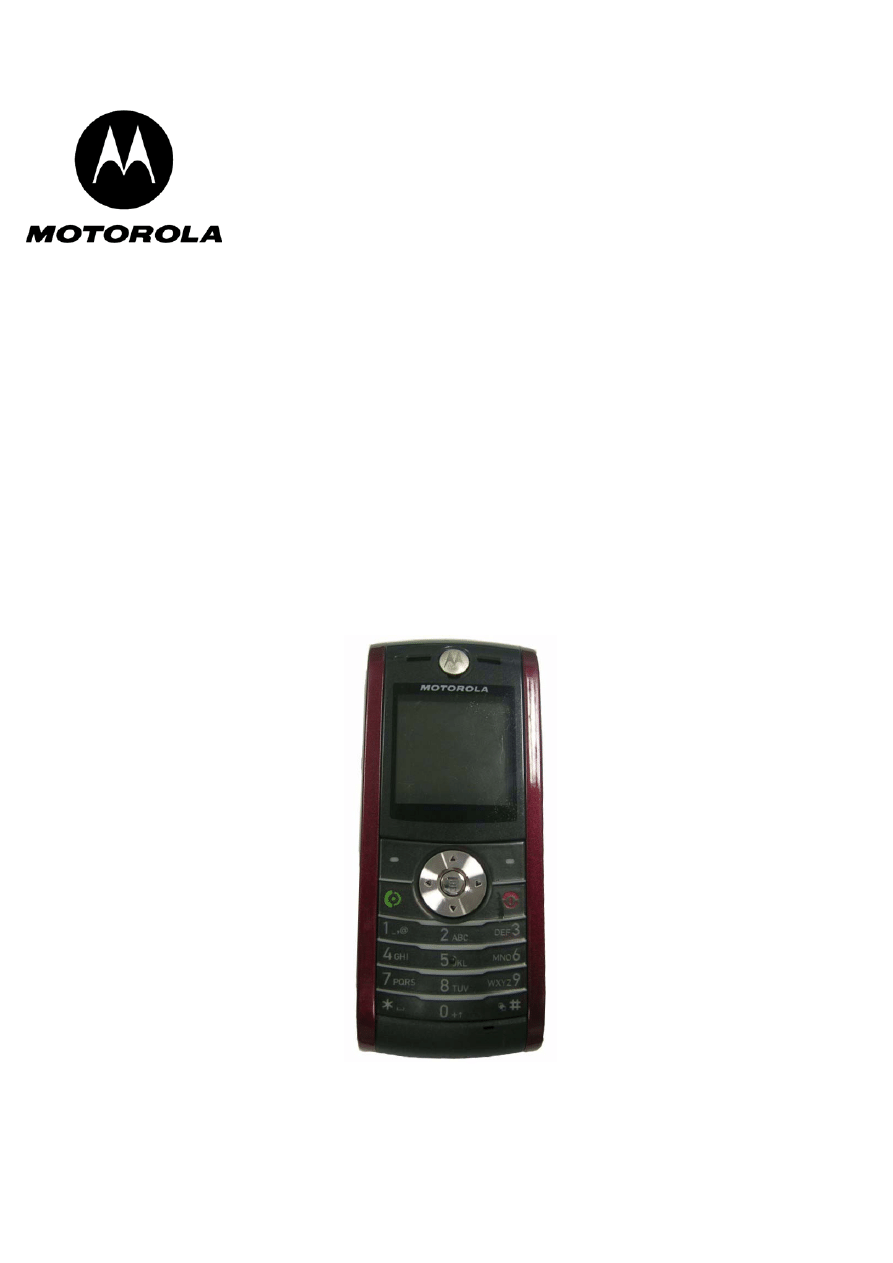
Level 1-2 Service Manual
W208
GSM 900/1800
GSM 850/1900
W208
Dual Band Wireless Telephone

Table of Contents
W208
2
Aug.15, 2006
Table of Contents
Introduction ................................................................................................................................... 3
Product Identification ............................................................................................................ 3
Product Names ..................................................................................................................... 3
Product Changes .................................................................................................................. 3
Regulatory Agency Compliance ........................................................................................... 3
Computer Program Copyrights ............................................................................................. 4
About This Service Manual ................................................................................................... 4
Warranty Service Policy ....................................................................................................... 5
Parts Replacement ............................................................................................................... 6
Specifications ................................................................................................................................ 7
Product Overview .......................................................................................................................... 9
Features ............................................................................................................................... 9
General Functions ....................................................................................................................... 11
Controls, Indicators, and Input/Output (I/O) Connectors .................................................... 11
User Interface Menu Structure ........................................................................................... 13
Battery Function ................................................................................................................. 14
Operation ............................................................................................................................ 14
Tools and Test Equipment ......................................................................................................... 14
Disassembly ................................................................................................................................ 15
Removing and Replacing the Battery ................................................................................. 16
Removing and Replacing the SIM Card ............................................................................. 17
Removing and Replacing the Front Housing ...................................................................... 17
Removing and Replacing the Transceiver Board, Back Housing, and Vibrator Module .... 20
Removing and Replacing the Antenna Module, Microphone ............................................. 21
Removing and Replacing the LCD Screen ......................................................................... 22
Removing and Replacing the LCD Shielding Case ............................................................ 23
Subscriber Identity Module (SIM) and Identification Label ..................................................... 24
SIM ..................................................................................................................................... 24
Identification ....................................................................................................................... 24
Troubleshooting .......................................................................................................................... 26
Manual Test Mode .............................................................................................................. 26
Manual Test Mode Commands .......................................................................................... 26
Troubleshooting Chart ........................................................................................................ 27
Programming: Software Upgrade and Flexing ................................................................... 28
Part Number Charts .................................................................................................................... 29
Exploded View Diagram ..................................................................................................... 29
Exploded View Parts List .................................................................................................... 30
Accessories ........................................................................................................................ 31
Index ............................................................................................................................................... 1

Level 1-2 Service Manual
Aug.15, 2006
3
Introduction
Motorola® Inc. maintains a worldwide organization that is dedicated to provide responsive,
full-service customer support. Motorola products are serviced by an international network of
company-operated product care centers as well as authorized independent service firms.
Available on a contract basis, Motorola Inc. offers comprehensive maintenance and installation
programs that enable customers to meet requirements for reliable, continuous communications.
To learn more about the wide range of Motorola service programs, contact your local Motorola
products representative or the nearest Customer Service Manager.
Product Identification
The model number on a label (usually on the housing) identifies Motorola products. Use the
entire model number when inquiring about the product. Numbers are also assigned to chassis
and kits.
Use these numbers when requesting information or ordering replacement parts.
Product Names
Product names are listed on the front cover. Product names are subject to change without
notice. Some product names, as well as some frequency bands, are available only in certain
markets.
Product Changes
When electrical, mechanical or production changes are incorporated into Motorola products, a
revision letter is assigned to the chassis or kit affected, for example: -A, -B, or -C, and so on.
The chassis or kit number, complete with revision number is imprinted during production. The
revision letter is an integral part of the chassis or kit number and is also listed on schematic
diagrams, and printed circuit board layouts.
Regulatory Agency Compliance
This device complies with Part 15 of the FCC Rules. Operation is subject to the following
conditions:
• This device may not cause any harmful interference, and
• this device must accept interference received, including interference that may cause
undesired operation
This class B device also complies with all requirements of the Canadian Interference-Causing
Equipment Regulations (ICES-003).
Cet appareil numerique de la classe B respecte toutes les exigences du Reglement sur le
materiel brouilleur du Canada.

W208
4
Aug.15, 2006
Computer Program Copyrights
The Motorola products described in this manual may include Motorola computer programs
stored in semiconductor memories or other media that are copyrighted with all rights reserved
worldwide to Motorola. Laws in the United States and other countries preserve for Motorola,
Inc. certain exclusive rights to the copyrighted Introduction computer programs, including the
exclusive right to copy, reproduce, modify, decompile, disassemble, and reverse-engineer the
Motorola computer programs in any manner or form without Motorola's prior written consent.
Furthermore, the purchase of Motorola products shall not be deemed to grant either directly or
by implication, estoppel, or otherwise, any license or rights under the copyrights, patents, or
patent applications of Motorola, except for a nonexclusive license to use the Motorola product
and the Motorola computer programs with the Motorola product.
About This Service Manual
Using this service manual and the suggestions contained in it assures proper installation,
operation, and maintenance of W208 telephones. Refer questions about this manual to the
nearest Customer Service Manager. This manual contains mechanical service information
required for the equipment described and is current as of the printing date.
Audience
This document aids service personnel in testing and repairing W208 telephones Service
personnel should be familiar with electronic assembly, testing, and troubleshooting methods,
and with the operation and use of associated test equipment.
Scope
This manual provides basic information relating to W208 telephones, and also provides
procedures and processes for repairing the units at Level 1 and 2 service centers, including:
• Unit swap out
• Repairing of mechanical faults
• Basic modular troubleshooting
• Testing and verification of unit functionality
• Initiate warranty claims and send faulty modules to Level 3 or 4 repair centers.
Level 1-2 Service Manual
Aug.15, 2006
5
Conventions
Special characters and typefaces, listed and described below, are used in this publication to
emphasize certain types of information.
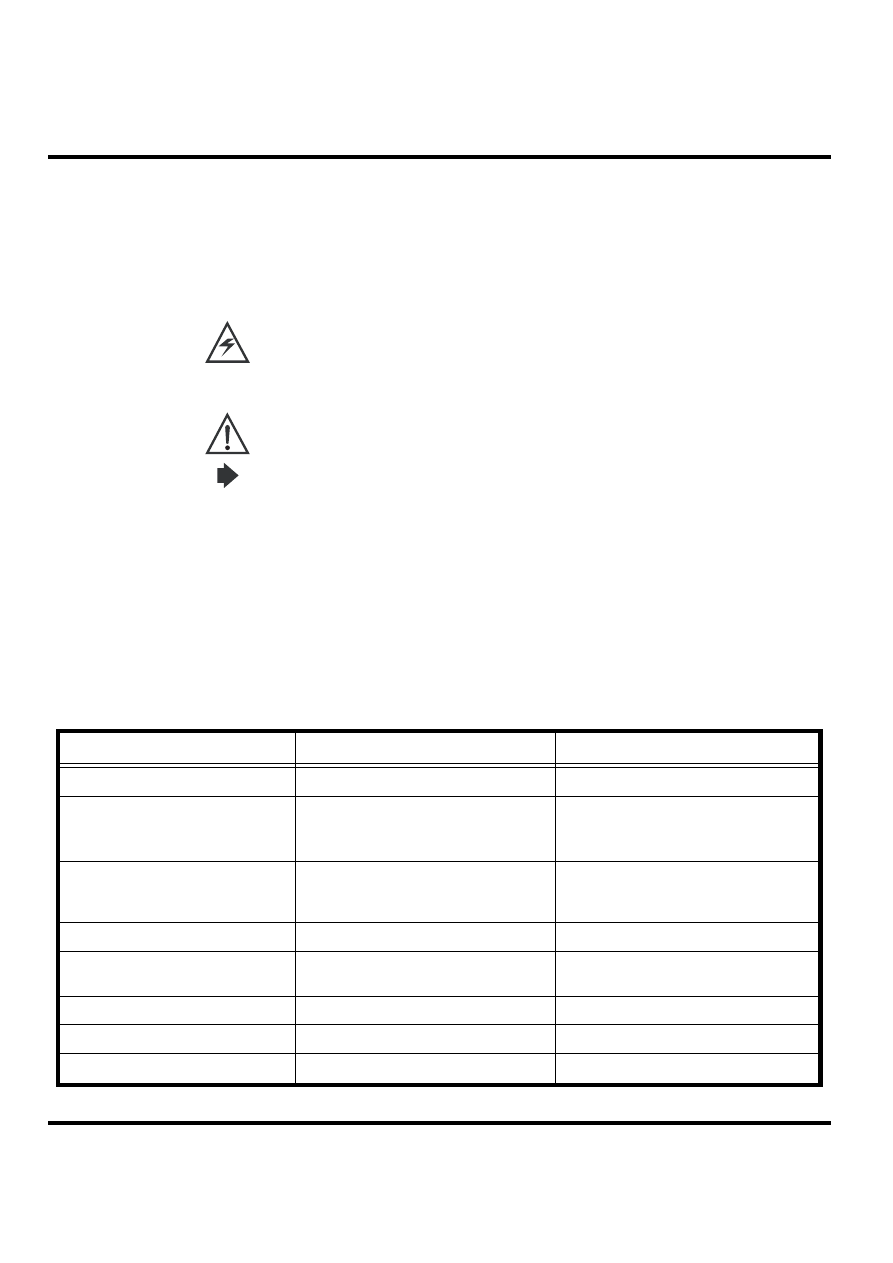
Note: Emphasizes additional information pertinent to the subject matter.
Caution: Emphasizes information about actions that may result in equipment damage.
Waring: Emphasizes information about actions that may result in personal injury.
M
Keys to be pressed are represented graphically. For example, instead of "Press the Menu Key",
you will see "Press
M
".
Information from a screen is shown in text as similar as possible to what appears in the display.
For example, ALERTS or
ALERTS
.
Information that you need to type is printed in boldface type.
Warranty Service Policy
The product is sold with the standard 12-month warranty terms and conditions. Accidental
damage, misuse, and extended warranties offered by retailers are not supported under
warranty.
Non-warranty repairs are available at agreed fixed repair prices.
Out of Box Failure Policy
The standard out of box failure criteria applies. Customer phones that fail very early on after
the date of sale are to be returned to Manufacturing for root cause analysis, to guard against
epidemic criteria. Manufacturing to bear the costs of early life failure.
Product Support
The customer's original phones will be repaired but not refurbished as standard. Appointed
Motorola Service Hubs will perform warranty and non-warranty field service for level 2
(assemblies) and level 3 (limited Transceiver component). Motorola High Tech Centers will
perform level 4 (full component) repairs.
Customer Support
Customer support is available through dedicated Call Centers and in-country help desks.
Product-Service training should be arranged through the local Motorola Support Center.

W208
6
Aug.15, 2006
Parts Replacement
When ordering replacement parts or equipment, include the Motorola part number and
description used in the service manual. When the Motorola part number of a component is not
known, use the product model number or other related major assembly along with a
description of the related major assembly and of the component in question. In the U.S.A., to
contact Motorola, Inc. on your TTY, call: 800-793-7834
Accessories and Aftermarket Division (AAD)
Replacement parts, test equipment, and manuals can be ordered from AAD.
For EMEA spare parts call +49 461 803 1638.
For Asia spare parts call +65 648 62995.
U.S.A.
Outside U.S.A.
Phone: 800-422-4210
Phone: 847-538-8023
FAX: 800-622-6210
FAX: 847-576-3023
Level 1-2 Service Manual
Aug.15, 2006
7
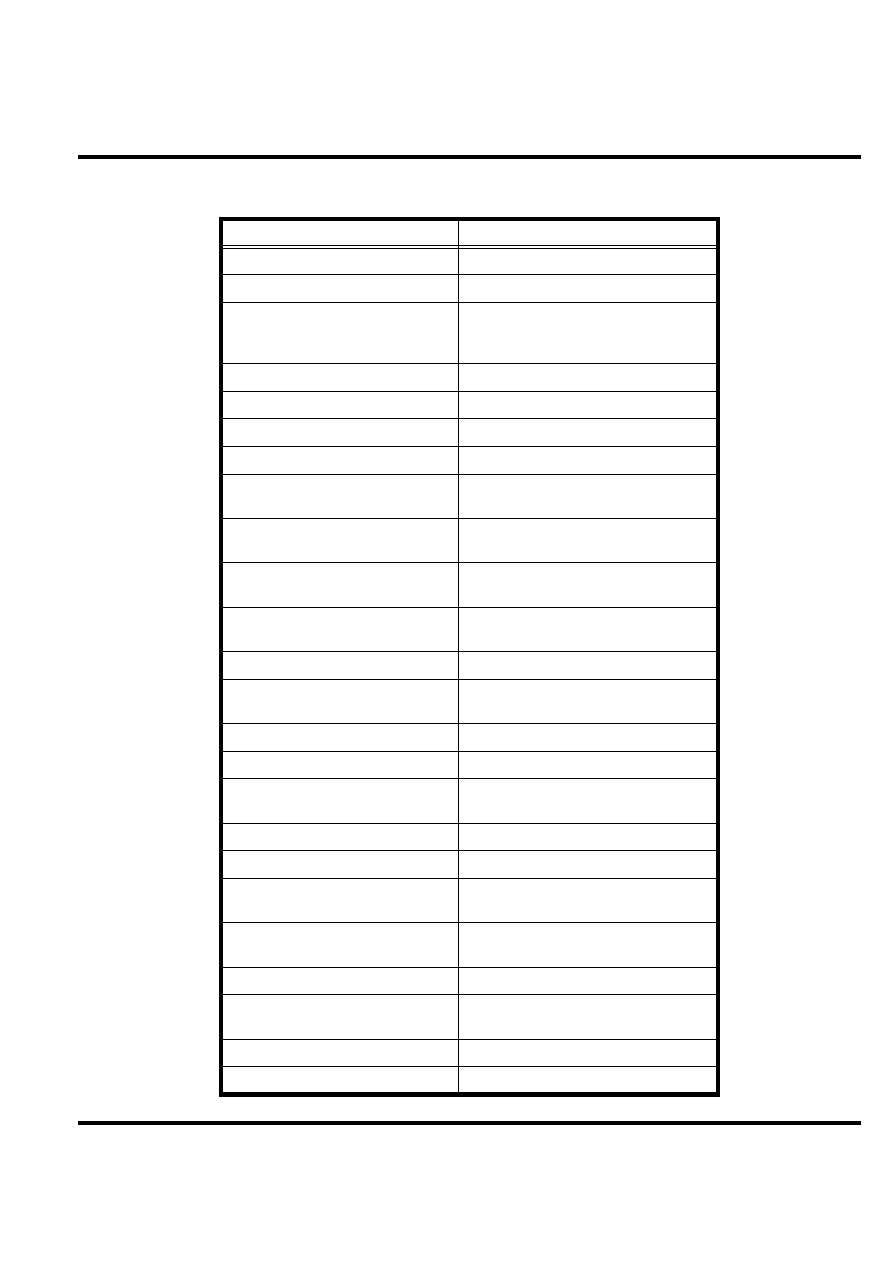
Specifications
General Functions
Specification
Dimensions
108mm x 44mm x 14.9mm
Weight
78grams (with battery)
LCD Display
65K Color TFT,
Active Area: 27.264mm x 27.264mm,
Hardware pixels: 128 x 128
Band
GSM900/1800 or GSM850/PCS1900
Battery
850 mAh Li Ion Battery
Product type
BAR type
Antenna
Internal Antenna
Frequency Range (EGSM)
880-915 MHz Tx,
925-960 MHz Rx
Frequency Range (DCS)
1710 – 1785 MHz Tx,
1805-1880 MHz Rx
Frequency Range (GSM850)
824-849 MHz Tx,
869-894 MHz Rx
Frequency Range (PCS)
1850-1910MHz Tx,
1930-1990 MHz Rx
Channel Spacing
200KHz
Channels
174 EGSM, 374 DCS,
124 GSM850, 299 PCS
Modulation
GMSK at BT=0.3
Transmitter Phase Accuracy
5 Degrees RMS, 20 Degrees peak
Duplex spacing
45MHz EGSM, 95MHz DCS,
45MHz GSM850, 80MHz PCS
Frequency Stability
±
0.1PPM of the downlink frequency (Rx)
Operating voltage
3.53V ~4.2V
Average Transmit Current
Power Level 5: 280 mA
Power Level 19: 115 mA
Average Standby Current
DRX 2: 6 mA
DRX 9: 2.7 mA
Temperature Range
-20°C to 55°C
Battery Life
Talk Time: 238-469 Mins; Stand by Time:
133~307 Hours
Battery Charge Time
4 Hours to 90% of 850mAH capacity
Alert Volume
Max 95dB@ 5cm, 0.5 watts input
W208
8
Aug.15, 2006
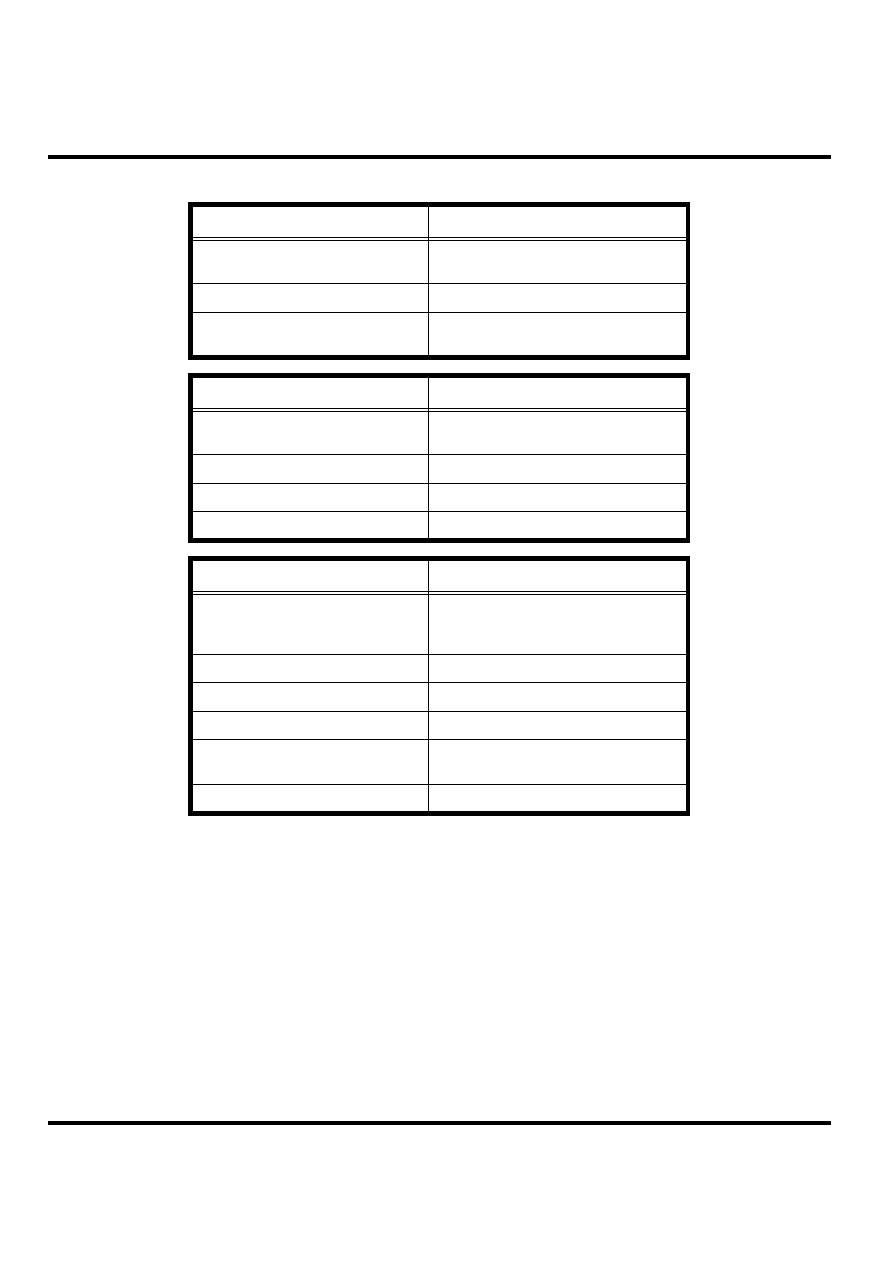
Transmitter Functions
Specification
RF Power Output
33 dBm typical GSM850/GSM900
30 dBm typical DCS1800/PCS1900
Output Impedance
50 ohms nominal
Spurious Emissions
-36 dBm from 0.1 to 1GHz,
-30 dBm from 1 to 4 GHz
Receiver Functions
Specification
Receiver Sensitivity
-107 dBm typical GSM 850/GSM900
-107 dBm typical DCS1800/PCS1900
RX Bit Error Rate (100K bits) type II
<2%
Channel Hop Time
500 microseconds
Time to Camp
Approximately 6~10 Second
Speech Coding Functions
Specification
Speech Coding Type
Regular pulse excitation/linear predictive
coding with long term prediction (PRE
LPC with LTP)
Bit Rate
13.0 Kbps
Frame Duration
20 ms
Block Length
260 bits
Classes
Class 1 bits =182 bits;
Class 2 bits = 78 bits
Bit Rate with FEC Encoding
22.8 Kbps

Level 1-2 Service Manual
Aug.15, 2006
9
Product Overview
The Motorola W208 features a global system for mobile communications wireless interface
technology. It also features a simplified icon and graphical user interface (UI) for easier
operation in addition to short message service text messaging (SMS), speed dialing, quick
dialing, an alarm, a calculator, games, and an address book.
The telephones are made of polycarbonate plastic. The display and speaker, as well as the 21-
key keypad, transceiver printed circuit board (PCB), microphone, charger and headphone
connectors, and power button are contained within clam shell form-factor housing. The User-
replaceable 850 mAh Lithium-Ion (Li-Ion) battery provide up to 238-469 Mins of talk time
with up to 133-307 Hours of standby time. The userreplaceable 920 mAh Lithium-Ion (Li-
Ion) battery provides up to 450 minutes of talk time with up to 350 hours of standby time. The
phone accepts 1.8V/3V mini subscriber identity module (SIM) cards that fit into the SIM
holder next to the battery. These telephones feature a 128 x 128 pixel color graphics display
and an internal antenna.
Features
W208 telephones use advanced, self-contained, sealed, custom integrated circuits to perform
the complex functions required for GSM communication. Aside from the space and weight
advantage, microcircuits enhance basic reliability, simplify maintenance, and provide a wide
variety of operational functions.
Features available in this family of telephones include:
• A 128 x 128 pixel color graphics display
• Internal antenna
• Lower voltage technology that provides increased standby and talk times
• Extended GSM (EGSM) channels
• Display animation
• VibraCall® vibrating alert
• 5-Way navigation key
• SIM Toolkit™ Class 2 (STK) (Network, subscription and SIM card or service provider
dependent feature. Not available in all areas.)
• Backlight
• Speed-, Quick- and One-Touch dialing
• Call Forwarding and Holding
• Customized Menus
• Personal management tools calculator with currency converter, and clock with date
• Other features

W208
10
Aug.15, 2006
Caller Line Identification
Upon receipt of a call, the calling party's phone number is compared to the phone book. If the
number matches a phone book entry, that name will be displayed. If there is no phone book
entry, the incoming phone number will be displayed. In the event that no caller identification
information is available, an incoming call message is displayed.
SIM Toolkit™ - Class 2
SIM Application Toolkit is a value-added service delivery mechanism that allows GSM
operators to customize the services they offer their customers, from the occasional user who
requests sports news and traffic alerts, to a high call time business user who receives stock
alerts and checks flight times. Operators can now create their own value-added services menu
quickly and easily in the phone.
The customized menu will appear as the first menu and may be updated over-the-air with new
services when customers request them.
Level 1-2 Service Manual
Aug.15, 2006
11
General Functions
Controls, Indicators, and Input/Output (I/O) Connectors
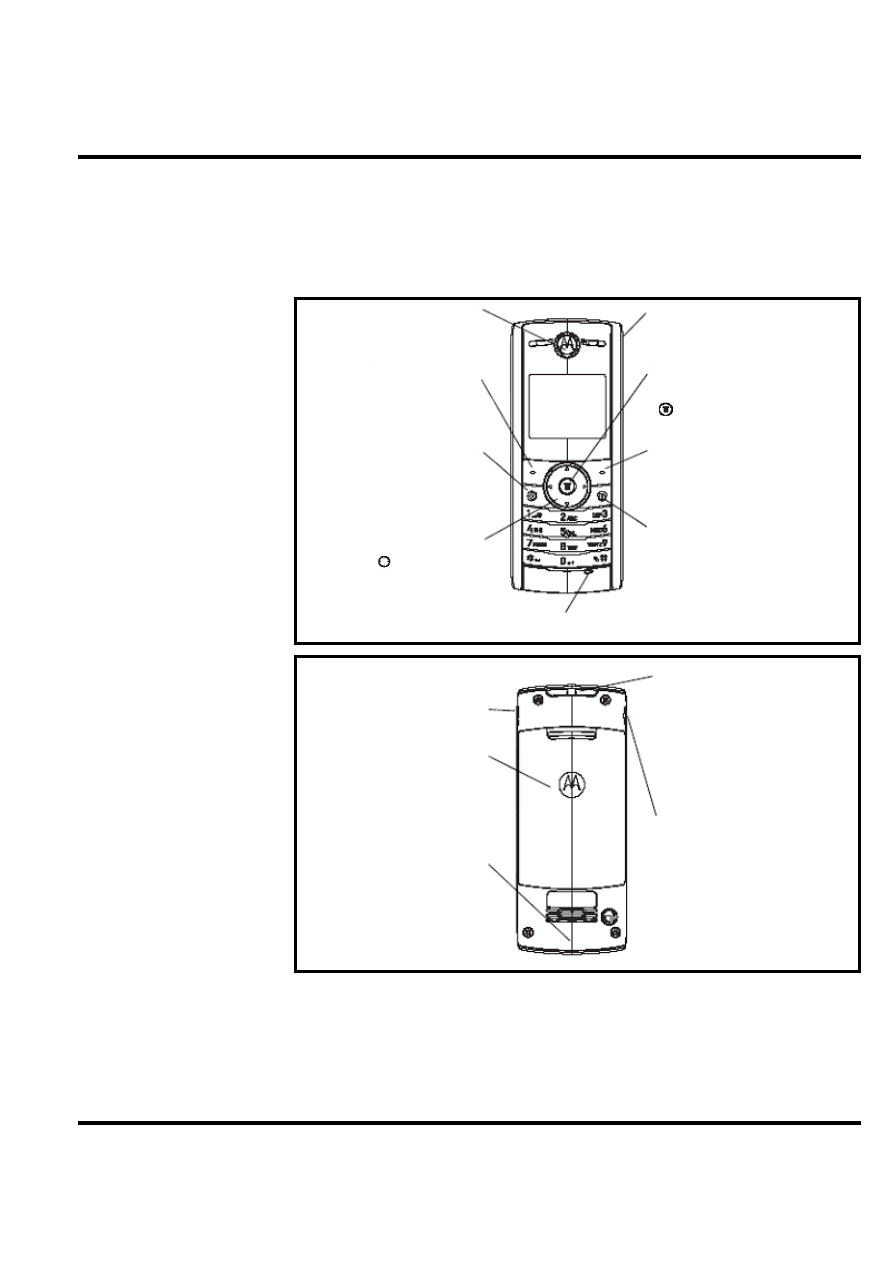
The W208 phone's controls are located on the front side of the device and on the keyboard as
shown in below. Indicators icons are displayed on the LCD.
Figure 1. W208 Telephone Control Locations
Menu Navigation
W208 telephones are equipped with a simplified icon and graphical-based user interface. See
the table below for details of the W208 menu structure. A five-way navigation key allows you
to move easily through menus and confirm your selection.
Earpiece
Listen to your voice
calls & messages.
Left Soft Key
Performs functions
identified by left
display prompt.
Send/Answer Key
Make and answer
calls. Press when idle
to see the list of
recently dialed calls.
Navigation Key
Press
up and down
to scroll through lists, left
and right to adjust
volume of ringtone style.
Microphone
Power/End Key
Press and hold to turn the
phone on/off.
Press and release to end
phone calls, exit menu
system.
Menu Key
Open a menu when you see
in the display.
Right Soft Key
Performs functions identified
by right display prompt.
Power Connector Port
Port to insert the charger.
Phone Jack
Battery Compartment
Integrated Antenna
Embedded in the bottom
and on the back of the
phone.
Lanyard Attachment
Headset Jack
Insert the headset
accessory for handsfree
use.
W208
12
Aug.15, 2006
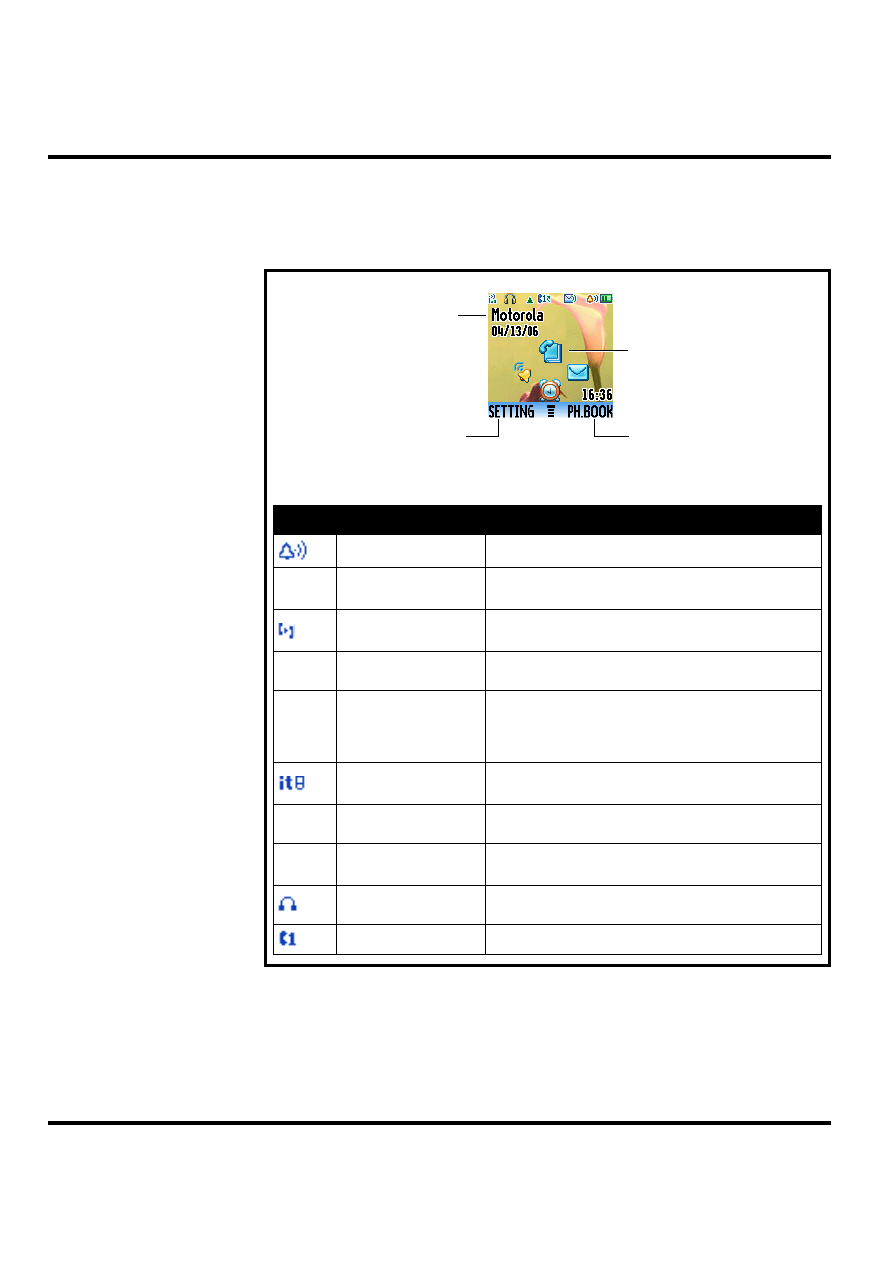
Liquid Crystal Display (LCD)
The LCD provides a 700 square millimeter multicolor backlit color display with user-
adjustable contrast settings for optimum readability in all light conditions. The bit-map 128 x
128 pixel display includes up to 3 lines of text, 1 line of icons, and 1 line of prompts.
Figure 2. W208 Display Icon Indicators
Icon
Name
Description
Alert Type Indicator
displays your assigned ring type.
5
Signal Strength
Indicator
shows the strength of your phone's connection with the
network.
Call Forward
Indicator
shows when Call Forward is activated.
O
In Use Indicator
indicates when a call is in progress, and when you
have a secure or insecure connection.
,
Roam Indicator
appears when your phone uses another network sys-
tem outside your home network. Icon here can also
indicate your text entry mode, alpha, numeric, symbol
and etc.
Entry Method
Indicator
appears when you select a specific kind of entry
method
X
Message Indicator
appears when you have a new voice or text message
waiting.
E
Battery Level
Indicator
shows the amount of charge left in your battery. The
more the bars, the greater the charge.
Headset Indicator
When you plug the headset to your phone, the icon dis-
plays.
LINE Indicator
indicates your phone is using LINE 1 or LINE 2.
Right Soft Key Label
Left Soft Key Label
Home Screen Display
Service Provider
Level 1-2 Service Manual
Aug.15, 2006
13
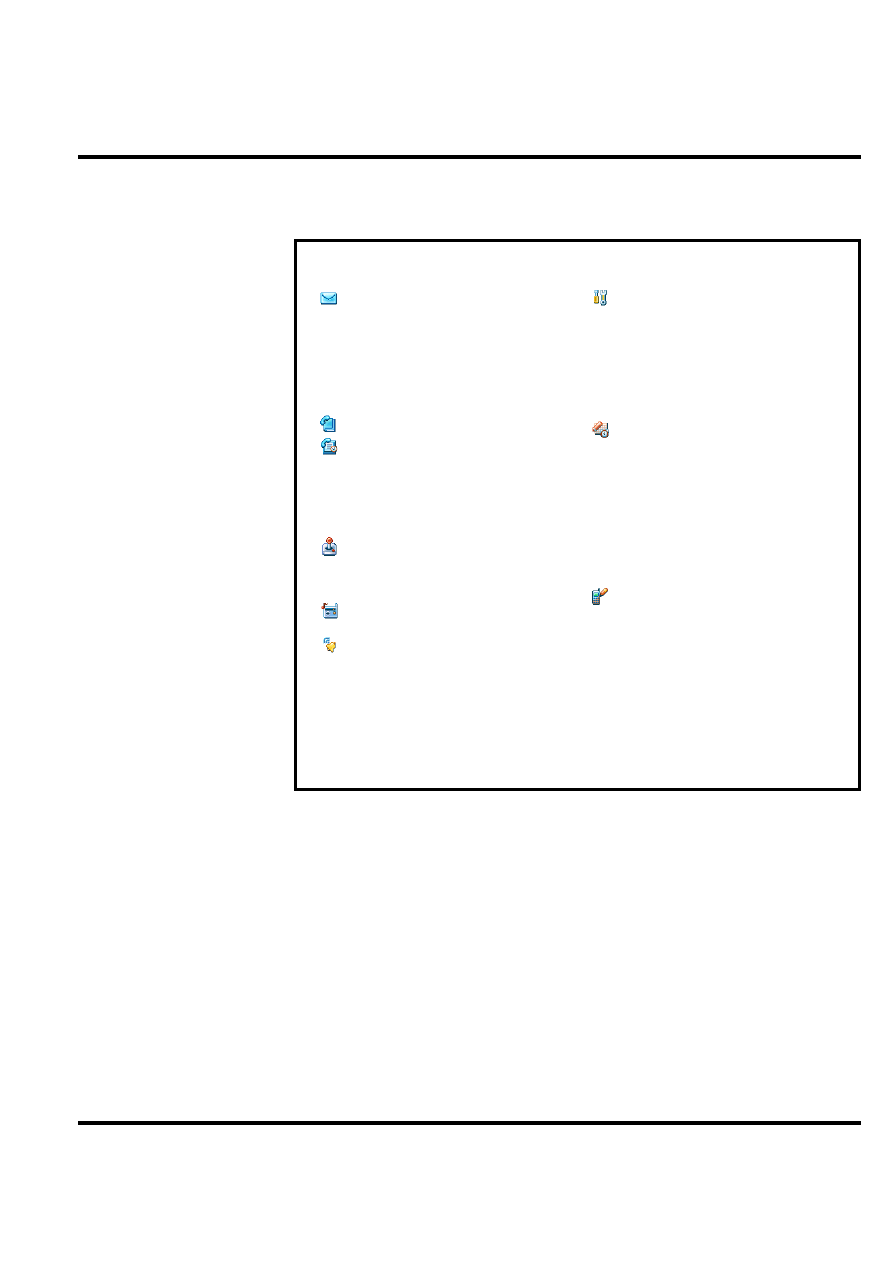
User Interface Menu Structure
The table below shows a portion of the W208 telephone menu structure.
Figure 3. W208 Menu Structure
Menu Map
Messages
• Create message
• Voicemail
• Inbox
• Info Services
• Quick Notes
• Outbox
• Drafts
Phonebook
Recent Calls
• Received Calls
• Dialed Calls
• Notepad
• Call times
• Call Cost
Games
• Rebels
• Crazy
• Football
FM Radio
(Plug in earphones)
Ring Style
• Style
• Lound Ring Detail
• My tones
Setting Menu
• Call Forward
• Phone Status
• In-Call Setup
• Security
• Initial Setup
• Network
• Headset
Office Tools
• Calculator
• My menu
• Alarm Clock
• Datebook
• Stop Watch
• Lantern
• Quick Dial
• Fixed Dial
• Service Dial
Personalize
• Home Screen
• Main Menu
• Color Style
• Greeting
• Wallpaper
• Screen Saver
• Quick Dial
* Optional Network, SIM card, or subscription-dependent features.
W208
14
Aug.15, 2006
Battery Function
The telephone displays a battery charge indicator icon in the idle screen to indicate the battery
charge level. The gauge shows four levels: 100%, 66%, 33%, and Low Battery.
Removing the battery causes the phone to shut down immediately and loose any pending work
(partially entered phone book entries or outgoing messages, for example).
Note: All batteries can cause property damage and/or bodily injury such as burns if a
conductive material such as jewelry, keys, or beaded chains touches exposed terminals. The
conductive material may complete an electrical circuit (short circuit) and become quite hot.
Exercise care in handling any charged battery, particularly when placing it inside a pocket,
purse, or other container with metal objects.
If the battery is removed while receiving a message, the message is lost.
To ensure proper memory retention, turn the phone OFF before removing the battery.
Immediately replace the old battery with a fresh battery.
Operation
For detailed operating instructions, refer to the appropriate User Guide listed in the Related
Publications section toward the end of this manual.
Tools and Test Equipment
The table below lists the tools and test equipment used on C139 telephones. Use either the
listed items or equivalents.
Table 1: General Test Equipment and Tools
Motorola Part Number
1
Description
Application
See Table 6
Charger
Used to charge battery and power phone
0180386A82
Antistatic Mat Kit (includes 66-80387A95
antistatic mat, 66-80334B36 ground
cord, and 42-80385A59 wrist band)
Provides protection from damage to
phone caused by electrostatic discharge
(ESD)
-
Antistatic Gloves
Provides protection from damage to
phone caused by electrostatic discharge
(ESD)
8102430Z04
GSM / DCS / PCS Test SIM
Used to enable manual test mode
6680388B67
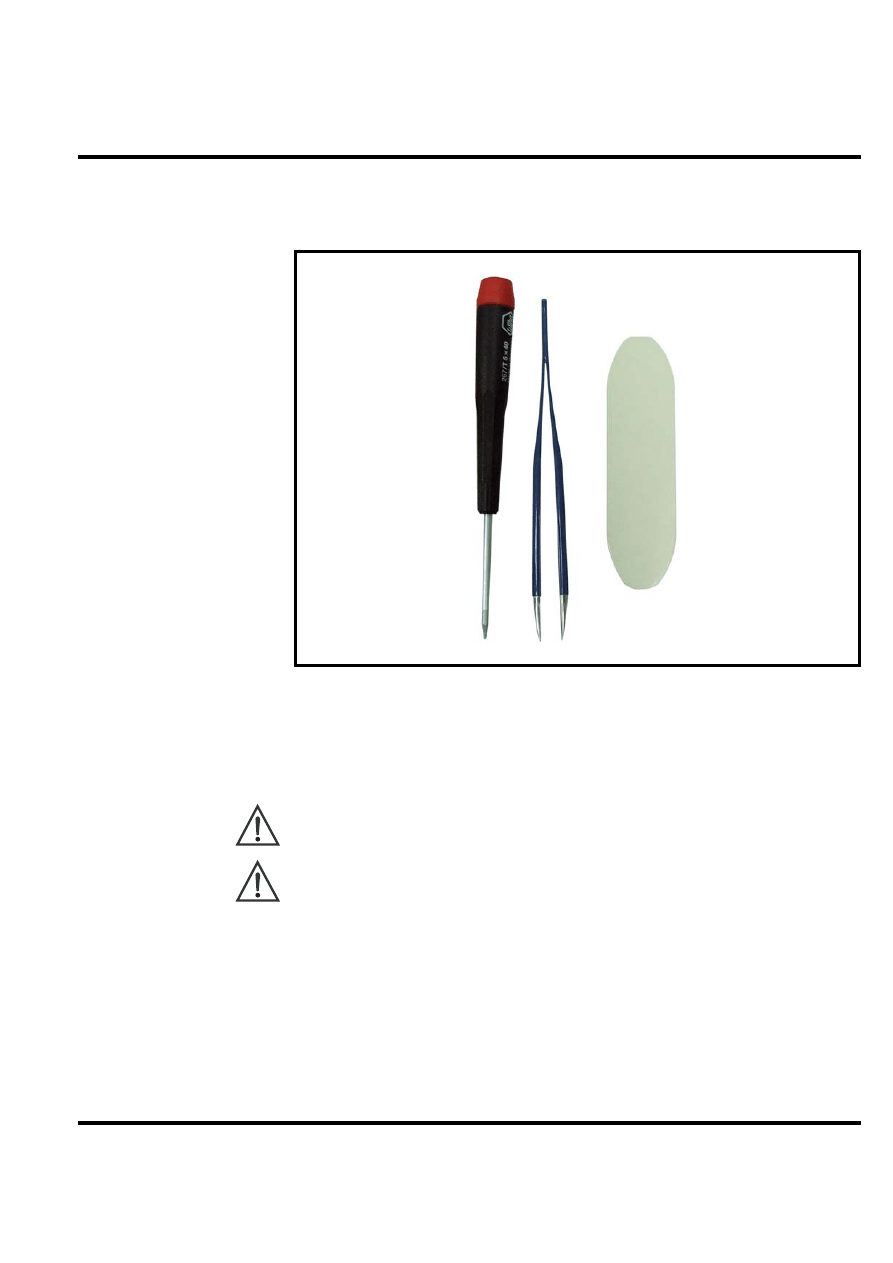
Disassembly tool, plastic with flat and
pointed ends (manual opening tool)
Used during assembly/disassembly
6680388B01
Tweezers, plastic
Used during assembly/disassembly
-
T5 Screw driver
Used with Screw Driver
HP34401A
2
Digital Multimeter
Used to measure battery voltage
Level 1-2 Service Manual
Aug.15, 2006
15
1. To order in North America, contact Motorola Aftermarket and Accessories Division (AAD) by phone at (800) 422-4210 or
FAX (800) 622-6210. Internationally, AAD can be reached by calling (847) 538-8023 or by fax (847) 576-3023.
2. Not available from Motorola. To order, contact Hewlett Packard at (800) 452-4844.
Figure 4. A screwdriver (T5), a pair of tweezers, and a wedge tool
Disassembly
This section describes how to disassemble a W208 telephone. Tools and equipment used are
listed on the preceding page.
Many of the integrated devices used in this phone are vulnerable to damage from electrostatic
discharge (ESD). Ensure adequate static protection is in place when handling, shipping, and
servicing any internal components.
Avoid stressing the plastic in any way to avoid damage to either the plastic or internal
components.
W208
16
Aug.15, 2006
Removing and Replacing the Battery
All batteries can cause property damage and/or bodily injury such as burns if a conductive
material such as jewelry, keys, or beaded chains touches exposed terminals. The conductive
material may complete an electrical circuit (short circuit) and become quite hot. Exercise care
in handling any charged battery, particularly when placing it inside a pocket, purse, or other
container with metal objects.
1.
Ensure the phone is turned off.
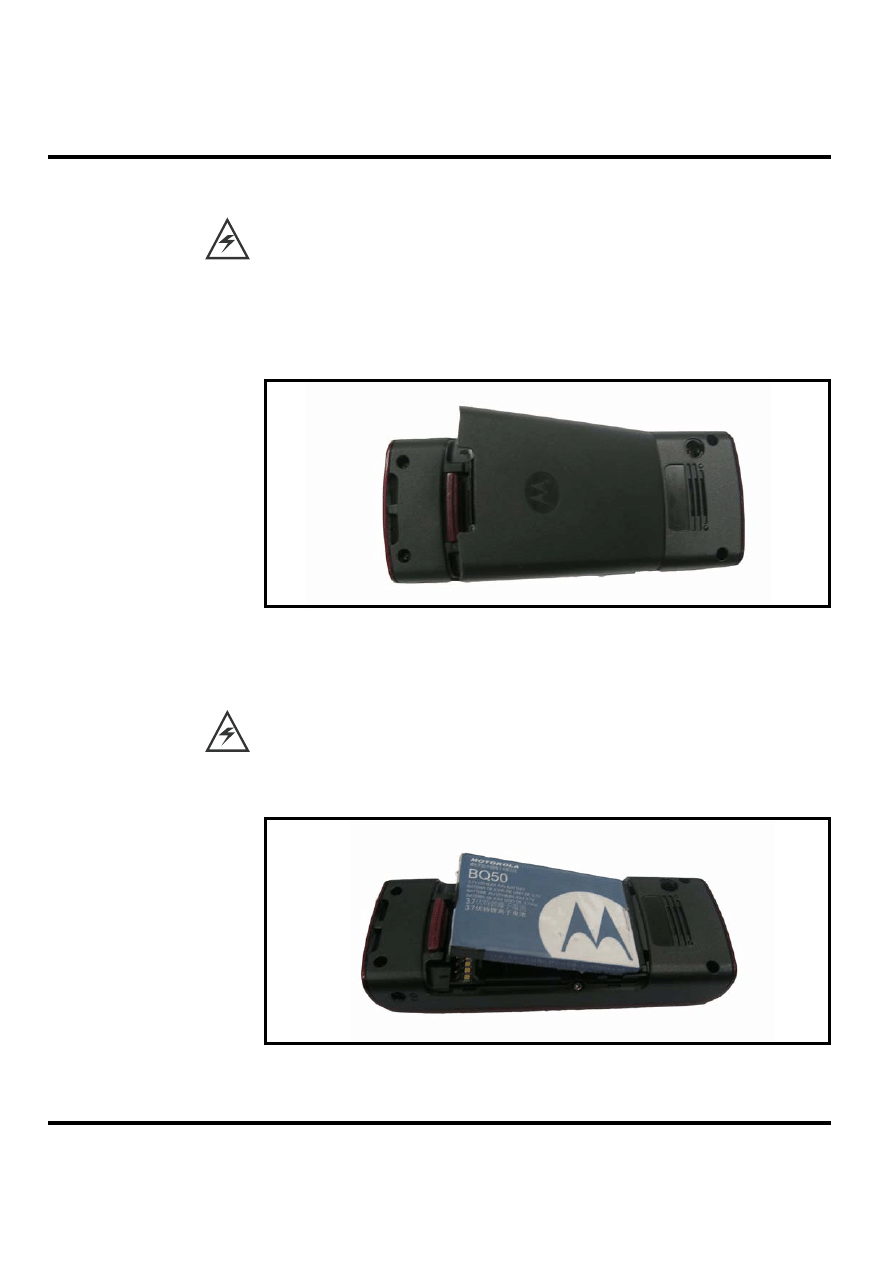
2.
Push the latch and pop out the battery cover.
Figure 5. Removing the battery cover
3.
Press the tab to pop out the battery.
There is a danger of explosion if the Lithium ion battery is replaced incorrectly. Replace only
with the same type of battery or equivalent as recommended by the battery manufacturer.
Dispose of used batteries according to the manufacturer's instructions.
4.
To replace, insert the battery with 2 tabs on its bottom end into the battery slot.
Figure 6. Replace the battery cover
Level 1-2 Service Manual
Aug.15, 2006
17
5.
Click the battery into place, then slip the battery cover over it.
Removing and Replacing the SIM Card
1.
Remove the battery.
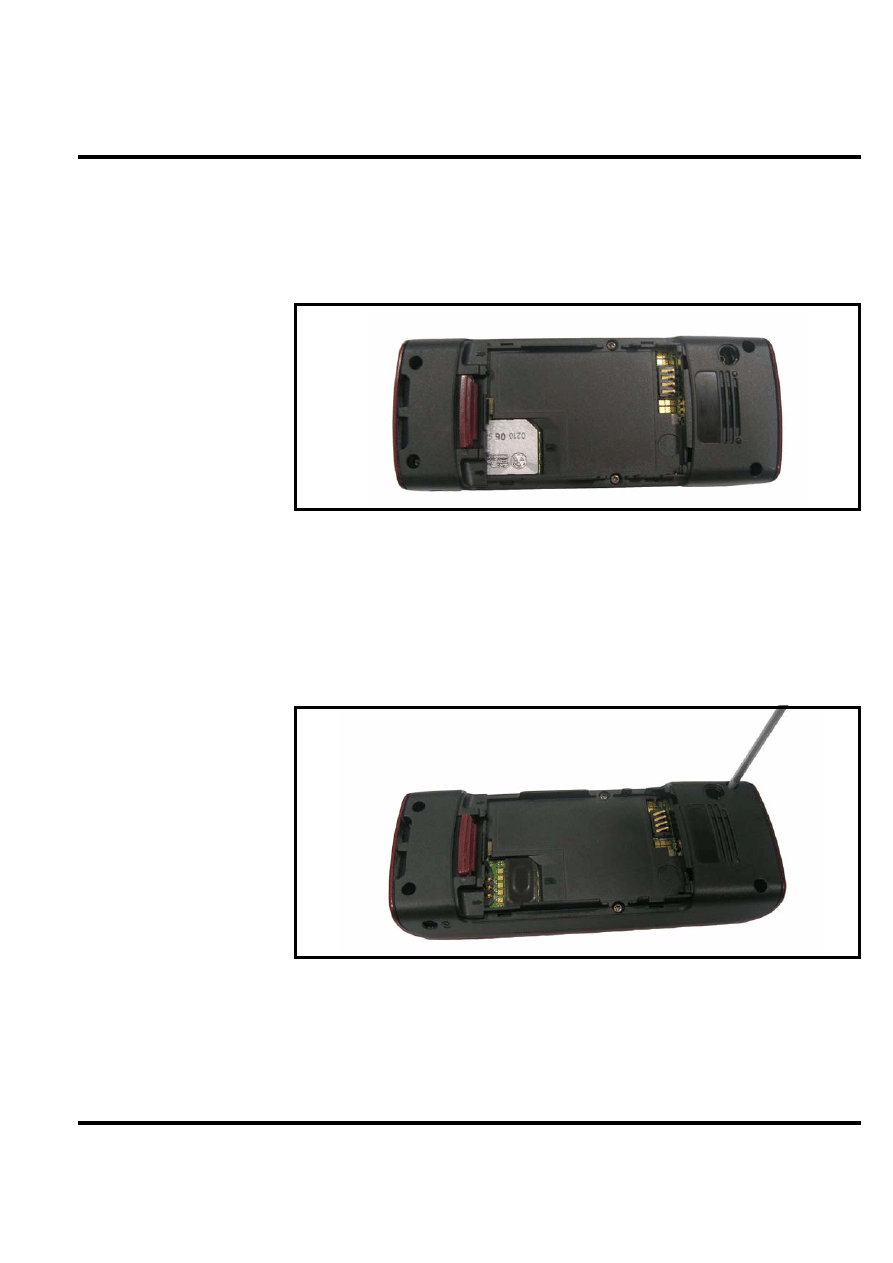
2.
Remove the SIM from its holder by sliding it in the direction shown below.
Figure 7. Removing the SIM card
3.
To replace, carefully slide the SIM into position in its socket.
Removing and Replacing the Front Housing
1.
Remove the SIM card.
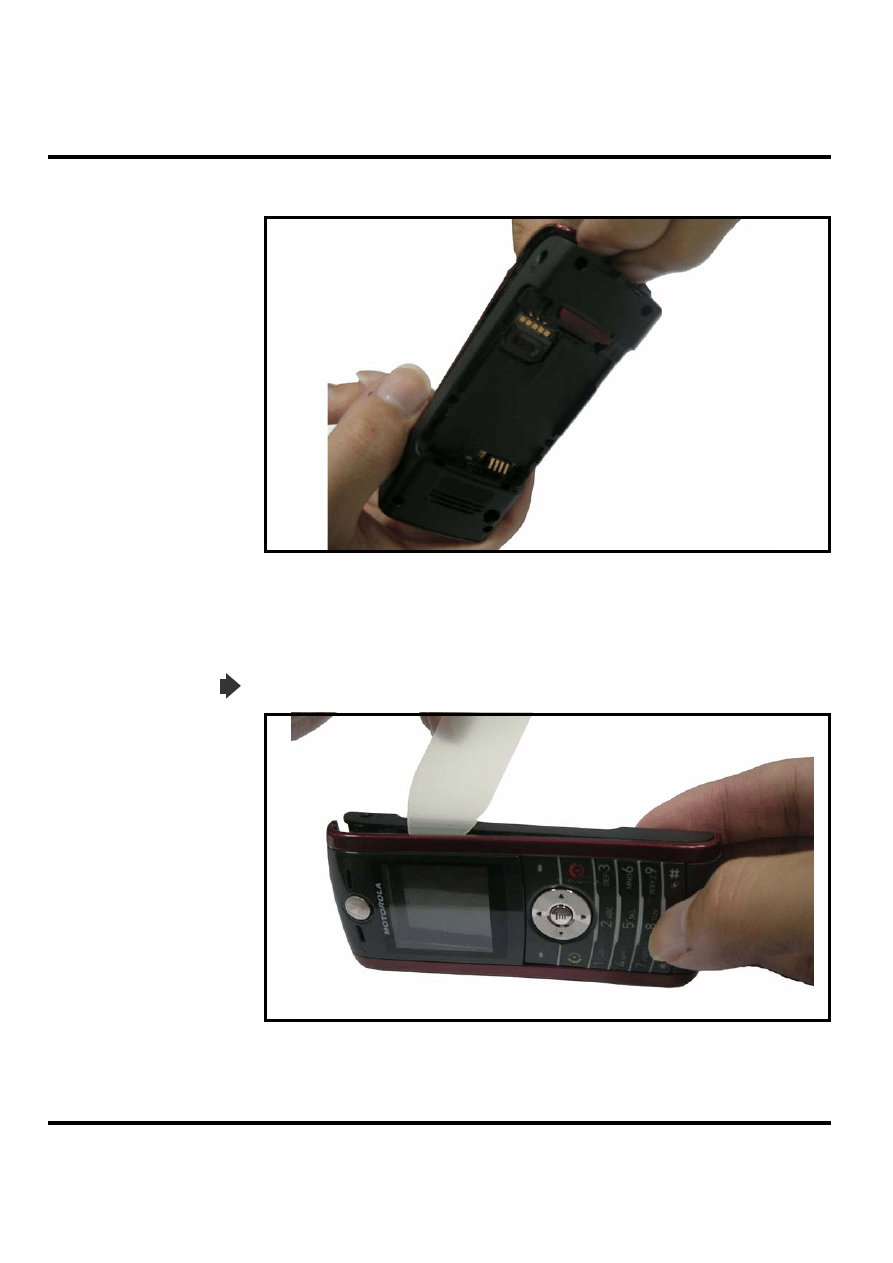
2.
Remove six T5 screws around the rear housing.
3.
Use torque force of 13.73 N-cm.
Figure 8. Removing the six T5 screws
W208
18
Aug.15, 2006
4.
Pull open the top of the front housing.
Figure 9.
5.
Use a flat wedge tool to pry the case open along the central seam beginning in the higher
left hand corner and sliding down and around to disengage the hooks. Repeat this for the
right hand side.
Be careful not to damage the side rubbers.
Figure 10. Prying the case apart along the seam
Level 1-2 Service Manual
Aug.15, 2006
19
6.
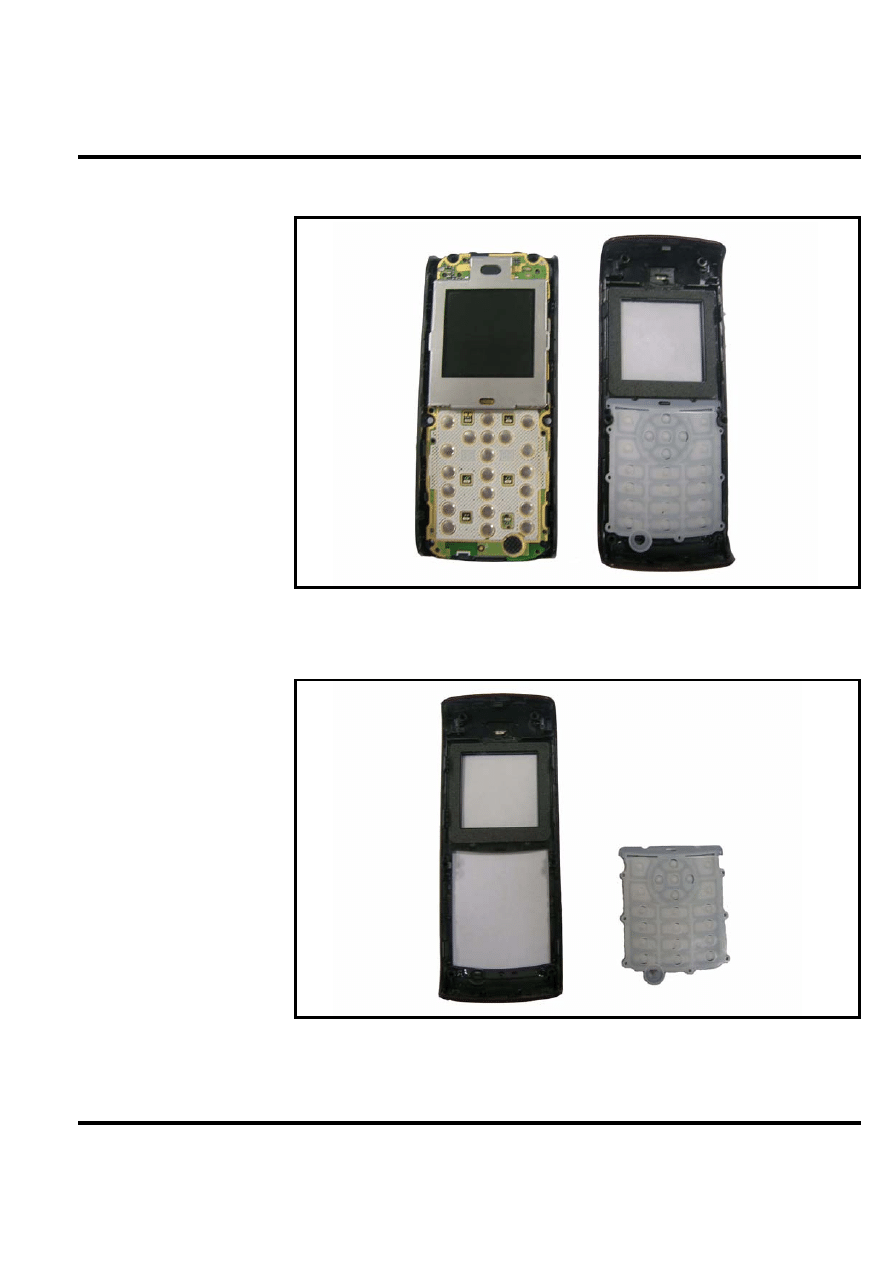
Remove the front housing.
Figure 11. Removing the front housing
7.
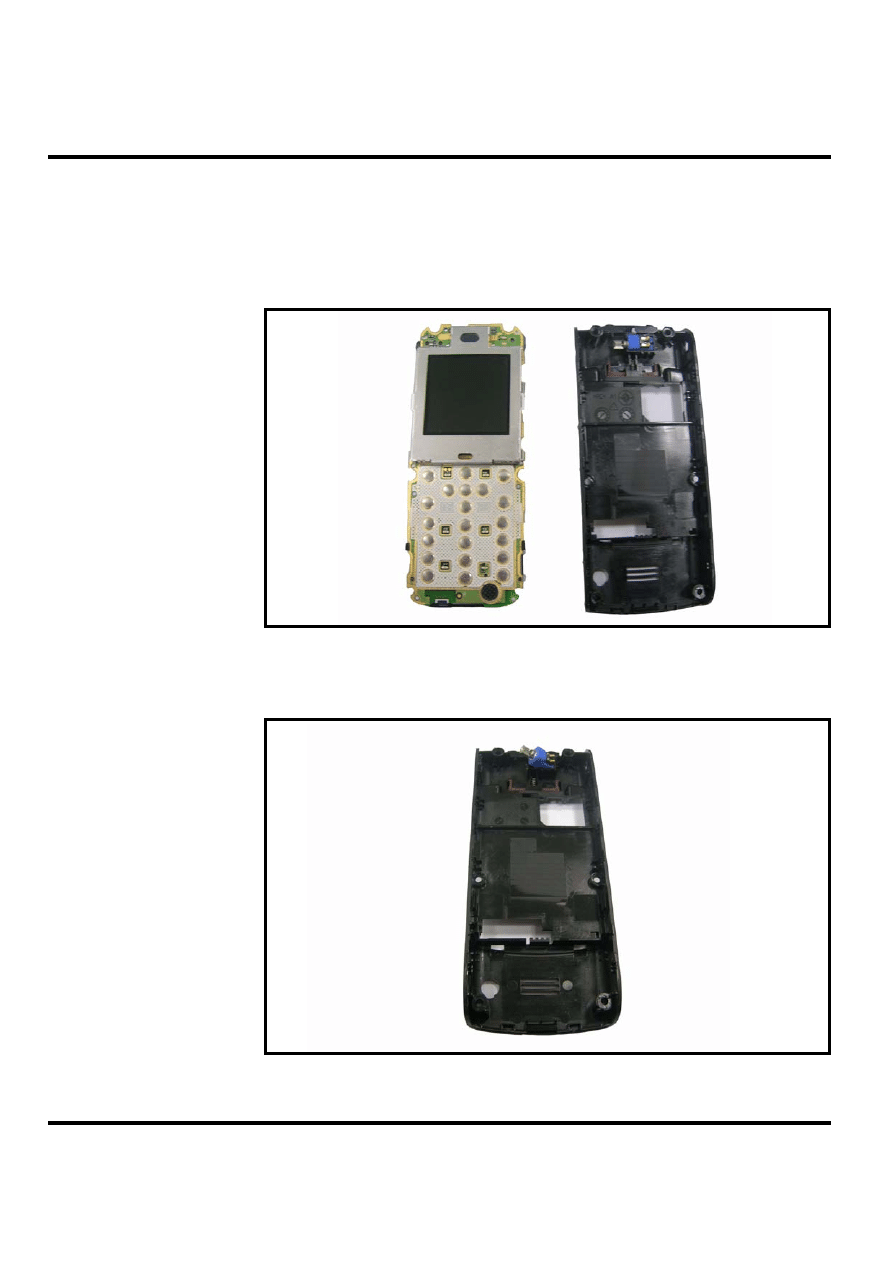
(Optional) Remove and replace the rubber keypad. It slips out of the front housing.
Figure 12. Removing the rubber keypad
8.
To replace, simply snap the front and back halves together again.
W208
20
Aug.15, 2006
Removing and Replacing the Transceiver Board, Back Housing, and Vibrator
Module
1.
Remove the front housing.
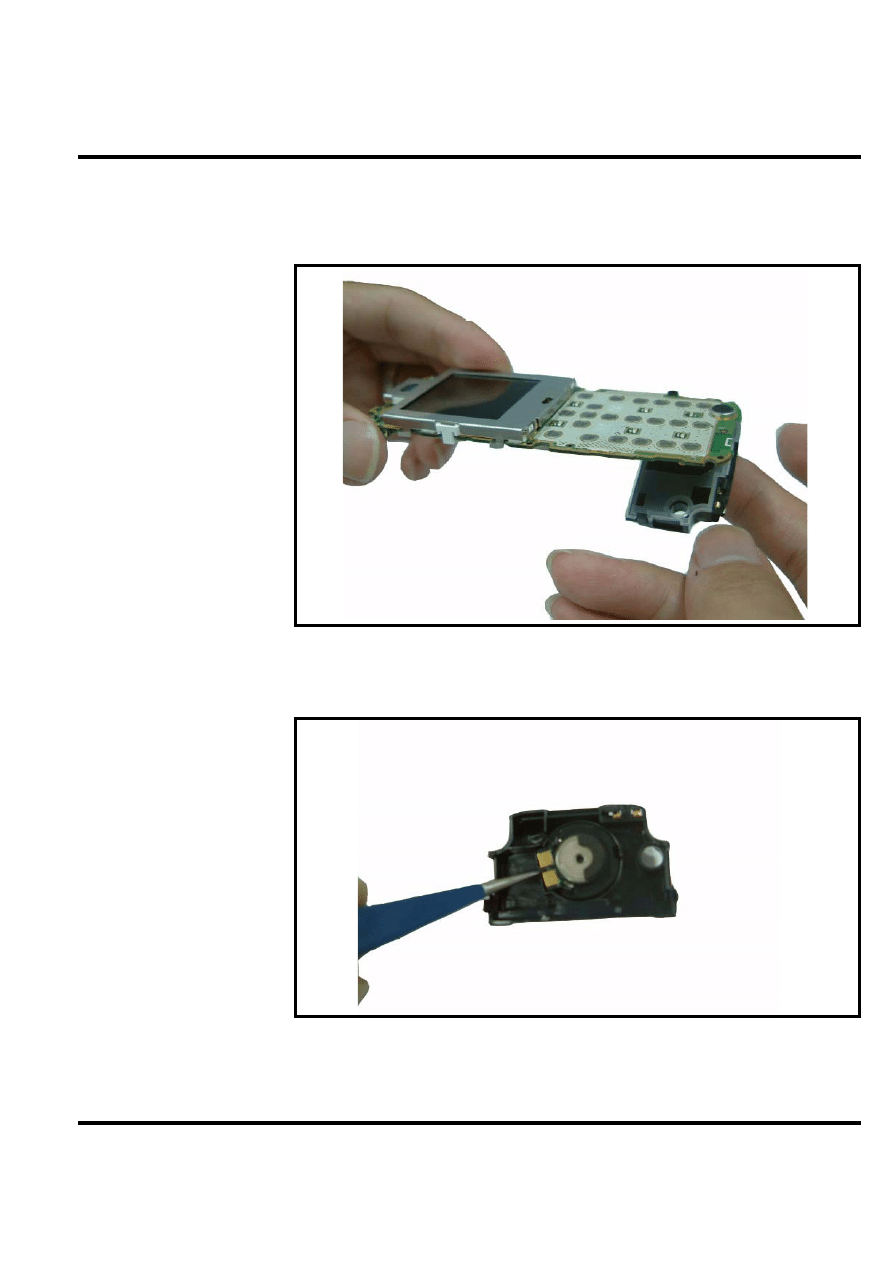
2.
Disengage the both side hooks which help to secure the transceiver board to the rear
housing, and then pop it out.
Figure 13. Disengaging the side hooks
3.
In the rear housing component, gently pry out the vibrator module.
Figure 14. Removing the vibrator module
Level 1-2 Service Manual
Aug.15, 2006
21
Removing and Replacing the Antenna Module, Microphone
1.
Remove the transceiver board, the vibrator module, and the rear housing.
2.
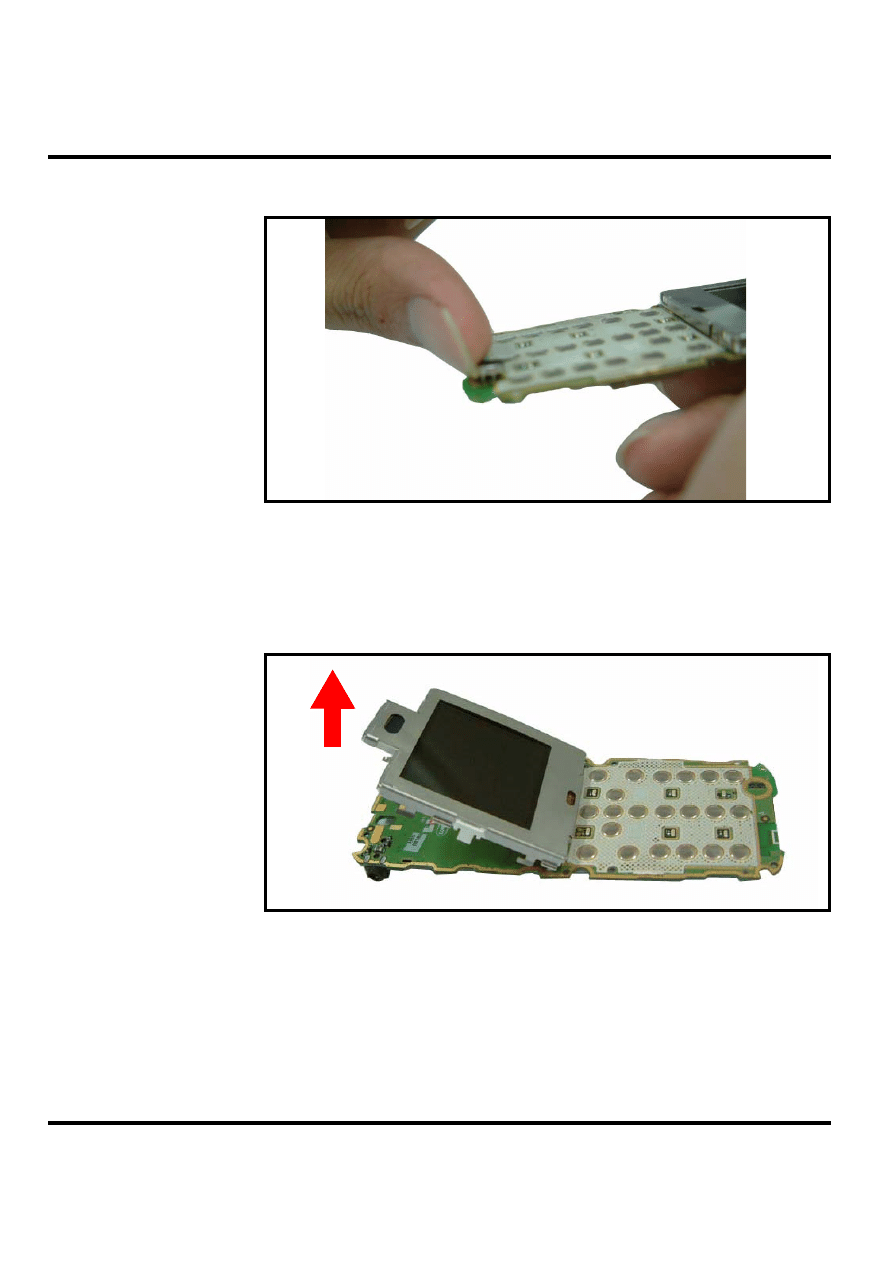
Gently snap the antenna away from the transceiver board.
Figure 15. Removing the antenna module
3.
(Optional) Remove and replace the speak.
Figure 16. Removing the microphone
W208
22
Aug.15, 2006
4.
Carefully pry off the microphone component.
Figure 17. Removing the microphone
Removing and Replacing the LCD Screen
1.
Remove the antenna module as described earlier.
2.
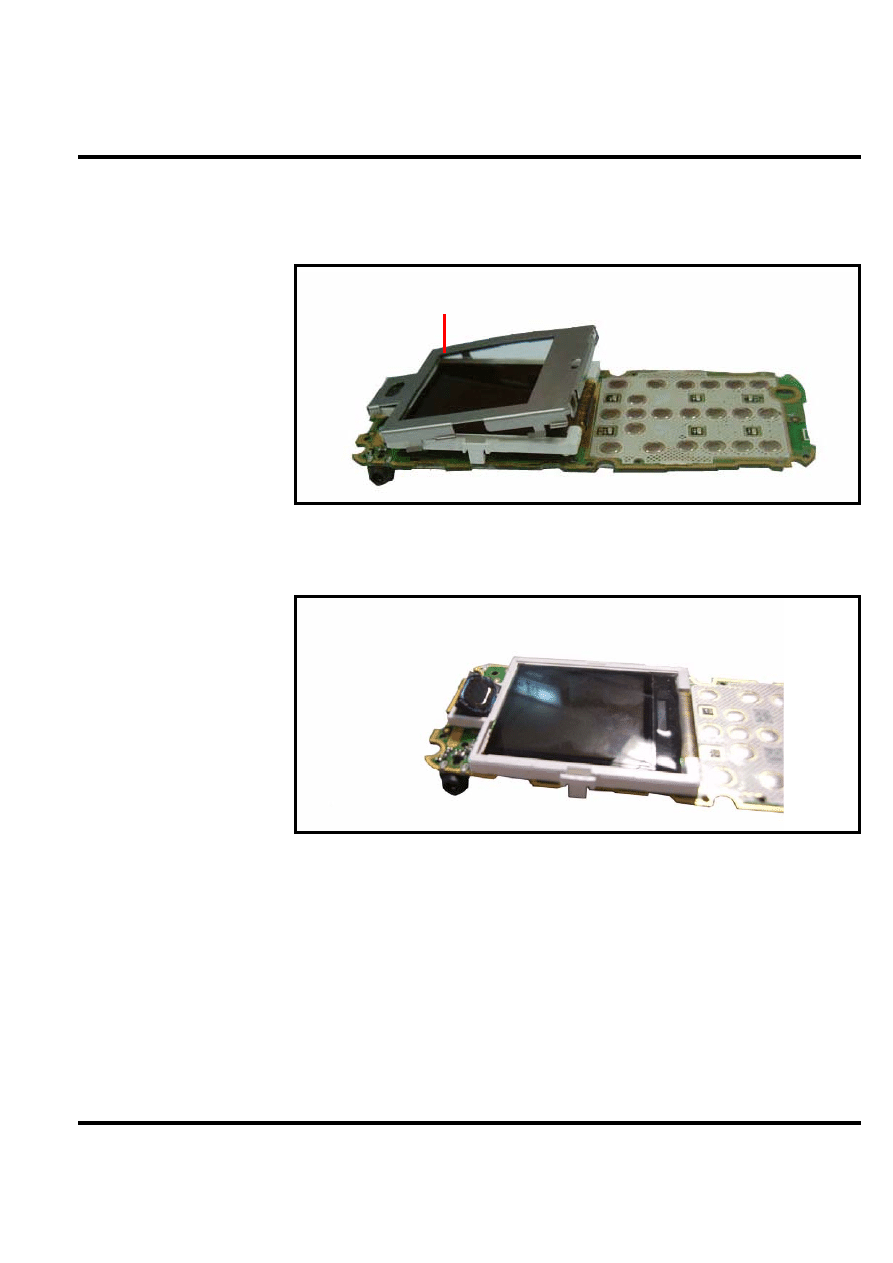
Gently pry the LCD screen away from the Transceiver board. Six hooks hold it in place
(three on each side).
Figure 18. Pry the LCD screen away from the Transceiver board
3.
Detach the cable connecting the LCD screen to the Transceiver board.
4.
To replace it, gently solder the cable to the Transceiver board then mount the LCD.
5.
Restore the antenna module and other parts.
Level 1-2 Service Manual
Aug.15, 2006
23
Removing and Replacing the LCD Shielding Case
1.
Remove the LCD screen as described earlier.
2.
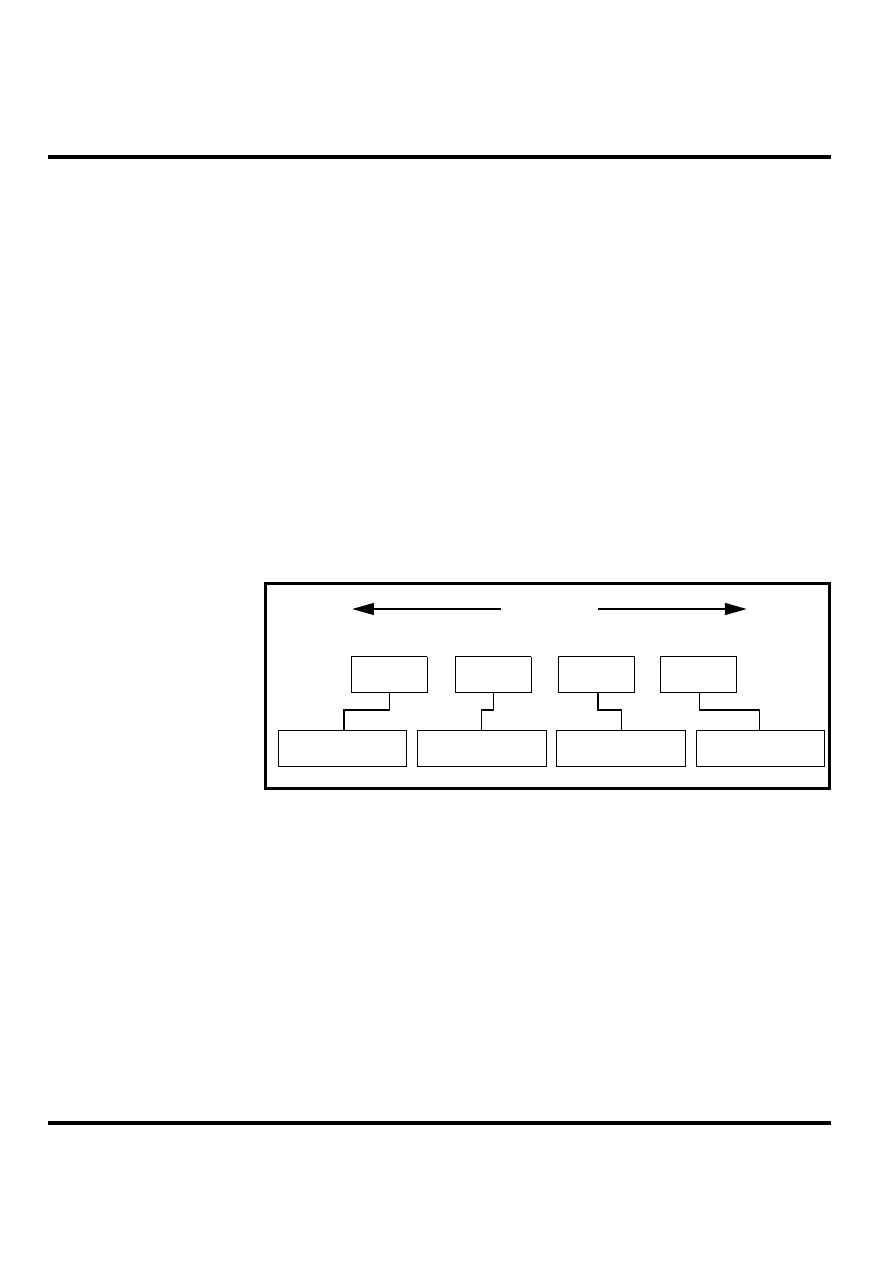
Gently pry the LCD shielding case away from the LCD screen.
Figure 19. Pry the LCD shielding case away
3.
(Optional) Remove and Replace the receiver.
Figure 20. Pop out the receiver
4.
To replace it, mount the LCD shielding case over the LCD screen.
5.
Restore the LCD screen and other parts.
Shielding case
W208
24
Aug.15, 2006
Subscriber Identity Module (SIM) and Identification Label
SIM
A SIM is required to access the existing local GSM network, or remote networks when
traveling (if a roaming agreement has been made with the provider).
The SIM contains:
• All the data necessary to access GSM services
• The ability to store user information such as phone numbers
• All information required by the network provider to provide access to the network
Identification
Each Motorola GSM phone is labeled with a variety of identifying numbers. The following
information describes the current identifying labels.
Mechanical Serial Number (MSN)
• The MSN is an individual unit identity number and remains with the unit throughout its
life.
• The MSN can be used to log and track a phone on Motorola's Service Center Database.
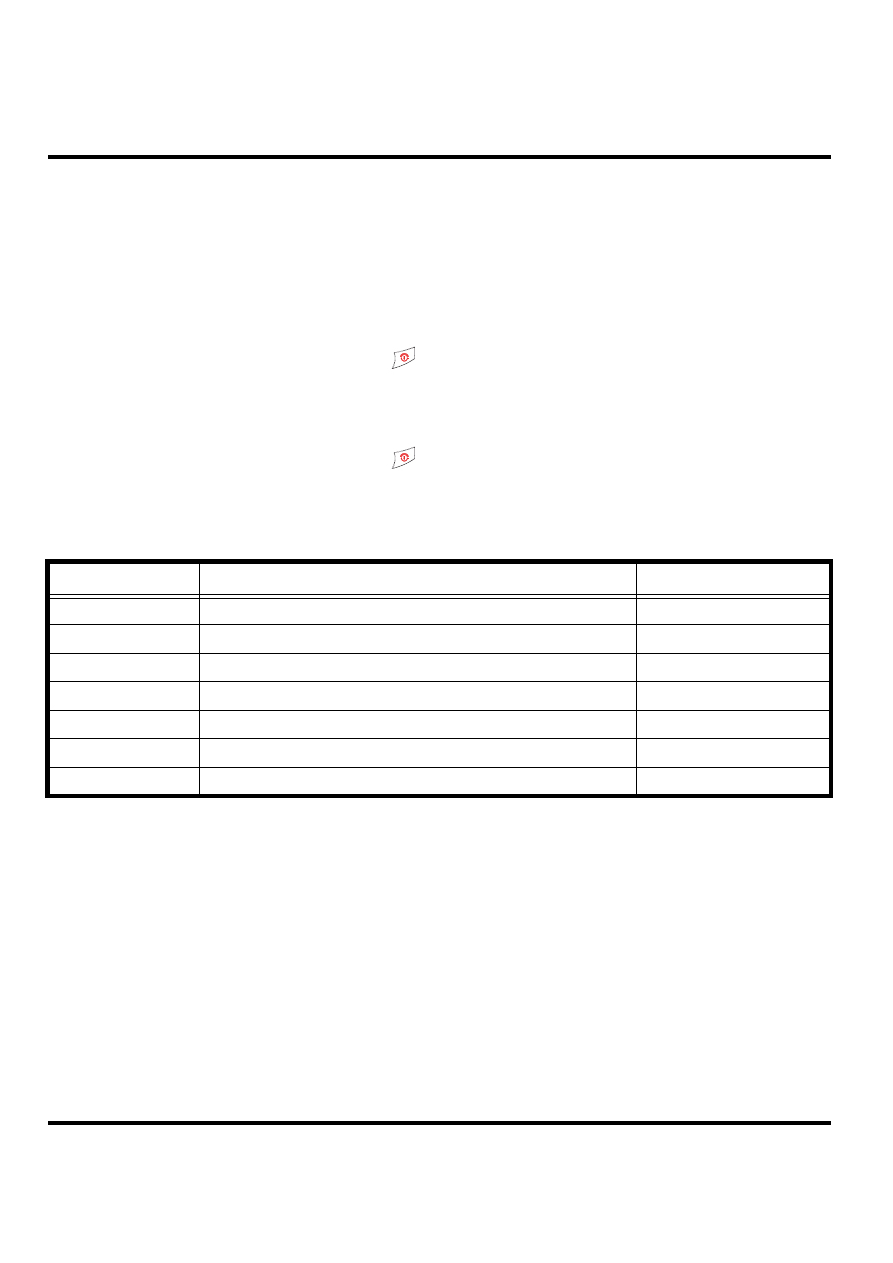
• The MSN is divided into 4 sections as shown in Figure 21.
Figure 21. MSN Label Breakdown
International Mobile Station Equipment Identity (IMEI)
The International Mobile Station Equipment Identity (IMEI) number is an individual number
unique to the Transceiver and is stored within the unit's memory. The IMEI uniquely identifies
an individual mobile station and thereby provides a means for controlling access to GSM
networks based on mobile station types or individual units. The full IMEI structure is listed in
the table below.
APC
DC
DC
SNR
Account Product Code
i.e. StarTACTM Phone130
Distribution Center
i.e. Easter Inch
Date Code: Year and
Month of Shipment
Unit's individual serial
number
3 Digits
1 Digit
2 Digits
4 Digits
MSN 10 Digits

Level 1-2 Service Manual
Aug.15, 2006
25
Where
Other label number configurations present are:
• TRANSCEIVER NUMBER: Identifies the product type. Normally the SWF number. (i.e.
V100).
• PACKAGE NUMBER: Identifies the equipment type, mode, and language in which the
product is shipped.
Table 2: IMEI Number Breakdown
TAC
Serial Number
Check Digit
NNXXXXXX
ZZZZZZ
A
TAC
Type Allocation Code, formerly known as Type Approval Code
NN
Reporting Body Identifier (BABT or CTIA)
XXXXXX
Type Identifier (defined by BABT or CTIA)
ZZZZZZ
Individual unit serial number
A
Phase 1 = 0.
Phase 2 & 2+= check digit and is defined as a function of
all other IMEI digits
W208
26
Aug.15, 2006
Troubleshooting
Manual Test Mode
Motorola W208 telephones are equipped with a manual test mode capability. This allows
service personnel to verify functionality and perform fault isolation by entering keypad
commands.
To enter the manual test command mode, a GSM/DCS/PCS test SIM must be used.
1.
Press and hold
to turn the phone OFF.
2.
Remove the battery as described in the procedures.
3.
Remove the customer’s SIM card from the phone as described in the procedures.
4.
Insert the test SIM into the SIM slot.
5.
Replace the battery as described in the procedures.
6.
Press and hold
to turn the phone ON.
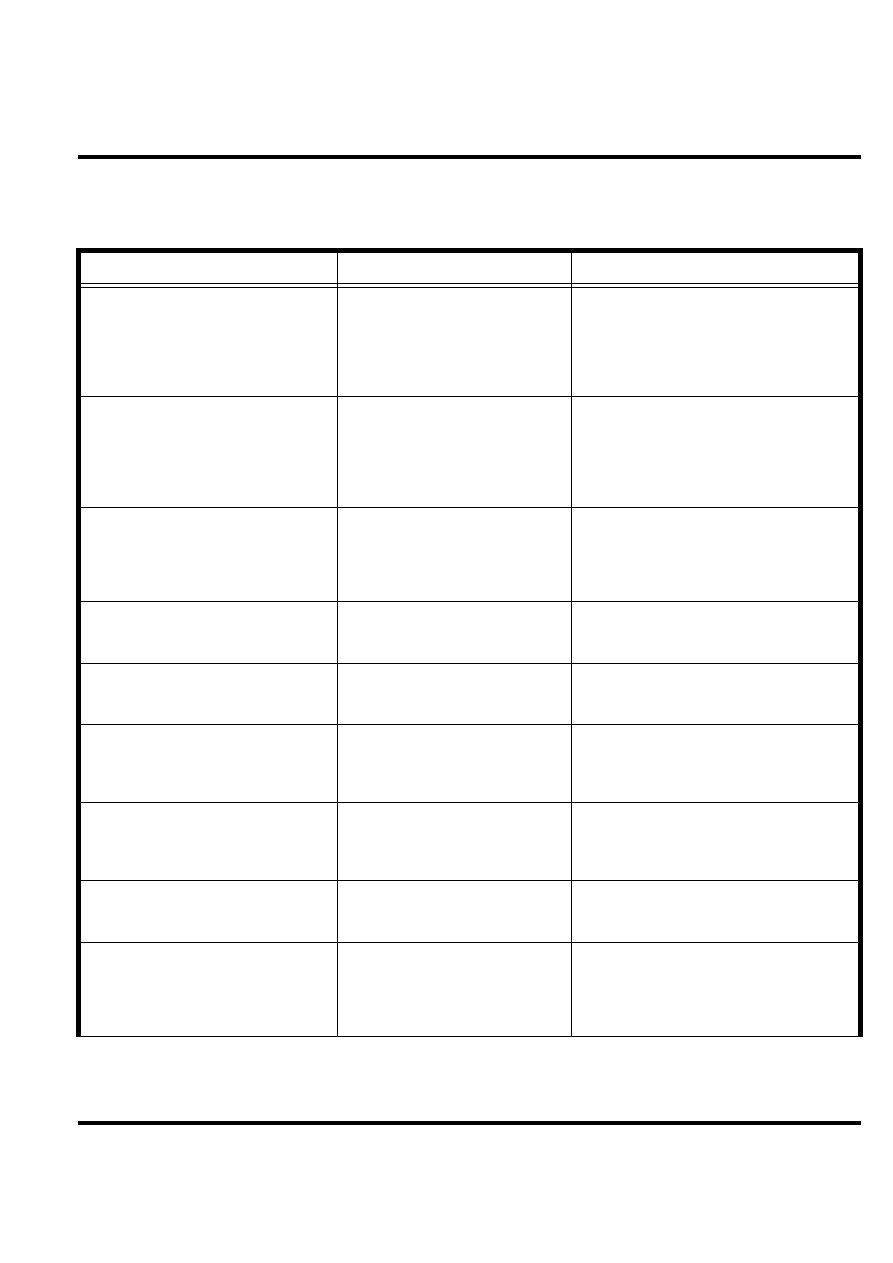
Manual Test Mode Commands
Table 3: Manual Test Commands
Key Sequence
Test Function/Name
Remarks
#02# Handset
information
#03#
RF information
#04#
ADC information
#09#
Simple Test mode
**0102#
FFS format
**0105#
Disable EFEM mode
*#06# IMEI
number
Level 1-2 Service Manual
Aug.15, 2006
27
Troubleshooting Chart
Table 4: Level 1 and 2 Troubleshooting Chart
Symptom
Probable Cause
Verification and Remedy
1. Telephone will not turn on or stay on.
a) Battery either discharged or
defective.
Measure battery voltage across a 50 ohm (>1
Watt) load. If the battery voltage is <3.25 Vdc,
recharge the battery using the appropriate
battery charger. If the battery will not
recharge, replace the battery. If battery is not
at fault, proceed to b.
b) Battery terminals open or mis-
aligned.
Visually inspect the battery terminals on both
the battery and the telephone. Realign and, if
necessary, either replace the battery or refer
to a Level 3 Service Center for the battery
connector replacement. If battery terminals
are not at fault, proceed to c.
c) keypad defective.
Replace the keypad. Temporarily connect a
+3.6 Vdc supply to the battery terminals.
Press and hold the PWR button. If unit turns
on and stays on, disconnect the dc power
source and reassemble with the new keypad.
2. Telephone exhibits poor reception or
erratic operation such as calls frequently
dropping or weak or distorted audio.
Connections to or from lower PCB
defective.
Check connection between the antenna and
the lower PCB.
3. Display is erratic, or provides partial
or no display.
LCM defective.
Replace the LCM. Verify that the fault has
been cleared and reassemble the unit with
the new LCM.
4. Incoming call alert transducer audio
distorted or volume is too low.
Speaker defective.
Replace the speaker as described in the pro-
cedures. Verify that the fault has been
cleared and reassemble the unit with the new
speaker.
5. Telephone transmit audio is weak.
(usually indicated by called parties com-
plaining of difficulty in hearing voice).
Microphone defective.
Replace the microphone as described in the
procedures. Verify that the fault has been
cleared and reassemble the unit with the new
microphone.
6. Receive audio from earpiece speaker
is weak or distorted.
a) Connections to or from lower
PCB defective.
Check connection between the antenna and
the lower PCB. If the connection is OK, pro-
ceed to b.
b) Speaker defective.
Temporarily replace the speaker with a
known good speaker. Ensure good connec-
tion. Place a call and verify improvement in
earpiece audio. If fault is cleared, reassemble
the telephone with the good speaker.
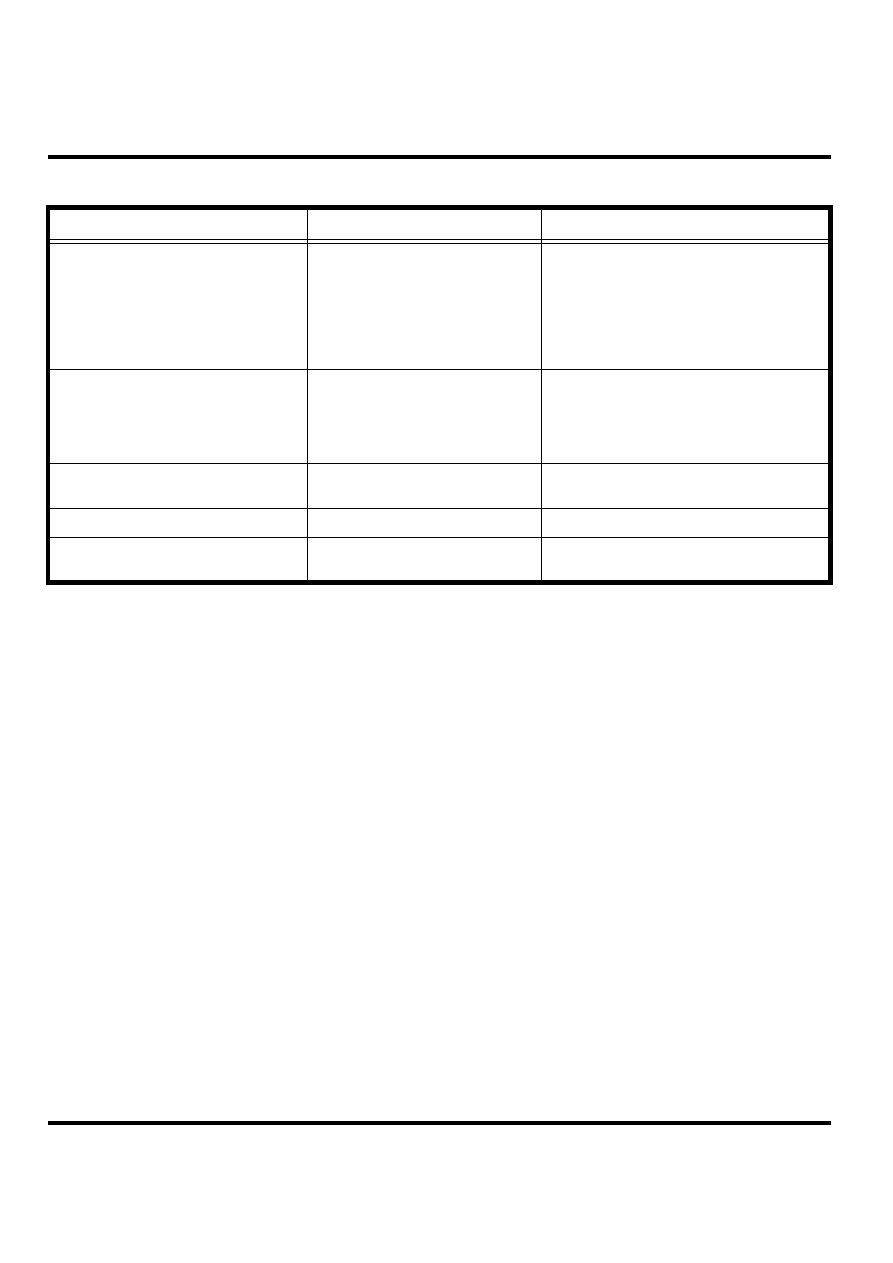
W208
28
Aug.15, 2006
Programming: Software Upgrade and Flexing
Contact your local technical support engineer for information about equipment and procedures
for flashing and flexing.
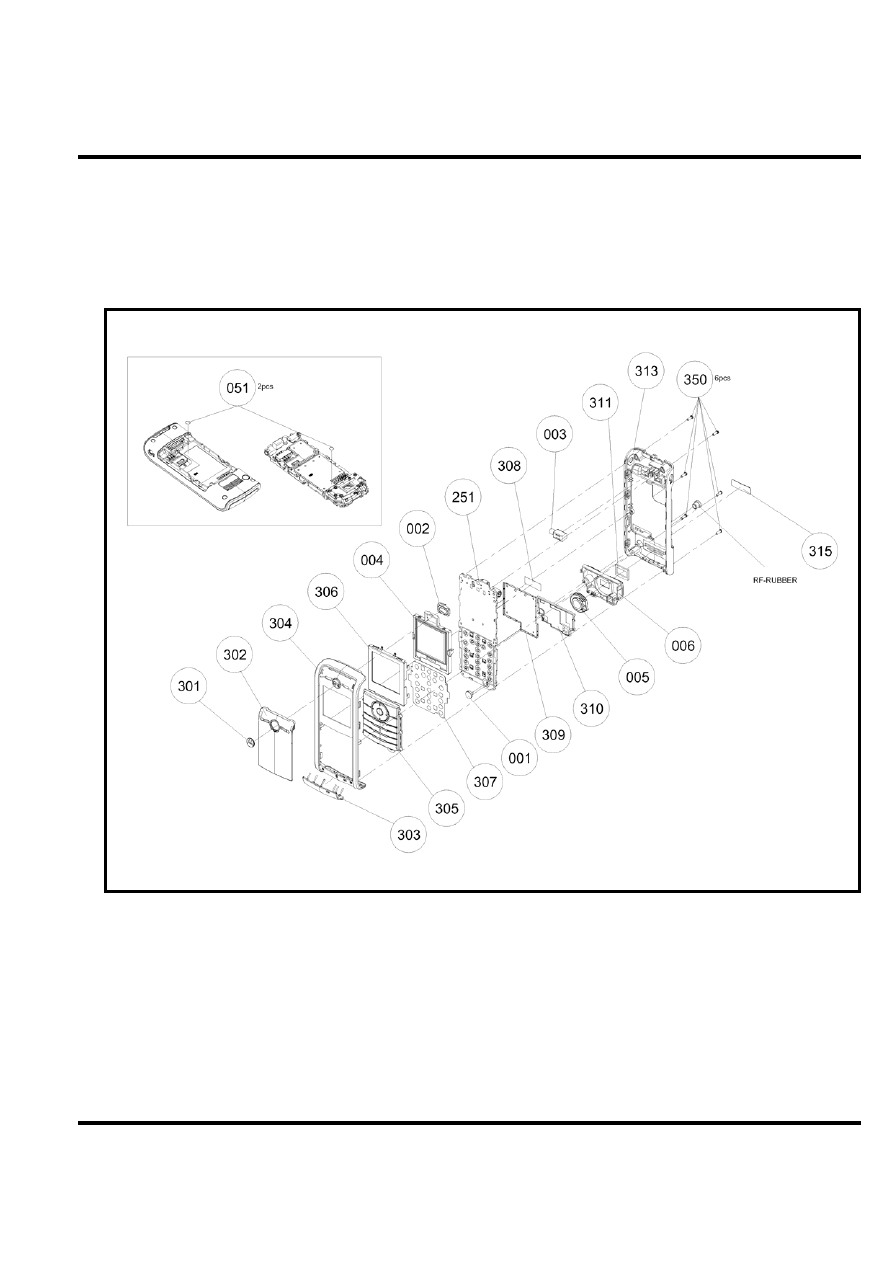
7. Telephone will not recognize or accept
SIM card.
SIM card defective.
Check the SIM card contacts for dirt. Clean if
necessary, and check if fault has been
cleared. If the contacts are clean, insert a
known good SIM card into the telephone.
Power up the unit and confirm that the card
has been accepted. If the fault no longer
exists, replace the defective SIM card.
8. Keypad not functioning.
Keypad defective.
Use alcohol to wipe the keypad metal dome.
Check if fault has been cleared. If the fault is
still present, either replace the keypad or
refer to a Level 3 Service Center for the key-
pad metal dome replacement.
9. Vibrator feature not functioning.
a) Vibrator faulty.
Check general condition of vibrator. If it is
good, proceed to b.
b) Vibrator defective.
Replace the defective vibrator.
10. No or weak audio when using head-
set.
Headset plug not fully pushed.
Ensure the headset plug is fully seated in the
jack.
Table 4: Level 1 and 2 Troubleshooting Chart (Continued)
Symptom
Probable Cause
Verification and Remedy
Level 1-2 Service Manual
Aug.15, 2006
29
Part Number Charts
The following section provides a reference for the parts associated with W208 telephones.
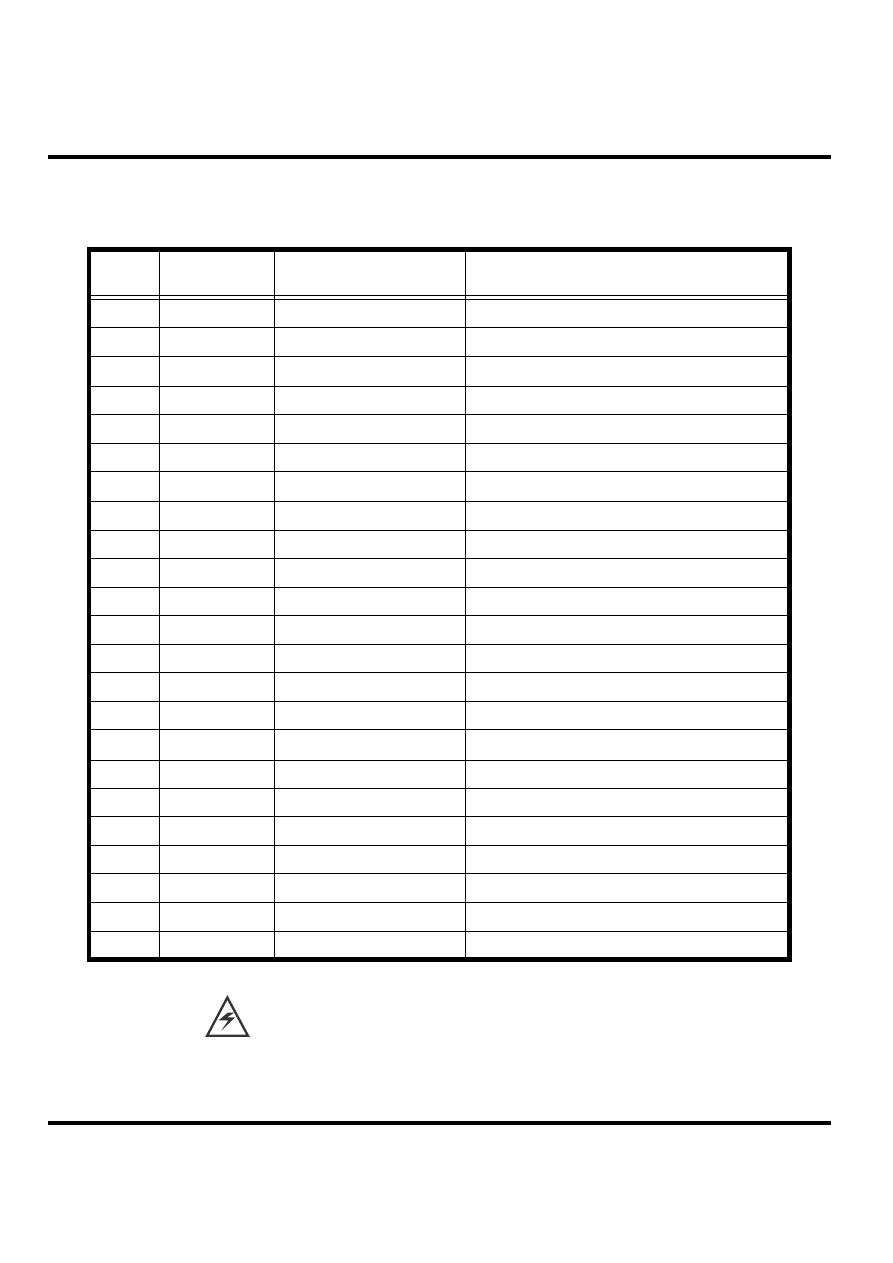
Exploded View Diagram
Figure 22. W208 Exploded View Diagram
W208
30
Aug.15, 2006
Exploded View Parts List
There is a danger of explosion if the Lithium ion battery pack is replaced incorrectly. Replace
only with the same type of battery or equivalent as recommended by the battery manufacturer.
Dispose of used batteries according to the manufacturer's instructions.
Table 5: W208 Exploded View Parts List
Part
Number
Item Number
Description
Specification
001
2220432301W
MIC
KUF4323-013031 6*1.5
-41dB
002
2240071103W
RECEIVER
SDRP0711KJ01-F2-G AAC
003
3930408012W
SPR-VIB
4*L8 1.3V LA4-459ED COPAL
004
7630001552W
LCM
TD015THEA6 128*128 65K TOPPOLY
005
2250160808W
SPEAKER
DMS1608F-05-PC-F1-G 8ohm AAC
006
2300H85001W
I-ANTENNA
H85 ANT+HOLDER EU
051
82E5803301W
LABEL
E58 WATERPROOF LABEL 4mm
251
6910830001W
F/WMB 33
H85 GA-107
300
5501390001W
ME/PT 33
H85/H85A RED
301
2545E58001W
MARK
E58-ABS CHROME M-LOGO
302
2541H85001W
LCD-LENS
H85-PC-BLACK
303
3028H85001W
RF-COV
H85-SILICON-BLACK
304
2511H85001W
UPP-ASSY
H85-RED
305
3101H85001W
DIAL-KEY
H85-RUBBER-BLACK-E-21KEY
306
3012H85001W
SHIELDASY
H85-LCD SHIELD+SPONGE ASSY
307
3109H85001W
MET-DOME
H85- 4*170g-21KEY
308
3064H85001W
MYLAR
H85-PC-6.5*16.65*0.055
309
3052H85003W
SHIELD-C
H85-SUS304-38.55*32.2*0.15T
310
3068H85001W
GASKET
H85-ANT-RUBBER
311
302FH85001W
SPK-GASKE
H85-PRON
313
2512H85001W
LOW-ASSY
H85-BLACK
315
3062H85001W
NAMEPLATE
H85-PC-GRAY
350
3501750102W
SCREW
TORX M1.7*5.0-BLACK-NI KL
ψ
ψ
ψ
ψ

Level 1-2 Service Manual
Aug.15, 2006
31
To order parts please use the following Link:
https://servicelink3.motorola.com
(Password is required)
For information on ordering parts please contact EMEA at +49 461 803 1638.
Accessories
Table 6: List of Accessories
Description
Part Number
Power Solutions
BQ50 battery 850 mAh
SNN5804A
BT50 battery 850 mAh
SNN5771A
EMU Switch Mode Midrate (PRC)
SPN5188B
EMU Switch Mode Midrate (US)
SPN5185B
EMU Switch Mode Midrate (Taiwan)
SPN5216C
EMU Switch Mode Midrate (Euro)
SPN5189B
EMU Switch Mode Midrate (HK/UK)
SPN5190B
EMU Switch Mode Midrate (Australia)
SPN5193B
EMU Switch Mode Midrate (India)
SPN5194B
EMU Switch Mode Midrate (Mexico)
SPN5186B
EMU Switch Mode Midrate (Brazil)
SPN5187B
EMU Switch Mode Midrate (Arg)
SPN5192B
EMU Switch Mode Dual Rate (Brazil)
SPN5196B
EMU Switch Mode Dual Rate (Arg)
SPN5197B
EMU Switch Mode Dual Rate (PRC)
SPN5198B
EMU Switch Mode Dual Rate (HK)
SPN5199B
EMU Switch Mode Dual Rate (Mex)
SPN5200B
EMU Switch Mode Dual Rate (US)
SPN5202B
EMU Switch Mode Dual Rate (Twn)
SPN5270B
In-Vehicle
VC700 EMU Power Adapter
SYN0847A
Audio&Connectivity
Mini USB/USB/Serial Data Cable
SKN6371B/C
Mono Earbud Headset (Black)
SYN8390B
Mono Earbud Headset (Silver)
AAYN4264B
One-Touch Headset
SYN8419C
Stereo One-Touch Earbud Headset
CHYN4516B
Stereo One-Touch Earbud Headset
SYN1603B
Right-Angle Adapter
SKN6182A
Audio Converter
SKN6183A
Consumer&Personalization
Silver Lanyard (Asia except PRC)
AAYN4402A
Silver Lanyard
CHYN4546

W208
32
Aug.15, 2006

Level 1-2 Service Manual
Index
Aug.15, 2006
Index-1
Index
A
About
Audience
4
Conventions
5
Scope
4
Accessories and Aftermarket Division
6
Alert Type Indicator
12
Audience
4
B
Back Housing
Removing and Replacing
20
Battery
Disposal
16
Function
14
Operation
14
Removing and Replacing
16
Battery Gauge
14
Battery Level Indicator
12
C
Call Forward Indicator
12
Caller Line Identification
10
Controls
11
Conventions
5
Customer Support
5
D
Disassembly
15
E
Electrostatic Discharge
15
Entry Method Indicator
12
F
Front Housing
Removing and Replacing
17
G
General Functions
11

Index
C139
Index-2
Aug.15, 2006
H
Headset Connector Port
11
Headset Indicator
12
I
In Use Indicator
12
Indicators
11
Input/Output (I/O) Connectors
11
International Mobile Station Equipment Identity (IMEI)
24
Number Breakdown
24
L
LCD Shielding Case
Removing and Replacing
23
Left Soft Key
11
LINE Indicator
12
Liquid Crystal Display (LCD)
12
LCD Shielding Case
23
Removing and Replacing
22
Low Battery
14
M
Mechanical Serial Number
24
Menu Key
11
Menu Navigation
11
Message Indicator
12
Microphone
11
N
Navigation Key
11
O
Out of Box Failure Policy
5
P
Part Number Charts
29
Parts Replacement
6
Accessories and Aftermarket Division
6
Power Connector Port
11
Power/End Key
11
Product Overview
9
Caller Line Identification
10
Features
9
SIM Toolkit™ - Class 2
10
Product Support
5

Level 1-2 Service Manual
Index
Aug.15, 2006
Index-3
R
Right Soft Key
11
Roam Indicator
12
S
Scope
4
Send/Answer Key
11
Signal Strength Indicator
12
SIM Card
24
Identification Label
24
International Mobile Station Equipment Identity (IMEI)
24
Mechanical Serial Number
24
Removing and Replacing
17
SIM Toolkit™ - Class 2
10
Specifications
7
T
Tools and Test Equipment
14
Troubleshooting
26
U
USB Connector Port
11
User Interface Menu Structure
13
V
Vibrator Motor
Removing and Replacing
21
W
Warranty Service Policy
5
Customer Support
5
Out of Box Failure Policy
5
Product Support
5

Index
C139
Index-4
Aug.15, 2006

MOTOROLA, the Stylized M Logo, and all other trademarks indicated as such herein are trademarks of Motorola, Inc.
All other product or service names are the property of their respective owners.
® Reg. U.S. Pat. & Tm. Off.
© 2005 Motorola, Inc.
All rights reserved.
Personal Communications Sector,
Sawgrass International Concourse
789 International Parkway Room S2C
Sunrise, FL 33323
Wyszukiwarka
Podobne podstrony:
SM V3 A4 C L12 V1
PL Table MPX200 L12 V1[1] 1
SM V3 L12
PL Kramerrefresh A4 C L12 V1 7
SM T191HT A4 C L12 01 10 22
PO wyk07 v1
s10 v1
s7 4 v1
s9 3a v1
Prezentacja v1
Program studiów SM IE
2015 06 podst SM
2 BO 2 1 PP Przykłady Segregator [v1]
Notice V1
EMP7700 ASM E B SM
BoeBot v1 0 id 91312 Nieznany (2)
19 Podwykonawcy i dostawcy v1 1id 18332
więcej podobnych podstron