What is SAP Transport Request? How to
Import/Export TR
What is a Transport Request?
•
Transport Requests (TRs) – is a kind of 'Container / Collection' of changes that are
made in the development system. It also records the information regarding the type of
change, the purpose of transport, request category and the target system. It is also
known as Change Requests.
•
Each TR contains one or more change jobs, also known as change Tasks (minimum
unit of transportable change). Tasks are stored inside a TR, just like multiple files are
stored in some folder. TR can be released only once all the tasks inside a TR are
completed, released or deleted.
•
Change Task is actually a list of objects that are modified by a particular user. Each
task can be assigned to (and released by) only one user. However multiple users can
be assigned to each Transport Request (as it can contain multiple tasks). Tasks are not
transportable by themselves, but only as a part of TR.
Change requests are named in a standard format as: <SID>K<Number> [Not modifiable by
system administrators]
•
SID – System ID
•
K – Is fixed keyword/alphabet
•
Number – can be anything from a range starting with 900001
Example: DEVK900030
Tasks also use the same naming convention, with 'numbers' consecutive to the number used
in TR containing them.
For Example, Tasks in the above mentioned TR Example can be named as: DEVK900031,
DEVK900032 …

•
The project manager or designated lead is responsible to create a TR and assign the
project members to the TR by creating task/s for each project member.
•
Hence, she/he is the owner with control of all the changes that are recorded in that TR
and therefore, she/he can only release that TR.
•
However, assigned project members can release their respective change tasks, once
completed.

Workbench Request – contains repository objects and also 'cross-client' customizing objects.
These requests are responsible for making changes in the ABAP workbench objects.
Customizing Request – contains objects that belong to 'client-specific' customizing. As per
client settings, these requests are automatically recorded as per when users perform
customizing settings and a target system is automatically assigned as per the transport layer (if
defined).
SE01 – Transport Organizer – Extended View

Create a Change Request
•
Change Request can be created in two ways:
o
Automatic – Whenever creating or modifying an object, or when performing
customizing settings, the system itself displays the 'Dialog box' for creating a
change request or mention name of an already created request, if available.
o
Manually – Create the change request from the Transport Organizer, and then
enter required attributes and insert objects.

>
Release the Transport Request (Export Process)

•
Position the cursor on the TR name or a Task name & choose the Release icon
(Truck), a record of the TR is automatically added to the appropriate import queues of
the systems defined in the TMS.
•
Releasing and importing a request generates export & import logs.
The Import Process
Importing TRs into the target system
•
After the request owner releases the Transport Requests from Source system, changes
should appear in quality and production system; however, this is not an automatic
process.

•
As soon as the export process completes (releasing of TRs), relevant files (Cofiles and
Data files) are created in the common transport directory at OS level and the entry is
made in the Import Buffer (OS View) / Import Queue (SAP App. View) of the QAS
and PRD.
•
Now to perform the import, we need to access the import queue and for that, we need
to execute transaction code STMS -> Import Button OR select Overview ->
Imports
•
It will show the list of systems in the current domain, description, and a number of
requests available in Import Queue and the status.
Import Queue -> is the list of TRs available in the common directory and are ready to be
imported into the target system, this is the SAP Application View, at the OS level it is also
known as Import Buffer.
The Import Status
Import Queue shows some standard 'status icons' in the last column, here are the icons with
their meanings, as defined by SAP:

In case, a request is not added automatically in the import queue/buffer, even though the OS
level files are present, then we can add such requests by the following method, however, we
should know the name of intended TR:
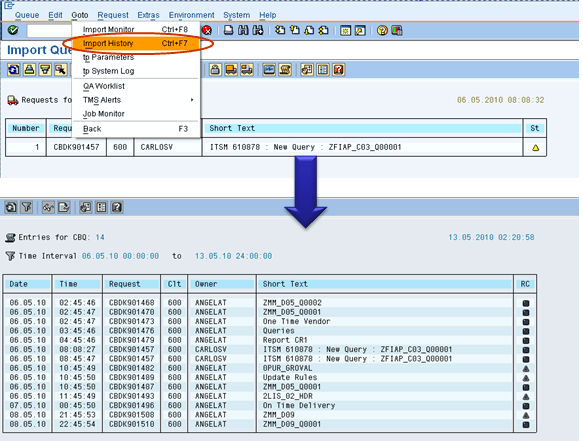
Import History
We can also check the previous imports that happened in the system as follows:

Transport logs and return codes
•
After the transport has been performed, the system administrator must check whether
it was performed properly or not, for that SAP has provided us with the following type
of logs (SE01 -> GOTO -> Transport Logs):
o
Action Log – which displays actions that have taken place: exports, test
import, import and so forth.
o
Transport Logs – which keep a record of the transport log files.
•
One of the important information provided by logs are the return codes:
o
0: The export was successful.
o
4: Warning was issued but all objects were transported successfully.
o
8: A warning was issued and at least one object could not be transported
successfully.
o
12 or higher: A critical error had occurred, generally not caused by the objects
in the request.