
„Objects classes, interfaces, packages,
annotations”
„Objects classes, interfaces, packages,
annotations”
Objects classes, interfaces,
packages, annotations
Creating Objects
Creating Objects
Each statement has three parts:
1.Declaration: When you create an object, you do not
have to declare a variable to refer to it. However, a
variable declaration often appears on the same line as
the code to create an object.
2.Instantiation: new is a Java operator that creates the
new object (allocates space for it).
3.Initialization: The new operator is followed by a call
to a constructor. For example, Point(23, 94) is a call to
Point's only constructor. The constructor initializes the
new object.
Objects classes, interfaces,
packages, annotations
Creating Objects(2)
Creating Objects(2)
1) Declaration
type name
Declarations do not create new objects. The
code Point origin_one does not create a new Point
object; it just declares a variable, named origin_one,
that will be used to refer to a Point object. The
reference is empty until assigned. An empty
reference is known as a null reference.
To create an object you must instantiate it with the new
operator.
Objects classes, interfaces,
packages, annotations
Creating Objects(3)
Creating Objects(3)
2) Instantiating an object
•
The new operator instantiates a class by
allocating memory for a new object. The new
operator requires a single, postfix argument: a call to
a constructor. The name of the constructor provides
the name of the class to instantiate. The constructor
initializes the new object.
•
The new operator returns a reference to the
object it created. Often, this reference is assigned to
a variable of the appropriate type. If the reference is
not assigned to a variable, the object is unreachable
after the statement in which the new operator
appears finishes executing.
Objects classes, interfaces,
packages, annotations
Creating Objects(4)
Creating Objects(4)
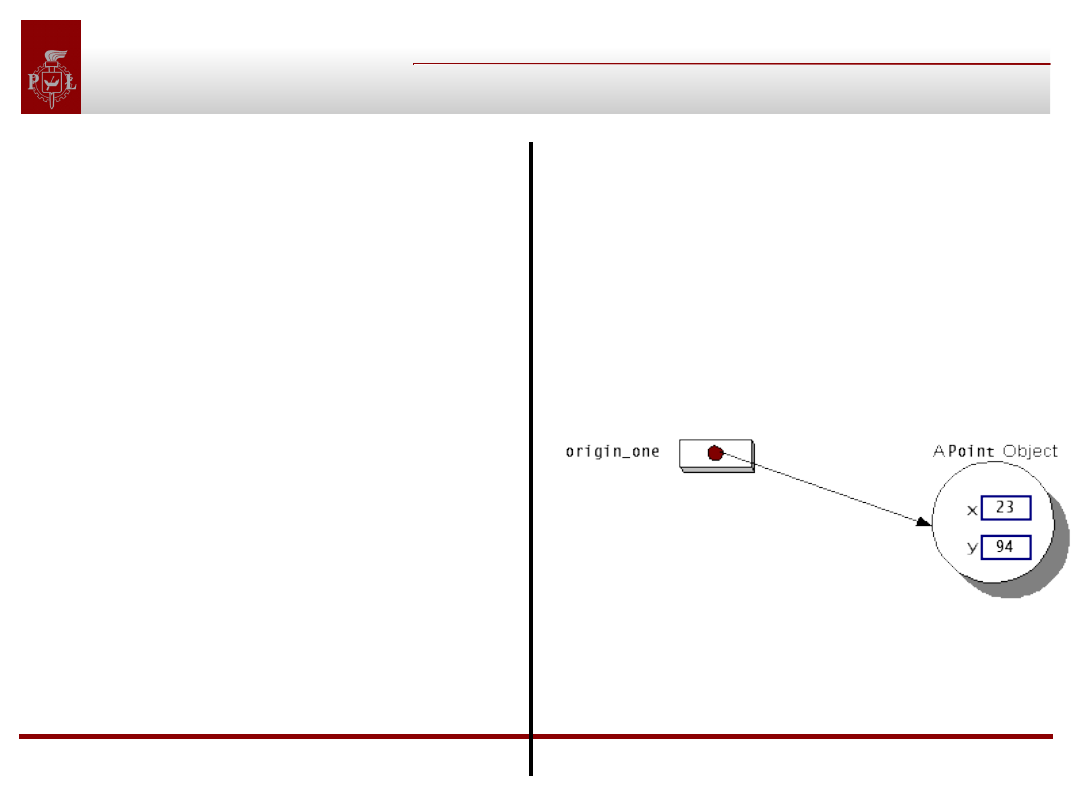
3) Intializing an object
Example:
public class Point {
public int x = 0;
public int y = 0;
public Point(int x, int y) {
this.x = x;
this.y = y;
}
}
Point
origin_one =
new Point(23,
94);
Objects classes, interfaces,
packages, annotations
Variables and Methods
Variables and Methods
Referencing an Object's Variables:
objectReference.variableName
Calling an Object's Methods
objectReference.methodName(argumentList);
or
objectReference.methodName();
Objects classes, interfaces,
packages, annotations
The Garbage Collector
The Garbage Collector
•
In some object oriented languages (ex. C++) is necessary to
keep the track of all used objects and destroy them when they
are no longer needed. This process is error prone.
•
The Java runtime environment deletes objects when it
determines that they are no longer being used. This process is
called garbage collection.
•
An object is eligible for garbage collection when there are no
more references to that object. References that are held in a
variable are usually dropped when the variable goes out of
scope. Or, you can explicitly drop an object reference by setting
the variable to the special value null. Remember that a program
can have multiple references to the same object; all references
to an object must be dropped before the object is eligible for
garbage collection.
Objects classes, interfaces,
packages, annotations
The Garbage Collector(2)
The Garbage Collector(2)
• Garbage collector periodically frees the memory
used by objects that are no longer referenced.
• The garbage collector does its job automatically
• In some situations, you may want to run the garbage
collection explicitly by calling the gc method in the
System class.
• Before an object gets garbage-collected, the garbage
collector gives the object an opportunity to clean up
after itself through a call to the object's finalize
method. This process is known as finalization.
Objects classes, interfaces,
packages, annotations
Finalization
Finalization
• The finalize method is a member of the Object
class, which is the top of the Java platform's
class hierarchy and a superclass of all classes.
• A class can override the finalize method to perform
any finalization necessary for objects of that type.
• If you override finalize, your implementation of the
method should call super.finalize as the last thing it
does.
Objects classes, interfaces,
packages, annotations
Question
Question
What's wrong with the following program?
public class SomethingIsWrong {
public static void main(String[] args) {
Rectangle myRect;
myRect.width = 40;
myRect.height = 50;
System.out.println("myRect's area is " + myRect.area());
}
}
=new Rectangle();
Answer:
The Rectangle Object is never created. This code will cause a
compiler warning or NullPointerException during runtime.
Objects classes, interfaces,
packages, annotations
Excercise
Excercise
Given the following class write some code that creates
an instance of the class, initializes its member variable,
and then displays the value of it.
public class NumberHolder { public int anInt; }
Answer:
public class NumberHolderDisplay {
public static void main(String[] args) {
NumberHolder aNH = new NumberHolder();
aNH.anInt = 1;
System.out.println(aNH.anInt);}}
Objects classes, interfaces,
packages, annotations
Characters and Strings
Characters and Strings
The Java platform contains four classes that you
can use when working with character data:
• Character -- A class whose instances can hold a
single character value. This class also defines handy
methods that can manipulate or inspect single-
character data.
• String -- A class for working with immutable
(unchanging) data composed of multiple characters.
• StringBuffer -- A class for storing and manipulating
mutable data composed of multiple characters
(synchronized)
• StringBuilder – The same as StringBuffer, not
synchronized
Objects classes, interfaces,
packages, annotations
Characters
Characters
• An object of Character type contains a single
character value.
• You use a Character object instead of a primitive
char variable when an object is required-for example,
when passing a character value into a method that
changes the value or when placing a character value
into a data structure, such as a vector, that requires
objects.
Objects classes, interfaces,
packages, annotations
Characters(2)
Characters(2)
Constructors and methods provided by the
Character class:
Character(char)
The Character class's only constructor, which
creates a Character object containing the value
provided by the argument. Once a Character object
has been created, the value it contains cannot be
changed.
compareTo(Character)
An instance method that compares the values held
by two character objects: the object on which the
method is called and the argument to the method.
This method returns an integer indicating whether
the value in the current object is greater than, equal
to, or less than the value held by the argument. A
letter is greater than another letter if its numeric
value is greater.
Objects classes, interfaces,
packages, annotations
Characters(3)
Characters(3)
Constructors and methods provided by the Character class:
equals(Object)
An instance method that compares the value held by the
current object with the value held by another. Returns true if
the values held by both objects are equal.
toString()
An instance method that converts the object to a string. The
resulting string is one character in length and contains the
value held by the character object.
charValue()
An instance method that returns the value held by the
character object as a primitive char value.
isUpperCase(char)
A class method that determines whether a primitive char
value is uppercase.
Objects classes, interfaces,
packages, annotations
Strings and StringBuffers
Strings and StringBuffers
Creating Strings and StringBuffers:
char[] helloArray = { 'h', 'e', 'l', 'l', 'o' };
String helloString = new String(helloArray);
int len = helloString.length();
StringBuffer dest = new StringBuffer(len);
•
Reasonable memory allocation - good first guess
Objects classes, interfaces,
packages, annotations
Strings and StringBuffers(2)
Strings and StringBuffers(2)
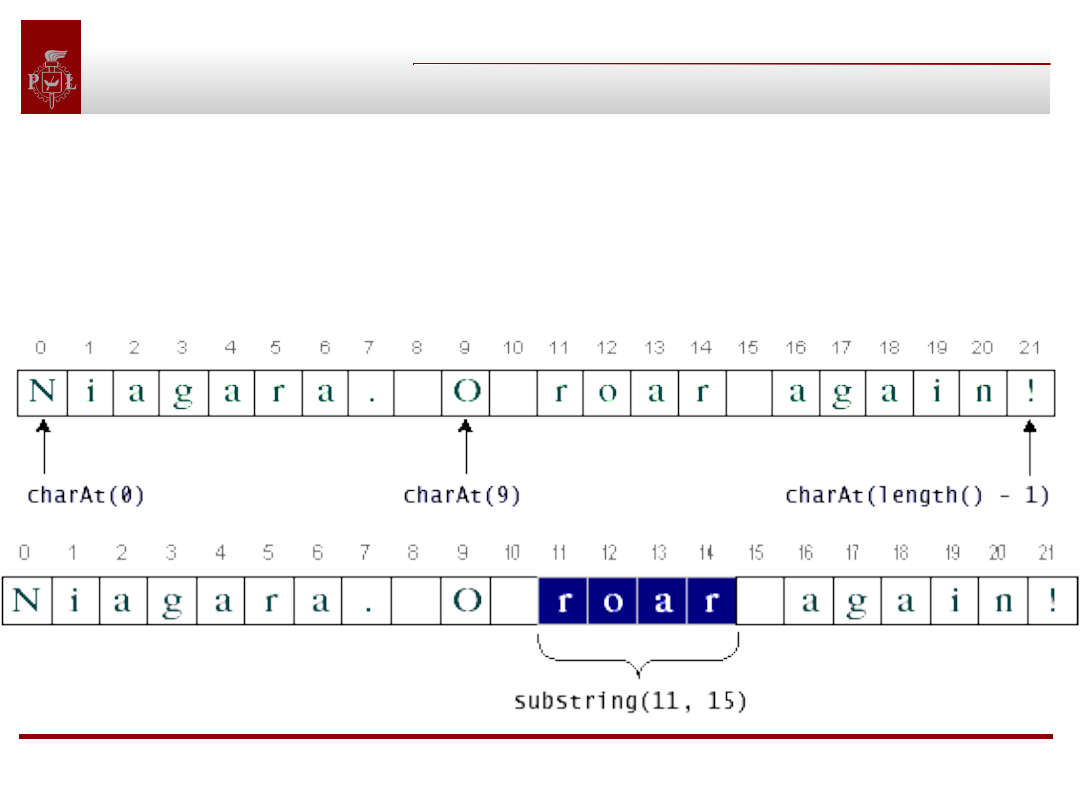
Getting characters and substrings from String and StringBuffer:
String aString = "Niagara. O roar again!";
char aChar = aString.charAt(9);
String roar = aString.substring(11,15);
Objects classes, interfaces,
packages, annotations
Strings Accessor Methods
Strings Accessor Methods
indexOf(int character)
lastIndexOf(int character)
Return the index of the first (last) occurrence of the
specified
character.
indexOf(int character, int from)
lastIndexOf(int character, int from)
Return the index of the first (last) occurrence of the
specified
character, searching forward (backward) from the
specified
index.
Objects classes, interfaces,
packages, annotations
Strings Accessor Methods(2)
Strings Accessor Methods(2)
indexOf(String string)
lastIndexOf(String string)
Return the index of the first (last) occurrence of the
specified String.
indexOf(String string, int from)
lastIndexOf(String string, int from)
Return the index of the first (last) occurrence of the
specified String, searching forward (backward) from
the specified index.
Objects classes, interfaces,
packages, annotations
Question
Question
What is the difference between:
StringBuffer.length()
and
StringBuffer.capacity() ?
Answer:
StringBuffer.length() - returns amount of space used
StringBuffer.capacity() - returns the amount of space
currently allocated for the StringBuffer,
Objects classes, interfaces,
packages, annotations
Strings conversions
Strings conversions
Sometimes is necessary to convert an object to a String
because there are methods that accept only String values.
Example:
class ReverseString {
public static String reverseIt(String source) {
int i, len = source.length();
StringBuffer dest = new StringBuffer(len);
for (i = (len - 1); i >= 0; i--) {
dest.append(source.charAt(i));
}
return dest.toString();
}
}
Objects classes, interfaces,
packages, annotations
Strings conversions(2)
Strings conversions(2)
All classes inherit toString from the Object class
Many classes in the java.lang package override this method to
provide an implementation that is meaningful to that class.
The valueOf Method
You can use valueOf to convert variables of different types to
Strings. Example:
System.out.println(String.valueOf(Math.PI));
Converting Strings to numbers
The "type wrapper" classes (Integer, Double, Float, and Long)
provide a class method named valueOf that converts a String to
an object of that type. Example:
String piStr = "3.14159";
Float pi = Float.valueOf(piStr);
Objects classes, interfaces,
packages, annotations
Strings - cont.
Strings - cont.
Literal Strings
In Java, you specify literal strings between double quotes:
"Hello World!"
So, possible is:
int len = "Hello World!".length();
Question:
What is the difference between:
String s = "Hello World!";
and
String s = new String("Hello World!");
Answer:
Efficiency. In the
second example
there are two objects
created.
Objects classes, interfaces,
packages, annotations
Concatenation and + operator
Concatenation and + operator
In the Java programming language, you can use + to
concatenate Strings together:
String cat = "cat";
System.out.println("con" + cat + "enation");
Question:
Is the above efficient?
Answer:
Yes, it is. The second line is compiled to:
System.out.println(new StringBuffer().append("con").
append(cat).append("enation").toString());
Objects classes, interfaces,
packages, annotations
Numbers
Numbers
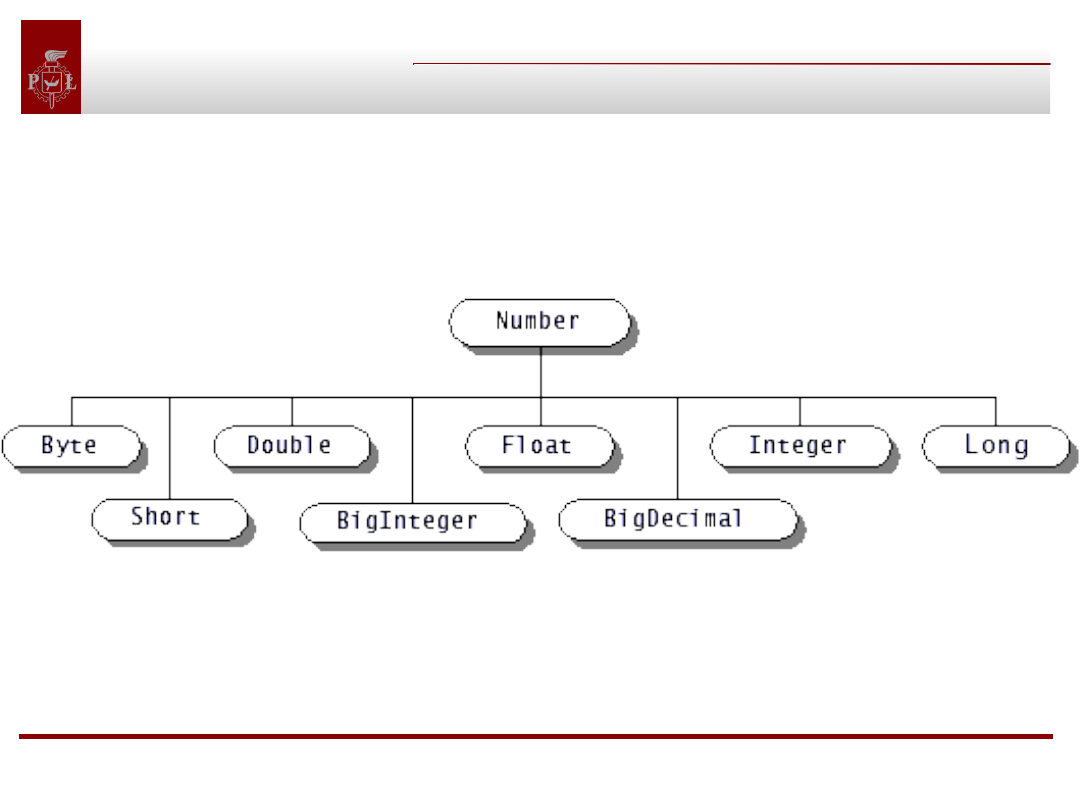
Java.lang.Number class and its subclasses:
Objects classes, interfaces,
packages, annotations
The wrapper classes
The wrapper classes
Number classes:
Number
Byte
Double
Float
Integer
Long
Short
BigDecimal (java.Math)
BigInteger (java.Math)
Wrappers for other data types:
Boolean
Character
Void
Objects classes, interfaces,
packages, annotations
The Integer class overview
The Integer class overview
Field Overview
static int
MAX_VALUE
A constant holding the maximum value an int can have, 2
31
-1.
static int
MIN_VALUE
A constant holding the minimum value an int can have, -2
31
.
Constructor Overview
Integer
(int value)
Constructs a newly allocated Integer object that represents the
specified int value.
Integer
(
String
s)
Constructs a newly allocated Integer object that represents the int
value indicated by the String parameter.
Objects classes, interfaces,
packages, annotations
The Integer class ...(2)
The Integer class ...(2)
Method Overview
byte
byteValue
()
Returns the value of this Integer as a byte.
int
intValue
()
Returns the value of this Integer as an int.
static int
parseInt
(
String
s)
Parses the string argument as a signed decimal integer. static
String
toBinaryString
(int i)
Returns a string representation of the integer argument as an
unsigned integer in base 2.
String
toString
()
Returns a String object representing this Integer's value. static
Integer
valueOf
(
String
s)
Returns an Integer object holding the value of the specified String.
Objects classes, interfaces,
packages, annotations
Numbers(2)
Numbers(2)
By invoking the methods provided by the NumberFormat class,
you can format numbers, currencies, and percentages according to
Locale. Example:
Double amount = new Double(345987.246);
NumberFormat numberFormatter;
String amountOut;
numberFormatter =
NumberFormat.getNumberInstance(currentLocale);
amountOut = numberFormatter.format(amount);
System.out.println(amountOut + " " +
currentLocale.toString());
The output shows how the format of the same number varies with
Locale:
345 987,246 fr_FR
345.987,246 de_DE
345,987.246 en_US
Objects classes, interfaces,
packages, annotations
Currencies and Percentages
Currencies and Percentages
To have currency or percentage format, you need
to change following line:
NumberFormat.getCurrencyInstance(currentLocale); or
NumberFormat.getPercentInstance(currentLocale);
The output for currencies with different Locale:
9 876 543,21 F
fr_FR
9.876.543,21 DM de_DE
$9,876,543.21
en_US
Of course NumberFormat class is unaware of
exchange rates!
Objects classes, interfaces,
packages, annotations
Customizing Formats
Customizing Formats
You specify the formatting properties of DecimalFormat class with a
pattern String. The pattern determines what the formatted number
looks like.
For a full description of the pattern syntax, see:
http://java.sun.com/docs/books/tutorial/java/data/numberpattern.html
Example:
DecimalFormat myFormatter = new DecimalFormat(pattern);
String output = myFormatter.format(value);
System.out.println(value + " " + pattern + " " + output);
Patterns examples:
###,###.###
000000.000
$###,###.###
Objects classes, interfaces,
packages, annotations
Local- sensitive formatting
Local- sensitive formatting
If you want a DecimalFormat object for a nondefault Locale, you
instantiate a NumberFormat and then cast it to DecimalFormat.
Example:
NumberFormat nf = NumberFormat.getNumberInstance(loc);
DecimalFormat df = (DecimalFormat)nf;
df.applyPattern(pattern);
String output = df.format(value);
System.out.println(pattern + " " + output + " " +
loc.toString());
The output varies with Locale:
###,###.###
123,456.789 en_US
###,###.###
123.456,789 de_DE
###,###.###
123 456,789 fr_FR
Objects classes, interfaces,
packages, annotations
Altering the formating symbols
Altering the formating symbols
You can use the DecimalFormatSymbols class to change the
symbols that appear in the formatted numbers produced by the
format method. The unusual format is the result of the calls to the
setDecimalSeparator, setGroupingSeparator, and
setGroupingSize methods. Example:
DecimalFormatSymbols unusualSymbols =
new DecimalFormatSymbols(currentLocale);
unusualSymbols.setDecimalSeparator('|');
unusualSymbols.setGroupingSeparator('^');
String strange = "#,##0.###";
DecimalFormat weirdFormatter =
new DecimalFormat(strange, unusualSymbols);
weirdFormatter.setGroupingSize(4);
String bizarre = weirdFormatter.format(12345.678);
System.out.println(bizarre);
The output = ?
=1^2345|678
Objects classes, interfaces,
packages, annotations
Arrays
Arrays
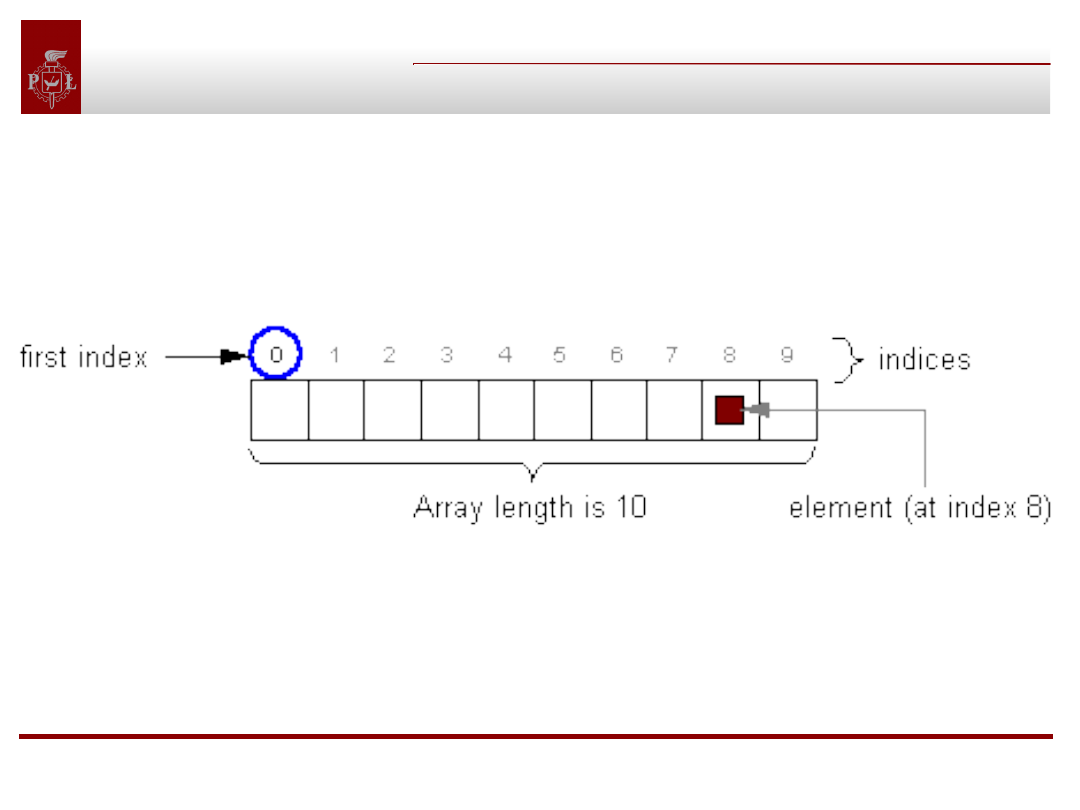
An array is a structure that holds multiple
values of the same type. The length of an array is
established when the array is created (at runtime).
To store data of different types in a single structure which
could dynamically change, use a Collection implementation, such
as Vector, instead of an array.
Objects classes, interfaces,
packages, annotations
Arrays (2)
Arrays (2)
Example on using arrays:
public class ArrayDemo {
public static void main(String[] args) {
int[] anArray;
// declare an array of integers
anArray = new int[10]; // create an array of integers
// assign a value to each array element and print
for (int i = 0; i < anArray.length; i++) {
anArray[i] = i;
System.out.print(anArray[i] + " ");
}
}
}
Array initializers example:
boolean[] answers = { true, false, true, true, false };
Presented by Bartosz Sakowicz
DMCS TUL Lodz
Objects classes, interfaces,
packages, annotations
Arrays of Objects
Arrays of Objects
Question:
What is wrong with following code:
String[] anArray = new String[5];
for (int i = 0; i < anArray.length; i++) {
System.out.println(anArray[i].toLowerCase());
}
Answer:
After first line of code is executed, the array called anArray exists and
has enough room to hold 5 string objects. However, the array doesn't
contain any strings yet. It is empty. The program must explicitly
create strings and put them in the array. The code will cause
NullPointerException.
Objects classes, interfaces,
packages, annotations
Arrays of Arrays
Arrays of Arrays
Example:
public class ArrayOfArraysDemo {
public static void main(String[] args) {
String[][] letters =
{
{ "a", "b", "c", "d", "e" },
{ "f", "g", "h", "i" },
{ "j", "k", "l", "m", "n", "o", "p" },
{ "q", "r", "s", "t", "u", "v" }
};
for (int i = 0; i < letters.length; i++) {
for (int j = 1; j < letters[i].length; j++) {
System.out.print(letters[i][j] + " ");
} } }}
Notice that the sub-arrays are all of different lengths. The
names of the sub-arrays are letters[0], letters[1], and so on.
Objects classes, interfaces,
packages, annotations
Arrays of Arrays (2)
Arrays of Arrays (2)
As with arrays of objects, you must explicitly create the sub-
arrays within an array. So if you don't use an initializer, you need
to write code like the following:
public class ArrayOfArraysDemo2 {
public static void main(String[] args) {
int[][] aMatrix = new int[4][];
//populate matrix
for (int i = 0; i < aMatrix.length; i++) {
aMatrix[i] = new int[5];
//create sub-array
for (int j = 0; j < aMatrix[i].length; j++) {
aMatrix[i][j] = i + j;
}}}}
Objects classes, interfaces,
packages, annotations
The copying Arrays
The copying Arrays
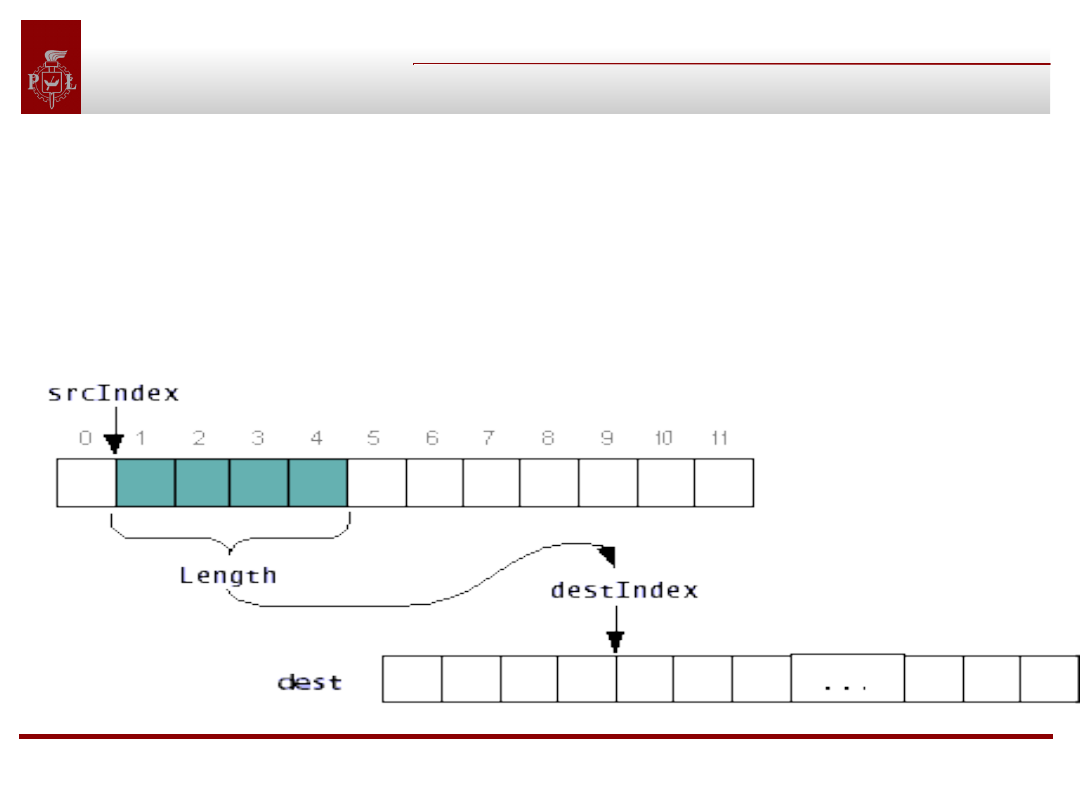
The arraycopy method requires five arguments:
public static void arraycopy( Object source,i nt srcIndex,
Object dest, int destIndex, int length)
Diagram illustrates how the copy takes place:
Objects classes, interfaces,
packages, annotations
Question
Question
1. What is wrong with following code and how to repair it?
2. What kind of message you will get and when?
public class WhatHappens {
public static void main(String[] args) {
StringBuffer[] stringBuffers = new StringBuffer[10];
for (int i = 0; i < stringBuffers.length; i ++) {
stringBuffers[i].append("StringBuffer at index " + i);
} } }
Answers:
1. Before appending to buffer following line is missing:
stringBuffers[i] = new StringBuffer();
2. NullPointerException during runtime.
Objects classes, interfaces,
packages, annotations
Creating classes
Creating classes
Objects classes, interfaces,
packages, annotations
The class declaration
The class declaration
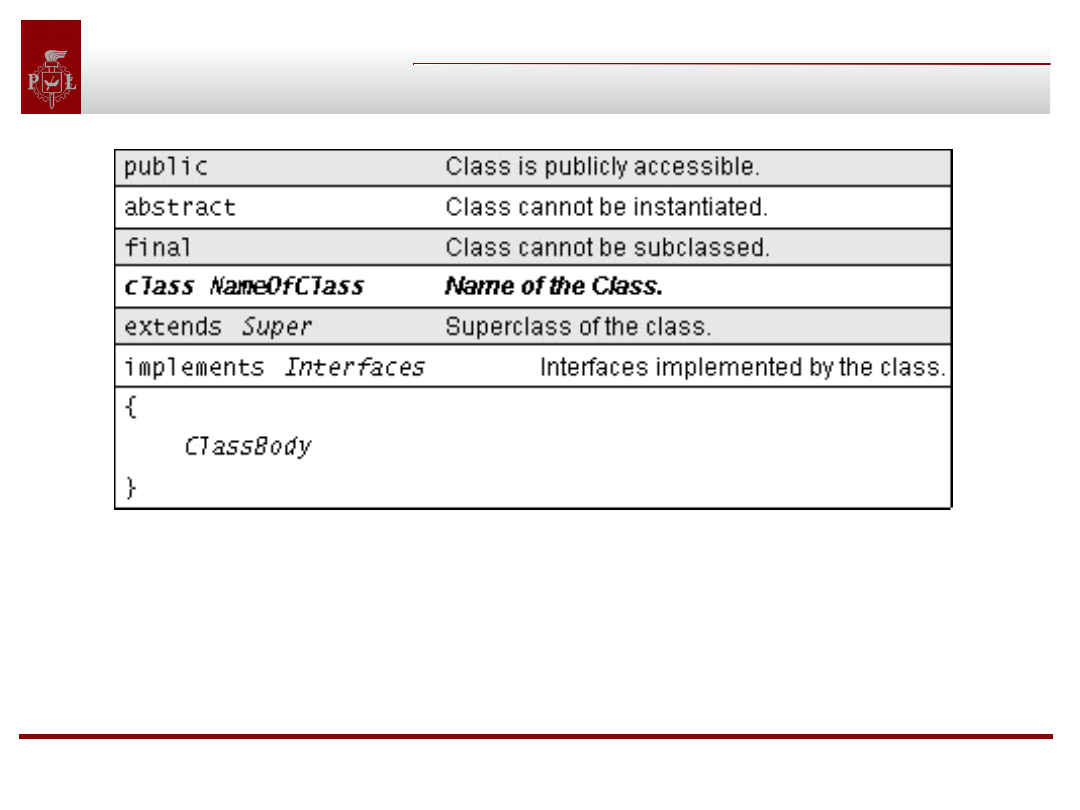
If you do not explicitly declare the optional items, the Java
compiler assumes certain defaults: a nonpublic,
nonabstract, nonfinal subclass of Object that implements
no interfaces.
Objects classes, interfaces,
packages, annotations
Constructors
Constructors
All Java classes have constructors that are used to initialize a new
object of that type. A constructor has the same name as the class. A
constructor is not a method. Examples:
public Stack() {
items = new Vector(10);
}
public Stack(int initialSize) {
items = new Vector(initialSize);
}
The compiler differentiates these constructors based on the number
of parameters in the list and their types. Based on the number and
type of the arguments that you pass into the constructor, the
compiler can determine which constructor to use:
new Stack();
new Stack(5);
Objects classes, interfaces,
packages, annotations
Constructors (2)
Constructors (2)
class AnimationThread extends Thread {
int framesPerSecond;
int numImages;
Image[] images;
AnimationThread(int fps, int num) {
super("AnimationThread");
this.framesPerSecond = fps;
this.numImages = num;
this.images = new Image[numImages];
for (int i = 0; i <= numImages; i++) {
// Load all the images.
}}}
Objects classes, interfaces,
packages, annotations
Constructors (3)
Constructors (3)
super("AnimationThread");
•This line invokes a constructor provided by the
superclass of AnimationThread, namely, Thread.
•This particular Thread constructor takes a String that
sets the name of Thread.
•Often a constructor wants to take advantage of
initialization code written in a class's superclass.
•Some classes must call their superclass constructor in
order for the object to work properly.
•If present, the superclass constructor must be
the first statement in the subclass's constructor:
An object should perform the higher-level initialization
first.
Objects classes, interfaces,
packages, annotations
Constructors (4)
Constructors (4)
Access specifiers in the constructors' declaration:
private
No other class can instantiate your class. Your class
may contain public class methods (sometimes called
factory methods), and those methods can construct an
object and return it, but no other classes can.
protected
Only subclasses of the class and classes in the same
package can create instances of it.
public
Any class can create an instance of your class.
no specifier gives package access
Only classes within the same package as your class
can construct an instance of it.
Objects classes, interfaces,
packages, annotations
Declaring Member Variables
Declaring Member Variables
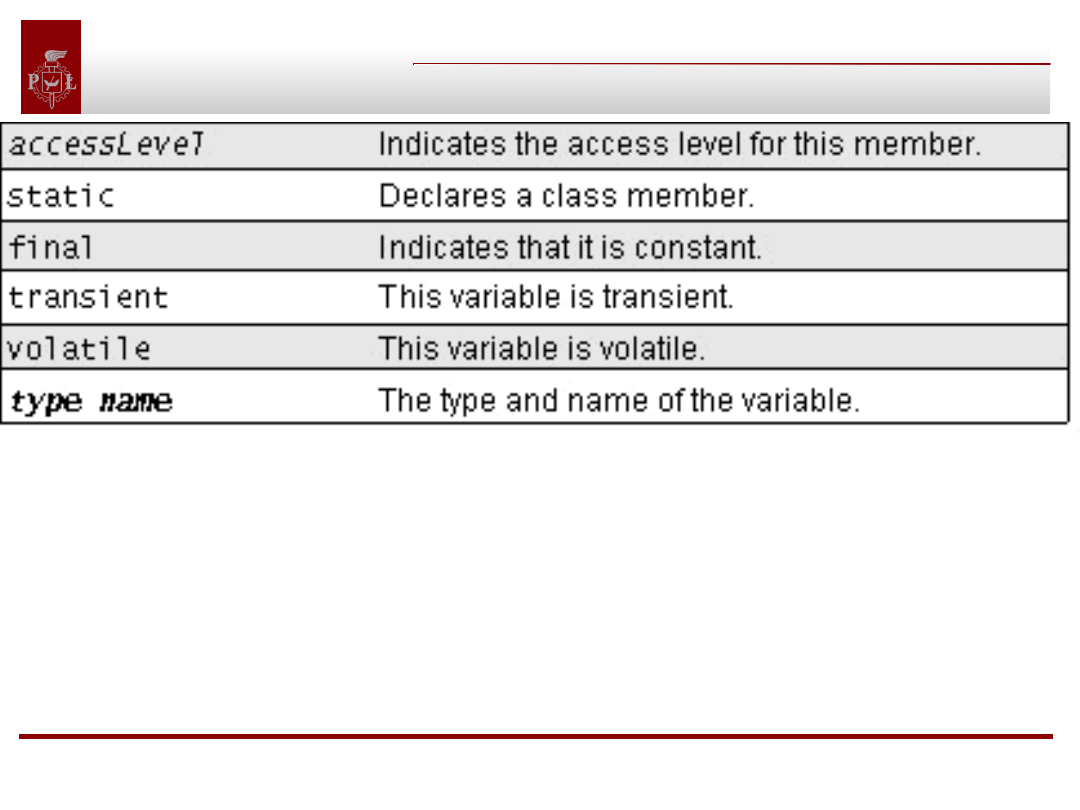
transient
The transient marker is not fully specified by The Java Language
Specification but is used in object serialization to mark member
variables that should not be serialized.
volatile
The volatile keyword is used to prevent the compiler from
performing certain optimizations on a member.
Objects classes, interfaces,
packages, annotations
Method Declaration
Method Declaration
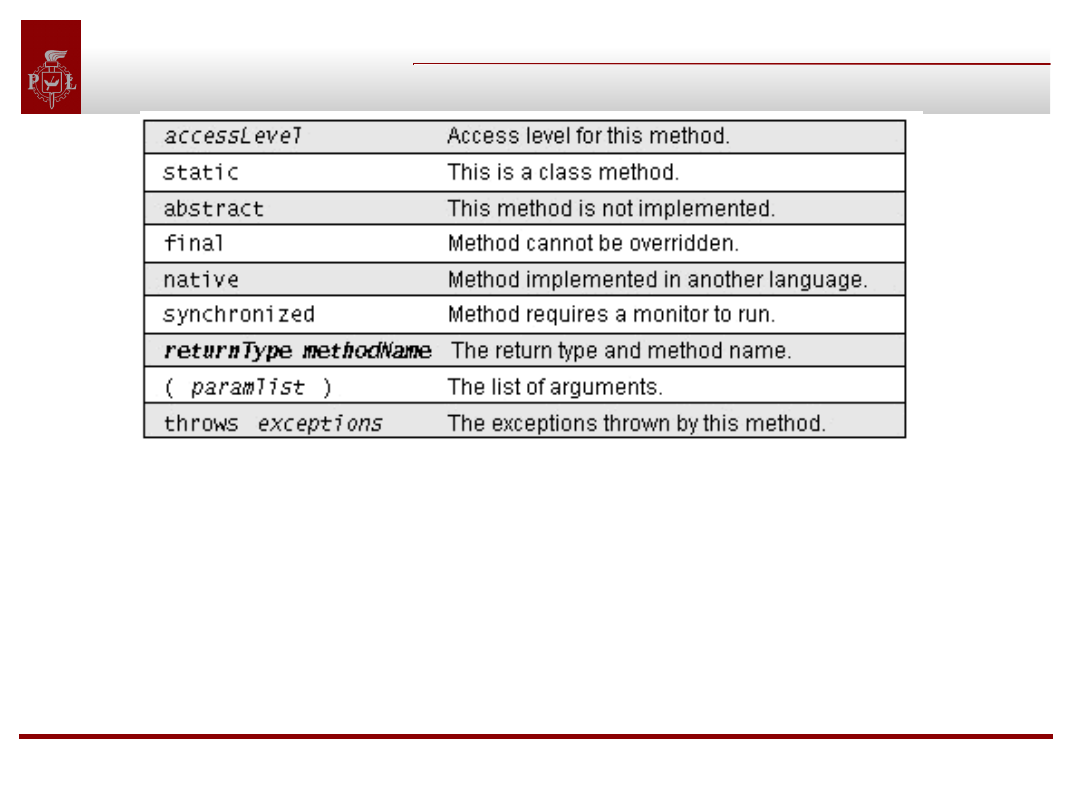
native
Methods implemented in a language other than Java are called
native methods and are declared as such using the native
keyword.
synchronized
Concurrently running threads often invoke methods that operate
on the same data. These methods may be declared synchronized.
Objects classes, interfaces,
packages, annotations
Returning a value
Returning a value
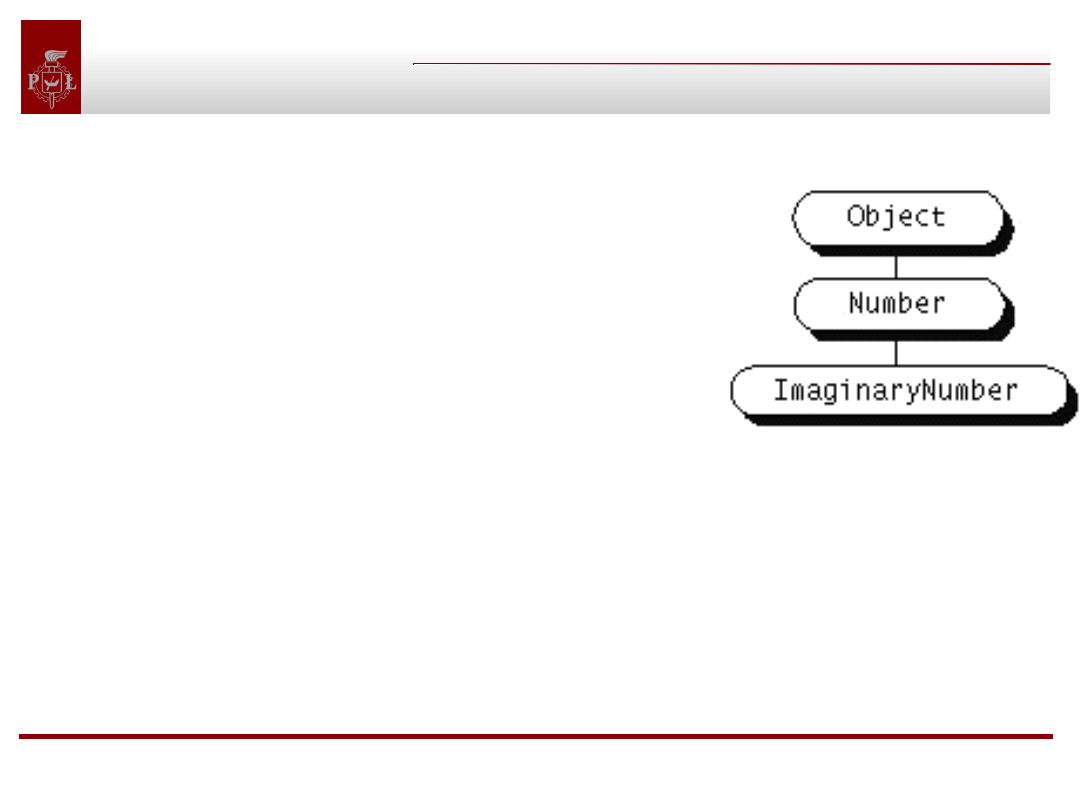
Suppose you have a class hierarchy illustrated here:
And a method declared
to return a Number:
public Number returnANumber() { . . .}
Question:
What object can be returned from the method?
Answer:
The returnANumber method can return an ImaginaryNumber but not
an Object. ImaginaryNumber "is a" Number because it's a subclass of
Number. However, an Object is not necessarily a Number--it could be
a String or some other type. You also can use interface names as
return types. In this case, the object returned must
implement the specified interface.
Objects classes, interfaces,
packages, annotations
A Method’s name
A Method’s name
Java supports method name overloading so that multiple
methods can share the same name. Example:
class DataRenderer {
void draw(String s) { . . . }
void draw(int i) { . . . }
void draw(float f) { . . . }
}
Question:
Is it correct add another method:
void draw(String t){...} to above example?
Answer:
No, because compiler cannot differentiate them and it will
cause an compiler error.
Objects classes, interfaces,
packages, annotations
Passing information into a method
Passing information into a method
•In Java, you can pass an argument of any valid Java data type into
a method. This includes primitive data types such as doubles,
floats, integers and reference data types such as objects and
arrays.
•You cannot pass methods into Java methods. But you can pass
an object into a method and then invoke the object's methods.
Hiding variables:
class Circle {
int x, y, radius;
public Circle(int x, int y, int radius) {
this.x = x;
this.y = y;
this.radius = radius;
} }
Objects classes, interfaces,
packages, annotations
Pass by value
Pass by value
In Java methods, arguments are passed by value. When invoked,
the method receives the value of the variable passed in. When the
argument is of primitive type, pass-by-value means that the method
cannot change its value. When the argument is of reference type,
pass-by-value means that the method cannot change the object
reference, but can invoke the object's methods and modify the
accessible variables within the object.
Question:
What is the final value of variable b:
int r = -1, g = -1, b = -1;
pen.getRGBColor(r, g, b);
b=?
Answer:
b=-1
Objects classes, interfaces,
packages, annotations
The super keyword
The super keyword
Example:
class ASillyClass {
boolean aVariable;
void aMethod() { aVariable = true; }
}
class ASillierClass extends ASillyClass {
boolean aVariable;
void aMethod() {
aVariable = false;
super.aMethod();
System.out.println(aVariable);
System.out.println(super.aVariable);
} }
Question:
What is an output?
Answer:
false
true
Objects classes, interfaces,
packages, annotations
Local variables
Local variables
Within the body of the method you can declare more
variables for use within that method. These variables are
local variables and live only while control remains within
the method. Example:
Object findObjectInArray(Object o, Object[]
arrayOfObjects) {
int i; // local variable
for (i = 0; i < arrayOfObjects.length; i++) {
if (arrayOfObjects[i] == o)
return o;
}
return null;
}
After this method returns, i no longer exists.
Objects classes, interfaces,
packages, annotations
Controlling Access to Members of a Class
Controlling Access to Members of a Class
Question:
What is wrong:
class Alpha {
private int iamprivate;
private void privateMethod() {
System.out.println("privateMethod");
} }
class Beta {
void accessMethod() {
Alpha a = new Alpha();
a.iamprivate = 10;
a.privateMethod();
} }
Answer:
//illegal
//illegal
Objects classes, interfaces,
packages, annotations
Controlling Access to Members of a Class(2)
Controlling Access to Members of a Class(2)
Compiler errors:
Beta.java:9: Variable iamprivate in class Alpha not accessible from
class Beta.
a.iamprivate = 10;
^
1 error
Beta.java:12: No method matching privateMethod() found in
class Alpha.
a.privateMethod();
1 error
Conclusion: Compiler is always right. Sometimes it is difficult
to understand error message.
Objects classes, interfaces,
packages, annotations
Controlling Access to Members of a Class(3)
Controlling Access to Members of a Class(3)
Question:
What is wrong?
class Alpha {
private int iamprivate;
boolean isEqualTo(Alpha anotherAlpha) {
if (this.iamprivate == anotherAlpha.iamprivate)
return true;
else
return false; } }
Answer:
Everything is all right (!!!). Objects of the same type have access
to one another's private members. This is because access restrictions
apply at the class or type level rather than at the object level (this
particular instance of a class).
Objects classes, interfaces,
packages, annotations
Controlling Access to Members of a Class(4)
Controlling Access to Members of a Class(4)
Protected access level specifier allows the class itself, subclasses
(with one caveat), and all classes in the same package to access
the members.
package Greek;
public class Alpha {
protected int iamprotected;
protected void protectedMethod() {
System.out.println("protectedMethod"); } }
package Greek;
class Gamma {
void accessMethod() {
Alpha a = new Alpha();
a.iamprotected = 10; // legal
a.protectedMethod(); // legal
}}
Objects classes, interfaces,
packages, annotations
Controlling Access to Members of a Class(5)
Controlling Access to Members of a Class(5)
The caveat:
The Delta class (introduced below) can access both iamprotected and
protectedMethod, but only on objects of type Delta or its subclasses.
The Delta class cannot access iamprotected or protectedMethod on
objects of type Alpha. Example:
package Latin;
import Greek.*;
class Delta extends Alpha {
void accessMethod(Alpha a, Delta d) {
a.iamprotected = 10; // illegal
d.iamprotected = 10; // legal
a.protectedMethod(); // illegal
d.protectedMethod(); // legal
} }
Objects classes, interfaces,
packages, annotations
Controlling Access to Members of a Class(6)
Controlling Access to Members of a Class(6)
Public:
Any class, in any package, has access to a class's public members.
Package:
The package access level is what you get if you don't explicitly set a
member's access to one of the other levels. This access level allows
classes in the same package as your class to access the members
package Greek;
class Alpha {
int iampackage;
void packageMethod() {
System.out.println("packageMethod");
} }
Objects classes, interfaces,
packages, annotations
Instance and Class members
Instance and Class members
Instance variable. Example:
class MyClass { float aFloat; }
Every time you create an instance of a class, the runtime system
creates one copy of each the class's instance variables for the
instance.
Class variable. Example:
class MyClass { static float aFloat; }
The runtime system allocates class variables once per class
regardless of the number of instances created of that class. The
system allocates memory for class variables the first time it
encounters the class. All instances share the same copy of the class's
class variables. You can access class variables through an instance or
through the class itself.
Objects classes, interfaces,
packages, annotations
Instance and Class members(2)
Instance and Class members(2)
Methods:
•Instance methods operate on the current object's
instance variables but also have access to the class
variables.
•Class methods cannot access the instance variables
declared within the class (unless they create a new object
and access them through the object).
•Class methods can be invoked on the class, you don't
need an instance to call a class method.
Objects classes, interfaces,
packages, annotations
Initializing Instance and Class Members
Initializing Instance and Class Members
You can use static initializers and instance initializers to
provide initial values for class and instance members
when you declare them in a class:
class BedAndBreakfast {
static final int MAX_CAPACITY = 10;
boolean full = false; }
This works well for members of primitive data type. Sometimes, it
even works when creating arrays and objects. But this form of
initialization has limitations, as follows:
1. Initializers can perform only initializations that can be expressed
in an assignment statement.
2. Initializers cannot call any method that can throw a checked
exception.
3. If the initializer calls a method that throws a runtime exception,
then it cannot do error recovery.
Objects classes, interfaces,
packages, annotations
Using static initialization blocks
Using static initialization blocks
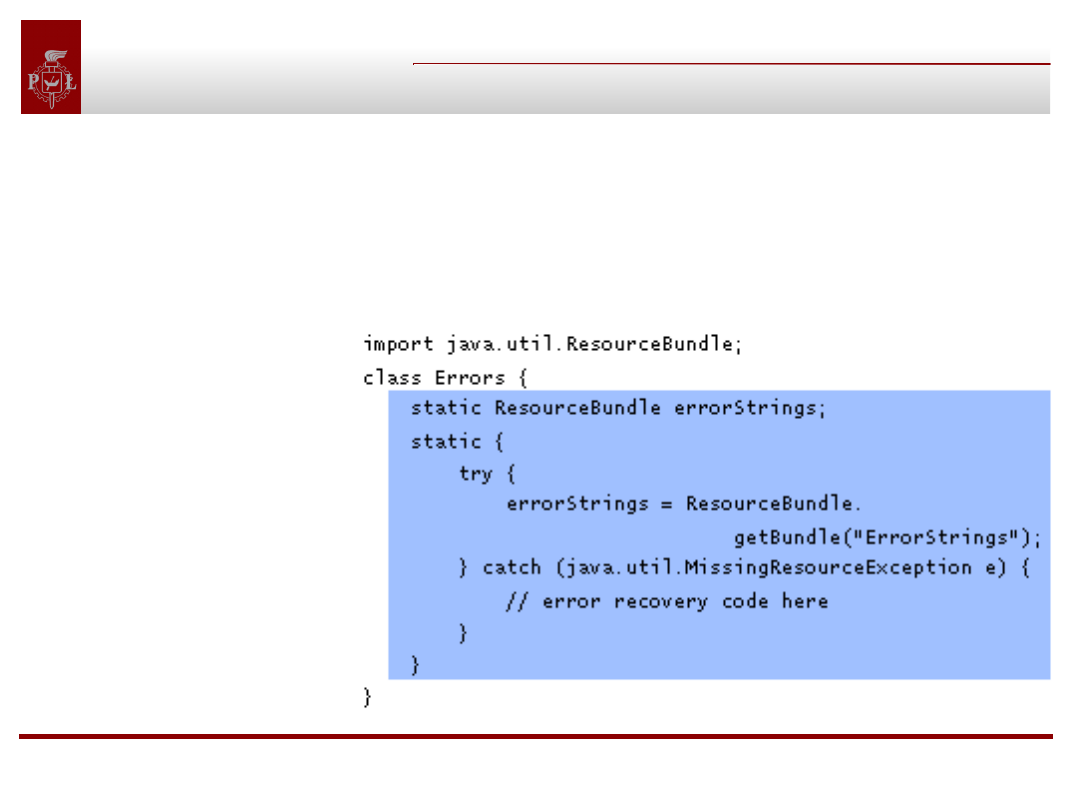
If you have some initialization to perform that cannot be done in an
initializer because of one of previous limitations, you have to put the
initialization code elsewhere. To initialize class members, put the
initialization code in a static initialization block. To initialize
instance members, put the initialization code in a constructor.
Objects classes, interfaces,
packages, annotations
Initializing instance members
Initializing instance members
Example:
import java.util.ResourceBundle;
class Errors {
ResourceBundle errorStrings;
Errors() {
try {
errorStrings =
ResourceBundle.getBundle("ErrorStrings");
} catch (java.util.MissingResourceException e) {
// error recovery code here } } }
The code that initializes errorStrings is in a constructor for
the class.
Objects classes, interfaces,
packages, annotations
Initializing instance members(2)
Initializing instance members(2)
Example.java.awt.Rectangle has these three constructors:
Rectangle();
Rectangle(int width, int height);
Rectangle(int x, int y, int width, int height);
Here are the possible implementations of the three Rectangle
constructors:
Rectangle() { this(0,0,0,0); }
Rectangle(int width, int height) { this(0,0,width,height); }
Rectangle(int x, int y, int width, int height) {
this.x = x; this.y = y;
this.width = width; this.height = height; }
Objects classes, interfaces,
packages, annotations
Inheritance
Inheritance
Extends clause declares that your class is a subclass of another. You
can specify only one superclass for your class (Java does not
support multiple class inheritance), and even though you can
omit the extends clause from your class declaration, your class has a
superclass.
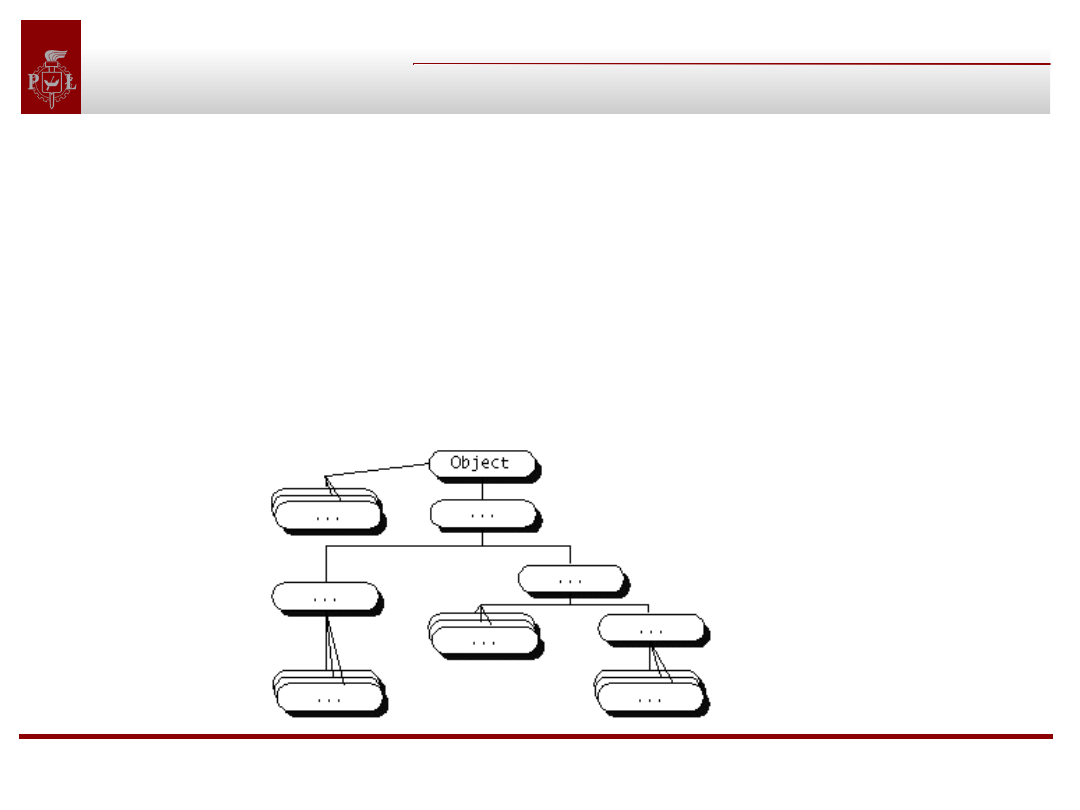
The Object class defines and implements behavior that every class
in the Java system needs. It is the most general of all classes. Its
immediate subclasses, and other classes near top of the hierarchy,
implement general behavior; classes near the bottom of the
hierarchy provide for more specialized behavior.
Objects classes, interfaces,
packages, annotations
Inheritance(2)
Inheritance(2)
The members that are inherited by a subclass:
•Subclasses inherit those superclass members declared as public or
protected.
•Subclasses inherit those superclass members declared with no
access specifier as long as the subclass is in the same package as the
superclass.
•Subclasses don't inherit a superclass's member if the subclass
declares a member with the same name. In the case of member
variables, the member variable in the subclass hides the one
in the superclass. In the case of methods, the method in the
subclass overrides the one in the superclass.
Objects classes, interfaces,
packages, annotations
Hiding member variables
Hiding member variables
Lets consider the following superclass and subclass pair:
class Super { Number aNumber; }
class Subbie extends Super { Float aNumber; }
The aNumber variable in Subbie hides aNumber in Super.
It is possible to access Super's aNumber from Subbie with:
super.aNumber
super is a Java language keyword that allows a method
to refer to hidden variables and overridden methods of
the superclass.
Objects classes, interfaces,
packages, annotations
Overriding Methods
Overriding Methods
Object class contains the toString method, which returns a String
object containing the name of the object's class and its hash code.
Most, if not all, classes will want to override this method and print out
something meaningful for that class.
The output of toString should be a textual representation of the
object. For the Stack class, a list of the items in the stack would be
appropriate
public class Stack {
private Vector items;
public String toString() {
// list of the items in the stack
} }
Objects classes, interfaces,
packages, annotations
Overriding Methods(2)
Overriding Methods(2)
•The return type, method name, and number and type of
the parameters for the overriding method must match
those in the overridden method.
•The overriding method can have a different throws
clause as long as it doesn't declare any types not
declared by the throws clause in the overridden method.
•The access specifier for the overriding method can allow
more access than the overridden method, but not less.
For example, a protected method in the superclass can be
made public but not private.
Objects classes, interfaces,
packages, annotations
Overriding Methods(3)
Overriding Methods(3)
Calling the Overridden Method
Sometimes, you don't want to completely override a method. Rather,
you want to add more functionality to it. To do this, simply call the
overridden method using the super keyword:
super.overriddenMethodName();
Methods a Subclass Cannot Override
A subclass cannot override methods that are declared final in the
superclass Also, a subclass cannot override methods that are
declared static in the superclass. A subclass can hide a static
method in the superclass by declaring a static method in the subclass
with the same signature as the static method in the superclass.
Methods a Subclass Must Override
A subclass must override methods that are declared abstract in the
superclass, or the subclass itself must be abstract.
Objects classes, interfaces,
packages, annotations
Being Descendent of Object
Being Descendent of Object
Every class in the Java system is a descendent, direct or
indirect, of the Object class. This class defines the basic state and
behavior that all objects must have.
Your classes may want to override the following Object methods:
clone
equals/hashCode (must be overridden together. )
finalize
toString
Your class cannot override these Object methods (they are final):
getClass
notify / notifyAll
wait
Objects classes, interfaces,
packages, annotations
The clone Method
The clone Method
•You use the clone method to create an object from an existing
object.
•Object's implementation of this method checks to see if the object
on which clone was invoked implements the Cloneable interface,
and throws a CloneNotSupportedException if it does not. Note that
Object itself does not implement Cloneable, so subclasses of
Object that don't explicitly implement the interface are not cloneable.
•If the object on which clone was invoked does implement the
Cloneable interface, Object's implementation of the clone method
creates an object of the same type as the original object and
initializes the new object's member variables to have the same
values as the original object's corresponding member variables.
•For some classes the default behavior of Object's clone
method works just fine. Other classes need to override clone
to get correct behavior.
Objects classes, interfaces,
packages, annotations
The clone Method (2)
The clone Method (2)
Lets consider the Stack class. If Stack relies on Object's
implementation of clone, then the original stack and its clone will
refer to the same vector. Here then is an appropriate implementation
of clone for Stack class:
public class Stack implements Cloneable {
private Vector items;
protected Object clone() {
try {
Stack s = (Stack)super.clone();
// clone the stack
s.items = (Vector)items.clone();// clone the vector
return s;
// return the clone
} catch (CloneNotSupportedException e) {
// this shouldn't happen because Stack is Cloneable
throw new InternalError();
} } }
Objects classes, interfaces,
packages, annotations
The equals Method
The equals Method
•You must override the equals and hashCode methods together.
•The equals method compares two objects for equality and returns
true if they are equal. The equals method provided in the Object class
uses the identity function to determine if objects are equal (if the
objects compared are the exact same object the method returns
true).
•For some classes, two distinct objects of that type might be
considered equal if they contain the same information. Example:
Integer one = new Integer(1), anotherOne = new Integer(1);
if (one.equals(anotherOne))
System.out.println("objects are equal");
This program displays objects are equal even though one and
anotherOne reference two distinct objects. They are considered equal
because the objects compared contain the same int value.
Objects classes, interfaces,
packages, annotations
The hashCode Method
The hashCode Method
•The value returned by hashCode is an int that maps an
object into a bucket in a hash table.
•An object must always produce the same hash
code.
•The hashing function for some classes is relatively
obvious. For example, an obvious hash code for an
Integer object is its integer value.
Objects classes, interfaces,
packages, annotations
clone and hashCode - example
clone and hashCode - example
public class BingoBall {
public int number;
public boolean equals(Object obj) {
if (!(obj instanceof BingoBall))
return false;
return ((BingoBall)obj).number == number;
}
public int hashCode() {
return number;
}
public String toString() {
return new
StringBuffer().append(letter).append(number).toString();
}
}
Objects classes, interfaces,
packages, annotations
The finalize Method
The finalize Method
• The Object class provides a method, finalize, that
cleans up an object before it is garbage collected.
• The finalize method is called automatically by the
system and most classes you write do not need to
override it.
Objects classes, interfaces,
packages, annotations
The toString Method
The toString Method
• Object's toString method returns a String
representation of the object.
• You can use toString along with System.out.println to
display a text representation of an object, such as the
current thread:
System.out.println(Thread.currentThread().toString());
• The String representation for an object
depends entirely on the object. The String
representation of an Integer object is the integer value
displayed as text. The String representation of a
Thread object contains various attributes about the
thread, such as its name and priority.
• The toString method is very useful for
debugging. It behooves you to override this
method in all your classes.
Objects classes, interfaces,
packages, annotations
The getClass Method
The getClass Method
• The getClass method is a final method that
returns a runtime representation of the class of an
object. This method returns a Class object.
• Once you have a Class object you can query it for
various information about the class, such as its name,
its superclass, and the names of the interfaces that it
implements.
• The following method gets and displays the class
name of an object:
void PrintClassName(Object obj) {
System.out.println("The Object's class is " +
obj.getClass().getName());
}
Objects classes, interfaces,
packages, annotations
The getClass Method(2)
The getClass Method(2)
•One handy use of a Class object is to create a new instance of a
class without knowing what the class is at compile time.
• The following sample method creates a new instance of the same
class as obj, which can be any class that inherits from Object (any
class):
Object createNewInstanceOf(Object obj) {
return obj.getClass().newInstance();
}
The notify, notifyAll and wait Methods
•You cannot override Object's notify and notifyAll methods and its
three versions of wait. This is because they are critical for ensuring
that threads are synchronized.
Objects classes, interfaces,
packages, annotations
Final classes and methods
Final classes and methods
You can declare that your class is final, that is, that your
class cannot be subclassed. There are (at least) two
reasons why you might want to do this:
1. Security
One mechanism that hackers use to subvert systems is to
create a subclass of a class and then substitute their class
for the original. The subclass looks and feels like the
original class but does vastly different things, possibly
causing damage or getting into private information.
2. Design
You may also wish to declare a class as final for object-
oriented design reasons. You may think that your class is
"perfect" or that, conceptually, your class should have no
subclasses.
Objects classes, interfaces,
packages, annotations
Final classes and methods(2)
Final classes and methods(2)
Example:
If you wanted to declare your (perfect) ChessAlgorithm class as final,
its declaration should look like this:
final class ChessAlgorithm { . . .}
The final Methods
You might wish to make a method final if it has an implementation
that should not be changed and it is critical to the consistent state of
the object.Instead of making your ChessAlgorithm class final, you
might want instead to make the nextMove method final:
class ChessAlgorithm {
final void nextMove(ChessPiece pieceMoved,
BoardLocation newLocation) { ... }
}
Objects classes, interfaces,
packages, annotations
Abstract classes
Abstract classes
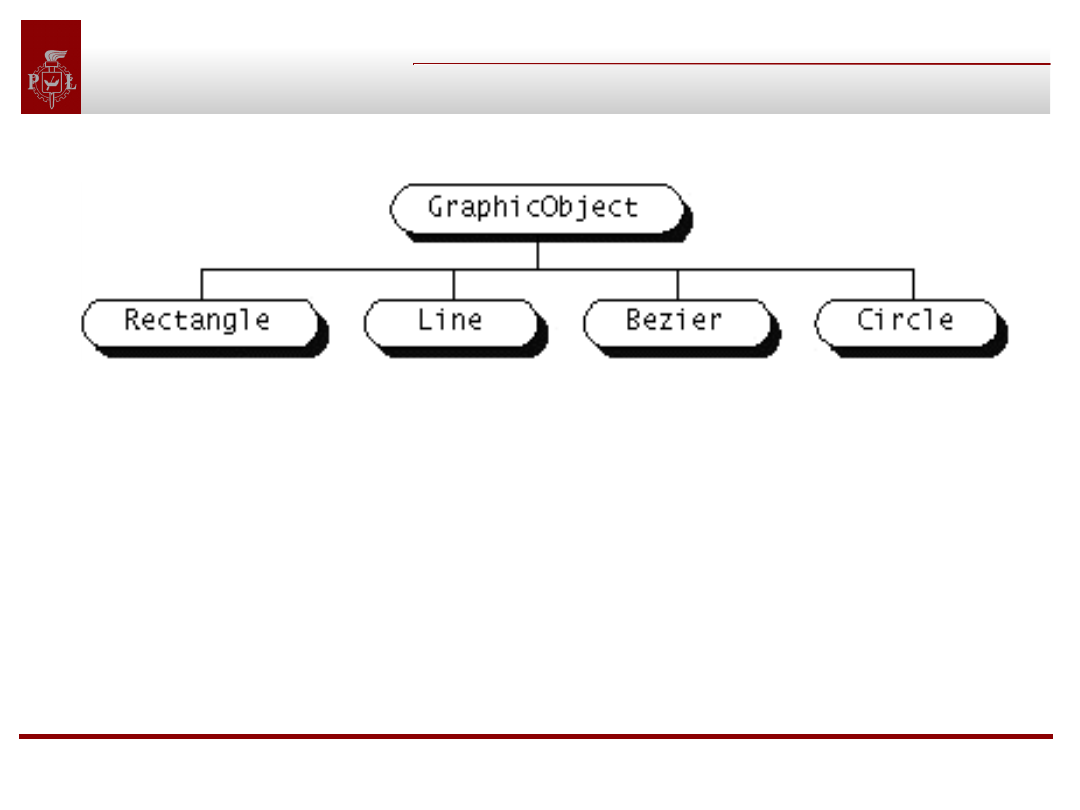
To declare that your class is an abstract class, use the
keyword abstract before the class keyword in your class
declaration:
abstract class Number {
. . .
}
If you attempt to instantiate an abstract class, the
compiler displays an error similar to the following and
refuses to compile your program:
AbstractTest.java:6: class AbstractTest is an abstract
class.
It can't be instantiated.
new AbstractTest();
^
1 error
Objects classes, interfaces,
packages, annotations
Abstract methods
Abstract methods
An abstract class may contain abstract
methods.Example:
The GraphicObject class would look like this:
abstract class GraphicObject {
int x, y;
void moveTo(int newX, int newY) { . . . }
abstract void draw();
}
Each non-abstract subclass would have to provide an implementation
for the draw method:
class Circle extends GraphicObject {
void draw() { . . . }
}
Objects classes, interfaces,
packages, annotations
Abstract classes and methods
Abstract classes and methods
• An abstract class is not required to have an
abstract method in it.
• Any class that has an abstract method in it or
that does not provide an implementation for any
abstract methods declared in its superclasses must
be declared as an abstract class.
Objects classes, interfaces,
packages, annotations
Questions
Questions
public class ClassA {
public void methodOne(int i) { }
public void methodTwo(int i) { }
public static void methodThree(int i) { }
public static void methodFour(int i) { }
}
public class ClassB extends ClassA {
public static void methodOne(int i) { }
public void methodTwo(int i) { }
public void methodThree(int i) { }
public static void methodFour(int i) { }
}
1. Which method overrides a method in the superclass?
2. Which method hides a method in the superclass?
3. What do the other methods do?
Answer:
//compiler
error
//overrides
//compiler
error //hides
Objects classes, interfaces,
packages, annotations
A nested class
A nested class
Java lets you define a class as a member of another class. Such a
class is called a nested class:
class EnclosingClass{
class ANestedClass {. . .}
}
• You use nested classes to reflect and enforce the relationship
between two classes.
• You should define a class within another class when the nested
class makes sense only in the context of its enclosing class or when it
relies on the enclosing class for its function. For example, a text
cursor makes sense only in the context of a particular text
component.
• The nested class has unlimited access to its enclosing class's
members, even if they are declared private. Question: Why ?
Answer: Nested class is a normal member of enclosing class.
Objects classes, interfaces,
packages, annotations
A nested class(2)
A nested class(2)
• A nested class can be declared static (or not). A static nested class
is called just that: a static nested class. A nonstatic nested class is
called an inner class:
class EnclosingClass{
static class AStaticNestedClass { . . . }
class InnerClass { . . . }
}
•A static nested class is associated with its enclosing class.
•A static nested class cannot refer directly to instance variables or
methods defined in its enclosing class-it can use them only through
an object reference.
•An inner class is associated with an instance of its enclosing class
and has direct access to that object's instance variables and
methods.
•Inner class cannot define any static members itself.
Objects classes, interfaces,
packages, annotations
A nested class(3)
A nested class(3)
• Nested classes can be declared abstract or final.
The meaning of these two modifiers for nested classes is
the same as for other classes.
• The access specifiers may be used to restrict
access to nested classes just as they do to other
class members.
• Any nested class can be declared in any block of
code. A nested class declared within a method or other
smaller block of code has access to any final variables in
scope.
Objects classes, interfaces,
packages, annotations
Inner class - Example
Inner class - Example
Suppose you want to add a feature to the Stack class that lets
another class enumerate over the elements in the stack using the
interface defined in java.util.Enumeration. This interface contains
two method declarations:
public boolean hasMoreElements();
public Object nextElement();
The Enumeration interface defines the interface for a single loop over
the elements:
while (hasMoreElements())
nextElement()
If Stack implemented the Enumeration interface itself, you could not
restart the loop and you could not enumerate the contents more than
once. Also, you couldn't allow two enumerations to happen
simultaneously. So Stack shouldn't implement Enumeration. Rather, a
helper class should do the work for Stack.
Objects classes, interfaces,
packages, annotations
Inner class - Example(2)
Inner class - Example(2)
public class Stack {
private Vector items;
public Enumeration enumerator() {
return new StackEnum();
}
class StackEnum implements Enumeration {
int currentItem = items.size() - 1;
public boolean hasMoreElements() {
return (currentItem >= 0);
}
public Object nextElement() {
if (!hasMoreElements())
throw new NoSuchElementException();
else
return items.elementAt(currentItem--);
} } }
Objects classes, interfaces,
packages, annotations
Anonymous class
Anonymous class
You can declare an inner class without naming it. Anonymous
classes can make code difficult to read. You should limit their use to
those classes that are very small. Example:
public class Stack {
private Vector items;
public Enumeration enumerator() {
return new Enumeration() {
int currentItem = items.size() - 1;
public boolean hasMoreElements() {
return (currentItem >= 0); }
public Object nextElement() {
if (!hasMoreElements())
throw new NoSuchElementException();
else
return items.elementAt(currentItem--);
} } } }
Objects classes, interfaces,
packages, annotations
Nested classes - questions
Nested classes - questions
a. The only users of this nested class will be instances of
the enclosing class or instances of the enclosing class's
subclasses.
b. Anyone can use this nested class.
c. Only instances of the declaring class need to use this
nested class, and a particular instance might use it
several times.
d. This tiny nested class is used just once, to create an
object that implements an interface.
e. This nested class has information about its enclosing
class (not about instances of the enclosing class) and is
used only by its enclosing class and perhaps their
subclasses.
f. Similar situation as the preceding (choice e), but not
intended to be used by subclasses.
1. anonymous
inner class
2. protected inner
class
3. public static
nested class
4. protected static
nested class
5. private static
nested class
6. private inner
class
1d
2a
3b
4e
5f
6c
Objects classes, interfaces,
packages, annotations
Nested classes – questions(2)
Nested classes – questions(2)
import java.util.*;
// What is wrong ?
public class Problem {
public static void main(String[] args) {
Timer timer = new Timer();
timer.schedule(new TimerTask() {
public void run() {
System.out.println("Exiting.");
timer.cancel();
}
}, 5000);
System.out.println("In 5 sec exit. ");
} }
final
Objects classes, interfaces,
packages, annotations
Interfaces
Interfaces
An interface defines a protocol of behavior that can be implemented
by any class anywhere in the class hierarchy. An interface defines a
set of methods but does not implement them. A class that
implements the interface agrees to implement all the methods
defined in the interface, thereby agreeing to certain behavior.
Definition:
An interface is a named collection of method definitions
(without implementations). An interface can also declare
constants.
Objects classes, interfaces,
packages, annotations
Interfaces and abstract classes
Interfaces and abstract classes
The differences between interfaces and abstract
classes:
•An interface cannot implement any methods, whereas
an abstract class can.
•A class can implement many interfaces but can have
only one superclass.
•An interface is not part of the class hierarchy. Unrelated
classes can implement the same interface.
Objects classes, interfaces,
packages, annotations
Using interfaces – example
Using interfaces – example
Suppose that you have written a class that can watch stock prices
coming over a data feed. This class allows other classes to register to
be notified when the value of a particular stock changes. First, your
class, which we'll call StockMonitor, would implement a method
that lets other objects register for notification:
public class StockMonitor {
public void watchStock(StockWatcher watcher, String tickerSymbol,
double delta) { ... } }
Arguments explanation:
StockWatcher is the name of an interface which declares one
method: valueChanged.
String tickerSymbol - symbol of the stock to watch
double delta - amount of change that the watcher considers
interesting enough to be notified of.
Objects classes, interfaces,
packages, annotations
Using interfaces – example(2)
Using interfaces – example(2)
• The watchStock method ensures, through the data type of its first
argument, that all registered objects implement the
valueChanged method.
• It makes sense to use an interface data type here because it
matters only that registrants implement a particular method.
• If StockMonitor had used a class name as the data type, that would
artificially force a class relationship on its users. Because a class can
have only one superclass, it would also limit what type of objects can
use this service.
• By using an interface, the registered objects class could be
anything -Applet or Thread- for instance, thus allowing any class
anywhere in the class hierarchy to use this service.
Objects classes, interfaces,
packages, annotations
Using interfaces – example(3)
Using interfaces – example(3)
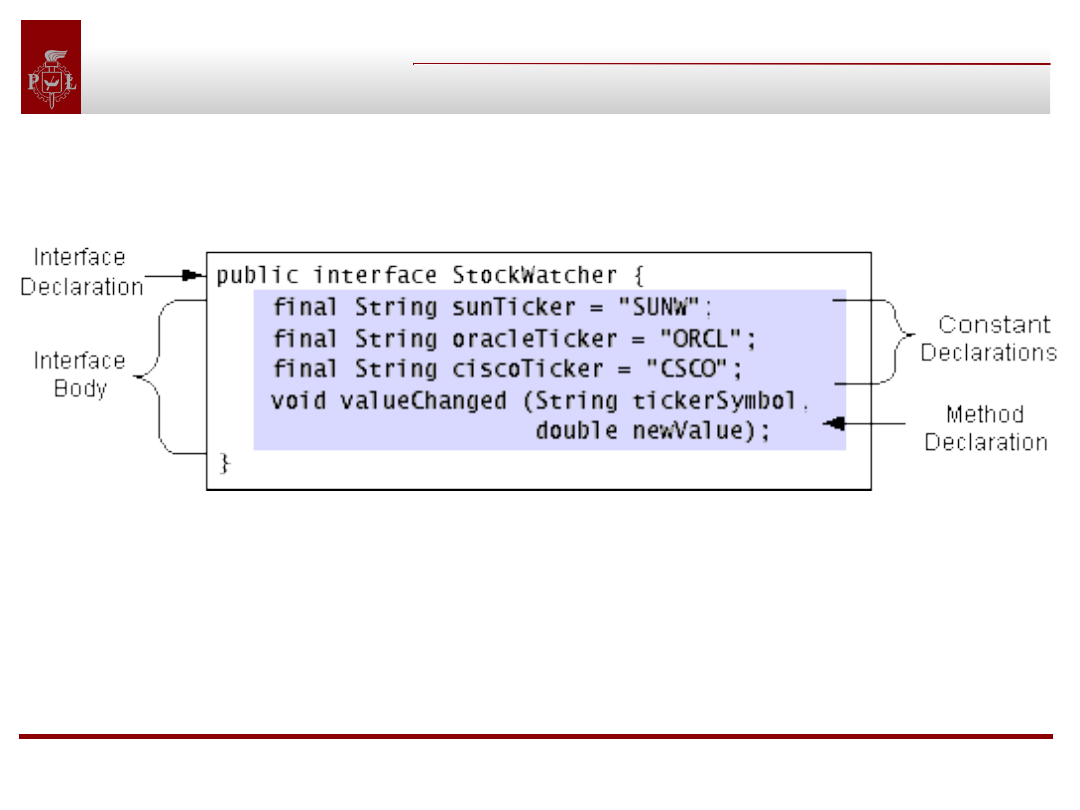
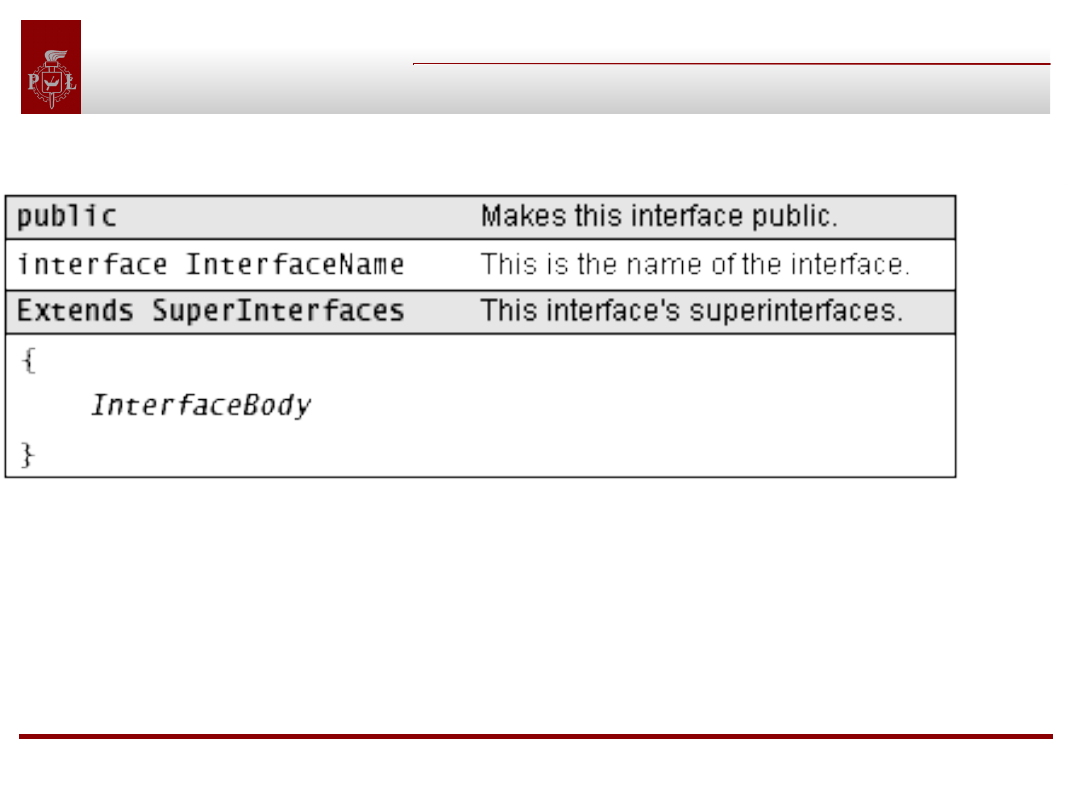
Declaration of interface StockWatcher:
This interface defines three constants, which are the
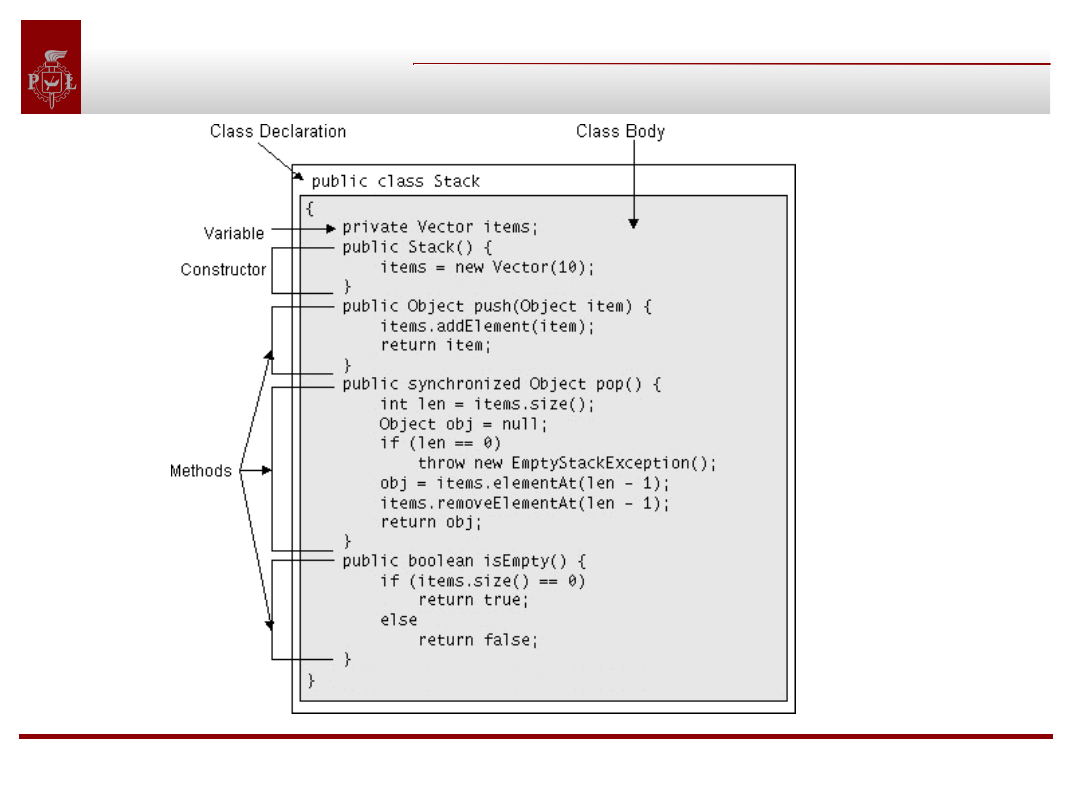
ticker symbols of watchable stocks. This interface also
declares, but does not implement, the valueChanged
method. Classes that implement this interface provide the
implementation for that method.
Objects classes, interfaces,
packages, annotations
The interface declaration
The interface declaration
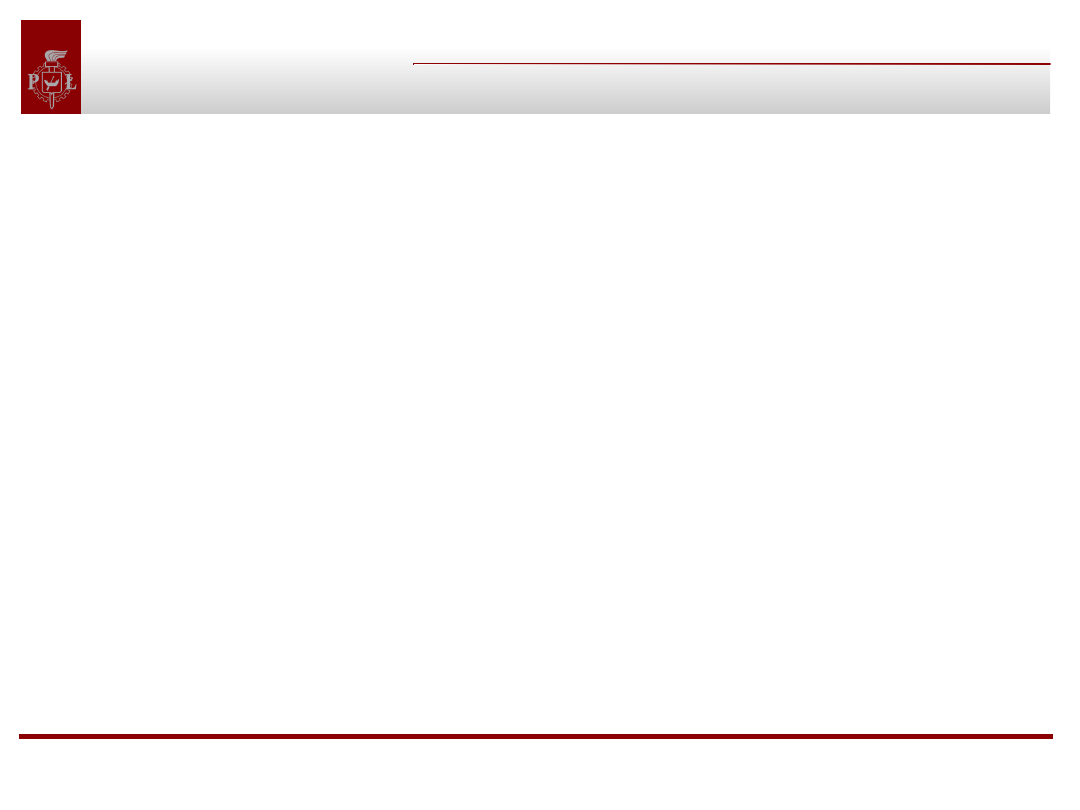
Two elements are required in an interface
declaration--the interface keyword and the name of
the interface.
Objects classes, interfaces,
packages, annotations
The interface declaration(2)
The interface declaration(2)
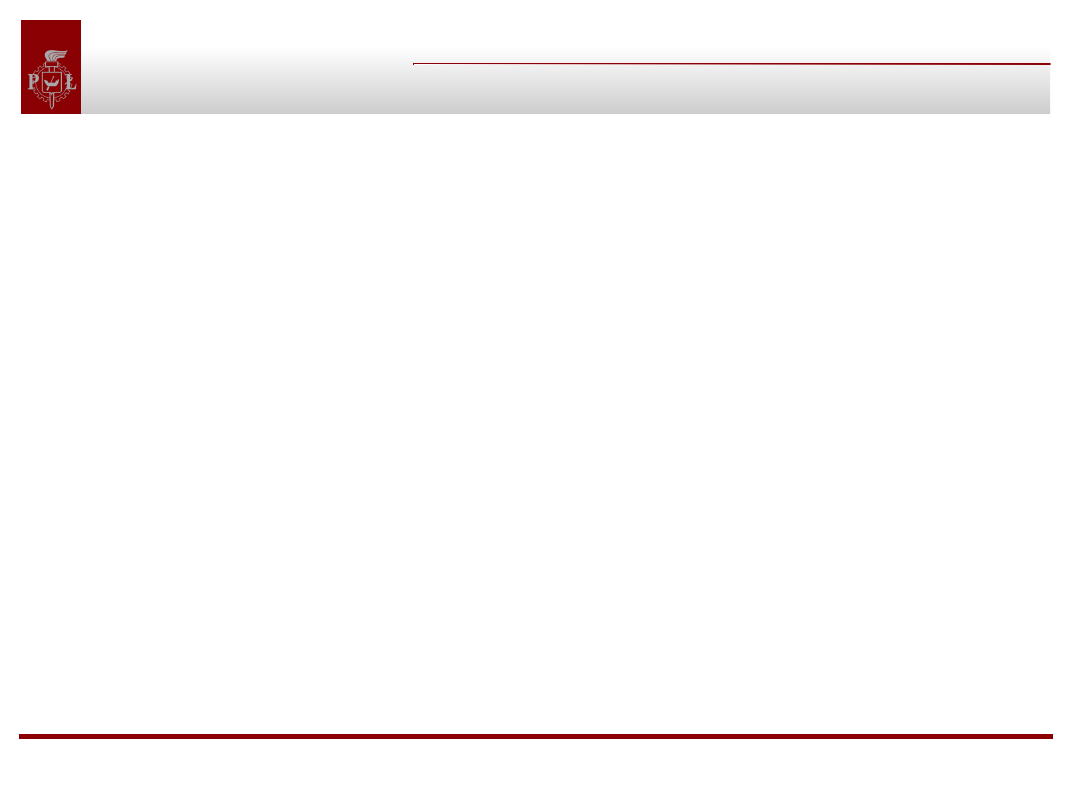
• The public access specifier indicates that the
interface can be used by any class in any package.
If you do not specify that your interface is public, your
interface will be accessible only to classes that are
defined in the same package as the interface.
• An interface declaration can have one other
component: a list of superinterfaces. An interface
can extend other interfaces, just as a class can extend or
subclass another class. However, whereas a class can
extend only one other class, an interface can extend any
number of interfaces. The list of superinterfaces is a
comma-separated list of all the interfaces extended by
the new interface.
Objects classes, interfaces,
packages, annotations
The interface body
The interface body
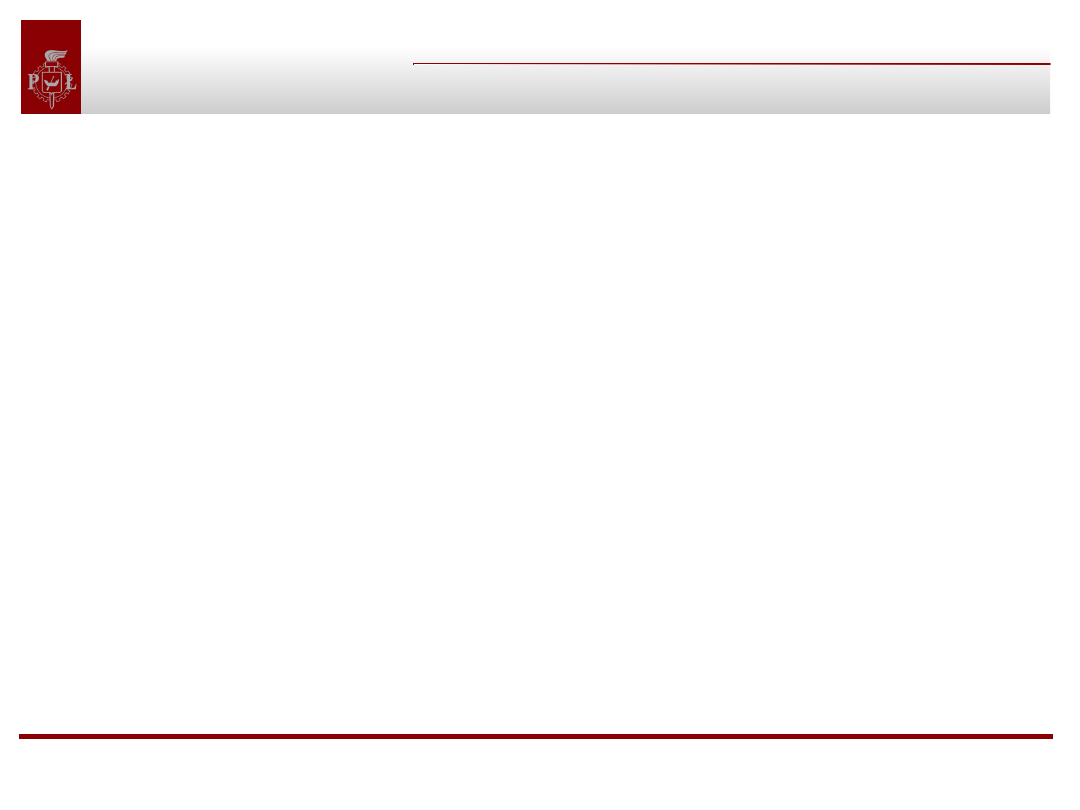
• The interface body contains method declarations for all the
methods included in the interface. A method declaration within an
interface is followed by a semicolon (;) because an interface does not
provide implementations for the methods declared within it. All
methods declared in an interface are implicitly public and
abstract.
• An interface can contain constant declarations in addition to
method declarations. All constant values defined in an interface
are implicitly public, static, and final.
• Member declarations in an interface disallow the use of some
declaration modifiers; you cannot use transient, volatile, or
synchronized in a member declaration in an interface. Also,
you may not use the private and protected specifiers when
declaring members of an interface.
Objects classes, interfaces,
packages, annotations
Implementing an Interface
Implementing an Interface
An interface defines a protocol of behavior. A class
that implements an interface adheres to the
protocol defined by that interface.
By convention: The implements clause follows the
extends clause, if it exists.
Classes that implement an interface inherit the
constants defined within that interface. So those
classes can use simple names to refer to the constants.
Any other class can use an interfaces constants with a
qualified name, like this:
StockWatcher.sunTicker
Objects classes, interfaces,
packages, annotations
Using Interface as a Type
Using Interface as a Type
When you define a new interface, you are defining
a new reference data type. You can use interface
names anywhere you can use any other data type
name.
Only an instance of a class that implements the
interface can be assigned to a reference variable
whose type is an interface name.
Objects classes, interfaces,
packages, annotations
Interfaces cannot grow
Interfaces cannot grow
Suppose that you want to add some functionality to StockWatcher.
For instance, suppose that you want to add a method that reports the
current stock price, regardless of whether the value changed:
public interface StockWatcher {
...
void valueChanged(String tickerSymbol, double newValue);
void currentValue(String tickerSymbol, double newValue);
}
If you make this change, all classes that implement the old
StockWatcher interface will break because they dont
implement the interface anymore!
Objects classes, interfaces,
packages, annotations
Interfaces cannot grow(2)
Interfaces cannot grow(2)
To avoid mentioned problem you should implement
interface completely from the beginning. For
example, you could create a StockWatcher subinterface
called StockTracker that declared the new method:
public interface StockTracker extends StockWatcher {
void currentValue(String tickerSymbol, double newValue);
}
Now users of your code can choose to upgrade to the new
interface or to stick with the old interface.
Objects classes, interfaces,
packages, annotations
Interfaces - questions
Interfaces - questions
Question:
Is the following interface valid?
public interface Marker { }
Answer:
Yes. Methods are not required. Empty interfaces can be
used as types and to mark classes without requiring any
particular method implementations. For an example a
useful empty interface is java.io.Serializable.
Objects classes, interfaces,
packages, annotations
Interfaces – questions(2)
Interfaces – questions(2)
Excercise:
Suppose that you have written a time server, which
periodically notifies its clients of the current date and
time. Write an interface that the server could use to
enforce a particular protocol on its clients.
Answer:
public interface TimeClient {
public void setTime(int hour, int minute, int second);
public void setDate(int day, int month, int year);
public void setDateAndTime(int day, int month, int
year,
int hour, int minute, int second); }
Objects classes, interfaces,
packages, annotations
Packages
Packages
To make classes easier to find and to use, to avoid naming
conflicts, and to control access, programmers bundle
groups of related classes and interfaces into packages.
Definition: A package is a collection of related classes
and interfaces providing access protection and
namespace management.
Objects classes, interfaces,
packages, annotations
Packages(2)
Packages(2)
Suppose that you write a group of classes that represent a collection
of graphic objects, such as circles, rectangles, lines, and points. You
also write an interface, Draggable, that classes implement if they can
be dragged with the mouse by the user:
//in the Graphic.java file
public abstract class Graphic { . . . }
//in the Circle.java file
public class Circle extends Graphic implements Draggable { . . . }
//in the Rectangle.java file
public class Rectangle extends Graphic implements Draggable { .}
//in the Draggable.java file public interface Draggable { . . . }
Why they should be bundled in a package?
Objects classes, interfaces,
packages, annotations
Packages(3)
Packages(3)
You should bundle these classes and the interface in a
package for several reasons:
• You and other programmers can easily determine that
these classes and interfaces are related.
• You and other programmers know where to find classes
and interfaces that provide graphics-related functions.
• The names of your classes wont conflict with class
names in other packages, because the package creates a
new namespace.
• You can allow classes within the package to have
unrestricted access to one another yet still restrict access
for classes outside the package.
Objects classes, interfaces,
packages, annotations
Creating Packages
Creating Packages
To create a package, you put a class or an interface in it.
To do this, you put a package statement at the top of the
source file in which the class or the interface is defined.
Example:
package graphics;
public class Circle extends Graphic implements Draggable
{ . . . }
•The Circle class is a public member of the graphics
package.
•You must include a package statement at the top of
every source file that defines a class or an interface that
is to be a member of the graphics package.
Objects classes, interfaces,
packages, annotations
Package Statement
Package Statement
• The scope of the package statement is the entire source
file,
• If you put multiple classes in a single source file, only
one may be public, and it must share the name of the
source files base name.
• Only public package members are accessible from
outside the package.
• If you do not use a package statement, your class or
interface ends up in the default package, which is a
package that has no name.
• The default package is only for small or temporary
applications or when you are just beginning development.
Otherwise, classes and interfaces belong in named
packages.
Objects classes, interfaces,
packages, annotations
Naming a Package
Naming a Package
It is possible to name identically two classes unless they are
in a different packages.
By convention:
Companies use their reversed Internet domain name in their package
names, like this: com.company.package. Name collisions that occur
within a single company need to be handled by convention within
that company, perhaps by including the region or the project name
after the company name, for example, com.company.region.package.
For our purposes:
All classes should be in package:
pl.lodz.p.dmcs.particular_name
Objects classes, interfaces,
packages, annotations
Using Package Members
Using Package Members
Only public package members are accessible outside the
package in which they are defined. To use a public
package member from outside its package, you must do
one or more of the following:
• Refer to the member by its long (qualified) name
• Import the package member
• Import the members entire package
Each is appropriate for different situations.
Objects classes, interfaces,
packages, annotations
Referring to a Package Member by Name
Referring to a Package Member by Name
If you are trying to use a member from a different
package and that package has not been imported, you
must use the members qualified name, which includes
the package name. This is the qualified name for the
Rectangle class declared in the graphics package :
graphics.Rectangle
You could use this long name to create an instance of
graphics.Rectangle:
graphics.Rectangle myRect = new
graphics.Rectangle();
Using long names is good for one-shot uses.
Objects classes, interfaces,
packages, annotations
Importing a Package Member
Importing a Package Member
To import a specific member into the current file, put an
import statement at the beginning of your file before any
class or interface definitions but after the package
statement, if there is one. Example:
import graphics.Circle;
Now you can refer to the Circle class by its simple name:
Circle myCircle = new Circle();
This approach works well if you use just a few members
from the graphics package. But if you use many classes
and interfaces from a package, you can import the entire
package.
Objects classes, interfaces,
packages, annotations
Importing an Entire Package
Importing an Entire Package
To import all the classes and interfaces contained in a particular
package, use the import statement with the asterisk (*) wildcard
character:
import graphics.*;
The asterisk in the import statement can be used only to
specify all the classes within a package. It cannot be used to
match a subset of the classes in a package. For example, the
following does not match all the classes in the graphics package that
begin with A:
import graphics.A*; // does not work
Instead, it generates a compiler error. With the import statement,
you can import only a single package member or an entire
package.
Objects classes, interfaces,
packages, annotations
Packages imported automatically
Packages imported automatically
The Java runtime system automatically imports three
entire packages:
• The default package (the package with no name)
• The java.lang package
• The current package
Objects classes, interfaces,
packages, annotations
Disambiguating a name
Disambiguating a name
If by some chance a member in one package shares the same
name with a member in another package and both packages
are imported, you must refer to each member by its qualified
name. For example, the previous example defined a class named
Rectangle in the graphics package. The java.awt package also
contains a Rectangle class. If both graphics and java.awt have
been imported, the following is ambiguous:
Rectangle rect;
In such a situation, you have to be more specific and use the
members qualified name to indicate exactly which Rectangle class
you want:
graphics.Rectangle rect;
Objects classes, interfaces,
packages, annotations
Managing files
Managing files
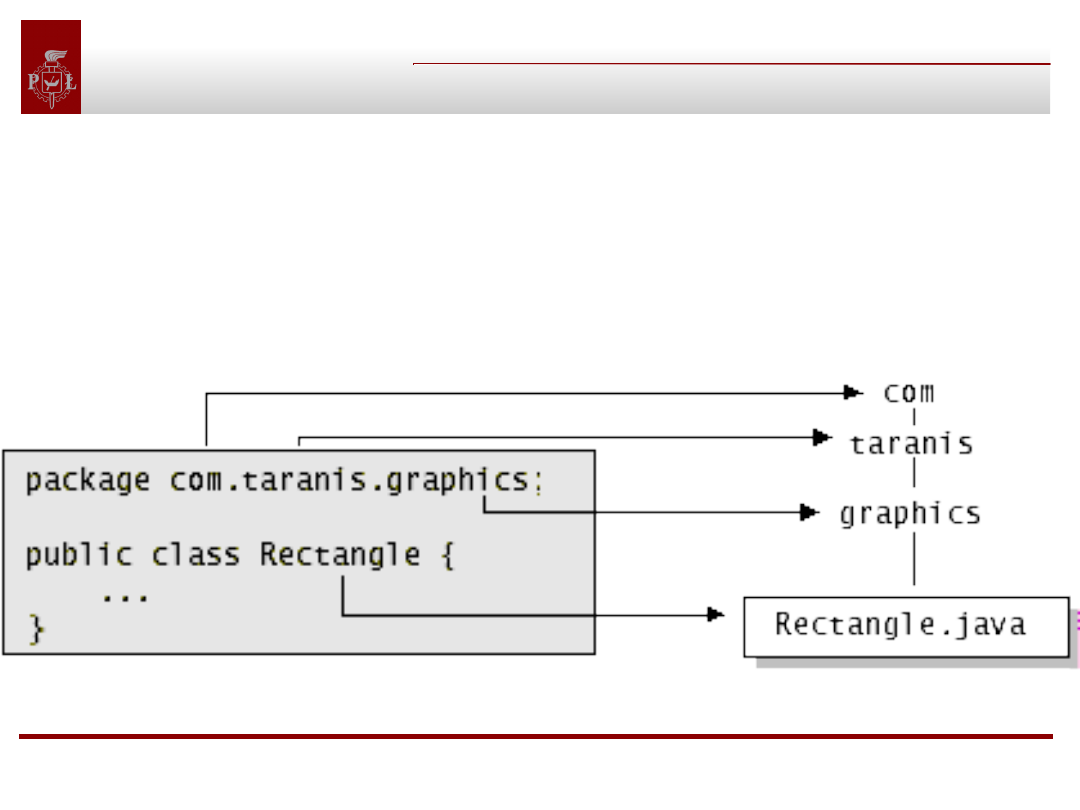
The qualified name of the package member and the path
name to the file are parallel:
class name graphics.Rectangle
pathname to file
graphics/Rectangle.java
Each component of the package name corresponds to a subdirectory.
Objects classes, interfaces,
packages, annotations
Managing files(2)
Managing files(2)
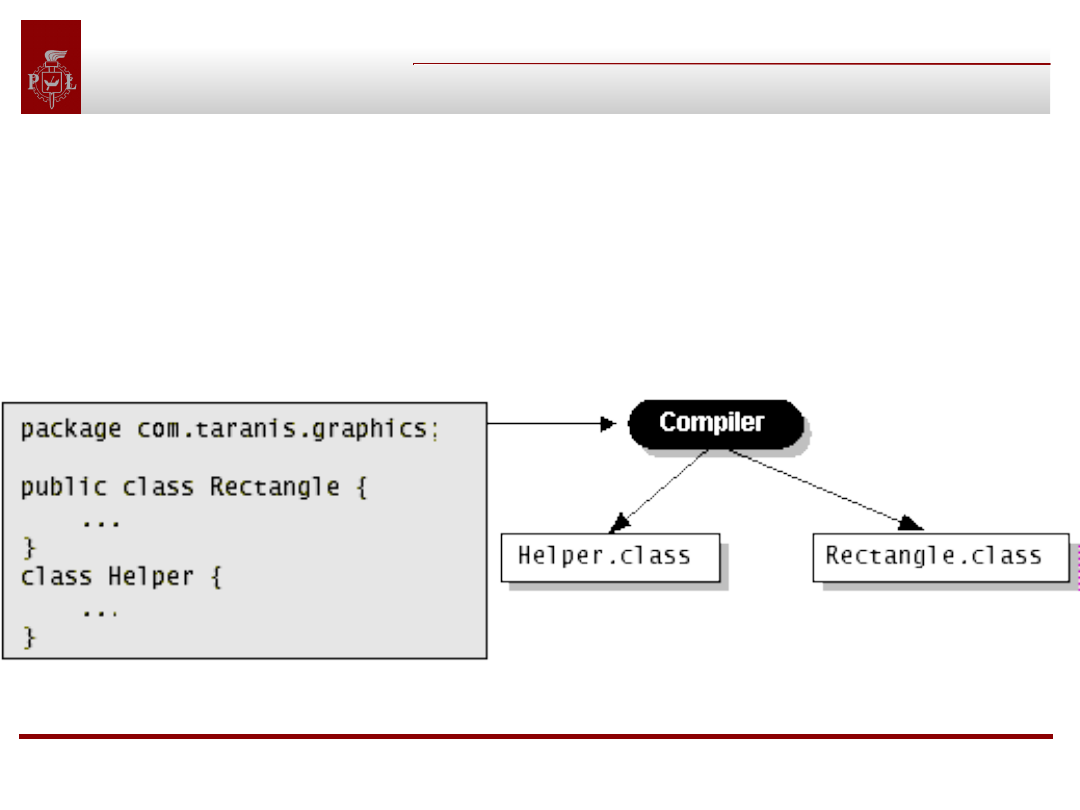
When you compile a source file, the compiler
creates a different output file for each class and
interface defined in it. The base name of the
output file is the name of the class or the
interface, and its extension is .class:
Objects classes, interfaces,
packages, annotations
Annotations
Annotations
Annotations provide data about a program that is not part of the
program itself. They have no direct effect on the operation of the
code they annotate.
Annotations have a number of uses, among them:
•Information for the compiler — Annotations can be used by the
compiler to detect errors or suppress warnings.
•Compiler-time and deployment-time processing — Software
tools can process annotation information to generate code, XML files,
and so forth.
•Runtime processing — Some annotations are available to be
examined at runtime.
Annotations can be applied to a program's declarations of classes,
fields, methods, and other program elements.
Objects classes, interfaces,
packages, annotations
Annotations
Annotations
Annotations examples:
@Author( name = "Benjamin Franklin", date =
"3/27/2003" )
class MyClass() { }
or:
@SuppressWarnings(value = "unchecked")
void myMethod() { }

Objects classes, interfaces,
packages, annotations
Annotations: documentation
Annotations: documentation
public class Test {
// Author: John Doe
// Date: 3/17/2002
// Current revision: 6
// Last modified: 4/12/2004
// By: Jane Doe
// Reviewers: Alice, Bill
// class code goes here
}
@interface ClassPreamble { String
author();
String date();
int currentRevision() default 1;
String lastModified() default "N/A";
String lastModifiedBy() default "N/A";
String[] reviewers();}
@ClassPreamble (
author = "John Doe",
date = "3/17/2002",
currentRevision = 6,
lastModified = "4/12/2004",
lastModifiedBy = "Jane Doe"
reviewers = {"Alice", "Bill"} )
Objects classes, interfaces,
packages, annotations
Annotations: documentation (2)
Annotations: documentation (2)
To make the information in @ClassPreamble appear in
Javadoc-generated documentation, you must annotate
the @ClassPreamble definition itself with the
@Documented annotation:
import java.lang.annotation.*;
// import this to use @Documented
@Documented
@interface ClassPreamble {
// Annotation element definitions
}
Objects classes, interfaces,
packages, annotations
Annotations: @Deprecated
Annotations: @Deprecated
@Deprecated annotation indicates that the marked element is
deprecated and should no longer be used.
The compiler generates a warning whenever a program uses a
method, class, or field with the @Deprecated annotation.
When an element is deprecated, it should also be documented using
the Javadoc @deprecated tag, as shown in the following example:
// Javadoc comment follows
/** * @deprecated * explanation of why it was deprecated – it will be
placed in JavaDoc*/
@Deprecated static void deprecatedMethod() { } }
// it really means that method is deprecated
Objects classes, interfaces,
packages, annotations
Annotations: @Override
Annotations: @Override
@Override annotation informs the compiler that the
element is meant to override an element declared in a
superclass:
// mark method as a superclass method
// that has been overridden
@Override
int overriddenMethod() { }
While it's not required to use this annotation when
overriding a method, it helps to prevent errors. If a
method marked with @Override fails to correctly override
a method in one of its superclasses, the compiler
generates an error.
Objects classes, interfaces,
packages, annotations
Annotations: @SuppressWarnings
Annotations: @SuppressWarnings
@SuppressWarnings annotation tells the compiler to
suppress specific warnings that it would otherwise
generate:
// use a deprecated method and tell
// compiler not to generate a warning
@SuppressWarnings("deprecation")
void useDeprecatedMethod() {
objectOne.deprecatedMethod();
//deprecation warning - suppressed
}
Every compiler warning belongs to a category
"deprecation" or "unchecked." The "unchecked" warning
can occur when interfacing with legacy code written
before the advent of generics.
Document Outline
- Slide 1
- Slide 2
- Slide 3
- Slide 4
- Slide 5
- Slide 6
- Slide 7
- Slide 8
- Slide 9
- Slide 10
- Slide 11
- Slide 12
- Slide 13
- Slide 14
- Slide 15
- Slide 16
- Slide 17
- Slide 18
- Slide 19
- Slide 20
- Slide 21
- Slide 22
- Slide 23
- Slide 24
- Slide 25
- Slide 26
- Slide 27
- Slide 28
- Slide 29
- Slide 30
- Slide 31
- Slide 32
- Slide 33
- Slide 34
- Slide 35
- Slide 36
- Slide 37
- Slide 38
- Slide 39
- Slide 40
- Slide 41
- Slide 42
- Slide 43
- Slide 44
- Slide 45
- Slide 46
- Slide 47
- Slide 48
- Slide 49
- Slide 50
- Slide 51
- Slide 52
- Slide 53
- Slide 54
- Slide 55
- Slide 56
- Slide 57
- Slide 58
- Slide 59
- Slide 60
- Slide 61
- Slide 62
- Slide 63
- Slide 64
- Slide 65
- Slide 66
- Slide 67
- Slide 68
- Slide 69
- Slide 70
- Slide 71
- Slide 72
- Slide 73
- Slide 74
- Slide 75
- Slide 76
- Slide 77
- Slide 78
- Slide 79
- Slide 80
- Slide 81
- Slide 82
- Slide 83
- Slide 84
- Slide 85
- Slide 86
- Slide 87
- Slide 88
- Slide 89
- Slide 90
- Slide 91
- Slide 92
- Slide 93
- Slide 94
- Slide 95
- Slide 96
- Slide 97
- Slide 98
- Slide 99
- Slide 100
- Slide 101
- Slide 102
- Slide 103
- Slide 104
- Slide 105
- Slide 106
- Slide 107
- Slide 108
- Slide 109
- Slide 110
- Slide 111
- Slide 112
- Slide 113
- Slide 114
- Slide 115
- Slide 116
- Slide 117
- Slide 118
- Slide 119
- Slide 120
- Slide 121
- Slide 122
- Slide 123
- Slide 124
- Slide 125
- Slide 126
- Slide 127
- Slide 128
- Slide 129
- Slide 130
- Slide 131
Wyszukiwarka
Podobne podstrony:
java object serialization speci Nieznany
07 Java klasy abstrakcyjne, interfejsy, polimorfizm 0
Java 06 Klasy Interfejsy
java object serialization speci Nieznany
java nativ interface specificat Nieznany
java lab01 object
OMÓWIENIE INTERFEJSÓW I KLAS ABSTRAKCYJNYCH W JĘZYKU JAVA
Java Data Objects jadaob
Java Data Objects
08 Interfejsy Java
(ebook pdf) programming primer for object oriented and procedural programming in java, c, c
python classes objects
Java Data Objects 2
Java Programmer 2 exam objectives
Java Data Objects jadaob
Java Native Interface łączenie Javy i C C
Java lang Interfaces
więcej podobnych podstron