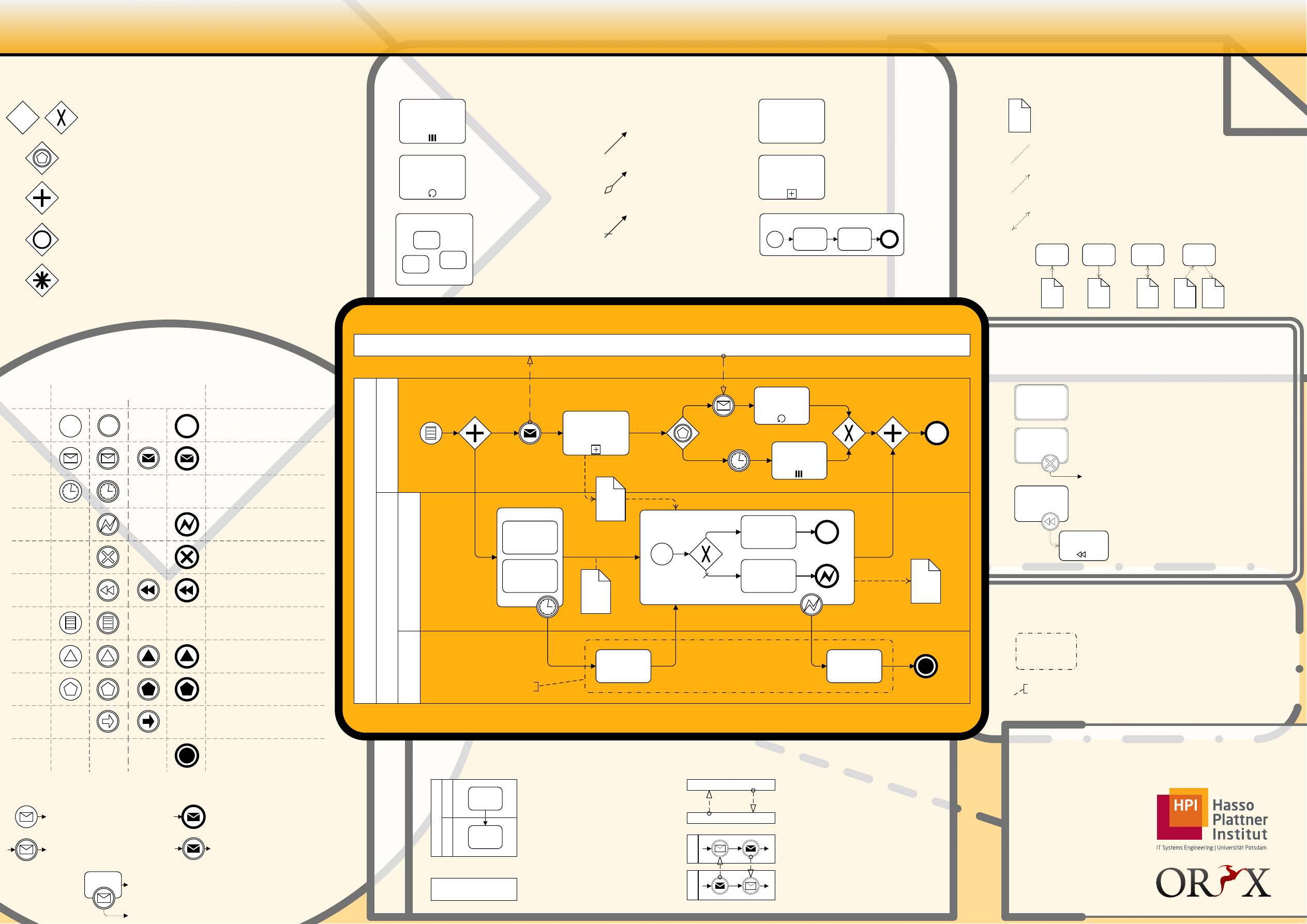
Gateways
Data
Attaching a data object with an Undirected
Association to a sequence flow indicates hand-over
of information between the activities involved.
A Directed Association indicates information flow.
A data object can be read at the start of an
activity or written upon completion.
A Bidirected Association indicates that the data
object is modified, i.e. read and written during the
execution of an actvity.
A Data Object represents information flowing
through the process, such as business documents,
e-mails or letters.
Events
Transactions
Swimlanes
activity
Start Event: Catching an event
starts a new process instance.
Intermediate Event (catching):
The process can only continue
once an event has been caught.
Attached Intermediate Event: The
activity is aborted once an event is
caught.
Intermediate Event (throwing):
An event is thrown and the process
continues.
End Event: An event is thrown
when the end of the process is
reached.
Start
End
Intermediate
Plain
Message
Timer
Error
Cancel
Compen-
sation
Conditional
Link
Signal
Multiple
Terminate
Catching
Throwing
Untyped events, typically
showing where the process
starts or ends.
Receiving and sending
messages.
Cyclic timer events, points in
time, time spans or timeouts.
Catching or throwing named
errors.
Reacting to cancelled
transactions or triggering
cancellation.
Compensation handling or
triggering compensation.
Reacting to changed business
conditions or integrating
business rules.
Signalling across different
processes. One signal thrown
can be caught multiple times.
Catching or throwing one out of
a set of events.
Off-page connectors. Two
corresponding link events equal
a sequence flow.
Triggering the immediate
termination of a process.
Data-based Exclusive Gateway
When splitting, it routes the sequence flow to exactly one of the outgoing
branches based on conditions. When merging, it awaits one incoming branch
to complete before triggering the outgoing flow.
Inclusive Gateway
When splitting, one or more branches are activated based on branching
conditions. When merging, it awaits all active incoming branches to
complete.
Complex Gateway
It triggers one or more branches based on complex conditions or verbal
descriptions. Use it sparingly as the semantics might not be clear.
Parallel Gateway
When used to split the sequence flow, all outgoing branches are activated
simultaneously. When merging parallel branches it waits for all incoming
branches to complete before triggering the outgoing flow.
Activities
BPMN - Business Process Modeling Notation 1.1
Transaction
Activity
Compensate
Activity
Transaction
A Transaction is a set of activities that logically
belong together; it might follow a specified
transaction protocol.
Attached Intermediate Cancel Events indicate
reactions to the cancellation of a transaction.
Activities inside the transaction are compensated
upon cancellation.
Completed activities can be compensated. An
activity and the corresponding Compensate Activity
are related using an attached Intermediate
Compensation Event.
Web: bpt.hpi.uni-potsdam.de
Oryx: oryx-editor.org
Blog: bpmn.info
Business Process Technology
Prof. Dr. Mathias Weske
Authors
Gero Decker
Alexander Grosskopf
Sven Wagner-Boysen
read
doc
write
doc
modify
doc
modify
doc
[state2]
doc
[state1]
Pool
Pool
Message Flow symbolizes
information flow across
organizational boundaries.
Message flow can be attached to
pools, activities, or message events.
The order of message exchanges
can be specified by combining
message flow and sequence flow.
Po
ol
Po
ol
La
ne
Task
La
ne
Task
Po
ol
Pools and Lanes represent
responsibilities for activities in a
process. A pool or a lane can be an
organization, a role, or a system.
Lanes sub-divide pools or other
lanes hierarchically.
Pool
Collapsed Pools hide all internals
of the contained processes.
Task
Task
~
Collapsed
Subprocess
Intermediate
Message Event
Task
Task
Task
Task
Loop
Activity
Multiple
Instances
Collapsed Pool
La
ne
La
ne
Ex
pa
nd
ed
P
oo
l
La
ne
La
ne
Data
Object
[state1]
Data
Object
[state2]
Conditional
Start Event
Parallel
Gateway
Parallel
Gateway
Grouping
End Event
Terminate
End Event
Data-based
Exclusive
Gateway
Embedded
Subprocess
Ad-hoc Subprocess
Text Annotation
Data
Object
Intermediate
Timer Event
Sequence
Flow
Intermediate
Error Event
Exception
Flow
Event-based
Exclusive
Gateway
Intermediate
Message Event
Intermediate
Timer Event
Catching
Throwing
Event-based Exclusive Gateway
Is always followed by catching events or receive tasks. Sequence flow is
routed to the subsequent event/task which happens first.
Condition
Default
Flow
Multiple
Instances
Loop
Multiple Instances of the
same activity are started in
parallel or sequentially, e.g.
for each line item in an
order.
Loop Activity is iterated if a
loop condition is true. The
condition is either tested
before or after the activity
execution.
Ad-hoc Subprocesses
contain tasks only. Each task
can be executed arbitrarily
often until a completion
condition is fulfilled.
Collapsed
Subprocess
Task
A Task is a unit of
work, the job to be
performed.
A Subprocess is a
decomposable activity.
It can be collapsed to
hide the details.
An Expanded Subprocess contains a
valid BPMN diagram.
Expanded Subprocess
Ad-hoc Subprocess
~
Sequence Flow defines the
execution order of activities.
Conditional Flow has a
condition assigned that
defines whether or not the
flow is used.
Default Flow is the default
branch to be chosen if all
other conditions evaluate to
false.
End Error Event
Message Flow
Documentation
Group
Text Annotation
An arbitrary set of objects can be
defined as a Group to show that
they logically belong together.
Any object can be associated with a
Text Annotation to provide
additional documentation.
Document Outline
- BPMN1_1_Poster_EN.vsd
- Page-1
Wyszukiwarka
Podobne podstrony:
BPMN2 0 Poster EN id 92566 Nieznany (2)
BPMN Poster PL id 92560 Nieznany (2)
bpmn 2 posterPL id 92565 Nieznany (2)
BPMN Poster A4 ver 1 0 10
BPMN2 0 Poster EN id 92566 Nieznany (2)
Budzik Versa wielkość karty kredytowej instrukcja EN
G2 4 PW EN wn Rys 01
więcej podobnych podstron