
ALL RIGHTS RESERVED UNDER JSPA (JAVA SPECIFICATION PARTICIPATION AGREEMENT)
Java
TM
APIs for Bluetooth
TM
Wireless Technology (JSR-82)
Specification Version 1.0a
Java
TM
2 Platform, Micro Edition
Motorola
Wireless Software, Applications & Services
6501 William Cannon Drive West
MD: OE112
Austin, TX 78735-8598
1.0a, April 5, 2002

ALL RIGHTS RESERVED UNDER JSPA (JAVA SPECIFICATION PARTICIPATION AGREEMENT)
April 5, 2002
Java APIs for Bluetooth Wireless Technology (JSR-82)
ii
Java and Java-based trademarks and logos are trademarks of Sun Microsystems, Inc.
Bluetooth is a trademark owned by Bluetooth SIG, Inc.
All other trademarks are the property of their respective owners.
© Sun Microsystems, Inc., 2001, 2002. All rights reserved.

ALL RIGHTS RESERVED UNDER JSPA (JAVA SPECIFICATION PARTICIPATION AGREEMENT)
April 5, 2002
Java APIs for Bluetooth Wireless Technology (JSR-82)
iii
CONTENTS
PART A – DISCOVERY ............................................................................................................ 16
Chapter 4

ALL RIGHTS RESERVED UNDER JSPA (JAVA SPECIFICATION PARTICIPATION AGREEMENT)
April 5, 2002
Java APIs for Bluetooth Wireless Technology (JSR-82)
iv
PART B – DEVICE MANAGEMENT...................................................................................... 38
Chapter 7
Security Changes After Connection Establishment...................................................47

ALL RIGHTS RESERVED UNDER JSPA (JAVA SPECIFICATION PARTICIPATION AGREEMENT)
April 5, 2002
Java APIs for Bluetooth Wireless Technology (JSR-82)
v
PART C – COMMUNICATION................................................................................................ 51
Chapter 9
Logical Link Control and Adaptation Protocol (L2CAP) ................................ 69
interface javax.bluetooth.L2CAPConnection extends javax.microedition.io.Connection .............76
interface javax.bluetooth.L2CAPConnectionNotifier extends javax.microedition.io.Connection.76

ALL RIGHTS RESERVED UNDER JSPA (JAVA SPECIFICATION PARTICIPATION AGREEMENT)
April 5, 2002
Java APIs for Bluetooth Wireless Technology (JSR-82)
vi
Appendix Javadocs.............................................................................................................. 97
References 98
Index 99
LIST OF TABLES
Table P-1 Revision History ...................................................................................................................................... viii
Table 1-1 RFC 2119 Definitions................................................................................................................................ 2
Table 1-2 Document Formatting Conventions............................................................................................................ 3
Table 3-1 Protocols and Layers in the Bluetooth Protocol Stack............................................................................... 8
Table 3-2 Device Properties ..................................................................................................................................... 13
Table 9-1 Service Record Template for SPP-based Services.................................................................................... 57
Table 10-1 Service Record Template for L2CAP-based Services............................................................................. 75
Table 11-1 OBEX Headers in the OBEX API ........................................................................................................... 82
Table 11-2 Service Record Template for GOEP-based Services .............................................................................. 85

ALL RIGHTS RESERVED UNDER JSPA (JAVA SPECIFICATION PARTICIPATION AGREEMENT)
April 5, 2002
Java APIs for Bluetooth Wireless Technology (JSR-82)
vii
LIST OF FIGURES
Figure 3-1 Bluetooth Protocol Stack .......................................................................................................................... 9
Figure 3-2 Bluetooth Version 1.1 Profiles from [2] ................................................................................................. 10
Figure 3-3 Functionality Provided by this Specification .......................................................................................... 10
Figure 3-4 Package Structure................................................................................................................................... 11
Figure 3-5 CLDC+MIDP+Bluetooth Architecture Diagram ................................................................................... 12
Figure 6-1 Server Application and Implementation Collaboration for Service Registration................................... 34
Figure 6-2 A Server Provides a Service Record That Enables Clients to Connect................................................... 36
Figure 10-1 L2CAP in the Generic Connection Framework .................................................................................... 70
Figure 11-1 OBEX in the Generic Connection Framework...................................................................................... 81

ALL RIGHTS RESERVED UNDER JSPA (JAVA SPECIFICATION PARTICIPATION AGREEMENT)
April 5, 2002
Java APIs for Bluetooth Wireless Technology (JSR-82)
viii
Preface
This document, Java
TM
APIs for Bluetooth
TM
Wireless Technology (JSR-82), is the definition of the APIs
for Bluetooth
1
wireless technology for Java
TM
2 Platform, Micro Edition (J2ME
TM
).
Revision History
Table P-1 Revision History
Version
Date
Comments
0.1
12/31/2000
First draft release
0.2
03/11/2001
Second draft for EG meeting (3/14-3/16)
0.3
04/18/2001
Suggestions/changes from March meeting
0.4
05/20/2001
L2CAP, OBEX, Device discovery, Server applications and incorporated comments from 0.3
0.5
08/29/2001
Comments from EG meeting (6/19-6/20) and several phonecons. OBEX, Service
registration, L2CAP and Security were redesigned
0.6
09/30/2001
Comments from EG phonecons and extended EG comments. Object push deleted. Some
rework to the other chapters
0.7
10/10/2001
Comments from the EG, updated with UML diagrams.
0.8 10/11/2001
Community
Review
0.9
11/28/2001
Changes from Community Review. Public review
0.95
01/18/2002
Changes from Public Review. Proposed final version
1.0 02/14/2002
Final
Release
1.0a
04/05/2002
Fixed typos. Schemas don’t have underscores.
Who Should Use This Specification
The intended audience for this document is the Java Community Process (JCP) expert group defining
these APIs, implementers of these APIs and application developers targeting these APIs.
How This Specification Is Organized
The topics in this specification are organized as follows:
Chapter 1, “Introduction and Background,” provides a context for the Java APIs for Bluetooth
Wireless Technology Specification and lists the names of the companies that have been involved in the
specification work.
1
Bluetooth is a trademark owned by Bluetooth SIG, Inc.

ALL RIGHTS RESERVED UNDER JSPA (JAVA SPECIFICATION PARTICIPATION AGREEMENT)
April 5, 2002
Java APIs for Bluetooth Wireless Technology (JSR-82)
ix
Chapter 2, “Goals, Requirements and Scope,” defines the goals, special requirements and scope of
this specification.
Chapter 3, “Architecture of the Java Bluetooth API,” provides an overview of Bluetooth wireless
technology and defines the high-level architecture of this specification.
Part A, “DISCOVERY,” covers chapters 4, 5 and 6.
Chapter 4, “Device Discovery,” defines the APIs for Bluetooth device discovery.
Chapter 5, “Service Discovery,” defines the APIs for service search and service record retrieval.
Chapter 6, “Service Registration,” defines the APIs for registering services.
Part B, “DEVICE MANAGEMENT,” covers chapters 7 and 8.
Chapter 7, “Generic Access Profile,” defines the APIs for the Generic Access Profile (GAP) and link
management.
Chapter 8, “Security,” defines the APIs to obtain secure communication.
Part C, “COMMUNICATION,” covers chapters 9,10 and 11.
Chapter 9, “Serial Port Profile,” defines the APIs for making RFCOMM connections.
Chapter 10, “Logical Link Control and Adaptation Protocol (L2CAP),” defines the APIs for making
L2CAP connections.
Chapter 11, “Object Exchange Protocol (OBEX),” defines the architecture and the APIs for making
OBEX connections.

ALL RIGHTS RESERVED UNDER JSPA (JAVA SPECIFICATION PARTICIPATION AGREEMENT)
Chapter 1 Introduction and Background
1.1 Introduction
This document, produced as a result of Java Specification Request 82 (JSR-82), defines the optional
package for Bluetooth wireless technology for Java 2 Platform, Micro Edition (J2ME). The goal of this
specification is to define the architecture and the associated APIs required to enable an open, third party
Bluetooth application development environment.
This API is designed to operate on top of the Connected, Limited Device Configuration (CLDC), which
is described in Connected, Limited Device Configuration (JSR-30), Sun Microsystems, Inc. This API is
an optional package that can be used to extend the capability of a J2ME profile, such as the Mobile
Information Device Profile (JSR 37) [5].
Because this API is based on CLDC, the reader is assumed to have some familiarity with the CLDC
specification and the Generic Connection Framework (GCF) described therein.
1.2 Background
1.2.1 Bluetooth Specification
The specification for Bluetooth wireless communications is developed by the Bluetooth Special Interest
Group (SIG) led by promoter companies 3Com, Ericsson, Intel, IBM, Agere, Microsoft, Motorola, Nokia
and Toshiba. The Bluetooth specification is available from the SIG’s web site,
. The Bluetooth specification defines protocols and application profiles but
does not define any APIs.
The JSR-82 specification defines APIs that can be used to exercise certain Bluetooth protocols defined in
the Bluetooth specification volume 1 [1], and certain profiles defined in the Bluetooth specification
volume 2 [2]. Those profiles are listed in Section 2.3. This API is defined in such a way as to make it
possible for additional and future profiles to be built on top of this API. This assumes that future changes
to the Bluetooth specification remain compatible with this API. This API is based on the Bluetooth
specification version 1.1. However, nothing in this specification is intended to preclude operating with
version 1.0 compliant stacks or hardware. In addition, if future versions are backward compatible with
version 1.1, then implementations of this specification should operate on those versions of stacks or
hardware as well.

ALL RIGHTS RESERVED UNDER JSPA (JAVA SPECIFICATION PARTICIPATION AGREEMENT)
April 5, 2002
Java APIs for Bluetooth Wireless Technology (JSR-82)
2
1.2.2 JSR-82 Expert Group
This specification was produced by the Expert Group formed to define the Java APIs for Bluetooth
wireless technology. The following companies, listed in alphabetical order, are members of this expert
group:
•= Extended Systems
•= IBM
•= Mitsubishi Electric
•= Motorola (specification lead)
•= Newbury Networks
•= Nokia
•= Parthus Technologies
•= Research in Motion
•= Rococo Software
•= Sharp Laboratories of America
•= Sony Ericsson Mobile Communications
•= Smart Fusion
•= Smart Network Devices
•= Sun Microsystems
•= Symbian
•= Telecordia
•= Vaultus
•= Zucotto
Three members participated as individual members. They are Peter Dawson, Steven Knudsen and Brad
Threatt.
1.3 Document Conventions
This document uses definitions based upon those specified in RFC 2119 [10].
Table 1-1 RFC 2119 Definitions
Term Definition
MUST
SHALL
REQUIRED
The associated definition is an absolute requirement of the specification.
MUST NOT
SHALL NOT
The associated definition is an absolute prohibition of the specification.

ALL RIGHTS RESERVED UNDER JSPA (JAVA SPECIFICATION PARTICIPATION AGREEMENT)
April 5, 2002
Java APIs for Bluetooth Wireless Technology (JSR-82)
3
Term Definition
SHOULD
RECOMMENDED
Indicates that there exist valid reasons in particular circumstances to ignore the associated
definition, but the full implications must be understood and carefully weighed before choosing
a different course. The associated definition is a recommended practice.
SHOULD NOT
Indicates that there may exist valid reasons in particular circumstances when the associated
definition or behavior is acceptable, but the full implications should be understood and the
case carefully weighed before implementing the definition or behavior. The associated
definition or behavior is not recommended.
MAY
OPTIONAL
The associated definition is truly optional.
The term application in this document is intended to represent only those applications written in the Java
programming language that use these APIs specified by JSR-82 through the Java Community Process.
1.4 Formatting Conventions
This specification uses the following formatting conventions:
Table 1-2 Document Formatting Conventions
Convention Description
Courier New
Used in code examples
Times New Roman
Used for text
Arial
Used for tables

ALL RIGHTS RESERVED UNDER JSPA (JAVA SPECIFICATION PARTICIPATION AGREEMENT)
April 5, 2002
Java APIs for Bluetooth Wireless Technology (JSR-82)
4
Chapter 2 Goals, Requirements, and Scope
2.1 Goals
The overall goal of this specification is to define a standard set of APIs that will enable an open, third-
party application development environment for Bluetooth wireless technology. The API is targeted
mainly at devices that are limited in processing power and memory, and are primarily battery-operated.
These devices may be manufactured in large quantities, meaning that low cost and low power
consumption will be primary goals of the manufacturers. The API definition takes these factors into
consideration.
The Bluetooth specification continues to grow as new profiles are added. The intent of this
specification’s design is such that new Bluetooth profiles can be built on top of this API using the Java
programming language, as long as the core layer specification does not change. To promote future
expansion and flexibility, this specification is not restricted only to APIs that implement Bluetooth
profiles, although there are APIs for some Bluetooth profiles, as seen in subsequent chapters. Future
Bluetooth profiles are being built on top of Object Exchange Protocol (OBEX) and Logical Link Control
and Adaptation Protocol (L2CAP), so APIs for OBEX and L2CAP protocols are provided to enable these
future profiles to be implemented in the Java programming language. Detailed information on Bluetooth
profiles and the relationship to the protocols such as OBEX and L2CAP are given in [1] and [2].
2.2 Requirements
The requirements listed in this chapter are additional requirements beyond those found in Connected,
Limited Device Configuration (JSR-30), Sun Microsystems, Inc [3].
2.2.1 Specification Definition Requirements
The requirements of this specification are:
1. Require only CLDC libraries.
2. Scalability – It should be able to run on any Java 2 platform that supplies the Generic Connection
Framework (GCF), including any current J2ME profile.
3. OBEX API definition must be independent of Bluetooth protocols. By contrast, applications written
using the Bluetooth API are expected to run only on platforms that incorporate Bluetooth wireless
technology.
4. Applications may use the OBEX API without using the Bluetooth API.
5. APIs that could allow applications to accidentally interfere with other applications or cause protocol
violations should be avoided or delegated to a system control or system monitoring mechanism.

ALL RIGHTS RESERVED UNDER JSPA (JAVA SPECIFICATION PARTICIPATION AGREEMENT)
April 5, 2002
Java APIs for Bluetooth Wireless Technology (JSR-82)
5
6. The API should allow applications to be both a client and a server. See Section 2.2.4.
7. The specification should allow for the possibility of building Bluetooth profiles on top of the L2CAP
and OBEX APIs.
This specification shall produce two optional packages; hence, two different Technology Compatibility
Kits (TCKs) will be produced.
2.2.2 Device Requirements)
This API is designed to operate on devices characterized as follows:
•= 512K minimum total memory available for Java 2 platform (ROM/Flash and RAM). Application
memory requirements are additional.
•= Bluetooth communication hardware, with necessary Bluetooth stack and radio. See Section 2.2.3 for
more detailed requirements
•= Compliant implementation of the J2ME Connected Limited Device Configuration or a superset of
CLDC APIs, such as the J2ME Connected Device Configuration (CDC) [4].
2.2.3 Bluetooth System Requirements
The requirements of the underlying Bluetooth system upon which this API will be built are:
•= The underlying system shall be “Qualified” in accordance with the Bluetooth Qualification Program
for at least the Generic Access Profile, Service Discovery Application Profile and Serial Port Profile.
•= The following layers are supported as defined in the Bluetooth specification version 1.1, and the
implementation of this API has access to them.
•= Service Discovery Protocol (SDP)
•= RFCOMM (type 1 device support)
•= Logical Link Control and Adaptation Protocol (L2CAP)
•= An entity called the Bluetooth Control Center (BCC) is provided by the system. The BCC is a
“control panel”-like application that allows a user or an Original Equipment Manufacturer (OEM) to
define specific values for certain configuration parameters in a stack. The details of the BCC are
discussed in Section 3.3.3.
OBEX support can be provided in the underlying Bluetooth system or by the implementation of this API.
2.2.4 Usage Cases
Peer-to-Peer Networking:
Peer-to-peer networking can be defined and interpreted in many ways. For the purpose of this
specification, a peer-to-peer network is a network between two or more devices where each device can be

ALL RIGHTS RESERVED UNDER JSPA (JAVA SPECIFICATION PARTICIPATION AGREEMENT)
April 5, 2002
Java APIs for Bluetooth Wireless Technology (JSR-82)
6
both a server and a client. The API specified in this document should allow such capability when the
network is formed using Bluetooth wireless technology. An example of a peer-to-peer network
application is a game played between two devices connected through Bluetooth communications.
The devices involved can belong to entirely different device classes (for example, a phone and a PDA),
using different hardware and operating systems. If these devices are Java-technology-enabled then the
software games can be written once in the Java programming language and run on all of these devices. In
addition, the device independence of these Bluetooth applications makes it possible to share and
download them to different devices.
Kiosk:
It is impractical for a kiosk that sells software to store different executables for the various Bluetooth
devices that will be manufactured. With this API, an application or a Bluetooth game can be written
once, and purchased and executed on all Bluetooth devices that have implemented this API. This
capability enables establishments such as airports, train stations and malls to have custom applications
that work best in their environment. Bluetooth devices that have this API implemented can download
these custom applications from kiosks.
Buying Soda and Bluetooth Applications Through Vending Machines:
Another example where this API can provide benefit is a scenario where people purchase or download
Bluetooth applications to their Bluetooth device while using the same device to purchase a soda from a
vending machine. This API allows applications to be written once and run on many different Bluetooth
platforms. The vending machine stores these applications and transfers them via Bluetooth transports. A
game manufacturer might buy advertising space on vending machines to house their sample game.
Customers purchasing soda could be given the option to download a free sample game, which can be
upgraded later by purchasing the game.
This API will help to create more applications, which can foster the success of Bluetooth wireless
technology.
2.3 Scope
The Bluetooth specification covers many layers and profiles and it is not possible to include all of them
in this API. Rather than try to address all of them, this specification prioritizes API function based on
size requirements and the breadth of usage of the API. This specification addresses the following areas:
1. Data transmissions only (Bluetooth wireless technology supports both data and voice transmissions)
2. The following protocols:
•= L2CAP (connection-oriented only)
•= RFCOMM
•= SDP
•= OBject Exchange protocol (OBEX)
3. The following profiles:

ALL RIGHTS RESERVED UNDER JSPA (JAVA SPECIFICATION PARTICIPATION AGREEMENT)
April 5, 2002
Java APIs for Bluetooth Wireless Technology (JSR-82)
7
•= Generic Access Profile (GAP)
•= Service Discovery Application Profile (SDAP)
•= Serial Port Profile (SPP)
•= Generic Object Exchange Profile (GOEP)
The specification does not address nor provide APIs for the following:
1. Audio (voice) transmissions
2. Telephony Control Protocol – Binary (TCS Binary or TCS-BIN)
The API is intended to provide the following capabilities:
1. Register
services
2. Discover devices and services
3. Establish RFCOMM, L2CAP and OBEX connections
4. Conduct these activities in a secure fashion
The following are outside the scope of this specification, but the specification does not prevent the
implementation of these capabilities:
1. Layer management: Many aspects of device management are system-specific and are difficult to
standardize, such as power modes, park mode and so on.
2. Downloading and storing applications: These features are implementation-specific and therefore
are not defined in this specification. Over-the-air provisioning is being addressed in other JSRs (JSR-
37 and JSR-118).
3. Asynchronous start of applications: Methods by which an application can be started
asynchronously because of external requests are not addressed. For example, a service does not have
to be running after it has registered itself, but could be started when a client connects to that service.
ALL RIGHTS RESERVED UNDER JSPA (JAVA SPECIFICATION PARTICIPATION AGREEMENT)
April 5, 2002
Java APIs for Bluetooth Wireless Technology (JSR-82)
8
Chapter 3 Architecture
3.1 Overview
This chapter addresses issues that both implementers and developers will encounter when implementing
and using the Java APIs for Bluetooth Wireless Technology.
3.2 Overview of Bluetooth Protocol Stack
This section provides a brief overview of the Bluetooth protocol stack. For more details on the protocol
stack and other parts of Bluetooth wireless technology, refer to the Bluetooth specifications available
from the Bluetooth SIG’s web site,
. The Bluetooth protocol stack can be
broadly divided into two components: the Bluetooth host and the Bluetooth controller (or Bluetooth radio
module). The Host Controller Interface (HCI) provides a standardized interface between the Bluetooth
host and the Bluetooth controller (radio module).
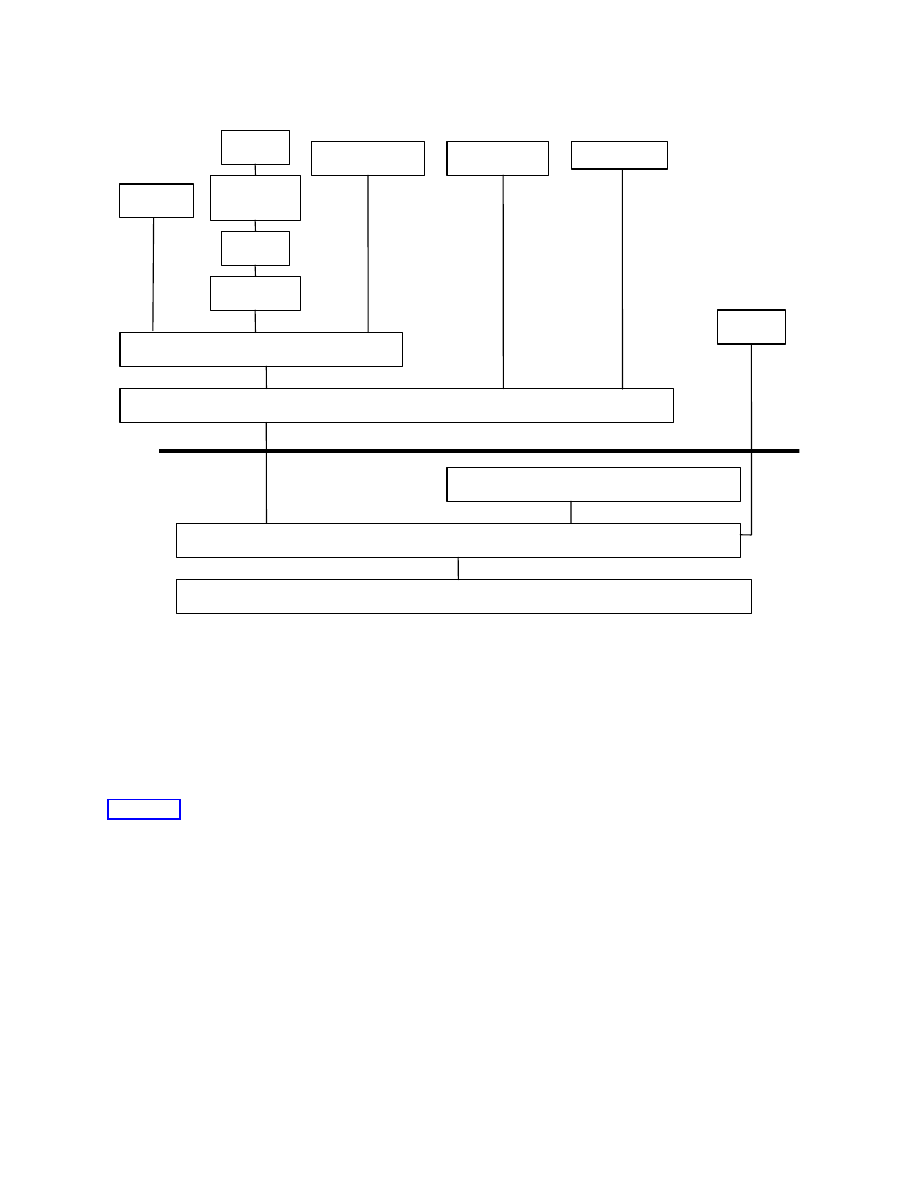
Figure 3-1 shows the block diagram of the Bluetooth protocol stack. The protocol stack is composed of
protocols that are specific to Bluetooth wireless technology, such as L2CAP and SDP, and other adopted
protocols such as OBEX. The Bluetooth protocol stack can be divided into four layers according to their
purpose as shown in Table 3-1.
Table 3-1 Protocols and Layers in the Bluetooth Protocol Stack
Protocol Groups
Protocols in the Stack
Bluetooth Core Protocols
Baseband, Link Manager Protocol, L2CAP and SDP
Cable Replacement Protocol
RFCOMM
Telephony Control Protocol
TCS Binary
Adopted Protocols
PPP, UDP/TCP/IP, OBEX, WAP
The baseband layer enables the physical RF link between Bluetooth units making a connection. Link
Manager Protocol (LMP) is responsible for link set-up between Bluetooth devices and managing security
aspects such as authentication and encryption. L2CAP adapts upper-layer protocols to the baseband. It
multiplexes between the various logical connections made by the upper layers. Audio data typically is
routed directly to and from the baseband and does not go through L2CAP. SDP is used to query device
information, services and characteristics of services. RFCOMM emulates RS-232 control and data
signals over the Bluetooth baseband, providing transport capabilities for upper level services that use a
serial interface as a transport mechanism. TCS Binary defines the call control signaling for the
establishment of voice and data calls between Bluetooth devices.
ALL RIGHTS RESERVED UNDER JSPA (JAVA SPECIFICATION PARTICIPATION AGREEMENT)
April 5, 2002
Java APIs for Bluetooth Wireless Technology (JSR-82)
9
Figure 3-1 Bluetooth Protocol Stack
In addition to the protocols, the Bluetooth SIG has defined Bluetooth Profiles. A Bluetooth Profile
defines standard ways to use selected protocols and protocol features that enable a particular usage
model. A Bluetooth device may support one or more profiles. The four “generic” profiles are
the Generic
Access Profile (GAP), the Serial Port Profile (SPP), the Service Discovery Application profile (SDAP),
and the Generic Object Exchange Profile (GOEP). These profiles are addressed by this specification.
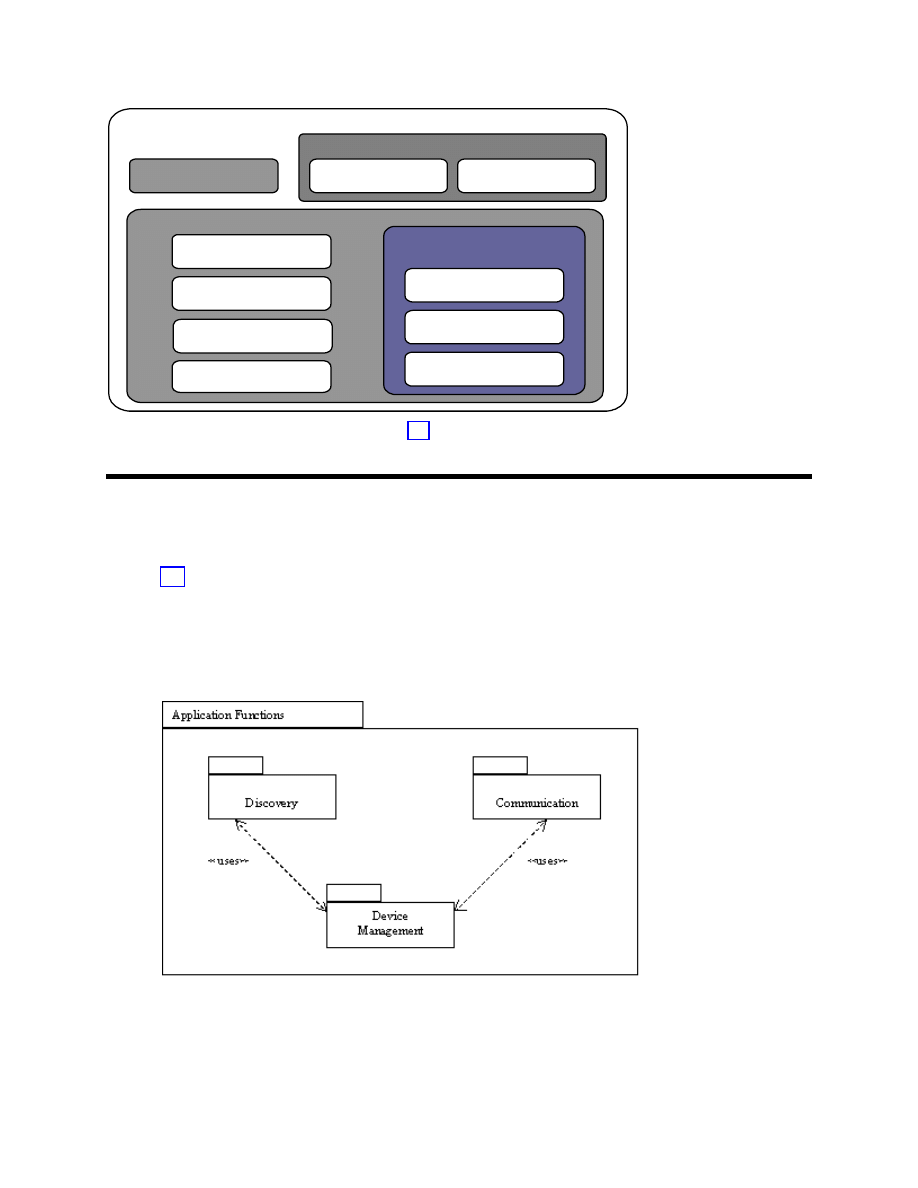
Figure 3-2 shows the relationships among the various Bluetooth profiles. As an example, the File
Transfer Profile is built on top of GOEP, which depends on the SPP, which is built upon GAP.
L2CAP
Audio
RFCOMM
OBEX
WAP
UDP/TCP
PPP
IP
AT-CMDS
SDP
TCS Binary
Baseband
LMP
Bluetooth Radio
HCI
ALL RIGHTS RESERVED UNDER JSPA (JAVA SPECIFICATION PARTICIPATION AGREEMENT)
April 5, 2002
Java APIs for Bluetooth Wireless Technology (JSR-82)
10
Generic Access Profile
SDAP
TCS-BIN-based Profiles
Cordless Phone
Intercom Profile
Serial Port Profile
Dial-up Networking
Fax Profile
Generic Object Exchange
Profile
LAN Access Profile
File Transfer
Object Push
Synchronization
Headset Profile
Figure 3-2 Bluetooth Version 1.1 Profiles from [2]
3.3 Architecture of the API
Section 2.3 defined the scope of this specification. Based on that scope, the functionality addressed by
this specification can be classified into three major categories:
1.
Discovery
2.
Communication
3.
Device Management
Figure 3-3 Functionality Provided by this Specification
ALL RIGHTS RESERVED UNDER JSPA (JAVA SPECIFICATION PARTICIPATION AGREEMENT)
April 5, 2002
Java APIs for Bluetooth Wireless Technology (JSR-82)
11
Discovery includes device discovery, service discovery and service registration. Communication includes
establishing connections between devices and using those connections for Bluetooth communication
between applications. Device management allows for managing and controlling these connections. This
specification is organized into these three functional categories. APIs for these functional categories are
defined in this specification.
3.3.1 Packages
The following two packages are defined:
1. javax.bluetooth
2.
javax.obex
As stated in the previous chapter, the OBEX API is defined independently of the Bluetooth transport
layer and is packaged separately. Each of the above packages represents separate optional packages,
implying that a CLDC implementation can include either of the two packages or both of them. The first
package is the core Bluetooth API and the second package contains the APIs for OBEX. There will be
two Technology Compatibility Kits (TCKs), one to test the Bluetooth API and another to test the OBEX
API. The TCK is the suite of tests, tools and documentation that allows implementers of this
specification to determine if their implementation is compliant with this specification.
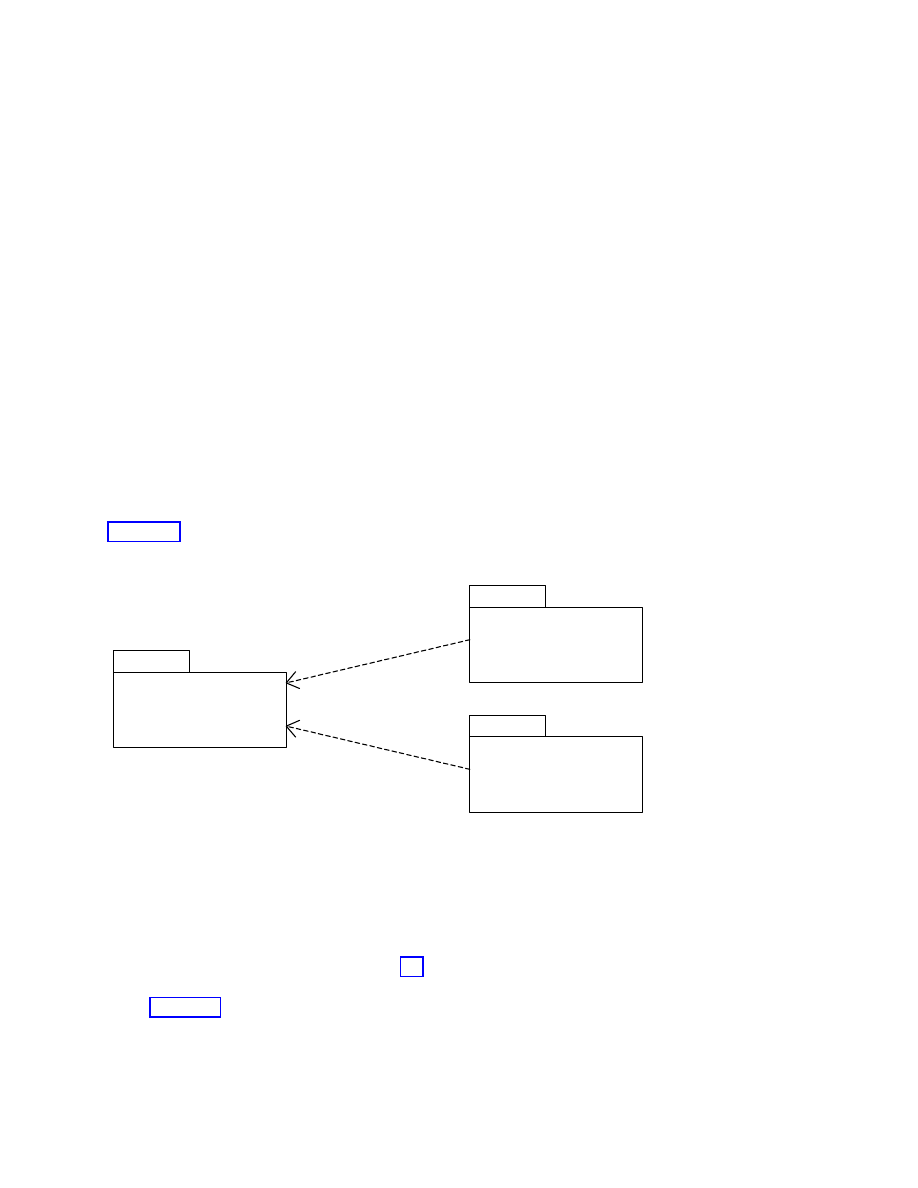
Figure 3-4 shows the package structure. The javax.obex and javax.bluetooth packages depend on the
javax.microedition.io package.
javax.obex
javax.microedition.io
javax.bluetooth
Figure 3-4 Package Structure
3.3.2 MIDP and Bluetooth API
Mobile Information Device Profile (MIDP) [5] devices are expected to be the first class of devices to
incorporate this specification, and the specification allows for the coexistence of MIDP and Bluetooth
APIs. Figure 3-5 gives an example of where the APIs defined in this specification fit in a CLDC+MIDP
architecture. The Bluetooth API and the MIDP APIs can coexist in a “MIDP+Bluetooth” device but do
ALL RIGHTS RESERVED UNDER JSPA (JAVA SPECIFICATION PARTICIPATION AGREEMENT)
April 5, 2002
Java APIs for Bluetooth Wireless Technology (JSR-82)
12
not depend on each other’s APIs. In a “CLDC+Bluetooth” device, the MIDP portions of this diagram will
not exist.
Operating
CLDC/KVM
MIDP
| Bluetooth -
API
MIDP-
Bluetooth
Applications
OEM specific
Applications
OEM-specific
Classes
Native
Applications
Operating System + Bluetooth Stack
Figure 3-5 CLDC+MIDP+Bluetooth Architecture Diagram
3.3.3 Bluetooth Control Center
Bluetooth devices, especially those implementing this API, may allow multiple applications to execute
simultaneously. The need for a Bluetooth Control Center (BCC) arises from the desire to prevent one
application from adversely affecting another application. The BCC is a set of capabilities that allow a
user or an OEM to define specific values for certain configuration parameters in a Bluetooth stack and to
resolve conflicting requests made by applications to the implementation of the Java APIs for Bluetooth
wireless technology. The BCC is the central authority for local Bluetooth device settings. The details of
the BCC are left to the implementation. It may be a native application, an application with a separate
API or simply a group of settings that are specified by the manufacturer and cannot be changed by the
user.
3.3.3.1 BCC and Security Mode
At the most basic level, the BCC defines device-wide security settings. For example, the BCC controls
the security mode that a stack uses and maintains the list of trusted devices. This API allows an
application to specify its security requirements in terms of authentication, authorization and encryption.
The JSR-82 implementation interfaces with the BCC to arbitrate these security requirements across all
applications. The BCC is not a class or an interface specified in the API, but is an important part of the
security architecture for this specification. The Java APIs for Bluetooth wireless technology require the
existence of a BCC. The precise nature of the BCC is implementation dependent. It may or may not be
written in the Java programming language.

ALL RIGHTS RESERVED UNDER JSPA (JAVA SPECIFICATION PARTICIPATION AGREEMENT)
April 5, 2002
Java APIs for Bluetooth Wireless Technology (JSR-82)
13
3.3.3.2 BCC Features
The BCC must provide the API implementation with these functions:
•= The base security settings of the device, including the security modes defined in the Bluetooth
specification.
•= A list of remote Bluetooth devices (not necessarily in the vicinity) that are already known to the local
Bluetooth device.
•= A list of remote Bluetooth devices (not necessarily in the vicinity) that are trusted by the local
Bluetooth device.
•= A mechanism to pair two devices trying to connect for the first time.
•= A mechanism to provide for authorization of connection requests.
None of this information may be changed by an application other than the BCC.
The BCC may provide, but is not limited to, the following capabilities:
•= Setting the Bluetooth device name (the user-friendly name) of the local device.
•= Setting timeouts used by the baseband layer.
•= Determining how connectable and discoverable modes are set.
•=
Resetting the local device.
•=
Enumerating services on the local device.
3.3.4 Device Properties
Various Java technology-compliant Bluetooth products need to be configured differently depending on
the product and market. Thus there is a need for a set of device properties. This API defines the
additional system properties that may be retrieved by a call to
LocalDevice.getProperty()
, as
shown in Table 3-2. These properties either provide additional information about the Bluetooth system or
define restrictions that are placed on an application by an implementation. The values of these properties
are implementation dependent and are of type
String
. The strings are case sensitive. If a property is not
defined or is not known, the value returned is
null
.
Table 3-2 Device Properties
Device Property
Description
bluetooth.api.version
The version of the Java APIs for Bluetooth wireless technology that is supported. For
this version it will be set to “1.0”.
bluetooth.l2cap.receiveMTU.max
The maximum ReceiveMTU size in bytes supported in L2CAP. The string will be in
Base
10
digits, e.g., “672”.
bluetooth.connected.devices.max
The maximum number of connected devices supported (will include parked devices).
The string will be in Base
10
digits.

ALL RIGHTS RESERVED UNDER JSPA (JAVA SPECIFICATION PARTICIPATION AGREEMENT)
April 5, 2002
Java APIs for Bluetooth Wireless Technology (JSR-82)
14
Device Property
Description
bluetooth.connected.inquiry
Is inquiry allowed during a connection? Valid values are either "true" or "false".
bluetooth.connected.page
Is paging allowed during a connection? Valid values are either "true" or "false".
bluetooth.connected.inquiry.scan
Is inquiry scanning allowed during connection? Valid values are either “true” or “false”.
bluetooth.connected.page.scan
Is page scanning allowed during connection? Valid values are either “true” or “false”.
bluetooth.master.switch
Is master/slave switch allowed? Valid values are either “true” or “false”.
bluetooth.sd.trans.max
Maximum number of concurrent service discovery transactions. The string will be in
Base
10
digits.
bluetooth.sd.attr.retrievable.max
Maximum number of service attributes to be retrieved per service record. The string
will be in Base
10
digits.
3.3.5 Client and Server Model
A Bluetooth service is an application acting as a server that provides some kind of assistance to client
devices via Bluetooth communications. This assistance typically takes the form of a capability or
function that is unavailable locally on the client device. A printing service is one example of a Bluetooth
server application. Other examples of Bluetooth server applications can be found in the Bluetooth
profiles: LAN access servers, file and object servers, synchronization services and so on. Developers can
define their own Bluetooth server applications beyond those specified in the Bluetooth profiles and make
these services available to remote clients. They do this by defining a service record that describes the
service and adding that service record to the service discovery database (SDDB) of the local device.
After registering a service record in the SDDB, the server application waits for a client application to
initiate contact with the server to access the service. The client application and the server application
then establish a Bluetooth connection to conduct their business.
The remaining chapters of this specification use the Bluetooth specification as a guide for defining the
capabilities that should be offered in this optional package. This is more difficult in the case of
Bluetooth server applications, because the Bluetooth specifications do not specify:
•= how or when server applications register service records in the SDDB;
•= what internal format or database mechanism is used by the SDDB;
•= how the SDDB assigns unique service record handles to service records; or
•= how server applications interact with the Bluetooth stack to form connections with remote clients.
These aspects of server applications are outside of the scope of the Bluetooth specification, are likely to
vary from one Bluetooth stack implementation to another and do not require standardization to ensure
interoperability of Bluetooth devices from different manufacturers. However, a standardized API will
allow server applications to take full advantage of Bluetooth communications.
This specification defines the following division of responsibilities among the server application, the
client application, and the Bluetooth stack.
Typical responsibilities of a Bluetooth server application are to:

ALL RIGHTS RESERVED UNDER JSPA (JAVA SPECIFICATION PARTICIPATION AGREEMENT)
April 5, 2002
Java APIs for Bluetooth Wireless Technology (JSR-82)
15
•= Create a service record describing the service offered by the application.
•= Add a service record to the server’s SDDB to make potential clients aware of this service.
•= Register the Bluetooth security measures associated with this service that should be enforced for
connections with clients.
•= Accept connections from clients that request the service offered by the application.
•= Update the service record in the server’s SDDB if characteristics of the service change.
•= Remove or disable the service record in the server’s SDDB when the service is no longer available.
Typical responsibilities of a Bluetooth client application are to:
•= Use SDP to query a remote SDDB for desired services.
•= Register the Bluetooth security measures associated with this service that should be enforced for
connections with servers.
•= Initiate connections to servers offering desired services.
•= Optionally, poll the SDDB to determine if the service has changed or has become unavailable.
The Bluetooth stack is assumed to provide the following capabilities for local Bluetooth server
applications:
•= A repository for service records that allows servers to add, update and remove their own service
records.
•= Assigning unique service record handles.
•= Establishing logical connections to client applications.
The Bluetooth stack is assumed to provide the following capabilities for remote service discovery clients:
•= Search and retrieval of service records stored in the server’s SDDB (that is, acting as an SDP server).
•= Establishing logical connections to server applications.
Chapter 5 describes the APIs that allow client applications to query a remote SDDB for desired services.
Chapter 6 describes the APIs that support most of the responsibilities of a Bluetooth server application.
The security responsibilities of server and client applications are discussed in Chapter 8. Details of server
applications and the requirements for implementations of the server APIs are discussed in Chapters 9, 10
and 11.

ALL RIGHTS RESERVED UNDER JSPA (JAVA SPECIFICATION PARTICIPATION AGREEMENT)
April 5, 2002
Java APIs for Bluetooth Wireless Technology (JSR-82)
16
PART A – DISCOVERY
Because wireless devices are mobile, they need a way to find devices to connect to and a way to learn
what those devices can do. This API provides a way to discover devices, find services and advertise
services to other devices. Chapter 4 describes the API for device discovery. Chapter 5 discusses finding
services on these devices and extracting the details needed to use these services. For services to be
discovered, they have to be registered, and Chapter 6 describes the API for service registration.

ALL RIGHTS RESERVED UNDER JSPA (JAVA SPECIFICATION PARTICIPATION AGREEMENT)
April 5, 2002
Java APIs for Bluetooth Wireless Technology (JSR-82)
17
Chapter 4 Device Discovery
4.1 Introduction
This chapter provides an overview of the device discovery capabilities of the Java APIs for Bluetooth
wireless technology. An application may obtain a list of devices using either
startInquiry()
(non-
blocking) or
retrieveDevices()
(blocking).
startInquiry()
requires the application to specify a
listener; this listener is notified when new devices are found from a real inquiry. If an application does
not wish to wait for an inquiry to begin, the API provides the
retrieveDevices()
method that returns
the list of devices that were already found via a previous inquiry or devices that are classified as pre-
known. Pre-known devices are those devices that are defined in the Bluetooth Control Center as devices
the local device frequently contacts. This method does not perform an inquiry, but provides a quick way
to get a list of devices that may be in the area. Once a device is discovered, a service search is usually
initiated (see Chapter 5 for details).
4.2 Device Discovery Classes
This section provides a brief overview of the classes that are used in device discovery. The specification
of the classes and methods are found in Appendix 1. Example code using these classes is in the next
chapter.
4.2.1 interface javax.bluetooth.DiscoveryListener
This interface allows an application to specify an event listener that will respond to inquiry-related
events. This interface is also used for service searching. The method
deviceDiscovered()
is called
each time a device is found during an inquiry. When the inquiry is completed or canceled, the
inquiryCompleted()
method will be called. This method receives as an argument either the
INQUIRY_COMPLETED, INQUIRY_ERROR
or
INQUIRY_TERMINATED
constant to differentiate between
completed, error or canceled inquiries.
4.2.2 class javax.bluetooth.DiscoveryAgent
This class provides methods for service and device discovery. For device discovery, this class provides
the
startInquiry
()
method to place the local device in inquiry mode and the
retrieveDevices()

ALL RIGHTS RESERVED UNDER JSPA (JAVA SPECIFICATION PARTICIPATION AGREEMENT)
April 5, 2002
Java APIs for Bluetooth Wireless Technology (JSR-82)
18
method to return information about devices that were found via previous inquiries performed by the local
device. It also provides a way to cancel an inquiry via the
cancelInquiry()
method.

ALL RIGHTS RESERVED UNDER JSPA (JAVA SPECIFICATION PARTICIPATION AGREEMENT)
April 5, 2002
Java APIs for Bluetooth Wireless Technology (JSR-82)
19
Chapter 5 Service Discovery
5.1 Introduction
This chapter describes the client API used to discover services that are available on a service discovery
server. Class
DiscoveryAgent
provides the methods to search for services on a Bluetooth server device
and to initiate device and service discovery transactions. This API does not support searching for
services on the local device.
5.2 API Overview
The process by which a client can discover services is described in the SDAP (Part K:2 of [2]), including
all of the SDP (Part E of [1]) capabilities. SDP and the GAP (Part K:1 of [2]) together provide the SDAP
functionality. This specification supports the following SDAP functionality:
•= searching for services of a particular class;
•= retrieving service attributes of a service;
•= simultaneously searching for services and retrieving their attributes; and
•= terminating a service search transaction in progress.
To discover services available on service discovery servers, the client application first should retrieve an
object that encapsulates the SDAP functionality. This object of type
DiscoveryAgent
is a global
singleton object. Pseudocode to retrieve the
DiscoveryAgent
is given next:
DiscoveryAgent da = LocalDevice.getLocalDevice().getDiscoveryAgent();
5.3 Service Discovery Classes
The following sections provide a brief overview of the classes involved in service discovery. The
specification of the classes and methods are found in Appendix 1.

ALL RIGHTS RESERVED UNDER JSPA (JAVA SPECIFICATION PARTICIPATION AGREEMENT)
April 5, 2002
Java APIs for Bluetooth Wireless Technology (JSR-82)
20
5.3.1 class javax.bluetooth.UUID
The class UUID encapsulates unsigned integers that are 16 bits, 32 bits or 128 bits long. The class is used
to represent a universally unique identifier used widely as the value for a service attribute. Only service
attributes represented by UUIDs are searchable in Bluetooth SDP. The Bluetooth specification defines a
few “short” (16-bit or 32-bit) UUIDs and describes how a 16-bit or 32-bit UUID is converted to a 128-bit
UUID. This promotion is required for matching; normally only 128-bit UUIDs are compared.
5.3.2 class javax.bluetooth.DataElement
This class contains the various data types that a Bluetooth service attribute value can take on.
Valid service attribute data types include:
•= signed and unsigned integers that are one, two, four, eight or sixteen bytes long,
•= String,
•= boolean,
•= UUID, and
•= sequences of any one of these scalar types.
The class also presents an interface to construct and retrieve the value of a service attribute.
5.3.3 interface javax.bluetooth.ServiceRecord
This interface defines the Bluetooth Service Record, which contains attribute ID, value pairs. A
Bluetooth attribute ID is a 16-bit unsigned integer and an attribute value is a
DataElement
. A
DataElement
is a self-describing value of one of the types listed in Section 5.3.2. In addition to
providing the remote Bluetooth server device from which a
ServiceRecord
was obtained, this interface
has a method
populateRecord()
to retrieve desired service attributes.
5.3.4 class javax.bluetooth.DiscoveryAgent
The class
DiscoveryAgent
provides methods for service and device discovery. It supports service
discovery in non-blocking mode and provides a way to cancel a service search transaction in progress.
5.3.5 interface javax.bluetooth.DiscoveryListener
This interface allows an application to specify an event listener that responds to device and service
discovery events. The method
servicesDiscovered()
is called whenever services are discovered.

ALL RIGHTS RESERVED UNDER JSPA (JAVA SPECIFICATION PARTICIPATION AGREEMENT)
April 5, 2002
Java APIs for Bluetooth Wireless Technology (JSR-82)
21
When a service search transaction is completed or canceled, the
serviceSearchCompleted()
method
is called.
5.4 Example Code
Sample code for device and service discovery follows:
import java.lang.*;
import java.io.*;
import java.util.*;
import javax.microedition.io.*;
import javax.bluetooth.*;
/**
* This class shows a simple client application that performs device
* and service
* discovery and communicates with a print server to show how the Java
* API for Bluetooth wireless technology works.
*/
public class PrintClient implements DiscoveryListener {
/**
* The DiscoveryAgent for the local Bluetooth device.
*/
private DiscoveryAgent agent;
/**
* The max number of service searches that can occur at any one time.
*/
private int maxServiceSearches = 0;
/**
* The number of service searches that are presently in progress.
*/
private int serviceSearchCount;
/**
* Keeps track of the transaction IDs returned from searchServices.
*/
private int transactionID[];
/**
* The service record to a printer service that can print the message

ALL RIGHTS RESERVED UNDER JSPA (JAVA SPECIFICATION PARTICIPATION AGREEMENT)
April 5, 2002
Java APIs for Bluetooth Wireless Technology (JSR-82)
22
* provided at the command line.
*/
private ServiceRecord record;
/**
* Keeps track of the devices found during an inquiry.
*/
private Vector deviceList;
/**
* Creates a PrintClient object and prepares the object for device
* discovery and service searching.
*
* @exception BluetoothStateException if the Bluetooth system could not be
* initialized
*/
public PrintClient() throws BluetoothStateException {
/*
* Retrieve the local Bluetooth device object.
*/
LocalDevice local = LocalDevice.getLocalDevice();
/*
* Retrieve the DiscoveryAgent object that allows us to perform device
* and service discovery.
*/
agent = local.getDiscoveryAgent();
/*
* Retrieve the max number of concurrent service searches that can
* exist at any one time.
*/
try {
maxServiceSearches = Integer.parseInt(
LocalDevice.getProperty("bluetooth.sd.trans.max"));
} catch (NumberFormatException e) {
System.out.println("General Application Error");
System.out.println("\tNumberFormatException: " + e.getMessage());
}
transactionID = new int[maxServiceSearches];
// Initialize the transaction list
for (int i = 0; i < maxServiceSearches; i++) {

ALL RIGHTS RESERVED UNDER JSPA (JAVA SPECIFICATION PARTICIPATION AGREEMENT)
April 5, 2002
Java APIs for Bluetooth Wireless Technology (JSR-82)
23
transactionID[i] = -1;
}
record = null;
deviceList = new Vector();
}
/**
* Adds the transaction table with the transaction ID provided.
*
* @param trans the transaction ID to add to the table
*/
private void addToTransactionTable(int trans) {
for (int i = 0; i < transactionID.length; i++) {
if (transactionID[i] == -1) {
transactionID[i] = trans;
return;
}
}
}
/**
* Removes the transaction from the transaction ID table.
*
* @param trans the transaction ID to delete from the table
*/
private void removeFromTransactionTable(int trans) {
for (int i = 0; i < transactionID.length; i++) {
if (transactionID[i] == trans) {
transactionID[i] = -1;
return;
}
}
}
/**
* Completes a service search on each remote device in the list until all
* devices are searched or until a printer is found that this application
* can print to.
*
* @param devList the list of remote Bluetooth devices to search
*
* @return true if a printer service is found; otherwise false if
* no printer service was found on the devList provided
*/

ALL RIGHTS RESERVED UNDER JSPA (JAVA SPECIFICATION PARTICIPATION AGREEMENT)
April 5, 2002
Java APIs for Bluetooth Wireless Technology (JSR-82)
24
private boolean searchServices(RemoteDevice[] devList) {
UUID[] searchList = new UUID[2];
/*
* Add the UUID for L2CAP to make sure that the service record
* found will support L2CAP.
This value is defined in the
* Bluetooth Assigned Numbers document.
*/
searchList[0] = new UUID(0x0100);
/*
* Add the UUID for the printer service that we are going to use to
* the list of UUIDs to search for. (a fictional printer service UUID)
*/
searchList[1] = new UUID("1020304050d0708093a1b121d1e1f100", false);
/*
* Start a search on as many devices as the system can support.
*/
for (int i = 0; i < devList.length; i++) {
/*
* If we found a service record for the printer service, then
* we can end the search.
*/
if (record != null) {
return true;
}
try {
int trans = agent.searchServices(null, searchList, devList[i],
this);
addToTransactionTable(trans);
} catch (BluetoothStateException e) {
/*
* Failed to start the search on this device, try another
* device.
*/
}
/*
* Determine if another search can be started.
If not, wait for
* a service search to end.
*/
synchronized (this) {

ALL RIGHTS RESERVED UNDER JSPA (JAVA SPECIFICATION PARTICIPATION AGREEMENT)
April 5, 2002
Java APIs for Bluetooth Wireless Technology (JSR-82)
25
serviceSearchCount++;
if (serviceSearchCount == maxServiceSearches) {
try {
this.wait();
} catch (Exception e) {
}
}
}
}
/*
* Wait until all the service searches have completed.
*/
while (serviceSearchCount > 0) {
synchronized (this) {
try {
this.wait();
} catch (Exception e) {
}
}
}
if (record != null) {
return true;
} else {
return false;
}
}
/**
* Finds the first printer that is available to print to.
*
* @return the service record of the printer that was found; null if no
* printer service was found
*/
public ServiceRecord findPrinter() {
/*
* If there are any devices that have been found by a recent inquiry,
* we don't need to spend the time to complete an inquiry.
*/
RemoteDevice[] devList = agent.retrieveDevices(DiscoveryAgent.CACHED);
if (devList != null) {
if (searchServices(devList)) {
return record;

ALL RIGHTS RESERVED UNDER JSPA (JAVA SPECIFICATION PARTICIPATION AGREEMENT)
April 5, 2002
Java APIs for Bluetooth Wireless Technology (JSR-82)
26
}
}
/*
* Did not find any printer services from the list of cached devices.
* Will try to find a printer service in the list of pre-known
* devices.
*/
devList = agent.retrieveDevices(DiscoveryAgent.PREKNOWN);
if (devList != null) {
if (searchServices(devList)) {
return record;
}
}
/*
* Did not find a printer service in the list of pre-known or cached
* devices.
So start an inquiry to find all devices that could be a
* printer and do a search on those devices.
*/
/* Start an inquiry to find a printer
*/
try {
agent.startInquiry(DiscoveryAgent.GIAC, this);
/*
* Wait until all the devices are found before trying to start the
* service search.
*/
synchronized (this) {
try {
this.wait();
} catch (Exception e) {
}
}
} catch (BluetoothStateException e) {
System.out.println("Unable to find devices to search");
}
if (deviceList.size() > 0) {
devList = new RemoteDevice[deviceList.size()];
deviceList.copyInto(devList);
if (searchServices(devList)) {
return record;

ALL RIGHTS RESERVED UNDER JSPA (JAVA SPECIFICATION PARTICIPATION AGREEMENT)
April 5, 2002
Java APIs for Bluetooth Wireless Technology (JSR-82)
27
}
}
return null;
}
/**
* This is the main method of this application.
It will print out
* the message provided to the first printer that it finds.
*
* @param args[0] the message to send to the printer
*/
public static void main(String[] args) {
PrintClient client = null;
/*
* Validate the proper number of arguments exist when starting this
* application.
*/
if ((args == null) || (args.length != 1)) {
System.out.println("usage: java PrintClient message");
return;
}
/*
* Create a new PrintClient object.
*/
try {
client = new PrintClient();
} catch (BluetoothStateException e) {
System.out.println("Failed to start Bluetooth System");
System.out.println("\tBluetoothStateException: " +
e.getMessage());
}
/*
* Find a printer in the local area
*/
ServiceRecord printerService = client.findPrinter();
if (printerService != null) {
/*
* Determine if this service will communicate over RFCOMM or
* L2CAP by retrieving the connection string.

ALL RIGHTS RESERVED UNDER JSPA (JAVA SPECIFICATION PARTICIPATION AGREEMENT)
April 5, 2002
Java APIs for Bluetooth Wireless Technology (JSR-82)
28
*/
String conURL = printerService.getConnectionURL(
ServiceRecord.NOAUTHENTICATE_NOENCRYPT, false);
int index= conURL.indexOf(':');
String protocol= conURL.substring(0, index);
if (protocol.equals("btspp")) {
/*
* Since this printer service uses RFCOMM, create an RFCOMM
* connection and send the data over RFCOMM.
*/
/* code to call RFCOMM client goes here */
} else if (protocol.equals("btl2cap")) {
/*
* Since this service uses L2CAP, create an L2CAP
* connection to the service and send the data to the
* service over L2CAP.
*/
/* code to call L2CAP client goes here */
} else {
System.out.println("Unsupported Protocol");
}
} else {
System.out.println("No Printer was found");
}
}
/**
* Called when a device was found during an inquiry.
An inquiry
* searches for devices that are discoverable.
The same device may
* be returned multiple times.
*
* @see DiscoveryAgent#startInquiry
*
* @param btDevice the device that was found during the inquiry
*
* @param cod the service classes, major device class, and minor
* device class of the remote device being returned
*

ALL RIGHTS RESERVED UNDER JSPA (JAVA SPECIFICATION PARTICIPATION AGREEMENT)
April 5, 2002
Java APIs for Bluetooth Wireless Technology (JSR-82)
29
*/
public void deviceDiscovered(RemoteDevice btDevice, DeviceClass cod) {
/*
* Since service search takes time and we are already forced to
* complete an inquiry, we will not do a service
* search on any device that is not an Imaging device.
* The device class of 0x600 is Imaging as
* defined in the Bluetooth Assigned Numbers document.
*/
if (cod.getMajorDeviceClass() == 0x600) {
/*
* Imaging devices could be a display, camera, scanner, or
* printer. If the imaging device is a printer,
* then bit 7 should be set from its minor device
* class according to the Bluetooth Assigned
* Numbers document.
*/
if ((cod.getMinorDeviceClass() & 0x80) != 0) {
/*
* Now we know that it is a printer.
Now we will verify that
* it has a rendering service on it.
A rendering service may
* allow us to print.
We will have to do a service search to
* get more information if a rendering service exists. If this
* device has a rendering service then bit 18 will be set in
* the major service classes.
*/
if ((cod.getServiceClasses() & 0x40000) != 0) {
deviceList.addElement(btDevice);
}
}
}
}
/**
* The following method is called when a service search is completed or
* was terminated because of an error.
Legal status values
* include:
* <code>SERVICE_SEARCH_COMPLETED</code>,
* <code>SERVICE_SEARCH_TERMINATED</code>,
* <code>SERVICE_SEARCH_ERROR</code>,
* <code>SERVICE_SEARCH_DEVICE_NOT_REACHABLE</code>, and
* <code>SERVICE_SEARCH_NO_RECORDS</code>.
*
* @param transID the transaction ID identifying the request which

ALL RIGHTS RESERVED UNDER JSPA (JAVA SPECIFICATION PARTICIPATION AGREEMENT)
April 5, 2002
Java APIs for Bluetooth Wireless Technology (JSR-82)
30
* initiated the service search
*
* @param respCode the response code which indicates the
* status of the transaction; guaranteed to be one of the
* aforementioned only
*
*/
public void serviceSearchCompleted(int transID, int respCode) {
/*
* Removes the transaction ID from the transaction table.
*/
removeFromTransactionTable(transID);
serviceSearchCount--;
synchronized (this) {
this.notifyAll();
}
}
/**
* Called when service(s) are found during a service search.
* This method provides the array of services that have been found.
*
* @param transID the transaction ID of the service search that is
* posting the result
*
* @param service a list of services found during the search request
*
* @see DiscoveryAgent#searchServices
*/
public void servicesDiscovered(int transID, ServiceRecord[] servRecord) {
/*
* If this is the first record found, then store this record
* and cancel the remaining searches.
*/
if (record == null) {
record = servRecord[0];
/*
* Cancel all the service searches that are presently
* being performed.
*/

ALL RIGHTS RESERVED UNDER JSPA (JAVA SPECIFICATION PARTICIPATION AGREEMENT)
April 5, 2002
Java APIs for Bluetooth Wireless Technology (JSR-82)
31
for (int i = 0; i < transactionID.length; i++) {
if (transactionID[i] != -1) {
agent.cancelServiceSearch(transactionID[i]);
}
}
}
}
/**
* Called when a device discovery transaction is
* completed. The <code>discType</code> will be
* <code>INQUIRY_COMPLETED</code> if the device discovery
* transactions ended normally,
* <code>INQUIRY_ERROR</code> if the device
* discovery transaction failed to complete normally,
* <code>INQUIRY_TERMINATED</code> if the device
* discovery transaction was canceled by calling
* <code>DiscoveryAgent.cancelInquiry()</code>.
*
* @param discType the type of request that was completed; one of
* <code>INQUIRY_COMPLETED</code>, <code>INQUIRY_ERROR</code>
* or <code>INQUIRY_TERMINATED</code>
*/
public void inquiryCompleted(int discType) {
synchronized (this) {
try {
this.notifyAll();
} catch (Exception e) {
}
}
}
}

ALL RIGHTS RESERVED UNDER JSPA (JAVA SPECIFICATION PARTICIPATION AGREEMENT)
April 5, 2002
Java APIs for Bluetooth Wireless Technology (JSR-82)
32
Chapter 6 Service Registration
6.1 Introduction
Chapter 3 listed the typical responsibilities of a Bluetooth server application:
1. Create a service record that describes the service offered by the application.
2. Add a service record to the server’s SDDB to make potential clients aware of this service.
3. Register the Bluetooth security measures associated with a service that should be enforced for
connections with clients.
4. Accept connections from clients that request the service offered by the application.
5. Update the service record in the server’s SDDB if characteristics of the service change.
6. Remove or disable the service record in the server’s SDDB when the service is no longer available.
Responsibilities 1, 2, 5, and 6 comprise a subset of the server responsibilities having to do with
advertising a service to client devices. We call this subset service registration.
This chapter provides an overview of the support that this API provides for service registration.
Additional details about service registration and the other server responsibilities, including sample
service registration code, can be found in Chapters 9-11.
6.2 Responsibilities for Service Registration
The previous section described service registration from a generic Bluetooth perspective. In the context
of the Java APIs for Bluetooth wireless technology, meeting the service registration responsibilities is a
collaborative effort between the server application, the API implementation and the Bluetooth stack.
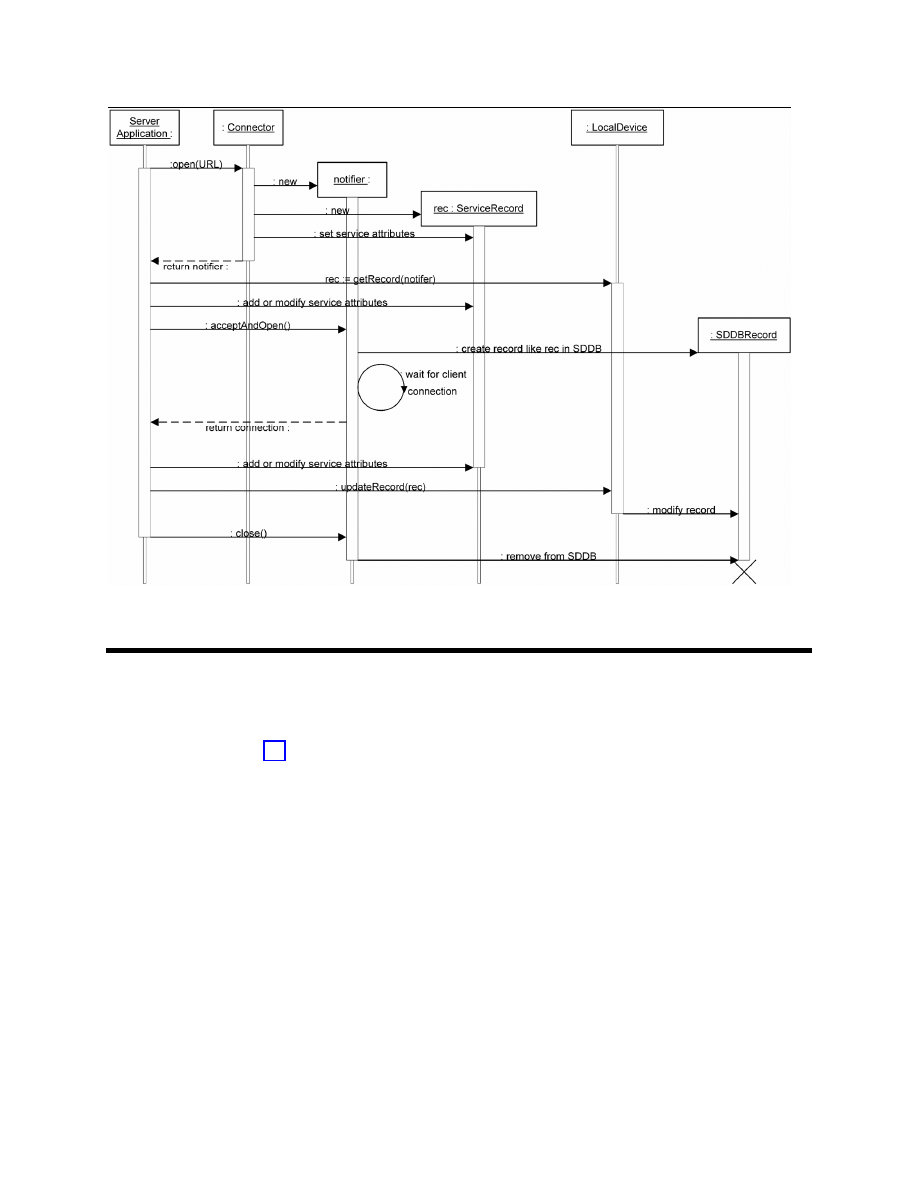
Figure 6-1 describes how these components collaborate.
Figure 6-1 shows that when the server application calls
Connector.open()
with a URL connection
string argument for a server, then the implementation creates a new
ServiceRecord
. A corresponding
service record is added to the SDDB by the implementation when the server application calls
acceptAndOpen()
. The server application can access its
ServiceRecord
by calling
getRecord()
,
and then make modifications to that
ServiceRecord
. These modifications also are made to the
corresponding service record in the SDDB when the server application calls
updateRecord()
. Finally,
the application’s service record is removed from the SDDB when the server application sends a
close
message to the
notifier
for the service.

ALL RIGHTS RESERVED UNDER JSPA (JAVA SPECIFICATION PARTICIPATION AGREEMENT)
April 5, 2002
Java APIs for Bluetooth Wireless Technology (JSR-82)
33
6.3 Connect-Anytime Services
The assumption in Figure 6-1 is that the server application already must be running and ready to accept
connections before a client attempts to make a connection to the server. Server applications that have
this requirement are called run-before-connect services. Some devices may provide a capability to start
selected server applications on demand when a client application attempts to connect to a server
application that is not currently running. Server applications with this capability are called connect-
anytime services.
In the case of connect-anytime services, the service record should remain in the SDDB after the server
application exits, because a client still can connect to this service. Ideally, a service record should be
discoverable by clients if, and only if, it is possible for clients to connect to this service. Although it is
difficult to achieve this objective in all cases, it provides a useful guideline to establish policies for
adding and removing service records from the SDDB.
In the case of run-before-connect services, clients have no possibility of connecting until the server calls
acceptAndOpen()
. For this reason, the implementation must not add a service record to the SDDB until
acceptAndOpen()
is called. Once the
notifier
is closed, it is no longer possible to call
acceptAndOpen()
to accept another client connection, so the implementation must remove the service
record from the SDDB or disable it.
In the case of connect-anytime services, the implementation should add the service record to the SDDB at
the point when the device and the server application first reach a state where clients can connect. By the
time a connect-anytime server application is running and has called
acceptAndOpen()
it must be in this
state and have its service record in the SDDB. However, the service record may be added to the SDDB
earlier if clients can connect prior to this point. In some cases, clients may be able to connect as soon as
a server application is installed on a device. In these cases, a service record may be added to the SDDB
at the time of application installation.
The service record should be removed from the SDDB or disabled when client applications no longer can
connect to the service. For example, the service record for a connect-anytime service must be removed
or disabled by the time of application de-installation because clients no longer can connect to this service
on this device.
An implementation of this API need not support both run-before-connect services and connect-anytime
services. Support for one of these two service types is sufficient.
ALL RIGHTS RESERVED UNDER JSPA (JAVA SPECIFICATION PARTICIPATION AGREEMENT)
April 5, 2002
Java APIs for Bluetooth Wireless Technology (JSR-82)
34
Figure 6-1 Server Application and Implementation Collaboration for Service Registration
6.4 Connectable and Non-Connectable Modes
The GAP specification [2] describes one of the modes of operation that characterize Bluetooth devices:
•= Connectable Mode: a device in this mode periodically listens for attempts by a remote device to
initiate a connection.
•= Non-Connectable Mode: a device in this mode does not listen for attempts by a remote device to
initiate a connection.
The following client functions will be successful only if the server device is in the connectable mode:
•= Use SDP to query a remote SDDB for desired services.
•= Initiate connections to servers offering desired services.
•= Optionally, poll the remote SDDB to determine if the service has changed or has become
unavailable.
The proper functioning of a server application requires that the server device be connectable. For this
reason, the implementation of this API should attempt to make the local device connectable when the
implementation is aware of the existence of service records in the SDDB of the local device. As part of
the implementation of
acceptAndOpen()
, an attempt must be made to ensure that the local device is

ALL RIGHTS RESERVED UNDER JSPA (JAVA SPECIFICATION PARTICIPATION AGREEMENT)
April 5, 2002
Java APIs for Bluetooth Wireless Technology (JSR-82)
35
connectable. In the case of connect-anytime services, other occasions beside
acceptAndOpen()
could
cause the implementation to check for the existence of service records and request that the server device
enter connectable mode; these cases are implementation dependent.
Because device users might have their own reasons to make the local device connectable or non-
connectable, the implementation is not the final authority on whether or not the device will enter
connectable mode. The implementation makes a request to the BCC to make the local device
connectable, but this request might not be satisfied if the device user has chosen to make the local device
non-connectable. A
BluetoothStateException
is thrown if the server device attempts to make itself
connectable, but this request conflicts with the device settings established by the user.
When all of the service records in the SDDB have been removed or disabled, the implementation
optionally may request that the server device be made non-connectable.
Although a device in non-connectable mode does not respond to connection attempts by remote devices,
it could initiate connection attempts of its own. That is, a non-connectable device can be a client, but not
a server. For this reason, the implementation need not request connectable mode for a device without
any service records in its SDDB.
6.5 Classes
The following sections provide a brief overview of the classes involved in service registration. The
specification of the classes and methods are found in Appendix 1.
6.5.1 interface javax.bluetooth.ServiceRecord
A service record describes a Bluetooth service to clients. Service records are composed of a set of
service attributes, where each attribute is a pair consisting of an attribute ID and an attribute value.
ALL RIGHTS RESERVED UNDER JSPA (JAVA SPECIFICATION PARTICIPATION AGREEMENT)
April 5, 2002
Java APIs for Bluetooth Wireless Technology (JSR-82)
36
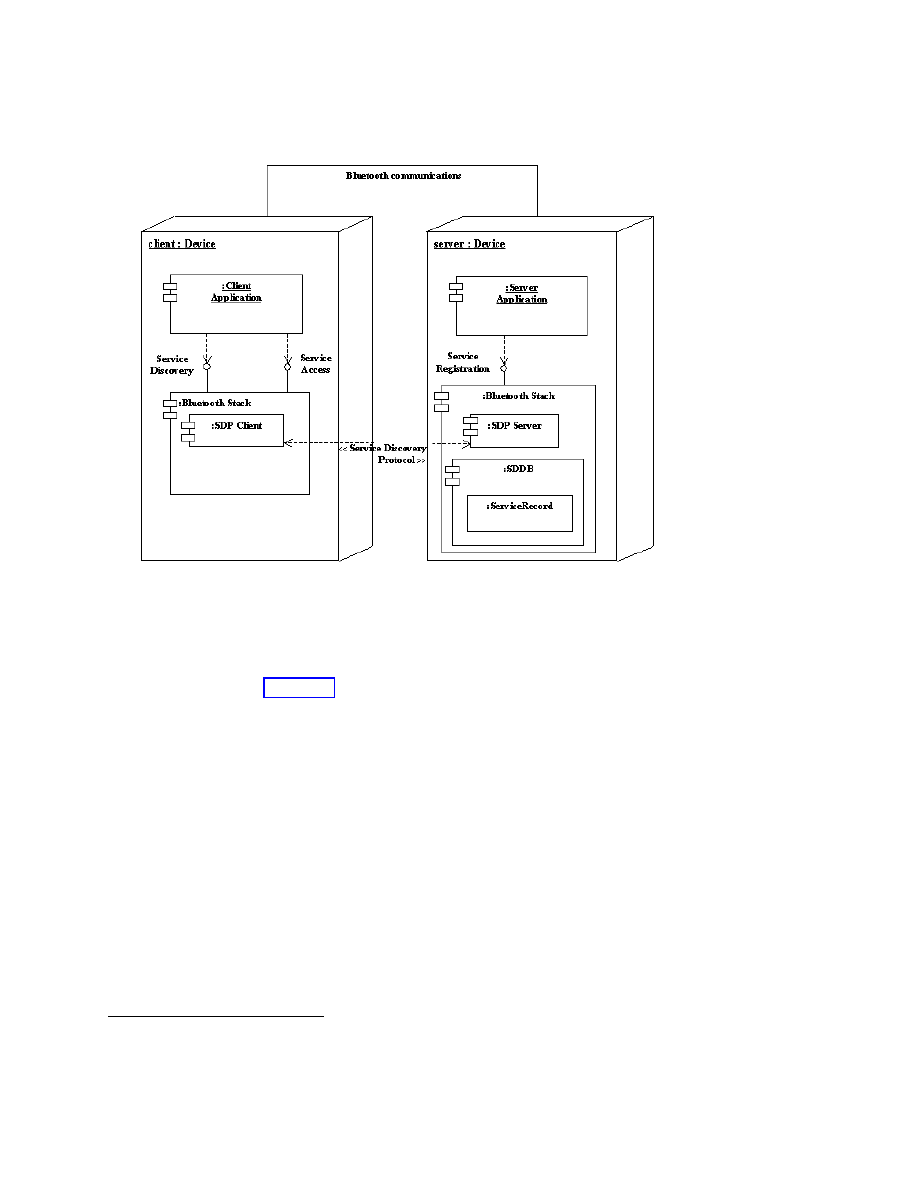
Figure 6-2 A Server Provides a Service Record That Enables Clients to Connect
An SDP server provided by a Bluetooth stack maintains a “database”
2
of service records that describe the
services on the server device. A run-before-connect service adds its
ServiceRecord
to the SDDB by
calling
acceptAndOpen()
. Service discovery clients use SDP to query the SDP server for any service
records of interest (see Figure 6-2). A ServiceRecord provides sufficient information to allow an
SDP client to connect to the Bluetooth service on the server device.
The server application also can use the
setDeviceServiceClasses()
method of
ServiceRecord
to
turn on some of the service class bits of the device to reflect the new service being offered. Additional
details about the device service class bits are in
javax.bluetooth.DeviceClass
in Appendix 1.
6.5.2 class javax.bluetooth.LocalDevice
The
LocalDevice
class provides a getRecord() method that a server application can use to obtain
its ServiceRecord. The server then can modify the
ServiceRecord
object by adding or modifying
attributes. The updated service record then can be placed in the SDDB by performing
notifier.acceptAndOpen()
or using the
updateRecord()
method of
LocalDevice
.
2
The term “database” is used informally. The service record storage mechanism is implementation-dependent and
can take many forms; it need not be a true relational or other database.

ALL RIGHTS RESERVED UNDER JSPA (JAVA SPECIFICATION PARTICIPATION AGREEMENT)
April 5, 2002
Java APIs for Bluetooth Wireless Technology (JSR-82)
37
6.5.3 class javax.bluetooth.ServiceRegistrationException extends
java.io.IOException
A
ServiceRegistrationException
is thrown when an attempt to add or modify a service record in
the SDDB fails.
Service registration failures can occur:
•= during the execution of
Connector.open()
, as the implementation creates a new service record for
the service specified by
Connector.open()
;
•= when a run-before-connect service invokes the
acceptAndOpen()
method and the implementation
attempts to add the service record associated with the notifier to the SDDB; and
•= after the initial creation of the service record, when the server application attempts to modify the
service record in the SDDB using the updateRecord() method.

ALL RIGHTS RESERVED UNDER JSPA (JAVA SPECIFICATION PARTICIPATION AGREEMENT)
April 5, 2002
Java APIs for Bluetooth Wireless Technology (JSR-82)
38
PART B – DEVICE MANAGEMENT
The two chapters in this section describe APIs that make it possible to change the way in which the local
device responds to remote devices. Chapter 7 describes:
•= the classes that represent the essential Bluetooth objects such as
LocalDevice
and
RemoteDevice
;
•= the methods that access the properties of these objects, such as their names and Bluetooth addresses;
and
•= the methods that manage the states of the
LocalDevice
, such as making the device discoverable.
Wireless devices are potentially more vulnerable to eavesdropping and spoofing (that is, falsifying the
origin of messages) than wired devices. Bluetooth wireless technology includes a number of responses to
this potential vulnerability. Some capabilities, such as frequency hopping, are applied universally to all
Bluetooth communications. Other capabilities, such as encryption and authentication, can be turned on
or off based on the needs of applications. Chapter 8 describes the APIs used to request these optional
security mechanisms.

ALL RIGHTS RESERVED UNDER JSPA (JAVA SPECIFICATION PARTICIPATION AGREEMENT)
April 5, 2002
Java APIs for Bluetooth Wireless Technology (JSR-82)
39
Chapter 7 Generic Access Profile
7.1 Introduction
This chapter contains the classes that represent the essential Bluetooth objects such as
LocalDevice
and
RemoteDevice
. These classes provide the device management capabilities that are part of the
Generic Access Profile (GAP), as defined in [2]. The standard control methods for the local device are in
the
LocalDevice
class. The classes
DeviceClass
and
BluetoothStateException
provide
support for the
LocalDevice
class.
DeviceClass
has methods for retrieving the values for major
service classes and the major and minor device classes that describe the properties of a device (these
values are defined in [7]). Finally, the
RemoteDevice
class represents a remote device and provides
methods to retrieve information about the remote device.
7.2 GAP Classes
The next sections provide a brief overview of the classes used in the GAP. The specification of the
classes and methods are found in Appendix 1.
7.2.1 class javax.bluetooth.LocalDevice
This class provides access to and control of the local Bluetooth device. It is designed to fulfill the
requirements of the GAP as defined in the Bluetooth specification.
7.2.2 class javax.bluetooth.RemoteDevice
This class represents a remote Bluetooth device. It provides basic information about a remote device,
including the device’s Bluetooth address and its friendly name (Bluetooth device name).
7.2.3 class javax.bluetooth.BluetoothStateException extends
java.io.IOException

ALL RIGHTS RESERVED UNDER JSPA (JAVA SPECIFICATION PARTICIPATION AGREEMENT)
April 5, 2002
Java APIs for Bluetooth Wireless Technology (JSR-82)
40
This exception is thrown when a device cannot honor a request that it normally supports because of the
radio’s state. For example, some devices do not allow inquiry when the device is connected to another
device.
7.2.4 class javax.bluetooth.DeviceClass
This class defines values for the device type and the types of services on a device.

ALL RIGHTS RESERVED UNDER JSPA (JAVA SPECIFICATION PARTICIPATION AGREEMENT)
April 5, 2002
Java APIs for Bluetooth Wireless Technology (JSR-82)
41
Chapter 8 Security
8.1 Introduction
This chapter describes the methods available to applications to request secure Bluetooth
communications. Client and server applications optionally can add parameters to the connection string
argument of
Connector.open()
to specify the security required for connections. This makes it
possible for different connections that involve different services to have different levels of security.
The parameters in the connection string can be used to set up security measures at the time that the
connection is established. The methods of the
RemoteDevice
class can be used at any time by client and
server applications to request a change in the security for a particular connection.
8.2 Security Requests in the Connection String
Server applications use one of the
open
methods of the
javax.microedition.io.Connector
class
from CLDC to create a notifier object that can be used to wait for a client to connect. For a server, the
mandatory components of the connection string argument of the
open
method provide sufficient
information to create an object of the appropriate class of notifier, and to create the appropriate service
record (see Chapter 6). However, optional parameters can be added to the connection string to specify
the server’s requirements for connections with clients. These parameters are for authentication,
encryption, authorization and master/slave role switch.
8.2.1 Server Requests for Authentication
Bluetooth authentication is a means of verifying the identity of a remote device. Authentication involves
a device-to-device challenge and response scheme that requires a 128-bit shared link key derived from a
PIN code shared by both devices. If the PIN codes on both devices do not match, the authentication
process fails.

ALL RIGHTS RESERVED UNDER JSPA (JAVA SPECIFICATION PARTICIPATION AGREEMENT)
April 5, 2002
Java APIs for Bluetooth Wireless Technology (JSR-82)
42
The
authenticate
parameter has the following interpretation when used in a server application’s
connection string:
•= If
authenticate=true
, the implementation attempts to verify the identity of every client device
that attempts to connect to the service.
•= If
authenticate=false
, the implementation does not attempt to verify the identity of client
devices that attempt to connect to the service.
•= If the
authenticate
parameter is not present in the connection string, then the implementation
does not attempt to verify the identity of clients unless other parameters present in the connection
string require this identity check (see Section 8.2.2 and Section 8.2.3).
Not all Bluetooth systems support authentication. Even if authentication is supported, it is possible for
authenticate=true
to conflict with device security settings that the user has established through the
BCC. A
BluetoothConnectionException
is thrown in the
Connector.open()
method if
authenticate=true
and authentication is not supported, or if authentication conflicts with the current
security settings for the device. If there is a conflict between the security needs of an application and the
security settings of the device, some implementations of the BCC might attempt to remove the conflict by
asking the user to consider changing the device settings.
8.2.2 Server Requests for Encryption
Encryption may be applied to the communications over a data link between two Bluetooth devices.
When activated, encryption is applied to all data transfers in both directions over this link.
The
encrypt
parameter has the following interpretation when used in a server application’s connection
string:
•= If
encrypt=true
, the implementation encrypts all communications to and from this service.
•= If
encrypt=false
, encryption is not required by the server application, but may be used if
encryption is required by the client device or by other existing connections over the data link
between these two devices.
•= If the
encrypt
parameter is not present in the connection string, this is equivalent to
encrypt=false
.
Because Bluetooth encryption requires a shared link key, encryption requires authentication. This means
that only certain combinations of parameter settings are valid:
•=
authenticate=true
and
encrypt=true
is a valid combination.
•=
authenticate=true
and
encrypt=false
is a valid combination.
•=
authenticate=false
and
encrypt=false
is a valid combination.
•=
authenticate=false
and
encrypt=true
is an invalid combination that results in a
BluetoothConnectionException
.
•=
encrypt=true
with the
authenticate
parameter being absent is treated as equivalent to
authenticate=true
.

ALL RIGHTS RESERVED UNDER JSPA (JAVA SPECIFICATION PARTICIPATION AGREEMENT)
April 5, 2002
Java APIs for Bluetooth Wireless Technology (JSR-82)
43
As was the case for authentication, not all Bluetooth systems support encryption. Even if encryption is
supported, it is possible for
encrypt=true
to conflict with device security settings that the user has
established through the BCC. A
BluetoothConnectionException
is thrown in the
Connector.open()
method if
encrypt=true
and encryption is not supported or encryption conflicts
with the current security settings for the device.
8.2.3 Server Requests for Authorization
Bluetooth authorization is a procedure in which a user of the server device grants access to a specific
service by a specific client device. The implementation of authorization may involve asking the user of
the server device if the client device should be allowed to access the service. It also may involve
consulting a list of devices that are “trusted” and therefore are allowed to access all services.
The
authorize
parameter has the following interpretation when used in a server application’s
connection string:
•= If
authorize=true
, the implementation consults with the BCC to determine whether or not the
client device requesting a connection should be allowed access to this service.
•= If
authorize=false
, all clients are allowed access to this service.
•= If the
authorize
parameter is not present in the connection string, this is equivalent to
authorize=false
.
Like encryption, authorization implies that the identity of the client device can be verified through
authentication. This means that only certain combinations of parameter settings are valid:
•=
authenticate=true
and
authorize=true
is a valid combination.
•=
authenticate=true
and
authorize=false
is a valid combination.
•=
authenticate=false
and
authorize=false
is a valid combination.
•=
authenticate=false
and
authorize=true
is an invalid combination that results in a
BluetoothConnectionException
.
•=
authorize=true
with the authenticate parameter being absent is treated as equivalent to
authenticate=true
.
As was the case for authentication and encryption, not all Bluetooth systems support authorization. Even
if authorization is supported, it is possible for
authorize=true
to conflict with device security settings
that the user has established through the BCC. A
BluetoothConnectionException
is thrown in the
Connector.open()
method if
authorize=true
and authorization is not supported or authorization
conflicts with the current security settings for the device.
8.2.4 Server Requests for Master Role
Bluetooth devices form localized networks. Each Bluetooth network has one master device whose clock
and frequency hopping sequence are used to synchronize up to seven slave devices. A Bluetooth device
can play either the master role or the slave role. The device that initiates the formation of a data link to

ALL RIGHTS RESERVED UNDER JSPA (JAVA SPECIFICATION PARTICIPATION AGREEMENT)
April 5, 2002
Java APIs for Bluetooth Wireless Technology (JSR-82)
44
another device typically becomes master of the Bluetooth network consisting of these two devices.
However, Bluetooth wireless technology provides a procedure for a slave device to request a
master/slave role switch.
The
master
parameter has the following interpretation when used in a server application’s connection
string:
•= If
master=true
, then as soon as a connection is established, the implementation requests that the
client and server switch roles so that the server becomes the master of the Bluetooth network
containing these two devices.
•= If
master=false
, the server is willing to be either the master or the slave.
•= If the
master
parameter is not present in the connection string, this is equivalent to
master=false
.
Not all Bluetooth systems support a master/slave role switch. If
master=true
and a master/slave role
switch is not supported by the server device, a
BluetoothConnectionException
is thrown in the
Connector.open()
method.
8.2.5 Client Requests in the Connection String
Client applications also may use the parameters
authenticate
,
encrypt
and
master
in the
connection string argument to
Connector
.
open()
. When used by clients, these connection parameters
have the following interpretations:
•= When
authenticate=true
, the implementation attempts to verify the identity of the server device.
•= When
encrypt=true
, the implementation encrypts all communications to and from this service. As
with servers,
encrypt=true
implies
authenticate=true
.
•= When
master=true
, the client must play the role of master in communications with this server, so
the implementation must refuse attempts by the server to initiate a role switch.
With this API, the only device that needs to grant permission to use a service is the device that offers that
service. Consequently, the parameter
authorize
is not allowed in client connections. A
BluetoothConnectionException
is thrown if either
authorize=true
or
authorize=false
appears in a client connection string.
When a client attempts to connect to a service offered by a server, both devices have their own settings
for the connection string parameters. The settings indicate the requirements that each device has for this
connection. Almost all of the possible combinations of client and server connection string parameters can
lead to a successful connection. The one exception is when the client and the server both set
master=true
. In this case, the connection attempt fails because of the contention over which device
will play the master role. The client is aware of this failure to establish a connection because the client’s
call to
Connector.open()
throws a
BluetoothConnectionException
. The server is unaware of
this failure since the implementation on the server side refuses the connection attempt but does not throw
an exception. The server application continues to wait in a blocking call to
acceptAndOpen()
until
there is a successful connection.

ALL RIGHTS RESERVED UNDER JSPA (JAVA SPECIFICATION PARTICIPATION AGREEMENT)
April 5, 2002
Java APIs for Bluetooth Wireless Technology (JSR-82)
45
8.3 Security Classes
Bluetooth security can be requested using the CLDC
javax.microedition.io.Connector
class as
described above. The
javax.bluetooth.RemoteDevice
class defined in this API also has methods
related to security, and the following subsection provides a brief overview. The specification of the
classes and methods are found in Appendix 1.
8.3.1 class javax.bluetooth.RemoteDevice
RemoteDevice
contains methods that can be used at any time to request a change in the security for a
connection or to interrogate the current security settings for a connection. The methods that change the
security settings are intended to be used in situations where an increased level of security is required only
for a bounded set of operations or for a brief period of time. Some of these methods take an instance of
javax.microedition.io.Connection
as an argument. This generic argument type is used in these
methods so that they can apply to serial port connections, L2CAP connections and OBEX connections.
8.4 Server Application Security
The following sample code for a serial port server application uses optional parameters in the connection
string to indicate that the implementation should perform authentication and encryption any time that a
client attempts to connect to this service.
/*
* Define the connection string used by this serial port
* server.
The Server uses optional parameters to request that
* connections to this service are authenticated and
* encrypted.
The default value ("false") will be used for
* authorize and master.
*/
String serversConnString =
"btspp://localhost:3B9FA89520078C303355AAA694238F07;
authenticate=true;encrypt=true";
try {
StreamConnectionNotifier notifier =
(StreamConnectionNotifier)Connector.open(serversConnString);

ALL RIGHTS RESERVED UNDER JSPA (JAVA SPECIFICATION PARTICIPATION AGREEMENT)
April 5, 2002
Java APIs for Bluetooth Wireless Technology (JSR-82)
46
/*
* Wait for a client to connect.
If the client cannot be
* authenticated or if the link to the client cannot be
* encrypted, the connection attempt is refused by the
* API implementation without this server application even
* being aware of it.
*/
StreamConnection rfconn =
(StreamConnection)notifier.acceptAndOpen();
} catch (IOException e) {
/* handle any IOexceptions */
}
/* Provide serial port service */
8.5 Client Application Security
This section illustrates sample code for a serial port client application. When connecting to a server using
Connector.open()
, the client uses optional parameters in the connection string to set up authentication
and encryption.
String encryptedMsg = "This message will be sent encrypted";
OutputStream os = null;
StreamConnection con = null;
ServiceRecord record;
/*
* Use the SDP Client methods to obtain a ServiceRecord from a
* SDP Server.
*/
/*
* Define a String requesting that this client's connection to
* the service described by record be authenticated and encrypted.
* The false argument means that the client does not need the
* master role.
*/
String clientsConnString =
record.getConnectionURL(ServiceRecord.AUTHENTICATE_ENCRYPT,
false);
try {

ALL RIGHTS RESERVED UNDER JSPA (JAVA SPECIFICATION PARTICIPATION AGREEMENT)
April 5, 2002
Java APIs for Bluetooth Wireless Technology (JSR-82)
47
con = (StreamConnection)
Connector.open(clientsConnString);
/*
* If we reach this point, then the server device has been
* authenticated, and all communications between the client
* device and this server device over con are being
* encrypted.
*/
os = con.openOutputStream();
/* Send encrypted data to the server device */
os.write(encryptedMsg.getBytes());
os.close();
} catch (BluetoothConnectionException e1) {
/*
* If the server cannot be authenticated or the connection
* cannot be encrypted then this exception will be thrown.
*/
return;
} catch (IOException e) {
System.out.println(e.getMessage());
} finally {
if (con != null) {
try {
con.close();
} catch (Exception e) {
}
}
}
The sample code above generates the connection string using
record.getConnectionURL(ServiceRecord.AUTHENTICATE_ENCRYPT, false);
This adds the following optional parameters to the connection string to indicate the security functions
that the client desires when connecting to the server:
;authenticate=true;encrypt=true;master=false
8.6 Security Changes After Connection Establishment
The following example shows how to change the security of a client connection after the connection is
already established. Assume that the connection initially was established with default security (no

ALL RIGHTS RESERVED UNDER JSPA (JAVA SPECIFICATION PARTICIPATION AGREEMENT)
April 5, 2002
Java APIs for Bluetooth Wireless Technology (JSR-82)
48
authentication, encryption or authorization). The example adds authentication and encryption to the
connection to send one message, then withdraws the encryption request after the first message is sent.
String encryptedMsg = "This message will be sent encrypted";
String clearMsg = "This message will be sent unencrypted";
OutputStream os = null;
StreamConnection con = null;
RemoteDevice remDev;
ServiceRecord record;
/*
* Use the SDP client methods to obtain a ServiceRecord from
* an SDP server.
*/
/* Create a connection string requesting no security */
String clientsConnString =
record.getConnectionURL(ServiceRecord.NOAUTHENTICATE_NOENCRYPT,
false);
try {
con = (StreamConnection)
Connector.open(clientsConnString);
remDev = RemoteDevice.getRemoteDevice(con);
if (!remDev.isEncrypted()) {
/* The connection to remDev is not currently
*
encrypted, so turn on encryption.
*/
if (!remDev.authenticate() || !remDev.encrypt(con, true)) {
/* quit since unable to turn on encryption */
return;
}
}
/*
* If we reach this point, then the server device has been
* authenticated, and all communications between the client
* device and the server device over con (or any other
* connection) are being encrypted.
*/
os = con.openOutputStream();
/* Send encrypted data to the server device */
os.write(encryptedMsg.getBytes());

ALL RIGHTS RESERVED UNDER JSPA (JAVA SPECIFICATION PARTICIPATION AGREEMENT)
April 5, 2002
Java APIs for Bluetooth Wireless Technology (JSR-82)
49
/* Withdraw the request for encryption */
if (remDev.encrypt(con, false)) {
/*
* Send unencrypted data to the server device since
*
successful in turning off encryption.
*/
os.write(clearMsg.getBytes());
} else {
/*
* Send encrypted data to the server device since
*
unable to turn off encryption.
*/
os.write(encryptedMsg.getBytes());
}
os.close();
} catch (IOException e) {
System.out.println(e.getMessage());
} finally {
if (con != null) {
/*
* No need to do remDev.encrypt(con, false)
*
before closing the connection.
*/
try {
con.close();
} catch (Exception e) {
}
}
}
This sample code establishes a connection to a service without requesting any Bluetooth security features
in the connection string argument to
Connector.open()
. That is, the connection string created by
getConnectionURL()
includes the following connection parameters:
;authenticate=false;encrypt=false;master=false
The preceding sample code contains the following statements that are used to authenticate the server
device and encrypt the serial port connection after the connection has been established:
remDev.authenticate();
remDev.encrypt(con, true);
The
authenticate()
statement is redundant because the
encrypt()
statement ensures that the
connection is authenticated before beginning encryption. However, this redundancy is harmless, as only
one authentication need be performed.

ALL RIGHTS RESERVED UNDER JSPA (JAVA SPECIFICATION PARTICIPATION AGREEMENT)
April 5, 2002
Java APIs for Bluetooth Wireless Technology (JSR-82)
50
As indicated in this example, withdrawing a request for encryption does not necessarily mean that
encryption is turned off. If other connections to this same device need encryption, then the data link that
underlies all of the connections might continue to be encrypted, depending on the policies used in the
BCC for this device.
This example checks whether or not encryption was turned off to illustrate the API. Ordinarily
applications need not be concerned with whether or not non-sensitive information is being encrypted by
the stack.
While this example shows a client application using methods of the
RemoteDevice
class to change the
security of communications over a connection, the same methods also can be used by server applications.
By changing the security on a connection, a server is changing the security used for communications with
a particular client.

ALL RIGHTS RESERVED UNDER JSPA (JAVA SPECIFICATION PARTICIPATION AGREEMENT)
April 5, 2002
Java APIs for Bluetooth Wireless Technology (JSR-82)
51
PART C – COMMUNICATION
To use a service on a remote Bluetooth device, the local Bluetooth device must communicate using the
same protocol(s) as the remote service. So that applications can conveniently access a wide variety of
Bluetooth services, APIs are provided to allow connections to services that have RFCOMM, L2CAP or
OBEX as their highest-level protocol (in addition to the APIs for SDP described previously). For
services that use some other protocol layered above one of these three (for example, TCP/IP), it should
be possible for an application to access that service by implementing the additional protocol within the
application.
Chapter 9 describes the API for the Serial Port Profile, which provides a high-level interface to many
services that use the RFCOMM protocol. Chapter 10 describes the API for the L2CAP protocol. Chapter
11 describes the API for the OBEX protocol.
Because the OBEX protocol can be used over several different transmission media (infrared, wired,
Bluetooth radio and so on), it is desirable that the OBEX APIs be independent of the other Bluetooth
APIs. For this reason, this specification treats the OBEX APIs in Chapter 11 as a separate optional
package that can be used either in conjunction with the Bluetooth APIs or independently of them.
The Generic Connection Framework (GCF) from the CLDC provides the base connection for
communication protocol implementation. CLDC defines the following three methods for opening a
connection, with the ‘mode’ and ‘timeouts’ parameters being optional. Timeout handling is
implementation dependent.
Connection Connector.open(String name);
Connection Connector.open(String name, int mode);
Connection Connector.open(String name, int mode, boolean timeouts);
The implementation must support opening a connection with either a server connection URL or a client
connection URL, with the default mode of
READ_WRITE
. The server and client connection URLs for
each protocol are described in the following chapters. Refer to the CLDC specification for a description
of
Connector.open()
.

ALL RIGHTS RESERVED UNDER JSPA (JAVA SPECIFICATION PARTICIPATION AGREEMENT)
April 5, 2002
Java APIs for Bluetooth Wireless Technology (JSR-82)
52
Chapter 9 Serial Port Profile
9.1 Introduction
The RFCOMM protocol provides emulation of multiple RS-232 serial ports between two Bluetooth
devices. The Bluetooth addresses of the two endpoints identify an RFCOMM session. Only one
RFCOMM session can exist between any pair of devices at one time, but a session may have more than
one connection. The number of connections that can be made simultaneously in a Bluetooth device is
implementation dependent. A device can have more than one RFCOMM session as long as each session
is linked to a different device. This feature is supported in this API, but according to the Bluetooth
specification it is optional, so some Bluetooth stacks may not support it.
9.2 API Overview
An application that offers a service based on the Serial Port Profile (SPP) is an SPP server. An
application that initiates a connection request to an SPP service is an SPP client. Client and server
applications may reside on either end of an RFCOMM session. An SPP server registers its service in the
SDDB. As part of the service registration process, a server channel identifier is added to the service
record by the implementation. A client locates the service using the service discovery API. It then can
connect to the service by specifying the server address and server channel identifier. After a connection
is established, data can be transmitted in both directions between the client and server. Negotiation of
connection parameters and flow control between two Bluetooth devices must be handled automatically
by the SPP connection implementation.
This chapter describes the capabilities that an SPP implementation must have beyond those specified for
the interfaces
StreamConnection
and
StreamConnectionNotifier
in CLDC [3]. This chapter also
describes the optional capabilities that an implementation may support.
9.3 SPP Server and Client Connection URLs
The Augmented Backus-Naur Form (ABNF) described here follows the guidelines of RFC 2234, [11].
The ABNF for SPP server and client connection URLs is:
srvString = protocol colon slashes srvHost 0*5(srvParams)

ALL RIGHTS RESERVED UNDER JSPA (JAVA SPECIFICATION PARTICIPATION AGREEMENT)
April 5, 2002
Java APIs for Bluetooth Wireless Technology (JSR-82)
53
cliString = protocol colon slashes cliHost 0*3(cliParams)
protocol = btspp
btspp = %d98.116.115.112.112
; defines the literal btspp
cliHost = address colon channel
srvHost = “localhost” colon uuid
channel = %d1-30
uuid = 1*32(HEXDIG)
colon = “:”
slashes = “//”
bool = “true” / “false”
address = 12*12(HEXDIG)
text = 1*( ALPHA / DIGIT / SP / “-” / “_” )
name = “;name=”
text
master = “;master=”
bool
; see constraints noted below
encrypt = “;encrypt=”
bool
; see constraints noted below
authorize = “;authorize=”
bool
; see constraints noted below
authenticate = “;authenticate=”
bool
; see constraints noted below
cliParams = master / encrypt / authenticate
srvParams = name / master / encrypt / authorize / authenticate
The core rules from RFC 2234 that are being referenced are: SP for space, ALPHA for lowercase and
uppercase alphabets, DIGIT for digits zero through nine and HEXDIG for hexadecimal digits (0-9, a-f,
A-F).
RFC 2234 specifies the values of literal text strings as being case-insensitive. For example, the rule
master in the preceding ABNF allows all of (“;MASTER=”, “;master=”, “;MaStEr=”) as legal values.
The string produced from the srvString and cliString rules must not contain both the substrings
“;authenticate=false” and “;encrypt=true”. For the string produced from srvString, it also must not
contain both the substrings “;authenticate=false” and “;authorize=true”. Additionally, the string produced
from either of the srvString or cliString rules must not contain one of the params (name, …) repeated
more than once. These constraints are being specified here because ABNF does not contain a rule that
would achieve the desired functionality.
9.4 Serial Port Service Registration

ALL RIGHTS RESERVED UNDER JSPA (JAVA SPECIFICATION PARTICIPATION AGREEMENT)
April 5, 2002
Java APIs for Bluetooth Wireless Technology (JSR-82)
54
An SPP server must initialize the services it offers and register those services in the SDDB. A pair of
related objects represents a serial port service:
1
An object that implements the
javax.microedition.io.StreamConnectionNotifier
interface. This object listens for client connections to this service.
2
An object that implements the
javax.bluetooth.ServiceRecord
interface. This object
describes this service and how it can be accessed by remote devices.
A server application uses the method
Connector.open()
with an SPP server connection URL to create
both of these objects representing the serial port service. For example:
StreamConnectionNotifier service =
(StreamConnectionNotifier)Connector.open(
“btspp://localhost:102030405060708090A1B1C1D1D1E100;name=SPPEx”);
Invoking
Connector.open()
with an SPP server connection URL argument returns a
StreamConnectionNotifier
that represents the SPP service. The implementation of
Connector.open()
also creates a new service record that represents the SPP service. An SPP
implementation must perform the following steps when creating this service record:
1) An RFCOMM server channel identifier,
chanN
, is assigned.
2)
chanN
is added to the ProtocolDescriptorList in the service record.
3) The UUID (
102030
…) used in the connection string to describe the type of service being offered is
added to the ServiceClassIDList.
4) A ServiceName attribute is added to the service record with value “
SPPEx
”
.
Section 9.6 describes the details of how SPP service records are created by the API implementation and
how server applications can modify them.
In the case of a run-before-connect service, the service record is added to the SDDB the first time the
server application calls
acceptAndOpen()
on the associated
StreamConnectionNotifier
(see the
next section for a discussion of the notifier and the role of the
acceptAndOpen()
method). The service
record becomes visible to potential SPP client applications when it is added to the SDDB.
9.5 Connection Establishment
9.5.1 Server Connection Establishment
As illustrated in the following example code, an SPP server creates an object of type
StreamConnectionNotifier
by:

ALL RIGHTS RESERVED UNDER JSPA (JAVA SPECIFICATION PARTICIPATION AGREEMENT)
April 5, 2002
Java APIs for Bluetooth Wireless Technology (JSR-82)
55
•= Using the appropriate string for an SPP server as the argument to
Connector.open()
; and
•=
Casting the result returned from
Connector.open()
to the
StreamConnectionNotifier
interface.
StreamConnectionNotifier service =
(StreamConnectionNotifier) Connector.open(
“btspp://localhost:102030405060708090A1B1C1D1D1E100;name=SPPEx”);
StreamConnection con =
(StreamConnection) service.acceptAndOpen();
The server uses the
acceptAndOpen()
method to indicate that it is ready to accept a client connection.
The method blocks until a client connects. The example code above demonstrates that a
StreamConnection
object is returned by
acceptAndOpen()
when the service accepts a connection
request from a client. The implementation of
acceptAndOpen()
for the btspp notifier must cause the
Bluetooth stack to send all communication between the client application and the server application
through the streams associated with the object returned by
acceptAndOpen()
. The object returned by
acceptAndOpen()
must implement the generic
StreamConnection
interface, but typically will be an
instance of a class that is tailored specifically for the SPP.
The SPP service can accept multiple connections from different clients by calling
acceptAndOpen()
repeatedly. A new
StreamConnection
object is created for each connection accepted. Each client
accesses the same service record and connects to the service using the same RFCOMM server channel.
If the underlying Bluetooth system does not support multiple connections, then the implementation of
acceptAndOpen()
throws a
BluetoothStateException
.
The method
close()
in the
StreamConnection
object that represents an SPP server-side connection
is used to close the connection. Refer to the CLDC specification [3] for a description of
close()
in the
Connection class.
When a run-before-connect service sends a
close()
message to a
StreamConnectionNotifier
, the
service record associated with that notifier becomes inaccessible to clients through service discovery.
The implementation must remove the service record from the SDDB or use any disabling features that
the Bluetooth stack provides such that the service record remains in the SDDB but is inaccessible to
clients. The
close()
message also causes the implementation to deactivate any service class bits that
were activated by
setDeviceServiceClasses()
, unless another service whose notifier is not yet
closed also had activated some of the same bits.
If
StreamConnections
to this service remain open when the
StreamConnectionNotifier
is closed,
it is not feasible to release the RFCOMM server channel that is assigned to this service. Only when all of
the
StreamConnections
to this service are closed and the notifier is closed should the implementation
release the RFCOMM server channel.
If an application does not close the
StreamConnectionNotifier
or all of the
StreamConnections
,
then the API implementation should perform the normal termination operations when the application
terminates. In the case of a run-before-connect service, the implementation should remove the service
record, release the server channel and deactivate the service class bits, unless other services

ALL RIGHTS RESERVED UNDER JSPA (JAVA SPECIFICATION PARTICIPATION AGREEMENT)
April 5, 2002
Java APIs for Bluetooth Wireless Technology (JSR-82)
56
corresponding to those same bits remain active. Owing to the possibility of abnormal shutdowns, service
records for run-before-connect services could remain in the SDDB and service class bits could remain
active although the server is not running. Removing such orphaned service records and correcting the
service class bits is implementation dependent.
9.5.2 Client Connection Establishment
Before an SPP client can establish a connection to an SPP service, it must discover that service via
service discovery. A client connection URL includes the Bluetooth device address of the server and the
server channel identifier for the service. The method
getConnectionURL()
in the
ServiceRecord
interface is used to obtain the client connection URL for the service.
Invoking the method
Connector.open()
with an SPP client connection URL returns a
StreamConnection
object that represents a client-side SPP connection. The following example
demonstrates that a client establishes a connection to an SPP service identified with server channel
identifier=5 on a device with address ‘
0050C000321B’
:
StreamConnection con =
(StreamConnection)
Connector.open(“btspp://0050C000321B:5”);
The method
close()
in the
StreamConnection
object that represents an SPP client-side connection is
used to close the connection. Refer to the CLDC specification [3] for a description of
close()
in the
Connection
class.
9.6 SPP Service Records
The Bluetooth Profiles specification has a template for the service record used by the SPP. The API
implementation uses this template to create a service record and insert the appropriate value for the
RFCOMM server channel identifier. The result is a minimal but sufficient service record.
Table 9-1, for example, shows the template for the service record created as a result of the call
Connector.open(“btspp://localhost:102030405060708090A1B1C1D1D1E100;name=SPPEx”
).
The template in Table 9-1 is adapted from the one in the SPP specification (Part K:5 of [2]). Service
records consist of a collection of (attrID, attrValue) pairs. Each pair describes one attribute of the
service. In Table 9-1, each row that has an entry in the AttrID column corresponds to a new (attrID,
attrValue) pair. Attribute values are represented as DataElements, which can be of various types (see [1],
Part E, Section 3). The Type/Size column in rows with an AttrID entry indicates the type of the
attrValue component of this (attrID, attrValue) pair. For example, the ServiceName row has a “String”
entry in the Type/Size column, indicating that the value of the ServiceName attribute is a DataElement of
type string.
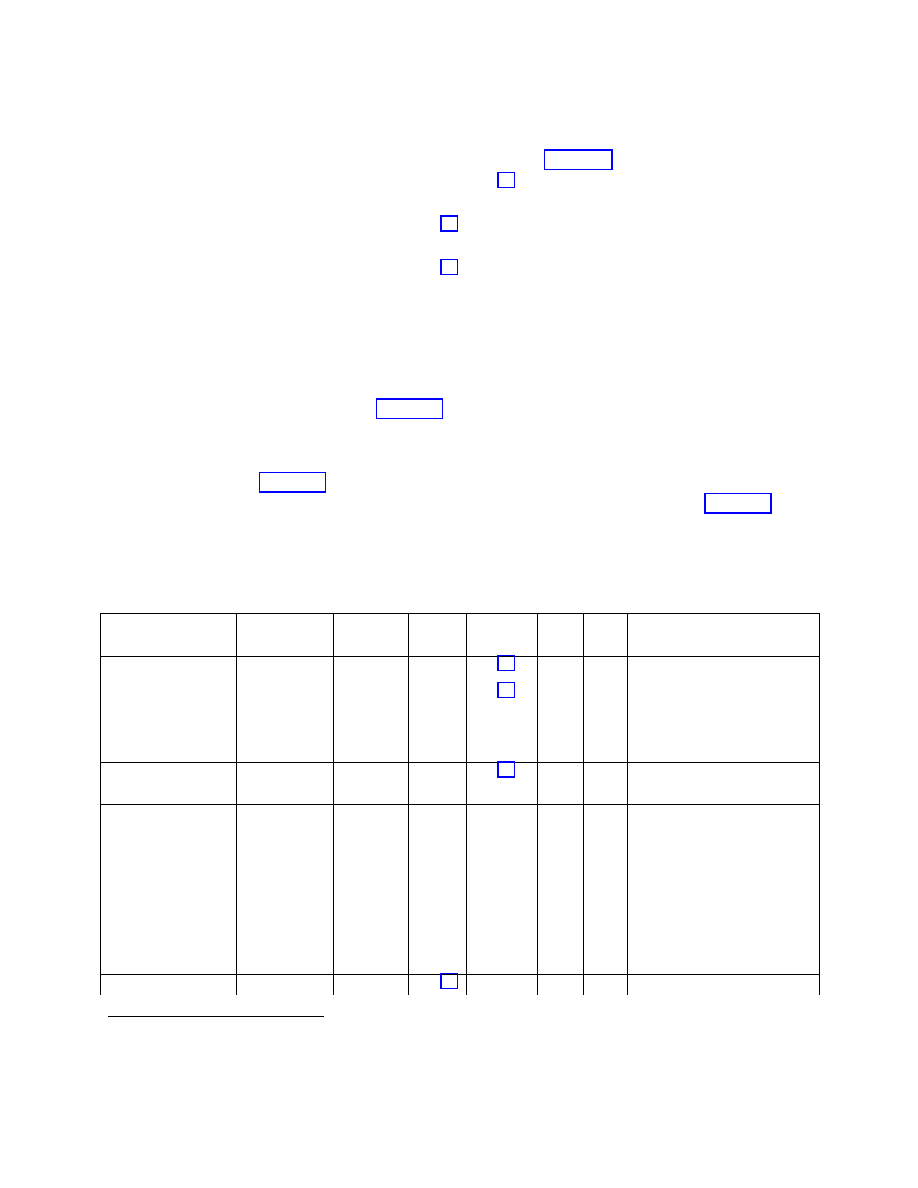
ALL RIGHTS RESERVED UNDER JSPA (JAVA SPECIFICATION PARTICIPATION AGREEMENT)
April 5, 2002
Java APIs for Bluetooth Wireless Technology (JSR-82)
57
Some attribute values have a more complex structure. For example, when DATSEQ is listed in the
Type/Size column, the attribute value is a sequence of other DataElements. If an attribute value is a
DATSEQ, then each element of the sequence has its own rows in Table 9-1. For example, the
ProtocolDescriptorList attribute has a DATSEQ value, and the DataElements that make up
ProtocolDescriptorList are described in the three rows following the ProtocolDescriptorList row.
The ProtocolDescriptorList describes the Bluetooth protocol stack that may be used to access the service
that is described by the service record. In this case, a connection to this serial port service can be made
using a stack that consists of the L2CAP layer and the RFCOMM layer, implying that the server
application communicates directly with RFCOMM. The ProtocolDescriptorList attribute is a DATSEQ
containing two other DATSEQs:
((L2CAP), (RFCOMM, chanN))
.
The first element (L2CAP) indicates that L2CAP is the lowest protocol layer used to access this service.
3
The second element, (RFCOMM, chanN), consists of two elements. The first is the name of the next
higher layer protocol, RFCOMM; the second is a protocol-specific parameter, chanN, which is the
RFCOMM server channel identifier. In Table 9-1, the DATSEQ
(L2CAP)
is described by the Protocol0
row and the DATSEQ
(RFCOMM, chanN)
is described by the next two rows, Protocol1 and
ProtocolSpecificParameter0.
The “M/O” column in Table 9-1 indicates which service record entries are mandatory (“M”) and which
entries are optional (“O”) according to the Bluetooth specification. The “C/F” column in Table 9-1
indicates which service record entries can be changed (“C”) by the server application and the
implementation and which entries are fixed (“F”), or can be changed only by the implementation. The
motivation for fixing certain values is described later.
Table 9-1 Service Record Template for SPP-based Services
Item Definition
Type/
Size
Value AttrID M/O C/F Notes
ServiceRecordHandle Uniquely
identifies each
record in an
SDDB
unsigned
int32
Varies
(assign
ed by
SDP
server)
M
F
Attr+Value added by the
implementation when the record
is added to the SDDB.
ServiceClassIDList
DATSEQ
M
C
Attr+Value inserted by
implementation.
ServiceClass0
Used by
server
application to
identify a new
type of Serial
Port service
UUID
128bit
Varies;
e.g.,
102030
405060
708090
A1B1C
1D1D1
E100
O
C
Obtained from the connection
string argument to
Connector.open() and inserted
by the implementation.
ServiceClass1
SerialPort
UUID 16
O
C
Value inserted by
3
Since SDP itself is a protocol that resides above L2CAP, layers below L2CAP are not included in SDP service
records.
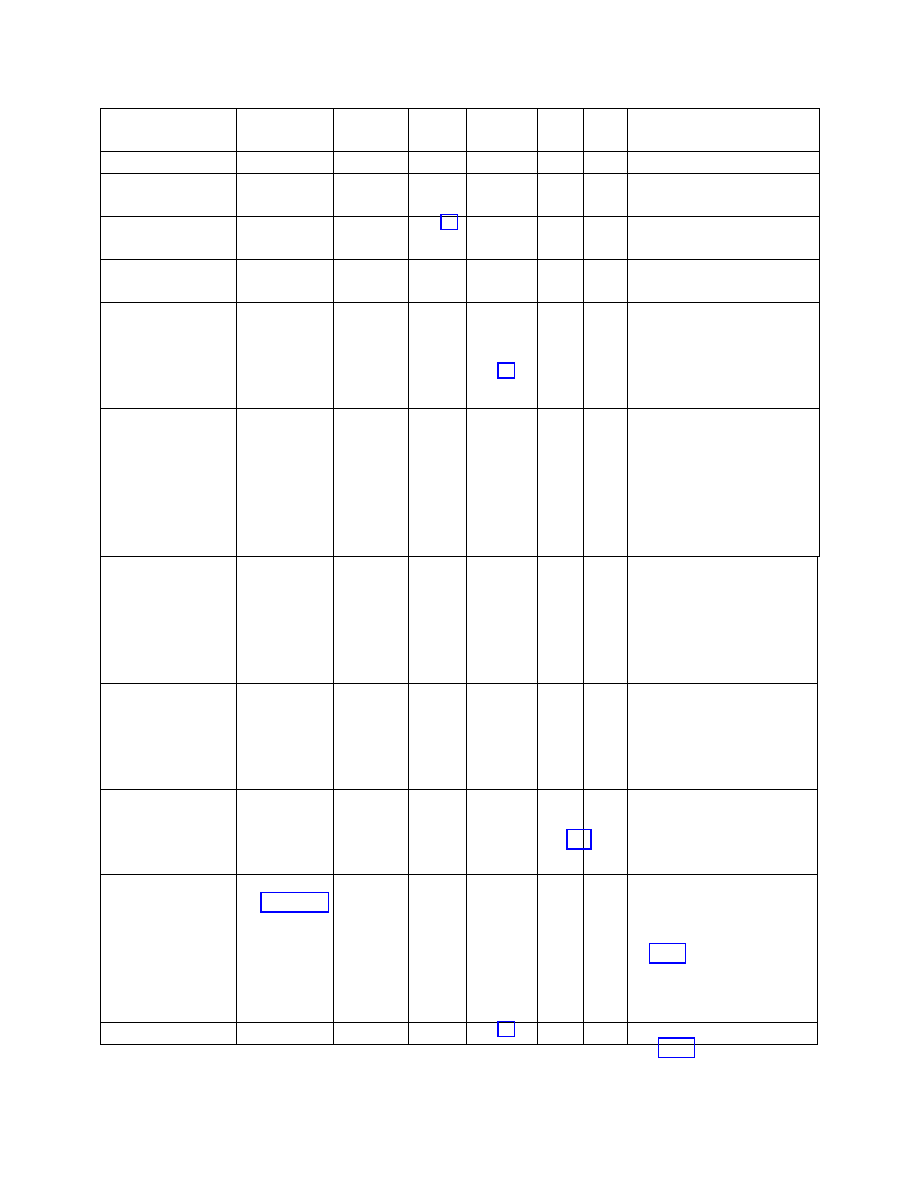
ALL RIGHTS RESERVED UNDER JSPA (JAVA SPECIFICATION PARTICIPATION AGREEMENT)
April 5, 2002
Java APIs for Bluetooth Wireless Technology (JSR-82)
58
Item Definition
Type/
Size
Value AttrID M/O C/F Notes
bit implementation.
ProtocolDescriptorList
DATSEQ
See [7]
M
C
Attr+Value inserted by
implementation.
Protocol0
L2CAP
UUID
16bit
See [7]
M
F
DATSEQ inserted by
implementation.
Protocol1
RFCOMM
UUID
16bit
See [7]
M
F
DATSEQ inserted by
implementation.
ProtocolSpecific
Parameter0
Server
Channel
unsigned
int8
Varies;
legal
options
are 1-
30
M
F
Value assigned and inserted by
the implementation. Used by
btspp clients to identify the
service to connect to.
ServiceName Displayable
text name
String Varies
0
+
0x0100
(base
attrID for
the
primary
language)
O
C
The connection string may
contain a name parameter (e.g.,
name=SPPEx). If so, the
parameter value is used as the
attribute value. Specifies the
ServiceName in the primary
language of the service record.
ServiceName Displayable
text name in
another natural
language
String Varies
0
+
base
for
another
language
(see next
row)
O
C
Attr+Value optionally inserted by
server application. Specifies the
ServiceName in another
language used in this service
record.
LanguageBaseAttribut
eIDList
DATSEQ
See [7]
O
C
Attr+Value optionally inserted by
server application. Indicates the
base value for a language other
than the primary one used in the
service record.
ServiceDescription
Displayable
text name
String Varies
1
+
language
base
O
C
Attr+Value optionally inserted by
server application. A brief,
human-readable description of
the service.
ServiceID
Unique ID for
service
UUID
128bit
Varies;
user
defined
O
C
Attr+Value optionally inserted by
server application. This value
may be used to denote a
specific server application no
matter where that application
runs.
BluetoothProfileDescri
DATSEQ
O
C
Attr+Value optionally inserted by

ALL RIGHTS RESERVED UNDER JSPA (JAVA SPECIFICATION PARTICIPATION AGREEMENT)
April 5, 2002
Java APIs for Bluetooth Wireless Technology (JSR-82)
59
Item Definition
Type/
Size
Value AttrID M/O C/F Notes
ptorList
server application. Describes all
of the Bluetooth profiles that this
service complies with.
Profile#i
SerialPortProfil
e
UUID
16bit
See [7]
O
C
DATSEQ optionally inserted by
server application; it is part of
BluetoothProfileDescriptorList
Param#i
Profile version
unsigned
int16
0x0100
O
C
Optionally inserted by server
application. It indicates the
supported version of the
corresponding Profile#i.
ServiceAvailability Ability
of
server to
accept new
clients
unsigned
int8
Varies.
0xFF =
fully
availabl
e;
0x00 =
unavail
See [7]
O
C
Attr+Value optionally inserted by
server application; meaning
varies by profile.
User Defined
Attribute #i
User Defined
Varies
Varies
O
C
Attr+Value optionally inserted by
server application; these values
are not described in the
Bluetooth specification.
9.6.1 SPP Service Record Modification
The method
Connector.open()
automatically adds some service attributes to the
ServiceRecord
after creating it. The “Notes” column of Table 9-1 indicates how attributes are added to the service
record. The implementation adds those attributes that are mandatory according to the Bluetooth
specification (indicated by “M” in the “M/O” column).
The server application optionally may add other service attributes to the
ServiceRecord
. There are
many optional attributes defined in the Bluetooth SDP specification ([1], Part E) that server applications
could use to describe various properties of their services; Table 9-1 shows only a few of these. It is also
possible to add user-defined attributes (those not defined by the Bluetooth specification) to service
records as indicated in Table 9-1. Consequently, the API has methods that allow server applications to
add service attributes to the service record created by
Connector.open()
.
In the
updateServiceAvailability()
method in the sample code in Section 9.7.3, the server
application obtains the
ServiceRecord
that was created for it using the statement reproduced here:
ServiceRecord record = localDev.getRecord(notifier);
Table 9-1 shows that the implementation of
Connector.open(“btspp:…”)
does not add the
ServiceAvailability attribute to the
ServiceRecord
. The sample code in Section 9.7.3 uses the

ALL RIGHTS RESERVED UNDER JSPA (JAVA SPECIFICATION PARTICIPATION AGREEMENT)
April 5, 2002
Java APIs for Bluetooth Wireless Technology (JSR-82)
60
setAttributeValue()
method of the
ServiceRecord
interface to add the ServiceAvailability
attribute.
In the case of a run-before-connect service, the
ServiceRecord
is added to the SDDB the first time the
server application calls
acceptAndOpen()
on the associated notifier. Any modifications the server
application made to its
ServiceRecord
prior to calling
acceptAndOpen()
will be reflected in the
service record added to the SDDB.
The sample code in Section 9.7.3 also makes modifications to the
ServiceRecord
after the initial call
to
acceptAndOpen()
. The server application modifies the ServiceAvailability attribute based on the
current number of client connections. The modifications the server application makes to
ServiceRecord
are not immediately reflected in the copy of this service record in the SDDB. The
sample code uses the following method call to update the copy of the service record in the SDDB so that
SDP clients will have visibility to the current value of the ServiceAvailability attribute:
localDev.updateRecord(record);
9.6.2 Restrictions on Modifying Service Records
As noted earlier, an application that needs access to a service record in the server’s SDDB must have
access to the associated
notifier
:
ServiceRecord record = localDev.getRecord(notifier);
Because applications can access only their own notifiers, it is not possible for one application to modify
another application’s service records in the server’s SDDB. If a malicious application AppM could
change the service record of another application, AppB, then AppM could:
•= cause clients to use incorrect connection parameters so that they could not connect to AppB when
they intended to do so; and
•= divert connections destined for AppB to the malicious application AppM.
Clearly, this would be undesirable, which is why applications can modify only their own service records.
Several rows in Table 9-1 have an “F” (for “fixed”) in the C/F column; this indicates that applications –
including the application that “owns” this service record – cannot change these entries in the service
record. The fixed attributes relate to the fundamental nature of the service or to the management of the
SDDB; hence an application is not permitted to change them (only the implementation can set these
values).
The ServiceRecordHandle attribute described in Table 9-1 is used to uniquely identify service records in
the SDDB. This attribute is fixed to ensure that the SDP server implementation in the Bluetooth stack
can manage the assignment of ServiceRecordHandle values.
The ProtocolDescriptorList tells a client application how to connect to the service. Protocol0 and
Protocol1 represent the (L2CAP, RFCOMM) stack that normally is used to connect to a serial port
service. These attributes are fixed to ensure that this protocol stack is always in the
ProtocolDescriptorList. Note that a server application optionally may add additional protocols to the
ProtocolDescriptorList, although this is unlikely to be useful for serial port services.

ALL RIGHTS RESERVED UNDER JSPA (JAVA SPECIFICATION PARTICIPATION AGREEMENT)
April 5, 2002
Java APIs for Bluetooth Wireless Technology (JSR-82)
61
ProtocolSpecificParameter0 is the server channel identifier. This attribute is fixed to ensure that the
RFCOMM implementation in the Bluetooth stack can manage the assignment of server channel values. If
an application were permitted to change the server channel identifier, effects similar to those described
earlier for a malicious application might result.
The two methods that serial port servers use to change the contents of the SDDB must enforce all of
these restrictions:
•=
StreamConnectionNotifier.acceptAndOpen()
, and
•=
LocalDevice.updateRecord()
.
An exception is thrown if these restrictions are violated. See the specification of the
updateRecord()
method in Appendix 1 for additional details.
9.6.3 Device Service Classes
Client devices can consult the
DeviceClass
of a server device to get a general idea of the kind of device
it is (for example, phone, PDA, or PC) and the major service classes it offers (for example, rendering,
telephony, or information). This means there are two different ways in which a server application
describes the service it offers:
•= by adding a service record to the SDDB, and
•= by activating major service class bits in the
DeviceClass
.
In the example code in Section 9.7.3, the
defineService()
method uses the
setDeviceServiceClasses()
method of the
ServiceRecord
interface to describe the single major
service class provided by the server application:
record.setDeviceServiceClasses(0x40000);
In the example, the server offers a “rendering” service, such as a printer or a speaker. A server uses the
setDeviceServiceClasses()
method to associate the
ServiceRecord
with all of the major service
classes that describe that service. Later, when a run-before-connect service first calls
acceptAndOpen()
, both its service record and its major service class bits are made visible to client
devices. In the case of the major service classes,
acceptAndOpen()
performs an OR of the current
settings of the service class bits of the device with the major service classes declared by the
setDeviceServiceClasses()
method. This OR operation might activate additional service class bits
that indicate new capabilities for the device.
A server application is not required to use the
setDeviceServiceClasses()
method. However, it is
recommended that a server use the method to describe its service in terms of the major service classes.
This practice allows clients to obtain a
DeviceClass
for the server that accurately describes the major
service classes provided by the server.
9.7 Example Code

ALL RIGHTS RESERVED UNDER JSPA (JAVA SPECIFICATION PARTICIPATION AGREEMENT)
April 5, 2002
Java APIs for Bluetooth Wireless Technology (JSR-82)
62
The next two sections illustrate example code for client and server applications. The third section shows
an example of a server application that makes modifications to its service record.
Device A and Device B are Bluetooth devices. An application on Device A transmits data to an
application on Device B.
A server application on Device B registers the service. A client application on Device A invokes service
discovery to obtain the connection URL for the service. The URL string includes the Bluetooth address
of Device B and the server channel identifier for the service.
9.7.1 Client Application
/**
* A code segment of an RFCOMM client.
*
*/
/**
* The RFCOMMPrinterClient will make a connection using the connection string
* provided and send a message to the server to print the data sent.
*/
class RFCOMMPrinterClient {
/**
* Keeps the connection string in case the application would like to make
* multiple connections to a printer.
*/
private String serverConnectionString;
/**
* Creates an RFCOMMPrinterClient that will send print jobs to a printer.
*
* @param server the connection string used to connect to the server
*/
RFCOMMPrinterClient(String server) {
serverConnectionString = server;
}
/**
* Sends the data to the printer to print.
This method will establish a
* connection to the server and send the String in bytes to the printer.
* This method will send the data in the default encoding scheme used by
* the local virtual machine.
*
* @param data the data to send to the printer
*
* @return true if the data was printed; false if the data failed to be
* printed
*/
public boolean printJob(String data) {
OutputStream os = null;
StreamConnection con = null;
try {
/*
* Open the connection to the server

ALL RIGHTS RESERVED UNDER JSPA (JAVA SPECIFICATION PARTICIPATION AGREEMENT)
April 5, 2002
Java APIs for Bluetooth Wireless Technology (JSR-82)
63
*/
con =(StreamConnection)Connector.open(serverConnectionString);
/*
* Sends data to remote device
*/
os = con.openOutputStream();
os.write(data.getBytes());
/*
* Close all resources
*/
os.close();
con.close();
} catch (IOException e2) {
System.out.println("Failed to print data");
System.out.println("IOException: " + e2.getMessage());
return false;
}
return true;
}
}
9.7.2 Server Application
/**
* A code segment of SPP server.
*
*/
StreamConnectionNotifier service = null;
StreamConnection con = null;
InputStream is = null;
String serviceURL =
“btspp://localhost:102030405060708090A1B1C1D1D1E100;name=SPP Server1”;
try {
/*
* Creates an SPP service record.
*/
service = (StreamConnectionNotifier)
Connector.open(serviceURL);
/*
* Add the service record to the SDDB and
* accept a client connection.
*/
con = (StreamConnection)service.acceptAndOpen();
is = con.openInputStream();
try {
int ch;

ALL RIGHTS RESERVED UNDER JSPA (JAVA SPECIFICATION PARTICIPATION AGREEMENT)
April 5, 2002
Java APIs for Bluetooth Wireless Technology (JSR-82)
64
while ((ch = is.read()) != -1) {
/* handle data received */
}
} catch (IOException e) {
System.out.println(e.getMessage());
}
is.close();
/*
* Close connection.
*/
con.close();
/*
* Remove service record from the SDDB.
* Stop accepting connections.
*/
service.close();
} catch (IOException e) {
System.out.println(e.getMessage());
}
9.7.3 Service Record Modification
The following example code illustrates how a run-before-connect server application can add a
ServiceAvailability attribute to the service record to inform clients whether or not the
ExampleSerialPortService
is currently accepting new client connections.
ExampleSerialPortService
can accept up to two clients at the same time.
public class SerialPortServerExample {
int clients = 0;
int maxClients = 2;
boolean stop = false;
LocalDevice localDev = LocalDevice.getLocalDevice();
StreamConnectionNotifier notifier;
/* Define ServiceAvailability values for 0, 1, and 2 clients */
DataElement fullyAvail
= new DataElement(DataElement.U_INT_1, 0xFF);
DataElement halfAvail
= new DataElement(DataElement.U_INT_1, 0x80);
DataElement unAvail
= new DataElement(DataElement.U_INT_1, 0x00);

ALL RIGHTS RESERVED UNDER JSPA (JAVA SPECIFICATION PARTICIPATION AGREEMENT)
April 5, 2002
Java APIs for Bluetooth Wireless Technology (JSR-82)
65
public static void main(String[] args) {
SerialPortServerExample server = new SerialPortServerExample();
server.defineService();
server.acceptClientConnections();
}
public void defineService() {
String connString =
"btspp://localhost:3B9FA89520078C303355AAA694238F07;name=SPP Server2";
/*
* Connector.open(connString) assigns a RFCOMM server channel
* and creates a service record using this channel.
*/
try {notifier =
(StreamConnectionNotifier)Connector.open(connString);
} catch (ServiceRegistrationException e1) {
/*
* The open method failed because unable to obtain an RFCOMM
* server channel.
*/
return;
} catch (IOException e2){
/* The open method failed due to another IOException */
return;
}
ServiceRecord record = localDev.getRecord(notifier);
/*
* Defining a rendering service.
acceptAndOpen() will
* update the service class bits of the device later.
*/
record.setDeviceServiceClasses(0x40000);
/*
* Update the service record to indicate accepting
* clients--this step is optional.
*/
updateServiceAvailability(0);
}

ALL RIGHTS RESERVED UNDER JSPA (JAVA SPECIFICATION PARTICIPATION AGREEMENT)
April 5, 2002
Java APIs for Bluetooth Wireless Technology (JSR-82)
66
public void acceptClientConnections() {
if (notifier = null){
return;
}
try {
while (!stop){
/*
* acceptAndOpen() waits for the next client to
* connect to this service. The first time through the
* loop, acceptAndOpen() adds the service record to
* the SDDB and updates the service class bits of the
* device.
*/
try {
StreamConnection clientConn
= (StreamConnection)notifier.acceptAndOpen();
} catch (ServiceRegistrationException e1) {
/*
* The acceptAndOpen method failed; possibly
* because the SDDB is full or violated constraints
* when modified record.
*/
return;
} catch (IOException e) {
continue;
}
if (clients < maxClients){
/*
* Update the service record to indicate changed
* availability to potential clients.
*/
updateServiceAvailability(1);
/*
* There would be code here to start up a thread
* to communicate with this client.
* When finished with this client, the thread closes
* clientConn and calls
* updateServiceAvailability(-1).
*/
} else {
/* More clients than allowed, so drop this new one */
clientConn.close();
}

ALL RIGHTS RESERVED UNDER JSPA (JAVA SPECIFICATION PARTICIPATION AGREEMENT)
April 5, 2002
Java APIs for Bluetooth Wireless Technology (JSR-82)
67
}
} finally {
/*
* Releases the RFCOMM server channel and removes the service
* record from the SDDB.
*/
notifier.close();
}
}
/*
* This method is synchronized so that only one thread at a
* time is changing the service record and updating the count of
* clients.
*/
synchronized boolean updateServiceAvailability(int changeInClients) {
DataElement currAvail;
clients = clients + changeInClients;
switch (clients) {
case 0:
currAvail = fullyAvail;
break;
case 1:
currAvail = halfAvail;
break;
case 2:
currAvail = unAvail;
}
/*
* Get the new service record that was created by
* Connector.open for this server application.
*/
ServiceRecord record = localDev.getRecord(notifier);
/*
* Add a ServiceAvailability attribute to the in-memory version of
* the service record. The attrID for ServiceAvailability
* is 0x0008.
*/
record.setAttributeValue(0x0008, currAvail);
/*

ALL RIGHTS RESERVED UNDER JSPA (JAVA SPECIFICATION PARTICIPATION AGREEMENT)
April 5, 2002
Java APIs for Bluetooth Wireless Technology (JSR-82)
68
* Update the service record in the SDDB to match the contents
* of record.
If record has not been added to the SDDB yet,
* then updateRecord does nothing –- in this case, acceptAndOpen()
* will add the modified record to the SDDB later.
*/
try {
localDev.updateRecord(record);
} catch (ServiceRegistrationException e) {
/* Unable to update the service record */
return false;
}
return true;
}
}

ALL RIGHTS RESERVED UNDER JSPA (JAVA SPECIFICATION PARTICIPATION AGREEMENT)
April 5, 2002
Java APIs for Bluetooth Wireless Technology (JSR-82)
69
Chapter 10 Logical Link Control and
Adaptation Protocol (L2CAP)
10.1 Introduction
This chapter describes the L2CAP API, including the classes, methods and constants. L2CAP supports
two types of connections, connection-oriented (bi-directional) and connectionless (uni-directional). All
connections made using the
connect
service primitive provided by the L2CAP layer of the stack are
connection-oriented. Connectionless data channels are established using the group communication
concept provided by the L2CAP layer. This API does not support group communication and hence does
not support connectionless channels.
10.2 API Overview
This section provides a brief description of the L2CAP API defined by this specification. The
specification of the classes and methods are found in Appendix 1. The API supports only connection-
oriented L2CAP channels.
An
L2CAPConnectionNotifier
notifies an L2CAP server when a client initiates a connection. Once
the connection is established, an
L2CAPConnection
object is returned. The interface
L2CAPConnection
and
L2CAPConnectionNotifier
extends the
Connection
interface. This
L2CAPConnection
interface can be used to send data to and receive data from a remote device using the
L2CAP protocol.
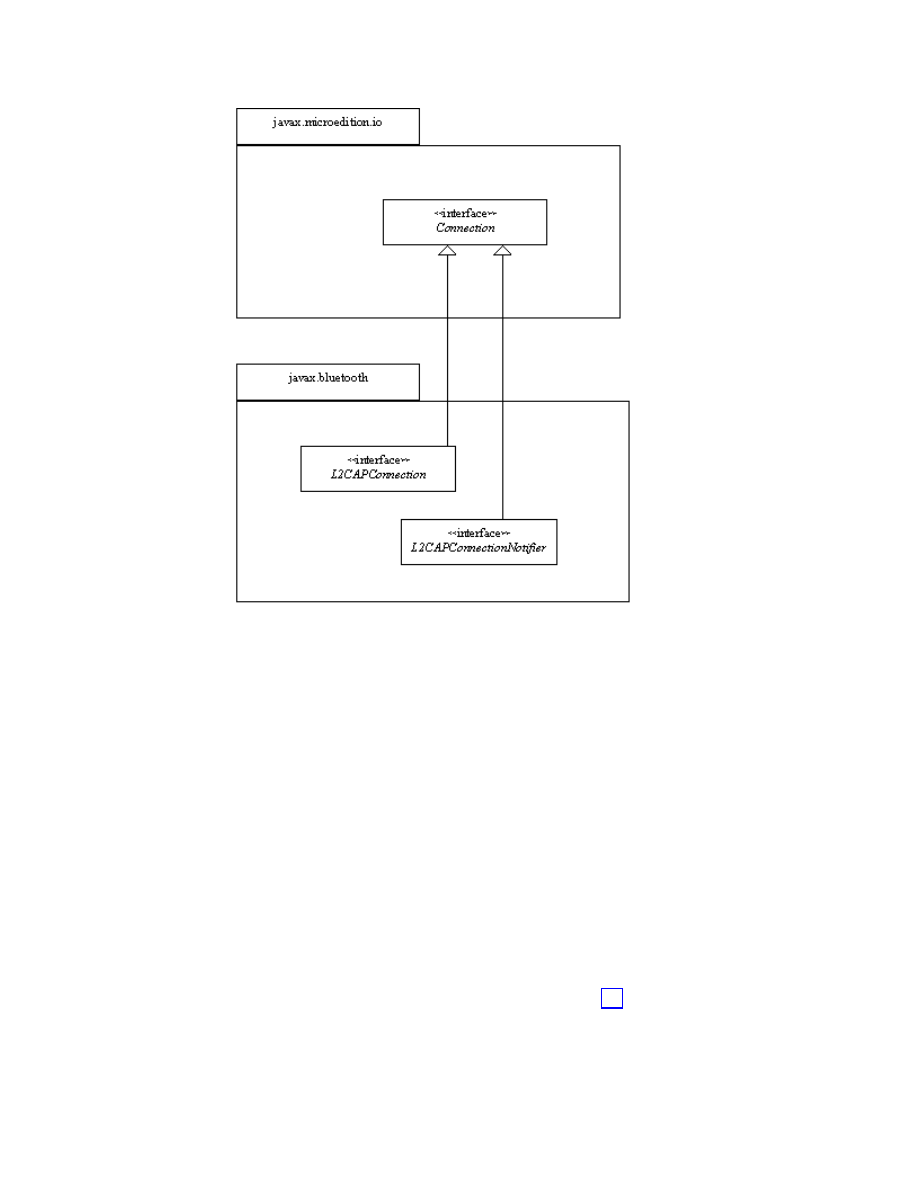
ALL RIGHTS RESERVED UNDER JSPA (JAVA SPECIFICATION PARTICIPATION AGREEMENT)
April 5, 2002
Java APIs for Bluetooth Wireless Technology (JSR-82)
70
Figure 10-1 L2CAP in the Generic Connection Framework
10.2.1 Channel
Configuration
Connection-oriented channels need to be configured once the connection is established. The channel
configuration parameters that are negotiated between Bluetooth devices are:
•= Maximum Transmission Unit (MTU) −The payload size (in bytes) that the sender of the request is
capable of accepting.
•= Flush Timeout −The amount of time for which the sender’s link controller/link manager will attempt
to successfully transmit a packet before flushing the packet. A value of 0xFFFF indicates that the
packet will be transmitted until it is acknowledged or until the ACL link terminates; this value
provides a reliable communication link. L2CAP provides a full-duplex communication channel that
delivers L2CAP protocol data units in an orderly manner. L2CAP does not provide any mechanism
to secure the reliable transmission of its protocol data units. Instead, it relies upon the retransmission
process in the baseband to support a sufficiently reliable communications channel for higher layers.
•= Quality of Service (QoS) − This option describes the traffic flow; see [1] Part D, Sec 6.3.

ALL RIGHTS RESERVED UNDER JSPA (JAVA SPECIFICATION PARTICIPATION AGREEMENT)
April 5, 2002
Java APIs for Bluetooth Wireless Technology (JSR-82)
71
This API assumes that:
•= The default Flush Timeout value provided by the stack is used for the connection. The default value,
defined in [1] Part D, Sec 6.2, is 0xFFFF.
•= The application can specify the incoming MTU that it would like to use for the connection. If an
application does not specify this value, then the DEFAULT_MTU of 672 bytes is used. The
application also can specify the MTU desired from the remote device, that is, the outgoing MTU. If
the application does not specify this value, then it will be less than or equal to the remote device’s
incoming MTU advertised by it during channel configuration.
•= Quality of Service parameters are not supported in this API. The Bluetooth stack determines the QoS
values.
10.2.1.1 Maximum Transmission Unit (MTU)
The implementation is responsible for configuring the channel with the requested or default MTU before
any read/write operations can take place on the connection. The ReceiveMTU is the maximum number of
bytes that the local device can receive in a given payload. The TransmitMTU is the maximum number of
bytes that the local device can send to the remote device in a given payload. If DevA is the local device
and DevB is the remote device, we define the following variants of ReceiveMTU:
•= ReceiveMTU
A
– maximum payload size proposed by an application on DevA for L2CAP payloads
received by DevA.
•= ReceiveMTU
B
– maximum payload size proposed by an application on DevB for L2CAP payloads
received by DevB.
•= ReceiveMTU
AB
– maximum payload size agreed to by DevA and DevB for L2CAP payloads received
by an application on DevA.
There are similar variants for TransmitMTU:
•= TransmitMTU
A
– maximum payload size proposed by an application on DevA for L2CAP payloads
sent by DevA.
•= TransmitMTU
B
– maximum payload size proposed by an application on DevB for L2CAP payloads
sent by DevB.
•= TransmitMTU
AB
– maximum payload size agreed to by DevA and DevB for L2CAP payloads sent by
an application on DevA.
If ReceiveMTU
A
≥ TransmitMTU
B
, then ReceiveMTU
AB
≤ ReceiveMTU
A
. If ReceiveMTU
A
<
TransmitMTU
B
, then the connection between DevA and DevB fails.
If TransmitMTU
A
≤
ReceiveMTU
B
, then TransmitMTU
AB
= TransmitMTU
A
. If TransmitMTU
A
>
ReceiveMTU
B
, then the connection between DevA and DevB fails.
When the application on the local device, DevA, calls
Connector.open(“btl2cap://…;ReceiveMTU=1024;TransmitMTU=512”),
ReceiveMTU
A
= 1024 and TransmitMTU
A
= 512. When the application on the remote device, DevB
calls
Connector.open(“btl2cap://…;ReceiveMTU=2048;TransmitMTU=512”)

ALL RIGHTS RESERVED UNDER JSPA (JAVA SPECIFICATION PARTICIPATION AGREEMENT)
April 5, 2002
Java APIs for Bluetooth Wireless Technology (JSR-82)
72
ReceiveMTU
B
= 2048 and TransmitMTU
B
= 512. In this case, a connection can be formed between
DevA and DevB with ReceiveMTU
AB
≤ 1024 and TransmitMTU
AB
= 512.
This section describes how the MTU is configured by the implementation when a connection request is
made. There are a number of possible cases:
1. The application specifies the ReceiveMTU
A
and TransmitMTU
A
. In this case, the implementation
advertises the ReceiveMTU
A
value in the configuration request to the remote device. If the remote
device responds with a negative configuration response, the connection fails. If the remote device
responds with a positive configuration response, the implementation waits for the configuration
request from the remote device. When the local device receives a configuration request from the
remote device, it compares the ReceiveMTU
B
value in the incoming request to the TransmitMTU
A
specified. If the maximum size the application plans to send, TransmitMTU
A
, is less than or equal to
the maximum size that the remote device can receive, ReceiveMTU
B
, the connection succeeds;
otherwise the connection fails.
2. The application specifies ReceiveMTU
A
, but does not specify TransmitMTU
A
. In this case,
configuration with respect to the ReceiveMTU
A
is similar to the above scenario. The
TransmitMTU
AB
will be less than or equal to the ReceiveMTU
B
in the configuration request received
from the remote device. The application should use the
getTransmitMTU()
method in
L2CAPConnection
class to obtain the outgoing MTU value to avoid sending too much data.
3. The application does not specify ReceiveMTU
A
, but specifies TransmitMTU
A
. In this case, the
implementation advertises ReceiveMTU
A
as the DEFAULT_MTU (672 bytes) to the remote device
in the configuration request. The handling of TransmitMTU
A
is similar to Case 1.
4. The application specifies neither the ReceiveMTU
A
nor the TransmitMTU
A
. In this case, the
handling of ReceiveMTU
A
is similar to case 3, and the handling of TransmitMTU
A
is similar to Case
2.
10.3 L2CAP Connection Interface
The following sections describe the usage of the connection string provided by the GCF for the various
types of L2CAP connections.
10.3.1 L2CAP Server and Client Connection URLs
The Augmented Backus-Naur Form (ABNF) for L2CAP server and client connection URLs is:
srvString = protocol colon slashes srvHost 0*7(srvParams)
cliString = protocol colon slashes cliHost 0*5(cliParams)
protocol = btl2cap

ALL RIGHTS RESERVED UNDER JSPA (JAVA SPECIFICATION PARTICIPATION AGREEMENT)
April 5, 2002
Java APIs for Bluetooth Wireless Technology (JSR-82)
73
btl2cap = %d98.116.108.50.99.97.112
; defines the literal btl2cap
cliHost = address colon psm
srvHost = “localhost” colon uuid
psm = 4*4(HEXDIG)
uuid = 1*32(HEXDIG)
colon = “:”
slashes = “//”
bool = “true” / “false”
address = 12*12(HEXDIG)
text = 1*( ALPHA / DIGIT / SP / “-” / “_” )
name = “;name=”
text
; see constraints below
master = ”;master=“
bool
encrypt = “;encrypt=”
bool
; see constraints below
authorize = “;authorize=”
bool
; see constraints below
authenticate = “;authenticate=”
bool
; see constraints below
receiveMTU = “;receiveMTU=” 1*(DIGIT)
transmitMTU = “;transmitMTU=” 1*(DIGIT)
cliParams = master / encrypt / authenticate / receiveMTU / transmitMTU
srvParams = name / master / encrypt / authorize / authenticate
/ receiveMTU / transmitMTU
The core rules from the RFC 2234 [11] that are being referenced are: SP for space, ALPHA for
lowercase and uppercase alphabets, DIGIT for digits zero through nine, and HEXDIG for hexadecimal
digits (0-9, a-f, A-F).
The RFC 2234 specifies the values of literal text string as being case-insensitive. For example, the rule
master in the above ABNF allows all of the following candidates as legal (“;MASTER=”, “;master=”,
“;MaStEr=”) values.
The string produced from the srvString and cliString rules must not contain both the substrings
“;authenticate=false” and “;encrypt=true”. For the string produced from srvString, it also must not
contain both the substrings “;authenticate=false” and “;authorize=true”. Additionally, the string produced
from either of the srvString or cliString rules must not contain one of the params (name, …) repeated
more than once. This constraint is being specified here because ABNF does not contain a rule that would
achieve the desired functionality.
The
psm
in the preceding connection string description represents the Protocol Service Multiplexor
(PSM) value for the service. L2CAP server applications on a device can identify themselves with a PSM
value, which is assigned by the implementation. Legal PSM values are in the range (0x1001..0xFFFF),
and the least significant byte must be odd and all other bytes must be even.

ALL RIGHTS RESERVED UNDER JSPA (JAVA SPECIFICATION PARTICIPATION AGREEMENT)
April 5, 2002
Java APIs for Bluetooth Wireless Technology (JSR-82)
74
The
receiveMTU and transmitMTU
in the preceding connection string represent the ReceiveMTU,
the maximum payload size proposed for reception by the client (server), and TransmitMTU, the
maximum payload size proposed for sending by the client (server). The other parameters are explained in
Chapter 8.
Pseudo code to open an L2CAP client connection is shown next:
try {
L2CAPConnection client = (L2CAPConnection)
Connector.open(“btl2cap://0050CD00321B:1001;ReceiveMTU=512;
TransmitMTU=512”);
} catch (…)
The call to
Connector.open()
returns only when either the connection is successfully established or
when the connection fails. If authentication is needed,
Connector.open()
blocks until the process
completes.
Pseudo code to open an L2CAP server connection is shown next:
try {
L2CAPConnectionNotifier server
= (L2CAPConnectionNotifier)
Connector.open(“btl2cap://localhost:3B9FA89520078C303355AAA694238F08;
name=L2CAPEx”);
L2CAPConnection con = (L2CAPConnection)server.acceptAndOpen();
} catch (…)
For a server, the service record is created when
Connector.open()
is called, and the call to
acceptAndOpen()
causes the implementation to add the service record to the SDDB. A
ServiceRegistrationException
is thrown if the registration fails. The next section describes the
L2CAP service record that this API uses.
If the client or server application requests a ReceiveMTU value greater than that which the stack can
provide, then the implementation should cause the
Connector.open()
call to fail. The application
must use
LocalDevice.getProperty(“bluetooth.l2cap.receiveMTU.max”)
to obtain the
maximum MTU supported by the stack. The application can specify a ReceiveMTU value less than
StackMTU, but it must be greater than or equal to MINIMUM_MTU (48 bytes) for the connection to
succeed. For a successful connection between client A and server B, ReceiveMTU
A
must be
≥
TransmitMTU
B
, and TransmitMTU
A
must be
≤ ReceiveMTU
B
. If these conditions cannot be satisfied,
Connector.open()
should fail and throw
BluetoothConnectionException
for clients. For
servers,
acceptAndOpen()
blocks until a successful connection to a client can be established. Once the
connection is established, the application can obtain the ReceiveMTU value for the connection using the
method
getReceiveMTU()
in the
L2CAPConnection
class.
If a connection fails, a
BluetoothConnectionException
must be thrown by the implementation.
This exception is a subclass of
IOException
, and applications can obtain the cause of failure using the
getStatus()
method of the class. If any of the arguments to
Connector.open()
(client or server) are
not legal, an
IllegalArgumentException
must be thrown by the implementation.
10.3.2 L2CAP Service Record
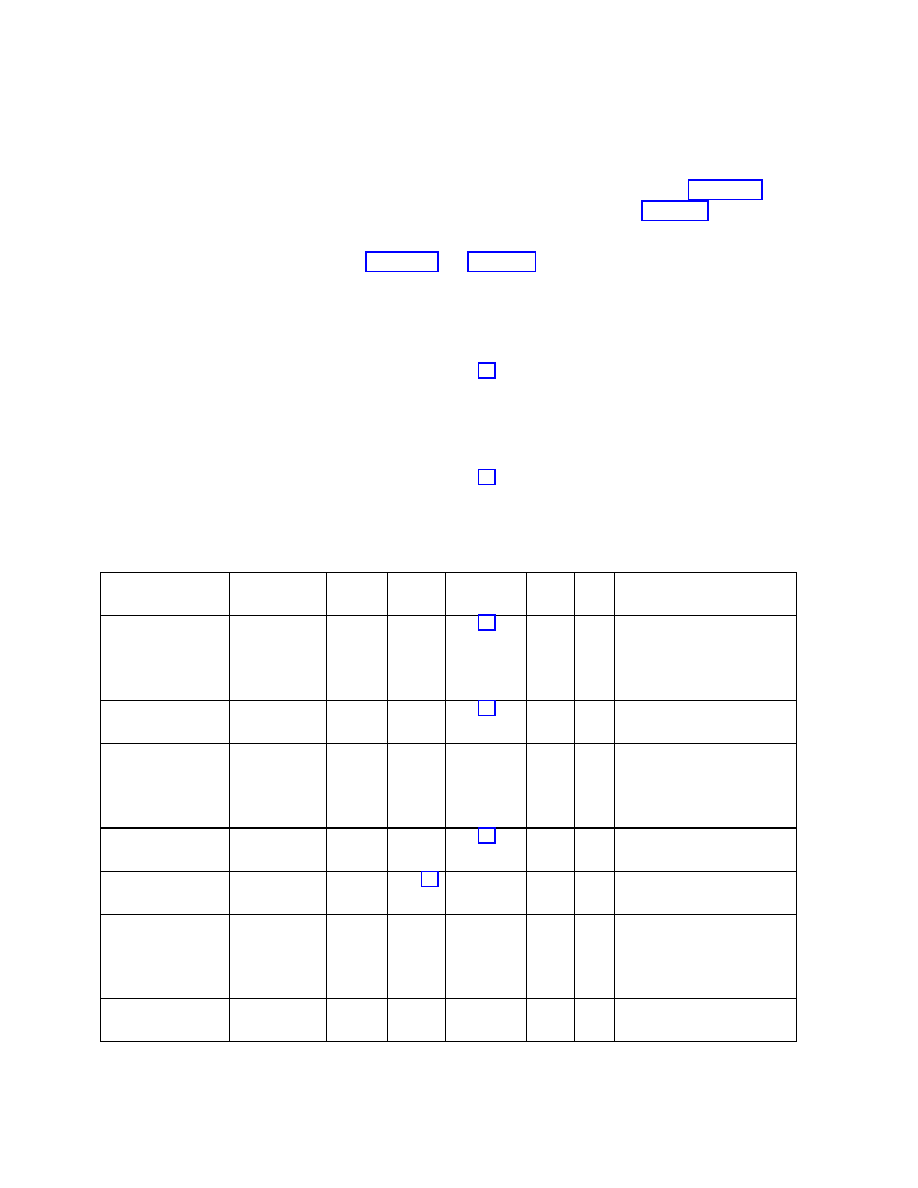
ALL RIGHTS RESERVED UNDER JSPA (JAVA SPECIFICATION PARTICIPATION AGREEMENT)
April 5, 2002
Java APIs for Bluetooth Wireless Technology (JSR-82)
75
When an L2CAP server application calls
Connector.open(“btl2cap://localhost:3B9FA89520078C303355AAA694238F08;name=An
L2CAP Server”)
a service record is created in a manner similar to that described for serial port services. Table 10-1 shows
the L2CAP service record; the rows and columns are interpreted as described in Table 9-1.
There are several differences between Table 10-1 and Table 9-1:
•= SerialPort has been removed from the ServiceClassIDList;
•= RFCOMM has been removed from the ProtocolDescriptorList; and
•= the BluetoothProfileDescriptorList has been removed.
The RFCOMM protocol is closely aligned with the SPP. However, L2CAP has no such closely aligned
profile. If new Bluetooth profiles are developed that operate directly over L2CAP, then a server
application could add a BluetoothProfileDescriptorList that includes such profiles to the L2CAP service
record.
As was the case for the SPP, the API implementation adds all the mandatory rows of the service record
for L2CAP; L2CAP server applications optionally may add service attributes to the service record.
Table 10-1 Service Record Template for L2CAP-based Services
Item Definition
Type/
Size
Value AttrID
M/O C/F Notes
ServiceRecordHandl
e
Uniquely
identifies each
record in a
SDDB.
Unsigne
d int32
Varies
M
F
Attr+Value added by the
implementation when the
record is added to the SDDB.
ServiceClassIDList
DATSE
Q
M
C
Attr+Value inserted by
implementation.
ServiceClass0
Used by server
application to
identify type of
L2CAP service
UUID
128bit
Varies
O
C
Obtained from the connection
string argument to
Connector.open() and inserted
by the implementation.
ProtocolDescriptorLi
st
DATSE
Q
M
C
Attr+Value inserted by
implementation.
Protocol0
L2CAP
UUID
16bit
M
F
DATSEQ inserted by
implementation.
ProtocolSpecific
Parameter0
PSM value
unsigne
d int16
Varies
M
F
Value assigned and inserted
by the implementation. Used
by btl2cap clients to identify
the service to connect to.
ServiceName Displayable
text name
String
Varies
0 + 0x0100
O
C
The connection string may
contain a name parameter

ALL RIGHTS RESERVED UNDER JSPA (JAVA SPECIFICATION PARTICIPATION AGREEMENT)
April 5, 2002
Java APIs for Bluetooth Wireless Technology (JSR-82)
76
Item Definition
Type/
Size
Value AttrID
M/O C/F Notes
(e.g., name=An L2CAP
Server). If so, the parameter
value is used as the attribute
value. Specifies the
ServiceName in the primary
language of the service record.
ServiceName Displayable
text name in
another natural
language
String
Varies
0 + base for
another
language
O
C
Attr+Value optionally inserted
by server application
LanguageBaseAttrib
uteIDList
DATSE
Q
See [7]
O
C
Attr+Value optionally inserted
by server application
ServiceDescription
Displayable
text name
String Varies 1
+
language
base
O
C
Attr+Value optionally inserted
by server application
ServiceAvailability Ability
of
server to
accept new
clients
unsigne
d int8
Varies. See [7]
O
C
Attr+Value optionally inserted
by server application
User Defined
Attribute #i
User Defined
Varies
Varies
O
C
Attr+Value optionally inserted
by server application
10.4 L2CAP Connection Classes
The following subsections provide a brief overview of the classes that are used in the L2CAP API. The
specification of the classes and methods are found in Appendix 1.
10.4.1 interface javax.bluetooth.L2CAPConnection extends
javax.microedition.io.Connection
This interface represents L2CAP connections. It contains methods to obtain the MTUs used by a
connection, and to send and receive data.
10.4.2 interface javax.bluetooth.L2CAPConnectionNotifier extends
javax.microedition.io.Connection

ALL RIGHTS RESERVED UNDER JSPA (JAVA SPECIFICATION PARTICIPATION AGREEMENT)
April 5, 2002
Java APIs for Bluetooth Wireless Technology (JSR-82)
77
The only method in this interface is
acceptAndOpen()
, which is used by L2CAP servers to listen for
incoming client connections.
10.4.3 class
javax.bluetooth.BluetoothConnectionException
extends java.io.IOException
This exception is thrown when a Bluetooth connection (RFCOMM or L2CAP) cannot be established
successfully. The
getStatus()
method of this class will indicate the reason for the connection failure.
10.5 Example Code
This is the sample code for L2CAP client and server applications.
10.5.1 Client
Application
/**
* The L2CAPPrinterClient will make a connection using the connection string
* provided and send a message to the server to print the data sent.
*/
class L2CAPPrinterClient {
/**
* Keeps the connection string in case the application would like to make
* multiple connections to a printer.
*/
private String serverConnectionString;
/**
* Creates an L2CAPPrinterClient object that will allow an application to
* send multiple print jobs to a Bluetooth printer.
*
* @param server the connection string used to connect to the server
*/
L2CAPPrinterClient(String server) {
serverConnectionString = server;
}
/**
* Sends a print job to the server.
The print job will print the message

ALL RIGHTS RESERVED UNDER JSPA (JAVA SPECIFICATION PARTICIPATION AGREEMENT)
April 5, 2002
Java APIs for Bluetooth Wireless Technology (JSR-82)
78
* provided.
*
* @param msg a non-null message to print
*
* @return true if the message was printed; false if the message was not
* printed
*/
public boolean printJob(String msg) {
L2CAPConnection con = null;
byte[] data = null;
int index = 0;
byte[] temp = null;
try {
/*
* Create a connection to the server
*/
con = (L2CAPConnection)Connector.open(serverConnectionString);
/*
* Determine the maximum amount of data I can send to the server.
*/
int MaxOutBufSize = con.getTransmitMTU();
temp = new byte[MaxOutBufSize];
/*
* Send as many packets as are needed to send the data
*/
data = msg.getBytes();
while (index < data.length) {
/*
* Determine if this is the last packet to send or if there
* will be additional packets
*/
if ((data.length - index) < MaxOutBufSize) {
temp = new byte[data.length - index];
System.arraycopy(data, index, temp, 0,
data.length – index);
} else {
temp = new byte[MaxOutBufSize];
System.arraycopy(data, index, temp, 0, MaxOutBufSize);
}
con.send(temp);
index += MaxOutBufSize;

ALL RIGHTS RESERVED UNDER JSPA (JAVA SPECIFICATION PARTICIPATION AGREEMENT)
April 5, 2002
Java APIs for Bluetooth Wireless Technology (JSR-82)
79
}
/*
* Close the connection to the server
*/
con.close();
} catch (BluetoothConnectionException e) {
System.out.println("Failed to print message");
System.out.println("\tBluetoothConnectionException: " +
e.getMessage());
System.out.println("\tStatus: " + e.getStatus());
} catch (IOException e) {
System.out.println("Failed to print message");
System.out.println("\tIOException: " + e.getMessage());
return false;
}
return true;
}
}
10.5.2 Server
Application
The following sample code illustrates L2CAP servers:
try {
L2CAPConnectionNotifier server = (L2CAPConnectionNotifier)
Connector.open(“btl2cap://localhost:3B9FA89520078C303355AAA694238F
08;name=L2CAP Server1”);
L2CAPConnection cliCon = (L2CAPConnection)server.acceptAndOpen();
} catch (IOException e) {
/* Handle the failure to setup a connection. */
}
/* Perform server functions. */

ALL RIGHTS RESERVED UNDER JSPA (JAVA SPECIFICATION PARTICIPATION AGREEMENT)
April 5, 2002
Java APIs for Bluetooth Wireless Technology (JSR-82)
80
Chapter 11 Object Exchange Protocol (OBEX)
11.1 Introduction
This chapter describes the OBject EXchange protocol (OBEX) API. Section 11.2 provides an overview
of the OBEX protocol. Section 11.3 describes how to create and use client and server connection objects
and how this API fits into the GCF. Section 11.4 describes the connection strings used with the GCF to
create OBEX client and server connections. Section 11.5 describes how authentication works in this
OBEX API. Section 11.6 provides a short description of each class and interface of the API. The final
section provides an example client and server application.
11.2 OBEX Overview
OBEX is a protocol developed by the Infrared Data Association ( IrDA
®
4
; see
“pushing” or “pulling” objects to and from clients and servers. OBEX performs object transfer by
establishing an OBEX session. An OBEX session begins by establishing an OBEX connection with a
CONNECT request. The session ends with a DISCONNECT request. Between the CONNECT and
DISCONNECT requests, the client may GET objects from the server or PUT objects to the server. The
objects could be files, vCards (a data format for electronic business cards), byte arrays and so on. The
OBEX client also might change the active folder or directory on the server by issuing the SETPATH
request.
OBEX scales easily from small objects to large ones. OBEX accomplishes this by sending an object in
multiple OBEX packets. When a client issues a request to PUT or GET a large object, it starts an OBEX
operation. The OBEX operation continues until the entire object is sent to a server, the entire object is
retrieved from the server, or an error occurs. To complete a PUT operation, the client (the application or
the OBEX protocol stack) breaks the object into small pieces and sends each piece individually. The
client does not send a subsequent piece until the previous piece is acknowledged. GET operations work
in a similar way, with the server breaking the object into smaller pieces. This packetization may be
transparent to an application.
OBEX, like HTTP, provides methods to pass additional information between the client and server using
headers. Unlike HTTP headers that are strings, OBEX headers are byte values or byte sequences. OBEX
headers include length, name, description type and even HTTP-specific headers. There also are 64 user-
defined headers and headers for authentication, application multiplexing and so on.
4
IrDA is a registered trademark of the Infrared Data Association.
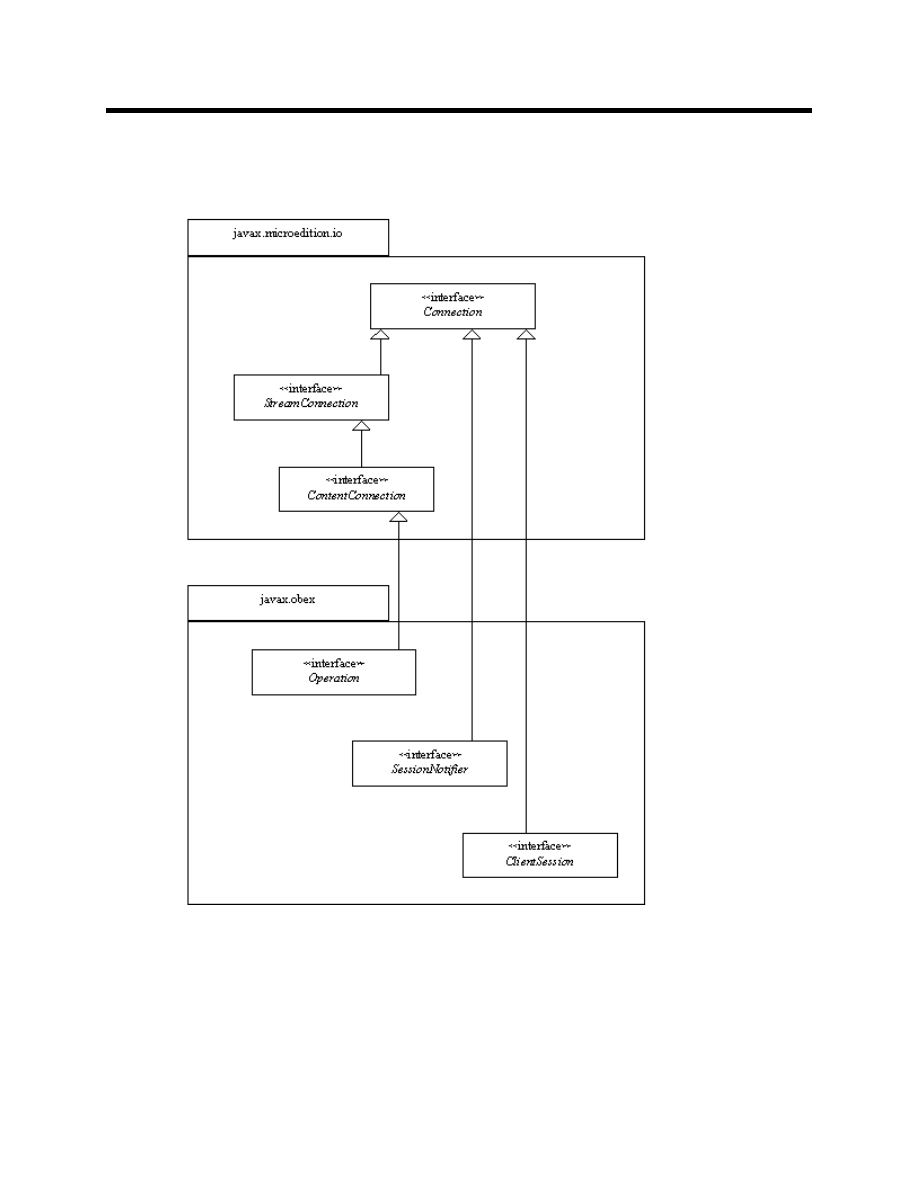
ALL RIGHTS RESERVED UNDER JSPA (JAVA SPECIFICATION PARTICIPATION AGREEMENT)
April 5, 2002
Java APIs for Bluetooth Wireless Technology (JSR-82)
81
11.3 API Overview
Figure 11-1 OBEX in the Generic Connection Framework
The OBEX API allows an application to complete OBEX operations between a client and a server. This
API does not address connectionless OBEX as defined in the OBEX specification. This OBEX

ALL RIGHTS RESERVED UNDER JSPA (JAVA SPECIFICATION PARTICIPATION AGREEMENT)
April 5, 2002
Java APIs for Bluetooth Wireless Technology (JSR-82)
82
API supports the following OBEX operations:
•= CONNECT
•= PUT
•= GET
•= SETPATH
•= ABORT
•= CREATE-EMPTY
•= PUT-DELETE
•= DISCONNECT
As stated in Section 11.2, OBEX packets consist of a collection of headers. The following OBEX
headers are accessible in this API.
Table 11-1 OBEX Headers in the OBEX API
Header Name
How to Manipulate the Header in the API
Count HeaderSet.getHeader(),
HeaderSet.setHeader()
Name HeaderSet.getHeader(),
HeaderSet.setHeader()
Type HeaderSet.getHeader(),
HeaderSet.setHeader()
Length HeaderSet.getHeader(),
HeaderSet.setHeader()
Time HeaderSet.getHeader(),
HeaderSet.setHeader()
Description HeaderSet.getHeader(),
HeaderSet.setHeader()
Target HeaderSet.getHeader(),
HeaderSet.setHeader()
HTTP HeaderSet.getHeader(),
HeaderSet.setHeader()
Body Operation.openInputStream(),
Operation.openDataInputStream(),
Operation.openOutputStream(), Operation.openDataOutputStream()
End of Body
Operation.openInputStream(), Operation.openDataInputStream(),
Operation.openOutputStream(), Operation.openDataOutputStream()
Who HeaderSet.getHeader(),
HeaderSet.setHeader()
Connection ID
ClientSession.setConnectionID(), ClientSession.getConnectionID(),
ServerRequestHandler.setConnectionID(), ServerRequestHandler.getConnectionID()
Application Parameters
HeaderSet.getHeader(), HeaderSet.setHeader()
Authentication Challenge
HeaderSet.createAuthenticationChallenge(), Authenticator.getPasswordAuthentication()
Authentication Response
Authenticator.getPasswordAuthentication(), Authenticator.validatePassword()
Object Class
HeaderSet.getHeader(), HeaderSet.setHeader()
User Defined
HeaderSet.getHeader(), HeaderSet.setHeader()
Two different multiplexing models are defined in the OBEX specification. This OBEX API is designed
to perform multiplexing at the transport layer. This multiplexing model relies on the multiplexing
capabilities of the transport layer protocol.

ALL RIGHTS RESERVED UNDER JSPA (JAVA SPECIFICATION PARTICIPATION AGREEMENT)
April 5, 2002
Java APIs for Bluetooth Wireless Technology (JSR-82)
83
As found in the CLDC specification [3], the following exceptions may be thrown by a call to
Connector.open()
.
•=
ConnectionNotFoundException
– thrown when the scheme used is not legal or if the protocol
type does not exist
•=
IllegalArgumentException
– thrown when the parameters of the connection string are
unrecognized
•=
IOException
– thrown when the
{target}
cannot be connected to.
11.3.1 Client
Connection
To create a client connection for OBEX, the client application uses the appropriate string defined in
Section 11.4 and passes this string to
Connector.open()
.
Connector.open()
returns a
javax.obex.ClientSession
object.
To establish an OBEX connection, the client creates a
javax.obex.HeaderSet
object using the
createHeaderSet()
method in the
ClientSession
interface. Using the
HeaderSet
object, the
client can specify header values for the CONNECT request. An OBEX CONNECT packet also contains
the OBEX version number, flags, and maximum packet length, which are maintained by the
implementation. To complete a CONNECT request, the client supplies the
HeaderSet
object to the
connect()
method in the
ClientSession
interface. After the CONNECT request finishes, the OBEX
headers received from the server are returned to the application. If no header object is provided as an
input parameter, a
javax.obex.HeaderSet
object still is returned from the
connect()
method. To
determine whether or not the request succeeded, the client calls the
getResponseCode()
method in the
HeaderSet
interface. This method returns the response code sent by the server, defined in the
javax.obex.ResponseCodes
class.
A DISCONNECT request is completed in the same way as a CONNECT request except that the
disconnect()
method is called instead of
connect()
. If the
javax.obex.HeaderSet
object
contains more headers than can fit in one OBEX packet, a
java.io.IOException
is thrown.
To complete a SETPATH operation, the client calls the
setPath()
method in the
ClientSession
object. To specify the name of the target directory, set the name header to the desired target by calling
setHeader()
on the
HeaderSet
provided to
setPath()
. The client also may specify whether or not
the server should back up one directory level before applying the name and whether or not the server
should create the directory if it does not already exist. If the header is too large to send in one OBEX
packet, a
java.io.IOException
is thrown.
To complete a PUT or GET operation, the client creates a
javax.obex.HeaderSet
object with
createHeaderSet()
. After specifying the header values, the client calls the
put()
or
get()
method
in the
javax.obex.ClientSession
object. The implementation sends the headers to the server and
receives the reply. The
put()
and
get()
methods return the
javax.obex.Operation
object. With
this object, the client can determine whether or not the request succeeded. If the request succeeded, the
client may put or get a data object using output or input streams, respectively. When the client is
finished, the appropriate stream should be closed. To ABORT a PUT or GET request, the client calls the

ALL RIGHTS RESERVED UNDER JSPA (JAVA SPECIFICATION PARTICIPATION AGREEMENT)
April 5, 2002
Java APIs for Bluetooth Wireless Technology (JSR-82)
84
abort()
method in the
javax.obex.Operation
object. The
abort()
method closes all input and
output streams and ends the operation by calling the
close()
method on the
Operation
object.
11.3.2 Server
Connection
To create a server connection, the server provides a string to
Connector.open()
as specified in
Connector.open()
returns a
javax.obex.SessionNotifier
object. The
SessionNotifier
object waits for a client to create a transport layer connection by calling
acceptAndOpen()
. A single server may serve multiple clients by calling
acceptAndOpen()
multiple
times. The
acceptAndOpen()
method returns a
javax.obex.Connection
object. This object
represents a connection to a single client. The server specifies the request handler that will respond to
OBEX requests from the client by passing the
javax.obex.ServerRequestHandler
object to
acceptAndOpen()
.
The server must create a new class that extends the
javax.obex.ServerRequestHandler
class. The
server needs to implement only those methods for the OBEX requests that it supports. For example, if
the server does not support SETPATH requests, it need not override the
onSetPath()
method. As
requests are received, the appropriate methods are called and the server processes the requests. When the
server is finished, it must return the appropriate final response code defined in the
javax.obex.ResponseCodes
class.
Server applications should not call the
abort()
method; if a server applications calls
abort()
the
javax.obex.Operation
argument that is part of the
onGet()
and
onPut()
methods throws a
java.io.IOException
.
If the server implementation is not able to pass all the headers that are specified by the server application
in a reply, then the server implementation returns an
OBEX_HTTP_REQ_TOO_LARGE
. If the server
application returns a response code that is not defined in the
javax.obex.ResponseCodes
class, then
the server implementation sends an
OBEX_HTTP_INTERNAL_ERROR
response to the client.
11.4 Connection String Description
To create an OBEX client or server connection object, the application uses the GCF, following the same
format as other connection strings in that framework:
{protocol}:[{target}][{params}]
The definition of
{protocol}
,
{target}
, and
{params}
depends on the transport layer that OBEX
uses. In general,
{protocol}
is defined to be
{transport}obex,
but OBEX over RFCOMM is an
exception to this rule and is discussed next.
These protocols should be implemented based on the actual transport mechanisms available on the
device. For example, if a device with only an infrared port implements this OBEX API set, then only the
"irdaobex" protocol needs to be implemented. Calling
Connector.open()
on an unsupported transport
protocol throws a
ConnectionNotFoundException
ALL RIGHTS RESERVED UNDER JSPA (JAVA SPECIFICATION PARTICIPATION AGREEMENT)
April 5, 2002
Java APIs for Bluetooth Wireless Technology (JSR-82)
85
11.4.1 OBEX Over RFCOMM
The
{protocol}
for OBEX over RFCOMM is defined as
btgoep
because this is the implementation of
the Generic Object Exchange Profile (GOEP) defined by the Bluetooth SIG. The
{target}
for client
connections is the Bluetooth address and channel identifier of the device that the client wishes to connect
to, separated by a colon (for example,
0050C000321B
:
4
). The
{target}
for a server always is
localhost
followed by a colon and the service class UUID. The valid
{params}
for OBEX over
RFCOMM are
authenticate
,
encrypt
,
authorize
, and
master
. The default value for all of these
{params}
is
false
(
true
is the only other valid value).
The following is a valid client connection string for OBEX over RFCOMM:
btgoep://0050C000321B:12
The following is a valid server connection string for OBEX over RFCOMM:
btgoep://localhost:12AF51A9030C4B2937407F8C9ECB238A
When an application passes a valid OBEX over RFCOMM server connection string to
Connector.open()
, a Bluetooth service record is created. Table 11-2 shows the GOEP service record.
Note that this service record contains the OBEX protocol in its ProtocolDescriptorList.
Table 11-2 Service Record Template for GOEP-based Services
Item Definition
Type/
Size
Value AttrID M/O C/F Notes
ServiceRecordHandle Uniquely
identifies
each record
in a SDDB
Unsigned
int32
Varies
M
F
Attr+Value added by the
implementation when the record
is added to the SDDB.
ServiceClassIDList
DATSEQ
See [7]
M
C
Attr+Value inserted by
implementation.
ServiceClass0
Used by app
to identify
type of
OBEX
service
UUID
128bit
Varies
O
C
Obtained from the string
argument to Connector.open()
and inserted by the
implementation.
ProtocolDescriptorList
DATSEQ
M
C
Attr+Value inserted by
implementation.
Protocol0
L2CAP
UUID
16bit
See [7]
M
F
DATSEQ inserted by
implementation.
Protocol1
RFCOMM
UUID
16bit
M
F
DATSEQ inserted by
implementation.
ProtocolSpecific
Parameter0
Server
Channel
unsigned
int8
Varies;
legal
options
are 1-30
M
F
Value obtained from the stack
by implementation & inserted by
the implementation. Used by
btgoep clients to identify the
service to connect to.

ALL RIGHTS RESERVED UNDER JSPA (JAVA SPECIFICATION PARTICIPATION AGREEMENT)
April 5, 2002
Java APIs for Bluetooth Wireless Technology (JSR-82)
86
Item Definition
Type/
Size
Value AttrID M/O C/F Notes
Protocol2
OBEX
UUID
16bit
M
F
DATSEQ inserted by
implementation.
ServiceName Displayable
text name
String Varies
0
+
0x0100
O
C
The connection string may
contain a name parameter. If
so, the parameter value is used
as the attribute value. This is
the ServiceName in the primary
language of the service record.
ServiceName Displayable
text name in
another
natural
language
String Varies
0
+
base for
another
languag
e
O
C
Attr+Value optionally inserted
by server application. This is
the ServiceName in one of the
other languages used in this
service record.
LanguageBaseAttribut
eIDList
DATSEQ
See [7]
O
C
Attr+Value optionally inserted
by server application
ServiceDescription
Displayable
text name
String Varies
1
+
languag
e base
O
C
Attr+Value optionally inserted
by server application
ServiceAvailability Ability
of
server to
accept new
clients
Unsigned
int8
Varies.
O
C
Attr+Value optionally inserted
by server application
User Defined Attribute
#i
User Defined
Varies
Varies
O
C
Attr+Value optionally inserted
by server application
A pair of related objects represents an OBEX service:
1
An object that implements the
javax.obex.SessionNotifier
interface and listens for client
connections to this service; and
2
An object that implements the
ServiceRecord
interface. This object describes this service and
its connection parameters to client devices.
11.4.2 OBEX Over TCP/IP
If OBEX uses TCP/IP as its transport protocol, the
{protocol}
is
tcpobex
. For an OBEX client, the
{target}
is the IP address of the server followed by a colon and port number. (for example,
12.34.56.100:5005). If no port number is specified, port number 650 is used (this is the port number
reserved for OBEX by IANA, the Internet Assigned Numbers Authority). A server’s
{target}
is a
colon followed by the port number (for example, :5005). If no port number is given, port number 650 is
opened by default. There are no valid
{params}
for OBEX over TCP/IP.

ALL RIGHTS RESERVED UNDER JSPA (JAVA SPECIFICATION PARTICIPATION AGREEMENT)
April 5, 2002
Java APIs for Bluetooth Wireless Technology (JSR-82)
87
The following are valid client connection strings for OBEX over TCP/IP:
tcpobex://132.53.12.154:5005
tcpobex://132.53.12.154
The first string creates a client that connects to port 5005. The second string creates a client that
connects to port 650.
The following are valid server connection strings for OBEX over TCP/IP:
tcpobex://:5005
tcpobex://
The first string creates a server that listens on port 5005. The second string creates a server that listens
on port 650.
11.4.3 OBEX Over IrDA
If OBEX uses IrDA’s Tiny TP as a transport protocol, the
{protocol}
is
irdaobex
. For OBEX clients,
the
{target}
begins with
discover
,
addr
,
conn
, or
name
, followed by additional parameters, if
necessary. For OBEX servers, the
{target}
begins with
localhost
.
11.4.3.1 Device Discovery Identifier
When
{target}
begins with
discover
, the IrDA protocol stack initiates a device discovery to
determine what infrared devices are in range. If more than one device is discovered, the implementation
attempts to connect to each of them until a successful connection and service query are completed. If no
acceptable devices are discovered, the discovery process is repeated for an implementation-specific
period of time before reporting failure to the application.
IrDA stack implementations may “cache” previously discovered devices. If a list of previously
discovered devices exists, the implementation may attempt connections to those devices. However, if the
connection attempt fails, implementations must revert to an actual discovery attempt, as just described,
before reporting failure to the application.
discover
may be followed by a “
.
” and a multi-byte hexadecimal representation of required service
hints provided by IrLAP during the discovery process. Hint bits provided by this semantic are used to
limit connection attempts to only those devices with the specified hint bits set. If multiple hint bits are
provided, all bits must be present for a remote device. For example,
discover.08
limits connection
attempts to devices with the “Printer” hint bit set,
discover.0110
limits connection attempts to devices
with both the “Telephony” and “Modem” hint bits set. (Hint bits are described in [8] Section 3.4.1.1 and
listed in [9].) IrDA-related specifications can be found at
http://www.irda.org/standards/specifications.asp
Note that the “Extension” bit (
0x80
) of each byte is ignored. At the time of this writing, only two bytes
of service hints are defined by [8], but more might be defined in the future, so there is no boundary on the
number of hint bits that may be provided.
Applications should use caution when requiring specific hint bits in client connections. Hint bits are not a
reliable means for determining a device’s type or its available services. By requiring certain hint bits,

ALL RIGHTS RESERVED UNDER JSPA (JAVA SPECIFICATION PARTICIPATION AGREEMENT)
April 5, 2002
Java APIs for Bluetooth Wireless Technology (JSR-82)
88
applications might unnecessarily limit interoperability with remote devices that, for whatever reason,
have failed to set those hint bits.
11.4.3.2 Target Identifier for OBEX Servers
To indicate availability of a service,
{target}
begins with
localhost
.
localhost
optionally is
followed by a set of hint bits using the same mechanism as the
discover
target just described (“
.
”
followed by one or more hint bytes). The hint bits specified using this mechanism are added to the hint
bits already set on the server device. Several applications may specify the same hint bit, which will
remain set until the last service that specifies that bit is closed. The default OBEX hint bit,
0200
, is set
automatically when opening an
irdaobex
server connection, regardless of whether or not it is explicitly
specified by the application.
11.4.3.3 Service Identification
OBEX over IrDA allows the definition of IAS class names in the
Connector.open()
string via the
{params}
section. The
{params}
has the name of “
ias
” and has the value of the list of IAS class
names. Individual class names are separated by “
,
”.
For example, a connector string of:
irdaobex://discover;ias=MyAppOBEX,OBEX,OBEX:IrXfer;
specifies that the implementation should discover devices and attempt to query services based on IAS
class names of
MyAppOBEX
,
OBEX
, and
OBEX:IrXfer
.
If a list of service names is not specified, the two predefined OBEX service names are attempted by
default. These names are
OBEX
and
OBEX:IrXfer
.
11.4.4 OBEX Server and Client Connection URLs
The Augmented Backus-Naur Form (ABNF) for OBEX server and client connection URLs is:
conString = tcpObex / irdaObex / btObex
btObex = btSrvString | btCliString
tcpObex = tcpSrvString | tcpCliString
irdaObex = irdaSrvString | irdaCliString
btgoep = %d98.116.103.111.101.112
; defines the literal btgoep
tcpobex = %d116.99.112.111.98.101.120
; defines the literal tcpobex
irdaobex = %d105.114.100.97.111.98.101.120
; defines the literal irdaobex
tcpCliString = tcpobex colon slashes tcpHost
tcpSrvString = tcpobex colon slashes 0*1(ipPort)

ALL RIGHTS RESERVED UNDER JSPA (JAVA SPECIFICATION PARTICIPATION AGREEMENT)
April 5, 2002
Java APIs for Bluetooth Wireless Technology (JSR-82)
89
ipPort = 1*(DIGIT)
ipAddress = 3*3(%d0-255 “.”) (%d0-255)
ipName = = 1*( hostLabel
"." ) topLabel
topLabel
= ALPHA | ALPHA *( alphaNum | "-" ) alphaNum
hostLabel
= alphaNum | alphaNum *( alphaNum | "-" ) alphaNum
tcpHost = ipName 0*1(colon ipPort) | ipAddress 0*1(colon ipPort)
btSrvString = btgoep colon slashes btSrvHost 0*5(btSrvParams)
btCliString = btgoep colon slashes btCliHost 0*3(btCliParams)
channel = %d1-30
uuid = 1*32(HEXDIG)
bool = “true” / “false”
name = “;name=”
text
; see constraints below
btAddress = 12*12(HEXDIG)
master = “;master=”
bool
encrypt = “;encrypt=”
bool
; see constraints below
text = 1*( ALPHA / DIGIT / SP / “-” / “_” )
authorize = “;authorize=”
bool
; see constraints below
authenticate = “;authenticate=”
bool
; see constraints below
btCliParams = master / encrypt / authenticate
btSrvParams = name / master / encrypt / authorize / authenticate
btCliHost = btAddress colon channel
btSrvHost = “localhost” colon uuid
irdaSrvString = irdaobex colon slashes irdaSrvHost 0*1(irdaParams)
irdaCliString = irdaobex colon slashes irdaCliHost 0*1(irdaParams)
irdaSrvHost = “localhost” 0*1(“.” 1*(DIGIT))
irdaCliHost =
“discover” 0*1(“.” 1*(DIGIT)) / “addr.” 2*8(HEXDIG)
/ “conn” / “name.” 1*(characters)
irdaParams = “;ias=” 1*(characters) 0*(“,” 1*(characters))
characters = %d0-255
colon = “:”
slashes = “//”
alphaNum = ALPHA | DIGIT

ALL RIGHTS RESERVED UNDER JSPA (JAVA SPECIFICATION PARTICIPATION AGREEMENT)
April 5, 2002
Java APIs for Bluetooth Wireless Technology (JSR-82)
90
The core rules from the RFC 2234 [11] that are being referenced are: SP for space, ALPHA for
lowercase and uppercase alphabets, DIGIT for digits zero through nine, and HEXDIG for hexadecimal
digits (0-9, a-f, A-F).
The RFC 2234 specifies the values of literal text string as being case-insensitive. For example the rule
master in the above ABNF allows all of the following candidates as legal (“;MASTER=”, “;master=”,
“;MaStEr=”) values.
The string produced from the srvString and cliString rules must not contain the substrings
“;authenticate=false” and “;encrypt=true”. For the string produced from srvString, it also must not
contain the substrings “;authenticate=false” and “;authorize=true”. Additionally, the string produced
from either rules, srvString or cliString, also must not contain one of the params (name, …) repeated
more than once. This constraint is being specified here since ABNF does not contain a rule that would
achieve the desired functionality.
11.5 Authentication
To authenticate a client or server in OBEX, the client and server must share a secret or password. This
password is never actually sent or exchanged as part of the OBEX authentication procedure. If the client
wishes to authenticate the server, the client sends an authentication challenge header to the server. The
authentication challenge header contains a 16-byte challenge. When the server receives this header, it
determines the correct password or shared secret. The server then combines the password with the
challenge and applies the MD5 hash algorithm. The resulting hash, called the response digest, is sent in
the authentication response header. When the client receives the authentication response header, it must
determine what the shared secret or password is. The client then combines the challenge it sent in the
authentication challenge header with the correct password. The MD5 hash algorithm is then applied.
The resulting digest is compared to the digest received in the authentication response header. If they are
the same, the server has been authenticated. The process is similar if the server wishes to authenticate
the client.
In this API, the authentication process is started by a call to
createAuthenticationChallenge()
.
This method tells the implementation to include an authentication challenge header in the next request or
reply. This method allows the application to provide a description of the password that should be used,
the type of access that will be granted and whether or not a user name is needed. The implementation will
generate the challenge.
To facilitate the authentication process in this API, the
Authenticator
interface provides methods that
may be implemented by an application to respond to authentication challenges and authentication
response headers. The
onAuthenticationChallenge()
method is called when an authentication
challenge header is received. It provides the description (or realm as it is called in [6]), along with some
additional information. The challenge is not provided to the application. Instead, the application is
expected to provide the correct user name (if needed) and password via a
PasswordAuthentication
object by returning this object from the
onAuthenticationChallenge()
method. The OBEX API
implementation then combines the challenge it received with the password, applies the MD5 hash
algorithm and sends the resulting hash in the authentication response header.

ALL RIGHTS RESERVED UNDER JSPA (JAVA SPECIFICATION PARTICIPATION AGREEMENT)
April 5, 2002
Java APIs for Bluetooth Wireless Technology (JSR-82)
91
When an authentication response is received, the
onAuthenticationResponse()
method is called
with the user name, if provided in the authentication response header. The application then must
determine what the correct password or shared secret is and return the password from the
onAuthenticationResponse()
method. The OBEX API implementation combines the password
returned with the challenge sent in the authentication challenge header and applies the MD5 hash
algorithm. The implementation then compares the response digest received in the authentication
response header and the hash just produced. If the values are not equal and the authentication request
was generated by an OBEX client by a call to
connect()
,
setPath()
,
delete()
,
get()
,
put()
, or
disconnect()
, then an
IOException
is thrown by the method. Alternatively an OBEX client may
generate the authentication request by calling
createAuthenticationChallenge()
on a
HeaderSet
object which is then passed to an
Operation
object via its
sendHeaders()
method. If the values are
not equal, an
IOException
will be thrown after any subsequent calls to either the
Operation
object or
any streams constructed by the same
Operation
object. If the values are not equal for an OBEX server,
the
onAuthenticationFailure()
method will be called on the server's
ServerRequestHandler
.
An
IOException
will be thrown after any subsequent calls by the server to either the
Operation
object associated with this OBEX connection or any streams constructed by the same
Operation
object.
11.6 OBEX Classes
The following sections provide a brief overview of the classes used in the OBEX API. The specification
of the classes and methods are found in Appendix 2.
11.6.1 interface javax.obex.ClientSession extends
javax.microedition.io.Connection
This interface represents a client-side connection object for OBEX. It provides methods for the
CONNECT, DISCONNECT, SETPATH, PUT-DELETE, CREATE-EMPTY, PUT and GET operations.
11.6.2 interface
javax.obex.HeaderSet
This interface defines the OBEX headers that may be set in an operation. It provides
get
and
set
methods for all OBEX headers. Clients can create a
HeaderSet
object by calling
createHeaderSet()
in the
javax.obex.ClientSession
object. A server receives a
HeaderSet
object through its event handler.
11.6.3 class
javax.obex.ResponseCodes
This class defines the valid response codes for an OBEX server.

ALL RIGHTS RESERVED UNDER JSPA (JAVA SPECIFICATION PARTICIPATION AGREEMENT)
April 5, 2002
Java APIs for Bluetooth Wireless Technology (JSR-82)
92
11.6.4 class
javax.obex.ServerRequestHandler
This class defines the framework for handling requests from an OBEX client. The application that
extends this class needs to override only those methods for the client requests that it supports.
11.6.5 interface javax.obex.SessionNotifier extends
javax.microedition.io.Connection
This interface defines the server session notifier object that is returned following a call to
Connector.open()
for server connections. It provides methods to wait for a client to establish a
transport-layer connection.
11.6.6 interface javax.obex.Operation extends
javax.microedition.io.ContentConnection
This interface defines an operation object that is used for PUT and GET operations. OBEX operations
continue automatically without application involvement as packets are read and written by the
implementation. This interface also provides a method to ABORT the current operation.
11.6.7 interface
Authenticator
This interface handles authentication challenge and authentication response headers.
11.6.8 class
PasswordAuthentication
This class encapsulates a user name and password used for authentication.
11.7 Example Code
This section contains sample code for a client and a server that use the OBEX API to perform
CONNECT and GET operations.
11.7.1 Client Application
import java.lang.*;
import java.io.*;

ALL RIGHTS RESERVED UNDER JSPA (JAVA SPECIFICATION PARTICIPATION AGREEMENT)
April 5, 2002
Java APIs for Bluetooth Wireless Technology (JSR-82)
93
import javax.obex.*;
import javax.microedition.io.*;
/**
* This is a sample application that uses the OBEX API
* defined in this chapter to CONNECT and then GET the server's
* vCard.
*/
public class OBEXClient {
public static void main(String[] args) {
ClientSession conn = null;
StreamConnection file = null;
// Connect to the server
try {
conn = (ClientSession)
Connector.open("tcpobex://12.123.155.12:5005");
} catch (IOException e) {
System.out.println("Unable to connect to server");
return;
}
// Issue a CONNECT command to connect to the OBEX
// server
try {
HeaderSet response = conn.connect(null);
if (response.getResponseCode()!=
ResponseCodes.OBEX_HTTP_OK) {
System.out.println("Request Failed");
conn.close();
return;
}
} catch (IOException e) {
System.out.println("Transport failed");
return;
}
// Issue a GET command to the OBEX server and
// write the object to a file
try {
// Set the name of the object to retrieve
HeaderSet head = conn.createHeaderSet();
head.setHeader(HeaderSet.TYPE, "text/vCard");

ALL RIGHTS RESERVED UNDER JSPA (JAVA SPECIFICATION PARTICIPATION AGREEMENT)
April 5, 2002
Java APIs for Bluetooth Wireless Technology (JSR-82)
94
// Issue the request
Operation op = conn.get(head);
// Get the correct streams to process the request
InputStream in = op.openInputStream();
// Open the file to write to
head = op.getReceivedHeaders();
file = (StreamConnection)
Connector.open((String)head.getHeader(HeaderSet.NAME));
OutputStream out = file.openOutputStream();
// Read and write the data
int data = in.read();
while (data != -1) {
out.write((byte)data);
data = in.read();
}
// End the operation
out.close();
file.close();
in.close();
op.close();
// DISCONNECT from the server
conn.disconnect(null);
} catch (IOException e) {
System.out.println("Unable to read/write file");
} finally {
// Close the transport layer connection
try {
conn.close();
} catch (Exception e) {
}
}
}
}
11.7.2 Server
Application
import java.lang.*;
import java.io.*;
import javax.obex.*;

ALL RIGHTS RESERVED UNDER JSPA (JAVA SPECIFICATION PARTICIPATION AGREEMENT)
April 5, 2002
Java APIs for Bluetooth Wireless Technology (JSR-82)
95
import javax.microedition.io.*;
/**
* Create a server that will respond to GET requests for the
* default vCard.
*/
public class OBEXServer extends ServerRequestHandler{
public OBEXServer() {
}
public static void main(String[] args) {
SessionNotifier notify = null;
try {
notify = (SessionNotifier)
Connector.open("tcpobex://:5005");
} catch(IOException e) {
System.out.println("Unable to create notifier");
return;
}
// Process each request
for (;;) {
try {
// Wait for a client to connect
Connection server =
notify.acceptAndOpen(new OBEXServer());
} catch (IOException e) {
System.out.println("Transport Error");
}
}
}
public int onGet(Operation op) {
try {
// Get the type of object that is being
// requested
HeaderSet head = op.getReceivedHeaders();
String type = (String)
head.getHeader(HeaderSet.TYPE);
// Determine if it is a vCard or not
if ((type == null) ||

ALL RIGHTS RESERVED UNDER JSPA (JAVA SPECIFICATION PARTICIPATION AGREEMENT)
April 5, 2002
Java APIs for Bluetooth Wireless Technology (JSR-82)
96
(!type.equals("text/vCard"))) {
return
ResponseCodes.OBEX_HTTP_FORBIDDEN;
}
DataOutputStream out =
op.openDataOutputStream();
// Open the file to read
InputConnection conn = (InputConnection)
Connector.open("file://BobSmith.vcd");
// Return the name of the vCard
head = createHeaderSet();
head.setHeader(HeaderSet.NAME,
"BobSmith.vcd");
op.sendHeaders(head);
// Read from the file
DataInputStream in =
conn.openDataInputStream();
int data;
while ((data = in.read()) != -1) {
out.write((byte)data);
}
// Close the open connections
in.close();
out.close();
op.close();
return ResponseCodes.OBEX_HTTP_OK;
} catch (IOException e) {
return ResponseCodes.OBEX_HTTP_INTERNAL_ERROR;
}
}
}

ALL RIGHTS RESERVED UNDER JSPA (JAVA SPECIFICATION PARTICIPATION AGREEMENT)
April 5, 2002
Java APIs for Bluetooth Wireless Technology (JSR-82)
97
Appendix Javadocs
This document, Java APIs for Bluetooth Wireless Technology (JSR-82), contains the following
appendices:
•= Appendix 1: Detailed description of the classes and methods in the javax.bluetooth package.
•= Appendix 2: Detailed description of the classes and methods in the javax.obex package.

ALL RIGHTS RESERVED UNDER JSPA (JAVA SPECIFICATION PARTICIPATION AGREEMENT)
April 5, 2002
Java APIs for Bluetooth Wireless Technology (JSR-82)
98
References
[1] Specification of the Bluetooth System, Core, v1.1,
[2] Specification of the Bluetooth System, Profiles v1.1,
[3] J2ME Connected, Limited Device Configuration (JSR-30), Sun Microsystems, Inc.
http://www.jcp.org/jsr/detail/30.jsp
[4] J2ME Connected Device Configuration (JSR-36), Sun Microsystems, Inc.
http://www.jcp.org/jsr/detail/36.jsp
[5] Mobile Information Device Profile for the J2ME Platform (JSR-37), Sun Microsystems, Inc.
http://www.jcp.org/jsr/detail/37.jsp
[6] IrDA Object Exchange Protocol Specification (IrOBEX),
http://www.irda.org/standards/specifications.asp
[7] Bluetooth Assigned Numbers, v2.5,
http://www.bluetooth.org/assigned-numbers/
[8] Infrared Data Association Link Management Protocol (IrLMP), v1.1,
http://www.irda.org/standards/specifications.asp
[9] IrLMP Hint Bit Assignments and Known IAS Definitions (IRDAIAS), Ver 1.0, IrDA
[10] Key words for use in RFCs to Indicate Requirement Levels, RFC 2119,
http://www.ietf.org/rfc/rfc2119.txt?number=2119
[11] Augmented BNF for Syntax Specifications: ABNF, RFC 2234,
http://www.ietf.org/rfc/rfc2234.txt?number=2234

ALL RIGHTS RESERVED UNDER JSPA (JAVA SPECIFICATION PARTICIPATION AGREEMENT)
April 5, 2002
Java APIs for Bluetooth Wireless Technology (JSR-82)
99
Index
A
API
architecture, 10
device discovery, 17
GAP, 39
L2CAP, 69, 76
OBEX, 11, 80, 91
security, 45
service discovery, 19
service registration, 35
Appendix 1, 17, 19, 35, 36, 39, 45, 61, 69, 76, 97
Appendix 2, 91, 97
application, 3
architecture
API, 10
Asynchronous start of applications, 7
Augmented Backus-Naur Form (ABNF), 52, 72, 88
authentication
Bluetooth, 8, 41
OBEX, 90
authorization, 43
B
baseband, 8
Bluetooth Control Center (BCC), 5, 12, 35, 42, 43, 50
features, 13
Bluetooth wireless technology
controller, 8
host, 8
profile, 9
radio, 5, 8, 40, 51
special interest group, 1
specification background, 1
stack, 8, 36
capabilities, 15
usage
kiosk, 6
peer-to-peer, 5
vending machine, 6
C
client application, 14
L2CAP, 72
OBEX, 83
responsibilities of, 15
sample code
device discovery, 21
L2CAP, 77
OBEX, 92
security, 46
service discovery, 21
SPP, 62
SPP, 52
Connectable Mode, 34
Connected Device Configuration (CDC), 5
Connected, Limited Device Configuration (CLDC), 1, 4, 5,
11, 41, 45, 51, 52, 55, 83
connection
L2CAP types, 69
OBEX, 83, 84
connection URL
L2CAP, 72
OBEX over IrDA, 88
OBEX over RFCOMM, 85
OBEX over TCP/IP, 87
parameters, 41, 44
protocols
btgoep, 85
btl2cap, 72
btspp, 52
irdaobex, 88
tcpobex, 87
SPP, 52
D
device
discovery, 17
master, 43
properties, 13
service classes, 61
slave, 44
trusted, 12, 43
discovery
of devices, 17
blocking, 17
non-blocking, 17
of services, 19
document conventions, 2
E
eavesdropping, 38
encryption, 8, 42
F
Flush Timeout, 70, 71
G
Generic Access Profile (GAP), 9, 39
Generic Connection Framework (GCF), 1, 4, 51, 72, 80, 84
Generic Object Exchange Profile (GOEP), 9, 85

ALL RIGHTS RESERVED UNDER JSPA (JAVA SPECIFICATION PARTICIPATION AGREEMENT)
April 5, 2002
Java APIs for Bluetooth Wireless Technology (JSR-82)
100
H
headers
HTTP, 80
OBEX, 80, 82
user-defined, 80
Host Controller Interface (HCI), 8
I
Infrared Data Association (IrDA), 80
inquiry, 14, 17, 40
inquiry scanning, 14
J
Java 2 Platform, Micro Edition (J2ME), 1
Java Specification Request 82 (JSR-82), 1
Bluetooth system requirements, 5
device requirements, 5
Expert Group, 2
scope of specification, 6
specification goals, 4
specification requirements, 4
java.io.IOException, 37, 39, 74, 77, 83, 84, 91
javadocs, 97
javax.bluetooth.BluetoothConnectionException, 42, 43, 44,
74, 77
javax.bluetooth.BluetoothStateException, 35, 39, 55
javax.bluetooth.DataElement, 20, 56
javax.bluetooth.DeviceClass, 36, 40, 61
javax.bluetooth.DiscoveryAgent, 17, 19, 20
javax.bluetooth.DiscoveryListener, 17, 20
javax.bluetooth.L2CAPConnection, 76
javax.bluetooth.L2CAPConnectionNotifier, 76
javax.bluetooth.LocalDevice, 36, 39
javax.bluetooth.RemoteDevice, 39, 41, 45, 50
javax.bluetooth.ServiceRecord, 20, 32, 35, 36, 54, 56, 59,
61, 86
javax.bluetooth.ServiceRegistrationException, 37, 74
javax.bluetooth.UUID, 20
javax.microedition.io.Connection, 76, 91, 92
javax.microedition.io.ContentConnection, 92
javax.microedition.io.StreamConnection, 52, 55
javax.microedition.io.StreamConnectionNotifier, 52, 54, 55
javax.obex.Authenticator, 92
javax.obex.ClientSession, 91
javax.obex.HeaderSet, 82, 83, 91
javax.obex.Operation, 80, 82, 83, 84, 91, 92
javax.obex.PasswordAuthentication, 92
javax.obex.ResponseCodes, 91
javax.obex.ServerRequestHandler, 92
javax.obex.SessionNotifier, 92
JSR-82, 1
K
kiosk, 6
L
Link Manager Protocol (LMP), 8
Logical Link Control and Adaptation Protocol (L2CAP), 4,
8, 69
channel
configuration, 70
connectionless, 69
connection-oriented, 69
sample code
client, 77
server, 79
M
major service classes, 61
maximum transmission unit (MTU), 71
configuration, 72
ReceiveMTU, 13, 71
TransmitMTU, 71
MD5 hash algorithm, 90, 91
Mobile Information Device Profile (MIDP), 1, 11
N
Non-Connectable Mode, 34
O
Object Exchange Protocol (OBEX), 4, 80
classes, 91
connectionless, 81
over IrDA, 87
over RFCOMM, 85
over TCP/IP, 86
sample code
client, 92
server, 94
P
packages
javax.bluetooth, 11, 97
javax.microedition.io, 11
javax.obex, 11, 97
packets
baseband, 70
OBEX, 80, 82, 83, 92
page scanning, 14
paging, 14
peer-to-peer, 5
profile
Bluetooth, 1, 4, 5, 9
J2ME, 1, 4
protocol data unit (PDU)
L2CAP, 70
Protocol Service Multiplexor (PSM), 73

ALL RIGHTS RESERVED UNDER JSPA (JAVA SPECIFICATION PARTICIPATION AGREEMENT)
April 5, 2002
Java APIs for Bluetooth Wireless Technology (JSR-82)
101
Q
Quality of Service (QoS), 70
R
ReceiveMTU, 13, 71
Revision History, viii
RFC 2119, 2
RFC 2234, 52
RFCOMM, 5, 7, 8, 51, 52
S
SDP client, 36, 60
SDP server, 15, 36, 60
security, 8, 12, 41
changing, 46, 47
classes, 45
sample code
client, 46
server, 45
Serial Port Profile (SPP), 9, 52
sample code
client, 62
server, 63
service registration, 53
server application
OBEX, 84
responsibilities of, 14
sample code
L2CAP, 79
OBEX, 94
security, 45
SPP, 63
SPP, 52
server channel identifier, 52, 54, 56, 57, 61, 62
service
connect-anytime service, 33, 35
definition of, 14
discovery, 19
OBEX, 86
record. See service record
run-before-connect service, 33, 36, 37, 54, 55, 60, 64
SPP server, 52
service attributes. See service record, attributes
Service Discovery Application Profile (SDAP), 9
functionality supported, 19
service discovery database (SDDB), 14, 32, 33, 34, 36, 37,
52, 54, 55, 60, 74
Service Discovery Protocol (SDP), 5, 8, 15, 19, 20, 36, 59
service record
attributes
BluetoothProfileDescriptorList, 75
ProtocolDescriptorList, 54, 57, 60, 75, 85
ServiceAvailability, 59
ServiceClassIDList, 54, 75
ServiceName, 54, 56
ServiceRecordHandle, 60
definition, 35
GOEP, 85
L2CAP, 75
modifying, 59
SPP, 56
service registration, 32
classes, 35
failure, 37
GOEP, 85
L2CAP, 74
SPP, 53
SIG, 1
spoofing, 38
stack
Bluetooth. See Bluetooth wireless technology:stack
T
TCS Binary, 7, 8
Technology Compatibility Kit (TCK), 5, 11
Telephony Control Protocol, 7
TransmitMTU, 71
V
vending machine, 6
Document Outline
- CONTENTS
- LIST OF TABLES
- LIST OF FIGURES
- Preface
- Introduction and Background
- Goals, Requirements, and Scope
- Architecture
- PART A – DISCOVERY
- Device Discovery
- Service Discovery
- Service Registration
- PART B – DEVICE MANAGEMENT
- Generic Access Profile
- Security
- PART C – COMMUNICATION
- Serial Port Profile
- Logical Link Control and Adaptation Protocol (L2CAP)
- Object Exchange Protocol (OBEX)
- Introduction
- OBEX Overview
- API Overview
- Connection String Description
- Authentication
- OBEX Classes
- interface javax.obex.ClientSession extends javax.microedition.io.Connection
- interface javax.obex.HeaderSet
- class javax.obex.ResponseCodes
- class javax.obex.ServerRequestHandler
- interface javax.obex.SessionNotifier extends javax.microedition.io.Connection
- interface javax.obex.Operation extends javax.microedition.io.ContentConnection
- interface Authenticator
- class PasswordAuthentication
- Example Code
- Javadocs
- References
- Index
Wyszukiwarka
Podobne podstrony:
Cukrzyca ciężarnych 2012 spec anestetyczki
download Finanse międzynarodowe FINANSE MIĘDZYNARODOWE WSZiM ROK III SPEC ZF
freespan spec guide
Opis zawodu Spec kontroli jakości
LM Pracuj spec Analityk finansowy
LM Pracuj spec Referent
sss teoria, Biotech, BIOTECHNOLOGIA, Semestr V, Spec. Bioinf, SSS, Egzamin
LM Pracuj spec Programista
anatomicosnew, Studia - biologia spec.biochemia UMCS, Anatomia i fizjologia
cw1 Zadania, Biotech, BIOTECHNOLOGIA, Semestr V, Spec. Bioinf, SSS, LAB, Lab 2
zag.13, rok V, sem.zimowy, I spec kliniczna
Spec komorki UB, Dokumenty 1
Urazy klatki piersiowej Odma plucna, Pielęgniarstwo, Materiały spec anstezja
odp test 1, 1 ROK Biologia i geologia, spec.Ochrona przyrody, Chemia nieorganiczna
IDEE PROGRAMOWE ROMANTYKÓW POLSKICH, Filologia polska spec. nauczycielska, Romantyzm
5 0a
KP 8 spec
KP 13 spec
więcej podobnych podstron