1 - 6
CCNP 1: Advanced Routing v 3.0 - Lab 8.5.2b
Copyright
2003, Cisco Systems, Inc.
Lab 8.5.2b NAT: Dynamic Translation with Multiple Pools Using Route Maps
Objective
In this lab, dynamic Network Address Translation (NAT) will be configured with multiple pools using
Route Maps.
Scenario
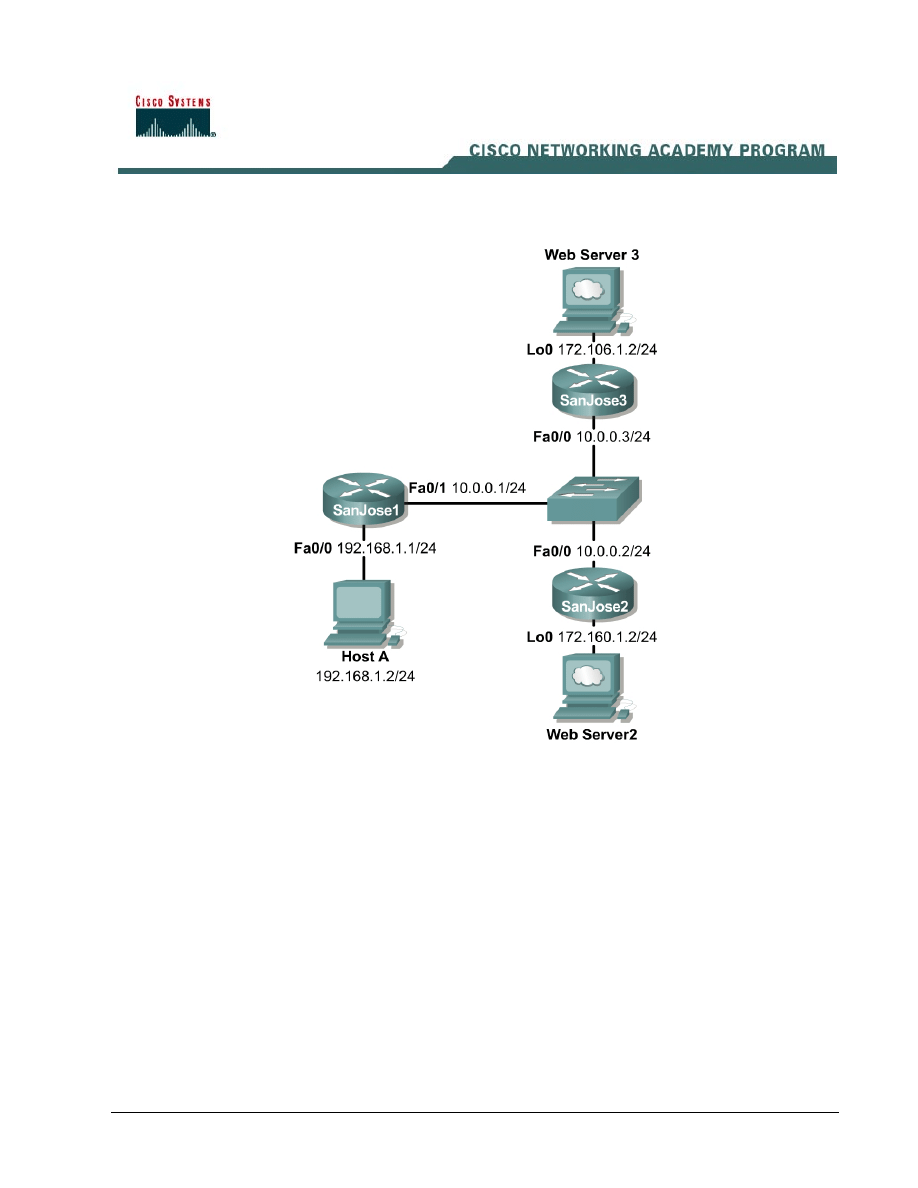
The single Class C address used on the SanJose1 LAN is not sufficient for the users and devices.
Therefore, NAT is being used to represent all inside local addresses, 192.168.1.x. However, all users
on the SanJose1 LAN require HTTP access to the Web Servers on the SanJose2 and SanJose3
LANs. This is represented by the respective Loopback addresses. Therefore, a multiple pool of
addresses must be used and it is required that all the hosts on the 192.168.1.0 network be translated
as follows:
172.106.2.0 when accessing Web Server 3 on the 172.106.1.0 network and
172.160.2.0 when accessing Web Server 2 on the 172.160.1.0 network.
As the Network Administrator, configure the SanJose1 router according to the requirements
described using dynamic NAT translation with multiple pools and route maps.

2 - 6
CCNP 1: Advanced Routing v 3.0 - Lab 8.5.2b
Copyright
2003, Cisco Systems, Inc.
Step 1
Build and configure the network according to the diagram. Also, enable the SanJose2 and SanJose3
routers for HTTP access as shown in the following to simulate the attached Web Servers:
SanJose2(config)#ip http server
SanJose3(config)#ip http server
Since no routing protocol is being used, static routes must be configured on SanJose1 to the
respective Web Servers on the SanJose2 and SanJose3 LANs. Default routes must be configured to
the 192.168.1.0 network from SanJose2 and SanJose3.
SanJose1(config)#ip route 172.106.1.0 255.255.255.0 10.0.0.3
SanJose1(config)#ip route 172.160.1.0 255.255.255.0 10.0.0.2
SanJose2(config)#ip route 0.0.0.0 0.0.0.0 10.0.0.1
SanJose3(config)#ip route 0.0.0.0 0.0.0.0 10.0.0.1
Test connectivity between the routers and between the SanJose1 Host A and its gateway with a
ping
.
Step 2
Create the pool of addresses that will be used to translate hosts on the 192.168.1.0 network. Create
the access control lists to allow hosts on the 192.168.1.0 network access to the 172.106.1.0 and
172.160.1.0 networks.
SanJose1(config)#ip nat pool pool106 172.106.2.1 172.106.2.254 prefix-
length 24
SanJose1(config)#ip nat pool pool160 172.160.2.1 172.160.2.254 prefix-
length 24
SanJose1(config)#access-list 106 permit ip 192.168.1.0 0.0.0.255
172.106.1.0 0.0.0.255
SanJose1(config)#access-list 160 permit ip 192.168.1.0 0.0.0.255
172.160.1.0 0.0.0.255
Step 3
Designate at least one inside NAT interface and one outside NAT interface on the NAT router,
SanJose1.
SanJose1(config)#interface fastethernet 0/0
SanJose1(config-if)#ip nat inside
SanJose1(config-if)#interface fastethernet 0/1
SanJose1(config-if)#ip nat outside
Step 4
So far, every task completed is exactly the same as if using the access control lists with no overload
approach.
Recall that NAT uses access lists and route maps only when it needs to create a translation entry. If
a translation entry already exists that matches the traffic then that will be used and any access lists
or route maps will not be consulted. The difference between using an access list or route map is the
type of translation entry that will be created.
When NAT uses a route map to create a translation entry, it will always create a “fully extended”
translation entry. This translation entry will contain both the inside and outside, local and global,
addresses and any TCP or UDP port information.

3 - 6
CCNP 1: Advanced Routing v 3.0 - Lab 8.5.2b
Copyright
2003, Cisco Systems, Inc.
When NAT uses an access list, it will create a simple translation entry. This simple entry will only
contain local and global IP address entries for just the inside or outside. This also depends on
whether the ip nat inside or
ip nat outside
command is configured. Also, it will not include
any TCP or UDP port information.
Test the access list approach to see exactly why it does not provide the ideal solution for network
address translation in this situation.
Configure the inside source access lists and address pools.
SanJose1(config)#ip nat inside source list 106 pool pool106
SanJose1(config)#ip nat inside source list 160 pool pool160
Enable debug ip packet on the SanJose1 and SanJose3 routers.
Open a browser window from the SanJose1 Host A to access Web Server 3 on the SanJose3 LAN,
loopback address 172.106.1.2. Observe the debug outputs on SanJose1 and SanJose3. Sample
output is shown as follows:
SanJose1#debug ip packet
IP packet debugging is on
SanJose1#
00:35:10: IP: s=172.106.2.1 (FastEthernet0/0), d=172.106.1.2 (FastEthernet0/1),
g=10.0.0.3, len 44, forward
00:35:10: IP: s=172.106.1.2 (FastEthernet0/1), d=192.168.1.2 (FastEthernet0/0),
g=192.168.1.2, len 44, forward
00:35:10: IP: s=172.106.1.2 (FastEthernet0/1), d=192.168.1.2 (FastEthernet0/0),
g=192.168.1.2, len 40, forward
00:35:10: IP: s=172.106.2.1 (FastEthernet0/0), d=172.106.1.2 (FastEthernet0/1),
g=10.0.0.3, len 40, forward
--output omitted--
SanJose1#
SanJose3#debug ip packet
IP packet debugging is on
SanJose3#
SanJose3#
00:35:37: IP: s=172.106.2.1 (FastEthernet0/0), d=172.106.1.2, len 44, rcvd 4
00:35:37: IP: s=172.106.1.2 (local), d=172.106.2.1 (FastEthernet0/0), len 44, se
nding
00:35:37: IP: s=172.106.2.1 (FastEthernet0/0), d=172.106.1.2, len 40, rcvd 4
00:35:37: IP: s=172.106.2.1 (FastEthernet0/0), d=172.106.1.2, len 364, rcvd 4
00:35:37: IP: s=172.106.1.2 (local), d=172.106.2.1 (FastEthernet0/0), len 596, s
ending
00:35:37: IP: s=172.106.1.2 (local), d=172.106.2.1 (FastEthernet0/0), len 596, s
ending
--output omitted--
SanJose3#
Issue the show ip nat translations verbose command on the SanJose1 router. Sample
output is shown as follows:
SanJose1#show ip nat translations verbose
Pro Inside global Inside local Outside local Outside global
--- 172.106.2.1 192.168.1.2 --- ---
create 00:01:37, use 00:00:31, left 23:59:28,
flags:
none, use_count: 0
1. Why are only the inside global and local address translations shown and no protocol or port
information?
_______________________________________________________________________
Enable debug ip packet on the SanJose2 router and SanJose1 if necessary.

4 - 6
CCNP 1: Advanced Routing v 3.0 - Lab 8.5.2b
Copyright
2003, Cisco Systems, Inc.
Now from SanJose1 Host A, use a browser to access Web Server 2 on the SanJose2 LAN, loopback
address 172.160.1.2. Observe the debug outputs on SanJose1 and SanJose 2. Sample output is
shown as follows:
SanJose1#debug ip packet
IP packet debugging is on
SanJose1#
00:55:22: IP: s=172.106.2.1 (FastEthernet0/0), d=172.160.1.2 (FastEthernet0/1),
g=10.0.0.2, len 44, forward
00:55:22: IP: s=172.160.1.2 (FastEthernet0/1), d=192.168.1.2 (FastEthernet0/0),
g=192.168.1.2, len 44, forward
00:55:22: IP: s=172.160.1.2 (FastEthernet0/1), d=192.168.1.2 (FastEthernet0/0),
g=192.168.1.2, len 40, forward
00:55:22: IP: s=172.106.2.1 (FastEthernet0/0), d=172.160.1.2 (FastEthernet0/1),
g=10.0.0.2, len 40, forward
SanJose1#
SanJose2#debug ip packet
IP packet debugging is on
SanJose2#
00:55:56: IP: s=172.106.2.1 (FastEthernet0/0), d=172.160.1.2, len 44, rcvd 4
00:55:56: IP: s=172.160.1.2 (local), d=172.106.2.1 (FastEthernet0/0), len 44, se
nding
00:55:56: IP: s=172.106.2.1 (FastEthernet0/0), d=172.160.1.2, len 40, rcvd 4
00:55:56: IP: s=172.106.2.1 (FastEthernet0/0), d=172.160.1.2, len 364, rcvd 4
00:55:56: IP: s=172.160.1.2 (local), d=172.106.2.1 (FastEthernet0/0), len 596, s
ending
00:55:56: IP: s=172.160.1.2 (local), d=172.106.2.1 (FastEthernet0/0), len 596, s
ending
--output omitted--
SanJose2#
Issue the show ip nat translations verbose command on the SanJose1 router. Sample
output is shown as follows:
SanJose1#show ip nat translations verbose
Pro Inside global Inside local Outside local Outside global
--- 172.106.2.1 192.168.1.2 --- ---
create 00:21:44, use 00:00:26, left 23:59:33,
flags:
none, use_count: 0
SanJose1#
2. After analyzing the data output, document the problem.
_______________________________________________________________________
_______________________________________________________________________
Step 5
Before configuring route maps, disable the debug ip packet command by using the undebug
ip packet
command on SanJose1. Then remove the previously configured inside source access
lists and address pools.
SanJose1#undebug ip packet
SanJose1#clear ip nat translation *
(Be sure to include the asterisk in this command)
SanJose1#configure terminal
SanJose1(config)#no ip nat inside source list 106 pool pool106
SanJose1(config)#no ip nat inside source list 160 pool pool160
Now configure route maps to resolve the problems encountered when using the access lists.
Create the inside source route maps and address pools as follows:
SanJose1(config)#ip nat inside source route-map MAP-106 pool pool106
SanJose1(config)#ip nat inside source route-map MAP-160 pool pool160

5 - 6
CCNP 1: Advanced Routing v 3.0 - Lab 8.5.2b
Copyright
2003, Cisco Systems, Inc.
Create the route maps as follows:
SanJose1(config)#route-map MAP-106 permit 10
SanJose1(config-route-map)#match ip address 106
SanJose1(config-route-map)#route-map MAP-160 permit 10
SanJose1(config-route-map)#match ip address 160
Step 6
Enable debug ip packet on the SanJose1 router.
Open a browser window from the SanJose1 Host A to access Web Server 3 on the SanJose3 LAN,
loopback address 172.106.1.2. Observe the debug outputs on SanJose1 and SanJose 3. Sample
from both routers is shown as follows:
SanJose1#debug ip packet
IP packet debugging is on
SanJose1#
01:13:52: IP: s=172.106.2.1 (FastEthernet0/0), d=172.106.1.2 (FastEthernet0/1),
g=10.0.0.3, len 44, forward
01:13:52: IP: s=172.106.1.2 (FastEthernet0/1), d=192.168.1.2 (FastEthernet0/0),
g=192.168.1.2, len 44, forward
01:13:52: IP: s=172.106.1.2 (FastEthernet0/1), d=192.168.1.2 (FastEthernet0/0),
g=192.168.1.2, len 40, forward
01:13:52: IP: s=172.106.2.1 (FastEthernet0/0), d=172.106.1.2 (FastEthernet0/1),
g=10.0.0.3, len 40, forward
SanJose1#
SanJose3#debug ip packet
IP packet debugging is on
SanJose3#
01:14:19: IP: s=172.106.2.1 (FastEthernet0/0), d=172.106.1.2, len 44, rcvd 4
01:14:19: IP: s=172.106.1.2 (local), d=172.106.2.1 (FastEthernet0/0), len 44, se
nding
01:14:19: IP: s=172.106.2.1 (FastEthernet0/0), d=172.106.1.2, len 40, rcvd 4
01:14:19: IP: s=172.106.2.1 (FastEthernet0/0), d=172.106.1.2, len 234, rcvd 4
01:14:19: IP: s=172.106.1.2 (local), d=172.106.2.1 (FastEthernet0/0), len 596, s
ending
01:14:19: IP: s=172.106.1.2 (local), d=172.106.2.1 (FastEthernet0/0), len 596, s
ending
--output omitted--
SanJose3#
Issue the show ip nat translations verbose command on the SanJose1 router. Sample
output is shown as follows:
SanJose1#show ip nat translations verbose
Pro Inside global Inside local Outside local Outside global
tcp 172.106.2.1:1118 192.168.1.2:1118 172.106.1.2:80 172.106.1.2:80
create 00:00:08, use 00:00:07, left 00:00:52,
flags:
extended, timing-out, use_count: 0
SanJose1#
Notice that while there are no differences in the debug ip packet outputs generated previously,
the output of the show ip nat translations verbose command is different.
3. What additional information is now available and why?
_______________________________________________________________________
_______________________________________________________________________

6 - 6
CCNP 1: Advanced Routing v 3.0 - Lab 8.5.2b
Copyright
2003, Cisco Systems, Inc.
Open a browser window from the SanJose1 Host A to access Web Server 2 on the SanJose2 LAN,
loopback address 172.160.1.2. Observe the debug outputs on SanJose1 and SanJose 2. Sample
output is shown as follows:
SanJose1#debug ip packet
IP packet debugging is on
SanJose1#
01:35:28: IP: s=172.160.2.1 (FastEthernet0/0), d=172.160.1.2 (FastEthernet0/1),
g=10.0.0.2, len 44, forward
01:35:28: IP: s=172.160.1.2 (FastEthernet0/1), d=192.168.1.2 (FastEthernet0/0),
g=192.168.1.2, len 44, forward
01:35:29: IP: s=172.160.1.2 (FastEthernet0/1), d=192.168.1.2 (FastEthernet0/0),
g=192.168.1.2, len 40, forward
01:35:29: IP: s=172.160.2.1 (FastEthernet0/0), d=172.160.1.2 (FastEthernet0/1),
g=10.0.0.2, len 40, forward
SanJose1#
SanJose2#debug ip packet
IP packet debugging is on
SanJose2#
01:35:54: IP: s=172.160.2.1 (FastEthernet0/0), d=172.160.1.2, len 44, rcvd 4
01:35:54: IP: s=172.160.1.2 (local), d=172.160.2.1 (FastEthernet0/0), len 44, se
nding
01:35:54: IP: s=172.160.2.1 (FastEthernet0/0), d=172.160.1.2, len 40, rcvd 4
01:35:54: IP: s=172.160.2.1 (FastEthernet0/0), d=172.160.1.2, len 234, rcvd 4
01:35:54: IP: s=172.160.1.2 (local), d=172.160.2.1 (FastEthernet0/0), len 596, s
ending
01:35:54: IP: s=172.160.1.2 (local), d=172.160.2.1 (FastEthernet0/0), len 596, s
ending
--output omitted--
SanJose2#
Issue the show ip nat translations verbose command on the SanJose1 router. Sample
output is shown as follows:
SanJose1#show ip nat translations verbose
Pro Inside global Inside local Outside local Outside global
tcp 172.160.2.1:1122 192.168.1.2:1122 172.160.1.2:80 172.160.1.2:80
create 00:00:34, use 00:00:34, left 00:00:25,
flags:
extended, timing-out, use_count: 0
SanJose1#
Dynamic NAT with multiple pools using route maps is now successfully configured.
4. Why does the translation from the SanJose1 Host A to the Web Server 2 on the SanJose2
LAN now work correctly with route maps?
_______________________________________________________________________
_______________________________________________________________________
SanJose1#show ip nat translations verbose
Pro Inside global Inside local Outside local Outside global
tcp 172.106.2.1:1126 192.168.1.2:1126 172.106.1.2:80 172.106.1.2:80
create 00:00:04, use 00:00:04, left 00:00:55,
flags:
extended, timing-out, use_count: 0
tcp 172.160.2.1:1125 192.168.1.2:1125 172.160.1.2:80 172.160.1.2:80
create 00:00:24, use 00:00:24, left 00:00:35,
flags:
extended, timing-out, use_count: 0
SanJose1#
Note: NAT ability to use route maps with static translations was introduced with Cisco IOS
version 12.2(4)T and 12.2(4)T2 for the Cisco 7500 series routers.
NAT with access list and overload will create a “fully extended” translation and is the same as the
route map.
Wyszukiwarka
Podobne podstrony:
lab 6 9 2b
Lab 2b
CCNP4 lab 6 2b en
Lab 2b
Fiz Lab 2b DOC
CCNA2 lab 11 2 2b pl
lab 2 10 2b
15 4 2b Lab Sharing
2b 3 3 2 2 Lab Wdrożenie zabezpieczenia VLAN
lab 11 2 2b
CCNA2 lab 11 2 2b pl
spis lab I sem 2010
2b ANALIZA RYNKU
III WWL DIAGN LAB CHORÓB NEREK i DRÓG MOCZ
więcej podobnych podstron