
© SANS Institute 2001, Author retains full rights
Key fingerprint = AF19 FA27 2F94 998D FDB5 DE3D F8B5 06E4 A169 4E46
Key fingerprint = AF19 FA27 2F94 998D FDB5 DE3D F8B5 06E4 A169 4E46
© SANS Institute 2001,
As part of the Information Security Reading Room.
Author retains full rights.
Cisco Router Hardening Step-by-Step
Security Essentials v1.2e
Dana Graesser
July 25, 2001
1.
Introduction
There are three main categories of routers in use at companies today. Not brands such as Cisco,
Nortel and Juniper, but three types that include Internet Gateway routers, Corporate Internal
routers and B2B routers. These three categories of routers should all be given consideration
from a security perspective, because they each pose unique security problems that should be
addressed.
Internet Gateway routers should be hardened to protect the corporation from external persons
who might wish to gain access to internal corporate resources. These external persons might be
script kiddies, malicious crackers or paid hackers intending to steal data.
Corporate Internal routers should be hardened to protect the corporation from internal threats.
Internal threats can be uninformed users who unintentionally cause harm or dissatisfied
employees who are intent on malevolent behavior. Internal routers should also be hardened
using tools such as access lists to protect especially sensitive corporate resources such as
financial data, research data or employee data.
B2B routers need to be hardened because they pose the same threats as Internet Gateway routers
and Corporate Internal routers to the internal network. Additionally they expose the company to
a certain level of risk because the partner network could be compromised if security measures
are not in place. Protecting business partners from risks from the internal network is good for
security and for business relations.
Cisco Systems is the dominant manufacturer of WAN equipment. Other vendors in the same
market include Juniper Networks and Nortel Networks. In the second quarter of 2000, Cisco had
75 percent of the high-end router market and an astounding 91 percent in the general router
market (
http://news.cnet.com/news/0-1004-200-3121255.html
).
According to the In-Stat Group 2000 Router Market Analysis, the entire router market will
exceed $30 billion by 2004. Additionally, traditional routers sales will grow through 2004 in the
double-digit range with terabit routers and SOHO cable/DSL routers leading the increase
(http://www.instat.com/abstracts/wn/2000/wn0008rt-abs.htm).
As of June 2000, throughout the world there are more than 5000 Cisco Certified Internetworking
Expert (CCIE™) certified professionals, more than 22,000 resellers, more than 1300 solutions
partners, and 3700 Cisco Networking Academies in 64 countries
(
http://www.cisco.com/warp/public/732/abc/enterprise/attributes.shtml
).
For all the reasons, a set of standard practices for hardening a router becomes a necessity.
Certain variations will always need to be addressed based on the topology of the network, the

© SANS Institute 2001, Author retains full rights
Key fingerprint = AF19 FA27 2F94 998D FDB5 DE3D F8B5 06E4 A169 4E46
Key fingerprint = AF19 FA27 2F94 998D FDB5 DE3D F8B5 06E4 A169 4E46
© SANS Institute 2001,
As part of the Information Security Reading Room.
Author retains full rights.
protocols used and the business needs. Those variations should be exceptions to the written
security policy and should be noted because they could expose the company to certain risks.
2.
General Security Guidelines
2.1
Conventions of this Document
The following formats are used in this document. Cisco commands are formatted into text boxes
with two columns. The command is listed in column one and the description is listed is listed in
column two. All commands should be entered in global configuration mode unless specifically
noted otherwise. The commands are written with exact portions of the command in standard font
and user defined input in italics. An example is below.
Command
Description
enable secret password
Establish a new password or change an
existing password for the privileged
command level.
Commands that are not in global configuration mode will have their mode preceding the
command. The mode will be in italics and underline.
Command
Description
(config-line) transport input ssh
Enable SSH access on VTY ports
A basic understanding of the Cisco Command Line Interface (CLI), router operations, routed
protocols and routing protocols is assumed.
2.2
Maximum Benefit vs. Maximum Effort

© SANS Institute 2001, Author retains full rights
Key fingerprint = AF19 FA27 2F94 998D FDB5 DE3D F8B5 06E4 A169 4E46
Key fingerprint = AF19 FA27 2F94 998D FDB5 DE3D F8B5 06E4 A169 4E46
© SANS Institute 2001,
As part of the Information Security Reading Room.
Author retains full rights.
Figure 1 Defense in Depth and Applied Effort with Actual Results
The above chart is one viewpoint on defense in depth. The idea behind the chart is that network
security tasks can be seen on a sliding scale from least effort to most effort while moving
inversely from high impact to low impact.
Routers are included in three of the top four categories that have high impact on network
security. Hardened routers, however, are only part of the solution. Additional measures must be
taken to achieve organizational objectives of mitigated computer risk. For example, it is easy to
implement an access list on a router to block all HTTP traffic. However, filtering certain
websites while allowing others is not a task for which a router is designed. Another area where
routers are not the best solution is in filtering email attachments. For these reasons, defense in
depth is an important security philosophy.
2.2.1 Network Scans
The task with the least effort and the highest impact is the network security scan. A network
security scan generates a list of vulnerabilities to present to the appropriate stakeholders. The
scan report should be used to make management aware of the extent of security problems. Tools
that can be used to perform a security scan are include without charge scanner Nessus
(
http://www.nessus.org
) and with charge scanner ISS (
http://www.iss.net
).

© SANS Institute 2001, Author retains full rights
Key fingerprint = AF19 FA27 2F94 998D FDB5 DE3D F8B5 06E4 A169 4E46
Key fingerprint = AF19 FA27 2F94 998D FDB5 DE3D F8B5 06E4 A169 4E46
© SANS Institute 2001,
As part of the Information Security Reading Room.
Author retains full rights.
Note: Security scans should ONLY be performed when there is explicit written permission from
a person or multiple persons in authority.
2.2.2 Internet/B2B/B2C/Hardening/Enclaving
The next task is defined as “Internet”. This task includes hardening Internet Gateway routers,
B2B routers, enclaving servers and services for B2B and B2C communications behind a firewall
infrastructure, and using an intrusion detection system. The enclaved servers should be hardened
using industry best practices. See the section below on OS Platforms for specific suggestions.
2.2.3 Site WAN Interfaces
WAN applies to site-based routers. These routers should also be hardened according to industry
standards to only allow needed services in and out. WAN routers are part of Corporate Internal
router category.
2.2.4 Site LAN/Switched Infrastructure
LAN applies to the internetwork infrastructure that supports the local network. That
infrastructure includes routers, route modules, switches and hubs. Examples of hardening
methods include ACLs on the routers and VLANs on the switches. Routers and route modules
on the LAN are part of the Corporate Internal router categor y.
2.2.5 RAS Platform Hardening
A number of methods of hardening are available for RAS. Those techniques can include apply
proper authentication, use unlisted numbers in a range different than your company’s public
telephone lines, monitor access, limit dial up times and limit access to systems.
2.2.6 OS Platform Hardening
OS Platforms refers to internal systems. They vary widely and all require different hardening
techniques. Those techniques include apply patches, disable routing, remove unneeded servers,
disable unused services, apply TCPWrappers, install TripWire and apply reverse DNS lookups.
Specific Step-by-Step guides for Solaris, Windows NT and Linux are available at
www.sans.org
.
2.2.7 Application(s) Hardening
Applications have two varieties – purchased applications and in-house developed applications.
Security measures for purchased applications can include apply vendor patches and limit services
per server (i.e. the PDC is not also the public webserver). In-house developed applications
should have security included as part of the initial software design. If not included, future
releases should address security issues.
2.3
Enforce the least privilege principle
Enforcing the least privilege principle means that users and administrators get the commands
they need and ONLY the commands they need. Having additional privileges allows employees
to move beyond the scope of their assigned duties, which can be positive from a business
perspective. However from a security view, users should have the privileges assigned to them in
a manner to limit their ability to go outside their specified tasks.

© SANS Institute 2001, Author retains full rights
Key fingerprint = AF19 FA27 2F94 998D FDB5 DE3D F8B5 06E4 A169 4E46
Key fingerprint = AF19 FA27 2F94 998D FDB5 DE3D F8B5 06E4 A169 4E46
© SANS Institute 2001,
As part of the Information Security Reading Room.
Author retains full rights.
This can pose problems because an administrator may have an assigned area of duty and
privileges, but may need additional privileges in order to facilitate cross training on another
administrator’s duties. A written security policy and a set of operational policies and procedures
should outline how this problem is resolved. Cisco routers allow for assignment of up to 15
levels of privilege.
2.4
Identify the Groups
2.4.1 Administrators
Large corporations have many assets and need many administrators. Small companies may have
one employee who administers all the systems. In either case it is a good idea to break out all the
various roles and determine what privileges each of them should have. This table should be
included in the written security policy. For example:
Title
Privileges
Number of Devices per
Administrator (optional)
Router Administrator
Level 15 access to all routers
Access Server Administrator
Level 15 access to all access
servers
Firewall Administrator
Root privilege to all firewalls
and management stations
IDS Administrator
Root privilege to all IDS
systems and syslog servers
Figure 2 Identify the Groups - Administrators and Privileges
The above is a limited example of the roles available and levels of privilege available to
administrators. In the above scenario, the router and access-server administrator may be the
same person while two additional fulltime personnel will handle the duties of firewall
administrator and IDS administrator. Or all of the above administrators may be one person. Or
all there may be a team of three router administrators, three access-server administrators, three
firewall administrators and three IDS administrators.
Additionally the table could have information about how many devices a single administrator is
expected to administer. That will allow for personnel planning based on the number of devices.
This is good because certain devices require much more hands-on administration than others.
This is especially important because as companies acquire other companies, they can determine
what staffing level is appropriate for operations personnel.
2.4.2 Users
Identifying users is an important step in securing the network. Users can be classified in many
different ways.
In multi-protocol networks users can be classified as IP users, IPX users, Appletalk users, etc.
For example, IP users could be further broken down according to whether they are Unix users,
Linux users and Windows users. Windows users could be further broken down based on
whether the user runs Windows 2000, Windows NT Workstation or Windows 98.

© SANS Institute 2001, Author retains full rights
Key fingerprint = AF19 FA27 2F94 998D FDB5 DE3D F8B5 06E4 A169 4E46
Key fingerprint = AF19 FA27 2F94 998D FDB5 DE3D F8B5 06E4 A169 4E46
© SANS Institute 2001,
As part of the Information Security Reading Room.
Author retains full rights.
Users can also be classified according to their business function. Examples include finance,
administration, sales, graphics, training, information technology, and research. Under sales, the
users could be subdivided into sales managers, outside salespeople, inside salespeople, sales
technical support and sales administrators.
The way that each company classifies its users depends on the structure of the organization.
Understanding the organization and understanding the needs of the users within that organization
allows for judicious assignment of privileges. A smart way to classify users is to develop a
matrix based on the criteria best suited to classifying the organization.
2.5
Limit Trust
2.5.1 Administrators
To be useful for any company, the matrix of roles should be developed and then the personnel
should be assigned to each role. This table, with the personnel assigned, should be part of the
operations documentation. It should NOT be in the written security policy as it may change.
Title
Privileges
Number of
Devices per
Administrator
(optional)
Name
Backup
(optional)
Router
Administrator
Level 15 access
to all routers
Ted
Alice
Access Server
Administrator
Level 15 access
to all access
servers
Alice
Bob
Firewall
Administrator
Root privilege to
all firewalls and
management
stations
Bob
Alice
IDS Administrator
Root privilege to
all IDS systems
and syslog
servers
Alice
Ted
Figure 3 Limit Trust – Administrators and Privileges
If administrators transfer to another department, procedures need to be in place to remove the old
permissions. When they leave the company, procedures should be in place about removing the
employee from the devices for which they have permissions.
2.5.2 Users
Policies and procedures need to put into place to ensure the users do not gain more privileges
then they need and are allowed. The structure of the organization and the matrix of users will
highlight what should be done. For example, account creation and deletion should be

© SANS Institute 2001, Author retains full rights
Key fingerprint = AF19 FA27 2F94 998D FDB5 DE3D F8B5 06E4 A169 4E46
Key fingerprint = AF19 FA27 2F94 998D FDB5 DE3D F8B5 06E4 A169 4E46
© SANS Institute 2001,
As part of the Information Security Reading Room.
Author retains full rights.
coordinated if users belong to both a Windows NT domain and have terminal access to a
mainframe.
Users should be prevented from accessing areas other than the ones that have been set up for
them. As users transfer from department to another, procedures need to be in place to remove
the old permissions and set up new permissions. When employees leave a company, procedures
should be in place about removing the employee from the groups for which they have
permissions. If the company employs a centralized directory, that could serve as a focal point.
3.
Setting up the Router
3.1
Physically secure the router
Physical security is the cornerstone of internetworking security. If an attacker can gain physical
access to your device, all the patches, ACLs, and firewall feature sets in the world cannot protect
them. The attacker can cause either overt or covert damage to your network is physical access is
compromised.
Overt damage is classified as immediate shutdown of the services provided by the router.
Examples include stealing the router or turning it off. Covert damage is much harder to find and
correct. It consists of the intentional introduction of malicious information that affects the
router’s services. For example, a malicious attacker could change one line in a multi-line ACL
that will cause routing issues. That change could lead to hours, days or weeks spent tracking
down the routing problem.
3.2
Choosing an IOS®
3.2.1 IOS® Background and History
The operating system for Cisco routers is the Cisco Internetwork Operating System (IOS®). The
original function of a router is just what is seems it should be – to route packets. Over time that
function has expanded greatly with the advent and adoption of new technologies such as voice,
video, and virtual private networking. Additional functions will surely be added over time to this
cornerstone of the network.
Cisco IOS® Software supports every major protocol and type of physical medium, for end-to-
end connectivity across IP and legacy networks. Cisco IOS® WAN and dial connectivity
software offers support for ATM, Frame Relay, X.25, ISDN, digital subscriber line (xDSL),
cable, wireless, dial, Point-to-Point Protocol (PPP), VPN, and virtual private dialup network
(VPDN) services (
http://www.cisco.com/warp/public/732/abc/fabric/connectivity.shtml
).
The functionality and multi-protocol support of the Cisco IOS® Software allow it to be a very
useful security measure in any internetwork. Access Control Lists (ACL), Authentication,
Authorization, and Accounting (aaa), and Cisco IOS® Firewall are some of the major tools used
in the Cisco IOS® Software to ensure security. Security professionals need to become experts in
the use of those tools to mitigate security risks to their network.
The emergence of e-commerce as a viable means to do business has required that networks
become more secure so that customers will feel comfortable conducting transactions over the
© SANS Institute 2001, Author retains full rights
Key fingerprint = AF19 FA27 2F94 998D FDB5 DE3D F8B5 06E4 A169 4E46
Key fingerprint = AF19 FA27 2F94 998D FDB5 DE3D F8B5 06E4 A169 4E46
© SANS Institute 2001,
As part of the Information Security Reading Room.
Author retains full rights.
Internet. Part of that security consists of “hardening” the routers. Having hardened routers, in
conjunction with hardened switches, servers and applications, assists in having another layer to a
“defense in depth” scheme.
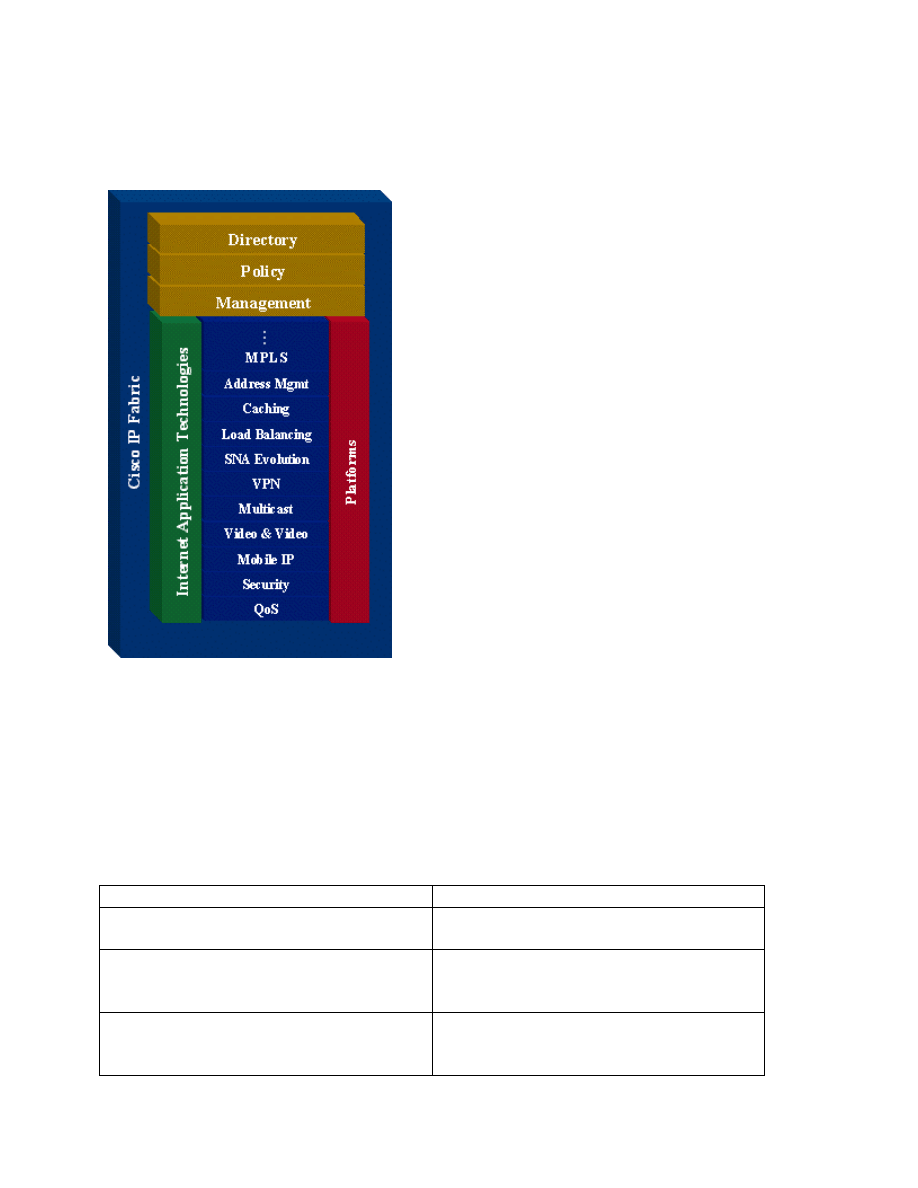
Figure 4 Cisco IOS® Software Intelligent Network Services
Cisco uses the terms release and feature set. A release is analogous to a version number and
works on many, if not all, of the various Cisco platforms. Feature sets (also known as software
images) are subsets of releases and are also supported across different platforms. Not all feature
sets are available on all platforms. Based on the number of releases, number of features and
number of platforms there are a large number of IOS® packages available.
Examples of feature-set categories include:
Feature Set
Description
Basic
A basic feature set for the hardware
platform; for example IP, IP/FW
Plus
A basic feature set plus additional features
such as IP Plus, IP/FW Plus, and Enterprise
Plus
Plus – Encryption
The addition of the 56-bit (Example: Plus
56) data encryption feature sets to either a
basic or plus feature set; examples include

© SANS Institute 2001, Author retains full rights
Key fingerprint = AF19 FA27 2F94 998D FDB5 DE3D F8B5 06E4 A169 4E46
Key fingerprint = AF19 FA27 2F94 998D FDB5 DE3D F8B5 06E4 A169 4E46
© SANS Institute 2001,
As part of the Information Security Reading Room.
Author retains full rights.
IP/ATM PLUS IPSEC 56 or Enterprise
Plus 56.
Figure 5 Feature Set Categories
From Cisco IOS® Release 12.2 onwards, the encryption designators are k8/k9:
1. k8: less than or equal to 64-bit encryption (on 12.2 and up)
2. k9: greater than 64-bit encryption (on 12.2 and up)
(http://www.cisco.com/warp/public/732/abc/releases/package.shtml)
Major IOS releases currently available are 10.3, 11.0, 11.1, 11.2, 11.3, 12.0, 12.1 and 12.2.
Further reading on the most current release 12.2:
(
http://www.cisco.com/univercd/cc/td/doc/product/software/ios122/122relnt/xprn122/122reqs.ht
m
)
Release
Description
Early-deployment (ED)
Indicates timely introduction of innovation
internetworking technologies.
Major Release
Takes the new functions introduced in
several ED releases and extends them to
more platforms and ensures that reliability
is achieved over a long period of time, 12.0
and 12.1 are major releases.
Maintenance Level
12.0 is the number of the major release, and
7 is its maintenance level. The complete
release number is 12.0(7)
T (Technology) Release
Uses the current major release as its
foundation to provide new features and
platform support. An example is Cisco
IOS® Release 12.1T
X Release
Supports only a limited number of
platforms and is based on a T release. An
example is 12.1(1)XB.
General-Deployment (GD) Release
A major release that has had extensive
market release, testing and bug analysis in
a wide range of network environments.
GD is achieved by a particular maintenance
version. Subsequent maintenance updates
for that release are also GD releases. For
example, 12.0 got the GD certification at
12.0(8). Thus, 12.0(9), 12.0(10), and so on
are GD releases.
Figure 6 Cisco IOS Releases
(http://www.cisco.com/warp/public/732/abc/releases/releases.shtml)

© SANS Institute 2001, Author retains full rights
Key fingerprint = AF19 FA27 2F94 998D FDB5 DE3D F8B5 06E4 A169 4E46
Key fingerprint = AF19 FA27 2F94 998D FDB5 DE3D F8B5 06E4 A169 4E46
© SANS Institute 2001,
As part of the Information Security Reading Room.
Author retains full rights.
Since the different releases of the Cisco IOS® work on different platforms and support different
features, one must carefully examine the Release notes to find the most stable, most secure
version of IOS® that supports the features that the internetwork needs.
3.2.2 Known Vulnerabilities
Cisco has several major vulnerabilities detailed on its website. A short description of each one,
quoted directly from the Cisco website, is included below. Additionally the Bugtraq ID and
credit are listed where available. They are available on the Bugtraq Vulnerabilities Database at
http://www.securityfocus.com/
.
Vulnerability
Cisco Bug ID –
Date
Description, Bugtraq ID, Credit
Cisco IOS
PPTP
Vulnerability
Cisco Bug ID
CSCdt46181
July 12, 2001
By sending a crafted PPTP packet to port 1723, a control
PPTP port, it is possible to crash the router. This
vulnerability does not require special router configuration.
Enabling PPTP is sufficient to expose the vulnerability.
The router will crash after it receives a single packet.
http://www.cisco.com/warp/public/707/PPTP-
vulnerability-pub.html
Bugtraq ID: 3022, Credit: Cisco Security Advisory
Multiple SSH
Vulnerabilities:
CRC-32 check
Cisco Bug ID
CSCdt96253
June 28, 2001
In order for this attack to succeed, an attacker must possess
one or two known ciphertext/plaintext pairs. This should
not be difficult since every session starts with a greeting
screen which is fixed and which can be determined. This
also implies that an attacker must be somewhere along the
session path in order to be able to sniff the session and
collect corresponding ciphertext.
http://www.cisco.com/warp/public/707/SSH-multiple-
pub.html
Bugtraq ID: 2347, Credit: Michal Zalewski
Multiple SSH
Vulnerabilities:
Traffic
analysis
Cisco Bug ID
CSCdt57231
June 28, 2001
To exploit this vulnerability, an attacker must be able to
capture packets. When sending a packet using the SSH
protocol, it is padded to the next 8-byte boundary, but the
exact length of the data (without the padding) is sent
unencrypted.
http://www.cisco.com/warp/public/707/SSH-multiple-
pub.html
Bugtraq ID:
http://www.securityfocus.com/archive/1/169840, Credit:
Solar Designer and Dug Song
Multiple SSH
Vulnerabilities:
Key recovery
Cisco Bug ID
CSCdu37371
June 28, 2001
In order to exploit this vulnerability, an attacker must be
able to sniff the SSH session and be able to establish a
connection to the SSH server. In order to recover the
server key, an attacker must perform an additional
2^20+2^19=1572864 connections. Since the key has a
lifespan of about an hour, this means that an attacker must

© SANS Institute 2001, Author retains full rights
Key fingerprint = AF19 FA27 2F94 998D FDB5 DE3D F8B5 06E4 A169 4E46
Key fingerprint = AF19 FA27 2F94 998D FDB5 DE3D F8B5 06E4 A169 4E46
© SANS Institute 2001,
As part of the Information Security Reading Room.
Author retains full rights.
perform around 400 connections per second.
http://www.cisco.com/warp/public/707/SSH-multiple-
pub.html
Bugtraq ID: 2344, Credit: Core SDI Advisory
IOS HTTP
Authorization
Vulnerability
Cisco Bug ID
CSCdt93862
June 29, 2001
By sending a crafted URL it is possible to bypass
authentication and execute any command on the router at
level 15 (enable level, the most privileged level). This will
happen only if the user is using a local database for
authentication (usernames and passwords are defined on
the device itself). The same URL will not be effective
against every Cisco IOS software release and hardware
combination. However, there are only 84 different
combinations to try, so it would be easy for an attacker to
test them all in a short period of time.
The URL in question follows this format:
http://<device_addres>/level/xx/exec/....
Where xx is a number between 16 and 99.
http://www.cisco.com/warp/public/707/IOS-httplevel-
pub.html
Bugtraq: 2936, Credit: David Hyams
IOS Reload
after Scanning
Vulnerability
Cisco Bug ID
CSCds07326
May 24, 2001
An attempt to make a TCP connection to ports 3100-3999,
5100-5999, 7100-7999, and 10100-10999 will cause the
router to unexpectedly reload at the next show running-
config, or write memory, or any command that causes the
configuration file to be accessed. Cisco IOS software
cannot be configured to support any services that might
listen at those port addresses, and cannot be configured to
accept connections on those ports, however, connection
attempts to these ports in the affected version will cause
memory corruption, later leading to an unexpected reload.
A common log message in environments that experienced
security scan related crashes was the "attempt to connect to
RSHELL" error message.
http://www.cisco.com/warp/public/707/ios-tcp-scanner-
reload-pub.shtml
Bugtraq ID: 2804, Credit: Cisco Security Advisory
Cisco IOS
Software TCP
Initial
Sequence
Number
Randomization
Improvements
Cisco Bug ID
CSCds04747
March 7, 2001
Cisco IOS® Software contains a flaw that permits the
successful prediction of TCP Initial Sequence Numbers.
This vulnerability is present in all released versions of
Cisco IOS software running on Cisco routers and switches.
It only affects the security of TCP connections that
originate or terminate on the affected Cisco device itself; it
does not apply to TCP traffic forwarded through the
affected device in transit between two other hosts.
http://www.cisco.com/warp/public/707/ios-tcp-isn-
random-pub.shtml

© SANS Institute 2001, Author retains full rights
Key fingerprint = AF19 FA27 2F94 998D FDB5 DE3D F8B5 06E4 A169 4E46
Key fingerprint = AF19 FA27 2F94 998D FDB5 DE3D F8B5 06E4 A169 4E46
© SANS Institute 2001,
As part of the Information Security Reading Room.
Author retains full rights.
Cisco IOS
Software
Multiple
SNMP
Community
String
Vulnerabilities
Cisco Bug IDs
CSCds32217,
CSCds16384,
CSCds19674,
CSCdr59314,
CSCdr61016,
CSCds49183.
March 7, 2001
Multiple Cisco IOS® Software and CatOS software
releases contain several independent but related
vulnerabilities involving the unexpected creation and
exposure of SNMP community strings. These
vulnerabilities can be exploited to permit the unauthorized
viewing or modification of affected devices. Community
strings also provide a weak form of access control in
earlier versions of SNMP, v1 and v2c. (SNMPv3 provides
much improved access control using strong authentication
and should be preferred over SNMPv1 and SNMPv2c
wherever it is supported.)
http://www.cisco.com/warp/public/707/ios-snmp-
community-vulns-pub.shtml
Cisco IOS
Software
SNMP Read-
Write ILMI
Community
String
Vulnerability
Cisco Bug ID
CSCdp11863
March 7, 2001
An affected device might be vulnerable to a denial-of-
service attack if it is not protected against unauthorized use
of the ILMI community string.
http://www.cisco.com/warp/public/707/ios-snmp-ilmi-
vuln-pub.shtml
Bugtraq ID: 2427, Credit: Cisco Security Advisory
Cisco IOS
HTTP Server
Query
Vulnerability
Cisco Bug ID
CSCdr91706
November 1,
2000
A defect in multiple releases of Cisco IOS software will
cause a Cisco router or switch to halt and reload if the IOS
HTTP service is enabled, browsing to
"http://router-ip/anytext?/" is attempted, and the enable
password is supplied when requested. This defect can be
exploited to produce a denial of service
(DoS) attack.
http://www.cisco.com/warp/public/707/ioshttpserverquery-
pub.shtml
Bugtraq: 1838, Credit: Alberto Solino
Cisco IOS
HTTP Server
Vulnerability
Cisco Bug ID
CSCdr36952
May 15, 2000
A defect in multiple releases of Cisco IOS software will
cause a Cisco router or switch to halt and reload if the IOS
HTTP service is enabled and browsing to "http://<router-
ip>/%%" is attempted. This defect can be exploited to
produce a denial of service (DoS) attack.
http://www.cisco.com/warp/public/707/ioshttpserver-
pub.shtml
Bugtraq ID: 1154, Credit: Keith Woodworth
Figure 7 Cisco IOS Vulnerabilities
In an environment were uptime and responsiveness are paramount and resources are at a
premium, policies and procedures need to be put in place to insure that all routers have an IOS
version installed to avoid exploits and vulnerabilities. Security procedures should require that IT
staff visit on a regular basis and sign up for email distributions from the various exploit and
vulnerability alert centers.

© SANS Institute 2001, Author retains full rights
Key fingerprint = AF19 FA27 2F94 998D FDB5 DE3D F8B5 06E4 A169 4E46
Key fingerprint = AF19 FA27 2F94 998D FDB5 DE3D F8B5 06E4 A169 4E46
© SANS Institute 2001,
As part of the Information Security Reading Room.
Author retains full rights.
Cisco PSIRT Advisories.
http://www.cisco.com/warp/public/707/advisory.html
CERT Coordination Center.
http://www.cert.org
SANS Emergency Incident Handler
http://www.incidents.org/
SANS Security Institute
http://www.sans.org
3.3
Choose a Routing Protocol
Unless this is an installation of a new network, a routing protocol is likely already in use.
However, the routing protocol in use may not be the most secure protocol. Migrating from the
current insecure protocol to a more secure protocol is a good idea. Routing protocols provide
security through the use of peer authentication. A major concern with any routing protocol is the
possibility of a router accepting invalid routing updates (Doyle, 1998).
The routing protocols listed in the table are protocols that route IP, IPX and Appletalk only. If
additional protocols are being routed the authentication available should be investigated.
Protocol Name
Authentication
Clear-Text
MD5 Hash
Protocol
RFCs
RIPv1
No
RFC 1058
IGRP
No
Proprietary
RIPv2
Yes
Yes
Yes
RFC 1723
EIGRP
Yes
Yes
Proprietary
OSPFv2
Yes
Yes
Yes
RFC 2328
IS-IS
Yes
Yes
RFC 1142
(ISO 10589),
1195
BGPv4
Yes
Yes
RFC 1771
IPX RIP
No
NLSP
No
IPX EIGRP
No
RTMP
No
Appletalk
EIGRP
No
AURP
No
Figure 8 Authentication per routing protocol
3.4
In-Band and Out-of-Band Communications

© SANS Institute 2001, Author retains full rights
Key fingerprint = AF19 FA27 2F94 998D FDB5 DE3D F8B5 06E4 A169 4E46
Key fingerprint = AF19 FA27 2F94 998D FDB5 DE3D F8B5 06E4 A169 4E46
© SANS Institute 2001,
As part of the Information Security Reading Room.
Author retains full rights.
3.4.1 In-Band communications
Two major forms of in-band communications are available. They are SNMP and Telnet.
3.4.1.1 SNMP
SNMP is a vulnerable service to use on an internetwork and should be used with caution.
Many devices have community strings (which are SNMP passwords) of public for read-only
access and private for read-write access. An SNMP sweep should be done of the routers on the
internetwork. If either public or private is found, they should be removed immediately and
replaced with strong passwords.
Multiple versions of SNMP are available: SNMPv1, SNMPv2c, and SNMPv3. SNMPv3
provides for several important security features: message integrity, authentication and
encryption. SNMPv3 uses HMAC-MD5 or HMAC-SHA for authentication and 56-bit DES for
encryption. If possible, use a different MD5 secret value for sections of the network or for each
router. The minimum IOS® software revision must be Release 12.0(3)T to enable all of the
SNMPv3 commands below.
SNMPv3 operates in a manner similar to privilege levels. Each user belongs to a group that
determines their privileges. The three user groups are auth, noauth, and priv. Below is a table
taken from the Cisco Systems website.
Model Level
Authentication
Encryption What Happens
v3
noAuthNoPriv Username
No
Uses a username match for
authentication.
v3
authNoPriv
MD5 or SHA
No
Provides authentication based on
the HMAC-MD5 or HMAC-
SHA algorithms.
v3
authPriv
MD5 or SHA
DES
Provides authentication based on
the HMAC-MD5 or HMAC-
SHA algorithms. Provides DES
56-bit encryption in addition to
authentication based on the
CBC-DES (DES-56) standard.
Figure 9 SNMP v3
http://www.cisco.com/univercd/cc/td/doc/product/software/ios120/120newft/120t/120t3/snmp3.h
tm#xtocid69272
The commands to enable SNMPv3 are:
Command
Description
snmp-server engineID local engineid-string
| remote ip-address udp-port port-number
engineid-string
Configures names for both the local and
remote SNMP engine (or copy of SNMP)
on the router.
snmp-server group groupname v3{auth |
Configures a new SNMP group and maps

© SANS Institute 2001, Author retains full rights
Key fingerprint = AF19 FA27 2F94 998D FDB5 DE3D F8B5 06E4 A169 4E46
Key fingerprint = AF19 FA27 2F94 998D FDB5 DE3D F8B5 06E4 A169 4E46
© SANS Institute 2001,
As part of the Information Security Reading Room.
Author retains full rights.
noauth | priv} access access-list
the users to an access list.
snmp-server host host traps version 3 {auth
| noauth | priv} udp-port port notification-
type
Configures the recipient of an SNMP trap
operation.
snmp-server user username groupname
remote ip-address udp-port port v3
encrypted auth {md5 | sha} auth-password
[priv des56 priv password] [access access-
list]
Configures a new user to an SNMP group.
3.4.1.2 Telnet
Local asynchronous terminals and dialup modems use standard lines, known as "TTYs". Remote
network connections, regardless of the protocol, use virtual TTYs, or "VTYs". The best way to
protect a system is to make certain that appropriate controls are applied on all lines, including
both VTY lines and TTY lines. http://www.cisco.com/warp/public/707/21.html
Telnet access should be secured using SSH. There are multiple versions of SSH available, but
Cisco only supports SSH version 1.
Command
Description
line line-number ending-line-number
Identifies a line for configuration and
enters line configuration mode.
(config-line) transport input ssh
Enable SSH access on VTY ports
(config-line) exec-timeout minutes
[seconds]
Prevents an idle session from consuming a
VTY indefinitely. Attackers could use idle
sessions as a denial-of-service attack.
(config-line) service tcp-keepalives-in
Can help to guard against both malicious
attacks and "orphaned" sessions caused by
remote system crashes.
(config-line) session-limit session-number
Sets the maximum number of sessions. A
small number of sessions may be useful in
limiting risk, but leads to the opportunity
for denial-of-service.
3.4.2 Out-of-Band Communications
The console port of a router has special privileges. Using the “password recovery” procedures
found on the Cisco website (http://www.cisco.com/warp/public/474/), an attacker can gain
control over the router.
If no modem or terminal server is attached, the console port is protected by the fact that the
router has been physically secured.
However, an attacker who can crash the router, and who has access to the console port via a
hardwired terminal, a modem, a terminal server, or some other network device, can take control
of the system, even if they do not have physical access to it or the ability to log in to it normally
(http://www.cisco.com/warp/public/707/21.html)
.

© SANS Institute 2001, Author retains full rights
Key fingerprint = AF19 FA27 2F94 998D FDB5 DE3D F8B5 06E4 A169 4E46
Key fingerprint = AF19 FA27 2F94 998D FDB5 DE3D F8B5 06E4 A169 4E46
© SANS Institute 2001,
As part of the Information Security Reading Room.
Author retains full rights.
If these other methods to access the console are available, passwords and privilege levels should
be used to limit access.
3.5
Choose a log server
A log server should be chosen on the network. It should be physically and logically secured.
The server should be secured and hardened so that the logs on it will have a high measure of
believability.
4.
Establish Strong Password Controls and Secure Account Policies
4.1
Passwords
Protect Passwords with Enable Secret
To provide a layer of security, particularly for passwords that cross the network or are stored on
a TFTP server, use the enable secret command. It allows you to establish an encrypted password
that users must enter to access enable mode (the default), or any privilege level you specify.
Command
Description
enable secret password
Establish a new password or change an
existing password for the privileged
command level.
There is another type called the Enable Password. Anyone who gets a copy of the configuration
file can easily crack this type of password. Several tools are available to crack these passwords.
They include Password Decryption in the Solarwinds suite (www.solarwinds.net) and
GetPass.exe from Boson (www.boson.com).
A way to spot a password that uses this weak form of encryption in a configuration file would be
to find a line that looks like this: enable password 7 023c445a05024f0b43460758. The 7 before
the string of letters and numbers shows that the password was encrypted using a simple Vigenere
cipher that is easy to break.
However, enable secret passwords are not completely invulnerable. They are subject to
“dictionary attacks” so copies of the configuration file should be protected from people who
should not have access to them.
4.2
Privilege Levels
Cisco employs privilege levels to make security more granular.
By default, the Cisco IOS® software has two modes of password security: user mode (EXEC)
and privilege mode (enable). You can configure up to 16 hierarchical levels of commands for
each mode. By configuring multiple passwords, you can allow different sets of users to have
access to specified commands. For example, if you want the configure command to be available
to a more restricted set of users than the clear line command, you can assign level 2 security to
the clear line command and distribute the level 2 password fairly widely, and assign level 3

© SANS Institute 2001, Author retains full rights
Key fingerprint = AF19 FA27 2F94 998D FDB5 DE3D F8B5 06E4 A169 4E46
Key fingerprint = AF19 FA27 2F94 998D FDB5 DE3D F8B5 06E4 A169 4E46
© SANS Institute 2001,
As part of the Information Security Reading Room.
Author retains full rights.
security to the configure command and distribute the password to level 3 commands to fewer
users.
(http://www.cisco.com/univercd/cc/td/doc/product/software/ios120/12cgcr/secur_c/scprt5/scpass
.htm)
.
Set the Privilege Level for a Command
To set the privilege level for a command:
Command
Description
privilege mode level level command
Set the privilege level for a command.
enable password level level [encryption-
type] password
Specify the enable password for a privilege
level.
Change the Default Privilege Level for Lines
To change the default privilege level for a given line or a group of lines:
Command
Description
(config-line) privilege level level
Specify a default privilege level for a line.
4.3
Banners
Banners are an important security consideration. Banners should be written that meet local, state
and federal law considerations. Banners should NOT include verbiage that implies or states
directly “Welcome”.
Sample banners are included for an Internet Service Provider, a company, a government agency
and a university. These sample banners were taken from actual routers and are only included as
a starting point. Care should be taken to write an appropriate banner based on the sensitivity of
the data and the perceived threat. For example, a company manufacturing bombs should have a
more stringent banner than a university with an open access policy.
4.3.1 Sample ISP Banner
************************************************************************
Use is restricted to X Company authorized users who must comply with the
Acceptable User Policy (AUP). Usage is monitored; unauthorized use will
be prosecuted.
************************************************************************
4.3.2 Sample Company Banner
************************************************************************
You have logged on to a X Company proprietary device. INFORMATION IN THIS DEVICE
BELONGS TO X COMPANY AND/OR ONE OF ITS AUTHORIZED CLIENTS AND MAY
NOT BE COPIED (IN WHOLE OR IN PART) IN ANY MANNER WITHOUT EXPRESS
WRITTEN AUTHORIZATION. This device may be used only for the authorized business
purposes of X Company and/or its clients. Anyone found using this device or its information for

© SANS Institute 2001, Author retains full rights
Key fingerprint = AF19 FA27 2F94 998D FDB5 DE3D F8B5 06E4 A169 4E46
Key fingerprint = AF19 FA27 2F94 998D FDB5 DE3D F8B5 06E4 A169 4E46
© SANS Institute 2001,
As part of the Information Security Reading Room.
Author retains full rights.
any unauthorized purpose or personal use may be subject to disciplinary action and/or
prosecution.
************************************************************************
4.3.3 Sample Government Banner
***********************************************************************
NOTICE TO USERS
This is a Federal computer system and is the property of the United States Government. It is for
authorized use only. Users (authorized or unauthorized) have no explicit or implicit expectation
of privacy.
Any or all uses of this system and all files on this system may be intercepted, monitored,
recorded, copied, audited, inspected, and disclosed to authorized site, Department of Energy, and
law enforcement personnel, as well as authorized officials of other agencies, both domestic and
foreign. By using this system, the user consents to such interception, monitoring, recording,
copying, auditing, inspection, and disclosure at the discretion of authorized site or Department of
Energy personnel.
Unauthorized or improper use of this system may result in administrative disciplinary action and
civil and criminal penalties. By continuing to use this system you indicate your awareness of and
consent to these terms and conditions of use. LOG OFF IMMEDIATELY if you do not agree to
the conditions stated in this warning.
***********************************************************************
4.3.4 Sample University Banner
***********************************************************************
Unauthorized use of this machine is prohibited.
This is a University machine intended for University purposes.
The University reserves the right to monitor its use as necessary to ensure its stability,
availability, and security.
***********************************************************************
To enable banners on a router, use the following command.
Command
Description
Banner login banner text
To print a banner message
4.4
Router Management with CiscoSecure ACS
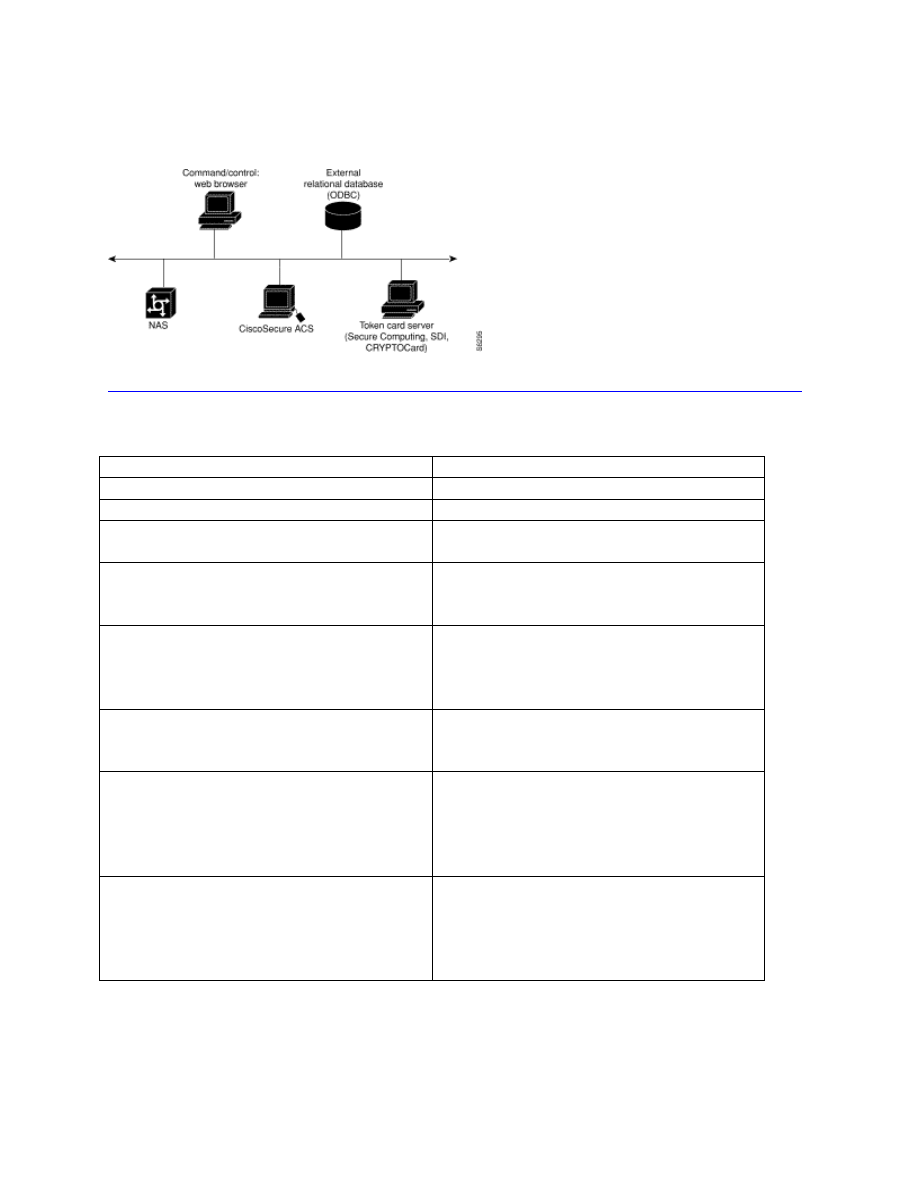
CiscoSecure ACS can be a valuable tool to enhance security because a structure can be
developed to specify command authorization, set administrative privilege levels, and monitor
router access. CiscoSecure ACS uses either TACACS+ or RADIUS to support those functions.
Configuration of the CiscoSecure ACS machine, command/control browser, NAS, external
© SANS Institute 2001, Author retains full rights
Key fingerprint = AF19 FA27 2F94 998D FDB5 DE3D F8B5 06E4 A169 4E46
Key fingerprint = AF19 FA27 2F94 998D FDB5 DE3D F8B5 06E4 A169 4E46
© SANS Institute 2001,
As part of the Information Security Reading Room.
Author retains full rights.
database, and optional token card server are outside the scope of this document. Only commands
specific to the routers to be managed are included.
Figure 10 Overview of CiscoSecure ACS Configuration
http://www.cisco.com/univercd/cc/td/doc/product/access/acs_soft/cs_unx/acsu235/overview.htm
The following command should be coded into router configuration.
Command
Description
tacacs-server host IP address
Identify the CiscoSecure TACACS+ server
tacacs-server key key
Identify the common key
aaa new-model
Global configuration command to enable
aaa.
aaa authentication login default tacacs+
Enable aaa authentication with the
TACACS+ as the method of
authentication.
aaa authentication enable default tacacs+
Create a series of authentication methods
that are used to determine whether a user
can access the privileged EXEC command
level.
aaa authorization exec tacacs+ if-
authenticated
Contact the TACACS+ server to determine
if users are permitted to start an EXEC
shell when they login.
aaa authorization commands 15 tacacs+ if-
authenticated
By default, privilege levels 0 and 15 are
present in the Cisco IOS software. You can
define other privilege levels on the router
to further control authorization. 15 is used
here as an example.
aaa accounting commands 15 stop-only
tacacs+
Create an accounting method list and
enable accounting. The stop-only keyword
instructs TACACS+ to send a stop record
accounting notice at the end of the
requested user process.
4.5
Remove Unneeded Services
The following services should be disabled from security perspective.

© SANS Institute 2001, Author retains full rights
Key fingerprint = AF19 FA27 2F94 998D FDB5 DE3D F8B5 06E4 A169 4E46
Key fingerprint = AF19 FA27 2F94 998D FDB5 DE3D F8B5 06E4 A169 4E46
© SANS Institute 2001,
As part of the Information Security Reading Room.
Author retains full rights.
In global configuration mode, udp and tcp small services should be disabled. They are on by
default in Cisco routers. The services are echo, chargen, daytime and discard. Finger is also on
by default and should be disabled. Cisco Discovery Protocol (CDP) and Network Time Protocol
(NTP) are on by default, and you should turn these off if you do not need them.
Command
Description
no service tcp-small-servers
When you disable the minor TCP/IP
servers, access to the Echo, Discard,
Chargen, and Daytime ports cause the
Cisco IOS® software to send a TCP
RESET packet to the sender and discard
the original incoming packet.
no service udp-small-servers
When you disable the servers, access to
Echo, Discard, and Chargen ports causes
the Cisco IOS® software to send an "ICMP
port unreachable" message to the sender
and discard the original incoming packet.
no ip bootp server
When you disable the BOOTP server,
access to the BOOTP ports cause the Cisco
IOS software to send an "ICMP port
unreachable" message to the sender and
discard the original incoming packet.
no service finger
To disallow Finger protocol requests
(defined in RFC 742) to be made of the
network server, use this global
configuration command. This service is
equivalent to issuing a remote show users
command.
no ip source-route
To discard any IP datagram containing a
source-route option use this command. It
is not good practice to allow IP source-
routing due to implicit tunneling attacks.
no ip identd
The ip identd command returns accurate
information about the host TCP port;
however, no attempt is made to protect
against unauthorized queries.
no ip http server
To remove the ability to use http to manage
Cisco routers. This is very important
considering IOS® HTTP Authorization
vulnerability.
no cdp run
To prevent information gathering about
routers.
ntp disable
If you must run NTP, configure NTP only
on required interfaces, and configure NTP
to listen only to certain specified peers.

© SANS Institute 2001, Author retains full rights
Key fingerprint = AF19 FA27 2F94 998D FDB5 DE3D F8B5 06E4 A169 4E46
Key fingerprint = AF19 FA27 2F94 998D FDB5 DE3D F8B5 06E4 A169 4E46
© SANS Institute 2001,
As part of the Information Security Reading Room.
Author retains full rights.
4.6
Secure Interfaces
The following commands should be used on the interface level to make specific interfaces more
secure.
Command
Description
(config-if) shutdown
All unused interfaces should be in the
shutdown state.
(config-if) no ip proxy-arp
To prevent internal addresses from being
revealed. (This is important to do if you do
not already have NAT configured to
prevent internal addresses from being
revealed).
(config-if) no ip directed-broadcast
The command should be applied to every
LAN interface that isn't known to forward
legitimate directed broadcasts. It is the
default is IOS version 12.0 and later.
4.7
Cisco Access Control Lists
Access lists have several purposes. They are to serve as a security filter for traffic coming in
from the Internet, to filter traffic to and from business partners, and for intra-company traffic to
keep specific areas within the country secure. The first item, blocking traffic from the Internet is
fairly well understood and documented. B2B connections are generally treated in the same
manner as a connection to the Internet so access principles are the same. Securing traffic within
a corporation is a less understood mechanism. For example, if human resources has sensitive
information and is on a subnet with other departments, there is a higher risk of compromise than
if human resources is on another subnet and has an access list that denies traffic.
There are two general stances on access lists. In the first stance, the access list specifically
denies certain traffic and allows all else. The second stance is when the access list allows certain
traffic and, by default, denies all else. The second stance is generally considered more secure
and is the default that Cisco uses.
Very specific information on using ACLs to block the Top Ten can be found in
“Top Ten Blocking Recommendations Using Cisco ACLs Securing the Perimeter with Cisco
IOS 12 Routers” by Scott Winters at
http://www.sans.org/infosecFAQ/firewall/blocking_cisco.htm
which includes specifics from the
Top Ten list from SANS at
http://www.sans.org/topten.htm
.
Additional recommendations for ACLs are located at
http://www.insecure.org/news/P55-10.txt
.
It is an article from Phrack Magazine that discusses best practices for building a “bastion router”.
Cisco recommends the following access list to protect against spoofing.
Command
Description
ip access-group list in
Used on an incoming interface to apply the
below access-list

© SANS Institute 2001, Author retains full rights
Key fingerprint = AF19 FA27 2F94 998D FDB5 DE3D F8B5 06E4 A169 4E46
Key fingerprint = AF19 FA27 2F94 998D FDB5 DE3D F8B5 06E4 A169 4E46
© SANS Institute 2001,
As part of the Information Security Reading Room.
Author retains full rights.
access-list number deny icmp any any
redirect
Blocks all ICMP redirects
access-list number deny ip 127.0.0.0
0.255.255.255 any
Blocks packets originating from a loopback
address
access-list number deny ip 224.0.0.0
31.255.255.255 any
Blocks packets originating from a multicast
address
access-list number deny ip host 0.0.0.0 any
Blocks packets originating from 0.0.0.0
address
The final line could negatively impact BOOTP/DHCP clients and should be tested before wide
implementation. The Common Sense Rules of Network Changes should be followed.
A final note on access lists is that recording violations of access lists can be a useful tool in
detecting attack patterns. By adding the log-input keyword, access list violations will be
recorded along with the interface from which the packet was received and the MAC address of
the host that sent it. That keyword should be used when an intrusion is suspected carefully
because of the impact on system performance.
5.
Logging, Monitoring and Updating the System
5.1
Turn on logging
Logging is a powerful tool when used on a regular basis. Servers are not the only equipment that
should have logging turned on. Cisco router logs also provide useful information. Cisco allows
granularity when specifying what actions should be logged. Cisco routers can provide an
immense quantity of real time status information to support network management simply by
enabling the system logging facility (http://www.networkingunlimited.com/white007.html).
Command
Description
service timestamps log datetime msecs
Add the date and time to syslog messages.
logging host
Specify the host name or IP address of the
host where you want to send syslog
messages.
logging facility facility
Eight facilities LOCAL0(16) through
LOCAL7(23); the default is LOCAL4(20).
Hosts file the messages based on the
facility number in the message.
logging trap level
(Optional) Use this command to limit
messages logged to the syslog servers
based on severity.
There are seven logging levels. They are:
Level
Description
0 – emergencies
System unusable messages
1 – alerts
Take immediate action
2 – critical
Critical condition

© SANS Institute 2001, Author retains full rights
Key fingerprint = AF19 FA27 2F94 998D FDB5 DE3D F8B5 06E4 A169 4E46
Key fingerprint = AF19 FA27 2F94 998D FDB5 DE3D F8B5 06E4 A169 4E46
© SANS Institute 2001,
As part of the Information Security Reading Room.
Author retains full rights.
3 – errors
Error message
4 – warnings
Warning message
5 – notifications
Normal but significant condition
6 – informational
Information message
7 – debugging
Debug messages and log FTP commands
and WWW URLs
Figure 11 Logging Levels
http://www.cisco.com/univercd/cc/td/doc/product/iaabu/pix/pix_60/config/commands.htm
5.2
Monitor the Logs
Best practices indicate that logs are useless unless they are reviewed on a regular basis.
According to Arizona State University UNIX Network Users Group, to understand better what is
happening on your system, we recommend that you check your logs often. Look for unusual
entries. See what is happening at 2AM when there is not supposed to be anyone on your system.
If you see something, make sure you know what is and why it is running at 2AM
(http://www.asu.edu/it/ag/unug/bestpractices/monitor_logs.htm).
Automating the analysis of router logs is essential to allow using the router logs as a proactive
network management tool (
http://www.networkingunlimited.com/white007.html
). Many tools
are available to make reviewing log files easier. One example is SWATCH: The Simple
WATCHer by Todd Atkins located at
http://www.oit.ucsb.edu/~eta/swatch/
. Another log
analysis tool designed specifically for ISPs and ASPs is Sawmill by Flowerfire at
http://www.flowerfire.com/sawmill/isp.html
.
5.3
Change Management
According to Fred Nickols, there are two meanings to change management. One meaning of
managing change refers to the making of changes in a planned and managed or systematic
fashion. The aim is to more effectively implement new methods and systems in an ongoing
organization. The changes to be managed lie within and are controlled by the organization.
However, these internal changes might have been triggered by events originating outside the
organization, in what is usually termed “the environment.” Hence, the second meaning of
managing change, namely, the response to changes over which the organization exercises little or
no control (e.g., legislation, social and political upheaval, the actions of competitors, shifting
economic tides and currents, and so on
http://home.att.net/~nickols/change.htm
).
These two meanings to change management apply to the types of routers defined above: Internet
Gateway routers, Corporate Internal routers and B2B routers. Corporate Internal routers are
generally considered to lie within and be controlled completely by the organization. Internet
Gateway routers and B2B routers respond to changes external to the organization and may
require changes based on external stimuli.
A change management process is invaluable for security. It assures that changes to devices are
made in a logical, orderly manner and facilitates good security measures.
Example. A remote site has a router managed by the IT department that currently is only
connected to the corporate WAN and they want to add a local connection to the Internet. If a

© SANS Institute 2001, Author retains full rights
Key fingerprint = AF19 FA27 2F94 998D FDB5 DE3D F8B5 06E4 A169 4E46
Key fingerprint = AF19 FA27 2F94 998D FDB5 DE3D F8B5 06E4 A169 4E46
© SANS Institute 2001,
As part of the Information Security Reading Room.
Author retains full rights.
proper change management program is in place, the remote site will need to submit a request to
have the new link added.
This change can then be reviewed against the corporate security policy to ensure that it does not
violate the policy, reviewed by technical staff to ensure that the link is properly secured with
ACLs and other measured specified according to security procedures developed to adhere to the
security policy.
Then the change can be scheduled and implemented with an understanding of how the new link
will affect the security of the entire corporation. After the scheduled change has been
implemented, tests should be conducted to verify that the changes have not invalidated security
measures.
5.4
Common-Sense Rules of Network Changes
Having a method for network changes is an important step in a successful change. A method can
include planning, configuring and documentation (Koutras, 2001). Other methods are available.
It is a good idea to choose a method and use it faithfully in order to have successful network
changes.
There are several items that make up a sensible plan for network changes:
1. Consult experts (internal and/or external)
2. Develop network change plan
3. Develop test plan
4. Develop backout plan
5. Validate plans against corporate security policy
6. Test the configuration in a lab
7. Backup current production configurations
8. Inform stakeholders about changes and change timing (via a Change Management
process)
9. Implement changes off-peak in a pilot group, if possible
10. Implement changes off-peak for entire network
11. Test applications
12. Backout (if necessary)
These rules have been developed over time in response to many situations that have arisen based
on changes made that were not planned. Based on the size of the network changes, it could
require a full-time project manager and a number of staff for months or could require one person
for a week.
5.5
Router Security Checklist
The following checklist was taken from the NSA/SNAC Router Security Configuration Guide
Executive Summary.
1. Router security policy written, approved, distributed.
2. Router IOS version checked and up to date.
3. Router configuration kept off-line, backed up, access to limited.

© SANS Institute 2001, Author retains full rights
Key fingerprint = AF19 FA27 2F94 998D FDB5 DE3D F8B5 06E4 A169 4E46
Key fingerprint = AF19 FA27 2F94 998D FDB5 DE3D F8B5 06E4 A169 4E46
© SANS Institute 2001,
As part of the Information Security Reading Room.
Author retains full rights.
4. Router configuration is well documented, commented.
5. Router users and passwords configured and maintained.
6. Enable passwords difficult to guess, knowledge of it is strictly limited.
7. Access restrictions imposed on Console, Aux, VTYs.
8. Unneeded network services disabled.
9. Unused interfaces disabled.
10. Risky interface services disabled.
11. Port and protocol needs of the network identified and checked.
12. Access lists limit traffic to identified ports and protocols.
13. Access lists block reserved and inappropriate addresses.
14. Static routes configured where necessary.
15. Routing protocols configured to use integrity mechanisms.
16. Logging enabled and log recipient hosts identified and configured.
17. Router’s time of day set accurately, maintained with NTP.
18. Logging set to include time information.
19. Logs checked, reviewed, archived in accordance with local policy.
20. SNMP disabled or enabled using the most secure methods available.
5.6
The Cost of Security
Securing the internetwork of a medium to large corporation is a monumental task. Security has
many costs, some of which are obvious and some of which are hidden. These costs need to be
known and understood.
5.6.1 Obvious Costs
Obvious costs include the cost of routers, servers, license upgrades, and personnel to run the
systems. For example, new routers may need to be purchased in order to take advantage of new
technologies. Costs for routers could also include maintenance costs for software upgrades. A
new server may be required to take advantage of CiscoSecure. Personnel costs consist of the
salaries of administrators as well as the cost of benefits such as health insurance and training. A
cost benefit analysis should be conducted to ensure that the cost of the security measures is in
line with the value of the corporate assets being protected.
5.6.2 Hidden Costs
According to Network Computing, ongoing tests have proved that there are significant
performance penalties once you enable ACLs, especially long ones such as the 200-line list that
we used in our tests, because an access list cannot always take advantage of the fastest switching
technique that might otherwise be available on the router
(
http://www.networkcomputing.com/1004/1004ws22.html
). Many security measures on a router
use additional memory and cpu utilization. These measures can adversely affect performance. A
decision needs to be made weighing the benefits of the security measures versus the costs related
to performance.
6.
References and Further Reading
6.1
References

© SANS Institute 2001, Author retains full rights
Key fingerprint = AF19 FA27 2F94 998D FDB5 DE3D F8B5 06E4 A169 4E46
Key fingerprint = AF19 FA27 2F94 998D FDB5 DE3D F8B5 06E4 A169 4E46
© SANS Institute 2001,
As part of the Information Security Reading Room.
Author retains full rights.
Antoine, Vanessa, et al., NSA/SNAC Router Security Recommendation Guide: Executive
Summary Card, Version 1.0a, April 2001
http://nsa1.www.conxion.com/cisco/index.html
Antoine, Vanessa, et al., Router Security Recommendation Guide, Version 1.0g, National
Security Agency, April 2001.
http://nsa1.www.conxion.com/cisco/index.html
Arizona State University UNIX Network Users Group. “Monitor Logs” Date Unknown.
http://www.asu.edu/it/ag/unug/bestpractices/monitor_logs.htm
Barrameda Jr., Pepin C. “Restricting Commands on a Cisco Router with Privilege Levels” 25
January 2001.
http://www.sans.org/infosecFAQ/firewall/commands.htm
Brett and Variable K. “Building Bastion Routers Using Cisco IOS” Phrack Magazine, Vol. 9,
Issue 55 9 September 1999.
http://www.insecure.org/news/P55-10.txt
Doyle, Jeff. CCIE Professional Development, Routing TCP/IP Vol I. Cisco Press, September,
1998.
http://www.ciscopress.com/series.cfm?series=2&subseries=17&news=0
In-Stat Group - Abstract. “2000 Router Market Analysis” December 2000.
http://www.instat.com/abstracts/wn/2000/wn0008rt-abs.htm
Koutras, Chris. “The Process of Hardening Linux” 11 January 2001.
http://www.sans.org/infosecFAQ/linux/hardening.htm
Langley, Richard. “Securing Your Internet Access Router” 23 January 23 2001.
http://www.sans.org/infosecFAQ/firewall/router.htm
NetworkComputing. “The Cost of Security on Cisco Routers”, 22 February 1999.
http://www.networkcomputing.com/1004/1004ws22.html
Networking Unlimited, Inc. “Automated Analysis of Cisco Log Files” 1999.
http://www.networkingunlimited.com/white007.html
Nickols, Fred. “Change Management 101: A Primer” 2000.
http://home.att.net/~nickols/change.htm
PSIRT. “Cisco IOS HTTP Server Query Vulnerability” 1 November 2000.
http://www.cisco.com/warp/public/707/ioshttpserverquery-pub.shtml
PSIRT. “Cisco IOS HTTP Server Vulnerability” 15 May 2000.
http://www.cisco.com/warp/public/707/ioshttpserver-pub.shtml

© SANS Institute 2001, Author retains full rights
Key fingerprint = AF19 FA27 2F94 998D FDB5 DE3D F8B5 06E4 A169 4E46
Key fingerprint = AF19 FA27 2F94 998D FDB5 DE3D F8B5 06E4 A169 4E46
© SANS Institute 2001,
As part of the Information Security Reading Room.
Author retains full rights.
PSIRT. “Cisco IOS PPTP Vulnerability” 12 July 2001.
http://www.cisco.com/warp/public/707/PPTP-vulnerability-pub.html
PSIRT. “Cisco IOS Software Multiple SNMP Community String Vulnerabilities” 7 March
2001.
http://www.cisco.com/warp/public/707/ios-snmp-community-vulns-pub.shtml
PSIRT. “Cisco IOS Software SNMP Read-Write ILMI Community String Vulnerability” 7
March 2001.
http://www.cisco.com/warp/public/707/ios-snmp-ilmi-vuln-pub.shtml
PSIRT. “Cisco IOS Software TCP Initial Sequence Number Randomization Improvements” 7
March 2001.
http://www.cisco.com/warp/public/707/ios-tcp-isn-random-pub.shtml
PSIRT. “IOS HTTP Authorization Vulnerability” 29 June 2001.
http://www.cisco.com/warp/public/707/IOS-httplevel-pub.html
PSIRT. “
IOS Reload after Scanning Vulnerability” 24 May 2001.
http://www.cisco.com/warp/public/707/ios-tcp-scanner-reload-pub.shtml
PSIRT. “Multiple SSH Vulnerabilities” 28 June 2001.
http://www.cisco.com/warp/public/707/SSH-multiple-pub.html
PSIRT. “PSIRT Advisories” Updated on As Needed Basis.
http://www.cisco.com/warp/public/707/advisory.html
SANS Institute. “How To Eliminate The Ten Most Critical Internet Security Threats ver 1.33”
25 June 2001.
http://www.sans.org/topten.htm
Unknown. “The ABCs of Cisco IOS Software” Date Unknown.
http://www.cisco.com/warp/public/732/abc/resources/links.shtml
Unknown. “The ABCs of Cisco IOS Software: Global Pool of Cisco IOS Knowledge” Date
Unknown.
http://www.cisco.com/warp/public/732/abc/enterprise/attributes.shtml
Unknown. “The ABCs of Cisco IOS Software: How Is Cisco IOS Software Packaged?” Date
Unknown.
http://www.cisco.com/warp/public/732/abc/releases/package.shtml
Unknown. “The ABCs of Cisco IOS Software: How Is Connectivity Improved?” Date
Unknown.
http://www.cisco.com/warp/public/732/abc/fabric/connectivity.shtml

© SANS Institute 2001, Author retains full rights
Key fingerprint = AF19 FA27 2F94 998D FDB5 DE3D F8B5 06E4 A169 4E46
Key fingerprint = AF19 FA27 2F94 998D FDB5 DE3D F8B5 06E4 A169 4E46
© SANS Institute 2001,
As part of the Information Security Reading Room.
Author retains full rights.
Unknown. “The ABCs of Cisco IOS Software: Useful Cisco IOS Tools” Date Unknown.
http://www.cisco.com/warp/public/732/abc/resources/tools.shtml
Unknown. “The ABCs of Cisco IOS Software: What Are the Different Types of Cisco IOS
Releases?” Date Unknown.
http://www.cisco.com/warp/public/732/abc/releases/releases.shtml
Unknown. “Configuring Passwords and Privileges” Date Unknown.
http://www.cisco.com/univercd/cc/td/doc/product/software/ios120/12cgcr/secur_c/scprt5/scpass.
htm
Unknown. “Improving Security on Cisco Routers” Date Unknown.
http://www.cisco.com/warp/public/707/21.html
Unknown. “Password Recovery Procedures” Date Unknown.
http://www.cisco.com/warp/public/474/
Unknown. “Release Notes for Cisco IOS Release 12.2” Date Unknown.
http://www.cisco.com/univercd/cc/td/doc/product/software/ios122/122relnt/xprn122/122reqs.ht
m
Winters, Scott. “Top Ten Blocking Recommendations Using Cisco ACLs Securing the
Perimeter with Cisco IOS 12 Routers” 15 August 2000
http://www.sans.org/infosecFAQ/firewall/blocking_cisco.htm
Wong, Wylie. “Nortel takes new road against rival in router market” c|net new.com 9 October
2000.
http://news.cnet.com/news/0-1004-200-3121255.html
6.2
Figure Sources
Figure 1 – Defense in Depth and Applied Effort with Actual Results. Source - Lee Robertson,
Schlumberger Network Solutions
Figure 4 – Cisco IOS® Software Intelligent Network Services. Source -
http://www.cisco.com/warp/public/732/abc/network_services/
Figure 5 – Feature Set Categories. Source -
http://www.cisco.com/warp/public/732/abc/releases/package.shtml
Figure 6 – Cisco IOS Releases. Source -
http://www.cisco.com/warp/public/732/abc/releases/releases.shtml

© SANS Institute 2001, Author retains full rights
Key fingerprint = AF19 FA27 2F94 998D FDB5 DE3D F8B5 06E4 A169 4E46
Key fingerprint = AF19 FA27 2F94 998D FDB5 DE3D F8B5 06E4 A169 4E46
© SANS Institute 2001,
As part of the Information Security Reading Room.
Author retains full rights.
Figure 9 – SNMPv3. Source -
http://www.cisco.com/univercd/cc/td/doc/product/software/ios120/120newft/120t/120t3/snmp3.h
tm#xtocid69272
Figure 10 – Overview of CiscoSecure ACS Configuration. Source -
http://www.cisco.com/univercd/cc/td/doc/product/access/acs_soft/cs_unx/acsu235/overview.htm
Figure 11 – Logging Levels. Source -
http://www.cisco.com/univercd/cc/td/doc/product/iaabu/pix/pix_60/config/commands.htm
6.3
Security Tools
Flowerfire. “Sawmill 6” 2000.
http://www.flowerfire.com/sawmill/isp.html
Boson. “GetPass.exe” 2001
http://www.boson.com
ISS. “ISS Security Scanner” 2001
http://www.iss.net
Nessus Project. “Nessus” 2001
http://www.nessus.org
Solarwinds. “Password Decryption” 2001
http://www.solarwinds.net
Todd Atkins. “SWATCH: The Simple WATCHer” 22 May 2001.
http://www.oit.ucsb.edu/~eta/swatch/
6.4
General Security Sites
Bugtraq Vulnerability Database
http://www.securityfocus.com
Cisco PSIRT Advisories
http://www.cisco.com/warp/public/707/advisory.html
CERT Coordination Center
http://www.cert.org
SANS Emergency Incident Handler
http://www.incidents.org/
SANS Security Institute
http://www.sans.org

© SANS Institute 2001, Author retains full rights
Key fingerprint = AF19 FA27 2F94 998D FDB5 DE3D F8B5 06E4 A169 4E46
Key fingerprint = AF19 FA27 2F94 998D FDB5 DE3D F8B5 06E4 A169 4E46
© SANS Institute 2001,
As part of the Information Security Reading Room.
Author retains full rights.
Wyszukiwarka
Podobne podstrony:
corel draw 10 step by step learning ebook gdb7h4vpmqfmtcqjt6hcag3bj4jdxptnc67pvly GDB7H4VPMQFMTCQJT6
Here is how to reflash CARPROG Mcu AT91SAM7S256 step by step
Draw Paper Dolls step by step
Here is how to reflash?RPROG Mcu AT91SAM7S256 step by step
Diy Japanese Garden Easy Step By Step Guide To Make
assembly language, step by step by jeff duntemann OEN5RHUWOXE5HF5UTT4FYF73VN4TO3TAJXECAEY
Buidling a Home Distillation Apparatus A Step by Step Guide
corel draw 10 step by step learning ebook gdb7h4vpmqfmtcqjt6hcag3bj4jdxptnc67pvly GDB7H4VPMQFMTCQJT6
Here is how to reflash CARPROG Mcu AT91SAM7S256 step by step
step by step
Unconscious Persuasion Step by Step Guide
1 syllabus contents by step
Drew Higgins A Serious Step By Step Guide On How To Fix Your Bad Credit Situation
Step by Step Guide
więcej podobnych podstron