O&O Services - Single-Sign-On on Linux using LDAP with Active Directory
Single-Sign-On on Linux using LDAP with Active Directory
)
Managing Director, O&O Services
March 2002
This article discusses how you can integrate Linux into a Windows-based network by making it
authenticate against an Active Directory server and having it get passwd and group information
from Active Directory as well.
It starts by giving a quick rundown on traditional authentication mechanisms in UNIX, then delves
into the details of setting up NSS and PAM with Active Directory.
The Problem
With the increasing proliferation of heterogenous IT infrastructures many enterprises are facing the problem of
how to keep user data in a unified manner that makes administration and use as efficient as possible.
User data are involved in a number of processes, especially during authentication, which we will discuss in-depth
here. Other possible uses includes enterprise-wide address books or the centralized supply of data about shared
resources like file systems or printers.
During the design of a centralized directory service which has to build on existing infrastructures, which in turn
rely on established, traditional processes, you have to keep a number of requirements in mind:
●
Centralized Administration (User data will only be manipulated at a central site)
●
"Ease of Use"® from the user's point of view (Data should be kept consistent across platforms and in one
place only, i.e. only one password for all services)
●
Security (Passwords shouldn't be visible to attackers)
In this article we assume the following scenario:
A number of machines running Linux are to be integrated into an existing network consisting exclusively of
Windows 2000/XP machines. Existing user accounts should be usable on the Linux machines with as few
restrictions as possible, e.g. the Windows password should also be used for login.
Furthermore, the user should not have to revert to Windows-specific processes, e.g. the password should be
changeable via passwd(1).
Our scenario assumes there is already a centralized user administration via Active Directory on a Windows 2000
server.
Traditional User Administration under UNIX
In order to better understand the problems during integration, we'll first give a short rundown of classic
authentication mechanisms under UNIX.
/etc/passwd
The traditional user administration under UNIX stems from the era of mainframes and terminals, i.e. from an
environment where joint user accounts on different computers in a network were not integrated into the concept.
In this model, user data are held in the files /etc/passwd and /etc/group (among others, which we'll abstract from
here). Both files are readable for everyone. /etc/passwd contains one line per user with the following data:
login_name
The login name of the user
password
The crypted password
UID
http://www.oo-services.com/en/articles/sso.html (1 di 6)13/09/2004 3.37.47

O&O Services - Single-Sign-On on Linux using LDAP with Active Directory
The numeric user id
GID
The primary numeric group id
user_name
A free-form field of additional user data, commonly used for the full user name, telephone number etc.
directory
The home directory
shell
The complete path to the login shell
For example:
username:Npge08pfz4wuk:503:100:Full Name:/home/username:/bin/sh
Authentication of a user is carried out at the start of a login session through login(1), which gathers the entry for
the user logging in through getpwent(3) or a similar function. login(1) then crypts the password string typed by
the user and compares it to the entry in /etc/passwd returned by getwpwent(3).
This form of user administration and authentication is still in use today. Over time, several enhancements were
introduced to the process in order to combat some of its shortcomings.
/etc/shadow
As stated earlier, /etc/passwd is readable for everyone and contains the crypted password of each user. To make
it harder for attackers to carry out dictionary attacks, shadow passwords were introduced. The password no longer
resides in /etc/passwd but in /etc/shadow instead. /etc/shadow (and /etc/gshadow resp) is only readable for root
and the group shadow.
Programs that need to access user data have to run suid root or sgid shadow.
NIS
In order for a number of machines to have access to information in /etc/passwd and /etc/group, Sun invented NIS
(Network Information System, formerly Sun Yellow Pages).
With NIS, user data are kept in the same format as in /etc/passwd and /etc/group in a central database and are
collected by remote machines via RPC.
In order to use NIS, no changes have to be applied to existing applications, only the C library has to be changed.
NSS
In order to be able to configure the source for the data in /etc/passwd and /etc/group, Sun also introduced NSS
(Name Service Switch). In terms of NSS, a name service refers to the data in one of the configuration files
traditionally kept in /etc/ (such as /etc/passwd) and is named according to the file name the data are traditionally
kept in (such as passwd).
With NSS, the source for a certain type of data such as passwd, but also including others like hosts for data from /
etc/hosts, is kept in a configuration file /etc/nsswitch.conf. This file is read by the C library which decides for each
name service where the data is gathered from (files, nis, etc).
This method is very flexible, allowing for the implementation of arbitrary sources through dynamic libraries. For
example, data can be gathered from an LDAP directory through the use of
.
PAM
All methods described above have one problem in common: They all rely on authentication information solely
represented by the old crypt(3)-encrypted password.
To gain flexibility in this respect,
PAM (Pluggable Authentication Modules)
were invented. With this library it is
possible to have any number of authentication mechanisms, such as smart cards, finger print scanners etc.
Authentication is no longer carried out by applications themselves but rather by the library which, depending on
the actual configuration, can delegate the authentication step to various means.
Unfortunately, using PAM makes it necessary to change all authenticating applications in order for them to use
PAM instead of getpwent(3) and crypt(3) for authentication purposes. Luckily, nearly all commonly used
applications that do authentication have PAM support already.
There is a
, an alternative to pserver that supports PAM.
Integration of Linux and Active Directory
http://www.oo-services.com/en/articles/sso.html (2 di 6)13/09/2004 3.37.47
O&O Services - Single-Sign-On on Linux using LDAP with Active Directory
Active Directory provides the central user administration means in a Windows network. It subsumes a number of
services:
●
LDAP Server
●
DNS Server
●
Kerberos Server
Here we will use the LDAP server in order to provide NSS-Information and an authentication mechanism.
The Architecture
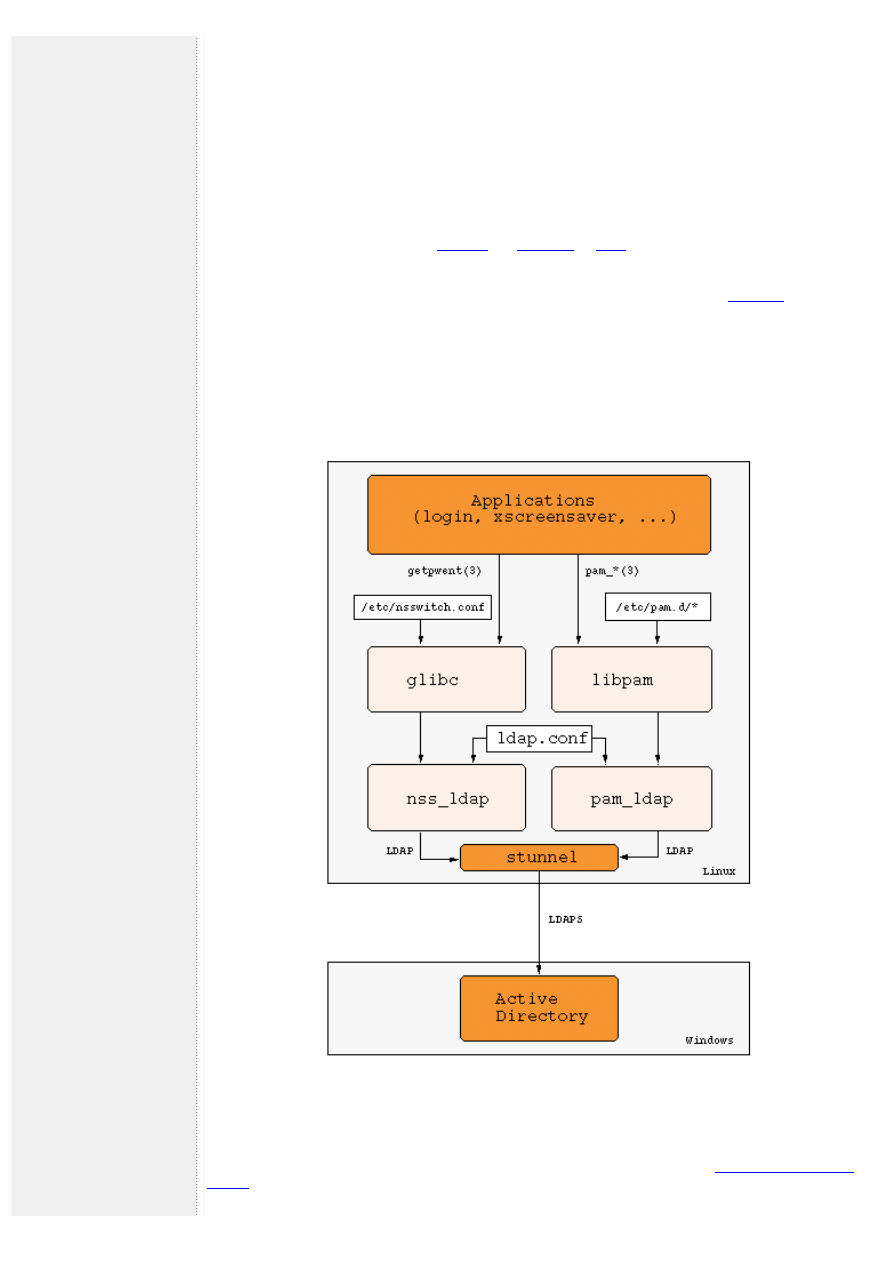
On the Linux side we'll use the libraries
to communicate via LDAP with the Active
Directory server and to serve as an interface to NSS and PAM. Both are contained in most major distributions.
There is an LDAP schema that contains the information from /etc/passwd and /etc/group:
Of course this schema is not supported by a default Active Directory server, in fact the Active Directory schema
collides with RFC 2307 in certain aspects, e.g. the attribute homeDirectory. Nonetheless it is possible to extend
the Active Directory schema in such a way that it is possible to enter the necessary information into Active
Directory and have it read correctly by nss_ldap.
Security is ensured by using SSL/TLS in the communication between Active Directory and pam_ldap/nss_ldap.
Figure 1. Single-Sign-On Architecture
Extending the Active Directory Schema
Step-by-step instructions for changing the Active Directory Schema can be found in the
.
http://www.oo-services.com/en/articles/sso.html (3 di 6)13/09/2004 3.37.47

O&O Services - Single-Sign-On on Linux using LDAP with Active Directory
It describes the steps necessary to change the Active Directory Schema analogous to those of Microsoft Services
for UNIX.
As soon as the changes are in place, you can fill in the additional attributes for users and groups using any LDAP
browser.
Maxime Batourine has created a
for Active Directory, which makes it possible to change user and group
data right in Active Directory Users and Computers.
For testing purposes you might use the LDAP utilities from the
Cofiguration of nss_ldap and pam_ldap
As mentioned before, many distributions contain the libraries nss_ldap and pam_ldap. Unfortunately, they are
sometimes not configured properly to work with Active Directory. It is necessary to configure nss_ldap with the
options --enable-rfc2307bis and --enable-schema-mapping.
Important: Systems that use bash as their /bin/sh may have problems while umounting or shutting down if NSS
lookups go over LDAP. This is because the shell script /etc/init.d/umountfs (may also be found under /etc/rc.d/init.
d/umountfs) which umounts all filesystems during shutdown is executed by bash which in turn calls getpwnam(3),
loading LDAP shared libraries. This can result in the filesystem where the LDAP shared libraries reside not being
able to umount because it is busy with the mmapped shared libraries.
A possible workaround is to change the shebang-path in /etc/init.d/rc and /etc/init.d/umountfs from /bin/sh to /
bin/ash (as well as all calls to sh in these scripts). Ash doesn't have the getpwnam(3) problem.
Both pam_ldap and nss_ldap work directly over SSL/TLS only if they are compiled with Netscape's LDAP SDK. If
you use a different LDAP library you can use SSL/TLS via
.
The configuration file for pam_ldap and nss_ldap is usually found in /etc/ldap.conf (both use the same
configuration file). Different distributions may place the configuration file at different locations such as /etc/
pam_ldap.conf or /etc/libnss_ldap.conf.
In order to level the incompatibilities between the Active Directory schema (Microsoft Services for UNIX, msSFU)
and RFC 2307, it is necessary to make a few changes to ldap.conf. Here's an example:
# Your LDAP server. Must be resolvable without using LDAP.
host 192.168.100.1
# The distinguished name of the search base.
base dc=oo-services,dc=com
# The LDAP version to use (defaults to 3
# if supported by client library)
ldap_version 3
# The distinguished name to bind to the server with.
# Optional: default is to bind anonymously.
binddn cn=Guest,cn=Users,dc=oo-services,dc=com
# The credentials to bind with.
# Optional: default is no credential.
bindpw secret
# The port.
port 389
# The search scope.
scope sub
nss_base_passwd CN=Users,DC=oo-services,DC=com
nss_base_shadow CN=Users,DC=oo-services,DC=com
nss_base_group CN=Group,DC=oo-services,DC=com
nss_map_objectclass posixAccount user
nss_map_attribute uid msSFUName
nss_map_attribute homeDirectory msSFUHomeDirectory
nss_map_objectclass posixGroup Group
nss_map_attribute cn msSFUName
nss_map_attribute userPassword msSFUPassword
nss_map_attribute uniqueMember member
pam_filter objectclass=user
pam_login_attribute sAMAccountName
pam_password ad
Configuring NSS
http://www.oo-services.com/en/articles/sso.html (4 di 6)13/09/2004 3.37.47

O&O Services - Single-Sign-On on Linux using LDAP with Active Directory
The configuration of NSS is done via /etc/nsswitch.conf. Changes in /etc/nsswitch.conf have immediate effect
making it easy to lock yourself out unintentionally, e.g. if the connection to the ADS does not work right away.
It is recommended you keep a root shell open while testing the setup so you can always fix a faulty configuration.
The configuration of NSS in /etc/nsswitch.conf consists of one line for each name service, first the name of the
service followed by the lookup methods in the order they are tried. For nss_ldap the following configuration might
be used:
passwd: files ldap
group: files ldap
shadow: files ldap
Local files (/etc/passwd and so forth) are tried first, followed by LDAP, i.e. Active Directory. This way local values
have higher precedence which might be useful for local root accounts etc.
Configuring PAM
PAM can be configured by two different means, either in a single file for all applications (/etc/pam.conf) or in a
separate directory /etc/pam.d with one file per application.
The pam_ldap distribution contains example files for most applications. For the login service the file /etc/pam.d/
login might look like this:
#%PAM-1.0
auth required /lib/security/pam_securetty.so
auth required /lib/security/pam_nologin.so
auth sufficient /lib/security/pam_ldap.so
auth required /lib/security/pam_warn.so
auth required /lib/security/pam_unix_auth.so try_first_pass
account sufficient /lib/security/pam_ldap.so
account required /lib/security/pam_warn.so
account required /lib/security/pam_unix_acct.so
password required /lib/security/pam_ldap.so
session required /lib/security/pam_unix_session.so
session required /lib/security/pam_mkhomedir.so skel=/etc/skel/ umask=0022
session optional /lib/security/pam_console.so
The module pam_mkhomedir.so makes sure that a home directory is created during the first login. This makes
sense if you don't want to create a home directory when you create a new user in Active Directory.
SSL via stunnel
In order to authenticate a user, pam_ldap carries out an LDAP-bind and transmits the password typed by the user
in cleartext. In order to keep attackers from abusing this with protocol sniffers, you should use SSL/TLS between
nss_ldap/pam_ldap and Active Directory.
A tool that comes in handy for this purpose is
, which provides a proxy (or tunnel) between unsecure and
secure connections.
Since the tunnel is running on the client side only, you don't need a certificate, only an unused port. If you have
an LDAP server on the client side as well, you might have to move to another port than 389, which makes it
necessary to patch ldap.conf accordingly.
If that isn't the case, simply start stunnel on the Linux machine as follows:
stunnel -c -d localhost:389 -r ads:636
where ads is the DNS name of the Windows 2000 server.
Conclusion
It is indeed possible to have an Active Directory server perform authentication and even host NSS data with users
on both sides not noticing the difference. You have to watch out for some quirks though, most of which I have
hopefully outlined in this article.
Resources
●
on how to set up Active Directory and Linux.
●
You might want to download the
to maintain UNIX-specific attributes in AD from
CSS Solutions.
http://www.oo-services.com/en/articles/sso.html (5 di 6)13/09/2004 3.37.47

O&O Services - Single-Sign-On on Linux using LDAP with Active Directory
●
The
focuses on Directory Service management tools and system integration.
●
The
has an excellent section on authentication against LDAP.
●
are the authors of the excellent pam_ldap and nss_ldap libraries.
About the Author
Michael Ganss is Managing Director of O&O Services, based in Berlin, Germany, where he has worked on
numerous projects ranging from 3D weather visualization systems to BER-codec development for the
telecommunications industry.
.
© 2002-2004 O&O Software GmbH - a member of the
http://www.oo-services.com/en/articles/sso.html (6 di 6)13/09/2004 3.37.47
Document Outline
Wyszukiwarka
Podobne podstrony:
Exploiting large memory management vulnerabilities in Xorg server running on Linux
Amazon FBA How to Easily Make Extra Money Selling on Amazon Using Fulfillment by Amazon (Amazon FBA
The Service You Get On The Tube
What To Focus On Before You Spend a Single dime On Advertising From Howard Jacobsons Leads Into Gold
Ava March Gambling On Love 1 All In with the Duke
Conflicting Perspectives On Shamans And Shamanism S Krippner [Am Psychologist 2002]
On the triangle test with replications
The use of electron beam lithographic graft polymerization on thermoresponsive polymers for regulati
Neumann W D Notes on geometry and 3 manifolds, with appendices by P Norbury (web draft, 2004)(54s)
A ZVS PWM Inverter With Active Voltage Clamping Using the Reverse Recovery Energy of the Diodes
IBM Using Ajax with PHP and Sajax (2005)
Using Log4j with JBoss by Scott Stark
dynamic linux kernel instrumentation with systemtap cohen 2006 04 28
Adobe Using WebObjects with Adobe GoLive 5 0
Linux Installing Oracle Database 10g on Novell SUSE Linux
2001 12 Red Hat 7 2 on Test in the Linux Labs
Effective antibacterial adhesive coating on cotton fabric using ZnO
Barron Using the standard on objective measures for concert auditoria, ISO 3382, to give reliable r
więcej podobnych podstron