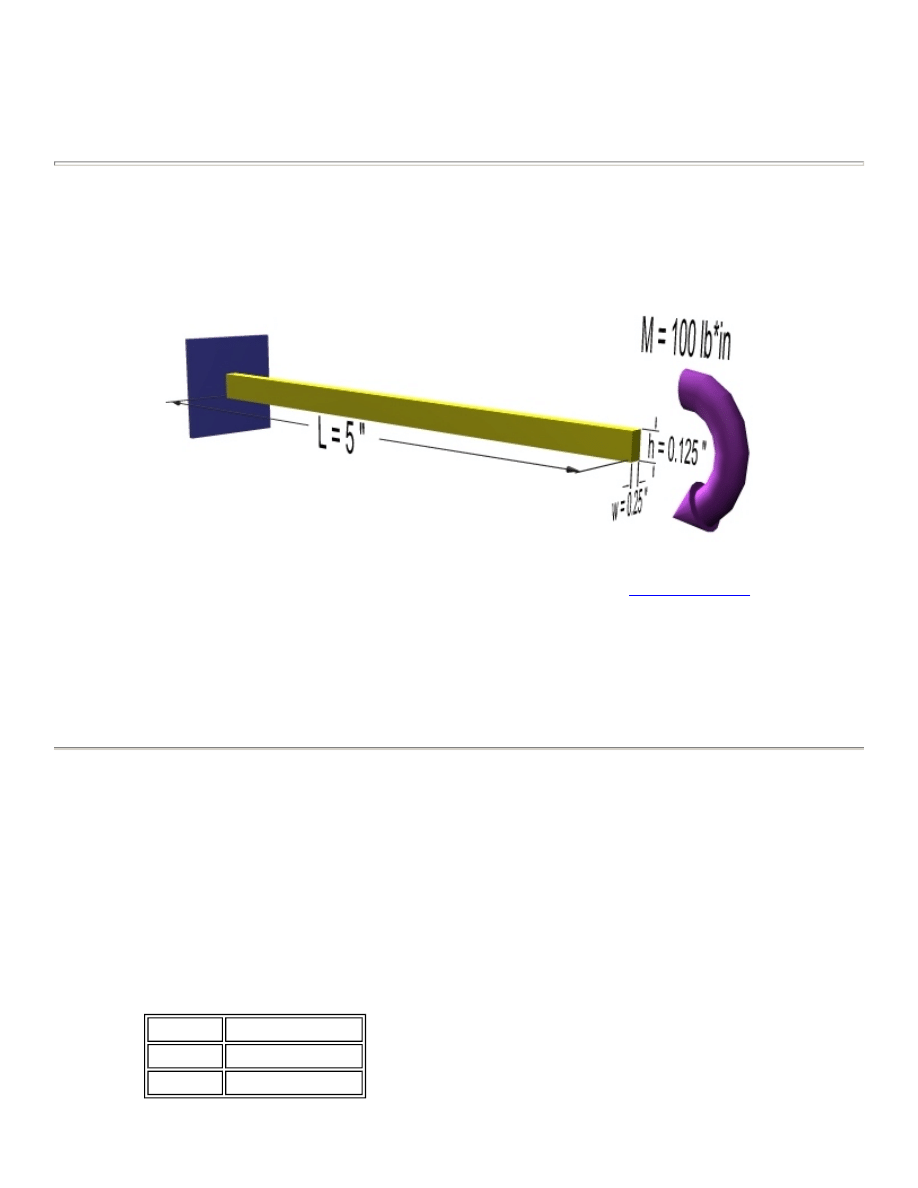
NonLinear Analysis of a Cantilever Beam
Introduction
This tutorial was created using ANSYS 7.0 The purpose of this tutorial is to outline the steps required to do a
simple nonlinear analysis of the beam shown below.
There are several causes for nonlinear behaviour such as Changing Status (ex.
contact elements
), Material
Nonlinearities and Geometric Nonlinearities (change in response due to large deformations). This tutorial will
deal specifically with Geometric Nonlinearities .
To solve this problem, the load will added incrementally. After each increment, the stiffness matrix will be
adjusted before increasing the load.
The solution will be compared to the equivalent solution using a linear response.
Preprocessing: Defining the Problem
1. Give example a Title
Utility Menu > File > Change Title ...
2. Create Keypoints
Preprocessor > Modeling > Create > Keypoints > In Active CS
We are going to define 2 keypoints (the beam vertices) for this structure to create a beam with a
length of 5 inches:
Keypoint Coordinates (x,y)
1
(0,0)
2
(5,0)
University of Alberta ANSYS Tutorials - www.mece.ualberta.ca/tutorials/ansys/IT/NonLinear/NonLinear.ht...
Copyright © 2001 University of Alberta

3. Define Lines
Preprocessor > Modeling > Create > Lines > Lines > Straight Line
Create a line between Keypoint 1 and Keypoint 2.
4. Define Element Types
Preprocessor > Element Type > Add/Edit/Delete...
For this problem we will use the BEAM3 (Beam 2D elastic) element. This element has 3 degrees of
freedom (translation along the X and Y axis's, and rotation about the Z axis). With only 3 degrees
of freedom, the BEAM3 element can only be used in 2D analysis.
5. Define Real Constants
Preprocessor > Real Constants... > Add...
In the 'Real Constants for BEAM3' window, enter the following geometric properties:
i. Cross-sectional area AREA: 0.03125
ii. Area Moment of Inertia IZZ: 4.069e-5
iii. Total beam height HEIGHT: 0.125
This defines an element with a solid rectangular cross section 0.25 x 0.125 inches.
6. Define Element Material Properties
Preprocessor > Material Props > Material Models > Structural > Linear > Elastic > Isotropic
In the window that appears, enter the following geometric properties for steel:
i. Young's modulus EX: 30e6
ii. Poisson's Ratio PRXY: 0.3
If you are wondering why a 'Linear' model was chosen when this is a non-linear example, it is
because this example is for non-linear geometry, not non-linear material properties. If we were
considering a block of wood, for example, we would have to consider non-linear material
properties.
7. Define Mesh Size
Preprocessor > Meshing > Size Cntrls > ManualSize > Lines > All Lines...
For this example we will specify an element edge length of 0.1 " (50 element divisions along the
line).
8. Mesh the frame
Preprocessor > Meshing > Mesh > Lines > click 'Pick All'
LMESH,ALL
Solution: Assigning Loads and Solving
1. Define Analysis Type
University of Alberta ANSYS Tutorials - www.mece.ualberta.ca/tutorials/ansys/IT/NonLinear/NonLinear.ht...
Copyright © 2001 University of Alberta
Solution > New Analysis > Static
ANTYPE,0
2. Set Solution Controls
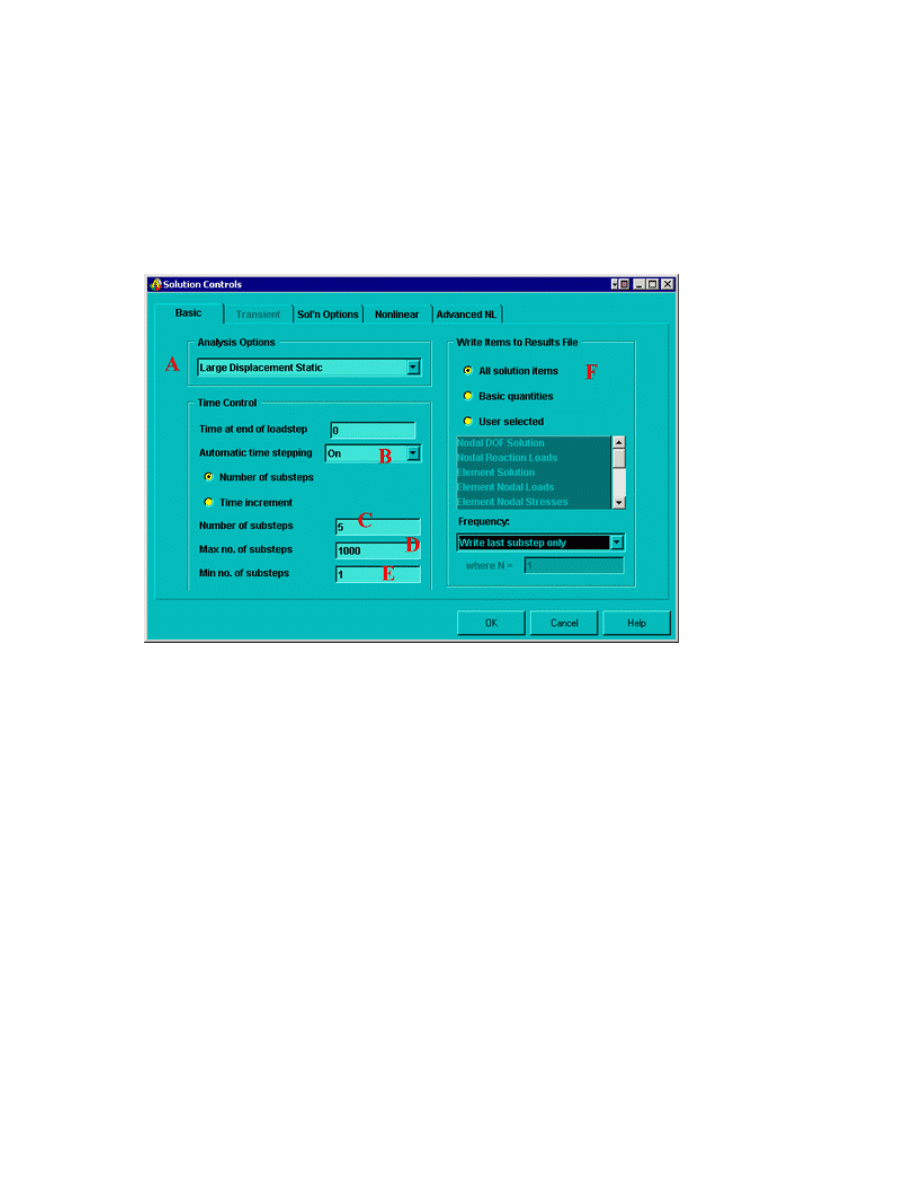
{
Select Solution > Analysis Type > Sol'n Control...
The following image will appear:
Ensure the following selections are made (as shown above)
A. Ensure Large Static Displacements are permitted (this will include the effects of large
deflection in the results)
B. Ensure Automatic time stepping is on. Automatic time stepping allows ANSYS to determine
appropriate sizes to break the load steps into. Decreasing the step size usually ensures better
accuracy, however, this takes time. The Automatic Time Step feature will determine an
appropriate balance. This feature also activates the ANSYS bisection feature which will
allow recovery if convergence fails.
C. Enter 5 as the number of substeps. This will set the initial substep to 1/5
th
of the total load.
The following example explains this: Assume that the applied load is 100 lb*in. If the
Automatic Time Stepping was off, there would be 5 load steps (each increasing by 1/5
th
of
the total load):
20 lb*in
40 lb*in
60 lb*in
80 lb*in
University of Alberta ANSYS Tutorials - www.mece.ualberta.ca/tutorials/ansys/IT/NonLinear/NonLinear.ht...
Copyright © 2001 University of Alberta

100 lb*in
Now, with the Automatic Time Stepping is on, the first step size will still be 20 lb*in.
However, the remaining substeps will be determined based on the response of the material
due to the previous load increment.
D. Enter a maximum number of substeps of 1000. This stops the program if the solution does
not converge after 1000 steps.
E. Enter a minimum number of substeps of 1.
F. Ensure all solution items are writen to a results file.
NOTE
There are several options which have not been changed from their default values. For more
information about these commands, type
help
followed by the command into the command line.
3. Apply Constraints
Solution > Define Loads > Apply > Structural > Displacement > On Keypoints
Fix Keypoint 1 (ie all DOFs constrained).
4. Apply Loads
Function
Command Comments
Load Step
KBC
Loads are either linearly interpolated (ramped) from the one
substep to another (ie - the load will increase from 10 lbs to 20 lbs
in a linear fashion) or they are step functions (ie. the load steps
directly from 10 lbs to 20 lbs). By default, the load is ramped. You
may wish to use the stepped loading for rate-dependent behaviour
or transient load steps.
Output
OUTRES This command controls the solution data written to the database.
By default, all of the solution items are written at the end of each
load step. You may select only a specific iten (ie Nodal DOF
solution) to decrease processing time.
Stress
Stiffness
SSTIF
This command activates stress stiffness effects in nonlinear
analyses. When large static deformations are permitted (as they are
in this case), stress stiffening is automatically included. For some
special nonlinear cases, this can cause divergence because some
elements do not provide a complete consistent tangent.
Newton
Raphson
NROPT
By default, the program will automatically choose the Newton-
Raphson options. Options include the full Newton-Raphson, the
modified Newton-Raphson, the previously computed matrix, and
the full Newton-Raphson with unsymmetric matrices of elements.
Convergence
Values
CNVTOL By default, the program checks the out-of-balance load for any
active DOF.
University of Alberta ANSYS Tutorials - www.mece.ualberta.ca/tutorials/ansys/IT/NonLinear/NonLinear.ht...
Copyright © 2001 University of Alberta
Solution > Define Loads > Apply > Structural > Force/Moment > On Keypoints
Place a -100 lb*in moment in the MZ direction at the right end of the beam (Keypoint 2)
5. Solve the System
Solution > Solve > Current LS
SOLVE
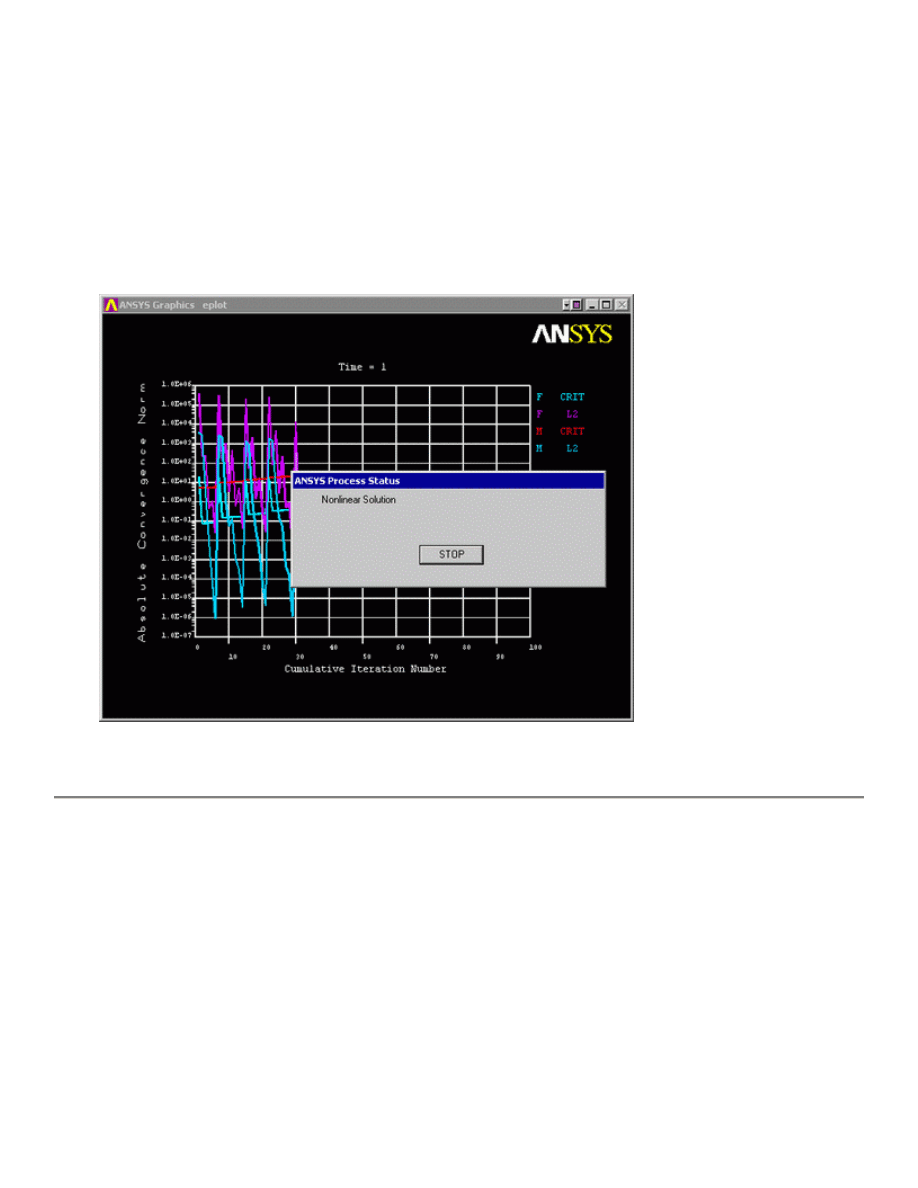
The following will appear on your screan for NonLinear Analyses
This shows the convergence of the solution.
General Postprocessing: Viewing the Results
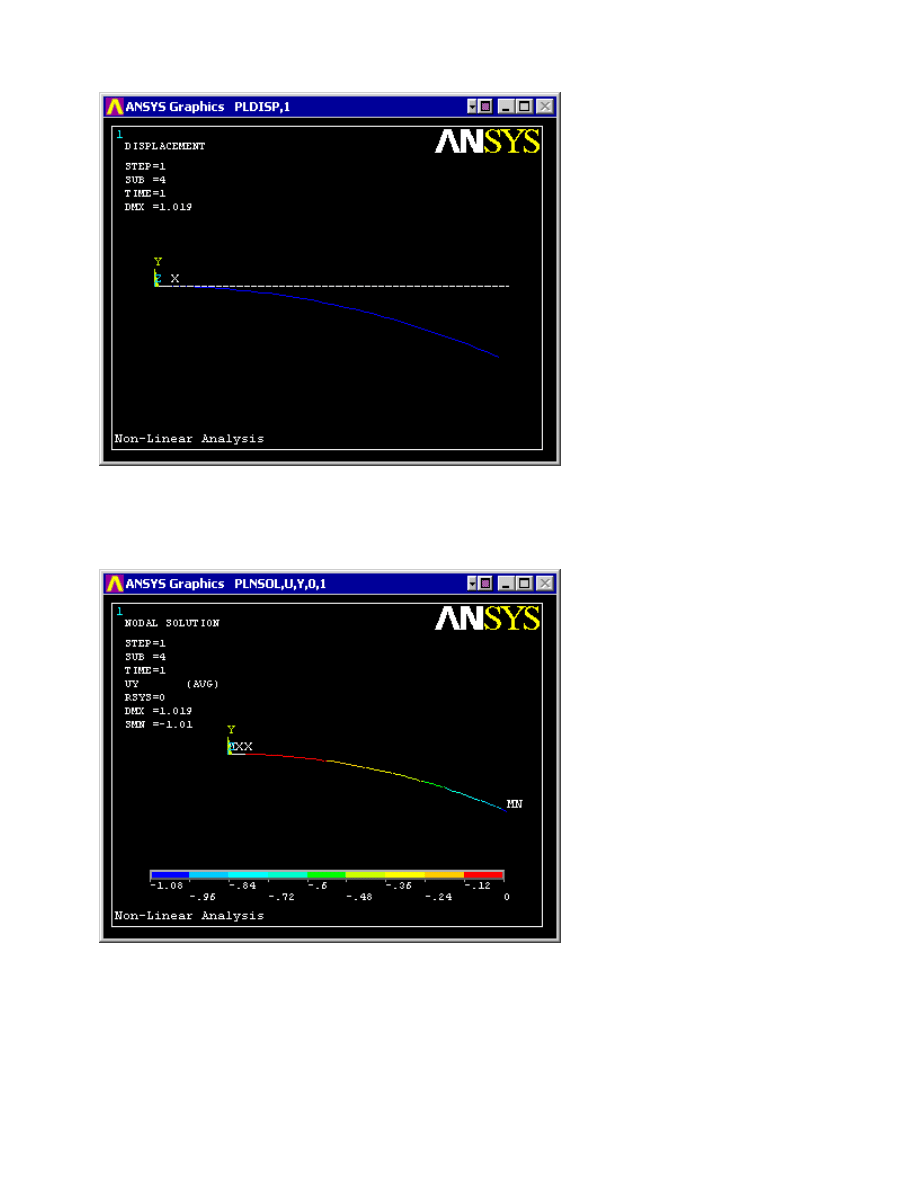
1. View the deformed shape
General Postproc > Plot Results > Deformed Shape... > Def + undeformed
PLDISP,1
University of Alberta ANSYS Tutorials - www.mece.ualberta.ca/tutorials/ansys/IT/NonLinear/NonLinear.ht...
Copyright © 2001 University of Alberta
2. View the deflection contour plot
General Postproc > Plot Results > Contour Plot > Nodal Solu... > DOF solution, UY
PLNSOL,U,Y,0,1
3. List Horizontal Displacement
If this example is performed as a linear model there will be no nodal deflection in the horizontal
direction due to the small deflections assumptions. However, this is not realistic for large
deflections. Modeling the system non-linearly, these horizontal deflections are calculated by
ANSYS.
General Postproc > List Results > Nodal Solution...> DOF solution, UX
University of Alberta ANSYS Tutorials - www.mece.ualberta.ca/tutorials/ansys/IT/NonLinear/NonLinear.ht...
Copyright © 2001 University of Alberta

Other results can be obtained as shown in previous linear static analyses.
Command File Mode of Solution
The above example was solved using a mixture of the Graphical User Interface (or GUI) and the
command language interface of ANSYS. This problem has also been solved using the
ANSYS command
language interface
that you may want to browse. Open the file and save it to your computer. Now go to
'File > Read input from...' and select the file.
University of Alberta ANSYS Tutorials - www.mece.ualberta.ca/tutorials/ansys/IT/NonLinear/NonLinear.ht...
Copyright © 2001 University of Alberta
Wyszukiwarka
Podobne podstrony:
7 Modal Analysis of a Cantilever Beam
8 Harmonic Analysis of a Cantilever Beam
9 Transient Analysis of a Cantilever Beam
Butterworth Finite element analysis of Structural Steelwork Beam to Column Bolted Connections (2)
1 Effect of Self Weight on a Cantilever Beam
Analysis of Reinforced Concrete Structures Using ANSYS Nonlinear Concrete Model
Butterworth Finite element analysis of Structural Steelwork Beam to Column Bolted Connections (2)
Analysis of the Vibrations of an Elastic Beam
An%20Analysis%20of%20the%20Data%20Obtained%20from%20Ventilat
A Contrastive Analysis of Engli Nieznany (3)
Analysis of soil fertility and its anomalies using an objective model
Pancharatnam A Study on the Computer Aided Acoustic Analysis of an Auditorium (CATT)
więcej podobnych podstron